Prop Sizing Trade Copier EA

💭 DOES THIS SOUND FAMILIAR?

  • Do you find the lot calculation slow and boring?
  • Does it get worse with every new currency pair?
  • Are you afraid of hitting a loss limit and losing the account?
  • Does every lost account hurt more than the last one?

I was caught in this loop myself. I built this tool for my own use.

📌 WHAT THIS IS

This is an Expert Advisor.

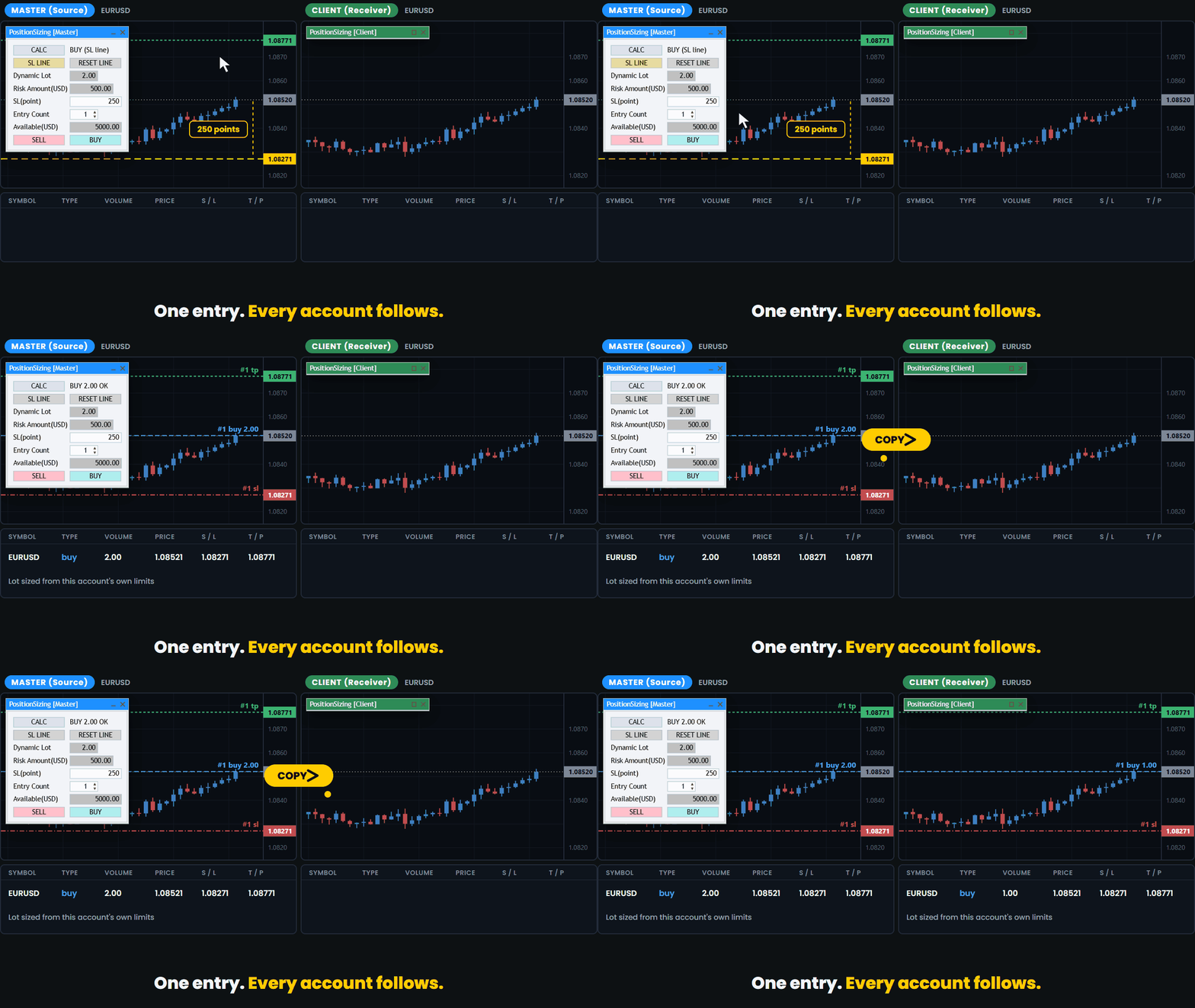
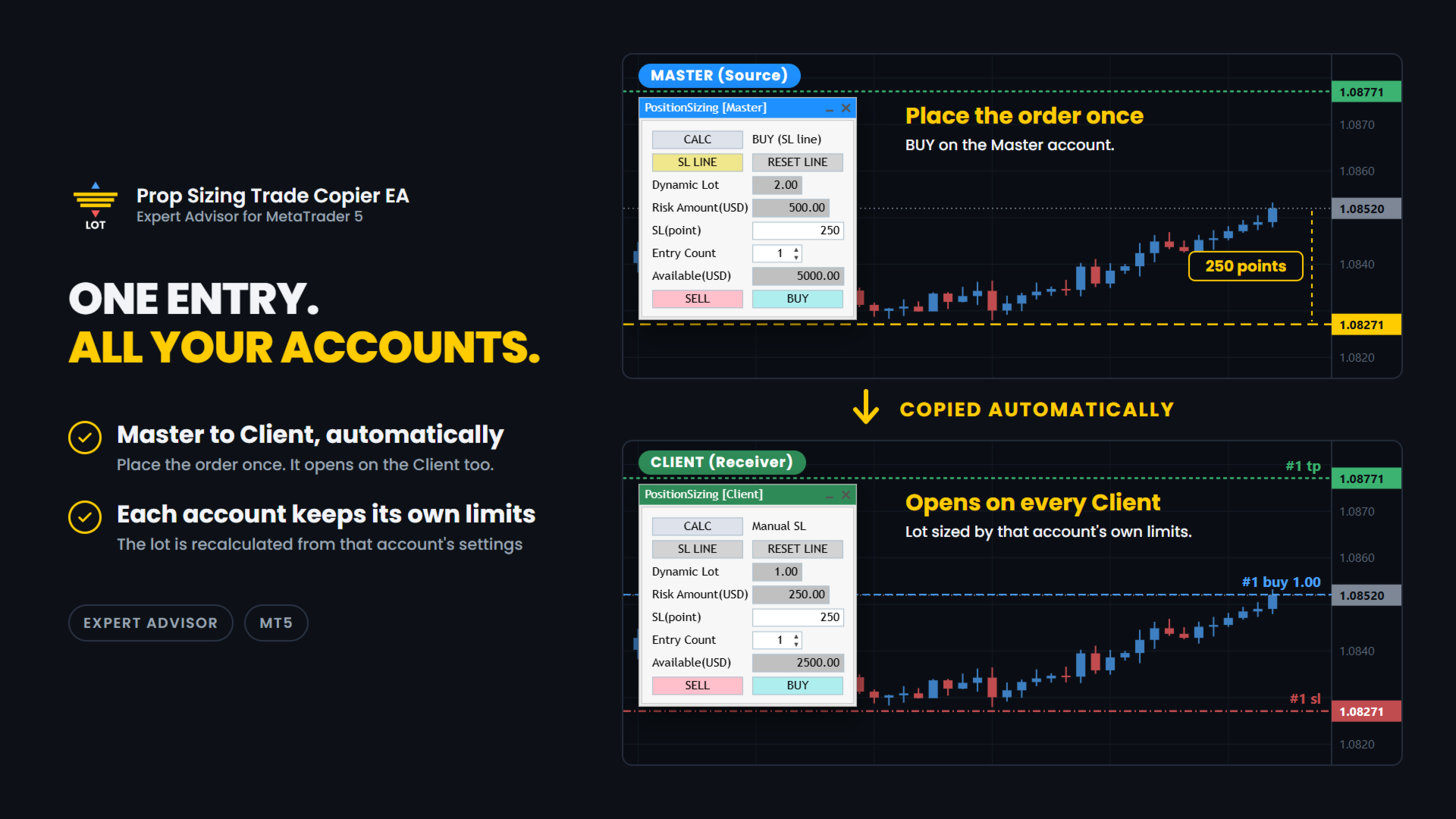
It lets you run several prop firm accounts from one PC. You enter on your main account and the trade is copied to the other accounts.
Each account calculates its own lot from its own balance and its own loss limits.

✅ WHAT IT DOES

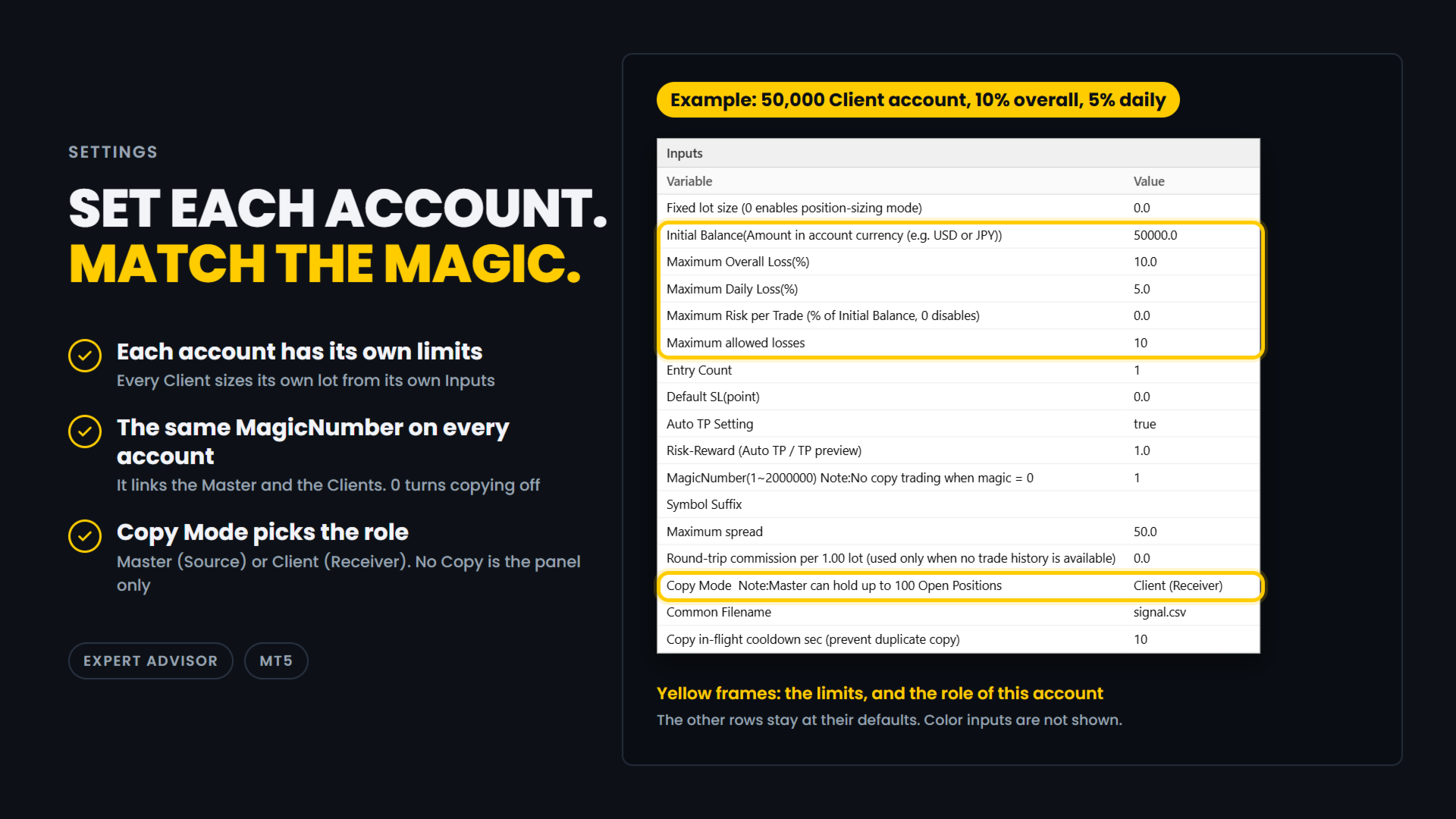
Pick the role and match the magic number. That is the setup.

Copy:

  • Master and Client roles. One terminal is the Master, which is the source.
    The others are Clients, which receive.
    The title bar is colour coded so you can see the role at a glance: blue for Master, green for Client.
  • Copying happens between MT5 terminals on the same PC, through a shared file.
    This is not an internet signal service and nothing is sent outside your computer.
  • If a Master and a Client are set up inside the same MT5 terminal by mistake, the one that started later is disabled automatically and a warning is shown.
  • The Master can hold up to 100 positions.
  • A cooldown stops the same position from being copied twice while the first copy is still waiting to be confirmed.
    The default is 10 seconds and you can change it.
  • Each Client sizes its own lot.
    A 50,000 account and a 10,000 account do not take the same lot for the same trade.

Trade panel (included):

  • Drag the stop-loss line and the lot size updates at once.
  • BUY and SELL buttons send the order with the calculated lot.
    The stop loss is the price of the line.
  • Direction is read from the line. Below the price is BUY. Above the price is SELL.
  • Auto TP. The TP is set from your Risk-Reward setting, and the TP preview line follows the stop-loss line.
    You can turn it off with the Auto TP Setting input.
  • The risk is shown in your account currency, not only in percent.
  • Available shows how much of your allowed loss is still left, in your account currency.
  • Round-trip commission is measured from your own trade history.
    It is shown for reference and is not included in the risk amount.
  • Entry Count from 1 to 10 for split entries. Lot and risk are shown for one entry.
    An "x2", "x3" ... mark appears next to the risk.
  • Fixed lot mode when you do not want the calculation.
  • Entry Count and the stop-loss line are stored per chart.
  • The panel can be collapsed to its title bar.
  • I use it live on FX majors and crosses.
    It has also been checked on gold (XAUUSD), BTCUSD and indices such as US30. Brokers set symbols differently, so check with a small lot first.

Order safety:

  • If the button you pressed and the line do not agree, no order is sent.
  • If the line is inside the spread, no order is sent.
  • The spread is checked again when you press the button.
    If it is wider than your Maximum spread setting, the order is cancelled.
  • If the stop-loss distance is zero or less, no order is sent.
  • If the calculated lot is zero, no order is sent.
    This also happens when no lot fits inside the risk you allowed.
  • A double-click on the button does not send two orders.
  • If the currency conversion for your account is not available, the tool stops.
    It does not send a guessed lot.
  • After the order is filled, the preview lines are removed.

🧪 HOW THE LOT IS CALCULATED

The tool works in four steps. Every account does this for itself.

1. Available. How much you can still lose.
It comes from your Initial Balance, Maximum Overall Loss (%) and Maximum Daily Loss (%).
The limit you would hit first is used.

2. Divide by Maximum allowed losses. This is how many losing trades in a row you want to survive.

3. Cap the risk. Maximum Risk per Trade (%) of your Initial Balance is the most one trade can risk, so the risk stays the same from trade to trade.
Set it to 0 to turn the cap off.

4. Work back from the stop. The distance to your stop-loss line is turned into a lot size for the current symbol.

You enter the limits your firm gives you. The tool does the rest.

🔧 SETTINGS

Example: a 50,000 Client account with a 10% overall loss limit and a 5% daily loss limit.

  • Fixed lot size: 0.0
    0 means each account calculates its own lot.
    Enter a lot size only if you want a fixed lot, copied orders included.
  • Initial Balance: 50000.0
    The starting balance of this account, in its currency.
    Every account has its own settings. Set 0 to use the current balance instead.
  • Maximum Overall Loss(%): 10.0
    The overall loss limit, in percent of Initial Balance.
  • Maximum Daily Loss(%): 5.0
    The daily loss limit, in percent.
    It is measured from the balance at the start of the day.
  • Maximum Risk per Trade: 0.0
    A cap on the risk of one entry, in percent of Initial Balance.
    0 turns the cap off.
    If your firm limits the risk of a single trade, entering about half of its limit leaves a margin.
  • Maximum allowed losses: 10
    How many losing trades in a row you want to survive.
  • Entry Count: 1
    How many orders one press of BUY or SELL sends on this account, from 1 to 10. Each order has the calculated lot.
    It is not part of the lot calculation.
    With Maximum allowed losses 10 and Entry Count 2, the number of losing trades you survive is 5 (10 / 2).
  • Default SL(point): 0.0
    The starting distance of the stop-loss line, in points.
    0 places the line at half the range of the last 20 bars.
  • Auto TP Setting: true
    true sets a TP on every order, copied orders included. false sends orders without a TP.
  • Risk-Reward: 1.0
    The TP distance as a multiple of the stop-loss distance.
    1.0 puts the TP as far from the entry as the stop loss.
  • MagicNumber(1~2000000): 1
    The link between the Master and the Clients. Use the same number on all of them.
    0 turns copying off.
  • Symbol Suffix: empty
    The ending your broker adds to symbol names, such as .m.
    Enter the one of the account this EA runs on, and leave it empty if there is none.
    It lets EURUSD on one broker match EURUSD.m on another.
    It is also used to find the currency pair that converts the risk into your account currency.
  • Maximum spread: 50.0
    The spread limit, in points (50.0 is 5 pips on a 5-digit symbol).
    If the spread is wider when an order is about to be sent, a copied order included, the order is cancelled.
    0 means no limit: the spread is not checked.
  • Round-trip commission per 1.00 lot: 0.0
    Used only when there is no trade history to measure from.
    It is shown for reference and is not included in the risk amount.
  • Copy Mode: Client (Receiver)
    No Copy is the panel only.
    Master (Source) copies the trades you enter on this account.
    Client (Receiver) copies the Master's trades.
    The title bar is blue for Master and green for Client.
  • Common Filename: signal.csv
    Leave it as it is.
    The Master and the Clients share this file through the MetaTrader Common folder, so use the same name on all of them.
  • Copy in-flight cooldown sec: 10
    After a Client sends a copy order, it waits this many seconds before it copies the same position again.
    This stops double copies.

In this example, on a day that starts with a balance of 50,000, Available is 2500.00, because the 5% daily limit is reached before the 10% overall limit.
The Client sizes its own lot from the risk of one entry, which is 250.00 (2500.00 / 10).

⚠️ IMPORTANT

  • When DefaultSL is 0, which is the default, the first stop-loss line is placed below the current price, at half the range of the last 20 bars of the timeframe you are on.
    Because the distance comes from the range, it may be an odd number such as 119 pips, and it changes when you switch timeframe.
    This is intended.
    Set DefaultSL to a fixed value if you want the same starting distance every time.
  • This EA and Prop Sizing Lot Size Calculator cannot run on the same chart.
    If the indicator is attached to the same chart, this EA will notify you and remove it.
    The stop-loss line position is not carried over. This is by design.
  • The older free Prop Sizing EA does not have this detection.
    Do not run it on the same chart as Prop Sizing Lot Size Calculator.

📋 ABOUT PROP FIRM RULES

Prop firms have different rules about third-party tools.
Some do not allow Expert Advisors that you did not write yourself.
Some also restrict third-party indicators, even ones that only calculate the lot size.
Some firms also limit copying between your own accounts. Rules can change.
Check the rules of your own firm before you use this product.
Whether to use it is your decision.

🎯 ONE THING ONLY

This tool does one thing. You enter on one account, the others follow, and each of them sizes its own lot.

🔗 ALSO AVAILABLE

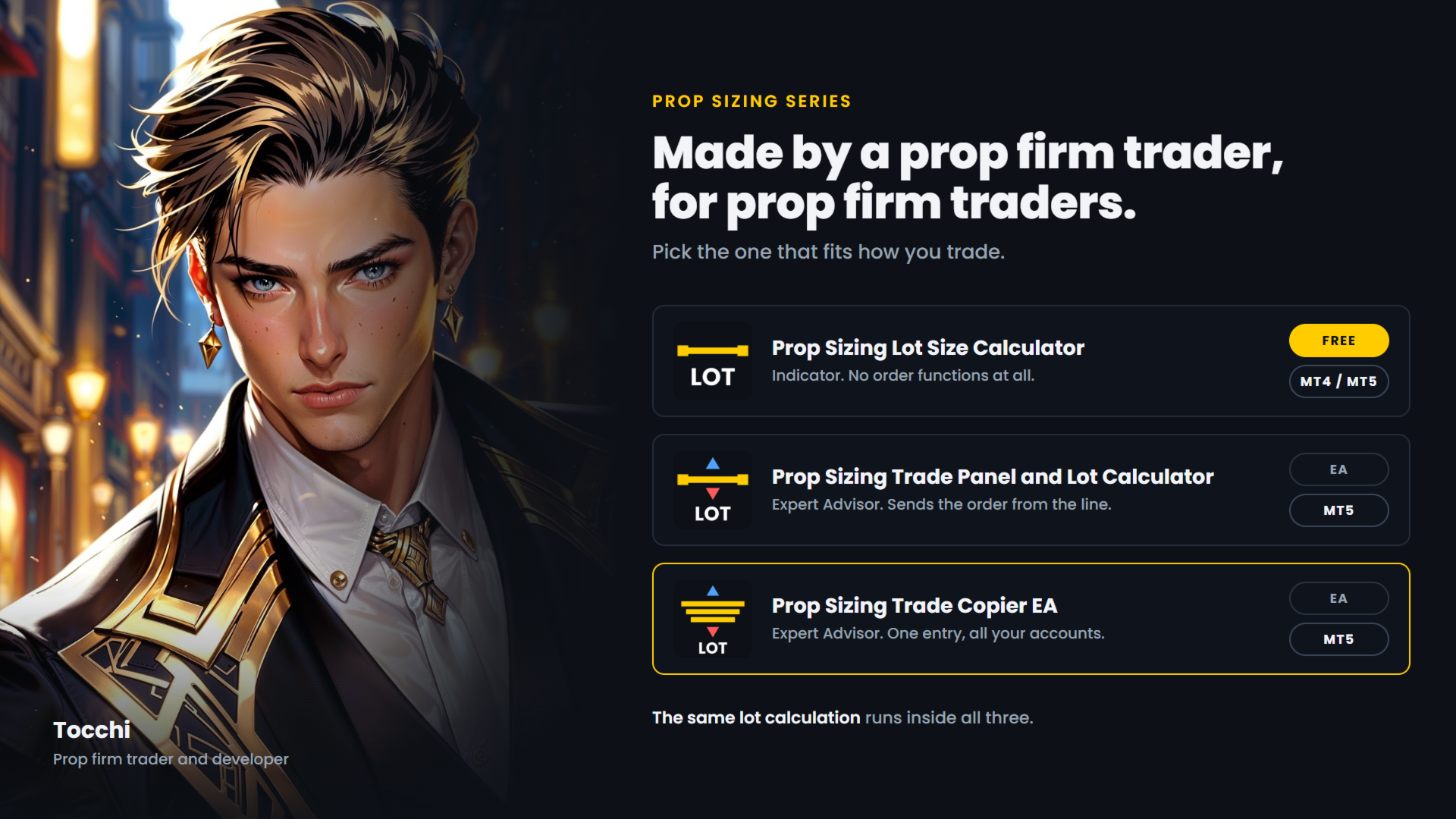
  • Prop Sizing Lot Size Calculator - free.
    Calculation and stop-loss line only, no order functions. MetaTrader 5.
  • Prop Sizing Lot Size Calculator MT4 - the same indicator for MetaTrader 4. Free.
  • Prop Sizing Trade Panel and Lot Calculator - the trade panel without the copy function.
    MetaTrader 5.
Рекомендуем также
Follow a master account from another terminal on the same computer. CopyTrade Local Receiver is the follower side of a trade copier. Paste the Receiver code shown on CopyTrade Local Sender (CT-XXXX-XXXX) into its inputs, and this account opens, modifies and closes the same trades as the master. The data is exchanged through the common data folder of MetaTrader on the same computer. Nothing is sent over the internet. The master may be MT4 or MT5 and may be with a different broker. What is copied
LT Trade Copy MT5 — Профессиональный копировщик сделок LT Trade Copy MT5   — это высокопроизводительная утилита, разработанная для трейдеров, которым необходимо копировать сделки между терминалами MetaTrader 5 (и MetaTrader 4) на одном компьютере или в локальной сети с минимальной задержкой и абсолютной точностью. Независимо от того, являетесь ли вы управляющим счетами, поставщиком сигналов или трейдером, работающим с несколькими брокерами одновременно, этот инструмент обеспечит вам полный контр
Локальный копировщик сделок для MetaTrader 5. Он копирует позиции между терминалами MT5 на одном ПК с Windows или VPS и рассчитывает объём каждой копии по спецификациям контрактов обоих брокеров (размер контракта, стоимость тика, валюта счёта), так что копия несёт ту же экспозицию, даже если у двух брокеров лот определён по-разному. Он никогда не открывает вторую копию одной и той же позиции мастера. Что он делает Один и тот же EA прикрепляется к одному графику в каждом терминале: В терминале ма
Trade Copier Simple Guide Trade Copier is an Expert Advisor (EA) for MetaTrader 5 (MT5) that lets you automatically copy trades from one account (the "Master") to another (the "Receiver"). It's designed for users who want to duplicate trading strategies across multiple accounts on the  same computer . No internet or external servers are needed—it uses a shared file on your machine to transfer trade info securely and quickly. How It Works Master Mode : Attach the EA to a chart on your main tradin
Signalator Local Trade Copier MT5 — быстрый локальный копировщик сделок для MetaTrader 5/4, предназначенный для работы с терминалами Master и Receiver на одном компьютере или VPS.  Поддерживает кроссплатформенное копирование между терминалами MT4, MT5 и cTrader в любом направлении: MT4 ↔ MT5 ↔ cTrader и все остальные комбинации. Копируйте сделки локально, без внешнего облачного сервера-посредника. Master публикует торговую активность в локальный bridge-канал, а каждый Receiver сам определяет, чт
Fast copier for sending trades to multiple MT4 / MT5 accounts. MT5 Trade Copier Master EA sends trades instantly from your master account to one or multiple slave accounts. Supports copying to: • MT5 accounts • MT4 accounts Perfect for: • Multi-account traders • Signal providers • Account managers • Personal account mirroring Main Features • Fast local trade copying • Low latency execution • Multiple slave accounts support • Copy open positions on startup • Stable file-based communication • Easy
OB FVG Trade Copier: Unified Master & Slave EA Version: 2.00 Type: Trade Copier / Risk Management Utility Compatibility: MetaTrader 4 & MetaTrader 5 (Cross-compatible codebase) Overview The OB FVG Trade Copier is a professional-grade, unified trade copying system designed to mirror trades between Master and Slave accounts seamlessly. Built with a unified architecture, a single EA file serves as both the sender (Master) and receiver (Slave) simply by toggling the EA Mode in the settings. It uti
FREE
Nasdaq Reversion A lightweight long-side mean-reversion Expert Advisor for the Nasdaq 100 index (NQ / USATECHIDXUSD) on H1. No martingale. No grid. No hedging. One position at a time. A hard stop on every trade. It waits for the index to get oversold within its trend, then takes one clean long with a fixed stop. No averaging into losers, no recovery games. How it works Oversold trigger: an RSI-based entry when the Nasdaq dips into oversold territory. Trend filter: an EMA filter keeps entries ali
FREE
Professional Trade Panel — All-in-One Smart Trading Tool This is a professional visual trading panel designed for the MetaTrader platform. It consolidates the most frequently used trading operations into a single compact and draggable interface, significantly improving execution efficiency and reducing the risk of misoperations. Core Features One-Click Close All: Close all open positions on the current symbol with a single click. The button displays real-time total floating profit and loss s
OTE Trade Copier MT5
Olaoluwa Oluwaseun Bamitale
OTE Trade Copier MT5 Trade Copier & Prop Firm Risk Manager Copy trades locally between MT5 terminals and across MT4/MT5 platforms on the same PC or VPS while protecting your funded accounts with advanced risk controls. IMPORTANT: Send me a message for the Complete User Manual Before Installation Why Traders Choose OTE Trade Copier MT5 Supports MT5 to MT5 trade copying Supports MT4 to MT5 and MT5 to MT4 when used with the MT4 version Designed for prop firm and funded account traders Daily drawd
EA Local Trade Copier Pro MT5: The Ultimate DLL-Free Trade Duplicator Устали от сложных копировщиков сделок, которые требуют небезопасных внешних DLL, приводят к сбоям вашего терминала или запутывают вас отдельными файлами "Master" и "Client"? Испытайте новое поколение копирования сделок с EA Local Trade Copier Pro MT5. Разработанная для максимальной стабильности, молниеносного исполнения и исключительной простоты, эта утилита позволяет беспрепятственно копировать сделки между несколькими термин
SonicTradeCopier: (Best for scalping) Easy Fast Reliable trade copier. Copy trades from one terminal to an other (internet copy feature coming soon.) MT4 to MT4. MT4 to MT5. MT5 to MT5. MT5 to MT4. MT4/MT5 to any other platform copy possibility for custom made solutions. Reverse trading. Advance filters for traders. Features: (Setting up copying policies) Sender only has to setup  signal name and start sending signals [ You must start signal sender first always ]. Receiver sets up  signal nam
News Risk Guard protects the positions you already hold when a scheduled economic release is about to hit. It is a risk tool. It does not predict direction, it does not look for entries of its own, and it makes no claim about profit. The calendar is built into the product: 4,101 releases covering 15 recurring events. No internet permission, no DLL, no file to install, and it behaves the same in the Strategy Tester as it does on a live chart. WHAT IT DOES 1. Event protection window    A confi
Утилита для копирования сделок с одного MT5-счёта или MT4-счёта на другой MT5-счёт. Демо-версию можно скачать здесь . Можно копировать позиции между Netting и Hedging счетами в любых комбинациях. Можно устанавливать фильтры по названию инструмента и магическим номерам позиций, которые будут копироваться. Пока что источник посылает информацию только о рыночных позициях. Отложенные ордера обрабатываются в момент превращения их в открытые рыночные позиции. На одном терминале советник запускается в
Local Trade Copier копирует позиции и ордера из одного терминала MetaTrader 5 (мастер) в один или несколько терминалов MetaTrader 5 (получатели) на том же компьютере. Работает локально, данные через интернет не передаются. Возможности - Один мастер и несколько получателей, разделение по имени канала. - Режимы объёма: множитель, фиксированный лот, отношение балансов, отношение эквити или по риску (нужен стоп-лосс). - Сопоставление символов разных брокеров (InpSymbolMap, префикс и суффикс); неодн
Копировщик сделок с MetaTrader 5 на MetaTrader 5 ( есть версия MetaTrader 4<->MetaTrader 4 , при наличии двух версий - сможете копировать MetaTrader 5<->MetaTrader 4, MetaTrader 4<->MetaTrader 5, MetaTrader 5<->MetaTrader 5, MetaTrader 4<->MetaTrader 4). Есть демо-версия (ограничение по коэффициентам и лотам) Работает только в режиме хеджинга Фильтр спреда. Выбор лучшей цены (начинать копировать с плюсовой или минусовой позиции). Настройка лота, фиксированный или коэффициент (можно копировать с
Trade Dispensary Connect — это утилита для советника MT5, предназначенная для отправки сделок в формате JSON в копировщик сделок Trade Dispensary через веб-хук. Если Trade Dispensary запущен на вашем локальном компьютере, просто используйте http://127.0.0.1 :5000/webhook/mt5/[ACCOUNT_ID] в качестве URL-адреса веб-хука. Если Trade Dispensary запущен на другом компьютере, получите адрес/домен этого компьютера. Для этого сценария рекомендуется использовать сервис туннелирования, такой как Pinggy и
FREE
Trading Motivation Display MT5
AL MOOSAWI ABDULLAH JAFFER BAQER
• Please test the product in the Strategy Tester before purchasing to understand how it works. • If you face any issues, contact me via private message—I’m always available to help. • After purchase, send me a screenshot of your order to receive a   FREE EA   as a gift. Trading Motivation Display – Stay Inspired, Stay Profitable! Trading is a game of patience, discipline, and resilience. Staying motivated is crucial for long-term success in the markets. That's where Trading Motivation Display c
The Superior Remote Trade Copier is a comprehensive MT5 utility that copies trades remotely and privately via Telegram, eliminating the need for external VPS bridges or third-party web servers. The ecosystem consists of a Master EA, a free Desktop App, and a Client EA. Master (Transmitter) Trade Broadcasting: Transmits market orders, pending orders, position modifications, and partial/full closures directly via Telegram. UI Dashboard: Interactive on-chart panel for quick bulk actions (Close All,
Try turning dust to gold with Reverse copier! Unprofitable EA or strategy can become profitable with reversing the direction of it's trades. As of now only MT5 → MT4 bridge is available, new functions will be added accordingly. EA's that work best with Reverse trade system is single-shot or scalping EA's. How it works: When a trade is executed on Master account, Reverse copier sends special log to the common txt file with a command to "open/close, buy/sell, symbol, volume...etc".  Reverse slave
FREE
Please download Master EA here =   https://www.mql5.com/en/market/product/186073 MT4 Version =  https://www.mql5.com/en/market/product/186079 Free Demo Version =  https://c.mql5.com/6/1033/COPYTRADE_BIN7D.zip User Manual : download here Best Trade Coppier for MT5. EA Trade Copier is a powerful and reliable trade copying solution that transfers trades from one Master account to multiple Slave accounts in real time. Whether you manage multiple trading accounts, investor accounts, VPS terminals, o
TradePulse Commander Pannel
AL MOOSAWI ABDULLAH JAFFER BAQER
Представляем вам **Управляющую панель торговли**, предназначенную для оптимизации ваших торговых операций и повышения эффективности! Наша передовая панель оснащена мощными функциями, которые упрощают ваши торговые задачи и предоставляют актуальную информацию в реальном времени: - **Управление TP и SL одним кликом**: Легко удаляйте все уровни Take Profit (TP) и Stop Loss (SL) по всему аккаунту или для конкретных пар всего одним нажатием кнопки. - **Отслеживание ордеров в реальном времени**: Ос
QBrain Strategy Auditor helps users identify incomplete or weak evidence before drawing conclusions from closed MetaTrader 5 outcomes. The utility is designed for strategy review. It does not open, modify, or close trades. It does not predict returns and does not certify a strategy. Main functions - Reads closed terminal account history in a selected date range or a normalized CSV placed in the MT5 file sandbox. - Checks whether the available evidence is sufficient for analysis. - Displays k
Gold Veritas MT5
Marat Baiburin
3.19 (21)
Discount on all my products until 01.05.  Gold Veritas  — полностью автоматический советник для работы на рынке Форекс в спокойные часы. Мониторинг работы советника:  https://www.mql5.com/ru/users/bayburinmarat/seller Правильная настройка GMT:  https://www.mql5.com/ru/blogs/post/743531 Все параметры, необходимые для максимально понятной и простой оптимизации, доступны всего в 6 пунктах настроек.Вы можете адаптировать советник под свои предпочтения: настроить уровни риска или настроить его самос
Currency Meter Dashboard Trader All 28 symbols should be added to market watch, then the utility starts to load data and the it does the calculations! What does this utility do? This utility shows the strength of each 8 major currencies. These eight major currencies are AUD - CAD - CHF - EUR - GBP - JPY - NZD - USD. For calculating the METER of each currency, we calculate the average of each symbol which has this currency in it. (all of them are 28 symbols like EURUSD) We have two sides: posit
• Please test the product in the Strategy Tester before purchasing to understand how it works. • If you face any issues, contact me via private message—I’m always available to help. • After purchase, send me a screenshot of your order to receive a   FREE EA   as a gift. Hedge Fragmentation Utility - Comprehensive Product Description Overview The Hedge Fragmentation Utility is a professional-grade MetaTrader 5 tool designed for forex traders who employ hedging strategies. This sophisticated util
Сopier master RAlabs (приемник) и Сopier provider RAlabs (источник сигналов) —с истема локального копирования сделок между терминалами MetaTrader на одном ПК/VPS. Состоит из двух продуктов: Provider (источник сигналов) и Master (приёмник-копировщик с панелью управления). Provider ставится на счёт-донор (чьи сделки копируем) — он публикует сделки. Master ставится на счёт-получатель — он читает доноров и открывает копии, на нём находится вся панель настроек копирования. Копирование локальное (чере
MT5 to MT5 Trade Copier – Fast and Reliable Trade Copying Solution The MT5 Trade Copier is a powerful tool designed to copy trades seamlessly between MetaTrader 5 accounts with minimal latency and high accuracy. Built for speed, flexibility, and ease of use, the copier works across different brokers, even when symbols use different prefixes or suffixes. This Expert Advisor is suitable for professional traders, signal providers, fund managers, and traders who manage multiple accounts. Key Featur
Elite Telegram Trade Copier & Community Manager (v3.94) Welcome to the ultimate solution for professional Telegram signal copying and community management. This Expert Advisor is not just a standard copier – it is a fully automated Trade Management Engine , a Signal Analytics Tool , and a Marketing Funnel for your own Telegram channels. Whether you want to automate trades from your favorite signal providers or manage your own VIP and Follower channels simultaneously, this EA handles everything:
FREE
Multi Close Manager Multi Close Manager — это утилита управления сделками для MetaTrader 5, предназначенная для управления уже открытыми позициями без автоматического открытия новых сделок. Утилиту можно использовать как с позициями, открытыми вручную, так и с позициями, открытыми другим Expert Advisor. Она предоставляет несколько независимых способов закрытия позиций, управление Stop Loss, Take Profit, Telegram-уведомления, запланированные защитные временные зоны и аварийную кнопку закрытия пря
FREE
С этим продуктом покупают
Trade Assistant MT5
Evgeniy Kravchenko
4.43 (216)
Помогает рассчитать риск на сделку, простая установка нового ордера с помощью линий, управление ордерами с функциями частичного закрытия, 7 типов трейлинг-стопа и другие полезные функции. Дополнительные материалы и инструкции Инструкция по установке - Инструкция к приложению Функция Линии   - отображает на графике линию открытия, стоп-лосс, тейк-профит. С помощью этой функции легко установить новый ордер и увидеть его дополнительные характеристики перед открытием. Управление риском   -   функ
Добро пожаловать в Trade Manager EA — лучший инструмент для управления рисками, предназначенный для упрощения, точности и эффективности торговли. Это не просто инструмент для размещения ордеров; это комплексное решение для удобного планирования торгов, управления позициями и усиленного контроля над рисками. Независимо от того, начинающий вы трейдер, опытный специалист или скальпер, нуждающийся в быстром исполнении, Trade Manager EA адаптируется к вашим потребностям и работает с любыми активами:
Local Trade Copier EA MT5
Juvenille Emperor Limited
4.94 (149)
Local Trade Copier EA MT5 — это быстрый и гибкий копировщик сделок для копирования и управления сделками между несколькими счетами MetaTrader 5 на одном компьютере с Windows или Windows VPS. Он сочетает локальную синхронизацию сделок с настройками на стороне Receiver для управления размером лота, рисками, фильтрацией сделок, сопоставлением символов, управлением сделками и защитой счета. Настройте терминалы Transmitter и Receiver примерно за 1 минуту и копируйте ручные сделки или сделки, открыты
Telegram to MT5 Multi-Channel Copier   автоматически копирует торговые сигналы из ваших Telegram- и Discord -каналов прямо в MetaTrader 5. Без ботов, без браузерных расширений, без ручного копирования. Сигнал приходит в Telegram или Discord — и советник открывает сделку в вашем терминале за считанные секунды. А перед тем как копировать канал, встроенный бэктестер покажет, что этот канал сделал бы на вашем счёте. Продукт состоит из двух компонентов: приложения для Windows, которое слушает ваши Te

Farmed Hedge Yield Farming | All Markets (Manual - Hybrid - Semi/Automated EA) VERIFIED TRADING RESULTS - Farmed Hedge Yield Axi Copy:  https://www.mql5.com/en/signals/2356376 - Farmed Hedge Yield Exn Copy:   https://www.mql5.com/en/signals/2356404 - Farmed Hedge Yield V Copy:  https://www.mql5.com/en/signals/2357156 IMPORTANT NOTICE: FarmedHedge is a MANUAL-FOCUSED TRADING UTILITY ,not a fully automated EA. Results shown on this Signal include manual trades and overall strategic management.
Копируйте сигналы из Telegram по своим торговым правилам Telegram to MT5 Signal Trader автоматически копирует текстовые торговые сигналы из открытых и закрытых каналов и групп Telegram в MetaTrader 5. Управляйте несколькими поставщиками сигналов и счетами MT5 из одного приложения для компьютера, задавая индивидуальные параметры риска и торговли для каждого поставщика . Для копирования не нужны бот Telegram и настройка API. Просто войдите в свой аккаунт Telegram по номеру телефона или QR-коду и в
News Trade EA MT5
Konstantin Kulikov
4.55 (11)
Представляю полезного робота, которым пользуюсь сам уже несколько лет. Может использоваться как в полуавтоматическом, так и в полностью автоматическом режиме. >>> Chat <<< Программа содержит гибкие настройки торговли на новостях экономического календаря. В тестере стратегий проверить нельзя. Только реальная работа. В настройках терминала необходимо добавить новостной сайт в список разрешенных URL. Кликните Сервис > Настройки > Советники. Поставьте галочку в "Разрешить WebRequest для следующих U
================================================================================ POC BREAKOUT - V20.72. Full Professional Grade Toolkit ================================================================================ POC Breakout is a full MetaTrader 5 trading dashboard for discretionary traders who want breakout signals, Point of Control (POC) context, volume profiles, order flow, market structure, news, alerts, and advanced trade planning in one professional workspace. Attached directly to you
TradePanel MT5
Alfiya Fazylova
4.88 (170)
Trade Panel — это многофункциональный торговый помощник. Приложение содержит более 50 торговых функций для ручной торговли и позволяет автоматизировать большинство торговых операций. Инструкция к приложению: https://www.mql5.com/ru/blogs/post/756476 Пробная версия приложения для демо-счета: https://www.mql5.com/ru/blogs/post/750864 Как установить приложение: https://www.mql5.com/ru/blogs/post/750096 Как тестировать приложение в визуальном режиме: https://www.mql5.com/ru/blogs/post/770274 Как уст
Dealer's Panel No signal decides anything here — a hand does. One click, and the panel calculates what's underneath: lot size from risk, target from a 30-step balance ladder that remembers exactly how far an account has climbed. Toggle between market and pending without touching an input field. Set a stop, and the take-profit can write itself — a fixed share of the balance, translated into price with no arithmetic left for the trader to get wrong. One trade live at a time; it won't let a seco
Exp COPYLOT CLIENT for MT5
Vladislav Andruschenko
3.97 (35)
Профессиональный копировщик сделок для MetaTrader 5 Быстрый, профессиональный и надежный копировщик сделок для MetaTrader . COPYLOT позволяет копировать сделки Forex между терминалами MT4 и MT5 с поддержкой счетов Hedge и Netting . Версия COPYLOT для MT5 поддерживает: - MT5 Hedge → MT5 Hedge - MT5 Hedge → MT5 Netting - MT5 Netting → MT5 Hedge - MT5 Netting → MT5 Netting - MT4 → MT5 Hedge - MT4 → MT5 Netting Версия MT4 Полное описание + DEMO + PDF Как купить Как установить Как получить файлы жур
Следующее обновление — версия 2.52 уже скоро! [НОВОЕ] Приготовьтесь к 4 новым важным функциям, призванным улучшить ваш анализ рынка и торговый процесс. Мы выводим анализ рынка на новый уровень с помощью 4 новых функций, разработанных с учётом ваших потребностей в трейдинге. Представляем: 1. TRADE OVERVIEW DASHBOARD 2. CONFLUENCE AT ZONE 3. STRONG & WEAK HIGH/LOW 4. OTE 1. TRADE OVERVIEW DASHBOARD Панель, которая помогает легче понимать общую картину рынка, предоставляя рекомендации для поддержк
RETAILBERG FOOTPRINT CHART PRO — Order-Flow Workspace for MetaTrader 5 Version 7.00  |  Professional System  |  31 tools  |  One chart A full 150-page illustrated User Manual is included. Please read the full manual to understand this feature packed footprint chart elements and ui. https://www.mql5.com/en/blogs/post/777982 DEMO / STRATEGY TESTER — PLEASE READ FIRST
The product will copy all telegram signal to MT5 ( which you are member) , also it can work as remote copier.  Easy to set up, copy order instant, can work with almost signal formats, image signal,  s upport to translate other language to English Work with all type of channel or group, even channel have "Restrict Saving Content", work with  multi channel, multi MT5 Work as remote copier: with signal have ticket number, it will copy exactly via ticket number. Support to backtest signal. How to s
EasyInsight AIO MT5
Alain Verleyen
4.92 (12)
EASY Insight AIO – Всё-в-одном для умного и простого трейдинга Обзор Представьте, что вы можете просканировать весь рынок — Форекс, золото, криптовалюты, индексы и даже акции — всего за несколько секунд, без ручного просмотра графиков, сложной установки или настройки индикаторов. EASY Insight AIO — это ваш идеальный инструмент экспорта для трейдинга с поддержкой искусственного интеллекта. Он предоставляет полный снимок рынка в одном аккуратном CSV-файле — готовом к мгновенному анализу в ChatGP
MT5 to Telegram Signal Provider — это простой в использовании полностью настраиваемый инструмент, который позволяет отправлять определённые сигналы в чат, канал или группу Telegram, превращая вашу учётную запись в провайдера сигналов . В отличие от большинства конкурирующих продуктов, он не использует импорт DLL. [ Демо ]   [ Руководство ] [ Версия MT4 ] [ Версия для Discord ] [ Канал в Telegram ]  New: [ Telegram To MT5 ] Настройка Доступно пошаговое руководство пользователя . Никаких знаний A
The Patch
Mian Rameez Ali
The Patch It never opens a trade. It walks behind the ones that did. Every open position, every pending order — checked twice a second for the one thing that's easy to forget: a stop, a target. Found bare, it doesn't ask. It writes the missing number in, measured in points from wherever the position began, and moves on to the next. No strategy, no opinion on direction. Just the quiet assumption that nothing should ever sit on the market unprotected — not because someone decided it shouldn't,
Grid Manual MT5
Alfiya Fazylova
4.73 (22)
Grid Manual — это торговая панель для работы с сеточными стратегиями. Утилита универсальная, имеет гибкие настройки и понятный интерфейс. Работает с сеткой ордеров не только в сторону усреднения убытков, но и в сторону наращивания прибыли. Трейдеру не нужно создавать и сопровождать сетку ордеров, это сделает утилита. Достаточно открыть ордер и Grid manual автоматически создаст ему сетку ордеров и будет сопровождать его до самого закрытия. Полная инструкция и демо-версия здесь . Основные особенно
Signal TradingView to MT5 Pro Automator Мгновенное профессиональное исполнение между TradingView и MetaTrader 5 Автоматизируйте свою торговую стратегию с помощью самого надежного моста связи между алертами TradingView и реальным исполнением в MT5. Разработанный для трейдеров, которым требуются скорость, гибкость и безупречное управление рисками, этот советник (Expert Advisor) превращает любое сообщение с алертом в точный рыночный или лимитный ордер. ПРЕИМУЩЕСТВА И СИЛЬНЫЕ СТОРОНЫ Универсальный д

Power Candles Strategy Scanner — самооптимизирующийся инструмент для поиска настроек по нескольким инструментам Power Candles Strategy Scanner использует тот же самооптимизирующийся движок, что и индикатор Power Candles — для всех символов в вашем Market Watch, одновременно. На одной панели отображается информация о том, какие символы в данный момент являются статистически торгуемыми, какая стратегия выигрывает на каждом из них, оптимальная пара Stop Loss / Take Profit, а также отправляется увед
Prop Guardian Risk Manager MT5 – Drawdown, Risk & Hedge Protection for Prop Firm and Managed Accounts Prop Guardian Risk Manager is a professional risk-control utility for MetaTrader 5, designed for prop firm traders, money managers and anyone who wants strict account-level risk protection. It does not generate trading signals, strategy entries or trading decisions. Instead, it runs in the background, monitors your account risk and can automatically block new exposure, close managed positions or
Anchor Trade Manager
Kalinskie Gilliam
5 (9)
Your EAs cannot see each other, but Anchor can. Anchor gives you one place to coordinate your EAs, manage risk, and decide when trading is allowed. It works alongside the trading bots you already use without any changes to them. The Problem One EA opens a trade. Then another starts trading. The next thing you know, you wake up to multiple grids built across your account. Each EA may be doing exactly what it was designed to do, but together they can place far more risk on your account than you in
VirtualTradePad PRO SE MT5 — профессиональный торговый центр управления для MetaTrader 5 VirtualTradePad PRO SE — это премиальная торговая панель и рабочая среда управления сделками на графике для MetaTrader 5 . Она создана для трейдеров, которым нужны более быстрое исполнение, более понятный контроль позиций, структурированное управление сделками, визуальное планирование уровней и профессиональный рабочий процесс прямо с графика. Это не просто панель BUY / SELL. PRO SE объединяет ручную торговл
The News Filter MT5
Leolouiski Gan
4.79 (24)
Этот продукт фильтрует всех экспертных советников и ручные графики во время новостей, так что вам не нужно беспокоиться о внезапных скачках цены, которые могут разрушить ваши ручные торговые настройки или сделки, введенные другими экспертными советниками. Этот продукт также поставляется с полной системой управления ордерами, которая может обрабатывать ваши открытые позиции и ордера на ожидание перед выпуском новостей. После покупки   The News Filter   вам больше не придется полагаться на встроен
Trader Evolution
Siarhei Vashchylka
5 (7)
"Trader Evolution" - Утилита, предназначенная для трейдеров, которые используют в своей работе волновой и технический анализ. Одна вкладка утилиты способна управлять капиталом и открывать ордера, а другая - помогать в построении волн Эллиотта, уровней поддержки и сопротивления, а также линий тренда. Инструкция/Мануал ( Обязательно читайте перед приобретением ) | Версия для МТ4 Преимущества 1. Торговля в несколько кликов. В панели доступны немедленные и отложенные ордера 2. Управление капиталом
Floor Watch
Syed Tauqeer Hussain Shah
Floor Watch One number, watched every thirty seconds: how far equity has fallen since the day began — or since its highest point, if it's told to trail the peak instead of the open. Cross the line and it doesn't argue. Every open position closes, every pending order vanishes, and anything that slips through afterward gets shut the moment it appears. Not asked. Removed. The floor holds until the clock turns 5 AM Pakistan time — then, and only then, does the day start over. One rule. No except
Торговая панель для MetaTrader 5 — профессиональная торговля в один клик с графика и клавиатуры Мощная торговая панель для активного ручного трейдинга, которая позволяет открывать, сопровождать и закрывать сделки значительно быстрее и удобнее, чем стандартными средствами MetaTrader. Панель создана для тех, кто хочет получить полный контроль над позициями, ордерами, прибылью и торговыми сценариями в одном рабочем пространстве. Это не просто вспомогательная утилита. Это полноценный торговый интер
Нужна поддержка? Как настроить? Есть вопросы? Спрашивайте здесь на своём языке, быстрый ответ: https://www.mql5.com/en/market/product/139088/comments Скачать рабочую демо-версию Copy Cat More (Копи Кэт Мор) — копировщик сделок (Trade Copier) MT5 — это локальный копировщик сделок и полноценная система управления рисками и исполнения, созданная для современных торговых задач. От челленджей проп-фирм (prop firm) до управления личным портфелем — он адаптируется к любой ситуации благодаря сочетанию
Seconds Chart MT5
Boris Sedov
4.61 (18)
Seconds Chart - уникальный инструмент для создания секундных графиков в MetaTrader 5 . С помощью Seconds Chart вы можете построить график с таймфреймом, заданным в секундах, получая идеальную гибкость и точность анализа, недоступную на стандартных минутных или часовых графиках. Например, таймфрейм S15 обозначает график со свечами продолжительностью 15 секунд. Вы можете использовать любые индикаторы и советники с поддержкой пользовательских символов. Работать с ними так же удобно, как и на станда
YuClusters
Yury Kulikov
4.93 (43)
Внимание: Ознакомиться с работой программы можно с помощью бесплатной версии  YuClusters DEMO . YuClusters это профессиональная система анализа рынка. Для трейдера открываются уникальные возможности анализа потока ордеров, объемов торговли, движения цены используя различные графики, профили, индикаторы, графические объекты. YuClusters оперирует данными на основе ленты сделок или тиковой информации, в зависимости от того, что доступно в котировках финансового инструмента.  YuClusters позволяет с
Другие продукты этого автора
Prop Sizing EA
Toshimichi Hirasawa
お知らせ:新しいシリーズがあります この製品に新しい機能を追加する予定はありません。同じロット計算を使い、チャート上でドラッグできる損切りラインなどを備えた新しいシリーズがあります。 ・Prop Sizing Lot Size Calculator(MetaTrader 5用インジケーター・無料) ・Prop Sizing Lot Size Calculator MT4(MetaTrader 4用インジケーター・無料) ・Prop Sizing Trade Panel and Lot Calculator(MetaTrader 5用EA・有料) ・Prop Sizing Trade Copier EA(MetaTrader 5用EA・有料) MQL5マーケットで、これらの名前を検索してください。 この製品は、新しいインジケーターと同じチャートで一緒に使わないでください。 以下は、この製品のもとの説明文です。 !!ご自身の戦略と合っているのか必ず確認してください!! ※勝率重視の戦略に適しています プロップファームを経験した人なら、 一度はこう思ったことがあるはずです。 最大損失率に合
FREE
DOES THIS SOUND FAMILIAR? Do you find the lot calculation slow and boring? Does it get worse with every new currency pair? Are you afraid of hitting a loss limit and losing the account? Does every lost account hurt more than the last one? I was caught in this loop myself. I built this tool for my own use. WHAT THIS IS This is an indicator. It contains no order functions at all. It cannot open, modify or close an order. This is the MetaTrader 4 version. Drag the stop-loss line on your chart
FREE
DOES THIS SOUND FAMILIAR? Do you find the lot calculation slow and boring? Does it get worse with every new currency pair? Are you afraid of hitting a loss limit and losing the account? Does every lost account hurt more than the last one? I was caught in this loop myself. I built this tool for my own use. WHAT THIS IS This is an indicator. It contains no order functions at all. It cannot open, modify or close a position. Drag the stop-loss line on your chart and the lot size is calculated
FREE
DOES THIS SOUND FAMILIAR? Do you find the lot calculation slow and boring? Does it get worse with every new currency pair? Are you afraid of hitting a loss limit and losing the account? Does every lost account hurt more than the last one? I was caught in this loop myself. I built this tool for my own use. WHAT THIS IS This is an Expert Advisor. It is a one-click trade panel with prop firm lot sizing built in. Drag the stop-loss line, read the lot size, and send the order from the same pane
Фильтр:
Нет отзывов
Ответ на отзыв