Multi Close Manager

Multi Close Manager

Multi Close Manager is a MetaTrader 5 trade management utility designed to manage existing positions without opening new trades.

The utility can be used with manually opened positions or positions opened by another Expert Advisor. It provides several independent position-closing methods, stop management, take-profit management, Telegram notifications, scheduled protection zones and an on-chart emergency close button.

The individual management functions can be enabled or disabled separately, allowing the user to build a simple or more detailed position-management configuration.

Main Functions

  • Manage existing positions without automatic trade entry
  • Manage all positions, manual positions only, or positions with a selected Magic Number
  • DI / ADX based position management
  • First DI Rise Telegram notifications
  • Independent ADX period for First DI Rise alerts
  • DI Cross close
  • DI Rise close
  • Heikin Ashi close
  • Standard candle direction close
  • Stochastic live touch close
  • Live or candle-close signal modes where available
  • Fixed Stop Loss management
  • Trailing Stop management
  • Fixed Take Profit management
  • Moving live Take Profit
  • End Candle Close
  • Configurable scheduled protection zones
  • Telegram close notifications
  • Telegram zone notifications
  • On-chart KILL PAIR emergency button
  • Optional pending-order deletion through the KILL PAIR function

Position Selection

Multi Close Manager works on the symbol of the chart to which it is attached.

The position filter can be configured in three modes:

All Positions
Manages applicable positions on the current symbol.

Magic Number Only
Manages only positions using the selected Magic Number.

Manual Positions Only
Manages positions with Magic Number 0.

This allows the manager to be used with manual trading as well as together with other Expert Advisors.

DI and ADX Management

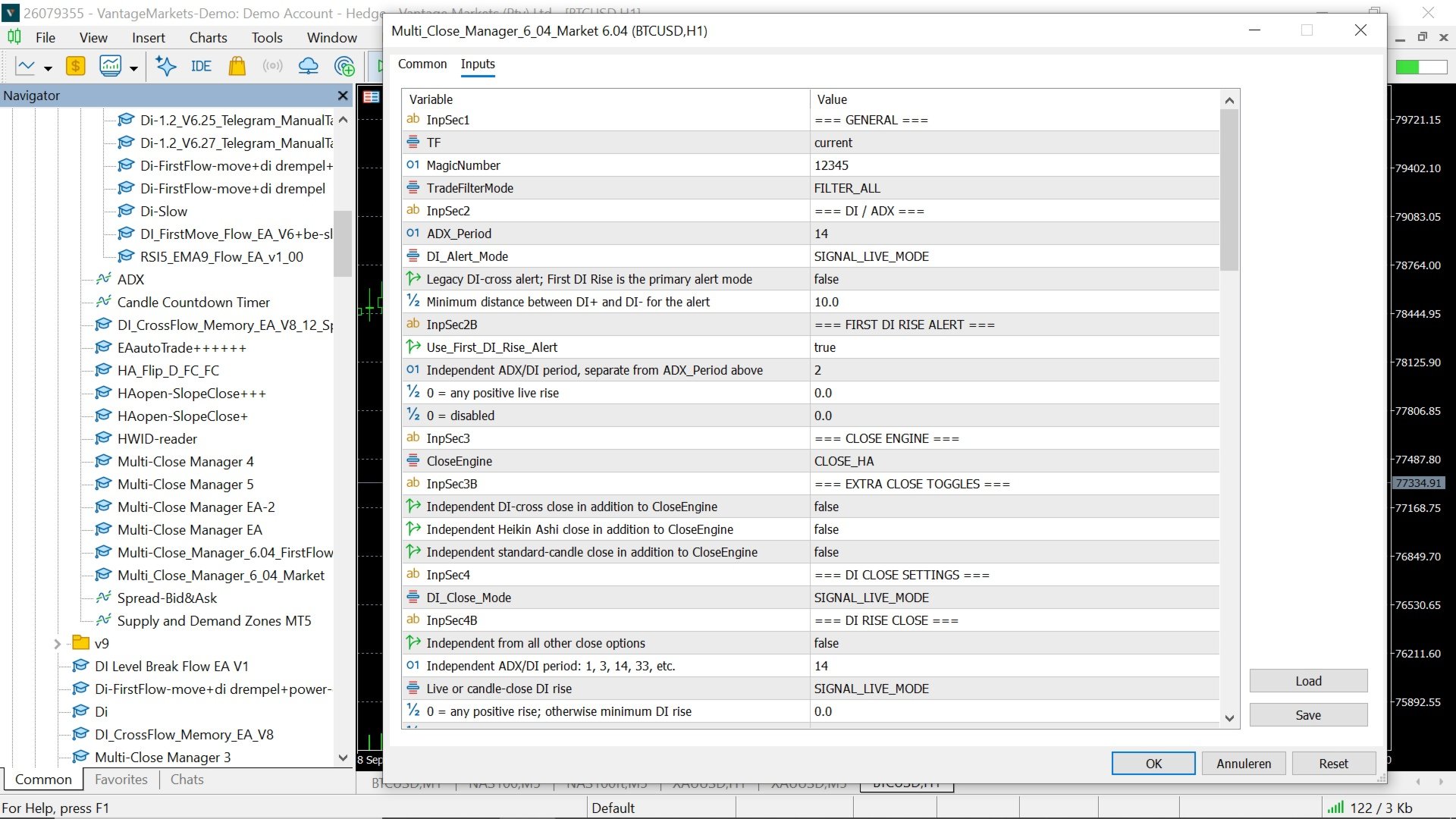
The manager contains several independent DI / ADX functions.

DI Cross Alerts

The standard DI alert system can monitor crossings between +DI and -DI.

A minimum DI spread can be configured to prevent alerts when the distance between the two DI lines is too small.

The alert can operate using live values or completed candle values.

First DI Rise Alert

The First DI Rise system is a separate directional-flow notification engine.

It can use its own ADX period independently from the main DI / ADX settings.

When a new directional DI flow begins, the manager can send one Telegram notification for the first valid DI rise.

Further rises in the same directional flow are ignored. A new notification becomes available when the opposite DI flow begins.

Optional settings include:

First_DI_Rise_ADX_Period
Independent ADX / DI period used for this alert.

First_DI_Rise_MinRise
Minimum required DI increase.

First_DI_Rise_MinADX
Optional minimum ADX value.

The Telegram message starts with DI+ FIRST RISE or DI- FIRST RISE, making the direction immediately visible in the notification.

Close Engine

The main Close Engine can be set to:

None
No primary close engine.

DI
Uses DI crossing logic to manage opposite positions.

HA
Uses Heikin Ashi directional changes.

STD
Uses standard candle direction.

Additional DI, HA and STD close functions can also be enabled independently.

This makes it possible to use a single close method or combine multiple exit conditions.

DI Rise Close

The independent DI Rise Close can close a position when the opposing DI line begins to rise.

For a BUY position, rising -DI can be used as the close condition.

For a SELL position, rising +DI can be used as the close condition.

This module has its own:

ADX period
Live or candle-close mode
Minimum DI rise
Minimum ADX value
Optional DI dominance requirement
Minimum dominance spread

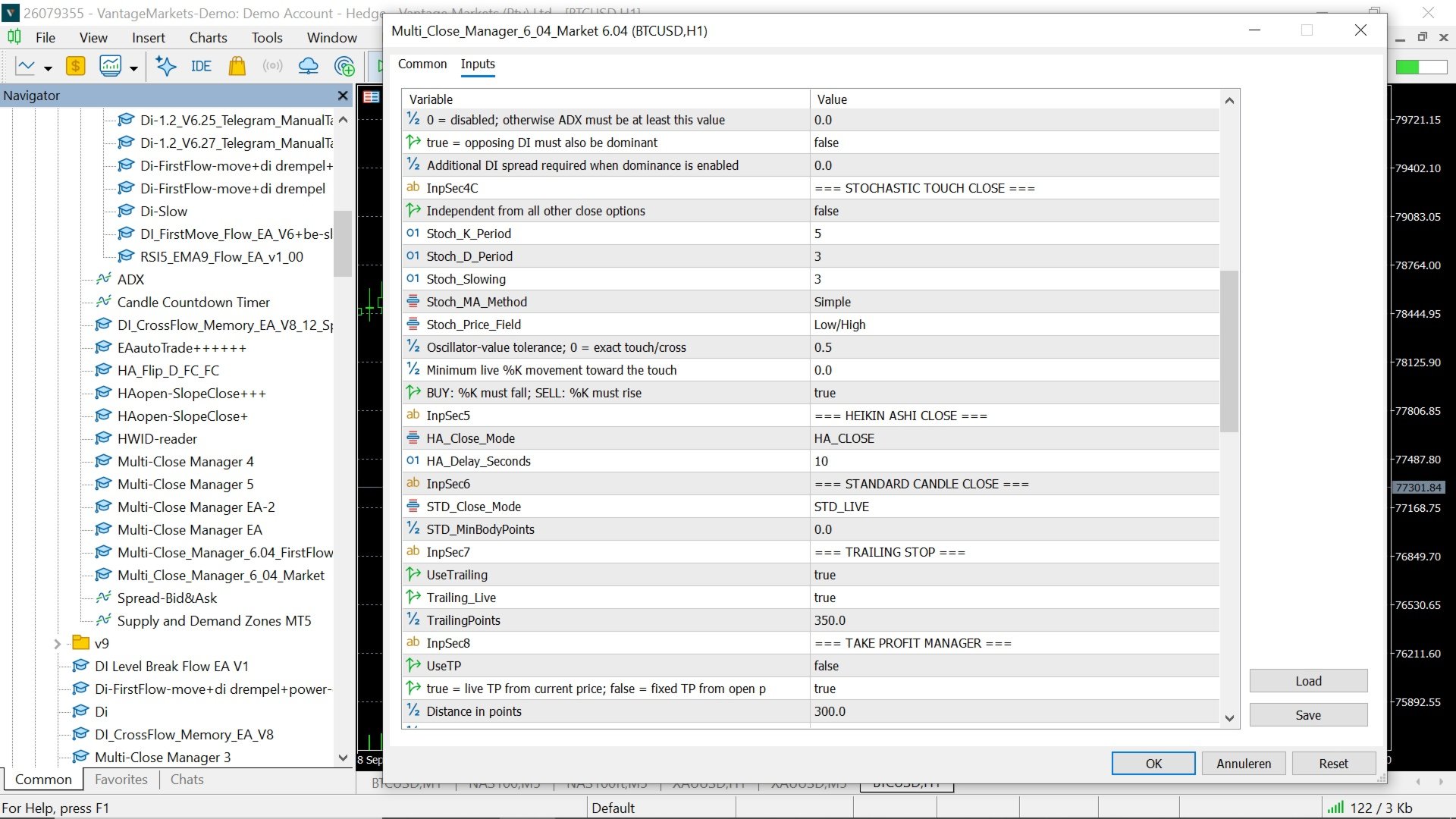
Stochastic Live Touch Close

An independent Stochastic close module is included.

For BUY positions, the manager can react when %K approaches or touches %D from above.

For SELL positions, the manager can react when %K approaches or touches %D from below.

The Stochastic settings include:

K Period
D Period
Slowing
MA Method
Price Field
Touch Tolerance
Minimum K Movement
Required K Direction

This close function operates independently from the DI, Heikin Ashi and standard-candle close modules.

Heikin Ashi Close

The Heikin Ashi close module supports three modes:

Live
Responds to a live Heikin Ashi directional flip.

Delay
Requires the live directional change to remain valid for the configured number of seconds.

Candle Close
Uses the completed candle to confirm the directional change.

Standard Candle Close

The standard-candle module uses normal candle direction.

A bullish candle can be used to close managed SELL positions.

A bearish candle can be used to close managed BUY positions.

The function can operate live or on completed candles.

A minimum candle-body size can also be configured.

Trailing Stop

Multi Close Manager includes an optional trailing-stop system.

The trailing stop can work:

Live — based on the current market price.

or

By Candle — updated according to completed candle processing.

The trailing distance is configured in points.

The manager only moves the stop in the direction that improves the protected position.

Fixed Stop Loss Manager

The Fixed SL Manager can automatically place a Stop Loss at a defined number of points from the position's opening price.

For BUY positions:

SL = Open Price - Fixed SL Points

For SELL positions:

SL = Open Price + Fixed SL Points

The manager checks the broker's minimum stop and freeze distances before modifying the position.

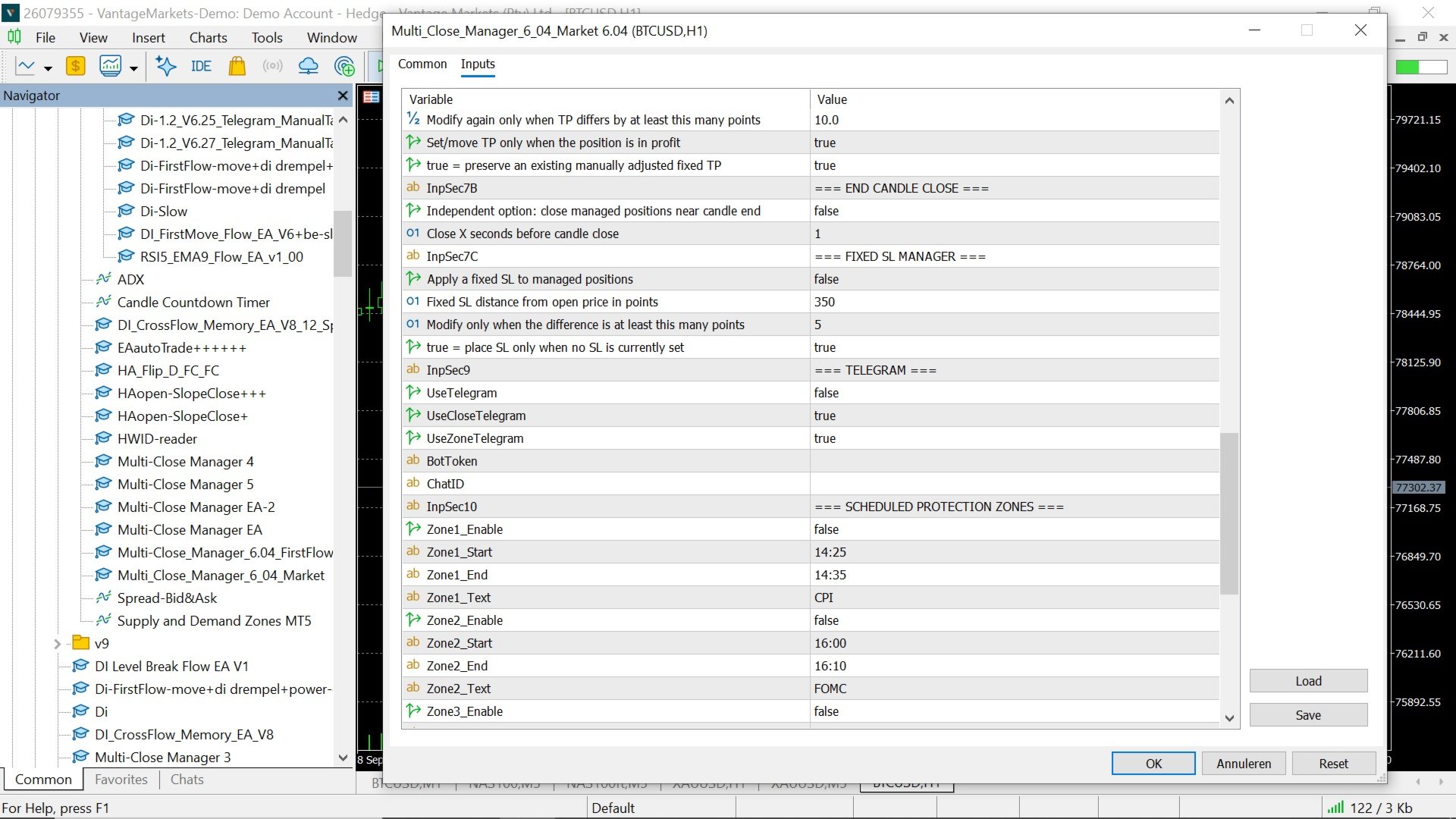
The option FixedSL_OnlyWhenNoSL can be used to apply the fixed SL only to positions that do not already have a Stop Loss.

This can prevent the manager from replacing a manually adjusted Stop Loss.

Take Profit Management

The Take Profit module supports two operating methods.

Fixed Take Profit

The TP is calculated from the original opening price.

For BUY positions:

TP = Open Price + TP Points

For SELL positions:

TP = Open Price - TP Points

An option is available to preserve an existing manually adjusted TP.

Live Take Profit

The live TP can move with price while maintaining the configured distance.

For BUY positions, the TP can move upward.

For SELL positions, the TP can move downward.

The TP can optionally be updated only when the position is already in profit.

Broker stop-distance and freeze-level requirements are taken into account before a modification is sent.

End Candle Close

The End Candle Close function can close managed positions shortly before the current candle ends.

The user selects the number of seconds before candle close.

For example:

1 second before candle close

The function follows the timeframe selected in the manager settings.

Scheduled Protection Zones

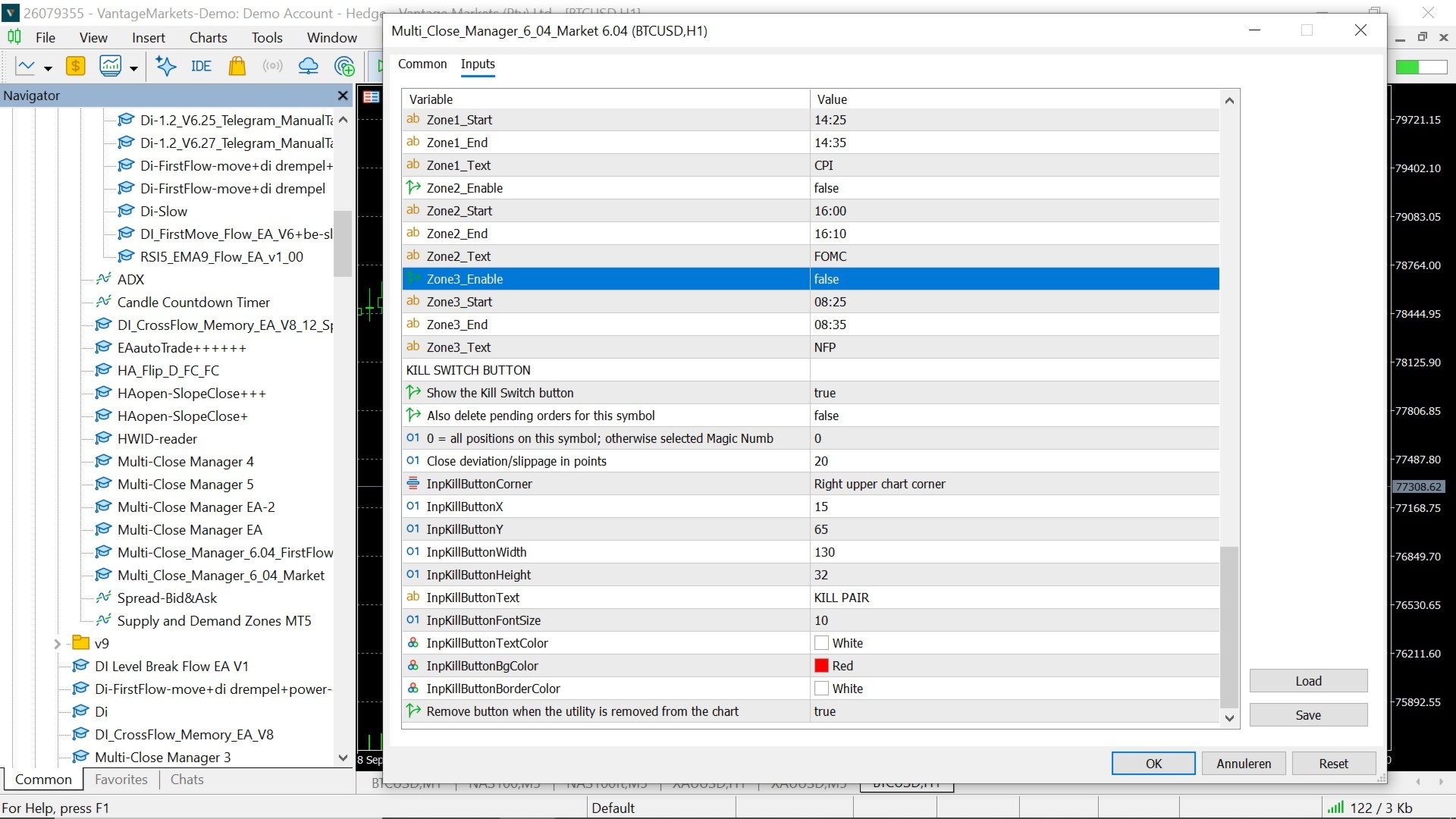
Three configurable time zones are available.

Each zone contains:

Enable / Disable
Start Time
End Time
Custom Zone Name

When an enabled zone begins, managed positions can be closed and the manager remains paused while the zone is active.

The zones are manually configured by the user and are not an automatic economic-calendar service.

They can be used for scheduled events or any period during which the user does not want the manager to continue normal position management.

Telegram Notifications

Multi Close Manager supports Telegram notifications.

Available notification functions include:

First DI Rise alerts
Position close notifications
Protection-zone notifications

The First DI Rise notification system is independent from the general close and zone notification settings.

A Telegram Bot Token and Chat ID are required.

MetaTrader 5 must also be configured to allow WebRequest access to the Telegram API.

KILL PAIR Emergency Button

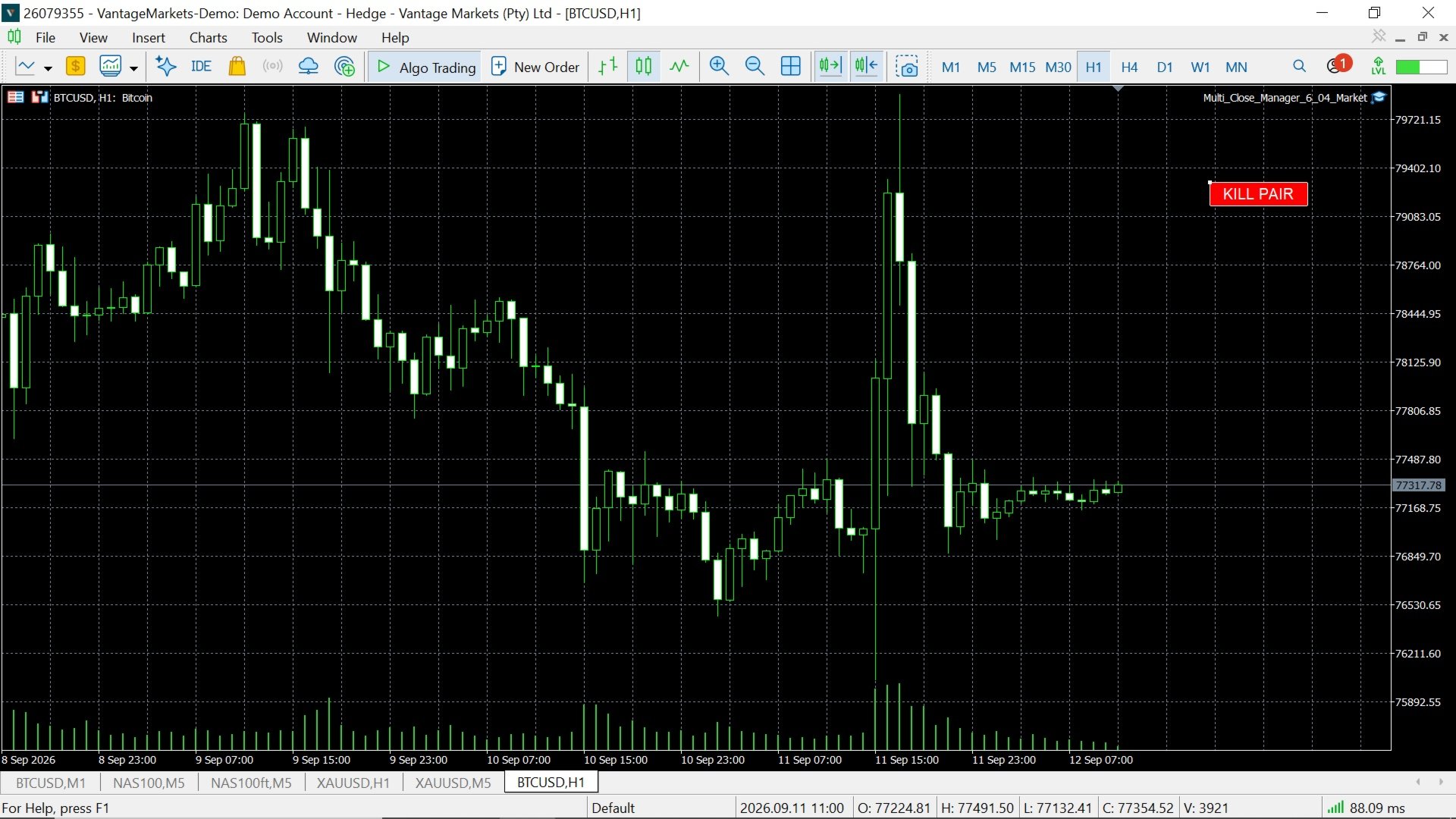
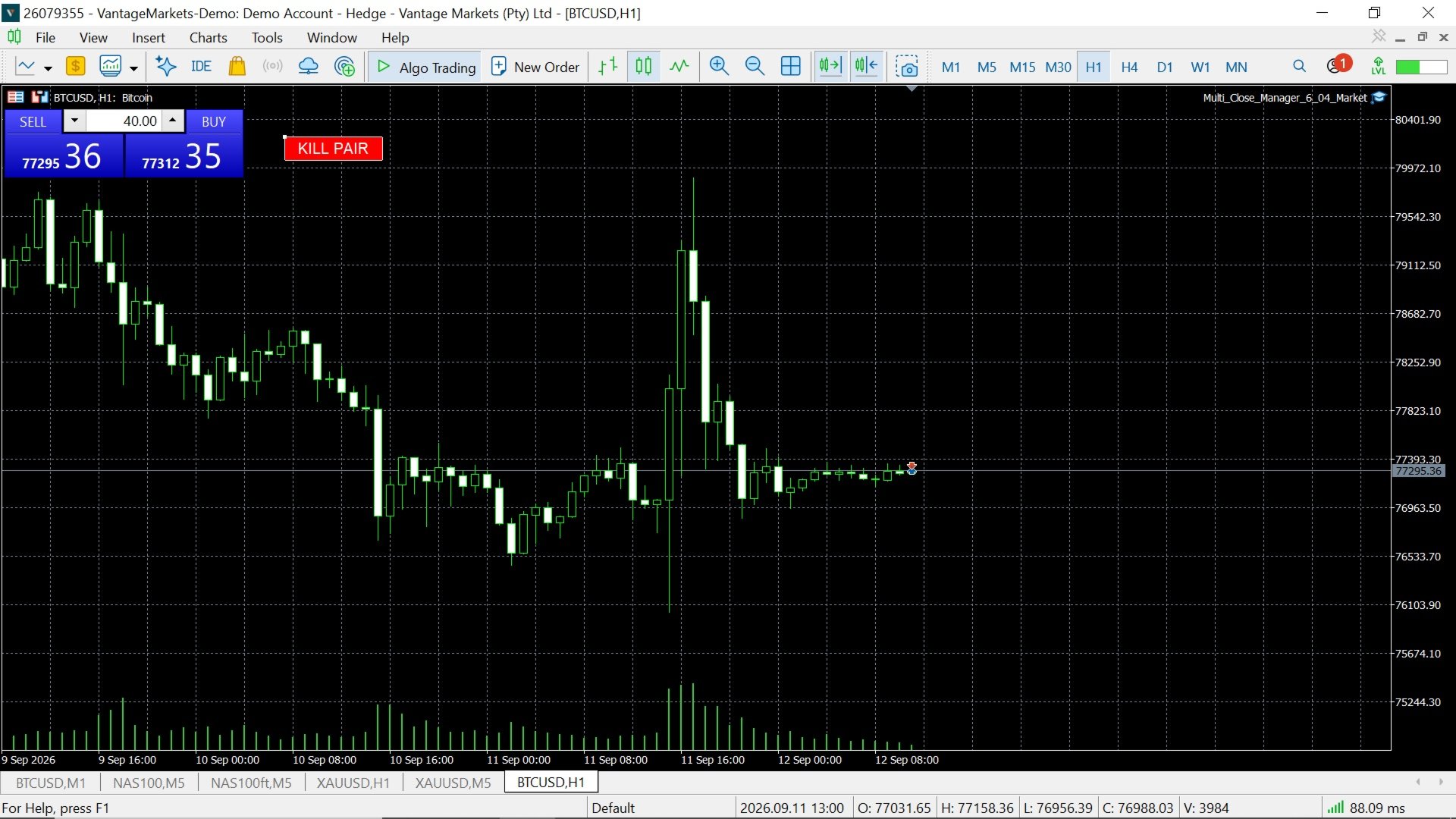
An optional KILL PAIR button can be displayed directly on the chart.

When pressed, it attempts to close matching open positions on the current chart symbol.

The Kill Switch can be configured to:

Close all positions on the current symbol

or

Close only positions matching a selected Magic Number

Pending orders for the same symbol can also be deleted when this option is enabled.

Button position, size, text and colors can be customized.

Important Usage Information

Multi Close Manager does not automatically open market positions.

It is designed to manage positions that already exist.

Several independent closing and position-management functions are available. Enabling multiple close modules at the same time means that the first valid enabled condition may close the position.

Users should therefore test their selected combination of settings before applying it to a live account.

Point values depend on the symbol specifications provided by the broker. A setting such as 300 points can represent a different price distance on different instruments.

Telegram notifications require an active internet connection and correctly configured MetaTrader 5 WebRequest permissions.

The utility does not guarantee trading results and does not predict future market direction.

Compatibility

Designed for:

MetaTrader 5

The manager can be attached to different symbols and timeframes. Each chart instance manages the symbol to which it is attached according to the selected position filter and input settings.

Summary

Multi Close Manager combines several position-management methods in one configurable MetaTrader 5 utility.

The user can choose which functions are required and disable the others, ranging from basic Stop Loss, Take Profit and trailing management to DI / ADX monitoring, Heikin Ashi exits, Stochastic exits, timed candle closing, Telegram alerts, protection zones and an emergency KILL PAIR button.
Recommended products
Spread Analysis Utility MT5
AL MOOSAWI ABDULLAH JAFFER BAQER
• Please test the product in the Strategy Tester before purchasing to understand how it works. • If you face any issues, contact me via private message—I’m always available to help. • After purchase, send me a screenshot of your order to receive a   FREE EA   as a gift. Spread Analysis Utility MT5 – Monitor & Analyze Broker Spreads in Real Time! Do you want to track your broker's spread fluctuations with precision? Spread Analysis Utility MT5 gives you real-time insights into the spread behavio
Broker Analysis Utility MT5
AL MOOSAWI ABDULLAH JAFFER BAQER
• Please test the product in the Strategy Tester before purchasing to understand how it works. • If you face any issues, contact me via private message—I’m always available to help. • After purchase, send me a screenshot of your order to receive a   FREE EA   as a gift. Broker Analysis Utility – Your Ultimate Broker Performance Monitor! Get Full Transparency on Your Broker's Execution Quality! Are you a trader who values precision, transparency, and performance? Broker Analysis Utility is an es
News Risk Guard protects the positions you already hold when a scheduled economic release is about to hit. It is a risk tool. It does not predict direction, it does not look for entries of its own, and it makes no claim about profit. The calendar is built into the product: 4,101 releases covering 15 recurring events. No internet permission, no DLL, no file to install, and it behaves the same in the Strategy Tester as it does on a live chart. WHAT IT DOES 1. Event protection window    A confi
Broker Connection Monitor MT5
AL MOOSAWI ABDULLAH JAFFER BAQER
• Please test the product in the Strategy Tester before purchasing to understand how it works. • If you face any issues, contact me via private message—I’m always available to help. • After purchase, send me a screenshot of your order to receive a   FREE EA   as a gift. Broker Connection Monitor - Keep Your Trading Secure! Ensure Stable Trading with Real-time Broker Connection Monitoring! Are you tired of unexpected connection drops affecting your trades? Do you want to monitor your broker's co
EA Risk Inspector is a professional MetaTrader 5 dashboard for reviewing the live risk created by Expert Advisors and open positions. It groups exposure by Magic Number and strategy context, highlights missing protection and presents account-level concentration in a transparent operational view. MAIN FEATURES • Position and EA grouping by Magic Number • Stop Loss validity and uncovered-exposure checks • Strategy-level risk and position summaries • Symbol and directional concentration analysis •
Pro Trader Assistant 1.1 - The Ultimate Trading Companion NB: DOES NOT WORK ON STRATEGY TESTER. FOR TESTING, DM ME   Trade Simple, Smarter, Safer, and More Efficiently Are you ready to transform your trading with institutional-grade risk management? Pro Trader Assistant 1.1  is your complete solution for mastering trading psychology, risk control, and execution efficiency. Built for both prop firm challenges and retail trading. Why Choose Pro Trader Assistant 1.1 Perfect for retail trading
NineEdge Pro EA
Mohammed Eltayeb Mohammed Khairalla
NineEdge Pro EA Multi-Strategy | Multi-Timeframe Trading System for MetaTrader 5 NineEdge Pro EA is a MetaTrader 5 Expert Advisor that combines multiple independent trading logic modules into a single execution system. The EA is designed to operate across different market conditions by using rule-based strategies on multiple timeframes. The system focuses on structured trade execution, configurable risk parameters, and clean order management. All trading decisions are made automatically based o
Hedge and Position Commander
AL MOOSAWI ABDULLAH JAFFER BAQER
• Please test the product in the Strategy Tester before purchasing to understand how it works. • If you face any issues, contact me via private message—I’m always available to help. • After purchase, send me a screenshot of your order to receive a   FREE EA   as a gift. Hedge & Position Commander The Hedge & Position Commander is an advanced trading utility designed to give traders complete control over their positions with powerful hedging capabilities and comprehensive position management too
Hedge Commander Pro
AL MOOSAWI ABDULLAH JAFFER BAQER
• Please test the product in the Strategy Tester before purchasing to understand how it works. • If you face any issues, contact me via private message—I’m always available to help. • After purchase, send me a screenshot of your order to receive a   FREE EA   as a gift. Auto-Hedge System Description The auto-hedge system is a dynamic risk management tool designed to protect trading accounts from significant drawdowns while enabling opportunities for recovery and profit. When enabled, the system
Bober Real MT5
Arnold Bobrinskii
4.88 (16)
Bober Real MT5 is a fully automatic Forex trading Expert Advisor. This robot was made in 2014 year and did a lot of profitbale trades during this period. So far over 7000% growth on my personal account. There was many updates but 2019 update is the best one. The robot can run on any instrument, but the results are better with EURGBP, GBPUSD, on the M5 timeframe. Robot doesn't show good results in tester or live account if you run incorrect sets. Set files for Live accounts availible only for cu
Strategy:   ZigZag Hedge Grid Strategy is an MT5 Expert Advisor that uses swing highs and lows to place hedge trades and capture market moves automatically. Use:   Best suited for cent accounts. Do demo testing before any live trading. Disclaimer:   Trading involves risk, and we are not responsible for any profit, loss, or account outcome. ZigZag Hedge Grid Strategy   is an automated MT5 Expert Advisor designed to identify swing highs and lows using the ZigZag indicator, then open hedge trades
Guardian Yield Keeper is a utility Expert Advisor for traders who want real-time exit management and profit protection for open positions on the current symbol. This EA does not open new trades and does not generate entry signals. Its job is simple: monitor existing positions and close them when your profit or risk conditions are met . It is especially suitable for traders using DCA, Grid, Martingale, or basket trading systems and looking for a dedicated management layer that is more flexible th
Pafpaf BTCUSD
裕介 石野
1.自動売買ソフトウェア(EA)の特徴 当自動売買ソフトウェア(EA)の特徴を詳しくお伝え致します。 FX 証券会社:CryptoGT、FXGT etc... プラットフォーム:MT5 専用 取引通貨:ビットコインドル (BTCUSD) 取引スタイル:スキャルピング~中期 取引時間軸:15 分足 (M15) まず、チャート上では、インジケーターなどは必要ありません。 当 EA へ全て組み込まれています。 推進はビットコインドル (BTCUSD) 15 分足用です。 ビットコインはご存じの通り、値動きが激しいです。 ほとんどがレンジですが、ブレイクするととんでもないほど動きます。 保有ポジション損失リスクを抑えたハーフ&ハーフのトラップ&リピートタイプ EA 利益はあっても保有ポジションによる損失(ロスカット)を減らす工夫として 値幅設定レンジ中央値より上では売りのトラップ&リピート、 中央値より下では買いのトラップ&リピートを行います。 パラメーター設定では、注文範囲の調整・フィルターによる発注抑制・トレーリングストップ の機能を備えています。 トラップ&リピートタイプの取引では、弱点
ForexcopyLocalMT5
Wei Ming Ding
3 (1)
The instructions for use: https://www.mql5.com/zh/blogs/post/754946 The MT4 version: https://www.mql5.com/zh/market/product/88205 The MT5 version: https://www.mql5.com/zh/market/product/88204 ---------------------------------------------- 1. Copy orders, from 12 master accounts to 100 slave accounts. The number of slave accounts can be customized, from 12 to 100. 2. Support MT4 to MT4, MT4 to MT5, MT5 to MT4, MT5 to MT5. 3. Identify the suffixes of trading varieties on different platforms, such
Bigshoot
Sy Hien Nguyen
EA DCA BigShoot – Product Description This Expert Advisor (EA) is designed to execute trades based on the trader’s initial trigger order. It serves as a specialized utility for accumulation trading strategies, helping traders gradually build positions using a DCA (Dollar-Cost Averaging) approach. The EA enables precise scaling with small entries, allowing you to capture more favorable price zones over time. Key Benefits Simplifies trade execution and position management Allows traders to operate
Trade Manager Simple
Juan Andres Montoya Robledo
Trade Manager Simple NQ and XAUUSD — Manual Trading Panel and Local Replicator Open the trade once. Your other MT5 terminals open it on their own, each with the lot size that fits that account. TMS is two tools in one: a panel for trading by hand with your risk under control, and a replicator that copies your entries to every other MetaTrader 5 terminal running on the same computer. No VPS, no signal service, no connection between brokers. The terminals talk through MetaTrader's shared folder,
LMA Pro EA
Andrew Hahn
LMA EA – Logarithmic Moving Average Suite v2.2 About the Developer I have been actively trading the global financial markets since August 2009. My approach emphasizes disciplined risk management, systematic decision-making, and technical analysis. This EA represents the culmination of my experience developing algorithmic trading systems based on proven technical concepts. Core Methodology This EA uses a Logarithmic Moving Average signal generator that applies logarithmic weighting to price data
MT5 To Telegram Copier
Levi Dane Benjamin
2.67 (3)
Send fully customisable trade signals from MetaTrader 5 to Telegram and run your own signal channel. Configure what gets sent, how it looks, and which trades are included using an easy on-chart interface. Made for signal providers : keep messages consistent, branded, and informative without manual posting. User Guide + Demo | MT4 Version | Discord Version Main features Highly customisable signal format with many configuration options Add your own text before/after each signal (tags, links, chan
Phoenix Midas
Alvaro Albillos Gutierrez
Phoenix Midas is an order-flow Expert Advisor built specifically for XAUUSD (Gold) on the M15 timeframe. It reads market structure through synthetic order-flow analysis — volume delta, volume profile (POC / value area) and liquidity behaviour — to time entries on two complementary setups, and it manages every trade with a fixed, pre-defined risk. Built-in news filtering and prop-firm risk controls make it suitable for both personal accounts and funded-challenge environments. WHAT IT IS NOT
TradePulse Commander Pannel
AL MOOSAWI ABDULLAH JAFFER BAQER
• Please test the product in the Strategy Tester before purchasing to understand how it works. • If you face any issues, contact me via private message—I’m always available to help. • After purchase, send me a screenshot of your order to receive a   FREE EA   as a gift. Introducing the ultimate Trade Management Panel designed to streamline your trading operations and boost your efficiency! Our advanced panel is packed with powerful features to simplify your trading tasks and provide real-time
Close by percentage MT5
Konstantin Kulikov
5 (1)
Hello friends. I wrote this utility specifically for use in my profile with a large number of Expert Advisors and sets ("Joint_profiles_from_grid_sets"   https://www.mql5.com/en/blogs/post/747929 ). Now, in order to limit losses on the account, there is no need to change the "Close_positions_at_percentage_of_loss" parameter on each chart. Just open   one   additional chart, attach this utility and set the desired percentage for closing all trades on the account. The utility has the following fu
HMA Scalper Pro EA
Vladimir Shumikhin
5 (2)
HMA Scalper Pro EA — Automated Trading Advisor Based on Hull Moving Average (HMA) for MetaTrader 5 OVERVIEW HMA Scalper Pro EA is a professional trading robot (Expert Advisor) for MetaTrader 5 that trades in the direction of the Hull Moving Average (HMA). The HMA indicator determines the current trend direction, and the EA opens trades in that direction, enhanced by Smart Risk capital management, adaptive grid trading, trailing stop, breakeven, and time filters. The EA supports both Netting a
Overview Mirror Signals EA is a powerful monitoring Expert Advisor that automatically sends real-time Telegram notifications for all important trade events on your MetaTrader 5 account. It is engineered specifically for signal providers , trade-copier operators , auditors , educators , and professional trading services that require immediate, detailed, and reliable reporting. Everything from entries, exits, SL/TP changes, comment changes, trailing stop activations, pending order modifications
Smart Breakout Recovery EA Smart Breakout Recovery EA is an advanced automated trading system based on EMA trend filtering and Supply/Demand breakout logic. The EA identifies high-probability breakout and false-break opportunities, combined with a controlled recovery system to optimize trade management. Key Features: - Dual EMA trend confirmation (M15 + H1) - Breakout and False Break detection - Supply & Demand zone integration - Smart Recovery (Martingale-based) - Adjustable lot scaling
Risk Manager Optimum
Freedom Uzochukwu Nnadi
5 (1)
RiskManagerOptimum for MetaTrader 5 – Your Ultimate Trading Safety Net! RiskManagerOptimum is the most advanced and professional trade and account risk management Expert Advisor for MetaTrader 5. It does not open trades. It monitors and manages existing positions in real time to control risk, drawdown, and exposure across all symbols. The EA is designed for manual traders, algorithmic traders, and portfolio traders who require strict and automated risk control across Forex, metals, crypto, indi
http://www.tradepositive.lat ALGO Smart Flow Risk Manager (Keyboard Edition) Have you ever spotted the perfect entry but hesitated so long calculating the lot size that the price ran away without you? Or has a bad streak ever wiped out 20% of your account because you didn't know when to stop? The ALGO Smart Flow Risk Manager is not an automated trading bot. It is a professional Execution Tool designed strictly for Manual Traders who demand speed, structure, and discipline. We turn your keyboar
FREE
• Please test the product in the Strategy Tester before purchasing to understand how it works. • If you face any issues, contact me via private message—I’m always available to help. • After purchase, send me a screenshot of your order to receive a   FREE EA   as a gift. Hedge Fragmentation Utility - Comprehensive Product Description Overview The Hedge Fragmentation Utility is a professional-grade MetaTrader 5 tool designed for forex traders who employ hedging strategies. This sophisticated util
SolarTrade Suite Financial Robot: LaunchPad Market Expert - designed to open trades! This is a trading robot that uses special innovative and advanced algorithms to calculate its values, Your Assistant in the World of Financial Markets. Use our set of indicators from the SolarTrade Suite series to better choose the moment to launch this robot. Check out our other products from the SolarTrade Suite series at the bottom of the description. Do you want to confidently navigate the world of inves
SCALPING GOLD DIGGER EA Intelligent Gold Trading Robot for XAUUSD Free Demo Version =   https://c.mql5.com/6/1028/GoldDigger_DEMO.zip Trade Gold with Confidence SCALPING GOLD DIGGER EA is an advanced Expert Advisor designed exclusively for XAUUSD (Gold) traders. Combining intelligent market analysis with adaptive trade management, it automatically identifies high-quality trading opportunities while maintaining strict risk control. Built for both beginners and experienced traders, SCALPING GOLD
RSI Grid MT5
Joseph Anthony Aya-ay Yutig
GET OTHER EAs FOR FREE!!!  GET OTHER EAs FOR FREE!!!  GET OTHER EAs FOR FREE!!!  GET OTHER EAs FOR FREE!!!  GET OTHER EAs FOR FREE!!!  RSI Grid is based on the RSI overbought and oversold conditions and opens a grid when the trade is on the losing side of the market. The RSI provides technical traders with signals about bullish and bearish price momentum, and it is often plotted beneath the graph of an asset’s price. An asset is usually considered overbought when the RSI is above 70% and overso
Buyers of this product also purchase
Trade Assistant MT5
Evgeniy Kravchenko
4.43 (215)
It helps to calculate the risk per trade, the easy installation of a new order, order management with partial closing functions, trailing stop of 7 types and other useful functions. Additional materials and instructions Installation instructions - Application instructions - Trial version of the application for a demo account Line function -   shows on the chart the Opening line, Stop Loss, Take Profit. With this function it is easy to set a new order and see its additional characteristics bef
Forex Trade Manager MT5
InvestSoft
4.98 (677)
Trade Manager MT5 is an advanced position size calculator and trade management tool for MetaTrader 5, designed to help traders plan trades faster, control risk more precisely, and manage open positions directly from the chart. It combines order placement, risk based lot calculation, Stop Loss and Take Profit management, Break Even, Trailing Stop, Partial Close, Equity Protection, and external trade management in one panel. Whether you trade forex, indices, metals, commodities, crypto, or future
Local Trade Copier EA MT5
Juvenille Emperor Limited
4.94 (148)
Local Trade Copier EA MT5 is a fast and flexible trade copier for copying and managing trades between multiple MetaTrader 5 accounts on the same Windows computer or Windows VPS. It combines local trade synchronization with Receiver-side controls for lot sizing, risk management, trade filtering, symbol mapping, trade management and account protection. Set up your Transmitter and Receiver terminals in about 1 minute and copy manual or EA trades between accounts at the same or different brokers. U
================================================================================ POC BREAKOUT - V20.72. Full Professional Grade Toolkit ================================================================================ POC Breakout is a full MetaTrader 5 trading dashboard for discretionary traders who want breakout signals, Point of Control (POC) context, volume profiles, order flow, market structure, news, alerts, and advanced trade planning in one professional workspace. Attached directly to you
TradePanel MT5
Alfiya Fazylova
4.88 (168)
Trade Panel is a multi-functional trading assistant. The app contains over 50 trading functions for manual trading and allows you to automate most trading tasks. Application instructions + video instructions: https://www.mql5.com/en/blogs/post/772292 Trial version of the application for a demo account: https://www.mql5.com/en/blogs/post/750865 How to install the application: https://www.mql5.com/en/blogs/post/756239 How to test the application in visual mode: https://www.mql5.com/en/blogs/post/7
Telegram to MT5 MultiChannel Copier
Sergio Marquez Uroz
4.46 (13)
Telegram to MT5 Multi-Channel Copier   automatically copies trading signals from your Telegram channels straight to MetaTrader 5. No bots, no browser extensions, no manual copying. A signal arrives in Telegram and the EA opens the trade in your terminal within seconds. And before you copy a channel, the built-in backtester shows you what that channel would have done in your account. The product has two components: a Windows application that listens to your Telegram channels, and this Expert Advi
FarmedHedge Pair Trading Dashboard
Tanapisit Tepawarapruek
5 (5)
Farmed Hedge Yield Farming | All Markets (Manual - Hybrid - Semi/Automated EA) VERIFIED TRADING RESULTS - Farmed Hedge Yield Axi Copy:  https://www.mql5.com/en/signals/2356376 - Farmed Hedge Yield Exn Copy:   https://www.mql5.com/en/signals/2356404 - Farmed Hedge Yield V Copy:  https://www.mql5.com/en/signals/2357156 IMPORTANT NOTICE: FarmedHedge is a MANUAL-FOCUSED TRADING UTILITY ,not a fully automated EA. Results shown on this Signal include manual trades and overall strategic management.
Copy Telegram signals with your own trading rules Telegram to MT5 Signal Trader automatically copies text-based trading signals from public and private Telegram channels and groups into MetaTrader 5. Manage multiple providers and MT5 accounts from one desktop app, with individual risk and trade settings for each provider . No Telegram bot or API setup needed for copying. Simply sign in with your own Telegram account by phone or QR code and select the channels or groups you have already joined. Y
Strategy Ledger Pro
Abdullah Uygar Tuna
5 (2)
Strategy Ledger Pro is a read-only account analysis panel for MetaTrader 5. It separates account results by Expert Advisor, strategy, symbol, and magic number. Before you download the demo. The Market runs the demo of any paid product in the Strategy Tester only. This panel analyses the trades on your own account, and a Strategy Tester run has no account history to read, so the demo opens on an empty panel and says so. That is the demo mechanism, not the product. The video in this description wa
Telegram To MT5 Ultra
Mirel Daniel Gheonu
5 (5)
Telegram To MT5 — Signal Copier Turn the trading calls from your Telegram channels into real MT5 orders — automatically, on as many accounts as you like, with risk and rules fully under your control. Telegram To MT5 connects the VIP / signal channels you already follow on Telegram to your MetaTrader 5 terminal. A free companion desktop app reads the messages (even from channels that block bots), and this Expert Advisor executes them on your account — applying your own risk settings, symbol mappi
Premium Trade Manager - The Trade Panel With a Coach Built In Premium Trade Manager puts a trading coach inside your chart, with a full execution engine underneath it. Set the trade up the way you always do, then let Max, your AI trading coach, read that exact setup against your live account and give you a straight verdict before you commit: is the stop disciplined, is the risk sane, is a high-impact release minutes away, are you near a prop-firm limit. Below sits the engine that runs everything
EA Overfitter
Stephen J Martret
5 (1)
That backtest looks great. But will it still be making money tomorrow, next week, next month? EA Overfitter re-runs your EA on 100 price histories it has never seen. One score tells you if the edge is real. A backtest tells you what an EA did on one price history — the one that happened to occur. What you cannot tell from it is how much of that result was the strategy and how much was the particular path. EA Overfitter answers that. It builds up to 100 synthetic price histories your EA has n
Astro Trade MT5
Indra Maulana
5 (7)
25% discount on the release of the tool: only for the next 3 buyers Send a message to receive a demo version. AstroTrade Trading Assistant AstroTrade is a comprehensive multi-functional trading utility developed for the MetaTrader 5 platform. It integrates essential tools for trade execution, risk management, and technical monitoring into a single unified interface. The application is designed to assist traders in managing their daily operations through a visual and structured environment. Vi
Exp COPYLOT CLIENT for MT5
Vladislav Andruschenko
3.97 (35)
Professional Trade Copier for MetaTrader 5 Fast, professional, and reliable trade copier for MetaTrader . COPYLOT allows you to copy Forex trades between MT4 and MT5 terminals with support for Hedge and Netting accounts. COPYLOT MT5 version supports: - MT5 Hedge to MT5 Hedge - MT5 Hedge to MT5 Netting - MT5 Netting to MT5 Hedge - MT5 Netting to MT5 Netting - MT4 to MT5 Hedge - MT4 to MT5 Netting MT4 version Full Description +DEMO +PDF How To Buy How To Install How to get Log Files H
Welcome to ENTRY IN THE ZONE WITH SMC MULTI TIMEFRAME Entry In The Zone and SMC Multi Timeframe is a real-time market analysis tool based on Smart Money Concepts (SMC), designed to analyze market structure, price direction, and key trading zones. It supports both Single-Timeframe Analysis and Multi-Timeframe Analysis, providing a clearer view of the overall market structure across multiple timeframes, with real-time BUY / SELL signals that do not repaint. It is designed to help filter trading op
Trade Copier Ultimate
Janitha Sandaruwan Amaradasa Wickramasingha Arachchilage
5 (5)
Trade Copier Ultimate - Telegram to MT5 Signal Copier Trade Copier Ultimate automatically copies Telegram trading signals into MetaTrader 5. The EA can read signal messages, detect the symbol, order type, entry price, Stop Loss, Take Profit levels and selected update commands, then execute or manage the trade in MT5 using your lot and risk settings. It is more than a basic Telegram to MT5 copier. TCU also supports Bot API and user-account Bridge workflows, Discord signal routing, local MT5 to MT
HINN MagicEntry Extra
ALGOFLOW OÜ
4.74 (19)
HINN MAGIC ENTRY – the ultimate tool for entry and position management! SIMPLE. FASTEST. INTUITIVE. MAX AUTOMATED. Place orders by selecting a level directly on the chart! full description   ::  demo-version  :: 60-sec-video-description Key features: - Market, limit, and pending orders - Automatic lot size calculation - Automatic spread and commission accounting - Unlimited partitial take-profits  - Breakeven and trailing stop-loss and take-profit  functions - Invalidation leves - Intuitive, a
The product will copy all telegram signal to MT5 ( which you are member) , also it can work as remote copier.  Easy to set up, copy order instant, can work with almost signal formats, image signal,  s upport to translate other language to English Work with all type of channel or group, even channel have "Restrict Saving Content", work with  multi channel, multi MT5 Work as remote copier: with signal have ticket number, it will copy exactly via ticket number. Support to backtest signal. How to s
Footprint Chart Pro — Professional OrderFlow EA for MetaTrader 5 Version 6.34 | Professional tool for real traders | Institutional-Grade Visualization DEMO USERS - PLEASE SELECT EVERY TICK / REAL TICK WHEN TESTING AND YOU HAVE DOWNLOADED HISTORICAL DATA. IF YOU SEE A WAITING SCREEN AND IT IS NOT DOWNLOADING, IT MEANS YOU HAVE LOW HISTORICAL DATA. TRY 1 MIN AND 5 MIN FIRST ON 1 DAY DATA. ONE DAY DATA SHOULD BE THE NEWEST AND MOST CURRENT DATE. PLEASE WAIT UNTIL THE MARKET HAS ROLLED OVER PERIOD.
Signal Trading View to MT5 Pro
Mirel Daniel Gheonu
4.5 (2)
Signal TradingView to MT5 Pro  Instant professional execution between TradingView and MetaTrader 5 Automate your trading strategy with the most robust communication bridge between TradingView alerts and real execution in MT5. Designed for traders who demand speed, flexibility, and impeccable risk management, this Expert Advisor transforms any alert message into a precise market or limit order.   Install and TEST the TRIAL version HERE STRENGTHS AND ADVANTAGES Universal Parsing Engine (Propriet
Trade Dashboard MT5
Fatemeh Ameri
4.94 (133)
Trade Dashboard simplifies how you open, manage, and control your trades, with built-in lot size calculation. It allows you to execute trades, manage risk, and control positions directly on the chart, with tools such as partial close, breakeven, and trailing stop. Designed to reduce manual work and help you stay focused on your trading decisions. A demo version is available for testing. Detailed explanations of features are provided within the MQL5 platform. Installation instructions are include
FUTURES ORDERFLOW FOOTPRINT CHART Professional OrderFlow EA for MetaTrader 5 Version 1.01| Professional tool for real traders | Institutional-Grade Visualization STRATEGY TESTER USERS - PLEASE SELECT EVERY REAL TICK WHEN TESTING AND YOU HAVE DOWNLOADED HISTORICAL DATA. IF YOU SEE A WAITING SCREEN AND IT IS NOT DOWNLOADING, IT MEANS YOU HAVE LOW HISTORICAL DATA. TRY 1 MIN AND 5 MIN FIRST ON 1 DAY DATA. ONE DAY DATA SHOULD BE THE NEWEST AND MOST CURRENT DATE. PLEASE WAIT UNTIL THE MARKET HAS ROL
Grid Manual MT5
Alfiya Fazylova
4.73 (22)
Grid Manual is a trading panel for working with grid strategies. The utility is universal, has flexible settings and an intuitive interface. It works with a grid of orders not only in the direction of averaging losses, but also in the direction of increasing profits. The trader does not need to create and maintain a grid of orders, the utility will do it. It is enough to open an order and the "Grid manual" will automatically create a grid of orders for it and will accompany it until the close. F
Timeless Charts
Samuel Manoel De Souza
5 (8)
Timeless Charts is an all-in-one trading utility for professional traders. It combines custom chart types such as Seconds Charts and Renko with advanced order flow analysis using Footprints , Clusters , Volume Profiles , VWAP studies, and anchored analysis tools for deeper market insight. Trading and position management are handled directly from the chart through an integrated trade management panel , while Market Replay and Virtual Accounts provide environments for practicing trading skills and
MT5 to Telegram Signal Provider turns your trading account into a signal provider. Every trade action, whether manual, by EA or from your phone, is instantly sent as a message to Telegram. You can fully customize the format or use a ready-made template for quick setup. [ Demo ] [ Manual ] [ MT4 Version ] [ Discord Version ]     New: [ Telegram To MT5 ] Setup A step by step user guide is available. Key Features Ability to customize order details sent to subscribers You can create a tiered subs
Seconds Chart MT5
Boris Sedov
4.61 (18)
Seconds Chart is a unique tool for creating second-based charts in MetaTrader 5 . With Seconds Chart , you can construct charts with timeframes set in seconds, providing unparalleled flexibility and precision in analysis that is unavailable with standard minute or hourly charts. For example, the S15 timeframe indicates a chart with candles lasting 15 seconds. You can use any indicators and Expert Advisors that support custom symbols. Working with them is just as convenient as on standard charts.
Trade Indicator Assistant   is a powerful MT5 utility designed to turn indicators into automated trading systems. Its main feature is the ability to automatically detect an indicator’s   BUY and SELL signal buffers , without requiring you to know the buffer numbers, search through indicator settings, or modify the indicator source code. Bonus Indicator:   After purchasing Trade Indicator Assistant, contact me to receive   Trade Signal Pro   completely free as a bonus indicator. [Download Demo V
Trade copier MT5
Alfiya Fazylova
4.6 (55)
Trade Copier is a professional utility designed to copy and synchronize trades between trading accounts. Copying occurs from the account / terminal of the supplier to the account / terminal of the recipient, which are installed on the same computer or VPS . PROMOTION - If you have already purchased the "Trade Copier MT5," you can receive the "Trade Copier MT4" for free (for copying MT4 > MT5 and MT4 < MT5). For more detailed information about the conditions, please contact us via private message
Message me after purchase to receive the complete manual kit + 3-day OpenAI API trial to test the AI features + Another bonus gift The current price is a limited discount for August Relaunch Update — secure your edition now before price go up. Next Price: $340 This is completely different from any trading panel you’ve tried or seen on the market. It’s one of the most innovative AI-powered trading panels available in the retail market right now. Imagine connecting   AI directly to your chart   —
Anchor Trade Manager
Kalinskie Gilliam
5 (9)
Your EAs cannot see each other, but Anchor can. Anchor gives you one place to coordinate your EAs, manage risk, and decide when trading is allowed. It works alongside the trading bots you already use without any changes to them. The Problem One EA opens a trade. Then another starts trading. The next thing you know, you wake up to multiple grids built across your account. Each EA may be doing exactly what it was designed to do, but together they can place far more risk on your account than you in
More from author
Bid Ask Spread Visualizer Bid Ask Spread Visualizer is a lightweight MetaTrader 5 indicator designed to display the live Bid price, Ask price and current market spread directly on the chart. The indicator provides a clear visual representation of the distance between Bid and Ask by drawing two horizontal price lines and displaying the current spread in points. It is especially useful for traders who want to monitor spread behavior without constantly checking the Market Watch window. Main Featur
FREE
KPS kill pair switch
Nourdin Ben Youssef
Kill Pair Switch Kill Pair Switch is a lightweight MetaTrader 5 order-management utility designed to close all open positions for the symbol of the current chart with a single chart button. The utility does not open trades and does not use a trading strategy. It is intended as a fast manual control for traders who want a dedicated emergency-close button directly on the chart. The KILL PAIR button can be freely moved to the preferred location on the chart. Its position can be remembered so it rem
FREE
DI Flow Live EA
Nourdin Ben Youssef
DI Flow Live EA In my own words I developed DI Flow Live EA from the idea that the movement of +DI and -DI can provide useful information about the current market flow when it is followed live instead of only after a candle has closed. My goal is not to remove the trader from the process, but to combine automation with observation and control. I personally prefer to keep an eye on the market while the EA is running, especially during fast or unusual conditions. The system will continue to be dev
Filter:
No reviews
Reply to review