All In One Trade Management Panel MT4

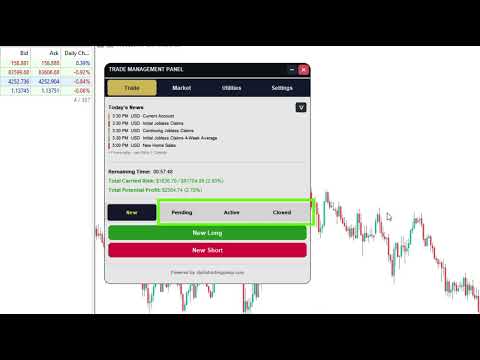
All In One Trade Management Panel is an on-chart trade management panel for MetaTrader 4. Plan trades with a drag-and-drop position tool, let the panel calculate the lot size from your risk, and manage pending, open and closed trades from one place. The panel also shows the market context many traders use: trend, key levels, market structure, economic news and currency strength.

Planning a trade:

Click New Long or New Short and place the entry on the chart. Drag the entry, stop loss and take-profit lines to the levels you want. The lot size is calculated from a percentage of your balance or a fixed lot, and rounded to your broker's lot step. A trade can be split across several take-profit levels. Each level shows its own lot size, R:R and expected profit. Before you confirm, a summary shows the full trade. You can then send it as a market or pending order, or save it as a plan and execute it later with one click.

Managing trades:

Placed trades stay on the chart as the same box. Drag the stop loss or take profit to modify the order, or use the trade menu for breakeven, partial close, editing SL/TP, closing one leg or closing the whole group. The Trade tab lists your pending, active and closed trades with the same actions. Trades can be hidden and shown again without losing them. An optional exposure cap blocks new trades once your total open risk reaches the limit you set.

Main features:

Position tool with up to 10 take-profit levels and risk-based lot sizing
Market orders, pending orders and saved plans
Breakeven, partial close, SL/TP editing and group close
Remaining candle time, total carried risk and potential profit shown in the panel
Trade journal saved as a CSV file, and closed trades kept on the chart for review
All trades, plans and chart boxes restored after a chart reload or terminal restart
Economic calendar with event details and a countdown to high-impact news
Currency strength meter with a selectable timeframe (M1 to MN1) and lookback
Price alarms shown as draggable lines on the chart
Multi-timeframe trend and market structure, fair value gaps, order blocks, liquidity levels, equal highs and lows, and session ranges. Each can be switched on or off in the settings.
Light, dark and custom themes, and saved setting presets

The analysis features are optional. Traders who only want execution and risk management can switch them off and keep the chart clean.

Requirements:

Works with any symbol, timeframe and broker. A hedging account is required for multiple take-profit levels, because each level is opened as its own position.

More from author
ATC Alert Manager lets you set price alarms directly on the chart and manage them from one small panel. Each alarm is shown as a line on the chart that you can drag to a new price. An alarm fires once, at the moment price crosses your level, with a popup alert, a sound and an optional push notification to your phone. Price that is already past the level does not trigger it, so you never get repeated alerts on every tick. Main features: Add an alarm with one click. The price field starts at the
FREE
ATC Candle Timer MT5
Kassim Abdela Banko
ATC Candle Timer puts the time left in the current candle and the key symbol information in one small panel. Candle timer: Countdown to the candle close for the chart timeframe or any timeframe you choose, including weekly and monthly. A progress bar showing how much of the candle has passed. Optional countdown label next to the current candle, switched on or off with a button on the panel. Optional alert a set number of seconds before the candle closes. Symbol information: Spread in points and
FREE
ATC Economic Calendar and News Panel shows the MetaTrader 5 built-in economic calendar directly on the chart, so you can see upcoming releases without opening another window. Main features: A "Next high impact" card with the next high-impact event for your selected currencies and a live countdown to it. Day-by-day event list. Move back and forward through the days with the arrow buttons, or jump to today. Each event shows its impact colour, currency, time, name and the Actual, Forecast and Previ
FREE
ATC Currency Strength Meter measures USD, EUR, GBP, JPY, AUD, NZD, CAD and CHF on one panel and ranks them from strongest to weakest. How it is calculated: Strength is the percentage change since the open of the chosen candle, taken from the 7 major USD pairs. USD strength is the average of the other currencies' moves against it. Broker symbol suffixes (for example EURUSD.m) are detected automatically. Main features: Timeframe buttons for M15, H1, H4, D1 and W1. The selected timeframe is remembe
FREE
ATC Trading Sessions draws the Sydney, Tokyo, London and New York sessions on your chart as boxes that cover each session's high and low, and adds a small panel with the live status of every market. Session times are set in each market's own local time, and daylight saving time for Europe, the United States and Australia is applied automatically. The boxes stay correct all year, whatever time zone your broker uses. Main features: Session boxes from the session high to the session low, with the
FREE
SMC Multi Timeframe Market Structure MT4 tracks market structure on five timeframes at the same time: swing points, higher highs and higher lows, lower highs and lower lows, and the breaks that confirm or change the trend. A panel shows the major and minor trend of every timeframe, so you can see whether the higher and lower timeframes agree. The structure is also drawn on the chart. How structure is built: Every swing high and swing low is tracked as new candles close. Swings that make a new ex
ATC Position Tool and Trade Manager MT4 brings a drag-and-drop position tool to MetaTrader 4 and connects it to real order execution. Draw the trade on the chart, drag the entry, stop loss and take-profit levels to where you want them, and the lot size is calculated from your risk. After the order is placed, the same box stays on the chart, so you manage the trade where you planned it. Planning a trade: Click New Long or New Short and place the entry on the chart. Risk, reward and the R:R ratio
All In One Trade Management Panel is an on-chart trade management panel for MetaTrader 5. Plan trades with a drag-and-drop position tool, let the panel calculate the lot size from your risk, and manage pending, open and closed trades from one place. The panel also shows the market context many traders use: trend, key levels, market structure, economic news and currency strength. Planning a trade: Click New Long or New Short and place the entry on the chart. Drag the entry, stop loss and take-pr
SMC Multi Timeframe Market Structure MT5 tracks market structure on five timeframes at the same time: swing points, higher highs and higher lows, lower highs and lower lows, and the breaks that confirm or change the trend. A panel shows the major and minor trend of every timeframe, so you can see whether the higher and lower timeframes agree. The structure is also drawn on the chart. How structure is built: Every swing high and swing low is tracked as new candles close. Swings that make a new e
ATC Position Tool and Trade Manager MT5 brings a drag-and-drop position tool to MetaTrader 5 and connects it to real order execution. Draw the trade on the chart, drag the entry, stop loss and take-profit levels to where you want them, and the lot size is calculated from your risk. After the order is placed, the same box stays on the chart, so you manage the trade where you planned it. Planning a trade: Click New Long or New Short and place the entry on the chart. Risk, reward and the R:R ratio
Filter:
No reviews
Reply to review