IMD Fibo EA

IMD Fibo EA

IMD Fibo EA is a trading utility for MetaTrader 5 designed to identify trading zones, analyze market direction, and prepare a structured trading plan based on hierarchical Fibonacci levels.

The utility combines:

  • a multi-symbol market scanner;
  • market direction analysis using EMA, MACD, and ADX;
  • a three-level hierarchical Fibonacci structure;
  • Entry, Stop Loss, and Take Profit calculation;
  • a trading panel for manual placement of limit orders;
  • built-in virtual statistics for evaluating the current settings.

IMD Fibo EA is not a fully automated trading robot.
The utility does not open trades without user confirmation. It analyzes the market and prepares a trade plan, while the final decision to place an order always remains with the trader.

Purpose of the utility

IMD Fibo EA is designed for traders who need a tool that helps them:

  • quickly scan multiple trading instruments;
  • identify market direction using technical filters;
  • understand market structure through Fibonacci levels;
  • receive a prepared trade plan;
  • manually place pending limit orders through the integrated panel.

The utility is intended for disciplined manual trading where market analysis is automated, but the final trading decision remains under the user's control.

How IMD Fibo EA works

The utility analyzes selected instruments and builds a three-level Fibonacci structure.

F1 — Main Range

The first level defines the primary market structure using the historical price range of the instrument.

F2 — Nested Range

After F1 is calculated, the utility determines the segment where the current price is located and builds a second Fibonacci structure inside it.

F3 — Working Zone

A third Fibonacci structure is created inside the active F2 segment and is used to identify more precise potential entry levels.

The following levels are used:

0 / 23.6 / 38.2 / 50 / 61.8 / 76.4 / 100

If several F1, F2, and F3 levels are located at the same price, the higher hierarchical level receives priority.

Market direction

Before creating a trade plan, the utility evaluates market direction using three components:

  • EMA — price position relative to the exponential moving average;
  • MACD — relationship between the main and signal lines;
  • ADX — +DI/-DI direction when trend strength is sufficient.

At least two out of three signals must agree to determine the final direction.

Example:

EMA — BUY
MACD — BUY
ADX — SELL

The final direction is BUY because two of the three signals indicate upward movement.

Calculations are performed using closed candles to reduce the influence of intrabar signal changes.

Entry search

After the direction is determined, the utility searches for a suitable Fibonacci level.

  • For BUY, the limit entry must be below the current Bid.
  • For SELL, the limit entry must be above the current Ask.

The calculation takes into account:

  • minimum distance from the current price;
  • symbol price step;
  • broker restrictions for pending orders;
  • current Bid and Ask;
  • availability of Limit, Stop Loss, and Take Profit for the selected symbol.

If no valid level is available, the utility does not offer an entry.

Stop Loss and Take Profit

IMD Fibo EA supports several exit calculation modes.

Fibonacci
Stop Loss and Take Profit are calculated using neighboring levels of the hierarchical Fibonacci structure.

Fixed Points
Stop Loss and Take Profit are specified manually in points.

Reward/Risk
Stop Loss is determined using the market structure, while Take Profit is calculated according to the selected Reward/Risk ratio.

Once an order is placed, its Entry, SL, and TP are not automatically recalculated when the current Fibonacci structure changes.

Symbol scanner

The utility can analyze multiple trading instruments simultaneously.

You can use:

  • a custom symbol list;
  • symbols from Market Watch.

Broker-specific prefixes and suffixes such as EURUSD.a or EURUSDm can be detected automatically.

All pages of the symbol list continue to be scanned in the background.

Virtual statistics

IMD Fibo EA includes virtual statistics that help quickly evaluate the current settings using historical data.

By default, the utility analyzes the last 30 calendar days using M1 data.

The statistics panel displays:

  • number of virtual entries;
  • Take Profit results;
  • Stop Loss results;
  • active virtual trades;
  • completed scenarios and the share of TP results among them.

This feature is intended for approximate evaluation and does not replace full testing in the MetaTrader 5 Strategy Tester.

Trading panel

IMD Fibo EA includes an integrated trading panel for manual management of pending orders.

When a valid trade plan is available, the panel displays:

  • direction;
  • Entry;
  • Stop Loss;
  • Take Profit;
  • Risk/Reward;
  • limit order type;
  • trade volume.

The trader makes the final decision and manually presses:

PLACE BUY LIMIT

or

PLACE SELL LIMIT

Before sending the order, the utility checks:

  • current market price;
  • broker trading restrictions;
  • minimum allowed distances;
  • trade volume;
  • order parameters.

Pending order management

A pending order placed through the panel can be removed with:

DELETE PENDING

The utility only manages its own pending order for the current symbol and Magic Number.

Other manual orders and open positions are not affected.

Quick start guide

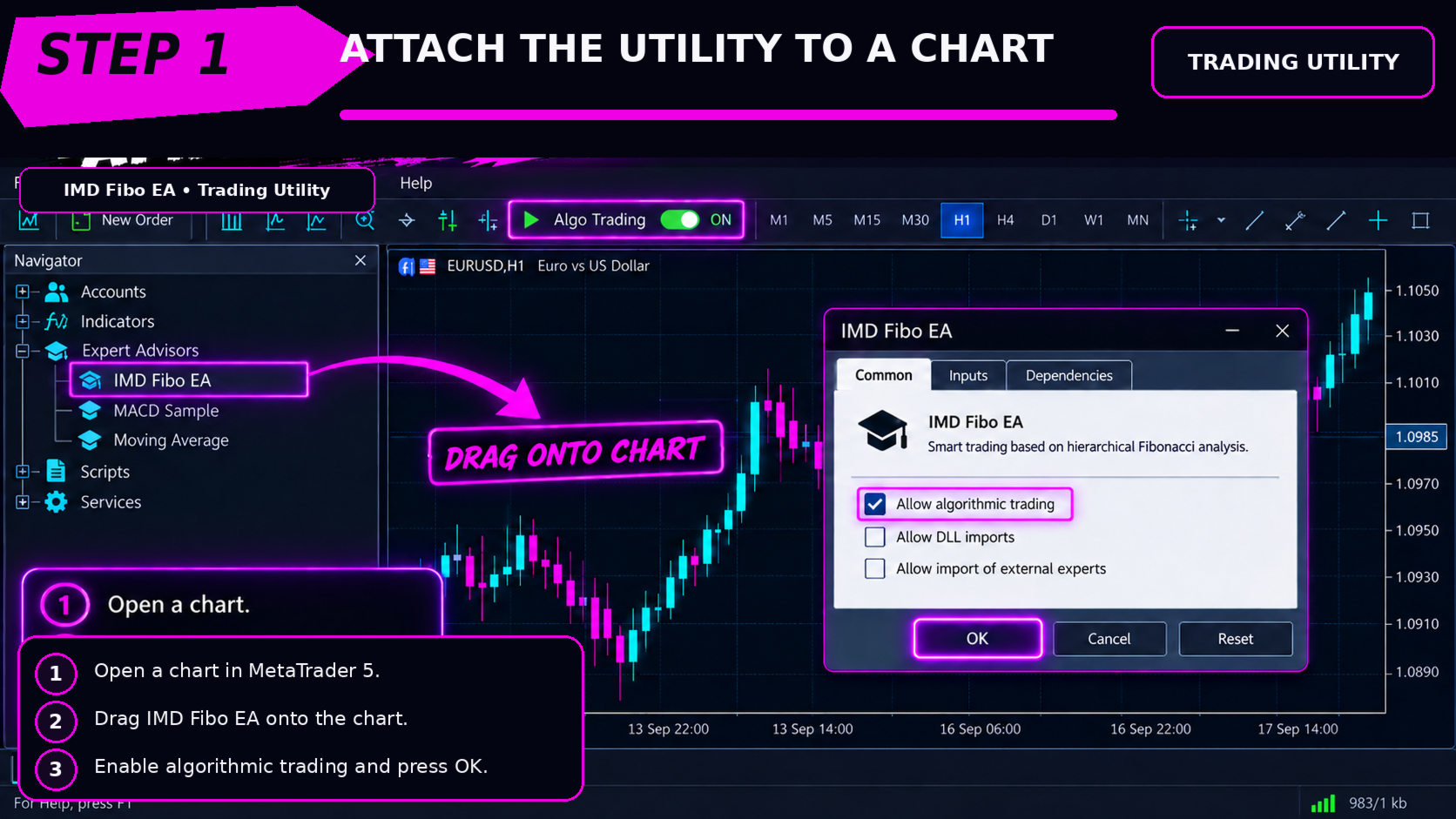
  1. Install IMD Fibo EA in MetaTrader 5.
  2. Attach the utility to the required chart.
  3. Enable algorithmic trading in the terminal and product settings.
  4. Select the symbols to analyze or use Market Watch.
  5. Select the working timeframe.
  6. Adjust EMA, MACD, and ADX parameters if necessary.
  7. Wait until historical and indicator data are fully loaded.
  8. Find a symbol with an active direction and available trading zone.
  9. Check F1/F2/F3, direction, Entry, SL, and TP.
  10. Set the required trade volume.
  11. If the setup matches your strategy, manually place the limit order through the panel.
  12. If the trade plan is no longer valid, remove the pending order with DELETE PENDING .

Main parameters

Symbols — list of analyzed instruments.
Trend Timeframe — timeframe used to determine direction.
EMA Period — EMA period.
MACD Fast / Slow / Signal — MACD parameters.
ADX Period — ADX period.
ADX Min — minimum ADX value required for voting.
Exit Mode — Stop Loss and Take Profit calculation mode.
Minimum Entry Distance — minimum distance between the entry and current market price.
SL Buffer — additional Stop Loss offset.
TP Buffer — Take Profit offset.
Fixed SL / Fixed TP — fixed SL and TP values.
Reward/Risk — target reward-to-risk ratio.
Default Lot — default trading volume.
Pending Expiry Days — pending order expiration period.
Statistics Days — virtual statistics period.
Panel Scale — interface scale.

Important information

IMD Fibo EA is a trading utility for technical analysis and trade plan preparation.

The product does not guarantee profit or financial results.

Trading results depend on:

  • selected instrument;
  • timeframe;
  • settings;
  • market conditions;
  • spread;
  • broker execution;
  • the trader's own decisions.

Before using the utility on a live account, it is recommended to test the settings and become familiar with its operation on a demo account.

Recommended products
English Description SmartEA Pro is a "Commercial-Grade" semi-automatic risk management and trading panel designed exclusively for professional manual and swing traders. It provides a comprehensive multi-timeframe (M1-W1) market overview while featuring a powerful built-in "Extreme Anti-Crash Engine" . This entirely eliminates the fatal flaws of traditional EAs, such as freezing your PC during heavy order volumes, being banned by brokers for DDOS-like API requests, and frequent 10016 (Inval
Equity Pulse MT5 Real-time equity, drawdown, and portfolio performance tracking in one clean trading panel. Equity Pulse MT5 is a practical account-monitoring indicator for MetaTrader 5. It helps traders see exactly where they stand across today, yesterday, recent days, the current week, month, and year. Instead of checking account history manually or relying only on the terminal’s floating profit number, Equity Pulse gives you a clear performance snapshot directly on the chart. It is designed
You set the limits. TEVSYS applies them across your account. Your risk rules are clear in your head. The hard part is executing them when the market speeds up, pressure rises, and the temptation for “one more” shows up. TEVSYS narrows the gap between what you decide and what happens in the terminal. No signals. No profit promises. Documented close precision. Account-level protection. Evidence you can cross-check in MetaTrader 5. What TEVSYS is TEVSYS is an operational governance system within Me
Advanced Live signal panel
Taha Saber Ashour Kamel
5 (1)
Advanced Signals Pro v10.0 is a professional-grade, all-in-one trading dashboard that combines 11 powerful technical indicators into a single, elegant interface. Monitor multiple symbols simultaneously, receive instant buy/sell signals with calculated targets, and make informed trading decisions with confidence. adjust parameters as you wish and if you want to see detailed analysis for any pair double click on it you will get tp , sl and support and resistance and accurate signal Whether you're
FREE
Nasdaq Dip Buyer
Kenichiro Sakamoto
NASDAQ DIP BUYER — USTEC H4 RSI Pullback (long-only) === LAUNCH PRICE: 3 OF 3 LEFT AT $35 (65% OFF the regular $99) === The price rises after every 3 purchases. When these copies are sold, the next price is $49. === START HERE === 1) Read the RISK WARNING below before anything else. 2) Attach the EA to a USTEC H4 chart — on any other chart it will place no trades. 3) Test the free demo in the Strategy Tester first: see “5-MINUTE DEMO CHECKLIST” below. 4) Independent forward results: see “INDEP
Simplify forex analysis: evaluate currency strength with ease This indicator evaluates all eight individual currencies by reading major, minor and crosses pairs using an indicator of your choice, and processing each currency into an index, which you can use to know the market situation of any particular currency in a simple, familiar and understandable way. [ Installation Guide | Update Guide | Troubleshooting | FAQ | All Products ] Find strong and weak currencies at a glance Compare one curren
Advanced Market Pressure Indicator - Professional Trading Tool Stop Guessing. Start Trading with Precision. WHAT IT DOES This indicator reveals WHO controls the market - Buyers or Sellers - and predicts their next move using advanced algorithms. 5 Powerful Systems in ONE Indicator: Real-Time Pressure Analysis - Shows exact buyer/seller force (0-100%) Automatic Divergence Detection - Catches reversals BEFORE they happen AI Confidence Score (70-100%) - Filters out false signals automat
Weekday Stats
Elidio Xavier Guimaraes
Weekday Stats Overview Weekday Stats is a quantitative analysis indicator designed to perform statistical studies of price behavior by classifying candle data according to the day of the week on which each candle occurred. The indicator processes the historical candles of the selected asset and provides statistical information for each day of the week, allowing the user to analyze price direction and price variation separately for each weekday. The sampling period, statistical parameters, and da
News Trade EA MT5
Konstantin Kulikov
4.55 (11)
Present to you the useful robot that I have been using for several years. It can be used in both semi-automatic mode and fully automatic mode. >>> Chat <<< The program contains flexible settings for trading on the news of the economic calendar. It cannot be checked in the strategy tester. Only real work. In the terminal settings, you need to add the news site to the list of allowed URLs. Click Tools > Options > Expert Advisors. Check the option "Allow WebRequests for listed URL:". Add this (de
STATISTICAL MT5 NEWS, EVENT, AND ECONOMIC CALENDAR SCANNER DASHBOARD The first statistical MT5 dashboard designed to scan news events and economic calendars using mathematical probability. THE SEVEN PILLARS: THE COMMANDMENTS OF PROFIT This system does not just look at news; it analyzes the science of market reactions through seven elite pillars: 1. Power (Math) This is the heartbeat of the market. Using a proprietary Net Score calculation, the system boils down complex momentum into a single nu
​AlphaPulse Quant (Momentum Pulse Reversal System) ​ Strategy Overview ​AlphaPulse Quant is an intelligent quantitative trading system meticulously engineered to capture institutional market sweeps and extreme overbought/oversold inflection points. Rejecting the lagging nature of traditional trend-following indicators, the strategy utilizes a proprietary multi-dimensional momentum pulse algorithm to execute counter-trend deployments just as trends exhaust and retail market sentiment reaches F
XAU ZENITH GRID PROTOCOL  Institutional Averaging Engine & Basket Recovery Protocol Xau Zenith Grid Protocol  represents the pinnacle of institutional-grade automated trading software. Fusing the concept of dynamic grid-based averaging- (inspired by AnE Gold Grid) with our proprietary Basket Take-Profit Engine- and Aegis Drawdown Armor, this robot is built exclusively for XAUUSD (Gold).  By tracking extreme overbought and oversold market conditions on the M15 timeframe, the EA scales into th
E2C Lines
Eduardo Cristian De Carvalho
Descubra o poder do nosso indicador de alta precisão, projetado para identificar as regiões de alvo e exaustão de qualquer ativo. Testado e validado por mais de 3 anos nos mercados de mini dólar e mini índice, ele oferece confiabilidade e eficácia incomparáveis. Transforme sua estratégia de trading e alcance novos patamares de sucesso com nossa ferramenta inovadora.
SkyGeniX
ʿAsm Mhmd Samy Asmaʿyl Rmdan
SkyGeniX: Innovative Solutions for Intelligent Automation SkyGeniX is a cutting-edge tool designed to simplify and enhance your workflows with intelligent automation. Whether you're managing complex tasks or optimizing performance, SkyGeniX offers a seamless, user-friendly experience tailored to your needs. Key features include: Smart Optimization : Enhance efficiency and achieve your goals faster with advanced algorithms. Customizable Settings : Tailor the tool to your specific requirements for
FREE
AutoChannel Angular
Diego Alejandro Guzman
AutoChannel Angular Dibuje automáticamente canales de tendencia dinámicos utilizando regresión lineal AutoChannel Angular es un indicador para MetaTrader 5 que genera automáticamente canales de tendencia mediante un algoritmo basado en regresión lineal . Analiza el comportamiento del precio dentro de un período configurable y proyecta un canal compuesto por una línea superior, una línea media y una línea inferior, proporcionando una referencia objetiva sobre la dirección predominante del mercado
FREE
Introducing the BlackWing Signal Provider—an advanced EA designed to enhance your trading experience by facilitating seamless communication between your MetaTrader 5 platform and Telegram channels, groups, or individual users. Key Features: 1. Real-Time Event Notifications: Receive instant alerts on new trades, modified orders, closed positions, and deleted orders. Stay informed and make well-timed decisions. 2. Interactive Chart Snapshots: Share chart snapshots along with new trades and ord
RSI Dynamic Line + Multi Filters - Professional MQL5 Trading Indicator RSI Dynamic Line + Multi Filters Professional MQL5 Trading Indicator | Trend Reversal & Momentum Signals with 15 Powerful Filters PRODUCT TYPE Multi-Indicator Expert MQL5 for MT4/MT5 • Entry Signals (RSI Cross) + 15 Powerful Filters • Professional Trading Tool • Trend Reversal & Momentum Signals with Alerts KEY FEATURES RSI Dynamic Line (Entry Signal) Fa
Adaptive Grid Engine AGE Pro
Thanyacharoen Natphasit
Adaptive Grid Engine (AGE) — Smart Trend-Filtered Grid System Adaptive Grid Engine (AGE) is a professional grid trading system built around a core principle: grid trading without trend filtering is gambling. AGE only opens new series in the direction confirmed by a multi-zone trend engine, while still allowing the grid to extend naturally as the market moves — giving you controlled, rule-based exposure instead of blind martingale. Unlike basic grid EAs that fire orders in both directions regardl
The Magic SMMA indicator is of great help in determining trend direction. It can be an excellent addition to your existing strategy or the basis of a new one. We humans can make better decisions when we see better visually. So we designed it to show a different color for rising and falling trends. Everyone can customize this in the way that suits them best. By setting the Trend Period, we can optimize it for longer or shorter trends for our strategy. It is great for all time frames. IF YOU NEE
FREE
Luck or Edge
Leandro Alberto Carrasco Matos
Your account shows a 78% win rate and a positive average. Does that mean your strategy works, or did you get lucky? Most history tools answer a different question. They show balance, equity, profit by symbol. Useful, but none of them tell you whether the number you are looking at is a real edge or noise. Luck or Edge reads your closed trades and answers that one question. WHAT IT SHOWS Verdict. A single line at the top: Real edge, Could be luck, Systematic loss, or Sample too small. Most of the
The Simple Manual Trading Panel (v2.11) Is a professional trade management tool designed with a clean, movable UI to streamline manual execution and automated exit strategies. Core Features Dynamic Visual Interface: A movable GUI panel that provides real-time information including a bar countdown timer, live spread, and advanced volume analysis. Flexible Lot Size setting, with 2 decimals (If broker supports it). Multi-Stage Take Profit: Supports three distinct Take Profit (TP) levels in either
Niubility Trend  Niubility Trend  displays the trend direction for all time frames in real time. You'll see at a glance at which direction the trends are running, how long they last and how powerful they are. All this makes it an easy-to-use trend trading system for beginners, advanced and professional traders. Features Easy to trade Customizable colors and sizes It is non-repainting and non-backpainting It is fantastic as a trailing stop method It implements alerts of all kinds
Haven Market Structure PRO 2.0 — Market Structure at a Glance Haven Market Structure PRO is an indicator for MetaTrader 5 that helps you read price structure, key levels and confirmed changes in market direction. Version 2.0 combines chart analysis with a compact HAVEN dashboard, so you can review market conditions and locate a level or event directly on the chart. Other products ->  HERE . What’s New in Version 2.0? Three structure ranks: ST, IT and LT. Short-term, intermediate-term and long-te
Online Accounts Manager MT5
Kyra Nickaline Watson-gordon
5 (1)
OneClick Online Account Manager is a powerful utility that helps you to manage all your accounts from a centralized panel. It is suitable for all single account traders and specially for multiple accounts traders. The utility help you to : Monitor status of all accounts on a private web page. Some information such as account connection status, account profit, DD, Balance, Equity, Margin Level, Number of positions and orders, Daily and Weekly profit/loss and also overall summation of all these p
Smart FVG Stats
- Md Rashidul Hasan
5 (1)
The  Smart FVG Statistics Indicator  is a powerful MetaTrader 5 tool designed to automatically identify, track, and analyze Fair Value Gaps (FVGs) on your charts. Love it? Hate it? Let me know in a review! Feature requests and ideas for new tools are highly appreciated. :) Try "The AUDCAD Trader": https://www.mql5.com/en/market/product/151841 Key Features Advanced  Fair Value Gap  Detection Automatic Identification : Automatically scans for both bullish and bearish FVGs across specified histo
FREE
Trillion Pips Pro MT5
Sivaramakrishnan Natarajan
TRILLION PIPS ELITE PRO INDICATOR Advanced Wave-Based Auto Trend System Built with 12+ Years of Real Market Experience, this is not just an indicator — it is a complete market intelligence system designed to help traders identify key levels, understand auto trend direction, and read market movement with confidence. UNIQUE POWER OF THIS INDICATOR Proprietary Strategy – Only from Trillion Pips Advanced Wave-Based Market Structure Engine Auto Trend Detection System Built-in Trend Decider Log
Displays Forex Calendar events on the chart in the form of multi-colored lines, depending on the importance of the news. Displays the currency and the impact of the news (if available). [OPTIONS:] Display only news on a currency pair or All news. Display news by major currencies (optional). Setting the time interval of displayed news. Selecting the importance of displayed events. Displaying the effects of news (Impacts) and currency on the chart.
FREE
Vision  by Quant Atlas Creator:  https://www.quant-atlas.com/ Vision by Quant Atlas  is a multi component reversal signal indicator designed to identify short term bullish and bearish exhaustion points across liquid markets. The model aggregates several independent technical evidence layers, including momentum behavior, mean reversion pressure, volatility based conditions, trend interaction, timing structure, and moving average related confirmation. The final output is converted into visual conv
Teaching TINN
Andriy Sydoruk
1 (1)
The Teaching T-INN utility was created to train architecture neural networks (T-INN) Target-IntelNeuroNet adapted to the currency market. The utility file must be placed in the scripts folder and run on the chart and timeframe on which you want to train the neural network. The result of the training will be recorded in a file, and the entire training process is displayed in the console on the chart and an additional log file. Before starting the script, it is necessary to download all the stori
FREE
Market Structure Engine - Dow Swings, BOS and CHoCH Market Structure Engine is a MetaTrader 5 indicator for visualizing Dow-style market structure with adaptive internal and external swing layers. It identifies HH, HL, LH and LL swings, then marks BOS and CHoCH events when structure levels are broken. Main features - Adaptive internal swing engine based on ATR. - External market structure derived from confirmed internal swings. - Internal and external zigzag lines for visual structure reading.
FREE
Buyers of this product also purchase
Trade Assistant MT5
Evgeniy Kravchenko
4.43 (216)
It helps to calculate the risk per trade, the easy installation of a new order, order management with partial closing functions, trailing stop of 7 types and other useful functions. Additional materials and instructions Installation instructions - Application instructions - Trial version of the application for a demo account Line function -   shows on the chart the Opening line, Stop Loss, Take Profit. With this function it is easy to set a new order and see its additional characteristics bef
Telegram to MT5 MultiChannel Copier
Sergio Marquez Uroz
4.59 (17)
Telegram to MT5 Multi-Channel Copier   automatically copies trading signals from your Telegram channels straight to MetaTrader 5. No bots, no browser extensions, no manual copying. A signal arrives in Telegram and the EA opens the trade in your terminal within seconds. And before you copy a channel, the built-in backtester shows you what that channel would have done in your account. The product has two components: a Windows application that listens to your Telegram channels, and this Expert Advi
================================================================================ POC BREAKOUT - V20.72. Full Professional Grade Toolkit ================================================================================ POC Breakout is a full MetaTrader 5 trading dashboard for discretionary traders who want breakout signals, Point of Control (POC) context, volume profiles, order flow, market structure, news, alerts, and advanced trade planning in one professional workspace. Attached directly to you
FarmedHedge Pair Trading Dashboard
Tanapisit Tepawarapruek
5 (5)
Farmed Hedge Yield Farming | All Markets (Manual - Hybrid - Semi/Automated EA) VERIFIED TRADING RESULTS - Farmed Hedge Yield Axi Copy:  https://www.mql5.com/en/signals/2356376 - Farmed Hedge Yield Exn Copy:   https://www.mql5.com/en/signals/2356404 - Farmed Hedge Yield V Copy:  https://www.mql5.com/en/signals/2357156 IMPORTANT NOTICE: FarmedHedge is a MANUAL-FOCUSED TRADING UTILITY ,not a fully automated EA. Results shown on this Signal include manual trades and overall strategic management.
Power Candles Strategy Scanner - Self-Optimizing Multi-Symbol Setup Finder Series price: 111 USD until Sunday, 27 September 2026, then 139 USD again. Self-optimizing settings work one chart at a time, and finding where they pay off right now means opening chart after chart. Power Candles Strategy Scanner runs the same self-optimizing engine as the Power Candles indicator on every symbol in your Market Watch, side by side. One panel ranks where it pays off: the winning strategy per symbol, its op
Premium Trade Manager - The Trade Panel With a Coach Built In Premium Trade Manager puts a trading coach inside your chart, with a full execution engine underneath it. Set the trade up the way you always do, then let Max, your AI trading coach, read that exact setup against your live account and give you a straight verdict before you commit: is the stop disciplined, is the risk sane, is a high-impact release minutes away, are you near a prop-firm limit. Below sits the engine that runs everything
MT5 Trading Deck
Manuel Michiels
5 (2)
One button. One trade. MT5 Trading Deck is a hotkey trading panel for MetaTrader 5 that turns the platform into a keyboard-driven execution cockpit. Stop loss, take profit and lot size are pre-calculated for every key; the moment you press, a market order is live on the broker. A complete technical user manual is attached in the product Comments section. It documents every input parameter, the full hotkey map, the recommended Stream Deck XL layout, and the advanced workflows for Pre-Limit orders
EasyInsight AIO MT5
Alain Verleyen
4.92 (12)
EASY Insight AIO – All-In-One Power for AI-Driven Trading Want to skip the setup and start scanning the entire market – Forex, Gold, Crypto, Indices, and even Stocks – in seconds? EASY Insight AIO is the complete plug-and-play solution for AI-powered trade analysis. It includes all core Stein Investments indicators built-in and automatically exports clean, structured CSV files – perfect for backtesting, AI prompts, and live market decision-making. No need to install or configure indicators manu
EA Overfitter
Stephen J Martret
5 (1)
That backtest looks great. But will it still be making money tomorrow, next week, next month? EA Overfitter re-runs your EA on 100 price histories it has never seen. One score tells you if the edge is real. A backtest tells you what an EA did on one price history — the one that happened to occur. What you cannot tell from it is how much of that result was the strategy and how much was the particular path. EA Overfitter answers that. It builds up to 100 synthetic price histories your EA has n
EA Slipstream
Stephen J Martret
5 (1)
Your backtest filled every order at the price it asked for. Your account does not. EA Slipstream measures what execution costs your EA, using your own fills, slippages and spreads to show you the true performance of your EA. A backtest prices every trade at the level the EA named. In live trading a pending order fills at whatever price is available when it triggers, a stop closes wherever the market is when it is hit, and the spread at that moment is whatever the account was quoting. The differ
Dynamic Fibonacci Grid
Tsvetan Tsvetanov
5 (1)
Introducing the latest version of the Dynamic Fibonacci Grid Dashboard for MT5. Now packed with many new features, this new dashboard transforms your trading experience and allows you to see the market and the price action from a completely different perspective. Discover new possibilities with simultaneous analysis of multiple timeframes covering multiple symbols. User-friendly interface for manual trading and management of positions and an expanded ability to apply predefined automated strate
The product will copy all telegram signal to MT5 ( which you are member) , also it can work as remote copier.  Easy to set up, copy order instant, can work with almost signal formats, image signal,  s upport to translate other language to English Work with all type of channel or group, even channel have "Restrict Saving Content", work with  multi channel, multi MT5 Work as remote copier: with signal have ticket number, it will copy exactly via ticket number. Support to backtest signal. How to s
Footprint Chart Pro — Professional OrderFlow EA for MetaTrader 5 Version 6.34 | Professional tool for real traders | Institutional-Grade Visualization DEMO USERS - PLEASE SELECT EVERY TICK / REAL TICK WHEN TESTING AND YOU HAVE DOWNLOADED HISTORICAL DATA. IF YOU SEE A WAITING SCREEN AND IT IS NOT DOWNLOADING, IT MEANS YOU HAVE LOW HISTORICAL DATA. TRY 1 MIN AND 5 MIN FIRST ON 1 DAY DATA. ONE DAY DATA SHOULD BE THE NEWEST AND MOST CURRENT DATE. PLEASE WAIT UNTIL THE MARKET HAS ROLLED OVER PERIOD.
YuClusters
Yury Kulikov
4.93 (43)
Attention: You can view the program operation in the free version  YuClusters DEMO .  YuClusters is a professional market analysis system. The trader has unique opportunities to analyze the flow of orders, trade volumes, price movements using various charts, profiles, indicators, and graphical objects. YuClusters operates on data based on Time&Sales or ticks information, depending on what is available in the quotes of a financial instrument. YuClusters allows you to build graphs by combining da
Timeless Charts
Samuel Manoel De Souza
5 (8)
Timeless Charts is an all-in-one trading utility for professional traders. It combines custom chart types such as Seconds Charts and Renko with advanced order flow analysis using Footprints , Clusters , Volume Profiles , VWAP studies, and anchored analysis tools for deeper market insight. Trading and position management are handled directly from the chart through an integrated trade management panel , while Market Replay and Virtual Accounts provide environments for practicing trading skills and
FUTURES ORDERFLOW FOOTPRINT CHART Professional OrderFlow EA for MetaTrader 5 Version 1.01| Professional tool for real traders | Institutional-Grade Visualization STRATEGY TESTER USERS - PLEASE SELECT EVERY REAL TICK WHEN TESTING AND YOU HAVE DOWNLOADED HISTORICAL DATA. IF YOU SEE A WAITING SCREEN AND IT IS NOT DOWNLOADING, IT MEANS YOU HAVE LOW HISTORICAL DATA. TRY 1 MIN AND 5 MIN FIRST ON 1 DAY DATA. ONE DAY DATA SHOULD BE THE NEWEST AND MOST CURRENT DATE. PLEASE WAIT UNTIL THE MARKET HAS ROL
The product is used to trade base on any Alert signal in MT5 Easy to setup, simple format with custom keyword All option to management orders as trailing stop, breakeen, partial close, time filter, news filter ... Option to auto open grid orders How to setup and guide: Let read all details about setup and download indicator for auto get   Alert Signal   here Do not buy if you even can not install demo EA to your VPS ( some VPS block download EA from mql5 market) We always bring customers high q
Trade Indicator Assistant   is a powerful MT5 utility designed to turn indicators into automated trading systems. Its main feature is the ability to automatically detect an indicator’s   BUY and SELL signal buffers , without requiring you to know the buffer numbers, search through indicator settings, or modify the indicator source code. Bonus Indicator:   After purchasing Trade Indicator Assistant, contact me to receive   Trade Signal Pro   completely free as a bonus indicator. [Download Demo V
Welcome to ENTRY IN THE ZONE AND SMC MULTI TIMEFRAME Entry In The Zone and SMC Multi Timeframe is a real-time market analysis tool based on Smart Money Concepts (SMC), designed to analyze market structure, price direction, and key trading zones. It supports both Single-Timeframe Analysis and Multi-Timeframe Analysis, providing a clearer view of the overall market structure across multiple timeframes, with real-time BUY / SELL signals that do not repaint. It is designed to help filter trading opp
Mentfx Mmanage mt5
Anton Jere Calmes
4.25 (8)
The added video will showcase all functionality, effectiveness, and uses of the trade manager. Drag and Drop Trade Manager. Draw your entry and have the tool calculate the rest. Advanced targeting and close portions of a trade directly available in tool (manage trades while you sleep). Market order or limit order on either side with factored spread. Just draw the entry, the tool does the rest. Hotkey setup to make it simple. Draw where you want to enter, and the stop loss, the tool calculates al
Becktester Telegram Signals Custom Becktester Telegram Signals Custom is an advanced version of the regular Becktester Telegram Signals, created for traders who want not only to parse Telegram signals and backtest them in MetaTrader 5, but also to test custom post-entry trade management logic that goes far beyond the standard version. The regular Becktester Telegram Signals already allows you to connect to Telegram, read real channel messages, parse Buy/Sell, Entry, Stop Loss and Take Profit dat
Ultimate Extractor
Clifton Creath
5 (7)
Ultimate Extractor - Professional Trading Analytics for MT5 *****this is the local HTML version of Ultimate Extractor. !!!!!it is not compatible with Cloud!!!! For the online version please reach out to me directly****** Ultimate EA manager also now available when you use cloud pro and above for free!! Ultimate Extractor transforms your MetaTrader 5 trading history into actionable insights with comprehensive analytics, interactive charts, and real-time performance tracking. What It Does Automa
EA Auditor
Stephen J Martret
5 (5)
EA Auditor is an independent analysis tool for traders evaluating Expert Advisors and trading signals on MetaTrader 5. It audits backtest reports, reviews posted developer signals, and cross-verifies the two against each other to help traders assess strategies before committing capital. The MQL5 market offers a wide range of Expert Advisors from many developers, with varying approaches, quality, and transparency. EA Auditor provides a consistent, data-driven framework for reviewing them, answer
Copy your MT5 trades to Interactive Brokers You keep using MT5. Every order you open or close is sent to your IB account. In real time. No coding. No changes to your strategy or EA. Try it first Rent 1 month: $30. Test on a live or paper account. What it does Real-time copying: same direction, reverse, or one side only. Map any MT5 symbol to any IB symbol. Set a lot ratio for each. Forex, Futures, Stocks, CFDs, Metals and Crypto. Position sync: both accounts checked, any difference fixed. Optio

Telegram To MT5 Receiver
Levi Dane Benjamin
4.53 (15)
Copy trade signals from Telegram channels you already belong to (including private and restricted channels) directly into MetaTrader 5. Set your risk rules once, monitor execution, and manage positions with built-in protections designed to reduce mistakes and overtrading. Fast setup : configure your channels, select what to copy, and start within minutes using a clean on-chart interface. User Guide + Demo | MT4 Version Who this is for Traders who follow one or more signal providers and want cons
Prop Firm Os
Gayathiri Gopalakrishnan
5 (1)
PROP FIRM OS Structured Trading Assistant for MetaTrader 5 PROP FIRM OS is a structured trading assistant designed for MetaTrader 5 users who prefer rule-based market analysis and organized trading workflows. The Expert Advisor combines market analysis tools, scanner functions, dashboard monitoring, alerts, risk-control settings, and trade management features inside one system. PROP FIRM OS is designed to help traders follow selected rules, filters, and monitoring conditions during trading activ
Advanced Daily Trading Limiter PRO
AL MOOSAWI ABDULLAH JAFFER BAQER
Advanced Daily Trading Limiter PRO Professional Risk Management. Uncompromising Trading Discipline. One undisciplined trading session can erase weeks of consistent profits. Whether it's overtrading, revenge trading, or exceeding a prop firm's daily risk limits, emotional decisions often become a trader's biggest obstacle—not the market itself. Advanced Daily Trading Limiter PRO is a comprehensive risk management and discipline enforcement utility for MetaTrader 5, designed to help traders stay
VirtualTradePad PRO SE MT5 — professional trading control center for MetaTrader 5 VirtualTradePad PRO SE is a premium chart-based trading panel and trade-management workspace for MetaTrader 5 . It is designed for traders who want faster execution, clearer position control, structured trade management, visual level planning and a professional workflow directly from the chart. This is not only a BUY / SELL panel. PRO SE combines manual trading, pending orders, position management, partial exits, b
Quant AI Agents
Ho Tuan Thang
5 (1)
Quant AI Agents are independent trading Expert Advisors. Instead of trading using a fixed strategy like other conventional EAs, Quant AI Agents   is a   multi-agent AI trading framework   that turns natural-language strategy prompts into live.  WANT THE SAME RESULTS AS MY LIVE SIGNAL?   Use the exact same brokers I do:   IC MARKETS , IC TRADING   .  Unlike the centralized stock market, Forex has no single, unified price feed.  Every broker sources liquidity from different providers, creating un
A professional panel for manual trading that keeps the whole trade cycle in one window on the chart, from a precise entry to protecting your account. Size every position strictly to a defined risk, build the trade with lines directly on the chart using the RR Tool, and place market and pending orders, grids and OCO. The panel takes position management off your hands: partial closing across up to five levels, six types of trailing stop, breakeven and Virtual SL/TP. Daily, weekly and monthly limit

More from author
IMD Fibo
Aleksei Chedaev
5 (3)
IMDFIbo is an indicator for the MetaTrader 4 terminal that automatically builds a grid of Fibonacci levels based on historical data. The tool is designed to visualize potential support and resistance zones on the price chart. How It Works The indicator analyzes historical price highs and lows over a specified period and builds Fibonacci levels based on them. The distinctive feature of the tool is the recursive construction of the grid: each interval between levels can be further divided into sm

FREE
IMD Fibo MT5
Aleksei Chedaev
5 (1)
IMDFIbo is an indicator for the MetaTrader 5 terminal that automatically builds a grid of Fibonacci levels based on historical data. The tool is designed to visualize potential support and resistance zones on the price chart. How It Works The indicator analyzes historical price highs and lows over a specified period and builds Fibonacci levels based on them. The distinctive feature of the tool is the recursive construction of the grid: each interval between levels can be further divided into sm
FREE
The indicator scans your trading account in real time, analyzes open positions, and, if enabled, pending orders, then mathematically calculates two key price levels. Breakeven Line (BE) The price at which closing your position will result in exactly zero total profit. The indicator takes commissions and swaps into account, so you do not accidentally close a trade at a loss because broker costs were forgotten. Target Line (Target/TP) The price the market must reach for you to earn a specified
FREE
The indicator scans your trading account in real time, analyzes open positions, and, if enabled, pending orders, then mathematically calculates two key price levels. -Breakeven Line (BE) The price at which closing your position will result in exactly zero total profit. The indicator takes commissions and swaps into account, so you do not accidentally close a trade at a loss because broker costs were forgotten. -Target Line (Target/TP) The price the market must reach for you to earn a specifie
FREE
IMD Gold EA
Aleksei Chedaev
Gold is one of the most demanding instruments for algorithmic trading: calm trending movements are regularly replaced by sharp sideways action, followed by spikes of chaotic volatility on news releases. A strategy that works perfectly in a trend usually loses its effectiveness in a flat market, and vice versa. This is exactly the problem that IMD Gold EA solves. The Expert Advisor for MetaTrader 5 is created specifically for trading gold (XAUUSD) on the M15 timeframe. Instead of a single fixed
Filter:
No reviews
Reply to review