IMD Triangles MT4

IMD Triangles — scanner of triangles and corridors on trend lines

Chat for discussing the robots in the team: join


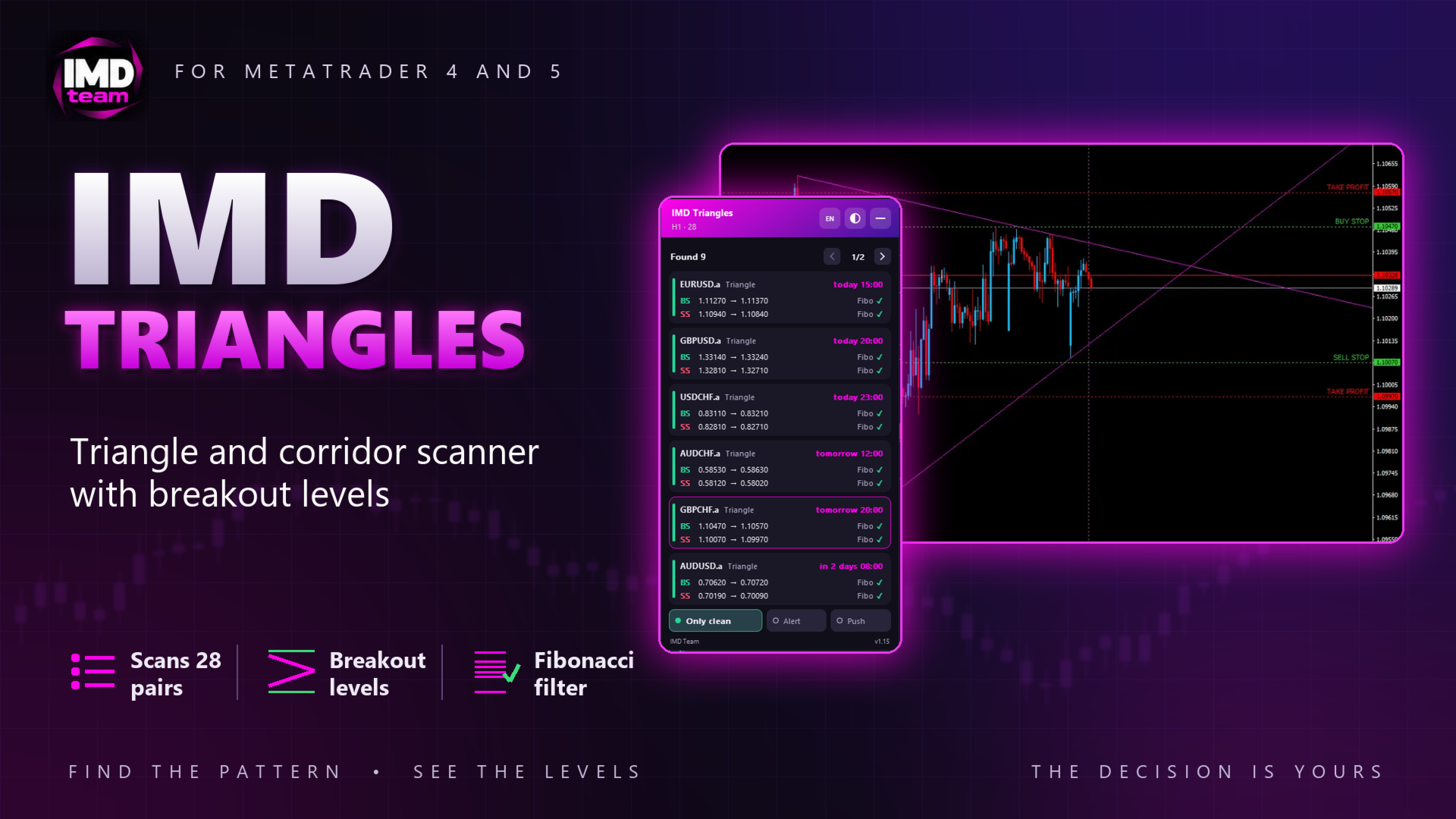
IMD Triangles is an indicator that scans a list of symbols for triangles and flat corridors built on trend lines and calculates Buy Stop and Sell Stop levels for the breakout.


The indicator does not open trades and does not make trading decisions. It shows the pattern and the levels, and the trader decides whether to place orders.


How patterns are found


The upper line is drawn through candle highs, the lower line through candle lows. A touch counts only when the candles after it do not cross the line, and the last closed candles (3 by default) are not used as touches. Because of this, a pattern does not redraw with every new candle.


A triangle is shown when:

• the first base of the pattern is high enough;

• both lines were touched recently;

• the lines meet within the set number of trading days: today, tomorrow or the day after by default.


A corridor is shown only when both lines are almost horizontal and parallel. A sloped corridor has no point where the lines meet, so it is not used.


Entry levels


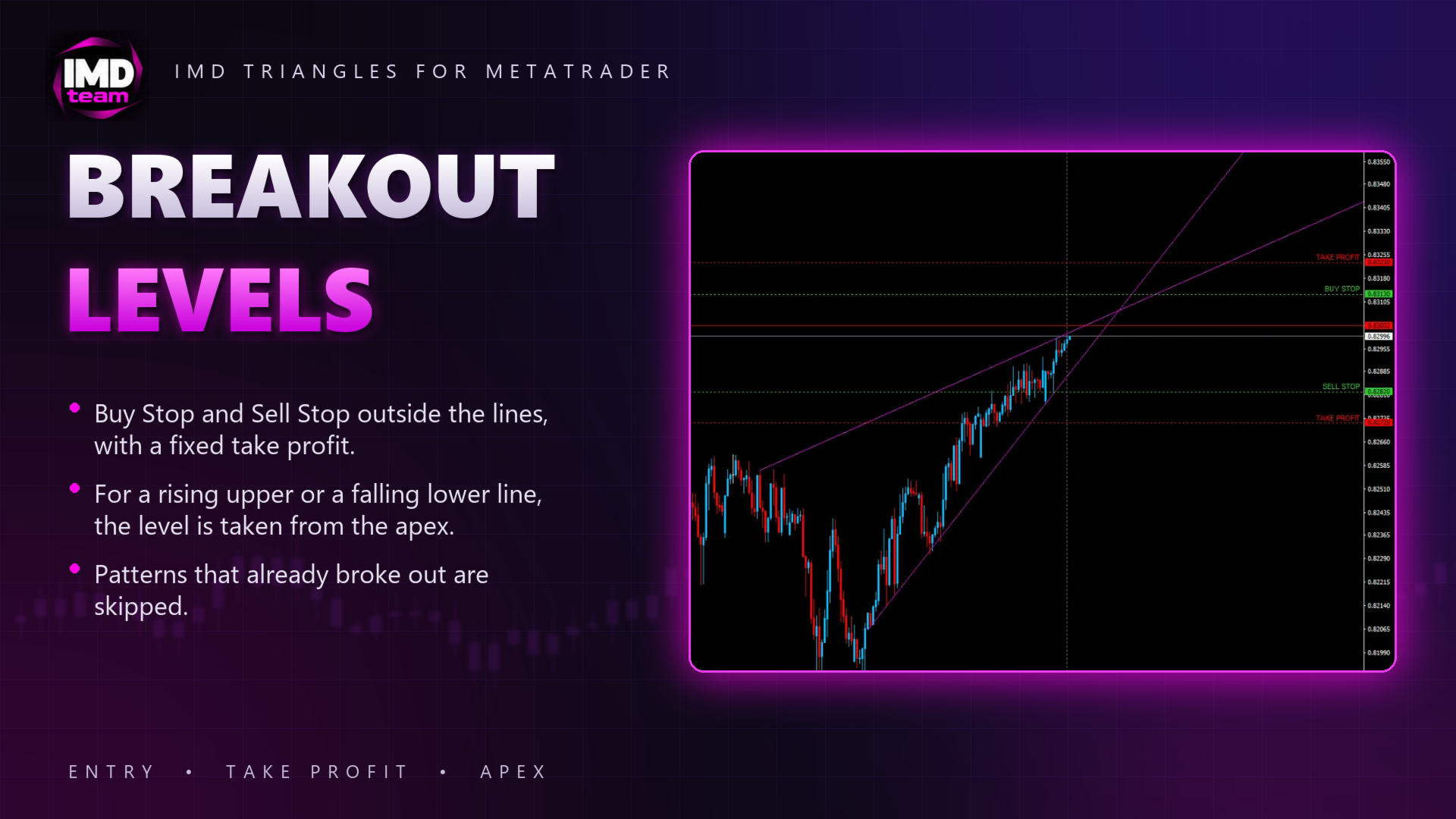
Buy Stop and Sell Stop are placed at a set distance outside the lines (50 points by default) on the last closed candle, rounded to a set step, with a fixed take profit.


If the upper line rises, it stays inside the triangle up to the apex, so the Buy Stop level is taken from the apex, the point where the lines meet. For a falling lower line the Sell Stop level is taken from the apex in the same way.


A pattern is skipped when the two entries are too close to each other, or when the price has already reached an entry level on recent candles or on the current one: such an order would be late.


Fibonacci filter


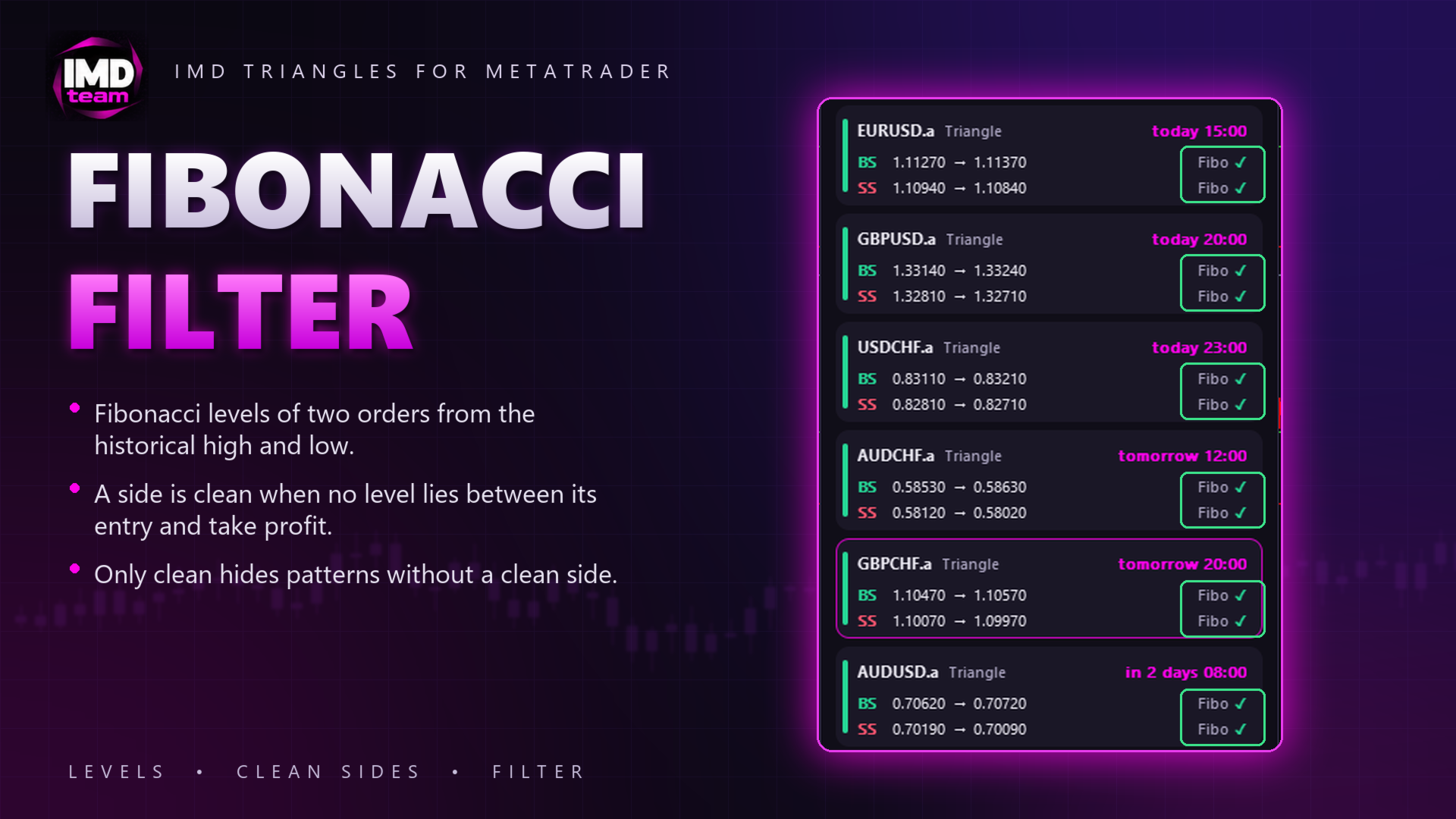
Fibonacci levels of two orders are built from the historical high and low of the symbol. A side is marked as clean when no level lies between its entry and its take profit. The Only clean switch hides patterns that have no clean side.


Panel


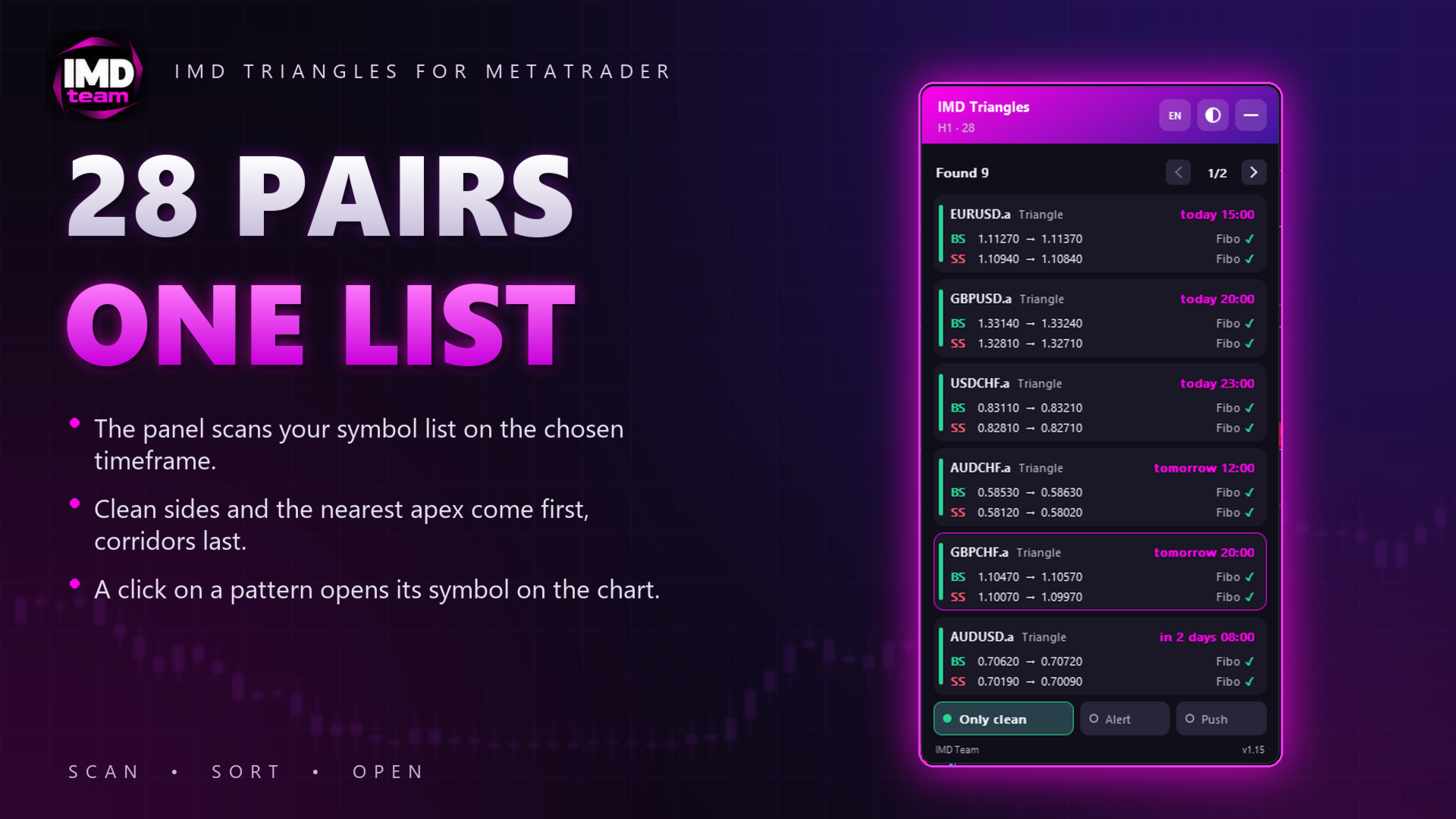
• List of patterns page by page: symbol, pattern type, apex time, Buy Stop and Sell Stop with take profit, and a Fibonacci mark for each side. Patterns with clean sides and a closer apex come first, corridors last.

• A click on a pattern opens its symbol on the chart, where the lines and levels are drawn.

• Switches on the panel: Only clean, Alert, Push.

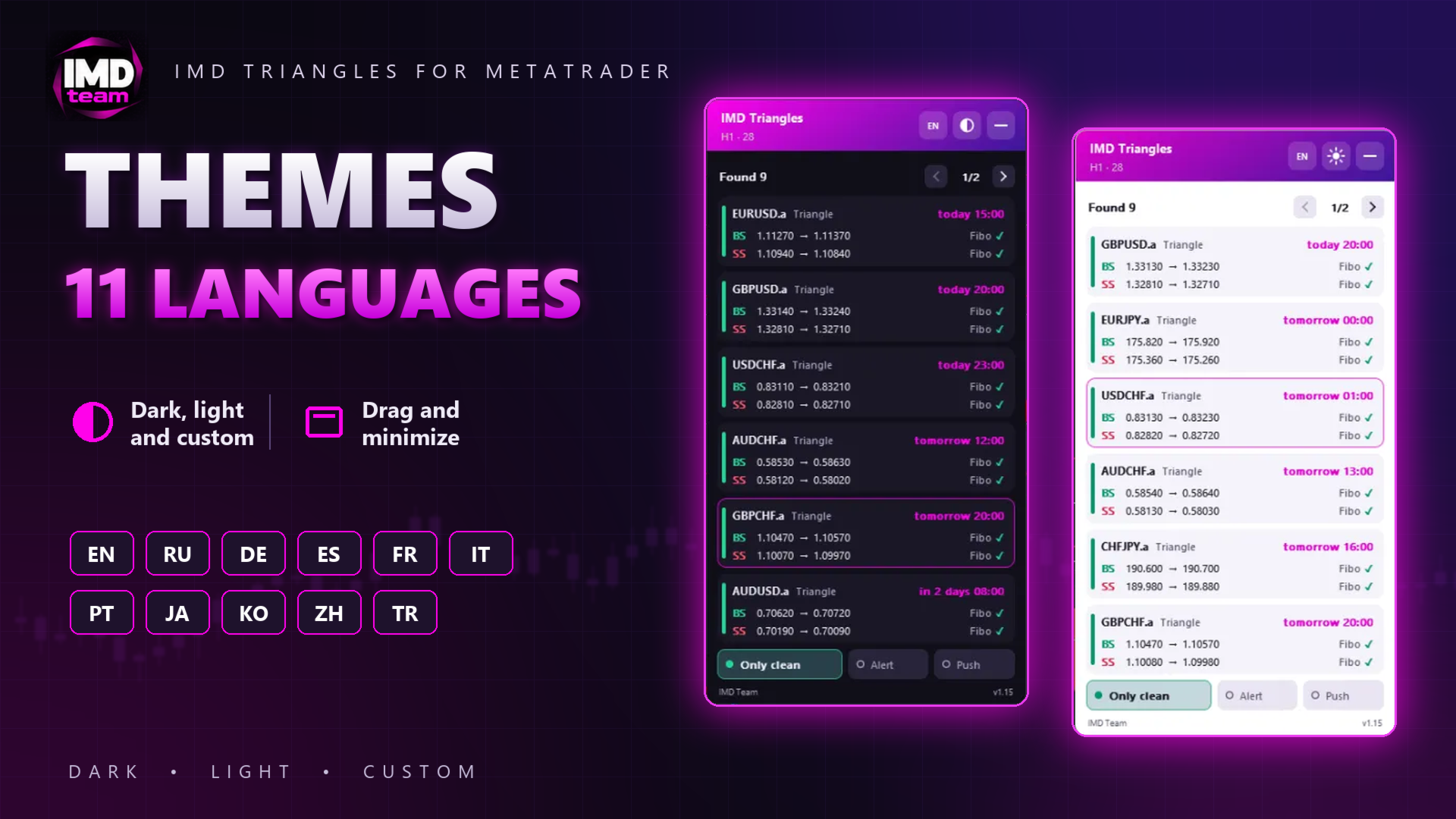
• Dark, light and custom themes, 11 interface languages, drag and minimize.


Notifications


Alert and push notification when a new pattern appears. Push notifications are off by default.


Inputs


• Scanner: symbol list (broker prefixes and suffixes are found automatically), timeframe, scan window, history test time.

• Lines: touch tolerance, minimum candles between touches, age of the last touch, number of last candles excluded from touches, minimum first base, apex limit in days, corridor settings.

• Orders: entry offset, take profit, minimum distance between entries, rounding step, skipping patterns whose entry was already reached.

• Fibonacci filter: start date and levels.

• Chart and panel: colors, line width, notifications, language, theme, position, scale, patterns per page.


Notes


Distances are set in points of 5-digit quotes (3-digit for JPY pairs); 4- and 2-digit quotes are converted automatically.


On the first run the indicator downloads the history of every symbol in the list, so the first scan may take a few seconds. Monthly history for the Fibonacci filter can take several minutes; until it loads, the panel shows "…" instead of the Fibonacci mark.


In the Strategy Tester the indicator scans only the tested symbol.


History test: set a past server time in the inputs, and the indicator analyzes the market as of that moment and prints the list of patterns to the Experts journal.


Trading involves risk. Patterns found on history do not guarantee future results.


For any questions, please contact the author via private messages on MQL5.com.

Recommended products
PTW NON REPAINT TRADING SYSTEM + HISTOGRAM Non-Repainting ,   Non-Redrawing   and   Non-Lagging  Trading System. Does the following: - Gives Accurate Entry and Exit Points - Scalping, Day and Swing Trading  - 95% Accuracy  - Targets, where to take profits. - Shows Trends, Support and resistance levels - Works on All Brokers - Works on All Currencies, CFDs and Stocks - It does not place trades for you, it only shows you what trades to place. - It works on All Timeframes - It is for Trend or ran


Gold Strike Predator
Ignacio Agustin Mene Franco
GoldStrike Predator – Professional Expert Advisor for XAUUSD GoldStrike Predator is an advanced, high-precision Expert Advisor (EA) designed exclusively for trading the XAUUSD pair (Gold vs. US Dollar) on the MetaTrader 4 platform. Developed with a sophisticated hybrid architecture, it combines multiple layers of technical and predictive analysis to identify high-probability opportunities in the gold market, one of the world's most volatile and profitable instruments. Trading Strategy The sys
KT Candlestick Patterns Scanner is a Multi-Symbol and Multi-Timeframe scanner that fetches and shows various candlestick patterns on 28 currency pairs and 9 time-frames concurrently . The scanner finds the candlestick patterns by loading the KT Candlestick Patterns indicator as a resource in the background. Features The scanner can find the candlestick patterns on 252* combinations of symbols and time-frames from a single chart. Open the signal's chart loaded with a predefined template with a s
Boost binary option profesional
Sebastian Alejandro Merino Sepulveda
Binarias & Forex (+90% Ratio-Win Next Candle) Espere que el precio llegue a una buena zona (fuerte) sea soporte, resistencia, zona de oferta o demanda, fibonacci level key, cifra redonda. Haciendo lo anterior definitivamente habrá una reversión en el precio y obtendrá su ITM en primera vela dando una efectividad del 100% siguiendo la tendencia. Es muy importante estar atento a las noticias fundamentales en el mercado y estas no afecten tu trading. Sesiones comerciales: cualquiera (24 horas).
Technical indicator that structures charts and identifies cyclical price movements. Can work on any charts. Several types of alerts. There are additional arrows on the chart itself. Without redrawing on history, works on closing a candle. Recommended TF from M5 and higher. Easy to use and configure parameters. When using 2 indicators with different parameters, you can use without other indicators. Has 2 input parameters Cyclicality and Signal duration These 2 parameters work with the processin
This EA can run on every currencies pairs recommend EURUSD, USDJPY, EURJPY, GBPUSD Timeframe 30 Minute (M30) The important advantage of this EA is that you can start to trade with $1000 min imum initial Deposit. And the robot can support your manual transactions on EURUSD. ACCOUNT LEVERAGE: 1:100 ACCOUNT (Stop Out): 50% or less ACCOUNT TYPE: Real account ACCOUNT MODE: Hedging account Take Profit: Automatically Stop Loss: Automatically LOT size: Manual first order
Trend Sim
Ivan Simonika
This is a professional Trend Sim indicator. The intelligent algorithm of the Trend Sim indicator accurately detects the trend, filters out market noise and generates input signals and exit levels. Functions with advanced statistical calculation rules improve the overall performance of this indicator. The indicator displays signals in a simple and accessible form in the form of arrows (when to buy and when to sell). Knowing the entry point of each of the currencies is very important for every f
Lunexa MT4
Aren Davidian
Lunexa – The Intelligent Trading Robot MT5 Version   :   h ttps://www.mql5.com/en/market/product/143765 products List :   https://www.mql5.com/en/users/arendav/seller Signals:   https://www.mql5.com/en/signals/2341558 Why Lunexa? In the ruthless world of trading, there's no place for luck—only intelligent algorithms and adaptive systems survive. Lunexa is the result of over 20 years of research, development, and testing on more than 2 million real market data points, built with o
Trend Analysis in act
Ihab Mohamed Kamal Fouda
The Trend Analysis Indicator is an innovative tool designed for traders and investors who seek to navigate the complexities of the financial markets with greater precision and insight. This powerful indicator is engineered to adeptly identify whether a market is trending or not, offering users a vital edge in their trading strategy. Key Features: Accurate Trend Detection : The core functionality of the Trend Analysis Indicator lies in its ability to accurately detect market trends. It analyzes p
Description: EuroPulse EMA Trend — EMA 34/144 Trend Following EA with ADX Filter (Swap-Free) PRODUCT OVERVIEW EuroPulse EMA Trend is a premium automated trading solution designed for MetaTrader 4, specialized for the EURUSD currency pair. The EA implements a fast and reliable trend-following strategy: • EMA 34/144 crossover for trend direction • ADX 14 filter for trend strength confirmation • ATR-based stop loss and take profit • Daily loss protection • Swap-Free mode for Islamic acco
Proinsta78
Mikhail Bilan
3.5 (4)
Good afternoon friends! At the request of buyers, now when conditions for buying or selling are met, the indicator will send an alert and push notifications. Push notifications come to the phone, provided that you have the MQL application installed. You just need to enter your MetaQuoteID in the application. You can find it in the MT4 platform in the Service - Settings - Notifications section. I showed the conditions for the signal in the form of screenshots in the section screenshots 1-2 phot
TR Basket System
Meshari F M Alkhawaled
TR_BASKET_SYSTEM v3.5 Institutional-Grade Basket Trading System The Problem Most grid systems fail for one reason: They don’t know when to stop. They keep adding positions blindly… Until the account is gone. The Solution TR_BASKET_SYSTEM is built differently. This is not a random grid EA. This is a defensive, structured, multi-layer trading system designed to: Control risk Adapt to market conditions Protect equity And exit intelligently What Makes It Different? This system does NOT rely on entr
Trade Invest Pro
Dmitriy Kashevich
Trade Invest Pro - Boss in the world of cryptocurrency! This indicator is ideal for cryptocurrency trading! Work on Trade Invest Pro took us half a year! But not in vain! Now only accurate signals near support - resistance levels! He showed himself well on timeframes m5 m15 for binary options! Optionally, it can be configured for forex for timeframes m30 and more! Reacts well to news! Doesn't paint! and does not disappear from the schedule! As soon as a red arrow appears, open a deal fo
Algo Trading Indicaor  With this indicator , you’ll have zones and trends that hight probability the price will reverse from it. so will gives you all the help that you need  MT5 Version                    https://www.mql5.com/en/market/product/170028 MT4 Version                    https://www.mql5.com/en/market/product/88034 Why should you join us !?  1-This indicator is logical since it’s working in previous days movement , to predict the future movements. 2-Algo trading indicator will hel
AuroraV5
Ron Fritzhugh Bryan
I could write a fantastic description with lots of quantitative testing parameters but we have a saying that "taste of a pudding is in the eating " so I will simple put a CHALLENGE :Test this EA on any of the major and minor pairs (AUD,USD,EUR,CHF,NZD )and I guarantee you  50% discount if you can prove in a test on any of the major pairs above  that you have incurred  more than 3 error runs. *NOW HAPPY TESTING* Then you get to write the description unhindered!!!!!!!!!!!!!!!!!!!!!!!!!!!!!!!
Linear Trend Predictor - A trend indicator that combines entry points and direction support lines. It works on the principle of breaking through the High/Low price channel. The indicator algorithm filters market noise, takes into account volatility and market dynamics. Indicator capabilities Using smoothing methods, it shows the market trend and entry points for opening BUY or SELL orders. Suitable for determining short-term and long-term market movements by analyzing charts on any timeframes.
NRP Surge EA MT4
Black Panther AI
Product Title: NRP Surge EA Description: Looking for the MetaTrader 5 version? > The MT5 version with native news filtering is available here: https://www.mql5.com/en/market/product/178954   SEE THE LIVE TRACK RECORD:   Watch this algorithm execute in real-time on our verified AquaFunded 10K Live Signal account here:   View Live Trading Signal & Performance The NRP Surge EA is a commercial-grade, institutional volume sniper engineered exclusively for the H1 timeframe. Designed for the mo
Al in one level
Kundan Kumar Srivastava
5 (1)
This indicator is collection of important dynamic support and resistance giving a trader crystal clear idea , where to sell and where to buy. it completely complements trend lines, support, resistance, and sideways market and allow a trader to make sustainable profits. The thickness of lines suggests its strengths, the thicker the dynamic line, the stronger is rejection or pullback allowing a trader to make multi-fold profit, as they can clearly see them. Introducing Your Ultimate Trading Edge:
This is a simple arrow system based on Engulfing Candlestick Pattern. It gives you alerts on your smartphone when there is an engulfing candlestick pattern happens. Which type of alerts available? 1. It paints on chart Up/Down Arrows. 2. Popup message and sound alert in trading terminal window. 3. Push notification or Alert on your Android and IOS mobile phones (requires MT4 or MT5 app installed!) *Note: Use it on higher timeframes like H4 (4 hours), D1 (1 Day) then find trade opportunities on s
G2 Entry Signal MT4
Ida Bagus Putu Mahardika
G2 ENTRY SIGNAL by Ida Bagus Putu Mahardika STRATEGY DESCRIPTION G2 Entry Signal is a professional multi-strategy entry dashboard that combines top-down analysis with 3 proven trading strategies in one powerful indicator. Designed for traders who demand clarity, accuracy, and actionable signals, this tool filters market noise and delivers high-probability entry opportunities directly on your chart. KEY ADVANTAGES 1. 3 STRATEGIES IN ONE DASHBOARD Strategy 1 – London Session Breakout:   Capt
FREE
I will support only my client. สำหรับลูกค้า Parameters General Trade Settings Money Management  Lot : Fixed (can change) Strategies  - H1 and H4 Strategies you can using both it is fixed with MA, Bollinger band, Candlestick Levels Close Functions  - H1 and H4 Strategies you can using both MagicNumber  - individual magic number. The EA will only manage position of the chart symbol with this magic number. NextOpenTradeAfterMinutes  - 20 minutes is default, can change it MaxSpread  - upto currenc
Pip Professional
Yaroslav Varankin
Pip Professional: A Reliable Advisor Pip Professional is a reliable advisor that operates on a new algorithm featuring three filters and uses moving averages (MA) to determine the trend. Recommendations: Max Spread: Trades will not be opened once the set spread value is reached. Slippage: Deviation from the price at the moment of order opening. Take Profit: 40 pips. Stop Loss: 35 pips. Lots: Trade size of 0.1. Timeframe: From M1 to D1. Currency Pairs: GBPUSD, EURUSD, and others. You can test th
KT Absolute Strength MT4
KEENBASE SOFTWARE SOLUTIONS
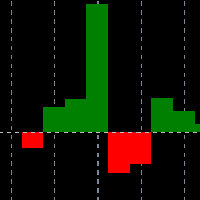
KT Absolute Strength measures and plots the absolute strength of the instrument's price action in a histogram form. It combines the moving average and histogram for a meaningful illustration. It supports two modes for the histogram calculation, i.e., it can be calculated using RSI and Stochastic both. However, for more dynamic analysis, RSI mode is always preferred. Buy Entry When the Absolute Strength histogram turns green and also it's higher than the previous red column. Sell Entry When th
NosTraderMus_RegLin_PRO Professional Expert Advisor with Linear Regression, MTF filters, and active trade management Recommended: start testing on the M5 (5-minute) timeframe. NosTraderMus_RegLin_PRO is designed for traders who want quantitative, disciplined, and repeatable trading. The EA detects value zones using a linear regression channel and only trades when the context supports it (RSI, DeMarker, multi-timeframe momentum, volume, and spread), while managing each position actively and adapt
Cancer
Vitalii Zakharuk
Cancer indicator is great for trend trading! An intelligent indicator algorithm with high probability shows the points of potential market reversal. If you are trading in a trend, then a trading strategy built on the basis of this indicator is perfect for you. The indicator filters out market noise, almost everything and all the necessary functions for working with a thread are built into one tool. It works on all currency pairs and on all timeframes, indicator setting - according to your desire
EMA Dashboard
Chantal Sala
1 (1)
Ema Dashboard is an innovative dashboard that allows you to monitor Moving Average on multiples symbols and different timeframes. This dashboard allows you to analyze information on 28 pairs on an unique chart. Its functionality includes analysis of All Time Frames. This configuration allows you to identify the Long Term Trend with extreme ease. This panel allows you to take very important directional movements. A click on button opens a new chart (symbol and timeframe). Graphic Object Symbol l
The Trend Professor is a moving average based indicator designed for the purpose of helping the community of traders to analyse the price trend. The indicator will be displayed in the main chart as it is indicated on the screenshot section. How it works The indicator has lines of moving averages and colored histograms to depict the direction of the trend. There will be a fast signal line colored blue/yellow/red at some points. The red/yellow colored lines stands for bearish trend/signal while th
The indicator is like a mother-in-law, who talks often, talks a lot and often inappropriately. The indicator, in addition to giving us an entry signal on parameters which I will then list, monitors the trend of the hourly timeframe, OSMA to understand the entry direction, RSI to sense any overbought or oversold conditions from which to abstain, ATR for the volatility and ADX for the trend. Indicator not recommended for newbies. Only the human judgment of these parameters, combined with the entr
Evoque Global
Muhammad Mubashir Mirza
Evoque Global – Reliable Automated Hedging The price will keep increasing by $100 with every  single purchase, so don't be late. Evoque Global   offers a hands-free, adaptive trading solution designed to deliver consistent profits with controlled risk. Using a smart hedging approach, it balances trades to reduce drawdowns and maximize smooth equity growth. This expert advisor works seamlessly in all market conditions—trending or ranging—automatically managing entries, exits, and trade sizes wit
Quantum Frequency Indicator (QFI) The World’s First Universal Market Frequency Analyzer for MT4 Trade Forex, Crypto, and Stocks With Up To 98% Accuracy Discover the Indicator That Decodes the Hidden Frequency of the Market After 14 years of research into market vibration and frequency science, a revolutionary breakthrough has arrived. The Quantum Frequency Indicator (QFI) reads the internal frequency of any financial market and generates ultra-precise Buy & Sell signals—before major moves
Buyers of this product also purchase
Miraculous Indicator Binary & Forex v3 StrategySafe Miraculous Indicator Binary & Forex v3 StrategySafe is a professional trading indicator designed for traders who want clear signals, powerful confirmation tools, and a structured way to analyze both Binary and Forex markets. This version brings a stronger trading experience with advanced dashboards, GANN Law analysis, Square of 9 levels, angle confirmation, and a clean StrategySafe approach that helps traders filter stronger setups instead of e
FFx Engulfing Setup Alerter gives trade suggestions with Entry, Target 1, Target 2 and StopLoss. Below are the different options available: Entry suggestion - pips to be added over the break for the entry 3 different options to calculate the SL - by pips, by ATR multiplier or at the pattern High/Low 3 different options to calculate the 2 TPs - by pips, by ATR multiplier or at Risk/Reward Offset the dashboard - any place on the chart Remove the suggestion once the price reached the SL line Lines
FFx InsideBar Setup Alerter gives trade suggestions with Entry, Target 1, Target 2 and StopLoss. Below are the different options available: Entry suggestion - pips to be added over the break for the entry Minimum candle size - to avoid too close buy/sell entry suggestions 3 different options to calculate the SL - by pips, by ATR multiplier or at the pattern High/Low 3 different options to calculate the 2 TPs - by pips, by ATR multiplier or at Risk/Reward Offset the dashboard - any place on the c
FFx OutsideBar Setup Alerter gives trade suggestions with Entry, Target 1, Target 2 and StopLoss. Below are the different options available: Entry suggestion - pips to be added over the break for the entry. 3 different options to calculate the SL - by pips, by ATR multiplier or at the pattern High/Low. 3 different options to calculate the 2 TPs - by pips, by ATR multiplier or at Risk/Reward. Offset the dashboard - any place on the chart. Remove the suggestion once the price reached the SL line.
FFx PinBar Setup Alerter gives trade suggestions with Entry, Target 1, Target 2 and StopLoss. Below are the different options available: Entry suggestion - pips to be added over the break for the entry Minimum candle size - to avoid too small candles 3 different options to calculate the SL - by pips, by ATR multiplier or at the pattern High/Low 3 different options to calculate the 2 TPs - by pips, by ATR multiplier or at Risk/Reward Offset the dashboard - any place on the chart Remove the sugges
The purpose of this new version of the MT4 standard indicator provided in your platform is to display in a sub-window multiple timeframes of the same indicator with its divergences. See the example shown in the picture below. But the display isn't like a simple MTF indicator. This is the real display of the indicator on its timeframe. Here's the options available in the FFx divergences indicator: Select the timeframes to be displayed (M1 to Monthly) Define the width (number of bars) for each tim
The purpose of this new version of the MT4 standard indicator provided in your platform is to display in a sub-window multiple timeframes of the same indicator with its divergences. See the example shown in the picture below. But the display isn't like a simple MTF indicator. This is the real display of the indicator on its timeframe. Here's the options available in the FFx divergences indicator: Select the timeframes to be displayed (M1 to Monthly). Define the width (number of bars) for each ti
The FFx Dashboard MTF alerter will show you on a single chart all the timeframes (M1 to Monthly) with their own status for the indicator. 2 Alert Options: Single timeframe: each selected timeframe alert separately when a signal occurs Multi timeframes: all selected timeframes must agree for an alert to be triggered Both options have an input to select the timeframes to be used for the alert(s). How to Understand the Status: Green/Red square: histogram above/below 0 line Green square + Red bord
The FFx Dashboard MTF alerter will show you on a single chart all the timeframes (M1 to Monthly) with their own status for the indicator. 2 Alert Options: Single timeframe: each selected timeframe alert separately when a signal occurs Multi timeframes: all selected timeframes must agree for an alert to be triggered Both options have an input to select the timeframes to be used for the alert(s). How to understand the status: Green/Red square: RSI above/below 50 line Green square + Red border: R
The FFx Dashboard MTF alerter will show you on a single chart all the timeframes (M1 to Monthly) with their own status for the indicator. 2 Alert Options: Single timeframe: each selected timeframe alert separately when a signal occurs Multi timeframes: all selected timeframes must agree for an alert to be triggered Both options have an input to select the timeframes to be used for the alert(s). How to understand the status: Green/Red square: Stoch above/below 50 line Green square + Red border:
The FFx Dashboard MTF alerter will show you on a single chart all the timeframes (M1 to Monthly) with their own status for the indicator. 2 Alert Options: Single timeframe: each selected timeframe alert separately when a signal occurs Multi timeframes: all selected timeframes must agree for an alert to be triggered Both options have an input to select the timeframes to be used for the alert(s). How to understand the status: Green/Red square: Price above/below Cloud (Kumo) Green square + Red bo
The FFx Dashboard MTF alerter will show you on a single chart all the timeframes (M1 to Monthly) with their own status for the indicator. 2 Alert Options: Single timeframe: each selected timeframe alert separately when a signal occurs Multi timeframes: all selected timeframes must agree for an alert to be triggered Both options have an input to select the timeframes to be used for the alert(s). How to understand the status: Green/Red square: MA pointing Up/Down Green square + Red border: MA po
The FFx Dashboard MTF alerter will show you on a single chart all the timeframes (M1 to Monthly) with their own status for the indicator. 2 Alert Options: Single timeframe: each selected timeframe alert separately when a signal occurs. Multi timeframes: all selected timeframes must agree for an alert to be triggered. Both options have an input to select the timeframes to be used for the alert(s). How to understand the status: Green square: Price above PSAR Red square: Price below PSAR Options
The FFx Dashboard MTF alerter will show you on a single chart all the timeframes (M1 to Monthly) with their own status for the indicator. 2 Alert Options: Single timeframe: each selected timeframe alert separately when a signal occurs Multi timeframes: all selected timeframes must agree for an alert to be triggered Both options have an input to select the timeframes to be used for the alert(s). How to understand the status: Green/Red square: CCI above/below levels (ie. 100/-100) Grey square: C
The FFx Dashboard MTF alerter will show you on a single chart all the timeframes (M1 to Monthly) with their own status for the indicator. 2 Alert Options: Single timeframe: each selected timeframe alert separately when a signal occurs Multi timeframes: all selected timeframes must agree for an alert to be triggered Both options have an input to select the timeframes to be used for the alert(s). How to understand the status: Green/Red square: ADX above level Grey square: ADX below level Red bor
The FFx Dashboard MTF alerter will show you on a single chart all the timeframes (M1 to Monthly) with their own status. 2 Alert Options: Single timeframe: each selected timeframe alert separately when a signal occurs Multi timeframes: all selected timeframes must agree for an alert to be triggered Both options have an input to select the timeframes to be used for the alert(s). How to understand the status: Green/Red square: bullish/bearish candle Options available in the FFx Dashboard Alerter
The [GRAFF] III manual trading system is based on multiple MetaTrader (MT4) indicators. Together, the entire PACK of GRAFF III indicators makes an advanced trading tool. The system consists of over 20 different custom-built indicators which have been carefully selected and tested in the long term to produce strong and efficient trading signals. The particular indicators are based on different mathematical formulas, so the entire system is calibrated to remove false signals from its own indicator
FFx Universal Strength Meter PRO is more than a basic strength meter. Instead of limiting the calculation to price, it can be based on any of the 19 integrated strength modes + 9 timeframes. With the FFx USM, you are able to define any period for any combination of timeframes. For example, you can set the dashboard for the last 10 candles for M15-H1-H4… Full flexibility! Very easy to interpret... It gives a great idea about which currency is weak and which is strong, so you can find the best pai
Pan PrizMA CD Phase is an analogue of the МetaТrader 5 indicator , and is an option based on the Pan PrizMA indicator. Details . Averaging by a quadric-quartic polynomial increases the smoothness of lines, adds momentum and rhythm. Extrapolation by the sinusoid function near a constant allows adjusting the delay or lead of signals. The value of the phase - wave status parameter (which is close in meaning to the trigonometric phase or the angle of the radius-vector rotation in the trigonometric p
Green Wall Arrows
Daniel Luchinger
1 (1)
The Name Green Wall : Arrows hits a lot of TP, by changing the idea of non using SL as something bad, but instead use Small TP and a lot of free Margin and Patience. Use micro TP and a lot of Free Margin with this indicator on Forex. It also can be used with Binary Options. This strategy is intended to be traded Manually. This Indicator runs on Open Bar, arrows will delete when price are against it. The only Indicator Parameter is Alerts true/false, all the rest is included inside the code. Arro
Golden Monowave
Ahmed Mohamed Ali
Golden Monowave is monowave indicator, the monowave theory is one of Elliott wave approach and one of most complicate and accurate method. Golden Monowave can shortcut many major steps to identify and describe the monowave. It works on any timeframe and with any trading instrument, including currencies, indices, futures, etc. Input Parameters initial_Bars - set the initial number of bars to calculate. wave_color - select the color of the wave. label_color - select the color of labels. temp_labe
Ticks Size
Viktor Kolmakov
This indicator displays in a separate window the difference between the number of points which increased the price, and the number of points that decreased the price during the time interval specified in the settings. The time interval for calculation is expressed as the number of bars of the chart the indicator is attached to. This approach allows you to evaluate the movement direction (growth or fall) of the instrument's price, the strength of the movement and the size of the movement in point
FFx Basket Scanner
Eric Venturi-Bloxs
MetaTrader 5 version available here : https://www.mql5.com/en/market/product/24882 FFx Basket Scanner is a global tool scanning all pairs and all timeframes over up to five indicators among the 16 available. You will clearly see which currencies to avoid trading and which ones to focus on. Once a currency goes into an extreme zone (e.g. 20/80%), you can trade the whole basket with great confidence. Another way to use it is to look at two currencies (weak vs strong) to find the best single pairs
NostradamusMT4
Andrey Spiridonov
1 (1)
NostradamusMT4 is a powerful indicator from the set of professional trader. The indicator is based on Andrei Spiridonov's original price calculation method (ESTIMATED PRICE) for the current candle price. Advantages The indicator does not redraw. It works on any timeframes. Works with any trading instruments. Perfectly suitable for scalping and trading binary options. Parameters Color - color of the ESTIMATED PRICE FUTURE line. How to work with the indicator The indicator forms the ESTIMATED P
MetaTrader 5 version available here: https://www.mql5.com/en/market/product/25794 FFx Pivot SR Suite PRO is a complete suite for support and resistance levels. Support and Resistance are the most used levels in all kinds of trading. Can be used to find reversal trend, to set targets and stop, etc. The indicator is fully flexible directly from the chart 4 periods to choose for the calculation: 4Hours, Daily, Weekly and Monthly 4 formulas to choose for the calculation: Classic, Camarilla, Fibonac
BinaryIndicator
Andrey Spiridonov
BinaryIndicator is a highly accurate indicator for trading binary options. It shows excellent results in scalping. This indicator is based in multifactor analysis of trend indicators, as well as confirmation oscillators, which in the end gives an increased accuracy of signals. Advantages of the indicator Increased accuracy of signals. Excellent results when trading binary options with a short expiration time from M30 to M1 . It works on any timeframes. Works with any trade symbols. Parameters
BinaryScalping
Andrey Spiridonov
BinaryScalping is a professional indicator for trading binary options and scalping. The algorithm of the indicator is based on the calculation of pivot points for each time period separately, the location of the price of the trading instrument relative to the pivot points is analyzed and the probability of a trading operation is calculated. The indicator has a built-in filter of trading signals based on the global trend. The indicator is installed in the usual way and works with any trading inst
More from author
IMD Gold EA
Aleksei Chedaev
IMD Gold EA – An adaptive trading Expert Advisor with no grid trading, no martingale strategy, and a Stop Loss on every trade. Chat for discussing the robots in the team: join Real-time robot signals: open IMD GOLD EA: Expert Advisor for Gold (XAUUSD) What it is. IMD GOLD EA trades gold from key support and resistance levels. Entry decisions come from six independent algorithms that run side by side. This diversifies the system: a weak spell for one approach does not stop the others. How it w
IMD TP Manager MT4
Aleksei Chedaev
5 (2)
IMD TP SL Manager — take profit and stop loss management for a basket of positions Chat for discussing the robots in the team: join IMD TP SL Manager is an assistant Expert Advisor for traders who hold several positions on one instrument and want to close them at a predefined financial result. You set the target as a percentage of the balance or as an amount in the account currency. The EA calculates a common take profit for the whole group of positions, taking into account the average price,
FREE
IMD Fibo MT5
Aleksei Chedaev
5 (1)
IMDFIbo is an indicator for the MetaTrader 5 terminal that automatically builds a grid of Fibonacci levels based on historical data. The tool is designed to visualize potential support and resistance zones on the price chart. How It Works The indicator analyzes historical price highs and lows over a specified period and builds Fibonacci levels based on them. The distinctive feature of the tool is the recursive construction of the grid: each interval between levels can be further divided into sm
FREE
IMD Fibo EA
Aleksei Chedaev
IMD Fibo EA IMD Fibo EA is a trading utility for MetaTrader 5 designed to identify trading zones, analyze market direction, and prepare a structured trading plan based on hierarchical Fibonacci levels. The utility combines: a multi-symbol market scanner; market direction analysis using EMA, MACD, and ADX; a three-level hierarchical Fibonacci structure; Entry, Stop Loss, and Take Profit calculation; a trading panel for manual placement of limit orders; built-in virtual statistics for evaluating
FREE
IMD Fibo
Aleksei Chedaev
5 (4)
IMDFIbo is an indicator for the MetaTrader 4 terminal that automatically builds a grid of Fibonacci levels based on historical data. The tool is designed to visualize potential support and resistance zones on the price chart. How It Works The indicator analyzes historical price highs and lows over a specified period and builds Fibonacci levels based on them. The distinctive feature of the tool is the recursive construction of the grid: each interval between levels can be further divided into sm
FREE
The indicator scans your trading account in real time, analyzes open positions, and, if enabled, pending orders, then mathematically calculates two key price levels. Breakeven Line (BE) The price at which closing your position will result in exactly zero total profit. The indicator takes commissions and swaps into account, so you do not accidentally close a trade at a loss because broker costs were forgotten. Target Line (Target/TP) The price the market must reach for you to earn a specified
FREE
IMD Trade Line
Aleksei Chedaev
5 (1)
The indicator scans your trading account in real time, analyzes open positions, and, if enabled, pending orders, then mathematically calculates two key price levels. -Breakeven Line (BE) The price at which closing your position will result in exactly zero total profit. The indicator takes commissions and swaps into account, so you do not accidentally close a trade at a loss because broker costs were forgotten. -Target Line (Target/TP) The price the market must reach for you to earn a specifie
FREE
IMD TP Manager
Aleksei Chedaev
IMD TP SL Manager — take profit and stop loss management for a basket of positions Chat for discussing the robots in the team: join IMD TP SL Manager is an assistant Expert Advisor for traders who hold several positions on one instrument and want to close them at a predefined financial result. You set the target as a percentage of the balance or as an amount in the account currency. The EA calculates a common take profit for the whole group of positions, taking into account the average price,
IMD Triangles
Aleksei Chedaev
IMD Triangles — scanner of triangles and corridors on trend lines Chat for discussing the robots in the team: join IMD Triangles is an indicator that scans a list of symbols for triangles and flat corridors built on trend lines and calculates Buy Stop and Sell Stop levels for the breakout. The indicator does not open trades and does not make trading decisions. It shows the pattern and the levels, and the trader decides whether to place orders. How patterns are found The upper line is drawn
Filter:
No reviews
Reply to review