MirrorForge Copie MT5

  • Utilities
  • Lungile Mbanjwa
    Lungile Mbanjwa
    Hi, I’m Lungile Mbanjwa, a 27-year-old reliable and dedicated Expert Advisor (EA) developer.
    I specialize in building smart, adaptive trading robots using Moving Average strategies — including SMA/EMA crossovers, trend detection, slope analysis, and dynamic filters.
    My promise to you:
  • Version: 1.20
  • Updated: 21 September 2026
  • Activations: 8

MirrorForge Local MT5 Trade Copier

MirrorForge is a local MT5 trade copier designed to mirror trading activity from a Master account to a Slave/Target account using a file-based communication system.

The EA can copy open market positions and pending orders, synchronize Stop Loss and Take Profit levels, support different lot-sizing configurations, handle broker symbol differences through prefix/suffix mapping, and maintain Master-to-Slave ticket relationships across terminal restarts.

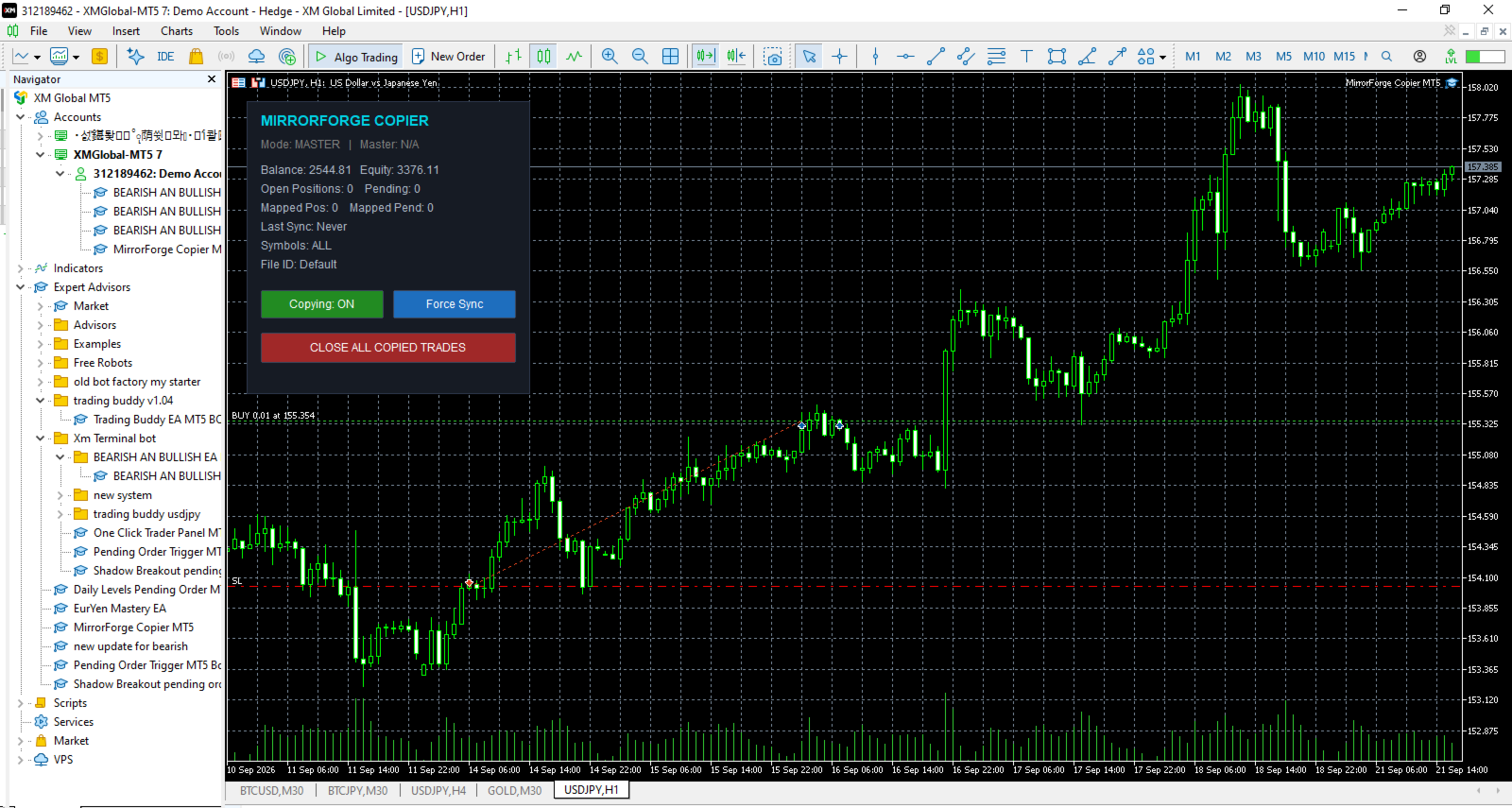
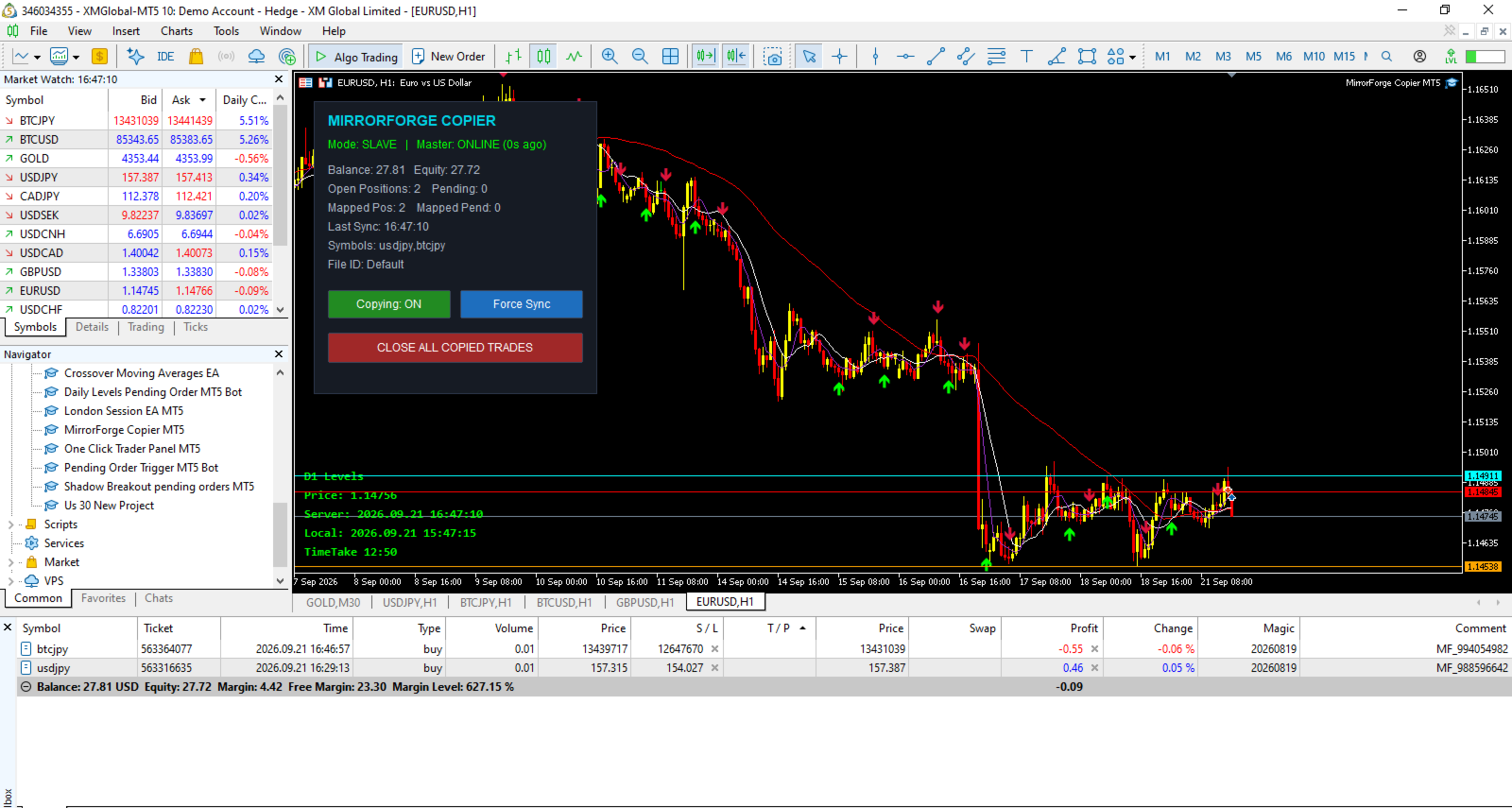
MirrorForge also includes a modern on-chart control panel with copying controls, synchronization information, account statistics, Master heartbeat status, symbol filters, and an emergency Close All Copied Trades function.

The system is designed for traders, EA developers, money managers, signal providers, and users who need to mirror trades between MT5 terminals running on the same computer, VPS, or environment where the MT5 common files directory is accessible.

Key Features

Master and Slave Modes

MirrorForge operates in two modes:

Master Mode

  • Monitors the source MT5 account.

  • Writes the current trading state to a shared file.

  • Publishes open positions.

  • Publishes supported pending orders.

  • Publishes entry price, volume, Stop Loss, Take Profit, magic number, comment, setup time and expiration information.

  • Maintains a heartbeat file so the Slave can determine whether the Master is active.

Slave Mode

  • Reads the Master trading state.

  • Creates corresponding trades on the target account.

  • Maintains Master-to-Slave ticket mappings.

  • Detects when Master positions are closed.

  • Detects when Master pending orders are removed.

  • Updates copied Stop Loss and Take Profit levels.

  • Reconciles the account after terminal restarts.

Both terminals use the same File ID to establish the communication pair.

Copy Market Positions

MirrorForge can copy open market positions from the Master account to the Slave account.

Supported directions include:

  • Buy positions

  • Sell positions

You can independently enable or disable copying of Buy and Sell trades.

The Slave can either follow the Master trade direction or reverse it.

Example

If the Master opens:

BUY 0.10 EURUSD

The Slave can be configured to open:

BUY 0.10 EURUSD

or, with Reverse Trades enabled:

SELL 0.10 EURUSD

Copy Pending Orders

MirrorForge can also synchronize supported pending orders.

Supported pending order types include:

  • Buy Limit

  • Sell Limit

  • Buy Stop

  • Sell Stop

  • Buy Stop Limit

  • Sell Stop Limit

The Slave monitors the Master pending-order list and attempts to maintain the corresponding pending orders.

If a pending order is modified on the Master, MirrorForge can update the corresponding Slave order.

If the Master pending order disappears, the mapped Slave pending order can also be removed.

Pending-order copying can be enabled or disabled independently.

Stop Loss and Take Profit Synchronization

MirrorForge can copy the Master trade's:

  • Stop Loss

  • Take Profit

These settings can be controlled independently.

Stop Loss

Enable:

Copy Stop Loss = true

The Slave will use the Master Stop Loss when opening or modifying the copied trade.

Disable it when you want the Slave to manage Stop Loss independently.

Take Profit

Enable:

Copy Take Profit = true

The Slave will use the Master Take Profit.

This provides flexibility for traders who want the Slave to follow the Master completely or use their own risk-management approach.

Flexible Lot Sizing

MirrorForge provides several lot-sizing options for Slave trades.

Fixed Lot

The Slave can use a predefined lot size regardless of the Master position volume.

Example:

Master:

0.50 lots

Slave Fixed Lot:

0.01 lots

The Slave opens:

0.01 lots

Lot Multiplier

The Slave can calculate its position size using the Master position volume multiplied by the selected multiplier.

Formula:

Slave Lot = Master Lot × Lot Multiplier

Example:

Master:

0.10 lots

Multiplier:

2.0

Slave:

0.20 lots

A multiplier below 1.0 can also be used to reduce the copied position size.

Lot Limits

The EA provides:

  • Minimum Lot

  • Maximum Lot

These settings help prevent the copier from opening positions outside the configured lot range.

The EA also checks the broker's symbol volume settings, including:

  • Minimum volume

  • Maximum volume

  • Volume step

before sending the trade.

Reverse Trades

The Reverse Trades option allows the Slave to trade in the opposite direction of the Master.

When disabled:

Master BUY → Slave BUY

Master SELL → Slave SELL

When enabled:

Master BUY → Slave SELL

Master SELL → Slave BUY

The reverse-direction functionality also applies to supported pending order types.

This allows MirrorForge to be used for strategies where the Slave account intentionally takes the opposite side of the Master account's signals.

Symbol Mapping

Different brokers may use different symbol names.

For example, one broker may use:

EURUSD

while another uses:

EURUSD.m

or:

EURUSDpro

MirrorForge provides symbol prefix and suffix settings to help map the Master symbol to the Slave broker's symbol.

Available settings include:

  • Master Symbol Suffix

  • Slave Symbol Suffix

  • Slave Symbol Prefix

Example

Master:

XAUUSD

Slave suffix:

.m

Result:

XAUUSD.m

This makes the copier more flexible when Master and Slave accounts use different broker symbol naming conventions.

Symbol Filter

MirrorForge allows you to control which symbols are copied.

The Allowed Symbols input accepts a comma-separated list.

Example:

EURUSD,GBPUSD,XAUUSD

Only the specified symbols will be processed.

Leaving the setting empty allows all symbols.

This can be useful when the Master account trades many instruments but the Slave account should only copy selected markets.

Magic Number Control

Slave trades are assigned the configured MirrorForge Magic Number.

This helps identify trades created by the copier and allows the EA to distinguish its own positions and pending orders from other trades on the Slave account.

The Master also provides an optional:

Copy Only Magic

filter.

When enabled, the Master will only publish positions and pending orders matching the configured Magic Number.

This is useful when another EA or multiple strategies are operating on the Master account.

Maximum Position and Pending Order Limits

MirrorForge includes safety limits for the Slave account.

Maximum Open Positions

Controls the maximum number of copied positions allowed.

Default:

100

Set to:

0

for unlimited positions.

Maximum Pending Orders

Controls the maximum number of copied pending orders.

Default:

50

Set to:

0

for unlimited pending orders.

These limits can help prevent uncontrolled copying if the Master account contains a large number of trades.

Slippage and Retry Protection

MirrorForge includes configurable execution controls.

Maximum Slippage

The:

Slippage Points

setting controls the maximum deviation used for trade execution.

Order Send Retries

If an order fails, MirrorForge can retry the operation.

The:

Max Order Send Retries

setting controls the number of attempts.

This can provide additional execution resilience when temporary trading conditions or broker responses cause an order request to fail.

Fast Local Synchronization

MirrorForge uses millisecond timers for its local synchronization process.

The Slave uses a configurable polling interval.

Default:

250 milliseconds

The Master writes its full current trading state at a configurable interval.

Default:

400 milliseconds

In addition, Master trade transactions can trigger an immediate state update.

This combination is designed to keep the Slave synchronized with changes occurring on the Master account without requiring an external server.

Actual execution speed can still depend on the MT5 terminal, broker, symbol trading conditions, VPS/computer performance, and market conditions.

Master Heartbeat

MirrorForge uses a heartbeat mechanism to monitor the Master.

The Master periodically updates a heartbeat file.

The Slave checks the age of that heartbeat.

Default timeout:

15 seconds

If the Slave does not receive a recent heartbeat within the configured timeout, the panel can report:

MASTER OFFLINE

This allows the user to monitor whether the Master terminal is actively publishing its state.

The heartbeat is a monitoring mechanism; it does not guarantee that every trade can be executed on the Slave.

Terminal Restart Recovery

One of the important features of MirrorForge is its reconciliation system.

The Slave stores Master-to-Slave ticket mappings in files.

When the Slave terminal is restarted, MirrorForge loads the saved mappings and performs a reconciliation process.

This allows the EA to compare:

Master current state

against

Slave current state

and determine which mapped trades should remain synchronized.

The system is designed so that terminal restarts do not automatically mean that the copier loses all knowledge of previously mapped trades.

Existing Trade Synchronization

MirrorForge provides an option for handling trades that already exist when the Slave starts.

Copy Existing Trades = Enabled

The Slave can synchronize existing Master positions and pending orders during startup/reconciliation.

Copy Existing Trades = Disabled

The EA can skip existing Master trades during the initial reconciliation.

This gives the user control over whether the Slave should begin copying only from new activity or also synchronize positions already open when the copier starts.

Automatic Trade Removal Synchronization

MirrorForge continuously compares the Master state with its stored mappings.

If a Master position that was previously mapped no longer exists, the EA attempts to close the corresponding Slave position.

Likewise, if a mapped Master pending order no longer exists, the EA attempts to delete the corresponding Slave pending order.

This keeps the Slave account aligned with the current Master trading state.

Live Modification Synchronization

If a copied Master position has its Stop Loss or Take Profit changed, MirrorForge checks the corresponding Slave position.

If the values are different, the EA can modify the Slave position.

The same synchronization logic is applied to supported pending orders, including their:

  • Entry price

  • Stop Loss

  • Take Profit

This means the copier is not limited to copying the initial trade entry.

Modern Control Panel

MirrorForge includes an on-chart control panel.

The panel displays important information including:

  • Current mode

  • Master online/offline status

  • Account balance

  • Account equity

  • Open positions

  • Pending orders

  • Mapped positions

  • Mapped pending orders

  • Last synchronization time

  • Symbol filter

  • File ID

The panel can be disabled if the trader prefers a clean chart.

Copying ON/OFF Control

The panel provides a button to enable or disable copying.

Copying: ON

The EA continues its normal synchronization process.

Copying: OFF

The synchronization process is disabled until copying is enabled again.

This gives the user direct control without needing to remove the EA from the chart.

Force Sync

The Slave panel includes a:

Force Sync

button.

This allows the user to manually trigger a synchronization process instead of waiting for the next normal timer cycle.

This can be useful when checking synchronization after changing settings or reconnecting terminals.

Close All Copied Trades

MirrorForge includes an emergency/manual control:

CLOSE ALL COPIED TRADES

When used in Slave mode, the EA attempts to:

  • Close positions using the MirrorForge Magic Number.

  • Delete pending orders using the MirrorForge Magic Number.

  • Clear the stored position mappings.

  • Clear the stored pending-order mappings.

This provides a convenient way to remove the copied trades managed by the copier.

Users should understand that this function acts on trades identified by the configured Magic Number, so the Magic Number should be configured carefully.

Detailed Logging

The EA provides a Detailed Logging option.

When enabled, important events can be displayed in the MT5 Experts log, including:

  • Position copied

  • Pending order copied

  • Position closed because the Master position disappeared

  • Pending order deleted

  • Mapping information

  • Synchronization information

  • Execution errors

  • Master heartbeat status

  • Maximum trade limits reached

This can make troubleshooting and monitoring easier.

Main Inputs

General

Mode

  • Master

  • Slave

File ID

Unique identifier used by the Master and Slave terminals.

The same File ID should be used for terminals that are intended to communicate with each other.

Magic Number

Magic number assigned to Slave trades.

Enable Copying

Enables or disables the copier.

Lot Sizing

Lot Mode

  • Fixed Lot

  • Lot Multiplier

  • Lot Balance

Fixed Lot

Lot size used when Fixed Lot mode is selected.

Lot Multiplier

Multiplier applied to the Master position volume when multiplier-based sizing is selected.

Minimum Lot

Minimum lot size allowed by the copier.

Maximum Lot

Maximum lot size allowed by the copier.

Copy Filters

Copy Buy

Enable/disable Buy copying.

Copy Sell

Enable/disable Sell copying.

Reverse Trades

Reverse Master direction on the Slave.

Copy Stop Loss

Synchronize Master Stop Loss.

Copy Take Profit

Synchronize Master Take Profit.

Copy Pending

Synchronize supported pending orders.

Copy Existing Trades

Determine whether existing Master trades should be considered during initial startup/reconciliation.

Copy Only Magic

Restrict Master-side copying to trades with the configured Magic Number.

Allowed Symbols

Comma-separated list of symbols to copy.

Symbol Handling

Master Suffix

Suffix to remove from Master symbols.

Slave Suffix

Suffix to add to Slave symbols.

Slave Prefix

Prefix to add to Slave symbols.

Safety & Limits

Maximum Open Positions

Maximum number of copied positions allowed on the Slave.

Maximum Pending Orders

Maximum number of copied pending orders allowed.

Slippage Points

Maximum configured execution deviation.

Maximum Retries

Number of execution attempts when an order request fails.

Timing

Slave Poll Interval

How frequently the Slave checks the Master state.

Master Write Interval

How frequently the Master writes its current state.

Heartbeat Timeout

Time in seconds before the Master is considered offline by the Slave.

Panel

Show Panel

Display or hide the MirrorForge control panel.

Panel X

Horizontal panel position.

Panel Y

Vertical panel position.

Logging

Detailed Log

Enable additional information in the MT5 Experts log.

Recommended Master/Slave Setup

A typical setup consists of two MT5 terminals.

Step 1 — Master

Attach MirrorForge to the account that contains the trades you want to publish.

Set:

Mode = MASTER

Choose a unique:

File ID

For example:

MyCopier

Keep the desired copying filters enabled.

Step 2 — Slave

Attach MirrorForge to the target MT5 account.

Set:

Mode = SLAVE

Use the exact same:

File ID = MyCopier

Configure the desired:

  • Lot Mode

  • Lot Multiplier

  • Symbol mapping

  • Buy/Sell filters

  • Risk limits

  • Stop Loss/Take Profit settings

Step 3 — Keep Terminals Running

For continuous copying, both the Master and Slave terminals need to remain active.

A VPS can be used to keep MT5 terminals running continuously.

The copier does not use an external cloud/server-based copy infrastructure. Communication is performed through files available to the MT5 terminals.

Example Configuration

Master Account

Mode:

MASTER

File ID:

MyTradingAccount

Copy Pending:

Enabled

Copy Buy:

Enabled

Copy Sell:

Enabled

Slave Account

Mode:

SLAVE

File ID:

MyTradingAccount

Lot Mode:

LOT_MULTIPLIER

Lot Multiplier:

0.50

Copy Stop Loss:

Enabled

Copy Take Profit:

Enabled

Copy Pending:

Enabled

Reverse Trades:

Disabled

This configuration would attempt to mirror the Master direction while using approximately 50% of the Master volume, subject to the Slave broker's volume requirements and the configured minimum/maximum lot limits.

Who Can Use MirrorForge?

MirrorForge can be useful for:

  • Traders managing multiple MT5 accounts

  • EA developers testing strategies across accounts

  • Traders using separate Master and execution accounts

  • Traders who want to mirror selected instruments

  • Users with different broker symbol suffixes

  • Traders who need fixed or multiplier-based Slave lot sizing

  • Users who need position and pending-order synchronization

  • Users running MT5 terminals on a local computer or VPS

Important Technical Notes

MirrorForge is a local file-based copier.

It does not depend on a remote trade-copying server for communication between the Master and Slave.

Both MT5 terminals need access to the appropriate MT5 common files environment.

The actual result of copying can be affected by:

  • Broker execution

  • Market liquidity

  • Spread

  • Slippage

  • Symbol availability

  • Trading permissions

  • Minimum and maximum volume

  • Volume step

  • Stop-level requirements

  • Market conditions

  • Terminal/VPS performance

  • Internet connectivity

  • Differences between Master and Slave brokers

A successful Master trade does not guarantee an identical execution price on the Slave.

Risk Warning

MirrorForge is a trade-copying tool. It does not guarantee profits and it does not remove the risks associated with financial markets.

Copied trades can experience differences in:

  • Entry price

  • Exit price

  • Spread

  • Slippage

  • Execution time

  • Stop Loss execution

  • Take Profit execution

  • Available trading volume

  • Symbol specifications

A Master account and Slave account can therefore produce different results even when the same trading instructions are copied.

Users should test the copier on demo accounts before using it with real funds and should configure lot sizes and limits according to their own risk tolerance.

Never assume that copied trades will have exactly the same execution as the Master.

Important Setup Requirement

For successful communication, the Master and Slave should use the same File ID.

For example:

Master:

File ID = MyCopier

Slave:

File ID = MyCopier

Using different File IDs will cause the terminals to use different communication files.

If broker symbol names are different, configure the appropriate Master suffix, Slave suffix, or Slave prefix.

Why MirrorForge?

MirrorForge combines local MT5 trade copying with configurable execution controls and persistent synchronization.

The system provides:

  • Master/Slave architecture

  • Market position copying

  • Pending-order copying

  • Buy/Sell filters

  • Reverse trading

  • Fixed lot sizing

  • Multiplier lot sizing

  • Lot limits

  • Stop Loss synchronization

  • Take Profit synchronization

  • Symbol filtering

  • Symbol prefix/suffix mapping

  • Magic-number identification

  • Position limits

  • Pending-order limits

  • Retry handling

  • Master heartbeat monitoring

  • Restart reconciliation

  • Persistent ticket mapping

  • Force synchronization

  • Close-all control

  • On-chart monitoring panel

  • Detailed logging

MirrorForge is designed to give the user direct control over how trades are copied between MT5 accounts while keeping the architecture simple and local.

Version

MirrorForge Local MT5 Trade Copier

Version: 1.20

The product is based on a local file-based Master/Slave architecture and includes support for both open positions and supported pending orders.

Final Note

Please test MirrorForge carefully with your specific brokers, symbols, account types, and execution conditions before using it on a live account.

The copier is a tool for synchronizing trading instructions; it is not a trading strategy and does not guarantee the same execution or financial results between accounts.
Recommended products
Bastion is a monitor-and-close-only risk manager for prop-firm traders. It watches your account against your firm's daily-loss and maximum-drawdown limits in real time and force-closes your open positions BEFORE you cross a line. It never opens a trade of its own, so it stays fully within the tools allowed by FTMO, FundedNext, The5ers, FTUK and FXIFY. Why traders fail challenges A large share of failed evaluations end on a single daily-loss breach: a moment of inattention, a news spike, one tra
APEX Terminal
Lukasz Mariusz Holla
Apex Terminal is a trade panel for MetaTrader 5 that sizes every position from your risk and manages it from entry to exit. Set how much you accept to lose and where the stop-loss goes. Before you click, the panel shows the lot, the loss at the stop and the profit at the full target. One click opens the trade with the stop-loss and the whole take-profit ladder already in place. TRADE - Position size from % of balance or equity, a fixed amount of money or a fixed lot. The lot is rounded down t
Ultimate Pro Trading Panel — All-In-One Manual & Grid Trading Dashboard Pro Trading Panel   is an all-in-one on-chart control panel that gives discretionary and semi-automated traders a complete toolkit for entries, exits, risk management, and grid trading — without leaving the chart. Every function is visual, draggable, and updates in real time. If you want to test this utility feel free to download the basic preview version of this tool here:  https://www.mql5.com/en/market/product/181435 Who
Trading Utility for Forex Currency Pairs Only not for Gold  Functions Auto Lot Calculation based on Risk Auto stoploss  Auto TakeProfit Breakeven Auto Close Half % Close in percentage with respect to the PIPs Pending Orders BuyLimit Sell Limit with distances BuyStop Sell Stop    with distances Trading Informations Risk in percentage For Multiple trades Combine Takeprofit and Combine Stoplosses
Overview Mirror Signals Service EA (Text only)   is a powerful monitoring Expert Advisor that automatically sends   real-time Telegram notifications   for all important trade events on your MetaTrader 5 account. It is engineered specifically for   signal providers ,   trade-copier operators ,   auditors ,   educators , and   professional trading services   that require immediate, detailed, and reliable reporting. Everything from   entries, exits, SL/TP changes, comment changes, trailing sto
RSI Currency Strength Meter is a powerful and elegant multi-currency indicator that measures the real-time relative strength of the 8 major currencies using RSI logic. By calculating the smoothed performance of each currency across its major pairs and applying the RSI formula, it delivers clean and responsive strength lines that make it easy to spot which currencies are truly strong or weak at any moment. This indicator is particularly useful for visualizing currency correlations and divergence
This tool will perform Trailing stop loss and Break even management for orders. Helps you limit or reduce the time spend watching orders on the screen, especially when you need to go to sleep. Just add this EA to 1 chart, you can manage all pairs. You can filter orders by comment, magic number, symbol and order ticket number. When Breakeven it can add shift/offset pips (to cover the commission...). You can try in strategy tester before purchase. The EA will add Buy and Sell alternately, so you
Trade Vista Pro
Chiiambwe Mulbnga
TradeVista Pro — Professional Trade & Risk Management Panel TradeVista Pro is a professional all-in-one trade execution and position management panel for MetaTrader 5 , designed for traders who want faster order management, precise risk control, and a cleaner way to manage open positions directly from the chart. Instead of constantly switching between the MT5 Trade tab, order windows, and chart controls, TradeVista Pro brings essential trading-management functions together in one intuitive inter
TradePilotmt5
Hossein Khalil Alishir
TradePilot Expert Advisor (EA) for MetaTrader 5 TradePilot is a professional and user-friendly Expert Advisor (EA) for MetaTrader 5 (MT5) . It simplifies automated trading , risk management , and trade execution with a smart trading panel . Perfect for beginners and experienced traders looking for a reliable trade manager EA with automated lot size calculation and smart position management. Key Advantages User-Friendly Trading Panel: Customizable panel with buttons and hotkeys for fast ex
CosmiCLab SMC FIBO CosmiCLab SMC FIBO is a professional trading indicator designed for traders who use Smart Money Concepts (SMC), market structure analysis and Fibonacci retracement levels. The indicator automatically detects market swings and builds Fibonacci levels based on the latest impulse movement. It also identifies market structure changes such as BOS (Break of Structure) and CHOCH (Change of Character), helping traders understand the current market direction. CosmiCLab SMC FIBO also pr
RRtoolBox
David Ruiz Moreno
RRtoolbox - Professional Tools: Risk:Reward Trading Tool (SL/TP Horizontals + Pending orders + Diagonals), Alerts set on trend lines (for alerts on diagonal levels), SelfManagement (BE, partials...), close/cancelling by time, Statistics, Info and trading on chart. One-Click Trading with Visual Risk:Reward Management RRtoolbox is a comprehensive trading panel that combines one-click order execution,  statistics and  powerful visual Risk:Reward tools, alerts set with trendlines, on chart butt
Timeframe Trading Limiter
AL MOOSAWI ABDULLAH JAFFER BAQER
Timeframe Trading Limiter is a professional risk management and trade discipline utility designed for MetaTrader 5. It empowers traders to enforce strict, automated limits on the number of trades and the maximum allowable drawdown within each trading period, based directly on the chart timeframe selected. Whether you are a discretionary trader prone to overtrading, a prop firm challenge participant needing to adhere to strict rules, or an algorithmic trader running multiple strategies, this tool
Overview Mirror Signals EA is a powerful monitoring Expert Advisor that automatically sends real-time Telegram notifications for all important trade events on your MetaTrader 5 account. It is engineered specifically for signal providers , trade-copier operators , auditors , educators , and professional trading services that require immediate, detailed, and reliable reporting. Everything from entries, exits, SL/TP changes, comment changes, trailing stop activations, pending order modifications
Exp5 Duplicator
Vladislav Andruschenko
4.78 (9)
Duplicator for MetaTrader 5 — professional position duplicator inside one terminal A reliable Expert Advisor for traders who want to automatically duplicate already opened positions in MetaTrader 5, increase volume, apply custom lot settings, and manage duplicates with precise rules. It is a practical tool for manual trading, algorithmic systems, and flexible management of existing positions inside one terminal. Duplicator for MT5 does not open positions by its own trading strategy. Its role is
FTMO Protector 8
Vyacheslav Izvarin
PROTECT YOUR FTMO Account in a simplest way Must-Have Account Protector for any Prop-trading Account and Challenge MT4 / MT5 Expert Advisor that protects your Forex Prop Trading account from an unexpected drawdown! FTMO Protector  is a Tool that lets you manage trades and control your profit and loss across multiple Robots and currency pairs using a simple parameters and settings. Use as many EAs and Instruments you need, the Protector will: 1.   Calculate your midnight (01:00 System time) Balan
Noize Absorption Index - is the manual trading system that measures the difference of pressure between bears forces and bulls forces. Green line - is a noize free index that showing curent situation. Zero value of index shows totally choppy/flat market.Values above zero level shows how powerfull bullish wave is and values below zero measures bearish forces.Up arrow appears on bearish market when it's ready to reverse, dn arrow appears on weak bullish market, as a result of reverse expectation.
Trade Assistant 38 in 1
Makarii Gubaydullin
4.91 (23)
Multifunctional tool: Lot Calculator, Grid Orders, R/R ratio, Trade Manager, Supply and Demand zones, Price Action and much more Demo version   |   User manual Trade Assistant   doesn't work in the strategy tester : you can download the   Demo Version HERE  to test the utility . Contact me   for any questions  / ideas for improvement / in case of a bug found If you need a MT4 version, it is available here Simplify, speed up and automate your trading   process . Expand the standard terminal capa
DDKiller Pro
Njaratahiry Michael Randrianiaina
Stop Blowing Your Account. Once and For All. DDKiller Pro is the MT5 risk guardian that runs silently on your chart and shuts down trading the moment you hit a limit — whether you're grinding a prop firm challenge or managing your own CFD account. The problem every trader knows: You set your rules. You break them anyway. One revenge trade. One overleveraged position. One session that erases a month of gains. DDKiller Pro removes that decision from your hands entirely. What it does: The second yo
Margin Call Shield – Defend Your Margin on Your Terms Margin Call Shield is a tool for MetaTrader 5 traders who want to decide for themselves which open positions are closed during margin call situations before the platform does so automatically based on its internal rules. By default, the broker or platform decides which positions to close, often using undisclosed algorithms. Margin Call Shield lets you set this order according to your own strategy. Why Was Margin Call Shield Created? In a mar
Pro Gold System Indicator
PEDRO JOAQUIM GONCALVES GOMES
ADVANCED FUNCTIONALITIES: Trend Score (0-100) with visual bar Intelligent signals with adjustable strength (1-10) Risk management with automatic TP/SL Audible and visual alerts Price zones with smooth filling Multi-indicator analysis (RSI, ATR, BB, EMAs) DESIGN FEATURES Modern Visual: Smooth and well-spaced lines (EMA with 2-3px width) Vibrant and professional colors (Sky Blue, Orange, Gold) Modern arrows (code 233/234) for buy/sell signals Configurable dark/light theme Adjustable transparency f
MT5Eezeorder 2
Tawanda Tinarwo
3 (1)
Open and close Multiple Trades on MT5 in 1 click at one price. Enter the Lot size Specify the number of trades you want to open Choose whether you want TP SL or Trailing Stop Once you are done, click Buy or Sell Create trailing stop for multiple trades  PLEASE NOTE: This is not a script, save it in the experts folder What to Always Note Check the minimum stop levels for the symbol you want to trade  Cross-Check your parameters  1. Make sure Auto trading is on 2. Make sure the SL and TP are great
SLTPSetter
Raphael Djangmah Osro Agbo
SLTPSetter - StopLoss Take Profit Setter HOW DOES IT WORK? Risk and account management is a very critical aspect of trading. Before entering a position, you must be fully aware how much you will be willing to loss both in percentage and value. This is where SLTPSetter gets you covered.  All you need to do is attach the indicator on the chart and PRESS BUY OR SELL automatically, all parameters needed for placing the trades will be provided at the top left corner of the screen. Feel free to adjust
Currency Exposure Matrix is a currency-level exposure dashboard derived from current open positions. Key functions: - Gross and net currency exposure - Long and short decomposition - Deposit-currency conversion - Concentration warnings - Transparent handling when conversion symbols are unavailable The utility helps users understand aggregated currency exposure across their portfolio. It does not generate entry signals, predict market direction or guarantee trading results. Review broker symbol
Gold Flow Seconds Chart transforms MetaTrader 5 into a fast and convenient workspace for manual trading. The utility builds 5-second and 10-second candles from the tick data provided by your broker. M1, M5, M7, M15, M30, H1 and H4 views are also available in the same interface. MOUSE-DRIVEN CHART NAVIGATION • Drag the chart horizontally and vertically with the left mouse button. • Use the mouse wheel to change candle width. • Use Ctrl + mouse wheel to adjust the vertical scale. • Return to t
Complete Trade Panel for the No Nonsense Forex method: This panel encapsulates almost all things you will need to execute your own NNFX algorithm, helping you trade even faster and easier. It has 3 parts: Symbol Panel Switch to any symbol in your charts quickly by pressing its name. Additional information can be displayed in the panel: currently open trades , correlation of those trades with other symbols (except if their stop loss is in breakeven or positive) and upcoming news (next daily candl
Rhino Backtest Manager - Trade Manager for Live Trading and the Strategy Tester Rhino Backtest Manager is a trade management panel that works both in live trading and in the MetaTrader 5 Strategy Tester. It allows you to place and manage orders manually inside the tester using the same interface as on a live account, so a strategy can be tested on historical data and then traded without changing tools. The panel calculates position volume from your risk settings, shows the money value of every
SmartRAL
Jemy Yeferson Dimu Ludji
SmartRAL (Smart Risk Auto-Lot EA) SmartRAL: The Ultimate Risk & Lot Management Expert Advisor (EA) SmartRAL is an essential tool for traders who demand precise risk management and automated position sizing in MetaTrader 5. Stop guessing your lot size and let the algorithm handle the calculations. This EA allows you to trade with confidence by guaranteeing your risk exposure on every single trade, while offering absolute flexibility in setting your Stop Loss (SL). Key Features & Benefits Guarante
Trade Manger
Israr Hussain Shah
Here   our more valuable tools SMC Trend Trading   ,  Easy SMC Trading  ,  Institutional SMC Architect Volume Analysis Tools  ,  Volume flow Profile  ,  Market volume profile  , FVG with Volume  , Liquidity Heatmap Profile  ,  Volume Spread Analysis You Give an Instruction: When you run the script, a window pops up with a dropdown menu. You choose exactly what you want it to do from the list (e.g., "Close Profit Only" or "Delete Pending Orders"). It Scans Your Positions: The script then reads
Supply and Demand Pro
Godbless C Nygu
4 (1)
Join Deriv link on profile>>> GET THIS FULL COPY AND GET ANOTHER FREE INDICATOR ONE OF THE BEST AND USEFULL INDICATORS IN THE WORLD ..This is the one of the best usefull indicators which has chosen to be used by top traders in the world. AUTOMATIC SUPPORT AND RESISTANCE This way of trading is also called Supply and demand, On this way of trading you can see auto colours appear where the market changes direction buying or selling Direction. ALL KIND OF PAIRS METALS AND INDICIES ARE INCLUDED A
CoPilot dashboard MT5
Frederic Jacques Collomb
CoPilot — Daily Trading Dashboard Know your numbers. Trade with clarity. MT4 version What is CoPilot? CoPilot is a professional-grade trading assistant that displays in real time all your daily performance statistics directly on the chart — with a live equity curve that updates trade by trade. Designed for active traders who need instant visibility into their session without leaving the chart, CoPilot aggregates every closed trade of the day across all symbols and presents them in a clean, color
Buyers of this product also purchase
Trade Assistant MT5
Evgeniy Kravchenko
4.43 (216)
It helps to calculate the risk per trade, the easy installation of a new order, order management with partial closing functions, trailing stop of 7 types and other useful functions. Additional materials and instructions Installation instructions - Application instructions - Trial version of the application for a demo account Line function -   shows on the chart the Opening line, Stop Loss, Take Profit. With this function it is easy to set a new order and see its additional characteristics bef
Forex Trade Manager MT5
InvestSoft
4.98 (685)
Trade Manager MT5 is an advanced position size calculator and trade management tool for MetaTrader 5, designed to help traders plan trades faster, control risk more precisely, and manage open positions directly from the chart. It combines order placement, risk based lot calculation, Stop Loss and Take Profit management, Break Even, Trailing Stop, Partial Close, Equity Protection, and external trade management in one panel. Whether you trade forex, indices, metals, commodities, crypto, or future
================================================================================ POC BREAKOUT - V20.72. Full Professional Grade Toolkit ================================================================================ POC Breakout is a full MetaTrader 5 trading dashboard for discretionary traders who want breakout signals, Point of Control (POC) context, volume profiles, order flow, market structure, news, alerts, and advanced trade planning in one professional workspace. Attached directly to you
Telegram to MT5 MultiChannel Copier
Sergio Marquez Uroz
4.61 (18)
Telegram to MT5 Multi-Channel Copier   automatically copies trading signals from your Telegram channels straight to MetaTrader 5. No bots, no browser extensions, no manual copying. A signal arrives in Telegram and the EA opens the trade in your terminal within seconds. And before you copy a channel, the built-in backtester shows you what that channel would have done in your account. The product has two components: a Windows application that listens to your Telegram channels, and this Expert Advi
TradePanel MT5
Alfiya Fazylova
4.88 (170)
Trade Panel is a multi-functional trading assistant. The app contains over 50 trading functions for manual trading and allows you to automate most trading tasks. Application instructions: https://www.mql5.com/en/blogs/post/756482 Trial version of the application for a demo account: https://www.mql5.com/en/blogs/post/750865 How to install the application: https://www.mql5.com/en/blogs/post/756239 How to test the application in visual mode: https://www.mql5.com/en/blogs/post/770277 How to install
Copy Telegram signals with your own trading rules Telegram to MT5 Signal Trader automatically copies text-based trading signals from public and private Telegram channels and groups into MetaTrader 5. Manage multiple providers and MT5 accounts from one desktop app, with individual risk and trade settings for each provider . No Telegram bot or API setup needed for copying. Simply sign in with your own Telegram account by phone or QR code and select the channels or groups you have already joined. Y
Footprint Chart Pro — Professional OrderFlow EA for MetaTrader 5 Version 6.34 | Professional tool for real traders | Institutional-Grade Visualization DEMO USERS - PLEASE SELECT EVERY TICK / REAL TICK WHEN TESTING AND YOU HAVE DOWNLOADED HISTORICAL DATA. IF YOU SEE A WAITING SCREEN AND IT IS NOT DOWNLOADING, IT MEANS YOU HAVE LOW HISTORICAL DATA. TRY 1 MIN AND 5 MIN FIRST ON 1 DAY DATA. ONE DAY DATA SHOULD BE THE NEWEST AND MOST CURRENT DATE. PLEASE WAIT UNTIL THE MARKET HAS ROLLED OVER PERIOD.
Exp COPYLOT CLIENT for MT5
Vladislav Andruschenko
3.97 (35)
Professional Trade Copier for MetaTrader 5 Fast, professional, and reliable trade copier for MetaTrader . COPYLOT allows you to copy Forex trades between MT4 and MT5 terminals with support for Hedge and Netting accounts. COPYLOT MT5 version supports: - MT5 Hedge to MT5 Hedge - MT5 Hedge to MT5 Netting - MT5 Netting to MT5 Hedge - MT5 Netting to MT5 Netting - MT4 to MT5 Hedge - MT4 to MT5 Netting MT4 version Full Description +DEMO +PDF How To Buy How To Install How to get Log Files H

FarmedHedge Pair Trading Dashboard
Tanapisit Tepawarapruek
5 (5)
Farmed Hedge Yield Farming | All Markets (Manual - Hybrid - Semi/Automated EA) VERIFIED TRADING RESULTS - Farmed Hedge Yield Axi Copy:  https://www.mql5.com/en/signals/2356376 - Farmed Hedge Yield Exn Copy:   https://www.mql5.com/en/signals/2356404 - Farmed Hedge Yield V Copy:  https://www.mql5.com/en/signals/2357156 IMPORTANT NOTICE: FarmedHedge is a MANUAL-FOCUSED TRADING UTILITY ,not a fully automated EA. Results shown on this Signal include manual trades and overall strategic management.
Grid Manual MT5
Alfiya Fazylova
4.73 (22)
Grid Manual is a trading panel for working with grid strategies. The utility is universal, has flexible settings and an intuitive interface. It works with a grid of orders not only in the direction of averaging losses, but also in the direction of increasing profits. The trader does not need to create and maintain a grid of orders, the utility will do it. It is enough to open an order and the "Grid manual" will automatically create a grid of orders for it and will accompany it until the close. F
Power Candles Strategy Scanner - Self-Optimizing Multi-Symbol Setup Finder Self-optimizing settings work one chart at a time, and finding where they pay off right now means opening chart after chart. Power Candles Strategy Scanner runs the same self-optimizing engine as the Power Candles indicator on every symbol in your Market Watch, side by side. One panel ranks where it pays off: the winning strategy per symbol, its optimized Stop Loss and Take Profit. An alert fires the moment a fresh signal
HINN MagicEntry Extra
ALGOFLOW OÜ
4.74 (19)
HINN MAGIC ENTRY – the ultimate tool for entry and position management! SIMPLE. FASTEST. INTUITIVE. MAX AUTOMATED. Place orders by selecting a level directly on the chart! full description   ::  demo-version  :: 60-sec-video-description Key features: - Market, limit, and pending orders - Automatic lot size calculation - Automatic spread and commission accounting - Unlimited partitial take-profits  - Breakeven and trailing stop-loss and take-profit  functions - Invalidation leves - Intuitive, a
MT5 to Telegram Signal Provider turns your trading account into a signal provider. Every trade action, whether manual, by EA or from your phone, is instantly sent as a message to Telegram. You can fully customize the format or use a ready-made template for quick setup. [ Demo ] [ Manual ] [ MT4 Version ] [ Discord Version ]     New: [ Telegram To MT5 ] Setup A step by step user guide is available. Key Features Ability to customize order details sent to subscribers You can create a tiered subs
Anchor Trade Manager
Kalinskie Gilliam
5 (9)
Your EAs cannot see each other, but Anchor can. Anchor gives you one place to coordinate your EAs, manage risk, and decide when trading is allowed. It works alongside the trading bots you already use without any changes to them. The Problem One EA opens a trade. Then another starts trading. The next thing you know, you wake up to multiple grids built across your account. Each EA may be doing exactly what it was designed to do, but together they can place far more risk on your account than you in
Copy your MT5 trades to Interactive Brokers You keep using MT5. Every order you open or close is sent to your IB account. In real time. No coding. No changes to your strategy or EA. Try it first Rent 1 month: $30. Test on a live or paper account. What it does Real-time copying: same direction, reverse, or one side only. Map any MT5 symbol to any IB symbol. Set a lot ratio for each. Forex, Futures, Stocks, CFDs, Metals and Crypto. Position sync: both accounts checked, any difference fixed. Optio
Signal Trading View to MT5 Pro
Mirel Daniel Gheonu
4.5 (2)
Signal TradingView to MT5 Pro  Instant professional execution between TradingView and MetaTrader 5 Automate your trading strategy with the most robust communication bridge between TradingView alerts and real execution in MT5. Designed for traders who demand speed, flexibility, and impeccable risk management, this Expert Advisor transforms any alert message into a precise market or limit order.   Install and TEST the TRIAL version HERE STRENGTHS AND ADVANTAGES Universal Parsing Engine (Propriet
The News Filter MT5
Leolouiski Gan
4.78 (23)
This product filters   all expert advisors and manual charts   during news time.  It is able to remove any of your EA during news and automatically reattach them after news ends. This product also comes with a complete  order management system   that can handle your open positions and pending orders before the release of any news. Once you purchase   The News Filter , you will no longer need to rely on built-in news filters for future expert advisors, as this product can filter them all from her
Trade Copier Ultimate
Janitha Sandaruwan Amaradasa Wickramasingha Arachchilage
5 (5)
Trade Copier Ultimate - Telegram to MT5 Signal Copier Trade Copier Ultimate automatically copies Telegram trading signals into MetaTrader 5. The EA can read signal messages, detect the symbol, order type, entry price, Stop Loss, Take Profit levels and selected update commands, then execute or manage the trade in MT5 using your lot and risk settings. It is more than a basic Telegram to MT5 copier. TCU also supports Bot API and user-account Bridge workflows, Discord signal routing, local MT5 to MT
Welcome to ENTRY IN THE ZONE AND SMC MULTI TIMEFRAME  SPECIAL BENEFIT FOR OUR MQL5 CUSTOMERS  FREE ACCESS TO THE NEW TOOL —COMING SOON —   Learn More on Our Official Website : https://www.fableedge.net Entry In The Zone and SMC Multi Timeframe is a real-time market analysis tool based on Smart Money Concepts (SMC), designed to analyze market structure, price direction, and key trading zones. It supports both Single-Timeframe Analysis and Multi-Timeframe Analysis, providing a clearer view of the
Keep the indicator you trust. Automate the work around it. Already have an MT5 indicator you rely on, but still need to watch the chart, wait for a signal, calculate the lot, place the order and manage every position by hand? Stratiora Signal Engine MT5 was built to close that gap. It can turn compatible Buy and Sell buffer signals into a complete automated workflow: entry, volume calculation, Stop Loss, Take Profit, filters, position management and account protection. Instead of ordering a dif
Premium Trade Manager - The Trade Panel With a Coach Built In Premium Trade Manager puts a trading coach inside your chart, with a full execution engine underneath it. Set the trade up the way you always do, then let Max, your AI trading coach, read that exact setup against your live account and give you a straight verdict before you commit: is the stop disciplined, is the risk sane, is a high-impact release minutes away, are you near a prop-firm limit. Below sits the engine that runs everything
YuClusters
Yury Kulikov
4.93 (43)
Attention: You can view the program operation in the free version  YuClusters DEMO .  YuClusters is a professional market analysis system. The trader has unique opportunities to analyze the flow of orders, trade volumes, price movements using various charts, profiles, indicators, and graphical objects. YuClusters operates on data based on Time&Sales or ticks information, depending on what is available in the quotes of a financial instrument. YuClusters allows you to build graphs by combining da
EA Overfitter
Stephen J Martret
5 (1)
That backtest looks great. But will it still be making money tomorrow, next week, next month? EA Overfitter re-runs your EA on 100 price histories it has never seen. One score tells you if the edge is real. A backtest tells you what an EA did on one price history — the one that happened to occur. What you cannot tell from it is how much of that result was the strategy and how much was the particular path. EA Overfitter answers that. It builds up to 100 synthetic price histories your EA has n
Trade Indicator Assistant   is a powerful MT5 utility designed to turn indicators into automated trading systems. Its main feature is the ability to automatically detect an indicator’s   BUY and SELL signal buffers , without requiring you to know the buffer numbers, search through indicator settings, or modify the indicator source code. Bonus Indicator:   After purchasing Trade Indicator Assistant, contact me to receive   Trade Signal Pro   completely free as a bonus indicator. [Download Demo V
Quant Panel
Kevin Craig E Gittins
QUANT PANEL Independent per-algo analytics, protected MT5 history and professional PDF reporting Quant Panel is built for traders who run several Expert Advisors or strategies on one MT5 account and need to know how each algo is actually performing. Instead of treating the terminal as one combined portfolio, Quant Panel groups closed positions by EA comment or magic number and calculates every strategy independently. It gives you one clear dashboard for comparing algos, finding weak systems and
Trade Dashboard MT5
Fatemeh Ameri
4.94 (135)
Trade Dashboard simplifies how you open, manage, and control your trades, with built-in lot size calculation. It allows you to execute trades, manage risk, and control positions directly on the chart, with tools such as partial close, breakeven, and trailing stop. Designed to reduce manual work and help you stay focused on your trading decisions. A demo version is available for testing. Detailed explanations of features are provided within the MQL5 platform. Installation instructions are include
VirtualTradePad One Click Trading Panel
Vladislav Andruschenko
4.59 (74)
Trading Panel for MetaTrader 5 — professional one-click trading from chart and keyboard A powerful trading panel for active manual trading, designed to open, manage, and close trades far faster and more efficiently than the standard MetaTrader interface. This panel is built for traders who want full control over positions, pending orders, profit management, and trading execution inside one professional workspace. This is not just another utility. It is a complete trading cockpit for MetaTrader
Smart Stop Scanner – Multi-Asset Stop-Loss Intelligence for Modern Traders Overview The Smart Stop Scanner brings professional stop-loss monitoring to every chart. It analyzes market structure, detects meaningful breakouts, and identifies the most relevant protective levels across Forex, Gold, Indices, Metals, Crypto, and more. All results appear inside one clean, DPI-aware dashboard designed for clarity, speed, and instant decision-making. This tool is part of the Stein Investments ecosystem
Binance Quotes Updater
Andrey Khatimlianskii
5 (1)
This service is designed to stream online cryptocurrency quotes   from the Binance exchange to your MetaTrader 5 terminal. You will find it perfectly suitable if you want to see the quotes of cryptocurrencies in real time — in the Market watch window and on the MetaTrader 5 charts. After running the service, you will have fully featured and automatically updated  cryptocurrency charts in your MetaTrader 5. You can apply templates, color schemes, technical indicators and any non-trading tools to
DrawDown Limiter
Haidar Lionel Haj Ali
5 (23)
DrawDown Limiter v5.0 — Advanced Account Protection Controller DrawDown Limiter v5.0 is a client-side account protection controller designed to supervise your trading account and automatically react when configured risk, profit, news, schedule, rollover, or position limits are reached. It can monitor manual trades, automated strategies, multiple Expert Advisors, pending orders and floating positions from one dedicated chart. It can protect the complete account or be configured to supervise a spe
More from author
Trade Panel Description Version: 1.00 This Trade Panel is a manual, on-chart trading interface designed to provide fast and precise control over trade execution and position management directly from the chart. It enables one-click trading and real-time adjustment of risk parameters without using the standard MetaTrader order window. Trade Execution BUY Button Instantly opens a Buy position on the current symbol using the selected lot size. Stop Loss and optional Take Profit are applied accordi
FREE
Overview Market Session KillZone MT5 is a clean and powerful visual indicator designed to highlight the major forex trading sessions directly on your chart. It clearly marks the Asia , London , and New York sessions with customizable semi-transparent shaded boxes and labels, helping traders instantly identify high-probability “Kill Zones” and session overlaps. Whether you trade session opens, London-New York overlap, or specific Kill Zones, this indicator gives you a clear visual structure of th
FREE
Indicator Description TimeTake v2.05 is a clean and functional multi-purpose information indicator for MetaTrader 5. Main Features: Candle Countdown Timer Displays a real-time countdown to the close of the current candle in format TimeTake HH:MM:SS (or with days when applicable). Time Information Local computer time (with date) Server time (with date) Current Price Shows the average of Bid and Ask prices. Displays "Last:" when trading is disabled. Previous Period Levels Automatically draws thre
FREE
Bullish EA MT5 – Gold Edition v1.29 Professional Multi-Session Trading Expert Advisor Bullish EA is a carefully engineered Expert Advisor designed for traders who want structured, disciplined, and controlled trading on MetaTrader 5. Built with precision and real trading logic in mind, this EA combines classic Moving Average crossover strategy with advanced session management, risk control, and dual order systems. Core Strategy The EA uses a triple Moving Average system: Fast MA Slow MA Long-ter
USDJPY & EURUSD Trading Buddy EA v1.07 The USDJPY & EURUSD Trading Buddy EA v1.07 is a fully automated Moving Average crossover trading system designed specifically for trading the forex pairs USDJPY and EURUSD using multi-timeframe trend confirmation, dynamic lot scaling, trailing stop management, and an advanced visual information panel. This Expert Advisor focuses on trend-following entries using three Moving Averages while filtering trades based on higher timeframe market direction. T
Dual MA EA v1.07 Developed by LUNGILE MBANJWA Overview Dual MA EA is a clean and professional multi-timeframe trend-following Expert Advisor for MetaTrader 5. It uses a higher-timeframe Moving Average trend filter combined with a lower-timeframe Moving Average crossover to open trades only in the direction of the main trend. The EA is fully isolated with its own magic number, works on any symbol, restores its statistics after terminal restarts, and can safely run together with other Expert Advi
Arrows Crossover MT5 Professional Moving Average Crossover Arrow Indicator for MetaTrader 5. This clean and accurate indicator automatically detects when the Fast MA crosses the Slow MA and instantly displays clear visual arrows on the chart: Lime Green ↑ Arrow = Buy signal (Fast MA crosses above Slow MA) Red ↓ Arrow = Sell signal (Fast MA crosses below Slow MA) Key Features: Fully customizable Fast & Slow Moving Averages (period, method, price, shift) Adjustable arrow colors, size, and vertical
Filter:
No reviews
Reply to review