MirrorForge Copie MT5
- Yardımcı programlar
-
Lungile Mbanjwa
 Hi, I’m Lungile Mbanjwa, a 27-year-old reliable and dedicated Expert Advisor (EA) developer.
I specialize in building smart, adaptive trading robots using Moving Average strategies — including SMA/EMA crossovers, trend detection, slope analysis, and dynamic filters.
My promise to you: - Sürüm: 1.20
- Güncellendi: 21 Eylül 2026
- Etkinleştirmeler: 8
MirrorForge Local MT5 Trade Copier
MirrorForge is a local MT5 trade copier designed to mirror trading activity from a Master account to a Slave/Target account using a file-based communication system.
The EA can copy open market positions and pending orders, synchronize Stop Loss and Take Profit levels, support different lot-sizing configurations, handle broker symbol differences through prefix/suffix mapping, and maintain Master-to-Slave ticket relationships across terminal restarts.
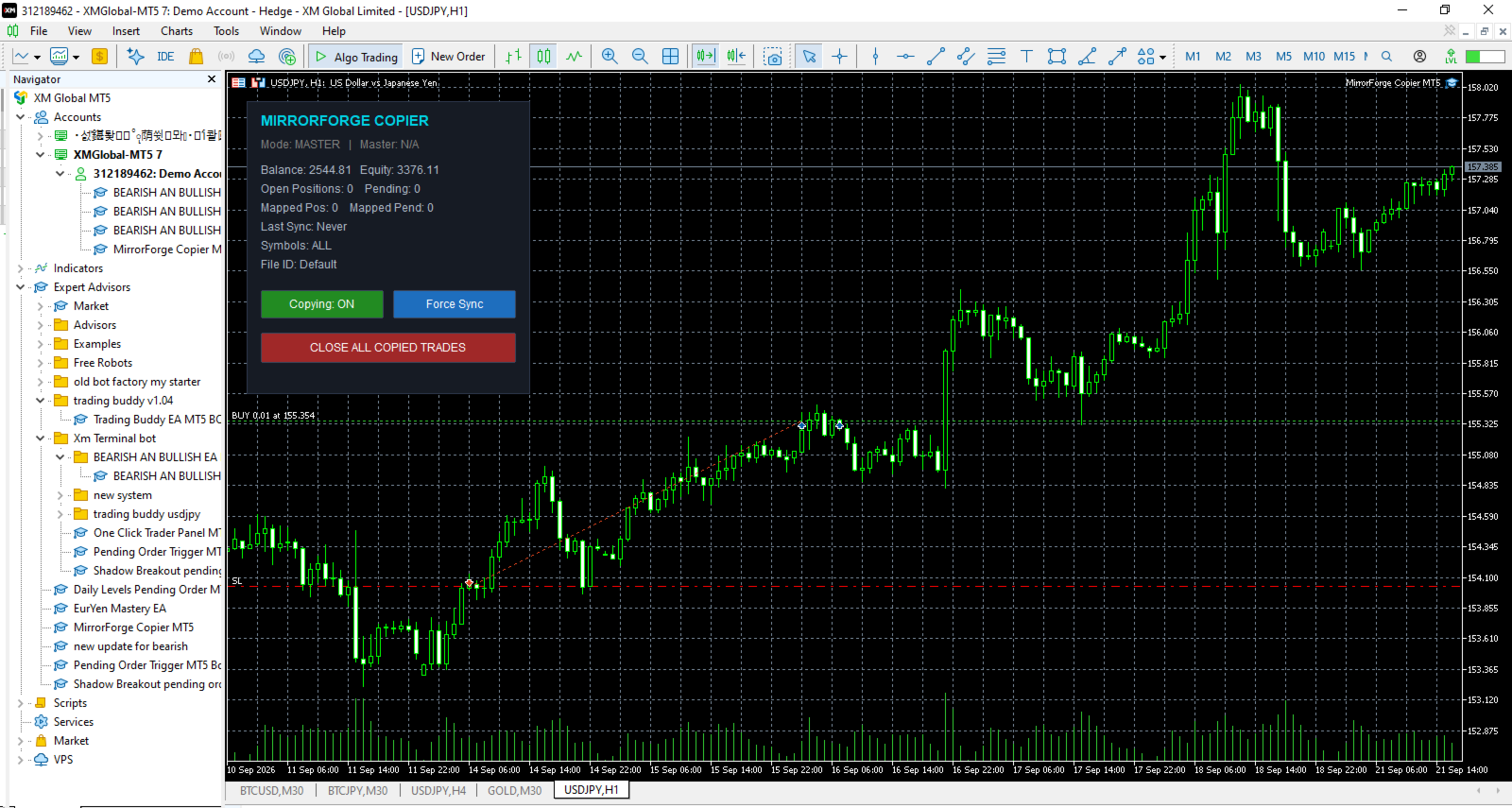
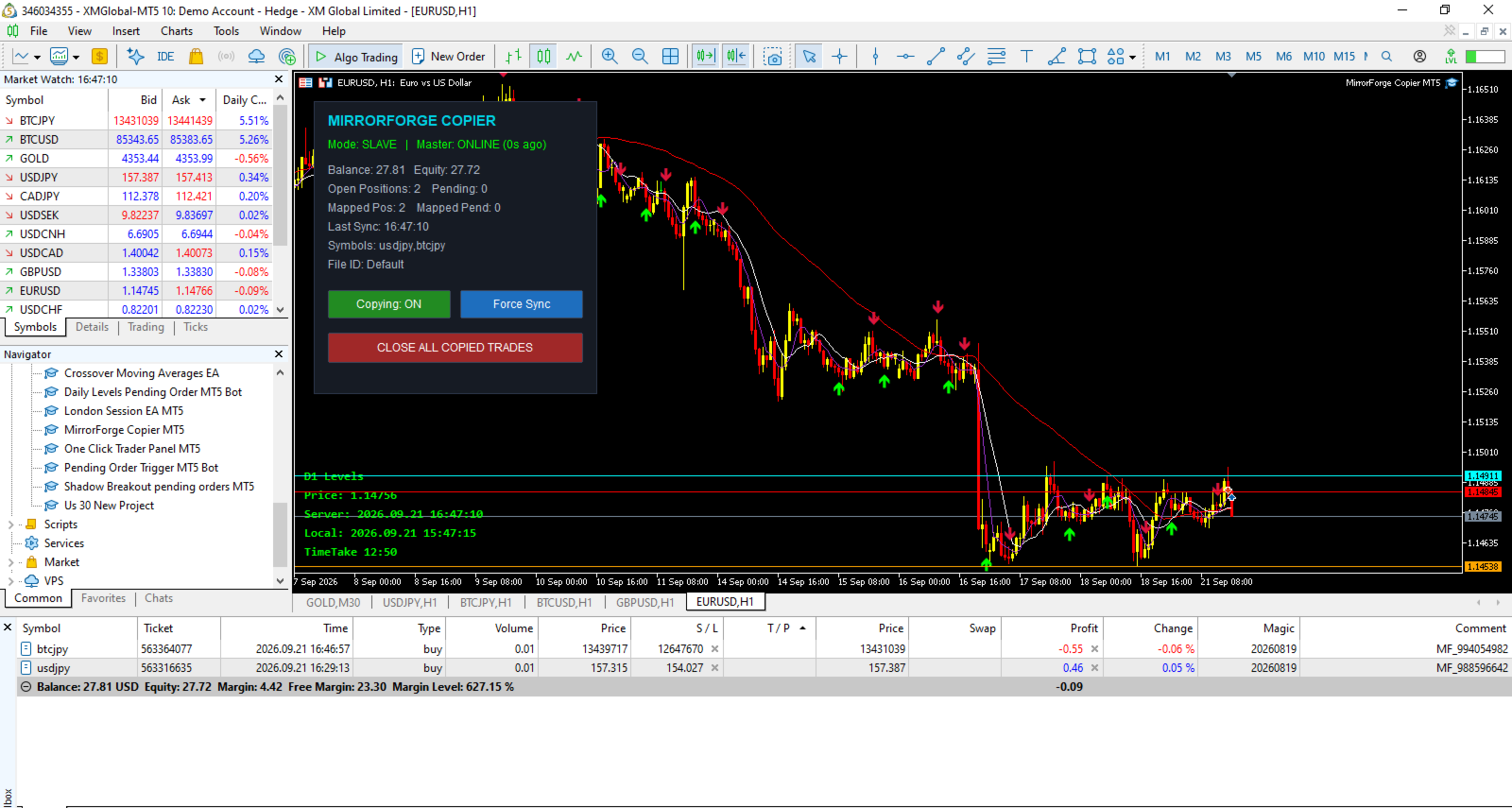
MirrorForge also includes a modern on-chart control panel with copying controls, synchronization information, account statistics, Master heartbeat status, symbol filters, and an emergency Close All Copied Trades function.
The system is designed for traders, EA developers, money managers, signal providers, and users who need to mirror trades between MT5 terminals running on the same computer, VPS, or environment where the MT5 common files directory is accessible.
Key Features
Master and Slave Modes
MirrorForge operates in two modes:
Master Mode
-
Monitors the source MT5 account.
-
Writes the current trading state to a shared file.
-
Publishes open positions.
-
Publishes supported pending orders.
-
Publishes entry price, volume, Stop Loss, Take Profit, magic number, comment, setup time and expiration information.
-
Maintains a heartbeat file so the Slave can determine whether the Master is active.
Slave Mode
-
Reads the Master trading state.
-
Creates corresponding trades on the target account.
-
Maintains Master-to-Slave ticket mappings.
-
Detects when Master positions are closed.
-
Detects when Master pending orders are removed.
-
Updates copied Stop Loss and Take Profit levels.
-
Reconciles the account after terminal restarts.
Both terminals use the same File ID to establish the communication pair.
Copy Market PositionsMirrorForge can copy open market positions from the Master account to the Slave account.
Supported directions include:
-
Buy positions
-
Sell positions
You can independently enable or disable copying of Buy and Sell trades.
The Slave can either follow the Master trade direction or reverse it.
Example
If the Master opens:
BUY 0.10 EURUSD
The Slave can be configured to open:
BUY 0.10 EURUSD
or, with Reverse Trades enabled:
SELL 0.10 EURUSD
Copy Pending OrdersMirrorForge can also synchronize supported pending orders.
Supported pending order types include:
-
Buy Limit
-
Sell Limit
-
Buy Stop
-
Sell Stop
-
Buy Stop Limit
-
Sell Stop Limit
The Slave monitors the Master pending-order list and attempts to maintain the corresponding pending orders.
If a pending order is modified on the Master, MirrorForge can update the corresponding Slave order.
If the Master pending order disappears, the mapped Slave pending order can also be removed.
Pending-order copying can be enabled or disabled independently.
Stop Loss and Take Profit SynchronizationMirrorForge can copy the Master trade's:
-
Stop Loss
-
Take Profit
These settings can be controlled independently.
Stop Loss
Enable:
Copy Stop Loss = true
The Slave will use the Master Stop Loss when opening or modifying the copied trade.
Disable it when you want the Slave to manage Stop Loss independently.
Take Profit
Enable:
Copy Take Profit = true
The Slave will use the Master Take Profit.
This provides flexibility for traders who want the Slave to follow the Master completely or use their own risk-management approach.
Flexible Lot SizingMirrorForge provides several lot-sizing options for Slave trades.
Fixed Lot
The Slave can use a predefined lot size regardless of the Master position volume.
Example:
Master:
0.50 lots
Slave Fixed Lot:
0.01 lots
The Slave opens:
0.01 lots
Lot Multiplier
The Slave can calculate its position size using the Master position volume multiplied by the selected multiplier.
Formula:
Slave Lot = Master Lot × Lot Multiplier
Example:
Master:
0.10 lots
Multiplier:
2.0
Slave:
0.20 lots
A multiplier below 1.0 can also be used to reduce the copied position size.
Lot Limits
The EA provides:
-
Minimum Lot
-
Maximum Lot
These settings help prevent the copier from opening positions outside the configured lot range.
The EA also checks the broker's symbol volume settings, including:
-
Minimum volume
-
Maximum volume
-
Volume step
before sending the trade.
Reverse TradesThe Reverse Trades option allows the Slave to trade in the opposite direction of the Master.
When disabled:
Master BUY → Slave BUY
Master SELL → Slave SELL
When enabled:
Master BUY → Slave SELL
Master SELL → Slave BUY
The reverse-direction functionality also applies to supported pending order types.
This allows MirrorForge to be used for strategies where the Slave account intentionally takes the opposite side of the Master account's signals.
Symbol MappingDifferent brokers may use different symbol names.
For example, one broker may use:
EURUSD
while another uses:
EURUSD.m
or:
EURUSDpro
MirrorForge provides symbol prefix and suffix settings to help map the Master symbol to the Slave broker's symbol.
Available settings include:
-
Master Symbol Suffix
-
Slave Symbol Suffix
-
Slave Symbol Prefix
Example
Master:
XAUUSD
Slave suffix:
.m
Result:
XAUUSD.m
This makes the copier more flexible when Master and Slave accounts use different broker symbol naming conventions.
Symbol FilterMirrorForge allows you to control which symbols are copied.
The Allowed Symbols input accepts a comma-separated list.
Example:
EURUSD,GBPUSD,XAUUSD
Only the specified symbols will be processed.
Leaving the setting empty allows all symbols.
This can be useful when the Master account trades many instruments but the Slave account should only copy selected markets.
Magic Number ControlSlave trades are assigned the configured MirrorForge Magic Number.
This helps identify trades created by the copier and allows the EA to distinguish its own positions and pending orders from other trades on the Slave account.
The Master also provides an optional:
Copy Only Magic
filter.
When enabled, the Master will only publish positions and pending orders matching the configured Magic Number.
This is useful when another EA or multiple strategies are operating on the Master account.
Maximum Position and Pending Order LimitsMirrorForge includes safety limits for the Slave account.
Maximum Open Positions
Controls the maximum number of copied positions allowed.
Default:
100
Set to:
0
for unlimited positions.
Maximum Pending Orders
Controls the maximum number of copied pending orders.
Default:
50
Set to:
0
for unlimited pending orders.
These limits can help prevent uncontrolled copying if the Master account contains a large number of trades.
Slippage and Retry ProtectionMirrorForge includes configurable execution controls.
Maximum Slippage
The:
Slippage Points
setting controls the maximum deviation used for trade execution.
Order Send Retries
If an order fails, MirrorForge can retry the operation.
The:
Max Order Send Retries
setting controls the number of attempts.
This can provide additional execution resilience when temporary trading conditions or broker responses cause an order request to fail.
Fast Local SynchronizationMirrorForge uses millisecond timers for its local synchronization process.
The Slave uses a configurable polling interval.
Default:
250 milliseconds
The Master writes its full current trading state at a configurable interval.
Default:
400 milliseconds
In addition, Master trade transactions can trigger an immediate state update.
This combination is designed to keep the Slave synchronized with changes occurring on the Master account without requiring an external server.
Actual execution speed can still depend on the MT5 terminal, broker, symbol trading conditions, VPS/computer performance, and market conditions.
Master HeartbeatMirrorForge uses a heartbeat mechanism to monitor the Master.
The Master periodically updates a heartbeat file.
The Slave checks the age of that heartbeat.
Default timeout:
15 seconds
If the Slave does not receive a recent heartbeat within the configured timeout, the panel can report:
MASTER OFFLINE
This allows the user to monitor whether the Master terminal is actively publishing its state.
The heartbeat is a monitoring mechanism; it does not guarantee that every trade can be executed on the Slave.
Terminal Restart RecoveryOne of the important features of MirrorForge is its reconciliation system.
The Slave stores Master-to-Slave ticket mappings in files.
When the Slave terminal is restarted, MirrorForge loads the saved mappings and performs a reconciliation process.
This allows the EA to compare:
Master current state
against
Slave current state
and determine which mapped trades should remain synchronized.
The system is designed so that terminal restarts do not automatically mean that the copier loses all knowledge of previously mapped trades.
Existing Trade SynchronizationMirrorForge provides an option for handling trades that already exist when the Slave starts.
Copy Existing Trades = Enabled
The Slave can synchronize existing Master positions and pending orders during startup/reconciliation.
Copy Existing Trades = Disabled
The EA can skip existing Master trades during the initial reconciliation.
This gives the user control over whether the Slave should begin copying only from new activity or also synchronize positions already open when the copier starts.
Automatic Trade Removal SynchronizationMirrorForge continuously compares the Master state with its stored mappings.
If a Master position that was previously mapped no longer exists, the EA attempts to close the corresponding Slave position.
Likewise, if a mapped Master pending order no longer exists, the EA attempts to delete the corresponding Slave pending order.
This keeps the Slave account aligned with the current Master trading state.
Live Modification SynchronizationIf a copied Master position has its Stop Loss or Take Profit changed, MirrorForge checks the corresponding Slave position.
If the values are different, the EA can modify the Slave position.
The same synchronization logic is applied to supported pending orders, including their:
-
Entry price
-
Stop Loss
-
Take Profit
This means the copier is not limited to copying the initial trade entry.
Modern Control PanelMirrorForge includes an on-chart control panel.
The panel displays important information including:
-
Current mode
-
Master online/offline status
-
Account balance
-
Account equity
-
Open positions
-
Pending orders
-
Mapped positions
-
Mapped pending orders
-
Last synchronization time
-
Symbol filter
-
File ID
The panel can be disabled if the trader prefers a clean chart.
Copying ON/OFF ControlThe panel provides a button to enable or disable copying.
Copying: ON
The EA continues its normal synchronization process.
Copying: OFF
The synchronization process is disabled until copying is enabled again.
This gives the user direct control without needing to remove the EA from the chart.
Force SyncThe Slave panel includes a:
Force Sync
button.
This allows the user to manually trigger a synchronization process instead of waiting for the next normal timer cycle.
This can be useful when checking synchronization after changing settings or reconnecting terminals.
Close All Copied TradesMirrorForge includes an emergency/manual control:
CLOSE ALL COPIED TRADES
When used in Slave mode, the EA attempts to:
-
Close positions using the MirrorForge Magic Number.
-
Delete pending orders using the MirrorForge Magic Number.
-
Clear the stored position mappings.
-
Clear the stored pending-order mappings.
This provides a convenient way to remove the copied trades managed by the copier.
Users should understand that this function acts on trades identified by the configured Magic Number, so the Magic Number should be configured carefully.
Detailed LoggingThe EA provides a Detailed Logging option.
When enabled, important events can be displayed in the MT5 Experts log, including:
-
Position copied
-
Pending order copied
-
Position closed because the Master position disappeared
-
Pending order deleted
-
Mapping information
-
Synchronization information
-
Execution errors
-
Master heartbeat status
-
Maximum trade limits reached
This can make troubleshooting and monitoring easier.
Main InputsGeneral
Mode
-
Master
-
Slave
File ID
Unique identifier used by the Master and Slave terminals.
The same File ID should be used for terminals that are intended to communicate with each other.
Magic Number
Magic number assigned to Slave trades.
Enable Copying
Enables or disables the copier.
Lot Sizing
Lot Mode
-
Fixed Lot
-
Lot Multiplier
-
Lot Balance
Fixed Lot
Lot size used when Fixed Lot mode is selected.
Lot Multiplier
Multiplier applied to the Master position volume when multiplier-based sizing is selected.
Minimum Lot
Minimum lot size allowed by the copier.
Maximum Lot
Maximum lot size allowed by the copier.
Copy Filters
Copy Buy
Enable/disable Buy copying.
Copy Sell
Enable/disable Sell copying.
Reverse Trades
Reverse Master direction on the Slave.
Copy Stop Loss
Synchronize Master Stop Loss.
Copy Take Profit
Synchronize Master Take Profit.
Copy Pending
Synchronize supported pending orders.
Copy Existing Trades
Determine whether existing Master trades should be considered during initial startup/reconciliation.
Copy Only Magic
Restrict Master-side copying to trades with the configured Magic Number.
Allowed Symbols
Comma-separated list of symbols to copy.
Symbol Handling
Master Suffix
Suffix to remove from Master symbols.
Slave Suffix
Suffix to add to Slave symbols.
Slave Prefix
Prefix to add to Slave symbols.
Safety & Limits
Maximum Open Positions
Maximum number of copied positions allowed on the Slave.
Maximum Pending Orders
Maximum number of copied pending orders allowed.
Slippage Points
Maximum configured execution deviation.
Maximum Retries
Number of execution attempts when an order request fails.
Timing
Slave Poll Interval
How frequently the Slave checks the Master state.
Master Write Interval
How frequently the Master writes its current state.
Heartbeat Timeout
Time in seconds before the Master is considered offline by the Slave.
Panel
Show Panel
Display or hide the MirrorForge control panel.
Panel X
Horizontal panel position.
Panel Y
Vertical panel position.
Logging
Detailed Log
Enable additional information in the MT5 Experts log.
Recommended Master/Slave SetupA typical setup consists of two MT5 terminals.
Step 1 — Master
Attach MirrorForge to the account that contains the trades you want to publish.
Set:
Mode = MASTER
Choose a unique:
File ID
For example:
MyCopier
Keep the desired copying filters enabled.
Step 2 — Slave
Attach MirrorForge to the target MT5 account.
Set:
Mode = SLAVE
Use the exact same:
File ID = MyCopier
Configure the desired:
-
Lot Mode
-
Lot Multiplier
-
Symbol mapping
-
Buy/Sell filters
-
Risk limits
-
Stop Loss/Take Profit settings
Step 3 — Keep Terminals Running
For continuous copying, both the Master and Slave terminals need to remain active.
A VPS can be used to keep MT5 terminals running continuously.
The copier does not use an external cloud/server-based copy infrastructure. Communication is performed through files available to the MT5 terminals.
Example ConfigurationMaster Account
Mode:
MASTER
File ID:
MyTradingAccount
Copy Pending:
Enabled
Copy Buy:
Enabled
Copy Sell:
Enabled
Slave Account
Mode:
SLAVE
File ID:
MyTradingAccount
Lot Mode:
LOT_MULTIPLIER
Lot Multiplier:
0.50
Copy Stop Loss:
Enabled
Copy Take Profit:
Enabled
Copy Pending:
Enabled
Reverse Trades:
Disabled
This configuration would attempt to mirror the Master direction while using approximately 50% of the Master volume, subject to the Slave broker's volume requirements and the configured minimum/maximum lot limits.
Who Can Use MirrorForge?MirrorForge can be useful for:
-
Traders managing multiple MT5 accounts
-
EA developers testing strategies across accounts
-
Traders using separate Master and execution accounts
-
Traders who want to mirror selected instruments
-
Users with different broker symbol suffixes
-
Traders who need fixed or multiplier-based Slave lot sizing
-
Users who need position and pending-order synchronization
-
Users running MT5 terminals on a local computer or VPS
MirrorForge is a local file-based copier.
It does not depend on a remote trade-copying server for communication between the Master and Slave.
Both MT5 terminals need access to the appropriate MT5 common files environment.
The actual result of copying can be affected by:
-
Broker execution
-
Market liquidity
-
Spread
-
Slippage
-
Symbol availability
-
Trading permissions
-
Minimum and maximum volume
-
Volume step
-
Stop-level requirements
-
Market conditions
-
Terminal/VPS performance
-
Internet connectivity
-
Differences between Master and Slave brokers
A successful Master trade does not guarantee an identical execution price on the Slave.
Risk WarningMirrorForge is a trade-copying tool. It does not guarantee profits and it does not remove the risks associated with financial markets.
Copied trades can experience differences in:
-
Entry price
-
Exit price
-
Spread
-
Slippage
-
Execution time
-
Stop Loss execution
-
Take Profit execution
-
Available trading volume
-
Symbol specifications
A Master account and Slave account can therefore produce different results even when the same trading instructions are copied.
Users should test the copier on demo accounts before using it with real funds and should configure lot sizes and limits according to their own risk tolerance.
Never assume that copied trades will have exactly the same execution as the Master.
Important Setup RequirementFor successful communication, the Master and Slave should use the same File ID.
For example:
Master:
File ID = MyCopier
Slave:
File ID = MyCopier
Using different File IDs will cause the terminals to use different communication files.
If broker symbol names are different, configure the appropriate Master suffix, Slave suffix, or Slave prefix.
Why MirrorForge?MirrorForge combines local MT5 trade copying with configurable execution controls and persistent synchronization.
The system provides:
-
Master/Slave architecture
-
Market position copying
-
Pending-order copying
-
Buy/Sell filters
-
Reverse trading
-
Fixed lot sizing
-
Multiplier lot sizing
-
Lot limits
-
Stop Loss synchronization
-
Take Profit synchronization
-
Symbol filtering
-
Symbol prefix/suffix mapping
-
Magic-number identification
-
Position limits
-
Pending-order limits
-
Retry handling
-
Master heartbeat monitoring
-
Restart reconciliation
-
Persistent ticket mapping
-
Force synchronization
-
Close-all control
-
On-chart monitoring panel
-
Detailed logging
MirrorForge is designed to give the user direct control over how trades are copied between MT5 accounts while keeping the architecture simple and local.
VersionMirrorForge Local MT5 Trade Copier
Version: 1.20
The product is based on a local file-based Master/Slave architecture and includes support for both open positions and supported pending orders.
Final Note
Please test MirrorForge carefully with your specific brokers, symbols, account types, and execution conditions before using it on a live account.
The copier is a tool for synchronizing trading instructions; it is not a trading strategy and does not guarantee the same execution or financial results between accounts.