MirrorForge Copie MT5

MirrorForge Local MT5 Trade Copier

MirrorForge is a local MT5 trade copier designed to mirror trading activity from a Master account to a Slave/Target account using a file-based communication system.

The EA can copy open market positions and pending orders, synchronize Stop Loss and Take Profit levels, support different lot-sizing configurations, handle broker symbol differences through prefix/suffix mapping, and maintain Master-to-Slave ticket relationships across terminal restarts.

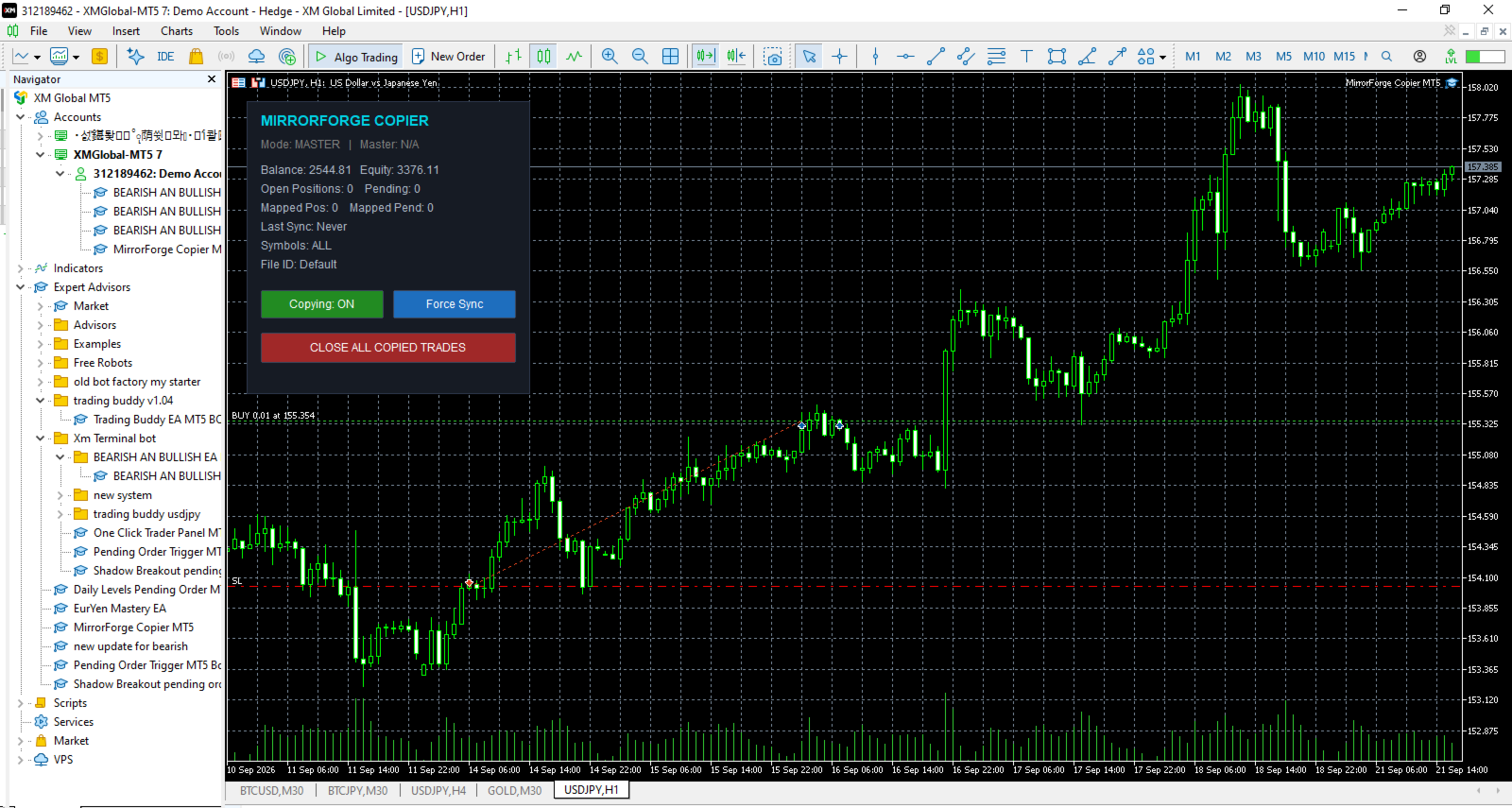
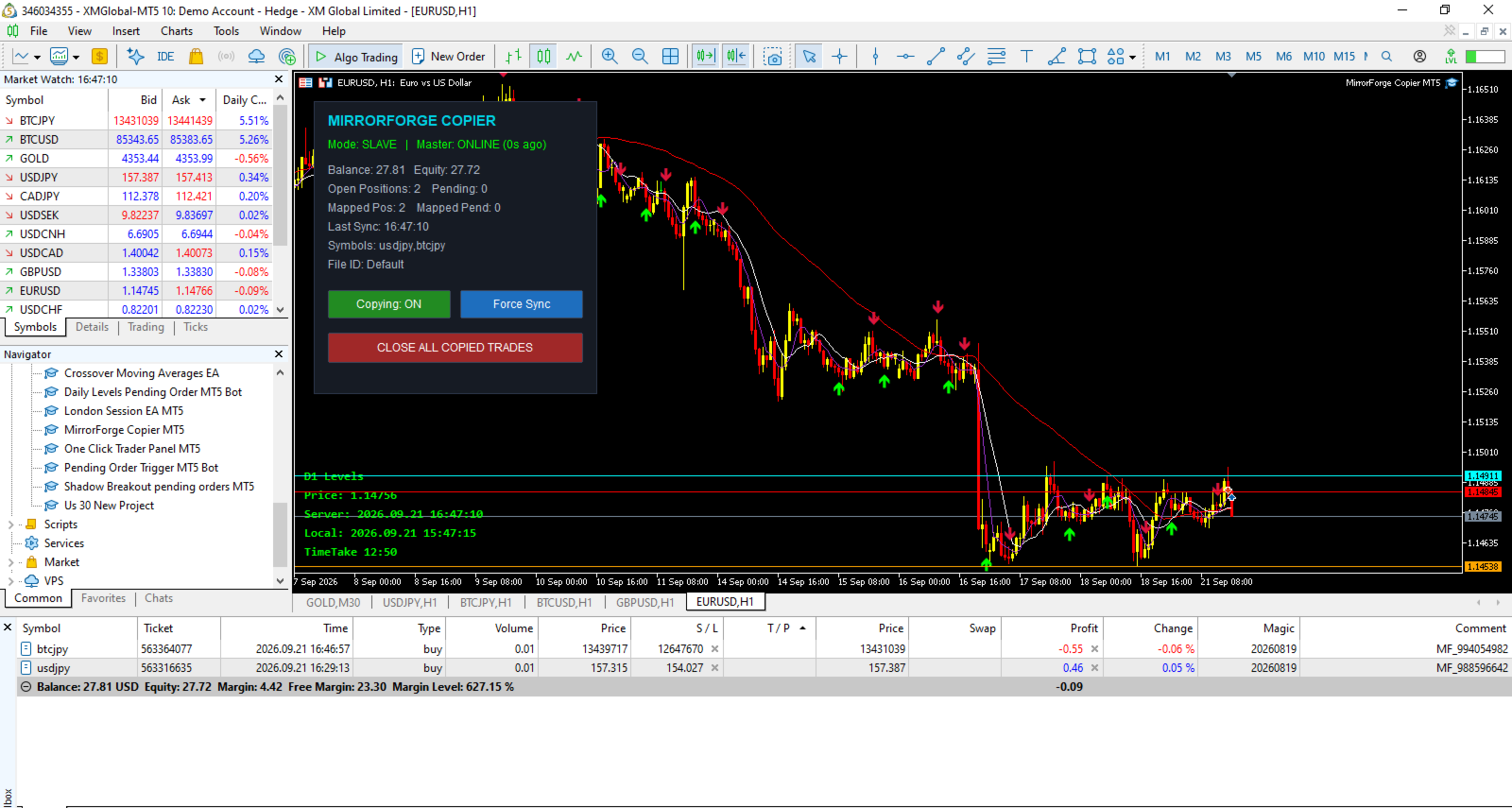
MirrorForge also includes a modern on-chart control panel with copying controls, synchronization information, account statistics, Master heartbeat status, symbol filters, and an emergency Close All Copied Trades function.

The system is designed for traders, EA developers, money managers, signal providers, and users who need to mirror trades between MT5 terminals running on the same computer, VPS, or environment where the MT5 common files directory is accessible.

Key Features

Master and Slave Modes

MirrorForge operates in two modes:

Master Mode

  • Monitors the source MT5 account.

  • Writes the current trading state to a shared file.

  • Publishes open positions.

  • Publishes supported pending orders.

  • Publishes entry price, volume, Stop Loss, Take Profit, magic number, comment, setup time and expiration information.

  • Maintains a heartbeat file so the Slave can determine whether the Master is active.

Slave Mode

  • Reads the Master trading state.

  • Creates corresponding trades on the target account.

  • Maintains Master-to-Slave ticket mappings.

  • Detects when Master positions are closed.

  • Detects when Master pending orders are removed.

  • Updates copied Stop Loss and Take Profit levels.

  • Reconciles the account after terminal restarts.

Both terminals use the same File ID to establish the communication pair.

Copy Market Positions

MirrorForge can copy open market positions from the Master account to the Slave account.

Supported directions include:

  • Buy positions

  • Sell positions

You can independently enable or disable copying of Buy and Sell trades.

The Slave can either follow the Master trade direction or reverse it.

Example

If the Master opens:

BUY 0.10 EURUSD

The Slave can be configured to open:

BUY 0.10 EURUSD

or, with Reverse Trades enabled:

SELL 0.10 EURUSD

Copy Pending Orders

MirrorForge can also synchronize supported pending orders.

Supported pending order types include:

  • Buy Limit

  • Sell Limit

  • Buy Stop

  • Sell Stop

  • Buy Stop Limit

  • Sell Stop Limit

The Slave monitors the Master pending-order list and attempts to maintain the corresponding pending orders.

If a pending order is modified on the Master, MirrorForge can update the corresponding Slave order.

If the Master pending order disappears, the mapped Slave pending order can also be removed.

Pending-order copying can be enabled or disabled independently.

Stop Loss and Take Profit Synchronization

MirrorForge can copy the Master trade's:

  • Stop Loss

  • Take Profit

These settings can be controlled independently.

Stop Loss

Enable:

Copy Stop Loss = true

The Slave will use the Master Stop Loss when opening or modifying the copied trade.

Disable it when you want the Slave to manage Stop Loss independently.

Take Profit

Enable:

Copy Take Profit = true

The Slave will use the Master Take Profit.

This provides flexibility for traders who want the Slave to follow the Master completely or use their own risk-management approach.

Flexible Lot Sizing

MirrorForge provides several lot-sizing options for Slave trades.

Fixed Lot

The Slave can use a predefined lot size regardless of the Master position volume.

Example:

Master:

0.50 lots

Slave Fixed Lot:

0.01 lots

The Slave opens:

0.01 lots

Lot Multiplier

The Slave can calculate its position size using the Master position volume multiplied by the selected multiplier.

Formula:

Slave Lot = Master Lot × Lot Multiplier

Example:

Master:

0.10 lots

Multiplier:

2.0

Slave:

0.20 lots

A multiplier below 1.0 can also be used to reduce the copied position size.

Lot Limits

The EA provides:

  • Minimum Lot

  • Maximum Lot

These settings help prevent the copier from opening positions outside the configured lot range.

The EA also checks the broker's symbol volume settings, including:

  • Minimum volume

  • Maximum volume

  • Volume step

before sending the trade.

Reverse Trades

The Reverse Trades option allows the Slave to trade in the opposite direction of the Master.

When disabled:

Master BUY → Slave BUY

Master SELL → Slave SELL

When enabled:

Master BUY → Slave SELL

Master SELL → Slave BUY

The reverse-direction functionality also applies to supported pending order types.

This allows MirrorForge to be used for strategies where the Slave account intentionally takes the opposite side of the Master account's signals.

Symbol Mapping

Different brokers may use different symbol names.

For example, one broker may use:

EURUSD

while another uses:

EURUSD.m

or:

EURUSDpro

MirrorForge provides symbol prefix and suffix settings to help map the Master symbol to the Slave broker's symbol.

Available settings include:

  • Master Symbol Suffix

  • Slave Symbol Suffix

  • Slave Symbol Prefix

Example

Master:

XAUUSD

Slave suffix:

.m

Result:

XAUUSD.m

This makes the copier more flexible when Master and Slave accounts use different broker symbol naming conventions.

Symbol Filter

MirrorForge allows you to control which symbols are copied.

The Allowed Symbols input accepts a comma-separated list.

Example:

EURUSD,GBPUSD,XAUUSD

Only the specified symbols will be processed.

Leaving the setting empty allows all symbols.

This can be useful when the Master account trades many instruments but the Slave account should only copy selected markets.

Magic Number Control

Slave trades are assigned the configured MirrorForge Magic Number.

This helps identify trades created by the copier and allows the EA to distinguish its own positions and pending orders from other trades on the Slave account.

The Master also provides an optional:

Copy Only Magic

filter.

When enabled, the Master will only publish positions and pending orders matching the configured Magic Number.

This is useful when another EA or multiple strategies are operating on the Master account.

Maximum Position and Pending Order Limits

MirrorForge includes safety limits for the Slave account.

Maximum Open Positions

Controls the maximum number of copied positions allowed.

Default:

100

Set to:

0

for unlimited positions.

Maximum Pending Orders

Controls the maximum number of copied pending orders.

Default:

50

Set to:

0

for unlimited pending orders.

These limits can help prevent uncontrolled copying if the Master account contains a large number of trades.

Slippage and Retry Protection

MirrorForge includes configurable execution controls.

Maximum Slippage

The:

Slippage Points

setting controls the maximum deviation used for trade execution.

Order Send Retries

If an order fails, MirrorForge can retry the operation.

The:

Max Order Send Retries

setting controls the number of attempts.

This can provide additional execution resilience when temporary trading conditions or broker responses cause an order request to fail.

Fast Local Synchronization

MirrorForge uses millisecond timers for its local synchronization process.

The Slave uses a configurable polling interval.

Default:

250 milliseconds

The Master writes its full current trading state at a configurable interval.

Default:

400 milliseconds

In addition, Master trade transactions can trigger an immediate state update.

This combination is designed to keep the Slave synchronized with changes occurring on the Master account without requiring an external server.

Actual execution speed can still depend on the MT5 terminal, broker, symbol trading conditions, VPS/computer performance, and market conditions.

Master Heartbeat

MirrorForge uses a heartbeat mechanism to monitor the Master.

The Master periodically updates a heartbeat file.

The Slave checks the age of that heartbeat.

Default timeout:

15 seconds

If the Slave does not receive a recent heartbeat within the configured timeout, the panel can report:

MASTER OFFLINE

This allows the user to monitor whether the Master terminal is actively publishing its state.

The heartbeat is a monitoring mechanism; it does not guarantee that every trade can be executed on the Slave.

Terminal Restart Recovery

One of the important features of MirrorForge is its reconciliation system.

The Slave stores Master-to-Slave ticket mappings in files.

When the Slave terminal is restarted, MirrorForge loads the saved mappings and performs a reconciliation process.

This allows the EA to compare:

Master current state

against

Slave current state

and determine which mapped trades should remain synchronized.

The system is designed so that terminal restarts do not automatically mean that the copier loses all knowledge of previously mapped trades.

Existing Trade Synchronization

MirrorForge provides an option for handling trades that already exist when the Slave starts.

Copy Existing Trades = Enabled

The Slave can synchronize existing Master positions and pending orders during startup/reconciliation.

Copy Existing Trades = Disabled

The EA can skip existing Master trades during the initial reconciliation.

This gives the user control over whether the Slave should begin copying only from new activity or also synchronize positions already open when the copier starts.

Automatic Trade Removal Synchronization

MirrorForge continuously compares the Master state with its stored mappings.

If a Master position that was previously mapped no longer exists, the EA attempts to close the corresponding Slave position.

Likewise, if a mapped Master pending order no longer exists, the EA attempts to delete the corresponding Slave pending order.

This keeps the Slave account aligned with the current Master trading state.

Live Modification Synchronization

If a copied Master position has its Stop Loss or Take Profit changed, MirrorForge checks the corresponding Slave position.

If the values are different, the EA can modify the Slave position.

The same synchronization logic is applied to supported pending orders, including their:

  • Entry price

  • Stop Loss

  • Take Profit

This means the copier is not limited to copying the initial trade entry.

Modern Control Panel

MirrorForge includes an on-chart control panel.

The panel displays important information including:

  • Current mode

  • Master online/offline status

  • Account balance

  • Account equity

  • Open positions

  • Pending orders

  • Mapped positions

  • Mapped pending orders

  • Last synchronization time

  • Symbol filter

  • File ID

The panel can be disabled if the trader prefers a clean chart.

Copying ON/OFF Control

The panel provides a button to enable or disable copying.

Copying: ON

The EA continues its normal synchronization process.

Copying: OFF

The synchronization process is disabled until copying is enabled again.

This gives the user direct control without needing to remove the EA from the chart.

Force Sync

The Slave panel includes a:

Force Sync

button.

This allows the user to manually trigger a synchronization process instead of waiting for the next normal timer cycle.

This can be useful when checking synchronization after changing settings or reconnecting terminals.

Close All Copied Trades

MirrorForge includes an emergency/manual control:

CLOSE ALL COPIED TRADES

When used in Slave mode, the EA attempts to:

  • Close positions using the MirrorForge Magic Number.

  • Delete pending orders using the MirrorForge Magic Number.

  • Clear the stored position mappings.

  • Clear the stored pending-order mappings.

This provides a convenient way to remove the copied trades managed by the copier.

Users should understand that this function acts on trades identified by the configured Magic Number, so the Magic Number should be configured carefully.

Detailed Logging

The EA provides a Detailed Logging option.

When enabled, important events can be displayed in the MT5 Experts log, including:

  • Position copied

  • Pending order copied

  • Position closed because the Master position disappeared

  • Pending order deleted

  • Mapping information

  • Synchronization information

  • Execution errors

  • Master heartbeat status

  • Maximum trade limits reached

This can make troubleshooting and monitoring easier.

Main Inputs

General

Mode

  • Master

  • Slave

File ID

Unique identifier used by the Master and Slave terminals.

The same File ID should be used for terminals that are intended to communicate with each other.

Magic Number

Magic number assigned to Slave trades.

Enable Copying

Enables or disables the copier.

Lot Sizing

Lot Mode

  • Fixed Lot

  • Lot Multiplier

  • Lot Balance

Fixed Lot

Lot size used when Fixed Lot mode is selected.

Lot Multiplier

Multiplier applied to the Master position volume when multiplier-based sizing is selected.

Minimum Lot

Minimum lot size allowed by the copier.

Maximum Lot

Maximum lot size allowed by the copier.

Copy Filters

Copy Buy

Enable/disable Buy copying.

Copy Sell

Enable/disable Sell copying.

Reverse Trades

Reverse Master direction on the Slave.

Copy Stop Loss

Synchronize Master Stop Loss.

Copy Take Profit

Synchronize Master Take Profit.

Copy Pending

Synchronize supported pending orders.

Copy Existing Trades

Determine whether existing Master trades should be considered during initial startup/reconciliation.

Copy Only Magic

Restrict Master-side copying to trades with the configured Magic Number.

Allowed Symbols

Comma-separated list of symbols to copy.

Symbol Handling

Master Suffix

Suffix to remove from Master symbols.

Slave Suffix

Suffix to add to Slave symbols.

Slave Prefix

Prefix to add to Slave symbols.

Safety & Limits

Maximum Open Positions

Maximum number of copied positions allowed on the Slave.

Maximum Pending Orders

Maximum number of copied pending orders allowed.

Slippage Points

Maximum configured execution deviation.

Maximum Retries

Number of execution attempts when an order request fails.

Timing

Slave Poll Interval

How frequently the Slave checks the Master state.

Master Write Interval

How frequently the Master writes its current state.

Heartbeat Timeout

Time in seconds before the Master is considered offline by the Slave.

Panel

Show Panel

Display or hide the MirrorForge control panel.

Panel X

Horizontal panel position.

Panel Y

Vertical panel position.

Logging

Detailed Log

Enable additional information in the MT5 Experts log.

Recommended Master/Slave Setup

A typical setup consists of two MT5 terminals.

Step 1 — Master

Attach MirrorForge to the account that contains the trades you want to publish.

Set:

Mode = MASTER

Choose a unique:

File ID

For example:

MyCopier

Keep the desired copying filters enabled.

Step 2 — Slave

Attach MirrorForge to the target MT5 account.

Set:

Mode = SLAVE

Use the exact same:

File ID = MyCopier

Configure the desired:

  • Lot Mode

  • Lot Multiplier

  • Symbol mapping

  • Buy/Sell filters

  • Risk limits

  • Stop Loss/Take Profit settings

Step 3 — Keep Terminals Running

For continuous copying, both the Master and Slave terminals need to remain active.

A VPS can be used to keep MT5 terminals running continuously.

The copier does not use an external cloud/server-based copy infrastructure. Communication is performed through files available to the MT5 terminals.

Example Configuration

Master Account

Mode:

MASTER

File ID:

MyTradingAccount

Copy Pending:

Enabled

Copy Buy:

Enabled

Copy Sell:

Enabled

Slave Account

Mode:

SLAVE

File ID:

MyTradingAccount

Lot Mode:

LOT_MULTIPLIER

Lot Multiplier:

0.50

Copy Stop Loss:

Enabled

Copy Take Profit:

Enabled

Copy Pending:

Enabled

Reverse Trades:

Disabled

This configuration would attempt to mirror the Master direction while using approximately 50% of the Master volume, subject to the Slave broker's volume requirements and the configured minimum/maximum lot limits.

Who Can Use MirrorForge?

MirrorForge can be useful for:

  • Traders managing multiple MT5 accounts

  • EA developers testing strategies across accounts

  • Traders using separate Master and execution accounts

  • Traders who want to mirror selected instruments

  • Users with different broker symbol suffixes

  • Traders who need fixed or multiplier-based Slave lot sizing

  • Users who need position and pending-order synchronization

  • Users running MT5 terminals on a local computer or VPS

Important Technical Notes

MirrorForge is a local file-based copier.

It does not depend on a remote trade-copying server for communication between the Master and Slave.

Both MT5 terminals need access to the appropriate MT5 common files environment.

The actual result of copying can be affected by:

  • Broker execution

  • Market liquidity

  • Spread

  • Slippage

  • Symbol availability

  • Trading permissions

  • Minimum and maximum volume

  • Volume step

  • Stop-level requirements

  • Market conditions

  • Terminal/VPS performance

  • Internet connectivity

  • Differences between Master and Slave brokers

A successful Master trade does not guarantee an identical execution price on the Slave.

Risk Warning

MirrorForge is a trade-copying tool. It does not guarantee profits and it does not remove the risks associated with financial markets.

Copied trades can experience differences in:

  • Entry price

  • Exit price

  • Spread

  • Slippage

  • Execution time

  • Stop Loss execution

  • Take Profit execution

  • Available trading volume

  • Symbol specifications

A Master account and Slave account can therefore produce different results even when the same trading instructions are copied.

Users should test the copier on demo accounts before using it with real funds and should configure lot sizes and limits according to their own risk tolerance.

Never assume that copied trades will have exactly the same execution as the Master.

Important Setup Requirement

For successful communication, the Master and Slave should use the same File ID.

For example:

Master:

File ID = MyCopier

Slave:

File ID = MyCopier

Using different File IDs will cause the terminals to use different communication files.

If broker symbol names are different, configure the appropriate Master suffix, Slave suffix, or Slave prefix.

Why MirrorForge?

MirrorForge combines local MT5 trade copying with configurable execution controls and persistent synchronization.

The system provides:

  • Master/Slave architecture

  • Market position copying

  • Pending-order copying

  • Buy/Sell filters

  • Reverse trading

  • Fixed lot sizing

  • Multiplier lot sizing

  • Lot limits

  • Stop Loss synchronization

  • Take Profit synchronization

  • Symbol filtering

  • Symbol prefix/suffix mapping

  • Magic-number identification

  • Position limits

  • Pending-order limits

  • Retry handling

  • Master heartbeat monitoring

  • Restart reconciliation

  • Persistent ticket mapping

  • Force synchronization

  • Close-all control

  • On-chart monitoring panel

  • Detailed logging

MirrorForge is designed to give the user direct control over how trades are copied between MT5 accounts while keeping the architecture simple and local.

Version

MirrorForge Local MT5 Trade Copier

Version: 1.20

The product is based on a local file-based Master/Slave architecture and includes support for both open positions and supported pending orders.

Final Note

Please test MirrorForge carefully with your specific brokers, symbols, account types, and execution conditions before using it on a live account.

The copier is a tool for synchronizing trading instructions; it is not a trading strategy and does not guarantee the same execution or financial results between accounts.
おすすめのプロダクト
Bastion is a monitor-and-close-only risk manager for prop-firm traders. It watches your account against your firm's daily-loss and maximum-drawdown limits in real time and force-closes your open positions BEFORE you cross a line. It never opens a trade of its own, so it stays fully within the tools allowed by FTMO, FundedNext, The5ers, FTUK and FXIFY. Why traders fail challenges A large share of failed evaluations end on a single daily-loss breach: a moment of inattention, a news spike, one tra
Apex Terminal is a trade panel for MetaTrader 5 that sizes every position from your risk and manages it from entry to exit. Set how much you accept to lose and where the stop-loss goes. Before you click, the panel shows the lot, the loss at the stop and the profit at the full target. One click opens the trade with the stop-loss and the whole take-profit ladder already in place. TRADE - Position size from % of balance or equity, a fixed amount of money or a fixed lot. The lot is rounded down t
Ultimate Pro Trading Panel — All-In-One Manual & Grid Trading Dashboard Pro Trading Panel   is an all-in-one on-chart control panel that gives discretionary and semi-automated traders a complete toolkit for entries, exits, risk management, and grid trading — without leaving the chart. Every function is visual, draggable, and updates in real time. If you want to test this utility feel free to download the basic preview version of this tool here:  https://www.mql5.com/en/market/product/181435 Who
Trading Utility for Forex Currency Pairs Only not for Gold  Functions Auto Lot Calculation based on Risk Auto stoploss  Auto TakeProfit Breakeven Auto Close Half % Close in percentage with respect to the PIPs Pending Orders BuyLimit Sell Limit with distances BuyStop Sell Stop    with distances Trading Informations Risk in percentage For Multiple trades Combine Takeprofit and Combine Stoplosses
Overview Mirror Signals Service EA (Text only)   is a powerful monitoring Expert Advisor that automatically sends   real-time Telegram notifications   for all important trade events on your MetaTrader 5 account. It is engineered specifically for   signal providers ,   trade-copier operators ,   auditors ,   educators , and   professional trading services   that require immediate, detailed, and reliable reporting. Everything from   entries, exits, SL/TP changes, comment changes, trailing sto
RSI Currency Strength Meter is a powerful and elegant multi-currency indicator that measures the real-time relative strength of the 8 major currencies using RSI logic. By calculating the smoothed performance of each currency across its major pairs and applying the RSI formula, it delivers clean and responsive strength lines that make it easy to spot which currencies are truly strong or weak at any moment. This indicator is particularly useful for visualizing currency correlations and divergence
This tool will perform Trailing stop loss and Break even management for orders. Helps you limit or reduce the time spend watching orders on the screen, especially when you need to go to sleep. Just add this EA to 1 chart, you can manage all pairs. You can filter orders by comment, magic number, symbol and order ticket number. When Breakeven it can add shift/offset pips (to cover the commission...). You can try in strategy tester before purchase. The EA will add Buy and Sell alternately, so you
TradeVista Pro — Professional Trade & Risk Management Panel TradeVista Pro is a professional all-in-one trade execution and position management panel for MetaTrader 5 , designed for traders who want faster order management, precise risk control, and a cleaner way to manage open positions directly from the chart. Instead of constantly switching between the MT5 Trade tab, order windows, and chart controls, TradeVista Pro brings essential trading-management functions together in one intuitive inter
TradePilotmt5
Hossein Khalil Alishir
TradePilot Expert Advisor (EA) for MetaTrader 5 TradePilot is a professional and user-friendly Expert Advisor (EA) for MetaTrader 5 (MT5) . It simplifies automated trading , risk management , and trade execution with a smart trading panel . Perfect for beginners and experienced traders looking for a reliable trade manager EA with automated lot size calculation and smart position management. Key Advantages User-Friendly Trading Panel: Customizable panel with buttons and hotkeys for fast ex
CosmiCLab SMC FIBO CosmiCLab SMC FIBO is a professional trading indicator designed for traders who use Smart Money Concepts (SMC), market structure analysis and Fibonacci retracement levels. The indicator automatically detects market swings and builds Fibonacci levels based on the latest impulse movement. It also identifies market structure changes such as BOS (Break of Structure) and CHOCH (Change of Character), helping traders understand the current market direction. CosmiCLab SMC FIBO also pr
RRtoolbox - Professional Tools: Risk:Reward Trading Tool (SL/TP Horizontals + Pending orders + Diagonals), Alerts set on trend lines (for alerts on diagonal levels), SelfManagement (BE, partials...), close/cancelling by time, Statistics, Info and trading on chart. One-Click Trading with Visual Risk:Reward Management RRtoolbox is a comprehensive trading panel that combines one-click order execution,  statistics and  powerful visual Risk:Reward tools, alerts set with trendlines, on chart butt
Timeframe Trading Limiter
AL MOOSAWI ABDULLAH JAFFER BAQER
Timeframe Trading Limiter is a professional risk management and trade discipline utility designed for MetaTrader 5. It empowers traders to enforce strict, automated limits on the number of trades and the maximum allowable drawdown within each trading period, based directly on the chart timeframe selected. Whether you are a discretionary trader prone to overtrading, a prop firm challenge participant needing to adhere to strict rules, or an algorithmic trader running multiple strategies, this tool
Overview Mirror Signals EA is a powerful monitoring Expert Advisor that automatically sends real-time Telegram notifications for all important trade events on your MetaTrader 5 account. It is engineered specifically for signal providers , trade-copier operators , auditors , educators , and professional trading services that require immediate, detailed, and reliable reporting. Everything from entries, exits, SL/TP changes, comment changes, trailing stop activations, pending order modifications
Exp5 Duplicator
Vladislav Andruschenko
4.78 (9)
Duplicator for MetaTrader 5 — 1つの端末内で動作するプロフェッショナルなポジション複製システム MetaTrader 5 ですでに開かれているポジションを自動で複製し、総ボリュームを拡張し、独自のロット設定を適用しながら、複製ポジションを明確なルールで管理したいトレーダーのための信頼性の高い Expert Advisor です。 手動売買、アルゴリズム売買、そして既存ポジションをより柔軟に管理したい場面に適した実用的なツールです。 Duplicator for MT5 は独自の売買戦略で新規ポジションを開くものではありません。役割は、MetaTrader 5 口座内にすでに存在しているポジションを監視し、指定した条件に従ってその複製を作成することです。複製回数、ロットサイズ、Stop Loss、Take Profit、コメント、追加の管理条件まで細かく設定できます。 異なるプラットフォーム間のコピーではなく、 同じ MetaTrader 5 端末内で ポジションを正確に複製したい場合、この MT5 版 Duplicator はその目的のために作られていま
PROTECT YOUR FTMO Account in a simplest way Must-Have Account Protector for any Prop-trading Account and Challenge MT4 / MT5 Expert Advisor that protects your Forex Prop Trading account from an unexpected drawdown! FTMO Protector  is a Tool that lets you manage trades and control your profit and loss across multiple Robots and currency pairs using a simple parameters and settings. Use as many EAs and Instruments you need, the Protector will: 1.   Calculate your midnight (01:00 System time) Balan
Noize Absorption Index - is the manual trading system that measures the difference of pressure between bears forces and bulls forces. Green line - is a noize free index that showing curent situation. Zero value of index shows totally choppy/flat market.Values above zero level shows how powerfull bullish wave is and values below zero measures bearish forces.Up arrow appears on bearish market when it's ready to reverse, dn arrow appears on weak bullish market, as a result of reverse expectation.
Trade Assistant 38 in 1
Makarii Gubaydullin
4.91 (23)
多機能ツール:ロット計算、グリッド注文、R/R比率、トレードマネージャー、サプライ&デマンドゾーン、プライスアクションなど デモ版   |   ユーザーマニュアル トレードアシスタント   はストラテジーテスターでは動作しません :   こちらからデモ版をダウンロード  して ユーティリティ をテストできます。 ご質問、改善のご提案、バグ発見の場合は ご連絡ください MT4版が必要な場合は こちら から入手できます トレード   プロセス を簡素化、高速化、自動化。   ダッシュボード で標準端末の機能を拡張。 トレードパネルは  あらゆる取引商品で動作:外国為替、株式、インデックス、暗号通貨など。 1. 新規トレードの実行 :ロット / リスク / R/R計算 :手動トレードのためのリスク管理 ロット計算機(リスクサイズに基づく取引量計算) リスク計算機(ロットサイズに基づくリスク額) リスクリワード   比率 グリッド注文:  + 動的間隔オプション、スプリットロットオプション 注文のアクティベーショントリガー、+ バイストップリミット / セルストップリミット 仮想SL、仮想
DDKiller Pro
Njaratahiry Michael Randrianiaina
Stop Blowing Your Account. Once and For All. DDKiller Pro is the MT5 risk guardian that runs silently on your chart and shuts down trading the moment you hit a limit — whether you're grinding a prop firm challenge or managing your own CFD account. The problem every trader knows: You set your rules. You break them anyway. One revenge trade. One overleveraged position. One session that erases a month of gains. DDKiller Pro removes that decision from your hands entirely. What it does: The second yo
Margin Call Shield – Defend Your Margin on Your Terms Margin Call Shield is a tool for MetaTrader 5 traders who want to decide for themselves which open positions are closed during margin call situations before the platform does so automatically based on its internal rules. By default, the broker or platform decides which positions to close, often using undisclosed algorithms. Margin Call Shield lets you set this order according to your own strategy. Why Was Margin Call Shield Created? In a mar
ADVANCED FUNCTIONALITIES: Trend Score (0-100) with visual bar Intelligent signals with adjustable strength (1-10) Risk management with automatic TP/SL Audible and visual alerts Price zones with smooth filling Multi-indicator analysis (RSI, ATR, BB, EMAs) DESIGN FEATURES Modern Visual: Smooth and well-spaced lines (EMA with 2-3px width) Vibrant and professional colors (Sky Blue, Orange, Gold) Modern arrows (code 233/234) for buy/sell signals Configurable dark/light theme Adjustable transparency f
Open and close Multiple Trades on MT5 in 1 click at one price. Enter the Lot size Specify the number of trades you want to open Choose whether you want TP SL or Trailing Stop Once you are done, click Buy or Sell Create trailing stop for multiple trades  PLEASE NOTE: This is not a script, save it in the experts folder What to Always Note Check the minimum stop levels for the symbol you want to trade  Cross-Check your parameters  1. Make sure Auto trading is on 2. Make sure the SL and TP are great
SLTPSetter
Raphael Djangmah Osro Agbo
SLTPSetter - StopLoss Take Profit Setter HOW DOES IT WORK? Risk and account management is a very critical aspect of trading. Before entering a position, you must be fully aware how much you will be willing to loss both in percentage and value. This is where SLTPSetter gets you covered.  All you need to do is attach the indicator on the chart and PRESS BUY OR SELL automatically, all parameters needed for placing the trades will be provided at the top left corner of the screen. Feel free to adjust
Currency Exposure Matrix is a currency-level exposure dashboard derived from current open positions. Key functions: - Gross and net currency exposure - Long and short decomposition - Deposit-currency conversion - Concentration warnings - Transparent handling when conversion symbols are unavailable The utility helps users understand aggregated currency exposure across their portfolio. It does not generate entry signals, predict market direction or guarantee trading results. Review broker symbol
Gold Flow Seconds Chart transforms MetaTrader 5 into a fast and convenient workspace for manual trading. The utility builds 5-second and 10-second candles from the tick data provided by your broker. M1, M5, M7, M15, M30, H1 and H4 views are also available in the same interface. MOUSE-DRIVEN CHART NAVIGATION • Drag the chart horizontally and vertically with the left mouse button. • Use the mouse wheel to change candle width. • Use Ctrl + mouse wheel to adjust the vertical scale. • Return to t
No Nonsense Forex メソッドのための完全なトレードパネルです。このパネルには、あなた自身のNNFXアルゴリズムを実行するために必要なほとんどすべてのものが集約されており、あなたがより速く、より簡単にトレードできるようになっています。3つの部分で構成されています。 シンボルパネル シンボル名を押すと、チャート内の任意のシンボルに素早く切り替えることができます。 パネルには、現在開いている取引、それらの取引と他のシンボルとの相関関係(ストップロスがブレークイーブンまたはプラスの場合を除く)、今後のニュース(次の日のローソク足、ローソク足の終値で取引する場合)などの追加情報を表示できます。 ニュースはForex Factoryからインポートされ、デフォルトのフィルタリングされたニュースはVPがNo Nonsense Forexで推奨しているものとなっています。ニュースを変更したい場合は、あなたの完全なカスタムニュース(大文字と小文字を区別します)を含むニュースが表示されることを考慮してください。 タイムゾーンはEET/EEST(メタトレーダーと同じ)で、表示されるニュースは
Rhino Backtest Manager - ライブ取引とストラテジーテスターのためのトレード管理パネル Rhino Backtest Manager は、ライブ取引と MetaTrader 5 のストラテジーテスターの両方で動作するトレード管理パネルです。ライブ口座と同じインターフェースのままテスター内で手動の発注と管理ができるため、ヒストリカルデータで手法を確認したあと、ツールを変えずにそのまま取引できます。 パネルは設定したリスク条件からロット数を計算し、発注前にストップロスとテイクプロフィットの金額を表示します。また、日次、週次、月次、および口座の全期間の成績を記録します。 ユーザーマニュアル: 製品の使い方 無料デモ版: デモ版をダウンロード MetaTrader 4 版: Rhino Backtest Manager MT4 版 初回起動の前に、マニュアルページで配布しているフォントをインストールしてください。フォントが無い場合、パネルは正しく表示されません。 機能 2つのモード。 同じパネルがライブ取引とストラテジーテスターモードで動作します。 注文の種類。 成行、
SmartRAL
Jemy Yeferson Dimu Ludji
SmartRAL (Smart Risk Auto-Lot EA) SmartRAL: The Ultimate Risk & Lot Management Expert Advisor (EA) SmartRAL is an essential tool for traders who demand precise risk management and automated position sizing in MetaTrader 5. Stop guessing your lot size and let the algorithm handle the calculations. This EA allows you to trade with confidence by guaranteeing your risk exposure on every single trade, while offering absolute flexibility in setting your Stop Loss (SL). Key Features & Benefits Guarante
Here   our more valuable tools SMC Trend Trading   ,  Easy SMC Trading  ,  Institutional SMC Architect Volume Analysis Tools  ,  Volume flow Profile  ,  Market volume profile  , FVG with Volume  , Liquidity Heatmap Profile  ,  Volume Spread Analysis You Give an Instruction: When you run the script, a window pops up with a dropdown menu. You choose exactly what you want it to do from the list (e.g., "Close Profit Only" or "Delete Pending Orders"). It Scans Your Positions: The script then reads
Join Deriv link on profile>>> GET THIS FULL COPY AND GET ANOTHER FREE INDICATOR ONE OF THE BEST AND USEFULL INDICATORS IN THE WORLD ..This is the one of the best usefull indicators which has chosen to be used by top traders in the world. AUTOMATIC SUPPORT AND RESISTANCE This way of trading is also called Supply and demand, On this way of trading you can see auto colours appear where the market changes direction buying or selling Direction. ALL KIND OF PAIRS METALS AND INDICIES ARE INCLUDED A
CoPilot — デイリートレーディングダッシュボード 数字を把握し、明確にトレードする。 MT4バージョン CoPilotとは? CoPilotは プロフェッショナルグレード のトレーディングアシスタントで、毎日のパフォーマンス統計を リアルタイム でチャートに直接表示します—— ライブエクイティカーブ はトレードごとに更新されます。チャートを離れずにセッションを即座に把握したいアクティブトレーダー向けに設計されており、CoPilotは すべてのシンボルのその日のクローズド取引 を集計し、シンプルでカラーコード化されたインタラクティブパネルに表示します。 ターミナルの履歴タブに切り替える必要はもうありません。手計算も不要です。CoPilotはあなたの 副操縦士 として常に監視し、常に計算し、常に目の前に表示します。 リアルタイム統計パネル CoPilotは3つのセクションに整理された完全な日次パフォーマンス指標を表示します: アクティビティ — 本日の総取引数、クローズド取引、オープンポジション、勝敗数、 勝率 (%) 、ブレークイーブン取引。勝率の色は動的に変化:50%超で緑、5
このプロダクトを購入した人は以下も購入しています
Trade Assistant MT5
Evgeniy Kravchenko
4.43 (216)
取引 ごとのリスクの 計算、新規注文 の 簡単 な 設置、部分的 な 決済機能 を 持 つ 注文管理、 7 種類 のトレーリングストップなど 、便利 な 機能 を 備 えています 。 追加の資料と説明書 インストール手順   -   アプリケーションの手順   -   デモアカウント用アプリケーションの試用版 ライン機能 チャート上にオープニングライン、ストップロス、テイクプロフィットを表示します。この機能により、新規注文を簡単に設定することができ、注文を出す前にその特徴を確認することができます。   リスク計算 リスク計算機能は、設定されたリスクとストップロス注文のサイズを考慮して、新規注文のボリュームを計算します。ストップロスの大きさを自由に設定できると同時に、設定したリスクを守ることができます。 Lot calc ボタン - リスク 計算 を 有効 / 無効 にします 。 Risk フィールドでは 、必要 なリスクの 値 を 0 から 100 までのパーセンテージまたは 預金通貨 で 設定 します 。 設定」 タブで 、 リスク 計算 の 種類 を 選択 します :「 $ 通
Trade Manager EAへようこそ。これは、取引をより直感的、正確、そして効率的にするために設計された究極の リスク管理ツール です。これは単なるオーダー実行ツールではなく、包括的な取引計画、ポジション管理、リスク管理のためのソリューションです。初心者から上級者、迅速な実行を必要とするスキャルパーまで、Trade Manager EAはあらゆるニーズに対応し、為替、指数、商品、暗号通貨などさまざまな市場で柔軟に対応します。 Trade Manager EAを使用すると、複雑な計算が過去のものになります。市場を分析し、エントリーポイント、ストップロス、テイクプロフィットのレベルをチャート上のラインでマークし、リスクを設定するだけで、Trade Managerが最適なポジションサイズを即座に計算し、SLとTPをピップ、ポイント、口座通貨でリアルタイムに表示します。すべての取引が簡単かつ効果的に管理されます。 主な機能: ポジションサイズ計算機 :定義されたリスクに基づいて取引サイズを瞬時に決定します。 簡単な取引計画 :エントリー、ストップロス、テイクプロフィットを設定するためのド
================================================================================ POC BREAKOUT - V20.72. Full Professional Grade Toolkit ================================================================================ POC Breakout is a full MetaTrader 5 trading dashboard for discretionary traders who want breakout signals, Point of Control (POC) context, volume profiles, order flow, market structure, news, alerts, and advanced trade planning in one professional workspace. Attached directly to you
Telegram to MT5 Multi-Channel Copier   は、Telegram チャンネルのトレードシグナルを MetaTrader 5 へ自動コピーします。ボット不要、ブラウザ拡張不要、手動コピー不要。Telegram にシグナルが届くと、EA が数秒であなたのターミナルに注文を出します。 さらに、チャンネルをコピーする前に、内蔵バックテスターでそのチャンネルがあなたの口座でどう動いたかを確認できます。 製品は 2 つのコンポーネントで構成されます:Telegram チャンネルを監視する Windows アプリと、MT5 ターミナルでシグナルを執行する本 EA です。MT4 版もあります   こちら . セットアップガイドとアプリのダウンロード:   https://www.mql5.com/en/blogs/post/768988 Telegramのシグナルチャンネルをバックテストする方法 をご覧ください。 現在の価格は今後値上げされます。 仕組み アプリはあなた自身の Telegram アカウントで接続するため、フォローしているすべてのチャンネル、グループ、ト
TradePanel MT5
Alfiya Fazylova
4.88 (170)
Trade Panelは多機能なトレーディングアシスタントです。アプリには手動取引用の50以上のトレーディング機能が搭載されており、ほとんどの取引作業を自動化することができます。 アプリの説明書: https://www.mql5.com/en/blogs/post/756482 デモ口座用アプリの試用版: https://www.mql5.com/en/blogs/post/750865 アプリのインストール方法: https://www.mql5.com/en/blogs/post/756239 アプリをビジュアルモードでテストする方法: https://www.mql5.com/en/blogs/post/770277 VPSのMetaTraderにアプリをインストールする方法: https://www.mql5.com/en/blogs/post/770190 取引。 ワンクリックで取引操作を行うことができます: リスクを自動計算して指値注文やポジションを開く。 複数の注文やポジションをワンクリックで開く。 注文のグリッドを開く。 保留中の注文やポジションをグループごとに閉じる
自分の取引ルールで Telegram のシグナルをコピー Telegram to MT5 Signal Trader は、Telegram の公開・非公開チャンネルやグループから、テキスト形式の取引シグナルを MetaTrader 5 へ自動でコピーします。1つのデスクトップアプリで複数の配信者と MT5 口座を管理し、 配信者ごとにリスクと取引設定を個別に指定 できます。 シグナルのコピーに Telegram ボットや API 設定は必要ありません。 電話番号または QR コードでご自身の Telegram アカウントにログインし、すでに参加しているチャンネルやグループを選ぶだけです。ボットの作成や、Telegram API トークン、API ID、API hash の入力は不要です。 ポジションサイズを選び、複数の利確水準に分けて決済し、建値へのストップ移動やトレーリングストップを自動化できます。配信者のシグナルを受け取りながら、実際の取引方法は自分で管理できます。 本製品は、この MT5 エキスパートアドバイザ(EA)と、必須の Windows 連携アプリで構成されます。 インス
Footprint Chart Pro — Professional OrderFlow EA for MetaTrader 5 Version 6.34 | Professional tool for real traders | Institutional-Grade Visualization DEMO USERS - PLEASE SELECT EVERY TICK / REAL TICK WHEN TESTING AND YOU HAVE DOWNLOADED HISTORICAL DATA. IF YOU SEE A WAITING SCREEN AND IT IS NOT DOWNLOADING, IT MEANS YOU HAVE LOW HISTORICAL DATA. TRY 1 MIN AND 5 MIN FIRST ON 1 DAY DATA. ONE DAY DATA SHOULD BE THE NEWEST AND MOST CURRENT DATE. PLEASE WAIT UNTIL THE MARKET HAS ROLLED OVER PERIOD.
Exp COPYLOT CLIENT for MT5
Vladislav Andruschenko
3.97 (35)
MetaTrader 5 用のプロフェッショナル取引コピー機 MetaTrader 向けの高速・高性能・信頼性の高い 取引コピー機 です。 COPYLOT は、MT4 と MT5 のターミナル間で Forex 取引をコピーでき、 Hedge 口座と Netting 口座の両方に対応しています。 COPYLOT MT5 版の対応構成: - MT5 Hedge → MT5 Hedge - MT5 Hedge → MT5 Netting - MT5 Netting → MT5 Hedge - MT5 Netting → MT5 Netting - MT4 → MT5 Hedge - MT4 → MT5 Netting MT4 版 完全な説明 + DEMO + PDF 購入方法 インストール方法 ログファイルの取得方法 テストと最適化の方法 Expforex のすべての製品 MT4 ターミナルへのコピーも可能です(MT4 → MT4、MT5 → MT4): COPYLOT CLIENT for MT4 COPYLOT は、2台、3台、さらには10台のターミナル間で同時に動作できる、プロフェッ
Farmed Hedge Yield Farming | All Markets (Manual - Hybrid - Semi/Automated EA) VERIFIED TRADING RESULTS - Farmed Hedge Yield Axi Copy:  https://www.mql5.com/en/signals/2356376 - Farmed Hedge Yield Exn Copy:   https://www.mql5.com/en/signals/2356404 - Farmed Hedge Yield V Copy:  https://www.mql5.com/en/signals/2357156 IMPORTANT NOTICE: FarmedHedge is a MANUAL-FOCUSED TRADING UTILITY ,not a fully automated EA. Results shown on this Signal include manual trades and overall strategic management.
Grid Manual MT5
Alfiya Fazylova
4.73 (22)
「Grid Manual」は、注文のグリッドを操作するための取引パネルです。 ユーティリティはユニバーサルで、柔軟な設定と直感的なインターフェイスを備えています。 それは、損失を平均化する方向だけでなく、利益を増やす方向でも注文のグリッドで機能します。 トレーダーは注文のグリッドを作成して維持する必要はありません。 すべてが「Grid Manual」によって行われます。 注文を開くだけで十分であり、「Grid Manual」は注文のグリッドを自動的に作成し、非常に閉じるまでそれに付随します。 完全な説明とデモバージョン ここ。 ユーティリティの主な機能と機能 ユーティリティは、モバイル端末から開かれた注文を含め、あらゆる方法で開かれた注文を処理します。 「制限」と「停止」の2種類のグリッドで機能します。 グリッド間隔の計算には、固定と動的(ATRインジケーターに基づく)の2つの方法で機能します。 オープンオーダーグリッドの設定を変更できます。 チャート上の各注文グリッドの損益分岐点を表示します。 各注文グリッドの利益率を表示します。 ワンクリックでグリッドから収益性の高い注文を閉じるこ
Power Candles Strategy Scanner - 自動最適化型マルチシンボル設定ファインダー パワーキャンドル・ストラテジー・スキャナーは 、パワーキャンドル・インジケーターを駆動するのと全く同じ自己最適化エンジンを、マーケットウォッチに登録されているすべての銘柄に対して並行して実行します。1つのパネルで、現在統計的に取引可能な銘柄、各銘柄で勝率の高い戦略、最適なストップロス/テイクプロフィットの組み合わせが表示され、新たなシグナルが発生した瞬間に通知が届きます。 このツールは、Stein Investmentsのエコシステムの一部です。  18種類以上のツールをすべて閲覧し、AIを活用したセットアップの推奨を受け取り、  https://stein.investments でコミュニティに参加しましょう 市場動向を網羅。銘柄ごとに3,000件以上の自動最適化。2種類のアラート。ワンクリックでチャートを切り替えて即座にアクション。 なぜこれが必要なのか 多くのマルチ銘柄スキャナーは、 価格の動き (ボラティリティ、変動率、銘柄ごとのRSI)を表示するだけです。それ
HINN MAGIC ENTRY – the ultimate tool for entry and position management! SIMPLE. FASTEST. INTUITIVE. MAX AUTOMATED. Place orders by selecting a level directly on the chart! full description   ::  demo-version  :: 60-sec-video-description Key features: - Market, limit, and pending orders - Automatic lot size calculation - Automatic spread and commission accounting - Unlimited partitial take-profits  - Breakeven and trailing stop-loss and take-profit  functions - Invalidation leves - Intuitive, a
MT5 to Telegram Signal Provider は、Telegramのチャット、チャンネル、またはグループに 指定された シグナルを送信することができる、完全にカスタマイズ可能な簡単なユーティリティです。これにより、あなたのアカウントは シグナルプロバイダー になります。 競合する製品とは異なり、DLLのインポートは使用していません。 [ デモ ] [ マニュアル ] [ MT4版 ] [ Discord版 ] [ Telegramチャンネル ]  New: [ Telegram To MT5 ] セットアップ ステップバイステップの ユーザーガイド が利用可能です。 Telegram APIの知識は必要ありません。必要な全ては開発者から提供されます。 主な特長 購読者に送信する注文の詳細をカスタマイズする機能 例えば、Bronze、Silver、Goldといった階層型のサブスクリプションモデルを作成できます。Goldサブスクリプションでは、すべてのシグナルが提供されます。 id、シンボル、またはコメントによって注文をフィルターできます 注文が実行されたチャート
Your EAs cannot see each other, but Anchor can. Anchor gives you one place to coordinate your EAs, manage risk, and decide when trading is allowed. It works alongside the trading bots you already use without any changes to them. The Problem One EA opens a trade. Then another starts trading. The next thing you know, you wake up to multiple grids built across your account. Each EA may be doing exactly what it was designed to do, but together they can place far more risk on your account than you in
Copy your MT5 trades to Interactive Brokers You keep using MT5. Every order you open or close is sent to your IB account. In real time. No coding. No changes to your strategy or EA. Try it first Rent 1 month: $30. Test on a live or paper account. What it does Real-time copying: same direction, reverse, or one side only. Map any MT5 symbol to any IB symbol. Set a lot ratio for each. Forex, Futures, Stocks, CFDs, Metals and Crypto. Position sync: both accounts checked, any difference fixed. Optio
Signal TradingView to MT5 Pro Automator TradingViewとMetaTrader 5間の即時プロフェッショナル実行 TradingViewのシグナル(アラート)とMT5での実際の約定を繋ぐ、最も強固なコミュニケーションブリッジで、取引戦略を自動化します。スピード、柔軟性、そして完璧なリスク管理を求めるトレーダー向けに設計されたこのExpert Advisorは、あらゆるアラートメッセージを正確な成行または指値注文に変換します。 強みと利点 ユニバーサルパーシングエンジン(独自技術): あらゆるアラート形式からデータを自動的に認識し、抽出できる高度なテクノロジー。単一の固定フォーマットに制限されることはありません。システムはシンボル(銘柄)、アクション、価格、SL(ストップロス)、TP(テイクプロフィット)を自動的に理解します。 リアルタイム実行: レイテンシ(遅延)を最小限に抑えるよう最適化された、1秒未満の超高速ポーリング技術。シグナルを受信してから数ミリ秒以内に注文が実行されます。 機関投資家レベルのリスク管理: 以下に基づく自動かつ正確
この製品は、ニュースタイム中にすべてのエキスパートアドバイザーと手動チャートをフィルタリングするため、急激な価格変動によるマニュアルトレードのセットアップの破壊や他のエキスパートアドバイザーによって入力された取引について心配する必要はありません。この製品には、ニュースのリリース前にオープンポジションとペンディングオーダーを処理できる完全な注文管理システムも付属しています。 The News Filter  を購入すると、将来のエキスパートアドバイザーのためにビルトインのニュースフィルターに頼る必要はなく、今後はすべてのエキスパートアドバイザーをここからフィルタリングできます。 ニュース選択 ニュースソースは、Forex Factoryの経済カレンダーから取得されます。 USD、EUR、GBP、JPY、AUD、CAD、CHF、NZD、CNYなど、任意の通貨数に基づいて選択できます。 Non-Farm(NFP)、FOMC、CPIなどのキーワード識別に基づいて選択することもできます。 影響レベルによってフィルタリングするニュースを選択することができ、低、中、高の影響範囲から選択できます。
Trade Copier Ultimate
Janitha Sandaruwan Amaradasa Wickramasingha Arachchilage
5 (5)
Trade Copier Ultimate - Telegram to MT5 Signal Copier Trade Copier Ultimate automatically copies Telegram trading signals into MetaTrader 5. The EA can read signal messages, detect the symbol, order type, entry price, Stop Loss, Take Profit levels and selected update commands, then execute or manage the trade in MT5 using your lot and risk settings. It is more than a basic Telegram to MT5 copier. TCU also supports Bot API and user-account Bridge workflows, Discord signal routing, local MT5 to MT
信頼しているインジケーターを、そのまま使う。 その周辺の作業を自動化する。 信頼できる MT5 インジケーターをお持ちでも、チャートを監視し、シグナルを待ち、ロットを計算し、発注して、各ポジションを手作業で管理していませんか? Stratiora Signal Engine MT5 は、その一連の作業をつなぐために開発されました。対応する Buy/Sell バッファーのシグナルを、エントリー、取引量の計算、Stop Loss、Take Profit、フィルター、ポジション管理、口座保護まで含む自動化された流れにできます。 インジケーターや取引アイデアを変えるたびに別の EA を発注する代わりに、柔軟なエンジンを一つ使い、各シグナルの取引方法を自分で決められます。 自分のシグナル。自分のルール。自分の執行方法。 発売記念オファー 現在の価格:199 USD。  Stratiora Signal Engine MT5 の購入後、 10 個のインジケーターを無料で受け取れます。 価格は購入が 10 件増えるごとに 50 USD 引き上げ、999 USD に達する予定です。注文時には Mar
Premium Trade Manager - コーチ内蔵型トレードパネル Premium Trade Manager は、AIトレーディングコーチをあなたのチャートの中に置き、その下に完全な執行エンジンを備えたツールです。いつも通りにトレードをセットアップし、あなた専任のAIトレーディングコーチ Max にそのセットアップをそのまま読み取らせて、発注前に率直な見解を伝えてもらいましょう。ストップの幅が規律あるアプローチに合っているか、リスクサイズは適切か、高影響のニュースイベントが数分後に迫っていないか、プロップファームの制限に近づいていないか。その下には、クリックの後をすべて処理するエンジンが備わっています。ワンクリックのリスクサイズ計算による発注、チャート上でドラッグして組み立て、発注後も動かせるプラン、最大4段階の分割利確、7種類のトレール方式、リアルタイムのプロップファームコンプライアンス、ニュースガード、そしてコストを自ら採点するスプレッド機能。判断はあなたが下す。Max がもう一度確認する。後のことはすべてパネルが担う。 購入前に実際に触れて試せます。 ブラウザ上でライブ
YuClusters
Yury Kulikov
4.93 (43)
Attention: You can view the program operation in the free version  YuClusters DEMO .  YuClusters is a professional market analysis system. The trader has unique opportunities to analyze the flow of orders, trade volumes, price movements using various charts, profiles, indicators, and graphical objects. YuClusters operates on data based on Time&Sales or ticks information, depending on what is available in the quotes of a financial instrument. YuClusters allows you to build graphs by combining da
EA Overfitter
Stephen J Martret
5 (1)
That backtest looks great. But will it still be making money tomorrow, next week, next month? EA Overfitter re-runs your EA on 100 price histories it has never seen. One score tells you if the edge is real. A backtest tells you what an EA did on one price history — the one that happened to occur. What you cannot tell from it is how much of that result was the strategy and how much was the particular path. EA Overfitter answers that. It builds up to 100 synthetic price histories your EA has n
Trade Indicator Assistant   is a powerful MT5 utility designed to turn indicators into automated trading systems. Its main feature is the ability to automatically detect an indicator’s   BUY and SELL signal buffers , without requiring you to know the buffer numbers, search through indicator settings, or modify the indicator source code. Bonus Indicator:   After purchasing Trade Indicator Assistant, contact me to receive   Trade Signal Pro   completely free as a bonus indicator. [Download Demo V
Quant Panel
Kevin Craig E Gittins
QUANT PANEL Independent per-algo analytics, protected MT5 history and professional PDF reporting Quant Panel is built for traders who run several Expert Advisors or strategies on one MT5 account and need to know how each algo is actually performing. Instead of treating the terminal as one combined portfolio, Quant Panel groups closed positions by EA comment or magic number and calculates every strategy independently. It gives you one clear dashboard for comparing algos, finding weak systems and
Trade Dashboard simplifies how you open, manage, and control your trades, with built-in lot size calculation. It allows you to execute trades, manage risk, and control positions directly on the chart, with tools such as partial close, breakeven, and trailing stop. Designed to reduce manual work and help you stay focused on your trading decisions. A demo version is available for testing. Detailed explanations of features are provided within the MQL5 platform. Installation instructions are include
MetaTrader 5 用トレーディングパネル — チャートとキーボードから行うプロフェッショナルなワンクリック取引 アクティブトレーダーのために設計された高機能 Trading Panel。標準の MetaTrader 操作よりも、はるかに速く、直感的に、そして効率的に取引を実行できます。 本パネルは、ポジション管理、未決注文管理、利益コントロール、執行スピードをひとつのプロフェッショナルなワークスペースに集約した実践的なソリューションです。 これは単なる補助ツールではありません。MetaTrader 5 のための本格的な trading cockpit です。チャートから直接操作し、キーボードで素早くコマンドを実行し、自動計算や視覚的なガイドを活用することで、手動トレードをより速く、より明確に、より快適にします。 このパネルを使えば、チャート上からワンクリックで注文を実行でき、標準の MetaTrader コントロールと比べて最大 30 倍速く取引操作を行うことができます。 新しいプレミアム版が利用可能です: VirtualTradePad PRO SE で取引ワークフローを強
Smart Stop Scanner – マルチアセット対応の市場構造型ストップロス分析システム 概要 Smart Stop Scanner は、複数の市場にわたるストップロス構造をプロフェッショナル品質で監視するために設計されたツールです。 実際の市場構造、重要なブレイクアウト、価格アクションロジックに基づいて最も意味のあるストップゾーンを自動的に検出し、 高精細(DPI対応)で見やすい統一パネルに表示します。 Forex、ゴールド、インデックス、メタル、暗号資産など幅広い市場に対応しています。 ストップレベルの算出方法 従来型のインジケーターや任意の計算式は使用していません。 代わりに、 ブレイクアウト、より高い高値、より低い安値 といった実際の市場構造イベントを検出します。 ストップレベルはこれらの構造ポイントから直接生成されるため、より自然で信頼性が高く、 実際の市場動向に即したストップ設定が可能になります。 主なハイライト • 高精度のマルチアセット対応 Forex、メタル、ゴールド、インデックス、暗号資産など、幅広い銘柄をサポートし、桁数やティックサイズを自動処
This service is designed to stream online cryptocurrency quotes   from the Binance exchange to your MetaTrader 5 terminal. You will find it perfectly suitable if you want to see the quotes of cryptocurrencies in real time — in the Market watch window and on the MetaTrader 5 charts. After running the service, you will have fully featured and automatically updated  cryptocurrency charts in your MetaTrader 5. You can apply templates, color schemes, technical indicators and any non-trading tools to
DrawDown Limiter
Haidar Lionel Haj Ali
5 (23)
DrawDown Limiter v5.0 — 高度な口座保護コントローラー DrawDown Limiter v5.0 は、取引口座を監視し、設定されたリスク、利益、ニュース、スケジュール、ロールオーバー、またはポジション数の制限に達した際に自動的に対応する、クライアント側で動作する口座保護コントローラーです。 1つの専用チャートから、 手動取引、自動売買戦略、複数のExpert Advisor、指値・逆指値注文、保有ポジション を監視できます。口座全体を保護することも、Magic Numberを使用して特定のEAまたは複数のEAのみを監視することもできます。 DrawDown Limiter の目的は、単にドローダウンを表示することではありません。 設定した取引ルールを積極的に適用し 、保護条件が有効である限り、そのルールを継続的に実行することを目的としています。 DrawDown Limiter v5.0 は、損失額だけを監視するのではなく、戦略がいつ取引を継続できるのか、どのエクスポージャーを維持できるのか、いつ取引を停止すべきか、そして自動売買環境をいつ安全に再開できるのかま
作者のその他のプロダクト
Trade Panel Description Version: 1.00 This Trade Panel is a manual, on-chart trading interface designed to provide fast and precise control over trade execution and position management directly from the chart. It enables one-click trading and real-time adjustment of risk parameters without using the standard MetaTrader order window. Trade Execution BUY Button Instantly opens a Buy position on the current symbol using the selected lot size. Stop Loss and optional Take Profit are applied accordi
FREE
Overview Market Session KillZone MT5 is a clean and powerful visual indicator designed to highlight the major forex trading sessions directly on your chart. It clearly marks the Asia , London , and New York sessions with customizable semi-transparent shaded boxes and labels, helping traders instantly identify high-probability “Kill Zones” and session overlaps. Whether you trade session opens, London-New York overlap, or specific Kill Zones, this indicator gives you a clear visual structure of th
FREE
Indicator Description TimeTake v2.05 is a clean and functional multi-purpose information indicator for MetaTrader 5. Main Features: Candle Countdown Timer Displays a real-time countdown to the close of the current candle in format TimeTake HH:MM:SS (or with days when applicable). Time Information Local computer time (with date) Server time (with date) Current Price Shows the average of Bid and Ask prices. Displays "Last:" when trading is disabled. Previous Period Levels Automatically draws thre
FREE
Bullish EA MT5 – Gold Edition v1.29 Professional Multi-Session Trading Expert Advisor Bullish EA is a carefully engineered Expert Advisor designed for traders who want structured, disciplined, and controlled trading on MetaTrader 5. Built with precision and real trading logic in mind, this EA combines classic Moving Average crossover strategy with advanced session management, risk control, and dual order systems. Core Strategy The EA uses a triple Moving Average system: Fast MA Slow MA Long-ter
EA説明: USDJPY & EURUSD Trading Buddy EA MT5 BOT バージョン: 1.03 取引通貨ペア: USDJPY, EURUSD プラットフォーム: MetaTrader 5 (MT5) EAタイプ: トレンドフォロー、移動平均線クロスオーバーシステム 概要 USDJPY & EURUSD Trading Buddy EA MT5 BOT は、MetaTrader 5 上で USDJPY と EURUSD の通貨ペアを取引するために設計された全自動のエキスパートアドバイザーです。3本の移動平均線を用いたクロスオーバー戦略によりトレンド方向を判断し、取引を実行します。ストップロス、トレーリングストップ、取引間のクールダウン時間、詳細なチャートパネルなど、リスク管理機能が組み込まれています。 エントリーロジック EAは3本の単純移動平均線 (SMA) に基づいています: 短期MA(高速)– デフォルト期間: 5 中期MA(中速)– デフォルト期間: 10 長期MA(低速)– デフォルト期間: 50 買い条件 以下の条件で買い注文が発動します: 短期MA >
Dual MA EA v1.07 Developed by LUNGILE MBANJWA Overview Dual MA EA is a clean and professional multi-timeframe trend-following Expert Advisor for MetaTrader 5. It uses a higher-timeframe Moving Average trend filter combined with a lower-timeframe Moving Average crossover to open trades only in the direction of the main trend. The EA is fully isolated with its own magic number, works on any symbol, restores its statistics after terminal restarts, and can safely run together with other Expert Advi
Arrows Crossover MT5 Professional Moving Average Crossover Arrow Indicator for MetaTrader 5. This clean and accurate indicator automatically detects when the Fast MA crosses the Slow MA and instantly displays clear visual arrows on the chart: Lime Green ↑ Arrow = Buy signal (Fast MA crosses above Slow MA) Red ↓ Arrow = Sell signal (Fast MA crosses below Slow MA) Key Features: Fully customizable Fast & Slow Moving Averages (period, method, price, shift) Adjustable arrow colors, size, and vertical
フィルタ:
レビューなし
レビューに返信