MirrorForge Copie MT5

  • Утилиты
  • Lungile Mbanjwa
    Lungile Mbanjwa
    Привет, я Lungile Mbanjwa
    27-летний надёжный и преданный продавец EA.
    Я программист ИИ, специализируюсь на стратегиях скользящих средних (пересечения SMA/EMA, тренды, наклоны и динамические фильтры) для создания умных и адаптивных советников (Expert Advisors).
    Мои обещания:
  • Версия: 1.20
  • Обновлено: 21 сентября 2026
  • Активации: 8

MirrorForge Local MT5 Trade Copier

MirrorForge is a local MT5 trade copier designed to mirror trading activity from a Master account to a Slave/Target account using a file-based communication system.

The EA can copy open market positions and pending orders, synchronize Stop Loss and Take Profit levels, support different lot-sizing configurations, handle broker symbol differences through prefix/suffix mapping, and maintain Master-to-Slave ticket relationships across terminal restarts.

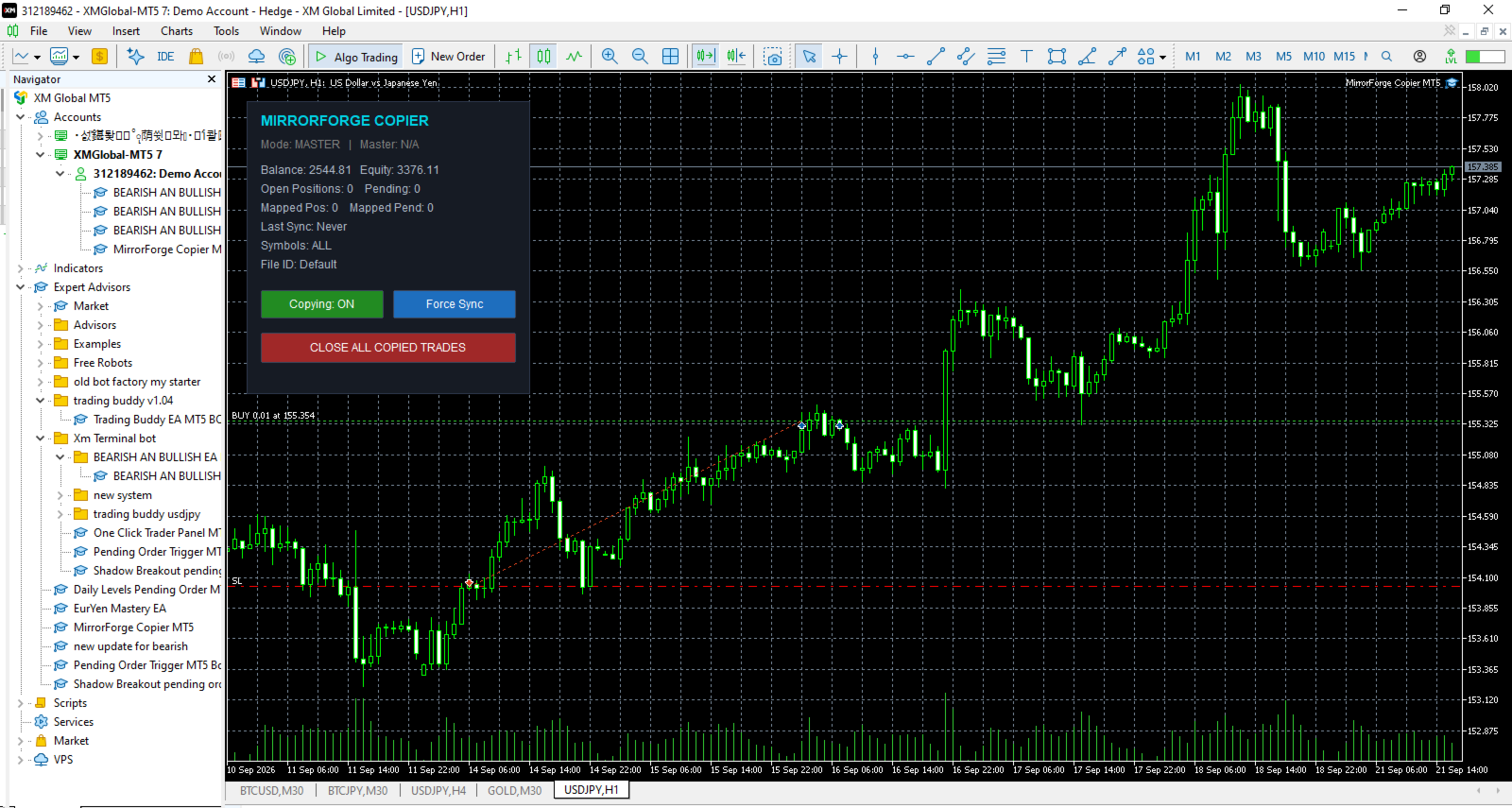
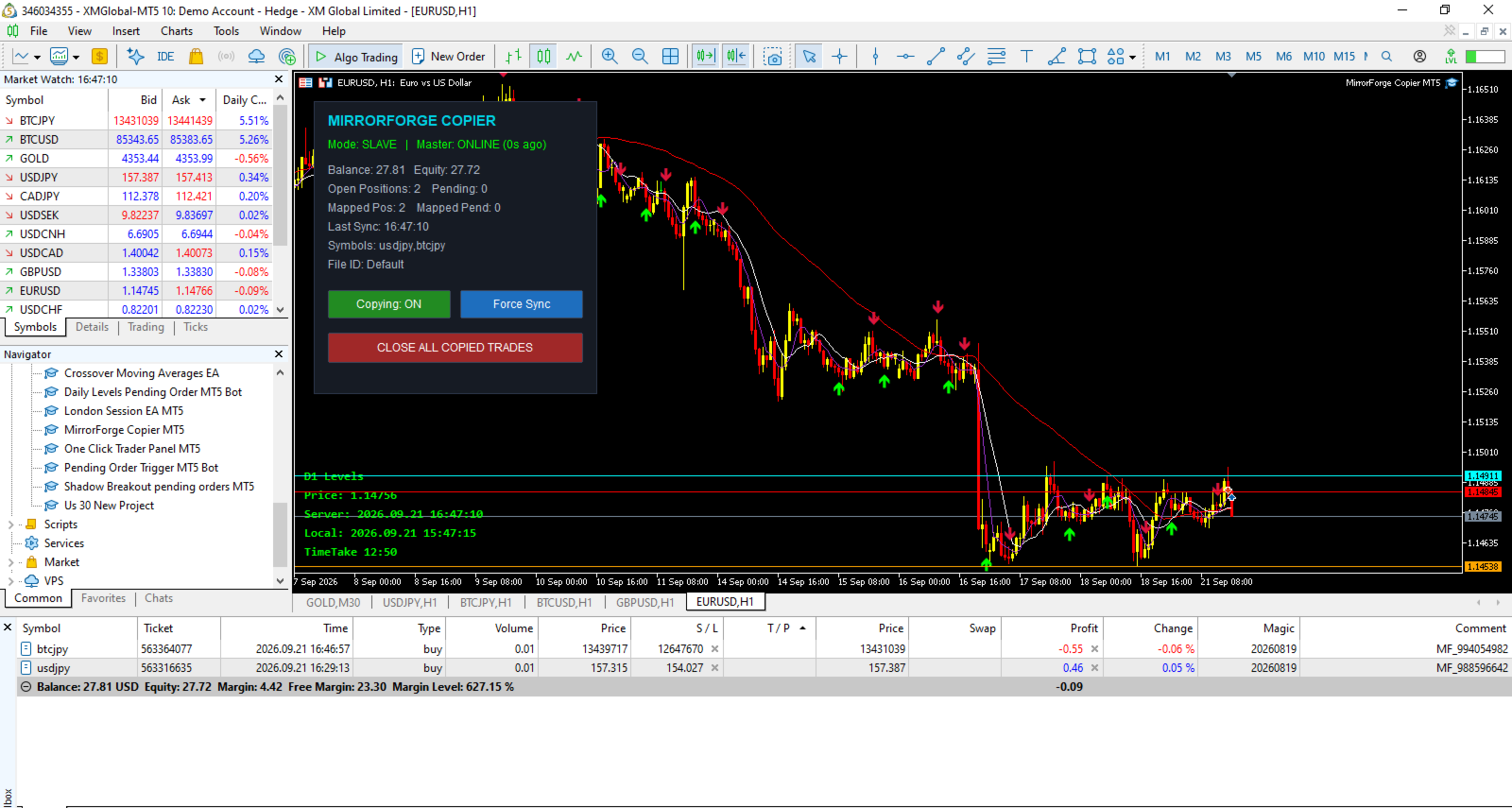
MirrorForge also includes a modern on-chart control panel with copying controls, synchronization information, account statistics, Master heartbeat status, symbol filters, and an emergency Close All Copied Trades function.

The system is designed for traders, EA developers, money managers, signal providers, and users who need to mirror trades between MT5 terminals running on the same computer, VPS, or environment where the MT5 common files directory is accessible.

Key Features

Master and Slave Modes

MirrorForge operates in two modes:

Master Mode

  • Monitors the source MT5 account.

  • Writes the current trading state to a shared file.

  • Publishes open positions.

  • Publishes supported pending orders.

  • Publishes entry price, volume, Stop Loss, Take Profit, magic number, comment, setup time and expiration information.

  • Maintains a heartbeat file so the Slave can determine whether the Master is active.

Slave Mode

  • Reads the Master trading state.

  • Creates corresponding trades on the target account.

  • Maintains Master-to-Slave ticket mappings.

  • Detects when Master positions are closed.

  • Detects when Master pending orders are removed.

  • Updates copied Stop Loss and Take Profit levels.

  • Reconciles the account after terminal restarts.

Both terminals use the same File ID to establish the communication pair.

Copy Market Positions

MirrorForge can copy open market positions from the Master account to the Slave account.

Supported directions include:

  • Buy positions

  • Sell positions

You can independently enable or disable copying of Buy and Sell trades.

The Slave can either follow the Master trade direction or reverse it.

Example

If the Master opens:

BUY 0.10 EURUSD

The Slave can be configured to open:

BUY 0.10 EURUSD

or, with Reverse Trades enabled:

SELL 0.10 EURUSD

Copy Pending Orders

MirrorForge can also synchronize supported pending orders.

Supported pending order types include:

  • Buy Limit

  • Sell Limit

  • Buy Stop

  • Sell Stop

  • Buy Stop Limit

  • Sell Stop Limit

The Slave monitors the Master pending-order list and attempts to maintain the corresponding pending orders.

If a pending order is modified on the Master, MirrorForge can update the corresponding Slave order.

If the Master pending order disappears, the mapped Slave pending order can also be removed.

Pending-order copying can be enabled or disabled independently.

Stop Loss and Take Profit Synchronization

MirrorForge can copy the Master trade's:

  • Stop Loss

  • Take Profit

These settings can be controlled independently.

Stop Loss

Enable:

Copy Stop Loss = true

The Slave will use the Master Stop Loss when opening or modifying the copied trade.

Disable it when you want the Slave to manage Stop Loss independently.

Take Profit

Enable:

Copy Take Profit = true

The Slave will use the Master Take Profit.

This provides flexibility for traders who want the Slave to follow the Master completely or use their own risk-management approach.

Flexible Lot Sizing

MirrorForge provides several lot-sizing options for Slave trades.

Fixed Lot

The Slave can use a predefined lot size regardless of the Master position volume.

Example:

Master:

0.50 lots

Slave Fixed Lot:

0.01 lots

The Slave opens:

0.01 lots

Lot Multiplier

The Slave can calculate its position size using the Master position volume multiplied by the selected multiplier.

Formula:

Slave Lot = Master Lot × Lot Multiplier

Example:

Master:

0.10 lots

Multiplier:

2.0

Slave:

0.20 lots

A multiplier below 1.0 can also be used to reduce the copied position size.

Lot Limits

The EA provides:

  • Minimum Lot

  • Maximum Lot

These settings help prevent the copier from opening positions outside the configured lot range.

The EA also checks the broker's symbol volume settings, including:

  • Minimum volume

  • Maximum volume

  • Volume step

before sending the trade.

Reverse Trades

The Reverse Trades option allows the Slave to trade in the opposite direction of the Master.

When disabled:

Master BUY → Slave BUY

Master SELL → Slave SELL

When enabled:

Master BUY → Slave SELL

Master SELL → Slave BUY

The reverse-direction functionality also applies to supported pending order types.

This allows MirrorForge to be used for strategies where the Slave account intentionally takes the opposite side of the Master account's signals.

Symbol Mapping

Different brokers may use different symbol names.

For example, one broker may use:

EURUSD

while another uses:

EURUSD.m

or:

EURUSDpro

MirrorForge provides symbol prefix and suffix settings to help map the Master symbol to the Slave broker's symbol.

Available settings include:

  • Master Symbol Suffix

  • Slave Symbol Suffix

  • Slave Symbol Prefix

Example

Master:

XAUUSD

Slave suffix:

.m

Result:

XAUUSD.m

This makes the copier more flexible when Master and Slave accounts use different broker symbol naming conventions.

Symbol Filter

MirrorForge allows you to control which symbols are copied.

The Allowed Symbols input accepts a comma-separated list.

Example:

EURUSD,GBPUSD,XAUUSD

Only the specified symbols will be processed.

Leaving the setting empty allows all symbols.

This can be useful when the Master account trades many instruments but the Slave account should only copy selected markets.

Magic Number Control

Slave trades are assigned the configured MirrorForge Magic Number.

This helps identify trades created by the copier and allows the EA to distinguish its own positions and pending orders from other trades on the Slave account.

The Master also provides an optional:

Copy Only Magic

filter.

When enabled, the Master will only publish positions and pending orders matching the configured Magic Number.

This is useful when another EA or multiple strategies are operating on the Master account.

Maximum Position and Pending Order Limits

MirrorForge includes safety limits for the Slave account.

Maximum Open Positions

Controls the maximum number of copied positions allowed.

Default:

100

Set to:

0

for unlimited positions.

Maximum Pending Orders

Controls the maximum number of copied pending orders.

Default:

50

Set to:

0

for unlimited pending orders.

These limits can help prevent uncontrolled copying if the Master account contains a large number of trades.

Slippage and Retry Protection

MirrorForge includes configurable execution controls.

Maximum Slippage

The:

Slippage Points

setting controls the maximum deviation used for trade execution.

Order Send Retries

If an order fails, MirrorForge can retry the operation.

The:

Max Order Send Retries

setting controls the number of attempts.

This can provide additional execution resilience when temporary trading conditions or broker responses cause an order request to fail.

Fast Local Synchronization

MirrorForge uses millisecond timers for its local synchronization process.

The Slave uses a configurable polling interval.

Default:

250 milliseconds

The Master writes its full current trading state at a configurable interval.

Default:

400 milliseconds

In addition, Master trade transactions can trigger an immediate state update.

This combination is designed to keep the Slave synchronized with changes occurring on the Master account without requiring an external server.

Actual execution speed can still depend on the MT5 terminal, broker, symbol trading conditions, VPS/computer performance, and market conditions.

Master Heartbeat

MirrorForge uses a heartbeat mechanism to monitor the Master.

The Master periodically updates a heartbeat file.

The Slave checks the age of that heartbeat.

Default timeout:

15 seconds

If the Slave does not receive a recent heartbeat within the configured timeout, the panel can report:

MASTER OFFLINE

This allows the user to monitor whether the Master terminal is actively publishing its state.

The heartbeat is a monitoring mechanism; it does not guarantee that every trade can be executed on the Slave.

Terminal Restart Recovery

One of the important features of MirrorForge is its reconciliation system.

The Slave stores Master-to-Slave ticket mappings in files.

When the Slave terminal is restarted, MirrorForge loads the saved mappings and performs a reconciliation process.

This allows the EA to compare:

Master current state

against

Slave current state

and determine which mapped trades should remain synchronized.

The system is designed so that terminal restarts do not automatically mean that the copier loses all knowledge of previously mapped trades.

Existing Trade Synchronization

MirrorForge provides an option for handling trades that already exist when the Slave starts.

Copy Existing Trades = Enabled

The Slave can synchronize existing Master positions and pending orders during startup/reconciliation.

Copy Existing Trades = Disabled

The EA can skip existing Master trades during the initial reconciliation.

This gives the user control over whether the Slave should begin copying only from new activity or also synchronize positions already open when the copier starts.

Automatic Trade Removal Synchronization

MirrorForge continuously compares the Master state with its stored mappings.

If a Master position that was previously mapped no longer exists, the EA attempts to close the corresponding Slave position.

Likewise, if a mapped Master pending order no longer exists, the EA attempts to delete the corresponding Slave pending order.

This keeps the Slave account aligned with the current Master trading state.

Live Modification Synchronization

If a copied Master position has its Stop Loss or Take Profit changed, MirrorForge checks the corresponding Slave position.

If the values are different, the EA can modify the Slave position.

The same synchronization logic is applied to supported pending orders, including their:

  • Entry price

  • Stop Loss

  • Take Profit

This means the copier is not limited to copying the initial trade entry.

Modern Control Panel

MirrorForge includes an on-chart control panel.

The panel displays important information including:

  • Current mode

  • Master online/offline status

  • Account balance

  • Account equity

  • Open positions

  • Pending orders

  • Mapped positions

  • Mapped pending orders

  • Last synchronization time

  • Symbol filter

  • File ID

The panel can be disabled if the trader prefers a clean chart.

Copying ON/OFF Control

The panel provides a button to enable or disable copying.

Copying: ON

The EA continues its normal synchronization process.

Copying: OFF

The synchronization process is disabled until copying is enabled again.

This gives the user direct control without needing to remove the EA from the chart.

Force Sync

The Slave panel includes a:

Force Sync

button.

This allows the user to manually trigger a synchronization process instead of waiting for the next normal timer cycle.

This can be useful when checking synchronization after changing settings or reconnecting terminals.

Close All Copied Trades

MirrorForge includes an emergency/manual control:

CLOSE ALL COPIED TRADES

When used in Slave mode, the EA attempts to:

  • Close positions using the MirrorForge Magic Number.

  • Delete pending orders using the MirrorForge Magic Number.

  • Clear the stored position mappings.

  • Clear the stored pending-order mappings.

This provides a convenient way to remove the copied trades managed by the copier.

Users should understand that this function acts on trades identified by the configured Magic Number, so the Magic Number should be configured carefully.

Detailed Logging

The EA provides a Detailed Logging option.

When enabled, important events can be displayed in the MT5 Experts log, including:

  • Position copied

  • Pending order copied

  • Position closed because the Master position disappeared

  • Pending order deleted

  • Mapping information

  • Synchronization information

  • Execution errors

  • Master heartbeat status

  • Maximum trade limits reached

This can make troubleshooting and monitoring easier.

Main Inputs

General

Mode

  • Master

  • Slave

File ID

Unique identifier used by the Master and Slave terminals.

The same File ID should be used for terminals that are intended to communicate with each other.

Magic Number

Magic number assigned to Slave trades.

Enable Copying

Enables or disables the copier.

Lot Sizing

Lot Mode

  • Fixed Lot

  • Lot Multiplier

  • Lot Balance

Fixed Lot

Lot size used when Fixed Lot mode is selected.

Lot Multiplier

Multiplier applied to the Master position volume when multiplier-based sizing is selected.

Minimum Lot

Minimum lot size allowed by the copier.

Maximum Lot

Maximum lot size allowed by the copier.

Copy Filters

Copy Buy

Enable/disable Buy copying.

Copy Sell

Enable/disable Sell copying.

Reverse Trades

Reverse Master direction on the Slave.

Copy Stop Loss

Synchronize Master Stop Loss.

Copy Take Profit

Synchronize Master Take Profit.

Copy Pending

Synchronize supported pending orders.

Copy Existing Trades

Determine whether existing Master trades should be considered during initial startup/reconciliation.

Copy Only Magic

Restrict Master-side copying to trades with the configured Magic Number.

Allowed Symbols

Comma-separated list of symbols to copy.

Symbol Handling

Master Suffix

Suffix to remove from Master symbols.

Slave Suffix

Suffix to add to Slave symbols.

Slave Prefix

Prefix to add to Slave symbols.

Safety & Limits

Maximum Open Positions

Maximum number of copied positions allowed on the Slave.

Maximum Pending Orders

Maximum number of copied pending orders allowed.

Slippage Points

Maximum configured execution deviation.

Maximum Retries

Number of execution attempts when an order request fails.

Timing

Slave Poll Interval

How frequently the Slave checks the Master state.

Master Write Interval

How frequently the Master writes its current state.

Heartbeat Timeout

Time in seconds before the Master is considered offline by the Slave.

Panel

Show Panel

Display or hide the MirrorForge control panel.

Panel X

Horizontal panel position.

Panel Y

Vertical panel position.

Logging

Detailed Log

Enable additional information in the MT5 Experts log.

Recommended Master/Slave Setup

A typical setup consists of two MT5 terminals.

Step 1 — Master

Attach MirrorForge to the account that contains the trades you want to publish.

Set:

Mode = MASTER

Choose a unique:

File ID

For example:

MyCopier

Keep the desired copying filters enabled.

Step 2 — Slave

Attach MirrorForge to the target MT5 account.

Set:

Mode = SLAVE

Use the exact same:

File ID = MyCopier

Configure the desired:

  • Lot Mode

  • Lot Multiplier

  • Symbol mapping

  • Buy/Sell filters

  • Risk limits

  • Stop Loss/Take Profit settings

Step 3 — Keep Terminals Running

For continuous copying, both the Master and Slave terminals need to remain active.

A VPS can be used to keep MT5 terminals running continuously.

The copier does not use an external cloud/server-based copy infrastructure. Communication is performed through files available to the MT5 terminals.

Example Configuration

Master Account

Mode:

MASTER

File ID:

MyTradingAccount

Copy Pending:

Enabled

Copy Buy:

Enabled

Copy Sell:

Enabled

Slave Account

Mode:

SLAVE

File ID:

MyTradingAccount

Lot Mode:

LOT_MULTIPLIER

Lot Multiplier:

0.50

Copy Stop Loss:

Enabled

Copy Take Profit:

Enabled

Copy Pending:

Enabled

Reverse Trades:

Disabled

This configuration would attempt to mirror the Master direction while using approximately 50% of the Master volume, subject to the Slave broker's volume requirements and the configured minimum/maximum lot limits.

Who Can Use MirrorForge?

MirrorForge can be useful for:

  • Traders managing multiple MT5 accounts

  • EA developers testing strategies across accounts

  • Traders using separate Master and execution accounts

  • Traders who want to mirror selected instruments

  • Users with different broker symbol suffixes

  • Traders who need fixed or multiplier-based Slave lot sizing

  • Users who need position and pending-order synchronization

  • Users running MT5 terminals on a local computer or VPS

Important Technical Notes

MirrorForge is a local file-based copier.

It does not depend on a remote trade-copying server for communication between the Master and Slave.

Both MT5 terminals need access to the appropriate MT5 common files environment.

The actual result of copying can be affected by:

  • Broker execution

  • Market liquidity

  • Spread

  • Slippage

  • Symbol availability

  • Trading permissions

  • Minimum and maximum volume

  • Volume step

  • Stop-level requirements

  • Market conditions

  • Terminal/VPS performance

  • Internet connectivity

  • Differences between Master and Slave brokers

A successful Master trade does not guarantee an identical execution price on the Slave.

Risk Warning

MirrorForge is a trade-copying tool. It does not guarantee profits and it does not remove the risks associated with financial markets.

Copied trades can experience differences in:

  • Entry price

  • Exit price

  • Spread

  • Slippage

  • Execution time

  • Stop Loss execution

  • Take Profit execution

  • Available trading volume

  • Symbol specifications

A Master account and Slave account can therefore produce different results even when the same trading instructions are copied.

Users should test the copier on demo accounts before using it with real funds and should configure lot sizes and limits according to their own risk tolerance.

Never assume that copied trades will have exactly the same execution as the Master.

Important Setup Requirement

For successful communication, the Master and Slave should use the same File ID.

For example:

Master:

File ID = MyCopier

Slave:

File ID = MyCopier

Using different File IDs will cause the terminals to use different communication files.

If broker symbol names are different, configure the appropriate Master suffix, Slave suffix, or Slave prefix.

Why MirrorForge?

MirrorForge combines local MT5 trade copying with configurable execution controls and persistent synchronization.

The system provides:

  • Master/Slave architecture

  • Market position copying

  • Pending-order copying

  • Buy/Sell filters

  • Reverse trading

  • Fixed lot sizing

  • Multiplier lot sizing

  • Lot limits

  • Stop Loss synchronization

  • Take Profit synchronization

  • Symbol filtering

  • Symbol prefix/suffix mapping

  • Magic-number identification

  • Position limits

  • Pending-order limits

  • Retry handling

  • Master heartbeat monitoring

  • Restart reconciliation

  • Persistent ticket mapping

  • Force synchronization

  • Close-all control

  • On-chart monitoring panel

  • Detailed logging

MirrorForge is designed to give the user direct control over how trades are copied between MT5 accounts while keeping the architecture simple and local.

Version

MirrorForge Local MT5 Trade Copier

Version: 1.20

The product is based on a local file-based Master/Slave architecture and includes support for both open positions and supported pending orders.

Final Note

Please test MirrorForge carefully with your specific brokers, symbols, account types, and execution conditions before using it on a live account.

The copier is a tool for synchronizing trading instructions; it is not a trading strategy and does not guarantee the same execution or financial results between accounts.
Рекомендуем также
Bastion is a monitor-and-close-only risk manager for prop-firm traders. It watches your account against your firm's daily-loss and maximum-drawdown limits in real time and force-closes your open positions BEFORE you cross a line. It never opens a trade of its own, so it stays fully within the tools allowed by FTMO, FundedNext, The5ers, FTUK and FXIFY. Why traders fail challenges A large share of failed evaluations end on a single daily-loss breach: a moment of inattention, a news spike, one tra
APEX Terminal
Lukasz Mariusz Holla
Apex Terminal is a trade panel for MetaTrader 5 that sizes every position from your risk and manages it from entry to exit. Set how much you accept to lose and where the stop-loss goes. Before you click, the panel shows the lot, the loss at the stop and the profit at the full target. One click opens the trade with the stop-loss and the whole take-profit ladder already in place. TRADE - Position size from % of balance or equity, a fixed amount of money or a fixed lot. The lot is rounded down t
Ultimate Pro Trading Panel — All-In-One Manual & Grid Trading Dashboard Pro Trading Panel   is an all-in-one on-chart control panel that gives discretionary and semi-automated traders a complete toolkit for entries, exits, risk management, and grid trading — without leaving the chart. Every function is visual, draggable, and updates in real time. If you want to test this utility feel free to download the basic preview version of this tool here:  https://www.mql5.com/en/market/product/181435 Who
Trading Utility for Forex Currency Pairs Only not for Gold  Functions Auto Lot Calculation based on Risk Auto stoploss  Auto TakeProfit Breakeven Auto Close Half % Close in percentage with respect to the PIPs Pending Orders BuyLimit Sell Limit with distances BuyStop Sell Stop    with distances Trading Informations Risk in percentage For Multiple trades Combine Takeprofit and Combine Stoplosses
Overview Mirror Signals Service EA (Text only)   is a powerful monitoring Expert Advisor that automatically sends   real-time Telegram notifications   for all important trade events on your MetaTrader 5 account. It is engineered specifically for   signal providers ,   trade-copier operators ,   auditors ,   educators , and   professional trading services   that require immediate, detailed, and reliable reporting. Everything from   entries, exits, SL/TP changes, comment changes, trailing sto
RSI Currency Strength Meter is a powerful and elegant multi-currency indicator that measures the real-time relative strength of the 8 major currencies using RSI logic. By calculating the smoothed performance of each currency across its major pairs and applying the RSI formula, it delivers clean and responsive strength lines that make it easy to spot which currencies are truly strong or weak at any moment. This indicator is particularly useful for visualizing currency correlations and divergence
This tool will perform Trailing stop loss and Break even management for orders. Helps you limit or reduce the time spend watching orders on the screen, especially when you need to go to sleep. Just add this EA to 1 chart, you can manage all pairs. You can filter orders by comment, magic number, symbol and order ticket number. When Breakeven it can add shift/offset pips (to cover the commission...). You can try in strategy tester before purchase. The EA will add Buy and Sell alternately, so you
TradeVista Pro — Professional Trade & Risk Management Panel TradeVista Pro is a professional all-in-one trade execution and position management panel for MetaTrader 5 , designed for traders who want faster order management, precise risk control, and a cleaner way to manage open positions directly from the chart. Instead of constantly switching between the MT5 Trade tab, order windows, and chart controls, TradeVista Pro brings essential trading-management functions together in one intuitive inter
TradePilotmt5
Hossein Khalil Alishir
TradePilot Expert Advisor (EA) for MetaTrader 5 TradePilot is a professional and user-friendly Expert Advisor (EA) for MetaTrader 5 (MT5) . It simplifies automated trading , risk management , and trade execution with a smart trading panel . Perfect for beginners and experienced traders looking for a reliable trade manager EA with automated lot size calculation and smart position management. Key Advantages User-Friendly Trading Panel: Customizable panel with buttons and hotkeys for fast ex
CosmiCLab SMC FIBO CosmiCLab SMC FIBO — это профессиональный торговый индикатор, основанный на концепциях Smart Money Concepts (SMC), анализе структуры рынка и уровнях Fibonacci. Индикатор автоматически определяет свинги рынка и строит уровни Fibonacci по последнему импульсному движению. Также индикатор определяет ключевые изменения структуры рынка: BOS — Break Of Structure CHOCH — Change Of Character Дополнительно отображаются сигнальные стрелки BUY / SELL при пробое структуры. Индикатор подход
RRtoolBox
David Ruiz Moreno
RRtoolbox - Professional Tools: Risk:Reward Trading Tool (SL/TP Horizontals + Pending orders + Diagonals), Alerts set on trend lines (for alerts on diagonal levels), SelfManagement (BE, partials...), close/cancelling by time, Statistics, Info and trading on chart. One-Click Trading with Visual Risk:Reward Management RRtoolbox is a comprehensive trading panel that combines one-click order execution,  statistics and  powerful visual Risk:Reward tools, alerts set with trendlines, on chart butt
Timeframe Trading Limiter
AL MOOSAWI ABDULLAH JAFFER BAQER
Timeframe Trading Limiter is a professional risk management and trade discipline utility designed for MetaTrader 5. It empowers traders to enforce strict, automated limits on the number of trades and the maximum allowable drawdown within each trading period, based directly on the chart timeframe selected. Whether you are a discretionary trader prone to overtrading, a prop firm challenge participant needing to adhere to strict rules, or an algorithmic trader running multiple strategies, this tool
Overview Mirror Signals EA is a powerful monitoring Expert Advisor that automatically sends real-time Telegram notifications for all important trade events on your MetaTrader 5 account. It is engineered specifically for signal providers , trade-copier operators , auditors , educators , and professional trading services that require immediate, detailed, and reliable reporting. Everything from entries, exits, SL/TP changes, comment changes, trailing stop activations, pending order modifications
Exp5 Duplicator
Vladislav Andruschenko
4.78 (9)
Duplicator для MetaTrader 5 — профессиональный дубликатор позиций внутри одного терминала Надёжный советник для трейдеров, которым нужно автоматически дублировать уже открытые позиции в MetaTrader 5, увеличивать объём, применять собственные настройки лота и сопровождать дубликаты по заданным правилам. Это удобный инструмент для ручной торговли, алгоритмических систем и гибкого управления уже существующими позициями внутри одного терминала. Duplicator для MT5 не открывает позиции по собственной
PROTECT YOUR FTMO Account in a simplest way Must-Have Account Protector for any Prop-trading Account and Challenge MT4 / MT5 Expert Advisor that protects your Forex Prop Trading account from an unexpected drawdown! FTMO Protector  is a Tool that lets you manage trades and control your profit and loss across multiple Robots and currency pairs using a simple parameters and settings. Use as many EAs and Instruments you need, the Protector will: 1.   Calculate your midnight (01:00 System time) Balan
Noize Absorption Index - is the manual trading system that measures the difference of pressure between bears forces and bulls forces. Green line - is a noize free index that showing curent situation. Zero value of index shows totally choppy/flat market.Values above zero level shows how powerfull bullish wave is and values below zero measures bearish forces.Up arrow appears on bearish market when it's ready to reverse, dn arrow appears on weak bullish market, as a result of reverse expectation.
Trade Assistant 38 in 1
Makarii Gubaydullin
4.91 (23)
Многофункциональная утилита: калькулятор лота, сеточные ордера, индикатор Price Action, менеджер ордеров, рассчёт R/R, и многое другое Демо-веpсия  |   Инструкция  |   Версия для MT4 Утилита не работает в тестере стратегий: вы можете скачать демо-версию ЗДЕСЬ , чтобы протестировать продукт перед покупкой. Напишите мне  если есть вопросы / идеи по улучшению / в случае найденного бага Упроситите и сделайте вашу торговлю быстрее, при этом расширяя стандартные возможности терминала. 1. Открытие но
DDKiller Pro
Njaratahiry Michael Randrianiaina
Stop Blowing Your Account. Once and For All. DDKiller Pro is the MT5 risk guardian that runs silently on your chart and shuts down trading the moment you hit a limit — whether you're grinding a prop firm challenge or managing your own CFD account. The problem every trader knows: You set your rules. You break them anyway. One revenge trade. One overleveraged position. One session that erases a month of gains. DDKiller Pro removes that decision from your hands entirely. What it does: The second yo
Margin Call Shield – Defend Your Margin on Your Terms Margin Call Shield is a tool for MetaTrader 5 traders who want to decide for themselves which open positions are closed during margin call situations before the platform does so automatically based on its internal rules. By default, the broker or platform decides which positions to close, often using undisclosed algorithms. Margin Call Shield lets you set this order according to your own strategy. Why Was Margin Call Shield Created? In a mar
ADVANCED FUNCTIONALITIES: Trend Score (0-100) with visual bar Intelligent signals with adjustable strength (1-10) Risk management with automatic TP/SL Audible and visual alerts Price zones with smooth filling Multi-indicator analysis (RSI, ATR, BB, EMAs) DESIGN FEATURES Modern Visual: Smooth and well-spaced lines (EMA with 2-3px width) Vibrant and professional colors (Sky Blue, Orange, Gold) Modern arrows (code 233/234) for buy/sell signals Configurable dark/light theme Adjustable transparency f
MT5Eezeorder 2
Tawanda Tinarwo
3 (1)
Open and close Multiple Trades on MT5 in 1 click at one price. Enter the Lot size Specify the number of trades you want to open Choose whether you want TP SL or Trailing Stop Once you are done, click Buy or Sell Create trailing stop for multiple trades  PLEASE NOTE: This is not a script, save it in the experts folder What to Always Note Check the minimum stop levels for the symbol you want to trade  Cross-Check your parameters  1. Make sure Auto trading is on 2. Make sure the SL and TP are great
SLTPSetter
Raphael Djangmah Osro Agbo
SLTPSetter - StopLoss Take Profit Setter HOW DOES IT WORK? Risk and account management is a very critical aspect of trading. Before entering a position, you must be fully aware how much you will be willing to loss both in percentage and value. This is where SLTPSetter gets you covered.  All you need to do is attach the indicator on the chart and PRESS BUY OR SELL automatically, all parameters needed for placing the trades will be provided at the top left corner of the screen. Feel free to adjust
Currency Exposure Matrix is a currency-level exposure dashboard derived from current open positions. Key functions: - Gross and net currency exposure - Long and short decomposition - Deposit-currency conversion - Concentration warnings - Transparent handling when conversion symbols are unavailable The utility helps users understand aggregated currency exposure across their portfolio. It does not generate entry signals, predict market direction or guarantee trading results. Review broker symbol
Gold Flow Seconds Chart превращает MetaTrader 5 в удобное рабочее пространство для ручной торговли. Утилита строит 5- и 10-секундные свечи из тиков, полученных от брокера. В том же интерфейсе доступны периоды M1, M5, M7, M15, M30, H1 и H4. УПРАВЛЕНИЕ ГРАФИКОМ МЫШЬЮ • Перемещение графика по горизонтали и вертикали левой кнопкой мыши. • Изменение ширины свечей колесом мыши. • Изменение вертикального масштаба с помощью Ctrl + колесо мыши. • Возврат к текущей рыночной цене кнопкой LIVE. ТОРГОВЛ
Полная торговая панель для метода No Nonsense Forex: В этой панели собрано практически все, что вам понадобится для реализации собственного алгоритма NNFX, что поможет вам торговать еще быстрее и проще. Она состоит из 3 частей: Панель символов Быстро переключитесь на любой символ в ваших графиках, нажав на его название. На панели может отображаться дополнительная информация: текущие открытые сделки , корреляция этих сделок с другими символами (за исключением случаев, когда их стоп-лосс находится
Rhino Backtest Manager - менеджер сделок для реальной торговли и тестера стратегий Rhino Backtest Manager - это торговая панель, которая работает как в реальной торговле, так и в тестере стратегий MetaTrader 5. Она позволяет выставлять и сопровождать ордера вручную внутри тестера в том же интерфейсе, что и на реальном счёте, поэтому стратегию можно проверить на истории и затем торговать, не меняя инструмент. Панель рассчитывает объём позиции по заданным параметрам риска, показывает денежную сто
SmartRAL
Jemy Yeferson Dimu Ludji
SmartRAL (Smart Risk Auto-Lot EA) SmartRAL: The Ultimate Risk & Lot Management Expert Advisor (EA) SmartRAL is an essential tool for traders who demand precise risk management and automated position sizing in MetaTrader 5. Stop guessing your lot size and let the algorithm handle the calculations. This EA allows you to trade with confidence by guaranteeing your risk exposure on every single trade, while offering absolute flexibility in setting your Stop Loss (SL). Key Features & Benefits Guarante
Trade Manger
Israr Hussain Shah
Here   our more valuable tools SMC Trend Trading   ,  Easy SMC Trading  ,  Institutional SMC Architect Volume Analysis Tools  ,  Volume flow Profile  ,  Market volume profile  , FVG with Volume  , Liquidity Heatmap Profile  ,  Volume Spread Analysis You Give an Instruction: When you run the script, a window pops up with a dropdown menu. You choose exactly what you want it to do from the list (e.g., "Close Profit Only" or "Delete Pending Orders"). It Scans Your Positions: The script then reads
Join Deriv link on profile>>> GET THIS FULL COPY AND GET ANOTHER FREE INDICATOR ONE OF THE BEST AND USEFULL INDICATORS IN THE WORLD ..This is the one of the best usefull indicators which has chosen to be used by top traders in the world. AUTOMATIC SUPPORT AND RESISTANCE This way of trading is also called Supply and demand, On this way of trading you can see auto colours appear where the market changes direction buying or selling Direction. ALL KIND OF PAIRS METALS AND INDICIES ARE INCLUDED A
CoPilot dashboard MT5
Frederic Jacques Collomb
CoPilot — Торговая панель дня Знайте свои цифры. Торгуйте с ясностью. MT4 версия Что такое CoPilot? CoPilot — это торговый помощник профессионального уровня , который отображает в режиме реального времени всю статистику дневной производительности прямо на графике — с живой кривой эквити , обновляемой сделка за сделкой. Разработан для активных трейдеров, которым нужна мгновенная видимость торговой сессии без переключения вкладок. CoPilot агрегирует каждую закрытую сделку дня по всем инструментам
С этим продуктом покупают
Trade Assistant MT5
Evgeniy Kravchenko
4.43 (216)
Помогает рассчитать риск на сделку, простая установка нового ордера с помощью линий, управление ордерами с функциями частичного закрытия, 7 типов трейлинг-стопа и другие полезные функции. Дополнительные материалы и инструкции Инструкция по установке - Инструкция к приложению - Пробная версия приложения для демо счета Функция Линии   - отображает на графике линию открытия, стоп-лосс, тейк-профит. С помощью этой функции легко установить новый ордер и увидеть его дополнительные характеристики пе
Добро пожаловать в Trade Manager EA — лучший инструмент для управления рисками, предназначенный для упрощения, точности и эффективности торговли. Это не просто инструмент для размещения ордеров; это комплексное решение для удобного планирования торгов, управления позициями и усиленного контроля над рисками. Независимо от того, начинающий вы трейдер, опытный специалист или скальпер, нуждающийся в быстром исполнении, Trade Manager EA адаптируется к вашим потребностям и работает с любыми активами:
================================================================================ POC BREAKOUT - V20.72. Full Professional Grade Toolkit ================================================================================ POC Breakout is a full MetaTrader 5 trading dashboard for discretionary traders who want breakout signals, Point of Control (POC) context, volume profiles, order flow, market structure, news, alerts, and advanced trade planning in one professional workspace. Attached directly to you
Telegram to MT5 Multi-Channel Copier   автоматически копирует торговые сигналы из ваших Telegram-каналов прямо в MetaTrader 5. Без ботов, без браузерных расширений, без ручного копирования. Сигнал приходит в Telegram — и советник открывает сделку в вашем терминале за считанные секунды. А перед тем как копировать канал, встроенный бэктестер покажет, что этот канал сделал бы на вашем счёте. Продукт состоит из двух компонентов: приложения для Windows, которое слушает ваши Telegram-каналы, и этого с
TradePanel MT5
Alfiya Fazylova
4.88 (170)
Trade Panel — это многофункциональный торговый помощник. Приложение содержит более 50 торговых функций для ручной торговли и позволяет автоматизировать большинство торговых операций. Инструкция к приложению: https://www.mql5.com/ru/blogs/post/756476 Пробная версия приложения для демо-счета: https://www.mql5.com/ru/blogs/post/750864 Как установить приложение: https://www.mql5.com/ru/blogs/post/750096 Как тестировать приложение в визуальном режиме: https://www.mql5.com/ru/blogs/post/770274 Как уст
Копируйте сигналы из Telegram по своим торговым правилам Telegram to MT5 Signal Trader автоматически копирует текстовые торговые сигналы из открытых и закрытых каналов и групп Telegram в MetaTrader 5. Управляйте несколькими поставщиками сигналов и счетами MT5 из одного приложения для компьютера, задавая индивидуальные параметры риска и торговли для каждого поставщика . Для копирования не нужны бот Telegram и настройка API. Просто войдите в свой аккаунт Telegram по номеру телефона или QR-коду и в
Footprint Chart Pro — Professional OrderFlow EA for MetaTrader 5 Version 6.34 | Professional tool for real traders | Institutional-Grade Visualization DEMO USERS - PLEASE SELECT EVERY TICK / REAL TICK WHEN TESTING AND YOU HAVE DOWNLOADED HISTORICAL DATA. IF YOU SEE A WAITING SCREEN AND IT IS NOT DOWNLOADING, IT MEANS YOU HAVE LOW HISTORICAL DATA. TRY 1 MIN AND 5 MIN FIRST ON 1 DAY DATA. ONE DAY DATA SHOULD BE THE NEWEST AND MOST CURRENT DATE. PLEASE WAIT UNTIL THE MARKET HAS ROLLED OVER PERIOD.
Exp COPYLOT CLIENT for MT5
Vladislav Andruschenko
3.97 (35)
Профессиональный копировщик сделок для MetaTrader 5 Быстрый, профессиональный и надежный копировщик сделок для MetaTrader . COPYLOT позволяет копировать сделки Forex между терминалами MT4 и MT5 с поддержкой счетов Hedge и Netting . Версия COPYLOT для MT5 поддерживает: - MT5 Hedge → MT5 Hedge - MT5 Hedge → MT5 Netting - MT5 Netting → MT5 Hedge - MT5 Netting → MT5 Netting - MT4 → MT5 Hedge - MT4 → MT5 Netting Версия MT4 Полное описание + DEMO + PDF Как купить Как установить Как получить файлы жур
Farmed Hedge Yield Farming | All Markets (Manual - Hybrid - Semi/Automated EA) VERIFIED TRADING RESULTS - Farmed Hedge Yield Axi Copy:  https://www.mql5.com/en/signals/2356376 - Farmed Hedge Yield Exn Copy:   https://www.mql5.com/en/signals/2356404 - Farmed Hedge Yield V Copy:  https://www.mql5.com/en/signals/2357156 IMPORTANT NOTICE: FarmedHedge is a MANUAL-FOCUSED TRADING UTILITY ,not a fully automated EA. Results shown on this Signal include manual trades and overall strategic management.
Grid Manual MT5
Alfiya Fazylova
4.73 (22)
Grid Manual — это торговая панель для работы с сеточными стратегиями. Утилита универсальная, имеет гибкие настройки и понятный интерфейс. Работает с сеткой ордеров не только в сторону усреднения убытков, но и в сторону наращивания прибыли. Трейдеру не нужно создавать и сопровождать сетку ордеров, это сделает утилита. Достаточно открыть ордер и Grid manual автоматически создаст ему сетку ордеров и будет сопровождать его до самого закрытия. Полная инструкция и демо-версия здесь . Основные особенно
Power Candles Strategy Scanner — самооптимизирующийся инструмент для поиска настроек по нескольким инструментам Power Candles Strategy Scanner использует тот же самооптимизирующийся движок, что и индикатор Power Candles — для всех символов в вашем Market Watch, одновременно. На одной панели отображается информация о том, какие символы в данный момент являются статистически торгуемыми, какая стратегия выигрывает на каждом из них, оптимальная пара Stop Loss / Take Profit, а также отправляется увед
HINN MAGIC ENTRY - лучший инструмент для входа и менеджмента позиций! ПРОСТО. БЫСТРО. ИНТУИТИВНО. МАКСИМАЛЬНО АВТОМАТИЗИРОВАНО. Выставляет ордера через выбор уровня на графике! полное описание    ::    demo-версия    ::   60-sec-video-description Основные функции: - Рыночные, лимитные и отложенные ордера -  Автоматический подсчет лоттажа  -  Автоматический учет спреда и комиссий -  Неограниченное количество промежуточных тейков для позиций - Перевод в безубыток и трейл стоп-лосса и тейк-проф
MT5 to Telegram Signal Provider — это простой в использовании полностью настраиваемый инструмент, который позволяет отправлять определённые сигналы в чат, канал или группу Telegram, превращая вашу учётную запись в провайдера сигналов . В отличие от большинства конкурирующих продуктов, он не использует импорт DLL. [ Демо ]   [ Руководство ] [ Версия MT4 ] [ Версия для Discord ] [ Канал в Telegram ]  New: [ Telegram To MT5 ] Настройка Доступно пошаговое руководство пользователя . Никаких знаний A
Anchor Trade Manager
Kalinskie Gilliam
5 (9)
Your EAs cannot see each other, but Anchor can. Anchor gives you one place to coordinate your EAs, manage risk, and decide when trading is allowed. It works alongside the trading bots you already use without any changes to them. The Problem One EA opens a trade. Then another starts trading. The next thing you know, you wake up to multiple grids built across your account. Each EA may be doing exactly what it was designed to do, but together they can place far more risk on your account than you in
Copy your MT5 trades to Interactive Brokers You keep using MT5. Every order you open or close is sent to your IB account. In real time. No coding. No changes to your strategy or EA. Try it first Rent 1 month: $30. Test on a live or paper account. What it does Real-time copying: same direction, reverse, or one side only. Map any MT5 symbol to any IB symbol. Set a lot ratio for each. Forex, Futures, Stocks, CFDs, Metals and Crypto. Position sync: both accounts checked, any difference fixed. Optio
Signal TradingView to MT5 Pro Automator Мгновенное профессиональное исполнение между TradingView и MetaTrader 5 Автоматизируйте свою торговую стратегию с помощью самого надежного моста связи между алертами TradingView и реальным исполнением в MT5. Разработанный для трейдеров, которым требуются скорость, гибкость и безупречное управление рисками, этот советник (Expert Advisor) превращает любое сообщение с алертом в точный рыночный или лимитный ордер. ПРЕИМУЩЕСТВА И СИЛЬНЫЕ СТОРОНЫ Универсальный д
The News Filter MT5
Leolouiski Gan
4.78 (23)
Этот продукт фильтрует всех экспертных советников и ручные графики во время новостей, так что вам не нужно беспокоиться о внезапных скачках цены, которые могут разрушить ваши ручные торговые настройки или сделки, введенные другими экспертными советниками. Этот продукт также поставляется с полной системой управления ордерами, которая может обрабатывать ваши открытые позиции и ордера на ожидание перед выпуском новостей. После покупки   The News Filter   вам больше не придется полагаться на встроен
Trade Copier Ultimate
Janitha Sandaruwan Amaradasa Wickramasingha Arachchilage
5 (5)
Trade Copier Ultimate - Telegram to MT5 Signal Copier Trade Copier Ultimate automatically copies Telegram trading signals into MetaTrader 5. The EA can read signal messages, detect the symbol, order type, entry price, Stop Loss, Take Profit levels and selected update commands, then execute or manage the trade in MT5 using your lot and risk settings. It is more than a basic Telegram to MT5 copier. TCU also supports Bot API and user-account Bridge workflows, Discord signal routing, local MT5 to MT
Welcome to ENTRY IN THE ZONE AND SMC MULTI TIMEFRAME  SPECIAL BENEFIT / FOR OUR MQL5 CUSTOMERS FREE ACCESS TO THE NEW TOOL  — COMING SOON — Learn more on our official website  : https://www.fableedge.net Entry In The Zone and SMC Multi Timeframe is a real-time market analysis tool based on Smart Money Concepts (SMC), designed to analyze market structure, price direction, and key trading zones. It supports both Single-Timeframe Analysis and Multi-Timeframe Analysis, providing a clearer view of th
Сохраните индикатор, которому доверяете. Автоматизируйте работу с его сигналами. У вас уже есть индикатор MT5, которому вы доверяете, но всё ещё приходится следить за графиком, ждать сигнала, рассчитывать лот, открывать сделки и управлять каждой позицией вручную? Stratiora Signal Engine MT5 создан, чтобы объединить эти действия. Он превращает совместимые сигналы буферов Buy и Sell в автоматизированный процесс: вход, расчёт объёма, Stop Loss, Take Profit, фильтры, управление позициями и защиту с
Premium Trade Manager - Торговая панель со встроенным коучем Premium Trade Manager помещает торгового коуча прямо в ваш график, а под ним работает полноценный движок исполнения. Настройте сделку так, как вы всегда это делаете, затем позвольте Max, вашему ИИ-наставнику по трейдингу, прочитать именно эту настройку с учётом вашего живого счёта и дать чёткое заключение до того, как вы входите: соответствует ли стоп дисциплинированному подходу, разумен ли риск, не выходит ли высоковолатильный релиз ч
YuClusters
Yury Kulikov
4.93 (43)
Внимание: Ознакомиться с работой программы можно с помощью бесплатной версии  YuClusters DEMO . YuClusters это профессиональная система анализа рынка. Для трейдера открываются уникальные возможности анализа потока ордеров, объемов торговли, движения цены используя различные графики, профили, индикаторы, графические объекты. YuClusters оперирует данными на основе ленты сделок или тиковой информации, в зависимости от того, что доступно в котировках финансового инструмента.  YuClusters позволяет с
EA Overfitter
Stephen J Martret
5 (1)
Бэктест выглядит отлично. Но будет ли советник зарабатывать завтра, через неделю, через месяц? EA Overfitter прогоняет вашего советника по 100 историям цены, которых он никогда не видел. Одна оценка показывает, реально ли преимущество. Бэктест показывает, что советник сделал на одной истории цены — на той, которая случайно произошла. Из него невозможно понять, какая часть результата была заслугой стратегии, а какая — конкретного пути цены. EA Overfitter отвечает на этот вопрос. Он строит до 10
Trade Indicator Assistant   is a powerful MT5 utility designed to turn indicators into automated trading systems. Its main feature is the ability to automatically detect an indicator’s   BUY and SELL signal buffers , without requiring you to know the buffer numbers, search through indicator settings, or modify the indicator source code. Bonus Indicator:   After purchasing Trade Indicator Assistant, contact me to receive   Trade Signal Pro   completely free as a bonus indicator. [Download Demo V
Quant Panel
Kevin Craig E Gittins
Количественная Панель Pro Идеальная Мульти-ЭА Панель Мониторинга для Квантовых Трейдеров Хватит переключаться между графиками и внешними инструментами для отслеживания алгоритмических стратегий! Quant Panel Pro предоставляет профессиональный мониторинг портфеля в одном стильном и удобном интерфейсе. Ключевые Возможности Количественная Аналитика Под Рукой Агрегирование прибыли и убытков (P&L) в реальном времени для всех советников Статистический анализ процента выигрышных сделок и частоты торговл
Trade Dashboard MT5
Fatemeh Ameri
4.94 (135)
Trade Dashboard simplifies how you open, manage, and control your trades, with built-in lot size calculation. It allows you to execute trades, manage risk, and control positions directly on the chart, with tools such as partial close, breakeven, and trailing stop. Designed to reduce manual work and help you stay focused on your trading decisions. A demo version is available for testing. Detailed explanations of features are provided within the MQL5 platform. Installation instructions are include
Торговая панель для MetaTrader 5 — профессиональная торговля в один клик с графика и клавиатуры Мощная торговая панель для активного ручного трейдинга, которая позволяет открывать, сопровождать и закрывать сделки значительно быстрее и удобнее, чем стандартными средствами MetaTrader. Панель создана для тех, кто хочет получить полный контроль над позициями, ордерами, прибылью и торговыми сценариями в одном рабочем пространстве. Это не просто вспомогательная утилита. Это полноценный торговый интер
Smart Stop Scanner – многоактивный интеллектуальный сканер стоп-лоссов Общее описание Smart Stop Scanner предоставляет профессиональный контроль стоп-лоссов на любом рынке. Он анализирует рыночную структуру, определяет значимые пробои и формирует ключевые защитные уровни по Forex, Золоту, Индексам, Металлам, Криптовалютам и другим инструментам. Все данные отображаются в одном чистом, информативном и DPI-адаптивном панели для максимальной ясности и скорости принятия решений. Как определяется с
Binance Quotes Updater
Andrey Khatimlianskii
5 (1)
Этот сервис предназначен для онлайн трансляции котировок   криптовалют с биржи Binance в Ваш MetaTrader 5. Он подойдет Вам идеально, если Вы хотите видеть цены всех интересующих вас криптовалют в режиме онлайн — в Обзоре рынка и на графиках MetaTrader 5. После запуска сервиса Вы получите полноценные, обновляемые автоматически графики криптовалют. Вы можете применять к ним шаблоны, цветовые схемы, технические индикаторы и любые неторговые утилиты, а также делать любые графические построения. Един
DrawDown Limiter
Haidar Lionel Haj Ali
5 (23)
DrawDown Limiter v5.0 — Расширенный контроллер защиты торгового счёта DrawDown Limiter v5.0 — это клиентский контроллер защиты торгового счёта, предназначенный для мониторинга вашей торговли и автоматической реакции при достижении настроенных лимитов риска, прибыли, новостей, расписания, ролловера или количества позиций. Он может контролировать ручные сделки, автоматические стратегии, несколько советников, отложенные ордера и открытые позиции с одного отдельного графика. Он может защищать весь т
Другие продукты этого автора
Торговая Панель Версия: 1.00 Данная Торговая Панель — это ручной, графический торговый интерфейс, предназначенный для быстрого и точного управления торговыми операциями непосредственно с графика. Панель обеспечивает торговлю в один клик и позволяет гибко управлять рисками без использования стандартного окна ордера MetaTrader. Открытие сделок Кнопка BUY Мгновенно открывает сделку на покупку по текущему символу с выбранным размером лота. Стоп-лосс и опциональный тейк-профит применяются в соответс
FREE
Overview Market Session KillZone MT5 is a clean and powerful visual indicator designed to highlight the major forex trading sessions directly on your chart. It clearly marks the Asia , London , and New York sessions with customizable semi-transparent shaded boxes and labels, helping traders instantly identify high-probability “Kill Zones” and session overlaps. Whether you trade session opens, London-New York overlap, or specific Kill Zones, this indicator gives you a clear visual structure of th
FREE
Indicator Description TimeTake v2.05 is a clean and functional multi-purpose information indicator for MetaTrader 5. Main Features: Candle Countdown Timer Displays a real-time countdown to the close of the current candle in format TimeTake HH:MM:SS (or with days when applicable). Time Information Local computer time (with date) Server time (with date) Current Price Shows the average of Bid and Ask prices. Displays "Last:" when trading is disabled. Previous Period Levels Automatically draws thre
FREE
Bullish EA MT5 v1.18 – Золотая Версия Bullish EA MT5 — это профессиональная автоматизированная торговая система, разработанная в первую очередь для XAUUSD (Золото) и предназначенная для платформы MetaTrader 5. Она сочетает в себе стратегию пересечения скользящих средних , строгие правила торговли по сессиям, надёжное управление рисками и удобную информационную панель в реальном времени. Основная стратегия EA использует тройную систему скользящих средних : Короткая MA : 5-периодная SMA Длинная MA
Описание советника: USDJPY & EURUSD Trading Buddy EA MT5 BOT Версия: 1.03 Инструменты: USDJPY, EURUSD Платформа: MetaTrader 5 (MT5) Тип советника: трендовый, система пересечения скользящих средних Обзор USDJPY & EURUSD Trading Buddy EA MT5 BOT — полностью автоматизированный советник, предназначенный для торговли парами USDJPY и EURUSD на платформе MetaTrader 5. Советник использует стратегию тройного пересечения скользящих средних для определения направления тренда и открытия сделок. Встроенные ф
Dual MA EA v1.07 Developed by LUNGILE MBANJWA Overview Dual MA EA is a clean and professional multi-timeframe trend-following Expert Advisor for MetaTrader 5. It uses a higher-timeframe Moving Average trend filter combined with a lower-timeframe Moving Average crossover to open trades only in the direction of the main trend. The EA is fully isolated with its own magic number, works on any symbol, restores its statistics after terminal restarts, and can safely run together with other Expert Advi
Arrows Crossover MT5 Professional Moving Average Crossover Arrow Indicator for MetaTrader 5. This clean and accurate indicator automatically detects when the Fast MA crosses the Slow MA and instantly displays clear visual arrows on the chart: Lime Green ↑ Arrow = Buy signal (Fast MA crosses above Slow MA) Red ↓ Arrow = Sell signal (Fast MA crosses below Slow MA) Key Features: Fully customizable Fast & Slow Moving Averages (period, method, price, shift) Adjustable arrow colors, size, and vertical
Фильтр:
Нет отзывов
Ответ на отзыв