MirrorForge Copie MT5

MirrorForge Local MT5 Trade Copier

MirrorForge is a local MT5 trade copier designed to mirror trading activity from a Master account to a Slave/Target account using a file-based communication system.

The EA can copy open market positions and pending orders, synchronize Stop Loss and Take Profit levels, support different lot-sizing configurations, handle broker symbol differences through prefix/suffix mapping, and maintain Master-to-Slave ticket relationships across terminal restarts.

MirrorForge also includes a modern on-chart control panel with copying controls, synchronization information, account statistics, Master heartbeat status, symbol filters, and an emergency Close All Copied Trades function.

The system is designed for traders, EA developers, money managers, signal providers, and users who need to mirror trades between MT5 terminals running on the same computer, VPS, or environment where the MT5 common files directory is accessible.

Key Features

Master and Slave Modes

MirrorForge operates in two modes:

Master Mode

  • Monitors the source MT5 account.

  • Writes the current trading state to a shared file.

  • Publishes open positions.

  • Publishes supported pending orders.

  • Publishes entry price, volume, Stop Loss, Take Profit, magic number, comment, setup time and expiration information.

  • Maintains a heartbeat file so the Slave can determine whether the Master is active.

Slave Mode

  • Reads the Master trading state.

  • Creates corresponding trades on the target account.

  • Maintains Master-to-Slave ticket mappings.

  • Detects when Master positions are closed.

  • Detects when Master pending orders are removed.

  • Updates copied Stop Loss and Take Profit levels.

  • Reconciles the account after terminal restarts.

Both terminals use the same File ID to establish the communication pair.

Copy Market Positions

MirrorForge can copy open market positions from the Master account to the Slave account.

Supported directions include:

  • Buy positions

  • Sell positions

You can independently enable or disable copying of Buy and Sell trades.

The Slave can either follow the Master trade direction or reverse it.

Example

If the Master opens:

BUY 0.10 EURUSD

The Slave can be configured to open:

BUY 0.10 EURUSD

or, with Reverse Trades enabled:

SELL 0.10 EURUSD

Copy Pending Orders

MirrorForge can also synchronize supported pending orders.

Supported pending order types include:

  • Buy Limit

  • Sell Limit

  • Buy Stop

  • Sell Stop

  • Buy Stop Limit

  • Sell Stop Limit

The Slave monitors the Master pending-order list and attempts to maintain the corresponding pending orders.

If a pending order is modified on the Master, MirrorForge can update the corresponding Slave order.

If the Master pending order disappears, the mapped Slave pending order can also be removed.

Pending-order copying can be enabled or disabled independently.

Stop Loss and Take Profit Synchronization

MirrorForge can copy the Master trade's:

  • Stop Loss

  • Take Profit

These settings can be controlled independently.

Stop Loss

Enable:

Copy Stop Loss = true

The Slave will use the Master Stop Loss when opening or modifying the copied trade.

Disable it when you want the Slave to manage Stop Loss independently.

Take Profit

Enable:

Copy Take Profit = true

The Slave will use the Master Take Profit.

This provides flexibility for traders who want the Slave to follow the Master completely or use their own risk-management approach.

Flexible Lot Sizing

MirrorForge provides several lot-sizing options for Slave trades.

Fixed Lot

The Slave can use a predefined lot size regardless of the Master position volume.

Example:

Master:

0.50 lots

Slave Fixed Lot:

0.01 lots

The Slave opens:

0.01 lots

Lot Multiplier

The Slave can calculate its position size using the Master position volume multiplied by the selected multiplier.

Formula:

Slave Lot = Master Lot × Lot Multiplier

Example:

Master:

0.10 lots

Multiplier:

2.0

Slave:

0.20 lots

A multiplier below 1.0 can also be used to reduce the copied position size.

Lot Limits

The EA provides:

  • Minimum Lot

  • Maximum Lot

These settings help prevent the copier from opening positions outside the configured lot range.

The EA also checks the broker's symbol volume settings, including:

  • Minimum volume

  • Maximum volume

  • Volume step

before sending the trade.

Reverse Trades

The Reverse Trades option allows the Slave to trade in the opposite direction of the Master.

When disabled:

Master BUY → Slave BUY

Master SELL → Slave SELL

When enabled:

Master BUY → Slave SELL

Master SELL → Slave BUY

The reverse-direction functionality also applies to supported pending order types.

This allows MirrorForge to be used for strategies where the Slave account intentionally takes the opposite side of the Master account's signals.

Symbol Mapping

Different brokers may use different symbol names.

For example, one broker may use:

EURUSD

while another uses:

EURUSD.m

or:

EURUSDpro

MirrorForge provides symbol prefix and suffix settings to help map the Master symbol to the Slave broker's symbol.

Available settings include:

  • Master Symbol Suffix

  • Slave Symbol Suffix

  • Slave Symbol Prefix

Example

Master:

XAUUSD

Slave suffix:

.m

Result:

XAUUSD.m

This makes the copier more flexible when Master and Slave accounts use different broker symbol naming conventions.

Symbol Filter

MirrorForge allows you to control which symbols are copied.

The Allowed Symbols input accepts a comma-separated list.

Example:

EURUSD,GBPUSD,XAUUSD

Only the specified symbols will be processed.

Leaving the setting empty allows all symbols.

This can be useful when the Master account trades many instruments but the Slave account should only copy selected markets.

Magic Number Control

Slave trades are assigned the configured MirrorForge Magic Number.

This helps identify trades created by the copier and allows the EA to distinguish its own positions and pending orders from other trades on the Slave account.

The Master also provides an optional:

Copy Only Magic

filter.

When enabled, the Master will only publish positions and pending orders matching the configured Magic Number.

This is useful when another EA or multiple strategies are operating on the Master account.

Maximum Position and Pending Order Limits

MirrorForge includes safety limits for the Slave account.

Maximum Open Positions

Controls the maximum number of copied positions allowed.

Default:

100

Set to:

0

for unlimited positions.

Maximum Pending Orders

Controls the maximum number of copied pending orders.

Default:

50

Set to:

0

for unlimited pending orders.

These limits can help prevent uncontrolled copying if the Master account contains a large number of trades.

Slippage and Retry Protection

MirrorForge includes configurable execution controls.

Maximum Slippage

The:

Slippage Points

setting controls the maximum deviation used for trade execution.

Order Send Retries

If an order fails, MirrorForge can retry the operation.

The:

Max Order Send Retries

setting controls the number of attempts.

This can provide additional execution resilience when temporary trading conditions or broker responses cause an order request to fail.

Fast Local Synchronization

MirrorForge uses millisecond timers for its local synchronization process.

The Slave uses a configurable polling interval.

Default:

250 milliseconds

The Master writes its full current trading state at a configurable interval.

Default:

400 milliseconds

In addition, Master trade transactions can trigger an immediate state update.

This combination is designed to keep the Slave synchronized with changes occurring on the Master account without requiring an external server.

Actual execution speed can still depend on the MT5 terminal, broker, symbol trading conditions, VPS/computer performance, and market conditions.

Master Heartbeat

MirrorForge uses a heartbeat mechanism to monitor the Master.

The Master periodically updates a heartbeat file.

The Slave checks the age of that heartbeat.

Default timeout:

15 seconds

If the Slave does not receive a recent heartbeat within the configured timeout, the panel can report:

MASTER OFFLINE

This allows the user to monitor whether the Master terminal is actively publishing its state.

The heartbeat is a monitoring mechanism; it does not guarantee that every trade can be executed on the Slave.

Terminal Restart Recovery

One of the important features of MirrorForge is its reconciliation system.

The Slave stores Master-to-Slave ticket mappings in files.

When the Slave terminal is restarted, MirrorForge loads the saved mappings and performs a reconciliation process.

This allows the EA to compare:

Master current state

against

Slave current state

and determine which mapped trades should remain synchronized.

The system is designed so that terminal restarts do not automatically mean that the copier loses all knowledge of previously mapped trades.

Existing Trade Synchronization

MirrorForge provides an option for handling trades that already exist when the Slave starts.

Copy Existing Trades = Enabled

The Slave can synchronize existing Master positions and pending orders during startup/reconciliation.

Copy Existing Trades = Disabled

The EA can skip existing Master trades during the initial reconciliation.

This gives the user control over whether the Slave should begin copying only from new activity or also synchronize positions already open when the copier starts.

Automatic Trade Removal Synchronization

MirrorForge continuously compares the Master state with its stored mappings.

If a Master position that was previously mapped no longer exists, the EA attempts to close the corresponding Slave position.

Likewise, if a mapped Master pending order no longer exists, the EA attempts to delete the corresponding Slave pending order.

This keeps the Slave account aligned with the current Master trading state.

Live Modification Synchronization

If a copied Master position has its Stop Loss or Take Profit changed, MirrorForge checks the corresponding Slave position.

If the values are different, the EA can modify the Slave position.

The same synchronization logic is applied to supported pending orders, including their:

  • Entry price

  • Stop Loss

  • Take Profit

This means the copier is not limited to copying the initial trade entry.

Modern Control Panel

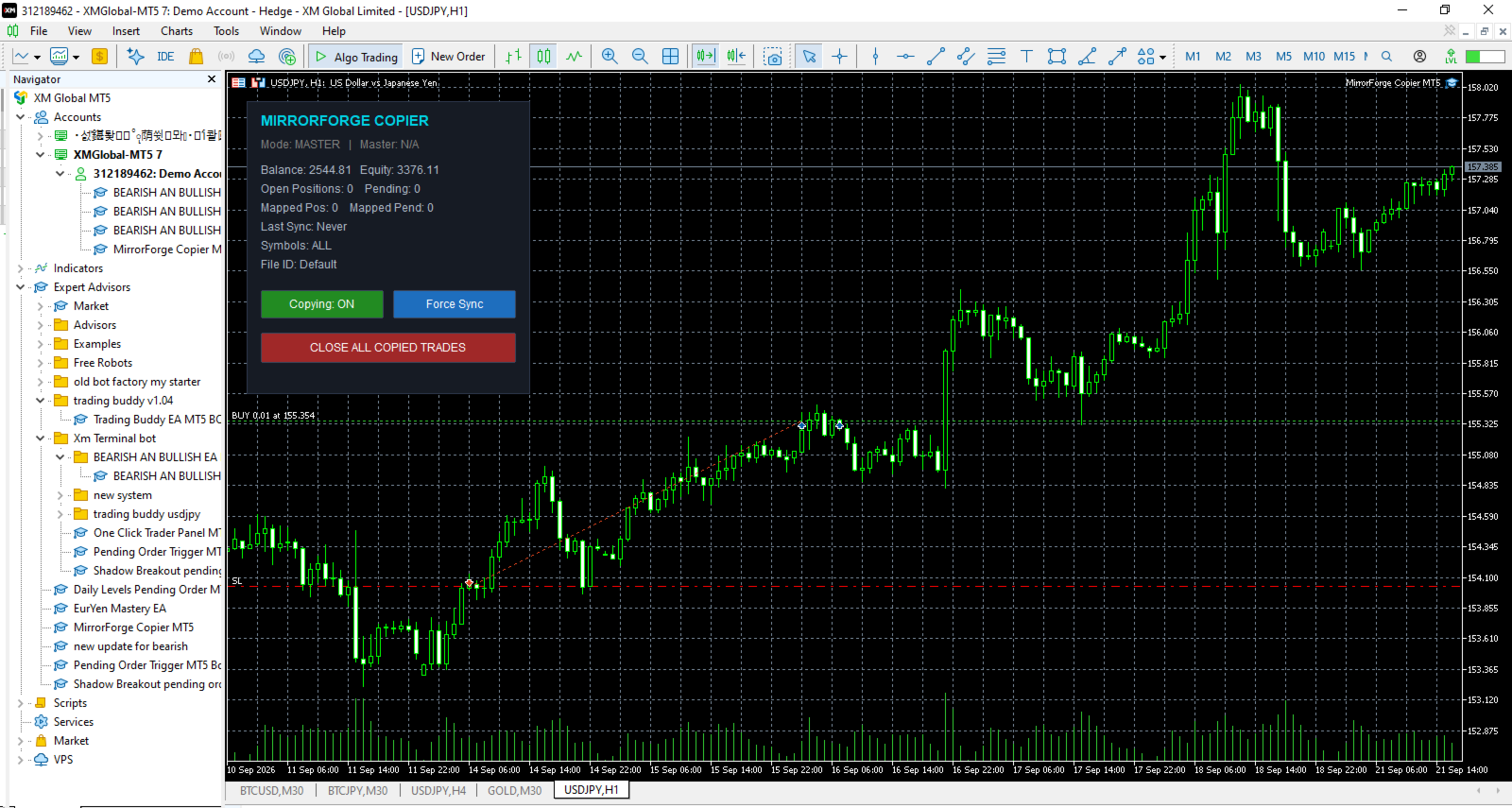
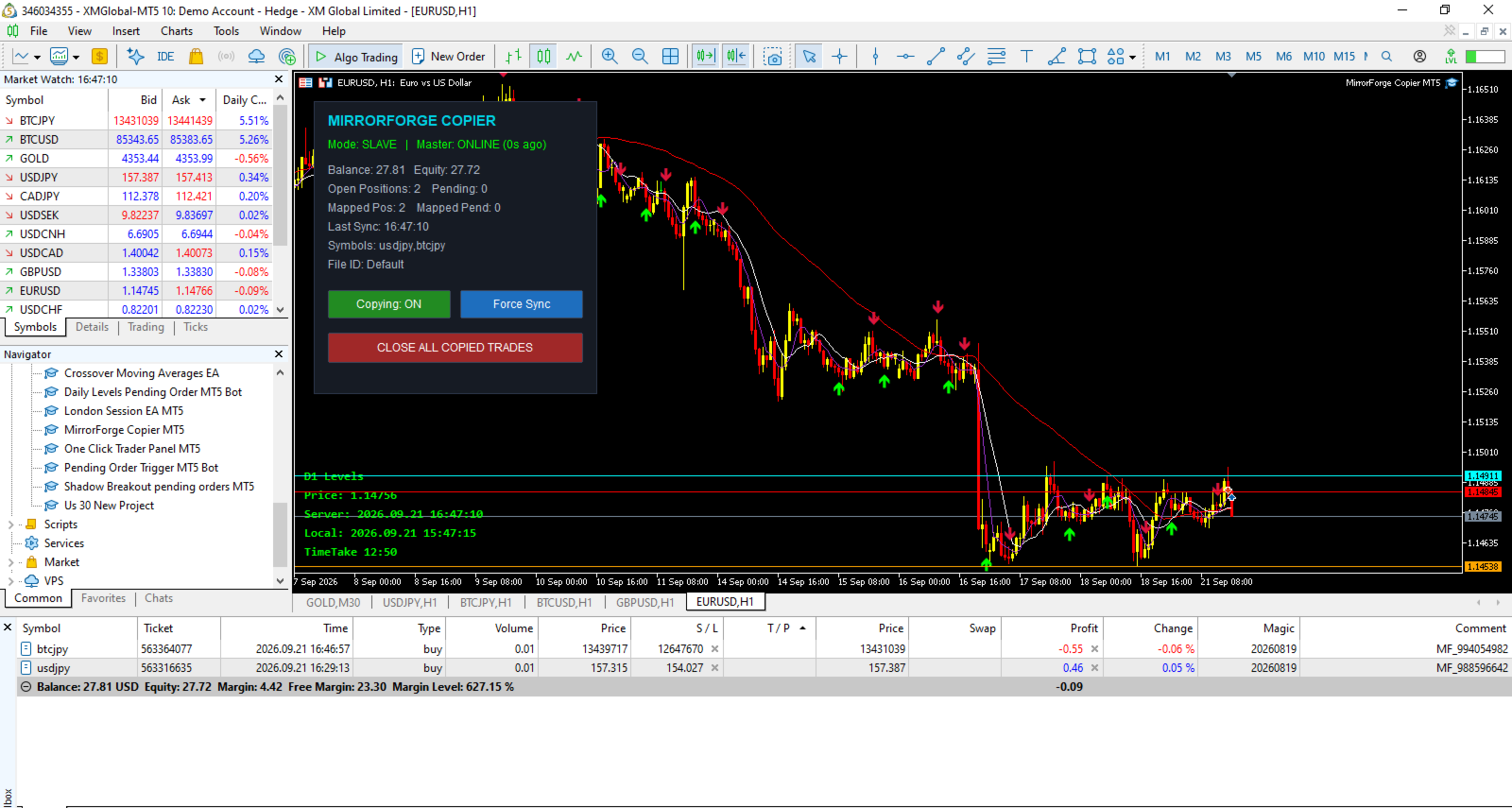
MirrorForge includes an on-chart control panel.

The panel displays important information including:

  • Current mode

  • Master online/offline status

  • Account balance

  • Account equity

  • Open positions

  • Pending orders

  • Mapped positions

  • Mapped pending orders

  • Last synchronization time

  • Symbol filter

  • File ID

The panel can be disabled if the trader prefers a clean chart.

Copying ON/OFF Control

The panel provides a button to enable or disable copying.

Copying: ON

The EA continues its normal synchronization process.

Copying: OFF

The synchronization process is disabled until copying is enabled again.

This gives the user direct control without needing to remove the EA from the chart.

Force Sync

The Slave panel includes a:

Force Sync

button.

This allows the user to manually trigger a synchronization process instead of waiting for the next normal timer cycle.

This can be useful when checking synchronization after changing settings or reconnecting terminals.

Close All Copied Trades

MirrorForge includes an emergency/manual control:

CLOSE ALL COPIED TRADES

When used in Slave mode, the EA attempts to:

  • Close positions using the MirrorForge Magic Number.

  • Delete pending orders using the MirrorForge Magic Number.

  • Clear the stored position mappings.

  • Clear the stored pending-order mappings.

This provides a convenient way to remove the copied trades managed by the copier.

Users should understand that this function acts on trades identified by the configured Magic Number, so the Magic Number should be configured carefully.

Detailed Logging

The EA provides a Detailed Logging option.

When enabled, important events can be displayed in the MT5 Experts log, including:

  • Position copied

  • Pending order copied

  • Position closed because the Master position disappeared

  • Pending order deleted

  • Mapping information

  • Synchronization information

  • Execution errors

  • Master heartbeat status

  • Maximum trade limits reached

This can make troubleshooting and monitoring easier.

Main Inputs

General

Mode

  • Master

  • Slave

File ID

Unique identifier used by the Master and Slave terminals.

The same File ID should be used for terminals that are intended to communicate with each other.

Magic Number

Magic number assigned to Slave trades.

Enable Copying

Enables or disables the copier.

Lot Sizing

Lot Mode

  • Fixed Lot

  • Lot Multiplier

  • Lot Balance

Fixed Lot

Lot size used when Fixed Lot mode is selected.

Lot Multiplier

Multiplier applied to the Master position volume when multiplier-based sizing is selected.

Minimum Lot

Minimum lot size allowed by the copier.

Maximum Lot

Maximum lot size allowed by the copier.

Copy Filters

Copy Buy

Enable/disable Buy copying.

Copy Sell

Enable/disable Sell copying.

Reverse Trades

Reverse Master direction on the Slave.

Copy Stop Loss

Synchronize Master Stop Loss.

Copy Take Profit

Synchronize Master Take Profit.

Copy Pending

Synchronize supported pending orders.

Copy Existing Trades

Determine whether existing Master trades should be considered during initial startup/reconciliation.

Copy Only Magic

Restrict Master-side copying to trades with the configured Magic Number.

Allowed Symbols

Comma-separated list of symbols to copy.

Symbol Handling

Master Suffix

Suffix to remove from Master symbols.

Slave Suffix

Suffix to add to Slave symbols.

Slave Prefix

Prefix to add to Slave symbols.

Safety & Limits

Maximum Open Positions

Maximum number of copied positions allowed on the Slave.

Maximum Pending Orders

Maximum number of copied pending orders allowed.

Slippage Points

Maximum configured execution deviation.

Maximum Retries

Number of execution attempts when an order request fails.

Timing

Slave Poll Interval

How frequently the Slave checks the Master state.

Master Write Interval

How frequently the Master writes its current state.

Heartbeat Timeout

Time in seconds before the Master is considered offline by the Slave.

Panel

Show Panel

Display or hide the MirrorForge control panel.

Panel X

Horizontal panel position.

Panel Y

Vertical panel position.

Logging

Detailed Log

Enable additional information in the MT5 Experts log.

Recommended Master/Slave Setup

A typical setup consists of two MT5 terminals.

Step 1 — Master

Attach MirrorForge to the account that contains the trades you want to publish.

Set:

Mode = MASTER

Choose a unique:

File ID

For example:

MyCopier

Keep the desired copying filters enabled.

Step 2 — Slave

Attach MirrorForge to the target MT5 account.

Set:

Mode = SLAVE

Use the exact same:

File ID = MyCopier

Configure the desired:

  • Lot Mode

  • Lot Multiplier

  • Symbol mapping

  • Buy/Sell filters

  • Risk limits

  • Stop Loss/Take Profit settings

Step 3 — Keep Terminals Running

For continuous copying, both the Master and Slave terminals need to remain active.

A VPS can be used to keep MT5 terminals running continuously.

The copier does not use an external cloud/server-based copy infrastructure. Communication is performed through files available to the MT5 terminals.

Example Configuration

Master Account

Mode:

MASTER

File ID:

MyTradingAccount

Copy Pending:

Enabled

Copy Buy:

Enabled

Copy Sell:

Enabled

Slave Account

Mode:

SLAVE

File ID:

MyTradingAccount

Lot Mode:

LOT_MULTIPLIER

Lot Multiplier:

0.50

Copy Stop Loss:

Enabled

Copy Take Profit:

Enabled

Copy Pending:

Enabled

Reverse Trades:

Disabled

This configuration would attempt to mirror the Master direction while using approximately 50% of the Master volume, subject to the Slave broker's volume requirements and the configured minimum/maximum lot limits.

Who Can Use MirrorForge?

MirrorForge can be useful for:

  • Traders managing multiple MT5 accounts

  • EA developers testing strategies across accounts

  • Traders using separate Master and execution accounts

  • Traders who want to mirror selected instruments

  • Users with different broker symbol suffixes

  • Traders who need fixed or multiplier-based Slave lot sizing

  • Users who need position and pending-order synchronization

  • Users running MT5 terminals on a local computer or VPS

Important Technical Notes

MirrorForge is a local file-based copier.

It does not depend on a remote trade-copying server for communication between the Master and Slave.

Both MT5 terminals need access to the appropriate MT5 common files environment.

The actual result of copying can be affected by:

  • Broker execution

  • Market liquidity

  • Spread

  • Slippage

  • Symbol availability

  • Trading permissions

  • Minimum and maximum volume

  • Volume step

  • Stop-level requirements

  • Market conditions

  • Terminal/VPS performance

  • Internet connectivity

  • Differences between Master and Slave brokers

A successful Master trade does not guarantee an identical execution price on the Slave.

Risk Warning

MirrorForge is a trade-copying tool. It does not guarantee profits and it does not remove the risks associated with financial markets.

Copied trades can experience differences in:

  • Entry price

  • Exit price

  • Spread

  • Slippage

  • Execution time

  • Stop Loss execution

  • Take Profit execution

  • Available trading volume

  • Symbol specifications

A Master account and Slave account can therefore produce different results even when the same trading instructions are copied.

Users should test the copier on demo accounts before using it with real funds and should configure lot sizes and limits according to their own risk tolerance.

Never assume that copied trades will have exactly the same execution as the Master.

Important Setup Requirement

For successful communication, the Master and Slave should use the same File ID.

For example:

Master:

File ID = MyCopier

Slave:

File ID = MyCopier

Using different File IDs will cause the terminals to use different communication files.

If broker symbol names are different, configure the appropriate Master suffix, Slave suffix, or Slave prefix.

Why MirrorForge?

MirrorForge combines local MT5 trade copying with configurable execution controls and persistent synchronization.

The system provides:

  • Master/Slave architecture

  • Market position copying

  • Pending-order copying

  • Buy/Sell filters

  • Reverse trading

  • Fixed lot sizing

  • Multiplier lot sizing

  • Lot limits

  • Stop Loss synchronization

  • Take Profit synchronization

  • Symbol filtering

  • Symbol prefix/suffix mapping

  • Magic-number identification

  • Position limits

  • Pending-order limits

  • Retry handling

  • Master heartbeat monitoring

  • Restart reconciliation

  • Persistent ticket mapping

  • Force synchronization

  • Close-all control

  • On-chart monitoring panel

  • Detailed logging

MirrorForge is designed to give the user direct control over how trades are copied between MT5 accounts while keeping the architecture simple and local.

Version

MirrorForge Local MT5 Trade Copier

Version: 1.20

The product is based on a local file-based Master/Slave architecture and includes support for both open positions and supported pending orders.

Final Note

Please test MirrorForge carefully with your specific brokers, symbols, account types, and execution conditions before using it on a live account.

The copier is a tool for synchronizing trading instructions; it is not a trading strategy and does not guarantee the same execution or financial results between accounts.
Produtos recomendados
Bastion is a monitor-and-close-only risk manager for prop-firm traders. It watches your account against your firm's daily-loss and maximum-drawdown limits in real time and force-closes your open positions BEFORE you cross a line. It never opens a trade of its own, so it stays fully within the tools allowed by FTMO, FundedNext, The5ers, FTUK and FXIFY. Why traders fail challenges A large share of failed evaluations end on a single daily-loss breach: a moment of inattention, a news spike, one tra
APEX Terminal
Lukasz Mariusz Holla
Apex Terminal is a trade panel for MetaTrader 5 that sizes every position from your risk and manages it from entry to exit. Set how much you accept to lose and where the stop-loss goes. Before you click, the panel shows the lot, the loss at the stop and the profit at the full target. One click opens the trade with the stop-loss and the whole take-profit ladder already in place. TRADE - Position size from % of balance or equity, a fixed amount of money or a fixed lot. The lot is rounded down t
Ultimate Pro Trading Panel — All-In-One Manual & Grid Trading Dashboard Pro Trading Panel   is an all-in-one on-chart control panel that gives discretionary and semi-automated traders a complete toolkit for entries, exits, risk management, and grid trading — without leaving the chart. Every function is visual, draggable, and updates in real time. If you want to test this utility feel free to download the basic preview version of this tool here:  https://www.mql5.com/en/market/product/181435 Who
Trading Utility for Forex Currency Pairs Only not for Gold  Functions Auto Lot Calculation based on Risk Auto stoploss  Auto TakeProfit Breakeven Auto Close Half % Close in percentage with respect to the PIPs Pending Orders BuyLimit Sell Limit with distances BuyStop Sell Stop    with distances Trading Informations Risk in percentage For Multiple trades Combine Takeprofit and Combine Stoplosses
Overview Mirror Signals Service EA (Text only)   is a powerful monitoring Expert Advisor that automatically sends   real-time Telegram notifications   for all important trade events on your MetaTrader 5 account. It is engineered specifically for   signal providers ,   trade-copier operators ,   auditors ,   educators , and   professional trading services   that require immediate, detailed, and reliable reporting. Everything from   entries, exits, SL/TP changes, comment changes, trailing sto
RSI Currency Strength Meter is a powerful and elegant multi-currency indicator that measures the real-time relative strength of the 8 major currencies using RSI logic. By calculating the smoothed performance of each currency across its major pairs and applying the RSI formula, it delivers clean and responsive strength lines that make it easy to spot which currencies are truly strong or weak at any moment. This indicator is particularly useful for visualizing currency correlations and divergence
This tool will perform Trailing stop loss and Break even management for orders. Helps you limit or reduce the time spend watching orders on the screen, especially when you need to go to sleep. Just add this EA to 1 chart, you can manage all pairs. You can filter orders by comment, magic number, symbol and order ticket number. When Breakeven it can add shift/offset pips (to cover the commission...). You can try in strategy tester before purchase. The EA will add Buy and Sell alternately, so you
TradeVista Pro — Professional Trade & Risk Management Panel TradeVista Pro is a professional all-in-one trade execution and position management panel for MetaTrader 5 , designed for traders who want faster order management, precise risk control, and a cleaner way to manage open positions directly from the chart. Instead of constantly switching between the MT5 Trade tab, order windows, and chart controls, TradeVista Pro brings essential trading-management functions together in one intuitive inter
TradePilotmt5
Hossein Khalil Alishir
TradePilot Expert Advisor (EA) for MetaTrader 5 TradePilot is a professional and user-friendly Expert Advisor (EA) for MetaTrader 5 (MT5) . It simplifies automated trading , risk management , and trade execution with a smart trading panel . Perfect for beginners and experienced traders looking for a reliable trade manager EA with automated lot size calculation and smart position management. Key Advantages User-Friendly Trading Panel: Customizable panel with buttons and hotkeys for fast ex
CosmiCLab SMC FIBO CosmiCLab SMC FIBO is a professional trading indicator designed for traders who use Smart Money Concepts (SMC), market structure analysis and Fibonacci retracement levels. The indicator automatically detects market swings and builds Fibonacci levels based on the latest impulse movement. It also identifies market structure changes such as BOS (Break of Structure) and CHOCH (Change of Character), helping traders understand the current market direction. CosmiCLab SMC FIBO also pr
RRtoolBox
David Ruiz Moreno
RRtoolbox - Professional Tools: Risk:Reward Trading Tool (SL/TP Horizontals + Pending orders + Diagonals), Alerts set on trend lines (for alerts on diagonal levels), SelfManagement (BE, partials...), close/cancelling by time, Statistics, Info and trading on chart. One-Click Trading with Visual Risk:Reward Management RRtoolbox is a comprehensive trading panel that combines one-click order execution,  statistics and  powerful visual Risk:Reward tools, alerts set with trendlines, on chart butt
Timeframe Trading Limiter
AL MOOSAWI ABDULLAH JAFFER BAQER
Timeframe Trading Limiter is a professional risk management and trade discipline utility designed for MetaTrader 5. It empowers traders to enforce strict, automated limits on the number of trades and the maximum allowable drawdown within each trading period, based directly on the chart timeframe selected. Whether you are a discretionary trader prone to overtrading, a prop firm challenge participant needing to adhere to strict rules, or an algorithmic trader running multiple strategies, this tool
Overview Mirror Signals EA is a powerful monitoring Expert Advisor that automatically sends real-time Telegram notifications for all important trade events on your MetaTrader 5 account. It is engineered specifically for signal providers , trade-copier operators , auditors , educators , and professional trading services that require immediate, detailed, and reliable reporting. Everything from entries, exits, SL/TP changes, comment changes, trailing stop activations, pending order modifications
Exp5 Duplicator
Vladislav Andruschenko
4.78 (9)
Duplicator para MetaTrader 5 — sistema profissional de duplicação de posições dentro de um único terminal Um Expert Advisor confiável para traders que desejam duplicar automaticamente posições já abertas no MetaTrader 5, aumentar o volume total, aplicar regras personalizadas de lote e gerenciar as duplicatas com lógica precisa. É uma ferramenta prática para trading manual, sistemas automatizados e uma gestão mais flexível de posições já existentes dentro do mesmo terminal. O Duplicator para MT5
FTMO Protector 8
Vyacheslav Izvarin
PROTECT YOUR FTMO Account in a simplest way Must-Have Account Protector for any Prop-trading Account and Challenge MT4 / MT5 Expert Advisor that protects your Forex Prop Trading account from an unexpected drawdown! FTMO Protector  is a Tool that lets you manage trades and control your profit and loss across multiple Robots and currency pairs using a simple parameters and settings. Use as many EAs and Instruments you need, the Protector will: 1.   Calculate your midnight (01:00 System time) Balan
Noize Absorption Index - is the manual trading system that measures the difference of pressure between bears forces and bulls forces. Green line - is a noize free index that showing curent situation. Zero value of index shows totally choppy/flat market.Values above zero level shows how powerfull bullish wave is and values below zero measures bearish forces.Up arrow appears on bearish market when it's ready to reverse, dn arrow appears on weak bullish market, as a result of reverse expectation.
Trade Assistant 38 in 1
Makarii Gubaydullin
4.91 (23)
Ferramenta Multifuncional: Calculadora de Lote, Ordens Grid, Proporção R/R, Gerenciador de Negociações, Zonas de Oferta e Demanda, Price Action e muito mais Versão Demo   |   Manual do Usuário O Assistente de Trading   não funciona no testador de estratégias : você pode baixar a   Versão Demo AQUI  para testar a utilidade . Entre em contato   para qualquer dúvida  / ideias de melhoria / caso encontre um erro Se precisar de uma versão MT4, ela está disponível aqui Simplifique, acelere e automati
DDKiller Pro
Njaratahiry Michael Randrianiaina
Stop Blowing Your Account. Once and For All. DDKiller Pro is the MT5 risk guardian that runs silently on your chart and shuts down trading the moment you hit a limit — whether you're grinding a prop firm challenge or managing your own CFD account. The problem every trader knows: You set your rules. You break them anyway. One revenge trade. One overleveraged position. One session that erases a month of gains. DDKiller Pro removes that decision from your hands entirely. What it does: The second yo
Margin Call Shield – Defend Your Margin on Your Terms Margin Call Shield is a tool for MetaTrader 5 traders who want to decide for themselves which open positions are closed during margin call situations before the platform does so automatically based on its internal rules. By default, the broker or platform decides which positions to close, often using undisclosed algorithms. Margin Call Shield lets you set this order according to your own strategy. Why Was Margin Call Shield Created? In a mar
Pro Gold System Indicator
PEDRO JOAQUIM GONCALVES GOMES
ADVANCED FUNCTIONALITIES: Trend Score (0-100) with visual bar Intelligent signals with adjustable strength (1-10) Risk management with automatic TP/SL Audible and visual alerts Price zones with smooth filling Multi-indicator analysis (RSI, ATR, BB, EMAs) DESIGN FEATURES Modern Visual: Smooth and well-spaced lines (EMA with 2-3px width) Vibrant and professional colors (Sky Blue, Orange, Gold) Modern arrows (code 233/234) for buy/sell signals Configurable dark/light theme Adjustable transparency f
MT5Eezeorder 2
Tawanda Tinarwo
3 (1)
Open and close Multiple Trades on MT5 in 1 click at one price. Enter the Lot size Specify the number of trades you want to open Choose whether you want TP SL or Trailing Stop Once you are done, click Buy or Sell Create trailing stop for multiple trades  PLEASE NOTE: This is not a script, save it in the experts folder What to Always Note Check the minimum stop levels for the symbol you want to trade  Cross-Check your parameters  1. Make sure Auto trading is on 2. Make sure the SL and TP are great
SLTPSetter
Raphael Djangmah Osro Agbo
SLTPSetter - StopLoss Take Profit Setter HOW DOES IT WORK? Risk and account management is a very critical aspect of trading. Before entering a position, you must be fully aware how much you will be willing to loss both in percentage and value. This is where SLTPSetter gets you covered.  All you need to do is attach the indicator on the chart and PRESS BUY OR SELL automatically, all parameters needed for placing the trades will be provided at the top left corner of the screen. Feel free to adjust
Currency Exposure Matrix is a currency-level exposure dashboard derived from current open positions. Key functions: - Gross and net currency exposure - Long and short decomposition - Deposit-currency conversion - Concentration warnings - Transparent handling when conversion symbols are unavailable The utility helps users understand aggregated currency exposure across their portfolio. It does not generate entry signals, predict market direction or guarantee trading results. Review broker symbol
Gold Flow Seconds Chart transforms MetaTrader 5 into a fast and convenient workspace for manual trading. The utility builds 5-second and 10-second candles from the tick data provided by your broker. M1, M5, M7, M15, M30, H1 and H4 views are also available in the same interface. MOUSE-DRIVEN CHART NAVIGATION • Drag the chart horizontally and vertically with the left mouse button. • Use the mouse wheel to change candle width. • Use Ctrl + mouse wheel to adjust the vertical scale. • Return to t
Painel de Comércio Completo para o método "No Nonsense Forex": Este painel encapsula quase tudo o que necessitará para executar o seu próprio algoritmo NNFX, ajudando-o a negociar ainda mais rápido e fácil. Tem 3 partes: Painel de Símbolos Alterne rapidamente para qualquer símbolo nas suas tabelas, premindo o seu nome. Informações adicionais podem ser apresentadas no painel: negociações abertas actualmente, correlação dessas negociações com outros símbolos (excepto se o seu stop loss estiver no
Rhino Backtest Manager - gestor de operações para o trading real e o testador de estratégia Rhino Backtest Manager é um painel de gestão de operações que funciona tanto no trading real quanto no testador de estratégia do MetaTrader 5. Ele permite enviar e gerir ordens manualmente dentro do testador com a mesma interface usada numa conta real, de modo que uma estratégia pode ser verificada em dados históricos e depois negociada sem trocar de ferramenta. O painel calcula o volume da posição a par
SmartRAL
Jemy Yeferson Dimu Ludji
SmartRAL (Smart Risk Auto-Lot EA) SmartRAL: The Ultimate Risk & Lot Management Expert Advisor (EA) SmartRAL is an essential tool for traders who demand precise risk management and automated position sizing in MetaTrader 5. Stop guessing your lot size and let the algorithm handle the calculations. This EA allows you to trade with confidence by guaranteeing your risk exposure on every single trade, while offering absolute flexibility in setting your Stop Loss (SL). Key Features & Benefits Guarante
Trade Manger
Israr Hussain Shah
Here   our more valuable tools SMC Trend Trading   ,  Easy SMC Trading  ,  Institutional SMC Architect Volume Analysis Tools  ,  Volume flow Profile  ,  Market volume profile  , FVG with Volume  , Liquidity Heatmap Profile  ,  Volume Spread Analysis You Give an Instruction: When you run the script, a window pops up with a dropdown menu. You choose exactly what you want it to do from the list (e.g., "Close Profit Only" or "Delete Pending Orders"). It Scans Your Positions: The script then reads
Supply and Demand Pro
Godbless C Nygu
4 (1)
Join Deriv link on profile>>> GET THIS FULL COPY AND GET ANOTHER FREE INDICATOR ONE OF THE BEST AND USEFULL INDICATORS IN THE WORLD ..This is the one of the best usefull indicators which has chosen to be used by top traders in the world. AUTOMATIC SUPPORT AND RESISTANCE This way of trading is also called Supply and demand, On this way of trading you can see auto colours appear where the market changes direction buying or selling Direction. ALL KIND OF PAIRS METALS AND INDICIES ARE INCLUDED A
CoPilot dashboard MT5
Frederic Jacques Collomb
CoPilot — Painel de trading diário Conheça os seus números. Opere com clareza. Versão MT4 O que é o CoPilot? O CoPilot é um assistente de trading de nível profissional que exibe em tempo real todas as estatísticas de desempenho diário diretamente no gráfico — com uma curva de equidade ao vivo que se atualiza operação por operação. Desenvolvido para traders ativos que precisam de visibilidade instantânea da sua sessão sem sair do gráfico, o CoPilot agrega cada operação fechada do dia em todos os
Os compradores deste produto também adquirem
Trade Assistant MT5
Evgeniy Kravchenko
4.43 (216)
Ajuda a calcular o risco por comércio, a fácil instalação de uma nova encomenda, gestão de encomendas com funções de fecho parcial, trailing stop de 7 tipos e outras funções úteis. Materiais e instruções adicionais Instruções de instalação   -   Instruções para a aplicação   -   Versão de teste da aplicação para uma conta de demonstração Função de linha Mostra no gráfico a linha de Abertura, Stop Loss, Take Profit. Com esta função é fácil definir uma nova ordem e ver as suas características ad
Bem-vindo ao Trade Manager EA—uma ferramenta de gestão de risco criada para tornar o trading mais intuitivo, preciso e eficiente. Não é apenas uma ferramenta para executar ordens, mas uma solução abrangente para planejamento de operações, gerenciamento de posições e controle de risco. Seja você um iniciante, trader avançado ou scalper que precisa de execução rápida, o Trade Manager EA adapta-se às suas necessidades, oferecendo flexibilidade em todos os mercados, desde forex e índices até commodi
================================================================================ POC BREAKOUT - V20.72. Full Professional Grade Toolkit ================================================================================ POC Breakout is a full MetaTrader 5 trading dashboard for discretionary traders who want breakout signals, Point of Control (POC) context, volume profiles, order flow, market structure, news, alerts, and advanced trade planning in one professional workspace. Attached directly to you
O Telegram to MT5 Multi-Channel Copier copia automaticamente os sinais de trading dos seus canais de Telegram diretamente para o MetaTrader 5. Sem bots, sem extensões de navegador, sem copiar à mão. O sinal chega ao Telegram e o EA abre a operação no seu terminal em poucos segundos. E antes de copiar um canal, o backtester integrado mostra o que esse canal teria feito na sua conta. O produto inclui dois componentes: um aplicativo de Windows que escuta os seus canais de Telegram, e este Expert Ad
TradePanel MT5
Alfiya Fazylova
4.88 (170)
Trade Panel é um assistente de negociação multifuncional. O aplicativo contém mais de 50 funções de negociação para trading manual e permite automatizar a maioria das tarefas de negociação. Instruções para o aplicativo: https://www.mql5.com/pt/blogs/post/762435 Versão de teste do aplicativo para conta demo: https://www.mql5.com/pt/blogs/post/762547 Como instalar o aplicativo: https://www.mql5.com/pt/blogs/post/762548 Como testar o aplicativo no modo visual: https://www.mql5.com/pt/blogs/post/770
Copie sinais do Telegram com suas próprias regras de negociação Telegram to MT5 Signal Trader copia automaticamente sinais de negociação em texto de canais e grupos públicos e privados do Telegram para o MetaTrader 5. Gerencie vários provedores e contas MT5 em um único aplicativo para desktop, com configurações individuais de risco e de negociação para cada provedor . Você não precisa de um bot do Telegram nem configurar uma API para copiar sinais. Basta entrar com sua própria conta do Telegram
Footprint Chart Pro — Professional OrderFlow EA for MetaTrader 5 Version 6.34 | Professional tool for real traders | Institutional-Grade Visualization DEMO USERS - PLEASE SELECT EVERY TICK / REAL TICK WHEN TESTING AND YOU HAVE DOWNLOADED HISTORICAL DATA. IF YOU SEE A WAITING SCREEN AND IT IS NOT DOWNLOADING, IT MEANS YOU HAVE LOW HISTORICAL DATA. TRY 1 MIN AND 5 MIN FIRST ON 1 DAY DATA. ONE DAY DATA SHOULD BE THE NEWEST AND MOST CURRENT DATE. PLEASE WAIT UNTIL THE MARKET HAS ROLLED OVER PERIOD.
Exp COPYLOT CLIENT for MT5
Vladislav Andruschenko
3.97 (35)
Copiador profissional de operações para MetaTrader 5 Um copiador de operações rápido, profissional e confiável para MetaTrader . COPYLOT permite copiar operações de Forex entre terminais MT4 e MT5 com suporte para contas Hedge e Netting . A versão MT5 do COPYLOT oferece suporte a: - MT5 Hedge → MT5 Hedge - MT5 Hedge → MT5 Netting - MT5 Netting → MT5 Hedge - MT5 Netting → MT5 Netting - MT4 → MT5 Hedge - MT4 → MT5 Netting Versão MT4 Descrição completa + DEMO + PDF Como comprar Como instalar Como
Farmed Hedge Yield Farming | All Markets (Manual - Hybrid - Semi/Automated EA) VERIFIED TRADING RESULTS - Farmed Hedge Yield Axi Copy:  https://www.mql5.com/en/signals/2356376 - Farmed Hedge Yield Exn Copy:   https://www.mql5.com/en/signals/2356404 - Farmed Hedge Yield V Copy:  https://www.mql5.com/en/signals/2357156 IMPORTANT NOTICE: FarmedHedge is a MANUAL-FOCUSED TRADING UTILITY ,not a fully automated EA. Results shown on this Signal include manual trades and overall strategic management.
Grid Manual MT5
Alfiya Fazylova
4.73 (22)
"Grid Manual" é um painel comercial para trabalhar com uma grade de ordens. O utilitário é universal, possui configurações flexíveis e uma interface intuitiva. Ele trabalha com uma grade de ordens não apenas na direção da média das perdas, mas também na direção do aumento dos lucros. O trader não precisa criar e manter uma grade de ordens, tudo será feito pelo ""Grid Manual". Basta abrir um orden e o "Grid manual" criará automaticamente uma grade de ordens para ele e trabalhará com ele até que s
Power Candles Strategy Scanner - Localizador de configurações multissímbolo com auto-otimização O Power Candles Strategy Scanner utiliza o mesmo motor de auto-otimização que alimenta o indicador Power Candles — em todos os símbolos da sua lista de observação, lado a lado. Um painel indica-lhe quais os símbolos que são estatisticamente negociáveis neste momento, qual a estratégia vencedora para cada um, o par ideal de Stop Loss / Take Profit, e avisa-o assim que um novo sinal é emitido. Esta ferr
HINN MagicEntry Extra
ALGOFLOW OÜ
4.74 (19)
HINN MAGIC ENTRY – the ultimate tool for entry and position management! SIMPLE. FASTEST. INTUITIVE. MAX AUTOMATED. Place orders by selecting a level directly on the chart! full description   ::  demo-version  :: 60-sec-video-description Key features: - Market, limit, and pending orders - Automatic lot size calculation - Automatic spread and commission accounting - Unlimited partitial take-profits  - Breakeven and trailing stop-loss and take-profit  functions - Invalidation leves - Intuitive, a
MT5 to Telegram Signal Provider é uma utilidade fácil de usar e totalmente personalizável que permite o envio de sinais especificados para o chat, canal ou grupo do Telegram, tornando sua conta um fornecedor de sinais . Ao contrário da maioria dos produtos concorrentes, ele não usa importações de DLL. [ Demonstração ] [ Manual ] [ Versão MT4 ] [ Versão Discord ] [ Canal do Telegram ]  New: [ Telegram To MT5 ] Configuração Um guia do usuário passo a passo está disponível. Não é necessário conhec
Anchor Trade Manager
Kalinskie Gilliam
5 (9)
Your EAs cannot see each other, but Anchor can. Anchor gives you one place to coordinate your EAs, manage risk, and decide when trading is allowed. It works alongside the trading bots you already use without any changes to them. The Problem One EA opens a trade. Then another starts trading. The next thing you know, you wake up to multiple grids built across your account. Each EA may be doing exactly what it was designed to do, but together they can place far more risk on your account than you in
Copy your MT5 trades to Interactive Brokers You keep using MT5. Every order you open or close is sent to your IB account. In real time. No coding. No changes to your strategy or EA. Try it first Rent 1 month: $30. Test on a live or paper account. What it does Real-time copying: same direction, reverse, or one side only. Map any MT5 symbol to any IB symbol. Set a lot ratio for each. Forex, Futures, Stocks, CFDs, Metals and Crypto. Position sync: both accounts checked, any difference fixed. Optio
Signal TradingView to MT5 Pro Automator Execução profissional instantânea entre TradingView e MetaTrader 5 Automatize a sua estratégia de trading com a ponte de comunicação mais robusta entre os alertas do TradingView e a execução real no MT5. Concebido para traders que exigem velocidade, flexibilidade e uma gestão de risco impecável, este Expert Advisor transforma qualquer mensagem de alerta numa ordem de mercado ou de limite precisa. PONTOS FORTES E VANTAGENS Motor de Parsing Universal (Propri
The News Filter MT5
Leolouiski Gan
4.78 (23)
Este produto filtra todos os consultores especializados e gráficos manuais durante o horário das notícias, para que você não precise se preocupar com picos de preços repentinos que possam destruir suas configurações de negociação manuais ou negociações realizadas por outros consultores especializados. Este produto também vem com um sistema de gerenciamento de pedidos completo que pode lidar com suas posições abertas e ordens pendentes antes do lançamento de qualquer notícia. Depois de comprar o
Trade Copier Ultimate
Janitha Sandaruwan Amaradasa Wickramasingha Arachchilage
5 (5)
Trade Copier Ultimate - Telegram to MT5 Signal Copier Trade Copier Ultimate automatically copies Telegram trading signals into MetaTrader 5. The EA can read signal messages, detect the symbol, order type, entry price, Stop Loss, Take Profit levels and selected update commands, then execute or manage the trade in MT5 using your lot and risk settings. It is more than a basic Telegram to MT5 copier. TCU also supports Bot API and user-account Bridge workflows, Discord signal routing, local MT5 to MT
Welcome to ENTRY IN THE ZONE AND SMC MULTI TIMEFRAME  SPECIAL BENEFIT FOR OUR MQL5 CUSTOMERS  FREE ACCESS TO THE NEW TOOL —COMING SOON —   Learn More on Our Official Website : https://www.fableedge.net Entry In The Zone and SMC Multi Timeframe is a real-time market analysis tool based on Smart Money Concepts (SMC), designed to analyze market structure, price direction, and key trading zones. It supports both Single-Timeframe Analysis and Multi-Timeframe Analysis, providing a clearer view of the
Mantenha o indicador em que você confia. Automatize o trabalho ao redor dele. Você já tem um indicador MT5 em que confia, mas ainda precisa acompanhar o gráfico, esperar um sinal, calcular o lote, enviar a ordem e gerenciar cada posição manualmente? O Stratiora Signal Engine MT5 foi criado para conectar essas etapas. Ele pode transformar sinais Buy e Sell de buffers compatíveis em um fluxo automatizado completo: entrada, cálculo de volume, Stop Loss, Take Profit, filtros, gestão de posições e p
Premium Trade Manager - O Painel de Operações com um Coach Integrado Premium Trade Manager coloca um coach de trading dentro do seu gráfico, com um motor de execução completo por baixo. Configure a operação da forma que sempre faz e deixe o Max, seu coach de trading com IA, ler exatamente esse setup em relação à sua conta ao vivo e dar um veredicto direto antes de confirmar: se o stop é disciplinado, se o risco faz sentido, se há um evento de alto impacto a minutos de distância, se você está pró
YuClusters
Yury Kulikov
4.93 (43)
Atenção: A versão demo para revisão e teste está aqui . YuClusters é um sistema profissional de análise de mercado. O trader tem oportunidades únicas para analisar o fluxo de pedidos, volumes de negociação, movimentos de preços usando vários gráficos, perfis, indicadores e objetos gráficos. O YuClusters opera com base em dados de Tempos e Negócios ou informações de ticks, dependendo do que está disponível nas cotações de um instrumento financeiro. O YuClusters permite que você crie gráficos com
EA Overfitter
Stephen J Martret
5 (1)
That backtest looks great. But will it still be making money tomorrow, next week, next month? EA Overfitter re-runs your EA on 100 price histories it has never seen. One score tells you if the edge is real. A backtest tells you what an EA did on one price history — the one that happened to occur. What you cannot tell from it is how much of that result was the strategy and how much was the particular path. EA Overfitter answers that. It builds up to 100 synthetic price histories your EA has n
Trade Indicator Assistant   is a powerful MT5 utility designed to turn indicators into automated trading systems. Its main feature is the ability to automatically detect an indicator’s   BUY and SELL signal buffers , without requiring you to know the buffer numbers, search through indicator settings, or modify the indicator source code. Bonus Indicator:   After purchasing Trade Indicator Assistant, contact me to receive   Trade Signal Pro   completely free as a bonus indicator. [Download Demo V
Quant Panel
Kevin Craig E Gittins
Quant Panel Pro O Painel Definitivo de Desempenho Multi-EA para Traders Quantitativos Pare de alternar entre múltiplos gráficos ou ferramentas externas para monitorar suas estratégias algorítmicas! O Quant Panel Pro oferece monitoramento de portfólio em nível institucional em uma interface profissional e elegante. Principais Recursos Análise Quantitativa ao Seu Alcance Agregação de lucros/perdas (P&L) em tempo real para todos seus Expert Advisors Análise estatística de taxa de acerto com métric
Trade Dashboard MT5
Fatemeh Ameri
4.94 (135)
Trade Dashboard simplifies how you open, manage, and control your trades, with built-in lot size calculation. It allows you to execute trades, manage risk, and control positions directly on the chart, with tools such as partial close, breakeven, and trailing stop. Designed to reduce manual work and help you stay focused on your trading decisions. A demo version is available for testing. Detailed explanations of features are provided within the MQL5 platform. Installation instructions are include
Painel de Trading para MetaTrader 5 — controle profissional de trading em um clique a partir do gráfico e do teclado Um painel de trading avançado para traders ativos, criado para abrir, gerenciar e fechar operações muito mais rápido do que com a interface padrão do MetaTrader. Esta solução foi desenvolvida para quem deseja controlar posições, ordens pendentes, lucro total e execução em um único espaço de trabalho profissional. Não se trata apenas de mais um utilitário. É um verdadeiro cockpit
Smart Stop Scanner – Sistema multiactivo de análise de stops baseado em estrutura de mercado Visão geral O Smart Stop Scanner oferece aos traders um monitoramento profissional de níveis de stop-loss em múltiplos mercados. O sistema identifica automaticamente as zonas de stop mais relevantes com base na estrutura real do mercado, rupturas significativas e lógica de price action — tudo apresentado em um painel unificado, claro e totalmente compatível com telas de alta resolução (DPI-aware). Func
Binance Quotes Updater
Andrey Khatimlianskii
5 (1)
This service is designed to stream online cryptocurrency quotes   from the Binance exchange to your MetaTrader 5 terminal. You will find it perfectly suitable if you want to see the quotes of cryptocurrencies in real time — in the Market watch window and on the MetaTrader 5 charts. After running the service, you will have fully featured and automatically updated  cryptocurrency charts in your MetaTrader 5. You can apply templates, color schemes, technical indicators and any non-trading tools to
DrawDown Limiter
Haidar Lionel Haj Ali
5 (23)
DrawDown Limiter v5.0 — Controlador Avançado de Proteção de Conta O DrawDown Limiter v5.0 é um controlador de proteção de conta executado no lado do cliente, desenvolvido para monitorar sua conta de trading e reagir automaticamente quando os limites configurados de risco, lucro, notícias, horário, rollover ou número de posições forem atingidos. Ele pode monitorar operações manuais, estratégias automatizadas, vários Expert Advisors, ordens pendentes e posições abertas a partir de um único gráfico
Mais do autor
Painel de Negociação Versão: 1.00 Este Painel de Negociação é uma interface de trading manual baseada no gráfico, projetada para oferecer execução rápida e controle preciso das operações e posições. Ele permite negociação com um clique e gerenciamento flexível de risco, sem a necessidade de utilizar a janela padrão de ordens do MetaTrader. Execução de Trades Botão BUY Abre instantaneamente uma posição de compra no ativo atual usando o tamanho de lote selecionado. O Stop Loss e o Take Profit (op
FREE
Overview Market Session KillZone MT5 is a clean and powerful visual indicator designed to highlight the major forex trading sessions directly on your chart. It clearly marks the Asia , London , and New York sessions with customizable semi-transparent shaded boxes and labels, helping traders instantly identify high-probability “Kill Zones” and session overlaps. Whether you trade session opens, London-New York overlap, or specific Kill Zones, this indicator gives you a clear visual structure of th
FREE
Indicator Description TimeTake v2.05 is a clean and functional multi-purpose information indicator for MetaTrader 5. Main Features: Candle Countdown Timer Displays a real-time countdown to the close of the current candle in format TimeTake HH:MM:SS (or with days when applicable). Time Information Local computer time (with date) Server time (with date) Current Price Shows the average of Bid and Ask prices. Displays "Last:" when trading is disabled. Previous Period Levels Automatically draws thre
FREE
Bullish EA MT5 – Gold Edition v1.29 Professional Multi-Session Trading Expert Advisor Bullish EA is a carefully engineered Expert Advisor designed for traders who want structured, disciplined, and controlled trading on MetaTrader 5. Built with precision and real trading logic in mind, this EA combines classic Moving Average crossover strategy with advanced session management, risk control, and dual order systems. Core Strategy The EA uses a triple Moving Average system: Fast MA Slow MA Long-ter
USDJPY & EURUSD Trading Buddy EA v1.07 The USDJPY & EURUSD Trading Buddy EA v1.07 is a fully automated Moving Average crossover trading system designed specifically for trading the forex pairs USDJPY and EURUSD using multi-timeframe trend confirmation, dynamic lot scaling, trailing stop management, and an advanced visual information panel. This Expert Advisor focuses on trend-following entries using three Moving Averages while filtering trades based on higher timeframe market direction. T
Dual MA EA v1.07 Developed by LUNGILE MBANJWA Overview Dual MA EA is a clean and professional multi-timeframe trend-following Expert Advisor for MetaTrader 5. It uses a higher-timeframe Moving Average trend filter combined with a lower-timeframe Moving Average crossover to open trades only in the direction of the main trend. The EA is fully isolated with its own magic number, works on any symbol, restores its statistics after terminal restarts, and can safely run together with other Expert Advi
Arrows Crossover MT5 Professional Moving Average Crossover Arrow Indicator for MetaTrader 5. This clean and accurate indicator automatically detects when the Fast MA crosses the Slow MA and instantly displays clear visual arrows on the chart: Lime Green ↑ Arrow = Buy signal (Fast MA crosses above Slow MA) Red ↓ Arrow = Sell signal (Fast MA crosses below Slow MA) Key Features: Fully customizable Fast & Slow Moving Averages (period, method, price, shift) Adjustable arrow colors, size, and vertical
Filtro:
Sem comentários
Responder ao comentário