Lattice Vision

LATTICE VISION™


THE MOST ADVANCED ORDER-NETWORK ANALYSIS TOOL ON MQL5.


Not a claim. A position backed by published, independently testable fidelity data.


Discover with Lattice Vision™. Deploy with Lattice Command™. One engine. Two instruments. One continuous workflow.


Lattice Vision is the original level-trading analysis tool — Grid Trading 2.0, engineered properly. When you find a configuration in Vision, the matching live engine produces the same trades. Eighteen test configurations covering filters, signal modes, stop-loss variants, consolidation, ghosting, and direction control — tested on MetaQuotes-native 1-minute USDJPY data with the platform's default symbol properties and a constant 2-pip spread. Eighteen of eighteen tests match exactly between Vision's predicted trade count and Command's true engine output. Zero aggregate drift across 3,790 trades. One hundred percent directional and mechanism alignment. Reproducible by any MT5 user with a generic MetaQuotes USD demo account — no third-party data downloads required.


→ Read the full Fidelity Report (published openly, free to download):

https://drive.google.com/drive/folders/19txtz0FCf2AitpHxllzG8OxELexszbrV?usp=sharing


That isn't marketing language. The full methodology and complete results are published below. Read it before you spend money on any execution suite that doesn't show you the same proof.


Lattice Vision is the analysis layer — years of price data, dozens of configurations, real-time recalculation, every metric that matters. Lattice Command is the execution layer — same engine, same outputs, full risk-control architecture. Use Vision standalone for parameter discovery. Pair it with Command for the only end-to-end workflow on MQL5 with a publicly documented fidelity matrix between the two engines.


Latest update — session-timing filters added for study isolation across configurable days and hours. Compare configurations against full sessions, weekday-only windows, or specific trading hours.


If you need help getting set up to perform a study, message us directly. Cave & Fire Lab is hands-on with every customer.


(Contact via DM after purchase for full PDF guide.)


Professional Order-Network Analysis & Parameter Discovery Tool for MetaTrader 5.


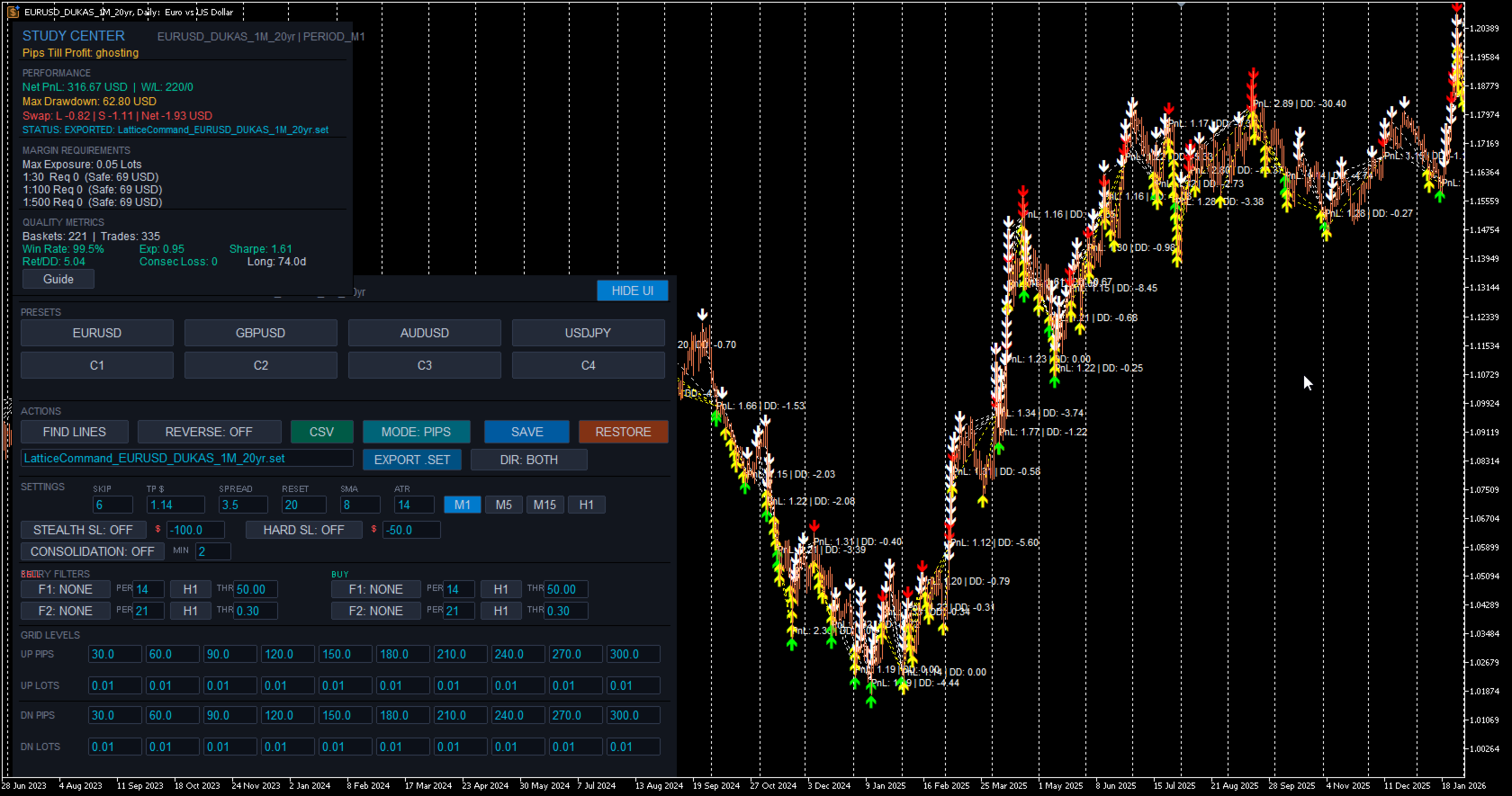
Lattice Vision™ is a visual analysis and parameter-discovery tool for MetaTrader 5. It simulates how price interacts with configurable order-network structures across historical data — allowing you to observe basket behaviour, measure risk characteristics, and refine your configuration before committing capital.


No orders are placed. No signals are generated. This is a professional analysis instrument.


---


OVERVIEW


Lattice Vision™ provides a structured, non-executing environment for observing how price interacts with order networks across any amount of historical data.


It provides:


- Instant visual simulation of order-network basket behaviour across years of data


- Ghosting Technology™ — a proprietary trigger-filtering system that lets you observe how skipping early interactions changes outcome profiles


- Comprehensive analytics with colour-coded risk thresholds


- Dual distance mode: fixed-pip or ATR-adaptive level spacing


- Real-time parameter adjustment with immediate recalculation


- CSV export for external analysis


- Preset system for saving and comparing configurations


Instead of waiting hours for backtests, you get a bird's-eye view of how your parameters behave across different market conditions — years of data rendered instantly on a single screen. Adjust a distance, change a lot size, toggle a mode, and watch the impact ripple across the entire dataset in real time.


---


FIDELITY REPORT — VISION ↔ COMMAND


This is the proof that defines the Lattice category.


Lattice Vision and Lattice Command share a single level-trading engine running in two different environments. Vision processes historical bars in a study window. Command runs in MT5's strategy tester or live account, executing on closed bars and using ticks only for measuring price drift and tracking account balance. These are fundamentally different execution contexts — and we engineered the pair from day one to deliver the same outcome from the same configuration. What you see in the study is what you get in the deploy.


The proof:


- 18 configurations tested across filters, signal modes, stop-loss variants, consolidation, ghosting, and direction control


- 12 months of MetaQuotes-native USDJPY 1-minute data (9 March 2025 → 9 March 2026) — the bars every MT5 user has access to from their generic MetaQuotes USD demo account


- MetaQuotes-default symbol properties — contract size, tick value, margin requirements, swap rates all sourced from the same platform that supplies the bars


- Constant 2-pip spread applied throughout, Open Prices Only tester model


- 18 of 18 tests match exactly between Vision's predicted trade count and Command's true engine output


- Zero aggregate drift across 3,790 trades


- 100% directional alignment — every test produces trades in the expected direction


- 100% mechanism alignment — every filter, signal mode, stop-loss variant, and lattice mode behaves correctly in both engines


Why MetaQuotes-native data: engine-vs-engine fidelity is a measurement of whether Vision and Command run the same logic on the same input. For that measurement to be clean, the input must be unambiguous — bar data and symbol properties must come from the same source. MetaQuotes-native data satisfies this condition: the bars and the USDJPY symbol specs both come from the MetaQuotes platform, so the engines are operating on a self-consistent input. Imported third-party historical bars (Dukascopy etc.) introduce a second variable — bars from one source, symbol specs from whichever broker the platform is configured for — and any drift observed there could be either an engine difference or a bar-vs-spec mismatch. Native data isolates the measurement to engine fidelity. That is why the matrix is run this way and that is why the result is 18 of 18.


A note on the MT5 Strategy Tester Results pane: the closed-position count shown in the Results pane reflects MetaTrader's own deal-level event accounting and may differ from the engine's structural trade count due to broker-side execution artefacts. The Results pane is useful for evaluating live-trading execution conditions; the journal's structural counter is the figure that aligns with Vision's panel. Both numbers are documented in the report so you can see exactly how each one is constructed.


The complete report — methodology, full test matrix, per-test results, account/symbol-property conditions, and the why-MetaQuotes-native interpretation — is published openly and free to download:


https://drive.google.com/drive/folders/19txtz0FCf2AitpHxllzG8OxELexszbrV?usp=sharing


This is an engineering position, not a marketing promise. Any future change to either engine that breaks the matrix beyond reported tolerances blocks release until resolved. The methodology is reproducible by any MT5 user — you don't have to take our word for it.


When fidelity between analysis and execution matters — and it should — this is what the bar looks like.


---


INTENDED USE


Designed for:


- Order-network and basket traders seeking a visual parameter-discovery tool


- DCA traders refining entry spacing and lot progression


- System developers designing and validating execution parameters


- Prop-firm traders testing configurations against drawdown constraints


- Risk-focused traders who want to understand drawdown characteristics before deploying


- Anyone who wants to see how an order-network structure behaves before committing capital


This is not a beginner signal tool. It assumes familiarity with position sizing, price movement, spread impact, and drawdown management.


---


GHOSTING TECHNOLOGY™ — PROPRIETARY TRIGGER FILTERING


Ghosting Technology™ is the defining innovation of Lattice Vision™. It fundamentally changes how you evaluate order-network configurations by letting you observe the impact of filtering early interactions.


The problem: when price first enters an order network, the initial interactions are often noise — premature triggers during unstable conditions before price has committed to a direction. Traditional analysis treats every crossing equally. Ghosting Technology™ lets you define how many initial interactions are observed but excluded from active simulation.


These "ghost" triggers are tracked and displayed on the chart as distinct markers (yellow/white arrows), but no simulated position is created. Only after the ghost threshold is reached do subsequent interactions become active. All P&L and metrics are calculated only from the live (non-ghosted) interactions.


The result: you can instantly observe how different ghost counts change your outcome profile, drawdown characteristics, and win rate across the entire dataset. Find the threshold where filtering noise produces a tighter, more resilient configuration — before risking a single dollar.


The ghost count is fully adjustable in real time. Change it and watch the entire study recalculate instantly. This makes Ghosting Technology™ tangible and intuitive — not just a number in a settings panel, but a visual filter you can see working on the chart.


---


CORE FEATURES


Visual Study Range


Define your analysis window using two draggable chart markers. Everything updates dynamically as you move them. Extend the range into live price action for forward observation, or narrow it to isolate a specific market regime. The FIND LINES button snaps markers to your current chart view with a single click.


20-Level Order-Network Configuration


Up to 20 price interaction levels — 10 upper (sell side) and 10 lower (buy side). Every level has independent spacing and independent lot sizing. Build uniform structures, progressive configurations, regressive profiles, or fully asymmetric layouts. Complete control over the shape of your order network.


ATR Adaptive Mode


Switch between fixed-pip distances and ATR-based multiples with a single toggle. In ATR mode, level spacing automatically widens in volatile conditions and tightens in calm markets, keeping your order network proportional to actual market movement. The ATR period is configurable. Basket TP can also be expressed in ATR multiples, with the effective dollar value shown in the Study Center. Compare both modes across the same data range to understand which suits each instrument.


Multi-Timeframe Anchor


Lock the SMA reference calculation to any timeframe (e.g. M1) while viewing results on any chart resolution. Watch simulated baskets on Daily, Weekly, or Monthly charts for the macro view while maintaining lower-timeframe precision. Analyse decades of data without sacrificing calculation accuracy.


Periodic Lattice Recalibration


The order network automatically recentres on the SMA reference at configurable intervals measured in bars. This keeps the structure aligned with evolving price action rather than anchored to a stale level. The recalibration interval is adjustable in real time.


Direction Inversion


Reverse the simulation direction with a single toggle. Upper crossings become buy signals, lower crossings become sell signals. Instantly observe how a contrarian approach performs across the same data range and network structure.


---


ANALYTICS & MEASUREMENT


Real-Time Study Center


A comprehensive analytics panel that updates instantly as you adjust any parameter. Displays: net PnL, win/loss count, win rate, maximum drawdown, peak exposure, expectancy, return-to-drawdown ratio, Sharpe ratio, maximum consecutive losses, and longest basket duration. All values in account currency with colour-coded risk thresholds — green for healthy, amber for caution, red for elevated.


Pips Till Profit


Shows exactly how many pips the current simulated basket needs to move to reach the target threshold, along with the precise target price level. Gives you an intuitive, real-time feel for how close or far each cycle is from completion.


Swap Cost Simulation


Estimated swap costs are calculated and included in basket PnL based on long and short swap rates. Provides more realistic outcome measurements for configurations that hold positions across multiple days.


Margin & Capital Requirements Guide


Reference estimates for capital requirements under common leverage conditions — 1:30, 1:100, and 1:500. Calculates margin required for maximum possible exposure based on your configured lot sizes across all 20 levels. Informational guidance only — not a broker guarantee.


Configurable Spread Assumption


Set a spread value to include transaction cost modelling in all measurements. Adjustable in real time — observe how sensitive your configuration is to transaction costs.


Integrated Metric Guide


Built-in explanations for every measurement in plain language with colour-coded threshold values: what it represents, why it's relevant, how to interpret it, and what typical acceptable ranges look like. Accessible directly from the interface with a single click.


---


VISUAL ANALYSIS


Basket Lifecycle Visualisation


Every completed basket cycle is rendered directly on the chart with colour-coded markers — green for profitable closures, red for losses, with PnL annotations. See at a glance where clusters of success or failure occur, which market regimes produce favourable outcomes, and how behaviour changes across different conditions.


Ghost vs Active Markers


Ghosted (filtered) interactions are visually distinct from active ones directly on the chart. You can see exactly which price crossings were observed but filtered during the Ghosting Technology™ phase, and which resulted in simulated positions.


Order-Network Level Display


Upper and lower interaction levels are displayed as colour-coded horizontal lines on the chart, showing exactly where the order network sits relative to current and historical price action. The structure updates in real time as parameters change.


Interactive Study Range


Define and adjust your analysis window visually using draggable chart markers. All calculations update immediately as you move them.


---


PRESET SYSTEM


Three-Profile Preset System


Each symbol supports three independently saved configuration profiles. Store conservative, moderate, and aggressive setups — or any three configurations you want to compare. Save distances, lot sizes, ghost count, target threshold, and distance mode with a single click. Recall and compare instantly. Presets persist across sessions.


One-Click CSV Export


Export complete study results in CSV format. Each row represents one basket cycle with: basket ID, timestamps, total volume, PnL, maximum drawdown, and interaction count. Files saved to MQL5/Files/ — compatible with Excel, Google Sheets, Python, R, or any CSV reader.


SET File Export & Import


Export your full configuration as an MT5-compatible .SET file ready to load directly into Lattice Command™ or the MT5 strategy tester. Import .SET files saved from Command back into Vision to re-examine live configurations on historical data. The export/import bridge is what makes the discover-deploy loop seamless.


Save & Restore


Save your current working configuration or restore factory defaults at any time. Experiment freely knowing you can snap back to a known-good state with one click.


---


INTERFACE & CONTROLS


Bloomberg-Inspired Terminal Design


Clean, professional dark interface designed for extended use. Structured sections with clear headers and visual dividers. Parameters, presets, actions, and study results all accessible from a single on-chart panel without opening dialogs or restarting the tool.


Live Parameter Editing


All key parameters are editable directly from on-chart input fields: distances, lot sizes, ghost count, target threshold, spread assumption, reset interval, and SMA period. Change any value and the entire study recalculates instantly across your full data range.


Collapsible UI


Toggle the entire interface on and off with a single button. When hidden, your chart is completely unobstructed. When shown, every control and metric is immediately accessible.


---


STUDY PARAMETERS


SKIP — Number of initial interactions to ghost before live counting (Ghosting Technology™)


TP $ / TP ATRx — Basket profit target (account currency or ATR multiples)


SPREAD — Assumed spread in pips for transaction cost modelling


RESET — Minimum bars between order-network repositioning


SMA — Anchor SMA period for reference calculation


ATR — ATR lookback period (ATR mode only)


MODE — Toggle between PIPS and ATR adaptive mode


Timeframe — Study timeframe for SMA anchor (M1, M5, M15, H1)


SCHEDULE — Optional session-timing filter with per-day toggles, hour-of-day window, and midnight buffer (disabled by default)


All changes recalculate immediately.


---


BASKET LOGIC


Price crosses an order-network level and an interaction is recorded. If within the ghost threshold, the interaction is tracked but no simulated position is created. Once past the ghost threshold, subsequent crossings create simulated positions. The basket accumulates as price expands through additional levels. When combined profit of active (non-ghosted) positions reaches the basket TP, the basket closes. One basket active at a time. After closure, the engine waits for the reset-bar cooldown before forming a new anchor.


Each basket tracks entry prices, running PnL, drawdown, lot exposure, and interaction count.


---


USE CASES


Rapid Parameter Discovery — Test configurations in seconds instead of hours. Adjust distances, lot sizes, ghost counts, and modes and watch outcomes update instantly across years of data.


Ghost Count Optimisation — Experiment with different Ghosting Technology™ thresholds to find the sweet spot between filtering noise and maintaining enough active interactions. See exactly how each ghost count changes the outcome profile across your entire dataset.


Volatility Mode Comparison — Toggle between PIPS and ATR distance modes to compare fixed versus volatility-adaptive spacing across the same market data.


Drawdown & Exposure Profiling — Identify exactly when and where configurations produce maximum adverse movement. Use this to set appropriate risk thresholds or to eliminate configurations that exceed your tolerance.


Parameter Sensitivity Testing — Nudge individual parameters and watch the impact across the entire dataset. Find stable zones where small changes don't dramatically alter outcomes — a sign of robustness rather than curve-fitting.


Multi-Instrument Screening — Rapidly evaluate the same configuration across multiple symbols. Use presets to store per-symbol optimised settings. Export CSV results for cross-instrument comparison.


Prop-Firm Parameter Validation — Review maximum drawdown, peak margin usage, and capital requirements against funded-account constraints.


---


COMPATIBILITY NOTE


Lattice Vision™ is a complete, standalone analysis and parameter-discovery tool. The visual insights, analytics, and exported data are fully valuable on their own — whether you execute manually, use your own EA, or any other method.


For users who also use Lattice Command™ (available separately), parameter structures are compatible between the two products and engine fidelity is independently documented in our published Fidelity Report (link above). This is a convenience, not a requirement — Lattice Vision™ is designed to inform any execution approach, not just one.


---


EXAMPLE WORKFLOW


1. Visualise on any timeframe


2. Lock the SMA anchor to your chosen SMA timeframe


3. Set your study range across sufficient historical data


4. Configure order-network distances and lot sizes and adjust, see your changes dynamically


5. Use Ghosting Technology™ to test whether filtering early interactions produces a tighter, more resilient profile


6. Try ATR mode on instruments with variable volatility


7. Compare configurations using presets


8. Export results for deeper analysis


Focus on drawdown before profit.


---


WHAT LATTICE VISION IS NOT


Lattice Vision™ is not an Expert Advisor — it does not place orders.


It is not a signal service.


It is not a profit guarantee.


It is not financial advice.


It is a professional analysis and parameter-discovery tool.


---


SYSTEM REQUIREMENTS


MetaTrader 5 (build 2000+), any compatible broker, any symbol with sufficient price history.


---


RISK DISCLAIMER


This tool is for analysis and parameter discovery. It does not guarantee profits and does not place trades.


Simulated results are based on historical data and user-defined parameters. They do not represent actual trading and may not reflect real market conditions including slippage, requotes, liquidity constraints, and execution delays.


Users are responsible for understanding the risks involved, validating any configuration with proper testing, testing on demo accounts before live deployment, and never trading with money they cannot afford to lose.


Trading forex and CFDs involves substantial risk of loss and is not suitable for all investors. Past performance — whether observed through this software or any other method — is not indicative of future results.


---


TRADEMARKS & LEGAL


Lattice Vision™, Lattice Command™, and Ghosting Technology™ are common law trademarks of Cave and Fire Group Pty Ltd.


© 2025–2026 Cave and Fire Group Pty Ltd. All rights reserved.


Cave & Fire Lab is a trading name of Cave and Fire Group Pty Ltd., a software development company. We are not a financial services provider, broker, fund manager, or advisory firm. We do not provide financial advice, trading signals, or recommendations of any kind.


MetaTrader 5 and MQL5 are registered trademarks of MetaQuotes Ltd. This product is not affiliated with, endorsed by, or sponsored by MetaQuotes Ltd.


All other trademarks are the property of their respective owners.


Recommended products
Pump Liquidity Refueling
Konstantin Meshcheriakov
PUMP V3_0 Liquidity Refueling — Refueling Your BalanceWhat is "Liquidity Refueling"? Think of the Forex market as a highway and liquidity as the fuel.  When institutional players "pour" massive volume into the market, the price makes a sharp surge — an impulse or a "pump."  The PUMP V3_0 EA acts as a smart fueling station: it identifies moments of maximum market energy and "pumps" that momentum directly into your trading account.   Performance Metrics (Strategy Tester Data):Net Profit "Pumped"
FREE
MT Monster
MASSINISSA AINOUZ
This EA has been backtested with real ticks since January 2012 untill March 2025, with no delay in execution, and then with a delay of 1000ms, the backtest showed a drawdown of 30% with a 10k USD backtest account. The EA default parameters are optimised to work best on EURUSD pair, but can work on other currencies and metals like XAUUSD. Before using this EA and in order to not lose all your money make sure you have at least 5000USD in your account. Do not use another EA with this one on the sam
Free automatic Fibonacci is an indicator that automatically plots a Fibonacci retracement based on the number of bars you select on the BarsToScan setting in the indicator. The Fibonacci is automatically updated in real time as new highest and lowest values appears amongst the selected bars. You can select which level values to be displayed in the indicator settings. You can also select the color of the levels thus enabling the trader to be able to attach the indicator several times with differe
FREE
Nikkei225 Gap ContinuationEA
Francesc Jordi Mallol Nolden
Nikkei 225 Gap Continuation EA Automated opening-gap continuation strategy for the Nikkei 225 Nikkei 225 Gap Continuation EA is an automated trading system for MetaTrader 5 designed specifically for the Japanese stock index. It searches for significant opening gaps and enters only when price action confirms a possible continuation in the same direction. The strategy combines the opening gap, a configurable opening range and session VWAP confirmation. It also includes risk-based position sizing,
FREE
Vantage Breakout
Alexandre Vincent Traber
Turn volatility expansions into structured, tiered profit-taking — Vantage Breakout trades adaptive ATR/SMA breakouts and manages every position with a disciplined 3-stage exit system, validated across Forex majors and Gold. Overview Vantage Breakout is an adaptive volatility breakout EA. It enters when price closes outside a dynamic band built from a Simple Moving Average offset by a multiple of the Average True Range, capturing genuine momentum expansions while filtering out noise. Every posi
FREE
LT Mini Charts
Thiago Duarte
4.88 (8)
This is a utility indicator that creates mini charts on left side of the chart you are looking at. It is very useful to watch many timeframes simultaneously, without having to change between multiple charts. Its configuration is very simple. You can have up to 4 mini charts opened. They automatically load the template of the "parent" chart. If you have any doubt please contact me. Enjoy! This is a free indicator, but it took hours to develop. If you want to pay me a coffee, I appreciate a lot  
FREE
Reversal Composite Candles
MetaQuotes Ltd.
3.69 (16)
The idea of the system is to indentify the reversal patterns using the calculation of the composite candle. The reversal patterns is similar to the "Hammer" and "Hanging Man" patterns in Japanese candlestick analysis. But it uses the composite candle instead the single candle and doesn't need the small body of the composite candle to confirm the reversal. Input parameters: Range - maximal number of bars, used in the calculation of the composite candle. Minimum - minimal size of the composite can
FREE
Prop News Filter
Joao Jara Carvalho
Prop News Filter is a free Expert Advisor that helps traders on prop firm and funded accounts avoid violating the 2-minute news rule that most major prop firms enforce. It uses a precise two-stage protection model: pre-block new trades 15 minutes before the restricted window, then close everything 2 minutes before the news. Most news filter tools either block trading too aggressively and kill your edge, or rely on the MQL5 native calendar which is often disabled on prop firm terminals. This EA u
FREE
Super Trend eu
Emin Ulucanli
4.83 (6)
SUPERTREND; It is a trend following indicator based on the SuperTrend ATR created by Olivier Seban. It can be used to detect changes in trend direction and locate stops. When the price falls below the indicator curve, it turns red and indicates a downtrend. Conversely, when the price moves above the curve, the indicator turns green, indicating an uptrend. Like other indicators, it works well on SuperTrend when used in conjunction with other indicators such as MACD, parabolik SAR, Bollinger Band
FREE
VFI Quantum
Nikita Berdnikov
5 (1)
Introducing VFI (Volume Flow Indicator) – a trading indicator that analyzes the relationship between volume and price movement to identify key trading opportunities. The indicator displays the strength and direction of volume flow, providing clear signals about potential entry and exit points. Signals are formed based on zero line crossovers, crossovers between the VFI line and its exponential moving average (EMA), and when the indicator exits overbought and oversold zones. Attention! This stra
FREE
This Expert Advisor is used to send messages from the PCT Multi indicator to Telegram. The EA has 5 settings: - Channel name: The name of the Telegram channel. - Token: Your bot's Token. - Entries: Entry messages will be sent. - Results: Entry results will be sent. - Alerts: Alerts will be sent. How to set up: In the Tools -> Options menu, in the "Expert Advisors" tab: - Check the "Allow WebRequest for listed URL:" option. - Click "add new URL" and add " https://api.telegram.org " (without the
FREE
️ Limited Free Access ! ️ Ares Quantum EA is currently available for free as part of an early‑tester release. This phase is designed to gather real user feedback, performance reports, and honest reviews from traders who try the EA on their own accounts. After the first 100 downloads, the EA will switch to a lifetime price of $229.99, increasing automatically by $50 every 5 copies sold until reaching the final retail value of $1,029.99. Anyone who downloads now keeps permanent access to the cur
Axilgo PipPiper CoPilot
Theory Y Technologies Pty Ltd
5 (2)
Axilgo Pip Piper CoPilot Elevate your trading game with the Axilgo Pip Piper CoPilot, the first in our revolutionary Pip Piper Series. This all-inclusive toolset is meticulously crafted for serious traders, focusing on key areas such as Risk Management, Trade Management, Prop Firm Rule Compliance, and Advanced Account Management . With CoPilot, you’re not just investing in a tool—you’re gaining a strategic partner in the intricate world of trading. Important Notice: To ensure you receive the fu
FREE
(Special New Year promotion - free price!) The indicator displays the actual 'Scale in points per bar' (identical to the manual setting in the Terminal, see screenshot) in the upper right corner of the chart. The displayed value changes INSTANTLY whenever the chart scale is changed! (This is very convenient when planning screenshots). In Settings: Change language (Russian/English), font size of the displayed text, text label offset coefficient from the graph corner, equally in X and Y directi
FREE
Slow RSI
Flavio Javier Jarabeck
4.8 (5)
For those who feel that regular RSI is too fast and too noisy to be used on regular trades or in EAs and want to have an alternative to meter the Momentum of the Price, here is a solution presented on the great article of the Technical Analysis of Stocks & Commodities magazine (April, 2015), by Vitali Apirine, called: Slow Relative Strenght Index . Its reading is almost the same as the regular RSI, but its levels of Overbought and Oversold are 80 and 20 instead. SRSI is very powerful to show div
FREE
PROMETHEUS TECHNICAN VERSION Free | By THE SONS A gift from The Sons — no strings, no trial, no expiry. Every trader deserves access to professional-grade market intelligence. That belief is why Prometheus Technical Version exists, and why it costs nothing. Consider it our handshake to the trading community. What You're Getting This is not a simplified tool dressed up as a gift. Prometheus Technican Version is a fully built, institutional-quality technical analysis indicator running a dual-model
FREE
Donchian Breakout And Rsi
Mattia Impicciatore
4.5 (2)
General Description This indicator is an enhanced version of the classic Donchian Channel , upgraded with practical trading functions. In addition to the standard three lines (high, low, and middle), the system detects breakouts and displays them visually with arrows on the chart, showing only the line opposite to the current trend direction for a cleaner view. The indicator includes: Visual signals : colored arrows on breakout Automatic notifications : popup, push, and email RSI filter : to val
FREE
Follow The Line MT5
Oliver Gideon Amofa Appiah
4.6 (35)
This indicator obeys the popular maxim that: "THE TREND IS YOUR FRIEND" It paints a GREEN line for BUY and also paints a RED line for SELL. (you can change the colors). It gives alarms and alerts of all kinds. IT DOES NOT REPAINT and can be used for all currency pairs and timeframes. Yes, as easy and simple as that. Even a newbie can use it to make great and reliable trades. NB: For best results, get my other premium indicators for more powerful and reliable signals. Get them here: https://www.m
FREE
Strong movement levels
Nikolay Mitrofanov
5 (2)
Looks for strong price movements and draws levels upon their completion. You determine the strength of the movement yourself by specifying in the settings the number of points and the number of candles of the same color in a row in one direction. There are 2 types of building in the settings: extrenum - high / low close - close price You can also adjust the number of displayed levels and the number of candles for calculations. By default, the settings indicate 5 levels for 360 candles. That
FREE
Inverse Liquidity Grab Ultimate EA
Stephen Muriithi Muraguri
5 (1)
This EA finds Fair Value Liquidity (FVL) on the chart, tracks when they get mitigated , and then looks for an inversion signal (price “fails” through the zone). When that inversion happens, it places a trade in the opposite direction of the original Liquidity gap (an Inverse FVG approach). It also lets you control when it trades using market sessions , and it can auto-close positions at New York open (all positions or profitable-only). Key advantages Clear, rule-based entries (no guessing): trad
FREE
Simple Weis Wave
Jean Jacques Huve Ribeiro
3.67 (3)
One of the best tools for analyzing volume, Weis Wave was idelized by David Weis, to facilitate the reading of directional flow. For the VSA method disciples it is an evolution of the practices created by Richard Wycoff, facilitating a predictive reading of the market, always seeking an accumulation and distribution of the negotiated contracts. Cumulative wave volume  Range of wave ( removed) Average Wave volume Ref "Tim Ord lectures" ( removed)
FREE
Hi you, I need your help! Be my Patron, let's make it possible! https://www.patreon.com/joaopeuko https://github.com/Joaopeuko/Mql5-Python-Integration Channel: English version - Versão Inglês: https://www.mql5.com/en/channels/Mql5_Python_Integration_EN Portuguese version - Versão Português: https://www.mql5.com/en/channels/Mql5_Python_Integration_PT Free version with 5 indicators: https://www.mql5.com/en/market/product/57574 This version has 38 indicators, 5 from the free version plus
FREE
Echelon EA
Daniel Suk
5 (1)
Echelon EA – Chart Your Unique Trading Constellation Like the celestial guides that lead explorers through the vast universe, Echelon EA empowers you to create and optimize your very own trading strategies. This versatile system combines advanced grid and martingale techniques with cutting‐edge indicators, offering you an endless palette for designing a strategy that is truly your own. Craft Your Personal Strategy: Infinite Possibilities – Customize every parameter to build a trading system t
FREE
Wallstreet Pro EA
Leonit Ajvazi
3 (2)
Symbol                                       XAUUSD, AUDUSD Period                                        H1 timeframe Retail support                            YES Minimum deposit                       1000 USD (or the equivalent amount in another currency) Compatible with all brokers      YES (supports any account currency) Works without preset                YES Symbol XAUUSD, AUDUSD Period (Timeframe) H1 timeframe Retail support YES Minimum deposit 1000 USD (or the equivalent amount in ano
FREE
Correlation Matrix Pro - Multi Currency Pairs Hedge Scanner Understand the relationships between currency pairs in real-time! A powerful analysis tool that helps you visualize statistical relationships between up to 6 currency pairs simultaneously. Perfect for portfolio management, risk diversification, and hedging strategies. KEY FEATURES - Real-time Pearson correlation using log returns - Monitor up to 6 currency pairs simultaneously - Automatic timeframe detection - Adjustable lookback
FREE
Advanced MTF High Low
Felipe Monteiro Rodrigues
Advanced MTF High Low is a multi-timeframe structural analysis indicator that automatically identifies the most relevant highs and lows from different periods (Month, Week, Day, H4, H1, among others) and projects these levels directly onto the current chart in lower timeframes. The indicator was developed to help traders quickly locate important institutional support and resistance zones by using the actual extremes of higher timeframes. The levels remain visible until they are mitigated by pric
FREE
GDS Renko Pip ST Chart - Pip-Based Renko Chart Indicator for MetaTrader 5 GDS Renko Pip ST Chart is a pip-based Renko chart indicator for MetaTrader 5. It helps traders build and study cleaner Renko price movement using a practical fixed pip or point-based brick structure. This tool is designed as a Renko chart foundation for manual analysis. It does not predict the market, does not generate buy or sell signals and does not decide whether a trade should be opened. Gold advisor   What Pip ST Cha
FREE
Rise of the Beasts
Bin Jumahat Johan
Rise of the Beasts – SuperTrend Auto-Trading EA Rise of the Beasts is a powerful, fully automated Expert Advisor that unleashes trend-following precision using the legendary SuperTrend indicator . Built for traders who want clean entries, smart exits, and consistent results, this EA dominates markets by identifying trend shifts with accuracy and acting instantly. Whether you trade forex, indices, metals, or crypto , Rise of the Beasts adapts to any market with strong risk control and volatili
FREE
Expert Advisor (EA) that utilizes the basic Dow Theory strategy along with RSI for take profit, and employs support and resistance levels from the Zigzag indicator as stop-loss and take-profit points, you can follow these guidelines: Dow Theory Strategy : This involves analyzing trends using the Dow Theory principles, mainly focusing on identifying primary trends (bullish or bearish) and secondary trends (corrections). You'll need to implement rules for identifying these trends based on price ac
FREE
Buyers of this product also purchase
Trade Assistant MT5
Evgeniy Kravchenko
4.41 (216)
It helps to calculate the risk per trade, the easy installation of a new order, order management with partial closing functions, trailing stop of 7 types and other useful functions. Additional materials and instructions Installation instructions - Application instructions - Trial version of the application for a demo account Line function -   shows on the chart the Opening line, Stop Loss, Take Profit. With this function it is easy to set a new order and see its additional characteristics bef
Forex Trade Manager MT5
InvestSoft
4.98 (673)
Trade Manager MT5 is an advanced position size calculator and trade management tool for MetaTrader 5, designed to help traders plan trades faster, control risk more precisely, and manage open positions directly from the chart. It combines order placement, risk based lot calculation, Stop Loss and Take Profit management, Break Even, Trailing Stop, Partial Close, Equity Protection, and external trade management in one panel. Whether you trade forex, indices, metals, commodities, crypto, or future
Local Trade Copier EA MT5
Juvenille Emperor Limited
4.97 (147)
Experience exceptionally fast trade copying with the   Local Trade Copier EA MT5 . With its easy 1-minute setup, this trade copier allows you to copy trades between multiple MetaTrader terminals on the same Windows computer or Windows VPS with lightning-fast copying speeds of under 0.5 seconds. Whether you're a beginner or a professional trader, the   Local Trade Copier EA MT5   offers a wide range of options to customize it to your specific needs. It's the ultimate solution for anyone looking t
Astro Trade MT5
Indra Maulana
5 (2)
25% discount on the release of the tool: only for the next 3 buyers Download the trial version: https://www.mql5.com/en/market/product/192656 AstroTrade Trading Assistant AstroTrade is a comprehensive multi-functional trading utility developed for the MetaTrader 5 platform. It integrates essential tools for trade execution, risk management, and technical monitoring into a single unified interface. The application is designed to assist traders in managing their daily operations through a visual
Beta Release The Telegram to MT5 Signal Trader is nearly at the official alpha release. Some features are still under development and you may encounter minor bugs. If you experience issues, please report them, your feedback helps improve the software for everyone. Telegram to MT5 Signal Trader is a powerful tool that automatically copies trading signals from Telegram channels or groups directly to your MetaTrader 5 account. It supports both public and private Telegram channels, and you can conn
================================================================================ POC BREAKOUT - V20.72. Full Professional Grade Toolkit ================================================================================ POC Breakout is a full MetaTrader 5 trading dashboard for discretionary traders who want breakout signals, Point of Control (POC) context, volume profiles, order flow, market structure, news, alerts, and advanced trade planning in one professional workspace. Attached directly to you
TradePanel MT5
Alfiya Fazylova
4.88 (167)
Trade Panel is a multi-functional trading assistant. The app contains over 50 trading functions for manual trading and allows you to automate most trading tasks. Application instructions + video instructions: https://www.mql5.com/en/blogs/post/756482 Trial version of the application for a demo account: https://www.mql5.com/en/blogs/post/750865 How to install the application: https://www.mql5.com/en/blogs/post/756239 How to test the application in visual mode: https://www.mql5.com/en/blogs/post/7
Telegram to MT5 Multi-Channel Copier automatically copies trading signals from your Telegram channels directly into MetaTrader 5. No bots, no browser extensions, no manual copying. You receive a signal on Telegram and the EA opens the trade on your terminal in a few seconds. The product includes two components: a Windows application that listens to your Telegram channels, and this Expert Advisor that executes the signals on your MT5 terminal. An MT4 version is also available. Setup guide and app
Telegram To MT5 Ultra
Mirel Daniel Gheonu
5 (4)
Telegram To MT5 — Signal Copier Turn the trading calls from your Telegram channels into real MT5 orders — automatically, on as many accounts as you like, with risk and rules fully under your control. Telegram To MT5 connects the VIP / signal channels you already follow on Telegram to your MetaTrader 5 terminal. A free companion desktop app reads the messages (even from channels that block bots), and this Expert Advisor executes them on your account — applying your own risk settings, symbol mappi
HINN MagicEntry Extra
ALGOFLOW OÜ
4.71 (17)
HINN MAGIC ENTRY – the ultimate tool for entry and position management! SIMPLE. FASTEST. INTUITIVE. MAX AUTOMATED. Place orders by selecting a level directly on the chart! full description   ::  demo-version  :: 60-sec-video-description Key features: - Market, limit, and pending orders - Automatic lot size calculation - Automatic spread and commission accounting - Unlimited partitial take-profits  - Breakeven and trailing stop-loss and take-profit  functions - Invalidation leves - Intuitive, a
Signal Trading View to MT5 Pro
Mirel Daniel Gheonu
4.5 (2)
Signal TradingView to MT5 Pro  Instant professional execution between TradingView and MetaTrader 5 Automate your trading strategy with the most robust communication bridge between TradingView alerts and real execution in MT5. Designed for traders who demand speed, flexibility, and impeccable risk management, this Expert Advisor transforms any alert message into a precise market or limit order.   Install and TEST the TRIAL version HERE STRENGTHS AND ADVANTAGES Universal Parsing Engine (Propriet
Exp COPYLOT CLIENT for MT5
Vladislav Andruschenko
3.97 (35)
Professional Trade Copier for MetaTrader 5 Fast, professional, and reliable trade copier for MetaTrader . COPYLOT allows you to copy Forex trades between MT4 and MT5 terminals with support for Hedge and Netting accounts. COPYLOT MT5 version supports: - MT5 Hedge to MT5 Hedge - MT5 Hedge to MT5 Netting - MT5 Netting to MT5 Hedge - MT5 Netting to MT5 Netting - MT4 to MT5 Hedge - MT4 to MT5 Netting MT4 version Full Description +DEMO +PDF How To Buy How To Install How to get Log Files H
The product will copy all telegram signal to MT5 ( which you are member) , also it can work as remote copier.  Easy to set up, copy order instant, can work with almost signal formats, image signal,  s upport to translate other language to English Work with all type of channel or group, even channel have "Restrict Saving Content", work with  multi channel, multi MT5 Work as remote copier: with signal have ticket number, it will copy exactly via ticket number. Support to backtest signal. How to s
Trade copier MT5
Alfiya Fazylova
4.58 (52)
Trade Copier is a professional utility designed to copy and synchronize trades between trading accounts. Copying occurs from the account / terminal of the supplier to the account / terminal of the recipient, which are installed on the same computer or VPS . PROMOTION - If you have already purchased the "Trade Copier MT5," you can receive the "Trade Copier MT4" for free (for copying MT4 > MT5 and MT4 < MT5). For more detailed information about the conditions, please contact us via private message
Anchor Trade Manager
Kalinskie Gilliam
5 (7)
Anchor: The EA Manager Your EAs manage their own trades. Anchor manages the account around them. Anchor gives you one place to control your EAs, manage risk and decide when trading is allowed. Any EA, any vendor, any broker or symbol. No source-code changes required. The Problem Most EAs only know what they are doing. They cannot see when another EA is already trading, when several EAs open and are stacking risk or when the account has reached your loss limit. Even using just one EA, it may not
Timeless Charts
Samuel Manoel De Souza
5 (8)
Timeless Charts is an all-in-one trading utility for professional traders. It combines custom chart types such as Seconds Charts and Renko with advanced order flow analysis using Footprints , Clusters , Volume Profiles , VWAP studies, and anchored analysis tools for deeper market insight. Trading and position management are handled directly from the chart through an integrated trade management panel , while Market Replay and Virtual Accounts provide environments for practicing trading skills and
Trade Copier Ultimate
Janitha Sandaruwan Amaradasa Wickramasingha Arachchilage
5 (4)
Trade Copier Ultimate - Telegram to MT5 Signal Copier Trade Copier Ultimate automatically copies Telegram trading signals into MetaTrader 5. The EA can read signal messages, detect the symbol, order type, entry price, Stop Loss, Take Profit levels and selected update commands, then execute or manage the trade in MT5 using your lot and risk settings. It is more than a basic Telegram to MT5 copier. TCU also supports Bot API and user-account Bridge workflows, Discord signal routing, local MT5 to MT
Global Investing FX Terminal
Santiago Nicolas Pla Casuriaga
The Global Investing FX Terminal is an all-in-one FX dashboard for MetaTrader 5 — CB policy rates, CFTC COT positioning, carry rankings, economic surprises, options skew, retail sentiment, and correlations, thirteen panels in total — rendered on a single zero-flicker canvas overlay and refreshing every 10 seconds from one attached EA. No external software required. Professional FX analysis requires simultaneous access to data that normally lives in separate platforms: rate derivatives, governmen
Footprint Chart Pro — Professional OrderFlow EA for MetaTrader 5 Version 6.34 | Professional tool for real traders | Institutional-Grade Visualization DEMO USERS - PLEASE SELECT EVERY TICK / REAL TICK WHEN TESTING AND YOU HAVE DOWNLOADED HISTORICAL DATA. IF YOU SEE A WAITING SCREEN AND IT IS NOT DOWNLOADING, IT MEANS YOU HAVE LOW HISTORICAL DATA. TRY 1 MIN AND 5 MIN FIRST ON 1 DAY DATA. ONE DAY DATA SHOULD BE THE NEWEST AND MOST CURRENT DATE. PLEASE WAIT UNTIL THE MARKET HAS ROLLED OVER PERIOD.
Power Candles Strategy Scanner - Self-Optimizing Multi-Symbol Setup Finder Power Candles Strategy Scanner runs the same self-optimizing engine that powers the Power Candles indicator - on every symbol in your Market Watch, side by side. One panel tells you which symbols are statistically tradable right now, which strategy wins on each, the optimal Stop Loss / Take Profit pair, and pings you the moment a fresh signal fires. This tool is part of the Stein Investments ecosystem - 18+ tools plus Max
Premium Trade Manager - The Trade Panel With a Coach Built In Premium Trade Manager puts a trading coach inside your chart, with a full execution engine underneath it. Set the trade up the way you always do, then let Max, your AI trading coach, read that exact setup against your live account and give you a straight verdict before you commit: is the stop disciplined, is the risk sane, is a high-impact release minutes away, are you near a prop-firm limit. Below sits the engine that runs everything
Grid Manual MT5
Alfiya Fazylova
4.73 (22)
Grid Manual is a trading panel for working with grid strategies. The utility is universal, has flexible settings and an intuitive interface. It works with a grid of orders not only in the direction of averaging losses, but also in the direction of increasing profits. The trader does not need to create and maintain a grid of orders, the utility will do it. It is enough to open an order and the "Grid manual" will automatically create a grid of orders for it and will accompany it until the close. F
Trading Chaos Expert
Gennadiy Stanilevych
5 (11)
This software has no equals in the world and represents a universal trade "console" covering trading signals, automated market entry, setting of Stop Loss and Take Profit, as well as Trailing Profit for multiple trades at the same time in a single open window. Intuitive control of the Expert Advisor in "three clicks" ensures a comprehensive use of all its functions on different computers, including tablets PCs. Interacting with additional signal indicators that mark the chart to give a real mark
Seconds Chart MT5
Boris Sedov
4.61 (18)
Seconds Chart is a unique tool for creating second-based charts in MetaTrader 5 . With Seconds Chart , you can construct charts with timeframes set in seconds, providing unparalleled flexibility and precision in analysis that is unavailable with standard minute or hourly charts. For example, the S15 timeframe indicates a chart with candles lasting 15 seconds. You can use any indicators and Expert Advisors that support custom symbols. Working with them is just as convenient as on standard charts.
FarmedHedge Pair Trading Dashboard
Tanapisit Tepawarapruek
5 (3)
Farmed Hedge Yield Farming | All Markets (Manual - Hybrid - Semi/Automated EA) VERIFIED TRADING RESULTS - Farmed Hedge Yield Axi Copy:  https://www.mql5.com/en/signals/2356376 - Farmed Hedge Yield Exn Copy:   https://www.mql5.com/en/signals/2356404 - Farmed Hedge Yield V Copy:  https://www.mql5.com/en/signals/2357156 * Before purchasing, please feel free to send me a message if you have any questions about the product or setup. ** After purchase,  Contact me via private message to receive t
Message me after purchase to receive the complete manual kit + 3-day OpenAI API trial to test the AI features + Another bonus gift The current price is a limited discount for August Relaunch Update — secure your edition now before price go up. Next Price: $340 This is completely different from any trading panel you’ve tried or seen on the market. It’s one of the most innovative AI-powered trading panels available in the retail market right now. Imagine connecting   AI directly to your chart   —
Trade Dashboard MT5
Fatemeh Ameri
4.95 (132)
Trade Dashboard simplifies how you open, manage, and control your trades, with built-in lot size calculation. It allows you to execute trades, manage risk, and control positions directly on the chart, with tools such as partial close, breakeven, and trailing stop. Designed to reduce manual work and help you stay focused on your trading decisions. A demo version is available for testing. Detailed explanations of features are provided within the MQL5 platform. Installation instructions are include
MT5 to Telegram Signal Provider turns your trading account into a signal provider. Every trade action, whether manual, by EA or from your phone, is instantly sent as a message to Telegram. You can fully customize the format or use a ready-made template for quick setup. [ Demo ] [ Manual ] [ MT4 Version ] [ Discord Version ]     New: [ Telegram To MT5 ] Setup A step by step user guide is available. Key Features Ability to customize order details sent to subscribers You can create a tiered subs
Risk Manager Pro MT5
Roman Zhitnik
5 (8)
Risk Manager Pro MT5 is an account protection Expert Advisor for traders who want strict risk control inside MetaTrader 5. The utility monitors your account equity, daily and weekly results, drawdown, open positions, trade count, consecutive losses, and trading hours. When a configured limit is reached, it can automatically close positions, cancel pending orders, stop other EAs, send notifications, or close the terminal. Instead of relying on discipline during a stressful trading session, you de
Welcome to ENTRY IN THE ZONE WITH SMC MULTI TIMEFRAME Entry In The Zone and SMC Multi Timeframe is a real-time market analysis tool based on Smart Money Concepts (SMC), designed to analyze market structure, price direction, and key trading zones. It supports both Single-Timeframe Analysis and Multi-Timeframe Analysis, providing a clearer view of the overall market structure across multiple timeframes, with real-time BUY / SELL signals that do not repaint. It is designed to help filter trading op

More from author
LATTICE COMMAND THE MOST ADVANCED ORDER-NETWORK EXECUTION SYSTEM ON MQL5. Not a claim. A position backed by published, independently testable fidelity data. Discover with Lattice Vision. Deploy with Lattice Command. One engine. Two instruments. One continuous workflow. Lattice Command is the original level-trading execution engine — Grid Trading 2.0, engineered properly. When you find a configuration in Vision, Command produces the same trades. Eighteen test configurations covering filte
Filter:
No reviews
Reply to review