Lattice Vision
- ユーティリティ
- バージョン: 2.99
- アップデート済み: 22 9月 2026

LATTICE VISION™
THE MOST ADVANCED ORDER-NETWORK ANALYSIS TOOL ON MQL5.
Not a claim. A position backed by published, independently testable fidelity data.
Discover with Lattice Vision™. Deploy with Lattice Command™. One engine. Two instruments. One continuous workflow.
Lattice Vision is the original level-trading analysis tool — Grid Trading 2.0, engineered properly. When you find a configuration in Vision, the matching live engine produces the same trades. Eighteen test configurations covering filters, signal modes, stop-loss variants, consolidation, ghosting, and direction control — tested on MetaQuotes-native 1-minute USDJPY data with the platform's default symbol properties and a constant 2-pip spread. Eighteen of eighteen tests match exactly between Vision's predicted trade count and Command's true engine output. Zero aggregate drift across 3,790 trades. One hundred percent directional and mechanism alignment. Reproducible by any MT5 user with a generic MetaQuotes USD demo account — no third-party data downloads required.
→ Read the full Fidelity Report (published openly, free to download):
https://drive.google.com/drive/folders/19txtz0FCf2AitpHxllzG8OxELexszbrV?usp=sharing
That isn't marketing language. The full methodology and complete results are published below. Read it before you spend money on any execution suite that doesn't show you the same proof.
Lattice Vision is the analysis layer — years of price data, dozens of configurations, real-time recalculation, every metric that matters. Lattice Command is the execution layer — same engine, same outputs, full risk-control architecture. Use Vision standalone for parameter discovery. Pair it with Command for the only end-to-end workflow on MQL5 with a publicly documented fidelity matrix between the two engines.
Latest update — session-timing filters added for study isolation across configurable days and hours. Compare configurations against full sessions, weekday-only windows, or specific trading hours.
If you need help getting set up to perform a study, message us directly. Cave & Fire Lab is hands-on with every customer.
(Contact via DM after purchase for full PDF guide.)
Professional Order-Network Analysis & Parameter Discovery Tool for MetaTrader 5.
Lattice Vision™ is a visual analysis and parameter-discovery tool for MetaTrader 5. It simulates how price interacts with configurable order-network structures across historical data — allowing you to observe basket behaviour, measure risk characteristics, and refine your configuration before committing capital.
No orders are placed. No signals are generated. This is a professional analysis instrument.
---
OVERVIEW
Lattice Vision™ provides a structured, non-executing environment for observing how price interacts with order networks across any amount of historical data.
It provides:
- Instant visual simulation of order-network basket behaviour across years of data
- Ghosting Technology™ — a proprietary trigger-filtering system that lets you observe how skipping early interactions changes outcome profiles
- Comprehensive analytics with colour-coded risk thresholds
- Dual distance mode: fixed-pip or ATR-adaptive level spacing
- Real-time parameter adjustment with immediate recalculation
- CSV export for external analysis
- Preset system for saving and comparing configurations
Instead of waiting hours for backtests, you get a bird's-eye view of how your parameters behave across different market conditions — years of data rendered instantly on a single screen. Adjust a distance, change a lot size, toggle a mode, and watch the impact ripple across the entire dataset in real time.
---
FIDELITY REPORT — VISION ↔ COMMAND
This is the proof that defines the Lattice category.
Lattice Vision and Lattice Command share a single level-trading engine running in two different environments. Vision processes historical bars in a study window. Command runs in MT5's strategy tester or live account, executing on closed bars and using ticks only for measuring price drift and tracking account balance. These are fundamentally different execution contexts — and we engineered the pair from day one to deliver the same outcome from the same configuration. What you see in the study is what you get in the deploy.
The proof:
- 18 configurations tested across filters, signal modes, stop-loss variants, consolidation, ghosting, and direction control
- 12 months of MetaQuotes-native USDJPY 1-minute data (9 March 2025 → 9 March 2026) — the bars every MT5 user has access to from their generic MetaQuotes USD demo account
- MetaQuotes-default symbol properties — contract size, tick value, margin requirements, swap rates all sourced from the same platform that supplies the bars
- Constant 2-pip spread applied throughout, Open Prices Only tester model
- 18 of 18 tests match exactly between Vision's predicted trade count and Command's true engine output
- Zero aggregate drift across 3,790 trades
- 100% directional alignment — every test produces trades in the expected direction
- 100% mechanism alignment — every filter, signal mode, stop-loss variant, and lattice mode behaves correctly in both engines
Why MetaQuotes-native data: engine-vs-engine fidelity is a measurement of whether Vision and Command run the same logic on the same input. For that measurement to be clean, the input must be unambiguous — bar data and symbol properties must come from the same source. MetaQuotes-native data satisfies this condition: the bars and the USDJPY symbol specs both come from the MetaQuotes platform, so the engines are operating on a self-consistent input. Imported third-party historical bars (Dukascopy etc.) introduce a second variable — bars from one source, symbol specs from whichever broker the platform is configured for — and any drift observed there could be either an engine difference or a bar-vs-spec mismatch. Native data isolates the measurement to engine fidelity. That is why the matrix is run this way and that is why the result is 18 of 18.
A note on the MT5 Strategy Tester Results pane: the closed-position count shown in the Results pane reflects MetaTrader's own deal-level event accounting and may differ from the engine's structural trade count due to broker-side execution artefacts. The Results pane is useful for evaluating live-trading execution conditions; the journal's structural counter is the figure that aligns with Vision's panel. Both numbers are documented in the report so you can see exactly how each one is constructed.
The complete report — methodology, full test matrix, per-test results, account/symbol-property conditions, and the why-MetaQuotes-native interpretation — is published openly and free to download:
https://drive.google.com/drive/folders/19txtz0FCf2AitpHxllzG8OxELexszbrV?usp=sharing
This is an engineering position, not a marketing promise. Any future change to either engine that breaks the matrix beyond reported tolerances blocks release until resolved. The methodology is reproducible by any MT5 user — you don't have to take our word for it.
When fidelity between analysis and execution matters — and it should — this is what the bar looks like.
---
INTENDED USE
Designed for:
- Order-network and basket traders seeking a visual parameter-discovery tool
- DCA traders refining entry spacing and lot progression
- System developers designing and validating execution parameters
- Prop-firm traders testing configurations against drawdown constraints
- Risk-focused traders who want to understand drawdown characteristics before deploying
- Anyone who wants to see how an order-network structure behaves before committing capital
This is not a beginner signal tool. It assumes familiarity with position sizing, price movement, spread impact, and drawdown management.
---
GHOSTING TECHNOLOGY™ — PROPRIETARY TRIGGER FILTERING
Ghosting Technology™ is the defining innovation of Lattice Vision™. It fundamentally changes how you evaluate order-network configurations by letting you observe the impact of filtering early interactions.
The problem: when price first enters an order network, the initial interactions are often noise — premature triggers during unstable conditions before price has committed to a direction. Traditional analysis treats every crossing equally. Ghosting Technology™ lets you define how many initial interactions are observed but excluded from active simulation.
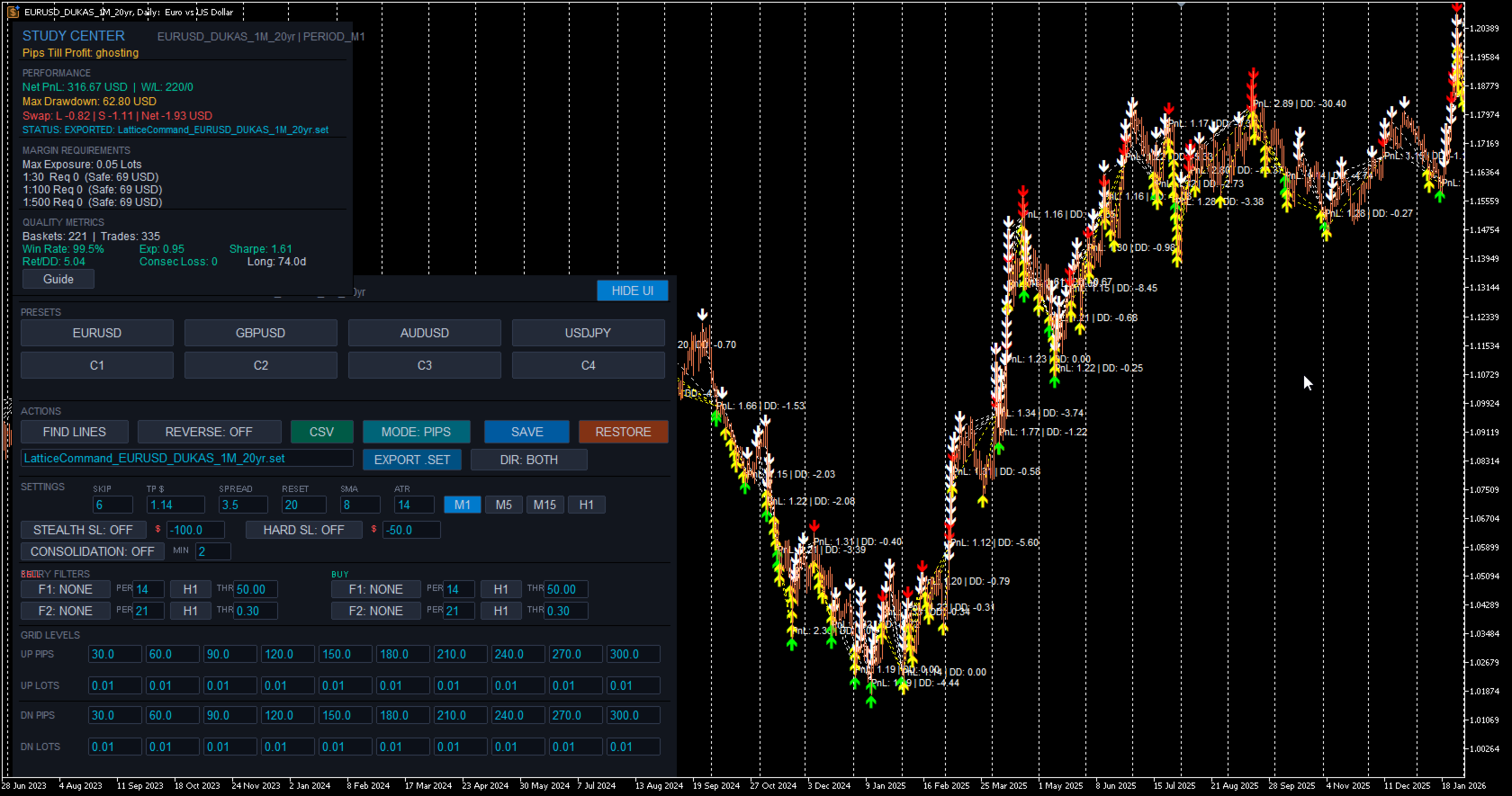
These "ghost" triggers are tracked and displayed on the chart as distinct markers (yellow/white arrows), but no simulated position is created. Only after the ghost threshold is reached do subsequent interactions become active. All P&L and metrics are calculated only from the live (non-ghosted) interactions.
The result: you can instantly observe how different ghost counts change your outcome profile, drawdown characteristics, and win rate across the entire dataset. Find the threshold where filtering noise produces a tighter, more resilient configuration — before risking a single dollar.
The ghost count is fully adjustable in real time. Change it and watch the entire study recalculate instantly. This makes Ghosting Technology™ tangible and intuitive — not just a number in a settings panel, but a visual filter you can see working on the chart.
---
CORE FEATURES
Visual Study Range
Define your analysis window using two draggable chart markers. Everything updates dynamically as you move them. Extend the range into live price action for forward observation, or narrow it to isolate a specific market regime. The FIND LINES button snaps markers to your current chart view with a single click.
20-Level Order-Network Configuration
Up to 20 price interaction levels — 10 upper (sell side) and 10 lower (buy side). Every level has independent spacing and independent lot sizing. Build uniform structures, progressive configurations, regressive profiles, or fully asymmetric layouts. Complete control over the shape of your order network.
ATR Adaptive Mode
Switch between fixed-pip distances and ATR-based multiples with a single toggle. In ATR mode, level spacing automatically widens in volatile conditions and tightens in calm markets, keeping your order network proportional to actual market movement. The ATR period is configurable. Basket TP can also be expressed in ATR multiples, with the effective dollar value shown in the Study Center. Compare both modes across the same data range to understand which suits each instrument.
Multi-Timeframe Anchor
Lock the SMA reference calculation to any timeframe (e.g. M1) while viewing results on any chart resolution. Watch simulated baskets on Daily, Weekly, or Monthly charts for the macro view while maintaining lower-timeframe precision. Analyse decades of data without sacrificing calculation accuracy.
Periodic Lattice Recalibration
The order network automatically recentres on the SMA reference at configurable intervals measured in bars. This keeps the structure aligned with evolving price action rather than anchored to a stale level. The recalibration interval is adjustable in real time.
Direction Inversion
Reverse the simulation direction with a single toggle. Upper crossings become buy signals, lower crossings become sell signals. Instantly observe how a contrarian approach performs across the same data range and network structure.
---
ANALYTICS & MEASUREMENT
Real-Time Study Center
A comprehensive analytics panel that updates instantly as you adjust any parameter. Displays: net PnL, win/loss count, win rate, maximum drawdown, peak exposure, expectancy, return-to-drawdown ratio, Sharpe ratio, maximum consecutive losses, and longest basket duration. All values in account currency with colour-coded risk thresholds — green for healthy, amber for caution, red for elevated.
Pips Till Profit
Shows exactly how many pips the current simulated basket needs to move to reach the target threshold, along with the precise target price level. Gives you an intuitive, real-time feel for how close or far each cycle is from completion.
Swap Cost Simulation
Estimated swap costs are calculated and included in basket PnL based on long and short swap rates. Provides more realistic outcome measurements for configurations that hold positions across multiple days.
Margin & Capital Requirements Guide
Reference estimates for capital requirements under common leverage conditions — 1:30, 1:100, and 1:500. Calculates margin required for maximum possible exposure based on your configured lot sizes across all 20 levels. Informational guidance only — not a broker guarantee.
Configurable Spread Assumption
Set a spread value to include transaction cost modelling in all measurements. Adjustable in real time — observe how sensitive your configuration is to transaction costs.
Integrated Metric Guide
Built-in explanations for every measurement in plain language with colour-coded threshold values: what it represents, why it's relevant, how to interpret it, and what typical acceptable ranges look like. Accessible directly from the interface with a single click.
---
VISUAL ANALYSIS
Basket Lifecycle Visualisation
Every completed basket cycle is rendered directly on the chart with colour-coded markers — green for profitable closures, red for losses, with PnL annotations. See at a glance where clusters of success or failure occur, which market regimes produce favourable outcomes, and how behaviour changes across different conditions.
Ghost vs Active Markers
Ghosted (filtered) interactions are visually distinct from active ones directly on the chart. You can see exactly which price crossings were observed but filtered during the Ghosting Technology™ phase, and which resulted in simulated positions.
Order-Network Level Display
Upper and lower interaction levels are displayed as colour-coded horizontal lines on the chart, showing exactly where the order network sits relative to current and historical price action. The structure updates in real time as parameters change.
Interactive Study Range
Define and adjust your analysis window visually using draggable chart markers. All calculations update immediately as you move them.
---
PRESET SYSTEM
Three-Profile Preset System
Each symbol supports three independently saved configuration profiles. Store conservative, moderate, and aggressive setups — or any three configurations you want to compare. Save distances, lot sizes, ghost count, target threshold, and distance mode with a single click. Recall and compare instantly. Presets persist across sessions.
One-Click CSV Export
Export complete study results in CSV format. Each row represents one basket cycle with: basket ID, timestamps, total volume, PnL, maximum drawdown, and interaction count. Files saved to MQL5/Files/ — compatible with Excel, Google Sheets, Python, R, or any CSV reader.
SET File Export & Import
Export your full configuration as an MT5-compatible .SET file ready to load directly into Lattice Command™ or the MT5 strategy tester. Import .SET files saved from Command back into Vision to re-examine live configurations on historical data. The export/import bridge is what makes the discover-deploy loop seamless.
Save & Restore
Save your current working configuration or restore factory defaults at any time. Experiment freely knowing you can snap back to a known-good state with one click.
---
INTERFACE & CONTROLS
Bloomberg-Inspired Terminal Design
Clean, professional dark interface designed for extended use. Structured sections with clear headers and visual dividers. Parameters, presets, actions, and study results all accessible from a single on-chart panel without opening dialogs or restarting the tool.
Live Parameter Editing
All key parameters are editable directly from on-chart input fields: distances, lot sizes, ghost count, target threshold, spread assumption, reset interval, and SMA period. Change any value and the entire study recalculates instantly across your full data range.
Collapsible UI
Toggle the entire interface on and off with a single button. When hidden, your chart is completely unobstructed. When shown, every control and metric is immediately accessible.
---
STUDY PARAMETERS
SKIP — Number of initial interactions to ghost before live counting (Ghosting Technology™)
TP $ / TP ATRx — Basket profit target (account currency or ATR multiples)
SPREAD — Assumed spread in pips for transaction cost modelling
RESET — Minimum bars between order-network repositioning
SMA — Anchor SMA period for reference calculation
ATR — ATR lookback period (ATR mode only)
MODE — Toggle between PIPS and ATR adaptive mode
Timeframe — Study timeframe for SMA anchor (M1, M5, M15, H1)
SCHEDULE — Optional session-timing filter with per-day toggles, hour-of-day window, and midnight buffer (disabled by default)
All changes recalculate immediately.
---
BASKET LOGIC
Price crosses an order-network level and an interaction is recorded. If within the ghost threshold, the interaction is tracked but no simulated position is created. Once past the ghost threshold, subsequent crossings create simulated positions. The basket accumulates as price expands through additional levels. When combined profit of active (non-ghosted) positions reaches the basket TP, the basket closes. One basket active at a time. After closure, the engine waits for the reset-bar cooldown before forming a new anchor.
Each basket tracks entry prices, running PnL, drawdown, lot exposure, and interaction count.
---
USE CASES
Rapid Parameter Discovery — Test configurations in seconds instead of hours. Adjust distances, lot sizes, ghost counts, and modes and watch outcomes update instantly across years of data.
Ghost Count Optimisation — Experiment with different Ghosting Technology™ thresholds to find the sweet spot between filtering noise and maintaining enough active interactions. See exactly how each ghost count changes the outcome profile across your entire dataset.
Volatility Mode Comparison — Toggle between PIPS and ATR distance modes to compare fixed versus volatility-adaptive spacing across the same market data.
Drawdown & Exposure Profiling — Identify exactly when and where configurations produce maximum adverse movement. Use this to set appropriate risk thresholds or to eliminate configurations that exceed your tolerance.
Parameter Sensitivity Testing — Nudge individual parameters and watch the impact across the entire dataset. Find stable zones where small changes don't dramatically alter outcomes — a sign of robustness rather than curve-fitting.
Multi-Instrument Screening — Rapidly evaluate the same configuration across multiple symbols. Use presets to store per-symbol optimised settings. Export CSV results for cross-instrument comparison.
Prop-Firm Parameter Validation — Review maximum drawdown, peak margin usage, and capital requirements against funded-account constraints.
---
COMPATIBILITY NOTE
Lattice Vision™ is a complete, standalone analysis and parameter-discovery tool. The visual insights, analytics, and exported data are fully valuable on their own — whether you execute manually, use your own EA, or any other method.
For users who also use Lattice Command™ (available separately), parameter structures are compatible between the two products and engine fidelity is independently documented in our published Fidelity Report (link above). This is a convenience, not a requirement — Lattice Vision™ is designed to inform any execution approach, not just one.
---
EXAMPLE WORKFLOW
1. Visualise on any timeframe
2. Lock the SMA anchor to your chosen SMA timeframe
3. Set your study range across sufficient historical data
4. Configure order-network distances and lot sizes and adjust, see your changes dynamically
5. Use Ghosting Technology™ to test whether filtering early interactions produces a tighter, more resilient profile
6. Try ATR mode on instruments with variable volatility
7. Compare configurations using presets
8. Export results for deeper analysis
Focus on drawdown before profit.
---
WHAT LATTICE VISION IS NOT
Lattice Vision™ is not an Expert Advisor — it does not place orders.
It is not a signal service.
It is not a profit guarantee.
It is not financial advice.
It is a professional analysis and parameter-discovery tool.
---
SYSTEM REQUIREMENTS
MetaTrader 5 (build 2000+), any compatible broker, any symbol with sufficient price history.
---
RISK DISCLAIMER
This tool is for analysis and parameter discovery. It does not guarantee profits and does not place trades.
Simulated results are based on historical data and user-defined parameters. They do not represent actual trading and may not reflect real market conditions including slippage, requotes, liquidity constraints, and execution delays.
Users are responsible for understanding the risks involved, validating any configuration with proper testing, testing on demo accounts before live deployment, and never trading with money they cannot afford to lose.
Trading forex and CFDs involves substantial risk of loss and is not suitable for all investors. Past performance — whether observed through this software or any other method — is not indicative of future results.
---
TRADEMARKS & LEGAL
Lattice Vision™, Lattice Command™, and Ghosting Technology™ are common law trademarks of Cave and Fire Group Pty Ltd.
© 2025–2026 Cave and Fire Group Pty Ltd. All rights reserved.
Cave & Fire Lab is a trading name of Cave and Fire Group Pty Ltd., a software development company. We are not a financial services provider, broker, fund manager, or advisory firm. We do not provide financial advice, trading signals, or recommendations of any kind.
MetaTrader 5 and MQL5 are registered trademarks of MetaQuotes Ltd. This product is not affiliated with, endorsed by, or sponsored by MetaQuotes Ltd.
All other trademarks are the property of their respective owners.