Lattice Vision

LATTICE VISION™


THE MOST ADVANCED ORDER-NETWORK ANALYSIS TOOL ON MQL5.


Not a claim. A position backed by published, independently testable fidelity data.


Discover with Lattice Vision™. Deploy with Lattice Command™. One engine. Two instruments. One continuous workflow.


Lattice Vision is the original level-trading analysis tool — Grid Trading 2.0, engineered properly. When you find a configuration in Vision, the matching live engine produces the same trades. Eighteen test configurations covering filters, signal modes, stop-loss variants, consolidation, ghosting, and direction control — tested on MetaQuotes-native 1-minute USDJPY data with the platform's default symbol properties and a constant 2-pip spread. Eighteen of eighteen tests match exactly between Vision's predicted trade count and Command's true engine output. Zero aggregate drift across 3,790 trades. One hundred percent directional and mechanism alignment. Reproducible by any MT5 user with a generic MetaQuotes USD demo account — no third-party data downloads required.


→ Read the full Fidelity Report (published openly, free to download):

https://drive.google.com/drive/folders/19txtz0FCf2AitpHxllzG8OxELexszbrV?usp=sharing


That isn't marketing language. The full methodology and complete results are published below. Read it before you spend money on any execution suite that doesn't show you the same proof.


Lattice Vision is the analysis layer — years of price data, dozens of configurations, real-time recalculation, every metric that matters. Lattice Command is the execution layer — same engine, same outputs, full risk-control architecture. Use Vision standalone for parameter discovery. Pair it with Command for the only end-to-end workflow on MQL5 with a publicly documented fidelity matrix between the two engines.


Latest update — session-timing filters added for study isolation across configurable days and hours. Compare configurations against full sessions, weekday-only windows, or specific trading hours.


If you need help getting set up to perform a study, message us directly. Cave & Fire Lab is hands-on with every customer.


(Contact via DM after purchase for full PDF guide.)


Professional Order-Network Analysis & Parameter Discovery Tool for MetaTrader 5.


Lattice Vision™ is a visual analysis and parameter-discovery tool for MetaTrader 5. It simulates how price interacts with configurable order-network structures across historical data — allowing you to observe basket behaviour, measure risk characteristics, and refine your configuration before committing capital.


No orders are placed. No signals are generated. This is a professional analysis instrument.


---


OVERVIEW


Lattice Vision™ provides a structured, non-executing environment for observing how price interacts with order networks across any amount of historical data.


It provides:


- Instant visual simulation of order-network basket behaviour across years of data


- Ghosting Technology™ — a proprietary trigger-filtering system that lets you observe how skipping early interactions changes outcome profiles


- Comprehensive analytics with colour-coded risk thresholds


- Dual distance mode: fixed-pip or ATR-adaptive level spacing


- Real-time parameter adjustment with immediate recalculation


- CSV export for external analysis


- Preset system for saving and comparing configurations


Instead of waiting hours for backtests, you get a bird's-eye view of how your parameters behave across different market conditions — years of data rendered instantly on a single screen. Adjust a distance, change a lot size, toggle a mode, and watch the impact ripple across the entire dataset in real time.


---


FIDELITY REPORT — VISION ↔ COMMAND


This is the proof that defines the Lattice category.


Lattice Vision and Lattice Command share a single level-trading engine running in two different environments. Vision processes historical bars in a study window. Command runs in MT5's strategy tester or live account, executing on closed bars and using ticks only for measuring price drift and tracking account balance. These are fundamentally different execution contexts — and we engineered the pair from day one to deliver the same outcome from the same configuration. What you see in the study is what you get in the deploy.


The proof:


- 18 configurations tested across filters, signal modes, stop-loss variants, consolidation, ghosting, and direction control


- 12 months of MetaQuotes-native USDJPY 1-minute data (9 March 2025 → 9 March 2026) — the bars every MT5 user has access to from their generic MetaQuotes USD demo account


- MetaQuotes-default symbol properties — contract size, tick value, margin requirements, swap rates all sourced from the same platform that supplies the bars


- Constant 2-pip spread applied throughout, Open Prices Only tester model


- 18 of 18 tests match exactly between Vision's predicted trade count and Command's true engine output


- Zero aggregate drift across 3,790 trades


- 100% directional alignment — every test produces trades in the expected direction


- 100% mechanism alignment — every filter, signal mode, stop-loss variant, and lattice mode behaves correctly in both engines


Why MetaQuotes-native data: engine-vs-engine fidelity is a measurement of whether Vision and Command run the same logic on the same input. For that measurement to be clean, the input must be unambiguous — bar data and symbol properties must come from the same source. MetaQuotes-native data satisfies this condition: the bars and the USDJPY symbol specs both come from the MetaQuotes platform, so the engines are operating on a self-consistent input. Imported third-party historical bars (Dukascopy etc.) introduce a second variable — bars from one source, symbol specs from whichever broker the platform is configured for — and any drift observed there could be either an engine difference or a bar-vs-spec mismatch. Native data isolates the measurement to engine fidelity. That is why the matrix is run this way and that is why the result is 18 of 18.


A note on the MT5 Strategy Tester Results pane: the closed-position count shown in the Results pane reflects MetaTrader's own deal-level event accounting and may differ from the engine's structural trade count due to broker-side execution artefacts. The Results pane is useful for evaluating live-trading execution conditions; the journal's structural counter is the figure that aligns with Vision's panel. Both numbers are documented in the report so you can see exactly how each one is constructed.


The complete report — methodology, full test matrix, per-test results, account/symbol-property conditions, and the why-MetaQuotes-native interpretation — is published openly and free to download:


https://drive.google.com/drive/folders/19txtz0FCf2AitpHxllzG8OxELexszbrV?usp=sharing


This is an engineering position, not a marketing promise. Any future change to either engine that breaks the matrix beyond reported tolerances blocks release until resolved. The methodology is reproducible by any MT5 user — you don't have to take our word for it.


When fidelity between analysis and execution matters — and it should — this is what the bar looks like.


---


INTENDED USE


Designed for:


- Order-network and basket traders seeking a visual parameter-discovery tool


- DCA traders refining entry spacing and lot progression


- System developers designing and validating execution parameters


- Prop-firm traders testing configurations against drawdown constraints


- Risk-focused traders who want to understand drawdown characteristics before deploying


- Anyone who wants to see how an order-network structure behaves before committing capital


This is not a beginner signal tool. It assumes familiarity with position sizing, price movement, spread impact, and drawdown management.


---


GHOSTING TECHNOLOGY™ — PROPRIETARY TRIGGER FILTERING


Ghosting Technology™ is the defining innovation of Lattice Vision™. It fundamentally changes how you evaluate order-network configurations by letting you observe the impact of filtering early interactions.


The problem: when price first enters an order network, the initial interactions are often noise — premature triggers during unstable conditions before price has committed to a direction. Traditional analysis treats every crossing equally. Ghosting Technology™ lets you define how many initial interactions are observed but excluded from active simulation.


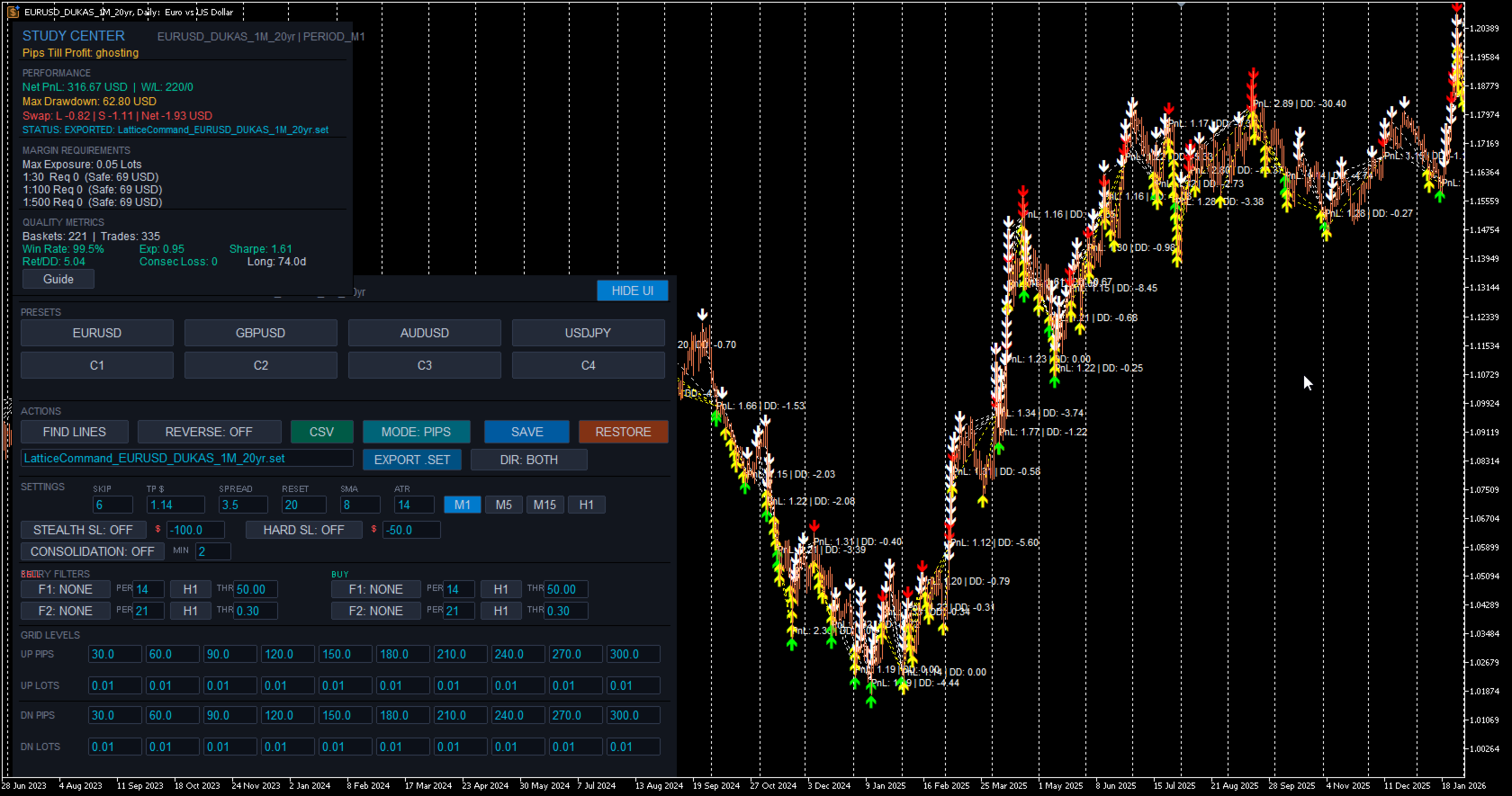
These "ghost" triggers are tracked and displayed on the chart as distinct markers (yellow/white arrows), but no simulated position is created. Only after the ghost threshold is reached do subsequent interactions become active. All P&L and metrics are calculated only from the live (non-ghosted) interactions.


The result: you can instantly observe how different ghost counts change your outcome profile, drawdown characteristics, and win rate across the entire dataset. Find the threshold where filtering noise produces a tighter, more resilient configuration — before risking a single dollar.


The ghost count is fully adjustable in real time. Change it and watch the entire study recalculate instantly. This makes Ghosting Technology™ tangible and intuitive — not just a number in a settings panel, but a visual filter you can see working on the chart.


---


CORE FEATURES


Visual Study Range


Define your analysis window using two draggable chart markers. Everything updates dynamically as you move them. Extend the range into live price action for forward observation, or narrow it to isolate a specific market regime. The FIND LINES button snaps markers to your current chart view with a single click.


20-Level Order-Network Configuration


Up to 20 price interaction levels — 10 upper (sell side) and 10 lower (buy side). Every level has independent spacing and independent lot sizing. Build uniform structures, progressive configurations, regressive profiles, or fully asymmetric layouts. Complete control over the shape of your order network.


ATR Adaptive Mode


Switch between fixed-pip distances and ATR-based multiples with a single toggle. In ATR mode, level spacing automatically widens in volatile conditions and tightens in calm markets, keeping your order network proportional to actual market movement. The ATR period is configurable. Basket TP can also be expressed in ATR multiples, with the effective dollar value shown in the Study Center. Compare both modes across the same data range to understand which suits each instrument.


Multi-Timeframe Anchor


Lock the SMA reference calculation to any timeframe (e.g. M1) while viewing results on any chart resolution. Watch simulated baskets on Daily, Weekly, or Monthly charts for the macro view while maintaining lower-timeframe precision. Analyse decades of data without sacrificing calculation accuracy.


Periodic Lattice Recalibration


The order network automatically recentres on the SMA reference at configurable intervals measured in bars. This keeps the structure aligned with evolving price action rather than anchored to a stale level. The recalibration interval is adjustable in real time.


Direction Inversion


Reverse the simulation direction with a single toggle. Upper crossings become buy signals, lower crossings become sell signals. Instantly observe how a contrarian approach performs across the same data range and network structure.


---


ANALYTICS & MEASUREMENT


Real-Time Study Center


A comprehensive analytics panel that updates instantly as you adjust any parameter. Displays: net PnL, win/loss count, win rate, maximum drawdown, peak exposure, expectancy, return-to-drawdown ratio, Sharpe ratio, maximum consecutive losses, and longest basket duration. All values in account currency with colour-coded risk thresholds — green for healthy, amber for caution, red for elevated.


Pips Till Profit


Shows exactly how many pips the current simulated basket needs to move to reach the target threshold, along with the precise target price level. Gives you an intuitive, real-time feel for how close or far each cycle is from completion.


Swap Cost Simulation


Estimated swap costs are calculated and included in basket PnL based on long and short swap rates. Provides more realistic outcome measurements for configurations that hold positions across multiple days.


Margin & Capital Requirements Guide


Reference estimates for capital requirements under common leverage conditions — 1:30, 1:100, and 1:500. Calculates margin required for maximum possible exposure based on your configured lot sizes across all 20 levels. Informational guidance only — not a broker guarantee.


Configurable Spread Assumption


Set a spread value to include transaction cost modelling in all measurements. Adjustable in real time — observe how sensitive your configuration is to transaction costs.


Integrated Metric Guide


Built-in explanations for every measurement in plain language with colour-coded threshold values: what it represents, why it's relevant, how to interpret it, and what typical acceptable ranges look like. Accessible directly from the interface with a single click.


---


VISUAL ANALYSIS


Basket Lifecycle Visualisation


Every completed basket cycle is rendered directly on the chart with colour-coded markers — green for profitable closures, red for losses, with PnL annotations. See at a glance where clusters of success or failure occur, which market regimes produce favourable outcomes, and how behaviour changes across different conditions.


Ghost vs Active Markers


Ghosted (filtered) interactions are visually distinct from active ones directly on the chart. You can see exactly which price crossings were observed but filtered during the Ghosting Technology™ phase, and which resulted in simulated positions.


Order-Network Level Display


Upper and lower interaction levels are displayed as colour-coded horizontal lines on the chart, showing exactly where the order network sits relative to current and historical price action. The structure updates in real time as parameters change.


Interactive Study Range


Define and adjust your analysis window visually using draggable chart markers. All calculations update immediately as you move them.


---


PRESET SYSTEM


Three-Profile Preset System


Each symbol supports three independently saved configuration profiles. Store conservative, moderate, and aggressive setups — or any three configurations you want to compare. Save distances, lot sizes, ghost count, target threshold, and distance mode with a single click. Recall and compare instantly. Presets persist across sessions.


One-Click CSV Export


Export complete study results in CSV format. Each row represents one basket cycle with: basket ID, timestamps, total volume, PnL, maximum drawdown, and interaction count. Files saved to MQL5/Files/ — compatible with Excel, Google Sheets, Python, R, or any CSV reader.


SET File Export & Import


Export your full configuration as an MT5-compatible .SET file ready to load directly into Lattice Command™ or the MT5 strategy tester. Import .SET files saved from Command back into Vision to re-examine live configurations on historical data. The export/import bridge is what makes the discover-deploy loop seamless.


Save & Restore


Save your current working configuration or restore factory defaults at any time. Experiment freely knowing you can snap back to a known-good state with one click.


---


INTERFACE & CONTROLS


Bloomberg-Inspired Terminal Design


Clean, professional dark interface designed for extended use. Structured sections with clear headers and visual dividers. Parameters, presets, actions, and study results all accessible from a single on-chart panel without opening dialogs or restarting the tool.


Live Parameter Editing


All key parameters are editable directly from on-chart input fields: distances, lot sizes, ghost count, target threshold, spread assumption, reset interval, and SMA period. Change any value and the entire study recalculates instantly across your full data range.


Collapsible UI


Toggle the entire interface on and off with a single button. When hidden, your chart is completely unobstructed. When shown, every control and metric is immediately accessible.


---


STUDY PARAMETERS


SKIP — Number of initial interactions to ghost before live counting (Ghosting Technology™)


TP $ / TP ATRx — Basket profit target (account currency or ATR multiples)


SPREAD — Assumed spread in pips for transaction cost modelling


RESET — Minimum bars between order-network repositioning


SMA — Anchor SMA period for reference calculation


ATR — ATR lookback period (ATR mode only)


MODE — Toggle between PIPS and ATR adaptive mode


Timeframe — Study timeframe for SMA anchor (M1, M5, M15, H1)


SCHEDULE — Optional session-timing filter with per-day toggles, hour-of-day window, and midnight buffer (disabled by default)


All changes recalculate immediately.


---


BASKET LOGIC


Price crosses an order-network level and an interaction is recorded. If within the ghost threshold, the interaction is tracked but no simulated position is created. Once past the ghost threshold, subsequent crossings create simulated positions. The basket accumulates as price expands through additional levels. When combined profit of active (non-ghosted) positions reaches the basket TP, the basket closes. One basket active at a time. After closure, the engine waits for the reset-bar cooldown before forming a new anchor.


Each basket tracks entry prices, running PnL, drawdown, lot exposure, and interaction count.


---


USE CASES


Rapid Parameter Discovery — Test configurations in seconds instead of hours. Adjust distances, lot sizes, ghost counts, and modes and watch outcomes update instantly across years of data.


Ghost Count Optimisation — Experiment with different Ghosting Technology™ thresholds to find the sweet spot between filtering noise and maintaining enough active interactions. See exactly how each ghost count changes the outcome profile across your entire dataset.


Volatility Mode Comparison — Toggle between PIPS and ATR distance modes to compare fixed versus volatility-adaptive spacing across the same market data.


Drawdown & Exposure Profiling — Identify exactly when and where configurations produce maximum adverse movement. Use this to set appropriate risk thresholds or to eliminate configurations that exceed your tolerance.


Parameter Sensitivity Testing — Nudge individual parameters and watch the impact across the entire dataset. Find stable zones where small changes don't dramatically alter outcomes — a sign of robustness rather than curve-fitting.


Multi-Instrument Screening — Rapidly evaluate the same configuration across multiple symbols. Use presets to store per-symbol optimised settings. Export CSV results for cross-instrument comparison.


Prop-Firm Parameter Validation — Review maximum drawdown, peak margin usage, and capital requirements against funded-account constraints.


---


COMPATIBILITY NOTE


Lattice Vision™ is a complete, standalone analysis and parameter-discovery tool. The visual insights, analytics, and exported data are fully valuable on their own — whether you execute manually, use your own EA, or any other method.


For users who also use Lattice Command™ (available separately), parameter structures are compatible between the two products and engine fidelity is independently documented in our published Fidelity Report (link above). This is a convenience, not a requirement — Lattice Vision™ is designed to inform any execution approach, not just one.


---


EXAMPLE WORKFLOW


1. Visualise on any timeframe


2. Lock the SMA anchor to your chosen SMA timeframe


3. Set your study range across sufficient historical data


4. Configure order-network distances and lot sizes and adjust, see your changes dynamically


5. Use Ghosting Technology™ to test whether filtering early interactions produces a tighter, more resilient profile


6. Try ATR mode on instruments with variable volatility


7. Compare configurations using presets


8. Export results for deeper analysis


Focus on drawdown before profit.


---


WHAT LATTICE VISION IS NOT


Lattice Vision™ is not an Expert Advisor — it does not place orders.


It is not a signal service.


It is not a profit guarantee.


It is not financial advice.


It is a professional analysis and parameter-discovery tool.


---


SYSTEM REQUIREMENTS


MetaTrader 5 (build 2000+), any compatible broker, any symbol with sufficient price history.


---


RISK DISCLAIMER


This tool is for analysis and parameter discovery. It does not guarantee profits and does not place trades.


Simulated results are based on historical data and user-defined parameters. They do not represent actual trading and may not reflect real market conditions including slippage, requotes, liquidity constraints, and execution delays.


Users are responsible for understanding the risks involved, validating any configuration with proper testing, testing on demo accounts before live deployment, and never trading with money they cannot afford to lose.


Trading forex and CFDs involves substantial risk of loss and is not suitable for all investors. Past performance — whether observed through this software or any other method — is not indicative of future results.


---


TRADEMARKS & LEGAL


Lattice Vision™, Lattice Command™, and Ghosting Technology™ are common law trademarks of Cave and Fire Group Pty Ltd.


© 2025–2026 Cave and Fire Group Pty Ltd. All rights reserved.


Cave & Fire Lab is a trading name of Cave and Fire Group Pty Ltd., a software development company. We are not a financial services provider, broker, fund manager, or advisory firm. We do not provide financial advice, trading signals, or recommendations of any kind.


MetaTrader 5 and MQL5 are registered trademarks of MetaQuotes Ltd. This product is not affiliated with, endorsed by, or sponsored by MetaQuotes Ltd.


All other trademarks are the property of their respective owners.


Önerilen ürünler
Weis Waves
Flavio Javier Jarabeck
2.83 (18)
The original author is David Weis, an expert in the Wyckoff Method. The Weis Wave is a modern adaptation of the 1930's Wyckoff Method, another expert in Tape Reading techniques and Chart Analysis. Weis Waves takes market volume and stacks it into waves according to price conditions giving the trader valuable insights about the market conditions. If you want to learn more about this subject you can find tons of videos in YouTube. Just look for "The Wickoff Method", "Weis Wave" and "Volume Spread
FREE
LT Donchian Channel
Thiago Duarte
4.86 (7)
Donchian Channel is an indicator created by Richard Donchian. It is formed by taking the highest high and the lowest low of the last specified period in candles. The area between high and low is the channel for the chosen period. Its configuration is simple. It is possible to have the average between the upper and lower lines, plus you have alerts when price hits one side. If you have any questions or find any bugs, please contact me. Enjoy!
FREE
HTF Candles Nika, herhangi bir üst zaman dilimindeki tam boyutlu mumları doğrudan MetaTrader 5'teki mevcut grafiğinize yerleştirir. Grafik değiştirmeden net bir çoklu zaman dilimi görünümü sağlar. Temel Ozellikler - Üst zaman dilimi mumlarını mevcut grafikte fitil içeren dolgulu dikdörtgenler olarak çizer - Standart mum ve Heiken Ashi görüntüleme modlarını destekler - Mevcut HTF mumunun kapanışına kadar gerçek zamanlı geri sayım sayacı - Yükselen ve düşen mumlar için özelleştirilebilir renkler
FREE
Donchian Breakout And Rsi
Mattia Impicciatore
4.5 (2)
Genel Açıklama Bu gösterge, klasik Donchian Kanalı ’nın geliştirilmiş bir versiyonudur ve gerçek işlem için pratik işlevlerle zenginleştirilmiştir. Standart üç çizgiye (üst, alt ve orta çizgi) ek olarak sistem breakout (fiyat kırılımı) noktalarını tespit eder ve bunları grafikte oklarla görsel olarak gösterir. Ayrıca grafiği sadeleştirmek için mevcut trend yönünün tersindeki çizgi yalnızca görüntülenir. Gösterge şunları içerir: Görsel sinyaller : Kırılım sırasında renkli oklar Otomatik bildiriml
FREE
Value Chart Candlesticks
Flavio Javier Jarabeck
4.57 (14)
The idea of a Value Chart indicator was presented in the very good book I read back in 2020 , " Dynamic Trading Indicators: Winning with Value Charts and Price Action Profile ", from the authors Mark Helweg and David Stendahl. The idea is simple and the result is pure genius: Present candlestick Price analysis in a detrended way! HOW TO READ THIS INDICATOR Look for Overbought and Oversold levels. Of course, you will need to test the settings a lot to find the "correct" one for your approach. It
FREE
Girassol Sunflower MT5 Indicator
Saullo De Oliveira Pacheco
3.86 (7)
This is the famous Sunflower indicator for Metatrader5. This indicator marks possible tops and bottoms on price charts. The indicator identifies tops and bottoms in the asset's price history, keep in mind that the current sunflower of the last candle repaints, as it is not possible to identify a top until the market reverses and it is also not possible to identify a bottom without the market stop falling and start rising. If you are looking for a professional programmer for Metatrader5, please
FREE
Follow The Line MT5
Oliver Gideon Amofa Appiah
4.6 (35)
This indicator obeys the popular maxim that: "THE TREND IS YOUR FRIEND" It paints a GREEN line for BUY and also paints a RED line for SELL. (you can change the colors). It gives alarms and alerts of all kinds. IT DOES NOT REPAINT and can be used for all currency pairs and timeframes. Yes, as easy and simple as that. Even a newbie can use it to make great and reliable trades. NB: For best results, get my other premium indicators for more powerful and reliable signals. Get them here: https://www.m
FREE
Dynamic CMF Calculation: Customize the period for the Chaikin Money Flow (CMF) to fine-tune your analysis and maximize signal precision. Intuitive Color-Coded Alerts: Instantly interpret market conditions with clear visual cues: Green Alert: Indicates the Overbought zone – signaling a potential selling opportunity. Red Alert: Indicates the Oversold zone – suggesting a potential buying opportunity. Gray Alert: Represents the Neutral zone – a signal to wait for a confirmed trend or reversal. Autom
High Low Open Close
Alexandre Borela
4.98 (44)
Bu projeyi seviyorsanız, 5 yıldız incelemesi bırakın. Bu gösterge açık, yüksek, düşük ve belirtilen fiyatlar için çizer Dönem ve belirli bir zaman bölgesi için ayarlanabilir. Bunlar birçok kurumsal ve profesyonel tarafından görünen önemli seviyelerdir. tüccarlar ve daha fazla olabileceği yerleri bilmeniz için yararlı olabilir Aktif. Mevcut dönemler şunlardır: Önceki gün. Önceki Hafta. Önceki Ay. Previous Quarter. Önceki yıl. Veya: Mevcut gün. Hafta. Şimdi Ay. Şimdiki Mahallesi. Bugün yıl.
FREE
Basic Vwap
james mugendi
4 (1)
Simple Vwap with the daily, weekly and monthly VWAP is the abbreviation for   volume-weighted average price , which is a technical analysis tool that shows the ratio of an asset's price to its total trade volume. It provides traders and investors with a measure of the average price at which a stock is traded over a given period of time. How it's used Identify entry and exit points:   Traders can use VWAP to determine when to buy or sell an asset.   Understand price trends :  Traders can use V
FREE
ATR Plus
Ivan Pochta
5 (1)
ATR Plus is an enhanced version of the classic ATR that shows not just volatility itself, but the directional energy of the market . The indicator converts ATR into a normalized oscillator (0–100), allowing you to clearly see: who dominates the market — buyers or sellers when a trend begins when a trend loses strength when the market shifts into a range where volatility reaches exhaustion zones ATR Plus is perfect for momentum, trend-following, breakout and volatility-based systems. How ATR Plus
FREE
Dual RSI
Paul Conrad Carlson
3.5 (2)
Indicator alerts for Dual Relative strength index rsi. Large rsi preset at 14 is below 30 small rsi preset at 4 is below 10 for buy bullish signals . Large rsi preset are 14 is above 70 small rsi preset at 4 is above 90 for sell bearish signals . Includes mobile and terminal alerts. draws lines when alerts. This indicator can help identify extremes and then the tops or bottoms of those extremes .
FREE
Mirror Chart MT5
Andrej Hermann
5 (1)
The Mirror Chart MT5 is a overlay indicator specifically designed to project a second financial instrument directly onto the main chart window. This tool is invaluable for traders who rely on correlation analysis, as it visualizes the price movements of two different instruments in real time. Unlike traditional overlays, this indicator utilizes intelligent, dynamic centering and scaling logic. It continuously analyzes the visible price range in the current window for both symbols and calculates
FREE
Friend of the Trend: Your Trend Tracker Master the market with Friend of the Trend , the indicator that simplifies trend analysis and helps you identify the best moments to buy, sell, or wait. With an intuitive and visually striking design, Friend of the Trend analyzes price movements and delivers signals through a colorful histogram: Green Bars : Signal an uptrend, indicating buying opportunities. Red Bars : Alert to a downtrend, suggesting potential selling points. Orange Bars : Represent cons
FREE
The indicator highlights the points that a professional trader sees in ordinary indicators. VisualVol visually displays different volatility indicators on a single scale and a common align. Highlights the excess of volume indicators in color. At the same time, Tick and Real Volume, Actual range, ATR, candle size and return (open-close difference) can be displayed. Thanks to VisualVol, you will see the market periods and the right time for different trading operations. This version is intended f
FREE
Donchian Pro
Paulo Henrique Faquineli Garcia
4.75 (4)
The Donchian Channel Channels are among the most popular tools of technical analysis, as they visually convey to the analyst the limits within which most price movement tends to occur. Channel users know that valuable information can be obtained at any time, whether prices are in the central region of a band or close to one of the border lines. One of the best known techniques to explore these concepts is Bollinger Bands. However, John Bollinger was not the only one to research the application
FREE
FVGs
Andrii Hurin
5 (10)
A simple indicator that automatically highlights all FVGs (Fair Value Gaps) formed on the chart, as well as FVGs on history. It is possible to select colors for FVGs of different directions (long or short), select the time interval, select the color of middle point and you can also choose whether to delete filled FVGs or leave them on the chart (the option is beneficial for backtesting). The indicator can be very useful for those, who trade according to the concept of smart money, ICT, or simply
FREE
This is a buyer and seller aggression indicator that analyzes the shape of each candle and project this data in a histogram form. There are 4 histograms in one. On the front we have two: Upper - Buyer force. Lower - Seller force. At the background we also have two histogram, both with same color. They measure the combined strenght of buyers and sellers. This histograms can be turned off in Input Parameters. It is also possible to have the real or tick volume to help on this force measurement. IN

FREE
Waves Sizer
Flavio Javier Jarabeck
3.86 (7)
Wyckoff fans, enjoy! Ideally to be used with the Weis Waves indicator, but it can be easily used alone, the Waves Sizer puts the range (in resulting Price movement) done by the Price on its market swings. You can control how accurate or loose will be the swings. This tool is very helpful for visually know how much the Price has traveled in your Timeframe. This way you can confront this level of effort with the resulting Volume, etc... Weis Waves indicator: https://www.mql5.com/en/market/produc

FREE
Simple Weis Wave
Jean Jacques Huve Ribeiro
3.67 (3)
One of the best tools for analyzing volume, Weis Wave was idelized by David Weis, to facilitate the reading of directional flow. For the VSA method disciples it is an evolution of the practices created by Richard Wycoff, facilitating a predictive reading of the market, always seeking an accumulation and distribution of the negotiated contracts. Cumulative wave volume  Range of wave ( removed) Average Wave volume Ref "Tim Ord lectures" ( removed)
FREE
Note from Developer: This is the lite version of the Double TMA with Bands Indicator. You can find the paid version that comes with alerts and on screen signal arrows built in here . I will also be selling an EA based on this trading system soon once all backtesting and optimization have been completed. Unlock your trading potential with the Double TMA Indicator with Reversal Detection! Designed for swing and reversal trading, this versatile tool integrates two Triangular Moving Averages (
FREE
DF Fib Trader Pro DF Fib Trader Pro, MetaTrader 5 için tasarlanmış otomatik bir işlem sistemidir. Giriş ve çıkış noktalarını tanımlamak için Fibonacci tabanlı fiyat seviyelerini trend ve yapı analiziyle birleştirir. EA hem uzun hem de kısa pozisyonları destekler ve yerleşik risk yönetimi parametreleri içerir. Temel Özellikler: • Giriş, SL ve TP noktalarını çizmek için Fibonacci geri çekilme ve uzatma mantığını kullanır. • Yapılandırılabilir lot büyüklüğü ve zarar durdurma/kâr alma seviyeleri •
FREE
Indicator Description 4 Hull MA Color + Envelopes is a powerful trend-following indicator for MetaTrader 5 that combines four Hull Moving Averages (HMA) with Moving Average Envelopes to clearly identify market direction, trend strength, and potential reversal or pullback zones. This indicator is designed to reduce noise, react quickly to price movement, and provide a clean visual structure for professional trading.   Key Features   4 Hull Moving Averages (20, 50, 100, 200) Automatic color change
FREE
The Scaled Awesome Oscillator (SAO) represents a refined adaptation of the Awesome Oscillator, aimed at establishing consistent benchmarks for identifying market edges. Unlike the standard Awesome Oscillator, which records the variation in pips across different commodities, the only unchanging reference point is the zero line. This limitation hampers investors and traders from pinpointing specific levels for trend reversals or continuations using the traditional Awesome Indicator, a creation of
FREE
Introduction Welcome to the world of Forex trading, where every tick of the market can be influenced by news events. Introducing our expert advisor for MetaTrader, your ultimate tool for navigating the complexities of news trading. This innovative advisor is specifically designed to automate your trading strategy during key macroeconomic releases, ensuring you never miss an opportunity.  When important indicators are announced, volatility often spikes, creating potential for profit. Our expert
FREE
VWAP_PC_MQL5 — MT5 üzerinde hacim ağırlıklı ortalama fiyatı (VWAP) gösteren basit, el yapımı bir gösterge. TF: Tüm zaman dilimlerinde çalışır. Parite: Forex, endeks, emtia ve hisse senetleriyle uyumlu. Ayarlar: AppliedPrice – hesaplama için kullanılan fiyat türü LineColor / Width / Style – çizgi görünümü SessionReset – günlük sıfırlama veya sürekli mod Çalışma prensibi (VWAP): VWAP (Volume Weighted Average Price) = (Fiyat × Hacim toplamı) / (Hacim toplamı) Fiyat VWAP’ın üzerindeyse alıcılar b
FREE
MACD Colored ZeroLag
Farzin Sadeghi Bonjar
4.73 (11)
It is the MQL5 version of zero lag MACD that was available for MT4 here: https://www.mql5.com/en/code/9993 Also there was a colored version of it here but it had some problems: https://www.mql5.com/en/code/8703 I fixed the MT4 version which has 95 lines of code. It took me 5 days to write the MT5 version.(reading the logs and testing multiple times and finding out the difference of MT5 and MT4!) My first MQL5 version of this indicator had 400 lines of code but I optimized my own code again and n
FREE
PZ Penta O MT5
PZ TRADING SLU
3.5 (4)
The Penta-O is a 6-point retracement harmonacci pattern which usually precedes big market movements. Penta-O patterns can expand and repaint quite a bit. To make things easier this indicator implements a twist: it waits for a donchian breakout in the right direction before signaling the trade. The end result is an otherwise repainting indicator with a very reliable trading signal. The donchian breakout period is entered as an input. [ Installation Guide | Update Guide | Troubleshooting | FAQ | A
FREE
World Time Display
Mohd Firuz Fahmi Bin Yusoff
The best and the only World Time Display for MT5 Features : - JAPAN, LONDON & NEW YORK Time Display - You can customize with different Font, Color And Text Size - You can customize Box Position and Box Color to meet your satisfaction - Only For Metatrader 5 - Customize GMT according to your Time Zone - Simple To Use. Just Attach to your MT5 - No hidden code or no errors
FREE
Weis Waves RSJ
JETINVEST
4.56 (9)
The Weis Waves RSJ Indicator sums up volumes in each wave. This is how we receive a bar chart of cumulative volumes of alternating waves. Namely the cumulative volume makes the Weis wave charts unique. It allows comparing the relation of the wave sequence characteristics, such as correspondence of the applied force (expressed in the volume) and received result (the price progress). If you still have questions, please contact me by direct message:  https://www.mql5.com/en/users/robsjunqueira/
FREE
Bu ürünün alıcıları ayrıca şunları da satın alıyor
Trade Assistant MT5
Evgeniy Kravchenko
4.42 (210)
It helps to calculate the risk per trade, the easy installation of a new order, order management with partial closing functions, trailing stop of 7 types and other useful functions. Additional materials and instructions Installation instructions - Application instructions - Trial version of the application for a demo account Line function -   shows on the chart the Opening line, Stop Loss, Take Profit. With this function it is easy to set a new order and see its additional characteristics bef
Trade Manager EA’ye hoş geldiniz! Ticaretin daha sezgisel, hassas ve verimli hale gelmesi için tasarlanmış nihai risk yönetim aracı ile tanışın. Bu sadece bir emir verme aracı değil; ticaret planlaması, pozisyon yönetimi ve risk kontrolü için kapsamlı bir çözüm. İster yeni başlayan bir yatırımcı olun, ister deneyimli bir trader ya da hızlı emir gerektiren bir scalper, Trade Manager EA ihtiyaçlarınıza uyum sağlar ve forex, endeksler, emtialar ve kripto paralar dahil tüm piyasalarda esneklik sunar
Local Trade Copier EA MT5
Juvenille Emperor Limited
4.96 (138)
Local Trade Copier EA MT5   ile olağanüstü hızlı işlem kopyalama deneyimi yaşayın. Kolay 1 dakikalık kurulumuyla bu işlem kopyalayıcısı, aynı Windows bilgisayarda veya Windows VPS'te birden fazla MetaTrader terminali arasında işlemleri kopyalamanıza olanak tanır ve 0.5 saniyenin altındaki şimşek hızında kopyalama hızları sunar. Başlangıç seviyesinde veya profesyonel bir tüccar olsanız da,   Local Trade Copier EA MT5 , spesifik ihtiyaçlarınıza göre özelleştirmek için geniş bir seçenek yelpazesi s
TradePanel MT5
Alfiya Fazylova
4.87 (154)
Trade Panel, çok işlevli bir ticaret asistanıdır. Uygulama, manuel ticaret için 50'den fazla ticaret fonksiyonu içerir ve çoğu ticaret görevini otomatikleştirmeyi mümkün kılar. Satın almadan önce demo hesapta demo sürümü test edebilirsiniz. Demo hesap için uygulamanın deneme sürümünü indirin: https://www.mql5.com/en/blogs/post/750865 . Talimatların tamamı buraya . Ticaret. Tek tıklamayla ticaret işlemleri yapmayı sağlar: Risk otomatik hesaplaması ile bekleyen emirleri ve pozisyonları açmak. Bird
Quant AI Agents is NOT AN Expert Advisor. Quant AI Agents   is a   multi-agent AI trading framework   that turns natural-language strategy prompts into live.  WANT THE SAME RESULTS AS MY LIVE SIGNAL?   Use the exact same brokers I do:   IC MARKETS , IC TRADING   .  Unlike the centralized stock market, Forex has no single, unified price feed.  Every broker sources liquidity from different providers, creating unique data streams. Other brokers can only achieve trading performance equivalent to 60
Power Candles Strateji Tarayıcısı - Kendi Kendini Optimize Eden Çoklu Sembol Kurulum Bulucu Power Candles Strateji Tarayıcısı , Power Candles göstergesini çalıştıran aynı kendinden optimize edici motoru, Piyasa İzleyicinizdeki her sembol üzerinde yan yana çalıştırır. Tek bir panel, şu anda istatistiksel olarak hangi sembollerin işlem yapılabilir olduğunu, her birinde hangi stratejinin kazandığını, en uygun Stop Loss / Take Profit çiftini gösterir ve yeni bir sinyal geldiği anda size bildirim gön
Beta Sürümü Telegram to MT5 Signal Trader resmi alfa sürümüne neredeyse hazır. Bazı özellikler hâlâ geliştirilmekte olup küçük hatalarla karşılaşabilirsiniz. Sorun yaşarsanız lütfen bildirin, geri bildiriminiz yazılımın herkes için gelişmesine yardımcı olur. Telegram to MT5 Signal Trader , Telegram kanallarından veya gruplarından gelen işlem sinyallerini otomatik olarak MetaTrader 5 hesabınıza kopyalayan güçlü bir araçtır. Herkese açık ve özel kanalları destekler ve birden fazla sinyal sağlayıc
Farmed Hedge Yield Farming | All Markets (Manual - Hybrid - Semi/Automated EA) MULTI-ASSET SUPPORT Trade any asset available on your broker - Forex: Major, Minor, Exotic pairs - Crypto: BTC, ETH, XRP, SOL, BNB - Stocks: Apple, Tesla, Amazon, Google, etc. - Commodities: Gold, Silver, Oil, Gas - Indices: US30, NAS100, SPX500, DAX40 - Any CFD your broker offers VERIFIED TRADING RESULTS - Farmed Hedge Yield Axi Copy:  https://www.mql5.com/en/signals/2356376 - Farmed Hedge Yield Exn Copy:   https:/
Exp COPYLOT CLIENT for MT5
Vladislav Andruschenko
3.91 (33)
MetaTrader 5 için profesyonel işlem kopyalayıcı MetaTrader için hızlı, profesyonel ve güvenilir bir işlem kopyalayıcı . COPYLOT , MT4 ve MT5 terminalleri arasında Forex işlemlerini kopyalamanıza olanak tanır ve Hedge ile Netting hesaplarını destekler. COPYLOT MT5 sürümü şunları destekler: - MT5 Hedge → MT5 Hedge - MT5 Hedge → MT5 Netting - MT5 Netting → MT5 Hedge - MT5 Netting → MT5 Netting - MT4 → MT5 Hedge - MT4 → MT5 Netting MT4 sürümü Tam açıklama + DEMO + PDF Nasıl satın alınır Nasıl kurul
Trade Dashboard simplifies how you open, manage, and control your trades, with built-in lot size calculation. It allows you to execute trades, manage risk, and control positions directly on the chart, with tools such as partial close, breakeven, and trailing stop. Designed to reduce manual work and help you stay focused on your trading decisions. A demo version is available for testing. Detailed explanations of features are provided within the MQL5 platform. Installation instructions are include
Trade copier MT5
Alfiya Fazylova
4.53 (43)
Trade Copier, ticaret hesapları arasındaki işlemleri kopyalamak ve senkronize etmek için tasarlanmış profesyonel bir yardımcı programdır. Kopyalama, tedarikçinin hesabından/terminalinden alıcının aynı bilgisayarda veya vps'de kurulu olan hesabına/terminaline gerçekleşir. KAMPANYA - Eğer zaten "Trade copier MT5" aldıysanız, "Trade copier MT4"ü ücretsiz olarak alabilirsiniz (MT4 > MT5 ve MT4 < MT5 kopyalamalar için). Koşullar hakkında daha fazla bilgi almak için lütfen bizimle özel mesaj yoluyla i
Premium Trade Manager - MetaTrader 5 için Hızlı ve Disiplinli İşlem Yönetimi Premium Trade Manager , MetaTrader 5 için her işlemdeki mekanik yükü üstlenen hızlı bir grafik üzeri paneldir. Yönü, sembolü ve zamanlamayı siz belirlersiniz - panel riskinize göre pozisyon büyüklüğünü hesaplar, stop ve hedefle birlikte emri açar, kısmi çıkışlarla ölçeklendirme yapar, stop'u takip eder ve ekonomik takvimi sizin adınıza izler. Dahili haber zekası bir adım daha ileriye gider: önümüzdeki olayları sabit bir
YuClusters
Yury Kulikov
4.93 (43)
Attention: You can view the program operation in the free version  YuClusters DEMO .  YuClusters is a professional market analysis system. The trader has unique opportunities to analyze the flow of orders, trade volumes, price movements using various charts, profiles, indicators, and graphical objects. YuClusters operates on data based on Time&Sales or ticks information, depending on what is available in the quotes of a financial instrument. YuClusters allows you to build graphs by combining da
MT5 to Telegram Signal Provider , hesabınızı bir sinyal sağlayıcı haline getirerek belirtilen sinyalleri Telegram'ın sohbetine, kanalına veya grubuna göndermeyi sağlayan kullanımı kolay, tamamen özelleştirilebilir bir araçtır. Rakip ürünlerin çoğunun aksine, DLL içe aktarması yapmaz. [ Demo ] [ Kılavuz ] [ MT4 Versiyonu ] [ Discord Versiyonu ] [ Telegram Kanalı ]  New: [ Telegram To MT5 ] Kurulum Adım adım bir kullanıcı kılavuzu mevcuttur. Telegram API'si hakkında bilgi gerekmemektedir; ihtiyac
Seconds Chart - MetaTrader 5 için saniye bazlı grafikler oluşturmanıza olanak sağlayan eşsiz bir araçtır. Seconds Chart sayesinde saniye cinsinden zaman dilimleriyle grafik oluşturabilir, standart dakika veya saatlik grafiklerde mümkün olmayan esneklik ve analiz hassasiyetine ulaşabilirsiniz. Örneğin, S15 zaman dilimi 15 saniyelik mum çubuklarını ifade eder. Desteklenen özel sembollerle herhangi bir gösterge ve danışman kullanabilirsiniz. Onlarla çalışmak, standart grafiklerde işlem yapmak kadar
Bir EA satın almadan önce, gerçekten dayanıklı mı yoksa sadece backtestte şanslı mı göründü, önce bunu kontrol edin. Çoğu robot güzel görünen bir backtest ile satılır. Yukarı giden bir eğri. İyi bir profit factor. Çok az şüphe. Yine de bu EA’lerin çoğu, piyasa o geçmişteki gibi hareket etmeyi bıraktığı anda dağılmaya başlar. Neden? Çünkü bir backtest yalnızca tek bir şeyi kanıtlar: o stratejinin fiyatın belirli bir yolunu izlediği durumda işe yaradığını. Başka yollarda da dayanacağını kanıtlamaz
Copy Cat More Trade Copier MT5 (Kopyalayıcı Kedi MT5) , günümüzün ticaret zorluklarına yönelik tasarlanmış yerel bir ticaret kopyalayıcısı ve eksiksiz risk yönetimi ve yürütme çerçevesidir. Prop firması zorluklarından kişisel portföy yönetimine kadar, sağlam yürütme, sermaye koruması, esnek yapılandırma ve gelişmiş ticaret işleme kombinasyonu ile her duruma uyum sağlar. Kopyalayıcı hem Master (gönderici) hem de Slave (alıcı) modunda çalışır, piyasa ve bekleyen emirlerin, ticaret değişikliklerini
AXR Prop Guard AXR Prop Guard , MetaTrader 5 için hesap genelinde risk koruma utility aracıdır. Prop firm traderları, funded-account challenges ve ciddi özel hesap koruması için tasarlanmıştır. AXR araç serisinin bir parçasıdır. Güncellemeler ve iletişim seçenekleri için resmi MQL5 sayfalarını kullanın: AXR MQL5 Channel: ürün güncellemeleri, sürüm notları ve yeni AXR araçları Telegram: satıcı profilini açın ; Telegram iletişimi profil açıklamasında yer alır. Satın aldıktan sonra kullanıcı kılavu
HINN MAGIC ENTRY – the ultimate tool for entry and position management! Place orders by selecting a level directly on the chart! full description   ::  demo-version  :: 60-sec-video-description Key features: - Market, limit, and pending orders - Automatic lot size calculation - Automatic spread and commission accounting - Unlimited partitial take-profits  - Breakeven and trailing stop-loss and take-profit  functions - Invalidation leves - Intuitive, adaptive, and customizable interface - Works
Timeless Charts
Samuel Manoel De Souza
5 (5)
Timeless Charts, profesyonel yatırımcılar için hepsi bir arada bir trading aracıdır. Saniye Grafikleri ve Renko gibi özel grafik türlerini, Footprints , Clusters , Hacim Profilleri , VWAP çalışmaları ve gelişmiş piyasa analizi sağlayan sabitlenmiş analiz araçlarıyla gelişmiş emir akışı analiziyle birleştirir. İşlem ve pozisyon yönetimi, entegre işlem yönetim paneli aracılığıyla doğrudan grafik üzerinden gerçekleştirilirken, Market Replay ve Sanal Hesaplar trading becerileri ve stratejileri üzeri
Custom Alerts AIO: Tüm Piyasaları Takip Et — Hiçbir Kurulum Gerekmez Genel Bakış Custom Alerts AIO , hiçbir ek yapılandırma gerektirmeyen, kullanıma hazır bir piyasa izleme çözümüdür. Gerekli tüm göstergeler — FX Power, FX Volume, FX Dynamic, FX Levels, IX Power — iç yapısına gömülüdür. Grafik görüntülemesi olmadan çalışır, bu da onu sessiz ve verimli bir şekilde gerçek zamanlı alarm üretimi için mükemmel hale getirir. Brokerınızın sunduğu tüm varlık sınıflarını destekler: Forex, Metaller, End
The Ultimate TradingView to MT5 Bridge Automation Manuel işlemleri ve gecikme sorunlarını durdurun. TradingView to MT5 Copier PRO , TradingView alarmlarınızı doğrudan MetaTrader 5 üzerinde yürütmek için en hızlı ve en güvenilir köprüdür (bridge). İster özel göstergeler, ister Strateji Test Komut Dosyaları veya manuel çizimler kullanın, bu Uzman Danışman (EA), Yüksek Hızlı WebSocket teknolojisini kullanarak işlemlerinizi anında gerçekleştirir. Basit kopyalayıcıların aksine, bu PRO sürüm Arena Sta
UTM Manager, hızlı ve verimli ticaret gerçekleştirme olanağı sunan sezgisel ve kullanımı kolay bir araçtır. Öne çıkan özelliklerden biri, spreadleri tamamen göz ardı ederek mum fiyatı üzerinden işlem yapmanızı sağlayan "Yayılmayı Yoksay" modudur (örneğin, LTF'de daha yüksek spread çiftlerinde işlem yapmanızı sağlar, spread nedeniyle alım satımların dışında kalmaktan kaçınır). UTM Manager'ın diğer bir önemli yönü, benzersiz yerel ticaret kopyalayıcısıdır ve her bir aracı kurumda farklı ticaret st
Anchor: The EA Manager Run your full EA portfolio without conflicts, without stacked risk, and without watching every chart yourself. Anchor coordinates up to 64 Expert Advisors on a single account so only one trades at a time. Attach Anchor to any chart. Type your EA names and magic numbers in one line. Anchor handles the rest. Built for portfolios. Built for discipline. Built for prop firms. The Problem Running multiple EAs on the same account creates risk. Two gold EAs can open opposite posit
Footprint Chart Pro — Professional OrderFlow EA for MetaTrader 5 Version 6.34 | Professional tool for real traders | Institutional-Grade Visualization DEMO USERS - PLEASE SELECT EVERY TICK / REAL TICK WHEN TESTING AND YOU HAVE DOWNLOADED HISTORICAL DATA. IF YOU SEE A WAITING SCREEN AND IT IS NOT DOWNLOADING, IT MEANS YOU HAVE LOW HISTORICAL DATA. TRY 1 MIN AND 5 MIN FIRST ON 1 DAY DATA. ONE DAY DATA SHOULD BE THE NEWEST AND MOST CURRENT DATE. PLEASE WAIT UNTIL THE MARKET HAS ROLLED OVER PERIOD.
This is exactly what the name says. Visual strategy builder . One of a kind. Turn your trading strategies and ideas into Expert Advisors without writing single line of code. Generate mql source code files with a few clicks and get your fully functional Expert Advisors, which are ready for live execution, strategy tester and cloud optimization. There are very few options for those who have no programming skills and can not create their trading solutions in the MQL language. Now, with Bots Builde
Ultimate Extractor - Professional Trading Analytics for MT5 *****this is the local HTML version of Ultimate Extractor. !!!!!it is not compatible with Cloud!!!! For the online version please reach out to me directly****** Ultimate Extractor transforms your MetaTrader 5 trading history into actionable insights with comprehensive analytics, interactive charts, and real-time performance tracking. What It Does Automatically analyzes your MT5 trading history across all Expert Advisors and generates
MetaTrader 5 için Trading Panel — grafik ve klavyeden profesyonel tek tıkla işlem kontrolü Aktif traderlar için geliştirilmiş güçlü bir Trading Panel; işlemleri standart MetaTrader arayüzüne göre çok daha hızlı açmanıza, yönetmenize ve kapatmanıza yardımcı olur. Bu çözüm; pozisyonları, bekleyen emirleri, toplam kârı ve işlem yürütmesini tek bir profesyonel çalışma alanında kontrol etmek isteyen kullanıcılar için tasarlanmıştır. Bu sadece sıradan bir yardımcı araç değildir. MetaTrader 5 için ger
MT5 için Stats Dashboard & Journal ULTRA Tam Kapsamlı Ticaret Komuta Merkezi: Analitik, Otomasyon ve Haber İstihbaratı. Stats Dashboard ULTRA, Pro analiz aracının nihai evrimidir. MetaTrader 5'i, kurumsal düzeyde performans analizini otomatik haber koruması ve gelişmiş psikolojik metriklerle birleştiren profesyonel bir ticaret istasyonuna dönüştürür. Tam kontrol talep eden manuel işlemciler (traderlar) ve EA portföy yöneticileri için tasarlanmıştır. ULTRA VERSİYONDAKİ YENİLİKLER Haber İstihbarat
AlgoRadar
Stephen J Martret
5 (4)
AlgoRadar is an on-chart analytics dashboard for MT5 that aggregates Expert Advisor performance across multiple accounts, brokers, and platforms, including both MT4 and MT5 data, into a single live view on your MT5 chart. All analysis runs from the chart interface, with no external applications or manual report processing required. EA Analysis and Ranking For traders running multiple Expert Advisors, AlgoRadar provides a consolidated view of each EA's performance across accounts. Active EAs a
Yazarın diğer ürünleri
LATTICE COMMAND THE MOST ADVANCED ORDER-NETWORK EXECUTION SYSTEM ON MQL5. Not a claim. A position backed by published, independently testable fidelity data. Discover with Lattice Vision. Deploy with Lattice Command. One engine. Two instruments. One continuous workflow. Lattice Command is the original level-trading execution engine — Grid Trading 2.0, engineered properly. When you find a configuration in Vision, Command produces the same trades. Eighteen test configurations covering filter
LATTICE LOCK: AUSSIE $79 USD. Pre-configured, settings-locked EA for AUD/USD. Drop it on. Let it run. Cave and Fire Lab | AUD/USD | Fully Automated | Bar-Only Execution --- NOTE You will need 1M bar data to test in the backtester. The EA can only be tested on the M1 timeframe. It can be run live on any timeframe — running it on a 4H chart live gives clean visuals of closed baskets. --- THE STRATEGY Lattice Lock: Aussie is a pre-configured EA from Cave and Fire Lab, engineered for high-
Filtrele:
Değerlendirme yok
Değerlendirmeye yanıt