MicroScalp Signal Finder
- Utilities
-
Kaan Caliskan
 All the products in my profile are for sale, complete with source code and all sales rights. If you are interested, please contact me via private message or at fxkaanc@gmail.com
Algorithmic Trading Engineer, Economist & Fund Manager | 13+ Years in the Markets - Version: 1.0
- Activations: 20
MicroScalp Signal Finder
Multi-Symbol, Multi-Timeframe Smart Money Scalping Signal Scanner for MetaTrader 5
Scalping requires precision timing and multi-layered analysis across multiple instruments — a task nearly impossible to perform manually in real time. Tracking market structure, order blocks, fair value gaps, liquidity sweeps, and momentum confirmations simultaneously across several symbols demands automation.
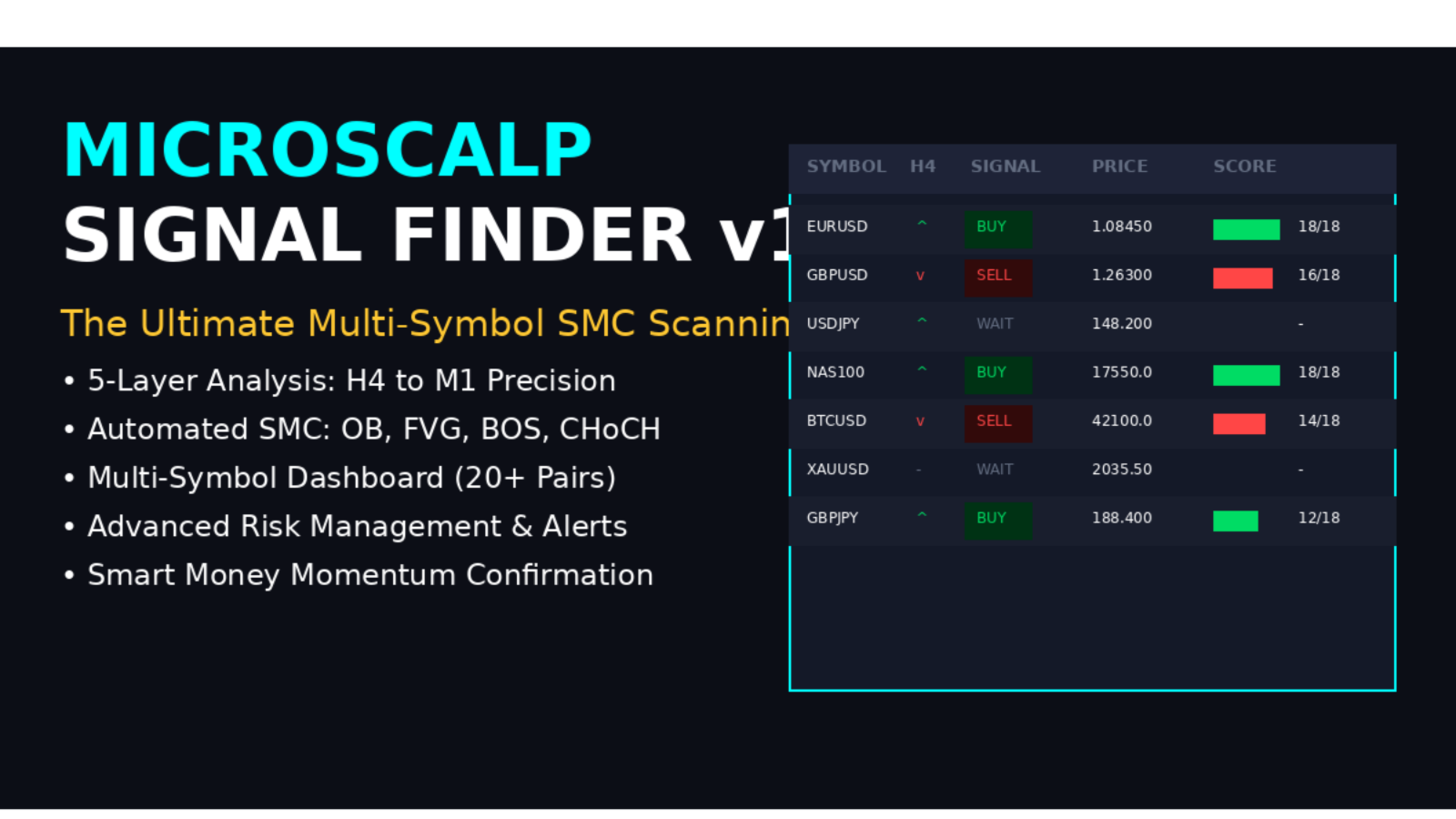
MicroScalp Signal Finder (MSF) scans up to 20 symbols simultaneously across five timeframes (H4-H1-M15-M5-M1), applying a rigorous 5-layer Smart Money Concepts analysis. When trend, structure, point of interest, momentum, and entry pattern all align, MSF generates a scored signal with precise Entry, Stop Loss, and three Take Profit levels.
Designed for forex, crypto, and index scalpers who want institutional-grade analysis without the manual effort. Every signal comes with a confluence score (0-18) so you can focus on the highest-probability setups.
Read More: Detailed Guide & Settings Explanation
Limited Offer: First 50 downloads are FREE! After that, this product will be paid. Download now to secure your free copy.
Key Features
- 5-Layer Analysis Engine: Top-down H4 trend, H1 structure (BOS/CHoCH), M15 POI detection, M5 momentum confirmation, and M1 entry pattern trigger
- Multi-Symbol Scanning: Monitor up to 20 symbols from a single chart — forex majors, crosses, crypto, and indices simultaneously
- Smart Money Concepts: Automatic detection of Order Blocks, Fair Value Gaps, OB+FVG confluence zones, Liquidity Sweeps, and Break of Structure events
- Confluence Scoring (0-18): Every signal is rated based on how many analysis layers confirmed, letting you focus on top-quality setups
- Broker-Agnostic Symbol Mapping: Automatically resolves broker-specific symbol names (EURUSDm, EURUSD.i, USTEC, BITCOIN, etc.) — works on any broker
- 3-Level Take Profit with Auto Breakeven: Scaled exit strategy with TP1/TP2/TP3 and automatic stop loss move to breakeven after TP1
- Interactive Canvas Dashboard: Modern draggable panel showing all symbols, HTF bias, structure, active signals, and live performance statistics
How It Works
MSF applies a strict top-down analysis pipeline on every M1 bar. First, it reads the H4 macro trend direction via EMA crossover and ADX strength. Then it detects H1 market structure (BOS/CHoCH) and identifies swing points. On M15/H1, it locates Points of Interest — Order Blocks, Fair Value Gaps, and Liquidity Pools. M5 momentum (RSI, Stochastic, MACD, Volume, Divergence) must confirm the direction. Finally, an M1 entry pattern (Engulfing, Pin Bar, Break-Retest, FVG Fill, or Liquidity Sweep) must trigger inside an active POI zone. Only when all five layers align is a signal generated.
Perfect For
- Scalpers: Precise M1 entries backed by multi-timeframe Smart Money analysis for short-duration, high-probability trades
- Smart Money / ICT Traders: Automated OB, FVG, BOS/CHoCH, and liquidity detection across multiple symbols saves hours of manual chart analysis
- Multi-Asset Traders: Scan forex, crypto, and indices simultaneously from one chart — never miss a setup on any instrument
- Disciplined Traders: The confluence scoring system enforces objectivity and helps eliminate emotional, low-quality entries
Settings & Configuration
MSF offers extensive customization: symbol list, timeframe hierarchy, EMA/ADX trend filter, swing lookback, OB/FVG detection, RSI/Stochastic/MACD momentum, risk percentage, R:R ratio, TP scaling, session filter with London/NY hours, and full alert configuration. For complete parameter documentation and configuration examples, please refer to the detailed guide linked above.
Support & Community
- Community Group: Join our MQL5 community group for updates, tips, and discussions
- More Products: Click here to explore my other products
- Direct Support: Contact via MQL5 messaging for technical assistance
Updates & Version History
This product is actively maintained with regular updates based on user feedback and market conditions. Check the "What's new" tab above for the latest version information, or join our community group for update announcements.
Note: A free demo version is available for testing in Strategy Tester. Download the demo to evaluate the product before purchasing.