Ast Crosshair for MT4
- Indicators
-
Wataru Horino
 I mainly develop indicators based on market structure.
Under the Astrea series, I gradually release MT4/MT5 tools that support trading decisions. - Version: 1.0
A simple crosshair indicator for MT4.
Main features
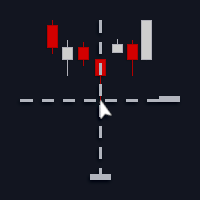
- Displays crosshair guidelines (price/time) that follow your mouse cursor, allowing you to check chart information intuitively.
- Designed to minimize calculations, so it runs lightweight and has minimal impact on chart performance.
- When the mouse cursor leaves the chart area, the crosshair automatically disappears, so unnecessary lines won’t remain on the chart.
Recommended for
- Those who want to improve the efficiency of top-down analysis and overall market context
- Those who want a simple yet practical chart customization
- Those who want to confirm highs/lows, necklines, and other key levels intuitively and accurately
How to use
- Apply “Ast Crosshair” to the target chart to start using it immediately.
- On the chart, the crosshair guidelines aligned with price/time will follow your mouse cursor.
- If needed, adjust parameters such as color and offsets to suit your environment.
Parameters
- Crosshair color
Sets the color of the crosshair (vertical and horizontal lines). - Horizontal offset
Adjusts the horizontal offset of the vertical line in pixels.
Positive values move it to the “right”, negative values to the “left”. - Vertical offset
Adjusts the vertical offset of the horizontal line in pixels.
Positive values move it “down”, negative values “up”. - Idle auto hide
Automatically hides the crosshair when the mouse has not moved for 5 seconds.
Notes
- Ast in the product name is an abbreviation of the developer brand "Astrea". It is not related to any third-party products, companies, or services that use "Ast" in their names.
- This indicator is a guide tool. It does not include trading signals or any auto-trading functions.
- Display and behavior may vary depending on your broker and MT4 version.
- This indicator is designed for the main chart only and does not display in indicator subwindows.
- The crosshair doesn't appear in the Object List by design, so it cannot be manipulated or deleted directly.
To disable it, remove this indicator from the chart. - Due to MT4 limitations, if you move the mouse cursor outside the chart very quickly, leaving the chart area may not be detected.