Reflex Panel

🚀 Reflex Panel - A Revolution in Semi-Automatic Trading!

Tired of the clumsy standard MT5 interface? Forget about constantly switching between windows and complex calculations!

Reflex Panel is a next-generation professional trading panel that will turn your chart into a full-fledged trader's command center!

⚡ WHY CHOOSE CHART REVOLUTION?

Everything on one screen - no more extra windows
Instant execution - open trades in one click
Smart risk calculation - automatic lot calculation based on % of deposit
Visual control - all position levels directly on the chart
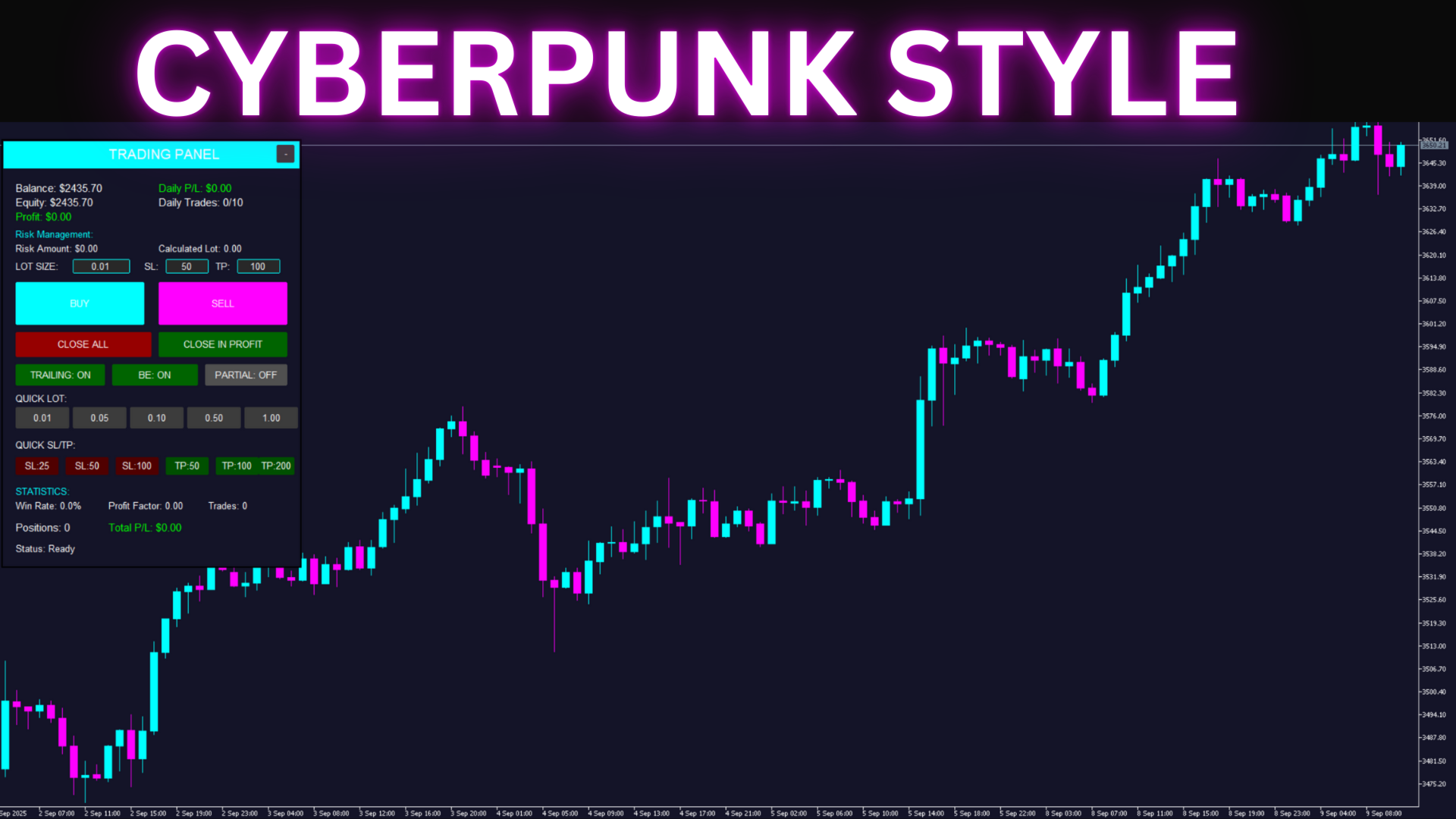
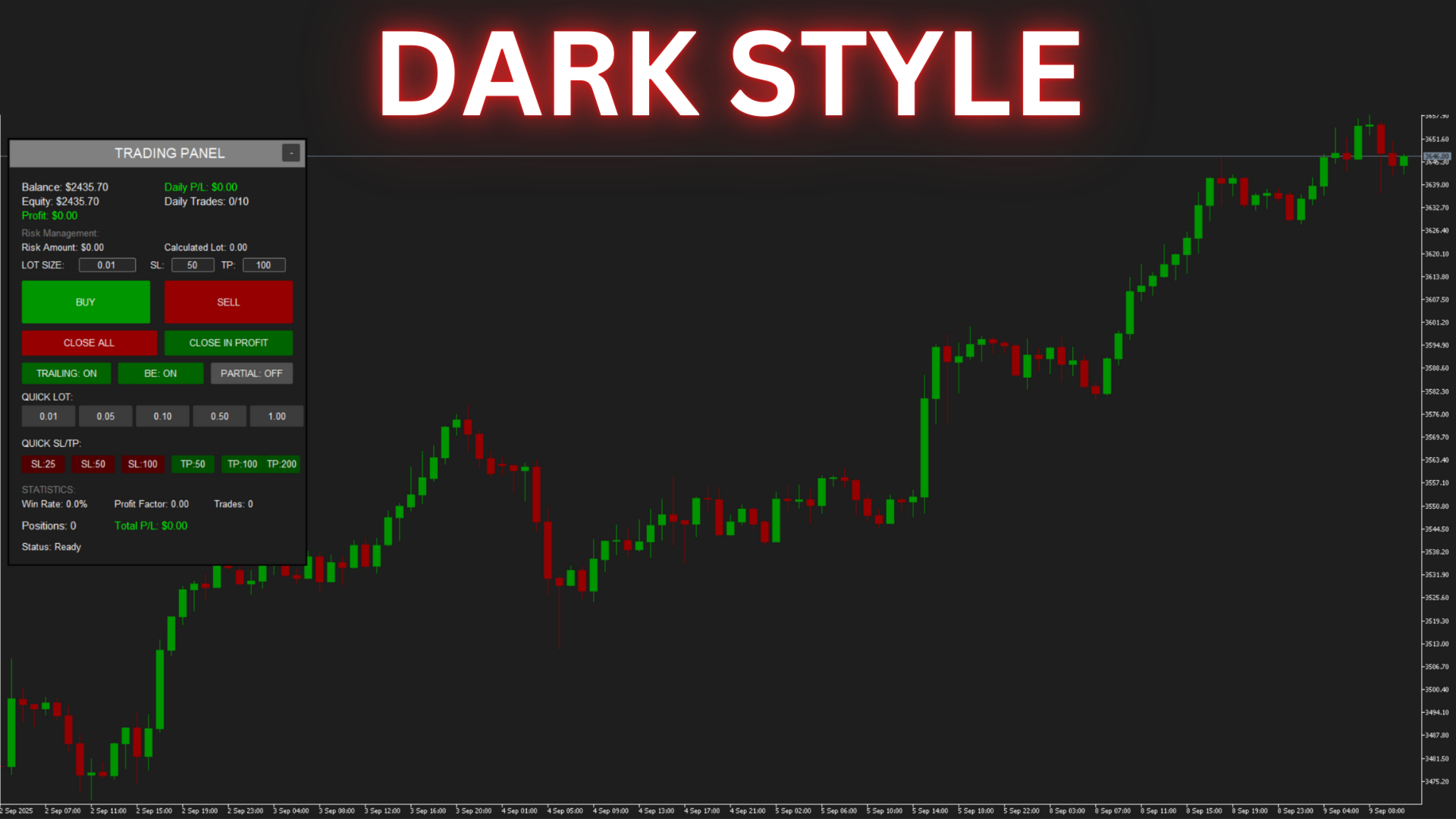
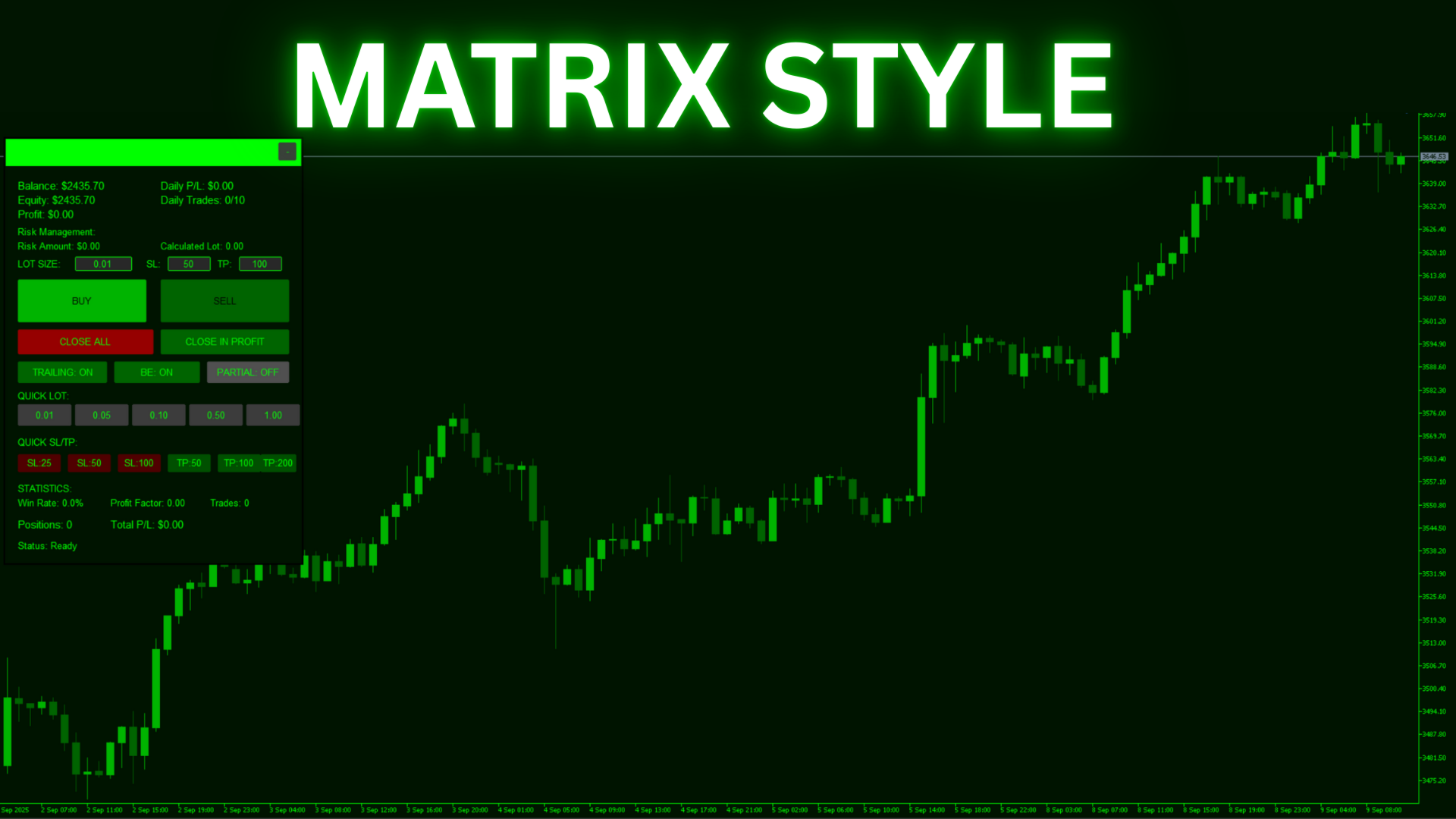
4 stylish themes - from Cyberpunk to Matrix

🎯 KEY FEATURES

📊 Trading Panel:

  • One-click opening of BUY/SELL positions
  • Quick setting of lot size, SL, and TP
  • Quick selection buttons (0.01 - 1.00 lot)
  • Preset SL/TP levels (25, 50, 100, 200 points)
  • Close all positions / only profitable ones
  • Collapsible panel to save space

💰 Capital Management:

  • Money Management - automatic lot calculation based on risk
  • Maximum daily loss - protection against tilt
  • Daily trade limit - activity control
  • Risk per trade - from 0.1% to 10% of the deposit

🔧 Automatic Functions:

  • Trailing Stop - automatic profit tracking
  • Break Even - move stop to breakeven
  • Partial Close - partial closing upon reaching a target

⚙️ DETAILED DESCRIPTION OF ALL SETTINGS

🎨 VISUAL STYLE

▪️ Visual Theme

Default: Cyberpunk 2077
Purpose: Allows you to choose an interface color scheme that is comfortable for your eyes
Options:

  • Cyberpunk 2077 - Dark blue background with bright cyan and magenta elements. A stylish, futuristic design.
  • Matrix - Classic black and green theme. Minimal eye strain during long working hours.
  • Neon - Bright neon colors on a dark background. For those who love contrast.
  • Dark Mode - A universal dark theme with gray tones. Suitable for any time of day.

💡 Recommendation: Choose a theme depending on your lighting and trading time.

💼 TRADING SETTINGS

▪️ Default Lot Size

Default: 0.01
Range: 0.01 - 100.00
Purpose: Sets the initial lot size that will be displayed on the panel at startup.
How to use: Set your usual working lot. It can be changed directly on the panel during operation.
💡 Tip: Beginners are recommended to start with the minimum lot size of 0.01.

▪️ Default Stop Loss

Default: 50 points
Range: 0 - 1000 points
Purpose: Automatically sets a protective stop-loss for all new positions.
Features: For Gold, 50 points = $5 price movement; for currency pairs = 5 pips.
💡 Tip: Set the value according to your strategy. 0 = no stop-loss (not recommended).

▪️ Default Take Profit

Default: 100 points
Range: 0 - 5000 points
Purpose: Automatically sets a target profit for all new positions.
Features: The EA automatically adapts the calculation to the instrument.
💡 Tip: A TP/SL ratio of 2:1 is considered optimal for most strategies.

▪️ Magic Number

Default: 12345
Range: Any integer
Purpose: A unique identifier to separate this EA's trades from others.
Important: Change this number if you use multiple copies of the EA.
💡 Tip: Use different Magic Numbers for different strategies or instruments.

💰 RISK MANAGEMENT

▪️ Use Money Management

Default: true (Enabled)
Purpose: Enables automatic lot size calculation based on the specified risk.
How it works: When enabled, the EA ignores the Default Lot Size and calculates the lot based on the % risk.
💡 Tip: Always keep it enabled to protect your deposit.

▪️ Risk Per Trade

Default: 1.0%
Range: 0.1% - 10.0%
Purpose: Determines what percentage of your deposit you are willing to lose in a single trade.
Example: With a $1000 deposit and 1% risk, the maximum loss = $10.
💡 Tip: Professionals rarely risk more than 2% per trade.

▪️ Max Daily Loss

Default: 5.0%
Range: 1.0% - 20.0%
Purpose: Automatically blocks trading upon reaching the daily loss limit.
Protection: Prevents emotional trading and "tilt".
💡 Tip: 5% is an optimal value to maintain psychological comfort.

▪️ Max Daily Trades

Default: 10
Range: 1 - 100
Purpose: Limits the number of trades per day to prevent overtrading.
Benefit: Forces you to choose entry points more carefully.
💡 Tip: For scalping, set it to 20-30; for day trading, 5-10.

📈 TRAILING STOP

▪️ Use Trailing Stop

Default: false (Disabled)
Purpose: Automatically moves the stop-loss to follow the price to protect profits.
How it works: When the price moves in your favor, the stop is trailed automatically.
💡 Tip: Works great in trending markets.

▪️ Trailing Start

Default: 30 points
Range: 10 - 500 points
Purpose: The minimum profit in points after which the trailing stop activates.
Example: With a setting of 30 points, trailing will only start when the position is in profit by 30+ points.
💡 Tip: Don't set the value too small; give the position room to "breathe".

▪️ Trailing Step

Default: 10 points
Range: 5 - 100 points
Purpose: The distance from the current price at which the trailing stop will be set.
Example: With a step of 10, the stop will always be 10 points away from the peak price.
💡 Tip: The more volatile the instrument, the larger the step should be.

🔒 BREAK EVEN

▪️ Use Break Even

Default: false (Disabled)
Purpose: Automatically moves the stop-loss to the entry price upon reaching a certain profit.
Advantage: Ensures that a profitable trade does not turn into a losing one.
💡 Tip: Use it during important news events and when holding positions overnight.

▪️ Break Even Start

Default: 20 points
Range: 10 - 200 points
Purpose: The minimum profit required to move the stop to breakeven.
Logic: When the profit reaches this value, the stop will be moved to the entry level.
💡 Tip: Set it to approximately 40-50% of your usual take-profit.

▪️ Break Even Profit

Default: 5 points
Range: 0 - 50 points
Purpose: Additional profit that will be locked in when the breakeven is triggered.
Example: With a value of 5, the stop will be set 5 points above the entry point for a BUY position.
💡 Tip: Set a minimum value to cover commissions and swaps.

✂️ PARTIAL CLOSE

▪️ Use Partial Close

Default: false (Disabled)
Purpose: Automatically closes a part of the position upon reaching the first target.
Strategy: Allows you to lock in some profit and leave the rest of the position to run for a larger move.
💡 Tip: An excellent feature for trend-following strategies.

▪️ Partial Close Percent

Default: 50%
Range: 10% - 90%
Purpose: Determines what portion of the position will be closed.
Example: At 50% with a 0.10 lot, 0.05 lot will be closed.
💡 Tip: 50% is the golden mean between securing profit and potential.

▪️ Partial Close Profit

Default: 30 points
Range: 10 - 500 points
Purpose: The profit level at which the partial close occurs.
Logic: Usually set at 30-50% of the take-profit target.
💡 Tip: Experiment with this parameter to optimize your strategy.

📊 ADDITIONAL PANEL FEATURES

The information block shows:

  • Balance - current account balance
  • Equity - equity (balance + current profit/loss)
  • Profit - current profit/loss on open positions
  • Daily P/L - profit/loss for the current day
  • Daily Trades - number of trades today / maximum
  • Risk Amount - risk amount in the deposit currency
  • Calculated Lot - automatically calculated lot size

Quick selection buttons:

  • Quick Lot - instant lot setting (0.01, 0.05, 0.10, 0.50, 1.00)
  • Quick SL - quick stop-loss setting (25, 50, 100 points)
  • Quick TP - quick take-profit setting (50, 100, 200 points)

Position Management:

  • BUY - open a long position with one click
  • SELL - open a short position with one click
  • CLOSE ALL - close all positions (with confirmation)
  • CLOSE IN PROFIT - close only profitable positions

🏆 SUPPORT FOR ALL INSTRUMENTS

The EA automatically detects the instrument type and correctly calculates the point size:

  • Gold (XAUUSD) - 1 point = $0.10 price movement
  • Silver (XAGUSD) - 1 point = $0.01 price movement
  • Oil (WTI/BRENT) - 1 point = $0.01 price movement
  • Indices (US30, NAS100) - 1 point = 1.0 index point
  • Forex 5-digit - 1 point = 0.1 pips (1 point) -- Note: Russian "пункт" for 5-digit brokers is usually a "point", not a full "pip".
  • Forex 4-digit - 1 point = 1 pip
  • Cryptocurrencies - automatic adaptation

🎯 WHO IS THIS EA FOR?

  • For Scalpers - instant opening and closing of positions
  • For Day Traders - full control over daily trading
  • For Swing Traders - automatic position management
  • For Beginners - simple interface and error protection
  • For Professionals - time-saving and convenient

📱 SIMPLE INSTALLATION AND SETUP

  1. Attach the EA to a chart - works on any timeframe
  2. Choose a visual theme - select one that is easy on your eyes
  3. Configure risk management - set your acceptable risk
  4. Set your SL/TP sizes - according to your strategy
  5. Enable desired functions - trailing stop, breakeven, partial close
  6. Start trading! - everything is ready to go

⚠️ IMPORTANT INFORMATION

Chart Revolution EA is a semi-automatic expert advisor that requires your participation in making trading decisions. The EA does not open trades on its own but provides a convenient interface and automates routine operations.

System Requirements:

  • MetaTrader 5 build 3000 or higher
  • Minimum deposit: $100
  • Recommended deposit: $1000+
  • Recommended leverage: 1:100 or higher
  • VPS is not required (for manual trading)

Risk Warning: Trading in financial markets involves a high risk of capital loss. Past performance does not guarantee future profits. Only use funds that you can afford to lose. Be sure to test the EA on a demo account before using it on a live account.

🎁 WHAT YOU GET

  • ✅ Fully functional trading expert advisor with source code
  • ✅ Lifetime license for 5 activations
  • ✅ Free updates forever
  • ✅ Detailed manual in Russian and English
  • ✅ Technical support from the developer
  • ✅ Access to a private user chat

❓ FREQUENTLY ASKED QUESTIONS

Q: Is this an automatic EA?
A: No, it is a semi-automatic assistant. You make the decision to open trades.

Q: Does it work on all instruments?
A: Yes, the EA adapts to any instrument automatically.

Q: Can I use multiple copies?
A: Yes, just set a different Magic Number for each copy.

Q: Is a VPS required?
A: Only if you want the trailing stop and breakeven functions to work 24/7.

📞 SUPPORT AND CONTACTS

✉️ For all questions, please contact us via the MQL5 messaging system
⏰ Response within 24 hours
💬 Telegram @blueprint_support

🎯 Reflex Panel - Invest in convenience, save time and nerves!

Start trading with comfort today!
Recommended products
Exit Manager MT5
Victor Christiaanse
Enhance Your Trading with the Exit Manager Elevate your trading strategy with the Exit Manager, designed to ensure optimal closure of your trades at precisely the right moments. Once you've placed an order, our Exit Manager steps in and starts monitoring the order based on YOUR predetermined conditions, and can even trail your stop loss to mitigate risk. Key Features: Set & Forget Functionality With the Exit Manager, simply place your trade and let the tool do the rest. It continuously monitors
HelloTrader
Aleksey Rodionov
HelloTrader is a completely new product view for the MetaTrader platform. Immediately after launching, the utility displays randomly one of the lines of the phrase, quotes of famous people or an aphorism in the upper left corner of the terminal. Every 5 minutes the recording changes. The structure includes more than 1000 phrases, quotes and aphorism in Russian and English. In the input parameters, you can choose the Russian language display of records, the default is English. The utility star
Copy Trade
Zhang Yi
5 (1)
Copy Trade EA (Expert Advisor) is an automatic trading software that can help investors automatically replicate the trading strategies and operations of other traders, thus obtaining trading results similar to those of other traders. The software is based on the MetaTrader platform and has the characteristics of easy-to-use, efficient, flexible, and adaptive, providing investors with a one-stop solution for automated trading. The software supports multiple trading varieties, including Forex, com
Данная утилита позволяет осуществлять полноценную торговлю в ручном режиме в тестере. Это особенно необходимо для тестирования своих стратегий торговли, без открытия счета и совершенно без риска. Кроме этого утилитой можно пользоваться и при обычной торговле на счете. Открытие любого количества позиций (при условии достаточности маржи) в любом направлении. Закрытие всех позиций по направлению или вообще всех открытых позиций счета с данным магическим числом. Параметры: Volume - объем сделки Mag
EaInfoMaster
Dustin Ricardo Pierenz
EA Info Display Master Stop clicking through charts to find your EA configurations! Get a complete overview of all running Expert Advisors with their symbols and magic numbers in seconds. Managing multiple EAs across different symbols? Monitoring performance on FX Blue or other platforms? This tool instantly displays: All running EA names Their symbols and magic numbers Account details (number, broker, currency) Direct FX Blue statistics links (other provider will follow! Tell me what you need)
Panic Panel MT5
Nikola Miladinovic
Panic Panel is a professional manual trade management tool for MetaTrader 5. It allows traders to control open positions quickly and safely directly from the chart. Main Features: - Symbol-specific position control - One-click Break Even - Manual Stop Loss step adjustment - Partial close: 25% / 50% / 75% - Net profit, position count and volume display - Independent per chart operation The panel works only on the active symbol and does not affect other instruments. This tool does NOT open tr
Auranos Support EA
Hani Omar Ismail El Sheikh
A very usefull EA helps you control Trailing Stop and Break even point for single order  it works seperately for Buy side and Sell side the EA displays some information useful when you load to your chart  all you need to do is to change the name of the pair you want to control TP and BEP it works with all pairs and all types of accounts  if you have any questions you can always write to us at info@auranos.me
Real Market Liquidity Levels This Expert Advisor for MetaTrader 5 displays real liquidity levels taken directly from the live market via an external API. The data is drawn on your broker’s MT5 chart in real time. Real market levels – independent from broker prices Liquidity levels are automatically adjusted to the current price , even if your broker has a small price offset compared to real market prices. This ensures you always see true pending orders from major market participants , not jus
Live Forex Signals is designed for trading on site signals   https://live-forex-signals.com/en and  https://foresignal.com/en . Live Forex Signal for MetaTrader 4   https://www.mql5.com/en/market/product/81445 Parameters Username   and   Password   if you have a subscription to the sites live-forex-signals.com/foresignal.com , then you should fill in these parameters with your credentials; if there is no subscription, then leave the fields empty; Comment   comment on the deals being opened Ris
Telegram Signals Hunter Bot is a Telegram bot which you can run on you PC, it's connected to your MT5 through the Expert Adviser. The main goal of this automated process is to track trading signals coming from Telegram channels/groups then execute orders on MT5. The Bot is powered by AI to analyze extract data from each signal, then execute orders automatically and safely on your MT5. We have developed the MT4 version before the MT5, you will notice that the demo video was recorded on the MT4, t
DAQ Capital - Visual Position Tool Stop guessing your lot sizes. Start planning trades like a professional with the visual precision of TradingView, now inside MetaTrader 5. Get this tool for FREE Unlock lifetime access to this tool (and much more) by joining the DAQ Capital community! Join here: https://daqcapital.pro/ Designed by DAQ Capital, this utility solves the biggest problem for trade

Utility for automatic order and risk management. Allows you to take the maximum from profits and limit your losses. Created by a practicing trader for traders. The utility is easy to use, works with any market orders opened manually by a trader or with the help of advisors. Can filter trades by magic number. The utility can work with any number of orders at the same time. Has the following functions: 1. Setting stop loss and take profit levels; 2. Closing trades by trailing stop levels; 3
Drawdown Terminator
Sivakumar Paul Suyambu
5 (1)
Drawdown Terminator – Account-wide Equity Guardian for MT5 Protect your capital. Lock your profits. Sleep without watching every tick. ️ 1. What is Drawdown Terminator? Drawdown Terminator is an MT5 utility (non-trading Expert Advisor) designed to protect your entire account equity – not just a single EA or symbol. It continuously monitors your total account equity / capital , and when your Equity Profit Target or Equity Loss Limit is reached, it can automatically: Close all open position
Account Monitor and Notifier Pro v3 mt5
Ahmed Mohamed Abdelmaksoud Maria
Account Monitor and Notifier Pro v3 represents a significant evolutionary leap utility development, seamlessly combining an institutional-grade account dashboard with a highly sophisticated trade and alert monitor. Designed specifically for the meticulous forex trader, this indicator transforms the standard charting interface into a comprehensive command center. It not only tracks real-time equity fluctuations but also deeply analyzes historical trade performance and enforces strict, automated r
PipsPro Scalper Gold
Hayyu Imam Muhammad
1 (1)
*This product special for XAUUSD* pair. Therefore, all additional features and strategies in future updates will be included in this product . Published at 2026.04.18 |   --> NEXT PRICE $359 USD BONUS:   [EtherPro Scalper EA]  -  Send a private message after you make a purchase to get a free EA bonus, depending on your subscription. [LIVE SIGNAL ]   Added new features --> AI Position Management System PipsPro Scalper Gold (MT5) is an Expert Advisor developed exclusively for XAUUSD trading. It
Episode Health Monitor Episode Health Monitor is a trading utility for MetaTrader 5 designed to analyze the real-time condition of active trading positions directly on the chart. The tool evaluates the current “trading episode” - a group of open positions - and provides a structured view of risk, stability, and distance to potential failure. Instead of relying only on profit/loss or price movement, it helps identify whether the current position is stable, weakening, or approaching a critical st
Только сейчас вы можете приобрести  TradeOps Command Center с 10% скидкой всего за 630$. Акция действует до 01.04.2026 Для получение инструкции об использование утилиты обратитесь в личные сообщения! TradeOps Command Center — Профессиональный инструмент контроля риска и дисциплины в трейдинге TradeOps Command Center — это многофункциональная утилита для MetaTrader 5, разработанная для трейдеров, которые стремятся к системному и дисциплинированному подходу к торговле. Продукт объединяет в себе у
Gold Ray
Dmitriq Evgenoeviz Ko
Gold Ray MT5 — The Art of the Golden Ratio in Trading Gold Ray is more than just a trading robot. It's the culmination of years of research into the dynamics of gold ( XAUUSD ), embodied in a highly accurate spectral analysis algorithm. While most expert advisors use outdated indicators, Gold Ray works with the price structure itself, calculating the trajectory of the "golden ray"—the moment when market liquidity and volatility converge into a powerful directional impulse. Why is Gold Ray your
XAU Hedgify Portfolio Guardian is a professional risk management suite designed for traders who require institutional-grade protection for their MetaTrader 5 accounts. Unlike standard protectors, this system utilizes quantitative volatility models and a multi-layer trigger matrix to secure your portfolio against market anomalies, news spikes, and execution failures. The system acts as a "Financial Sentinel," monitoring every aspect of your account health—from floating P&L and equity snapshots to
This script is for changing all open tabs/charts at once on MetaTrader 5 using the drop-down box once the script has been initialized. It has all the standard timeframes available to be selected for MetaTrader 5. This is an individual script for all timeframes. You will need to select the timeframe you want all charts to go. Please watch the video for the installation instructions. 
Key Features: 200+ Fully Implemented Patterns   across all categories Advanced Market Structure Analysis Smart Money Integration   (Wyckoff, Order Blocks, Liquidity) Professional Risk Management Multi-Timeframe Analysis AI-Powered Confidence Scoring Advanced Visualization Real-time Alerts Pattern Categories: Single Candle Patterns (Hammer, Doji, Marubozu, etc.) Multi-Candle Patterns (Engulfing, Stars, Harami, etc.) Chart Patterns (Head & Shoulders, Cup & Handle, Triangles, etc.) Harmonic Pattern
FREE
Zeus Trade Assistant is a professional MetaTrader 5 Expert Advisor streamlining on-chart trade execution, risk control, prop firm management, and multi-position handling. Guide Link It provides traders with a structured environment to place, manage, and monitor trades without relying on multiple tools or manual calculations. The EA does not generate signals or strategies. It is built strictly for execution, control, and performance tracking. Why Traders Use Zeus Eliminate manual lot size calc
DDKiller Pro
Njaratahiry Michael Randrianiaina
Stop Blowing Your Account. Once and For All. DDKiller Pro is the MT5 risk guardian that runs silently on your chart and shuts down trading the moment you hit a limit — whether you're grinding a prop firm challenge or managing your own CFD account. The problem every trader knows: You set your rules. You break them anyway. One revenge trade. One overleveraged position. One session that erases a month of gains. DDKiller Pro removes that decision from your hands entirely. What it does: The second yo
Boom Coded News
Muhammad Faiz Fathi Bin Mohd Marzuki
This EA does not make entry,you must setup first. After setup this EA will execute order based on input parameter. For MT4 Version : CLICK HERE TO BUY MT4 VERSION EA BOOM CODED NEWS Time-Locked Entry System Executes one precise market order exactly at your predefined MT5 server time (HH:MM:SS). Single Trade Per News Designed to avoid overtrading — ideal for news. Recommended on high impact news like NFP,CPI,FOMC and other red high impact news Auto-Off After Entry EA can automatic
StopToProfit
Andrej Nikitin
Expert Advisor to change the Stop Loss and Take Profit levels. It is possible to set stop levels according to the specified profit/loss. You can set the price level directly. Эксперт для изменения уровней Stop Loss и Take Profit открытой позиции. Есть возможность задавать уровни стопов в соответствии с заданной прибылью/убытком. Можно задать непосредственно ценовой уровень ордеров Stop Loss и Take Profit.
Ride the wind MT5
Natalyia Nikitina
Ride the Wind MT5 — Automated Trading System Ride the Wind MT5 is an Expert Advisor based on market analysis algorithms and risk management. It operates in a fully automated mode and requires minimal trader intervention. Attention! Contact me immediately after purchase to receive setup instructions! Why Choose Ride the Wind MT5? Analysis Algorithms: 24/7 automated trading using built-in models. Flexibility: adapts to volatility and changing market conditions. Modern Order Execution Types: suppor
Mentfx Mmanage mt5
Anton Jere Calmes
4.25 (8)
The added video will showcase all functionality, effectiveness, and uses of the trade manager. Drag and Drop Trade Manager. Draw your entry and have the tool calculate the rest. Advanced targeting and close portions of a trade directly available in tool (manage trades while you sleep). Market order or limit order on either side with factored spread. Just draw the entry, the tool does the rest. Hotkey setup to make it simple. Draw where you want to enter, and the stop loss, the tool calculates al
HelloTraderDemo
Aleksey Rodionov
HelloTrader is a completely new product view for the MetaTrader platform. Immediately after launching, the utility displays randomly one of the lines of the phrase, quotes of famous people or an aphorism in the upper left corner of the terminal. Every 5 minutes the recording changes. The Demo version includes 32 phrases, quotes or aphorisms in English only. The utility starts working immediately after launch and no longer has any settings or functions. The only task is to randomly display quot
FREE
Breakout Range Strategy Kasper
Anthony Alain Marc Carayon
BREAKOUT RANGE STRATEGY KASPER - Your Key to Profitable Breakout Trading! STOP Missing Explosive Breakout Moves! This professional indicator automatically detects consolidation zones and alerts you the INSTANT price breaks out - giving you the edge to catch powerful trends from the very beginning! WHY TRADERS LOVE THIS INDICATOR: Automatic Range Detection - No guesswork! The indicator finds consolidation zones for you Crystal-Clear Visual Zones - Beautiful gray zones show exa
Ava 3
Sveinn FRIDFINNSSON
5 (1)
AvA 3 SET files AvA 3 - HELLENIC: Dynamic Multi-Module Trading System AvA 3 - HELLENIC is a sophisticated Expert Advisor meticulously engineered for serious forex traders seeking exceptional versatility and precision in automated trading. This powerful EA integrates multiple trading modules within a flexible framework, delivering a complete trading solution adaptable to diverse market conditions. At its core, AvA 3 - HELLENIC features four specialized trading modules - ALPHA, BETA, GAMMA, and
Buyers of this product also purchase
Trade Assistant MT5
Evgeniy Kravchenko
4.42 (211)
It helps to calculate the risk per trade, the easy installation of a new order, order management with partial closing functions, trailing stop of 7 types and other useful functions. Additional materials and instructions Installation instructions - Application instructions - Trial version of the application for a demo account Line function -   shows on the chart the Opening line, Stop Loss, Take Profit. With this function it is easy to set a new order and see its additional characteristics bef
Forex Trade Manager MT5
InvestSoft
4.98 (656)
Welcome to Trade Manager MT5 - the ultimate risk management tool designed to make trading more intuitive, precise, and efficient. This is not just an order placement tool; it's a comprehensive solution for seamless trade planning, position management, and enhanced control over risk. Whether you're a beginner taking your first steps, an advanced trader, or a scalper needing rapid executions, Trade Manager MT5 adapts to your needs, offering flexibility across all markets, from forex and indices t
Quant AI Agents is NOT AN Expert Advisor. Quant AI Agents   is a   multi-agent AI trading framework   that turns natural-language strategy prompts into live.  WANT THE SAME RESULTS AS MY LIVE SIGNAL?   Use the exact same brokers I do:   IC MARKETS , IC TRADING   .  Unlike the centralized stock market, Forex has no single, unified price feed.  Every broker sources liquidity from different providers, creating unique data streams. Other brokers can only achieve trading performance equivalent to 60
Local Trade Copier EA MT5
Juvenille Emperor Limited
4.96 (138)
Experience exceptionally fast trade copying with the   Local Trade Copier EA MT5 . With its easy 1-minute setup, this trade copier allows you to copy trades between multiple MetaTrader terminals on the same Windows computer or Windows VPS with lightning-fast copying speeds of under 0.5 seconds. Whether you're a beginner or a professional trader, the   Local Trade Copier EA MT5   offers a wide range of options to customize it to your specific needs. It's the ultimate solution for anyone looking t
TradePanel MT5
Alfiya Fazylova
4.87 (155)
Trade Panel is a multi-functional trading assistant. The app contains over 50 trading functions for manual trading and allows you to automate most trading tasks. Before making a purchase, you can test the demo version on a demo account. Download the trial version of the application for a demonstration account: https://www.mql5.com/en/blogs/post/750865 . Full instructions here . Trade. Allows you to perform trading operations in one click: Open pending orders and positions with automatic risk cal
Beta Release The Telegram to MT5 Signal Trader is nearly at the official alpha release. Some features are still under development and you may encounter minor bugs. If you experience issues, please report them, your feedback helps improve the software for everyone. Telegram to MT5 Signal Trader is a powerful tool that automatically copies trading signals from Telegram channels or groups directly to your MetaTrader 5 account. It supports both public and private Telegram channels, and you can conn
FarmedHedge Pair Trading Dashboard
Tanapisit Tepawarapruek
5 (3)
Farmed Hedge Yield Farming | All Markets (Manual - Hybrid - Semi/Automated EA) MULTI-ASSET SUPPORT Trade any asset available on your broker - Forex: Major, Minor, Exotic pairs - Crypto: BTC, ETH, XRP, SOL, BNB - Stocks: Apple, Tesla, Amazon, Google, etc. - Commodities: Gold, Silver, Oil, Gas - Indices: US30, NAS100, SPX500, DAX40 - Any CFD your broker offers VERIFIED TRADING RESULTS - Farmed Hedge Yield Axi Copy:  https://www.mql5.com/en/signals/2356376 - Farmed Hedge Yield Exn Copy:   https:/
YuClusters
Yury Kulikov
4.93 (43)
Attention: You can view the program operation in the free version  YuClusters DEMO .  YuClusters is a professional market analysis system. The trader has unique opportunities to analyze the flow of orders, trade volumes, price movements using various charts, profiles, indicators, and graphical objects. YuClusters operates on data based on Time&Sales or ticks information, depending on what is available in the quotes of a financial instrument. YuClusters allows you to build graphs by combining da
Power Candles Strategy Scanner - Self-Optimizing Multi-Symbol Setup Finder Power Candles Strategy Scanner runs the same self-optimizing engine that powers the Power Candles indicator - on every symbol in your Market Watch, side by side. One panel tells you which symbols are statistically tradable right now, which strategy wins on each, the optimal Stop Loss / Take Profit pair, and pings you the moment a fresh signal fires. This tool is part of the Stein Investments ecosystem - 18+ tools plus Max
Premium Trade Manager - Fast, Disciplined Trade Management for MetaTrader 5 Premium Trade Manager is a fast on-chart panel for MetaTrader 5 that takes the mechanical work out of every trade. You decide direction, symbol and timing - the panel sizes the position to your risk, places the order with stop and target, scales out in partials, trails the stop and watches the economic calendar for you. Its built-in news intelligence goes one step further: it scores upcoming events by their real, measure
Exp COPYLOT CLIENT for MT5
Vladislav Andruschenko
3.91 (33)
Professional Trade Copier for MetaTrader 5 Fast, professional, and reliable trade copier for MetaTrader . COPYLOT allows you to copy Forex trades between MT4 and MT5 terminals with support for Hedge and Netting accounts. COPYLOT MT5 version supports: - MT5 Hedge to MT5 Hedge - MT5 Hedge to MT5 Netting - MT5 Netting to MT5 Hedge - MT5 Netting to MT5 Netting - MT4 to MT5 Hedge - MT4 to MT5 Netting MT4 version Full Description +DEMO +PDF How To Buy How To Install How to get Log Files H
Trade Dashboard MT5
Fatemeh Ameri
4.94 (125)
Trade Dashboard simplifies how you open, manage, and control your trades, with built-in lot size calculation. It allows you to execute trades, manage risk, and control positions directly on the chart, with tools such as partial close, breakeven, and trailing stop. Designed to reduce manual work and help you stay focused on your trading decisions. A demo version is available for testing. Detailed explanations of features are provided within the MQL5 platform. Installation instructions are include
MT5 to Telegram Signal Provider turns your trading account into a signal provider. Every trade action, whether manual, by EA or from your phone, is instantly sent as a message to Telegram. You can fully customize the format or use a ready-made template for quick setup. [ Demo ] [ Manual ] [ MT4 Version ] [ Discord Version ]     New: [ Telegram To MT5 ] Setup A step by step user guide is available. Key Features Ability to customize order details sent to subscribers You can create a tiered subs
Seconds Chart MT5
Boris Sedov
4.59 (17)
Seconds Chart is a unique tool for creating second-based charts in MetaTrader 5 . With Seconds Chart , you can construct charts with timeframes set in seconds, providing unparalleled flexibility and precision in analysis that is unavailable with standard minute or hourly charts. For example, the S15 timeframe indicates a chart with candles lasting 15 seconds. You can use any indicators and Expert Advisors that support custom symbols. Working with them is just as convenient as on standard charts.
Poc Breakout Signal: The Ultimate Institutional Order Flow & Price Action System Elevate your trading with Poc Breakout, a comprehensive technical analysis tool designed to bridge the gap between retail trading and institutional market understanding. This all-in-one system combines powerful Buy/Sell signals, advanced Volume Profile analysis, real-time Order Flow (Depth of Market), and critical macroeconomic data to give you a clear, unambiguous edge in the markets. Poc Breakout Signal decodes c
Copy Cat More Trade Copier MT5 is a local trade copier and a complete risk management and execution framework designed for today’s trading challenges. From prop firm challenges to personal portfolio management, it adapts to every situation with a blend of robust execution, capital protection, flexible configuration, and advanced trade handling. The copier works in both Master (sender) and Slave (receiver) modes, with real-time synchronization of market and pending orders, trade modifications, pa
Custom Alerts AIO: All-in-One Market Scanner – No Setup Required Overview Custom Alerts AIO is the fastest and easiest way to monitor multiple markets for real-time trading signals—without any setup or extra licenses. It comes with all required Stein Investments indicators already embedded, making it the perfect plug-and-play solution for traders who value simplicity and performance. Just load it to any chart and start receiving alerts across Forex, Metals, Crypto, and Indices. Shares can be a
AXR Prop Guard
Stoyan Kirilov Karlov
AXR Prop Guard AXR Prop Guard is an account-wide risk protection utility for MetaTrader 5. It is built for prop-firm traders, funded-account challenges, and serious private account protection. It is part of the AXR tool line. For updates and contact options, use the official MQL5 pages: AXR MQL5 Channel: product updates, release notes and new AXR tools Telegram: open the seller profile ; the Telegram contact is listed in the profile description. After purchase, please send me a private message t
Timeless Charts
Samuel Manoel De Souza
5 (5)
Timeless Charts is an all-in-one trading utility for professional traders. It combines custom chart types such as Seconds Charts and Renko with advanced order flow analysis using Footprints , Clusters , Volume Profiles , VWAP studies, and anchored analysis tools for deeper market insight. Trading and position management are handled directly from the chart through an integrated trade management panel , while Market Replay and Virtual Accounts provide environments for practicing trading skills and
The News Filter MT5
Leolouiski Gan
4.77 (22)
This product filters   all expert advisors and manual charts   during news time.  It is able to remove any of your EA during news and automatically reattach them after news ends. This product also comes with a complete  order management system   that can handle your open positions and pending orders before the release of any news. Once you purchase   The News Filter , you will no longer need to rely on built-in news filters for future expert advisors, as this product can filter them all from her
AntiOverfit PRO MT5
Enrique Enguix
5 (5)
Before you buy an EA, check whether it really holds up or just got lucky in a backtest. Most robots are sold with a beautiful backtest. Rising equity curve. Good profit factor. Very few doubts. And yet, many of those EAs fall apart as soon as the market stops moving the way it did in that historical run. Why? Because a backtest only proves one thing: that the strategy worked on one specific price path. It does not prove it will hold up under different paths. It does not prove it is robust. And i
Trading View ToMT5
Mirel Daniel Gheonu
The Ultimate TradingView to MT5 Bridge Automation Stop manual trading and latency issues. TradingView to MT5 Copier PRO is the fastest and most reliable bridge to execute your TradingView alerts directly on MetaTrader 5. This EA executes your trades instantly using High-Speed WebSocket technology . Installation instructions and Trial version  Key Features  Trade Copier  Ultra-Fast Execution: Uses WebSocket connectivity (faster than standard WebRequest) to minimize slippage.  Universal Broker
Anchor Trade Manager
Kalinskie Gilliam
5 (2)
Anchor: The EA Manager Run your full EA portfolio without conflicts, without stacked risk, and without watching every chart yourself. Anchor coordinates up to 64 Expert Advisors on a single account so only one trades at a time. Attach Anchor to any chart. Type your EA names and magic numbers in one line. Anchor handles the rest. Built for portfolios. Built for discipline. Built for prop firms. The Problem Running multiple EAs on the same account creates risk. Two gold EAs can open opposite posit
Ultimate Extractor
Clifton Creath
5 (9)
Ultimate Extractor - Professional Trading Analytics for MT5 *****this is the local HTML version of Ultimate Extractor. !!!!!it is not compatible with Cloud!!!! For the online version please reach out to me directly****** Ultimate Extractor transforms your MetaTrader 5 trading history into actionable insights with comprehensive analytics, interactive charts, and real-time performance tracking. What It Does Automatically analyzes your MT5 trading history across all Expert Advisors and generates
Footprint Chart Pro — Professional OrderFlow EA for MetaTrader 5 Version 6.34 | Professional tool for real traders | Institutional-Grade Visualization DEMO USERS - PLEASE SELECT EVERY TICK / REAL TICK WHEN TESTING AND YOU HAVE DOWNLOADED HISTORICAL DATA. IF YOU SEE A WAITING SCREEN AND IT IS NOT DOWNLOADING, IT MEANS YOU HAVE LOW HISTORICAL DATA. TRY 1 MIN AND 5 MIN FIRST ON 1 DAY DATA. ONE DAY DATA SHOULD BE THE NEWEST AND MOST CURRENT DATE. PLEASE WAIT UNTIL THE MARKET HAS ROLLED OVER PERIOD.
HINN MagicEntry Extra
ALGOFLOW OÜ
4.71 (14)
HINN MAGIC ENTRY – the ultimate tool for entry and position management! Place orders by selecting a level directly on the chart! full description   ::  demo-version  :: 60-sec-video-description Key features: - Market, limit, and pending orders - Automatic lot size calculation - Automatic spread and commission accounting - Unlimited partitial take-profits  - Breakeven and trailing stop-loss and take-profit  functions - Invalidation leves - Intuitive, adaptive, and customizable interface - Works
VirtualTradePad One Click Trading Panel
Vladislav Andruschenko
4.59 (74)
Trading Panel for MetaTrader 5 — professional one-click trading from chart and keyboard A powerful trading panel for active manual trading, designed to open, manage, and close trades far faster and more efficiently than the standard MetaTrader interface. This panel is built for traders who want full control over positions, pending orders, profit management, and trading execution inside one professional workspace. This is not just another utility. It is a complete trading cockpit for MetaTrader
Trade Manager DaneTrades
Levi Dane Benjamin
4.28 (29)
DaneTrades Trade Manager is a professional trade panel for MetaTrader 5, designed for fast, accurate execution with built‑in risk control. Place market or pending orders directly from the chart while the panel automatically calculates position size from your chosen risk, helping you stay consistent and avoid emotional decision‑making. The Trade Manager is built for manual traders who want structure: clear risk/reward planning, automation for repeatable management, and safeguards that help reduc
Telegram to MT5 Coppy
Sergey Batudayev
5 (9)
Telegram to MT5: The Ultimate Signal Copying Solution Simplify your trading with Telegram to MT5, the modern tool that copies trading signals directly from Telegram channels and chats to your MetaTrader 5 platform, without the need for DLLs. This powerful solution ensures precise signal execution, extensive customization options, saves time, and boosts your efficiency. [ Instructions and DEMO ] [ FAQ ] [ How atach logs properly ] [ Settings descrition ] Key Features Direct Telegram API Integrati
Advanced Dashboard Ultra
Mirel Daniel Gheonu
5 (2)
Stats Dashboard & Journal ULTRA for MT5   The Complete Trading Command Center: Analytics, Automation & News Intelligence. Installation instructions and Demo version   Stats Dashboard ULTRA is the ultimate evolution of the analytics tool. It transforms MetaTrader 5 into a professional trading station, combining institutional-grade performance analysis with automated news   protection and advanced psychological metrics. Designed for manual traders and EA portfolio managers who demand total con
More from author
Burning Scalper - Advanced MFI Trading System Indicator Description Burning Scalper is a comprehensive trading system based on an enhanced Money Flow Index (MFI) indicator, designed for precise identification of market entry and exit points. The indicator combines volume and price analysis, providing traders with a complete picture of market dynamics. Key Features Intelligent Trading Signals The indicator automatically identifies optimal market entry points by analyzing extre
FREE
### FTBP Telegram Panel - Your On-Chart Notification Center **FTBP Telegram Panel** is not just an Expert Advisor, but a full-featured tool for traders who want to receive instant notifications about their trades in Telegram and manage the visual style of their terminal. The product is completely free! ### Key Features * **Instant Telegram Notifications:** Get alerts for every opened and closed trade, including the ticker, volume, and financial result. * **Interactive Control Panel:** Forget
TrendFlex Pro - Professional Adaptive Channel System TrendFlex Pro is an innovative new-generation indicator that uses adaptive Gaussian envelopes to accurately identify dynamic support and resistance levels. The indicator automatically adjusts to market volatility and generates high-precision trading signals. Key Advantages: Adaptive Technology - automatically adjusts to any instrument and timeframe Two Operating Modes - Dynamic (with repainting) and Static (without repainting) Smart
CHART REVOLUTION EA - A Revolution in Semi-Automatic Trading! Tired of the clumsy standard MT5 interface? Forget about constantly switching between windows and complex calculations! Chart Revolution EA is a next-generation professional trading panel that will turn your chart into a full-fledged trader's command center! WHY CHOOSE CHART REVOLUTION? Everything on one screen - no more extra windows Instant execution - open trades in one click Smart risk calculation - automatic lot calcul
BluePrint Adaptive Trader - Professional Trading System Advanced Channel Trading System based on our proprietary TrenderFlex PRO algorithm Learn more about TrenderFlex PRO KEY FEATURES • TrenderFlex PRO Channel Technology - Advanced channel calculation based on our proven algorithm • Adaptive Risk Management - Automatic TP/SL calculation based on channel width • Win Rate Statistics - Real-time tracking of TP1, TP2, TP3 success rates • Multi-Timeframe Analysis - Monitor 7 timeframes simultaneou
Filter:
No reviews
Reply to review