Chart Revolution EA

🚀 CHART REVOLUTION EA - A Revolution in Semi-Automatic Trading!

Tired of the clumsy standard MT5 interface? Forget about constantly switching between windows and complex calculations!

Chart Revolution EA is a next-generation professional trading panel that will turn your chart into a full-fledged trader's command center!

⚡ WHY CHOOSE CHART REVOLUTION?

✅ Everything on one screen - no more extra windows
✅ Instant execution - open trades in one click
✅ Smart risk calculation - automatic lot calculation based on % of deposit
✅ Visual control - all position levels directly on the chart
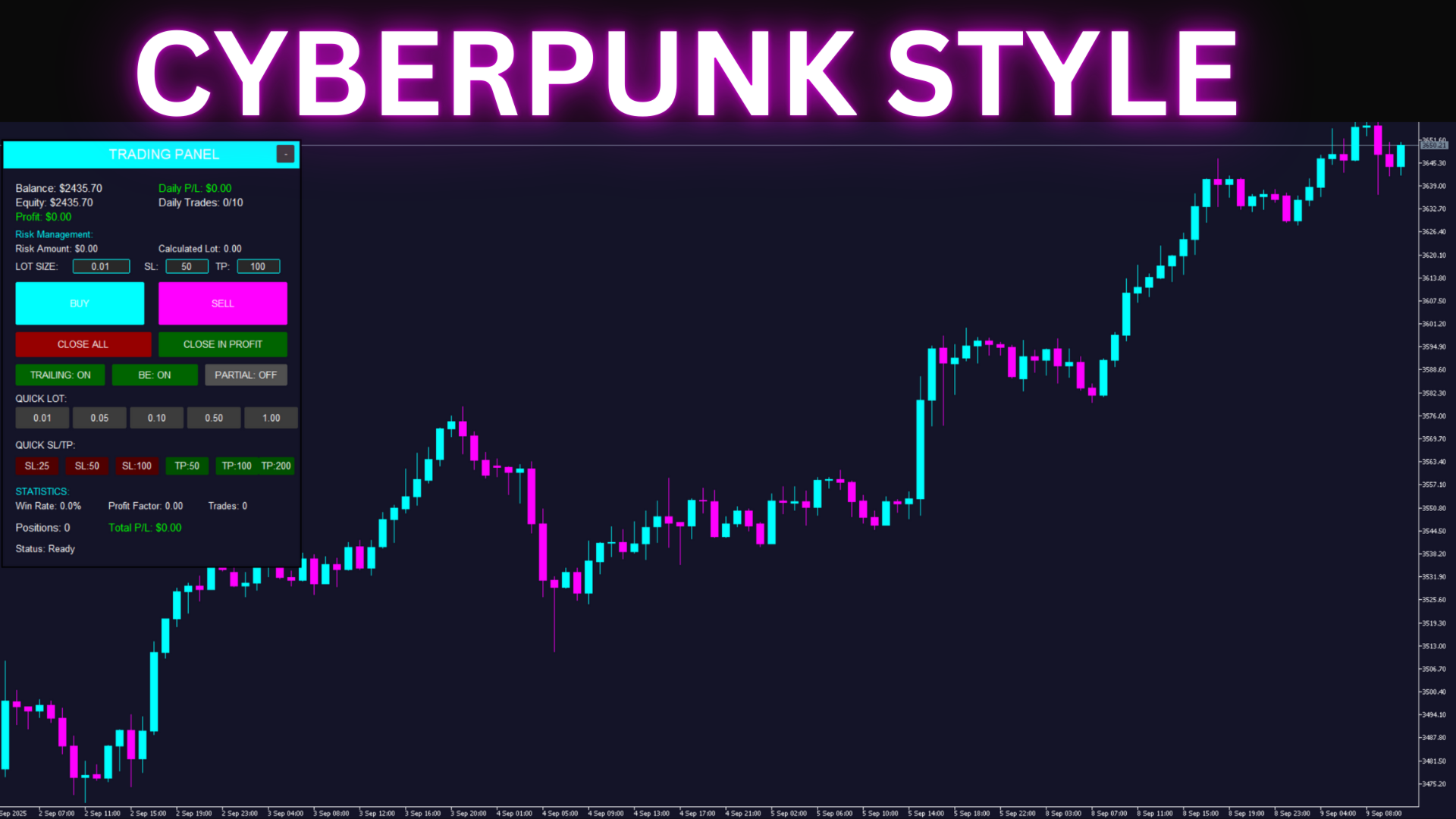
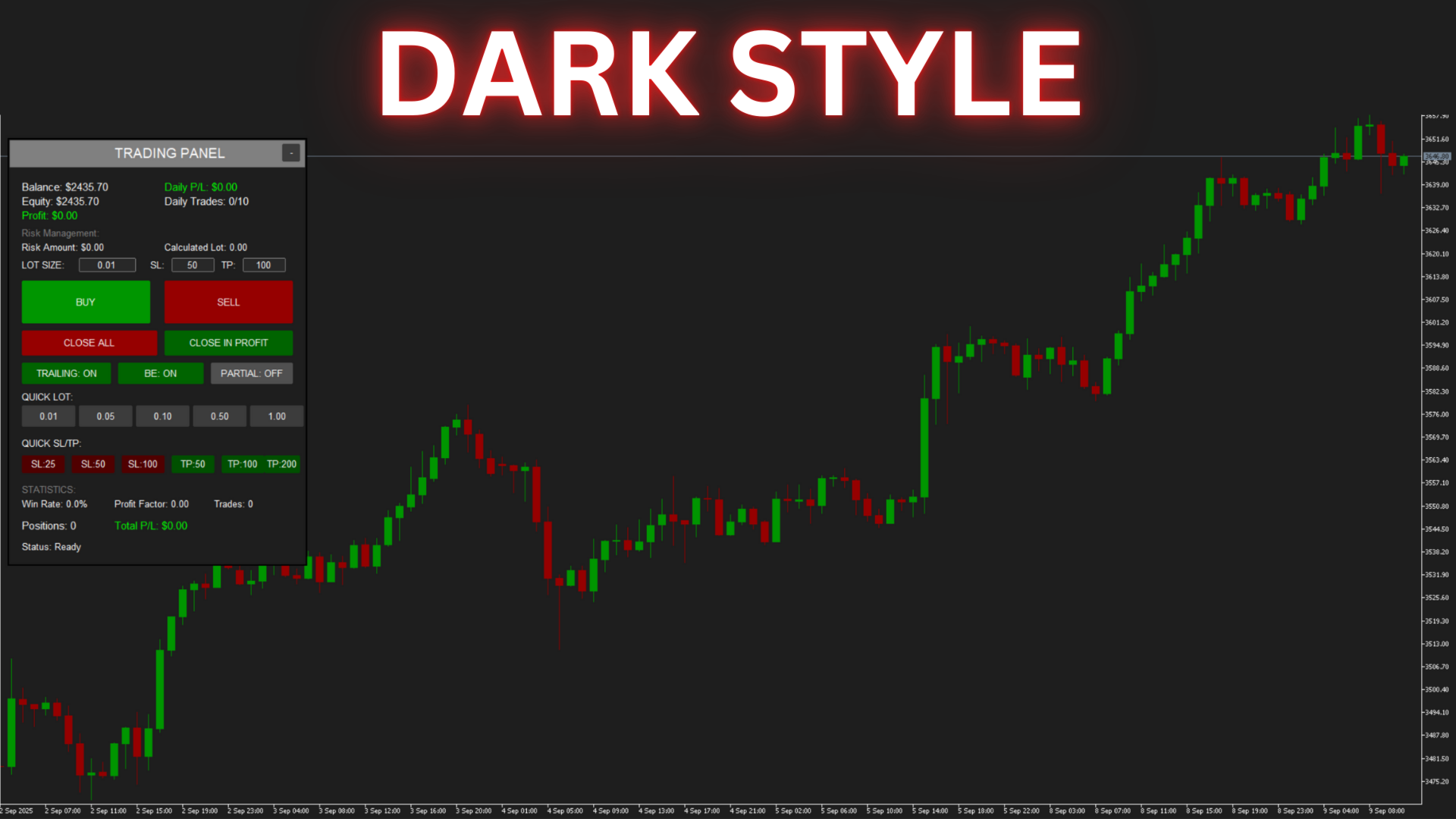
✅ 4 stylish themes - from Cyberpunk to Matrix

🎯 KEY FEATURES

📊 Trading Panel:

  • One-click opening of BUY/SELL positions
  • Quick setting of lot size, SL, and TP
  • Quick selection buttons (0.01 - 1.00 lot)
  • Preset SL/TP levels (25, 50, 100, 200 points)
  • Close all positions / only profitable ones
  • Collapsible panel to save space

💰 Capital Management:

  • Money Management - automatic lot calculation based on risk
  • Maximum daily loss - protection against tilt
  • Daily trade limit - activity control
  • Risk per trade - from 0.1% to 10% of the deposit

🔧 Automatic Functions:

  • Trailing Stop - automatic profit tracking
  • Break Even - move stop to breakeven
  • Partial Close - partial closing upon reaching a target

⚙️ DETAILED DESCRIPTION OF ALL SETTINGS

🎨 VISUAL STYLE

▪️ Visual Theme

Default: Cyberpunk 2077
Purpose: Allows you to choose an interface color scheme that is comfortable for your eyes
Options:

  • Cyberpunk 2077 - Dark blue background with bright cyan and magenta elements. A stylish, futuristic design.
  • Matrix - Classic black and green theme. Minimal eye strain during long working hours.
  • Neon - Bright neon colors on a dark background. For those who love contrast.
  • Dark Mode - A universal dark theme with gray tones. Suitable for any time of day.

💡 Recommendation: Choose a theme depending on your lighting and trading time.

💼 TRADING SETTINGS

▪️ Default Lot Size

Default: 0.01
Range: 0.01 - 100.00
Purpose: Sets the initial lot size that will be displayed on the panel at startup.
How to use: Set your usual working lot. It can be changed directly on the panel during operation.
💡 Tip: Beginners are recommended to start with the minimum lot size of 0.01.

▪️ Default Stop Loss

Default: 50 points
Range: 0 - 1000 points
Purpose: Automatically sets a protective stop-loss for all new positions.
Features: For Gold, 50 points = $5 price movement; for currency pairs = 5 pips.
💡 Tip: Set the value according to your strategy. 0 = no stop-loss (not recommended).

▪️ Default Take Profit

Default: 100 points
Range: 0 - 5000 points
Purpose: Automatically sets a target profit for all new positions.
Features: The EA automatically adapts the calculation to the instrument.
💡 Tip: A TP/SL ratio of 2:1 is considered optimal for most strategies.

▪️ Magic Number

Default: 12345
Range: Any integer
Purpose: A unique identifier to separate this EA's trades from others.
Important: Change this number if you use multiple copies of the EA.
💡 Tip: Use different Magic Numbers for different strategies or instruments.

💰 RISK MANAGEMENT

▪️ Use Money Management

Default: true (Enabled)
Purpose: Enables automatic lot size calculation based on the specified risk.
How it works: When enabled, the EA ignores the Default Lot Size and calculates the lot based on the % risk.
💡 Tip: Always keep it enabled to protect your deposit.

▪️ Risk Per Trade

Default: 1.0%
Range: 0.1% - 10.0%
Purpose: Determines what percentage of your deposit you are willing to lose in a single trade.
Example: With a $1000 deposit and 1% risk, the maximum loss = $10.
💡 Tip: Professionals rarely risk more than 2% per trade.

▪️ Max Daily Loss

Default: 5.0%
Range: 1.0% - 20.0%
Purpose: Automatically blocks trading upon reaching the daily loss limit.
Protection: Prevents emotional trading and "tilt".
💡 Tip: 5% is an optimal value to maintain psychological comfort.

▪️ Max Daily Trades

Default: 10
Range: 1 - 100
Purpose: Limits the number of trades per day to prevent overtrading.
Benefit: Forces you to choose entry points more carefully.
💡 Tip: For scalping, set it to 20-30; for day trading, 5-10.

📈 TRAILING STOP

▪️ Use Trailing Stop

Default: false (Disabled)
Purpose: Automatically moves the stop-loss to follow the price to protect profits.
How it works: When the price moves in your favor, the stop is trailed automatically.
💡 Tip: Works great in trending markets.

▪️ Trailing Start

Default: 30 points
Range: 10 - 500 points
Purpose: The minimum profit in points after which the trailing stop activates.
Example: With a setting of 30 points, trailing will only start when the position is in profit by 30+ points.
💡 Tip: Don't set the value too small; give the position room to "breathe".

▪️ Trailing Step

Default: 10 points
Range: 5 - 100 points
Purpose: The distance from the current price at which the trailing stop will be set.
Example: With a step of 10, the stop will always be 10 points away from the peak price.
💡 Tip: The more volatile the instrument, the larger the step should be.

🔒 BREAK EVEN

▪️ Use Break Even

Default: false (Disabled)
Purpose: Automatically moves the stop-loss to the entry price upon reaching a certain profit.
Advantage: Ensures that a profitable trade does not turn into a losing one.
💡 Tip: Use it during important news events and when holding positions overnight.

▪️ Break Even Start

Default: 20 points
Range: 10 - 200 points
Purpose: The minimum profit required to move the stop to breakeven.
Logic: When the profit reaches this value, the stop will be moved to the entry level.
💡 Tip: Set it to approximately 40-50% of your usual take-profit.

▪️ Break Even Profit

Default: 5 points
Range: 0 - 50 points
Purpose: Additional profit that will be locked in when the breakeven is triggered.
Example: With a value of 5, the stop will be set 5 points above the entry point for a BUY position.
💡 Tip: Set a minimum value to cover commissions and swaps.

✂️ PARTIAL CLOSE

▪️ Use Partial Close

Default: false (Disabled)
Purpose: Automatically closes a part of the position upon reaching the first target.
Strategy: Allows you to lock in some profit and leave the rest of the position to run for a larger move.
💡 Tip: An excellent feature for trend-following strategies.

▪️ Partial Close Percent

Default: 50%
Range: 10% - 90%
Purpose: Determines what portion of the position will be closed.
Example: At 50% with a 0.10 lot, 0.05 lot will be closed.
💡 Tip: 50% is the golden mean between securing profit and potential.

▪️ Partial Close Profit

Default: 30 points
Range: 10 - 500 points
Purpose: The profit level at which the partial close occurs.
Logic: Usually set at 30-50% of the take-profit target.
💡 Tip: Experiment with this parameter to optimize your strategy.

📊 ADDITIONAL PANEL FEATURES

The information block shows:

  • Balance - current account balance
  • Equity - equity (balance + current profit/loss)
  • Profit - current profit/loss on open positions
  • Daily P/L - profit/loss for the current day
  • Daily Trades - number of trades today / maximum
  • Risk Amount - risk amount in the deposit currency
  • Calculated Lot - automatically calculated lot size

Quick selection buttons:

  • Quick Lot - instant lot setting (0.01, 0.05, 0.10, 0.50, 1.00)
  • Quick SL - quick stop-loss setting (25, 50, 100 points)
  • Quick TP - quick take-profit setting (50, 100, 200 points)

Position Management:

  • BUY - open a long position with one click
  • SELL - open a short position with one click
  • CLOSE ALL - close all positions (with confirmation)
  • CLOSE IN PROFIT - close only profitable positions

🏆 SUPPORT FOR ALL INSTRUMENTS

The EA automatically detects the instrument type and correctly calculates the point size:

  • Gold (XAUUSD) - 1 point = $0.10 price movement
  • Silver (XAGUSD) - 1 point = $0.01 price movement
  • Oil (WTI/BRENT) - 1 point = $0.01 price movement
  • Indices (US30, NAS100) - 1 point = 1.0 index point
  • Forex 5-digit - 1 point = 0.1 pips (1 point) -- Note: Russian "пункт" for 5-digit brokers is usually a "point", not a full "pip".
  • Forex 4-digit - 1 point = 1 pip
  • Cryptocurrencies - automatic adaptation

🎯 WHO IS THIS EA FOR?

  • ✅ For Scalpers - instant opening and closing of positions
  • ✅ For Day Traders - full control over daily trading
  • ✅ For Swing Traders - automatic position management
  • ✅ For Beginners - simple interface and error protection
  • ✅ For Professionals - time-saving and convenient

📱 SIMPLE INSTALLATION AND SETUP

  1. Attach the EA to a chart - works on any timeframe
  2. Choose a visual theme - select one that is easy on your eyes
  3. Configure risk management - set your acceptable risk
  4. Set your SL/TP sizes - according to your strategy
  5. Enable desired functions - trailing stop, breakeven, partial close
  6. Start trading! - everything is ready to go

⚠️ IMPORTANT INFORMATION

Chart Revolution EA is a semi-automatic expert advisor that requires your participation in making trading decisions. The EA does not open trades on its own but provides a convenient interface and automates routine operations.

System Requirements:

  • MetaTrader 5 build 3000 or higher
  • Minimum deposit: $100
  • Recommended deposit: $1000+
  • Recommended leverage: 1:100 or higher
  • VPS is not required (for manual trading)

Risk Warning: Trading in financial markets involves a high risk of capital loss. Past performance does not guarantee future profits. Only use funds that you can afford to lose. Be sure to test the EA on a demo account before using it on a live account.

🎁 WHAT YOU GET

  • ✅ Fully functional trading expert advisor with source code
  • ✅ Lifetime license for 5 activations
  • ✅ Free updates forever
  • ✅ Detailed manual in Russian and English
  • ✅ Technical support from the developer
  • ✅ Access to a private user chat

❓ FREQUENTLY ASKED QUESTIONS

Q: Is this an automatic EA?
A: No, it is a semi-automatic assistant. You make the decision to open trades.

Q: Does it work on all instruments?
A: Yes, the EA adapts to any instrument automatically.

Q: Can I use multiple copies?
A: Yes, just set a different Magic Number for each copy.

Q: Is a VPS required?
A: Only if you want the trailing stop and breakeven functions to work 24/7.

📞 SUPPORT AND CONTACTS

✉️ For all questions, please contact us via the MQL5 messaging system
⏰ Response within 24 hours
💬 Telegram @blueprint_support

🎯 Chart Revolution EA - Invest in convenience, save time and nerves!

Start trading with comfort today!
Recommended products
Ninja Trend Matrix MT5 Ninja Trend Matrix MT5 is a MetaTrader 5 indicator that brings multi-timeframe trend direction, relative strength and ATR-based volatility together in one dashboard. It helps you review the current market environment before making a discretionary decision or using another trading system. The indicator does not open, modify or close trades. It does not display entry arrows, take-profit levels, stop-loss levels, win rates or profit forecasts. Main features Classifies each se
FREE
Show Pips for MT5
Roman Podpora
4.5 (32)
This information indicator will be useful for those who always want to be aware of the current situation on the account. VERSION MT 4 - More useful indicators The indicator displays data such as profit in points, percentage and currency, as well as the spread for the current pair and the time until the bar closes on the current timeframe. There are several options for placing the information line on the chart: - To the right of the price (runs behind the price); - As a comment (in the upper lef
FREE
This indicator is especially for the binary trading. Time frame is 1 minutes and exp time 5 or 3 minutes only. You must be use martingale 3 step. So you must put lots size is 10 % at most. You should use Mt2 trading platform to connect with my indicator to get more signal without human working. This indicator wining rate is over 80% but you may get 100% of profit by using martingale 3 step. You should use MT2 Trading Platform to connect meta trader platform and binary platform . You can get mt2
FREE
IMPORTANT NOTE: This is a professional Trade Management Utility and on-chart assistant. It is NOT an automated trading robot. It does not open trades on its own. The UltraFast Trade Manager MT5 is the ultimate execution and risk-management suite designed to give you absolute control over your manual and algorithmic trades. When managing multiple positions, calculating complex net break-even points, or constantly monitoring the economic calendar, hesitation can lead to costly mistakes. This utili
FREE
Girassol Sunflower MT5 Indicator
Saullo De Oliveira Pacheco
3.86 (7)
This is the famous Sunflower indicator for Metatrader5. This indicator marks possible tops and bottoms on price charts. The indicator identifies tops and bottoms in the asset's price history, keep in mind that the current sunflower of the last candle repaints, as it is not possible to identify a top until the market reverses and it is also not possible to identify a bottom without the market stop falling and start rising. If you are looking for a professional programmer for Metatrader5, please
FREE
Follow The Line MT5
Oliver Gideon Amofa Appiah
4.6 (35)
This indicator obeys the popular maxim that: "THE TREND IS YOUR FRIEND" It paints a GREEN line for BUY and also paints a RED line for SELL. (you can change the colors). It gives alarms and alerts of all kinds. IT DOES NOT REPAINT and can be used for all currency pairs and timeframes. Yes, as easy and simple as that. Even a newbie can use it to make great and reliable trades. NB: For best results, get my other premium indicators for more powerful and reliable signals. Get them here: https://www.m
FREE
Trend Signal Levels is an educational trend-following indicator for MetaTrader 5. It combines an ATR Supertrend engine with optional EMA and RSI filters to mark trend shifts on your chart, then projects a complete trade-management template — entry, stop loss, and three take-profit levels — for every signal. It works on any symbol and timeframe, including XAUUSD, forex pairs, indices, and crypto CFDs. Key features Clear BUY / SELL arrows with on-chart text labels and the signal price Supertrend e
FREE
Hidden CCI MT5
Christian Ricard
This indicator allows to hide CCI oscillator (on all MT5 timeframes) from a date define by the user, with a vertical line (Alone) or a panel (with "Hidden Candles"). Indicator Inputs: Period Apply To Information on "Commodity Channel Index" indicator is available here:   https://www.metatrader4.com/en/trading-platform/help/analytics/tech_indicators/commodity_channel_index ************************************************************* Hey traders!!  Give me your feeds!  We are a community here and
FREE
Donchian Breakout And Rsi
Mattia Impicciatore
4.5 (2)
General Description This indicator is an enhanced version of the classic Donchian Channel , upgraded with practical trading functions. In addition to the standard three lines (high, low, and middle), the system detects breakouts and displays them visually with arrows on the chart, showing only the line opposite to the current trend direction for a cleaner view. The indicator includes: Visual signals : colored arrows on breakout Automatic notifications : popup, push, and email RSI filter : to val
FREE
Kiwi Multi Pairs Indicator MT5 v1.01 Kiwi Multi Pairs Indicator MT5 is a multi-market and multi-timeframe confirmation dashboard for MetaTrader 5. Instead of opening many charts and checking indicators individually, Kiwi Multi Pairs Indicator brings 9 markets, 5 technical indicators and 7 timeframes together in one easy-to-read dashboard. The indicator is designed to help traders quickly identify bullish, bearish and mixed market conditions and compare confirmation across different symbols and t
FREE
Coral Indi
Dinh Duong Luong
Coral trend is   a trend-following indicator that is widely popular among FOREX traders . It is usually used as a confluence with other indicators. It uses combinations of moving averages with complex smoothing formulas! It has two configurable parameters: Coefficient   - smoothing ratio (*) Applied price Calculation: Coral = (-0.064) * B6 + 0.672 * B5 - 2.352 * B4 + 2.744 * B3
FREE
Indicator and Expert Adviser  EA Available in the comments section of this product. Download with Indicator must have indicator installed for EA to work. Mt5 indicator alerts for bollinger band and envelope extremes occurring at the same time. Buy signal alerts occur when A bullish candle has formed below both the lower bollinger band and the lower envelope  Bar must open and close below both these indicators. Sell signal occur when A bear bar is formed above the upper bollinger band and upper
FREE
VolumeBasedColorsBars
Henrique Magalhaes Lopes
VolumeBasedColorsBars — Free Powerful Volume Analysis for All Traders Unlock the hidden story behind every price bar! VolumeBasedColorsBars is a professional-grade, 100% FREE indicator that colorizes your chart candles based on real, adaptive volume analysis. Instantly spot surges in market activity, identify exhaustion, and catch the moves that matter. This indicator gives you:    • Dynamic color-coded bars for instant volume context    • Adaptive thresholds based on historical, session-awar
FREE
RiskCockpit - real-time risk advisor for prop-firm and funded accounts (FundedNext, FTMO, E8, The5ers, MyFundedFX) and personal/demo accounts. It is an INDICATOR (an advisor): it shows and proposes; it never opens, modifies or closes a trade. THE PROBLEM IT SOLVES Funded accounts are rarely lost to a bad strategy - they are lost to a single careless click: one lot too big, a stop-loss left off, a trade inside a news window, a daily-loss line crossed by accident. The rules sit in a PDF; your ris
FREE
Trade Behavior Mirror reads your own account's closed trade history and counts one specific pattern: opening a new position shortly after a loss, at a lot size larger than your own recent normal. It does not predict, and it does not advise. Every number on the panel is something that already happened on this account. How the numbers are built: it reads up to 31 days of closed deals across every symbol and every magic number - this is an account-wide picture, not a chart-specific one. From the 3
FREE
PRODUCT TITLE: Mindgame  SHORT DESCRIPTION (Max 150 chars): All-in-One professional indicator: 5 SMAs, Non-Repainting MACD Crossover Arrows, NY Session Shading, and Live HUD Dashboard for MT5. CATEGORY: Market > MetaTrader 5 > Indicators > Trend / Oscillators PRICE RECOMMENDATION: $39 - $59 (or Free with premium upgrade / rental options) ================================================================================ FULL PRODUCT DESCRIPTION (Copy-paste directly into MQL5 Market description
FREE
Pin Bars MT5
Yury Emeliyanov
Main purpose:   "Pin Bars"   is designed to automatically detect pin bars on financial market charts. A pin bar is a candle with a characteristic body and a long tail, which can signal a trend reversal or correction. How it works:   The indicator analyzes each candle on the chart, determining the size of the body, tail and nose of the candle. When a pin bar corresponding to predefined parameters is detected, the indicator marks it on the chart with an up or down arrow, depending on the directi
FREE
FibRetrace Zones Fibonacci Retracement Zones of the Latest Swing Leg FibRetrace Zones is the free visual companion to the FibRetrace Expert Advisor. It draws the Fibonacci retracement levels and highlights the pullback zone on the latest swing leg, so you can see where retracement entries line up — before you trade. The zone is color-coded by direction: green for bullish setups, red for bearish setups. Works on any symbol and any timeframe, and confirmed bars never repaint. KEY FEATURES Automati
FREE
SuperTrend Indicator – Description & Important Notice The SuperTrend is a composite technical indicator designed to help you identify the primary trend, measure its strength, and assess signal quality. However, an indicator is only a tool —it’s never 100% accurate and cannot replace sound risk management. 1. Core Formula & Components ATR (Average True Range): measures price volatility; customize sensitivity via Periods and Multiplier . Upper/Lower Bands: derived from ATR and your chosen source p
FREE
PROMETHEUS TECHNICAN VERSION Free | By THE SONS A gift from The Sons — no strings, no trial, no expiry. Every trader deserves access to professional-grade market intelligence. That belief is why Prometheus Technical Version exists, and why it costs nothing. Consider it our handshake to the trading community. What You're Getting This is not a simplified tool dressed up as a gift. Prometheus Technican Version is a fully built, institutional-quality technical analysis indicator running a dual-model
FREE
Position Size Caculator
Nguyen Van Chien
5 (3)
Calculating the volume of orders every time you create an order is an extremely important thing in risk management Let this tool simplify your work! ----------------------------------------------------- How to use? Attach the indicator to the chart and set its parameters:  Risk size in %  or money and Risk Reward Ratio. Click on the ON button and locate the horizontal line to your would-be StopLoss level. Options: Click on the Pending/Instant button to locate the horizontal line  to your would-b
FREE
Shadow Flare MT5
Kestutis Balciunas
Shadow Flare Indicator is a non-repainting trend & liquidity tool for MetaTrader 5. It runs a configurable moving-average baseline (HMA, EMA, SMA, or RMA) wrapped in an Average True Range envelope and produces a sticky trend state that only flips when price closes through the upper or lower band. The same trend engine drives an automatic supply/demand zone module that detects pivot highs and pivot lows, draws coloured boxes around them, and mitigates each zone the moment price closes through it.
FREE
MSX SuperTrend Visual Indicator Overview MSX SuperTrend Visual Indicator is a MetaTrader 5 indicator designed to display trend direction and market structure using a SuperTrend-based calculation with optional filtering components. The indicator combines trend visualization, volatility measurement and optional EMA-based filtering to provide a clear graphical representation of market conditions. Features • SuperTrend-based trend visualization • ATR-based volatility calculation • Optional Heikin A
FREE
Quantum Gold Pro EA
Chaiwat Wongsricha
Description Quantum Gold Pro EA is a TRIAL Expert Advisor for MetaTrader 5, specially designed for Gold (XAUUSD) automated trading. This EA uses smart market entry logic, basket profit management, and built-in risk protection to support traders who want to test automated strategies before using the full version. Features Optimized for Gold (XAUUSD) Automatic Buy / Sell trading system Basket Take Profit control Spread and margin protection Dashboard display on chart Smart risk management Easy se
FREE
Stochastic   +   RSI   Multi-Timeframe   Dashboard   with   Momentum   Strength Need Trade Assistant? Trade Panel Pro MT 5 Please leave a review, if you like this.   OVERVIEW A   professional   multi-timeframe   dashboard   indicator   that   displays   Stochastic   Oscillator   and   RSI   (Relative   Strength   Index)   values   from   7   different   timeframes   simultaneously   on   a   single   compact   panel.   Perfect   for   scalpers   and   day   traders   who   need   quick   m
FREE
Forex 1 hour candle trader
Thej Karthiarath
5 (1)
This EA is completely private EA given after back-testing a particular strategy. You can request to get the strategy by contacting the following number in WhatsApp +91 9567407508.  You can contact in telegram too. The EA basically takes trade on particular one hour candle breaks.  You should use this EA only after attending a zoom meeting and a proper back-test. Understand the rules and regulations of  your country while you trade in forex and other commodity.
FREE
Renko subwindow
Alexandre Vincent Traber
Overview Renko SubWindow plots a Renko brick chart as colored candles inside a separate indicator window, without affecting the main chart. Brick size can be fixed in points or calculated dynamically from ATR for adaptive volatility-based bricks. How it works Reconstructs Renko bricks from closing prices of the current symbol/timeframe history. Each brick forms once price moves beyond the defined brick size from the last brick's close. Bricks are rendered as colored candles: bullish (up) and bea
FREE
Automatic Trendlines
Pasi Hakamaki
4.69 (51)
The indicator draws trendlines on chart. This indicator has six inputs. User can specify alternative labels for both lines. If multiple instances of the indicator are used, the labels must differ. User can set width and color of the lines and depth which specifies what significant peaks should be used. For example, Depth=10 sets trendlines using the current peaks and valleys that have at least 10 bars to the right and to the left and that have highs/lows less/greater than the peak's high/low. In
FREE
Daily Entry M1 – MT5 Indicator Daily Entry M1 is a MetaTrader 5 indicator created for traders who focus on short-term intraday opportunities on the M1 timeframe. The indicator analyzes market conditions and displays clear BUY and SELL arrows directly on the chart when its internal entry conditions are confirmed. The indicator is designed to look for potential market turning areas and attempts to identify entries close to an intraday top or bottom, helping traders focus on possible reversal oppo
FREE
Free automatic Fibonacci is an indicator that automatically plots a Fibonacci retracement based on the number of bars you select on the BarsToScan setting in the indicator. The Fibonacci is automatically updated in real time as new highest and lowest values appears amongst the selected bars. You can select which level values to be displayed in the indicator settings. You can also select the color of the levels thus enabling the trader to be able to attach the indicator several times with differe
FREE
Buyers of this product also purchase
Trade Assistant MT5
Evgeniy Kravchenko
4.43 (216)
It helps to calculate the risk per trade, the easy installation of a new order, order management with partial closing functions, trailing stop of 7 types and other useful functions. Additional materials and instructions Installation instructions - Application instructions - Trial version of the application for a demo account Line function -   shows on the chart the Opening line, Stop Loss, Take Profit. With this function it is easy to set a new order and see its additional characteristics bef
Forex Trade Manager MT5
InvestSoft
4.98 (685)
Trade Manager MT5 is an advanced position size calculator and trade management tool for MetaTrader 5, designed to help traders plan trades faster, control risk more precisely, and manage open positions directly from the chart. It combines order placement, risk based lot calculation, Stop Loss and Take Profit management, Break Even, Trailing Stop, Partial Close, Equity Protection, and external trade management in one panel. Whether you trade forex, indices, metals, commodities, crypto, or future
Local Trade Copier EA MT5
Juvenille Emperor Limited
4.94 (149)
Local Trade Copier EA MT5 is a fast and flexible trade copier for copying and managing trades between multiple MetaTrader 5 accounts on the same Windows computer or Windows VPS. It combines local trade synchronization with Receiver-side controls for lot sizing, risk management, trade filtering, symbol mapping, trade management and account protection. Set up your Transmitter and Receiver terminals in about 1 minute and copy manual or EA trades between accounts at the same or different brokers. U
Telegram to MT5 MultiChannel Copier
Sergio Marquez Uroz
4.61 (18)
Telegram to MT5 Multi-Channel Copier   automatically copies trading signals from your Telegram channels straight to MetaTrader 5. No bots, no browser extensions, no manual copying. A signal arrives in Telegram and the EA opens the trade in your terminal within seconds. And before you copy a channel, the built-in backtester shows you what that channel would have done in your account. The product has two components: a Windows application that listens to your Telegram channels, and this Expert Advi
Strategy Ledger Pro
Abdullah Uygar Tuna
5 (7)
Strategy Ledger Pro is a read-only account analysis panel for MetaTrader 5. It separates account results by Expert Advisor, strategy, symbol, and magic number, so you can see what each one really contributes. The panel is available in 11 languages: English, Français, Deutsch, Español, Italiano, Português, Русский, Türkçe, 中文, 日本語 and 한국어. Before you download the demo. The Market runs the demo of any paid product in the Strategy Tester only. This panel analyses the trades on your own account, and
================================================================================ POC BREAKOUT - V20.72. Full Professional Grade Toolkit ================================================================================ POC Breakout is a full MetaTrader 5 trading dashboard for discretionary traders who want breakout signals, Point of Control (POC) context, volume profiles, order flow, market structure, news, alerts, and advanced trade planning in one professional workspace. Attached directly to you
TradePanel MT5
Alfiya Fazylova
4.88 (170)
Trade Panel is a multi-functional trading assistant. The app contains over 50 trading functions for manual trading and allows you to automate most trading tasks. Application instructions: https://www.mql5.com/en/blogs/post/756482 Trial version of the application for a demo account: https://www.mql5.com/en/blogs/post/750865 How to install the application: https://www.mql5.com/en/blogs/post/756239 How to test the application in visual mode: https://www.mql5.com/en/blogs/post/770277 How to install
Copy Telegram signals with your own trading rules Telegram to MT5 Signal Trader automatically copies text-based trading signals from public and private Telegram channels and groups into MetaTrader 5. Manage multiple providers and MT5 accounts from one desktop app, with individual risk and trade settings for each provider . No Telegram bot or API setup needed for copying. Simply sign in with your own Telegram account by phone or QR code and select the channels or groups you have already joined. Y
Power Candles Strategy Scanner - Self-Optimizing Multi-Symbol Setup Finder Self-optimizing settings work one chart at a time, and finding where they pay off right now means opening chart after chart. Power Candles Strategy Scanner runs the same self-optimizing engine as the Power Candles indicator on every symbol in your Market Watch, side by side. One panel ranks where it pays off: the winning strategy per symbol, its optimized Stop Loss and Take Profit. An alert fires the moment a fresh signal
FarmedHedge Pair Trading Dashboard
Tanapisit Tepawarapruek
5 (5)
Farmed Hedge Yield Farming | All Markets (Manual - Hybrid - Semi/Automated EA) VERIFIED TRADING RESULTS - Farmed Hedge Yield Axi Copy:  https://www.mql5.com/en/signals/2356376 - Farmed Hedge Yield Exn Copy:   https://www.mql5.com/en/signals/2356404 - Farmed Hedge Yield V Copy:  https://www.mql5.com/en/signals/2357156 IMPORTANT NOTICE: FarmedHedge is a MANUAL-FOCUSED TRADING UTILITY ,not a fully automated EA. Results shown on this Signal include manual trades and overall strategic management.
Exp COPYLOT CLIENT for MT5
Vladislav Andruschenko
3.97 (35)
Professional Trade Copier for MetaTrader 5 Fast, professional, and reliable trade copier for MetaTrader . COPYLOT allows you to copy Forex trades between MT4 and MT5 terminals with support for Hedge and Netting accounts. COPYLOT MT5 version supports: - MT5 Hedge to MT5 Hedge - MT5 Hedge to MT5 Netting - MT5 Netting to MT5 Hedge - MT5 Netting to MT5 Netting - MT4 to MT5 Hedge - MT4 to MT5 Netting MT4 version Full Description +DEMO +PDF How To Buy How To Install How to get Log Files H
Trade copier MT5
Alfiya Fazylova
4.61 (56)
Trade Copier is a professional utility designed to copy and synchronize trades between trading accounts. Copying occurs from the account / terminal of the supplier to the account / terminal of the recipient, which are installed on the same computer or VPS . Before buying, you can test the demo version on a demo account. Demo version here . Full instruction here . Main functionality and benefits: Supports copying MT5> MT5, MT4> MT5, MT5> MT4, including MT5 netting accounts. * Supports copying Dem
Grid Manual MT5
Alfiya Fazylova
4.73 (22)
Grid Manual is a trading panel for working with grid strategies. The utility is universal, has flexible settings and an intuitive interface. It works with a grid of orders not only in the direction of averaging losses, but also in the direction of increasing profits. The trader does not need to create and maintain a grid of orders, the utility will do it. It is enough to open an order and the "Grid manual" will automatically create a grid of orders for it and will accompany it until the close. F
Footprint Chart Pro — Professional OrderFlow EA for MetaTrader 5 Version 6.34 | Professional tool for real traders | Institutional-Grade Visualization DEMO USERS - PLEASE SELECT EVERY TICK / REAL TICK WHEN TESTING AND YOU HAVE DOWNLOADED HISTORICAL DATA. IF YOU SEE A WAITING SCREEN AND IT IS NOT DOWNLOADING, IT MEANS YOU HAVE LOW HISTORICAL DATA. TRY 1 MIN AND 5 MIN FIRST ON 1 DAY DATA. ONE DAY DATA SHOULD BE THE NEWEST AND MOST CURRENT DATE. PLEASE WAIT UNTIL THE MARKET HAS ROLLED OVER PERIOD.
HINN MagicEntry Extra
ALGOFLOW OÜ
4.74 (19)
HINN MAGIC ENTRY – the ultimate tool for entry and position management! SIMPLE. FASTEST. INTUITIVE. MAX AUTOMATED. Place orders by selecting a level directly on the chart! full description   ::  demo-version  :: 60-sec-video-description Key features: - Market, limit, and pending orders - Automatic lot size calculation - Automatic spread and commission accounting - Unlimited partitial take-profits  - Breakeven and trailing stop-loss and take-profit  functions - Invalidation leves - Intuitive, a
Welcome to ENTRY IN THE ZONE AND SMC MULTI TIMEFRAME /  Official Website :   https://www.fableedge.net Entry In The Zone and SMC Multi Timeframe is a real-time market analysis tool based on Smart Money Concepts (SMC), designed to analyze market structure, price direction, and key trading zones. It supports both Single-Timeframe Analysis and Multi-Timeframe Analysis, providing a clearer view of the overall market structure across multiple timeframes, with real-time BUY / SELL signals that do not
Signal Trading View to MT5 Pro
Mirel Daniel Gheonu
4.5 (2)
Signal TradingView to MT5 Pro  Instant professional execution between TradingView and MetaTrader 5 Automate your trading strategy with the most robust communication bridge between TradingView alerts and real execution in MT5. Designed for traders who demand speed, flexibility, and impeccable risk management, this Expert Advisor transforms any alert message into a precise market or limit order.   Install and TEST the TRIAL version HERE STRENGTHS AND ADVANTAGES Universal Parsing Engine (Propriet
MT5 to Telegram Signal Provider turns your trading account into a signal provider. Every trade action, whether manual, by EA or from your phone, is instantly sent as a message to Telegram. You can fully customize the format or use a ready-made template for quick setup. [ Demo ] [ Manual ] [ MT4 Version ] [ Discord Version ]     New: [ Telegram To MT5 ] Setup A step by step user guide is available. Key Features Ability to customize order details sent to subscribers You can create a tiered subs
Premium Trade Manager - The Trade Panel With a Coach Built In Premium Trade Manager puts a trading coach inside your chart, with a full execution engine underneath it. Set the trade up the way you always do, then let Max, your AI trading coach, read that exact setup against your live account and give you a straight verdict before you commit: is the stop disciplined, is the risk sane, is a high-impact release minutes away, are you near a prop-firm limit. Below sits the engine that runs everything
Anchor Trade Manager
Kalinskie Gilliam
5 (9)
Your EAs cannot see each other, but Anchor can. Anchor gives you one place to coordinate your EAs, manage risk, and decide when trading is allowed. It works alongside the trading bots you already use without any changes to them. The Problem One EA opens a trade. Then another starts trading. The next thing you know, you wake up to multiple grids built across your account. Each EA may be doing exactly what it was designed to do, but together they can place far more risk on your account than you in
Trade Indicator Assistant   is a powerful MT5 utility designed to turn indicators into automated trading systems. Its main feature is the ability to automatically detect an indicator’s   BUY and SELL signal buffers , without requiring you to know the buffer numbers, search through indicator settings, or modify the indicator source code. Bonus Indicator:   After purchasing Trade Indicator Assistant, contact me to receive   Trade Signal Pro   completely free as a bonus indicator. [Download Demo V
Telegram To MT5 Ultra
Mirel Daniel Gheonu
5 (5)
Telegram To MT5 — Signal Copier Turn the trading calls from your Telegram channels into real MT5 orders — automatically, on as many accounts as you like, with risk and rules fully under your control. Telegram To MT5 connects the VIP / signal channels you already follow on Telegram to your MetaTrader 5 terminal. A free companion desktop app reads the messages (even from channels that block bots), and this Expert Advisor executes them on your account — applying your own risk settings, symbol mappi
Trade Manager Panel Pro MT5
VividMind Digital Solutions
5 (6)
Message me after purchase to receive the complete manual kit + 3-day OpenAI API trial to test the AI features + Another bonus gift The current price is a limited discount for August Relaunch Update — secure your edition now before price go up. Next Price: $340 This is completely different from any trading panel you’ve tried or seen on the market. It’s one of the most innovative AI-powered trading panels available in the retail market right now. Imagine connecting   AI directly to your chart   —
Quant Panel
Kevin Craig E Gittins
QUANT PANEL Independent per-algo analytics, protected MT5 history and professional PDF reporting Quant Panel is built for traders who run several Expert Advisors or strategies on one MT5 account and need to know how each algo is actually performing. Instead of treating the terminal as one combined portfolio, Quant Panel groups closed positions by EA comment or magic number and calculates every strategy independently. It gives you one clear dashboard for comparing algos, finding weak systems and
Telegram to MT5 Coppy
Sergey Batudayev
5 (10)
Telegram to MT5: The Ultimate Signal Copying Solution Simplify your trading with Telegram to MT5, the modern tool that copies trading signals directly from Telegram channels and chats to your MetaTrader 5 platform, without the need for DLLs. This powerful solution ensures precise signal execution, extensive customization options, saves time, and boosts your efficiency. [ Instructions and DEMO ] [ FAQ ] [ How atach logs properly ] [ Settings descrition ] Key Features Direct Telegram API Integrati
YuClusters
Yury Kulikov
4.93 (43)
Attention: You can view the program operation in the free version  YuClusters DEMO .  YuClusters is a professional market analysis system. The trader has unique opportunities to analyze the flow of orders, trade volumes, price movements using various charts, profiles, indicators, and graphical objects. YuClusters operates on data based on Time&Sales or ticks information, depending on what is available in the quotes of a financial instrument. YuClusters allows you to build graphs by combining da
Trade Manager DaneTrades
Levi Dane Benjamin
4.23 (30)
DaneTrades Trade Manager is a professional trade panel for MetaTrader 5, designed for fast, accurate execution with built‑in risk control. Place market or pending orders directly from the chart while the panel automatically calculates position size from your chosen risk, helping you stay consistent and avoid emotional decision‑making. The Trade Manager is built for manual traders who want structure: clear risk/reward planning, automation for repeatable management, and safeguards that help reduc
DrawDown Limiter
Haidar Lionel Haj Ali
5 (23)
DrawDown Limiter v5.0 — Advanced Account Protection Controller DrawDown Limiter v5.0 is a client-side account protection controller designed to supervise your trading account and automatically react when configured risk, profit, news, schedule, rollover, or position limits are reached. It can monitor manual trades, automated strategies, multiple Expert Advisors, pending orders and floating positions from one dedicated chart. It can protect the complete account or be configured to supervise a spe
The News Filter MT5
Leolouiski Gan
4.78 (23)
This product filters   all expert advisors and manual charts   during news time.  It is able to remove any of your EA during news and automatically reattach them after news ends. This product also comes with a complete  order management system   that can handle your open positions and pending orders before the release of any news. Once you purchase   The News Filter , you will no longer need to rely on built-in news filters for future expert advisors, as this product can filter them all from her
VirtualTradePad One Click Trading Panel
Vladislav Andruschenko
4.59 (74)
Trading Panel for MetaTrader 5 — professional one-click trading from chart and keyboard A powerful trading panel for active manual trading, designed to open, manage, and close trades far faster and more efficiently than the standard MetaTrader interface. This panel is built for traders who want full control over positions, pending orders, profit management, and trading execution inside one professional workspace. This is not just another utility. It is a complete trading cockpit for MetaTrader
More from author
TrenderFlex PRO
Stepan Sinic
5 (2)
TrendFlex Pro - Professional Adaptive Channel System TrendFlex Pro is an innovative new-generation indicator that uses adaptive Gaussian envelopes to accurately identify dynamic support and resistance levels. The indicator automatically adjusts to market volatility and generates high-precision trading signals. Key Advantages: Adaptive Technology - automatically adjusts to any instrument and timeframe Two Operating Modes - Dynamic (with repainting) and Static (without repainting) Smart
FREE
BluePrint Adaptive Trader - Professional Trading System Advanced Channel Trading System based on our proprietary TrenderFlex PRO algorithm Learn more about TrenderFlex PRO KEY FEATURES • TrenderFlex PRO Channel Technology - Advanced channel calculation based on our proven algorithm • Adaptive Risk Management - Automatic TP/SL calculation based on channel width • Win Rate Statistics - Real-time tracking of TP1, TP2, TP3 success rates • Multi-Timeframe Analysis - Monitor 7 timeframes simultaneou
FREE
Burning Scalper - Advanced MFI Trading System Indicator Description Burning Scalper is a comprehensive trading system based on an enhanced Money Flow Index (MFI) indicator, designed for precise identification of market entry and exit points. The indicator combines volume and price analysis, providing traders with a complete picture of market dynamics. Key Features Intelligent Trading Signals The indicator automatically identifies optimal market entry points by analyzing extre
FREE
### FTBP Telegram Panel - Your On-Chart Notification Center **FTBP Telegram Panel** is not just an Expert Advisor, but a full-featured tool for traders who want to receive instant notifications about their trades in Telegram and manage the visual style of their terminal. The product is completely free! ### Key Features * **Instant Telegram Notifications:** Get alerts for every opened and closed trade, including the ticker, volume, and financial result. * **Interactive Control Panel:** Forget
FREE
Reflex Panel - A Revolution in Semi-Automatic Trading! Tired of the clumsy standard MT5 interface? Forget about constantly switching between windows and complex calculations! Reflex Panel is a next-generation professional trading panel that will turn your chart into a full-fledged trader's command center! WHY CHOOSE CHART REVOLUTION? Everything on one screen - no more extra windows Instant execution - open trades in one click Smart risk calculation - automatic lot calculation based on
FREE
Filter:
No reviews
Reply to review