Unwickable Stop Loss

 Are You Tired of Break Even Turning into a Winning Trade Without You? Unwickable Stop Loss (USL) Keeps You In The Trade!

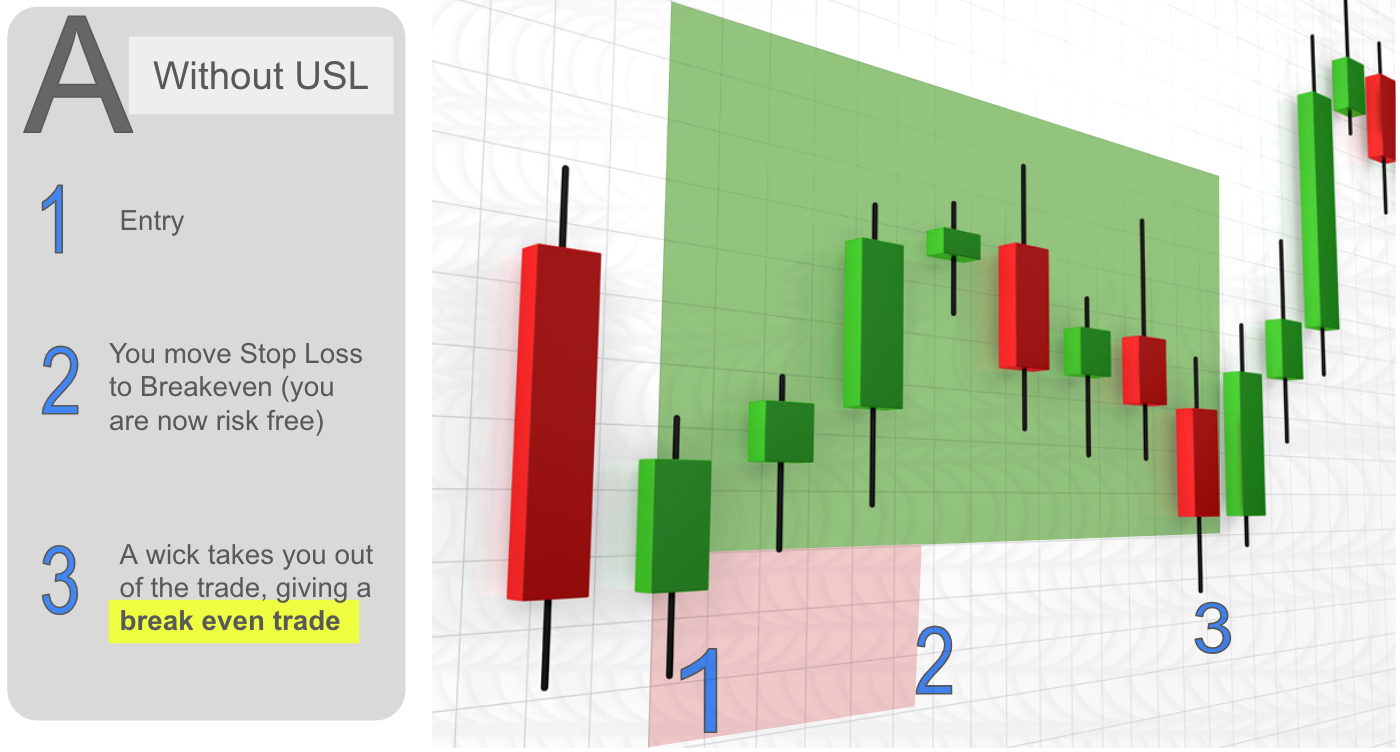
You've meticulously planned your trades, exercised patience, and entered at the 'perfect' moment. As the trade moves in your favour, you move your stop loss to break even, feeling secure with no capital at risk. But then, the market takes an unexpected turn, stops you out, and proceeds in your intended direction (see Screenshot A).

Ever wonder what could be done differently? Timing the move of stops is as challenging as timing entries, and getting it wrong often leads to premature exits.

What if there is a better way to navigate the uncertainties of moving stops? One that eliminates premature exits and keeps you in the trade longer

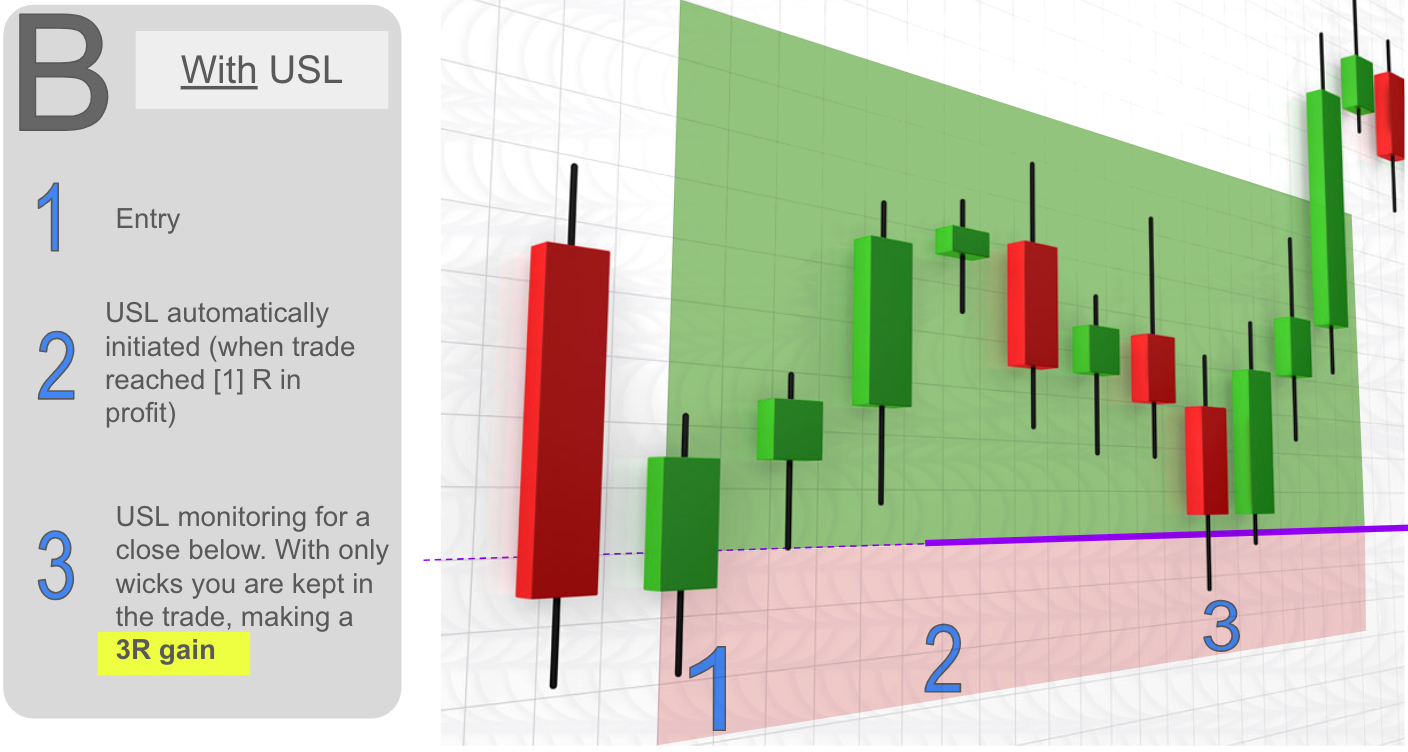
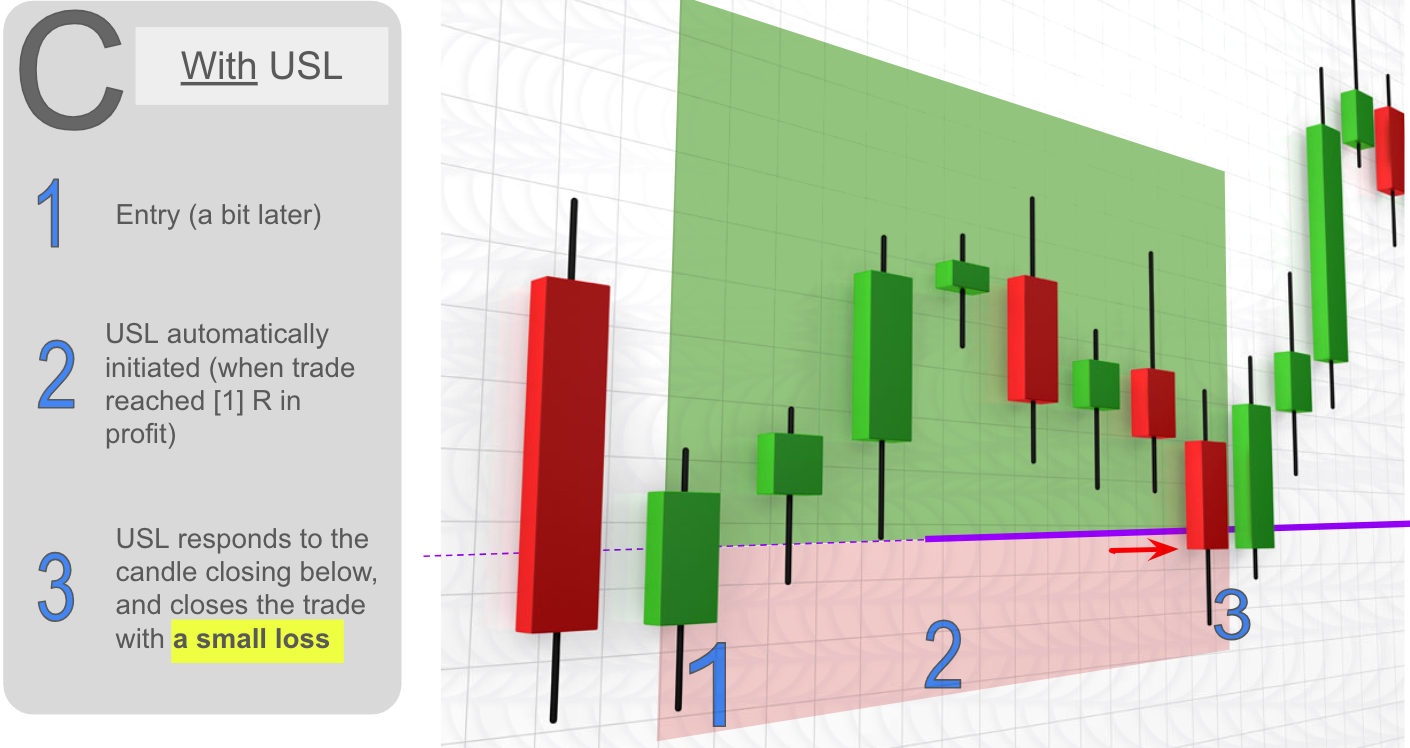
Introducing Unwickable Stop Loss (USL), a game-changer in risk management that works seamlessly with your hard stop loss. USL gives trades where the wick won't take you out prematurely (See Screenshot B), providing you the security of downside protection while keeping your break-even or trailing stop resilient even against vicious market wicks. USL works by requiring a candle close below the USL (See Screenshot C).

Key Benefits of Unwickable Stop Loss (USL):

  • Stop Leaving Money on the Table: Prevent premature break-even exits and maximize your profit potential.

  • Well-Managed Exit Strategy: Stay in the trade as long as possible for a mentally easier trading experience.

  • Tailored to Your Preferences: Simple to use, appealing to traders who want flexibility in their stop loss strategies. Try the demo and witness USL handle your break-even positions effortlessly.

  • Comprehensive Trailing Stop: Safeguard gains with  USL moving automatically, avoiding premature exits due to market wicks.

  • Effortless Real-Time Risk Management: Replace reliance on experience or willpower and get consistency using  predefined thresholds and milestones.

Is USL for You? It May Not Be a Panacea:

  • USL won't magically make you profitable if you're not already breaking even or profitable.

  • While USL provides security, there's still a risk of loss (See Screenshot C).

Calculating the Potential:

Consider a trader with 100 trades, 30 wins, 40 losses, and 30 break-even trades. Assuming a 1% risk per trade, USL could potentially add 8% to profits by allowing break-even trades to run their course. See Annex.

Instructions for Use:

  1. Place the Unwickable Stop Loss expert on a single chart only.

  2. After entering a trade, the USL line appears, automatically adjusting based on your chosen parameters.

  3. Manually adjust the line if preferred.

  4. You can use your selected keys (S & X by default) to scroll through the current trades.

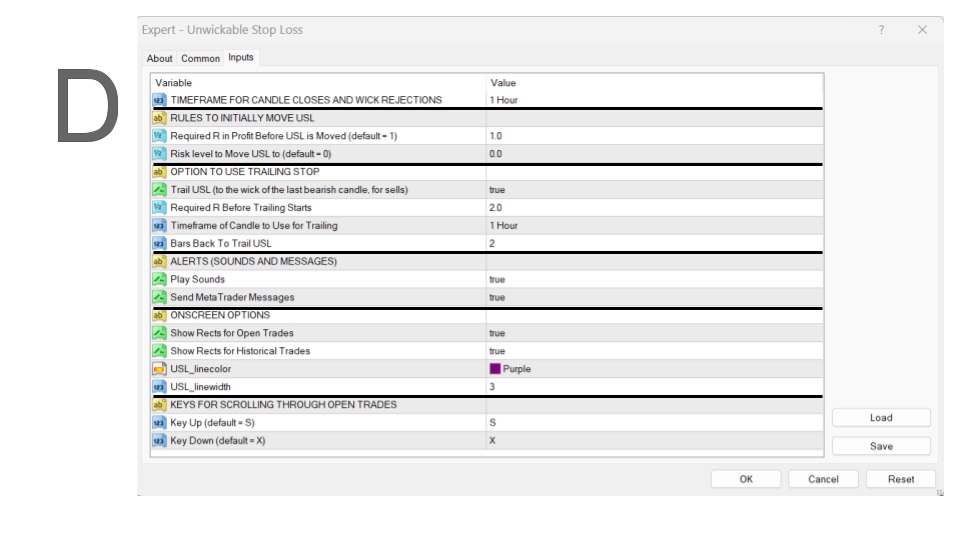
System Parameters - Essential Settings (See Screenshot D):

  • Trading Timeframe: The crucial parameter is your trading timeframe, with the default setting at H1. This ensures that Unwickable Stop Loss (USL) remains resilient to any wicks within this timeframe, exiting the trade only if an H1 body close happens below the USL line.

  • Profit Level Decision: Determine the level of profit at which you want the USL line to be moved—whether to break even or any risk level you choose (e.g., 0.5R).

  • Trailing Stop Decision: Decide if you want USL to handle trailing stops. If yes, specify the profit level at which trailing can begin (e.g., at 2R). Trailing involves moving the USL to the wick of the last candle closed in the trade direction, with the default setting at 2 candles away.

Non-Essential Parameters (See Screenshot D):

Explore additional system parameters that you can customize to your preferences:

  • Alerts: Toggle alerts (sounds/messages) on or off based on your preference.

  • Line Color: The default color of the USL line is purple, but you can customize it to suit your visual preferences.

  • Rectangles for Trades: Choose whether to draw green and red rectangles for current (dark green) or historical trades (light green).

  • Scroll Through Open Trades: Specify the keys (defaults to X and S) you want to use for scrolling through open trades.

Note on Showing Historical Rectangles:

USL can access historical data as shown in the account history tab in your MetaTrader client. Right-click there to adjust the duration if needed. Remember that USL can only show history from trades taken with USL enabled, as the original stop-loss level is necessary.

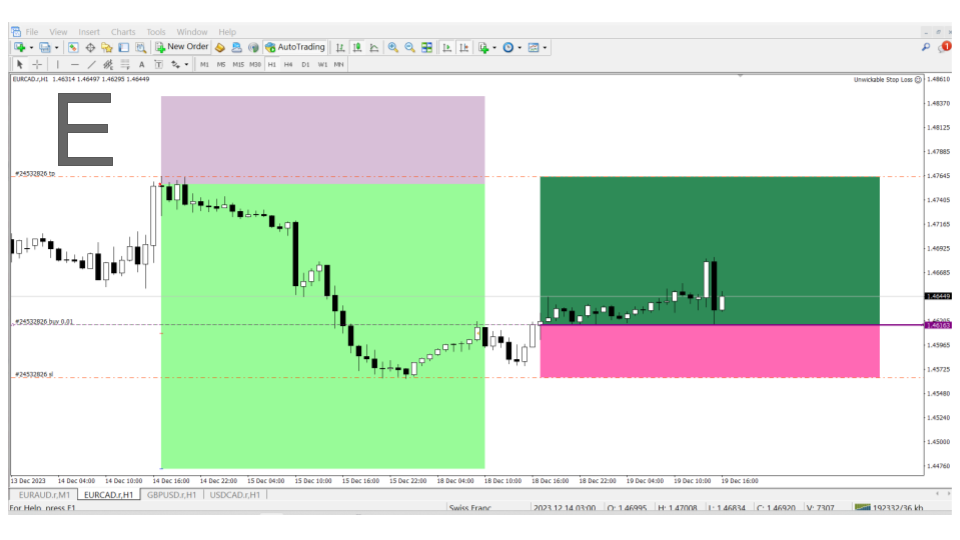
Example Trades - Visualize USL in Action (See Screenshot E):

  • You can imagine the effect of USL in real trades, but here are two examples. The first is an historical trade that was managed with USL including trailing the stop to close the trade in profit,  and the second is a current trade that would have been taken out at break even by the wick but thanks to USL we are still in the trade for a potential profit.

Conclusion:

Unwickable Stop Loss could be the missing piece in your trading strategy, providing a systematic exit strategy to optimize trade outcomes. Try the demo, analyze your historical trades, and decide if USL is the solution you've been looking for.


Feel free to experiment with the settings and explore the effectiveness of USL in your trading strategy. If you have questions or need further guidance, reach out—we're here to help!


Annex. Calculation details

The trader who's taken 100 trades and won 30 (averaging 2 times their risk per trade), lost 40, and had 30 trades hit break even. If the trader risked 1% of their capital per trade, their total return would be 20% (30 wins at 2% gain minus 40 losses at 1% per trade).

Since this trader has a 30% win rate, it's reasonable to assume that at least 30% of those break-even trades could have turned into winners. In your own calculation, use the actual results.

If we could let those break-even trades run their course instead of exiting prematurely, we'd add 18% (30% of 30 trades at 2%) to our profits. 

This might require allowing the remaining 70% of trades to take a modest loss (in order to confirm the market is in fact decidedly against us - see screenshot C).

Assuming an estimated 0.25% to 0.5% loss on each of those trades, the total loss would be around 5% to 10%.  In your own calculation, use the actual results.

So conservatively, we can add at least 8% to our profits

Recommended products
Colored Candle Time
Saeed Hatam Mahmoudi
Candle Time (MT4) The Candle Time indicator shows the remaining time for the current candle on the active chart timeframe. It adapts automatically to the chart period and updates on every tick. This is a charting utility; it does not provide trading signals and does not guarantee any profit. Main functions Display the time remaining for the current candle on any timeframe (M1 to MN). Color-coded state: green when price is above the open (up), gray when unchanged, and red when below the open (do
FREE
Der rebound EA handelt vollautomatisch  Du bekommst hier einen tollen EA mit extra Zubehör, Kostenlos ! Er verwendet keine gefährlichen Strategien wie Martingale oder Gritter usw. Bei diesem EA kannst du vieles nach deinen Wünschen, oder nach meinem Set einstellen. Zusätzlich hat er einen News Filter, er pausiert die trades während der eingestellten Zeit. Zusätzlich erhöht er auf Wunsch die lots Grösse automatisch. Der Backtest und die trades wurden mit Fusion Markets gemacht Hebel 1:500 Zer
FREE
ForexBob 1 Click Button is very impresive forex tool for scalpers: 1. Helpful in Closing multiple trades in just Single Click. 2. Scalper can benefits the most who always eager to close multiple trades in averaging and lock the profits fast. 3. It helps to avoid latency and so profits can be locked where we need. 4. Easy to Install, same as we install any expert advisor. 5. Speed of closing trades depends on your broker's server speed. If you find any improvements we are open to your feedback
FREE
Telegram Signals Copier is a fully automated software that reads messages from Telegram and inserts them as orders on your MT4 terminal. It comes with an advanced risk management tool, that can risk based on a % of your balance, fixed loss, and many other options. You can fully customize how you take the signals, change the TP and SL level. With an advanced analytics tool, you can see where your favorite signal providers are doing the most profit, and improve the profits even more. Contact
FREE
PatternVol EA
Alexandr Gribanov
4.5 (2)
The PatternVol EA is based on its own observations of the market and consists of patterns, candlestick analysis, analysis of candlestick volumes, and also, the EA does not contain indicators. At the moment, the advisor is a small constructor of my non-indicator strategies, you can disable and enable each strategy separately, or make an assembly from several strategies. The work on the advisor continues to this day, new strategies are added, algorithms are improved. In the future, it will be a l
FREE
NeuroExtMT4
Dmytryi Voitukhov
https://t.me/mql5_neuroExt   actual version Signal  https://www.mql5.com/ru/signals/1516213 You can use any tool. The bases will be automatically created at the start of the Learn. If you need to start learning from 0 - just delete the base files. Initial deposit - from 200 ye. Options: DO NOT ATTEMPT TO TEST WITHOUT NEURAL NETWORK TRAINING! it is enough for the balance graph after training to be horizontal. generating a training base is extremely simple.  there is a ready-made training for
FREE
Manual zig zag
Andrey Koshcheev
5 (7)
Manual Zig-zag allows you to build a zig-zag with the mouse, to build it is necessary to turn on the zig-zag and left-click. The file must be placed in the \ MQL4 \ Indicators folder then in the terminal from the list of indicators put it on the chart. A zigzag can be built so that this zigzag can only be seen on the current time frame or in all halves at once. You can change the color and thickness of the line while on the chart without getting into the settings. You can quickly remove each
FREE
The News Filter based EA Controller (NFC) is a very convenient utility to control the live trading status of your Expert Advisors during important news events. The NFC was programmed to prevent all Expert Advisors of live trading during significant news events. The NFC is resource-efficient and uses the Forex Factory Calendar. It is not necessary to set offset hours dependent on your broker, it will be done by the NFC. The NFC was successfully used and tested under MetaTrader 4 on a personal com
FREE
GridderEA Pro
Nikolaos Pantzos
3.83 (6)
It's a multi-currency grid and martingale system that can trade all input pairs from one chart. The expert will close all orders for each pair using a profit level. The expert has the possibility to trade up to 100 pairs. Information Chose a broker with fast execution and low spreads for effective results. Please make some tests on a demo account to see how the expert works before using it on a real account. For 0.01 lot size and leverage 1:500, you need an initial balance of at least 10,000 f
FREE
Free automatic Fibonacci is an indicator that automatically plots a Fibonacci retracement based on the number of bars you select on the BarsToScan setting in the indicator. The Fibonacci is automatically updated in real time as new highest and lowest values appears amongst the selected bars. You can select which level values to be displayed in the indicator settings. You can also select the color of the levels thus enabling the trader to be able to attach the indicator several times with differe
FREE
Pin Bars
Yury Emeliyanov
5 (4)
Main purpose: "Pin Bars" is designed to automatically detect pin bars on financial market charts. A pin bar is a candle with a characteristic body and a long tail, which can signal a trend reversal or correction. How it works: The indicator analyzes each candle on the chart, determining the size of the body, tail and nose of the candle. When a pin bar corresponding to predefined parameters is detected, the indicator marks it on the chart with an up or down arrow, depending on the direction of
FREE
The Auto Fibonacci Indicator is a professional technical analysis tool that automatically draws Fibonacci retracement levels based on the most recent closed Daily (D1) or 4-Hour (H4) candle. These levels are widely used by traders to identify key support , resistance , and trend reversal zones . This version is designed for manual trading and supports a powerful trading strategy using Fibonacci levels combined with a 50-period EMA (Exponential Moving Average) , which you can easily add from MT4
FREE
Utility for know all informations and settings of terminal where the utility is loaded. The informations that you can know are for example: - The path of folder where the terminal start - The path of   folder where the terminal store the indicators, experts advisors etc - The path of   common folder - The permission to use DLL, to automated trading etc - The permission to send email, FTP or notifications to smartphone and many other informations
FREE
This expert advisor can enter and exit trades at specific times and on specific weekdays, expressed in GMT Time. It offers weekday selection, trade management settings, a martingale function and money management features. [ Installation Guide | Update Guide | Troubleshooting | FAQ | All Products ] Easy to use and supervise Fully configurable entry and exit times (up to 5 trades) Enable or disable trading weekdays in inputs Customizable break-even, stop-loss, take-profit and trailing-stop setting
FREE
#1  Copy Signals from  Signals Copier Telegram to MT4   & Never miss a trade again Time saving and fast execution Whether you’re traveling or sleeping, always know that Telegram To Mt4 performs the trades for you. In other words, Our Telegram MT4 Signal Trader  will analyze the trading signals you receive on your selected Telegram channels and execute them to your Telegram to MT4 account. Reduce The Risk Telegram To Mt4   defines the whole experience of copying signals from Telegram signal copi
FREE
NAS100 Auto Sl And TP
Moustapha Boulouz
5 (2)
Introducing NAS100 Auto SL and TP Maker for MT4: Never miss setting StopLoss and TakeProfit again with our NAS100 Auto SL and TP Maker, an indispensable assistant for traders navigating the Nasdaq 100 market on MetaTrader 4. This tool is designed for those who seek a seamless solution to automate the management of StopLoss and TakeProfit levels. Key Features: Effortless Automation: Automatically monitors Nasdaq 100 trades without StopLoss and/or TakeProfit. Dynamically adjusts levels based on us
FREE
StatsBar
Maksim Kalachev
StatBar 1.6 Indicator showing balance, earnings for today, yesterday and the day before yesterday. The indicator also shows: - Server; - GMT; - Server time; - Shoulder; - Spread. Description of variables: extern int Magic = "-1"; // Magic for statistics -1 = all 0 = manual extern string Symboll = "-1"; // Symbol for statistics -1 = all 0 = current EURUSD = for EURUSD
FREE
Blogs : https://www.mql5.com/en/blogs/post/765148 MT4 Version : https://www.mql5.com/en/market/product/154458 MT5 Version : https://www.mql5.com/en/market/product/154459 Telegram Order – Smart Trade Manager & Telegram Notifier for MT4 Telegram Order is a smart trade-manager and notification tool for MetaTrader 4. It automatically monitors all your orders (market & pending), sends detailed notifications to Telegram (with optional screenshots), and gives you an intuitive panel for managing TP, S
FREE
TradeKeeper Lite
Evgeniy Scherbina
The utility TradeKeeper Lite can show your profits for different periods and bip a sound when you reach a profit target value. Click the tachometer to quickly switch to the next profit period. There are 5 of them: This Day, This Week, This Month, Last 90 Days and All I Made. With the utility TradeKeeper Pro , available at this link , you can also open trades with a magic number and volume of your choice, trail any orders with a simple trail or iSAR-based trail, as well as close any open trades a

FREE
Rainbow MT4
Jamal El Alama
Rainbow MT4 is a technical indicator based on Moving average with period 34 and very easy to use. When price crosses above MA and MA changes color to green, it’s a signal to buy. When price crosses below MA and MA changes color to red, it’s a signal to sell. The Expert advisor ( Rainbow EA MT4) based on Rainbow MT4 indicator, as you can see in the short video below is now available here .
FREE
Send Orders At Time MT4
Abdeljalil El Kedmiri
This new   time-based strategy   enable you to schedule precise buy/sell orders at any predefined time , allowing you to execute trades based on timing rather than technical analysis.  The system automatically can determines the order type (buy or sell) based on technical confirmations provided by RSI and moving averages. You have the freedom to adjust and customize all parameters related to Buy and Sell criteria, as well as enable or disable technical filters . Link to MT5 version :  https://ww
FREE
Open Popup Notification Please leave a review about this product to help other users benefit from it. " Free " Script to turn on pop-up notifications to view past trading alert messages including displaying account information. This script is compatible with MetaTrader 4 The script is easy to install and use, making it suitable for traders of all experience levels. There's nothing to worry about, including a freezing screen and any kind of effects on other chart windows. Disclaimer: This script
FREE
ExportDailyRange
Etsushi Ishizuka
ExportRange is a utility script designed to export candle range data from any selected timeframe into a CSV file. It collects the high, low, and range values of each bar, along with the bar time and index. The script helps traders who need simple and reliable data for statistical or volatility analysis. When the script is applied to a chart, it extracts the specified number of bars and saves the output in CSV format inside the terminal’s Files directory. Both the number of bars and the timeframe
FREE
This indicator help to mark the high and low of the session Asian,London,Newyork , with custom hour setting This indicator is set to count from minute candle so it will move with the current market and stop at the designated hour and create a accurate line for the day. below is the customization that you can adjust : Input Descriptions EnableAsian Enables or disables the display of Asian session high and low levels. EnableLondon Enables or disables the display of London session high and
FREE
The Saz_Timer indicator belongs to the Saz_Forex suite of professional indicators designed by Traders, for Traders. This indicator will show minutes and seconds of real time on the chart window. The indicator uses the OnTimer() event so it can update even while no ticks received on the chart. The text is shown toward the bottom right of the chart, encircled red in the screenshot. Inputs: Text Colour, allows selection of the colour for the text.
FREE
Virtual Assistant MINI   VIRTUALL ASSISTANT = MAKE YOUR TP AND SL VIRTUAL!   Tool meant to control your stop loss and take profit by converting them to virtual SL/TP (with support for TRAILING) Convert all SL and TP to virtual so your exits on trades are hidden from your broker! Run this EA on any graph, choose 1MIN timeframe (VA is autosaving data only on new bar detected, so graph TF equals to VA autosave period) !!! When using virtual trade exits, stable connection is needed for order executi
FREE
Trading panel for manual trading. Has a fairly wide functionality. Allows you to automatically calculate the order size, open both market and pending orders. It has a wide range of options for closing orders, it is possible to partially close orders, close orders after reaching a certain profit or loss, separately close profitable and unprofitable, buy and sell, as well as pending orders. The panel also contains a simple implementation of a grid of pending orders, reverse and lock functions, tr
FREE
IceFX TradeInfo
Norbert Mereg
4.77 (44)
IceFX’s TradeInfo is an utility indicator which displays the most important information of the current account and position. Displayed information: Information about the current account (Balance, Equity, Free Margin). Current spread, current drawdown (DD), planned profit, expected losses, etc. Number of open position(s), volume (LOT), profit. Today’s and yesterday’s range. Remaining time to the next candle. Last day profit information (with integrated IceFX ProfitInfo indicator). Risk-based LOT
FREE
Onrex IV
Lee Teik Hong
5 (1)
ONREX IV  ONREX IV is a trading tool that be used to practise and enhance your manual trading skills. It's also Auto Trading Expert Advisor. Don't worry if your trades goes in the wrong direction, ONREX IV will take over and try to manage and control your risk management. ONREX IV offers a trading interface panel that allows traders to trade manually or opt FULL AUTO TRADING. It's also set to hide the Take Profit and Stop Loss. ONREX IV has its own Magic Number, please use trade button on the p
FREE
This indicator show the candle remaining time on the chart and/or in the corner of the window. It also display notificaton (popup and push) when a new candle is formed (optional). You configure the timer on candles and at chart corner. I don't need to explain the functions because are very simple. MT5 version:  https://www.mql5.com/pt/market/product/38470 Any doubt or suggestion to a new feature please comment. Enjoy!
FREE
Buyers of this product also purchase
Local Trade Copier EA MT4
Juvenille Emperor Limited
4.96 (104)
Experience exceptionally  fast trade copying with the Local Trade Copier EA MT4 . With its easy 1-minute setup, this trade copier allows you to copy trades between multiple MetaTrader terminals on the same Windows computer or Windows VPS with lightning-fast copying speeds of under 0.5 seconds. Whether you're a beginner or a professional trader, the Local Trade Copier EA MT4 offers a wide range of options to customize it to your specific needs. It's the ultimate solution for anyone looking to inc
Trade Assistant MT4
Evgeniy Kravchenko
4.42 (192)
It helps to calculate the risk per trade, the easy installation of a new order, order management with partial closing functions, trailing stop of 7 types and other useful functions. Additional materials and instructions Installation instructions   -   Application instructions   -   Trial version of the application for a demo account Line function -   shows on the chart the Opening line, Stop Loss, Take Profit. With this function it is easy to set a new order and see its additional characteris
Forex Trade Manager MT4
InvestSoft
4.98 (424)
Welcome to Trade Manager MT4 - the ultimate   risk management tool   designed to make trading more intuitive, precise, and efficient. This is not just an order placement tool; it's a comprehensive solution for seamless trade planning, position management, and enhanced control over risk. Whether you're a beginner taking your first steps, an advanced trader, or a scalper needing rapid executions, Trade Manager MT4 adapts to your needs, offering flexibility across all markets, from forex and indice
Averaging Helper
Sergey Batudayev
5 (2)
Averaging Helper - This sort of trading helper instrument will help you average out your previously unprofitable positions using two techniques: standard averaging hedging with the subsequent opening of positions according to the trend The utility has the ability to sort out several open positions in different directions at once, both for buy and for sell. For example, you opened 1 position for a sell and the second for a buy, and they are both unprofit, or one is in the unprofit and one is in
Copy Cat More Trade Copier MT4 is not just a simple local trade copier; it is a complete risk management and execution framework designed for today’s trading challenges. From prop firm challenges to personal portfolio management, it adapts to every situation with its blend of robust execution, capital protection, flexible configuration, and advanced trade handling. The copier works in both   Master (sender) and Slave (receiver)   modes, with real-time synchronization of market and pending orders
The product will copy all telegram signal to MT4   ( which you are member  ) , also it can work as remote copier.  Easy to set up, copy order instant, can work with almost signal formats, image signal, s upport to translate other language to English Work with all type of channel or group, even channel have "Restrict Saving Content", work with  multi channel, multi MT5 Work as remote copier: with signal have ticket number, it will copy exactly via ticket number. Support to backtest signal. How to
TradePanel MT4
Alfiya Fazylova
4.84 (89)
Trade Panel is a multifunctional trading assistant. The application contains more than 50 trading functions for manual trading and allows you to automate most trading operations. Attention, the application does not work in the strategy tester. Before purchasing, you can test the demo version on a demo account. The demo version is here . Full instructions here . Trade. Allows you to perform trading operations in one click: Open pending orders and positions with automatic risk calculation. Open mu
MT4 to Telegram Signal Provider   turns your trading account into a signal provider. Every trade action, whether manual, by EA or from your phone, is instantly sent as a message to Telegram. You can fully customize the format or use a ready-made template for quick setup. [ Demo ] [ Manual ] [ MT5 Version ] [ Discord Version ]  New: [ Telegram To MT5 ] Setup A step by step user guide is available. Key Features Ability to customize order details sent to subscribers You can create a tiered subs
Instantly see your closed trade history by day and week, your current open trades, and forex exposure on one chart! Use the heatmap to identify profitable trades and where your current drawdown is within your trading portfolio. MT5 Version -  https://www.mql5.com/en/market/product/132613 Quick Close Buttons Use the quick close buttons to close every trade on a single symbol, close out individual trades in full, or take partial profits or losses at the click of a button. No more hunting for trade

LAUNCH OFFER 30% OFF! $49 instead of $69! The Risk/Reward Tool is a professional-grade Expert Advisor designed to revolutionise the way you plan, visualise, and execute trades in MetaTrader 4. Whether you're a discretionary trader who values precise risk management or a strategy developer who needs to test trade setups visually, this tool provides everything you need in one elegant, intuitive interface. Unlike basic position calculators, the Risk/Reward Tool combines visual trade planning with
Exp COPYLOT CLIENT for MT4
Vladislav Andruschenko
4.69 (65)
Trade copier for MetaTrader 4.   It copies forex trades, positions, and orders from any accounts. It is one of the best trade copiers   MT4-MT4, MT5 - MT4   for the   COPYLOT MT4   version (or   MT4 - MT5 MT5 - MT5   for the   COPYLOT MT5   version).        MT5 version Full Description +DEMO +PDF   How To Buy    How To Install     How to get Log Files    How To Test and Optimize    All products from Expforex Copier  version for      MetaTrader 5  terminal ( МТ5 - МТ5, МТ4 - МТ5 )-  Copylot Cli
Trade Copier Pro
Vu Trung Kien
4.57 (14)
Trade Copier Pro is a tool to copy trade remotely to MT4, MT5 and cTrader accounts at different computers/locations over internet. This is an ideal solution for you if you are a signal provider and want to copy your trades to other receivers globally on your own rules. One provider can copy trades to multiple receivers and one receiver can get trade from multiple providers as well. The provider can even set the subscription expiry for each receiver, so that receiver will not be able to receive t
News Filter EA MT4
Rashed Samir
5 (9)
News Filter EA: Advanced Algo Trading Assistant News Filter EA is an advanced algo trading assistant designed to enhance your trading experience. By using the   News Filter EA , you can integrate a Forex economic news filter into your existing expert advisor, even if you do not have access to its source code. In addition to the news filter, you can also specify   trading days   and   hours   for your expert. The News Filter EA also includes   risk management   and   equity protection   features
Trade copier MT4
Alfiya Fazylova
4.55 (31)
Trade Copier is a professional utility designed to copy and synchronize trades between trading accounts. Copying occurs from the account / terminal of the supplier to the account / terminal of the recipient, which are installed on the same computer or VPS . Before buying, you can test the demo version on a demo account. Demo version here . Full instruction here . Main functionality and benefits: Supports copying MT4> MT4, MT4> MT5, MT5> MT4, including MT5 netting accounts. * Supports copying Dem
VirtualTradePad mt4 Extra
Vladislav Andruschenko
4.86 (58)
Trading Panel for trading in 1 click.  Working with positions and orders!  Trading from the chart or the keyboard. Using our trading panel, you can trade in one click from the chart and perform trading operations 30 times faster than the standard MetaTrader control. Automatic calculations of parameters and functions that make life easier for a trader and help a trader conduct their trading activities much faster and more conveniently. Graphic tips and full information on trade deals on the chart
Trade Dashboard MT4
Fatemeh Ameri
4.96 (53)
Tired of complex order placement and manual calculations? Trade Dashboard is your solution. With its user-friendly interface, placing orders becomes effortless, by a single click, you can open trades, set stop loss and take profit levels, manage trade lot size, and calculate risk to reward ratios, allowing you to only focus on your strategy. Say goodbye to manual calculations and streamline your trading experience with Trade Dashboard. Download  Demo Version  right now. You can find  Details of
Exp4 Duplicator
Vladislav Andruschenko
4.5 (22)
The Expert Advisor repeats trades and positions a preset number of times on your account  MetaTrader 4 . It copies all deals opened manually or by another Expert Advisor. Copies signals and increases the lot from signals ! Increases the lot of other EAs. The following functions are supported: custom lot for copied trades, copying Stop Loss, Take Profit, use of trailing stop.        MT5 version Full Description +DEMO +PDF   How To Buy    How To Install       How to get Log Files     How To Tes
Auto Grid trades
Makarii Gubaydullin
Auto Grid:  automatic Grid orders based on your existing trades. Automate complex trading strategies   with sophisticated grid systems that detect new positions and automatically create optimized order arrays. Multifunctional utility : 66+ features, including Auto Grid tool  |   contact me  if you have any questions  |   MT5 version A. Intelligent Trade Detection & Monitoring: Symbol-specific or comprehensive portfolio scanning Advanced order type detection with precise categorization Strategic
With this Expert Advisor, you can seamlessly integrate various channel, arrow, and reversal indicators. It offers the flexibility to use all popular channel trading strategies, while also providing powerful tools to customize your trading conditions and risk management system.   The Expert Advisor opens orders when the price crosses the channel boundaries. Multiple crossing conditions are available for customization: Price touches boundary on re-entry into the channel Price touches boundary on
X2 Copy MT4
Liubov' Shkandrii
Discover Instant Trade Copying with the Revolutionary X2 Copy MT4. With just a 10-second setup, you'll get a powerful tool for syncing trades between MetaTrader terminals on a single Windows computer or VPS with unprecedented speed - under 0.1 seconds. Whether you're managing multiple accounts, following signals, or scaling your strategy, X2 Copy MT4 adapts to your workflow with unparalleled precision and control. Stop waiting — start copying with market-leading speed and reliability. Download t
KT Equity Protector MT4
KEENBASE SOFTWARE SOLUTIONS
3.4 (5)
Safeguard Your Trading Capital Effortlessly Protecting your trading capital is just as important as growing it. The KT Equity Protector is your personal risk manager, continuously watching your account equity and automatically stepping in to prevent losses or lock in profits by closing all active and pending orders when predefined profit targets or stop-loss levels are reached. No more emotional decisions, no guesswork—just reliable equity protection working tirelessly on your behalf. KT Equity

Copier->Convenient and fast interface interaction, users can use it right away   ->>>> Recommended to use on Windows computers or VPS Windows Features: Diversified and personalized copy trading settings: 1. Different lot modes can be set for different signal sources 2. Different signal sources can be set for forward and reverse copy trading 3. Signals can be set with comments 4. Whether to calibrate the lot according to the contract lot Diversified and personalized copy order settings 2: 1. Dif
Advanced trading tool: One click smart orders that execute under your conditions Developed by trader for trading community:  position size calculator (lot size), open position after price action, strategy builder, set and forget trading, mobile notifications Risk Management -  Risk percentage position size calculator, gain percentage, target risk reward ratio, spread and commissions are included in calculations 7 Advanced order types   - Set and forget trading with price action automation (OCO,
Drawdown Manager MT4 is a robust MetaTrader 4 Expert Advisor designed as an equity protector to manage trades and safeguard your trading account. Tailored for proprietary trading firms, this utility tool enhances your trading experience with advanced risk management features, ensuring your investments are secure. It monitors and controls trading activities without executing trades, focusing on protecting capital and optimizing account performance. Note : Download and test the Drawdown Manager M
Market Screener for MT4
Sergey Batudayev
5 (1)
This is a screener that allows to identify assets that are more than usually overbought (% growth) or oversold (% fall)  within a selected period of time (time frame). The market is ruled by the law, buy cheaper, sell more expensive,  but without an automatic scanner it is very difficult to identify assets overbought or oversold, say, within the current week, or the current hour, or month. There can be dozens or hundreds of instruments, sometimes it is simply not possible to physically analyze e
Bermaui Manual EA
Muhammad Elbermawi
5 (10)
This is a semi-automatic expert advisor that trades the grid system. The idea is to gradually take different positions in the market, then to calculate the break-even level for them. When the prices pass this break-even by a predetermined distance all opened orders are closed. Important Information Here is the user's guide:   https://www.mql5.com/en/blogs/post/730567 You can try this EA with any of my other products, here:    https://www.mql5.com/en/users/bermaui314/seller Important Features T
EchoTrade Telegram Signal Backtester VALIDATE TELEGRAM SIGNALS IN MINUTES - STOP GUESSING, START BACKTESTING Stop blowing accounts on "VIP" signals that don't deliver. The EchoTrade Telegram Signal Backtester is the professional solution to audit, verify, and optimize any Telegram signal provider's performance on historical data. Most signal providers show you their wins but hide their losses. This tool reveals the naked truth. By combining a powerful Data Manager (included) with an advanced MT4
Seconds Chart is a unique tool for creating second-based charts in MetaTrader 4 . With Seconds Chart , you can construct charts with timeframes set in seconds, providing unparalleled flexibility and precision in analysis that is unavailable with standard minute or hourly charts. For example, the S15 timeframe indicates a chart with candles lasting 15 seconds. You can use any indicators, Expert Advisors (EAs), and scripts, operating as conveniently as with standard charts. Unlike standard tools,
Remote Trade Copier   is an advanced tool designed for efficiently copying trades between accounts in both   local   and   remote   modes. It allows for lightning-fast order replication from a master account to a slave account. In local mode, trades are copied instantly, while in remote mode, the copying process takes a second.  In new version, in remote mode , the copy operation can be performed with a delay of milliseconds or zero . After purchase, ask how to activate it MT4 Version (Only Loc
Telegram to MT4 Coppy
Sergey Batudayev
3.57 (7)
Telegram to MT4: The Ultimate Signal Copying Solution Streamline your trading with Telegram to MT4 , the cutting-edge utility designed to copy trading signals directly from Telegram channels and chats to your MetaTrader 4 platform—without the need for DLLs. This robust solution ensures seamless execution of signals with unparalleled precision and customization options, saving you time and boosting your efficiency. [ Instructions and DEMO ] Key Features Direct Telegram API Integration Authenticat
Filter:
No reviews
Reply to review