Unwickable Stop Loss

Êtes-vous fatigué de voir le seuil de rentabilité devenir une transaction gagnante sans vous ? Le Stop Loss Unwickable (USL) vous maintient dans le commerce !


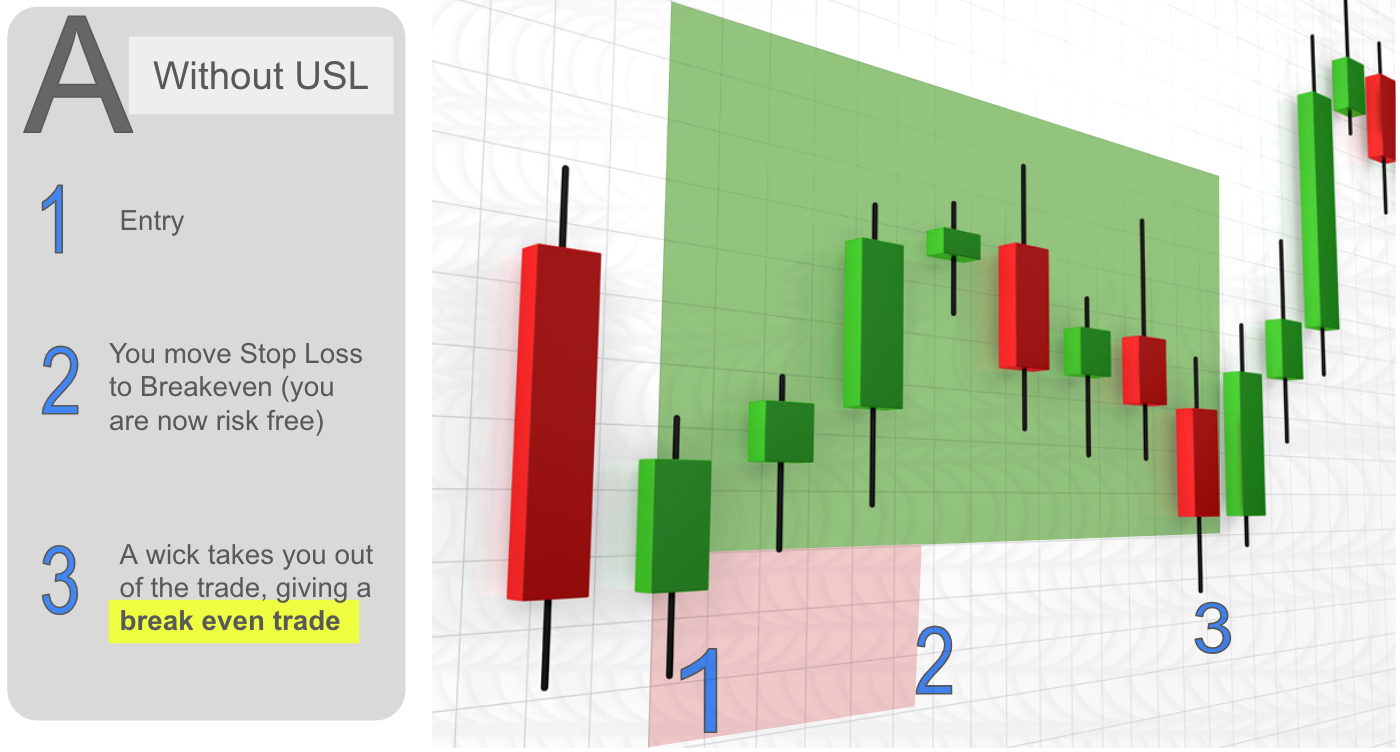
Vous avez méticuleusement planifié vos transactions, fait preuve de patience et êtes entré au moment « parfait ». Au fur et à mesure que la transaction évolue en votre faveur, vous déplacez votre stop loss jusqu'au seuil de rentabilité, vous sentant en sécurité sans capital à risque. Mais ensuite, le marché prend une tournure inattendue, vous arrête et continue dans la direction souhaitée (voir capture d’écran A).
Vous êtes-vous déjà demandé ce qui pourrait être fait différemment ? Chronométrer le mouvement des arrêts est aussi difficile que chronométrer les entrées, et une erreur conduit souvent à des sorties prématurées.


Et s’il existait une meilleure façon de gérer les incertitudes liées aux arrêts en mouvement ? Celui qui élimine les sorties prématurées pour vous maintenir dans le commerce plus longtemps

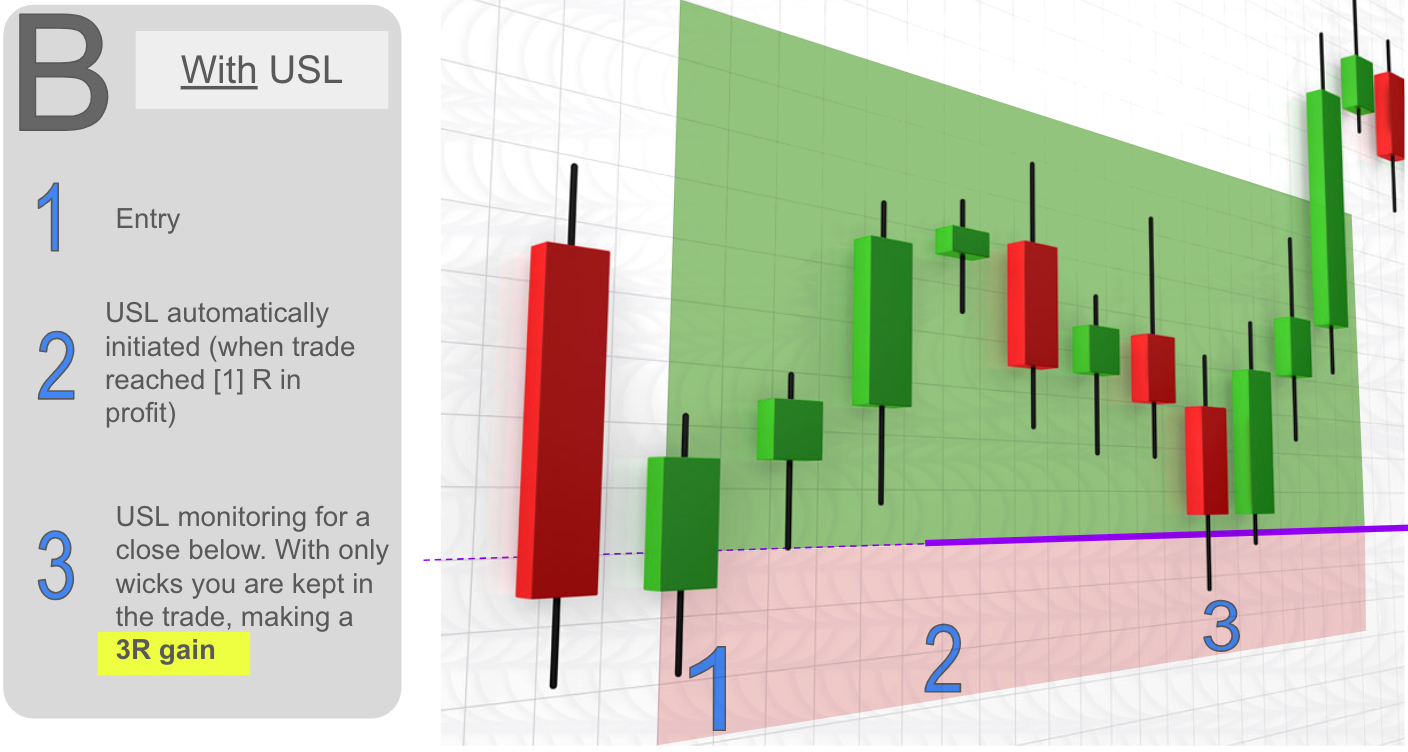
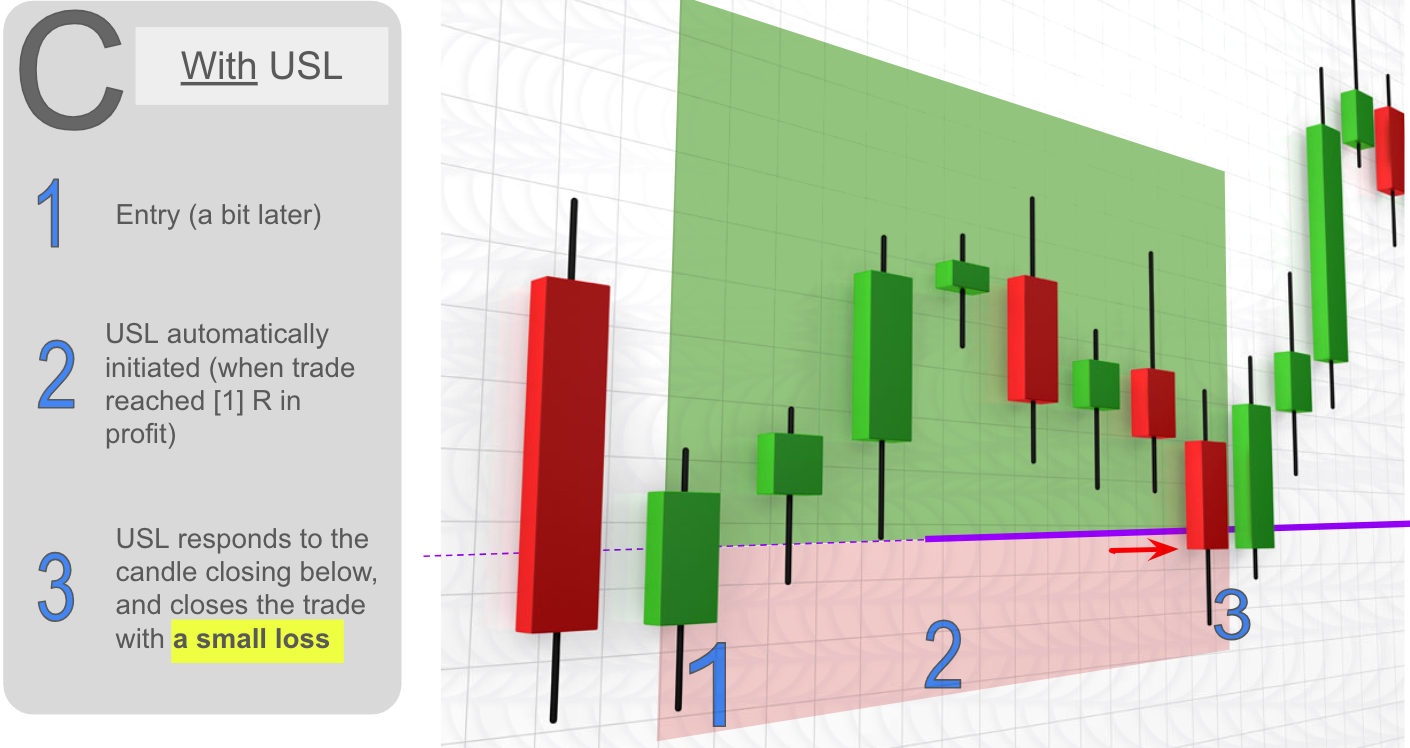
Présentation d'Unwickable Stop Loss (USL), un outil révolutionnaire dans la gestion des risques qui fonctionne de manière transparente avec votre hard stop loss. USL propose des transactions dans lesquelles la mèche ne vous fera pas sortir prématurément (voir capture d'écran B), vous offrant ainsi la sécurité d'une protection contre les baisses tout en gardant votre seuil de rentabilité ou votre stop suiveur résilient, même contre les mèches vicieuses du marché. L'USL fonctionne en exigeant qu'une bougie se ferme en dessous de l'USL (voir capture d'écran C).


Principaux avantages du Stop Loss Unwickable (USL) :
1 - Restez dans le trading le plus longtemps possible pour une expérience de trading mentalement plus facile.
2 - Simple à utiliser, attrayant pour les traders qui souhaitent de la flexibilité dans leurs stratégies stop loss.
3 - Protégez les gains avec l'USL qui suit automatiquement, en évitant les sorties prématurées dues aux effets néfastes du marché.

4 - Remplacez le recours à l'expérience ou à la volonté : obtenez de la cohérence en utilisant des seuils et des jalons prédéfinis.


L'USL est-elle faite pour vous ? Ce n’est peut-être pas une panacée :
L'USL ne vous rendra pas rentable comme par magie si vous n'êtes pas déjà au seuil de rentabilité ou rentable.

Bien que l'USL assure la sécurité, il existe toujours un risque de perte (voir capture d'écran C).


Calcul du potentiel :

Considérons un trader avec 100 transactions, 30 victoires, 40 pertes et 30 transactions au seuil de rentabilité. En supposant un risque de 1 % par transaction, USL pourrait potentiellement ajouter 8 % aux bénéfices en permettant aux transactions au seuil de rentabilité de suivre leur cours. Voir annexe.


Mode d'emploi:
1 - Placez l'expert Unwickable Stop Loss sur un seul graphique uniquement.
2 - Après avoir entré une transaction, la ligne USL apparaît, s'ajustant automatiquement en fonction des paramètres choisis.
3 - Ajustez manuellement la ligne si vous préférez.

4 - Vous pouvez utiliser les touches sélectionnées (S & X par défaut) pour faire défiler les transactions en cours.


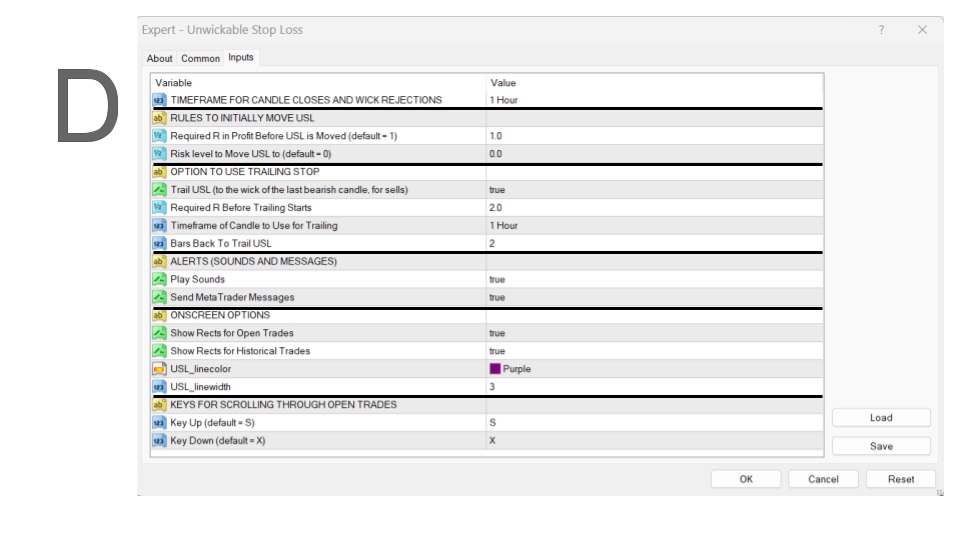
Paramètres système - Paramètres essentiels (voir capture d'écran D) :
Période de négociation : Unwickable Stop Loss (USL) reste résilient à toute mèche au cours de cette période, ne quittant la transaction que si une clôture du corps H1 se produit en dessous de la ligne USL.
Décision relative au niveau de profit : déterminez le niveau de profit auquel vous souhaitez que la ligne USL soit déplacée, que ce soit pour atteindre le seuil de rentabilité ou tout autre niveau de risque que vous choisissez (par exemple, 0,5R).

Décision Trailing Stop : Spécifiez le niveau de profit auquel le trailing peut commencer (par exemple, à 2R). Le trailing consiste à déplacer l'USL vers la mèche de la dernière bougie fermée dans le sens des échanges, avec le réglage par défaut à 2 bougies.


Remarque sur l'affichage des rectangles historiques :

USL peut accéder aux données historiques comme indiqué dans l'onglet Historique du compte de votre client MetaTrader. Faites un clic droit ici pour ajuster la durée si nécessaire. USL ne peut afficher que l'historique des transactions effectuées avec USL activé, car le niveau stop-loss d'origine est nécessaire.


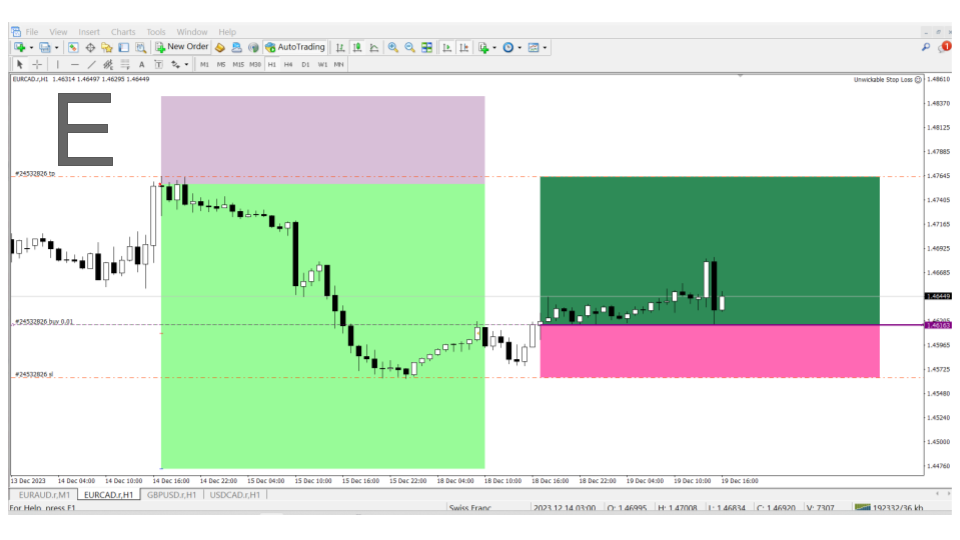
Exemples de transactions - Visualisez USL en action (voir capture d'écran E) :

Pour voir l'effet de l'USL sur les transactions réelles, voici deux exemples : une transaction historique qui a été gérée avec USL incluant le trailing stop et une transaction actuelle qui aurait été souscrite au seuil de rentabilité par la mèche mais grâce à USL nous sommes toujours dans le commerce pour un profit potentiel.


Conclusion:
Le Stop Loss imprévisible pourrait être la pièce manquante de votre stratégie de trading, fournissant une stratégie de sortie systématique pour optimiser les résultats des transactions. Essayez la démo, analysez vos transactions historiques et décidez si USL est la solution que vous recherchiez.

Découvrez l'efficacité de l'USL dans votre trading. Si vous avez besoin de conseils supplémentaires, contactez-nous : nous sommes là pour vous aider !

Annexe. Détails du calcul
Le trader qui a effectué 100 transactions et en a gagné 30 (soit une moyenne de 2 fois son risque par transaction), en a perdu 40 et a atteint le seuil de rentabilité pour 30 transactions. Si le trader risquait 1 % de son capital par transaction, son rendement total serait de 20 % (30 gains à 2 % de gain moins 40 pertes à 1 % par transaction).
Étant donné que ce trader a un taux de réussite de 30 %, il est raisonnable de supposer qu'au moins 30 % de ces transactions au seuil de rentabilité auraient pu se transformer en gagnants.
Si nous pouvions laisser ces transactions au seuil de rentabilité suivre leur cours au lieu de les quitter prématurément, nous ajouterions 18 % (30 % sur 30 transactions à 2 %) à nos bénéfices.
Cela pourrait nécessiter de permettre aux 70 % de transactions restantes de subir une perte modeste (afin de confirmer que le marché est en fait résolument contre nous - voir capture d'écran C).
En supposant une perte estimée entre 0,25 % et 0,5 % sur chacune de ces transactions, la perte totale serait d'environ 5 % à 10 %.
De manière prudente, nous pouvons ajouter au moins 8 % à nos bénéfices. Dans votre propre calcul, utilisez les résultats réels.

Produits recommandés
Colored Candle Time
Saeed Hatam Mahmoudi
Candle Time (MT4) The Candle Time indicator shows the remaining time for the current candle on the active chart timeframe. It adapts automatically to the chart period and updates on every tick. This is a charting utility; it does not provide trading signals and does not guarantee any profit. Main functions Display the time remaining for the current candle on any timeframe (M1 to MN). Color-coded state: green when price is above the open (up), gray when unchanged, and red when below the open (do
FREE
Smart Trade and Order Manager
Md Sakhawat Hossain
4.75 (4)
Smart Trade and Order Manager: An Essential Tool for Precision Trading Smart Trade and Order Manager is your trusted trading assistant, meticulously designed to simplify and streamline your trading operations. It empowers traders by enabling swift order execution and effortless order management, allowing you to dedicate your valuable time to in-depth market analysis and decision-making. With just a few clicks, you can initiate various order types, ensuring you are always in control of your tradi
FREE
Der rebound EA handelt vollautomatisch  Du bekommst hier einen tollen EA mit extra Zubehör, Kostenlos ! Er verwendet keine gefährlichen Strategien wie Martingale oder Gritter usw. Bei diesem EA kannst du vieles nach deinen Wünschen, oder nach meinem Set einstellen. Zusätzlich hat er einen News Filter, er pausiert die trades während der eingestellten Zeit. Zusätzlich erhöht er auf Wunsch die lots Grösse automatisch. Der Backtest und die trades wurden mit Fusion Markets gemacht Hebel 1:500 Zer
FREE
ForexBob 1 Click Button is very impresive forex tool for scalpers: 1. Helpful in Closing multiple trades in just Single Click. 2. Scalper can benefits the most who always eager to close multiple trades in averaging and lock the profits fast. 3. It helps to avoid latency and so profits can be locked where we need. 4. Easy to Install, same as we install any expert advisor. 5. Speed of closing trades depends on your broker's server speed. If you find any improvements we are open to your feedback
FREE
Telegram Signals Copier is a fully automated software that reads messages from Telegram and inserts them as orders on your MT4 terminal. It comes with an advanced risk management tool, that can risk based on a % of your balance, fixed loss, and many other options. You can fully customize how you take the signals, change the TP and SL level. With an advanced analytics tool, you can see where your favorite signal providers are doing the most profit, and improve the profits even more. Contact
FREE
PatternVol EA
Alexandr Gribanov
4.5 (2)
The PatternVol EA is based on its own observations of the market and consists of patterns, candlestick analysis, analysis of candlestick volumes, and also, the EA does not contain indicators. At the moment, the advisor is a small constructor of my non-indicator strategies, you can disable and enable each strategy separately, or make an assembly from several strategies. The work on the advisor continues to this day, new strategies are added, algorithms are improved. In the future, it will be a l
FREE
NeuroExtMT4
Dmytryi Voitukhov
https://t.me/mql5_neuroExt   actual version Signal  https://www.mql5.com/ru/signals/1516213 You can use any tool. The bases will be automatically created at the start of the Learn. If you need to start learning from 0 - just delete the base files. Initial deposit - from 200 ye. Options: DO NOT ATTEMPT TO TEST WITHOUT NEURAL NETWORK TRAINING! it is enough for the balance graph after training to be horizontal. generating a training base is extremely simple.  there is a ready-made training for
FREE
Manual zig zag
Andrey Koshcheev
5 (7)
Manual Zig-zag allows you to build a zig-zag with the mouse, to build it is necessary to turn on the zig-zag and left-click. The file must be placed in the \ MQL4 \ Indicators folder then in the terminal from the list of indicators put it on the chart. A zigzag can be built so that this zigzag can only be seen on the current time frame or in all halves at once. You can change the color and thickness of the line while on the chart without getting into the settings. You can quickly remove each
FREE
The News Filter based EA Controller (NFC) is a very convenient utility to control the live trading status of your Expert Advisors during important news events. The NFC was programmed to prevent all Expert Advisors of live trading during significant news events. The NFC is resource-efficient and uses the Forex Factory Calendar. It is not necessary to set offset hours dependent on your broker, it will be done by the NFC. The NFC was successfully used and tested under MetaTrader 4 on a personal com
FREE
GridderEA Pro
Nikolaos Pantzos
3.83 (6)
It's a multi-currency grid and martingale system that can trade all input pairs from one chart. The expert will close all orders for each pair using a profit level. The expert has the possibility to trade up to 100 pairs. Information Chose a broker with fast execution and low spreads for effective results. Please make some tests on a demo account to see how the expert works before using it on a real account. For 0.01 lot size and leverage 1:500, you need an initial balance of at least 10,000 f
FREE
Nabeeha Trade Manager Compact Manual Trade Manager for MetaTrader 5 and Meta Trader 4 Nabeeha Trade Manager is a lightweight, chart-based manual trading assistant designed to make trade execution and position management faster and easier directly from the MT5/MT4 chart. It provides a compact control panel with   BUY, SELL, partial close, breakeven, profit/loss management, and close-all functions , together with flexible lot calculation modes and swing-based automatic Stop Loss placement. Key Fea
Free automatic Fibonacci is an indicator that automatically plots a Fibonacci retracement based on the number of bars you select on the BarsToScan setting in the indicator. The Fibonacci is automatically updated in real time as new highest and lowest values appears amongst the selected bars. You can select which level values to be displayed in the indicator settings. You can also select the color of the levels thus enabling the trader to be able to attach the indicator several times with differe
FREE
Pin Bars
Yury Emeliyanov
4.83 (6)
Objectif principal: "Pin Bars" est conçu pour détecter automatiquement les barres pin sur les graphiques des marchés financiers. Une barre d'épingle est une bougie avec un corps caractéristique et une longue queue, qui peut signaler un renversement ou une correction de tendance. Comment ça marche: L'indicateur analyse chaque bougie sur le graphique, déterminant la taille du corps, de la queue et du nez de la bougie. Lorsqu'une barre d'épingle correspondant à des paramètres prédéfinis est détec
FREE
The Auto Fibonacci Indicator is a professional technical analysis tool that automatically draws Fibonacci retracement levels based on the most recent closed Daily (D1) or 4-Hour (H4) candle. These levels are widely used by traders to identify key support , resistance , and trend reversal zones . This version is designed for manual trading and supports a powerful trading strategy using Fibonacci levels combined with a 50-period EMA (Exponential Moving Average) , which you can easily add from MT4
FREE
Utility for know all informations and settings of terminal where the utility is loaded. The informations that you can know are for example: - The path of folder where the terminal start - The path of   folder where the terminal store the indicators, experts advisors etc - The path of   common folder - The permission to use DLL, to automated trading etc - The permission to send email, FTP or notifications to smartphone and many other informations
FREE
This expert advisor can enter and exit trades at specific times and on specific weekdays, expressed in GMT Time. It offers weekday selection, trade management settings, a martingale function and money management features. [ Installation Guide | Update Guide | Troubleshooting | FAQ | All Products   |  Get Help ] Easy to use and supervise Fully configurable entry and exit times (up to 5 trades) Enable or disable trading weekdays in inputs Customizable break-even, stop-loss, take-profit and trail
FREE
#1  Copy Signals from  Signals Copier Telegram to MT4   & Never miss a trade again Time saving and fast execution Whether you’re traveling or sleeping, always know that Telegram To Mt4 performs the trades for you. In other words, Our Telegram MT4 Signal Trader  will analyze the trading signals you receive on your selected Telegram channels and execute them to your Telegram to MT4 account. Reduce The Risk Telegram To Mt4   defines the whole experience of copying signals from Telegram signal copi
FREE
NAS100 Auto Sl And TP
Moustapha Boulouz
5 (2)
Voici NAS100 Auto SL and TP Maker pour MT4 : Ne manquez plus jamais le réglage du StopLoss et du TakeProfit avec notre NAS100 Auto SL and TP Maker, un assistant indispensable pour les traders naviguant sur le marché du Nasdaq 100 sur MetaTrader 4. Cet outil est conçu pour ceux qui recherchent une solution transparente pour automatiser la gestion des niveaux de StopLoss et TakeProfit. Caractéristiques principales : Automatisation sans effort : Surveille automatiquement les transactions sur le Na
FREE
EA Dashboard MT4
Teerathad Booranawisedkul
FREE 7-DAY TRIAL After your trial ends, continue using this essential trading tool for only $30 one-time payment. This utility is designed to assist traders in monitoring account status, open positions, and trading performance in real time. It provides consolidated information related to account metrics, risk exposure, and statistical performance to support trading analysis and decision-making. The product does not execute trades automatically and does not provide trading signals. It is intende
StatsBar
Maksim Kalachev
StatBar 1.6 Indicator showing balance, earnings for today, yesterday and the day before yesterday. The indicator also shows: - Server; - GMT; - Server time; - Shoulder; - Spread. Description of variables: extern int Magic = "-1"; // Magic for statistics -1 = all 0 = manual extern string Symboll = "-1"; // Symbol for statistics -1 = all 0 = current EURUSD = for EURUSD
FREE
The utility TradeKeeper Lite can show your profits for different periods and bip a sound when you reach a profit target value. Click the tachometer to quickly switch to the next profit period. There are 5 of them: This Day, This Week, This Month, Last 90 Days and All I Made. With the utility TradeKeeper Pro , available at this link , you can also open trades with a magic number and volume of your choice, trail any orders with a simple trail or iSAR-based trail, as well as close any open trades a
FREE
Rainbow MT4
Jamal El Alama
Rainbow MT4 is a technical indicator based on Moving average with period 34 and very easy to use. When price crosses above MA and MA changes color to green, it’s a signal to buy. When price crosses below MA and MA changes color to red, it’s a signal to sell. The Expert advisor ( Rainbow EA MT4) based on Rainbow MT4 indicator, as you can see in the short video below is now available here .
FREE
Send Orders At Time MT4
Abdeljalil El Kedmiri
This new   time-based strategy   enable you to schedule precise buy/sell orders at any predefined time , allowing you to execute trades based on timing rather than technical analysis.  The system automatically can determines the order type (buy or sell) based on technical confirmations provided by RSI and moving averages. You have the freedom to adjust and customize all parameters related to Buy and Sell criteria, as well as enable or disable technical filters . Link to MT5 version :  https://ww
FREE
Open Popup Notification Please leave a review about this product to help other users benefit from it. " Free " Script to turn on pop-up notifications to view past trading alert messages including displaying account information. This script is compatible with MetaTrader 4 The script is easy to install and use, making it suitable for traders of all experience levels. There's nothing to worry about, including a freezing screen and any kind of effects on other chart windows. Disclaimer: This script

FREE
ExportRange est un script utilitaire conçu pour exporter les données des chandeliers d’une période choisie au format CSV. Le script récupère le plus haut, le plus bas, la plage (différence entre les deux), ainsi que la date et l’index de chaque barre. Il convient aux utilisateurs ayant besoin de données simples et fiables pour des analyses statistiques ou des études de volatilité. Lorsqu’il est appliqué à un graphique, le script extrait le nombre de barres défini et enregistre les résultats au f
FREE
This indicator help to mark the high and low of the session Asian,London,Newyork , with custom hour setting This indicator is set to count from minute candle so it will move with the current market and stop at the designated hour and create a accurate line for the day. below is the customization that you can adjust : Input Descriptions EnableAsian Enables or disables the display of Asian session high and low levels. EnableLondon Enables or disables the display of London session high and
FREE
The Saz_Timer indicator belongs to the Saz_Forex suite of professional indicators designed by Traders, for Traders. This indicator will show minutes and seconds of real time on the chart window. The indicator uses the OnTimer() event so it can update even while no ticks received on the chart. The text is shown toward the bottom right of the chart, encircled red in the screenshot. Inputs: Text Colour, allows selection of the colour for the text.

FREE
FREE for the First 50 Users ================================================================   ShowKillZones v1.0   - Corrected NY AM end time from 11 to 10, and NY PM end time from 17 to 16 (adjusted to Kill Zone hours) [cite: 321, 326]   - Changed NY AM/PM labels to Kill Zone [cite: 321, 326] v1.0  -  User Manual [cite: 321] ================================================================ [Overview] This indicator displays ICT Kill Zones (session hours) on the chart as background zones an
FREE
Virtual Assistant MINI   VIRTUALL ASSISTANT = MAKE YOUR TP AND SL VIRTUAL!   Tool meant to control your stop loss and take profit by converting them to virtual SL/TP (with support for TRAILING) Convert all SL and TP to virtual so your exits on trades are hidden from your broker! Run this EA on any graph, choose 1MIN timeframe (VA is autosaving data only on new bar detected, so graph TF equals to VA autosave period) !!! When using virtual trade exits, stable connection is needed for order executi
FREE
Les acheteurs de ce produit ont également acheté
Bienvenue sur Trade Manager EA, l’outil ultime de gestion des risques conçu pour rendre le trading plus intuitif, précis et efficace. Ce n’est pas seulement un outil d’exécution d’ordres ; c’est une solution complète pour la planification des trades, la gestion des positions et le contrôle des risques. Que vous soyez débutant, trader expérimenté ou scalpeur ayant besoin d’une exécution rapide, Trade Manager EA s’adapte à vos besoins, offrant une flexibilité sur tous les marchés, des devises et i
Trade Indicator Assistant is a powerful MT4 utility designed to turn indicators into automated trading systems. Its main feature is the ability to automatically detect an indicator’s   BUY and SELL signal buffers , without requiring you to know the buffer numbers, search through indicator settings, or modify the indicator source code. Bonus Indicator: After purchasing Trade Indicator Assistant, contact me to receive Trade Signal Pro completely free as a bonus indicator. [Download Demo Version]
Local Trade Copier EA MT4
Juvenille Emperor Limited
4.96 (112)
Local Trade Copier EA MT4 est un copieur de trades rapide et flexible permettant de copier et de gérer des trades entre plusieurs comptes MetaTrader 4 sur le même ordinateur Windows ou Windows VPS. Il combine la synchronisation locale des trades avec des contrôles côté Receiver pour la taille des lots, la gestion du risque, le filtrage des trades, le mappage des symboles, la gestion des trades et la protection du compte. Configurez vos terminaux Transmitter et Receiver en environ 1 minute et co
Exp COPYLOT CLIENT for MT4
Vladislav Andruschenko
4.69 (65)
Copieur de trades professionnel pour MetaTrader 4 Un copieur de trades rapide, fiable et professionnel pour MetaTrader 4 . COPYLOT permet de copier des opérations Forex entre les terminaux MetaTrader 4 et MetaTrader 5 , avec une synchronisation flexible adaptée à différents types de comptes et styles de trading. La version COPYLOT MT4 prend en charge : MetaTrader 4 → MetaTrader 4 MetaTrader 5 Hedge → MetaTrader 4 MetaTrader 5 Netting → MetaTrader 4   Version MT5 Description complète + DEMO + PDF
Trade Assistant MT4
Evgeniy Kravchenko
4.43 (197)
It helps to calculate the risk per trade, the easy installation of a new order, order management with partial closing functions, trailing stop of 7 types and other useful functions. Additional materials and instructions Installation instructions   -   Application instructions   -   Trial version of the application for a demo account Line function -   shows on the chart the Opening line, Stop Loss, Take Profit. With this function it is easy to set a new order and see its additional characteris
Telegram to MT4 Multi-Channel Copier   copie automatiquement les signaux de trading de vos canaux Telegram directement vers MetaTrader 4. Pas de bots, pas d'extensions de navigateur, pas de copie manuelle. Un signal arrive sur Telegram et l'EA ouvre le trade dans votre terminal en quelques secondes. Et avant de copier un canal, le backtester intégré vous montre ce que ce canal aurait fait sur votre compte. Le produit comprend deux composants : une application Windows qui écoute vos canaux Telegr
Le MT4 to Telegram Signal Provider est un outil facile à utiliser et entièrement personnalisable qui permet d'envoyer des signaux à Telegram, transformant ainsi votre compte en fournisseur de signaux. Le format des messages est entièrement personnalisable ! Cependant, pour une utilisation simple, vous pouvez également opter pour un modèle prédéfini et activer ou désactiver des parties spécifiques du message. [ Démonstration ]   [ Manuel ] [ Version MT5 ] [ Version Discord ] [ Canal Telegram ]  N
Trade copier MT4
Alfiya Fazylova
4.61 (36)
Trade Copier est un utilitaire professionnel conçu pour copier et synchroniser les commandesentre les comptes de trading. Les commandes sont copiées du compte/terminal du fournisseur vers le compte/terminal du destinataire, qui sont installés sur le même ordinateur ou vps. Avant d'acheter, vous pouvez tester la version démo sur un compte démo. Version démo ici . Instructions complètes ici . Principales fonctionnalités et avantages: Prend en charge la copie des commandes MT4> MT4, MT4> MT5, MT5>
Take a Break
Eric Emmrich
5 (31)
Take a Break pauses your Expert Advisors when trading is a bad idea: before news, after a daily loss, outside your trading hours, or when a rule you wrote yourself says so. When the pause is over, your EAs simply continue. Account protection for all your EAs in one tool: news filter, drawdown and equity protection, time filter and custom rules. One EA on one chart protects the whole account, the free indicator gives every chart its own rules on top. Free demo | What is new in 26.09 | Support Ass
VirtualTradePad mt4 Extra
Vladislav Andruschenko
4.85 (61)
Panneau de trading pour trader en 1 clic.   Travailler avec des positions et des commandes!   Trading à partir du graphique ou du clavier. En utilisant notre panel de trading, vous pouvez trader en un clic à partir du graphique et effectuer des opérations de trading 30 fois plus rapidement que le contrôle MetaTrader standard. Des calculs automatiques de paramètres et de fonctions qui facilitent la vie d'un trader et aident un trader à mener ses activités de trading beaucoup plus rapidement et pl
Smart Copy Local MT4
Kyra Nickaline Watson-gordon
5 (7)
Smart Copy is an Easy-to-Use EA that supports Multi Copying Metatrader4 and Metatrader5 and Local/Remote Copying. (Remote Version is coming soon) Free version is available on Smart Copy Local Free MT4 Specifications :     Real Time, Multi Terminal - Multi Account - MT4/MT5 trade copying     Copy from netting to hedge and hedge to netting is supported.     Fast and instant copy     All settings are input visually.     Easy modifying symbol names, prefix, suffix     Enable/Disable copying s
Telegram to MT4 Coppy
Sergey Batudayev
4.09 (11)
Télégramme vers MT4 :   la solution ultime pour copier des signaux Simplifiez votre trading avec   Telegram vers MT4   , l'utilitaire de pointe conçu pour copier les signaux de trading directement depuis les canaux et chats Telegram vers votre plateforme MetaTrader 4, sans DLL. Cette solution robuste garantit une exécution fluide des signaux avec une précision et des options de personnalisation inégalées, vous faisant gagner du temps et optimisant votre efficacité. [ Instructions and DEMO ] Cara
KT Equity Protector MT4
KEENBASE SOFTWARE SOLUTIONS
3.75 (4)
Le seul EA que chaque trader MetaTrader devrait faire tourner, mais que beaucoup n’utilisent toujours pas. La plupart des comptes ne sautent pas parce que la stratégie était mauvaise. Ils sautent parce qu’à un mauvais moment, un trader a laissé courir une perte, a renforcé une position, a gardé des trades ouverts pendant le week-end, a rendu au marché une semaine gagnante ou a oublié la limite journalière d’une prop firm à cause d’un seul mauvais clic. KT Equity Protector est le gardien automati
Want automatically to put the pending order, take profit and stop loss? This EA will do it on your behalf! The Fibo Heart EA strategy will place limit order after the ‘check point’ breakout. The position will be triggered when the price make a successful retest. If not, the pending order will automatically deleted after price hit certain level. You also have option to enable market order (instant execution) and custom take profit in the inputs setting. This EA must be attached with Fibo Heart In
Télécharger la version d'essai fonctionnelle Copy Cat More (Chat Copieur) — Copieur de Trades (Trade Copier) MT4 n'est pas un simple copieur de trades local ; c'est un cadre complet de gestion du risque et d'exécution (risk management and execution framework) conçu pour les défis du trading d'aujourd'hui. Des challenges de prop firm à la gestion de portefeuille personnel, il s'adapte à chaque situation grâce à sa combinaison d' exécution robuste, de protection du capital, de configuration fle
Partial Closure EA MT4
Juvenille Emperor Limited
5 (3)
Partial Closure EA MT4 vous permet de clôturer partiellement n'importe quelle position sur votre compte, manuellement selon un pourcentage choisi de la taille du lot et/ou par numéro de ticket, ou automatiquement selon des pourcentages définis des niveaux de TP/SL, en clôturant un pourcentage de la taille de lot initiale sur jusqu’à 10 niveaux de take profit et 10 de stop loss. Il peut gérer toutes ou certaines des transactions de votre compte en spécifiant ou en excluant certains numéros magiq
TradePanel MT4
Alfiya Fazylova
4.84 (95)
Trade Panel est un assistant commercial multifonction. L'application contient plus de 50 fonctions de trading pour le trading manuel et permet d'automatiser la plupart des tâches commerciales. Instructions d'utilisation : https://www.mql5.com/fr/blogs/post/762589 Version d'essai de l'application pour un compte démo : https://www.mql5.com/fr/blogs/post/762644 Comment installer l'application : https://www.mql5.com/fr/blogs/post/762645 Comment tester l'application en mode visuel : https://www.mql5.
King Trade Copier MT4
Mohammed Maher Al-sayed Mohammed Ahmed Saleh
5 (1)
King Trade Copier relie des terminaux MetaTrader qui tournent sur le même ordinateur ou le même VPS. Les trades ouverts sur un compte apparaissent sur les autres. Le fichier contient les deux rôles, de sorte que le même téléchargement devient l'émetteur ou un récepteur selon la valeur que vous donnez à Mode. Sur chaque graphique, le panneau indique si ce terminal envoie ou reçoit, nomme le compte de l'autre côté, compte les récepteurs qui ont répondu et donne l'ancienneté du dernier signal. Un
Indicateur de force des devises pour MetaTrader 4 Cet indicateur de force des devises lit jusqu'à 28 paires majeures et en tire un chiffre par devise, pour les 8 principales : USD, EUR, GBP, JPY, CHF, CAD, AUD et NZD. Au lieu d'ouvrir graphique après graphique pour savoir qui mène, vous lisez un seul panneau sur votre graphique MetaTrader 4 et vous savez quelle devise est achetée et laquelle est vendue. Ce que le panneau affiche Une barre de force classée pour chacune des 8 devises, avec son pou
ATTENTION: The Indicator cannot be backtested, as it is generated exclusively from live intraday calculations based on options flow. GEX Level Converter – Gamma Exposure Mapping for CFD Charts NASDAQ-100 edition — for US100 · NDX · NAS100 · USTECH and every Nasdaq-100 CFD equivalent Instantly see professional options-market levels directly on your MetaTrader Nasdaq-100 CFD chart. The GEX Level Converter translates the daily Gamma Exposure (GEX) zones of the NDX options market into precise pri
天机跟单系统-MT4接收端 天机文件跟单系统是一款专业的跨平台跟单EA,让您在MT4和MT5之间自由复制交易。无论您是管理多个账户、在模拟盘与实盘之间验证策略,还是在不同券商之间迁移交易,天机都能为您提供稳定、灵活、安全的跟单体验。 重要提示:本系统由「发送端 + 接收端」两个EA文件组成,缺一不可,需成对使用。请确保下载了对应您平台(MT4或MT5)的两个文件。 下载   MT5发送端   访问: https://www.mql5.com/zh/market/product/187073 下载   MT5接收端   访问: https://www.mql5.com/zh/market/product/187071 下载   MT4发送端   访问: https://www.mql5.com/zh/market/product/187078 下载   MT4接收端   访问: https://www.mql5.com/zh/market/product/187074 如果这个跟单系统对你有帮助,请给个好评,你的认可是我持续更新最大的动力 核心功能 真正的
天机跟单系统 -MT4发送端 天机文件跟单系统是一款专业的跨平台跟单EA,让您在MT4和MT5之间自由复制交易。无论您是管理多个账户、在模拟盘与实盘之间验证策略,还是在不同券商之间迁移交易,天机都能为您提供稳定、灵活、安全的跟单体验。 重要提示:本系统由「发送端 + 接收端」两个EA文件组成,缺一不可,需成对使用。请确保下载了对应您平台(MT4或MT5)的两个文件。 下载   MT5发送端   访问: https://www.mql5.com/zh/market/product/187073 下载   MT5接收端   访问: https://www.mql5.com/zh/market/product/187071 下载   MT4发送端   访问: https://www.mql5.com/zh/market/product/187078 下载   MT4接收端   访问: https://www.mql5.com/zh/market/product/187074 如果这个跟单系统对你有帮助,请给个好评,你的认可是我持续更新最大的动力 核心功能 真正的跨
This is a program in the form of an EA that attaches to a chart in MetaTrader 4. Then, by using API from Bittrex, Binance websites, it downloads the history of altcoins. By selecting a pair name, the EA automatically downloads all time frames history (Daily,H12,H4,H2,H1,M30,M15,M5,M3,M1) so there is no need to attach multiple EAs to different charts. You can select one pair from Bittrex and 4 pairs from Binance exchange with one running EA and create up to 15 timeframes for 5 different pairs. Th
Copieur ->Interaction d'interface pratique et rapide, les utilisateurs peuvent l'utiliser immédiatement       ->>>> Recommandé pour une utilisation sur des ordinateurs Windows ou VPS Windows Caractéristiques: Paramètres de copy trading diversifiés et personnalisés : 1. Différents modes de lot peuvent être définis pour différentes sources de signaux 2. Différentes sources de signaux peuvent être définies pour le copy trading avant et arrière 3. Les signaux peuvent être définis avec des commentai
EA Local Trade Copier Pro MT4 : Le duplicateur de trades ultime sans DLL Êtes-vous fatigué des copieurs de trades compliqués qui nécessitent des DLL externes dangereuses, font planter votre terminal ou vous confondent avec des fichiers « Master » et « Client » distincts ? Découvrez la prochaine génération de copie de trades avec EA Local Trade Copier Pro MT4. Conçu pour une stabilité maximale, une exécution ultra-rapide et une simplicité ultime, cet utilitaire vous permet de copier de manière tr
X2 Copy MT4
Liubov' Shkandrii
Rapide. Précis. Innovant. Technologique. Découvrez la copie instantanée de transactions avec le révolutionnaire X2 Copy MT4. Avec seulement 10 secondes d'installation simple, vous obtenez un outil puissant pour synchroniser les transactions entre les terminaux MetaTrader sur un seul ordinateur ou Windows VPS avec une vitesse sans précédent. Que vous gériez plusieurs comptes, suiviez des signaux ou déployiez votre stratégie, X2 Copy MT4 s'adapte à votre flux de travail avec une précision et un co
CloseIfProfitorLoss with Trailing
Vladislav Andruschenko
4.88 (32)
Close If Profit or Loss with Trailing pour MetaTrader 4 — fermeture automatique par profit total ou perte totale Un utilitaire pratique pour MetaTrader 4 qui ferme automatiquement les positions lorsque le profit total ou la perte totale atteint le niveau que vous avez défini. L’Expert Advisor surveille les opérations ouvertes, calcule le résultat flottant, peut utiliser Trailing Profit et aide à gérer les positions plus rapidement qu’une réaction manuelle. MetaTrader 4 reste très utilisé par le
Multi Copy
Kaijun Wang
5 (1)
Copieur ->Interaction d'interface pratique et rapide, les utilisateurs peuvent l'utiliser immédiatement       ->>>> Recommandé pour une utilisation sur des ordinateurs Windows ou VPS Windows Fonctions de base : La vitesse d'interaction normale du copy trading est inférieure à 0,5 s Détecter automatiquement les sources de signal et afficher une liste des comptes de sources de signal Associez automatiquement les symboles, 95 % des symboles de trading couramment utilisés sur différentes plateformes
Trend Line Optimizer
Evgenii Aksenov
4.11 (19)
Il s'agit d'un optimiseur de paramètres automatique pour l'indicateur Trend Line PRO Vous pouvez facilement et rapidement trouver les paramètres optimaux pour votre indicateur Trend Line PRO préféré.  L'optimisation ne prend que quelques secondes. L'optimiseur vous permet de trouver les meilleurs paramètres pour chaque paire et période: Amplitude, TP1-TP3, StopLoss, ainsi que les valeurs pour Time Filter et HTF Filter sur la section sélectionnée de l'histoire (Days)  Pour optimiser différents
Trade Dashboard MT4
Fatemeh Ameri
4.96 (54)
Trade Dashboard simplifies how you open, manage, and control your trades, with built-in lot size calculation. It allows you to execute trades, manage risk, and control positions directly on the chart, with tools such as partial close, breakeven, and trailing stop. Designed to reduce manual work and help you stay focused on your trading decisions. A demo version is available for testing. Detailed explanations of features are provided within the MQL5 platform. Installation instructions are include
Filtrer:
Aucun avis
Répondre à l'avis