News Dashboard MT4

4.5
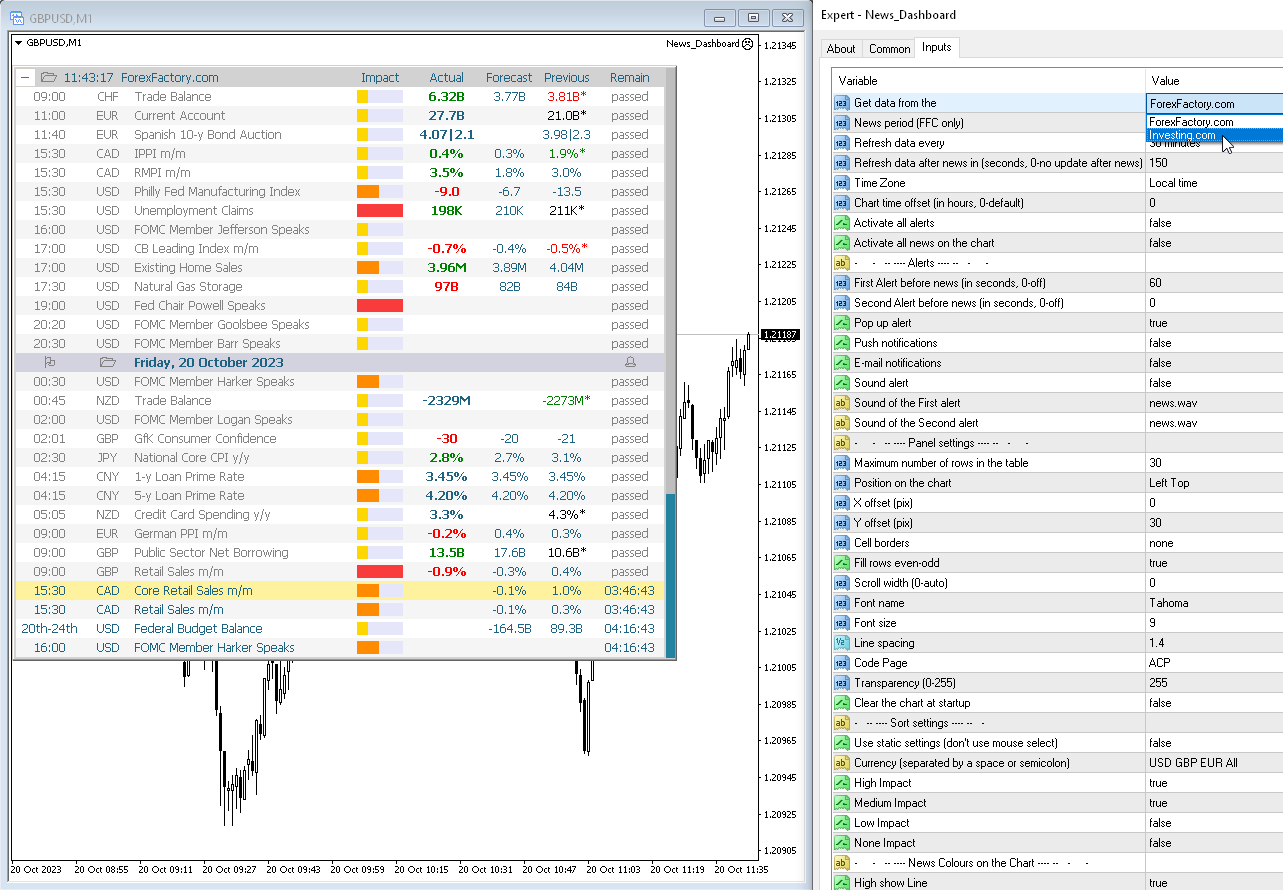
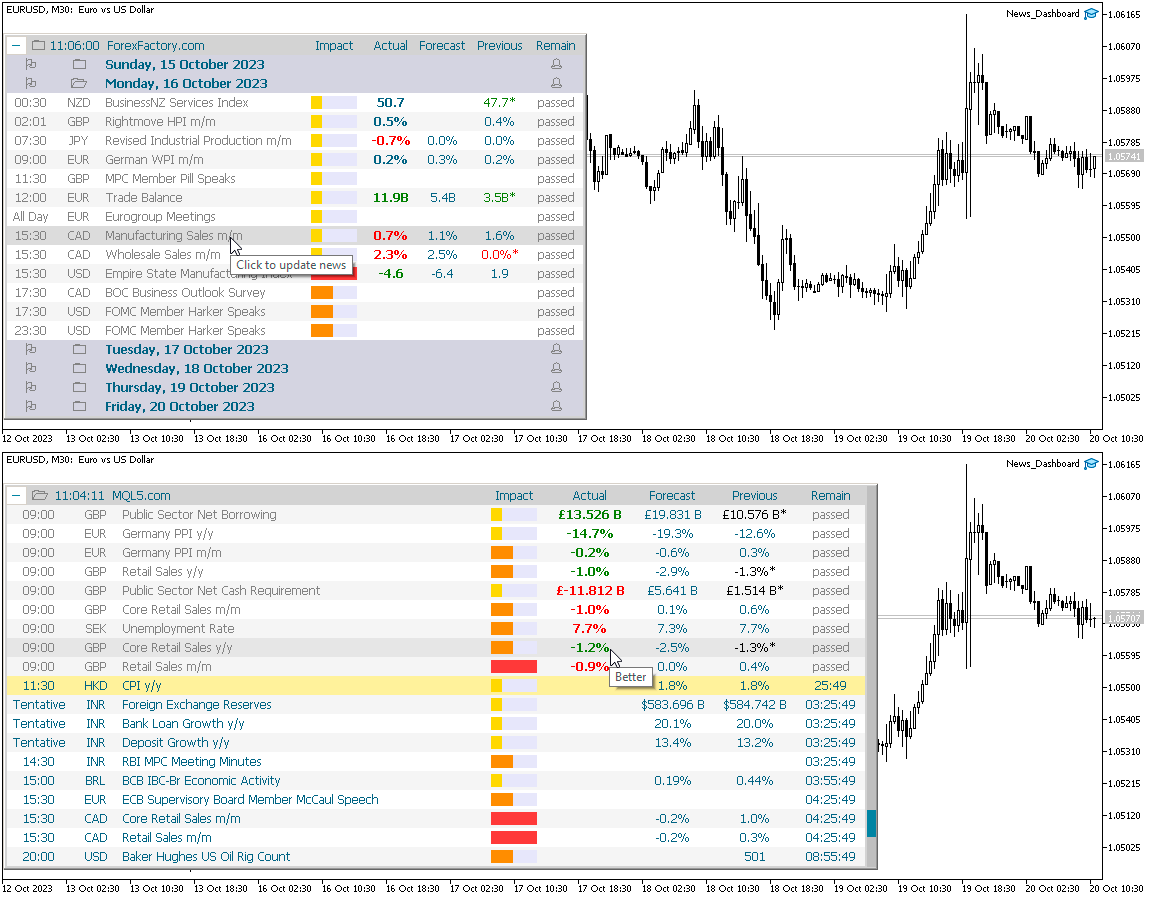
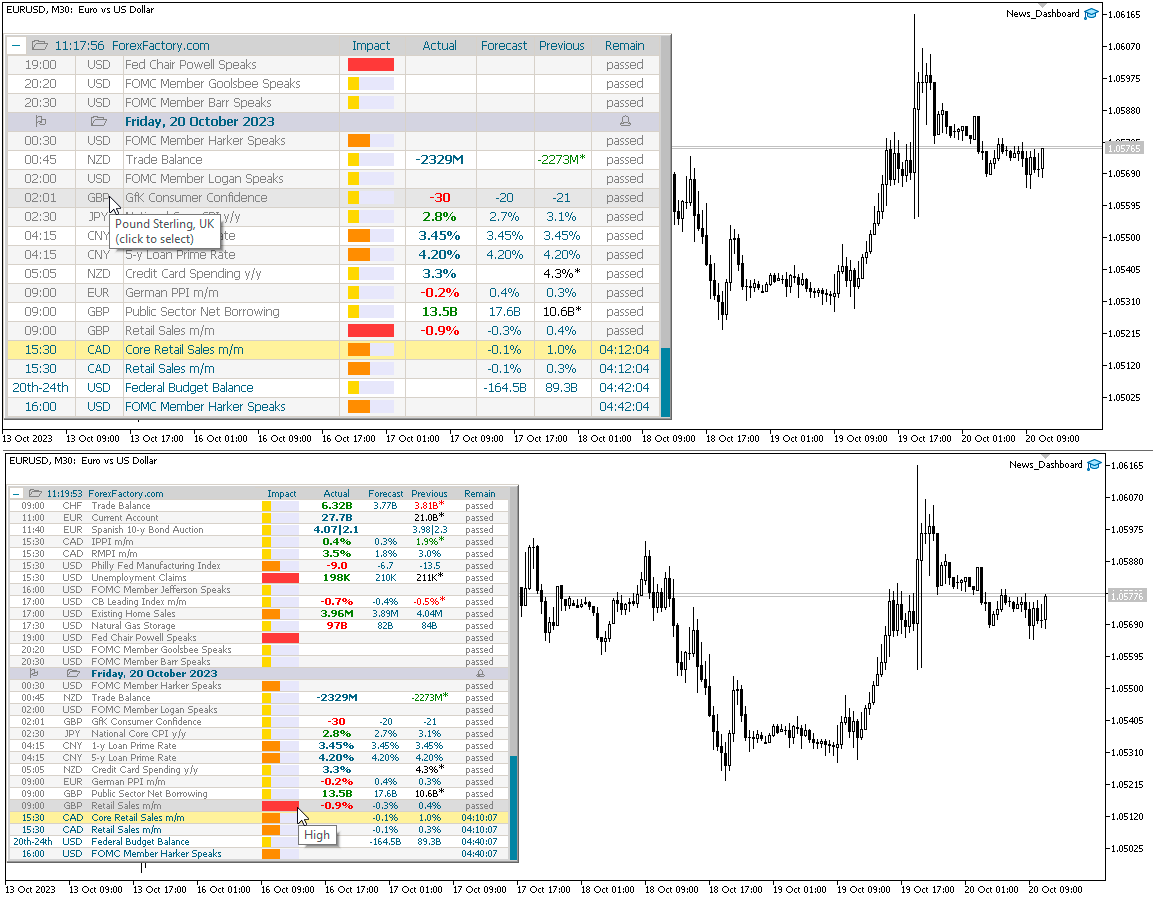
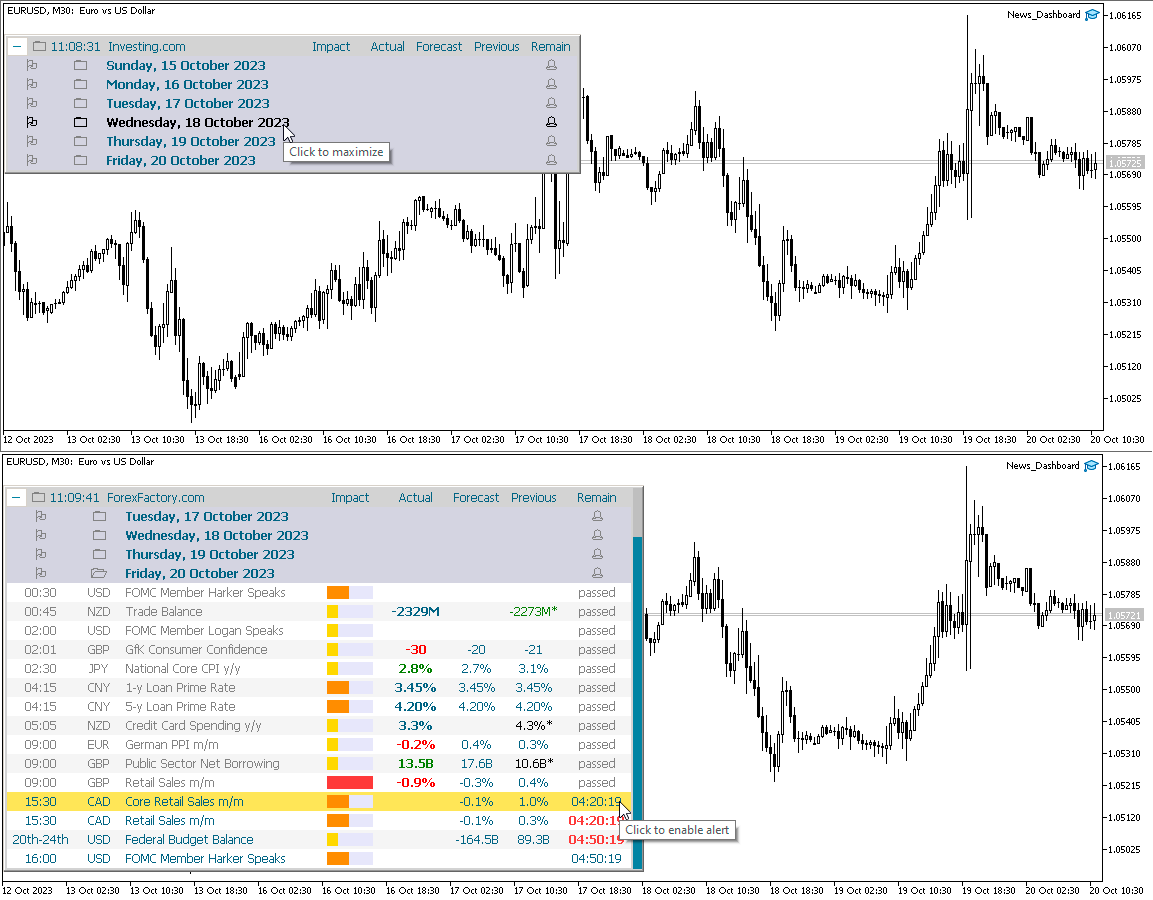
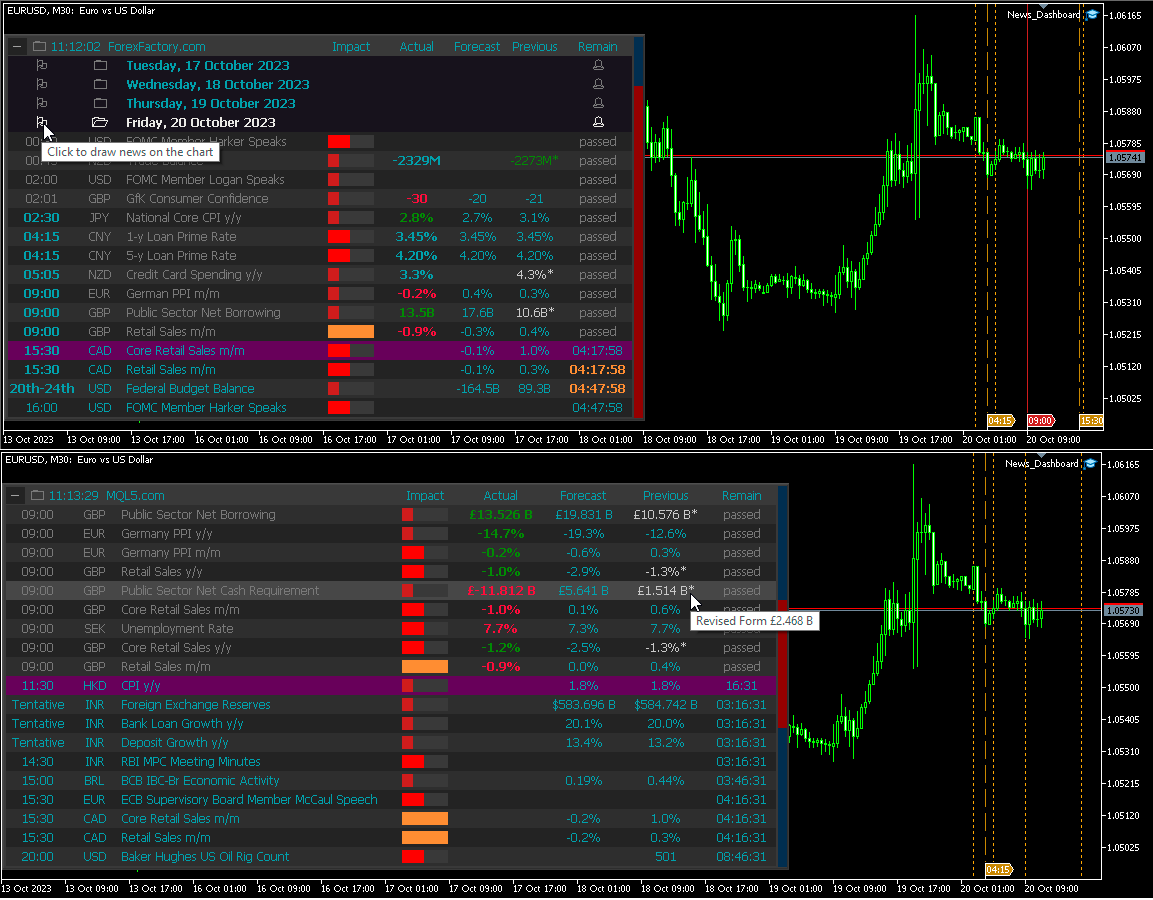
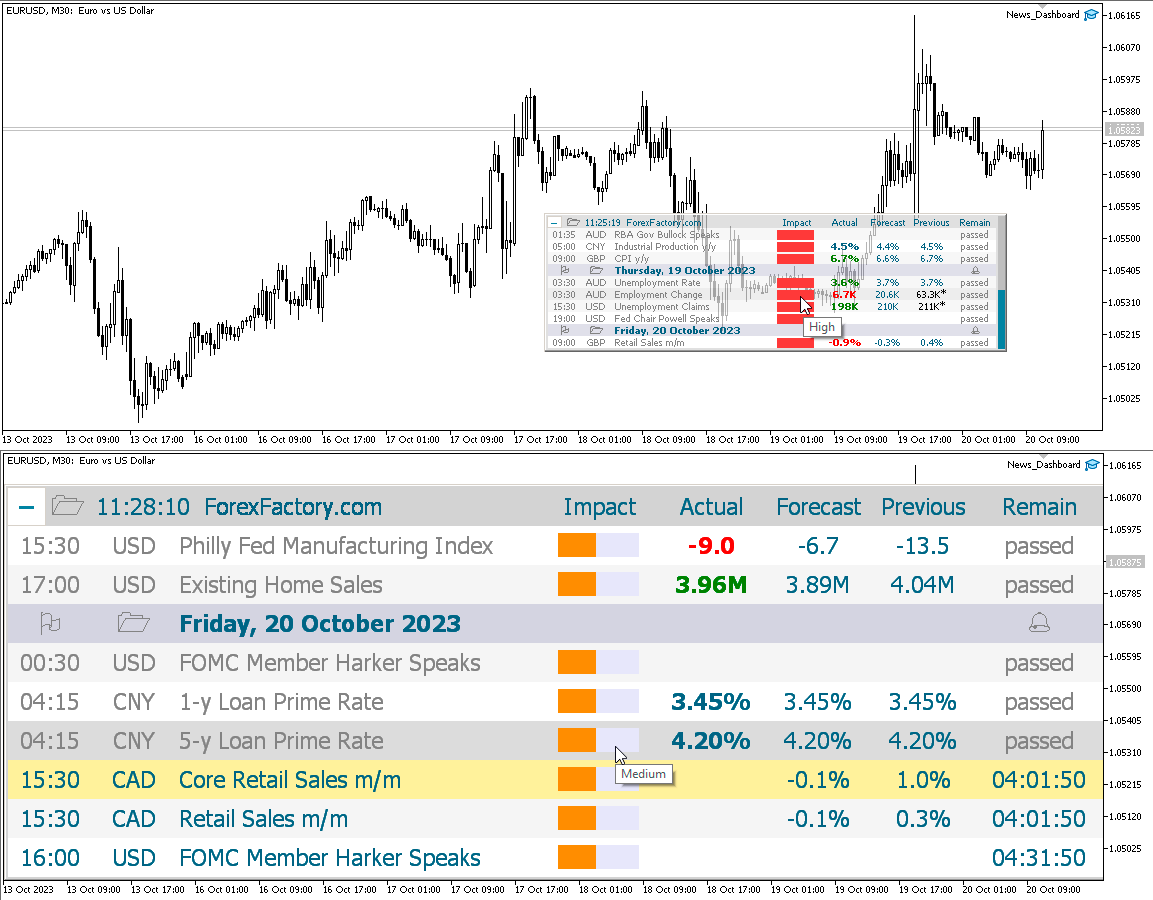
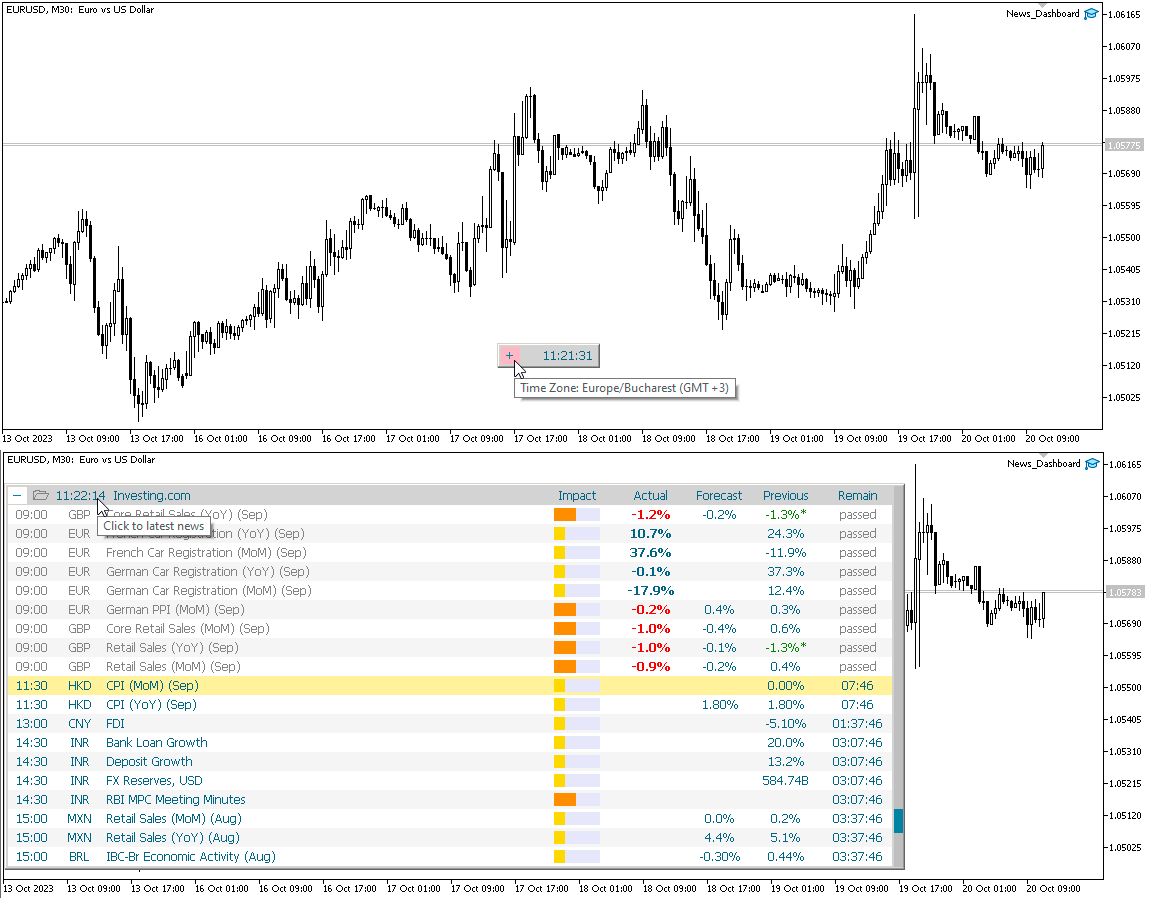
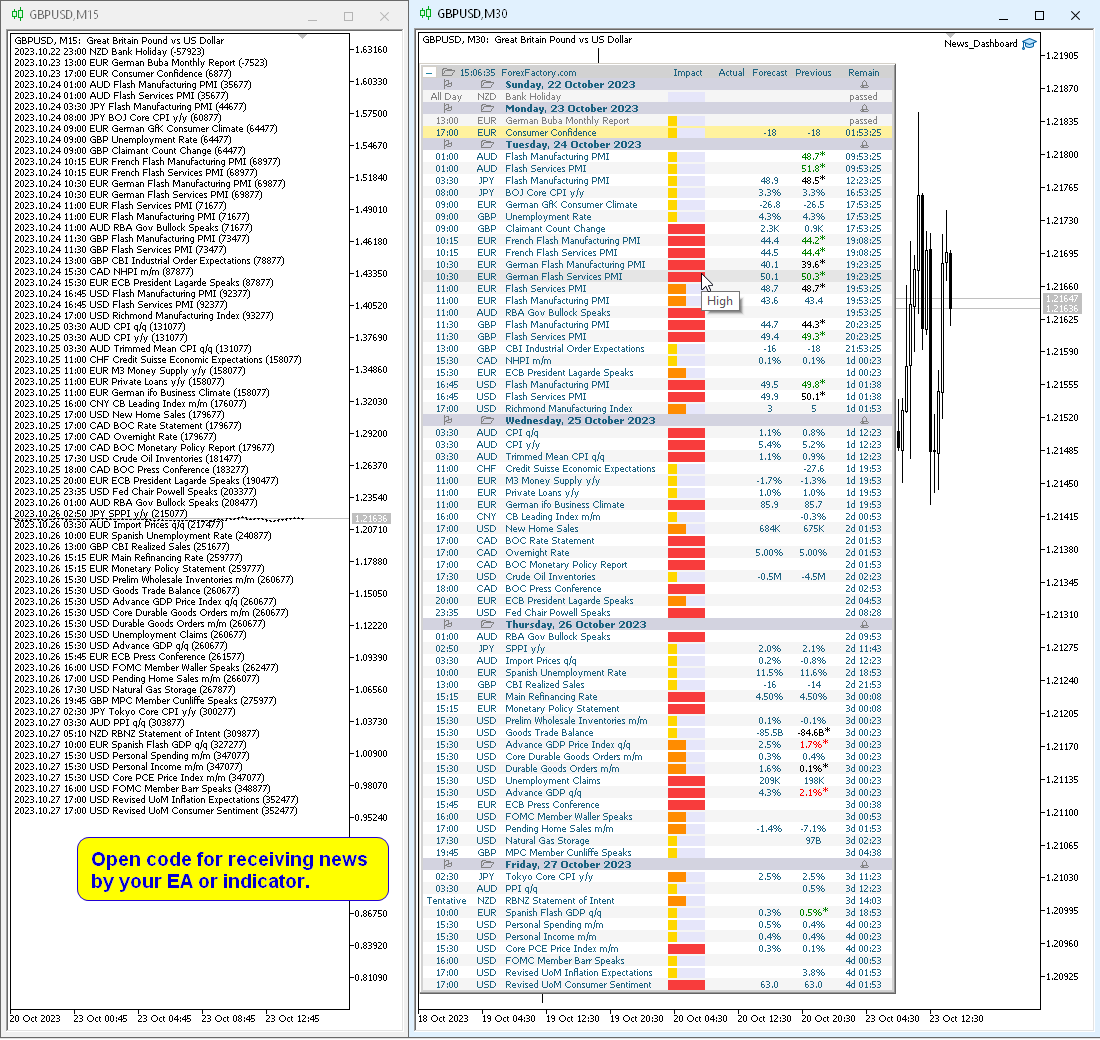
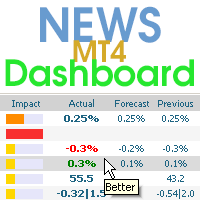
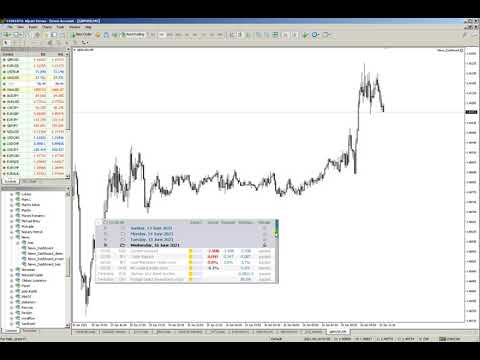
This dashboard displaying current news from ForexFactory.com (calendar FFC) and from the Investing.com website. You can sort news by impact and by country, and display them on the chart with one click. By holding down the 'Ctrl' key, you can select several different 'currencies' or 'impacts' to sort. Also, this utility shows not only the forecast, but also the actual values ​​after they appear on the site. You can set a separate notification for each news.

You can read the news using your EA or indicator. For more details, see the description in the comments.

The EA can close market positions and pending orders before news, move stop loss to breakeven and close positions at the end of the day.

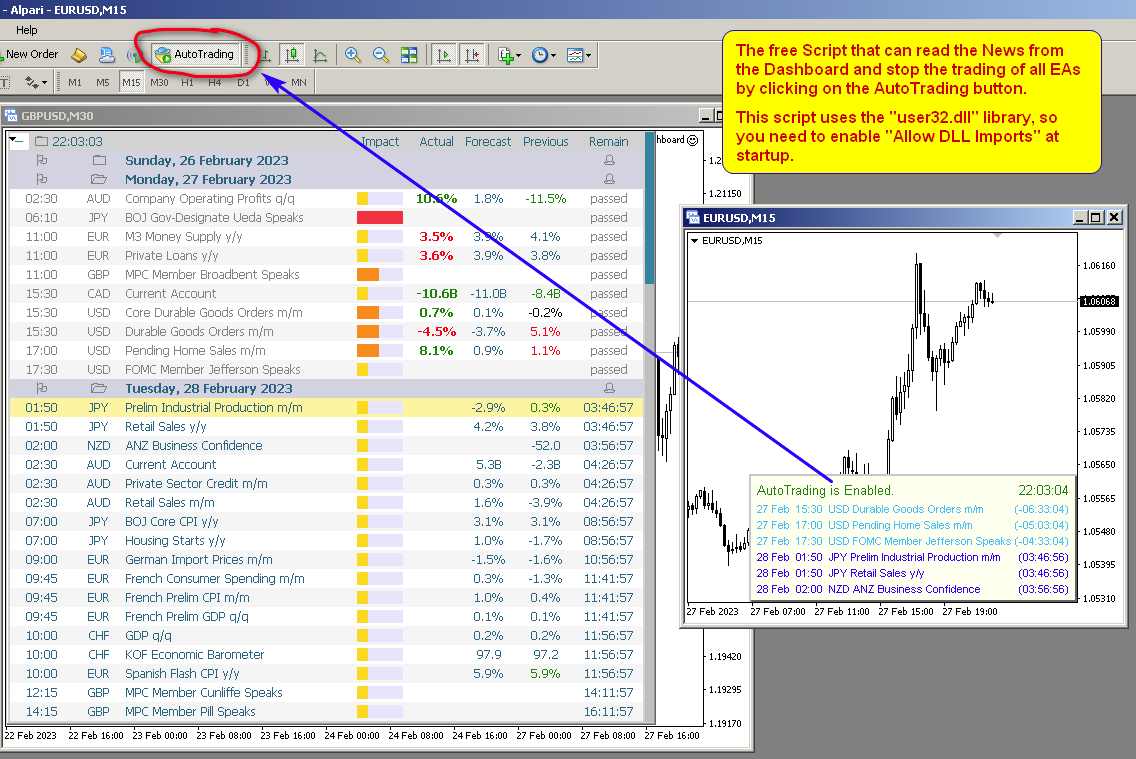
Also in the Comments you can find a Script that can read the news from the Dashboard and stop the trading of all EAs by clicking on the AutoTrading button.

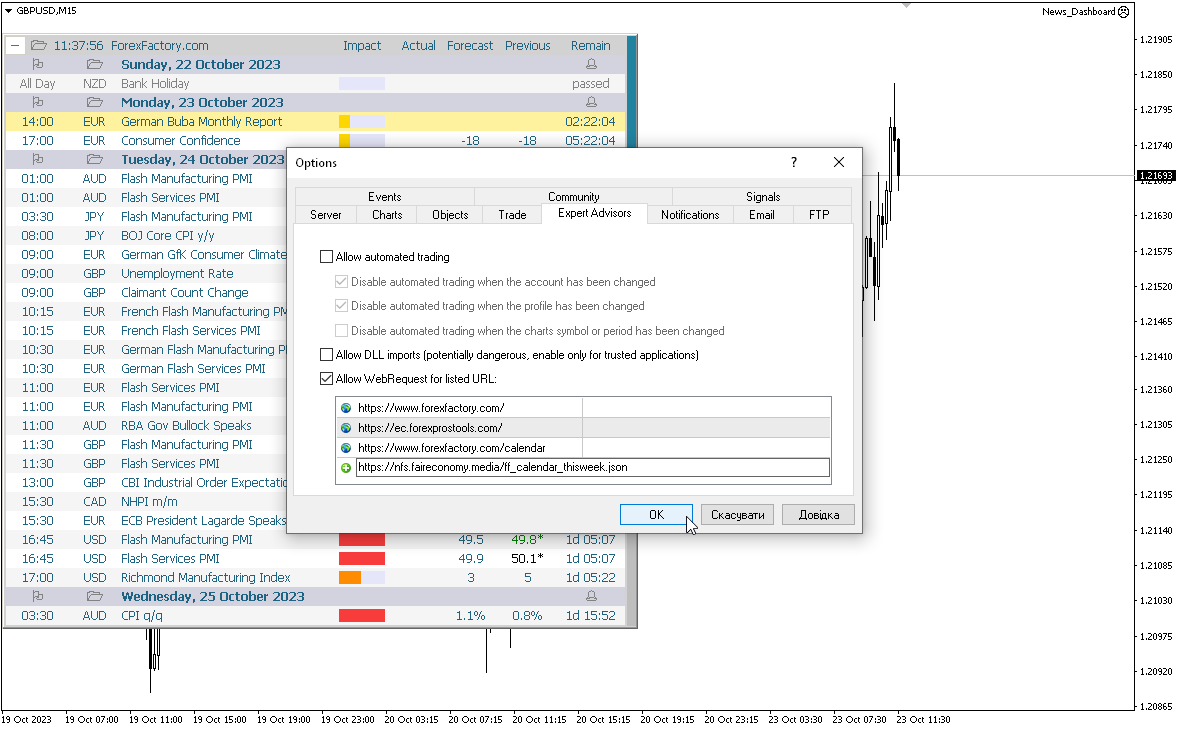
This program takes information from the internet, so you need to enable access to the ForexFactory and  Investing.com sites in your terminal settings.

Press "ctrl+O", "Expert Advisors", "Allow WebRequest", and copy the links to the list (see last screenshot, spaces should be removed, they were added because links cannot be posted here):

https://www.   forexfactory.com/
https://www.   forexfactory.com/calendar
https://           ec.forexprostools.com/
https://           nfs.faireconomy.media/ff_calendar_thisweek.json

    ForexFactory uses CloudFlare protection, and blocks some IP-address and VPS.
    Therefore, before buying, I recommend that you check out the test version, to see if it works for you, which is in the Comments

    Parameters

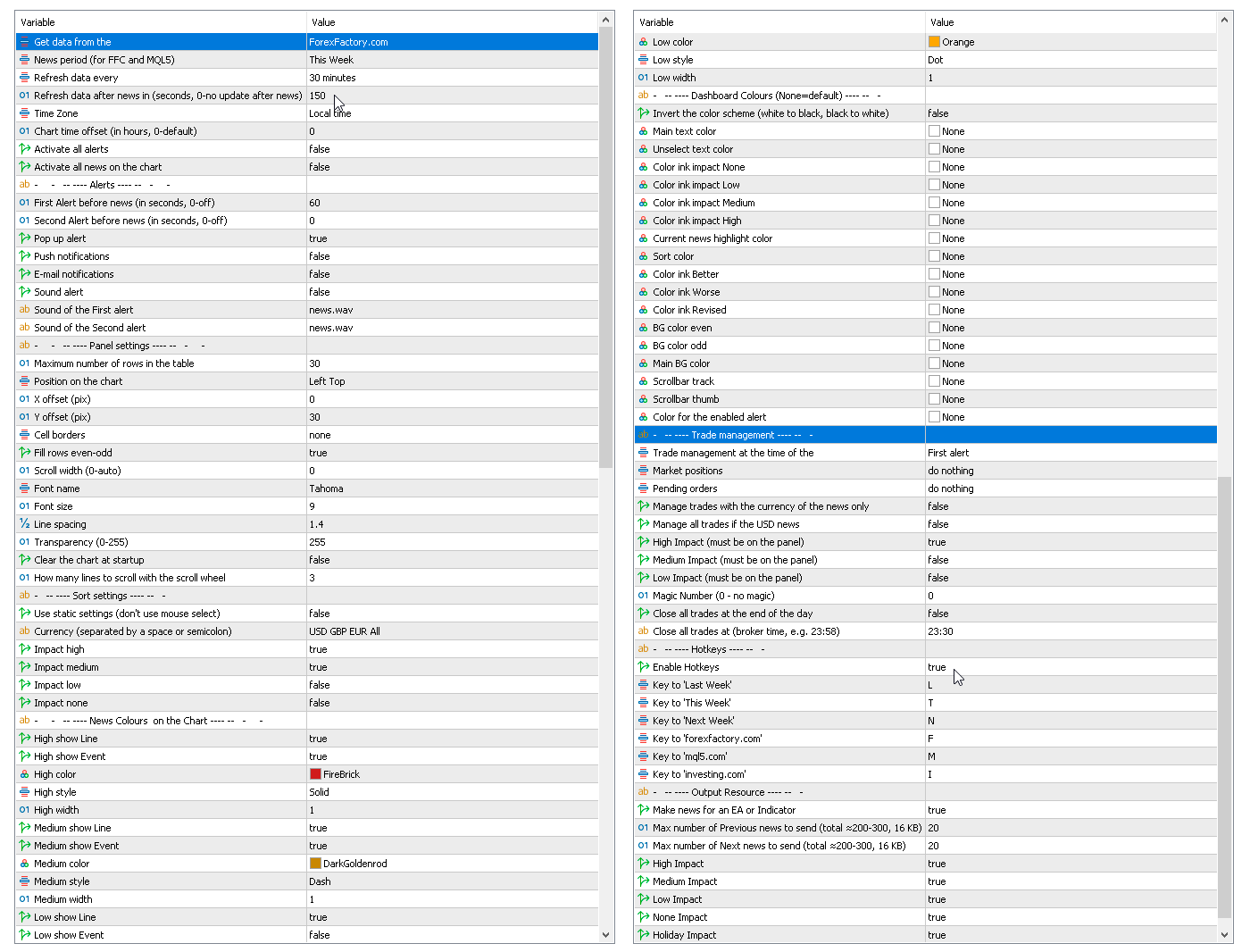
    Get data from the source
      — forexfactory.com
       investing.com
      — 
      FFC (nfs.faireconomy.media)

      News period (for FFC)

        — Last Week — previous week
        — This Week — current week
        — Next Week — future week.
        Refresh data every — update data from the site every X-minutes.
        Refresh data after news in (sec., 0-no update after news) — update data automatically after news release to get actual values, by default after 150 seconds.
        Time Zone — choice of time zone, if it is determined incorrectly.
        Chart time offset (in hours, 0-default) — time shift for drawing objects on the chart.
        Activate all alerts — at start, all news will have alerts enabled;
        Activate all news on the chart — at start, all news will be displayed on the chart;
        Make news for an EA or Indicator.
          Alerts
          First Alert before news (seconds, 0-off) — send a first alert before the news, time in seconds.
          Second Alert before news (seconds, 0-off) — send a second alert before the news, time in seconds.
          Pop up alert — MT alerts.
          Push notifications.
          E-mail notifications.
          Sound alert.
          Sound of the First alert — filename for the first alert. The file must be located in the terminal_dir\Sounds directory. Only audio files in WAV format are played.
          Sound of the Second alert — filename for the second alert.
            Panel settings
            Maximum number of rows in the table.
            Position on chart.
            X offset (pix).
            Y offset (pix).
            Cell borders — options for framing table cells.
            Fill rows even-odd.
            Scroll width (0-auto).
            Font name.
            Font size.
            Line spacing.
            Code Page — change the code page. If the characters on the panel are displayed incorrectly, try other encodings (e.g. ACP or UTF7 .
            Transparency (0-255).
            Clear the chart at startup.
              Sort settings
              Use static settings (don't use mouse select) — this parameter disables the ability to select "currencies" and "impact" with the mouse. Only the values set below will be active.
              Currency (separated by a space or semicolon) — list of currencies to be displayed.
              Impact high — display high impact news.
              Impact medium — display news with medium impact.
              Impact low — display news with low impact.
              Impact none — display news without impact.
              News Colors on the Chart — news colors for displaying on the chart.
              Dashboard Colors (None = default) — color of dashboard elements.
                Trade management
                Trade management at the time of the
                  — First alert
                  — Second alert
                  — turn off
                  Market positions
                    — Close all 
                    — Set Breakeven & Close unprofitable
                    — Set Breakeven
                    — do nothing
                    Pending orders
                      — Close all 
                      — do nothing

                      Manage trades with the currency of the news only.
                      Manage only if the news has an enabled alert on the panel.

                      Manage all trades if the USD news.
                      High Impact (must be on the panel).
                      Medium Impact (must be on the panel).
                      Low Impact (must be on the panel).
                      Magic Number (0 - no magic).
                      Close all trades at the end of the day.
                      Close all trades at (broker time, e.g. 23:58).

                      This EA (news panel) downloads news (news loader) from websites and displays them on your chart.
                      Recensioni 8
                      StonePu
                      34
                      StonePu 2025.10.22 00:09 
                       

                      Simple and great

                      danmar
                      2225
                      danmar 2024.07.03 11:54 
                       

                      HI, i just buy this because it is easy to use, have all information's needed, allow param for what is needed, personally i use the inverted background (white) and with font 18 it is perfect on my big screen. of course, to have the actual value is why i buy it. Very Well Done.

                      ==2024 07 29 === i believe the dashboard was no more functioning (in fact it was my mistake with a click with select only news on USD !) anr Sir Taras respond very very quickly (34 minutes!) and all is ok and i lean something interesting. A big thank you for this very excellent tool and it never leave my big screen. Design excellent information's accurate and possibility to update at any time the data : very well done and Thank you for caring for yours customers. Very Well done.

                      ==2024 12 15 === with many months using this tool it is really excellent and always in my charts, can not imagine to live without !ahahah! Really Excellent and so easy to make it to fit our needs.

                      Sara Sabaghi
                      24124
                      Sara Sabaghi 2023.02.11 11:03 
                       

                      I have my own news panel. but I purchase yours because I like to support your great job with respect to your and your nice work. You made it with love and I hope you do well in the future too.

                      Prodotti consigliati
                      Description: Please tick "Show object descriptions" in chart properties to enable hrays views That utility converts a trendline into a horizontal ray known as tool for drawing supply and demand zones. Simply create a trendline on a chart and once selected, it will get converted. Ray remains horizontal while dragging.  Quick ray plot: press "R" key to create horizontal ray. It will be snapped to the nearest OHLC value Further versions will be improved. For feature request please post new comm
                      Auto Fibo Pro m
                      DMITRII GRIDASOV
                      Indicatore "Auto FIBO Pro" Crypto_Forex: è un ottimo strumento ausiliario nel trading! - L'indicatore calcola e posiziona automaticamente sul grafico i livelli di Fibo e le linee di tendenza locali (colore rosso). - I livelli di Fibonacci indicano le aree chiave in cui il prezzo può invertirsi. - I livelli più importanti sono 23,6%, 38,2%, 50% e 61,8%. - Puoi usarlo per lo scalping di inversione o per il trading di zone grid. - Ci sono molte opportunità per migliorare il tuo sistema attuale us
                      Program Overview: This program is a trading tool designed to monitor and analyze the 7 major currency pairs. It is a variant of a similar program used for tracking stock indices, but this version focuses on the seven major currency pairs. The program helps in identifying and calculating significant price movements (gaps) between the high and low prices of these currency pairs over a specified time frame. It then provides insights through comments and alerts based on the calculated gaps. Major Cu
                      Reversal Monster Mini
                      Abdulfattah Yahya Mohammed Alhazmi
                      The Most advanced and comprehensive EA to trade Trend Reversals/Pullbacks It is a very profitable EA, to trade trends breakout, and manage trades, takeprofit, stoploss, move to breakeven, and trailing stop. The   “Reversal Monster EA”   trades Reversal/Pullbacks when the current price of the pair pullback to a predefined horizontal level or trendline on the currency chart. The opening of the position can be immediate after pullback to the drawn trendline or after closing the candle below/above

                      FREE
                      The Saz_Timer indicator belongs to the Saz_Forex suite of professional indicators designed by Traders, for Traders. This indicator will show minutes and seconds of real time on the chart window. The indicator uses the OnTimer() event so it can update even while no ticks received on the chart. The text is shown toward the bottom right of the chart, encircled red in the screenshot. Inputs: Text Colour, allows selection of the colour for the text.
                      FREE
                      Arrow Micro Scalper è un indicatore progettato per lo scalping e il trading a breve termine, integrato in qualsiasi grafico e strumento finanziario (valute, criptovalute, azioni, metalli). Nel suo lavoro utilizza l'analisi delle onde e un filtro sulla direzione del trend. Consigliato per l'uso su Time Frame da M1 a H4. Come lavorare con l'indicatore. L'indicatore contiene 2 parametri esterni per modificare le impostazioni, il resto è già configurato per impostazione predefinita. Le frecce gran
                      TMA AI Bands
                      Monique Ellen Miranda Dos Santos
                      L'indicatore TMA AI Bands si basa sulla Media Mobile Triangolare (TMA) con bande superiore e inferiore dinamiche e frecce chiare di acquisto/vendita tracciate direttamente sul grafico. Integra un'IA per l'ottimizzazione adattiva e garantisce l'assenza di ridisegno, fornendo segnali precisi di inversione quando il prezzo tocca le bande. * Coppie: funziona con tutte le coppie di valute * Timeframe consigliati: D1 / W1 / MN * Variabili esterne configurabili:   * TimeFrame – periodo di calcolo
                      Unlimited Binary Options Copier Remote is a powerful tool to copy binary options trades remotely between multiple accounts at different locations over internet. This is an ideal solution for signal provider, who want to share his binary options trades with the others globally on his own rules. One provider can copy trades to unlimited receivers and one receiver can get trade from unlimited providers as well. The provider can set the subscription expiry for each receiver, so that receiver will no
                      Auto Breakeven level
                      Makarii Gubaydullin
                      Livelli automatici di break-even Utilizzando   questo   strumento ,   p uoi attivare lo spostamento automatico dello SL, quando il trade raggiunge un profitto desiderato.  Particolarmente   importante   per   i   trader   a   breve termine   .   È disponibile anche l'opzione offset: parte del profitto può essere protetta. Strumento multifunzione : 66+ funzioni, incluso questo strumento  |   Contattami  se hai domande  |   Versione MT5 Processo di attivazione della funzione automatica di break-e
                      L'indicatore SMC Venom Model BPR è uno strumento professionale per i trader che operano nell'ambito del concetto di Smart Money (SMC). Identifica automaticamente due modelli chiave sul grafico dei prezzi: FVG   (Fair Value Gap) è una combinazione di tre candele, in cui c'è un gap tra la prima e la terza candela. Forma una zona tra livelli in cui non c'è supporto di volume, il che spesso porta a una correzione dei prezzi. BPR   (Balanced Price Range) è una combinazione di due modelli FVG che for
                      Forex Candle High/Low Alert Indicator Overview: Forex Candle High/Low Alert Indicator, designed to provide real-time insights and alerts for major currency pairs. This custom-built tool displays key High and Low values over a chosen number of candles and time frame, ensuring you stay informed about critical price movements and trends. (The candles observed are from the 1st candle back - The amount of the chosen number of candles) Key Features: Real-Time High/Low Tracking : The indicator dynamica
                      Super Reversal Pattern
                      Parfait Mujinga Ndalika
                      Super Reversal Pattern Indicator Unlock the power of advanced pattern recognition with our Super Reversal Pattern Indicator. Designed for traders seeking precision and reliability, this indicator identifies one of the most effective reversal patterns in technical analysis, offering a significant edge in your trading strategy. Key Features: Non-Repainting Accuracy: Enjoy the confidence of non-repainting technology. Once a Super Reversal Pattern is detected, it remains static, providing consiste
                      TSim
                      Sergey Kruglov
                      Утилита  TSim   позволяет симулировать ручную торговлю в Тестере Стратегий MetaTrader 4. В панеле можно устанавливать размеры лота, тейпрофита и стоплосса. Панель имеет кнопки Sell   и Buy для выставления рыночных ордеров, а также кнопки CloseSell, CloseBuy и CloseAll для быстрого закрытия ордеров. Под панелью отображается список открытых ордеров. Внимание. Панель работает только в Визуальном режиме Тестера Стратегий MetaTrader 4.
                      FREE
                      Step into the world of Forex trading with confidence, clarity, and precision using   Gold Indicator   a next-generation tool engineered to take your trading performance to the next level. Whether you’re a seasoned professional or just beginning your journey in the currency markets, Gold Indicator equips you with powerful insights and help you trade smarter, not harder. Built on the proven synergy of three advanced indicators, Gold Indicator focuses exclusively on medium and long-term trends eli
                      Daily Candle Predictor è un indicatore che prevede il prezzo di chiusura di una candela. L'indicatore è destinato principalmente all'uso sui grafici D1. Questo indicatore è adatto sia per il trading forex tradizionale che per il trading di opzioni binarie. L'indicatore può essere utilizzato come sistema di trading autonomo o può fungere da aggiunta al sistema di trading esistente. Questo indicatore analizza la candela corrente, calcolando alcuni fattori di forza all'interno del corpo della cande
                      Gold Venamax MT4
                      Sergei Linskii
                      5 (1)
                      Gold Venamax : questo è il miglior indicatore tecnico azionario. L'algoritmo dell'indicatore analizza il movimento dei prezzi di un asset e riflette la volatilità e le potenziali zone di ingresso. Caratteristiche dell'indicatore: Questo è un super indicatore con Magic e due blocchi di frecce di tendenza per un trading comodo e redditizio. Sul grafico viene visualizzato il pulsante rosso per cambiare blocco. Magic è impostato nelle impostazioni dell'indicatore, in modo da poter installare l'indi
                      Smart Backtest
                      Mr Chaiyaporn Boonsamorn
                      For those who are still not confident in their system or are testing new techniques to make it easier without wasting time to change the charts one by one, we recommend EA Smart Backtest to help you backtest your system efficiently. -The EA is intended to Backtest your system.   -Able to open buy or sell in visual mode and can modify values ​​for LOT, SL, TP.   -The chart also shows the Balance Equity Profit status. -Can choose to close, Buy, Close, Sell
                      We present you the indicator "Candle closing counter", which will become your indispensable assistant in the world of trading. That’s why knowing when the candle will close can help: If you like to trade using candle patterns, you will know when the candle will be closed. This indicator will allow you to check if a known pattern has formed and if there is a possibility of trading. The indicator will help you to prepare for market opening and market closure. You can set a timer to create a pre
                      DF Fib Trader Pro DF Fib Trader Pro è un sistema di trading automatizzato progettato per MetaTrader 4. Utilizza livelli di prezzo basati su Fibonacci combinati con analisi di trend e struttura per definire punti di ingresso e di uscita. L'EA supporta posizioni sia lunghe che corte e include parametri di gestione del rischio integrati. Caratteristiche principali: • Utilizza la logica di ritracciamento ed estensione di Fibonacci per tracciare punti di ingresso, SL e TP. • Dimensione del lotto e
                      FREE
                      Set TP & SL by Price – Auto Order Modifier for MT4 Imposta automaticamente livelli precisi di TP e SL su qualsiasi ordine ️ Compatibile con tutti i simboli e gli EA, filtrabile per simbolo o magic number Questo Expert Advisor consente di impostare Take Profit (TP) e Stop Loss (SL) utilizzando valori di prezzo esatti (es: 1.12345 su EURUSD). Nessun pip o punto — solo controllo preciso e mirato su tutti gli ordini, anche con filtri per simbolo o numero magico. Funzionalità principali:
                      Shark Deal Book
                      Philip Pankaj Suthagar
                      4 (3)
                      Term  "shark"  in the business world denotes a high volume investor who just made a good investment in a highly Potential business deal.So, sharks are the ones who make the market move. In our case, if an American shark bought a Japanese company, he/she has to convert American dollars into Japanese yen to make the deal. So, the demand for the Japanese yen will increase sharply. Thus USD/JPY will go short rapidly if the deal was from the shark. Another example, In the case of forex, if fed increa
                      Night Scalper EA Lite
                      Robots4Forex Ltd
                      2.33 (3)
                      The Night Scalper EA Lite is a fully automated Expert Advisor that trades at night and relies on price reversion. The EA trades using market orders and has the option to use time averaging to improve performance. This EA works best on EURUSD using the M5 timeframe, but will also work on AUDUSD, GBPUSD, NZDUSD, USDCAD, USDCHF and likely many more. A VPS is advisable when trading this system and a low spread and commission based broker is best. Check the comments for back test results and optimiz
                      FREE
                      ScalpingOne
                      Xian Er Sha Ao
                      Scalping Day Trading Support Utility Scalping One for MT4 setting faile (for white Chart)    http://www.emkyuradias.shop/indexenglish.html One position is displayed with one button. View P & L, Lot, and Point in real time. It is possible to switch the display of positions of only chart currencies and all currency pairs.   Supports automatic identification in Japanese and English   Account currency notation corresponds to dollar, euro, pound, yen (automatic identification) Lot, take profit and
                      This indicator help to mark the high and low of the session Asian,London,Newyork , with custom hour setting This indicator is set to count from minute candle so it will move with the current market and stop at the designated hour and create a accurate line for the day. below is the customization that you can adjust : Input Descriptions EnableAsian Enables or disables the display of Asian session high and low levels. EnableLondon Enables or disables the display of London session high and
                      FREE
                      Gold Bricks FX USES THE TREND WAVE INDICATOR AND IT CAN IDENTIFY THE BEGINNING AND THE END OF A NEW WAVE TREND MOVEMENT. AS AN OSCILLATOR, THE INDICATOR IDENTIFIES THE OVERBOUGHT AND OVERSOLD ZONES. IT WORKS GREAT TO CATCH THE SHORT TERM PRICE REVERSALS AND USES A MARTINGALE STRATEGY TO CLOSE ALL TRADES IN PROFIT. USE DEFAULT SETTINGS ON H1 OR HIGHER TIME FRAME ON ANY PAIR FOR MORE ACCURATE TRADES WHY THIS EA : Smart entries calculated by 4 great strategies The EA can be run on even a $300
                      Trend Ray
                      Andriy Sydoruk
                      The indicator shows the potential trend direction by cyclical-wave dependence. Thus, all the rays of the intersection will be optimal rays, in the direction of which the price is expected to move, taking into account the indicator period. Rays can be used as a direction for potential market movement. But we must not forget that the approach must be comprehensive, the indicator signals require additional information to enter the market.
                      Virtual Assistant MINI   VIRTUALL ASSISTANT = MAKE YOUR TP AND SL VIRTUAL!   Tool meant to control your stop loss and take profit by converting them to virtual SL/TP (with support for TRAILING) Convert all SL and TP to virtual so your exits on trades are hidden from your broker! Run this EA on any graph, choose 1MIN timeframe (VA is autosaving data only on new bar detected, so graph TF equals to VA autosave period) !!! When using virtual trade exits, stable connection is needed for order executi
                      FREE
                      L'indicateur montre les heures d'ouverture des bourses mondiales. Vous aide à voir quels marchés sont actuellement les plus actifs Découvrez mon  #1 Pro  Utility : 66+ fonctionnalités, incluant cet outil  |   Contactez-moi  si vous avez des questions Aide à sélectionner les instruments les plus volatils en ce moment; Particulièrement utile pour les traders intraday; 1) Lors de l'utilisation sur des délais 1H et inférieurs: les lignes correspondront à la position réelle des barres sur le graphiq
                      PZ Mean Reversion MT4
                      PZ TRADING SLU
                      3 (4)
                      Indicatore unico che implementa un approccio professionale e quantitativo al trading di reversione. Sfrutta il fatto che il prezzo devia e ritorna alla media in modo prevedibile e misurabile, il che consente regole di entrata e uscita chiare che superano di gran lunga le strategie di trading non quantitative. [ Installation Guide | Update Guide | Troubleshooting | FAQ | All Products ] Segnali di trading chiari Incredibilmente facile da scambiare Colori e dimensioni personalizzabili Implementa l
                      Harvest GOLD
                      Sayan Vandenhout
                      Harvest GOLD USES THE TREND WAVE INDICATOR AND IT CAN IDENTIFY THE BEGINNING AND THE END OF A NEW WAVE TREND MOVEMENT. AS AN OSCILLATOR, THE INDICATOR IDENTIFIES THE OVERBOUGHT AND OVERSOLD ZONES. IT WORKS GREAT TO CATCH THE SHORT TERM PRICE REVERSALS AND USES A MARTINGALE STRATEGY TO CLOSE ALL TRADES IN PROFIT. USE DEFAULT SETTINGS ON H1 OR HIGHER TIME FRAME ON ANY PAIR FOR MORE ACCURATE TRADES WHY THIS EA : Smart entries calculated by 3 great strategies The EA can be run on even a $30000
                      Gli utenti di questo prodotto hanno anche acquistato
                      Forex Trade Manager MT4
                      InvestSoft
                      4.98 (424)
                      Benvenuto a Trade Manager EA, lo strumento definitivo per la gestione del rischio , progettato per rendere il trading più intuitivo, preciso ed efficiente. Non è solo uno strumento per l'esecuzione degli ordini, ma una soluzione completa per la pianificazione delle operazioni, la gestione delle posizioni e il controllo del rischio. Che tu sia un principiante, un trader avanzato o uno scalper che necessita di esecuzioni rapide, Trade Manager EA si adatta alle tue esigenze, offrendo flessibilità s
                      TradePanel MT4
                      Alfiya Fazylova
                      4.84 (89)
                      Trade Panel è un assistente commerciale multifunzionale. L'applicazione contiene più di 50 funzioni di trading per il trading manuale e consente di automatizzare la maggior parte delle operazioni di trading. Attenzione, l'applicazione non funziona nel tester di strategia. Prima dell'acquisto, puoi testare la versione demo su un conto demo. Versione demo qui . Istruzioni complete qui . Commercio. Ti consente di eseguire operazioni di trading con un clic: Apri ordini e posizioni pendenti con calco
                      The product will copy all telegram signal to MT4   ( which you are member  ) , also it can work as remote copier.  Easy to set up, copy order instant, can work with almost signal formats, image signal, s upport to translate other language to English Work with all type of channel or group, even channel have "Restrict Saving Content", work with  multi channel, multi MT5 Work as remote copier: with signal have ticket number, it will copy exactly via ticket number. Support to backtest signal. How to
                      Ultimate Extractor - Professional Trading Analytics for MT4 Ultimate Extractor transforms your MetaTrader 4 trading history into actionable insights with comprehensive analytics, interactive charts, and real-time performance tracking. Ability to combine multiple accounts and MT4 and MT5 into a single dashboard. What It Does Automatically analyzes your MT4 trading history across all Expert Advisors and generates detailed HTML reports with interactive visualizations. Tracks live performance metric
                      Copiatrice->Interazione dell'interfaccia comoda e veloce, gli utenti possono utilizzarla subito       ->>>> Si consiglia di utilizzarlo su computer Windows o VPS Windows Caratteristiche: Impostazioni di copy trading diversificate e personalizzate: 1. È possibile impostare diverse modalità di lotto per diverse fonti di segnale 2. È possibile impostare diverse fonti di segnale per il copy trading forward e reverse 3. I segnali possono essere impostati con commenti 4. Se calibrare il lotto in base
                      Il MT4 to Telegram Signal Provider è uno strumento facile da usare e completamente personalizzabile che consente l'invio di segnali a Telegram, trasformando il tuo account in un fornitore di segnali. Il formato dei messaggi è completamente personalizzabile! Tuttavia, per un uso semplice, puoi anche optare per un modello predefinito e abilitare o disabilitare parti specifiche del messaggio. [ Dimostrativo ]  [ Manuale ] [ Versione MT5 ] [ Versione Discord ] [ Canale Telegram ]  New: [ Telegram To
                      Copy Cat More Trade Copier MT4 (Copia Gatto MT4) non è solo un semplice copiatore locale di operazioni; è un quadro completo di gestione del rischio ed esecuzione, progettato per le sfide del trading moderno. Dai challenge delle prop firm alla gestione dei conti personali, si adatta a ogni situazione grazie a una combinazione di esecuzione robusta, protezione del capitale, configurazione flessibile e gestione avanzata delle operazioni. Il copiatore funziona sia in modalità Master (mittente) che
                      News Filter EA MT4
                      Rashed Samir
                      5 (9)
                      News Filter EA: Advanced Algo Trading Assistant News Filter EA is an advanced algo trading assistant designed to enhance your trading experience. By using the   News Filter EA , you can integrate a Forex economic news filter into your existing expert advisor, even if you do not have access to its source code. In addition to the news filter, you can also specify   trading days   and   hours   for your expert. The News Filter EA also includes   risk management   and   equity protection   features
                      Draw Agent
                      Omar Alkassar
                      Draw Agent è progettato come un modo bello e innovativo per creare e gestire tutte le analisi dei grafici, gli scarabocchi, le note e altro ancora. Questo strumento fornisce un metodo di disegno a mano libera, per trattare lo spazio del grafico come una lavagna e disegnare a mano. Questo strumento di disegno a mano libera ti consente di disegnare sui grafici MT4/MT5, al fine di contrassegnare o evidenziare gli eventi sul grafico. È uno strumento utile se ti piace   disegnare manualmente le onde
                      TPSpro Trade PRO
                      Roman Podpora
                      4.67 (6)
                      Uno strumento in grado di calcolare istantaneamente la dimensione della posizione o il rischio in base a un dato livello di stop-loss è fondamentale sia per i trader professionisti che per quelli alle prime armi. L'utilità di trading TRADE PRO fornisce calcoli rapidi e precisi, aiutandoti a prendere decisioni in condizioni di mercato volatili e soggette a tempestività. VERSIONE MT5        /   Materiali di installazione aggiuntivi Funzioni principali: Originale. Semplice. Efficace. Un modo unic
                      DFGX Dashboard
                      Tsvetan Tsvetanov
                      5 (2)
                      Take your trading to the next level with DFGX - our second generation Dynamic Fibonacci Grid. This new, powerful and easy to use application is specially designed and optimized for contrarian intraday trading, scalping and news trading on the Forex market. This system is the ideal solution for active professional traders and scalpers who are looking for innovative ways to optimize their strategy. The system also provides excellent opportunity for new traders who want to learn to trade in a syste
                      Trade Manager MT4 DaneTrades
                      Levi Dane Benjamin
                      4.09 (11)
                      Trade Manager per aiutarti a entrare e uscire rapidamente dalle operazioni calcolando automaticamente il tuo rischio. Incluse funzionalità che ti aiutano a prevenire l'eccessivo trading, il vendetta trading e il trading emotivo. Le operazioni possono essere gestite automaticamente e i parametri di performance del conto possono essere visualizzati in un grafico. Queste caratteristiche rendono questo pannello ideale per tutti i trader manuali e aiuta a migliorare la piattaforma MetaTrader 4. Suppo
                      Take a Break
                      Eric Emmrich
                      5 (31)
                      The most advanced news filter on MQL market - free demo available Take a Break has transformed from a basic news filter into a comprehensive account protection solution. It seamlessly pauses any other Expert Advisors during news events or based on your custom filters, all while safeguarding your EA settings - restoring them automatically when trading resumes for complete peace of mind. Typical use cases: A single news filter for all your EAs. Stop trading during news/high volatility (+ close all
                      Averaging Helper
                      Sergey Batudayev
                      5 (2)
                      Strumento di supporto al trading: questo tipo di strumento di supporto al trading ti aiuterà a calcolare la media delle tue posizioni precedentemente non redditizie utilizzando due tecniche: media standard copertura con successiva apertura di posizioni in base all'andamento L'utility permette   di gestire contemporaneamente diverse posizioni aperte in direzioni diverse, sia per l'acquisto che per la vendita. Ad esempio, se hai aperto una posizione per la vendita e la seconda per l'acquisto, entr
                      With this Expert Advisor, you can seamlessly integrate various channel, arrow, and reversal indicators. It offers the flexibility to use all popular channel trading strategies, while also providing powerful tools to customize your trading conditions and risk management system.   The Expert Advisor opens orders when the price crosses the channel boundaries. Multiple crossing conditions are available for customization: Price touches boundary on re-entry into the channel Price touches boundary on
                      Custom Alerts AIO: Monitora tutti i mercati — senza alcuna configurazione Panoramica Custom Alerts AIO è una soluzione di monitoraggio dei mercati pronta all’uso che non richiede alcuna configurazione. Tutti gli indicatori necessari — FX Power, FX Volume, FX Dynamic, FX Levels, IX Power — sono integrati internamente. Non vengono mostrati grafici, rendendolo ideale per generare alert in tempo reale in modo discreto ed efficiente. Supporta tutte le classi di asset offerte dal tuo broker: Forex,
                      Visualizza immediatamente la cronologia delle tue operazioni chiuse per giorno e settimana, le tue operazioni aperte correnti e l'esposizione forex su un grafico! Utilizza la mappa di calore per identificare le operazioni redditizie e dove si trova il tuo drawdown attuale all'interno del tuo portafoglio di trading. Pulsanti di chiusura rapida Utilizza i pulsanti di chiusura rapida per chiudere ogni operazione su un singolo simbolo, chiudere singole operazioni per intero o ottenere profitti o p
                      Zone Trader MT4
                      LEE SAMSON
                      5 (1)
                      Fai trading automaticamente su zone di supporto e resistenza o di domanda e offerta una volta identificate le aree chiave da cui vuoi fare trading. Questo EA ti consente di disegnare zone di acquisto e vendita con un solo clic e poi posizionarle esattamente dove ti aspetti che il prezzo cambi. L'EA monitora quindi quelle zone e farà trading automaticamente in base all'azione del prezzo che specifichi per le zone. Una volta che il trading iniziale è stato eseguito, l'EA uscirà in profitto nella
                      Remote Trade Copier   is an advanced tool designed for efficiently copying trades between accounts in both   local   and   remote   modes. It allows for lightning-fast order replication from a master account to a slave account. In local mode, trades are copied instantly, while in remote mode, the copying process takes a second.  In new version, in remote mode , the copy operation can be performed with a delay of milliseconds or zero . After purchase, ask how to activate it MT4 Version (Only Loc
                      Trade Copier Pro
                      Vu Trung Kien
                      4.57 (14)
                      Trade Copier Pro is a tool to copy trade remotely to MT4, MT5 and cTrader accounts at different computers/locations over internet. This is an ideal solution for you if you are a signal provider and want to copy your trades to other receivers globally on your own rules. One provider can copy trades to multiple receivers and one receiver can get trade from multiple providers as well. The provider can even set the subscription expiry for each receiver, so that receiver will not be able to receive t
                      The News Filter
                      Leolouiski Gan
                      5 (25)
                      Questo prodotto filtra tutti gli esperti consulenti e i grafici manuali durante il periodo delle notizie, così non dovrai preoccuparti di improvvisi picchi di prezzo che potrebbero distruggere le tue impostazioni di trading manuali o le negoziazioni effettuate da altri esperti consulenti. Questo prodotto viene fornito anche con un sistema completo di gestione degli ordini che può gestire le tue posizioni aperte e gli ordini in sospeso prima della pubblicazione di qualsiasi notizia. Una volta che
                      If you need an advisor on any arrow indicator signals - this utility will definitely help you.  You will be able, with the help of this utility to form an unlimited number of EAs on YOUR signals , with your set of settings, with your copyright and complete source code . You will be able to use the resulting EAs unlimitedly , including adding them to the Market and other resources. Free simple version of the generation script to help you understand how it works - here What does the utility do? 
                      Gann Model Forecast
                      Kirill Borovskii
                      5 (1)
                      I present to your attention a powerful utility for predicting the future movement of an asset based on W.D. Ganna’s law of vibration. This utility analyzes the selected market model and provides codes for future possible market movement patterns. If you enter the selected code into the appropriate box, you will receive a forecast of the potential market movement. The utility has the ability to display several potential forecast models. The forecast is not yet tied to time and price and gives th
                      ManHedger MT4
                      Peter Mueller
                      5 (1)
                      THIS EA IS A SEMI-AUTO EA, IT NEEDS USER INPUT. Manual & Test Version Please   DON'T BUY   this product before   TESTING  and watching my video about it. Contact me for user support or bug reports, or if you want the MT5 version! MT5 Version I do not guarantee any profits or financial success using this EA. With this Expert Advisor, you can: Implement your own   Zone Recovery   strategy to capitalize on trending markets. Create   Grid   trading strategies, to profit from ranging markets. Place
                      The Expert Advisor will help you forward all pop-up alert with screenshot from  MetaTrader 4 to Telegram channel/ group, also forward all notifications to Telegram. Parameters  -  Telegram Bot Token - create bot on Telegram and get token.  -  Telegram Chat ID  - input your Telegram user ID,  group / channel ID  -  Forward Alert - default true, to forward alert.  -  Send message as caption of Screenshot - default false, set true to send message below Screenshot  How to setup and guide  - Telegram
                      The Ultimate Drawdown Recovery & Trade Protection EA for MT4! Your Trades Deserve a Second Chance. Give Them This Soldier. Struggling with floating losses or sudden drawdowns that threaten your account? Stop watching your trades drown in red and let the Ultimate Drawdown Recovery EA (UDR) recover, protect, and empower your trading strategy automatically. What Is UDR? UDR is an ultra-smart, lightning-fast MT4 Expert Advisor designed to recover drawdowns, secure break-even exits, manage trades wi
                      EasyInsight AIO MT4
                      Alain Verleyen
                      4 (2)
                      EASY Insight AIO – La soluzione all-in-one per un trading intelligente e senza sforzo Panoramica Immagina di poter analizzare l’intero mercato — Forex, Oro, Cripto, Indici e persino Azioni — in pochi secondi, senza dover controllare manualmente i grafici, installare indicatori o affrontare configurazioni complicate. EASY Insight AIO è il tuo strumento definitivo di esportazione per il trading alimentato dall’IA, pronto all’uso. Offre una panoramica completa del mercato in un unico file CSV pul
                      Telegram to MT4 Coppy
                      Sergey Batudayev
                      3.57 (7)
                      Da Telegram a MT4: la soluzione definitiva per la copia del segnale Semplifica il tuo trading con   Telegram su MT4   , l'utility all'avanguardia progettata per copiare i segnali di trading direttamente dai canali e dalle chat di Telegram sulla tua piattaforma MetaTrader 4, senza bisogno di DLL. Questa soluzione affidabile garantisce un'esecuzione impeccabile dei segnali con una precisione e opzioni di personalizzazione senza pari, risparmiando tempo e aumentando la tua efficienza. [ Instruction
                      Everything for chart Technical Analysis indicator MT4 in one tool Draw your supply demand zone with rectangle and support resistance with trendline and get alerts to mobile phone or email alert -  Risk reward indicator Video tutorials, manuals, DEMO download   here .  Find contacts on my   profile . 1.   Extended rectangles and trendlines Object will be extended to the right edge of the chart when price will draw new candles on chart. This is rectangle extender or trendline extender. 2. Price to

                      Candlestick Pattern Scanner is a multi-timeframe and multi-symbol dashboard and alert system that checks all timeframes and currency pairs for different candlestick patterns that are formed in them. Scanner is integrated with support and resistance zones so you can check the candlestick patterns in the most important areas of the chart to find breakout and reversal patterns in the price chart. Download demo version   (works on M30,D1,W1 timeframes and 20 symbols of Market Watch window) Read the

                      Altri dall’autore
                      The Gann Box (or Gann Square) is a market analysis method based on the "Mathematical formula for market predictions" article by W.D. Gann. This indicator can plot three models of Squares: 90, 52(104), 144. There are six variants of grids and two variants of arcs. You can plot multiple squares on one chart simultaneously. Parameters Square — selection of a Gann square model: 90 — square of 90 (or square of nine); 52 (104) — square of 52 (or 104); 144 — universal square of 144; 144 (full) — "fu
                      ADX Dashboard MT5
                      Taras Slobodyanik
                      5 (4)
                      L'indicatore ADX viene utilizzato per determinare la tendenza e la sua forza. La direzione del prezzo è mostrata dai valori +DI e -DI e il valore ADX mostra la forza del trend. Se +DI è superiore a -DI, ​​il mercato è in un trend rialzista, se al contrario è in un trend al ribasso. Se l'ADX è inferiore a 20, non esiste una direzione definita. Non appena l'indicatore supera questo livello, inizia un trend di media forza. Valori superiori a 40 indicano un trend forte (un trend al ribasso o al ria
                      Multicurrency and multitimeframe modification of the indicator Bollinger Bands. On the dashboard you can see breakouts and touches of the Bollinger Bands. In the parameters you can specify any desired currencies and timeframes. The indicator can also send notifications when the price touches the Bollinger Bands, when the current volatility changes (expands or falls), and when the price touches all the bands. By clicking on a cell with a period, this symbol and period will be opened. This is MTF
                      Time Scale for MT5
                      Taras Slobodyanik
                      4.75 (28)
                      The indicator draws the time scale on the chart. You can specify the time offset, adjust the size and font to display on the chart ( it is displaying your local time on your chart instead of MT time ). You can also select the desired format for displaying the date and time. You may be interested in my other product , which contains a more advanced version of the Time Scale . You can also find my other products here Parameters Hours (time shift) — time shift (hours); Minutes (time shift) — time

                      FREE
                      Modifica multivaluta e multitimeframe dell'indicatore Relative Strength Index (RSI). È possibile specificare qualsiasi valuta e intervallo di tempo desiderati nei parametri. Inoltre, il pannello può inviare notifiche quando si attraversano i livelli di ipercomprato e ipervenduto. Cliccando su una cella con un punto, questo simbolo e punto verranno aperti. Questo è lo scanner MTF. La chiave per nascondere la dashboard dal grafico è "D" per impostazione predefinita. Similmente al Valuta Strengt
                      Lines Profit Loss MT5
                      Taras Slobodyanik
                      4.62 (13)
                      L'indicatore mostra il profitto (perdita) sul simbolo corrente. Puoi trascinare e rilasciare liberamente la linea per visualizzare il profitto o la perdita corrente. Puoi trovare i miei prodotti   qui Parametri Calculation in money or in points — calcola il profitto/perdita in punti o denaro. Add pending orders to calculate — prendi in considerazione gli ordini in sospeso nei calcoli. Magic Number (0 - all orders on symbol) — numero magico, se è necessario valutare ordini specifici. Offset f
                      FREE
                      Modifica multivaluta e multitimeframe dell'oscillatore stocastico. È possibile specificare qualsiasi valuta e intervallo di tempo desiderati nei parametri. Il pannello visualizza i valori correnti e le intersezioni delle linee: Segnale e Principale (crossover stocastico). Inoltre, l'indicatore può inviare notifiche quando si attraversano i livelli di ipercomprato e ipervenduto. Cliccando su una cella con un punto, questo simbolo e punto verranno aperti. Questo è lo scanner MTF. Similmente al V
                      ADX Dashboard
                      Taras Slobodyanik
                      5 (5)
                      L'indicatore ADX viene utilizzato per determinare la tendenza e la sua forza. La direzione del prezzo è mostrata dai valori +DI e -DI e il valore ADX mostra la forza del trend. Se +DI è superiore a -DI, ​​il mercato è in un trend rialzista, se al contrario è in un trend al ribasso. Se l'ADX è inferiore a 20, non esiste una direzione definita. Non appena l'indicatore supera questo livello, inizia un trend di media forza. Valori superiori a 40 indicano un trend forte (un trend al ribasso o al ria
                      ZigZag Dashboard for MT5
                      Taras Slobodyanik
                      5 (4)
                      Multicurrency and multitimeframe modification of the ZigZag indicator. Displays the current direction of the market, the height of the last movement, the number of bars in this movement and the breaking of the previous point of the ZigZag (horizontal line). This is MTF Scanner, you can actually see the supply and demand levels. You can specify any desired currencies and timeframes in the parameters. Also, the panel can send notifications when the ZigZag changes direction or when there was a br
                      Multicurrency and multi-timeframe indicator Inside Bar (IB). In the parameters, you can specify any desired currencies and timeframes. The panel displays the last found Inside Bar (and Mother Bar) pattern, the current price position and the breakout of the levels of the Mother and Inside Bars. You can set the size and color for bars and text in the cells. The indicator can also send notifications when levels are broken. The dashboard highlights Double Inside Bar in a special color. By clicking
                      Pro Sessions MT5
                      Taras Slobodyanik
                      5 (1)
                      This is an indicator of trading sessions  that can display all levels (Open-High-Low-Close) for four sessions . The indicator can also predict session levels. Sessions can be drawn with lines or rectangles (empty or filled), lines can be extended to the next session. You can easily hide/show each session by pressing hotkeys (by default '1', '2', '3', '4'). You can see ASR (Average Session Range) lines  (default hotkey 'A'). This is similar to the ADR calculation, only it is calculated based on
                      ZigZag Lines MTF
                      Taras Slobodyanik
                      4.38 (13)
                      Multi timeframe ZigZag indicator. It displays the support/resistance horizontal lines and their breakouts, as well as draws the current targets of the market. It can also display lines of the Fractals indicator and candles from other periods (up to Quarterly). So, you can actually see the supply and demand levels. Indicator – connects key lows and highs to show trend lines. You can also use it as indicator for the Break of Structure(BOS) & Market Structure Shift(MSS). The indicator redraws the

                      Heikin Ashi Dashboard
                      Taras Slobodyanik
                      5 (5)
                      Multi-currency and multitimeframe Heikin Ashi indicator. Shows the current state of the market. On the scanner panel you can see the direction, strength and number of bars of the current trend. The Consolidation/Reversal candles are also shown using color. You can specify any desired currencies and periods in the parameters. Also, the indicator can send notifications when the trend changes or when reversal and consolidation candles (dojis) appear. By clicking on a cell, this symbol and period wi
                      CCI Dashboard for MT4
                      Taras Slobodyanik
                      5 (3)
                      Multicurrency and multitimeframe modification of the Commodity Channel Index (CCI) indicator. You can specify any desired currencies and timeframes in the parameters. Also, the panel can send notifications when crossing overbought and oversold levels. By clicking on a cell with a period, this symbol and period will be opened. This is MTF Scanner. The key to hide the dashboard from the chart is "D" by default. Parameters CCI Period — averaging period. CCI Applied price — price type. Clear the
                      MA Dashboard
                      Taras Slobodyanik
                      4.5 (2)
                      Modifica multivaluta e multitimeframe dell'indicatore Moving Average (MA). Sulla dashboard puoi vedere lo stato attuale dell'indicatore: breakout e tocchi (per prezzo) della MA veloce e della MA lenta, nonché l'intersezione delle linee MA tra loro (crossover della media mobile). Nei parametri è possibile specificare le valute e i tempi desiderati. Inoltre, l'indicatore può inviare notifiche sul prezzo che tocca le linee e sul loro attraversamento. Cliccando su una cella con un punto, questo sim
                      MA Dashboard MT5
                      Taras Slobodyanik
                      5 (4)
                      Modifica multivaluta e multitimeframe dell'indicatore Moving Average (MA). Sulla dashboard puoi vedere lo stato attuale dell'indicatore: breakout e tocchi (per prezzo) della MA veloce e della MA lenta, nonché l'intersezione delle linee MA tra loro (crossover della media mobile). Nei parametri è possibile specificare le valute e i tempi desiderati. Inoltre, l'indicatore può inviare notifiche sul prezzo che tocca le linee e sul loro attraversamento. Cliccando su una cella con un punto, questo sim
                      ZigZag Lines MTF for MT5
                      Taras Slobodyanik
                      5 (11)
                      Multi timeframe ZigZag indicator. It displays the support/resistance horizontal lines and their breakouts, as well as draws the current targets of the market. It can also display lines of the Fractals indicator and candles from other periods (up to Quarterly). So, you can actually see the supply and demand levels. Indicator – connects key lows and highs to show trend lines. You can also use it as indicator for the Break of Structure(BOS) & Market Structure Shift(MSS). The indicator redraws the
                      Lines Profit Loss
                      Taras Slobodyanik
                      4.63 (16)
                      L'indicatore mostra il profitto (perdita) sul simbolo corrente. Puoi trascinare e rilasciare liberamente la linea per visualizzare il profitto o la perdita corrente. Puoi trovare i miei prodotti qui Parametri Calculation in money or in points — calcola il profitto/perdita in punti o denaro. Add pending orders to calculate — prendi in considerazione gli ordini in sospeso nei calcoli. Magic Number (0 - all orders on symbol) — numero magico, se è necessario valutare ordini specifici. Offset for
                      FREE
                      ZigZag Dashboard for MT4
                      Taras Slobodyanik
                      4.8 (5)
                      Multicurrency and multitimeframe modification of the ZigZag indicator. Displays the current direction of the market, the height of the last movement, the number of bars in this movement and the breaking of the previous point of the ZigZag (horizontal line). This is MTF Scanner, you can actually see the supply and demand levels. You can specify any desired currencies and timeframes in the parameters. Also, the panel can send notifications when the ZigZag changes direction or when there was a br
                      News Dashboard MT5
                      Taras Slobodyanik
                      This dashboard displays current news from three sources: from the ForexFactory.com website (FFC calendar), from the Investing.com website and the Economic Calendar from mql5.com. You can sort news by impact and by country, and display them on the chart with one click. By holding down the 'Ctrl' key, you can select several different 'currencies' or 'impacts' to sort. Also, this utility shows not only the forecast, but also the actual values ​​after they appear on the site. You can set a separate
                      Pro Sessions MT4
                      Taras Slobodyanik
                      4.75 (4)
                      This is an indicator of trading sessions  that can display all levels (Open-High-Low-Close) for four sessions. The indicator can also predict session levels. Sessions can be drawn with lines or rectangles (empty or filled), lines can be extended to the next session. You can easily hide/show each session by pressing hotkeys (by default '1', '2', '3', '4'). You can see ASR (Average Session Range) lines  (default hotkey 'A'). This is similar to the ADR calculation, only it is calculated based on t
                      Time Scale
                      Taras Slobodyanik
                      4.87 (15)
                      The indicator draws the time scale on the chart. You can specify the time offset, adjust the size and font to display on the chart (it is displaying your local time on your chart instead of MT time). You can also select the desired format for displaying the date and time. While holding down the middle mouse button, and moving the cursor, a slider will appear on the scale. You may be interested in my other product , which contains a more advanced version of the Time Scale. You can also find my o

                      FREE
                      CCI Dashboard for MT5
                      Taras Slobodyanik
                      5 (1)
                      Multicurrency and multitimeframe modification of the Commodity Channel Index (CCI) indicator. You can specify any desired currencies and timeframes in the parameters. Also, the panel can send notifications when crossing overbought and oversold levels. By clicking on a cell with a period, this symbol and period will be opened. This is MTF Scanner. The key to hide the dashboard from the chart is "D" by default. Parameters CCI Period  — averaging period. CCI Applied price  — price type. Clear th
                      Gann Square of 144
                      Taras Slobodyanik
                      5 (6)
                      The Gann Box (or Gann Square) is a market analysis method based on the "Mathematical formula for market predictions" article by W.D. Gann. This indicator can plot three models of Squares: 90, 52(104), 144. There are six variants of grids and two variants of arcs. You can plot multiple squares on one chart simultaneously. Parameters Square — selection of a Gann square model: 90 — square of 90 (or square of nine); 52 (104) — square of 52 (or 104); 144 — universal square of 144; 144 (full) — "fu
                      Multicurrency and multitimeframe modification of the indicator Bollinger Bands. On the dashboard you can see breakouts and touches of the Bollinger Bands. In the parameters you can specify any desired currencies and timeframes. The indicator can also send notifications when the price touches the Bollinger Bands, when the current volatility changes (expands or falls), and when the price touches all the bands. By clicking on a cell with a period, this symbol and period will be opened. This is MTF
                      Magnifier Ruler Crosshair
                      Taras Slobodyanik
                      5 (2)
                      The indicator has three main tools: Magnifier (Zoom chart), Ruler  ( Time and Price scales ),   and Crosshair. You can move it all around with your mouse and customize different formats for  displaying , customize   size and color of each element. The Magnifier (zoom chart) allows you to display candles from any time frame and at different scales. Hotkeys: 'Q' - higher timeframe, 'A' - lower timeframe, 'W' - decrease candle size, 'S' - increase candle size, 'Z' - show/hide zoom chart You can
                      The indicator has three main tools: Magnifier (Zoom chart), Ruler  ( Time and Price scales ),   and Crosshair. You can move it all around with your mouse and customize different formats for  displaying , customize   size and color of each element. The Magnifier (zoom chart) allows you to display candles from any time frame and at different scales. Hotkeys: 'Q' - higher timeframe, 'A' - lower timeframe, 'W' - decrease candle size, 'S' - increase candle size, 'Z' - show/hide zoom chart. You can

                      Inside Bar Dashboard
                      Taras Slobodyanik
                      5 (3)
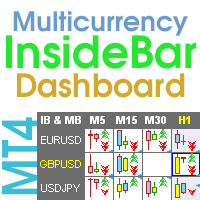
                      Multicurrency and multi-timeframe indicator Inside Bar (IB). In the parameters, you can specify any desired currencies and timeframes. The panel displays the last found Inside Bar (and Mother Bar) pattern, the current price position and the breakout of the levels of the Mother and Inside Bars. You can set the size and color for bars and text in the cells. The indicator can also send notifications when levels are broken. The dashboard highlights Double Inside Bar in a special color. By clicking
                      Heikin Ashi Dashboard MT5
                      Taras Slobodyanik
                      5 (4)
                      Multi-currency and multitimeframe Heikin Ashi indicator. Shows the current state of the market. On the scanner panel you can see the direction, strength and number of bars of the current trend. The Consolidation/Reversal candles are also shown using color. You can specify any desired currencies and periods in the parameters. Also, the indicator can send notifications when the trend changes or when reversal and consolidation candles (dojis) appear. By clicking on a cell, this symbol and period wi


                      Fractals Dashboard MT5
                      Taras Slobodyanik
                      5 (3)
                      Multicurrency and multitimeframe modification of the Fractals indicator. Displays the last two fractals — their sequence (and which one is broken), or the distance between them. You can specify any desired currencies and timeframes in the parameters. Also, the panel can send notifications on a fractal's breakout. By clicking on a cell with a period, this symbol and period will be opened. This is MTF Scanner. The key to hide the dashboard from the chart is "D" by default. Parameters Calculation
                      Filtro:
                      StonePu
                      34
                      StonePu 2025.10.22 00:09 
                       

                      Simple and great

                      danmar
                      2225
                      danmar 2024.07.03 11:54 
                       

                      HI, i just buy this because it is easy to use, have all information's needed, allow param for what is needed, personally i use the inverted background (white) and with font 18 it is perfect on my big screen. of course, to have the actual value is why i buy it. Very Well Done.

                      ==2024 07 29 === i believe the dashboard was no more functioning (in fact it was my mistake with a click with select only news on USD !) anr Sir Taras respond very very quickly (34 minutes!) and all is ok and i lean something interesting. A big thank you for this very excellent tool and it never leave my big screen. Design excellent information's accurate and possibility to update at any time the data : very well done and Thank you for caring for yours customers. Very Well done.

                      ==2024 12 15 === with many months using this tool it is really excellent and always in my charts, can not imagine to live without !ahahah! Really Excellent and so easy to make it to fit our needs.

                      kemdo2000
                      356
                      kemdo2000 2023.03.09 10:43 
                       

                      Waste of money

                      Taras Slobodyanik
                      90846
                      Risposta dello sviluppatore Taras Slobodyanik 2023.05.17 09:14
                      ForexFactory uses CloudFlare protection, and blocks some IP-address and VPS. Therefore, before buying, I recommend that you check out the test version, to see if it works for you, which is in the Comments.
                      Or you can use the source investing.com.
                      Sara Sabaghi
                      24124
                      Sara Sabaghi 2023.02.11 11:03 
                       

                      I have my own news panel. but I purchase yours because I like to support your great job with respect to your and your nice work. You made it with love and I hope you do well in the future too.

                      GRNDMSTRA
                      170
                      GRNDMSTRA 2023.02.08 16:00 
                       

                      THE BEST NEWS TOOL FOR MT4!!!

                      deimy
                      553
                      deimy 2022.05.16 19:08 
                       

                      Great product, recommended

                      Ahmad Walid
                      475
                      Ahmad Walid 2021.05.28 18:05 
                       

                      This is my favorite and the best News panel you can find anywhere! it offers lots of features and the developer Taras is a really good person, he listened to my feedback and suggestions with an open mind, he did everything I asked for and more, so thank you and keep up the good work! :)

                      Sam Lox
                      195
                      Sam Lox 2021.04.05 18:22 
                       

                      Works Great! I love the simplicity.

                      Rispondi alla recensione