Take a Break

5

News filter, equity guard & session control for all your EAs — one tool, full protection — Free Demo | Latest Updates

v26 (August 2026) is the biggest update ever: the EA now protects your entire account — every chart, no helper needed — and the indicator gives any chart its own protection rules (news, loss limits, trading times and more). The AI Trade Assessment arrives in MetaTrader 4 — automatic verdicts on new entries and on-chart assess buttons alike. Existing setups keep working unchanged until you switch; the legacy Chart-Group mode is removed with v27. Versions are now year.month (26.08 = August 2026). Update both products — EA and indicator work as a pair. Full story: Take a Break v26 — every chart gets its own rules

v26 launch window: the price stays at $70 until August 31 — from September 1, Take a Break is $89. All future updates included, as always.

Take a Break has evolved from a basic news filter into a comprehensive account protection solution. It pauses your other Expert Advisors during news events or based on custom filters. When trading resumes, it automatically restores your entire chart setup, including all EA settings.

New in v26: an integrated AI Trade Assessment evaluates each new trade entry directly on your chart — a second pair of eyes that delivers an honest verdict with reasoning, plus an optional auto-close on poor entries.


Why traders choose Take a Break

  • AI Trade Assessment (new!) — every new trade entry is evaluated by an AI that sees your full chart and trading context, with honest verdict and optional auto-close on poor entries.
  • One news filter for all your EAs — no more relying on individual built-in filters that may or may not work.
  • Prop firm ready — stop trading when daily profit/loss limits are reached (FTMO and others).
  • Equity & drawdown protection — automatically pause trading when Equity, Balance or Margin drops below your threshold. Set per-trade SL/TP thresholds and pause EAs after losses.
  • Volatility filters — pause trading when daily price change or candle volatility exceeds your limits.
  • Session & time control — restrict trading to specific days, hours, months or sessions (e.g. US session only).
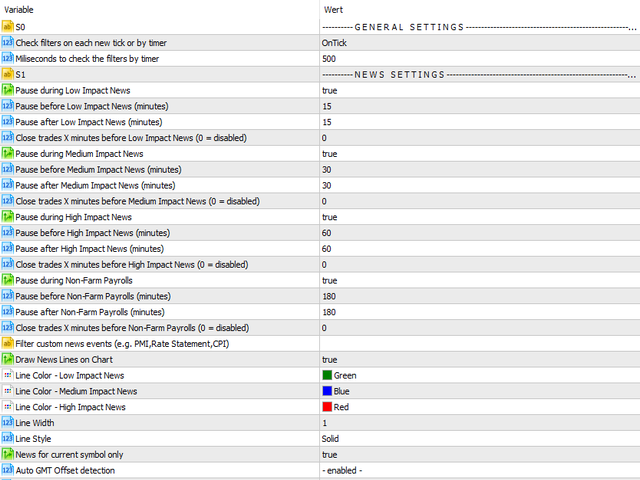
  • Pre-news trade management — close all trades or only specific ones (by Magic Number or comment) before high-impact news hits. Optionally wait for a minimum profit before closing.
  • News alerts — push notifications, email alerts and on-screen popups before upcoming news events.


What sets Take a Break apart

  • Works with any EA — no source code access needed. If it runs on a chart, Take a Break can protect it.
  • The only news filter with a built-in AI second opinion — TaB does not just react to news events, it also evaluates your entries in real time.
  • All-in-one — news filter, drawdown control, equity protection, spread filter, lot limiter and time filter in a single tool.
  • Set and forget — configure once, and Take a Break handles the rest. Your EA settings are saved and restored automatically.
  • Actively developed since 2018 — continuously improved based on user feedback and feature requests.
  • Personal support — direct contact with me, the developer. Feature requests welcome!

Take a Break cannot run in the Strategy Tester. To evaluate it before purchasing, download the free demo version (limited to 1 chart symbol).


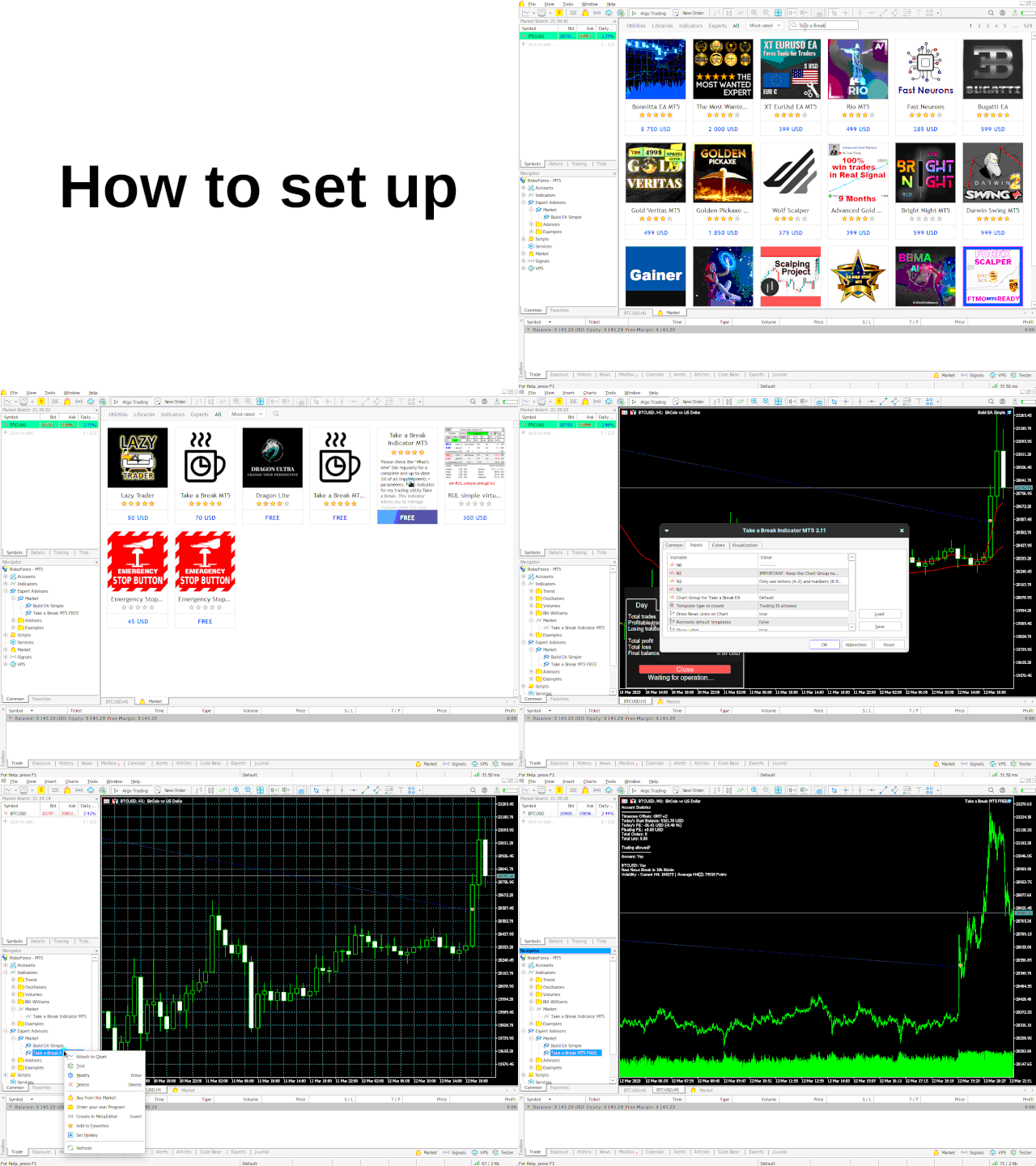
Quick Setup (3 steps)

  1. Allow WebRequests: Press CTRL+O, open the tab Expert Advisors and add this URL to the allowed list: https://trading.custom-solutions.it
  2. Attach the Take a Break EA to any M1 chart (symbol doesn't matter) — your account is protected: when trading is no longer allowed, every chart pauses.
  3. Optional: download the free Take a Break Indicator and add it to any chart that should carry its own rules (news filter, loss limits, trading times and more — configured right on the chart).

Questions about the setup? Try the TaB Support Assistant at trading.custom-solutions.it/support — available 24/7.


How it works

Take a Break uses two components: an EA and an Indicator.

  • The EA runs on a single M1 chart and protects the entire account from there — every chart, no indicator required.
  • The Indicator adds per-chart rules on top: news filter, profit/loss limits, order limits, market filters and trading times for that one chart.
  • Legacy Chart-Group setups keep working unchanged until v27 — see the migration walkthrough.


Feature overview

Category What it does
AI Trade Assessment (new in v26) Real-time evaluation of every new trade entry by AI, based on your chart and the full trading context. Honest verdict with reasoning, risk analysis and concrete improvement suggestions. Optional auto-close on poor entries. Assess buttons on the chart deliver a verdict BEFORE you enter. A number of free assessments are included out of the box, no setup required. Bring your own Anthropic API key for unlimited use.
Per-Chart Protection Profiles (new in v26) The indicator gives any chart its own rules: news filter, profit/loss limits with cooldown, order limits, max spread, volatility and daily-change filters, trading times with daily close, and the chart's own trade scope.
News Filters Pause before/after Special, High, Medium and Low impact news. Separate NFP timing. Filter by event name (e.g. "PMI,CPI") or symbol (e.g. "EUR,USD"). Auto-detects relevant symbols per chart. Close trades X minutes before news (all, by Magic Number or by comment). Optionally require a minimum profit or maximum loss before closing.
News Alerts Push notifications, email alerts and on-screen popups before upcoming news events. Configurable quiet hours.
Drawdown Protection Set a stop-loss and/or take-profit threshold per trade or across all trades. Automatically pauses EAs for X minutes after a loss or profit event. Works in account currency or percent of balance.
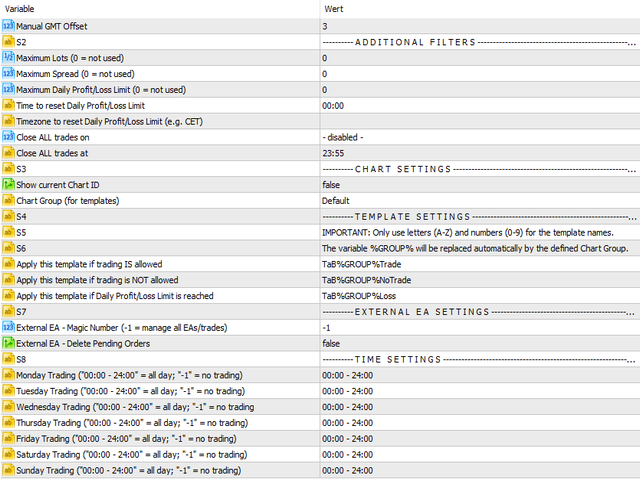
Account Protection Daily profit & loss limits (Equity or Balance mode). Min/Max Equity thresholds. Configurable reset timezone and time. Automatically closes all trades and pauses EAs when limits are hit — since v26 on every chart of the terminal, with automatic resume.
Volatility Filters Pause trading when daily price change exceeds a threshold (% or absolute). Filter by candle volatility on any timeframe. Optionally close open trades when triggered.
Trading Times Per-weekday trading windows with flexible format (e.g. "4-5,20-22"). Filter by days of month, days of year or specific months. Maximum trade duration. Scheduled trade closures on specific weekdays or daily.
Additional Filters Maximum spread per symbol. Maximum total lots. Max open orders (total, buy-only or sell-only). Max daily orders. Minimum success rate filter.

For the full settings list and latest improvements, check the "What's new" tab. Need help? Contact me

Recensioni 33
dyakoo
263
dyakoo 2025.12.19 19:33 
 

A must have tool for every trader! I love it been looking for something like this for a long time

Quantxtech
545
Quantxtech 2025.01.28 10:34 
 

Excellent EA. I recommend it to everyone. It allows me to integrate risk management functions and stay away from situations of high expected (news) and unexpected volatility. The author is very professional and enthusiastic, responds immediately and is very available to give suggestions and accept advice.

Carl Christian Nyberg
1403
Carl Christian Nyberg 2024.12.15 19:54 
 

Fantastic little thing that adds up really good the the EA's that I'm currently running. So far it has managed to avoid bad trades just before major news happenings. Will keep on running it and trying to find the perfect setup regarding Drawdown Control and Minimum Profit/Maximum Loss before and during news.

Prodotti consigliati
Details of each condition Type 1. Set no use Hedging Martingale, to open the order by yourself only through the push button. TP and SL follow setting. Set Setting_Hedging =false; Set Setting_TrailingStop =false; if not use. Type 2. Semi Auto Recovery Zone You have to open the order by yourself only through the push button. If in the wrong direction and Set true on Hedging Martingale, EA will fix the order with the zone system by use Hedging Martingale Set Setting_Hedging =true; Set Setting_Tra
SmartDash Trader EA This is MT4 Semi Automated EA which trade using BUY, SELL and CLOSE Buttons to executes trade actions. You can use Auto Set SL/TP/Lot of your choice since the EA comes with only 0.01 lot and 0 for TP/SL. Set 10 pips for TP to take advantage of trades. NOTE: THIS EA DOES NOT BACKTEST. ITS BUTTON TRADER EA HOW THE STRATEGIES TO USE THE DASHBOARD TRADER Wait for a weaker or stronger currency means the currency strength meter should show less than 15% for SELL and more than 88% f
Semi Auto Recovery Zone
Sirinya Pakkaman
5 (1)
Details of each condition Type 1. Set no use Hedging Martingale, to open the order by yourself only through the push button. TP and SL follow setting. Set Setting_Hedging =false;     Use_Signal =false;  Type 2. Semi Auto Recovery Zone You have to open the order by yourself only through the push button. If in the wrong direction and Set true on Hedging Martingale, EA will fix the order with the zone system by use Hedging Martingale Set Setting_Hedging =true;     Use_Signal =false;  Type 3. Use
MultiTP Trade Manager EA — Advanced Trade Management Made Effortless (MT4) Limited Offer – First 100 Downloads FREE! Be among the first 100 traders to download Trade Anchor Manager (MT4/MT5) completely free of charge. Hurry – once the limit is reached, the offer closes instantly! After trying it out, we’d love if you could leave a review and share your thoughts – your feedback helps us improve and lets other traders know what to expect. Need this Trade Anchor Manager for MT5?  http
FREE
Overview Happy Shiba Inu is a precision scheduling utility designed to restrict a MT4 account's trading activity to specific day or time windows. It manages both live execution logic and the automatic cleanup of pending orders during "Off-Hours." Operational Logic Pending Orders: The moment the timer hits a "Restricted" zone, the EA will scan all open orders. Any Limit or Stop orders will be deleted immediately to prevent accidental fills during high-volatility off-hours. Execution Block: Any c
Unlock the power of "Psychological Numbers" with RoundLevel . Large financial institutions, banks, and hedge funds don't place orders at random prices; they prefer round numbers (e.g., 1.1000, 105.00, 2000). These levels act as invisible magnets for price action, serving as high-probability support and resistance zones. Key Features: Universal Compatibility: Works perfectly on Forex, Gold (XAUUSD), Indices, and Stocks. Clean Visualization: Automatically draws horizontal levels without cluttering
Grid Trading
Waseem Raza
5 (3)
Grid Trading EA is a semi-automated one-click trading EA for both Normal Trading and Grid/Martingale Trading . Normal Trading Simply click Buy or Sell directly from the chart. The EA will automatically manage trades by: Setting Stop Loss and Take Profit Managing Trailing Stop Grid / Martingale Trading When Grid Trading mode is enabled, the EA will automatically open additional grid orders at specified distances while increasing the lot size based on your settings. Inputs & Settings Lots — Initia
What is this?  This script not only can help you to place all type of orders, included market order " BUY " / " SELL " and pending order " BUYSTOP " / " BUYLIMIT " / " SELLSTOP " / " SELLLIMIT ", but also, it allow you to place order lots by money management concept. How to use this script? 1. Open the chart you want to trade; 2. Drag and drop the script to that chart; 3. Input the parameter what you want to do; 4. Double check the order information, then click "Yes" to confirm to place order;
Trade Builder Pro MT4
Mostafa Saad Saeed Shawara
Titolo del Prodotto Trade Builder Pro - Gestore visivo di trading e assistente al rischio interattivo sul grafico Descrizione Breve Semplifica il tuo trading con Trade Builder Pro , un assistente di trading ( Trade Assistant ) e gestore di ordini ( Trade Manager ) altamente interattivo. Imposta ingresso, stop-loss e take-profit direttamente sul grafico, con calcolo automatico del lotto e del rapporto rischio/rendimento ( risk reward ratio ) in tempo reale. Panoramica Una gestione delle operazion
Heaven Assistant: Simplify Your MT4 Management Simplify the management of the MetaTrader 4 (MT4) platform with the Heaven Assistant . This Expert Advisor (EA) is a robust tool that allows you to control and customize your trading environment in an efficient and user-friendly manner. Key Features: Multiple Pairs Opening: Quick access to most currency pairs, both major and minor, plus exotic pairs. The ability to open indices, metals, and cryptocurrencies with a single click. Template Change: Easi
Telegram To MT4 Receiver
Levi Dane Benjamin
3.67 (6)
Copia i segnali da qualsiasi canale di cui sei membro (inclusi quelli privati e restrittivi) direttamente sul tuo MT4.  Questo strumento è stato progettato con l'utente in mente offrendo molte funzionalità necessarie per gestire e monitorare le negoziazioni. Questo prodotto è presentato in un'interfaccia grafica facile da usare e visivamente attraente. Personalizza le tue impostazioni e inizia a utilizzare il prodotto in pochi minuti! Guida dell'utente + Demo  | Versione MT5 | Versione Discord
Mongol Indicator2
Sumiyabazar Buyanjargal
It's a variation of mid of HH and LL since it compares the higher of HH or LL against a period and twice the number of bars back to avoid whipsaws. I used to display this against lines on a chart, but made a histogram out of it and it looks interesting. It looks good at gauging trend strength and general turns (see image below). The name of the indicator is BAM, which is an acronym for "Below and Above Mid". Ways to use it: 1. To see general trend on longer TFs (more than 30 bars back).
NewsReady
Joel Protusada
NewsReady is a semi-automated Expert Advisor that uses a smart straddle methods It needs to be set in charts 2 to 10 minutes before Economic Data release with a red-flag impact on currencies related to the news. Then it run pending orders in specified number of minutes indicated in the time-period parameter. After the specified time, it will stop trading and will remove all pending orders. Important You can not backtest this tool because it is semi-automated and can only be set and run a few min
EA Alert
Chui Yu Lui
****************** ******* ******* *** FREE Trail for Demo *** ****************** ******* ******* 1. Search "ShootingAlert_bot in Telegram 2. Start it 3. Enjoy it EA Alert is using Telegram to do various actions: 1. Check Account Info 2. Check Order 3. Place Order 4. Modify Order 5. Switch user to help trade 6. Check Market Info 7. Show Chart 8. Show Chart with your template It is very useful for order management, especially while you are Working at office or Dine out with friends . It use
Zirk Trading Management Zirk Trading Management is a powerful trade management utility for MetaTrader that helps traders execute trades with consistent risk management. It is designed to simplify position sizing by automatically calculating the correct lot size based on your chosen risk percentage and stop-loss distance. Instead of manually calculating lot sizes, simply set your desired account risk (e.g., 1%), place your stop loss, and the utility instantly determines the appropriate trade vol
Candle Exit EA MT4
Osazee Asikhemhen
Candle Exit Pro Strumento di uscita automatica basato sulle candele per trader manuali Candle Exit Pro è uno strumento leggero di gestione del trading che chiude automaticamente le posizioni aperte manualmente dopo un numero specifico di candele completate. Invece di monitorare costantemente le tue operazioni, apri semplicemente una posizione manualmente e lascia che l’EA gestisca il momento di uscita in base al numero di candele. Funzionalità principali Chiude automaticamente le operazioni manu
Trades Manager Buy and Sell Close The Close Buy and Sell Expert Advisor is a free EA given to help traders manage trades easily especially during volatile market environment. Features: It helps to quickly close trades either in profit or loss. Close for separate Buy Only  Close for separate Sell Only  Close for both Buy and Sell Only  Control Box can be minimized, closed or moved around from the chart. It works for all open trades opened on the terminal. Contact me for your specific coding
FREE
News Filter EA that send you a Push notification to your MT4 phone APP and TURN OFF MT4 Automatically Before News.  This EA doesn't work in backtest From 1.7 version  the EA have  Close all trades before news functions added. You only need to allow that url in MT4 options: To see the url and how to add it to MT4, visit this post: https://www.mql5.com/en/blogs/post/754402 When Metatrader is turned off, it saves the status of all the charts, indicators and Expert Advisors that you have in them
Prendi facilmente il controllo della tua routine di trading con il rivoluzionario Trades Time Manager. Questo potente strumento automatizza l'esecuzione degli ordini in orari prestabiliti, trasformando il tuo approccio al trading. Crea elenchi di attività personalizzati per diverse azioni di trading, dall'acquisto all'impostazione degli ordini, il tutto senza intervento manuale. Trades Time Manager Guida all'installazione e agli input Se desideri ricevere notifiche sull'EA, aggiungi il nostro UR
MRKD Vector
Jay Benedict Alfaras
MRKD Vector — Smart Trade Management Utility MRKD Vector is a powerful and intuitive order execution tool designed for efficient manual trading in MetaTrader 5. Built with precision and speed in mind, MRKD Vector simplifies trade management by giving you full control over entries, stops, and targets — all from a sleek interface. Key Features: Quick Order Execution Place trades with ease using a clean, fast interface built for active traders. Intuitive SL, TP, and Lot Size Control Adjust sto
KT COG Robot
KEENBASE SOFTWARE SOLUTIONS
KT COG Robot is a fully automated Expert Advisor based on the KT COG Indicator . The COG indicator was originally presented by John F. Ehlers in the May 2002 edition of Technical Analysis of Stocks & Commodities magazine. The EA fires a long trade when COG line cross above the signal line and a short trade is fired when the COG line cross below the signal line.  Adaptive Filtration Our adaptive filtration algorithm combines the original COG formula with the major trend direction and market acce
Trading Control Pad
Sukunthakan Ngernbamrung
Trading Control Pad is a useful tool for all traders. To send BUY/SELL, pending order, modify and automatic setting SL and TP in one click by the current symbol. The Trading Control Pad can help you being comfortable and quickly trading.  Pad can help you automatic and manual partially close some lot at the target, breakeven and trailing stop. The Trading Control Pad features / Functionality Showing the currency pair, the total positions, the number of buy and sell orders. Standard tools for op
The Telegram Blue Chili Alerter is still in full development. Many more options are still being programmed. Signals for trades will be added next. I am also happy to respond to customer requests. The only thing you need to do is create a Telegram bot and enter the bot token and chat ID in the presets. If you have any questions or want to know which features are still to come, just get in touch with me. I will be happy to help you and answer your questions as quickly as possible. Quick guide: 1:
Trade Manager MT4 DaneTrades
Levi Dane Benjamin
4.09 (11)
Trade Manager per aiutarti a entrare e uscire rapidamente dalle operazioni calcolando automaticamente il tuo rischio. Incluse funzionalità che ti aiutano a prevenire l'eccessivo trading, il vendetta trading e il trading emotivo. Le operazioni possono essere gestite automaticamente e i parametri di performance del conto possono essere visualizzati in un grafico. Queste caratteristiche rendono questo pannello ideale per tutti i trader manuali e aiuta a migliorare la piattaforma MetaTrader 4. Suppo
Trade Dashboard MT4
Fatemeh Ameri
4.96 (54)
Trade Dashboard simplifies how you open, manage, and control your trades, with built-in lot size calculation. It allows you to execute trades, manage risk, and control positions directly on the chart, with tools such as partial close, breakeven, and trailing stop. Designed to reduce manual work and help you stay focused on your trading decisions. A demo version is available for testing. Detailed explanations of features are provided within the MQL5 platform. Installation instructions are include
Every trader is watching over his account over and over.... trying to anlayse every system he or she has. With this tool you are able to  export your complete history of every account export withdrawls / deposits / rebates to a separate file export account status with balance / equity / current drawdown recalculate micro to standard lots / profits ...  export decimal by "." or ","  combine a series of Magic Numbers to one unique Magic Number   filter to ignore OrderComments.
The Arrow Scalper
Fawwaz Abdulmantaser Salim Albaker
1 (2)
Dear Friend..  I share with you this simple Expert Adviser .. it is full automatic  this Expert Adviser following the trend of the pair you install on or any stocks or indices , it is works like that: - when the trend on H4 chart show a start of up trend the expert will wait till the 15M & 1H charts show an up trend the EA will open a buy order directly , and do the same for down trend and open a sell order the buy or sell  order lot size and take profit and stop loss will measured manually  by
FREE
Prop-Firm Guardian. Protezione drawdown in tempo reale ️ Ferma il tuo conto prima che violi le regole Prop-Firm Guardian è un Expert Advisor difensivo che monitora il tuo equity ad ogni tick e chiude forzatamente tutte le posizioni nell'istante in cui viene raggiunto il limite di drawdown giornaliero o totale. Le nuove operazioni vengono poi bloccate automaticamente fino alla successiva mezzanotte del broker, così la tua challenge FTMO, MyForexFunds, FundedNext, The5ers o di qualsiasi altra
L'indicateur montre les heures d'ouverture des bourses mondiales. Vous aide à voir quels marchés sont actuellement les plus actifs Découvrez mon  #1 Pro  Utility : 66+ fonctionnalités, incluant cet outil  |   Contactez-moi  si vous avez des questions Aide à sélectionner les instruments les plus volatils en ce moment; Particulièrement utile pour les traders intraday; 1) Lors de l'utilisation sur des délais 1H et inférieurs: les lignes correspondront à la position réelle des barres sur le graphiq
Angry bull Option Binary
Fabio Oliveira Magalhaes
1 (1)
Angry Bull Option Binary   This is a Binary Options robot, which contains 7 strategies, you can backtest it to check what the best strategies are Settings Initial Batch Value Dynamic Investment = If activated it will use an automatic lot according to its capital Balance ($) w/ backtest = Starting balance to backtest PorcRiscoInvestment = It will be the value of % for the automatic lot if it is activated Expiration (in minutes) = It will be the expiration time of orders in Binary Options Magic
Gli utenti di questo prodotto hanno anche acquistato
Forex Trade Manager MT4
InvestSoft
4.98 (445)
Benvenuto a Trade Manager EA, lo strumento definitivo per la gestione del rischio , progettato per rendere il trading più intuitivo, preciso ed efficiente. Non è solo uno strumento per l'esecuzione degli ordini, ma una soluzione completa per la pianificazione delle operazioni, la gestione delle posizioni e il controllo del rischio. Che tu sia un principiante, un trader avanzato o uno scalper che necessita di esecuzioni rapide, Trade Manager EA si adatta alle tue esigenze, offrendo flessibilità s
The product will copy all telegram signal to MT4   ( which you are member  ) , also it can work as remote copier.  Easy to set up, copy order instant, can work with almost signal formats, image signal, s upport to translate other language to English Work with all type of channel or group, even channel have "Restrict Saving Content", work with  multi channel, multi MT5 Work as remote copier: with signal have ticket number, it will copy exactly via ticket number. Support to backtest signal. How to
Prop Guardian Risk Manager MT4 – Drawdown, Risk & Hedge Protection for Prop Firm and Managed Accounts Prop Guardian Risk Manager is a professional risk-control utility for MetaTrader 4, designed for prop firm traders, money managers and anyone who wants strict account-level risk protection. It does not generate trading signals, strategy entries or trading decisions. Instead, it runs in the background, monitors your account risk and can automatically block new exposure, close managed trades or ac
Riskless Pyramid
Snapdragon Systems Ltd
5 (1)
Introduction This powerful MT4 trade mangement EA offers a way potentially to aggressively multiply trade profits in a riskfree manner. Once a trade has been entered with a defined stoploss and take profit target then the EA will add three pyramid add-on trades in order to increase the overall level of profit. The user sets the total combined profit target to be gained if everything works out. This can be specified either as a multiple of the original trade profit or as a total dollar amount. Fo
Grid Manual MT4
Alfiya Fazylova
4.71 (17)
Grid Manual è un pannello di trading per lavorare con una griglia di ordini. L'utilità è universale, ha impostazioni flessibili e un'interfaccia intuitiva. Funziona con una griglia di ordini non solo nella direzione delle perdite, ma anche nella direzione dell'aumento dei profitti. Il trader non ha bisogno di creare e mantenere una griglia di ordini, lo farà l'utilità. È sufficiente aprire un ordine e il manuale di Grid creerà automaticamente una griglia di ordini per esso e lo accompagnerà fino
Unlimited Trade Copier Pro
Vu Trung Kien
4.43 (7)
Unlimited Trade Copier Pro is a tool to copy trade remotely to multiple MT4, MT5 and cTrader accounts at different computers/locations over internet. This is an ideal solution for you if you are a signal provider and want to copy your trades to other receivers globally on your own rules. One provider can copy trades to multiple receivers and one receiver can get trade from multiple providers as well. The provider can even set the subscription expiry for each receiver, so that receiver will not b
Custom Alerts AIO: Monitora tutti i mercati — senza alcuna configurazione Panoramica Custom Alerts AIO è una soluzione di monitoraggio dei mercati pronta all’uso che non richiede alcuna configurazione. Tutti gli indicatori necessari — FX Power, FX Volume, FX Dynamic, FX Levels, IX Power — sono integrati internamente. Non vengono mostrati grafici, rendendolo ideale per generare alert in tempo reale in modo discreto ed efficiente. Supporta tutte le classi di asset offerte dal tuo broker: Forex,
PZ Trade Pad Pro MT4
PZ TRADING SLU
3.67 (3)
Effortlessly calculate lot sizes and manage trades to save time and avoid costly errors The Trade Pad Pro EA is a tool for the Metatrader Platform that aims to help traders manage their trades more efficiently and effectively. It has a user-friendly visual interface that allows users to easily place and manage an unlimited number of trades, helping to avoid human errors and enhance their trading activity. [ Installation Guide | Update Guide | Troubleshooting | FAQ | All Products ] One of the k
Strategy Builder offers an incredible amount of functionality. It combines a trade panel with configurable automation (covert indicators into an EA), real-time statistics (profit & draw down) plus automatic optimization of SL, TP/exit, trading hours, indicator inputs. Multiple indicators can be combined into an single alert/trade signal and can include custom indicators, even if just have ex4 file or purchased from Market. The system is easily configured via a CONFIG button and associated pop-up
VirtualTradePad PRO SE MT4 — pannello di trading avanzato e workspace grafico per MetaTrader 4 VirtualTradePad PRO SE è un pannello di trading professionale e un ambiente di gestione delle operazioni per MetaTrader 4 . Aiuta i trader ad aprire, gestire, proteggere, chiudere e analizzare le operazioni più rapidamente da un’unica interfaccia basata sul grafico. Il prodotto è stato creato per trader manuali attivi che hanno bisogno di qualcosa di più di un semplice insieme di pulsanti. PRO SE combi
Un pannello professionale per il trading manuale che tiene l'intero ciclo dell'operazione in un'unica finestra sul grafico, dall'ingresso preciso alla protezione del conto. Calcola il volume esattamente sul rischio che hai definito, costruisci l'operazione con le linee direttamente sul grafico grazie all'RR Tool e apri ordini a mercato e pendenti, griglie e OCO. La gestione della posizione la prende in carico il pannello: chiusura parziale fino a cinque livelli, sei tipi di trailing stop, breake
Zone Trader MT4
Lee Samson
5 (1)
Fai trading automaticamente su zone di supporto e resistenza o di domanda e offerta una volta identificate le aree chiave da cui vuoi fare trading. Questo EA ti consente di disegnare zone di acquisto e vendita con un solo clic e poi posizionarle esattamente dove ti aspetti che il prezzo cambi. L'EA monitora quindi quelle zone e farà trading automaticamente in base all'azione del prezzo che specifichi per le zone. Una volta che il trading iniziale è stato eseguito, l'EA uscirà in profitto nella
TradeMirror è uno strumento locale di copia degli ordini progettato per le piattaforme MT4/MT5, con supporto alla sincronizzazione delle operazioni in tempo reale. Tutorial Clicca sul link Tutorial di Trademirror per visualizzare altri tutorial. Vantaggi del Prodotto In linea con gli elevati standard di sicurezza, stabilità e privacy per i software finanziari, abbiamo ottimizzato tre aspetti fondamentali: Interfaccia grafica intuitiva per un utilizzo semplificato Protezione rafforzata della priv
Smart Channel M4
Vahidreza Heidar Gholami
The trend in the market can be predicted using trend lines but the problem is you don’t know where exactly the price is going to touch the trend line where you can put your pending orders on. Smart Channel Expert Advisor makes it possible to put an advanced channel around the price data, which can be configured to handle placing orders, opening and closing positions, managing risk per trade, spread, slippage, and trailing stop-loss and take-profit automatically. Features Money Management (Calcul
Trade panel Sniper
Andrey Kaunov
5 (4)
Простая в управлении Торговая панель обеспечит безопасную торговлю. Вычислит объём сделки от заданного уровня Stop Loss и величины убытка. Поможет рассчитать сейф, и в ноль закрыть неверную сделку. Интуитивно понятный интерфейс делает панель удобной в управлении, освобождая внимание трейдера для принятия решения о входе в сделку. Программа сделает все расчёты за вас. Поэтому работа с помощью панели Снайпер - оптимальное решение для торговли с соблюдением Мани-менеджмента. А это главный ключ к по
ManHedger MT4
Peter Mueller
5 (2)
THIS EA IS A SEMI-AUTO EA, IT NEEDS USER INPUT. Manual & Test Version Please TEST this product before   BUYING  and watch my video about it. Contact me for user support or bug reports, or if you want the MT5 version! MT5 Version I do not guarantee any profits or financial success using this EA. With this Expert Advisor, you can: Implement your own   Zone Recovery   strategy to capitalize on trending markets. Create   Grid   trading strategies, to profit from ranging markets. Place orders easil
The Expert Advisor will help you forward all pop-up alert with screenshot from  MetaTrader 4 to Telegram channel/ group, also forward all notifications to Telegram. Parameters  -  Telegram Bot Token - create bot on Telegram and get token.  -  Telegram Chat ID  - input your Telegram user ID,  group / channel ID  -  Forward Alert - default true, to forward alert.  -  Send message as caption of Screenshot - default false, set true to send message below Screenshot  How to setup and guide  - Telegram
EasyInsight AIO MT4
Alain Verleyen
4 (2)
EASY Insight AIO – La soluzione all-in-one per un trading intelligente e senza sforzo Panoramica Immagina di poter analizzare l’intero mercato — Forex, Oro, Cripto, Indici e persino Azioni — in pochi secondi, senza dover controllare manualmente i grafici, installare indicatori o affrontare configurazioni complicate. EASY Insight AIO è il tuo strumento definitivo di esportazione per il trading alimentato dall’IA, pronto all’uso. Offre una panoramica completa del mercato in un unico file CSV pul
RedFox Copier Pro
Rui Manh Tien
4.7 (10)
Time saving and fast execution Whether you’re traveling or sleeping, always know that Telegram To Mt4 performs the trades for you. In other words, Our   Telegram MT4 Signal Trader  will analyze the trading signals you receive on your selected Telegram channels and execute them to your Telegram to MT4 account. Reduce The Risk Telegram To Mt4   defines the whole experience of copying signals from   Telegram signal copier to mt4 platforms. Users not only can follow all instructions from the signa
Auto Trade Driver
Vu Trung Kien
4.6 (15)
Auto Trade Driver is an automatic powerful tool (run as Expert Advisor) that helps you to manage risk and control orders and maximize your profit in multi-protect/trailing-stop rules. This tool is very useful for both scalpers and trend followers. It not only calculates the trade risk exactly, but also protects and maximizes your profits in real-time. With this tool, the only thing you have to do is to enter trade by your own strategy, then it will auto-drive your position with exit strategy you
The FFx Hidden Manager panel will help you to manage easily your orders directly on the chart. Below all features described: TP, SL and TrailingStop are hidden Each order has its own lines on chart Drag & Drop any line to change the TP/SL as per your need Option to move automatically the SL line at breakeven when TP #1 is reached Option to choose the TP/SL type (by pips or price) Option to choose the TrailingStop type (by pips, MA, Fractals, PSAR or ATR) Define which order(s) you want to manage
FFx Risk Calculator
Eric Venturi-Bloxs
FFx Risk Calculator panel will help you to calculate very easily your trades size, SL or the risk directly on the chart. All features are described below: Option to select which parameter to calculate: Risk, Stop Loss or Lot Size The panel will show if the lot size is allowed according to the current account free margin Button to maximize/minimize the panel Drag and Drop the panel anywhere on the chart How to use it? Select the parameter you want to be calculated. It will be based on the 2 other
Trade Copier Pro
Vu Trung Kien
4.29 (14)
Trade Copier Pro is a tool to copy trade remotely to MT4, MT5 and cTrader accounts at different computers/locations over internet. This is an ideal solution for you if you are a signal provider and want to copy your trades to other receivers globally on your own rules. One provider can copy trades to multiple receivers and one receiver can get trade from multiple providers as well. The provider can even set the subscription expiry for each receiver, so that receiver will not be able to receive t
News Trader Pro
Vu Trung Kien
4.38 (16)
News Trader Pro is a unique robot that allows you to trade the news by your predefined strategy. It loads every piece of news from several popular Forex websites. You can choose any news and preset the strategy to trade it, and then News Trader Pro will trade that news by selected strategy automatically when the news comes. News release gives opportunity to have pips since the price usually has big move at that time. Now, with this tool, trading news becomes easier, more flexible and more exciti
Bears CD HTB Global  (Bears Convergence/Divergence High Top Bottom Global) is an analytical bears convergence/divergence indicator (C, D or CD) between a financial instrument and 22 MT4 indicators working on all periods simultaneously. The indicator measures the power of CD for indicators and periods and is the second one out of the two possible versions (HBT and HTB). Features The analyzer is not a lagging one. It works by ticks and is able to show CD in the main window even in case the MT4 in
Bulls CD LBT Global  (Bulls Convergence/Divergence Low Bottom  Top   Global) is an analytical bulls convergence/divergence indicator (C, D or CD) between a financial instrument and 22 MT4 indicators working on all periods simultaneously. The indicator measures the power of CD for indicators and periods and is the first one out of the two possible versions (LBT and LTB). Features The analyzer is not a lagging one. It works by ticks and is able to show CD in the main window even in case the MT4 i
FFx Watcher PRO
Eric Venturi-Bloxs
The FFx Watcher PRO is a dashboard displaying on a single chart the current direction of up to 15 standard indicators and up to 9 timeframes. It has 2 different modes: 1. Watcher mode: Multi Indicators User is able to select up to 15 indicators to be displayed User is able to select up to 9 timeframes to be displayed 2. Watcher mode: Multi Pairs User is able to select any number of pairs/symbols User is able to select up to 9 timeframes to be displayed This mode uses one of the standard indicat
The VIZUALIZER
Charles Harper
THE [VIZUALIZER] is a MetaTrader (MT4) Script designed to visualize an account history. It will read the account statement and then will visualize the positions on chart in form of rectangles, showing the OpenTime, OpenPrice, CloseTime and ClosePrice. Generally, it has been developed to analyze the trading history, to observe how risky the particular positions were, allowing you to analyze the trading strategy from the account statement. It is working with standard MS Excel CSV files It is visua
NickZ Tool
Nicolas Zouein
This is a must have tool for a serious trader. It saves your precious time spent for opening/closing trades, creating pending trades and modifying your TP/SL in bulk according to either pips or price. If you need to quickly open several pending orders (Buy Stop, Sell Stop) at a certain distance from each other, this script will do all the routine for you! The first time you use this handy tool, you will realize it has already paid for itself. Instructions: Drag and drop this script onto a chart.
The product combines a manual trade panel with the ability to perform actions automatically in a highly configurable way. Actions include capturing indicator values and then based on those values raising alerts, open/close or partially close trades, scale-in, setting up pending orders, adjusting stop loss, take profit and more. On-chart controls can be configured, such as tick boxes and buttons, so can be fully interactive. The EA also handles money management, news events, hidden stop loss, tak
Altri dall’autore
Take a Break MT5
Eric Emmrich
4.76 (25)
News filter, equity guard & session control for all your EAs — one tool, full protection — Free Demo | Latest Updates v26 (August 2026) is the biggest update ever: the EA now protects your entire account — every chart, no helper needed — and the indicator gives any chart its own protection rules (news, loss limits, trading times and more). Existing setups keep working unchanged until you switch; the legacy Chart-Group mode is removed with v27. Versions are now year.month (26.08 = August 2026). U
Please check the " What's new " tab regularly for a complete and up-to-date list of all improvements + parameters. FREE companion for my trading utility Take a Break . Since v26 the indicator carries each chart's OWN protection rules — configured right on the chart: News filter — pause windows per impact level ("before,after" minutes, "all day", special events by name) Profit/loss limits — in $ or %, with an optional cooldown pause after a limit closes trades Order limits — maximum open orders,
FREE
Tax Buddy MT5
Eric Emmrich
5 (5)
Tax Buddy creates a simple, sortable trading report which you can send to your local tax authorities alongside your annual declaration. I've been using this kind of report for the German Finanzamt in order to declare my capital gains ("Kapitalerträge") in a readily comprehensible manner. For testing purposes, the Demo version places random trades in the Strategy Tester on the symbol of your choice and creates a demo report for them. Conveniently, all reports are stored in the common path for al
Take a Break is a comprehensive account protection and risk management tool for MetaTrader. It acts as a kill switch that automatically pauses your EAs when drawdown limits are hit, keeping your account safe during high volatility and news events . v26 (August 2026): the EA now protects your entire account — every chart, no helper needed — and the free Take a Break Indicator gives any chart its own protection rules (news, loss limits, trading times and more). Full story: Take a Break v26 — every
FREE
Take a Break Indicator
Eric Emmrich
4.83 (6)
Please check the " What's new " tab regularly for a complete and up-to-date list of all improvements + parameters. FREE companion for my trading utility Take a Break . Since v26 the indicator carries each chart's OWN protection rules — configured right on the chart: News filter — pause windows per impact level ("before,after" minutes, "all day", special events by name) Profit/loss limits — in $ or %, with an optional cooldown pause after a limit closes trades Order limits — maximum open orders,
FREE
Take a Break FREE
Eric Emmrich
5 (6)
Take a Break is a comprehensive account protection and risk management tool for MetaTrader. It acts as a kill switch that automatically pauses your EAs when drawdown limits are hit, keeping your account safe during high volatility and news events . v26 (August 2026): the EA now protects your entire account — every chart, no helper needed — and the free Take a Break Indicator gives any chart its own protection rules (news, loss limits, trading times and more). Full story: Take a Break v26 — every
FREE
Tax Buddy
Eric Emmrich
5 (3)
Tax Buddy creates a simple, sortable trading report which you can send to your local tax authorities alongside your annual declaration. I've been using this kind of report for the German Finanzamt in order to declare my capital gains ("Kapitalerträge") in a readily comprehensible manner. For testing purposes, the Demo version places random trades in the Strategy Tester on the symbol of your choice and creates a demo report for them. Conveniently, all reports are stored in the common path for al
Never miss a trading opportunity again and stay up-to-date with latest market developments even while on the go - welcome to The Notifier . No need to watch your charts all day: receive real-time alerts from all your favorite indicators - by push notifications and on-screen alerts. This tool notifies you on every every new (indicator) high/low, or also regularly with just  a summary of the total highs/lows within the last X minutes. It also comes with its own built-in notifications that can be
Filtro:
dyakoo
263
dyakoo 2025.12.19 19:33 
 

A must have tool for every trader! I love it been looking for something like this for a long time

Eric Emmrich
11061
Risposta dello sviluppatore Eric Emmrich 2025.12.20 21:17
Thank you very much for sharing your experience with TaB!
Quantxtech
545
Quantxtech 2025.01.28 10:34 
 

Excellent EA. I recommend it to everyone. It allows me to integrate risk management functions and stay away from situations of high expected (news) and unexpected volatility. The author is very professional and enthusiastic, responds immediately and is very available to give suggestions and accept advice.

Eric Emmrich
11061
Risposta dello sviluppatore Eric Emmrich 2025.01.28 11:42
Thank you very much for taking the time for a review - much appreciated! :)
Carl Christian Nyberg
1403
Carl Christian Nyberg 2024.12.15 19:54 
 

Fantastic little thing that adds up really good the the EA's that I'm currently running. So far it has managed to avoid bad trades just before major news happenings. Will keep on running it and trying to find the perfect setup regarding Drawdown Control and Minimum Profit/Maximum Loss before and during news.

Eric Emmrich
11061
Risposta dello sviluppatore Eric Emmrich 2024.12.16 11:20
Many thanks for sharing your positive experience with TaB! Very happy to read that it helps in your trading :)
Maik Siebel
801
Maik Siebel 2024.08.23 11:38 
 

Eric has answers and solutions for all questions :-) Thanks again for your help and your great tool.

Eric Emmrich
11061
Risposta dello sviluppatore Eric Emmrich 2024.08.23 14:30
Thank you very much!
Brandon Thames
294
Brandon Thames 2024.07.12 19:14 
 

I originally just bought this to use as a news filter, but this is so much more than just a news filter. While I have not used any of the many other features this utility provides I did reach out to the author to implement a suggestion. Eric was quick to respond and deploy a solution that works for what I needed. Thank you Eric, top tier news filter (and so much more).

Eric Emmrich
11061
Risposta dello sviluppatore Eric Emmrich 2024.07.12 19:35
Many thanks for taking the time for a review! Glad to hear that you are happy with TaB. If you miss any feature, feel free to reach out :)
MartinRuslan-MQL
312
MartinRuslan-MQL 2024.04.17 17:39 
 

THis is my first EA purchase at MQL5 that: 1. The product are really good 2. The author is very supportive and always give a straight answer and help. Kudos for the author, keep up the great support, and looking forward for the next great product.

Eric Emmrich
11061
Risposta dello sviluppatore Eric Emmrich 2024.04.18 10:33
Thank you so much for taking the time for a review & sharing your feedback! :)
Andre Nas
273
Andre Nas 2023.12.18 01:01 
 

So I've been using this for almost a year now with phenomenal results. The amount of equity protection features are unmatched by any other out there that I could find and it's especially useful for prop firm trading. The simple fact that you can set max daily profit/loss by specific magic numbers is just one example of the attention to detail the author has given to this product. There are also constant updates from the author on an as needed basis and if you request help from him, he gets back to you in only a few hours.

Eric Emmrich
11061
Risposta dello sviluppatore Eric Emmrich 2023.12.18 11:47
Delighted to read about your positive long-term experience with TaB, Andre - many thanks for sharing! :)
Lau Ka Shun
576
Lau Ka Shun 2023.10.16 16:33 
 

A "MUST" have tools for my Prop Firm Challenge and I've passed both 2 Steps challenge on FTMO with TaB. The Support from author is great as well! Thank you Eric!

Eric Emmrich
11061
Risposta dello sviluppatore Eric Emmrich 2023.10.16 17:12
Many thanks for sharing your experience with TaB! I'm really happy to read that TaB has helped you in passing the challenge & wish you good profits in the future as well :)
Mark Thimoty Evangelista
515
Mark Thimoty Evangelista 2023.09.27 03:12 
 

After exchanging several conversations with the author, TaB now completes my risk management for my portfolio. Eric has been really helpful with the workarounds and even acknowledges a bug and fixes it the day after through an update!

Eric Emmrich
11061
Risposta dello sviluppatore Eric Emmrich 2023.09.27 08:28
Thanks so much! Always happy about happy users :)
iSlyDz
225
iSlyDz 2023.04.12 22:52 
 

This EA is really incredible and complete, it allows you to protect your account well, there are so many parameters that it becomes a must-have. The author is really available for any question and for the installation I really recommend

Eric Emmrich
11061
Risposta dello sviluppatore Eric Emmrich 2023.04.13 09:11
Many thanks! :)
Alesamo
1593
Alesamo 2023.04.08 08:33 
 

I bought TaB last week because internal news filters of some EAs with a specific URL do not work any more and developpers of these EAs don't give a s**t about it and didn't fix it immediately. So far I am very happy, TaB does exactly what I need! Can recommend!

Eric Emmrich
11061
Risposta dello sviluppatore Eric Emmrich 2023.04.11 13:54
Thank you! :)
handler47
29
handler47 2023.02.15 02:43 
 

Testing it right now, will update the review after a few days of testing, in any case we can underline that the tool is very complete, I don't know any other similar tool, it has everything that IceFx NewsInfo does not have.

Greetings to the developer!

Jekil
750
Jekil 2023.01.21 13:09 
 

Very good protector for all EA. Is necessary.

Nemesio Jr Reyes
755
Nemesio Jr Reyes 2022.11.18 18:50 
 

Amazing product this is better than IceFX.NewsInfo. Is it true that this EA can close all trades before the high-impact news? Are there any setfiles for the setting all close trade before high impact? or is it already included in the default configuration?

Eric Emmrich
11061
Risposta dello sviluppatore Eric Emmrich 2022.11.20 12:13
Thank you for your great review! :) Yes, TaB can close trades before high impact news. To achieve this, you need to set the option "Take action X minutes before/after news" to the desired value in minutes. Given the dynamic nature of TaB, there are no specific .set files. You need to configure TaB according to your needs. If you need help with it, just contact me.
Usama Zulfiqar
23
Usama Zulfiqar 2022.11.02 15:02 
 

L'utente non ha lasciato alcun commento sulla valutazione.

Eric Emmrich
11061
Risposta dello sviluppatore Eric Emmrich 2022.11.02 15:37
Many thanks for the great review :) There are already plans to make the current daily limits configurable with the amount of days. That should also cover your feature request then :)
Adoyzke1229
219
Adoyzke1229 2022.10.12 17:08 
 

L'utente non ha lasciato alcun commento sulla valutazione.

Eric Emmrich
11061
Risposta dello sviluppatore Eric Emmrich 2022.10.12 18:05
Thank you for your great review - glad you like it :)
christofort
361
christofort 2022.02.07 14:13 
 

Very professionnal tool ! A must have for all manual and automatic trader :) Five stars !

portkinov
287
portkinov 2021.11.28 18:52 
 

THIS SELLER IS TAKING CUSTOMER ADVICE SERIOUSLY, I'M STARTING TO LOVE THIS GUY.. THANKS A LOT MAN <

Eric Emmrich
11061
Risposta dello sviluppatore Eric Emmrich 2021.11.28 18:55
Thank you very much for your review!
(And sorry that integrating your requests took a bit longer than expected :))
Wolfgang Rockert
2457
Wolfgang Rockert 2021.11.27 16:01 
 

TaB is a very helpful tool, i use it with my Portfolio and works very good... Also good Service...

Eric Emmrich
11061
Risposta dello sviluppatore Eric Emmrich 2021.11.28 11:35
Thank you very much, Wolfgang! Much appreciated :)
Susan Anne Thompson
409
Susan Anne Thompson 2021.10.21 15:58 
 

This EA 'TaB' is so very very useful - and powerful. It takes some time to get to know how to use it - but it's worth investing your time. Most of my time was spent 'testing' ie I said "do this then, or because..." - and every time I was happy with the outcome The seller himself, Eric, is absolutely brilliant - I have every confidence to keep using the EA, and the indicator - and to keep watching what Eric may deliver next. TaB is worth every dollar - even within a few days of use, it's paid for itself - and I sleep much better, and dare I say "I'm much more relaxed too!"

Eric Emmrich
11061
Risposta dello sviluppatore Eric Emmrich 2021.10.21 19:58
Susan, thank you very much for sharing your positive experience and for the kind words. Much appreciated!
12
Rispondi alla recensione