 MetaTrader 5
 Experts
 Indicatori
 librerie
 Utilità
 Widget
 Regole
Guarda i video tutorial del Market su YouTube
Come acquistare un Robot di Trading o un indicatore
Esegui il tuo EA
hosting virtuale
hosting virtuale
Prova un indicatore/robot di trading prima di acquistarlo
Vuoi guadagnare nel Market?
Come presentare un prodotto per venderlo con successo
Nuove utilità di trading per MetaTrader 5 - 46
 Di seguito sono riportati i programmi di trading che semplificano il trading in MetaTrader 5. Passa il mouse su un'utilità per leggerne la descrizione e la sua funzione.
Panoramica Questo Expert Advisor permette di fare clic sul corpo di una candela (come in TradingView) per creare tre linee sul grafico: Entry , Stop Loss e Take Profit . Puoi trascinarle con il mouse. Il rischio di trading si imposta negli Inputs dell’EA con: percentuale, lotto fisso o importo fisso in dollari. Il rapporto Reward/Risk (RR) è visualizzato in alto a destra sul grafico. Nuove funzionalità Opzione Risk-Free Funzione Trail Stop Filtro Notizie L’EA include un Filtro Notizie ch
FREE

Trade Dispensary Connect è un'utility EA per MT5 progettata per inviare operazioni in formato JSON al Trade Dispensary Trade Copyr tramite Webhook. Se Trade Dispensary è in esecuzione sul tuo computer locale, utilizza semplicemente http://127.0.0.1 :5000/webhook/mt5/[ACCOUNT_ID] come URL del webhook. Se Trade Dispensary è in esecuzione su un altro PC, ottieni l'indirizzo/dominio del computer. In questo caso, si consiglia un servizio di tunneling come Pinggy o Ngrok.
Questo EA per MT5 è specifi
FREE

【CARATTERISTICHE PRINCIPALI】 - Imposta automaticamente StopLoss/TakeProfit per posizioni XAUUSD - Supporta ordini sia di ACQUISTO che di VENDITA - Risposta rapida: controlla ogni 0,5 secondi - Meccanismo di ripetizione incorporato (fino a 5 tentativi)
【DESCRIZIONE DEI PARAMETRI】 Distanza StopLoss: Stop loss in punti dal prezzo di apertura (es. 4500=45,00 punti) Distanza TakeProfit: Take profit in punti dal prezzo di apertura (es. 5000=50,00 punti)
【GUIDA ALL'USO】 1. Imposta le distanze StopLo

Premium Risk è uno strumento intelligente di gestione del rischio e apertura delle operazioni, progettato appositamente per scalper.
Calcola automaticamente il rapporto rischio-rendimento (R:R) e l’ importo del rischio basato sul capitale , aiutandoti a determinare dimensione e volume della posizione con precisione. Con il modulo POS puoi monitorare e gestire automaticamente le tue operazioni.
La funzione magnete rileva istantaneamente il prezzo di mercato, permettendo esecuzioni rapide e precis

ThunderSentinel è semplice e potente che ti aiuta a gestire le posizioni aperte in modo automatico, chiudendole quando raggiungono un profitto desiderato. È pensato per chi vuole automatizzare la chiusura delle operazioni senza dover impostare manualmente livelli di Take Profit. Caratteristiche principali Chiusura automatica delle posizioni: Puoi scegliere se chiudere le operazioni in base a un profitto in euro oppure in percentuale. Controllo continuo: ThunderSentinel controlla le posizioni o

Ritz Conspiracy 16 – Multi-Layer Market Intelligence System Ritz Conspiracy 16 adalah indikator analisis pasar multi-layer yang menggabungkan 16 indikator teknikal utama ke dalam satu panel visual terpadu.
Dirancang dengan konsep market intelligence , indikator ini bekerja seperti pusat komando yang membaca perilaku pasar dari berbagai sudut: trend, volatilitas, momentum, volume, hingga struktur harga. Dengan pendekatan “konspiratif”, indikator ini menghubungkan jejak kecil dari 16 algoritma unt
FREE
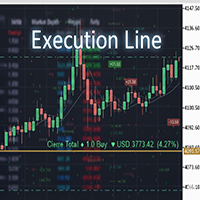
Result and Execution line, which shows the net global position, the expected profit at a given price level, and its percentage of the account balance. Additionally, with the line unselected, it executes position and/or order closing actions. You can move the line from one price to another by selecting it, to obtain information on the closing result of positions at different price levels. If you wish to close trades and/or orders, select this option in the EA parameters and then deselect the li
FREE
Core Positioning Advanced analytical tool designed specifically for MT5, providing in-depth analysis of trading history, uncovering data insights, optimizing strategies, and enhancing profitability. Core Usage Strategy Performance Evaluation: Analyzes profitability, stability, and risk to provide an objective rating from A+ to D.
Trading Pattern Discovery: Identifies high-quality assets, time periods, and profit-making habits suited to different market conditions.
Risk Management Optimization: C
FREE

ZigZag Trader EA - Intelligent ZigZag Trading Assistant
Introduction ZigZag Trader EA is a fully automated trading assistant based on the ZigZag indicator. It intelligently identifies previous highs and lows of the ZigZag indicator, combined with an advanced risk management system, to provide you with precise trading signals and automated trade execution. Whether you are a novice or experienced trader, ZigZag Trader EA can help you simplify trading decisions and achieve stable trading performa

Fly With Gold – Scenario Dashboard PRO Dashboard di Analisi delle Condizioni di Mercato per MT4 / MT5 Fly With Gold – Scenario Dashboard PRO è un indicatore professionale di analisi delle condizioni di mercato , progettato per aiutare il trader a identificare in tempo reale fasi di trend, lateralità (range) e neutralità . Questo prodotto è uno strumento di analisi e supporto decisionale .
Non genera segnali di trading , non apre operazioni e non garantisce profitti . Cosa fa l’indicatore Analizz

This tool automatically calculates the lot size, the TP and SL (in pips) for you, and directly places trades. It has 5 clickable buttons: Risk percentage Variable, holds the value in percentage of the account balance you willing to risk. Example: if the value is 1% and your account balance is 1000USD, the EA will place the trade that will ensure that you only loss 10USD should the market goes against you. TP (in pips) variable, holds the value of your preferred Take Profit in pips. SL (in pips)

OrderPro Trade Panel v1.00
OrderPro is a professional tool that provides a complete and interactive control panel to manage your trading operations. It was designed to simplify and speed up order execution, offering advanced risk management tools and real-time analysis.
Advantages of OrderPro
Intuitive interface - All controls in a single organized panel
Fast execution - Orders placed with one click
Professional risk management - Automatic BE and TS
Clear visualization - All importan
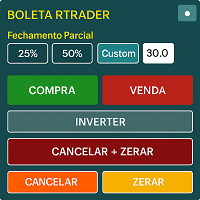
Boleta RTrader - A Boleta Mais Completa para MetaTrader 5 A ferramenta definitiva para traders que buscam precisão, agilidade e controle total sobre suas operações no MetaTrader 5.
**IMPORTANTE**: É aconselhável desabilitar no gráfico do MT5 o histórico de negociações somente quando for usar saídas parcias e precisar movimentar a ordem parcial para evitar delay. --- PRINCIPAIS FUNCIONALIDADES: EXECUÇÃO DE ORDENS **Compra e Venda Instantâneas**: Execute ordens a mercado com um único clique **

This Expert Advisor (EA) for MetaTrader 5 (MT5) has been designed to automatically manage Stop Loss (SL) and Take Profit (TP).
Main Features
Automatic Detection of Manual Positions : Monitors new manual positions without SL/TP and applies the configured rules Multiple Orders : Opening of multiple orders under the same conditions as the original position Hidden SL/TP : The hidden mode allows creating SL/TP invisible to your broker Equity Protection": Allows defining a threshold for the accou
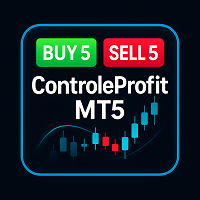
ControleProfit – Painel de Operações para MetaTrader 5 O ControleProfit é um painel simples e objetivo desenvolvido para facilitar a execução manual de operações no MetaTrader 5.
Foi criado para traders que desejam praticidade, rapidez e organização, mantendo o gráfico limpo e livre de elementos desnecessários. Funcionalidades Execução rápida de ordens
Botões BUY e SELL com tamanhos de lote pré-definidos (1, 5, 10 e 15).
Ideal para operações rápidas sem abrir janelas adicionais. Encerramento im

Product Name: Anchor auto TP and SL Trade Manager MT5 Your manual trade will be managed automatically. Turns single trades into smart grids with auto-sync TP/SL.
Anchor Auto TP and SL Trade Manager is a powerful trade assistant designed for manual traders who use averaging or recovery strategies. Stop calculating grid levels manually! This EA turns your manual trade into an automated "Anchor." If the market moves against you, the EA automatically builds a recovery grid based on your specific S
FREE
Portfolio Aggregator - one dashboard, total clarity across all your trading accounts Portfolio Aggregator unifies account data from multiple brokers and currencies into a single, transparent dashboard, giving real-time visibility into equity, margin, P&L, and risk metrics so traders can maintain control and confidence across diversified strategies. It converts all values into a chosen base currency using live FX rates, and displays equity, balance, unrealized P&L, margin usage, and open position
FREE

Here our more valuable tools
SMC Trend Trading , Easy SMC Trading , Institutional SMC Architect Volume Analysis Tools , Volume flow Profile , Market volume profile , FVG with Volume , Liquidity Heatmap Profile , Volume Spread Analysis You Give an Instruction: When you run the script, a window pops up with a dropdown menu. You choose exactly what you want it to do from the list (e.g., "Close Profit Only" or "Delete Pending Orders"). It Scans Your Positions: The script then reads

How the Chart Cleaner Script Works
The Chart Cleaner is a one-click tool designed to instantly wipe your chart clean.
When you drag and drop the script onto a chart, it scans for and removes all visual objects—including trend lines, horizontal lines, text labels, shapes, and any other drawings you have placed.
The result is a completely clean, uncluttered chart, giving you a fresh workspace for your analysis. It's the fastest way to reset your chart to its default state.

MultiChartSync5 - Multi-Chart Auto-Sync Tool User Guide Program Overview MultiChartSync5 is a professional MetaTrader 5 multi-chart synchronization tool that enables automatic timeline alignment and synchronized navigation across multiple chart windows, significantly improving efficiency for multi-instrument and multi-timeframe analysis. Core Features 1. Intelligent Chart Synchronization Automatic Chart Alignment : All secondary charts automatically align with the master chart's candlestick t

Are you an MT5 trader who needs rapid, reliable risk management? Introducing this essential utility – a powerful, free Expert Advisor designed to instantly close all open positions on your MetaTrader 5 account with a single, dedicated action. This tool is a must-have for emergency market exits or quick, decisive profit-taking. Why is this a FREE tool? I am a professional MQL developer actively focused on delivering 5-star solutions and securing custom MQL5 Freelance Jobs . This free ut
FREE
Risk Manager is an MT5 Expert Advisor that opens a market order with a precisely sized lot at the cursor’s vertical level as Stop-Loss, using a single hotkey. Side is detected automatically: SL below price → BUY, SL above price → SELL. Risk is computed in account currency via OrderCalcProfit, so it works correctly on FX, metals, indices, and crypto.
Why traders use it Eliminates mental math and lot calculators. Turns any discretionary setup into a consistent, risk-fixed execution in one keystr

IanFX XAUUSD Trade Panel v5 — Open Trades on Your Phone, Manage Everything from the Panel IanFX Trade Panel is a professional, ultra-responsive manual trading panel designed specifically for XAUUSD scalpers, intraday traders, and multi-layer position builders. Built for mobile-first execution. Pre-load your zone prices, lot sizes, SL/TP, and grid settings into the panel. When the moment comes — tap one button. No fumbling through MT5's clunky order dialog on a tiny screen. No retyping number
=================================================== THE FUN & FRIENDLY GUIDE TO THIS PRO SCALPING TOOL V2 ===================================================
Welcome, fellow alchemist of the financial markets! If you're reading this, you’ve unlocked one of the most interesting, dramatic, occasionally chaotic, but ultimately POWERFUL tools in the XAUUSD universe: **Your Trailing_SLTP**.
Grab a cup of coffee (or something stronger), and let’s begin your journey.
----------------------------
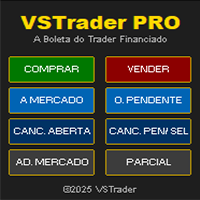
VSTrader PRO – A Boleta Que os Traders de Contas Financiadas Aguardavam Feita de Trader para Trader, a Boleta VSTrader PRO é uma solução inteligente para o trader que especialmente para FTMO, The5ers, FundedNext e qualquer outra mesa proprietária que aceite uso de EAs. Funcionalidades da Boleta: • Entrada a Mercado ou Pendente Com um Clique - posicione rapidamente sua ordem e execute em instantes. • Gestão de Risco Inteligente – cálculo automático de risco por operação pré-definido. Exemplo: 0,2

Smart Stop Manager – Esecuzione automatica dello stop-loss con precisione professionale Panoramica
Smart Stop Manager è il livello di esecuzione della linea Smart Stop, progettato per i trader che richiedono una gestione dello stop-loss strutturata, affidabile e completamente automatizzata su più posizioni aperte. Monitora continuamente tutte le operazioni attive, calcola il livello di stop ottimale utilizzando la logica di struttura di mercato Smart Stop e aggiorna gli stop automaticamente se

Trailing Stop Manager PRO: trailing stop, break-even e chiusura parziale per MetaTrader 5 Trailing Stop Manager PRO è un gestore di posizioni per MetaTrader 5. Applica trailing stop, break-even, chiusure parziali e protezione dal drawdown a ogni posizione aperta del conto, sia aperta a mano sia da un altro Expert Advisor. Lo stop è la parte di un trade che più spesso resta senza gestione. Questa utility lo sposta al posto vostro, secondo una regola che scegliete voi, e non lo sposta mai a sfavor

AP Trade Manager — Product Description AP Trade Manager is a compact, broker-safe MT5 utility that turns your chart into a fast, disciplined trade workstation. It handles entries, exits, partials, breakeven+, OCO/Bracket logic, trailing stops, and scheduled-style actions from a clean panel you can dock anywhere. It’s pure MQL5 (no DLL, no WebRequest), and designed for live charts. What it does One-tap execution. Buy/Sell market and all four pending types (Buy/Sell Stop, Buy/Sell Limit). Auto-siz

Scopri come le operazioni influenzano il tuo conto. Trade Planner MT5 è uno strumento avanzato di gestione del denaro per MetaTrader 5, progettato per pianificare, controllare e analizzare più scenari di conto potenziali. Aiuta i trader a valutare come capitale, margine libero e livello di margine possano cambiare in qualsiasi momento e a qualsiasi prezzo — prima di aprire o modificare operazioni reali. Inoltre, il programma consente di anticipare gli scenari peggiori. Senza una pianificazione

Offerta di lancio: solo per i primi 10. Prezzo speciale: $35 (Regolare: $90). Rimasti: 10 Per aumentare la visibilità, offro questo sconto ai primi 10 acquirenti.
Passi troppo tempo a cercare grafici passati e configurazioni di prezzo? Scorri il grafico più e più volte per trovare una configurazione specifica. Quando finalmente pensi di averla trovata, non sai più dove si trovi su un timeframe inferiore. Basta un piccolo spostamento o uno zoom del grafico per perderla di nuovo. Con questo s
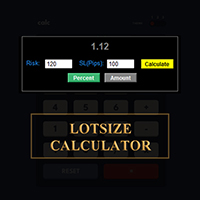
CALCOLA IL TUO LOTTO PROPRIO QUI SU METATRADER!!!
Ciao trader. Siete trader orientati alla gestione del rischio? Se sì, allora questo è per voi. Mi chiamo Ibrahim e ho sviluppato uno strumento che può aiutarvi a calcolare il vostro lotto in base alla percentuale di rischio rispetto al saldo del vostro conto. Questo strumento può anche aiutarvi a calcolare il vostro lotto se avete un valore assoluto che desiderate rischiare, invece di specificare il rischio in percentuale. Ad esempio, potete sp
FREE

By default, MetaTrader 5 only supports timeframes of one minute or higher. Ultra-short-term charts such as 1-second or 5-second timeframes are not available in the standard platform. Seconds Chart Generator is a utility EA designed to generate seconds-based charts in real time using tick data, allowing traders to observe ultra-short-term price movements with precision. Simply attach it to any standard chart, and it will automatically create a custom symbol representing the seconds-based chart. Y

Certamente. Ecco la traduzione in italiano, mantenendo il formato esatto e includendo i termini inglesi tra parentesi, come richiesto: EA dei Prezzi Medi di Ingresso con Chiusura Ordini (Entry Price Averages EA with Close Orders) Nota per gli Utenti – Scegli lo strumento giusto per te: * Se hai bisogno solo di una visualizzazione visiva del prezzo medio (visual average price display), utilizza il nostro Prezzi Medi di Ingresso MT5 (Entry Price Averages MT5) (se hai già un esperto (expert) su

ROSSI CAMPOS ULTRA TRADER EA – Il Guardiano Intelligente dei Tuoi Profitti! Perché è stato creato?
Le soluzioni disponibili sul mercato erano complesse, pesanti o semplicemente non funzionavano come dovuto. Ho deciso di creare qualcosa di leggero, preciso e affidabile. Caratteristiche Esclusive: Leggero e stabile — Nessun blocco o conflitto. Configurazione intuitiva — Compila i campi e sei pronto! Precisione millimetrica — Calcoli basati sul tick attuale. Universale — Funziona su qualsiasi stru

On the standard MT5 platform, only minute-based timeframes are available, and ultra-short charts such as 1-second or 5-second bars are not provided. The tool Seconds Chart Generator SimpleVer is a utility EA designed to generate real-time second-based charts from tick data, allowing traders to observe ultra-short-term price movements with precision. You can use it simply by attaching it to a regular chart. The generated second-based charts are automatically created as custom symbols, so you can
FREE
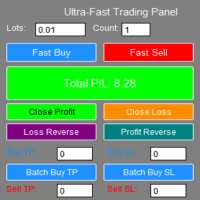
**"Fast Trading Panel 1.0"** is a highly efficient trading tool specifically designed for the MT5 platform. It integrates rapid order placement, intelligent closing, and batch management to provide traders with an ultimate operating experience and professional risk management capabilities.
- **One-Click Fast Ordering**: Supports custom lot sizes and batch orders, allowing instant buying and selling. - **Real-Time Parameter Adjustment**: Trading parameters take effect immediately without reload

VM Auto SLTP Basic - Intelligent Trade Management for Scalpers Enhance your scalping strategy to a higher level. VM Auto SLTP Basic automatically manages Stop Loss and Take Profit for orders that are opened manually or by other Expert Advisors. This tool does not open trades on its own, allowing you to maintain full control while enjoying precise risk management. Full documentation available in the product blog: [User Guide] Key Features SL/TP based on ATR or fixed price Automatic SL move to B
FREE

https://youtu.be/P8x0ZxYflic --- ## **MASANIELLO PRO EA - Professional Money Management Trading System** ### **DESCRIPTION FOR MQL5 MARKETPLACE:** **Masaniello Pro EA** is a professional-grade Expert Advisor that combines the legendary Masaniello money management system with advanced visual trading tools. Perfect for traders of all levels who want to automate risk management and execute trades with precision. ### **KEY FEATURES:** ** Masaniello Money Management System** - Automatic bet progres
Manual Grid Pro – Total Control, Absolute Precision Manual Grid Pro is an advanced tool designed for traders who want to master grid trading with manual, semi-automatic, or fully automated control , combining flexibility, full customization, and intelligent risk management . This EA allows you to trade major or secondary currency pairs in convergent or divergent mode , using limit or stop orders , with fully adjustable parameters to fit any trading style or strategy. ️ Main Features Smart

TimeFrame_Matcher is a kind of Tactical Timer. Description (RU): Sharp spikes in volatility and liquidity in the market are often tied to a specific time—the closing of higher candlesticks (xx:00, xx:30, H4, H1, etc.). At these moments, traders working on different timeframes simultaneously review their positions.
For a day trader, being caught off guard by such a "junction" means uncontrollable risk.
TimeFrame_Matcher is a professional attention management tool. It doesn't predict the direct
Triple TP is an expert advisor to dfine partial take profit values on three levels and (if you want) a stop loss for every trade. The settings are very simple. The EA works with inside stops. All values are hidden (not visible for your broker). With the Triple TP expert advisor you can manage manual trades and trades from other expert advisors too. The information display will show you the Average True Range (ATR) for the current timeframe in pips and the current spread. Define yourself in adva

RSI Telegram Alert is an innovative Expert Advisor that combines the power of the RSI indicator with the convenience of Telegram notifications. With this tool, you can receive RSI-based trading alerts directly to your Telegram chat — whether you’re at your desk or on the go. It’s designed for traders who want to stay informed about market movements in real-time without constantly monitoring the MetaTrader 5 terminal. The EA monitors RSI values on the selected timeframe and, once the specified th

Trading Assistent is a multifunctional trading panel that combines all necessary tools for professional trading. The panel provides complete control over positions, in-depth risk analysis, and fast order execution.
MAIN FUNCTIONAL BLOCKS
Position Management:
- Real-time viewing of all open positions
- Sorting by symbol, profit, volume, and type
- Visual indication of profitable and losing positions
- Bulk closing operations
- Breakeven function for profit protection
Trading Operations:
- I

ChrisFX AUTOBOT – Smart Semi-Automatic Control ChrisFX AUTOBOT is a semi-automatic Expert Advisor designed for active traders who want to stay in control while benefiting from automated risk management.
It features an automatic BreakEven system and smart partial close management , offering the perfect balance between manual decision and algorithmic precision. Main Features BUY / SELL buttons directly on the chart Automatic BreakEven after X points (fully configurable) Automatic partial close (50

TRADE WITH MAGIC – Professional One-Click Trading Panel
| Crystal AI Systems
Trade With Magic is a fast, lightweight, and highly efficient one-click trading panel designed for traders who require precise manual execution and full control over magic numbers, comments, and risk parameters. It is suitable for both manual trading and advanced EA testing environments where ac
FREE
Description Smart SL/TP Modifier Pro is a professional utility designed to help traders easily manage Stop Loss (SL) and Take Profit (TP) levels directly from their MetaTrader 5 chart.
It provides interactive on-chart control lines and intuitive buttons for quick modification of all active orders with just one click. This tool is especially useful for traders who manage multiple positions manually but want to ensure consistent and fast SL/TP adjustment. Main Features Modify all open trades
FREE

Forex EA Manager - Professional Position Management Tool Overview Forex EA Manager is a sophisticated MetaTrader 5 Expert Advisor designed to provide professional position management capabilities for forex traders. This EA focuses on risk management and trade optimization through advanced order management features. Key Features ️ Risk Management Automated Stop Loss & Take Profit : Configurable SL/TP levels with pip-based calculation Flexible TP/SL Control : Enable/disable functionality b

Tool Auto Modify SLTP – Protect Your Trades, Optimize Your Strategy In trading, risk is always present. Just one forgotten SL/TP can turn a promising trade into a loss. Even experienced traders occasionally make mistakes. That’s why Tool Auto Modify SLTP was created – to keep you protected and let you focus on your strategy. Key Features: Manage Orders for All Symbols: Monitor and adjust SL/TP for all your trading pairs. Three Flexible Risk Modes: Point-Based: Set fixed SL/TP distances. Account

EV Trade Panel is an Expert Advisor for MetaTrader 5 designed to support manual trading through a clean, dark-themed interface with fully adjustable controls. It provides a structured workspace where traders can execute orders efficiently, manage risk with precision, and handle positions in real time. The panel is adaptable to different instruments such as forex pairs, gold, indices, and other volatile symbols, and it fits naturally into any trading routine or timeframe. Main Features Order exec
Quantitative Synchronization Terminal Server MT5 is a professional MQL5 script for the MetaTrader 5 (MT5) platform, specifically designed to synchronize and load historical bar data and historical tick data from the server to the local terminal.This script helps traders ensure their local terminal has complete historical data, which is crucial for backtesting, technical analysis, and strategy development. Quantitative Trading Guide public chat: Join Us Quantitative Trading Guide public channe
FREE

V-Connect Tick Data Validator is a utility for MetaTrader 5. It checks each tick and rejects invalid data.
Features - Checks bid and ask prices - Checks spread and time - Uses only MQL5 functions - Logs results in the Experts tab - Real-time filtering:
- Negative or zero spreads - Stale timestamps (>60 seconds) - Reversed bid/ask - **<1ms overhead** — runs on low-spec VPS - **Journal audit trail** — "TICK PASSED" / "TICK REJECTED" How to Use Attach to a chart. In your EA: if (validate_tick(tick
FREE

Tired of fumbling with lot size calculations and manually managing every trade? The Visual Risk Manager (VRM) is a professional-grade trading panel designed to streamline your trading and enforce discipline. This Expert Advisor is not a strategy; it's a powerful utility that allows you to manage your risk and execute trades with unparalleled speed and precision, directly from your chart. Why You Need the Visual Risk Manager Stop letting emotions and guesswork control your trading. VRM ensures t

1.Multi-horizon telemetry: calculates profit, equity drawdown, open positions, and positions opened today for each period, feeding both the report tab and the risk engine.
2.Draggable on-chart console with twin tabs—Report for at-a-glance P/L & drawdown plus the Unlock Trading button, and Risk Manager for editing thresholds, timeouts, and toggles without opening MetaTrader dialogs.
3.Fully configurable rule stack: every limit offers Alert, Push, Email, Close Positions, Close Orders, Lock Tr

Blog di MQL5: https://www.mql5.com/en/blogs/post/765148 Versione MT4: https://www.mql5.com/en/market/product/154458 Versione MT5: https://www.mql5.com/en/market/product/154459
Gratis per un periodo limitato
Ordine Telegram [tambangEA] è un assistente di trading semi-manuale professionale, creato per i trader che desiderano un flusso di lavoro di esecuzione più rapido, pulito e controllato.
Questo prodotto è progettato per i trader che dispongono già di una propria analisi di mercato e necess
FREE

Smart Stop Scanner – Analisi multi-asset degli stop-loss basata sulla reale struttura di mercato Panoramica
Smart Stop Scanner offre un monitoraggio professionale dei livelli di stop-loss su più mercati. Il sistema identifica automaticamente le zone di stop più rilevanti basandosi sulla reale struttura di mercato, sulle rotture significative e sulla logica del price action, presentando tutte le informazioni in un pannello chiaro, coerente e ottimizzato per schermi ad alta risoluzione (DPI-awar

Offerta di lancio: solo per i primi 10. Prezzo speciale: $30 (Regolare: $40). Rimasti: 10 Per aumentare la visibilità, offro questo sconto ai primi 10 acquirenti.
Cattura facilmente il "momento desiderato" in un istante. Sincronizzazione definitiva per l'analisi multi-timeframe.
Dove si trova esattamente sul timeframe inferiore quel punto che avevi individuato su quello superiore?
Non è più necessario perdere tempo a scorrere il grafico per cercarlo di nuovo. Focalizza con alta precisione il
Trailing Stop Utility PRO – Gestione avanzata di trailing multi-modo e multi-simbolo Se noti bug o comportamenti anomali, contattami pure.
Il tuo feedback aiuta a migliorare questo strumento. Panoramica Trailing Stop Utility PRO è uno strumento avanzato per gestire trailing stop su più simboli e timeframe.
È leggero, stabile e compatibile con tutte le versioni MT5. Funziona sia con operazioni manuali che con quelle aperte dagli EA, offrendo modalità Percent, Pips, ATR, profili per simbolo/Magic

FJUNIVERSE | Strumento MT5 Volatilità e Lotto Minimo Uno scanner potente con un solo clic che rivela istantaneamente il rischio reale e la volatilità di ogni simbolo nel tuo Market Watch, utilizzando il timeframe attuale del grafico. Questo script calcola l'importo esatto in USD a rischio per il lotto minimo definito dal broker, oltre a un profilo completo di volatilità basato su tutte le candele caricate. I risultati vengono salvati in un file CSV pulito e visualizzati nel Giornale di MetaTrade

ROSSI CAMPOS TRAILING STOP AUTO EA - Il Guardiano Intelligente dei Tuoi Profitti! Perché è stato creato?
Perdere operazioni redditizie a causa della mancanza di un trailing stop efficiente era molto frustrante. Le soluzioni disponibili erano troppo complesse, pesanti o semplicemente inaffidabili. Ho deciso di creare qualcosa di leggero, preciso e affidabile — un assistente che protegge automaticamente i tuoi guadagni senza alcuna complicazione. Come funziona? (Per chi non è programmatore) Tu imp

Auto SL/TP Manager Non lasciare mai più un'operazione manuale senza protezione! Hai mai aperto una posizione in fretta e furia dimenticando di impostare lo Stop Loss o il Take Profit? "Auto SL/TP Manager" è la tua rete di sicurezza essenziale. Questo Expert Advisor monitora il tuo account 24/7 e applica automaticamente i tuoi livelli predefiniti di rischio (SL) e profitto (TP) a tutte le posizioni aperte che ne sono sprovviste. È lo strumento perfetto per trader manuali , scalper , o chiunque vo

Momentum Candle Alert — Segui i movimenti dei grandi operatori Non perdere i movimenti dei grandi operatori di mercato!
Momentum Candle Alert ti consente di individuare le candele impulsive più forti nel momento stesso in cui si formano. Come funziona:
Aggiungi l’alert al grafico, scegli il timeframe desiderato e imposta il numero di punti o il movimento in dollari per ricevere la notifica. Caratteristiche principali: Monitoraggio dei movimenti di prezzo in tempo reale. Avviso automatico quan

Questo EA è utilizzato principalmente per lo scalping su XAUUSD.
Scopo Rimuove l’emozione dalla gestione delle operazioni — protegge automaticamente le posizioni e prende profitto così non devi prendere decisioni difficili sotto pressione.
Cosa fa ️ Stop Loss automatico Imposta SL basandosi su recenti massimi/minimi + buffer Niente più stress per la collocazione manuale Profitti parziali automatici Due modalità: Movimento fisso: chiude il 50% dopo uno spostamento di prezzo

Order Filled Sound Free for now, if useful for you, leave 5 stars comment. Will be free for live!
Order Filled Sound automatically plays a notification whenever an order is executed — including Take Profit (TP) and Stop Loss (SL). You can easily customize the sound in the EA properties or replace it with your own sound file ( *.wav ).
To use your own sound, simply copy it into the following folder:
C:\Program Files\MetaTrader\Sounds This tool ensures you never miss an important trade event aga
FREE

Product name: BVCandleStream Overview Background service that automatically creates custom tick-based symbols (equal-tick bars) for scalping and price action analysis.
It converts raw ticks of standard symbols into custom bars with a fixed number of ticks per bar, so you can apply any standard MT5 indicators or EAs to these synthetic tick charts.
Key Features 1. Tick-Based Bar Generation Monitors the symbol of the open chart and automatically groups ticks into bars at the specified count ( InpT
FREE

Crystal Trade Manager – Advanced MT5 Risk and Trade Control Utility Overview
Crystal Trade Manager (CTM) is a professional MetaTrader 5 utility designed for risk management, trade automation, and instant execution control.
It provides traders with an integrated system for protecting equity, managing daily drawdowns, controlling lot sizes, and applying automation features such as automatic SL/TP, break-even, and trailing stop. The tool is suitable for manual traders, prop-firm challenge particip

The difference between you and a funded trader is rarely the strategy. It is one single oversized trade. ProRiskManager makes that trade technically impossible. Most challenges are not lost to bad strategies. They are lost to one moment. One miscalculated lot size. One revenge trade after a losing streak. One news candle through your daily loss limit. Industry data shows that only a small fraction of purchased prop firm challenges ever reach a funded account, and a large share of the failures e

Close All Pro MT5 – Fast PnL Control is a powerful trade manager MT5 utility that gives you total control over your trades. With a single click, you can close all MT5 orders, monitor real-time profit and loss, and manage your floating PnL directly from a clean on-chart panel. The tool is lightweight, responsive, and built to help traders save time, reduce emotional stress, and maintain focus. Whether you trade manually or through an EA, this MT5 profit panel provides the visibility and precisio

King ElChart Telegram Bridge A professional bridge between MetaTrader and Telegram. It can send and receive trading signals instantly and manage trades automatically. FEATURES • Two modes: Sender and Receiver • Works on any symbol or timeframe • Fast and lightweight • Easy setup and real-time status display
NOTE After purchase, please contact me via MQL5 private messages to receive the bridge package and assistance with setup.

Boost Your Trading with the Trade AST PRO Imagine having a personal trading assistant that transforms how you trade. With our EA, success is just one click away: Drag & Drop Smart Setup Place entry, SL and TP by simply dragging lines on the chart Automatic real-time risk and volume calculations Instant adaptation to every market move Lightning-Fast Execution Direct BUY/SELL buttons on the chart MARKET mode for instant entry PENDING mode for planned trades Auto Mobile Mirror Co
FREE

HotKey Trade: Invisible and Fast Execution It is a minimalist order executor designed for scalpers and price action traders. It eliminates cumbersome panels and operates at maximum speed using only your keyboard.
Key Points:
100% Clean Chart: No panels or buttons blocking your view of the price. Instant Execution: Fires orders to the market without menus or clicks. Dynamic Lot Management: Change your volume and view it only when you need it Quick Commands:
[ C ] – Buy (BUY) [ V ] – Sell (SELL
Scopri come acquistare un robot di trading dal MetaTrader Market, il negozio di applicazioni per la piattaforma MetaTrader.
Il sistema di pagamento di MQL5.community supporta le transazioni tramite PayPal, carte bancarie e gli altri sistemi di pagamento più diffusi. Per essere pienamente soddisfatto, ti consigliamo vivamente di testare il robot di trading prima di acquistarlo.

Ti stai perdendo delle opportunità di trading:
- App di trading gratuite
- Oltre 8.000 segnali per il copy trading
- Notizie economiche per esplorare i mercati finanziari
Registrazione
Accedi
Accetti la politica del sito e le condizioni d’uso
Se non hai un account, registrati