AP Trade Assistant
- Utilità
-
Allan Graham Pike
 Credo che Bitcoin meriti strumenti specializzati, creati con la stessa disciplina e concentrazione dei mercati stessi. Troppi EA inseguono ogni coppia e ogni configurazione, e alla fine non producono nulla. Il mio obiettivo è creare sistemi di trading con una sola missione: catturare i grandi
 - Versione: 1.4
- Attivazioni: 10
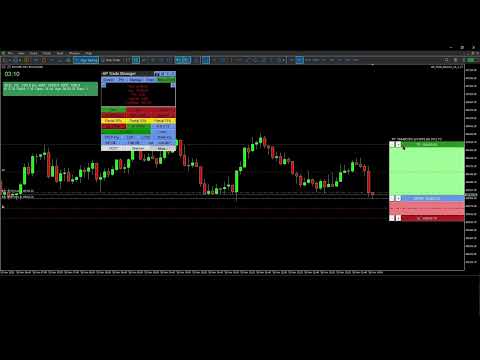
AP Trade Manager is a compact, broker-safe MT5 utility that turns your chart into a fast, disciplined trade workstation. It handles entries, exits, partials, breakeven+, OCO/Bracket logic, trailing stops, and scheduled-style actions from a clean panel you can dock anywhere. It’s pure MQL5 (no DLL, no WebRequest), and designed for live charts.
What it does
-
One-tap execution. Buy/Sell market and all four pending types (Buy/Sell Stop, Buy/Sell Limit). Auto-sizes by fixed lot or % balance risk.
-
Lines Mode trading. Toggle “Lines”, drag Entry/SL/TP on chart, snap to grid/ATR steps, then press PLACE. The EA decides market vs pending, applies clamps, and tags orders.
-
Protection suite. Breakeven+ with offset, unified trailing (Fixed, ATR, MA, SAR, Fractal, Prev-Bar) with hard ratchet, optional Virtual Stops with server fallback and warnings.
-
Position control. Partials (25/50/75 or custom), Close Buys/Sells/All, Delete Pendings, Reverse (with freeze/stop safeguards).
-
OCO / Bracket. From your lines: paired orders cancel the sibling on fill; market fills auto-place TP/SL.
-
Manage workbench. A side drawer listing live tickets (Ticket | Side | Lots | Entry | SL | TP | P/L | Trail | Age). Click any row to select it; act from the main panel while the drawer stays open.
-
Main Display Box (MDB). At-a-glance spread, times (Srv/Loc), symbol P/L, margin badge, mode badges (Lines*, OCO*, Trail…). Page through account and session views.
-
News glance. A minimal news panel with color-coded impact and countdown. Informational only; it never blocks trading.
-
Tools & overlays. Drawing mode (trendline, channel, triangle). Add-ons: Candle Countdown, Session Boxes, AP Multi-Range, MA Cross Alerts, Supertrend, candle hover volume tooltips, and a Screenshot button.
-
Hindsight cards. One-click snapshots + key stats you can export later into a trade journal (CSV).
-
Settings export/import. Save per-symbol/TF presets and panel geometry to JSON; restore on any terminal.
-
Speed without sloppiness. OrderCheck + margin checks on every send. Lots floored to broker step. Stops/freeze level respected.
-
Clarity. Minimal clicks, readable status line, short toasts, clean badges.
-
Persistence. Remembers geometry, tab, risk mode, and overlays per symbol/timeframe.
-
Validator-ready. Timer throttled, logs quiet, no external calls, file ops gated for tester.
What’s included
-
Panel UI (header tools, tabs, trade grid, MDB, Manage/Tools/Info drawers)
-
Risk Manager (fixed lot or % balance, cash risk, R multiple, spread/commission option)
-
Order Router (preflight checks, deviation policy, retry/nudge, tagging)
-
BE/Trail Engine (trigger + offset, multi-strategy trailing, hard ratchet)
-
OCO/Bracket (pairing, cancel-on-fill, bracket from market)
-
Position Book (fast snapshot for rows/filters/partials)
-
Overlays (countdown, sessions, multi-range, MA cross, Supertrend; draw objects)
-
Hindsight & Journal (cards + CSV export)
-
Persistence (GV/Files JSON)
Compatibility
-
Platform: MetaTrader 5 desktop (Windows).
On macOS use a Windows VM or supported compatibility layer. -
Category: Utilities (no backtest UI in Strategy Tester).
-
Live use: Designed for live charts. Strategy Tester cannot interact with panel buttons.
1) Install and attach
-
Copy the compiled EA into MQL5\Experts\ and restart MT5.
-
Allow Algo Trading globally and on the chart.
-
Attach AP Trade Manager to a symbol chart (M1–D1). Place the panel where you like.
Note: The Strategy Tester won’t exercise the UI. Use a live chart or demo account chart.
2) First-run checks (60 seconds)
-
Open More → Quick Start to skim basics or More → About for version info.
-
In the header, set theme with T if desired.
-
Confirm risk mode on the trade strip:
-
% for risk-percent sizing (enter Risk % in inputs or via the inline editor).
-
Lot for fixed lots.
-
-
MDB shows Srv/Loc time, Spread, P/L, and Free Margin badge.
3) Place a trade with Lines Mode
-
Tap Lines. Three lines appear: ENTRY, SL, TP with handles and labels.
-
Drag ENTRY/SL/TP where you want. Use step/snap controls if enabled.
-
Press PLACE:
-
The EA chooses market or pending based on ENTRY vs Bid/Ask.
-
It clamps SL/TP to broker stops/freeze. Status line confirms action.
-
-
Toggle OCO for paired pendings, Bracket to auto-attach TP/SL to market fills.
4) Protect and manage
-
BE+: Turn on; set offset points. The EA moves SL to BE+ once the trigger is hit.
-
Trail: Pick mode (Fixed/ATR/MA/SAR/Fractal/Prev-Bar). Ratchet never loosens.
-
Partials: Use 25/50/75 or Custom %. The EA floors to broker lot step.
-
Close controls: Close Buys/Sells/All, Delete Pendings, or Reverse safely.
- Virtual Stops (VStops). Local SL/TP watcher that closes positions at your thresholds without placing server-side stops. Shows a VStop* badge in the MDB when active. Latency and gaps can cause slippage; for critical risk consider pairing with server SL/TP (Bracket ON) so the server protects you if the terminal is closed.
5) Manage drawer (optional)
-
Click Manage. You’ll see rows for current symbol (or filters).
-
Click a row to select that position. Keep the drawer open and use MCP buttons to partial/BE/Trail the selected trade.
-
Drawer and MCP stay in sync; status shows results and any skips.
6) Tools & overlays
-
Tools → Drawing Mode: trendline, channel, triangle. Draw, move, delete.
-
Add-ons: toggle Candle Countdown, Session Boxes, AP Multi-Range, MA Cross Alerts, Supertrend.
Overlays render via chart objects or indicators and update on timer. -
Hover volume: move the mouse over a candle to see its volume tooltip.
7) News glance
-
Click Info → News to view upcoming/active events with impact colors and countdown.
It’s informational only; the EA never blocks orders because of news.
8) Screenshots & Hindsight
-
Click the camera button to capture the chart into \MQL5\Files\APTA_Shots\ .
-
When you close a trade, tap Hindsight to save a card (chart snapshot + key stats).
-
Export your journal: More → Export Settings / Journal to CSV for later review.
9) Save / load your setup
-
More → Export Settings saves presets, overlays, geometry into JSON (per symbol/TF).
-
More → Import Settings restores them. Useful across terminals or fresh installs.
10) Safety notes
-
The EA runs OrderCheck + OrderCalcMargin before every send.
-
Lots respect broker min/step; stops respect stops/freeze levels.
-
Virtual Stops (optional): the EA watches price and sends a market exit if your local SL/TP is hit. SL/TP still applied server-side if you enable bracket/real stops. You’ll see a warning badge when Virtual is ON.
Troubleshooting
-
Buttons don’t respond in Tester: that’s expected. Use a live chart.
-
“Insufficient margin” or “stops too close”: widen SL/TP or reduce risk; check symbol stop/freeze levels in MDB.
-
No overlays appear: ensure Tools → Add-ons toggles are ON and timeframes are supported.
-
Mac users: use MT5 for Windows via VM/compatibility layer. Native macOS ports can be unreliable with advanced chart objects.
-
Mac users — read before purchase
MetaTrader 5 is a Windows app. On macOS you must run MT5 under virtualization (Parallels/VMware) or compatibility layers (CrossOver/Wine).
-
Recommended: Parallels on Apple Silicon (M-series) with Windows 11 ARM. Stable UI, full object drawing, normal file paths.
-
Known quirks under Wine/CrossOver:
-
Some hover tooltips and custom labels may not render in window-only screen captures (use “display capture” in OBS).
-
Retina scaling can misplace labels; lower scaling or set MT5 to 100%.
-
File paths differ; keep presets in …/MQL5/Files/ .
-
-
We do not ship a macOS binary. Support covers MT5 inside a Windows environment only.
Does not work in the Strategy TesterThis is a manual trade assistant. It relies on live UI clicks, chart objects, and broker interaction. The MT5 Strategy Tester does not deliver those, so the panel can’t operate.
Why it won’t run in Tester
-
The tester doesn’t generate OnChartEvent mouse/keyboard events that our panel needs.
-
Many tester runs have trading disabled or restricted; manual OrderSend/modify logic is blocked.
-
Visual mode isn’t a live chart: multi-symbol book, partials, OCO linking, and UI state persistence aren’t simulated.
-
Calendar/screenshots/file I/O are limited or off in tester, so news and utilities won’t load.
Use on a live or demo chart in the terminal with trading enabled.
-