Trading Assistent
- Utilità
- Versione: 1.1
- Aggiornato: 13 novembre 2025
- Attivazioni: 10

Trading Assistent is a multifunctional trading panel that combines all necessary tools for professional trading. The panel provides complete control over positions, in-depth risk analysis, and fast order execution.
MAIN FUNCTIONAL BLOCKS
Position Management:
- Real-time viewing of all open positions
- Sorting by symbol, profit, volume, and type
- Visual indication of profitable and losing positions
- Bulk closing operations
- Breakeven function for profit protection
Trading Operations:
- Instant market order execution
- All types of pending orders
- Integrated risk calculator
- Stop loss and take profit configuration
Risk Analysis:
- Current exposure calculation
- Margin and drawdown monitoring
- Capital management recommendations
- Color-coded risk level indication
USER GUIDE
LAUNCH AND SETUP
The panel automatically launches when placed on a chart. Recommended placement on the main trading instrument.
INTERFACE STRUCTURE
The panel is divided into three main tabs:
- Trade - for order placement and parameter calculation
- Risk - for current risk analysis
- Positions - for open position management
WORKING WITH TRADING MODULE
Instrument Selection:
Use the dropdown list to select trading symbols. The system automatically loads available instruments.
Trade Parameter Calculation:
- Enter position volume or use automatic calculation
- Set stop loss in points
- Configure take profit
- Set risk percentage for automatic volume calculation
Order Execution:
Market Orders - use BUY/SELL buttons for instant execution.
Pending Orders:
- Select order type (Limit, Stop, Stop-Limit)
- Specify activation price
- For Stop-Limit, additionally specify limit price
- Use Auto button for automatic price calculation
RISK MANAGEMENT
Account Monitoring:
The panel displays key account parameters:
- Current balance and equity
- Free margin
- Margin level
- Current drawdown
Exposure Analysis:
The system calculates:
- Total risk across all positions
- Risk percentage of deposit
- Recommended volume for new positions
NOTIFICATION SYSTEM:
The panel uses color indication and temporary messages to notify about:
- Successful order execution
- Operation execution errors
- Risk limit exceedances
- Position status changes
TAB AND FUNCTION DESCRIPTION
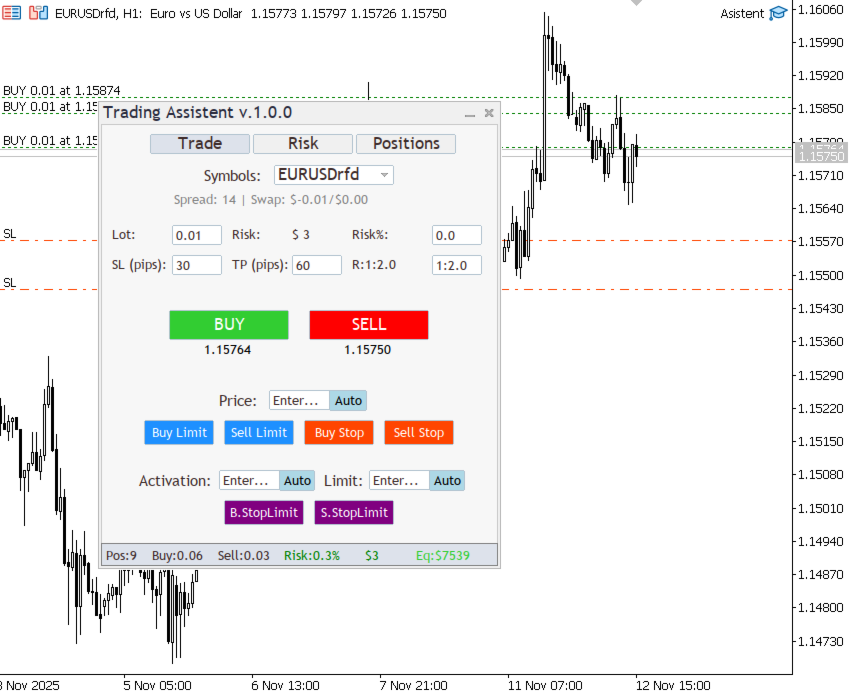
TRADE TAB:
Symbol Selection Section:
- Dropdown list of available instruments
- Current spread display
- Swap information
Risk Calculation Section:
- Position volume input field
- Monetary risk equivalent display
- Risk percentage configuration
- Automatic recalculation when parameters change
Price Level Section:
- Stop loss and take profit input fields
- Risk/Reward ratio display
- Automatic calculation based on ratio
Order Execution Section:
Market Orders:
- BUY/SELL buttons with current price display
- Instant execution
Pending Orders:
- Complete set of order types
- Activation price input fields
- Automatic calculation buttons
- Visual separation by order types
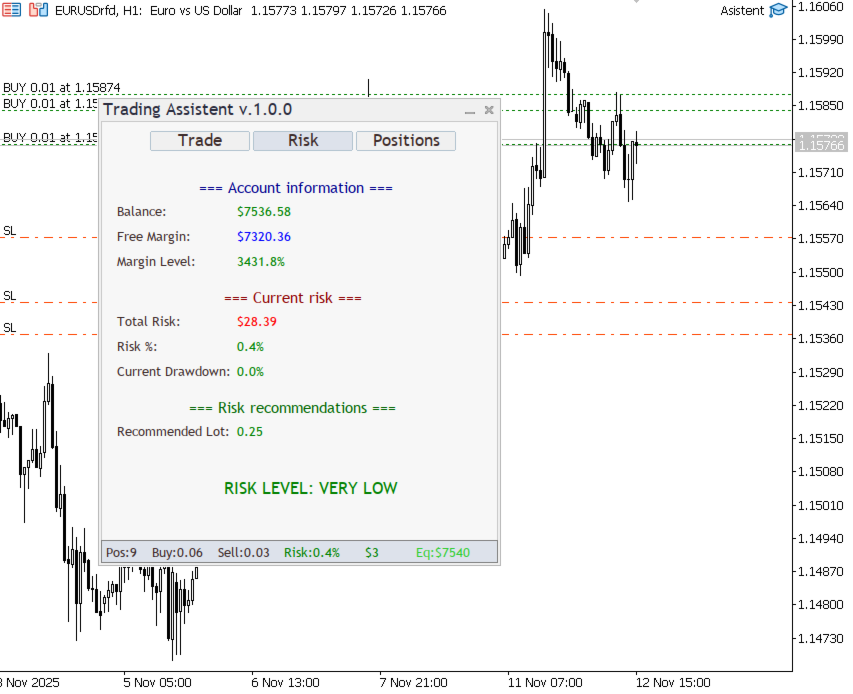
RISK TAB:
Account Information:
- Current balance and equity values
- Free margin level
- Margin usage percentage
- Color-coded load indication
Risk Analysis:
- Portfolio aggregate risk
- Risk percentage of deposit
- Current drawdown
- Danger level indicators
Recommendation System:
- Optimal volume calculation
- Overall risk level assessment
- Position management suggestions
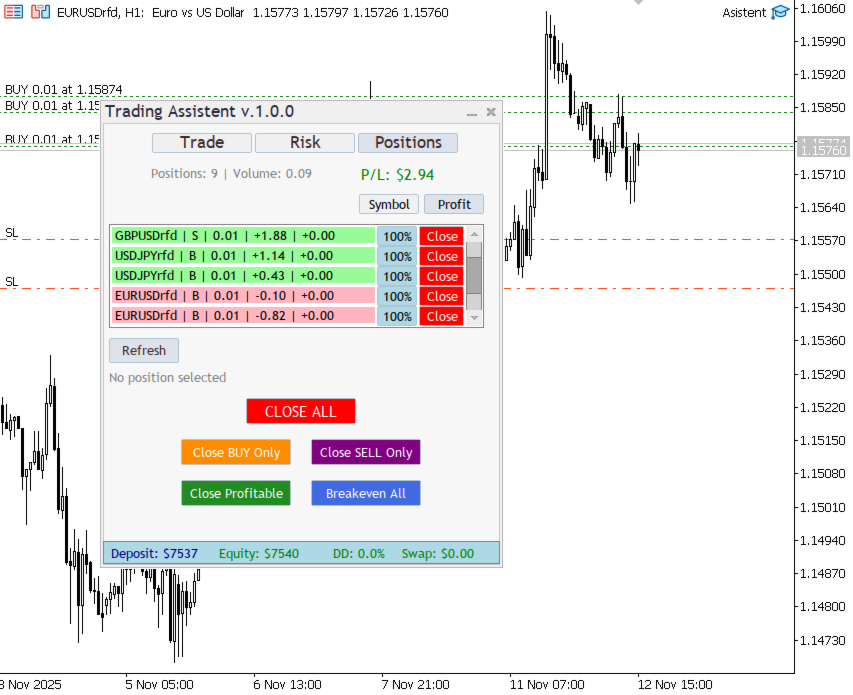
POSITIONS TAB:
Positions List:
- Table of all open positions
- Key parameter display
- Profitability color coding
- Sorting system by various criteria
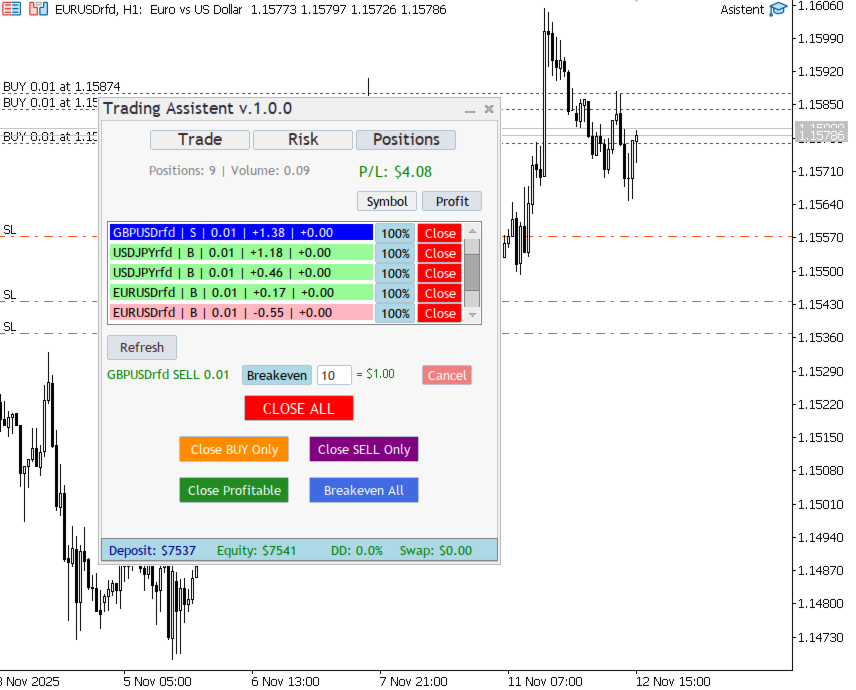
Management Tools:
Individual Management:
- Position selection by click
- Breakeven function with offset configuration
- Partial closing options
- Breakeven parameter visualization
Bulk Operations:
- Close all positions
- Close positions by direction
- Close only profitable positions
- Mass breakeven setup
Status Panel:
- Total number of positions
- Aggregate volumes and profit
- Deposit indicators
- Swap calculation
PRACTICAL RECOMMENDATIONS
WORKFLOW OPTIMIZATION:
Security Configuration:
- Always verify parameters before execution
- Use recommended risk levels
- Monitor overall portfolio exposure
Efficient Management:
- Apply bulk operations to save time
- Use breakeven function for profit protection
- Regularly analyze Risk tab
Interface Customization:
- Move panel to convenient screen area
- Use minimization mode when necessary
- Configure default parameters
ADDITIONAL CAPABILITIES:
Automatic Calculation:
The system automatically calculates optimal order parameters based on specified risk level.
Color Indication:
Intuitive color system allows quick assessment of position status and risk levels.
Bulk Operations:
Powerful tools for managing multiple positions simultaneously.
Real-time Updates:
All data updates in real-time without delays.
Trading Assistent provides a professional approach to trading, combining powerful analytical capabilities with intuitive management. The system is designed for traders who value efficiency and strict risk control.
MAIN FUNCTIONAL BLOCKS
Position Management:
- Real-time viewing of all open positions
- Sorting by symbol, profit, volume, and type
- Visual indication of profitable and losing positions
- Bulk closing operations
- Breakeven function for profit protection
Trading Operations:
- Instant market order execution
- All types of pending orders
- Integrated risk calculator
- Stop loss and take profit configuration
Risk Analysis:
- Current exposure calculation
- Margin and drawdown monitoring
- Capital management recommendations
- Color-coded risk level indication
USER GUIDE
LAUNCH AND SETUP
The panel automatically launches when placed on a chart. Recommended placement on the main trading instrument.
INTERFACE STRUCTURE
The panel is divided into three main tabs:
- Trade - for order placement and parameter calculation
- Risk - for current risk analysis
- Positions - for open position management
WORKING WITH TRADING MODULE
Instrument Selection:
Use the dropdown list to select trading symbols. The system automatically loads available instruments.
Trade Parameter Calculation:
- Enter position volume or use automatic calculation
- Set stop loss in points
- Configure take profit
- Set risk percentage for automatic volume calculation
Order Execution:
Market Orders - use BUY/SELL buttons for instant execution.
Pending Orders:
- Select order type (Limit, Stop, Stop-Limit)
- Specify activation price
- For Stop-Limit, additionally specify limit price
- Use Auto button for automatic price calculation
RISK MANAGEMENT
Account Monitoring:
The panel displays key account parameters:
- Current balance and equity
- Free margin
- Margin level
- Current drawdown
Exposure Analysis:
The system calculates:
- Total risk across all positions
- Risk percentage of deposit
- Recommended volume for new positions
NOTIFICATION SYSTEM:
The panel uses color indication and temporary messages to notify about:
- Successful order execution
- Operation execution errors
- Risk limit exceedances
- Position status changes
TAB AND FUNCTION DESCRIPTION
TRADE TAB:
Symbol Selection Section:
- Dropdown list of available instruments
- Current spread display
- Swap information
Risk Calculation Section:
- Position volume input field
- Monetary risk equivalent display
- Risk percentage configuration
- Automatic recalculation when parameters change
Price Level Section:
- Stop loss and take profit input fields
- Risk/Reward ratio display
- Automatic calculation based on ratio
Order Execution Section:
Market Orders:
- BUY/SELL buttons with current price display
- Instant execution
Pending Orders:
- Complete set of order types
- Activation price input fields
- Automatic calculation buttons
- Visual separation by order types
RISK TAB:
Account Information:
- Current balance and equity values
- Free margin level
- Margin usage percentage
- Color-coded load indication
Risk Analysis:
- Portfolio aggregate risk
- Risk percentage of deposit
- Current drawdown
- Danger level indicators
Recommendation System:
- Optimal volume calculation
- Overall risk level assessment
- Position management suggestions
POSITIONS TAB:
Positions List:
- Table of all open positions
- Key parameter display
- Profitability color coding
- Sorting system by various criteria
Management Tools:
Individual Management:
- Position selection by click
- Breakeven function with offset configuration
- Partial closing options
- Breakeven parameter visualization
Bulk Operations:
- Close all positions
- Close positions by direction
- Close only profitable positions
- Mass breakeven setup
Status Panel:
- Total number of positions
- Aggregate volumes and profit
- Deposit indicators
- Swap calculation
PRACTICAL RECOMMENDATIONS
WORKFLOW OPTIMIZATION:
Security Configuration:
- Always verify parameters before execution
- Use recommended risk levels
- Monitor overall portfolio exposure
Efficient Management:
- Apply bulk operations to save time
- Use breakeven function for profit protection
- Regularly analyze Risk tab
Interface Customization:
- Move panel to convenient screen area
- Use minimization mode when necessary
- Configure default parameters
ADDITIONAL CAPABILITIES:
Automatic Calculation:
The system automatically calculates optimal order parameters based on specified risk level.
Color Indication:
Intuitive color system allows quick assessment of position status and risk levels.
Bulk Operations:
Powerful tools for managing multiple positions simultaneously.
Real-time Updates:
All data updates in real-time without delays.
Trading Assistent provides a professional approach to trading, combining powerful analytical capabilities with intuitive management. The system is designed for traders who value efficiency and strict risk control.