Smart SL and TP Modifier Pro
- Utilità
- Versione: 1.61
- Aggiornato: 12 novembre 2025

📘 Description
Smart SL/TP Modifier Pro is a professional utility designed to help traders easily manage Stop Loss (SL) and Take Profit (TP) levels directly from their MetaTrader 5 chart.
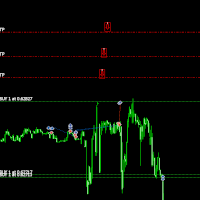
It provides interactive on-chart control lines and intuitive buttons for quick modification of all active orders with just one click.
This tool is especially useful for traders who manage multiple positions manually but want to ensure consistent and fast SL/TP adjustment.
🚀 Main Features
-
Modify all open trades with one click.
-
Automatic detection of Buy and Sell positions.
-
Independent Buy Only and Sell Only modes.
-
Instant update of SL and TP lines.
-
Delete or reset lines automatically when changing mode.
-
Built-in safety message if you try to apply without selecting mode or without active trades.
-
Clean and minimal on-chart interface.
⚙️ How It Works
-
Attach the utility to any chart.
-
Click Buy Only or Sell Only — the corresponding SL/TP lines will appear.
-
Adjust the SL and TP lines to your desired levels.
-
Press Apply to modify all matching orders automatically.
-
You can easily switch between Buy/Sell modes — the lines will reset accordingly.
🔒 Safety Features
-
Prevents accidental modification when no trades exist.
-
Alerts if no mode is active.
-
No auto-trading — full user control at all times.
🧠 Important Notes
-
This is not an Expert Advisor; it does not open or close trades automatically.
-
Works on all symbols and any timeframe.
-
Requires AutoTrading enabled (for modification rights).
-
Fully compatible with both Netting and Hedging accounts.
🧰 Input Parameters
| Parameter | Description |
|---|---|
| Line Color | Color for SL/TP lines |
| Line Style | Style and thickness of lines |
| Auto Delete | Remove lines when changing mode |
| Alert Mode | Show message boxes or alerts |
💡 Recommended Use
Ideal for:
-
Manual traders who want quick SL/TP management.
-
Scalpers and intraday traders who modify trades frequently.
-
Users managing multiple open positions simultaneously.