 MetaTrader 5
 Experts
 Indicatori
 librerie
 Utilità
 Widget
 Regole
Guarda i video tutorial del Market su YouTube
Come acquistare un Robot di Trading o un indicatore
Esegui il tuo EA
hosting virtuale
hosting virtuale
Prova un indicatore/robot di trading prima di acquistarlo
Vuoi guadagnare nel Market?
Come presentare un prodotto per venderlo con successo
Nuove utilità di trading per MetaTrader 5 - 42
 Di seguito sono riportati i programmi di trading che semplificano il trading in MetaTrader 5. Passa il mouse su un'utilità per leggerne la descrizione e la sua funzione.
Anti Revenge Trading Police Bot v1.80 (Revenge Trading Protector) Sviluppato da Mindfultradeness
Sei intrappolato nel ciclo del revenge trading, dove ogni perdita ti tenta a rientrare nel mercato? Immagina un guardiano al tuo fianco — l’Anti-Revenge Police Bot, il tuo strumento definitivo per superare il revenge trading! Questa utility innovativa monitora ogni tua mossa, rileva le perdite chiuse e attiva un periodo di cooldown personalizzabile per fermare quegli impulsi tossici. Con un interv
FREE

Kalifx Trade Manager is a smart on-chart trading and risk-management panel for MetaTrader 5. It replaces manual order tickets and spreadsheet risk math with a compact, draggable panel that lets you place, size, and manage trades directly from the chart — including automatic breakeven, trailing stops, and a 3-level partial close (multi-TP) system with draggable on-chart lines. Built for discretionary traders who want the speed of a one-click panel with the discipline of automated risk rules runni

AZ Trade Recovery Assistant MT5 combines manual trading flexibility with intelligent automated management.This advanced on-chart panel isn’t just for trade execution — it’s a complete trade management assistant. You can open or close positions instantly, adjust lot size, manage trailing stops, and modify Take Profit or Stop Loss — all directly from the panel. It’s built for traders who want full control of their trades with smart automation running in the background. What truly makes this assist

K-line Terminator - a countdown tool that accurately grasps every second Core Summary: Still anxious about not knowing when the current candlestick will end? 'Candlestick Terminator' is an indispensable tool in your trading toolbox! It utilizes a clear and intuitive countdown timer to display the precise time remaining for the currently active candlestick in real-time, helping you avoid making hasty decisions during the chaotic moments of candlestick transitions, thus allowing you to enter, exit
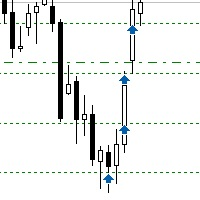
Sometimes the markets are in such a trending phase that it is impossible not to notice and it is enough to simply buy with the trend. 1) So, we scroll through the charts of different instruments, and see a good entry point, so let's specify the desired price for the first order in the Price_for_First_Order parameter and the direction in the Trend_Direction parameter, this is already enough for a good deal. (If Price_for_First_Order=0, the position will open immediately at the market price.) 2) T

Binance Copier allows to seamlessly and easily copy trades between MT5 and Binance Futures! The tool's main feature is to replicate trades and all available orders between MetaTrader 5 and Binance that can be applied to both Expert Advisors and manually opened ones.
Before purchase please familiarize with comparison between MT5 to Binance and Binance Copier Key Features: Bidirectional Copying - MT5 → Binance (Master Mode): Copy your MT5 trades to Binance - Binance → MT5 (Slave Mode): Mirror Bi

Overview MAVIS Trader is a powerful one-click trading panel designed for traders who value speed, clarity, and precise control.
It lets you open multiple Buy/Sell positions instantly, automatically synchronize SL/TP levels across all open trades, and close every position on the symbol with a single click.
Perfect for scalpers, grid traders, and anyone who needs consistent, mirrored risk management without manual editing Key Features One-Click Buy/Sell: Open several trades at once with your

Heartbeat Agent is a cross-platform utility for monitoring the status of your trading terminal, compatible with both Windows and Linux. This tool sends regular GET requests to a specified URL, allowing you to monitor the terminal's performance and receive real-time updates on its status. If the connection to the terminal is lost for any reason, you will be immediately aware and can take the necessary actions. Key Features of Heartbeat Agent: Cross-Platform Compatibility: Heartbeat Agent supp
FREE
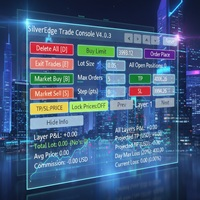
Description SilverEdge Trade Console is a fast, layer-based trading console for MT5 that lets you place, manage, and exit trades in a few keystrokes. It combines one-tap market orders, guided pending orders, per-layer TP/SL control, and a built-in break-even/trailing engine—wrapped in a clean dashboard that docks anywhere on your chart. Designed for scalpers and intraday traders who need speed, consistency, and clear logs. Features Layer-Based Workflow (1–9): Assign and work within layers to sep

Selam arkadaşlar özellikle gold scalp yaparken zamana ve reflekse ne kadar ihtiyacımız olduğunu biliyorsunuz.
Bu sebeple ben kendime scalp yaparken bana yardımcı olacak buttonlar hazırladım.
ben gold scalp yaparken : 3 .çeşit Sell
3 .çeşit buy close sell close buy
açık emirleri kapat hepsini kapat
şeklinde kendime butonlar hazırladım. ve çok faydasını gördüm.
bütün butonların renklerini lot değerlerini isimlerini değiştirebililrsinz.
kesinnikle çok seveceğinize eminim
bol kazançlar.
FREE

Toma el Control Absoluto de Tus Operaciones ¿Cansado de calcular manualmente el tamaño de tu posición o de sudar frío esperando a que el precio toque tu stop loss? La gestión del riesgo es la línea que separa a los traders consistentes del resto. No dejes tu capital en manos de la improvisación. Presentamos la Calculadora de Posición y Riesgo , tu nueva aliada esencial para operar con precisión y disciplina profesional. Con esta poderosa herramienta, tú: Maximiza tu Potencial: Calcul
FREE

️ EquityShield is your automated risk management guardian for MetaTrader 5. If you've ever exceeded your daily loss limit, struggled to enforce your own trading rules during volatile markets, or wanted to automatically lock in profits when you hit your targets, EquityShield is built for you. This is not a trading strategy - it's a safety system that watches your account 24/7, automatically closes positions when your risk limits are breached, and helps you maintain consistent trading discipline

Product Overview Trade with Natural Language, Let AI Execute Fully. This is a revolutionary MT5 trading program that allows you to describe trading strategies directly in natural language. AI will fully understand and automatically execute all trading operations. No programming knowledge required - simply describe your trading ideas, and the system will fully manage your trading account. It executes your strategy with creativity and optimizes trading strategies on its own! Contact me for a 15-d

EA Info Display Master Stop clicking through charts to find your EA configurations! Get a complete overview of all running Expert Advisors with their symbols and magic numbers in seconds. Managing multiple EAs across different symbols? Monitoring performance on FX Blue or other platforms? This tool instantly displays: All running EA names Their symbols and magic numbers Account details (number, broker, currency) Direct FX Blue statistics links (other provider will follow! Tell me what you need)
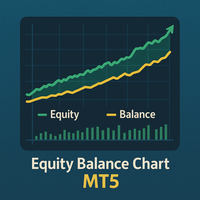
Equity Balance Chart (Indicator Description) This is an advanced MQL5 indicator designed to track and display an account's performance directly on the chart. It plots the account's Equity (in lime green) and Balance (in orange) as two separate lines in a sub-window. Its two primary features are: Persistent History: The indicator saves the equity and balance data from each bar to a history file. When you restart MetaTrader 5 or reload the indicator, it automatically loads this file to redraw the
FREE

Indique facilmente zonas de preço com espaçamento fixo!
O Price Steps Marker desenha linhas horizontais automáticas a cada 5 unidades. Price Steps Marker é um indicador visual simples que organiza o gráfico em zonas de preço equidistantes.
Ele marca automaticamente linhas horizontais a cada valor de 5 em 5 unidades, tanto acima quanto abaixo do preço atual — facilitando a leitura de volume.

This EA help traders close their open positions at a specific MT5 server time before news or before ending of H4 timeframe of the morning New York session to protect their profit or prevent from unexpected loss. The default setting is 19:30 (HH:MM) and you can adjust as require to fit trading strategies. It very user friendly where contain only single input parameter to specify a time that position will be closed.
CLICCA QUI PER VEDERE TUTTI I MIEI PRODOTTI GRATUITI
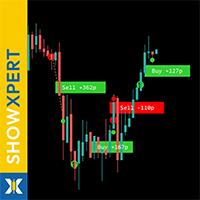
ShowXpert è il tuo centro di controllo visivo per MetaTrader 5. ShowXpert è uno strumento intelligente che mostra tutte le tue operazioni chiuse Buy e Sell direttamente sul grafico , includendo il risultato in punti e valuta . Le operazioni in profitto appaiono in verde, quelle in perdita in rosso, tutto in modo chiaro, intuitivo e in tempo reale. A colpo d’occhio puoi vedere quali setup hanno funzionato e come si sta sviluppando la tua oper
FREE

SmartLimits - Gestore Visivo di Ordini Pendenti SmartLimits è uno strumento di trading professionale che ti consente di gestire gli ordini pendenti direttamente sul grafico con pieno controllo visivo.
Ti permette di creare, regolare e confermare ordini Buy o Sell Limit e Stop tramite un pannello intuitivo sul grafico, senza aprire le finestre degli ordini di MetaTrader. Questo strumento è pensato per i trader che preferiscono un modo rapido e organizzato di gestire gli ordini in modo visivo, rid
FREE

Trade2Telegram — un plugin per le notifiche automatiche di trade da MetaTrader a Telegram. Questo strumento è progettato per trader che gestiscono capitale, gestiscono canali di segnali o guidano comunità educative. Il plugin copia tutte le operazioni di trading dal terminal e le pubblica in una chat, gruppo o canale Telegram selezionato. I messaggi vengono inviati automaticamente quando le posizioni vengono aperte o chiuse, i livelli di stop-loss o take-profit vengono modificati, gli ordini pen
FREE

Strifor SmartTrade Expert — soluzione per trader professionisti che automatizza le fasi chiave dell’apertura di un trade: Imposta immediatamente stop-loss e take-profit Rischio fisso per trade (definito nelle impostazioni dell’expert) Risparmia tempo ed elimina errori manuali Funziona perfettamente con Strifor Lot Calculator (lotto calcolato dal calcolatore, stesso rischio nell’expert) Tasto rapido
ALT+F4 — apertura rapida. Con un clic si apre l’ordine con SL/TP e rischio fisso. Vantaggi Veloci
FREE

Telegram2MT5 Signal Copier — Automatizza la copia dei tuoi segnali Telegram direttamente in MetaTrader 5 Con Telegram2MT5 Signal Copier, ogni segnale che ricevi su Telegram viene eseguito in modo istantaneo e automatico sul tuo conto MetaTrader 5. Veloce, affidabile e completamente personalizzabile.
Scarica il file Windows Bridge APP e il tutorial Il file bridge è necessario per collegare il Pannello Web Locale all’EA MT5 Compatibile con Windows 10 & Windows 11 - 64 bit - e con Windows Server

SFG Grid Manager MT5 – Sistema di Griglia Intelligente e Mirror SFG Grid Manager MT5 è un gestore di griglia automatico professionale che segue una posizione esistente (manuale o aperta da un altro EA) e apre un’operazione di mediazione per ogni step definito (GridPips). Quando la posizione primaria viene chiusa o scompare, tutte le operazioni aperte dal manager vengono chiuse automaticamente.
Funziona con qualsiasi broker che utilizzi conti Netting o Hedging ed è pienamente compatibile sia c

**Sync MT5 – Real-Time Multi-Chart Analysis Manager** chart sync
Transform your MT5 platform into a professional analysis workstation. Sync is a comprehensive tool that synchronizes charts, objects, and crosshairs across multiple windows, allowing you to trade with unprecedented precision and efficiency.
**MAIN FEATURES**
1. **Smart Chart Synchronization** - Synchronize symbols and timeframes across multiple charts with one click. - Group system – Organize your charts by strategy or as

RM Pro – Gestore di Trading Avanzato
Fai trading in modo più intelligente, non più difficile
Dimentica i calcoli complessi sulla dimensione dei lotti, le percentuali di rischio o i livelli di stop loss. RM Pro ti restituisce la chiarezza mentale, permettendoti di concentrarti solo su strategia e tempismo. Imposta semplicemente il capitale a rischio e il prezzo dello stop loss, e con un solo clic su Buy o Sell, l’Expert Advisor eseguirà immediatamente l’ordine — calcolando automaticamente la d

This is tool that will help you to manage your trades.you can set target 1,2,3 in points and percentage size of lot size you want to close at this targets.like you have set target 1,2,3 as 5$,10$ and 15$ with size 40%,30%,30%.now if you take entry on xauusd on 4220 with 0.1 lot then it will close 0.04 lot on 5$ target ,0.03 lot at 10$ target and remaining quantity at 15$ target. you can set stoploss also in points. the stoploss and target will be automatically set when you take trade. also there
VM Auto SLTP Pro - Advanced Order and Risk Management EA
Overview:
VM Auto SLTP Pro is a professional upgrade to the VM Auto SLTP Basic edition, built to deliver robust performance, advanced trade management tools, and an intuitive on-chart control panel. This Expert Advisor automatically sets and manages Stop Loss (SL) and Take Profit (TP) levels for existing positions — whether opened manually or by other EAs — using ATR-based, fixed-point, fixed-price, or USD-based rules. VM Auto SLTP Pro

Imagine flying a real aircraft without ever stepping into a flight simulator. That's what trading is like. You have to simulate your strategy before you can take it to a live market. It is good if you can simulate things speedily before even stepping into any live market, or before coming up with an automated system. People don't have all day to stare at a higher timeframe chart until the entry signal finally arrives. That's why I built this so that you can simulate your strategy with speed. Th
FREE

Operative Management Pro – Advanced Trading Utility Operative Management Pro is a smart visual tool for traders who want to analyze and simulate their trades before placing them on the market. This panel displays in real-time the most important parameters of the current symbol: Current price and minimum lot size Required margin Spread cost in USD and pips Take Profit and Stop Loss value in USD Automatic risk and reward calculation With just a click on the chart, you can simulate BUY or SELL t

[Regarding Investment Issues]
Question 1:
When market opportunities arise, most investors tend to place orders frantically. However, when placing orders in such a frantic manner, you have no way of knowing whether you will be liquidated. The only reference is the margin ratio, but the margin ratio cannot accurately determine whether you will be liquidated.
If the order quantity is large or the product order quantity is even larger, you cannot calculate the loss and profit. If there is a t

Overview:
The Drawdown Control Limiter MT5 is a robust and efficient tool designed for traders who aim to monitor and limit drawdown levels in their MetaTrader5 Live/Demo accounts. This Expert Advisor provides real-time tracking of drawdown percentages or amounts and automatically closes positions if the specified limits are exceeded, helping protect your capital. EA account drawdown protector is designed for normal trading Live and Demo accounts (not for Prop Firms) . Key Features: Customiza

Followgram EA: Advanced Automated Trading Expert for MT5 Check out our Telegram or contact us for a free trial.( https://t.me/Followgram_EA )
We continue to develop the EA further.
We focus on one pair with both buy and sell trades.
We also have a test account that anyone can follow.
(This is not about profits, but about the features.)
Type: MT5 Demo ECN Number: 67167230 Password: Followgram2025! Server: RoboForex-ECN
Overview The Followgram EA is a sophisticated Expert Advisor for MetaTr

TradeVision is a simple and elegant performance indicator for MetaTrader 5. It was designed to give traders a clear and instant overview of their results. Gone are the days of digging through your account history! TradeVision displays a comprehensive and visually intuitive dashboard directly on your trading chart. At a glance, you can assess your efficiency and make more informed decisions. The widget displays your real-time performance statistics, segmented by key periods for a detailed and re
ATTENTION ! Utilities do not have a good functionality on backtest mode. For Having a Demo Trial, message me from message box and receive 3 days trial.
Our Team Services: If you are want to see our products click the link: LINK If you have an idea you'd like to develop into an application, click the link: LINK
Instant on-chart stop & target levels, from 1:1 up to 1:6. Trade Ratio Lines MT5 draws an open stop line and objective lines (take-profit) at fixed R-multiples relative to your entry

Auto-Shutdown MT5 Terminal - Saves you from Over-Trading by automatically closing MT5 Termial when daily loss limits are breached Love it? Hate it? Let me know in a review! Feature requests and ideas for new tools are highly appreciated. :)
Try "The AUDCAD Trader":
https://www.mql5.com/en/market/product/151841 ️ Your Automated Discipline Enforcer "I'll just make back what I lost..."
"One more trade to break even..."
"I can't end the day red..."
Sound familiar? These thoughts have d
FREE
Manual trading panel — opens one test trade for validation only.
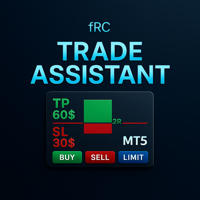
fRC Trade Assistant — Smart Manual Trading Panel fRC Trade Assistant is an intelligent trading panel designed for manual traders.
It allows you to open positions with one click, calculate lot size based on your predefined risk, and automatically place Stop Loss (SL) and Take Profit (TP) levels. For example, if your balance is $1000 and you set a 1% risk ,
the panel automatically calculates the appropriate lot size.
When the trad

Short Description:
Prop Firm Protector EZ MT5 is an EA designed to protect your funded account by managing risk and ensuring compliance with the Prop Firm's trading rules. This EA automatically monitors equity levels, closes trades when profit targets or drawdown limits are reached, and provides a visual display of key account metrics. The EA features a Super Easy setup, is simple to use, and works with all different Prop Firm service providers.
Overview:
Prop Firm Protector EZ MT5 is an Draw
Smart Trade Panel
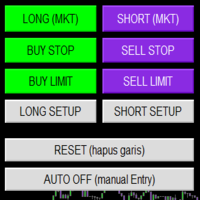
Trading Assistant is a powerful and elegant one-click trading panel for MetaTrader 5 — designed for professional traders who value speed, precision, and clarity.
Whether you scalp XAUUSD, swing trade indices, or run tight risk management, this tool gives you complete control with a clean visual layout, automatic ATR-based setups, and adaptive risk calculation.
️ Main Features One-Click Execution
Instant Buy/Sell Market Orders with pre-defined SL/TP
Supports Buy Stop
FREE

NiceProTrader Manager - Professional Risk & Trade Management Panel Trade with Confidence, Not with Fear! Control Your Exact Risk in Dollars with One Click. 2. Product Overview (The "Why") "Tired of complex lot size calculations and the fear of risking more than you planned? NiceProTrader Manager is a powerful and intuitive panel for MetaTrader 5 that revolutionizes how you manage your trades. Set your exact risk, stop loss, and take profit in dollars , not pips, and let the EA handle all the co

The Trade Panel Dashboard is a powerful, user-friendly interface designed to streamline and enhance your trading experience. This centralized hub provides real-time data visualization, advanced analytics, and seamless execution tools, empowering traders to make informed decisions with precision and speed. Key Features: Real-Time Market Data
Access live price feeds, market trends for multiple assets (stocks, cryptocurrencies, forex, commodities, etc.) in one consolidated view. Order Management
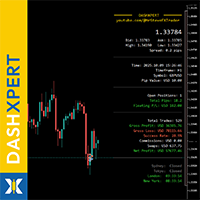
CLICCA QUI PER VEDERE TUTTI I MIEI PRODOTTI GRATUITI
DashXpert è un pannello potente e completamente gratuito per MetaTrader 5 , che mostra tutti i dati essenziali del mercato, le informazioni del conto e le statistiche di performance direttamente sul tuo grafico. Invece di passare continuamente tra finestre e schede, DashXpert ti offre una visione centralizzata e intelligente - ottimizzata per la massima chiarezza, la minima distrazione e un aspetto professionale. Fornisce una panoramica chia
FREE
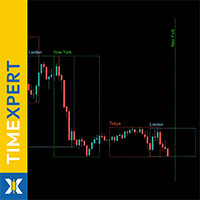
CLICCA QUI PER VEDERE TUTTI I MIEI PRODOTTI GRATUITI
TimeXpert è uno strumento completamente gratuito per MetaTrader 5 che mostra le sessioni di trading globali - Tokyo, Sydney, London e New York - direttamente sul tuo grafico. Invece di calcolare gli orari manualmente, ottieni una panoramica automatica codificata a colori , che ti mostra a colpo d’occhio quando i mercati aprono, si sovrappongono o chiudono . Questo ti permette di identificare istantaneamente dove appare la volatilità , quando
FREE

AIX GROK FJU ASSISTANT | Consulente di Trading Potenziato dall'IA per MetaTrader 5 Trasforma il tuo trading con l'AIX GROK FJU ASSISTANT, un avanzato Expert Advisor (EA) per MetaTrader 5 (MT5) che sfrutta la tecnologia di intelligenza artificiale all'avanguardia di GROK (sviluppata da xAI) per fornire analisi tecniche in tempo reale e approfondimenti di trading. Progettato sia per trader principianti che esperti, questo EA collega i tuoi grafici MT5 a GROK AI, fornendo segnali di trading basati

Manual position management. Missing SL. Price moves against you. No protection.
Trade Manager Lite automates Stop Loss, Take Profit, Trailing Stop, and Break-Even for your open positions. Attach to one chart. Configure your default SL/TP distance. Let it manage your positions automatically. What's Included (FREE Version) Auto SL/TP: Applies missing Stop Loss and Take Profit to positions based on your configured distance in points Trailing Stop: Adjusts SL dynamically as price moves in your favor
FREE

QuotesDownloader è uno script per MetaTrader 5 che consente di esportare le quotazioni storiche di 28 coppie di valute e dell'oro (XAUUSD) in Excel. Funzionalità Principali: Esportazione dei dati degli ultimi 2290 giorni, ore o intervalli di 15 minuti. Supporto per 28 coppie di valute e XAUUSD. Selezione del timeframe: giornaliero, orario o 15 minuti. Esportazione automatica in Excel per un'analisi semplice e veloce. Vantaggi: Semplifica il processo di ottenimento dei dati storici. Adatto a trad

R.E.A. Automatic Risk Monetary (MT5) – Per-symbol manager for manual entries & pending orders Summary (hero) Automate risk management for manual trades (magic 0) and pending orders on the chart’s symbol : SL/TP by % of balance or fixed amount , BreakEven and Trailing (for positions), with instant reaction on order placement/execution. What it does Locked to the symbol where you attach it, this EA manages only: Your manual positions on that symbol. Your pending orders on that symbol (limit/stop/s
FREE

Take your technical execution to the highest level with the Fimathe Robot Designed specifically for professional traders who demand absolute precision, stability, and tactical flexibility, this Expert Advisor automates the time-tested Fimathe methodology by combining the intelligence of modern algorithms with a robust, high-performance interface. With a modern visual layout, the Painel Pro 5.5 offers complete operational freedom: execute trades in 100% manual mode with panel assistance or activ

Unified Panel v5: Your Personal Command Center in MetaTrader 5 Tired of Missing Opportunities? Take Full Control of the Market! Every trader knows the pain: Fatigue from Waiting: You spend hours staring at the monitor, switching between dozens of charts and timeframes in search of the perfect setup. You get distracted for a moment—and the best opportunity is gone. Fear of a Margin Call: You have several positions open, possibly on different instruments or in a "lock". How do you know where the
FREE

TM Assistant Trade is a trading assistant tool designed for MetaTrader 5 (MT5). It helps users configure, monitor and manage trades directly on the chart through an interactive interface, minimizing manual operations and improving trading consistency. Introduction to TM Assistant Trade 1. Trading Interface
Line Function - Display on the trading screen (Entry price - Take profit - Stop loss) through icons and lines to help traders perform operations more conveniently.
Main area with screens displ

PGS Trade Panel – Professional Trade Management Tool for MT5 Take full control of your trading with structured execution, real-time feedback, and customizable automation, all directly on your chart. Profit Guard System Trade Panel is an advanced on-chart trading tool designed to give you discipline, clarity, and precision in every trade. It supports manual, semi-automated, and automated workflows with multiple strategies that can be enabled, customized, or disabled at any time. Automatic Take P

Telegram Trade Notifier for MT5 è un sistema professionale di notifiche che invia messaggi istantanei al tuo gruppo o canale Telegram ogni volta che viene aperta o chiusa un’operazione sul tuo conto MT5. FUNZIONALITÀ PRINCIPALI Invia notifiche per ogni apertura e chiusura di operazioni
Compatibile con Gruppi, Canali e Topic (thread) di Telegram
️ Frequenza di scansione e filtri personalizzabili
Memoria persistente (nessun messaggio duplicato dopo il riavvio)
Ignora lo storico — invi
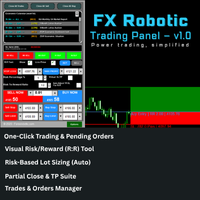
FX Robotic Trading Panel — v1.0 by Forex Robotic All-in-one MT5 panel for one-click execution, visual R:R control, risk-based lot sizing, partial closes (incl. virtual TPs), news, and MA signals—right on your chart. Overview FX Robotic Trading Panel is a professional, on-chart control center for MetaTrader 5 that blends lightning-fast trade execution , visual Risk/Reward management , auto lot sizing from risk% , staged partial take-profits (real or virtual ), an economic calendar , and a multi
FREE

RiskManager is a simple yet powerful script for MetaTrader 5 that helps traders calculate the optimal lot size for every trade. By entering your desired risk amount and stop loss in pips, RiskManager instantly calculates the correct lot size using live market prices. This ensures you never risk more than you intend, making your trading safer and more consistent. Importance: Proper risk management is essential for long-term trading success. RiskManager takes the guesswork out of position sizing,

Risk Panel VIP (MT5) Risk Panel VIP is a professional tool for MetaTrader 5 designed for fast, disciplined execution. It calculates position size from your balance risk and places Stop Loss / Take Profit accordingly. This is a trade management utility; it does not provide trading signals and does not guarantee any profit. Main functions Draggable Stop Line : place the stop on chart; the panel auto-calculates lot size from your configured risk % of balance (default 2%, editable). Context-aware a

Category: Utilities → Trade Panels
Version: 1.2 (auto-sizing buttons + adjustable font size) ClickCloserExpress is a super-lightweight panel for MetaTrader 5 that lets you close positions instantly by profit/loss, symbol, side (Buy/Sell), and magic number— without opening new trades or cluttering your chart. Perfect for manual/semi-auto management, scalping, and fast portfolio clean-ups. What it does One-click closing of: All positions. Profitable only or losing only . Symbol on chart o

Adaptive ATR Trailing Stop (MT5)
Overview Adaptive ATR Trailing Stop is a utility Expert Advisor for MetaTrader 5 that manages stop loss levels for existing open positions. It uses the Average True Range (ATR) to calculate a volatility-based trailing distance.
This EA does not open trades. It only modifies the Stop Loss (SL) of existing positions and keeps the current Take Profit (TP) unchanged.
How it works - The EA runs on every tick of the chart where it is attached. - For each open posit
FREE

Elsna Alert (MT5 EA) is a lightweight Expert Advisor that monitors your trading account in real time and alerts you whenever a trade is opened or closed . It uses MetaTrader 5’s built-in OnTradeTransaction event to instantly detect any new executed deals—manual or automated—and plays a custom sound for each event.
You can choose whether it tracks all symbols or only the chart’s symbol . Key features: Instant audio alert when a trade opens or closes. Works with both manual and EA-driven trades. O
FREE

Помощник для ручной торговли. Рассчитывает лот по вашему риску, показывает все параметры сделки до её открытия.
Два режима: Market - для входа по текущей цене. Линия Open следит за Ask/Bid автоматически. Breakout - для отложенных ордеров. Выбираешь свечу и таймфрейм, линии ставятся на High/Low.
Можно менять цвета линий, переназначать клавиши, двигать панель куда удобно.
FREE
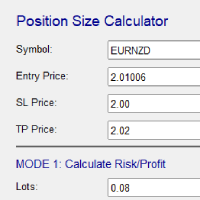
Risk and Position Size Calculator – Expert Advisor Utility A powerful and easy-to-use EA utility designed to help traders manage risk with precision. It automatically calculates the optimal position size based on your account balance, chosen risk percentage, and stop loss. In addition, it calculates potential profit and displays take profit levels directly on the chart. Fully customizable and compatible with all instruments and timeframes, it's the perfect tool for improving your risk management

TradeMind Pro EA - Description Why TradeMind Pro EA is Essential for Your Trading Success Revolutionary LLM-Powered Trading: The world's first Expert Advisor built entirely on Large Language Model technology, bringing the power of advanced AI reasoning directly to your MetaTrader 5 platform. TradeMind Pro EA doesn't rely on traditional technical indicators or hardcoded algorithms – instead, it leverages cutting-edge Language Models (GPT-4, Claude, Gemini) to analyze market conditions with hu

BTC Trading Assistant EA (MT5) Manual trading assistant that helps place and manage trades with automated risk and stop management. Overview BTC Trading Assistant EA is a utility Expert Advisor for MetaTrader 5 intended for manual traders. It provides a chart interface to execute BUY/SELL/CLOSE actions and automates selected trade management functions such as position sizing, initial SL/TP placement, break-even, trailing stop and optional partial profit taking. This EA does not generate trade si

Trade History By Magic Indicator Unlock Your Trading Insights with Trade History By Magic! Enhance your MetaTrader 5 experience with this powerful indicator designed for traders who demand precision and clarity. Trade History By Magic provides a clear, real-time display of your trading history, organized by magic numbers, directly on your chart. Perfect for both automated and manual traders, this tool helps you track performance effortlessly. Key Features: Organized Trade Tracking : Displays tra
Trendline Toolbox (MT5) Trendline Toolbox is a utility indicator for MetaTrader 5 that helps manage trendlines and common chart objects. It is a charting tool; it does not provide trading signals and does not guarantee any profit. Main functions Clone the selected trendline (keeps style, angle, and price levels). Toggle the Extend/Ray property for the selected trendline. Delete the selected trendline. Purge all objects on the current chart. Draggable panel: double-click the hand icon and drag t
FREE

Candle Time (MT5) The Candle Time indicator shows the remaining time for the current candle on the active chart timeframe. It adapts automatically to the chart period and updates on every tick. This is a charting utility; it does not provide trading signals and does not guarantee any profit. Main functions Display the time remaining for the current candle on any timeframe (M1 to MN). Color-coded state: green when price is above the open (up), gray when unchanged, and red when below the open (do
FREE

# Trading Info Panel - Your Complete Trading Dashboard
## Why This Indicator Was Created
As a fullscreen trader, I was constantly frustrated with the hassle of: - Exiting fullscreen mode to check positions - Switching between charts and the terminal window - Losing focus on price action while checking account status - Missing critical margin levels during active trading
**I needed a simple, elegant solution that kept all vital trading information visible at a glance - without disruptin
FREE

Product Name: Magic Simulator “ Find your own 'Signature Setup ” Version: 1.0
From 'I Missed It' to 'I Took It' Transform those frustrating near misses into consistent winners. Practice each setup until your reaction becomes automatic and hesitation-free.
Full Product Description: Become a Confident, Disciplined Trader – Risk-Free Have you ever felt the sting of a bad trade and wished you could rewind time? Do you struggle with fear, greed, or hesitation? Ever spotted the perfect setup but mi

sTrade UI is a compact, lightweight alternative for O ne-Click Trading which built-in MT5 didn't offer.
Designed for traders especially scalpers who want a clean and fast trade execution. Key features: Minimal CPU footprint Docked One-click Right Panel to Perform New Position*
One-click Close at Position's Price* Ability to Close All Position* Option to stick Position's PL info to latest candle and able to colorize it *: Tied to EA's Magic number (EA's Id), set to 0 if want Globally This is m
MT5 → Telegram Notifier (Utility · Informers) Send trading events from MetaTrader 5 directly to Telegram. Perfect for journaling, team alerts, or remote monitoring. What it does Trade Open : posts BUY/SELL, BUY/SELL Limit, BUY/SELL Stop, lots, entry, SL/TP, local time. (Optional chart screenshot.) SL/TP Update : short message — only what changed (new SL or TP), posted as reply to the original trade message. Partial / Full Close : posts closed volume, price, Net P/L (swap + commission included),

Questo Expert Advisor utilizza l'indicatore Parabolic SAR per impostare e tracciare dinamicamente il livello di Stop Loss (SL) degli ordini aperti, garantendo la protezione dei profitti e minimizzando la gestione manuale delle operazioni. Caratteristiche Principali Regolazione Dinamica dello SL: L'EA regola automaticamente lo Stop Loss (SL) di qualsiasi posizione aperta al livello indicato dal punto Parabolic SAR corrente su ogni nuova barra. Protezione Segui-Tendenza: Assicura che lo SL segua d

Assistente Manuale TP (Manual Helper TP) Questo strumento è progettato per aiutarti a proteggere i tuoi profitti e a ridurre il tuo rischio. Imposterà lo Stop Loss e gestirà un Trailing Stop per le tue operazioni. Come si usa Collegalo al grafico del simbolo che tradi e gestirà le tue posizioni secondo le tue regole. Tutte le impostazioni sono in punti. È importante regolarle in base al tuo simbolo e alla tua strategia. L'impostazione predefinita può funzionare con XAUUSD. Per lo scalping è megl
FREE
MetaTrader Market - i robot di trading e gli indicatori tecnici per trader sono disponibili nel tuo terminale di trading.
Il sistema di pagamento MQL5.community è disponibile per tutti gli utenti registrati sul sito MQL5.com che effettuano transazioni su MetaTrader Services. Puoi depositare e prelevare denaro usando WebMoney, PayPal o una carta di credito.

Ti stai perdendo delle opportunità di trading:
- App di trading gratuite
- Oltre 8.000 segnali per il copy trading
- Notizie economiche per esplorare i mercati finanziari
Registrazione
Accedi
Accetti la politica del sito e le condizioni d’uso
Se non hai un account, registrati