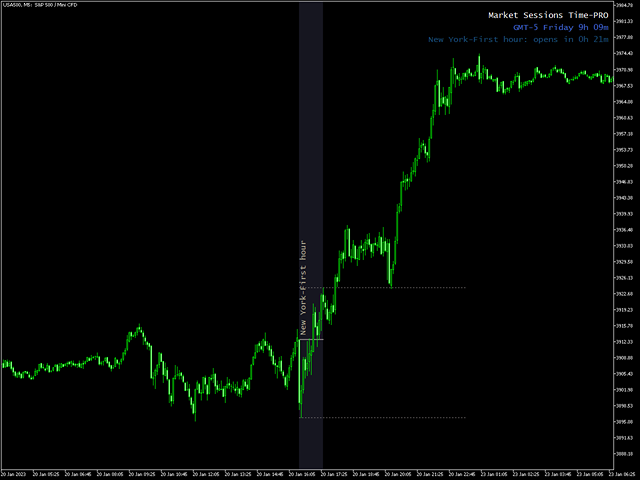
Market Sessions Time PRO

4

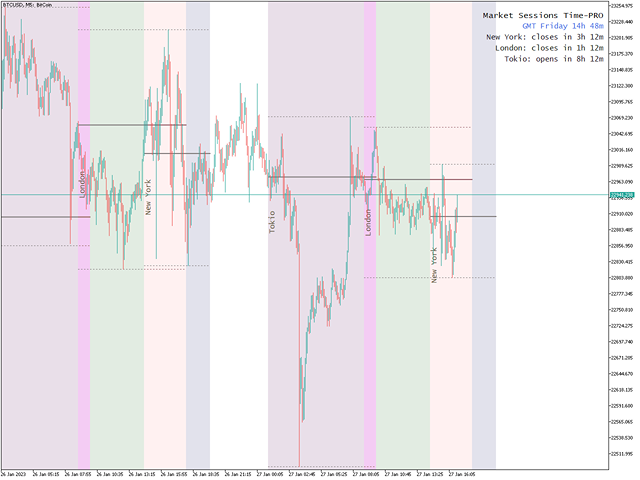
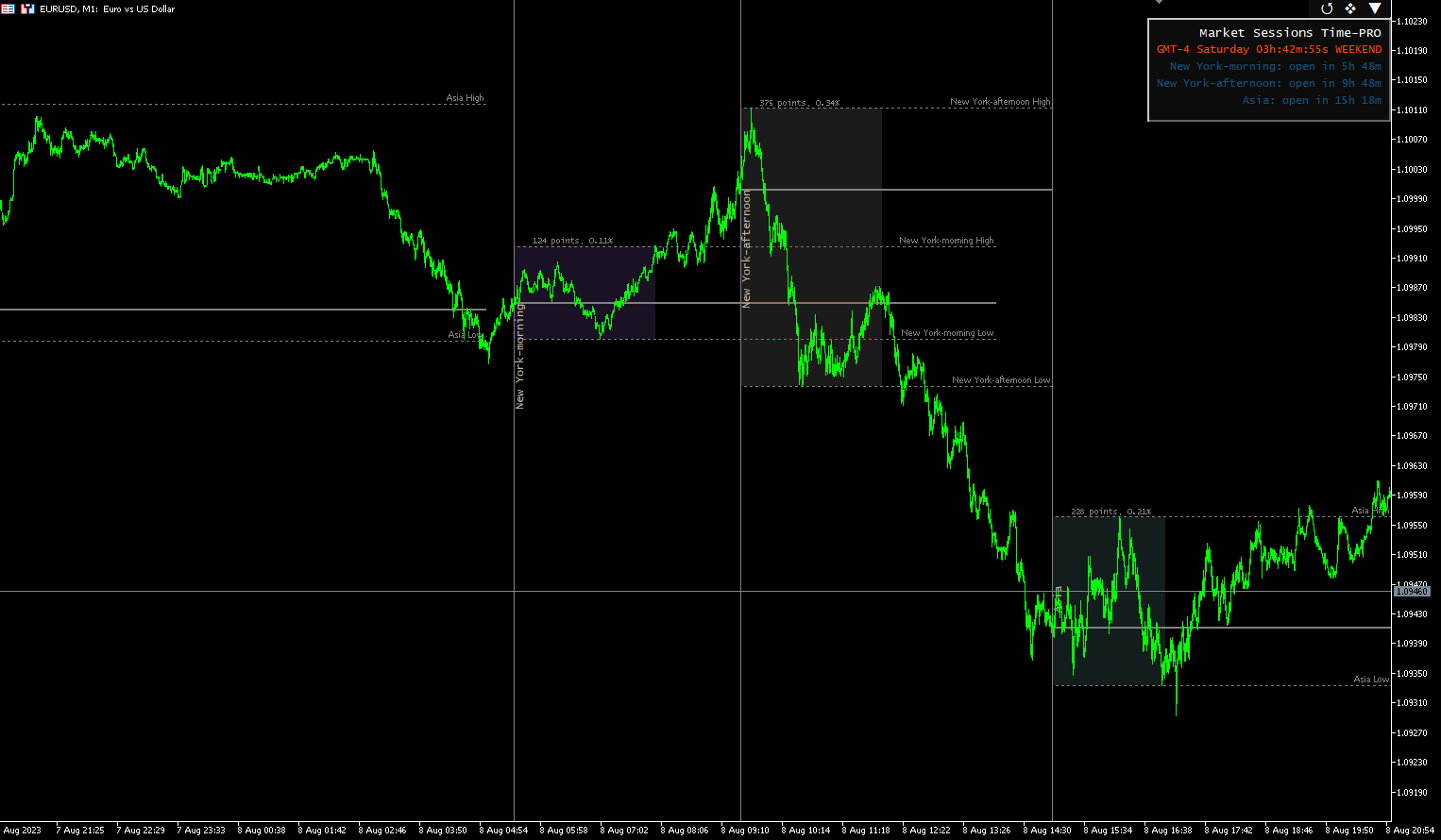
Displays on chart up to 7 markets intraday sessions, 3 weekly ranges and Daily OHLC levels, fully customizable

Each session and range can be shown or hidden, and be adapted to fit special intraday or intraweek periods according to each trader needs


Define sessions start/end times using any of these modes:

  • GMT/UTC time (adjustable to any timezone)
  • Server/broker time (chart time) 
  • Local time (your computer time)

PRO version features

  • Open and Close times with minutes presition: they can be setted as hour:minutes(HH:mm) or just hours(HH) format
  • Adjustable timezone offset for GMT time: set timezone offset to the base GMT time, to easily use any market base time depending on its location. For example New York time: GMT -5
  • Start/End days for weekly ranges: set a period between any days of the week (Sunday to Monday) for weekly ranges
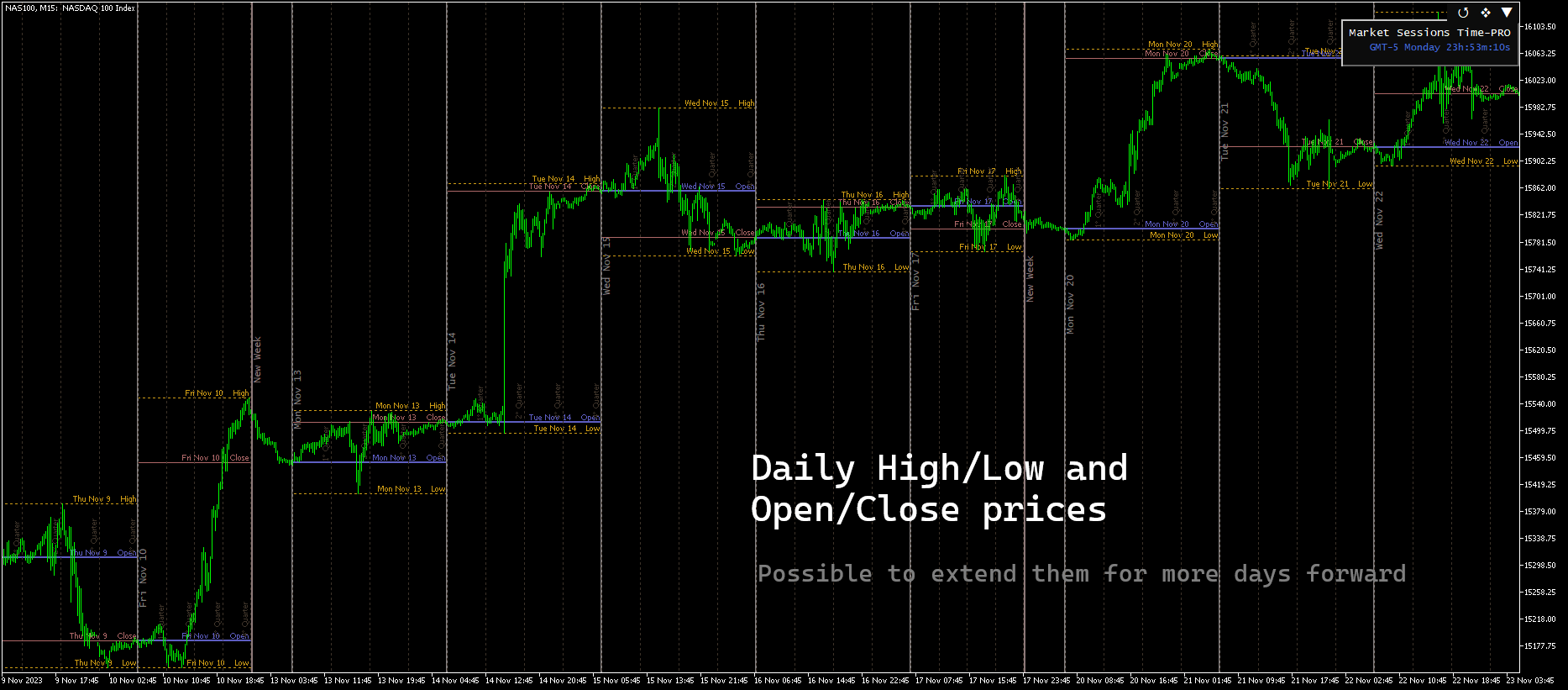
  • Custom Daily start hour and timezone: define the Daily range based on any timezone and hour start, independently of the broker or intraday sessions time
  • Alerts and mobile notifications to MetaTrader android or iPhone app*: get notified when a intraday session has started/closed, also set reminders up to 59 minutes before it

Time

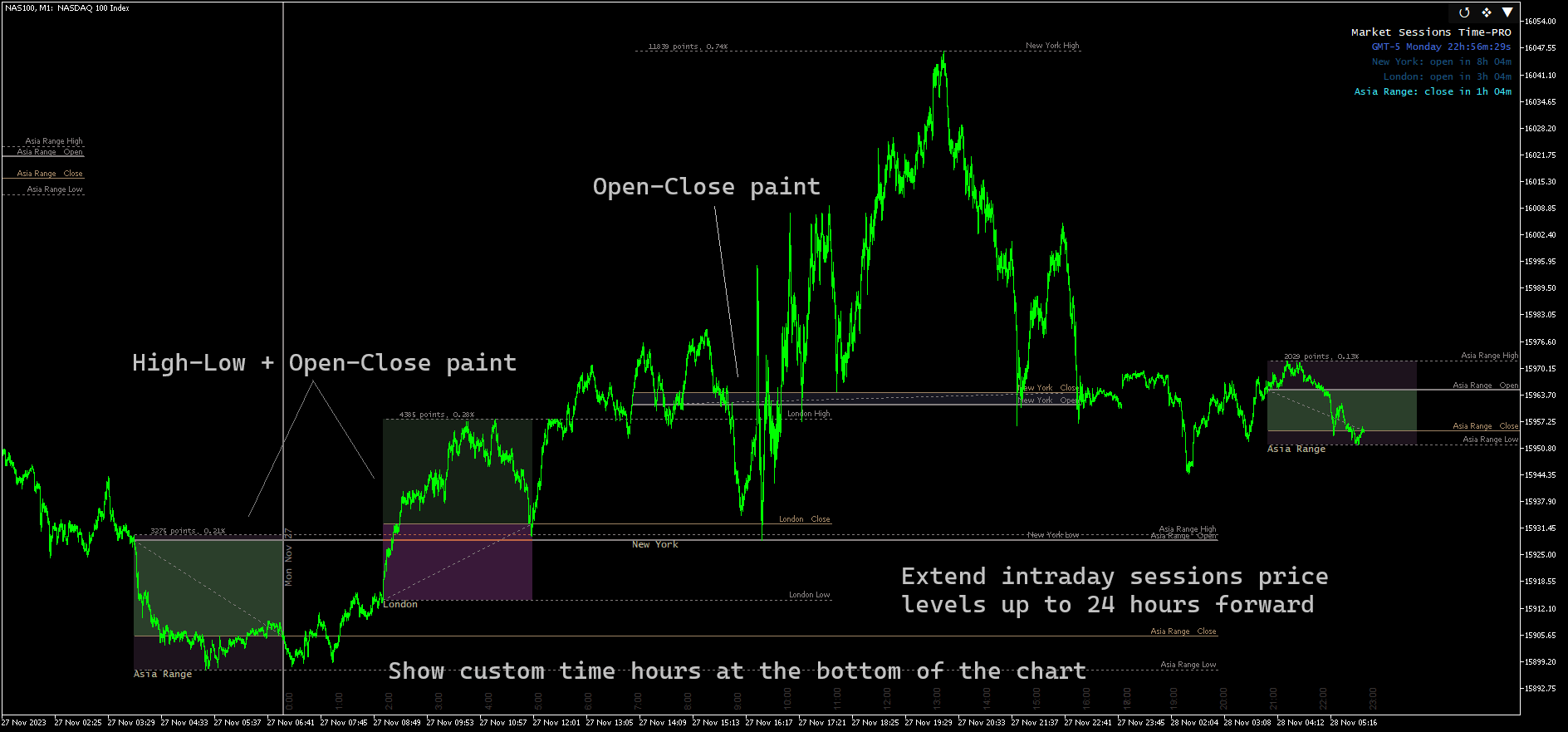
  • Custom time hours separators on the chart: to see it easily over the chart, regardless of the broker time showed on the chart bottom by default. Vertical/horizontal display for hours numbers
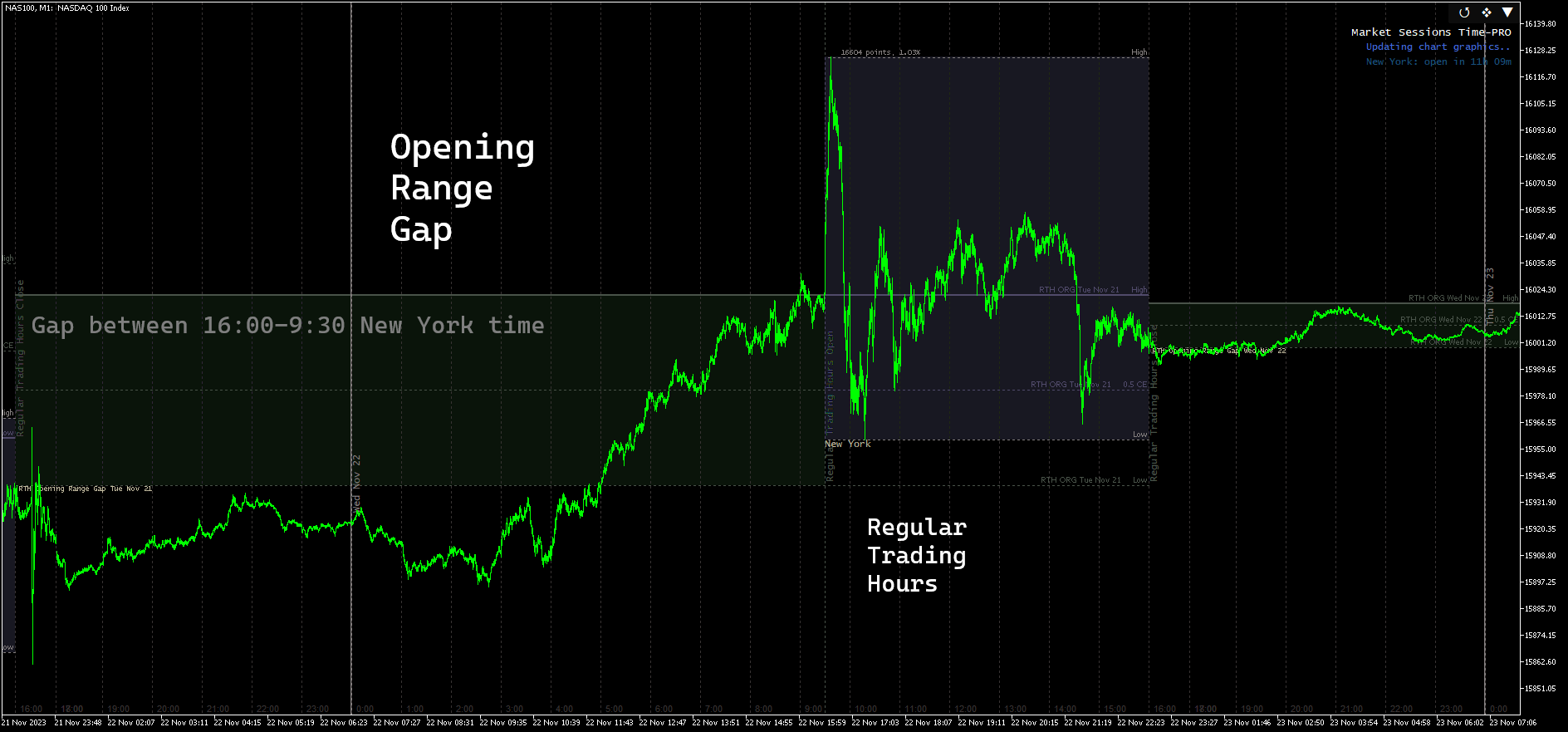
  • Regular Trading Hours (RTH) open/close separator lines: based on the time period between New York time 9:30-16:00

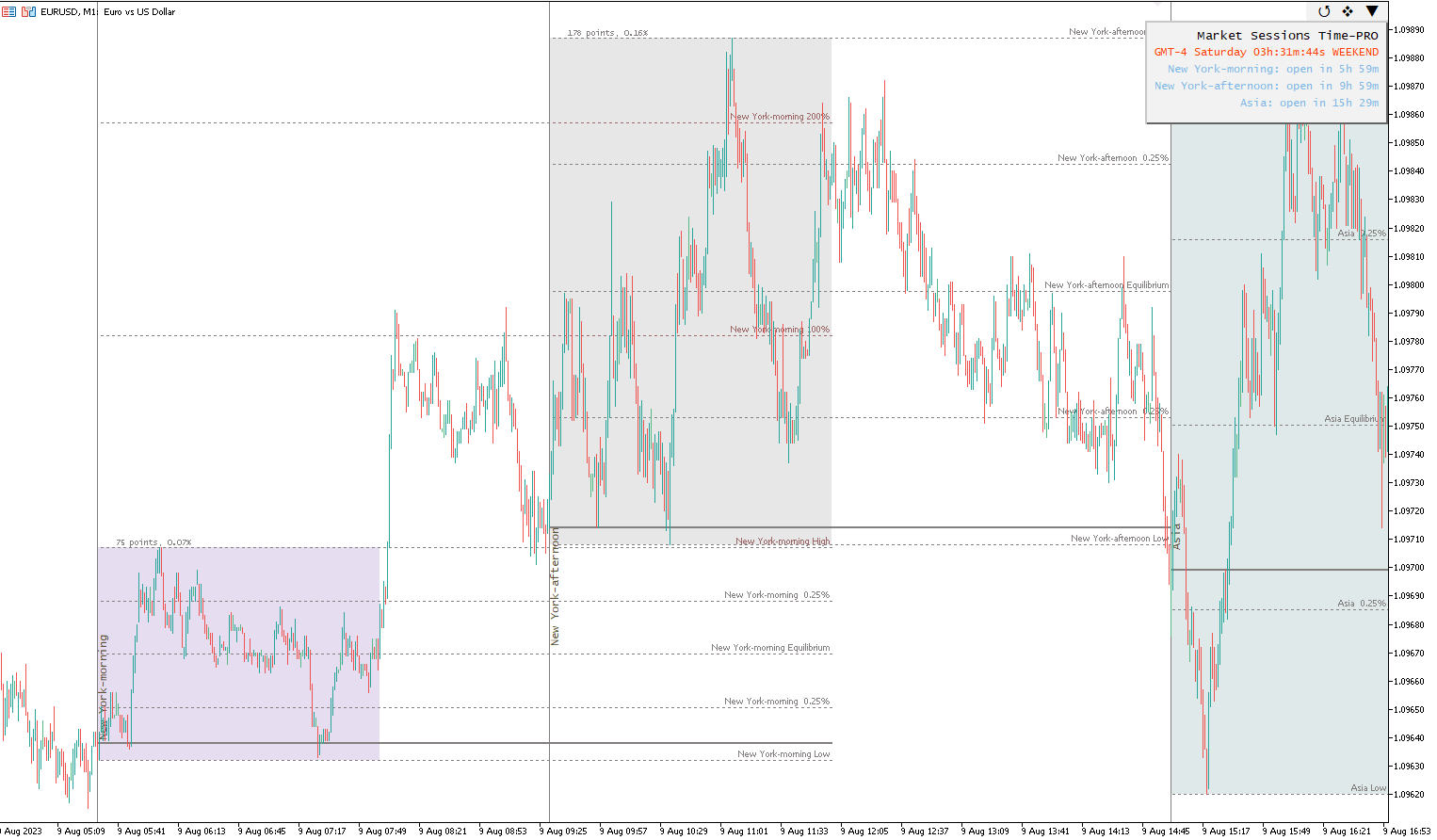
Intraday sessions

  • Name: differentiate each of the 7 intraday session with a particular name. Vertical/Horizontal display

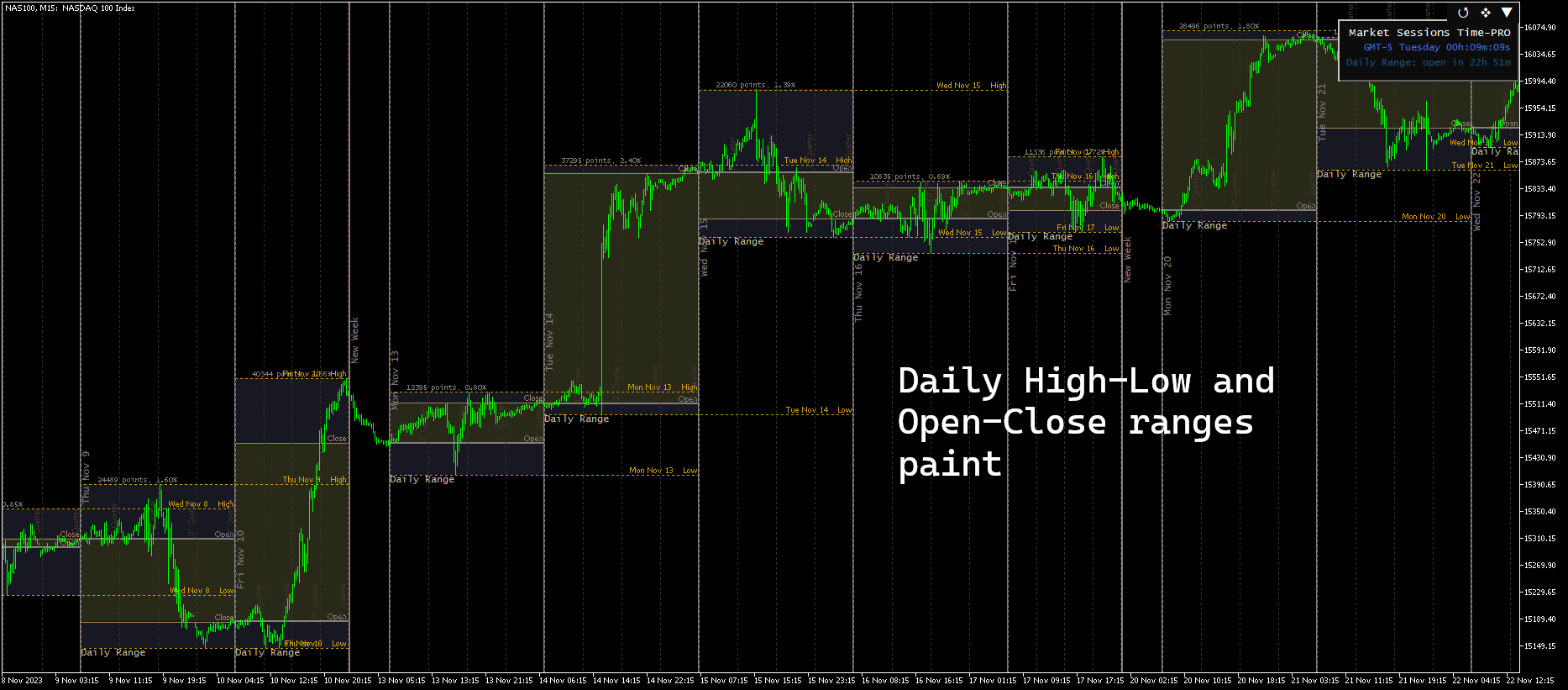
  • 6 Paint modes: High-Low range, Open-Close range, High-Low+Open-Close ranges, Highest-Lowest range of Open/Close prices, Only fist bar, Full Background
  • Range Points: sessions range amplitude sized in points and price percent
  • Open price to close price line: shows the movement from the session open price to the close price

  • Last High-Low line: shows the last high/low peaks during the session period

Intraday sessions and Daily period

  • Open and Close Lines: possible to show both or only one of them. Extend up to 24 hours on intraday sessions, or several days forwardfor daily levels
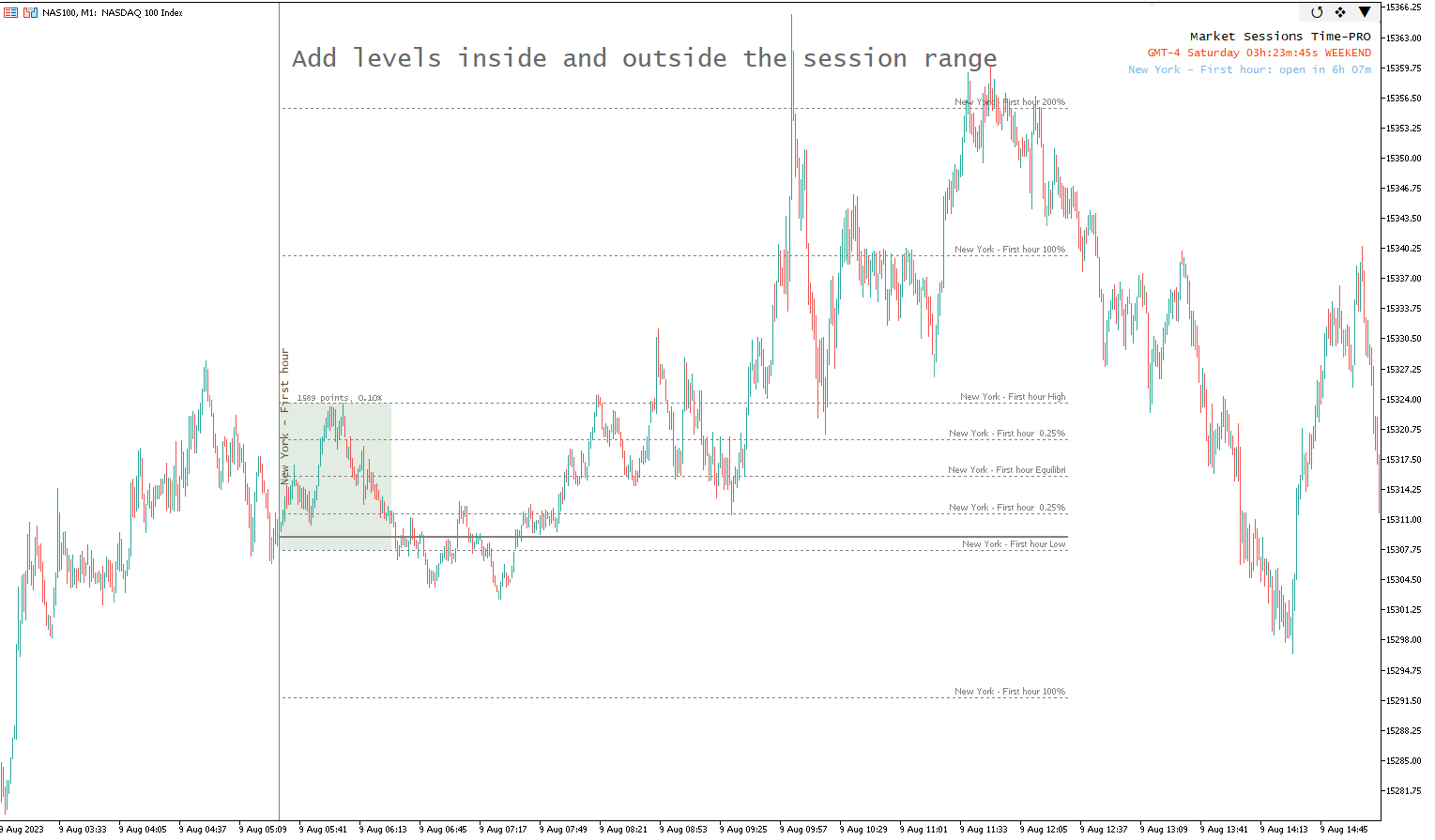
  • High-Low Lines: defined by the session range of prices. Extend them up to 24 hours longer than the session close time, or several days forward  for daily levels
  • Start/end time lines: show sessions separators on the start/end times, and New Day separators
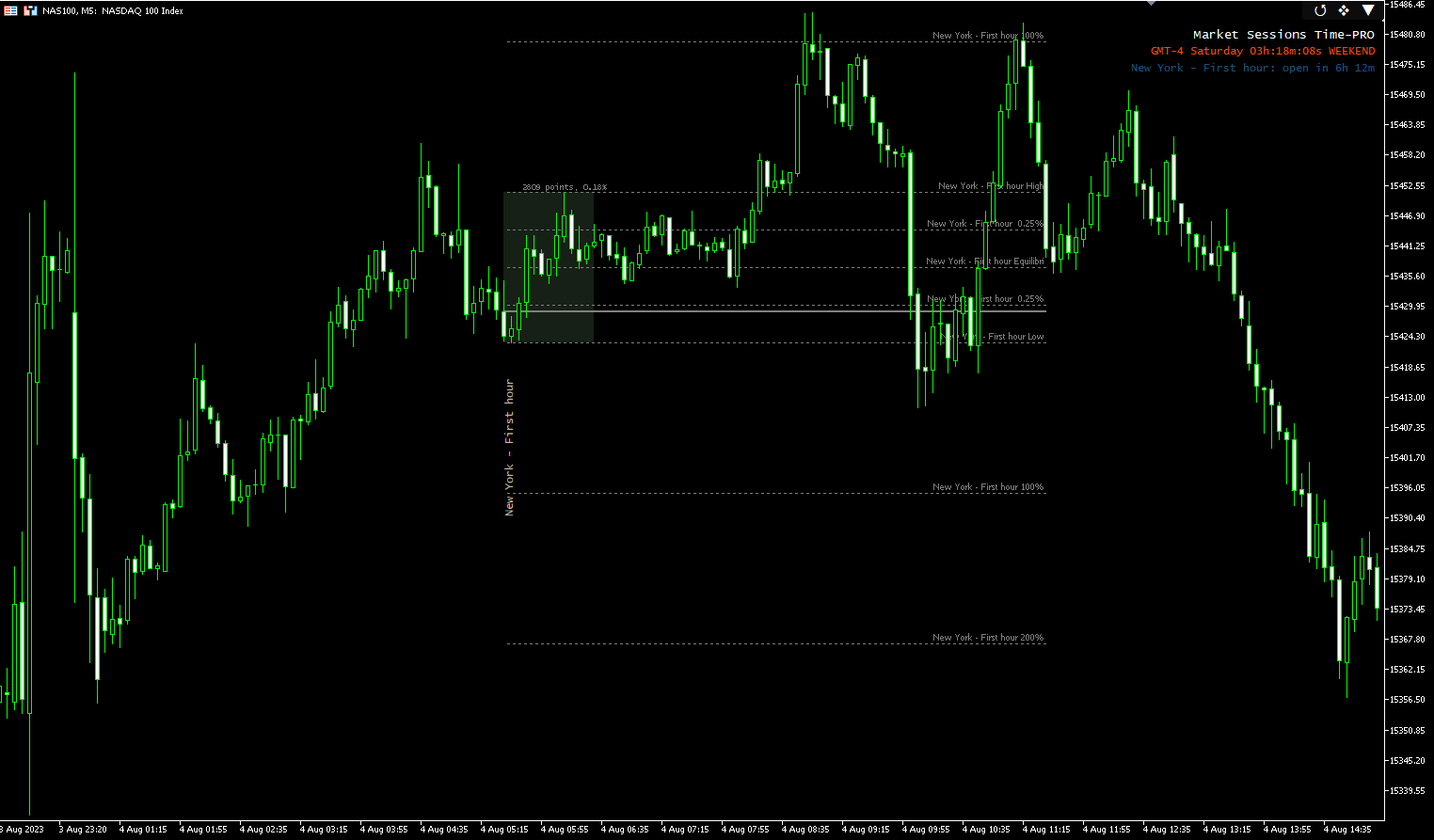
  • Price Levels: based on proportions from the session range amplitude. Extend them up to 24 hours longer than the session close time, or several days forward  for daily levels

  • Time Divisions: divide the intraday session and daily period into time zones based on proportions of the total time

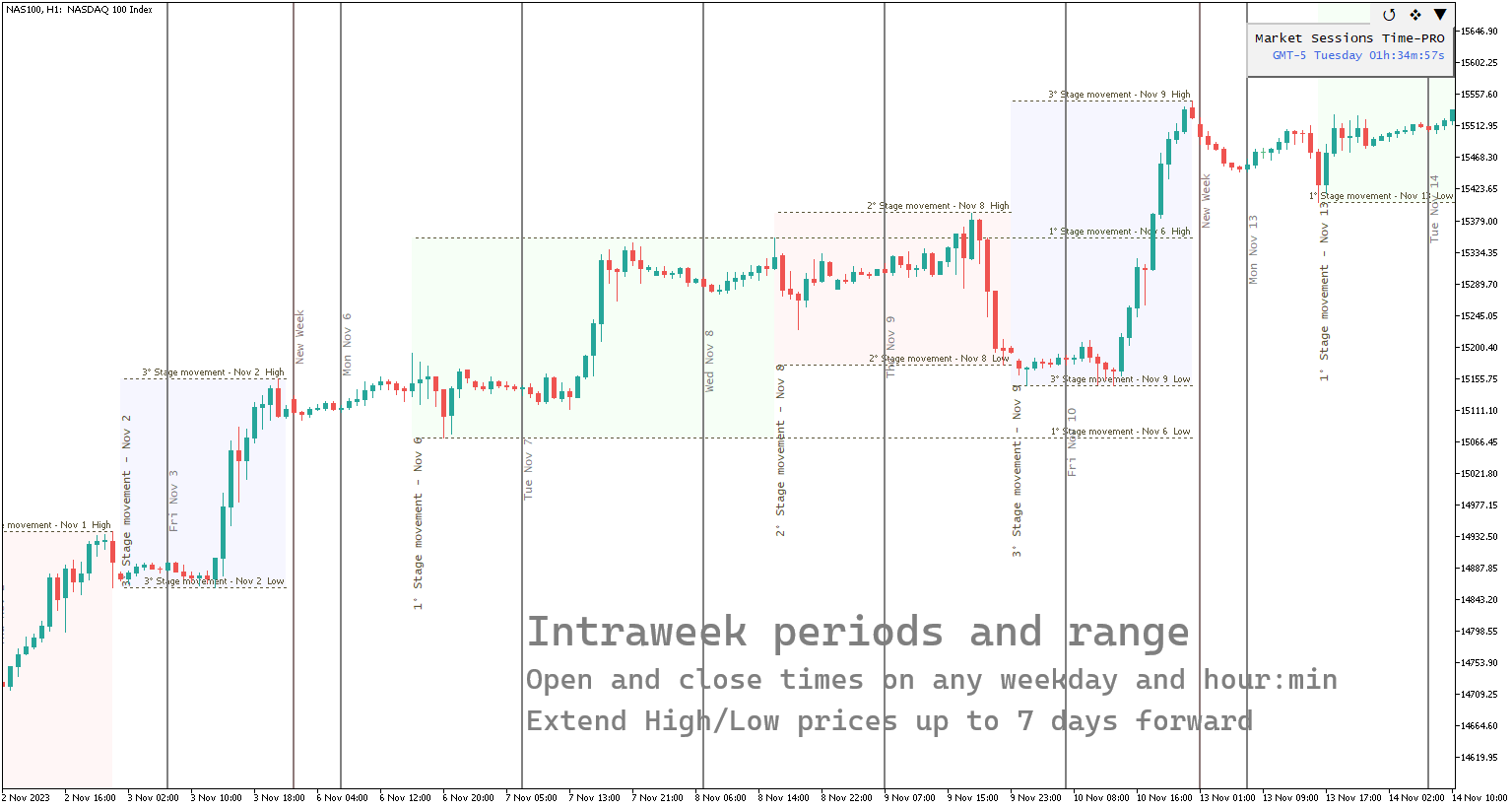
Intraweek periods

  • Custom time period: from any weekday to another, and hours:minutes presition
  • Name: set each weekly range with a particular name. Vertical/Horizontal display
  • High-Low Range paint: back paint on the intraweek range with a custom color
  • High-Low Lines: possible to extend up to 7 days forward

I C T

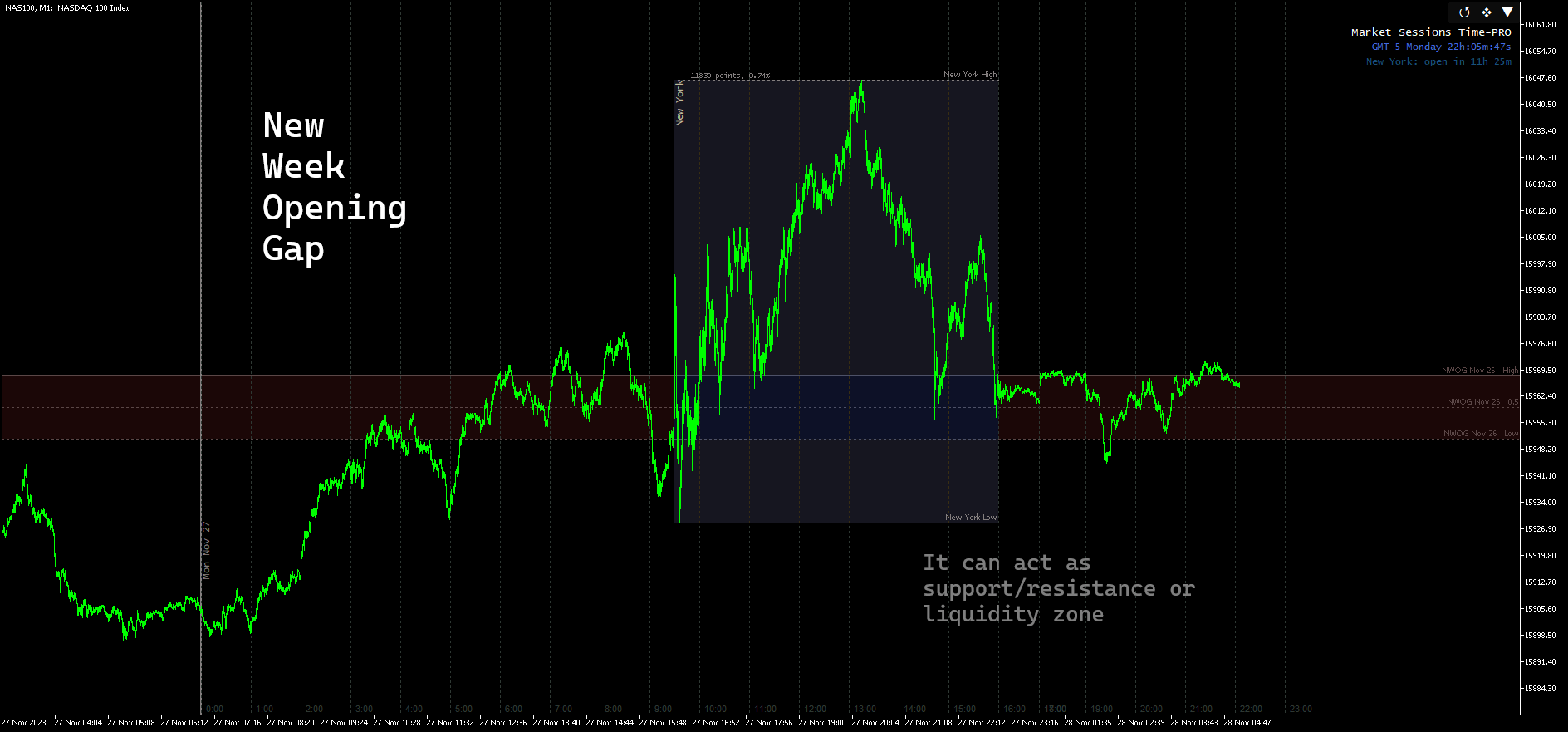
    • New Week Opening Gap (NWOG): shows the price gap range produced during weekend days from friday close price to sunday opening price, extended all along the week. This zone is usually touched many times during the week, acting as support/resistance or liquidity zone in some cases. 
    • RTH Opening Range Gap: the gap is formed between the close(16:00) and the open(9:30) of Regular Trading Hours(RTH), based on New York time. The gap range high-low and CE are often touched during the RTH period, and acts as a liquidity zone. The New York timezone can be adjusted to Summer or Winter offset depending the season. It's possible to extend the high/low and CE levels more days forward.

    Week

    • New week separator line: shows the start of a new week with a vertical line. 
    • Open price line: can be visualized by turning 'ON' NWOG range, as a thick line

    Others features

    • Reset button: clean and restart the indicator graphics easily from the chart
    • Buttons to hide graphics and clock: hide the sessions graphics and clock easily from the chart

    • Simple Clock panel: display a background panel that prevents the clock from being confused with candles and other objects on the chart


    Base features

    • Session Color: assign a particular color to each session**
    • Open Price Line: shows session opening price extended until the end time
    • Previous visible sessions on the chart can be limited by days. Increasing the days amount will increase the time to start the indicator on the chart, depending on the timeframe used
    • Auto Contrast Correction:  will try to adjust the colors contrast to the chart background color          

    * Mobile notifications require to first get the 'MetaQuotes ID' obtained on the mobile app and set it up on the MetaTrader pc terminal, on Tools > Options > Notifications

    ** The sessions colors will be mixed when there is an overlap. This will create a new particular color on the chart, useful to spot overlaps easily on historic data

    *** On demo and simulation execution the tester can't execute the 'Reset' button, it will work only on a live chart

    Disclaimer: The copy of the indicator is sold as is in its current condition at the time of purchase. It is not guaranteed that modifications or new features will be added to the current state. Future updates will be focus primarily on bug fixes and may or may not include new features.

    Chart graphics compatibility of this indicator and other indicators running together on the same chart is not guaranteed.

    Please, try the demo version of the indicator first to make sure it works as expected.

    Contact by private message for any questions

    Reviews 3
    Mastercepeda1
    163
    Mastercepeda1 2023.09.06 23:01 
     

    This is the BEST Market Sessions indicator! The developer Juan was super responsive when I inquired about adding weekly ranges. It is AMAZING to have the option to fully customize the Sessions and Weekly Opening Ranges. The indicator has a descrete and very stylish OFF/ON Button giving the Users the ability to turn off the Drawings/Sessions and Weekly ranges without having to access the Input area. Just perfect! Well done Juan and I look forward to seeing future. I am super grateful!!!

    Recommended products
    RSI Currency Strength Meter is a powerful and elegant multi-currency indicator that measures the real-time relative strength of the 8 major currencies using RSI logic. By calculating the smoothed performance of each currency across its major pairs and applying the RSI formula, it delivers clean and responsive strength lines that make it easy to spot which currencies are truly strong or weak at any moment. This indicator is particularly useful for visualizing currency correlations and divergence
    Lot Size Calculator – Position Sizing Tool This indicator calculates lot size based on the selected risk percentage and stop loss distance. It is designed for Forex, metals, indices, commodities, and cryptocurrency trading. Main Features Position sizing based on account balance and chosen risk percentage Market order and pending order modes Visual trade levels: entry, stop loss, and take profit lines on chart Risk-to-reward ratio display Automatic lot adjustment depending on stop loss distanc
    Trading Utility for Forex Currency Pairs Only not for Gold  Functions Auto Lot Calculation based on Risk Auto stoploss  Auto TakeProfit Breakeven Auto Close Half % Close in percentage with respect to the PIPs Pending Orders BuyLimit Sell Limit with distances BuyStop Sell Stop    with distances Trading Informations Risk in percentage For Multiple trades Combine Takeprofit and Combine Stoplosses
    Currency Exposure Matrix is a currency-level exposure dashboard derived from current open positions. Key functions: - Gross and net currency exposure - Long and short decomposition - Deposit-currency conversion - Concentration warnings - Transparent handling when conversion symbols are unavailable The utility helps users understand aggregated currency exposure across their portfolio. It does not generate entry signals, predict market direction or guarantee trading results. Review broker symbol
    Recovery Manager Panel MT5 is a manual order management panel for traders who want to manage open positions directly from the chart in a clearer and more organized way. This tool is not a signal robot. It does not predict market direction, generate entry signals, or trade automatically based on market forecasts. Instead, it helps traders work with positions that are already open. You can calculate possible recovery lot sizes, view estimated target levels on the chart, and use available floating
    Visual Dolphin Indicator
    AL MOOSAWI ABDULLAH JAFFER BAQER
    Visual Dolphin Indicator Unlock the rhythm of the market with the Visual Dolphin Indicator, your ultimate tool for identifying and capitalizing on market trends with clarity and confidence. Designed for both novice and experienced traders, this indicator eliminates the noise and guesswork, providing crystal-clear buy and sell signals directly on your chart. The Logic Behind the Waves The core of the Visual Dolphin Indicator is a sophisticated yet intuitive dual-wave system based on moving avera
    CloseByTimeEA
    Aleksandr Vasiutin
    CloseByTime Utility is a MetaTrader 5 service utility designed to automatically close open positions and delete pending orders at a specified time. It helps traders schedule the end of trading activity in advance, for example at the end of the day, before news releases, or before market close. The utility uses broker server time, supports weekday filtering, and can work with all symbols or only with a selected list of instruments. Features Automatically closes open positions at a specified time.
    CosmiCLab SMC FIBO CosmiCLab SMC FIBO is a professional trading indicator designed for traders who use Smart Money Concepts (SMC), market structure analysis and Fibonacci retracement levels. The indicator automatically detects market swings and builds Fibonacci levels based on the latest impulse movement. It also identifies market structure changes such as BOS (Break of Structure) and CHOCH (Change of Character), helping traders understand the current market direction. CosmiCLab SMC FIBO also pr
    Grid Manager — Manual Multi-Basket Grid Assistant for MT5 Grid Manager is a hands-on control panel for building and managing grid "baskets" directly on your chart. You decide the direction and the moment; the tool opens the grid, manages every leg, and protects the position with money-based risk controls, on-chart breakeven/SL/TP lines, and one-click actions. It is an execution and management assistant — fast, visual, and fully under your control. What it is — and what it is not Grid Manager is
    Magic Number Manager   is a professional trade management utility for MetaTrader 5 that provides centralized monitoring and control for 20+ Expert Advisors running simultaneously on a single account. Key Features: Performance Dashboard   - Real-time table displaying each EA's total trades, win rate, total profit, average trade, best/worst trade, current drawdown, and profit factor. Color-coded metrics for instant visual assessment. Batch Trade Management   - Close all open positions from a speci
    Prop Calculator Assistant Stop blowing Prop Firm accounts due to bad math. Let the Assistant handle the risk. Prop Calculator Assistant   is the ultimate trade management panel designed specifically for traders attempting to pass funding challenges (FTMO, etc.) or managing funded capital. It replaces mental math and manual order dragging with a precision visual interface that keeps you strictly within your rules. This is   not   an auto-trading bot that guesses the market. It is a professional  
    Candlestick Pattern Scanner is a multi-timeframe and multi-symbol dashboard and alert system that checks all timeframes and currency pairs for different candlestick patterns that are formed in them. Scanner is integrated   with support and resistance zones so you can check the candlestick patterns in most important areas of the chart to find breakout and reversal patterns in the price chart. Download demo version   (works on M4,M6,M12,H3,H8 timeframes and 20 symbols of Market Watch window) Read
    Prop Challenge Command Center is an account-control dashboard for monitoring prop-style daily and overall loss rules, target progress, minimum trading days, consistency, open risk and account state. Key functions: - Configurable rule profiles - Persisted daily and peak-equity baselines - Daily and overall drawdown monitoring - Profit-target and minimum-day progress - Consistency and exposure views - Warning ladder with guarded lock, reset and flatten controls - Event history for operational rev
    Trade Copilot - Semi-Automatic Risk Management Panel for Gold (XAUUSD) and any instrument Trade Copilot is a semi-automatic trading panel built for manual traders who want an EA's discipline without giving up control of their own entries. You decide the direction and the level - the panel handles risk sizing, stop-loss placement, take-profit management, and trade protection automatically. KEY FEATURES - Risk-based lot sizing - choose Risk %, Risk $, or Fixed Lot; the panel calculates positio
    Painel Nelogica ChartTrading
    Tiago Silvano Souza Felipe
    Painel Profit is an operational trading panel for MetaTrader 5 created to make manual execution and visual order management easier directly on the chart. The operating principle is simple: the trader selects the symbol, timeframe, volume, entry type, and exit strategy. Based on these commands, the panel sends or organizes the trade through the interface, displaying the entry, take profit, and stop loss levels on the chart for visual monitoring. This product is not a signal robot and does not mak
    AW Workpad MT5
    AW Trading Software Limited
    AW Workpad is a multifunctional trading control panel designed for manual and semi-automatic trading. It allows you to manage pending orders, market positions, provides a wide range of statistical data, as well as a multi-period analysis of a group of classic indicators. The utility is represented by five tabs:   Positions, Pending, Close, Indicators, Info. Each tab has its own group of functions for processing orders or information about the current market situation. MT4 version ->   HERE  / P
    Expert TP SL v04
    Mikhail Ostashov
    Expert TP SL v04 - Professional Trading Assistant with AI Motivation System Advanced manual trading tool with automatic risk management, overtrading protection, and intelligent psychological support for disciplined trading. PRODUCT OVERVIEW Expert TP SL v04 is a comprehensive trading assistant designed for manual traders who want to maintain emotional discipline while automating risk calculations. This isn't just another order placement tool - it's a complete trading psychology system that pr
    Timeframe Trading Limiter
    AL MOOSAWI ABDULLAH JAFFER BAQER
    Timeframe Trading Limiter is a professional risk management and trade discipline utility designed for MetaTrader 5. It empowers traders to enforce strict, automated limits on the number of trades and the maximum allowable drawdown within each trading period, based directly on the chart timeframe selected. Whether you are a discretionary trader prone to overtrading, a prop firm challenge participant needing to adhere to strict rules, or an algorithmic trader running multiple strategies, this tool
    Overview Mirror Signals Service EA (Text only)   is a powerful monitoring Expert Advisor that automatically sends   real-time Telegram notifications   for all important trade events on your MetaTrader 5 account. It is engineered specifically for   signal providers ,   trade-copier operators ,   auditors ,   educators , and   professional trading services   that require immediate, detailed, and reliable reporting. Everything from   entries, exits, SL/TP changes, comment changes, trailing sto
    Auto Stop Loss MT5
    Nabil Oukhouma
    5 (1)
    The "Set & Forget" Risk Manager for Multi-Asset Trading Never Leave a Trade Unprotected. Auto Stop Loss (MT5 Manager) is the ultimate background utility for traders who prioritize safety. Unlike standard panels, this tool works tirelessly behind the scenes to instantly secure every trade you place. Whether you open trades manually or via another EA, this manager ensures every position has a hard Stop Loss, Take Profit, and dynamic Trailing Stop attached immediately. The Game Changer:  Manage yo
    TAQ Magic Keys Trade Manager is for MetaTrader5 (MT5). It has an advanced trade management tool and Lot size calculator for MetaTrader 5.  It is designed to help traders to trades faster, precise and manage open positions directly with one click. Demo 3 Days Free Trial https://taqmagickeys.com/product/taq-magic-keys-v5-0-demo-3days-free-trial/ FN key is the best functions which automatically manage trades up to TP4 with auto partial closing and trailing SL. Define your trade strategy in FN keys
    FRATO Smart GEX Gamma Exposure 0DTE Dashboard
    Francisco Felipe Alves Da Silva Rocha
    Elevate your trading to the institutional level with   FRATO Smart GEX . This is not just another lagging technical indicator. It is a quantitative intelligence tool that reads the positioning of large Market Makers through real-time   GEX (Gamma Exposure)   and   Open Interest (OI)   analysis. Understand where big players are pushing the price and identify support and resistance zones that are invisible on a standard candle chart! KEY FEATURES: Real-Time GEX Analysis:   Visualize Call Wall
    Apex Signal Stream – Trade Panel Version 1.21 | For MetaTrader 5 Overview Apex Trade Panel   is a fully on-chart manual trading panel. It gives you precise control over every order you place, from lot sizing and stop-loss logic to trailing methods and batch close filters. All through a clean, resizable, dark/light-themed interface that sits directly on your chart. No menu diving, no repetitive calculations. Just clarity and speed. Feature Breakdown Position Sizing — Three Risk Modes Cycle throug
    Level Volume Pro
    John Samfel Bucton Josol
    HAT IT DOES   MONTHLY HIGH & LOW — AUTO-DRAWN EVERY MONTH Draws the High and Low of every month for the current year (or any year you set). Each level extends as a horizontal ray into the future so you always see where price is reacting to historical monthly extremes. Color-coded (blue = high, red = low), labeled (JAN HIGH, FEB LOW etc.), fully customizable width and style. Toggle individual months on or off.   WEEKLY HIGH & LOW
    TradeControl Pro – Advanced Trade Manager for MetaTrader TradeControl Pro is a trade management tool for MetaTrader that enables structured and efficient management of trading positions directly on the chart. The application combines a clearly designed user interface with automated calculations and flexible control options for different trading approaches. The integrated on-chart panel is organized in a tabular layout and divided into three main sections (tabs): Execution , Close , and Info . Th
    Overview Mirror Signals EA is a powerful monitoring Expert Advisor that automatically sends real-time Telegram notifications for all important trade events on your MetaTrader 5 account. It is engineered specifically for signal providers , trade-copier operators , auditors , educators , and professional trading services that require immediate, detailed, and reliable reporting. Everything from entries, exits, SL/TP changes, comment changes, trailing stop activations, pending order modifications
    AP Manager
    Ardian Putra
    Product Title AP Manager – Auto SL, TP, Break Even & Trailing Stop for MT5 Product Description Take full control of your risk management with AP Manager , a powerful and flexible tool designed to automatically manage Stop Loss, Take Profit, Break Even, and Trailing Stop for all your trades. This utility is perfect for traders who want to protect profits, minimize losses, and trade with discipline — without constantly monitoring the charts. Key Features Automatic Stop Loss & Take Pr
    Local Copy Trader Utility - Professional Copy Trading System Overview Local Copy Trader Utility is the complete solution for mirroring trades between MetaTrader 5 accounts. With both Master and Slave functionality in one powerful Expert Advisor, it delivers reliable, lightning-fast trade copying with zero external dependencies. Perfect for managing multiple accounts, following trading signals, or transferring trades between brokers, this system ensures your positions stay perfectly synchronized
    Overview Candle Timer Countdown Pro displays a smooth, accurate countdown to the close of the current candle, accompanied by a circular progress arc that gives you an instant visual sense of time remaining. Unlike other timers that freeze between ticks or drift out of sync, this indicator uses server time interpolation to deliver a stutter-free countdown on every timeframe from M1 to MN. Whether you trade scalping setups on the 1-minute chart or swing positions on H4, knowing exactly when the cu
    Trade Assistant 38 in 1
    Makarii Gubaydullin
    4.91 (23)
    Multifunctional tool: Lot Calculator, Grid Orders, R/R ratio, Trade Manager, Supply and Demand zones, Price Action and much more Demo version   |   User manual Trade Assistant   doesn't work in the strategy tester : you can download the   Demo Version HERE  to test the utility . Contact me   for any questions  / ideas for improvement / in case of a bug found If you need a MT4 version, it is available here Simplify, speed up and automate your trading   process . Expand the standard terminal capa
    Buyers of this product also purchase
    Trade Assistant MT5
    Evgeniy Kravchenko
    4.41 (215)
    It helps to calculate the risk per trade, the easy installation of a new order, order management with partial closing functions, trailing stop of 7 types and other useful functions. Additional materials and instructions Installation instructions - Application instructions - Trial version of the application for a demo account Line function -   shows on the chart the Opening line, Stop Loss, Take Profit. With this function it is easy to set a new order and see its additional characteristics bef
    Forex Trade Manager MT5
    InvestSoft
    4.98 (668)
    Trade Manager MT5 is an advanced position size calculator and trade management tool for MetaTrader 5, designed to help traders plan trades faster, control risk more precisely, and manage open positions directly from the chart. It combines order placement, risk based lot calculation, Stop Loss and Take Profit management, Break Even, Trailing Stop, Partial Close, Equity Protection, and external trade management in one panel. Whether you trade forex, indices, metals, commodities, crypto, or future
    Local Trade Copier EA MT5
    Juvenille Emperor Limited
    4.97 (144)
    Experience exceptionally fast trade copying with the   Local Trade Copier EA MT5 . With its easy 1-minute setup, this trade copier allows you to copy trades between multiple MetaTrader terminals on the same Windows computer or Windows VPS with lightning-fast copying speeds of under 0.5 seconds. Whether you're a beginner or a professional trader, the   Local Trade Copier EA MT5   offers a wide range of options to customize it to your specific needs. It's the ultimate solution for anyone looking t
    ================================================================================ POC BREAKOUT - V20.72. Full Professional Grade Toolkit ================================================================================ POC Breakout is a full MetaTrader 5 trading dashboard for discretionary traders who want breakout signals, Point of Control (POC) context, volume profiles, order flow, market structure, news, alerts, and advanced trade planning in one professional workspace. Attached directly to you
    TradePanel MT5
    Alfiya Fazylova
    4.88 (166)
    Trade Panel is a multi-functional trading assistant. The app contains over 50 trading functions for manual trading and allows you to automate most trading tasks. Before making a purchase, you can test the demo version on a demo account. Download the trial version of the application for a demonstration account: https://www.mql5.com/en/blogs/post/750865 . Full instructions here . Trade. Allows you to perform trading operations in one click: Open pending orders and positions with automatic risk cal
    Beta Release The Telegram to MT5 Signal Trader is nearly at the official alpha release. Some features are still under development and you may encounter minor bugs. If you experience issues, please report them, your feedback helps improve the software for everyone. Telegram to MT5 Signal Trader is a powerful tool that automatically copies trading signals from Telegram channels or groups directly to your MetaTrader 5 account. It supports both public and private Telegram channels, and you can conn
    FarmedHedge Pair Trading Dashboard
    Tanapisit Tepawarapruek
    5 (3)
    Farmed Hedge Yield Farming | All Markets (Manual - Hybrid - Semi/Automated EA) MULTI-ASSET SUPPORT Trade any asset available on your broker - Forex: Major, Minor, Exotic pairs - Crypto: BTC, ETH, XRP, SOL, BNB - Stocks: Apple, Tesla, Amazon, Google, etc. - Commodities: Gold, Silver, Oil, Gas - Indices: US30, NAS100, SPX500, DAX40 - Any CFD your broker offers VERIFIED TRADING RESULTS - Farmed Hedge Yield Axi Copy:  https://www.mql5.com/en/signals/2356376 - Farmed Hedge Yield Exn Copy:   https:/
    Exp COPYLOT CLIENT for MT5
    Vladislav Andruschenko
    3.97 (35)
    Professional Trade Copier for MetaTrader 5 Fast, professional, and reliable trade copier for MetaTrader . COPYLOT allows you to copy Forex trades between MT4 and MT5 terminals with support for Hedge and Netting accounts. COPYLOT MT5 version supports: - MT5 Hedge to MT5 Hedge - MT5 Hedge to MT5 Netting - MT5 Netting to MT5 Hedge - MT5 Netting to MT5 Netting - MT4 to MT5 Hedge - MT4 to MT5 Netting MT4 version Full Description +DEMO +PDF How To Buy How To Install How to get Log Files H
    Anchor Trade Manager
    Kalinskie Gilliam
    5 (6)
    Anchor: The EA Manager Your EAs manage their own trades. Anchor manages the account around them. Anchor gives you one place to control your EAs, manage risk and decide when trading is allowed. Any EA, any vendor, any broker or symbol. No source-code changes required. The Problem Most EAs only know what they are doing. They cannot see when another EA is already trading, when several EAs open and are stacking risk or when the account has reached your loss limit. Even using just one EA, it may not
    Telegram to MT5 Multi-Channel Copier automatically copies trading signals from your Telegram channels directly into MetaTrader 5. No bots, no browser extensions, no manual copying. You receive a signal on Telegram and the EA opens the trade on your terminal in a few seconds. The product includes two components: a Windows application that listens to your Telegram channels, and this Expert Advisor that executes the signals on your MT5 terminal. An MT4 version is also available. Setup guide and app
    Footprint Chart Pro — Professional OrderFlow EA for MetaTrader 5 Version 6.34 | Professional tool for real traders | Institutional-Grade Visualization DEMO USERS - PLEASE SELECT EVERY TICK / REAL TICK WHEN TESTING AND YOU HAVE DOWNLOADED HISTORICAL DATA. IF YOU SEE A WAITING SCREEN AND IT IS NOT DOWNLOADING, IT MEANS YOU HAVE LOW HISTORICAL DATA. TRY 1 MIN AND 5 MIN FIRST ON 1 DAY DATA. ONE DAY DATA SHOULD BE THE NEWEST AND MOST CURRENT DATE. PLEASE WAIT UNTIL THE MARKET HAS ROLLED OVER PERIOD.
    Trade copier MT5
    Alfiya Fazylova
    4.57 (51)
    Trade Copier is a professional utility designed to copy and synchronize trades between trading accounts. Copying occurs from the account / terminal of the supplier to the account / terminal of the recipient, which are installed on the same computer or VPS . PROMOTION - If you have already purchased the "Trade Copier MT5," you can receive the "Trade Copier MT4" for free (for copying MT4 > MT5 and MT4 < MT5). For more detailed information about the conditions, please contact us via private message
    Premium Trade Manager - The Trade Panel With a Coach Built In Premium Trade Manager puts a trading coach inside your chart, with a full execution engine underneath it. Set the trade up the way you always do, then let Max, your AI trading coach, read that exact setup against your live account and give you a straight verdict before you commit: is the stop disciplined, is the risk sane, is a high-impact release minutes away, are you near a prop-firm limit. Below sits the engine that runs everything
    Power Candles Strategy Scanner - Self-Optimizing Multi-Symbol Setup Finder Power Candles Strategy Scanner runs the same self-optimizing engine that powers the Power Candles indicator - on every symbol in your Market Watch, side by side. One panel tells you which symbols are statistically tradable right now, which strategy wins on each, the optimal Stop Loss / Take Profit pair, and pings you the moment a fresh signal fires. This tool is part of the Stein Investments ecosystem - 18+ tools plus Max
    Trade Dashboard MT5
    Fatemeh Ameri
    4.95 (132)
    Trade Dashboard simplifies how you open, manage, and control your trades, with built-in lot size calculation. It allows you to execute trades, manage risk, and control positions directly on the chart, with tools such as partial close, breakeven, and trailing stop. Designed to reduce manual work and help you stay focused on your trading decisions. A demo version is available for testing. Detailed explanations of features are provided within the MQL5 platform. Installation instructions are include
    Adam FTMO MT5
    Vyacheslav Izvarin
    5 (2)
    ADAM EA Special Version for FTMO Please use ShowInfo= false for backtesting ! Our 1st EA created using ChatGPT technology Trade only GOOD and checked PROP FIRMS  Default parameters for Challenge $100,000 Tested on EURUSD and GBPUSD only  Use 15MIN Time Frame Close all deals and Auto-trading  before Weekend at 12:00 GMT+3  Friday For Prop Firms MUST use special Protector  https://www.mql5.com/en/market/product/94362 --------------------------------------------------------------------------------
    Telegram To MT5 Ultra
    Mirel Daniel Gheonu
    5 (3)
    Telegram To MT5 — Signal Copier Turn the trading calls from your Telegram channels into real MT5 orders — automatically, on as many accounts as you like, with risk and rules fully under your control. Telegram To MT5 connects the VIP / signal channels you already follow on Telegram to your MetaTrader 5 terminal. A free companion desktop app reads the messages (even from channels that block bots), and this Expert Advisor executes them on your account — applying your own risk settings, symbol mappi
    YuClusters
    Yury Kulikov
    4.93 (43)
    Attention: You can view the program operation in the free version  YuClusters DEMO .  YuClusters is a professional market analysis system. The trader has unique opportunities to analyze the flow of orders, trade volumes, price movements using various charts, profiles, indicators, and graphical objects. YuClusters operates on data based on Time&Sales or ticks information, depending on what is available in the quotes of a financial instrument. YuClusters allows you to build graphs by combining da
    Welcome to ENTRY IN THE ZONE WITH SMC MULTI TIMEFRAME Entry In The Zone and SMC Multi Timeframe is a real-time market analysis tool based on Smart Money Concepts (SMC), designed to analyze market structure, price direction, and key trading zones. It supports both Single-Timeframe Analysis and Multi-Timeframe Analysis, providing a clearer view of the overall market structure across multiple timeframes, with real-time BUY / SELL signals that do not repaint. It is designed to help filter trading op
    EA Auditor
    Stephen J Martret
    5 (4)
    EA Auditor is an independent analysis tool for traders evaluating Expert Advisors and trading signals on MetaTrader 5. It audits backtest reports, reviews posted developer signals, and cross-verifies the two against each other to help traders assess strategies before committing capital. The MQL5 market offers a wide range of Expert Advisors from many developers, with varying approaches, quality, and transparency. EA Auditor provides a consistent, data-driven framework for reviewing them, answer
    The product will copy all telegram signal to MT5 ( which you are member) , also it can work as remote copier.  Easy to set up, copy order instant, can work with almost signal formats, image signal,  s upport to translate other language to English Work with all type of channel or group, even channel have "Restrict Saving Content", work with  multi channel, multi MT5 Work as remote copier: with signal have ticket number, it will copy exactly via ticket number. Support to backtest signal. How to s
    Timeless Charts
    Samuel Manoel De Souza
    5 (7)
    Timeless Charts is an all-in-one trading utility for professional traders. It combines custom chart types such as Seconds Charts and Renko with advanced order flow analysis using Footprints , Clusters , Volume Profiles , VWAP studies, and anchored analysis tools for deeper market insight. Trading and position management are handled directly from the chart through an integrated trade management panel , while Market Replay and Virtual Accounts provide environments for practicing trading skills and
    Working Demo Download Copy Cat More Trade Copier MT5 is a local trade copier and a complete risk management and execution framework designed for today’s trading challenges. From prop firm challenges to personal portfolio management, it adapts to every situation with a blend of robust execution, capital protection, flexible configuration, and advanced trade handling. The copier works in both Master (sender) and Slave (receiver) modes, with real-time synchronization of market and pending orders,
    Trade Command Center
    Nguyen Thanh Trieu
    5 (2)
    Additional materials and instructions Installation instructions - Trial version of the application for a demo account ; Official Information Official channel Seller profile Trade Command Center — Professional Trade Execution & Real-Time Risk Guard Panel Trade Command Center is a high-performance visual trade execution, lot size calculator, and risk management utility for MetaTrader 5. It is engineered specifically for manual traders requiring strict risk enforcement, capital protection, a
    VirtualTradePad One Click Trading Panel
    Vladislav Andruschenko
    4.59 (74)
    Trading Panel for MetaTrader 5 — professional one-click trading from chart and keyboard A powerful trading panel for active manual trading, designed to open, manage, and close trades far faster and more efficiently than the standard MetaTrader interface. This panel is built for traders who want full control over positions, pending orders, profit management, and trading execution inside one professional workspace. This is not just another utility. It is a complete trading cockpit for MetaTrader
    Elevate Your Trading Signals with Our Advanced Telegram Bridge EA It’s time to captivate your audience with real-time trading updates that are both professional and visually appealing. Contact me to see the demo and get a trial version We have significantly invested in user friendly features that create a unique experience for customers and providers.  SIGNAL BRIDGE is able to deliver 100% COPIER FRIENDLY SIGNALS for all business cases, even bypassing Metatrader logics where other EAs struggle!
    Seconds Chart MT5
    Boris Sedov
    4.61 (18)
    Seconds Chart is a unique tool for creating second-based charts in MetaTrader 5 . With Seconds Chart , you can construct charts with timeframes set in seconds, providing unparalleled flexibility and precision in analysis that is unavailable with standard minute or hourly charts. For example, the S15 timeframe indicates a chart with candles lasting 15 seconds. You can use any indicators and Expert Advisors that support custom symbols. Working with them is just as convenient as on standard charts.
    Quant AI Agents
    Ho Tuan Thang
    5 (1)
    Quant AI Agents are independent trading Expert Advisors. Instead of trading using a fixed strategy like other conventional EAs, Quant AI Agents   is a   multi-agent AI trading framework   that turns natural-language strategy prompts into live.  WANT THE SAME RESULTS AS MY LIVE SIGNAL?   Use the exact same brokers I do:   IC MARKETS , IC TRADING   .  Unlike the centralized stock market, Forex has no single, unified price feed.  Every broker sources liquidity from different providers, creating un
    VirtualTradePad PRO SE MT5 — professional trading control center for MetaTrader 5 VirtualTradePad PRO SE is a premium chart-based trading panel and trade-management workspace for MetaTrader 5 . It is designed for traders who want faster execution, clearer position control, structured trade management, visual level planning and a professional workflow directly from the chart. This is not only a BUY / SELL panel. PRO SE combines manual trading, pending orders, position management, partial exits, b
    Trade Manager DaneTrades
    Levi Dane Benjamin
    4.23 (30)
    DaneTrades Trade Manager is a professional trade panel for MetaTrader 5, designed for fast, accurate execution with built‑in risk control. Place market or pending orders directly from the chart while the panel automatically calculates position size from your chosen risk, helping you stay consistent and avoid emotional decision‑making. The Trade Manager is built for manual traders who want structure: clear risk/reward planning, automation for repeatable management, and safeguards that help reduc
    More from author
    Market Sessions Time
    Juan Facundo Valdes
    4.6 (25)
    Displays the current major markets session and the remaining time to start the next ones. Markets New York London Frankfurt Tokio Sidney 1 more session with custom name, open and close time Clock time GMT / UTC Local (from computer) Broker (server time) Default time on settings is GMT. After changing to Local or Broker time, is needed to adjust each session open and close hour manually based on the time type choosed. Each market open and close hour can be ajusted Graphics settings Each Sessio
    FREE
    Double Inside Bars
    Juan Facundo Valdes
    4.8 (5)
    This indicator is based on the strategy proposed by 'The Secret Mindset' YouTube channel, on the video "A Reliable Scalping Strategy I Discovered After 1 Month of Price Action Trading" A complete and detailed explication of the strategy and conditions to filter the signals are exposed on the video.  * The YouTube channel creator is not related to this indicator development The signals should be combined with other indicators and be filtered by each trader judgment Indicator Bars that are inside
    FREE
    Market Sessions Time MT4
    Juan Facundo Valdes
    3.5 (4)
    Displays the current major markets session and the remaining time to start the next ones. Markets New York London Frankfurt Tokio Sidney 1 more session with custom name, open and close time Clock time GMT / UTC Local (from computer) Broker (server time) Default time on settings is GMT. After changing to Local or Broker time, is needed to adjust each session open and close hour manually based on the time type choosed. Each market open and close hour can be ajusted Graphics settings Each Sessi
    FREE
    Displays on chart up to  7 markets sessions  and  3 weekly ranges,  fully customizable Each session and range can be shown or hidden, and be adapted to fit special intraday or intraweek periods according to each trader needs Define sessions start/end times using any of these modes: GMT/UTC time (adjustable to any timezone) Server/broker time (chart time)  Local time (your computer time) PRO version features Name : differentiate each session and weekly range with a particular name Open and Clos
    Filter:
    Johan Julien Aubry
    919
    Johan Julien Aubry 2025.03.30 09:52 
     

    I wrote to the developer more than one month ago because of a bug but I never received any answer. When a session starts between two full hours (like New York), it won't be drawn at all if your timeframe is H1, as the exact session starting time doesn't exist in the upper timeframe.

    Mastercepeda1
    163
    Mastercepeda1 2023.09.06 23:01 
     

    This is the BEST Market Sessions indicator! The developer Juan was super responsive when I inquired about adding weekly ranges. It is AMAZING to have the option to fully customize the Sessions and Weekly Opening Ranges. The indicator has a descrete and very stylish OFF/ON Button giving the Users the ability to turn off the Drawings/Sessions and Weekly ranges without having to access the Input area. Just perfect! Well done Juan and I look forward to seeing future. I am super grateful!!!

    Juan Facundo Valdes
    24240
    Reply from developer Juan Facundo Valdes 2023.09.07 00:57
    Thank you so much for your feedback!
    are1971
    747
    are1971 2023.03.20 15:00 
     

    User didn't leave any comment to the rating

    Juan Facundo Valdes
    24240
    Reply from developer Juan Facundo Valdes 2023.03.20 23:30
    Thank you so much for your review!
    Reply to review