Position Basket PL Closer

  • Utilities
  • Kazuma Uezono
    Kazuma Uezono
    MQL5 / MQL4 / Pine Script v6 developer and active trader.
    Seller on the MQL5 Market (indicators for MT4/MT5).
    Services:
    - TradingView Pine Script to MT5/MT4 conversion (bar-by-bar matching, with tester report)
    - MT4 to MT5 migration
  • Version: 1.2
  • Activations: 5
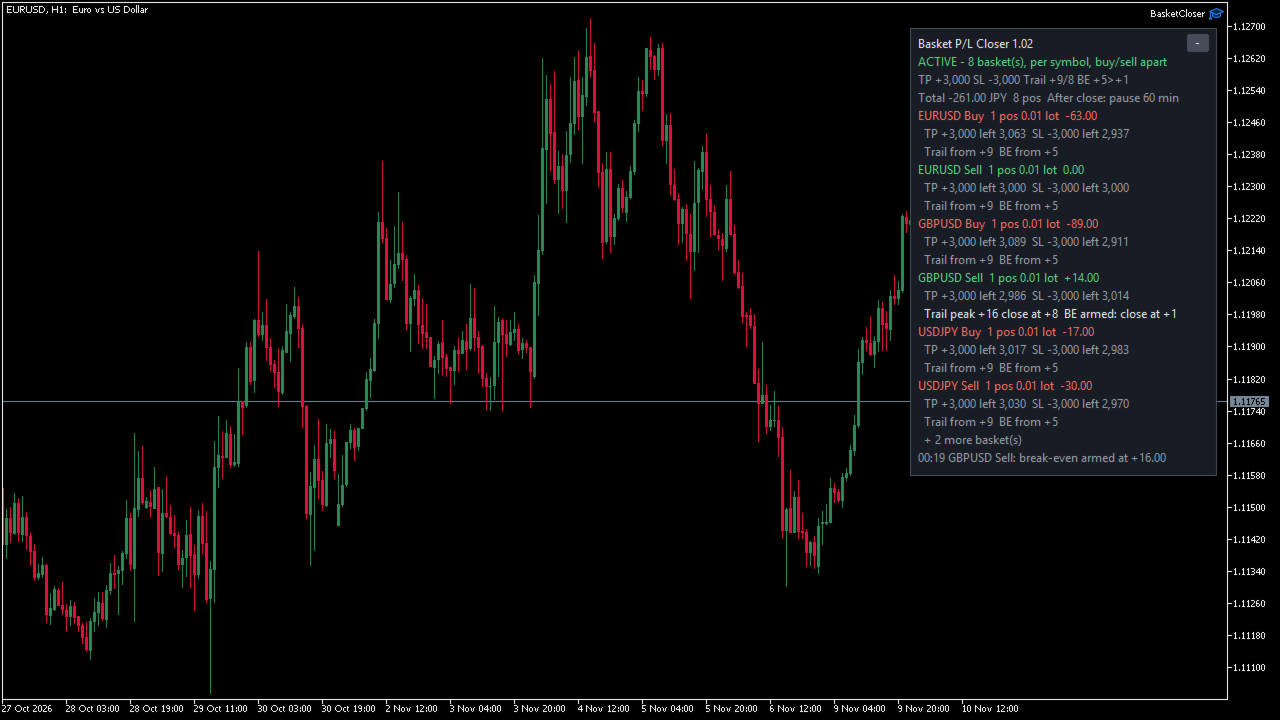
This utility Expert Advisor for MetaTrader 5 groups the open positions of your account into baskets and closes a whole basket when its total profit or loss reaches a level you set. The positions can come from your manual trading or from other EAs. The panel on the chart shows the short name "Basket P/L Closer".

What it is not: it never opens trades on a real or demo account, it gives no buy or sell signals and it is not a trading strategy. All four close conditions are OFF by default, so after you attach it, it only shows the baskets until you turn a condition on. It cannot prevent losses: it sends market close orders after a level has been reached, and the result can be worse than the level (see the limits below).

BASKETS
- Grouping: one basket for all positions, one basket per symbol (default), one per magic number, or one per symbol + magic number.
- Buy and sell: together in one basket (default), as separate baskets, buy positions only, or sell positions only.
- Optional filters: only the listed magic numbers (0 = manual trades) and only the listed symbols, comma separated. Empty = all. Write symbol names exactly as in Market Watch, including any suffix (upper or lower case does not matter).
- Positions outside the filters are never touched.

CLOSE CONDITIONS (all OFF by default)
- Profit target: the basket is closed when its total profit reaches the value.
- Loss limit: the basket is closed when its total loss reaches the value (entered as a positive number).
- Profit trailing: starts when the total profit reaches a start value, follows the highest value, and closes the basket when the profit falls back from that peak by the distance you set.
- Break-even: arms when the total profit reaches a start value, then closes the basket if the total profit falls back to the value you want to keep.
- Each condition has its own unit: money (account currency), % of balance, or pips.
- If the loss limit and another condition are met at the same moment, the loss limit is used.

AFTER A BASKET IS CLOSED
- Nothing: keep watching (default).
- Pause that basket for N minutes (default 60): during the pause every new position that falls into that basket is closed as soon as the EA sees it.
- Stop the EA: after the first basket close, the EA stops checking the conditions of ALL baskets. This lasts until you press Resume on the panel or change the basket definition (see the limits). Changing only the condition values (target, limit, trailing, break-even) does not release the stop.
- Optional: also delete the basket's pending orders when it is closed and while it is paused. Pending orders are deleted before the positions are closed.

PANEL AND ALERTS
- Status, total P/L and number of positions, and for each basket its P/L and how far it is from each condition (trailing peak, break-even level). Baskets that are closing or paused are listed first; the number of baskets shown is adjustable (1-20).
- The reason is shown when the EA cannot close (for example Algo Trading is off).
- Resume button after a stop, collapse button, English or Japanese (automatic from the terminal language, or chosen).
- Popup alert when a basket is closed (default on) and push notifications (optional).
- Each close is written to the Experts log with its reason. The close orders carry a short comment "BKC" and the reason.

STATE AFTER A RESTART
- The trailing peak, an armed break-even, a close in progress, a pause and the stop are saved in the terminal and continue after the terminal or the computer is restarted. In our tests no state was lost in 5 forced shutdowns of the terminal.
- The state is saved in the terminal where the EA runs. If you move to another terminal or computer (for example a virtual server), it does not move with it.

MEASURED IN OUR TESTS (demo account, one computer)
- A basket of 2 positions and 1 pending order was closed and deleted about 0.3 s after its condition was met.
- A new position opened during a pause was closed about 0.2 s after it appeared.
Your times depend on your broker, your connection and your computer.

LIMITS YOU SHOULD KNOW BEFORE BUYING
- Not a guarantee. Baskets are closed with market orders, so the final result can be worse than the level you set. In one of our tests with a loss limit of -60, the baskets were closed at -64 to -89. Gaps (for example at the weekly open), fast markets, slippage, rejected or delayed orders and a closed market can make the difference larger.
- If a condition is already met when you attach the EA or turn the condition on, the basket is closed about 3 seconds later. Look at the panel values before you turn a condition on.
- The basket definition consists of: the grouping, the buy/sell setting, the magic number and symbol filters, the trailing unit, the break-even unit, Points per pip, and whether swap and commission are included. Changing any of these resets the trailing peaks, the armed break-evens, the pauses and the stop. Changing other inputs keeps them.
- Pips: the pips of a basket are the simple sum of the pips of its positions, not weighted by lot size (a 0.01 lot and a 1.00 lot position count the same). Automatic pip size: 10 points on 3- and 5-digit symbols, otherwise 1 point, so on many GOLD, index and BTC symbols 1 pip = 1 point. The Points per pip input, if set, applies to all symbols. For baskets with mixed symbols, money or % is usually clearer.
- %: percent of the account balance at the moment of each check. After closes the balance changes, so the same percent becomes a different amount.
- Money and % include swap and commission (input, on by default). On MT5 only the commission charged at entry is included; a commission charged at exit is not. Pips do not include swap or commission.
- One copy per basket definition: a second copy with the same basket definition on the same account waits on standby. Copies with different definitions both run, and if their baskets overlap (different filters on the same positions), both will try to close them. Copies in different terminals on the same account cannot see each other.
- During a pause, each new position is closed again, and each one costs spread and commission. The EA cannot stop another EA from opening trades.
- The EA works only while MetaTrader 5 is running and connected and Algo Trading is ON (toolbar button) and allowed in the EA settings.
- Not tested on a live account yet: netting accounts, symbols with a freeze level, and closing a position larger than the maximum lot of the symbol in parts. Tested on hedging accounts.
- Strategy Tester: manual trades cannot be simulated there, so the EA runs a demonstration. It opens small positions with magic number 73170 on the chart symbol, risks at most about 1.5% of the balance per run, and stops after the balance falls below 95% of the start or after 20 runs. The demonstration trades are random and their P/L has no meaning; the tester report is not a trading result. The demonstration never runs on a real or demo account.

SETUP
1. Attach the EA to any one chart. The chart symbol does not limit what is watched.
2. Set the filters, the grouping and the buy/sell setting, and check that the panel shows the baskets you expect (with all conditions OFF it only watches).
3. Turn on the conditions you want, choose their units and the action after a close. Read the note on the panel and press OK.
4. Turn on Algo Trading and allow it in the EA settings. Try everything on a demo account first.

IMPORTANT
- No profit is promised, and closing exactly at a level is not guaranteed.
- The EA never decides what or when to trade; the positions and the levels are your decisions.

OTHER
- 34 inputs in 8 groups. The maximum slippage for closing is adjustable (points); on market-execution accounts the broker may not use it.
- While the panel is shown, the EA turns off "Chart on foreground" for its chart so that the panel stays readable, and turns it back on when you remove the EA.
- Support through MQL5 messages, reply within 3 business days: installation, settings and bug reports. Questions about what or when to trade, or which levels to use, cannot be answered.
Recommended products
See what each Expert Advisor on your account really earns. Halberd Portfolio Monitor splits your account history by magic number and shows trades, win rate, profit factor, net result, drawdown, open positions and a health status for every strategy. It is read-only and never trades. When several Expert Advisors run on one account, MetaTrader shows one balance for all of them. A strategy that is quietly losing can hide behind one that is winning. Halberd Portfolio Monitor reads your account histor
EURUSD EMA–SMA Reversal Breakout (H1) is a fully automated MetaTrader 4 strategy designed to capture **confirmed reversal breakouts** on EURUSD using a simple trend + position filter with rule-based **pending STOP execution** beyond recent structure. The EA was backtested on **EURUSD on the H1 timeframe** from **April 1, 2004 to April 24, 2024** using a MetaTrader 4 backtest engine (base data: EURUSD_M1_UTC2). No parameter setup is required — the system is delivered with optimized and fine-tune
FREE
High Tide Health Monitor
Mark Christopher Small
High Tide Health Monitor Free dashboard that splits your account P/L by EA using magic numbers. See what each system has made, what it is down from its own best, and get told before a quiet drawdown becomes a loud one. Four EAs on one account. Which one is actually making money? Most people cannot answer that without exporting their history to a spreadsheet and sorting by magic number, which is why most people never do it, and why an EA that has quietly stopped working can run for months before
FREE
LT Protect My Trades
Thiago Duarte
5 (3)
Protect My Trades is an EA (expert advisor bot) that automatically put stop loss and take profit on market trades and pending orders. You can specify if want it to do this only on actual symbol trades or in all others. Its configuration is very simple. Functions: Take profit: distance to TP (0 = disabled, no TP will be created). Stop loss: distance to SL (0 = disabled, no SL will be created). Price type: price type in pips or pipets/points (pips is common in Forex). Actual symbol only: manage th
FREE
Pro Trader Assistant 1.1 - The Ultimate Trading Companion NB: DOES NOT WORK ON STRATEGY TESTER. FOR TESTING, DM ME   Trade Simple, Smarter, Safer, and More Efficiently Are you ready to transform your trading with institutional-grade risk management? Pro Trader Assistant 1.1  is your complete solution for mastering trading psychology, risk control, and execution efficiency. Built for both prop firm challenges and retail trading. Why Choose Pro Trader Assistant 1.1 Perfect for retail trading
Trade Assistant JJC Academy
Jhonathan Alexis Jaramillo Cortez
JJC Academy Trade Assistant — Risk Calculator & Position Management Panel Stop calculating your lot size by hand. Stop blowing your drawdown over a calculation mistake. JJC Academy Trade Assistant is the trading panel I built and use myself to manage a portfolio of funded accounts — designed so every entry respects exactly the risk you defined, no matter the pair, the broker, or the prop firm you trade with. Real-time risk calculator Set your Risk % and your R:R — lot size is calculated insta
FREE
Open Risk Budget Cap
Md Nasar Uddin Redoy
Open Risk Budget Cap enforces a total open stop-loss risk budget across your account. It does not choose direction and does not open discretionary trades on a live chart. Attach it to one chart; the symbol and timeframe do not matter. What it measures Every open position and every pending order is priced to its stop-loss in account currency using OrderCalcProfit. Positions or orders without a stop-loss are counted and shown on the panel as "without stop-loss". They are excluded from the budget
Gold V3 Grid
Ameer Noori Ali Al-mashhadi
Gold V3 Grid - مستشار خبير متقدم لتداول الذهب XAUUSD SCALPER هو برنامج تداول آلي (مستشار خبير) مصمم خصيصًا لمنصة MetaTrader 5، ويهدف إلى تداول الذهب مقابل الدولار الأمريكي (XAUUSD). يركز هذا البرنامج على فرص السوق قصيرة الأجل، ويهدف إلى توفير منهجية آلية ومنظمة لتداول الذهب السريع. من خلال تحليل تحركات الأسعار وتنفيذ الصفقات وفقًا لمنطق التداول المبرمج، يُساعد XAUUSD SCALPER المتداولين على إدارة أنشطتهم التجارية بكفاءة وفعالية أكبر. استراتيجية التداول وتحليل السوق يركز برنامج XAUUSD SCALPER على
Mir Station MT5
Marta Gonzalez
Mir Station MT5  it is a Secure Automated Software for trade Forex market and indices.    The architecture is a Fully Automatic Autonomous Robot Expert capable of independently analyzing the market and making trading decisions      Mir Station MT5   Have neurals nets to used the correct algoritm in the correct market situation   Mir Station MT5         It is an advanced trading system. This is a fully automatic Expert Advisor.      Mir Station MT5   is a plug and play system Mir Sta
ISS Station MT5
Marta Gonzalez
ISS Station MT5      it is a Secure Automated Software for trade Forex market and indices. The architecture is a Fully Automatic Autonomous Robot Expert capable of independently analyzing the market and making trading decisions ISS Station MT5       Have neurals nets to used the correct algoritm in the correct market situation ISS Station MT5           It is an advanced trading system. This is a fully automatic Expert Advisor.        ISS Station MT5       is a plug and play system   ISS Stat
AI Advisor – Let AI See Your Real Trading World AI Advisor builds rich prompts directly from your account information, ready to paste into any AI chat. It helps you quickly review your account status, understand the current market structure, spot risks, and explore potential profit opportunities. Quick links  Download & versions Download:      AI Advisor v1.02.ex4      AI Advisor   v1.02.ex5 Installation guide AI Advisor  Version Overview FAQ & troubleshooting How to Use – 3 Simple Steps Open
FREE
The Fractal Trend Master is one of the most powerful and sophisticated Expert Advisors on the market, designed to protect traders' capital while maximizing profit opportunities. Based on Bill Williams' renowned methodology, this EA uses three essential technical analysis tools: the Alligator indicator , fractals , and the Gator Oscillator , creating a robust and precise framework for identifying and following market trends. This EA was designed with a focus on advanced risk management and capita
Exclusive EA for FOREX HEDGE account The EA (FuzzyLogicTrendEA) is based on fuzzy logic strategies based on the analysis of a set of 5 indicators and filters. Each indicator and filter has a weight in the calculation and, when the fuzzy logic result reaches the value defined in the EA parameter, a negotiation is opened seeking a pre-defined gain. As additional functions it is possible to define maximum spread, stop loss and so on . Recommended Symbol: EURUSD, AUDUSD, GBPUSD, NZDUSD, USDCAD, AU
ProTrade EA
Jim Ariel Camarce Ignao
Key Features   Automated Candle Pattern Recognition 10 Professional Patterns : Detects Bullish/Bearish Engulfing, Hammer/Shooting Star, Morning/Evening Star, Piercing/Dark Cloud, and 6 additional professional candlestick patterns Smart Filtering : Combine multiple patterns with configurable confirmation logic Volume Confirmation : Optional volume filter to validate pattern strength Multi-Timeframe Analysis : Separate execution and bias timeframes for better timing   Trading Dashboard Int
GOLD/USDT M15 Dynamic ATR Expert Advisor Designed specifically for GOLD/USDT on the M15 timeframe, this Expert Advisor adapts perfectly to non-standard price scales, digits, and tick structures typical of crypto and synthetic gold contracts. By replacing fixed points with dynamic ATR volatility metrics, it delivers robust risk control and precision execution. Key Features Dynamic ATR Risk Management: Stop Loss, Take Profit, and Trailing Stop are calculated using ATR multipliers based on real-tim
X7pro
Viktor Mitrofanov
X7 PRO — Adaptive Trade Driver. Shifts when the market shifts.  = XAU, CFD, FOREX = X7 PRO was built with a deep understanding of trading's core axiom: the market never stands still, and the search for a single "holy grail" formula is destined to fail. The purpose of this tool is not to guess the market, but to synchronize with it. We designed it as a flexible, adaptive environment that remains "alive" through every phase of the market cycle. It doesn't provide ready-made answers — it provides
Chart Pro Classic Dark v1.00 Chart Pro Classic Dark is a professional MT5 chart styling and customization tool designed to give your charts a clean, modern, and professional dark appearance. Key Features Dark Black Background — Applies a clean black background to the chart. ️ Candlestick Chart — Automatically configures the chart to use candlesticks. Bullish Candles — Green/Lime bullish candles. Bearish Candles — White bearish candles. Grid Removal — Hides the chart grid for a clean
FREE
Hamster Scalping mt5
Ramil Minniakhmetov
4.72 (245)
Hamster Scalping is a fully automated Expert Advisor. Night scalping strategy. The RSI indicator and an ATR-based filter are used for entries. The advisor needs a hedging account type Be careful i not sell EA or sets at telegram it scam. All settings free here at   blog .  IMPORTANT! Contact me immediately after the purchase to get instructions and a bonus! Real operation monitoring as well as my other products can be found here: https://www.mql5.com/en/users/mechanic/seller General Recommendati
Equity guardian and prop risk radar
Cristian David Castillo Arrieta
AbacuQuant Equity Guardian is an essential, 100% free institutional risk management utility designed for both Prop-Firm challenges (FTMO, FundedNext, The5ers) and Live personal accounts. Tired of losing your prop challenge or wiping weeks of profits in a single revenge-trading tilt? Equity Guardian stands watch 24/7 on your MetaTrader 5 chart and enforces strict, disciplined risk limits before emotions destroy your account. KEY FEATURES: Daily Loss Limit Guard: Tracks equity vs. broker day-
FREE
EMA256 Fourier Cycle Trader EMA256 Fourier Cycle Trader is an advanced MetaTrader 5 Expert Advisor combining a long-term EMA or TEMA trend model, causal Fourier cycle analysis, configurable averaging and a unified basket take-profit system. The Expert Advisor is designed primarily for CENT accounts and for traders who understand basket recovery strategies, geometric lot progression and the risks associated with trading without a mandatory Stop Loss. RECOMMENDED STARTING CONFIGURATION Recommended
Go Long Advanced
Phantom Trading Inc.
4.78 (9)
The Go Long EA implements an advanced intraday trading strategy based on the principle of systematic daily trading with multiple technical confirmations. While many traders seek complex algorithms, this EA combines simple yet effective concepts with sophisticated risk management and multiple technical filters. The EA opens positions at a specific time each day, but only when market conditions align with multiple technical indicators. This systematic approach helps capture intraday moves while a
FREE
Gold Adaptive EA MT5 is an automated Expert Advisor for MetaTrader 5 designed for trading Gold (XAUUSD). The EA uses several internal trading models and market filters to adapt to different phases of Gold price movement. Instead of relying on one fixed entry pattern, Gold Adaptive EA MT5 analyzes market behavior and selects suitable logic for trend continuation, impulse moves, pullbacks and selected recovery conditions. The main goal of the Expert Advisor is to provide a structured Gold tradi
FREE
Atomberg Gold is a fully automated Expert Advisor for XAUUSD that combines a strict RSI reversal entry with an averaging grid and a shared basket take profit, managed from a live on-chart control panel. HOW IT WORKS Sell cycles open only when all conditions align: RSI reaches the overbought zone and confirms a reversal on the following closed bar, spread is within the allowed limit, and free margin is sufficient. An optional instant buy re-entry mode keeps the EA active around the clock. Open
Take full control of your manual and automated trades with the Multi-Mode Trailing & Risk Assistant , an advanced risk management and trade-enhancing Expert Advisor built specifically for MetaTrader 5 (MT5). Designed for high-volatility instruments like Gold (XAUUSD) as well as major forex pairs, this tool ensures your profits are locked in and your risk is professionally managed. Key Features: Auto SL & TP (1:3 Risk-to-Reward): Automatically attaches a default Stop Loss and calculates a 1: 3 Ta
Accounts Protector MT5
Vladimir Mametov
5 (5)
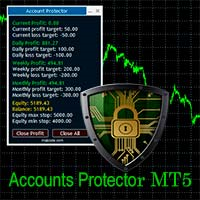
The Expert Advisor is designed to protect the account, fix profit (loss) and display current information about the account. Trading account protection is carried out by closing all open orders in the terminal and/or closing all charts. When running the Expert Advisor with default parameters, it will only display your account information and will be reduced in size. Next, you can set the conditions under which your trading account will be protected. Profit and loss limits can be set for daily pro
FREE
Gyroscopes mt5
Nadiya Mirosh
5 (2)
Gyroscope        professional forex expert   (for EURUSD, GBPUSD, USDJPY, AUDUSD, USDCHF, EURGBP, EURJPY, NZDUSD, USDCAD, EURCHF, AUDJPY, CADJPY pairs)   alyzing the market using the Elliot Wave Index. Elliott wave theory is the interpretation of processes in financial markets through a system of visual models (waves) on price charts. The author of the theory, Ralph Elliott, identified eight variants of alternating waves (of which five are in the trend and three are against the trend). The mov
Protect your funded accounts and personal capital with military-grade precision. This utility continuously monitors your floating equity against your daily starting balance. The moment your custom drawdown threshold is breached, it instantly liquidates all open positions, deletes pending orders, and completely unloads from the chart. Stop revenge trading and never fail a prop firm evaluation due to a margin breach again.
FREE
Trade Panel Manager — Master all trades in one dashboard Stop calculating volume manually, stop worrying about forgetting to set SL/TP. TTrade Panel Manager transforms MetaTrader 5 into a professional trading command center — drag and drop a few lines on the chart, the EA automatically calculates lot sizes according to your desired risk level, displaying SL/TP in pips and currency in real time, right before you press the button. Why download now? Accurate lot size calculation based on risk pe
FREE
VectorAnchor
Jerome Alan Wood
# VectorAnchor (v1.05) VectorAnchor is a multi-pair grid Expert Advisor for **AUDUSD, EURUSD, and NZDUSD on H1**, built around controlled grid recovery and basket-level profit management. Version 1.05 adds two major upgrades: a **built-in regime filter** that keeps the EA out of the market conditions that break grid systems, and **equity-scaled position sizing**. The EA automatically applies the validated configuration for whichever of the three pairs it is attached to — no manual setup of the
My Grid Scalper
Ahmad Aan Isnain Shofwan
3 (2)
MyGrid Scalper You either lead it — or it leads you. I am releasing an MT5 version based on the MT4 version—which has been downloaded over 30,000 times since 2022—without hype, fanfare, or discounts. This EA is free and will remain free forever. I dedicate the spiritual rewards from the good and benefits it provides to my late mother in the hereafter . Just consistent execution in the hands of those who understand Basic Info Symbol: Any (default optimized: XAUUSD) Timeframe: Any (default optim
FREE
Buyers of this product also purchase
Trade Assistant MT5
Evgeniy Kravchenko
4.43 (216)
It helps to calculate the risk per trade, the easy installation of a new order, order management with partial closing functions, trailing stop of 7 types and other useful functions. Additional materials and instructions Installation instructions - Application instructions Line function -   shows on the chart the Opening line, Stop Loss, Take Profit. With this function it is easy to set a new order and see its additional characteristics before opening.   Risk management  - The risk calculation
FarmedHedge Pair Trading Dashboard
Tanapisit Tepawarapruek
5 (7)
Farmed Hedge Yield Farming | All Markets (Manual - Hybrid - Semi/Automated EA) VERIFIED TRADING RESULTS - Farmed Hedge Yield Axi Copy:  https://www.mql5.com/en/signals/2356376 - Farmed Hedge Yield Exn Copy:   https://www.mql5.com/en/signals/2356404 - Farmed Hedge Yield V Copy:  https://www.mql5.com/en/signals/2357156 IMPORTANT NOTICE: FarmedHedge is a MANUAL-FOCUSED TRADING UTILITY ,not a fully automated EA. Results shown on this Signal include manual trades and overall strategic management.
Forex Trade Manager MT5
InvestSoft
4.98 (689)
Trade Manager MT5 is an advanced position size calculator and trade management tool for MetaTrader 5, designed to help traders plan trades faster, control risk more precisely, and manage open positions directly from the chart. It combines order placement, risk based lot calculation, Stop Loss and Take Profit management, Break Even, Trailing Stop, Partial Close, Equity Protection, and external trade management in one panel. Whether you trade forex, indices, metals, commodities, crypto, or future
Telegram to MT5 MultiChannel Copier
Sergio Marquez Uroz
4.68 (22)
Telegram to MT5 Multi-Channel Copier   automatically copies trading signals from your Telegram and Discord channels straight to MetaTrader 5. No bots, no browser extensions, no manual copying. A signal arrives in Telegram or Discord and the EA opens the trade in your terminal within seconds. And before you copy a channel, the built-in backtester shows you what that channel would have done in your account. The product has two components: a Windows application that listens to your Telegram channel
TradePanel MT5
Alfiya Fazylova
4.88 (173)
Trade Panel is a multi-functional trading assistant. The app contains over 50 trading functions for manual trading and allows you to automate most trading tasks. Application instructions: https://www.mql5.com/en/blogs/post/756482 Trial version of the application for a demo account: https://www.mql5.com/en/blogs/post/750865 How to install the application: https://www.mql5.com/en/blogs/post/756239 How to test the application in visual mode: https://www.mql5.com/en/blogs/post/770277 How to install
Local Trade Copier EA MT5
Juvenille Emperor Limited
4.94 (150)
Local Trade Copier EA MT5 is a fast and flexible trade copier for copying and managing trades between multiple MetaTrader 5 accounts on the same Windows computer or Windows VPS. It combines local trade synchronization with Receiver-side controls for lot sizing, risk management, trade filtering, symbol mapping, trade management and account protection. Set up your Transmitter and Receiver terminals in about 1 minute and copy manual or EA trades between accounts at the same or different brokers. U
News Trade EA MT5
Konstantin Kulikov
4.55 (11)
Present to you the useful robot that I have been using for several years. It can be used in both semi-automatic mode and fully automatic mode. >>> Chat <<< The program contains flexible settings for trading on the news of the economic calendar. It cannot be checked in the strategy tester. Only real work. Download the latest archive of settings: https://www.mql5.com/en/blogs/post/747929 Signals monitoring: https://www.mql5.com/en/signals/author/test-standart When creating your own sets of setti
Exp COPYLOT CLIENT for MT5
Vladislav Andruschenko
3.97 (35)
Professional Trade Copier for MetaTrader 5 Fast, professional, and reliable trade copier for MetaTrader . COPYLOT allows you to copy Forex trades between MT4 and MT5 terminals with support for Hedge and Netting accounts. COPYLOT MT5 version supports: - MT5 Hedge to MT5 Hedge - MT5 Hedge to MT5 Netting - MT5 Netting to MT5 Hedge - MT5 Netting to MT5 Netting - MT4 to MT5 Hedge - MT4 to MT5 Netting MT4 version Full Description +DEMO +PDF How To Buy How To Install How to get Log Files H
Copy Telegram signals with your own trading rules Telegram to MT5 Signal Trader automatically copies text-based trading signals from public and private Telegram channels and groups into MetaTrader 5. Manage multiple providers and MT5 accounts from one desktop app, with individual risk and trade settings for each provider . No Telegram bot or API setup needed for copying. Simply sign in with your own Telegram account by phone or QR code and select the channels or groups you have already joined. Y
The product will copy all telegram signal to MT5 ( which you are member) , also it can work as remote copier.  Easy to set up, copy order instant, can work with almost signal formats, image signal,  s upport to translate other language to English Work with all type of channel or group, even channel have "Restrict Saving Content", work with  multi channel, multi MT5 Work as remote copier: with signal have ticket number, it will copy exactly via ticket number. Support to backtest signal. How to s
Strategy Ledger Pro
Abdullah Uygar Tuna
5 (14)
Strategy Ledger Pro is a read-only account analysis panel for MetaTrader 5. It separates account results by Expert Advisor, strategy, symbol, and magic number, so you can see what each one really contributes. The panel is available in 11 languages: English, Français, Deutsch, Español, Italiano, Português, Русский, Türkçe, 中文, 日本語 and 한국어. Before you download the demo. The Market runs the demo of any paid product in the Strategy Tester only. This panel analyses the trades on your own account, and
================================================================================ POC BREAKOUT - V20.72. Full Professional Grade Toolkit ================================================================================ POC Breakout is a full MetaTrader 5 trading dashboard for discretionary traders who want breakout signals, Point of Control (POC) context, volume profiles, order flow, market structure, news, alerts, and advanced trade planning in one professional workspace. Attached directly to you
EA Overfitter
Stephen J Martret
5 (3)
That backtest looks great. But will it still be making money tomorrow, next week, next month? EA Overfitter re-runs your EA on 100 price histories it has never seen. One score tells you if the edge is real. A backtest tells you what an EA did on one price history — the one that happened to occur. What you cannot tell from it is how much of that result was the strategy and how much was the particular path. EA Overfitter answers that. It builds up to 100 synthetic price histories your EA has n
Power Candles Strategy Scanner - Self-Optimizing Multi-Symbol Setup Finder Self-optimizing settings work one chart at a time, and finding where they pay off right now means opening chart after chart. Power Candles Strategy Scanner runs the same self-optimizing engine as the Power Candles indicator on every symbol in your Market Watch, side by side. One panel ranks where it pays off: the winning strategy per symbol, its optimized Stop Loss and Take Profit. An alert fires the moment a fresh signal
Timeless Charts
Samuel Manoel De Souza
5 (9)
Timeless Charts is an all-in-one trading utility for professional traders. It combines custom chart types such as Seconds Charts and Renko with advanced order flow analysis using Footprints , Clusters , Volume Profiles , VWAP studies, and anchored analysis tools for deeper market insight. Trading and position management are handled directly from the chart through an integrated trade management panel , while Market Replay and Virtual Accounts provide environments for practicing trading skills and
Telegram to MT5 Coppy
Sergey Batudayev
5 (10)
Telegram to MT5: The Ultimate Signal Copying Solution Simplify your trading with Telegram to MT5, the modern tool that copies trading signals directly from Telegram channels and chats to your MetaTrader 5 platform, without the need for DLLs. This powerful solution ensures precise signal execution, extensive customization options, saves time, and boosts your efficiency. [ Instructions and DEMO ] [ FAQ ] [ How atach logs properly ] [ Settings descrition ] Key Features Direct Telegram API Integrati
VirtualTradePad One Click Trading Panel
Vladislav Andruschenko
4.59 (74)
Trading Panel for MetaTrader 5 — professional one-click trading from chart and keyboard A powerful trading panel for active manual trading, designed to open, manage, and close trades far faster and more efficiently than the standard MetaTrader interface. This panel is built for traders who want full control over positions, pending orders, profit management, and trading execution inside one professional workspace. This is not just another utility. It is a complete trading cockpit for MetaTrader
Welcome to Entry In The Zone with SMC Multi Timeframe  —  COMPLETE SMC ANALYSIS SYSTEM — ALL IN ONE INDICATOR  Entry In The Zone with SMC Multi Timeframe  An indicator designed for market analysis based on Smart Money Concepts (SMC), displaying Market Structure, Key Zones (Order Blocks, Supply & Demand Zones, and Fair Value Gaps), Liquidity, and real-time BUY / SELL signals. It supports both Single-Timeframe and Multi-Timeframe analysis, along with the Confluence at Zone feature, which helps you
Telegram To MT5 Ultra
Mirel Daniel Gheonu
5 (5)
Telegram To MT5 — Signal Copier Turn the trading calls from your Telegram channels into real MT5 orders — automatically, on as many accounts as you like, with risk and rules fully under your control. Telegram To MT5 connects the VIP / signal channels you already follow on Telegram to your MetaTrader 5 terminal. A free companion desktop app reads the messages (even from channels that block bots), and this Expert Advisor executes them on your account — applying your own risk settings, symbol mappi
Anchor Trade Manager
Kalinskie Gilliam
5 (8)
Your EAs cannot see each other, but Anchor can. Anchor gives you one place to coordinate your EAs, manage risk, and decide when trading is allowed. It works alongside the trading bots you already use without any changes to them. The Problem One EA opens a trade. Then another starts trading. The next thing you know, you wake up to multiple grids built across your account. Each EA may be doing exactly what it was designed to do, but together they can place far more risk on your account than you in
Trade Indicator Assistant   is a powerful MT5 utility designed to turn indicators into automated trading systems. Its main feature is the ability to automatically detect an indicator’s   BUY and SELL signal buffers , without requiring you to know the buffer numbers, search through indicator settings, or modify the indicator source code. Bonus Indicator:   After purchasing Trade Indicator Assistant, contact me to receive   Trade Signal Pro   completely free as a bonus indicator. [Download Demo V
EA Auditor
Stephen J Martret
5 (7)
EA Auditor is an independent analysis tool for traders evaluating Expert Advisors and trading signals on MetaTrader 5. It audits backtest reports, reviews posted developer signals, and cross-verifies the two against each other to help traders assess strategies before committing capital. The MQL5 market offers a wide range of Expert Advisors from many developers, with varying approaches, quality, and transparency. EA Auditor provides a consistent, data-driven framework for reviewing them, answer
Trade Manager DaneTrades
Levi Dane Benjamin
4.13 (31)
DaneTrades Trade Manager is a professional trade panel for MetaTrader 5, designed for fast, accurate execution with built‑in risk control. Place market or pending orders directly from the chart while the panel automatically calculates position size from your chosen risk, helping you stay consistent and avoid emotional decision‑making. The Trade Manager is built for manual traders who want structure: clear risk/reward planning, automation for repeatable management, and safeguards that help reduc
MT5 to Telegram Signal Provider turns your trading account into a signal provider. Every trade action, whether manual, by EA or from your phone, is instantly sent as a message to Telegram. You can fully customize the format or use a ready-made template for quick setup. [ Demo ] [ Manual ] [ MT4 Version ] [ Discord Version ]     New: [ Telegram To MT5 ] Setup A step by step user guide is available. Key Features Ability to customize order details sent to subscribers You can create a tiered subs
RETAILBERG FOOTPRINT CHART PRO — Order-Flow Workspace for MetaTrader 5 Version 7.00  |  Professional System  |  31 tools  |  One chart A full 150-page illustrated User Manual is included. Please read the full manual to understand this feature packed footprint chart elements and ui. https://www.mql5.com/en/blogs/post/777982 DEMO / STRATEGY TESTER — PLEASE READ FIRST
DrawDown Limiter
Haidar Lionel Haj Ali
5 (23)
DrawDown Limiter v5.0 — Advanced Account Protection Controller DrawDown Limiter v5.0 is a client-side account protection controller designed to supervise your trading account and automatically react when configured risk, profit, news, schedule, rollover, or position limits are reached. It can monitor manual trades, automated strategies, multiple Expert Advisors, pending orders and floating positions from one dedicated chart. It can protect the complete account or be configured to supervise a spe
VirtualTradePad PRO SE MT5 — professional trading control center for MetaTrader 5 VirtualTradePad PRO SE is a premium chart-based trading panel and trade-management workspace for MetaTrader 5 . It is designed for traders who want faster execution, clearer position control, structured trade management, visual level planning and a professional workflow directly from the chart. This is not only a BUY / SELL panel. PRO SE combines manual trading, pending orders, position management, partial exits, b
Trader Evolution
Siarhei Vashchylka
5 (7)
" Trader Evolution " - A utility designed for traders who use wave and technical analysis in their work. One tab of the utility is capable of money management and opening orders, and the other can help in making Elliott wave and technical analysis. Manual (Be sure to read before purchasing) | Version for MT4 Advantages 1. Trading in a few clicks. Immediate and pending orders are available in the panel 2. Money management. The program automatically selects the appropriate lot size 3. Simplifies
Trade copier MT5
Alfiya Fazylova
4.61 (57)
Trade Copier is a professional utility designed to copy and synchronize trades between trading accounts. Copying occurs from the account / terminal of the supplier to the account / terminal of the recipient, which are installed on the same computer or VPS . Before buying, you can test the demo version on a demo account. Demo version here . Full instruction here . Main functionality and benefits: Supports copying MT5> MT5, MT4> MT5, MT5> MT4, including MT5 netting accounts. * Supports copying Dem
AW Trade Manager
AW Trading Software Limited
AW Trade Manager is a trade panel for MetaTrader 5 with a risk/reward tool on the chart. A trade is planned with Entry, Stop Loss and Take Profit lines dragged with the mouse: plates show price, distance and money, zones show profit and loss, and the volume is calculated from the risk. Before sending, the confirmation window shows the whole trade with risk, margin and the rules of the position. Manual and instruction -> HERE / Free LIVE Demo -> HERE To manage a position after the entry the panel
More from author
Elliott Wave Auto Count for MetaTrader 4 labels Elliott waves automatically on four degrees at the same time: the base degree and the three degrees above it. It follows the rules and guidelines of "Elliott Wave Principle" (Frost & Prechter), and for the current wave it shows a price x time target zone and an invalidation level. It is meant for MT4 traders who use Elliott wave analysis and want a rule-based starting count, with the alternate count and the invalidation level always visible. It is
Fibo Price Time Zones combines Fibonacci price levels with Fibonacci time targets and draws them on the chart as boxes (price x time zones). Where boxes from several waves and from up to two higher timeframes overlap, the area is emphasized in three levels. It is meant for traders who already use Fibonacci retracements and extensions and also want to see roughly when a level is worth watching, without drawing every tool by hand. It is a display tool only: it gives no buy or sell signals and doe
RSI AutoScale is a clean, lightweight RSI for traders who use both TradingView and MetaTrader 5 and want the two charts to look the same. WHAT IT SHOWS - RSI (Wilder smoothing): the same values as the standard RSI, with any applied price. - Signal line on the RSI: SMA, EMA, SMMA or LWMA, with its own period. - Levels: upper, middle and lower lines (70 / 50 / 30 by default). They use MT5's native levels, so they reach the right edge and their values appear on the scale. - Zone fills: the middle
FREE
Stoch RSI Band Fill is a Stochastic RSI indicator for MetaTrader 5. MT5 does not include a built-in Stoch RSI, so this indicator adds one. It follows the same calculation steps as the built-in Stoch RSI on TradingView and uses the same layout: K and D lines, 80 / 50 / 20 levels and a shaded band between the upper and lower levels. CALCULATION, STEP BY STEP 1. RSI of the selected price (default: close, length 14), smoothed with Wilder's method (RMA). The first average is the simple average of the
FREE
Pivot Points Six Types with Level Alerts is a TV-compatible pivot point indicator for MetaTrader 5. It uses the same formulas and the same period boundaries as the "Pivot Points Standard" indicator that comes with TradingView, and it draws the levels the same way: short horizontal lines that start at the first bar of each period, with "R1 (price)" style labels in orange (#FB8C00). SIX CALCULATION TYPES The levels are calculated from the high, low and close of the previous period. - Traditional
FREE
MACD Four Color Histogram is a MACD for MetaTrader 5 that uses the same formula and the same look as the built-in MACD on TradingView. It is made for traders who use both platforms and want the MACD on each chart to read the same way. HOW IT DIFFERS FROM THE MT5 STANDARD MACD - MT5 standard MACD: the histogram is the MACD line itself, and the signal line is an SMA. - This indicator: three parts, as on TradingView. MACD line, signal line, and histogram = MACD - signal. The histogram has 4 colors.
FREE
This is the MetaTrader 4 edition of RSI AutoScale. It draws the standard Wilder RSI with a signal line, a shaded band between the levels, colored areas where the RSI leaves that band, and a choice of three scales. It is meant for traders who use TradingView and MetaTrader 4 side by side and want the RSI pane to look much the same on both. HOW IT LOOKS ON MT4 - RSI line: the same values as MT4's built-in RSI for the same period and applied price. - Signal line: a moving average of the RSI (SMA, E
FREE
MetaTrader 4 ships with a Stochastic and an RSI, but not with a Stochastic RSI. This indicator fills that gap for MT4 users and is built to be TV-compatible: it follows the calculation of the Stoch RSI that comes with TradingView, and the pane looks the way TradingView users expect - a blue K line, an orange D line, dashed 80 and 20 levels, a dotted 50 line and a light band between 80 and 20. WHAT APPEARS IN THE SUBWINDOW - K and D lines. The Data Window lists only K and D. - Upper band (80) a
FREE
Supply & Demand Zones marks supply and demand zones on a MetaTrader 5 chart with one fixed, fully published rule: a strong bar (body at least X times ATR) that leaves a short "base" of small-body bars behind it. The base becomes a demand zone when the strong bar is bullish and closes above it, or a supply zone when the strong bar is bearish and closes below it. Each zone shows its state: fresh, touched with a count, or broken. It is meant for traders who draw these zones by hand and want them d
FREE
Pivot Points Six Types with Level Alerts MT4 brings TV-compatible pivot points to MetaTrader 4. If you also chart on TradingView, you know its built-in "Pivot Points Standard". This MT4 indicator reproduces it: the same six calculation methods, the same period choices from one day to ten years, and the same look - an orange (#FB8C00) line for each level, starting at the beginning of each period, labelled like "S2 (1.08345)". WHICH LEVELS EACH METHOD GIVES Method | Levels drawn | Note Tradition
FREE
A MetaTrader 4 MACD built to read like the MACD you see on TradingView: a MACD line, a signal line, and a histogram of the gap between them, colored in four shades. If you switch between the two platforms during the day, the MACD pane on your MT4 chart will look and behave the way you are used to. WHY NOT THE MT4 BUILT-IN MACD? MT4's own MACD draws the MACD line as gray bars and smooths the signal line with an SMA. There is no separate histogram and no color change. This indicator calculates the
FREE
Candle Countdown Tag with Spread shows how long the current candle has left, in a small colored tag right next to the last candle - the way TradingView shows its bar countdown. The same tag can also show the current spread, the time left of up to two more timeframes and the open time of the next candle. It is a display tool for MetaTrader 5: no alerts, no signals, no trading. WHAT IT SHOWS - Time left of the chart timeframe: mm:ss under one hour, hh:mm:ss under one day, "2d 04:15:30" for longe
FREE
VWAP Band Fills with Anchored VWAP is a TV-compatible VWAP for MetaTrader 5. It uses the same formula as the built-in "VWAP" indicator of TradingView (Pine ta.vwap), offers the same inputs - anchor period, source, offset, standard deviation or percentage bands #1 to #3 - and draws it the same way: a blue VWAP line, green / olive / teal bands and light fills between them. An optional anchored VWAP starts from a vertical line that you drag to any bar. HOW IT IS CALCULATED For every bar of the cu
FREE
Dow Structure MTF shows the Dow theory trend of five timeframes at once in MetaTrader 4, using the pullback low / rally high method that is common among Japanese traders. For each timeframe it shows whether the trend is up, down or range, which price would change it, and how far the current price is from that price. Only closed bars are used, so a confirmed result does not change afterwards (no repaint). It is meant for traders who check the trend structure of several timeframes by hand and wan
Fibo Price Time Zones for MetaTrader 4 combines Fibonacci price levels with Fibonacci time targets and draws them on the chart as boxes (price x time zones). Where boxes from several waves and from up to two higher timeframes overlap, the area is emphasized in three levels. It is meant for MT4 traders who already use Fibonacci retracements and extensions and also want to see roughly when a level is worth watching. It is a display tool only: it gives no buy or sell signals and does not place ord
Time Average Lines draws four averages measured by time, not by the number of bars, so each line keeps the same length of time when you switch timeframes: a time moving average, a TWAP, a same-time-of-day average and a time-based EMA. For the same-time average, the rest of today is shown as a dotted path that joins the past averages; the path is a summary of the past, not a forecast. It is meant for intraday traders who want averages that mean the same thing on M1 and on M15, and who want to co
Auto Trendline Channel MTF draws trendlines, parallel channels and horizontal support / resistance automatically from confirmed swing highs and lows in MetaTrader 4, and records for each line the touch count, close breaks, wick breaks and retests. A table shows, for the chart timeframe and two higher timeframes, the nearest line above and below the price, the distance to it and the Dow theory direction. It is meant for traders who draw trendlines and levels by hand and want them drawn by fixed,
Currency Strength Meter for MetaTrader 4 combines the 28 pairs of the 8 major currencies (USD, EUR, JPY, GBP, AUD, NZD, CAD, CHF) into one strength line per currency, with a ranking table for the chart timeframe, M15, H1, H4 and D1. The full formula is published below. It is meant for MT4 traders who compare currencies before choosing which pair to look at, and who want to know exactly how the numbers are made. It is an analysis aid: it does not tell you when to buy or sell and does not show fu
Trade History Stats Panel for MetaTrader 4 reads the closed trades in your own account history and sums them up in a panel on the chart: number of trades, win rate, profit factor, average P/L per trade, drawdown of the closed-trade curve, holding time, buy / sell, and tables by month, symbol, weekday and hour. It is meant for traders who want to look back at their own past trades, like a trading journal that fills itself in, and to check the numbers by period, symbol or magic number. It never p
Prop Challenge Loss Tracker for MetaTrader 4 shows, in a panel on the chart, how much room is left before the daily loss limit and the maximum loss limit of a funded-account (prop) challenge are reached, and sends staged alerts as the limits are used up. It is meant for traders taking a prop challenge who want to see their remaining loss room at a glance, set to the rules of their own program. It is a display and alert tool only: it never opens, modifies or closes any order. Whether a limit is
Market Structure Liquidity Map for MetaTrader 4 draws smart money concepts (SMC) style market structure on the chart: swing labels, break of structure (BOS), change of character (CHoCH), equal highs and lows, previous day and week levels, liquidity sweeps and unfilled fair value gaps (FVG), with a small table for the chart timeframe and two higher timeframes. It is meant for MT4 traders who read structure and liquidity by hand and want the same levels drawn the same way every time. It is a disp
Divergence Detector for MetaTrader 4 finds regular and hidden divergences between price swings and one oscillator of your choice (RSI, MACD histogram, Stochastic %K, OBV, CCI or Momentum) and draws them on the price chart and in the indicator window, with a small table for four other timeframes. It is meant for MT4 traders who look for divergences by eye and want them found by fixed, visible rules on closed bars. It is a display tool only: it gives no buy or sell signals and does not place orde
Multi Symbol Market Scanner Panel shows up to 30 symbols in one table on your MT4 chart: trend direction, RSI and ATR% on M15, H1, H4 and D1, plus today's range, distance from yesterday's high or low and a simple H1 / H4 swing structure. Click a symbol name to switch the chart to it. It is meant for MT4 traders who watch many forex pairs, metals or indices and want one overview instead of opening many charts. It is a display tool only: it gives no buy or sell signals, does not rank symbols to t
Asia London New York Session Key Levels for MetaTrader 4 draws the three main sessions (plus one optional extra session) as boxes with their high, low and open lines, and adds key levels: previous day, week and month high and low, week and month open, and round numbers. Session times can be set in New York time, London time, UTC or server time, with daylight saving handled automatically. It is meant for MT4 intraday traders who mark session ranges and prior-day levels by hand and want them draw
Risk and Lot Size Calculator for MetaTrader 4 works out the lot size for the amount you are prepared to lose. Drag three lines on the chart (entry, stop loss, take profit) and the panel shows the lot size, the money at risk, the profit at the take profit, the risk:reward ratio and the margin required, with an optional view of the loss room left on a prop (funded) account. It is meant for manual traders who want to size each position from the stop distance before they place the order. It is a ca
Copy trades between MetaTrader 4 and MetaTrader 5 terminals on one Windows computer. Cross Terminal Trade Copier MT4 runs in an MT4 terminal, either as the sending side (Master) or as the copying side (Receiver). The data goes through a file in the MetaTrader common data folder: no DLL imports, no web requests, no outside server. Use it only for your own accounts on one PC. It is not intended for copying into anyone else's account or for distributing signals. IMPORTANT - ONE MASTER ON EACH CH
Daily and Max Loss Limit Guard MT4 is an Expert Advisor for MetaTrader 4 that keeps an eye on the account equity and enforces the loss limits you choose. When the daily loss limit, the maximum loss floor or the optional daily profit target is reached, it removes pending orders, closes the open orders it is responsible for, and keeps closing any new order until the stop ends. On the chart, the panel uses the short name "Equity DD Guard". What it is not: it does not open trades on your real or de
An Expert Advisor for MetaTrader 4 that treats several open orders as one "basket" and closes the basket as a whole when the combined profit or loss gets to the level you have chosen. It works with orders from manual trading and from other EAs. On the chart, its panel carries the short name "Basket P/L Closer". Please note what it does not do. It places no new trades on your real or demo account, offers no buy or sell signals and is not a trading system. Out of the box all four closing rules ar
Candle Countdown Tag with Spread MT4 puts a TradingView-style countdown on your MT4 chart: a small tag beside the last candle that tells you when the bar closes, together with the current spread. Optional extra lines show the time left of two more timeframes and when the next candle opens. Nothing else - it does not trade, alert or give signals. ONE TAG, UP TO FIVE LINES Line | Example | Setting Chart timeframe | 12:41 | on by default Extra timeframe 1 | H4 02:12:41 | off (choose a timeframe t
FREE
Do you mark supply and demand zones by hand and get a slightly different result every time? This free MetaTrader 4 indicator draws them with one fixed rule that is written out in full below, so you can check every zone yourself. The idea: a strong candle (body at least X times ATR) leaves a "base" of 1 to 10 small candles right before it. A bullish strong candle that closes above the base turns it into a demand zone; a bearish one that closes below it turns it into a supply zone. The indicator
FREE
Filter:
No reviews
Reply to review