Ziggurat Pivot Engine
- Experts
-
Syarief Azman Bin Rosli
 Hello and welcome to my official MQL5 profile!
I am Syarief Azman Bin Rosli, an algorithmic trading systems developer and quantitative software engineer with over a decade of specialized experience creating robust automated trading solutions for MetaTrader 5 and MetaTrader 4. - Version: 1.0
- Activations: 5
Ziggurat Pivot Engine is a MetaTrader 5 Expert Advisor for the Camarilla tiers of the previous day. It fades rejections of the inner tier (H3/L3) back toward the prior close and follows confirmed closes through the outer tier (H4/L4). A day-regime matrix decides each day which setups may trade, based on how wide the previous day was. One position at a time per symbol and magic number, closed at the day exit; no grid, martingale, averaging or hedging.
Quick Start
- Attach the EA to one chart of the symbol (any timeframe up to H4; signals run on the Working Timeframe, M15 by default) and enable Algo Trading.
- Start with the defaults: 1 % risk, entry window 08:00-20:00, day exit 22:30 (server time). Move the window if your server time is far from GMT+2.
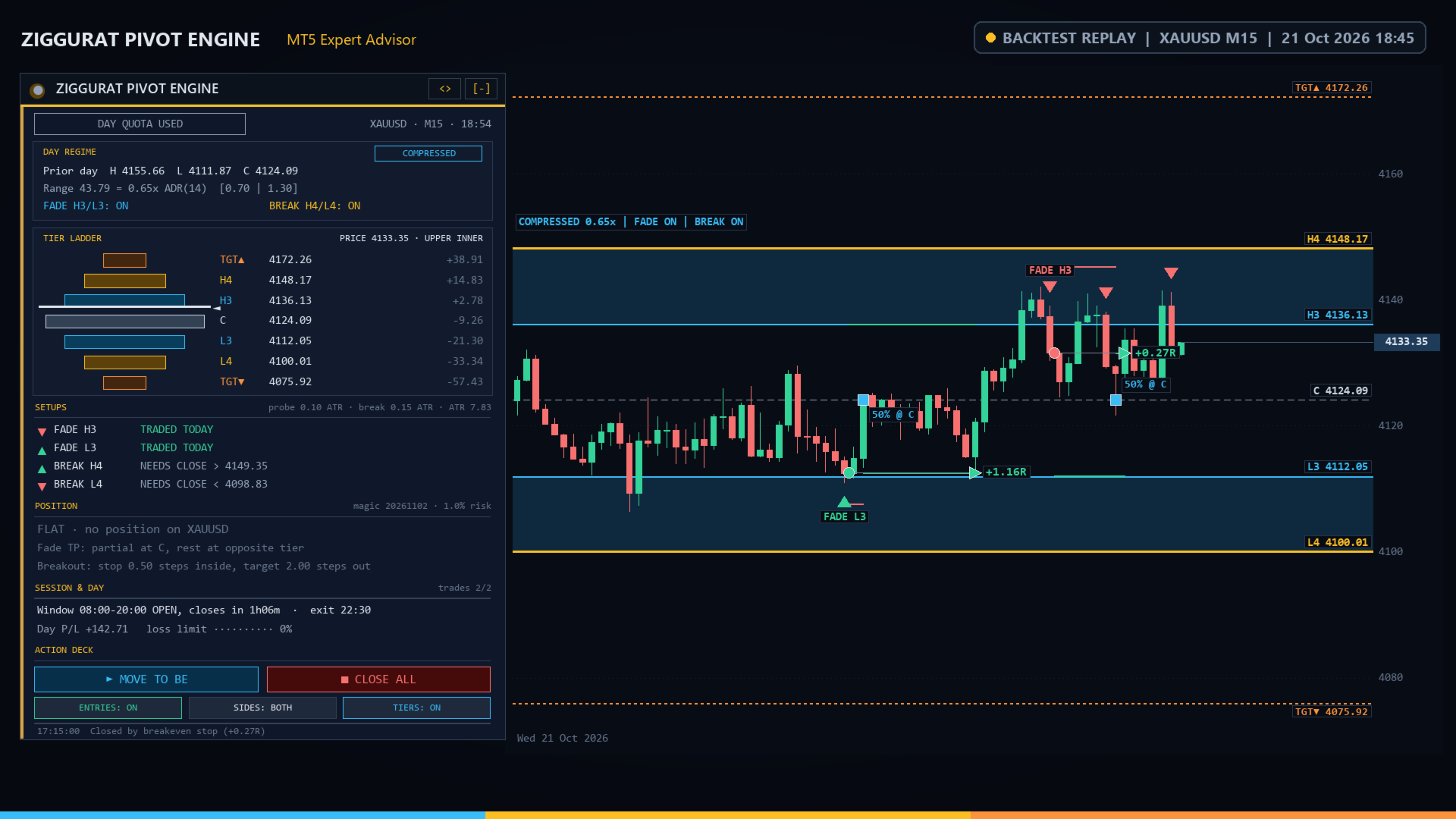
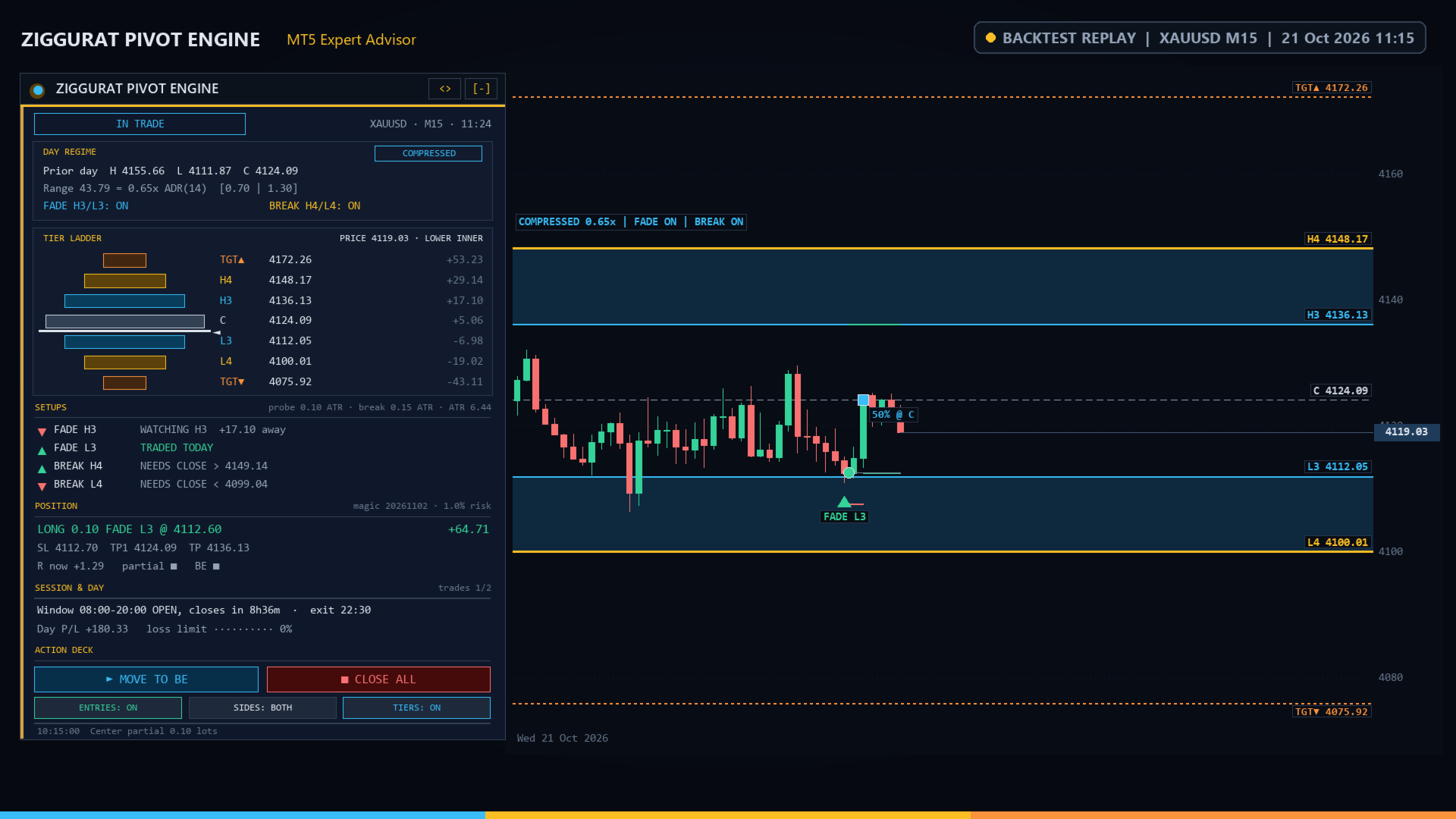
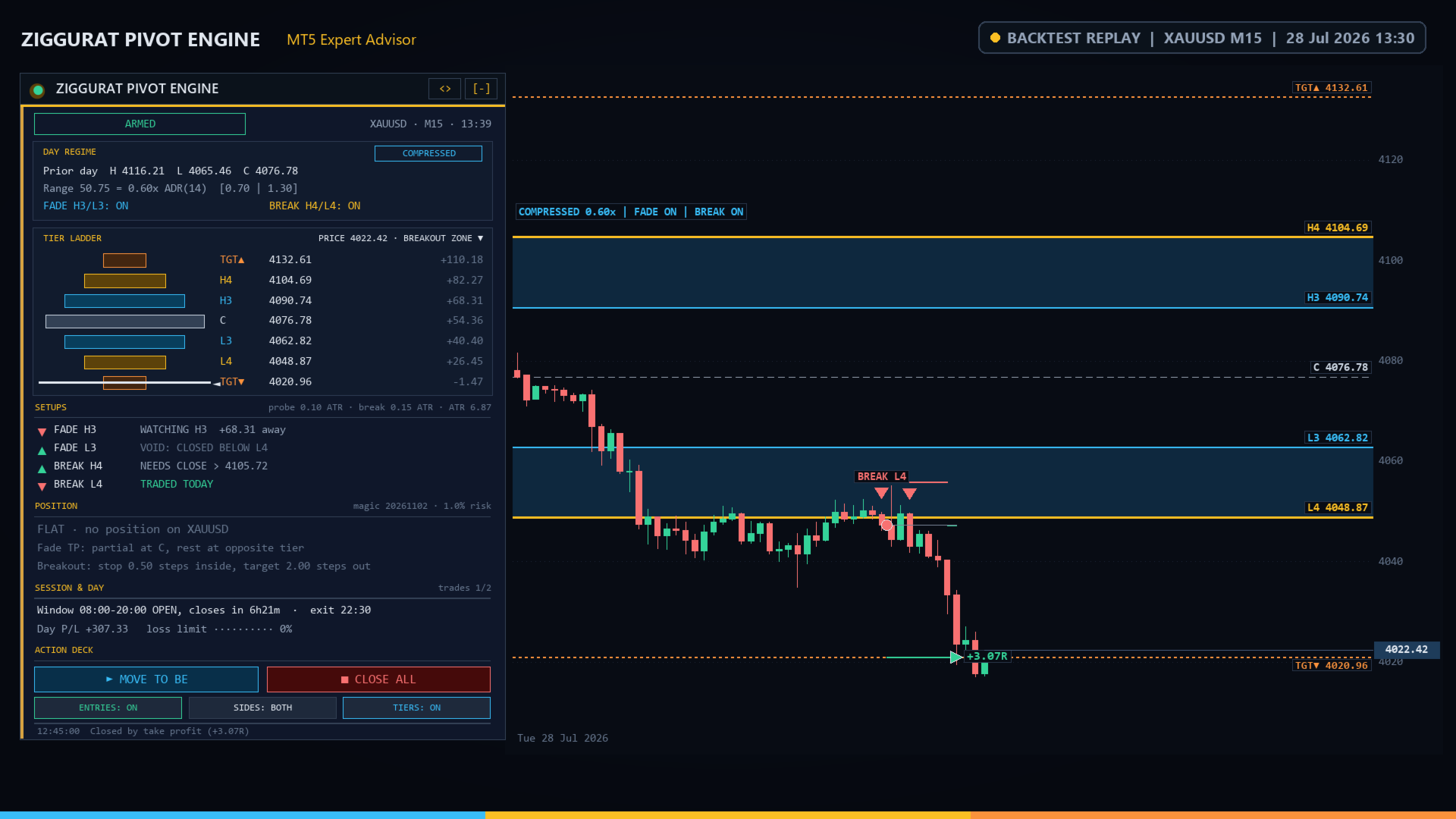
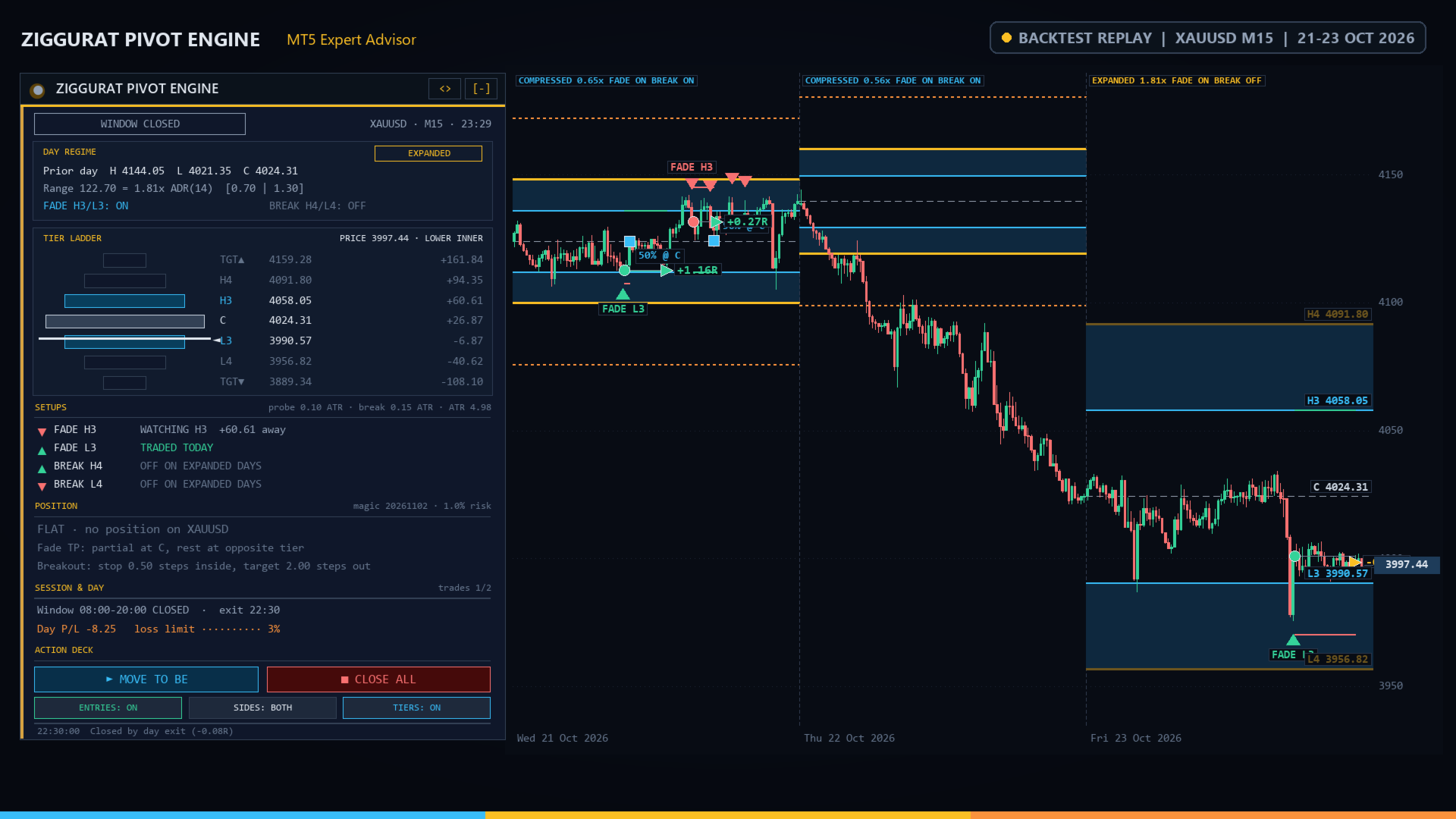
- The cockpit shows the day regime, the tier ladder with live price, the four setups and the position. ARMED = entries allowed now.
- Check: a visual Strategy Tester run on XAUUSD or EURUSD M15 over two weeks draws every tier, signal and trade.
- Push alerts: set your MetaQuotes ID (Tools > Options > Notifications) and Push Notifications to Mobile = true.
How It Trades
Tiers: from the previous daily bar (high H, low L, close C) the step is s = 0.275 x (H - L). H3 = C + s, H4 = C + 2s, L3 = C - s, L4 = C - 2s; C is the center. TGT = H4 + Breakout Target Beyond H4/L4 x s (below: L4 minus the same).
Day regime: previous range / daily ATR (Daily ATR Period for the Day Regime). Under Compressed Day Below = COMPRESSED, over Expanded Day Above = EXPANDED, otherwise NORMAL (NO DATA without history). Six matrix switches enable fades and breakouts per regime. Defaults: fades on COMPRESSED and EXPANDED days, breakouts on COMPRESSED days, nothing on NORMAL days.
Signals use closed bars of the Working Timeframe and its ATR (ATR Period).
FADE H3 (short): a bar reaching H3 starts a probe. The first close back below H3 is a signal if the probe went at least Minimum Probe Beyond H3/L3 x ATR above H3, the close is above C, no bar today closed above H4 and (with Skip a Fade When the Day Opens Beyond H4/L4) the day did not open above H4. Otherwise that close re-arms the side. After Acceptance After closes above H3 the probe is dropped. FADE L3 (long) mirrors it below L3.
BREAK H4 (long): a close above H4 by at least Minimum Close Beyond H4/L4 x ATR while the previous close (or the day open) was not above H4. BREAK L4 (short) mirrors it.
Entry: market order at the next bar open, only if the signal bar opened inside Entry Window Start to Entry Window End (closing before Day Exit Time), the regime allows the setup, the direction is allowed, that setup has not traded today, fewer than Max Trades per Day trades opened today and no position is open (netting: none on the symbol).
Exits:
- FADE stop: probe extreme plus Stop Buffer Beyond the Probe x ATR; if it lies more than Maximum Stop Beyond H3/L3 steps beyond the tier the trade is skipped (STOP TOO WIDE). Fade Take-Profit Model: Prior close (center), Opposite inner tier (L3 / H3) or Partial at center, rest at opposite inner tier. With the last, Partial Close at Center percent closes at C, the stop moves to entry plus Breakeven Buffer points and the rest targets the opposite inner tier.
- BREAK stop: Breakout Stop Back Inside H4/L4 steps inside the broken tier; target TGT; breakeven after a gain of Breakout Breakeven Trigger x risk.
- Skips: reward to the final target below Minimum Reward-to-Risk to Enter (LOW RR), spread above Max Spread percent of the stop distance (SPREAD), stop or target inside the broker stop distance (STOPS).
- Day Exit Time closes every EA position; a position from an earlier server day closes at once. Empty = off.
- Daily Loss Limit: when today's closed plus floating loss reaches this percent of the starting balance, positions close and entries pause until the next server day.
- Closes and stop changes are sent only outside the freeze distance and inside the trading session, otherwise retried.
Position Sizing: Fixed lot uses Fixed Lot; Risk % of balance: lots = balance x Risk Percent per Trade / 100 / loss per lot at the stop; Fixed money risk per trade uses Risk Money per Trade. Lots are rounded to the lot step and capped by Maximum Lot and the volume limit; below the broker minimum the minimum lot is used (small accounts may risk more). Free margin is checked before each order.
Recommended: M15 on XAUUSD and major FX pairs. Worth optimizing: the two regime thresholds, the six matrix switches, the entry window and Minimum Probe Beyond H3/L3.
Cockpit Controls
- [-] / [+]: collapse to a pill (ZIGGURAT, regime, status) or expand.
- <>: move the cockpit to the next chart corner.
- MOVE TO BE: stop of every EA position to entry plus Breakeven Buffer points (if price is far enough).
- CLOSE ALL: the first click shows CONFIRM CLOSE?, a second click within 4 seconds closes all EA positions on the symbol.
- ENTRIES: ON / ENTRIES: OFF: allow or pause new entries; open positions stay managed.
- SIDES: BOTH / SIDES: LONG / SIDES: SHORT: allowed directions.
- TIERS: ON / TIERS: OFF: chart overlays.
Toggles survive timeframe changes and reset to the inputs when the EA is re-attached.
Cockpit Readouts
- Status badge: ARMED, IN TRADE, ENTRIES PAUSED, STANDING ASIDE (no setup allowed today), DAY QUOTA USED, WINDOW OPENS hh:mm, WINDOW CLOSED, WAITING FOR LEVELS, DAILY LIMIT HIT, ALGO TRADING OFF. The LED blinks green when ARMED.
- DAY REGIME: badge COMPRESSED, NORMAL, EXPANDED or NO DATA; prior H, L, C; range as a multiple of ADR with both thresholds; FADE H3/L3: ON or OFF, BREAK H4/L4: ON or OFF.
- TIER LADDER: stepped rows TGT, H4, H3, C, L3, L4, TGT with price and distance from Bid; lapis = fade tier, gold = breakout tier, terracotta = targets, dark = off today. The white marker shows price; the caption names the zone: BEYOND TARGET, BREAKOUT ZONE, FADE ZONE, UPPER INNER or LOWER INNER.
- SETUPS (FADE H3, FADE L3, BREAK H4, BREAK L4): WATCHING H3 / WATCHING L3 with distance, PROBE +x.xx ATR n/8 (depth, bars), NEEDS CLOSE > / NEEDS CLOSE < with the trigger, TRADED TODAY, OFF ON <regime> DAYS, OFF: DIRECTION, VOID: OPENED ABOVE H4, VOID: CLOSED ABOVE H4, VOID: OPENED BELOW L4, VOID: CLOSED BELOW L4, WAITING FOR DAILY LEVELS, or SKIPPED hh:mm: reason. Reasons: OUT OF WINDOW, REGIME OFF, SIDE OFF, DONE TODAY, ENTRIES OFF, DAILY LIMIT, MAX TRADES, POSITION OPEN, SYMBOL BUSY, ALGO OFF, TRADE DISABLED, MARKET CLOSED, STOP TOO WIDE, STOPS, LOW RR, SPREAD, NO MARGIN, VOLUME LIMIT, NO DATA, SEND FAILED.
- POSITION: FLAT, or side, lots, setup, entry, floating profit; SL, TP1 (center partial), TP; R now, partial and BE (filled square = done).
- SESSION & DAY: window OPEN (closes in), opens in or CLOSED, exit time; Day P/L with the loss-limit meter; trades today / maximum.
- Footer: last event.
Chart Overlays
Today and Past Days Drawn on Chart earlier days: lapis H3/L3 lines with shaded fade zones to the gold H4/L4 lines, a dashed center, dotted terracotta TGT lines on breakout days and a regime tag. Dimmed = setup off that day. Arrows mark valid signals; the first of each setup is captioned. Shown on chart timeframes up to H4.
Alerts
Terminal Pop-Up Alerts and Push Notifications to Mobile fire on entries, skipped signals (except window, regime, direction and already-traded skips), the center partial, the day exit and the daily loss limit. Not in the Strategy Tester.
Side Effects
Chart objects prefixed ZPE_H_ (cockpit) and ZPE_OV_ (overlays), removed with the EA; one-second timer; no files, no global variables, no DLLs. Order comment = Trade Comment plus the setup, e.g. Ziggurat FADE H3.
Input Parameters
- Camarilla Tiers & Day Regime: Working Timeframe (M15, up to H4); ATR Period (14 bars); Daily ATR Period for the Day Regime (14 days); Compressed Day Below (0.70); Expanded Day Above (1.30).
- Regime Matrix: Fade H3/L3 on Compressed Days (true), Fade H3/L3 on Normal Days (false), Fade H3/L3 on Expanded Days (true), Break H4/L4 on Compressed Days (true), Break H4/L4 on Normal Days (false), Break H4/L4 on Expanded Days (false).
- Fade Setup: Minimum Probe Beyond H3/L3 (0.10 ATR); Acceptance After (8 bars); Stop Buffer Beyond the Probe (0.50 ATR); Maximum Stop Beyond H3/L3 (1.00 steps); Fade Take-Profit Model (Partial at center, rest at opposite inner tier); Partial Close at Center (50 %); Skip a Fade When the Day Opens Beyond H4/L4 (true).
- Breakout Setup: Minimum Close Beyond H4/L4 (0.15 ATR); Breakout Stop Back Inside H4/L4 (0.50 steps); Breakout Target Beyond H4/L4 (2.00 steps); Breakout Breakeven Trigger (1.0 R, 0 = off).
- Schedule: Entry Window Start (08:00); Entry Window End (20:00, same day); Day Exit Time (22:30, empty = off); Allowed Directions (Long and short, Long only, Short only).
- Money Management: Position Sizing (Risk % of balance, Fixed lot, Fixed money risk per trade); Fixed Lot (0.10); Risk Percent per Trade (1.0); Risk Money per Trade (100); Maximum Lot (5.0, 0 = broker maximum); Minimum Reward-to-Risk to Enter (1.0); Max Trades per Day (2); Breakeven Buffer (10 points); Daily Loss Limit (3.0 %, 0 = off).
- Execution: Magic Number (20261102, one per chart on the same symbol); Trade Comment (Ziggurat); Max Slippage (20 points); Max Spread (20 % of the stop distance, 0 = off).
- Alerts: Terminal Pop-Up Alerts (true); Push Notifications to Mobile (false).
- Cockpit & Chart: Cockpit Dock Position (Top left, Top right, Bottom right, Bottom left); Horizontal Margin (16) and Vertical Margin (28) pixels; Draw Camarilla Tiers & Signals (true); Past Days Drawn on Chart (5).
Typical Setups
- Balanced (gold, majors, M15): defaults.
- Fade only: the three Break switches false, Fade H3/L3 on Normal Days true, Entry Window End 16:00.
- Breakout days: all Fade switches false, Breakout Target Beyond H4/L4 2.5, Breakout Breakeven Trigger 0.8.
- Conservative: Risk Percent per Trade 0.5, Max Trades per Day 1, Fade Take-Profit Model = Prior close (center).
Notes
- After a restart the day is rebuilt from history on the next bar; open positions are adopted and managed.
- The Strategy Tester uses the same rules; cockpit and overlays appear in visual mode only.
- Test on a demo account first.
Risk Disclaimer
Trading forex and CFDs on margin carries a high risk of loss. Past or simulated results do not guarantee future results. This EA does not promise profit; use only capital you can afford to lose.