Cascade Exit Conductor

Cascade Exit Conductor is a position-management utility for MetaTrader 5. It watches the trades you already have open - placed by hand or by any Expert Advisor - and runs their exits for you: it locks a breakeven stop, banks profit in a staged partial-exit cascade, trails the runner with an ATR or fixed distance, and can close a position after a maximum holding time. It is operated from a compact on-chart cockpit with one-click controls.

It never opens trades of its own and it does not predict direction. If you have no open positions, it simply idles and manages nothing.

What it does and does not do

  • It DOES: move stops to breakeven, take partial profits in up to three steps, trail the remaining volume, and optionally time-close positions.
  • It DOES NOT: open new orders, place pending orders, add to positions, martingale, grid, or hedge. It only reduces risk and manages exits on positions that already exist.

Quick Start

  1. Allow automated trading: in Tools > Options > Expert Advisors tick "Allow Algo Trading" (and enable the toolbar Algo Trading button). The utility sends close and modify requests, so this must be on.
  2. For mobile push alerts, set your MetaQuotes ID in Tools > Options > Notifications (only needed if you turn on Push Notifications To Mobile).
  3. Drag Cascade Exit Conductor onto any chart. One instance can manage every symbol; you do not need it on every chart.
  4. Choose the scope with Positions To Manage: "Current Chart Symbol Only" or "All Symbols".
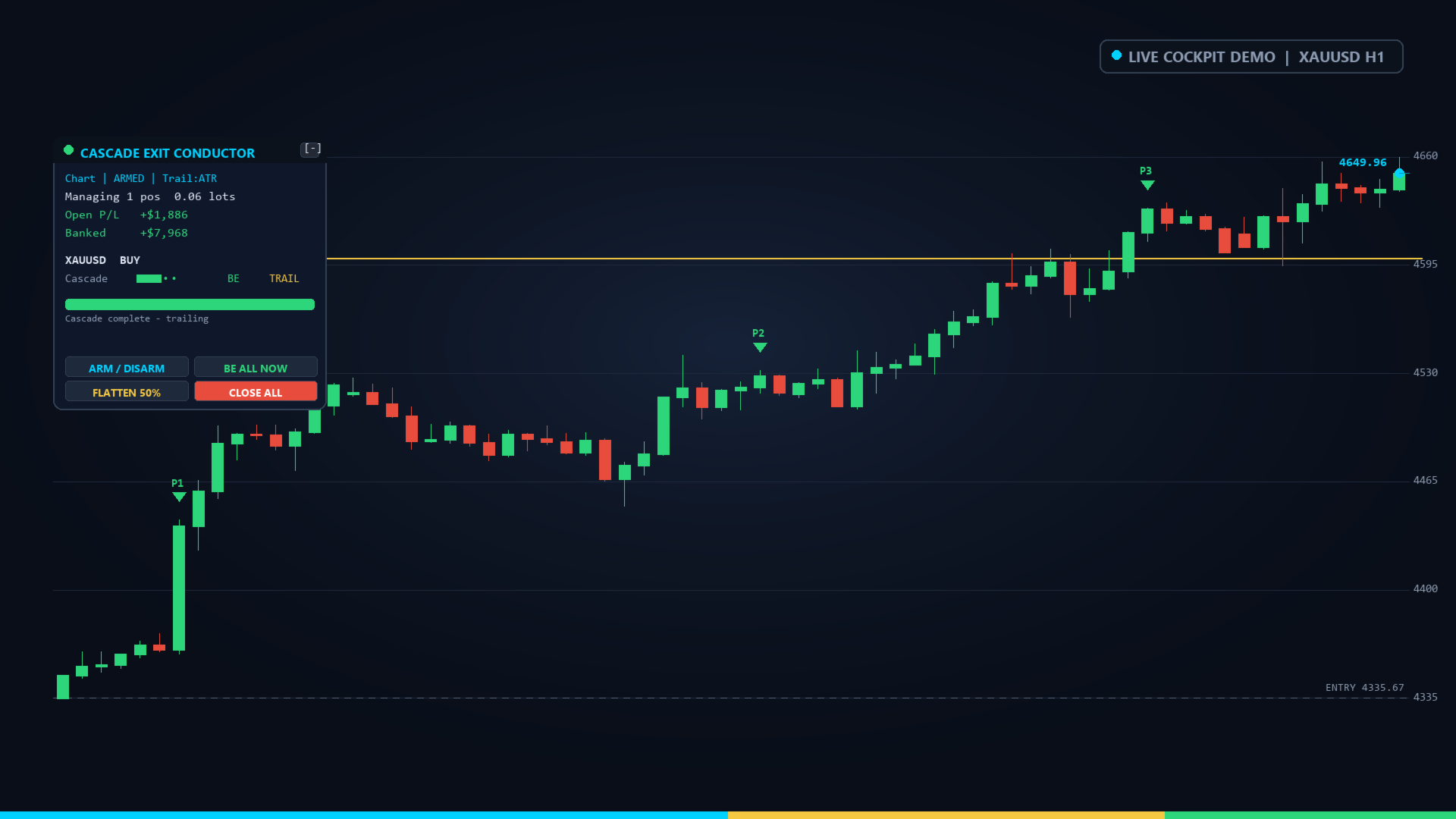
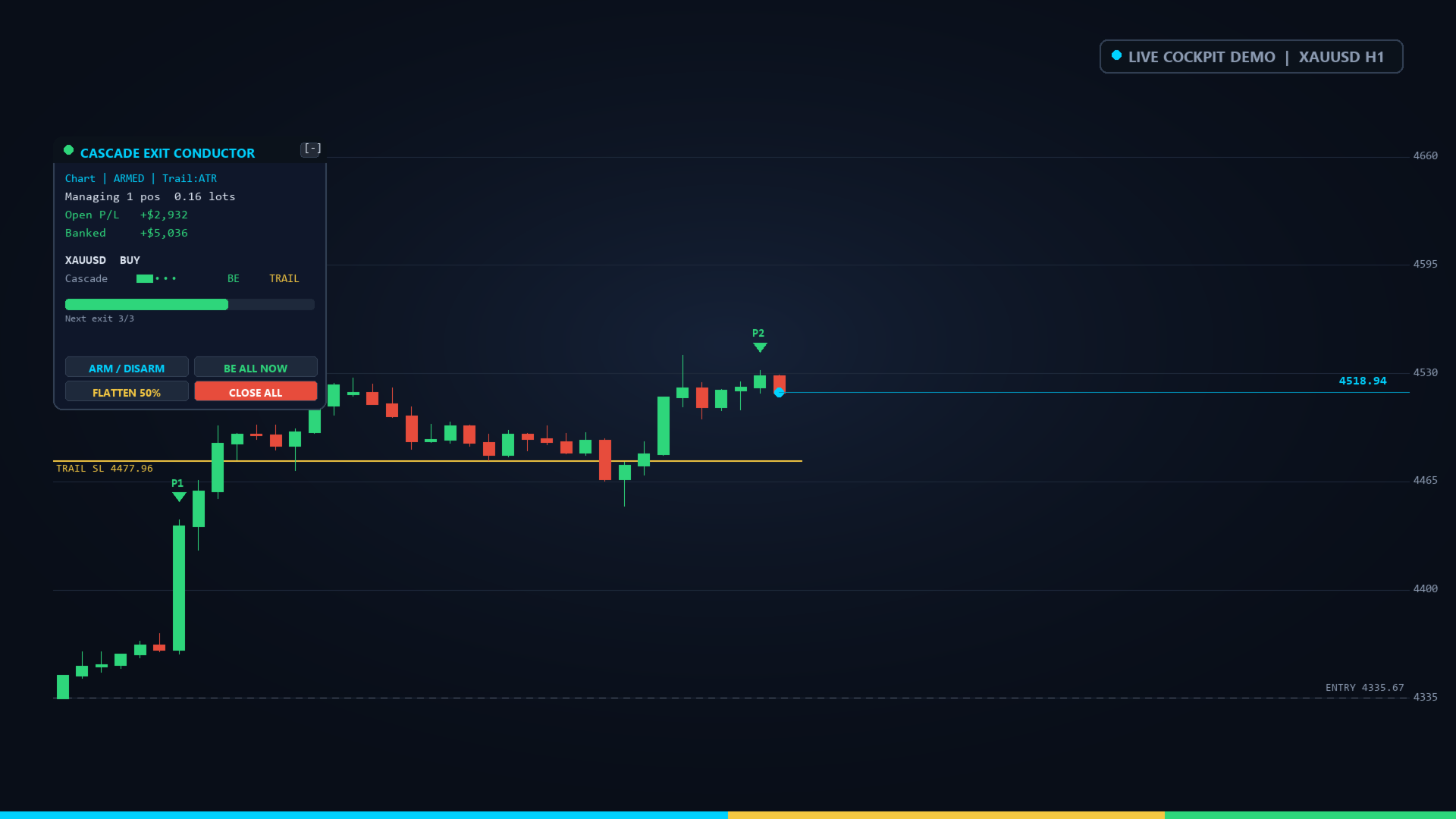
  5. Confirm the cockpit shows ARMED (green LED). Open or already-hold a trade, and watch the Cascade ladder fill and the stop step up as price moves in your favor.

To verify it instantly: open a small manual trade in the managed scope, then click BE ALL NOW - the stop should jump to the entry price. Click FLATTEN 50% to close half. These confirm the utility controls your orders correctly.

Input Parameters

Every label below is the exact text shown in the input dialog.

Management Scope

  • Master Automation Armed (default true): when false the utility only acts on the manual HUD buttons; all automatic management is paused. The ARM / DISARM button toggles this live.
  • Positions To Manage (default Current Chart Symbol Only): choose "Current Chart Symbol Only" to manage only this chart's symbol, or "All Symbols" to manage every open position in the account.
  • Filter By Magic Number (default false): when true, only positions whose magic number equals the value below are managed - use it to manage one EA's trades and leave others alone.
  • Magic Number To Manage (default 0): the magic number to match when the filter is on. 0 targets manually opened trades.

Breakeven Lock

  • Enable Breakeven Lock (default true): turn the breakeven stop on or off.
  • Breakeven Trigger (pips in profit) (default 120): once the position is this many pips in profit, the stop is moved to the entry.
  • Breakeven Offset (pips beyond entry) (default 10): where the stop lands relative to the entry - positive locks a small profit (entry + offset for a buy).

Partial Exit Cascade

  • Enable Partial Exit Cascade (default true): turn staged partial closes on or off.
  • Step 1 Trigger (pips) (default 150) and Step 1 Close (% of original volume) (default 35): at +150 pips, close 35% of the position's original volume.
  • Step 2 Trigger (pips) (default 300) and Step 2 Close (% of original volume) (default 35): the second harvest.
  • Step 3 Trigger (pips) (default 500) and Step 3 Close (% of original volume) (default 20): the third harvest. Percentages are of the ORIGINAL volume, so three steps of 35/35/20 leave 10% running. Set any step's values to 0 to skip it.

Trailing Stop

  • Enable Trailing Stop (default true): turn trailing on or off.
  • Trailing Mode (default ATR Distance): "ATR Distance" trails by ATR x multiplier (adapts to volatility); "Fixed Pips" trails by a constant distance.
  • Activate Trailing After (pips) (default 200): trailing only starts once the position is this far in profit.
  • Fixed Trail Distance (pips) (default 150): the gap kept behind price in "Fixed Pips" mode.
  • ATR Period (ATR mode) (default 14): the ATR averaging length used in "ATR Distance" mode, on the chart timeframe.
  • ATR Multiplier (ATR mode) (default 2.5): the ATR is multiplied by this to set the trail gap.

Time-Based Exit

  • Enable Time-Based Exit (default false): close positions that have been open too long.
  • Max Position Hold (minutes) (default 1440): maximum holding time in minutes before the position is closed (1440 = 24 hours).

Notifications

  • Terminal Pop-Up Alerts (default true): show a pop-up Alert on every action.
  • Push Notifications To Mobile (default false): send a push to the MetaTrader mobile app.
  • Audible Alerts (default true): play a sound on every action.

HUD Cockpit Display

  • Object Name Prefix (default CEC_): the prefix for every chart object; change it only if you run two copies on one chart.
  • HUD Chart Corner (default Top Left): anchor corner - "Top Left", "Top Right", "Bottom Left" or "Bottom Right".
  • HUD X Offset (pixels) (default 22) and HUD Y Offset (pixels) (default 30): the cockpit's distance from that corner.
  • HUD Background (default dark slate), Accent Color (cyan), Profit / Armed Color (green) and Loss / Alert Color (red): the cockpit palette.

The On-Chart Cockpit

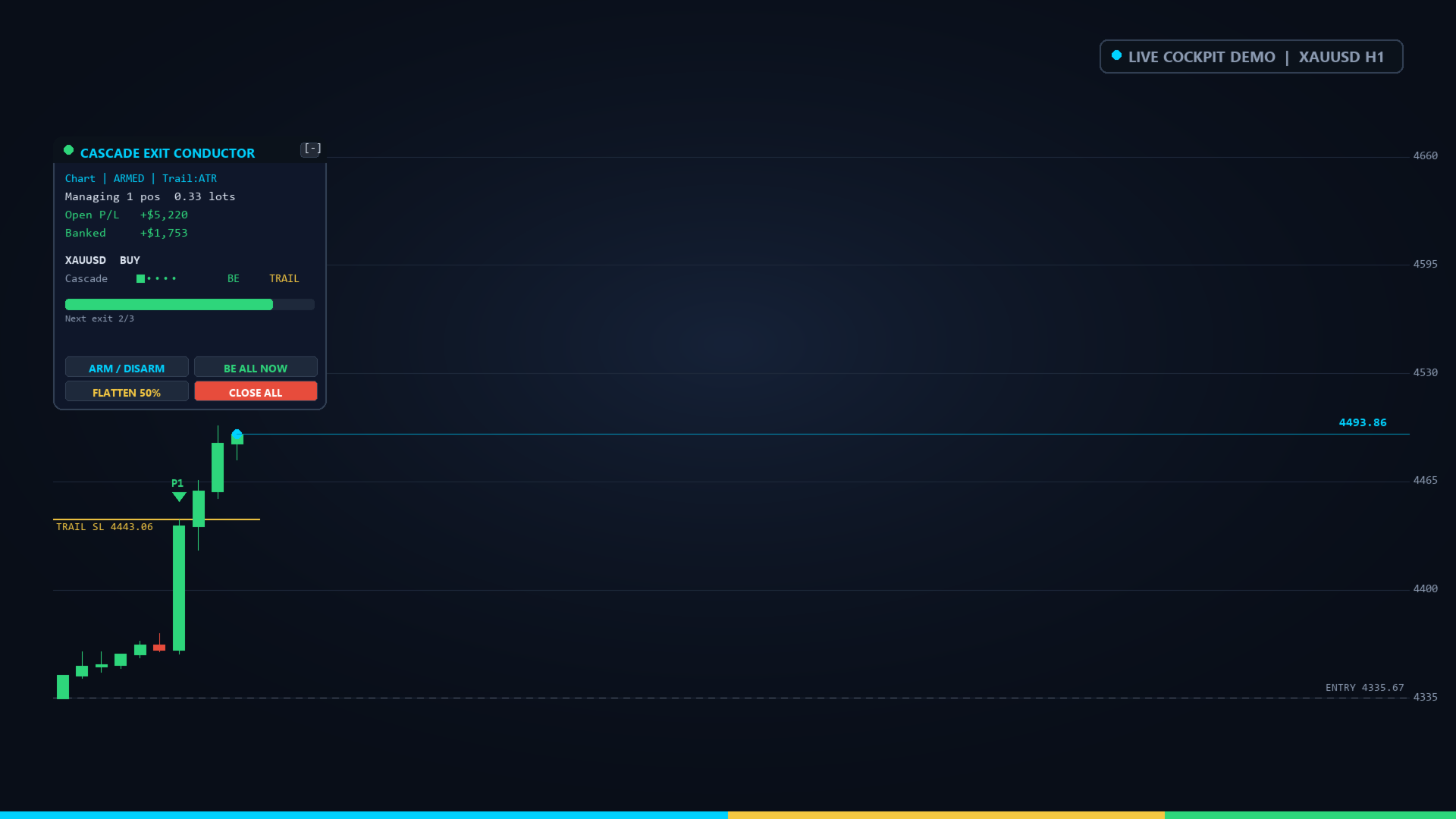
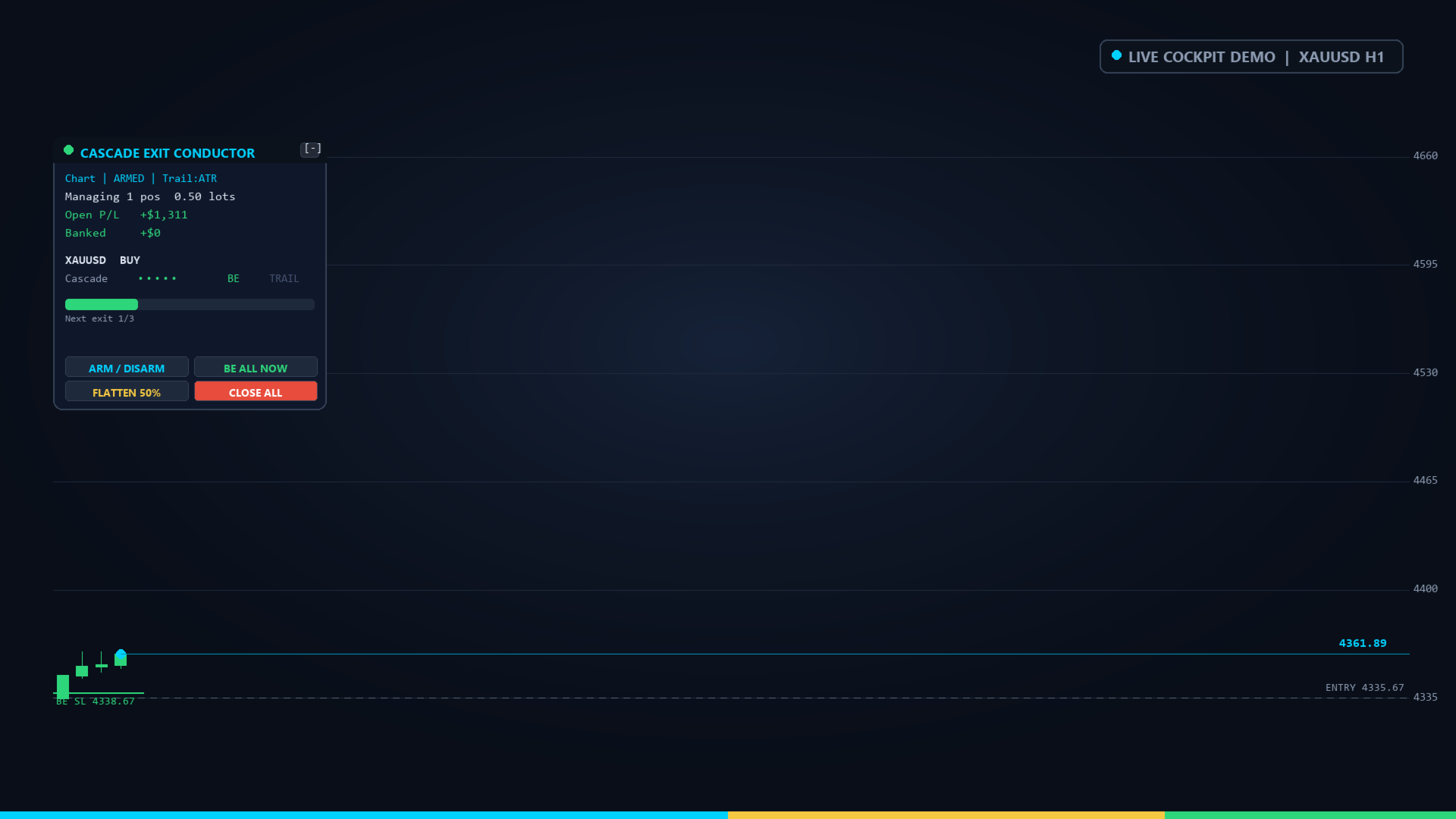
The cockpit is a dark multi-layer panel with a header strip, a live status block, one row per managed position, a progress meter and an action deck.

Header: a status LED dot - green when ARMED, amber when DISARMED - next to the title CASCADE EXIT CONDUCTOR, and a [-] button that collapses the panel to a compact pill; click the [+] on the pill to restore it. Collapsed, the title line reads, for example, "CEC ARMED | 2 pos | +$340.00".

Status block:

  • Mode line, e.g. "Chart | ARMED | Trail:ATR". The first field is the scope ("Chart" or "AllSym"), the second is ARMED or DISARMED, the third is the trailing mode (Trail:ATR, Trail:Fix or Trail:Off).
  • "Managing N pos X.XX lots" with the aggregate floating profit of all managed positions, green when positive and red when negative.

Position rows (up to four shown): each row reads "SYMBOL BUY/SELL ladder flags profit". The ladder is five cells; a filled cell means a completed cascade step (three filled = all three partials done). The flags are two letters: a B appears once breakeven is locked, a T once trailing is active (a dash means not yet). BUY or SELL marks the side, and the profit is that position's floating result.

Action deck (four buttons):

  • ARM / DISARM - toggles Master Automation Armed. Disarmed, automatic management stops but the other buttons still work.
  • BE ALL NOW - immediately moves every managed position's stop to its breakeven level.
  • FLATTEN 50% - closes half of every managed position at market.
  • CLOSE ALL - closes every managed position at market.

Automatic Behavior

On a fast internal timer and on every tick, for each in-scope position the utility, in order:

  1. Time exit: if enabled and the position has been open at least Max Position Hold minutes, it is closed.
  2. Partial cascade: when profit reaches Step 1/2/3 Trigger, the matching Step Close percentage of the ORIGINAL volume is closed. If the remainder would fall below the broker minimum lot, the step closes the position in full instead.
  3. Breakeven lock: at Breakeven Trigger pips, the stop is set to entry +/- Breakeven Offset. The stop is only ever moved forward, never loosened.
  4. Trailing stop: past Activate Trailing After pips, the stop follows price by the ATR or fixed distance, only ever tightening, and never back below a locked breakeven.

Safety: before any close or modify the utility checks the symbol is tradable and that price is not inside the broker stop/freeze level; if it is, the action is deferred to the next tick rather than sent and rejected. All stop prices are normalized to the symbol's digits and respect the minimum stop distance.

Notifications, Side Effects and Scope

  • Every action prints to the Experts log and, depending on your settings, raises a terminal Alert, a mobile push and a sound. All messages carry the prefix [Cascade Conductor].
  • The utility writes no files and sets no terminal global variables. The only chart objects it creates are the cockpit elements, all under the Object Name Prefix; they are removed cleanly when it is detached.
  • Its own stop/take-profit modifications are tagged with magic number 771144; it manages positions by the scope and magic filter above, not by that tag.

Typical Setups

  • Intraday forex runner: Breakeven Trigger 120, cascade 150/300/500 at 35/35/20, ATR trailing period 14 x 2.5, Enable Time-Based Exit off.
  • Gold / index scalp (remember a "pip" is 10 points on 5/3-digit symbols and 1 point on 2-digit gold, so size the triggers to the instrument): smaller triggers, Fixed Pips trailing.
  • Set-and-forget EA assistant: Filter By Magic Number true with that EA's magic, cascade on, trailing on, so your EA's entries are managed to the exit automatically.

Notes and Risk

A "pip" here is 10 points on 5-digit and 3-digit symbols and 1 point on others; check the distances suit your symbol. The utility reduces exposure and automates exits - it cannot prevent slippage, gaps or losing trades, and it does not guarantee any profit or result. Test it on a demo account first. Trading carries risk; past or simulated behavior does not guarantee future results.
Recommended products
Protect your funded accounts and personal capital with military-grade precision. This utility continuously monitors your floating equity against your daily starting balance. The moment your custom drawdown threshold is breached, it instantly liquidates all open positions, deletes pending orders, and completely unloads from the chart. Stop revenge trading and never fail a prop firm evaluation due to a margin breach again.
FREE
Open Risk Budget Cap
Md Nasar Uddin Redoy
Open Risk Budget Cap enforces a total open stop-loss risk budget across your account. It does not choose direction and does not open discretionary trades on a live chart. Attach it to one chart; the symbol and timeframe do not matter. What it measures Every open position and every pending order is priced to its stop-loss in account currency using OrderCalcProfit. Positions or orders without a stop-loss are counted and shown on the panel as "without stop-loss". They are excluded from the budget
HedgeSafe Trade Assistant A risk-first manual trading panel for MetaTrader 5. HedgeSafe helps you prepare, validate and manage a trade directly on the chart before you press BUY or SELL. HedgeSafe is not a signal service, market predictor, AI bot or automatic strategy. It does not choose trade direction and does not promise profit. You remain in control of every trading decision. Main capabilities Lot calculation from a percentage of account balance or a fixed amount in account currency. Stop Lo
The Ultimate All-In-One Trade Manager & Prop Firm Guardian for MT5. Nexus Pro Trade Manager is the most advanced, all-in-one trading assistant designed for both manual traders and Prop Firm challengers. Featuring a stunning, lag-free UI (Dark/Light mode), it completely transforms your MT5 into a professional trading terminal. Whether you are trading a personal account or trying to pass evaluations for FTMO, FundedNext, or other prop firms, Nexus Pro protects your capital, automates your risk cal
Your stop is already on the MT5 chart. What lot size keeps your loss within the risk you chose? Easy Trade Executor (ETE) shows the lot, loss at the stop, profit at take profit and required margin. After entry, you set the rules: move to breakeven, Close 50% or start a trailing stop. The panel carries out each action according to your rules. Open it and go from sizing the lot to closing the trade in a few clicks on your MT5 chart. See the lot and key order numbers before you click Send Lot from
DR Trade and Risk Manager: The Foundational Algorithmic Risk Console for MT5 For the discretionary trader, the greatest adversary is not the market; it is the undisciplined self. You have a solid strategy, but in moments of high pressure, do you follow your rules with perfect consistency? Do you cut losses without hesitation? Do you let winners run without cutting them short out of fear? For most, the answer is no. This gap between strategy and execution is where profits are lost. DR Trade and R
Click Trading
Jawad Tauheed
5 (2)
One Click Trading – Auto TP SL Developer TraderLinkz Version 1.00 Category Utility What it does Adds missing TP and SL to your manual trades and pending orders Sets them once per ticket Lets you move TP and SL afterward Works on hedging and netting accounts Scans on every tick and reacts on trade events Why you want it You place faster entries You get consistent risk and exit targets You reduce fat finger errors You keep full manual control Quick start Attach the EA to any chart Keep TP and SL e
FREE
Trade assistant pro v8
Ahmed Mohammed Bakr Bakr
2 (1)
FREE FREE FREE Trade Assistant MT5 – Professional Trading & Risk Management Panel Trade Assistant MT5 is an advanced trading panel designed to help traders execute orders faster, safer, and more professionally . It simplifies manual trading by combining smart order management , precise risk control , and one-click execution , making it ideal for both beginners and advanced traders. This tool does not trade automatically . Instead, it empowers you with full control while applying professional-gra
FREE
INTRODUCTORY LAUNCH OFFER: $139 • Exclusive introductory price for the first 10 copies only. • Price will be permanently adjusted to $279 after the first 10 activations. • Next price step: $199 -> Final price: $279. Fortress Risk Manager is an institutional-grade, all-in-one Capital Protection and Risk Management Cockpit built natively for MetaTrader 5. Engineered specifically for prop firm challenge accounts, funded trader programs, and discipl
Breakevan Utility
Jose Luis Thenier Villa
BreakEvan Utility  Is a simple tool in a panel with this utilities: This utility will draw a Golden Line in the chart applied showing the breakeven price, considering all the positions opened for that specific symbol. Also the information panel shows: Balance Breakeven Price for that chart Force Breakeven (for that symbol) as ON/OFF Force Breakeven Global (takes into account all trades opened) as ON/OFF Total Lots opened for Symbol Total Lots opened Global And two buttons: Force Breakeven: Whe
TradePilotmt5
Hossein Khalil Alishir
TradePilot Expert Advisor (EA) for MetaTrader 5 TradePilot is a professional and user-friendly Expert Advisor (EA) for MetaTrader 5 (MT5) . It simplifies automated trading , risk management , and trade execution with a smart trading panel . Perfect for beginners and experienced traders looking for a reliable trade manager EA with automated lot size calculation and smart position management. Key Advantages User-Friendly Trading Panel: Customizable panel with buttons and hotkeys for fast ex
Trade Copilot - Semi-Automatic Risk Management Panel for Gold (XAUUSD) and any instrument Trade Copilot is a semi-automatic trading panel built for manual traders who want an EA's discipline without giving up control of their own entries. You decide the direction and the level - the panel handles risk sizing, stop-loss placement, take-profit management, and trade protection automatically. KEY FEATURES - Risk-based lot sizing - choose Risk %, Risk $, or Fixed Lot; the panel calculates positio
RRtoolBox
David Ruiz Moreno
RRtoolbox - Professional Tools: Risk:Reward Trading Tool (SL/TP Horizontals + Pending orders + Diagonals), Alerts set on trend lines (for alerts on diagonal levels), SelfManagement (BE, partials...), close/cancelling by time, Statistics, Info and trading on chart. One-Click Trading with Visual Risk:Reward Management RRtoolbox is a comprehensive trading panel that combines one-click order execution,  statistics and  powerful visual Risk:Reward tools, alerts set with trendlines, on chart butt
Trade Insight Pro Trade Insight Pro is an advanced trading performance analytics utility for MetaTrader 5. It transforms your MT5 trading history into clear and useful performance statistics directly on the chart. The utility is designed for traders who want to understand their historical results in greater detail, identify performance patterns, compare BUY and SELL behavior, and review their trading activity using objective data. Trade Insight Pro does not generate trading signals and does
FiT Panel Pro
Thonglak Janyakorn
Overview FiT Panel Pro is a professional-grade trade management panel designed for MetaTrader 5 traders who demand speed, precision, and full control over their trades. Built with a modern dark-theme UI, it combines one-click execution with advanced risk management, visual SL/TP drag lines, automatic Fibonacci-based levels, and comprehensive order management — all in a single, compact panel. Whether you are a scalper, day trader, or swing trader, FiT Panel Pro gives you the edge you need to exec
FREE
Account Monitor Pro — Your Ultimate Trade Statistics Hub Account Monitor Pro is a professional information dashboard designed for traders who combine Expert Advisors (EAs) and manual trading. The indicator separates statistics in real-time based on your Magic Number, allowing you to clearly see who is driving the profit: the algorithm or yourself. Key Features: Split Monitoring: Instant separation of "Robot" positions (by Magic Number) and "Manual" trades. Multi-language Support: 11 languages in
FREE
Lot calculator tool MT5
Ernestas Kvedaras
3.67 (3)
More stable MetaTrader 4 version is available here:  Lot Calculator Tool . This tool helps you to automatically calculate and manage risk, conveniently place orders visually, schedule orders, trail stops, move them to break-even and more. Features Place market or pending orders using draggable lines Schedule orders Calculate and limit risk using various methods See current spread See time till next candle Set custom order comments Trail stops Move stops to break-even See order profit/loss in p
DDKiller Pro
Njaratahiry Michael Randrianiaina
Stop Blowing Your Account. Once and For All. DDKiller Pro is the MT5 risk guardian that runs silently on your chart and shuts down trading the moment you hit a limit — whether you're grinding a prop firm challenge or managing your own CFD account. The problem every trader knows: You set your rules. You break them anyway. One revenge trade. One overleveraged position. One session that erases a month of gains. DDKiller Pro removes that decision from your hands entirely. What it does: The second yo
TradeArchitect Grid Manager  is a chart-based manual trading utility for MetaTrader 5. It combines visual trade planning, risk-based position sizing, market and pending order execution, position management, and optional martingale or anti-martingale progression. The utility does not generate trading signals and does not decide when to buy or sell. The trader chooses the direction, Entry, Stop Loss and Take Profit. GridPlan Trade Manager performs the calculations, checks the plan and manages th
Expert TP SL v04
Mikhail Ostashov
Expert TP SL v04 - Professional Trading Assistant with AI Motivation System Advanced manual trading tool with automatic risk management, overtrading protection, and intelligent psychological support for disciplined trading. PRODUCT OVERVIEW Expert TP SL v04 is a comprehensive trading assistant designed for manual traders who want to maintain emotional discipline while automating risk calculations. This isn't just another order placement tool - it's a complete trading psychology system that pr
CosmiCLab SMC FIBO CosmiCLab SMC FIBO is a professional trading indicator designed for traders who use Smart Money Concepts (SMC), market structure analysis and Fibonacci retracement levels. The indicator automatically detects market swings and builds Fibonacci levels based on the latest impulse movement. It also identifies market structure changes such as BOS (Break of Structure) and CHOCH (Change of Character), helping traders understand the current market direction. CosmiCLab SMC FIBO also pr
Bastion is a monitor-and-close-only risk manager for prop-firm traders. It watches your account against your firm's daily-loss and maximum-drawdown limits in real time and force-closes your open positions BEFORE you cross a line. It never opens a trade of its own, so it stays fully within the tools allowed by FTMO, FundedNext, The5ers, FTUK and FXIFY. Why traders fail challenges A large share of failed evaluations end on a single daily-loss breach: a moment of inattention, a news spike, one tra
Capital Management EA – Smart Risk Management & Profit Optimization for MT5 Take control of your trading capital with smart, automated strategies — fully optimized for MetaTrader 5 (MT5). Looking to protect your capital and maximize profits through automated money management strategies ? Capital Management EA is the all-in-one Expert Advisor for MetaTrader 5 (MT5) that helps you trade smarter, not harder. Core Features: 5-in-1 Capital Management Strategies – Built-in versatility Gr
Stormer RSI 2
Ricardo Rodrigues Lucca
This strategy was learned from Stormer to be used on B3. Basically, 15 minutes before closing the market, it will check RSI and decided if it will open an position. This strategy do not define a stop loss. If the take profit reach the entry price it will close at market the position. The same happens if the maximal number of days is reached. It is created to brazilian people, so all configuration are in portuguese. Sorry Activations allowed have been set to 50.
Auto SLTP Maker MT5
Oleg Remizov
5 (1)
Auto SLTP Maker MT5  is an assistant for all those who forget to set StopLoss and/or TakeProfit in deal parameters, or trade on a very fast market and fail to place them in time. This tool automatically tracks trades without StopLoss and/or TakeProfit and checks what level should be set in accordance with the settings. The tool works both with market and pending orders. The type of orders to work with can be set in the parameters. It can track either trades for the instrument it runs on, or all
Imagine flying a real aircraft without ever stepping into a flight simulator. That's what trading is like. You have to simulate your strategy before you can take it to a live market. It is good if you can simulate things speedily before even stepping into any live market, or before coming up with an automated system.  People don't have all day to stare at a higher timeframe chart until the entry signal finally arrives. That's why I built this so that you can simulate your strategy with speed. Th
FREE
Grid Trading EA is a semi-automated one-click trading EA for both Normal Trading and Grid/Martingale Trading . Normal Trading Simply click Buy or Sell directly from the chart. The EA will automatically manage trades by: Setting Stop Loss and Take Profit Managing Trailing Stop Grid / Martingale Trading (For Hedging Account Type Only) When Grid Trading mode is enabled, the EA will automatically open additional grid orders at specified distances while increasing the lot size based on your settings.
Equity Master Stop v2 MT5
Frank William Jr Colbert
Trading tool combining a sophisticated equity stop-loss, dynamic take-profit management (Breakeven & Trailing), and symbol-group-based closing logic. It is a complete risk management and trade supervision tool. Features: All features of `Equity Master Stop v1` (floating profit/loss limits, exit protection, skip hours). Take-Profit Override: Can force a TP on any order to lock in a `MAX_FLOATING_PROFIT`. Step Breakeven: Locks in increasing amounts of profit as a trade moves favorably (e.g., aft
CYGNIX RISK GLADIATOR — Professional Trade Manager & Risk Guardian for MT5 Guard every position. Manage every trade. Sleep at night. Cygnix Risk Gladiator is a professional-grade position management Expert Advisor that watches every open trade on your account and automatically applies institutional-level risk controls in real time. It does not generate signals — it protects, manages, and exits trades opened by you, your strategies, or any other EA. Built for IC Markets and fully compatible w
ProTrade EA
Jim Ariel Camarce Ignao
Key Features   Automated Candle Pattern Recognition 10 Professional Patterns : Detects Bullish/Bearish Engulfing, Hammer/Shooting Star, Morning/Evening Star, Piercing/Dark Cloud, and 6 additional professional candlestick patterns Smart Filtering : Combine multiple patterns with configurable confirmation logic Volume Confirmation : Optional volume filter to validate pattern strength Multi-Timeframe Analysis : Separate execution and bias timeframes for better timing   Trading Dashboard Int
Buyers of this product also purchase
Forex Trade Manager MT5
InvestSoft
4.98 (689)
Trade Manager MT5 is an advanced position size calculator and trade management tool for MetaTrader 5, designed to help traders plan trades faster, control risk more precisely, and manage open positions directly from the chart. It combines order placement, risk based lot calculation, Stop Loss and Take Profit management, Break Even, Trailing Stop, Partial Close, Equity Protection, and external trade management in one panel. Whether you trade forex, indices, metals, commodities, crypto, or future
FarmedHedge Pair Trading Dashboard
Tanapisit Tepawarapruek
5 (7)
Farmed Hedge Yield Farming | All Markets (Manual - Hybrid - Semi/Automated EA) VERIFIED TRADING RESULTS - Farmed Hedge Yield Axi Copy:  https://www.mql5.com/en/signals/2356376 - Farmed Hedge Yield Exn Copy:   https://www.mql5.com/en/signals/2356404 - Farmed Hedge Yield V Copy:  https://www.mql5.com/en/signals/2357156 IMPORTANT NOTICE: FarmedHedge is a MANUAL-FOCUSED TRADING UTILITY ,not a fully automated EA. Results shown on this Signal include manual trades and overall strategic management.
Telegram to MT5 MultiChannel Copier
Sergio Marquez Uroz
4.68 (22)
Telegram to MT5 Multi-Channel Copier   automatically copies trading signals from your Telegram and Discord channels straight to MetaTrader 5. No bots, no browser extensions, no manual copying. A signal arrives in Telegram or Discord and the EA opens the trade in your terminal within seconds. And before you copy a channel, the built-in backtester shows you what that channel would have done in your account. The product has two components: a Windows application that listens to your Telegram channel
Copy Telegram signals with your own trading rules Telegram to MT5 Signal Trader automatically copies text-based trading signals from public and private Telegram channels and groups into MetaTrader 5. Manage multiple providers and MT5 accounts from one desktop app, with individual risk and trade settings for each provider . No Telegram bot or API setup needed for copying. Simply sign in with your own Telegram account by phone or QR code and select the channels or groups you have already joined. Y
TradePanel MT5
Alfiya Fazylova
4.88 (170)
Trade Panel is a multi-functional trading assistant. The app contains over 50 trading functions for manual trading and allows you to automate most trading tasks. Application instructions: https://www.mql5.com/en/blogs/post/756482 Trial version of the application for a demo account: https://www.mql5.com/en/blogs/post/750865 How to install the application: https://www.mql5.com/en/blogs/post/756239 How to test the application in visual mode: https://www.mql5.com/en/blogs/post/770277 How to install
================================================================================ POC BREAKOUT - V20.72. Full Professional Grade Toolkit ================================================================================ POC Breakout is a full MetaTrader 5 trading dashboard for discretionary traders who want breakout signals, Point of Control (POC) context, volume profiles, order flow, market structure, news, alerts, and advanced trade planning in one professional workspace. Attached directly to you
REVDEN AI Desk: Run Your Trading From One Conversation With Your Own AI, on REVDEN's Market Context Imagine running your trading from one conversation. REVDEN AI Desk brings it into MetaTrader 5: you ask your own AI how it reads the market, and it answers from REVDEN's full context on the symbols you trade, with their state, their risk picture and the releases ahead. Its proposals arrive with entry, stop, target and risk, and you approve the ones that fit. Your rules change the same way: write w
News Trade EA MT5
Konstantin Kulikov
4.55 (11)
Present to you the useful robot that I have been using for several years. It can be used in both semi-automatic mode and fully automatic mode. >>> Chat <<< The program contains flexible settings for trading on the news of the economic calendar. It cannot be checked in the strategy tester. Only real work. Download the latest archive of settings: https://www.mql5.com/en/blogs/post/747929 Signals monitoring: https://www.mql5.com/en/signals/author/test-standart When creating your own sets of setti
The Patch
Mian Rameez Ali
The Patch It never opens a trade. It walks behind the ones that did. Every open position, every pending order — checked twice a second for the one thing that's easy to forget: a stop, a target. Found bare, it doesn't ask. It writes the missing number in, measured in points from wherever the position began, and moves on to the next. No strategy, no opinion on direction. Just the quiet assumption that nothing should ever sit on the market unprotected — not because someone decided it shouldn't,
EA Overfitter
Stephen J Martret
5 (1)
That backtest looks great. But will it still be making money tomorrow, next week, next month? EA Overfitter re-runs your EA on 100 price histories it has never seen. One score tells you if the edge is real. A backtest tells you what an EA did on one price history — the one that happened to occur. What you cannot tell from it is how much of that result was the strategy and how much was the particular path. EA Overfitter answers that. It builds up to 100 synthetic price histories your EA has n
Next Update — Version 2.52 Coming Soon! [NEW] Get Ready for 4 Major New Features Designed to Enhance Your Market Analysis and Trading Workflow We’re taking market analysis to the next level with 4   new features designed to meet your trading needs. Introducing: TRADE OVERVIEW DASHBOARD CONFLUENCE AT ZONE STRONG & WEAK HIGH/LOW OPTIMAL TRADE ENTRY —  OTE 1. TADE OVERVIEW DASHBOARD  A dashboard that helps you understand the overall market picture more easily, providing guidance to support your
The product will copy all telegram signal to MT5 ( which you are member) , also it can work as remote copier.  Easy to set up, copy order instant, can work with almost signal formats, image signal,  s upport to translate other language to English Work with all type of channel or group, even channel have "Restrict Saving Content", work with  multi channel, multi MT5 Work as remote copier: with signal have ticket number, it will copy exactly via ticket number. Support to backtest signal. How to s
RETAILBERG FOOTPRINT CHART PRO — Order-Flow Workspace for MetaTrader 5 Version 7.00  |  Professional System  |  31 tools  |  One chart A full 150-page illustrated User Manual is included. Please read the full manual to understand this feature packed footprint chart elements and ui. https://www.mql5.com/en/blogs/post/777982 DEMO / STRATEGY TESTER — PLEASE READ FIRST
Floor Watch
Syed Tauqeer Hussain Shah
Floor Watch One number, watched every thirty seconds: how far equity has fallen since the day began — or since its highest point, if it's told to trail the peak instead of the open. Cross the line and it doesn't argue. Every open position closes, every pending order vanishes, and anything that slips through afterward gets shut the moment it appears. Not asked. Removed. The floor holds until the clock turns 5 AM Pakistan time — then, and only then, does the day start over. One rule. No except
Power Candles Strategy Scanner - Self-Optimizing Multi-Symbol Setup Finder Self-optimizing settings work one chart at a time, and finding where they pay off right now means opening chart after chart. Power Candles Strategy Scanner runs the same self-optimizing engine as the Power Candles indicator on every symbol in your Market Watch, side by side. One panel ranks where it pays off: the winning strategy per symbol, its optimized Stop Loss and Take Profit. An alert fires the moment a fresh signal
YuClusters
Yury Kulikov
4.93 (43)
Attention: You can view the program operation in the free version  YuClusters DEMO .  YuClusters is a professional market analysis system. The trader has unique opportunities to analyze the flow of orders, trade volumes, price movements using various charts, profiles, indicators, and graphical objects. YuClusters operates on data based on Time&Sales or ticks information, depending on what is available in the quotes of a financial instrument. YuClusters allows you to build graphs by combining da
DrawDown Limiter
Haidar Lionel Haj Ali
5 (23)
DrawDown Limiter v5.0 — Advanced Account Protection Controller DrawDown Limiter v5.0 is a client-side account protection controller designed to supervise your trading account and automatically react when configured risk, profit, news, schedule, rollover, or position limits are reached. It can monitor manual trades, automated strategies, multiple Expert Advisors, pending orders and floating positions from one dedicated chart. It can protect the complete account or be configured to supervise a spe
Master Your Trading Discipline   Stop losing your hard-earned gains to overtrading and emotional decisions. The Discipline Tool is your ultimate trading assistant, ensuring strict risk management in real-time. Key Protection Features: Advanced Drawdown Defense : Automatically halts trading if your daily drawdown exceeds a preset threshold (percentage or dollar amount). Real-Time Equity Lock : Safeguard profits by referencing peak equity, ensuring drawdown stays within control. Hard Profit Target
Grid Manual MT5
Alfiya Fazylova
4.7 (23)
Grid Manual is a trading panel for working with grid strategies. The utility is universal, has flexible settings and an intuitive interface. It works with a grid of orders not only in the direction of averaging losses, but also in the direction of increasing profits. The trader does not need to create and maintain a grid of orders, the utility will do it. It is enough to open an order and the "Grid manual" will automatically create a grid of orders for it and will accompany it until the close. F
Dealer Panel
Mian Rameez Ali
Dealer's Panel No signal decides anything here — a hand does. One click, and the panel calculates what's underneath: lot size from risk, target from a 30-step balance ladder that remembers exactly how far an account has climbed. Toggle between market and pending without touching an input field. Set a stop, and the take-profit can write itself — a fixed share of the balance, translated into price with no arithmetic left for the trader to get wrong. One trade live at a time; it won't let a seco
My Chart Generator
Trade The Volume Waves Single Member P.C.
5 (1)
What if your chart adapted to the market instead of the clock?   THE PROBLEM IT SOLVES   Instead of trying to find the best indicator that fits your timeframe chart, build a chart and find the most appropriate indicator.   My Chart Generator is a MetaTrader 5 background service that builds  live, fully historical three types of custom charts :1. Range/Volume Balanced chart, 2.  Range/Volume Absorption chart and 3. Constant Volume chart from any symbol — Forex pairs, crypto, indices, commodities,
Auto DCA EA
Truong Giang Hoang
5 (1)
All new interface and function Add telegram notify (you have to get Telegram bot API and chat ID). With this ea, you can earn 10-40% even more profit/month! 1. This EA is used to automatically take profit or DCA your orders on MT5 according to the parameters you set. You can enter first order on your phone or MT5 terminal on your computer and it automatically take profit or DCA your orders. 2. Enter buy/sell limit-stop price * Buy limit price/ Sell limit price/ Buy stop price/ Sell stop price:
EA Portfolio Control & Cloud Monitoring for MetaTrader 5 Your EAs manage trades. KONTROL_01 manages your EAs. A control system for traders running multiple Expert Advisors on the same account. Coordinate EA activity, manage trading risks and monitor your setup remotely. A detailed User Manual is available via DM after purchase. IN PRACTICE Multiple EAs. No coordination. Your EAs trade independently, unaware of each other's activity. KONTROL_01 coordinates them, limits simultaneous activity a
Copy Cat More Trade Copier MT5 is a local trade copier and a complete risk management and execution framework designed for today’s trading challenges. From prop firm challenges to personal portfolio management, it adapts to every situation with a blend of robust execution, capital protection, flexible configuration, and advanced trade handling. The copier works in both Master (sender) and Slave (receiver) modes, with real-time synchronization of market and pending orders, trade modifications, pa
Buy once. Get all my MT4 and MT5 indicators and trading robots (EAs) - available now and released in the future - at no extra cost. Contact me after purchase for instructions to receive them. The price is planned to rise by 50$ after every 10 purchases, up to 999$. The Market price at checkout applies. Keep the indicator you trust. Automate the work around it. Your signal. Your rules. Your execution. Already have an MT5 indicator you rely on, but still need to watch the chart, wait for a signal
Quant AI Agents
Ho Tuan Thang
5 (1)
Quant AI Agents are independent trading Expert Advisors. Instead of trading using a fixed strategy like other conventional EAs, Quant AI Agents   is a   multi-agent AI trading framework   that turns natural-language strategy prompts into live.  WANT THE SAME RESULTS AS MY LIVE SIGNAL?   Use the exact same brokers I do:   IC MARKETS , IC TRADING   .  Unlike the centralized stock market, Forex has no single, unified price feed.  Every broker sources liquidity from different providers, creating un
EasyInsight AIO MT5
Alain Verleyen
4.92 (12)
EASY Insight AIO – All-In-One Power for AI-Driven Trading Want to skip the setup and start scanning the entire market – Forex, Gold, Crypto, Indices, and even Stocks – in seconds? EASY Insight AIO is the complete plug-and-play solution for AI-powered trade analysis. It includes all core Stein Investments indicators built-in and automatically exports clean, structured CSV files – perfect for backtesting, AI prompts, and live market decision-making. No need to install or configure indicators manu
Daily Trading Limiter
AL MOOSAWI ABDULLAH JAFFER BAQER
5 (8)
• Please test the product in the Strategy Tester before purchasing to understand how it works. • If you face any issues, contact me via private message—I’m always available to help. • After purchase, send me a screenshot of your order to receive a FREE EA as a gift. Daily Trading Limiter — the rule you cannot break Every trader knows the number. Three trades. Two percent. One bad day and stop. And every trader has watched themselves take the fourth trade anyway. The problem was never knowing th
Trade Indicator Assistant   is a powerful MT5 utility designed to turn indicators into automated trading systems. Its main feature is the ability to automatically detect an indicator’s   BUY and SELL signal buffers , without requiring you to know the buffer numbers, search through indicator settings, or modify the indicator source code. Bonus Indicator:   After purchasing Trade Indicator Assistant, contact me to receive   Trade Signal Pro   completely free as a bonus indicator. [Download Demo V
Premium Trade Manager - The Trade Panel With a Coach Built In Premium Trade Manager puts a trading coach inside your chart, with a full execution engine underneath it. Set the trade up the way you always do, then let Max, your AI trading coach, read that exact setup against your live account and give you a straight verdict before you commit: is the stop disciplined, is the risk sane, is a high-impact release minutes away, are you near a prop-firm limit. Below sits the engine that runs everything
More from author
EA Budak Ubat
Syarief Azman Bin Rosli
4 (3)
Download Trial EA Budak Ubat Channel Limited Time Price! The price will increase by 10 USD after every 10 purchases! How it works When the EA is active, it will analyze the chart based on the Execution Mode parameter. If there are no existing positions on the chart, the EA will enter a trade based on the parameter. If the trend is bullish, it will enter a buy trade and if it is bearish it will enter a sell trade. And it will also set a Stop loss order at a certain distance from the opened trad
EA Budak Ubat MT5
Syarief Azman Bin Rosli
EA Budak Ubat MT5 is an automated grid-trading Expert Advisor designed for MetaTrader 5. It combines technical trend analysis, dynamic volatility scaling, and multi-layered risk management to trade ranging and trending market conditions. Optimized for the M5 timeframe on major forex pairs and metals (XAUUSD / Gold). ### Key Features • 4 Selectable Analysis Methods:   1. Classic Candle: Directional momentum from candle patterns.   2. SMA20: 20-period Simple Moving Average crossover.   3. Allig
Indi RBO
Syarief Azman Bin Rosli
Input: Range Start Time : The starting time of the range creation Range End Time : The ending time of range creation Trade End Time : The time where the line of range zone high/low will be extended to Minimum Size : The minimum size of the range in point Maximum Size : The maximum size of the range in point If the range size is between the minimum and maximum, indicator will print the 1st color (blue).
Apex Flow Reversion
Syarief Azman Bin Rosli
# Apex Flow Reversion MT4 Apex Flow Reversion is an automated trading system developed for MetaTrader 4 that executes an intraday statistical mean-reversion strategy. The system monitors price deviation from a dynamic Volume-Weighted Average Price benchmark and identifies exhaustion points using standard deviation bands, Relative Strength Index momentum filtration, and Average True Range volatility constraints. ## Strategy Overview The algorithm computes a rolling intraday VWAP curve weighte
Vortex Confluence Radar
Syarief Azman Bin Rosli
Vortex Confluence Radar MT4 Vortex Confluence Radar is a multi-oscillator confluence scoring engine developed natively for MetaTrader 4. It fuses three distinct technical oscillators—Relative Vigor Index (RVI), Commodity Channel Index (CCI), and Williams % Percent Range (WPR)—into a unified momentum histogram with a smoothed signal line and automated crossover alert signals. Understanding the Indicator Architecture The indicator operates in a separate sub-window and renders several distinct visu
Kinetix Speed Commander
Syarief Azman Bin Rosli
Kinetix Speed Commander MT4 Kinetix Speed Commander   is an institutional-grade, on-chart one-click trade execution cockpit, dynamic position sizing calculator, and risk-to-reward order management terminal engineered natively for MetaTrader 4. Built specifically for proprietary trading firm challengers, fast-paced scalpers, and systematic day traders, Kinetix Speed Commander eliminates manual calculation delays, human execution errors, and over-leveraged risk exposure. Operating via a high-perfo
Prism Candle Forge
Syarief Azman Bin Rosli
Prism Candle Forge — Candlestick Pattern Recognition Engine for MT4 Prism Candle Forge is a native MQL4 library that detects and validates 20+ Japanese candlestick patterns using ATR-weighted geometric analysis. It provides pattern identification, directional confidence scoring, candle morphology classification, and trend context validation — all through 8 exported functions callable from any Expert Advisor, Indicator, or Script. Zero DLLs, zero external dependencies, pure MQL4 computation. Dist
Sigma Squeeze Reactor
Syarief Azman Bin Rosli
Sigma Squeeze Reactor Bollinger-Keltner Volatility Squeeze Breakout Expert Advisor Sigma Squeeze Reactor is an intelligent breakout Expert Advisor for MetaTrader 4 that identifies and trades explosive volatility expansion moves. It detects when Bollinger Bands contract inside Keltner Channels (the classic volatility squeeze) and executes precise entries when the compression releases, confirmed by momentum oscillator direction. The EA is engineered with a   Dual-Engine Breakout Architecture   tha
Fulcrum Value Profile
Syarief Azman Bin Rosli
Fulcrum Value Profile is a MetaTrader 4 indicator that builds a tick-volume profile for every session, marks its Point of Control (POC) and value area, draws the developing POC/VAH/VAL as lines, tracks naked POCs and flags two value-area setups on closed bars: re-entry into the prior value area (80% rule) and acceptance outside it (breakout). It never opens, modifies or closes trades. Quick Start Attach the indicator to an M5, M15 or M30 chart. Keep Profile Period = Daily session, or choose Cust
Filament Tripline Console
Syarief Azman Bin Rosli
Filament Tripline Console turns your own horizontal lines and trendlines into armed triplines. When price touches a line, or a bar closes beyond it, the tripline fires its action: an alert, a market BUY or SELL with automatic lot size, stop loss and take profit, or an EXIT that closes positions. It never trades on its own analysis; it only acts on lines you arm. Quick Start Attach the utility to any chart. For BUY, SELL and EXIT actions enable Algo Trading in the toolbar and Allow live trading o
Tectonic Structure Engine
Syarief Azman Bin Rosli
An MQL4 library that maps market structure for your EA, indicator or script: confirmed swings labelled HH, HL, LH, LL, EQH and EQL, break of structure (BOS), change of character (CHoCH), liquidity sweeps, order blocks and fair value gaps with fill tracking, and the position of price in the dealing range. It reads closed bars only and never repaints. It does not trade, draw or alert. You receive the compiled Tectonic_Structure_Engine.ex4; this page is the full API reference. Quick Start Copy Tect
Recoil Retrace Engine
Syarief Azman Bin Rosli
Recoil Retrace Engine is a MetaTrader 4 Expert Advisor that trades the pullback after a strong move. It finds an impulse leg that ran from a confirmed swing by a multiple of ATR, waits for price to recoil into a retracement pocket (default 38.2-61.8 %), enters in the direction of the leg, takes a partial at the leg extreme and runs the rest to an extension target. One position at a time per symbol and magic number; no grid, martingale, averaging or hedging. Quick Start Attach the EA to one chart
Spectra Trend Ribbon
Syarief Azman Bin Rosli
Spectra Trend Ribbon is a multi-tier trend direction and volatility expansion indicator developed natively for MetaTrader 5. It combines an adaptive smoothed central trend baseline with dynamic volatility envelope bands and automated momentum breakout signals. Understanding the Visual Signals: 1. Central Adaptive Baseline (Color Line) - Green Color: Indicates that the market price is trading above the baseline and the baseline slope is positive, representing an active bullish trend regime. -
Aegis Risk Sentinel
Syarief Azman Bin Rosli
Aegis Risk Sentinel MT5 Aegis Risk Sentinel   is an institutional-grade, real-time equity protection and risk management utility developed natively for MetaTrader 5. Engineered for proprietary trading firm challengers, professional fund managers, and retail day traders, Aegis enforces mathematical discipline on your trading account, preventing catastrophic drawdowns, emotional revenge trading, and over-leveraged margin calls. The utility features an ultra-responsive on-chart Head-Up Display (HUD
Stratos Momentum Engine
Syarief Azman Bin Rosli
Stratos Momentum Engine MT5 Stratos Momentum Engine is a fully automated multi-timeframe momentum breakout trading system designed for MetaTrader 5. The Expert Advisor combines structural trend identification on the higher timeframe (H1) with precision momentum timing and breakout confirmation on the lower timeframe (M15). The system utilizes mathematical least-squares linear regression slope to define primary directional bias, Stochastic oscillator dynamics to identify optimal entry points with
Nexus Quant Matrix
Syarief Azman Bin Rosli
Nexus Quant Matrix — Quantitative Computing Engine for MT5 Nexus Quant Matrix is a high-performance quantitative library built natively in MQL5. It delivers institutional-grade Kalman filtering, Cornish-Fisher VaR, Expected Shortfall (CVaR), Kelly Criterion sizing, margin-protected lot calculation, and Pearson correlation directly into your Expert Advisors — zero DLLs, zero external dependencies. Distributed as a compiled binary (Nexus_Quant_Matrix.ex5). This description is your complete API ref
Quasar Regime Cloud
Syarief Azman Bin Rosli
Quasar Regime Cloud is a market regime indicator for MetaTrader 5. It measures whether price is currently trending or chopping, then shows the result directly on the chart through a fractal-adaptive cloud. Signals are only produced while the market is classified as trending, which filters out many of the false crossovers that occur in sideways conditions. How It Works 1. Fractal Dimension Estimate For every bar the indicator estimates the fractal dimension (D) of price over a configurable window
Isobar Event Shield
Syarief Azman Bin Rosli
Isobar Event Shield protects your trades from economic news in MetaTrader 5. It reads the terminal's built-in economic calendar, counts down to every release that affects your symbols and, shortly before each release, applies the protection you choose to the positions and pending orders that you or your other Expert Advisors already have. It never opens trades of its own. Quick Start Attach the utility to one chart (one copy per terminal) and enable Algo Trading in the terminal toolbar. The bas
Riptide Sweep Reclaimer
Syarief Azman Bin Rosli
Riptide Sweep Reclaimer is a MetaTrader 5 Expert Advisor that trades liquidity sweeps of a quiet-session range: it measures the high and low of a window you choose (default 00:00-08:00 server time), waits for the next session to push through one side and fades the move once a candle closes back inside, targeting the midpoint and the opposite side. One position at a time on the chart symbol; no grid, martingale or averaging. Quick Start Attach the EA to one chart of the symbol (any timeframe; th
Turnstile Order Gateway
Syarief Azman Bin Rosli
An MQL5 library between your Expert Advisor and OrderSend. Each request passes 9 gates (connection, Algo Trading, symbol mode, session, order-type flags, volume, stops, margin, OrderCheck) before sending. Closes and modifications blocked by the freeze level, a closed session or a lost connection are queued and sent later. It never trades on its own. You receive the compiled Turnstile_Order_Gateway.ex5; this page is the full API reference. Quick Start Copy Turnstile_Order_Gateway.ex5 to MQL5/Libr
Counterpoint Divergence Matrix is a MetaTrader 5 indicator that finds divergence between price swings and momentum. It marks regular divergence (price makes a new extreme, the oscillator does not) and hidden divergence (the reverse), keeps only clean ones with a line-of-sight check, and scores each signal by how many of five oscillators agree: RSI, MACD, Stochastic, CCI and Momentum. Signals appear once the newest swing is confirmed and never repaint. It does not trade. Quick Start Attach it to
Ziggurat Pivot Engine
Syarief Azman Bin Rosli
Ziggurat Pivot Engine is a MetaTrader 5 Expert Advisor for the Camarilla tiers of the previous day. It fades rejections of the inner tier (H3/L3) back toward the prior close and follows confirmed closes through the outer tier (H4/L4). A day-regime matrix decides each day which setups may trade, based on how wide the previous day was. One position at a time per symbol and magic number, closed at the day exit; no grid, martingale, averaging or hedging. Quick Start Attach the EA to one chart of the
Filter:
No reviews
Reply to review