Broker Basket Preflight
- Utilities
- Version: 1.0

Broker Basket Preflight
A read-only MetaTrader 5 diagnostic script for checking exact broker symbols before testing a multi-symbol strategy. It reports contract and volume rules, price increments, quote age and spread in the Experts journal.
Install the ready-to-run version for free from the Market in desktop MetaTrader 5, then find Broker Basket Preflight under Navigator → Scripts → Market and run it on a separate chart.
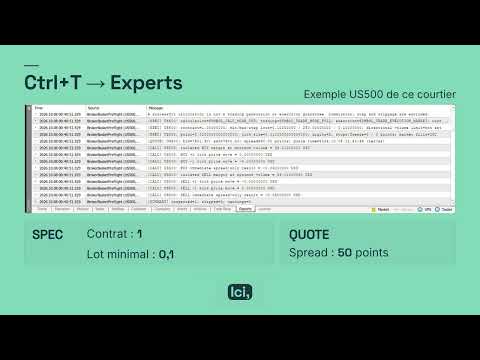
Open Toolbox (Ctrl+T) and select Experts to read the report.
How to use
- Select your exact broker symbols in Market Watch and allow quotes to arrive.
- Run the script on a separate chart. Leave InpSymbols empty for the chart symbol, or enter comma-separated names for a basket.
- Read the SPEC, QUOTE, CALC, WARN, SKIP and SUMMARY lines in the Experts journal. Correct any reported issue and run it again.
Inputs
- InpSymbols: empty by default; accepts up to 64 exact names. Prefixes and suffixes must match your broker.
- InpMaxQuoteAgeSeconds: default 120; 0 disables the stale-quote age threshold.
- InpMaxSpreadPoints: default 0, disabled; the optional warning threshold uses broker points.
Calculations and limits
At valid minimum volume and grid-aligned quotes, it estimates isolated BUY/SELL margin, upward and downward one-tick price-move results, and the immediate spread-only result. Amounts are labelled in the account currency. Unavailable calculations produce warnings.
The script sends no orders and manages no positions. Margin estimates exclude current positions and pending orders. Commission, swap and slippage are excluded. It does not validate daily history, signal logic, available funds or session opening times. A clean report does not guarantee that a trade will be accepted.