QuantumBit Pro Bitcoin Adaptive Grid Trader
- Experts
- Version: 1.30
- Updated: 16 October 2026
- Activations: 5

Limited launch offer: USD 199 for the first 10 purchases only. Only 9 places remain at this price. The price will then increase to USD 299.
QuantumBit Pro 1.30 — adaptive Bitcoin grid for MT5
Trade Bitcoin from one H1 chart with an H4 trend filter, volatility-based grid spacing and basket exits. QuantumBit is designed for traders who understand grid exposure and want to inspect the strategy, settings and test evidence before using it.
October 2026 update kit: setup notes, executable defaults and matched simulation summary. MT5 Setup Hub.
Free setup resources: Download the matching SET (v1.20, historical) · Download MT5 reports and instructions (v1.20, historical) · Setup guide and comparison of the four strategies.
One-month rental: USD 39. After purchase or rental, evaluate on a demo account with the version-specific SET.
Version 1.30 — October 2026 update — clearer operation and measurable recovery
A new read-only panel shows trading permissions, strategy context, positions matching this EA’s symbols and Magic identifiers, and broker volume specifications in the journal.
The recovery monitor observes whole-account equity from attachment or the latest cash-flow reset: current and maximum observed drawdown, time below the previous equity peak, the longest underwater episode (including an unfinished one), and completed recoveries.
InpDiagnosticsPanel controls the panel; InpDiagnosticsJournal controls broker diagnostics and the final recovery summary. These are observations sampled on received ticks, not a loss limit, a historical account record or an EA-only performance report. Deposits, withdrawals and detected capital adjustments reset the observation session.
Entry rules, sizing, exits and existing protections are preserved. The original inputs retain their names; review your saved settings when upgrading. Historical tables below identify the version actually tested.
How it works
- Trend direction: EMA(275) on H4 sets the bias. A 0.25 ATR neutral zone limits direction changes near the EMA.
- Adaptive grid: ATR(14) on H1 sets 1 ATR spacing and a 1.75 ATR basket target, with up to 10 levels.
- Flat lots by default: base lot 0.01, multiplier 1.0, compounding off. New entries still accumulate exposure during adverse moves.
- Basket exits: profit target, trend reversal and configurable floating-loss protection. Optional filters and capital controls are available.
Backtests with comparable conditions
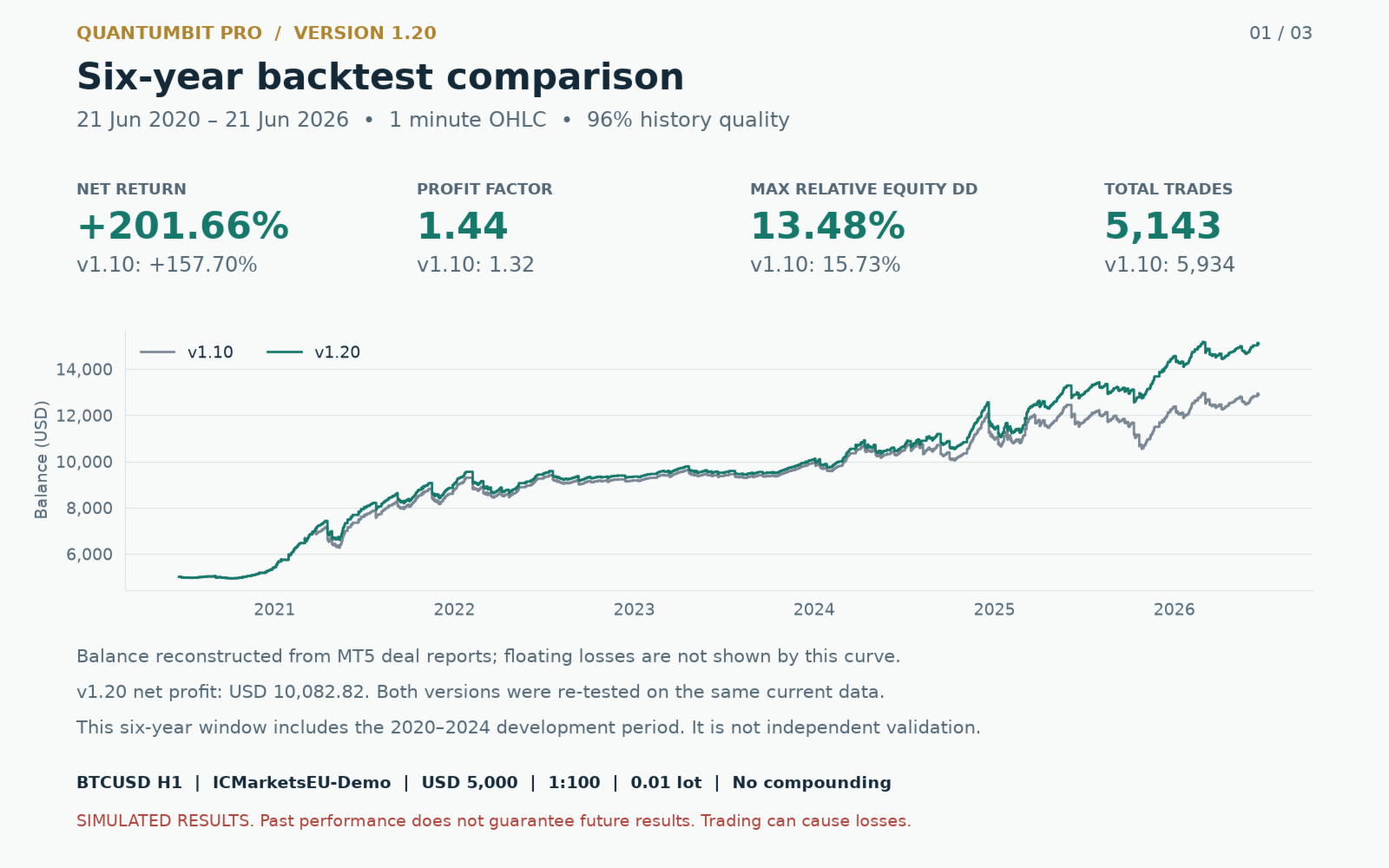
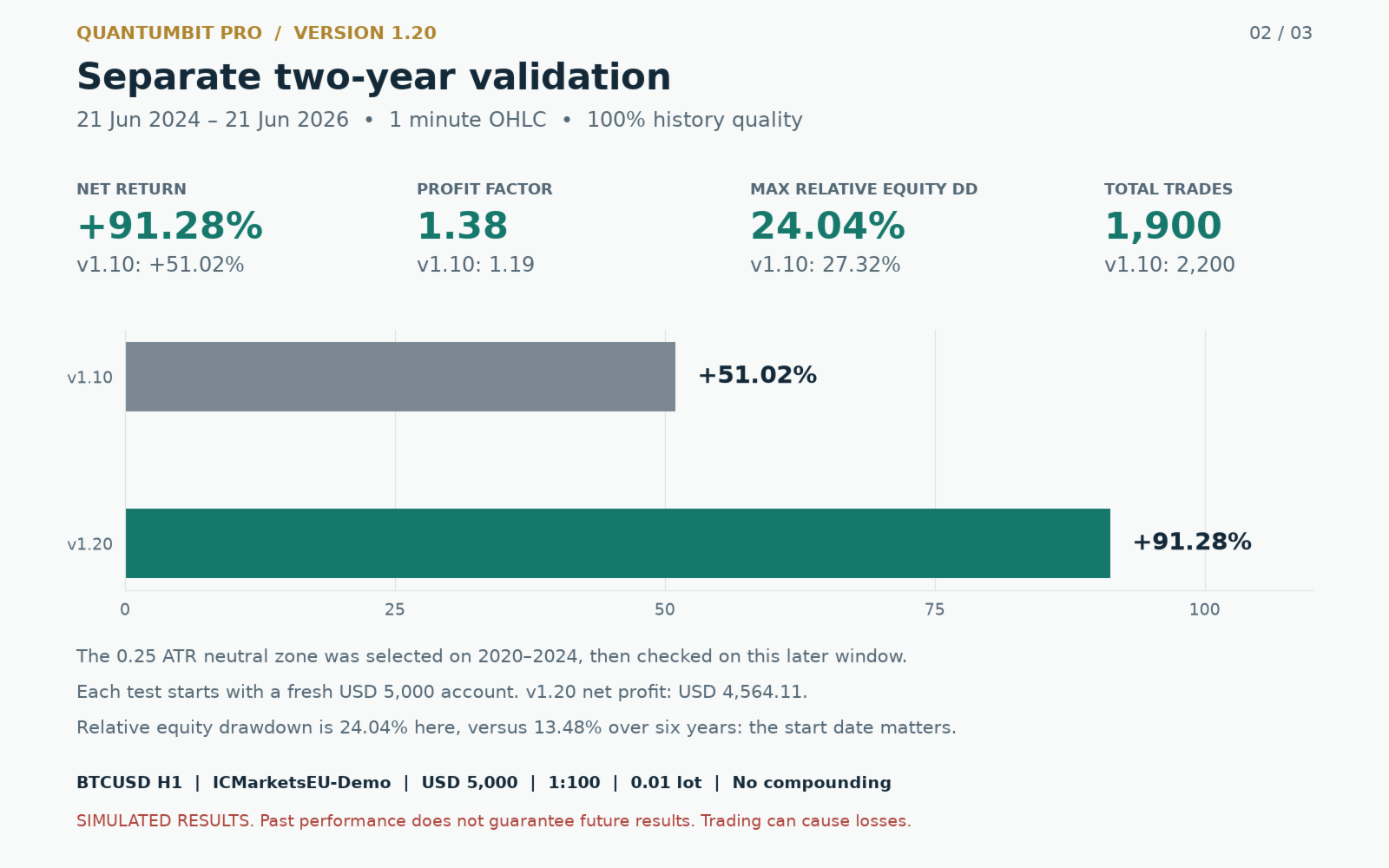
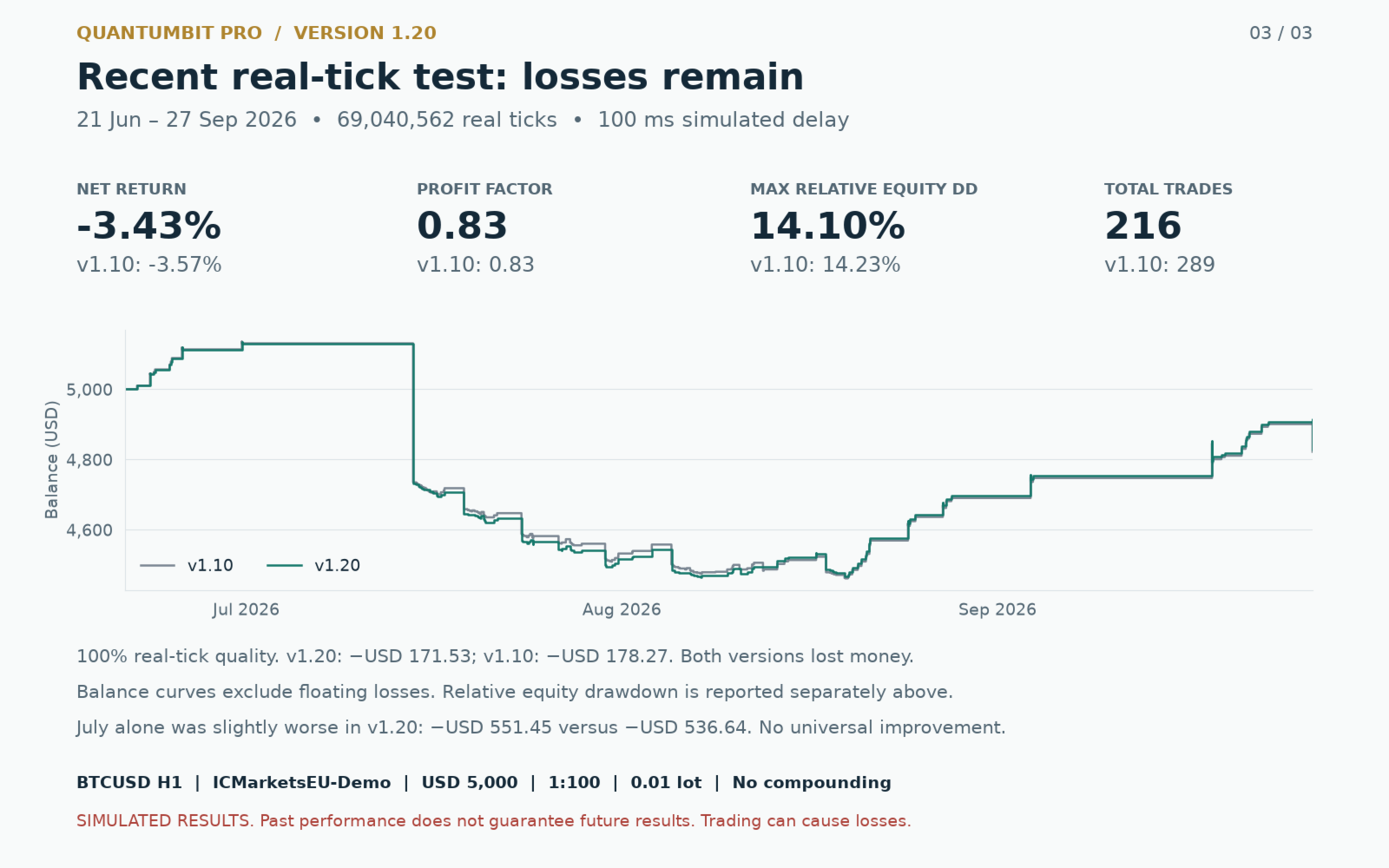
Both versions were retested on the same ICMarketsEU-Demo BTCUSD H1 data: USD 5,000, leverage 1:100, lot 0.01, no compounding. Each window starts separately. Return = net profit / initial deposit; drawdown = maximum relative equity drawdown.
| Window / model | v1.20 return / DD | v1.10 return / DD |
|---|---|---|
| 21 June 2020–21 June 2026 / OHLC M1 | +201.66% / 13.48% | +157.70% / 15.73% |
| 21 June 2024–21 June 2026 / OHLC M1 | +91.28% / 24.04% | +51.02% / 27.32% |
| 21 June–27 September 2026 / real ticks, 100 ms | −3.43% / 14.10% | −3.57% / 14.23% |
The six-year test has 96% history quality, includes development data and reports PF 1.44 with 5,143 trades for v1.20. The 2024–2026 check has 100% history quality; its larger drawdown shows why the starting date matters. The recent test uses 69,040,562 real ticks and remains loss-making. July alone was slightly worse with v1.20: −11.03% versus −10.73%. The neutral zone was selected on 2020–2024 before checking the later period. No multi-broker validation or future-profit guarantee is established.
What changed in 1.20
The neutral zone and default 0.01 lot accompany stronger execution handling: broker return codes are checked, refused or partial closures are retried, and pending exits and protection locks survive normal restarts in the same terminal. Monetary exits can run without indicator data. Total exposure includes both directions; volume is rounded down to the broker step and orders below minimum volume are skipped.
Settings to understand
- InpLot = 0.01; InpLotMult = 1.0; InpCompound = false. The old executable default was 0.04. Old SET files can preserve it.
- InpTrendBufferATR = 0.25; set 0 to disable the neutral zone.
- InpMaxTotalLots = 1.0: combined open-lot cap for this symbol and Magic.
- InpMaxDD_Pct = 25: basket floating-loss threshold relative to current balance, not a guaranteed account drawdown ceiling.
- Long, short and trend-flip exits are enabled. Additional capital, stress, ADX, large-bar and spread controls are off by default; review their inputs before enabling them.
Test and install
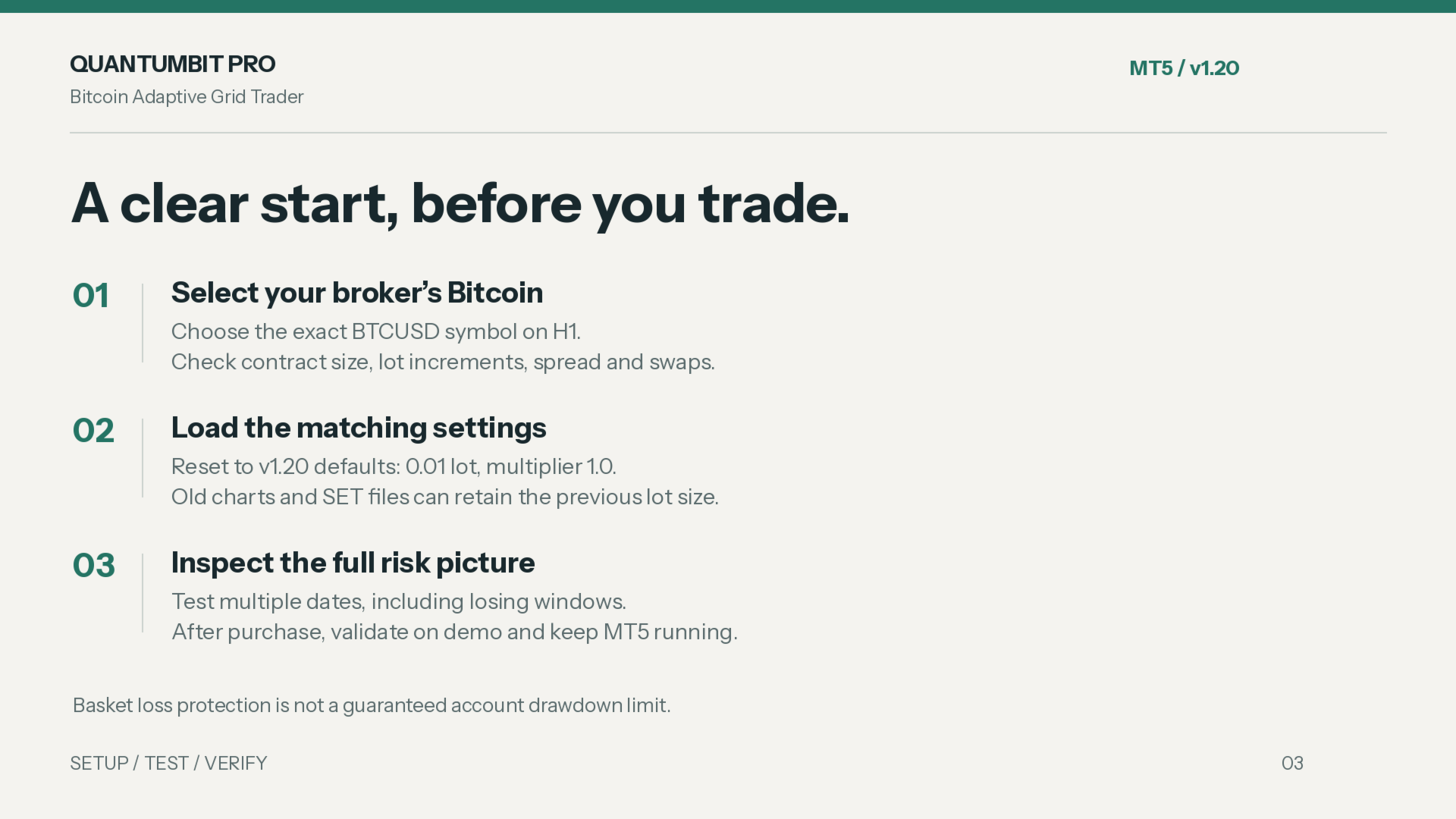
- Use the free Market demo in the MT5 Strategy Tester with the exact broker BTCUSD symbol on H1. Check contract size, lot step, spread, commission, swaps and data quality.
- Reset to 1.30 defaults or load the matching SET. Compare several starting dates and losing windows, using reliable real ticks where available.
- After purchase or rental, use a hedging account and one H1 instance per symbol/Magic. Validate on demo, then keep the terminal or VPS running.
Before you buy
Free demo? Strategy Tester only; it cannot trade on a demo or live account chart.
Minimum balance? USD 5,000 is a research condition, not a guaranteed safe minimum.
Support? Use MQL5 Comments or private messages with version, broker symbol, account mode, settings and relevant journal lines, without account identifiers.
Grid trading and leveraged crypto CFDs can cause substantial losses. Flat lots do not remove accumulating exposure. Gaps, closed markets and rejected orders can exceed protection thresholds. Capital-floor calculations observe whole-account equity but close only this EA’s symbol/Magic positions; saved state does not automatically transfer to another terminal. Backtests are simulations, not live results. Past performance does not guarantee future returns.
Already a customer? An honest review of setup, usability and your testing conditions helps others decide.