Single Arrow Wave Volume Reversal
- Indicators
-
Ahmed Hamed Hamed Eadwan
 Hello, I'm Ahmed — a trader and MQL5 developer based in the
United Arab Emirates, and the founder of R protocols.
I've been writing code since 1984 and trading the markets since 2006.
For many years, I developed trading tools for my own use, refining them
through real market experience. - Version: 1.1
- Updated: 24 September 2026
- Activations: 5
One rejection. One arrow. One confirmed entry.
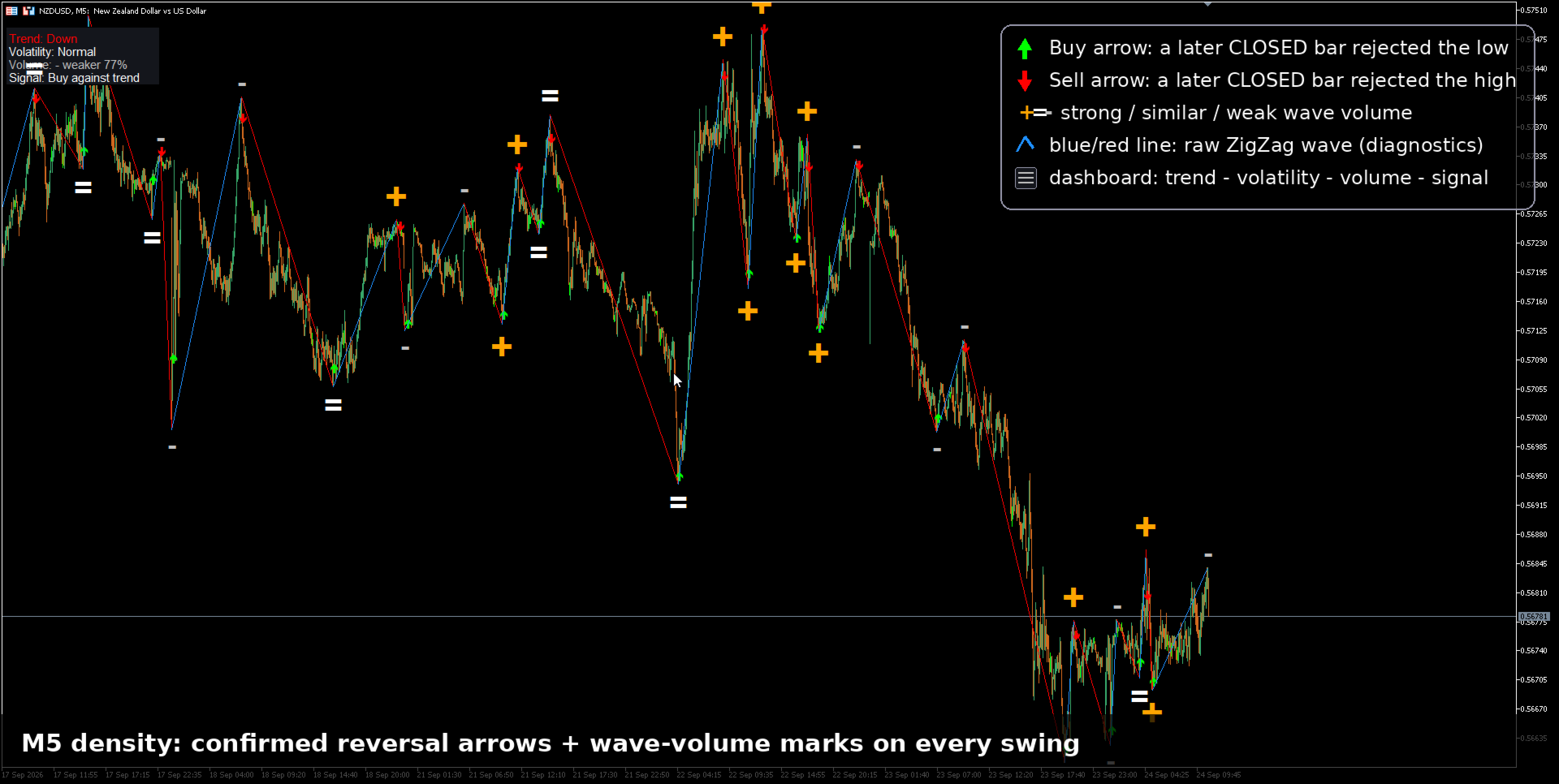
Single Arrow Reversal is a standalone reversal-signal indicator for MetaTrader 5. A ZigZag extreme is only a candidate: the arrow is printed on a later CLOSED bar that rejects that extreme — never on the extreme itself. Because the arrow lives on a closed, confirmed bar, the history you see is the history you get: confirmed arrows do not repaint.
Around the arrow engine you get three decision layers: wave-volume strength marks on every swing, a fib TP ladder of the last confirmed wave, and a live context dashboard (swing trend, volatility, volume reading and signal alignment). One file, no external indicators, no libraries, no DLLs.
From the same family: Single Arrow MT4, Single Arrow MTF MT4 and Single Arrow Scanner MT4.
The arrow lifecycle (read this first)
- Candidate: the built-in linear-time ZigZag engine prints a swing extreme (a pivot).
- Rejection window: for up to N closed bars (default 8) the indicator waits for a bar that breaks back through the trigger — pivot body, full candle or pivot close, your choice — and closes as a rejection candle.
- Arrow: printed on that rejecting closed bar. If price makes a new extreme before the rejection, the candidate is invalidated: no arrow, no fake signal.
Typical latency is 1–8 bars after the pivot. That is the price of honesty: the tool prefers being right and slightly late over being early and repaint-prone.
Why confirmed arrows do not repaint
- Shift 0 (the forming bar) is never used for an arrow decision.
- Every comparison uses closed bars only: rejection candles, volume sums, trend and volatility readings.
- Once printed, a confirmed arrow is frozen in history.
- Optional pivot locking freezes confirmed pivots so later recalculations cannot move them.
The raw ZigZag wave line, like any ZigZag, may adjust while a swing is still developing. It is shown for context and is clearly separated from the arrow stream.
Wave-volume strength marks (- = +)
At each swing end the indicator compares the wave's average volume with the median of the previous same-direction waves and prints a mark:
- + (orange, large): stronger participation than recent waves.
- = (white): similar participation.
- - (silver, small): weaker participation.
- . — no comparable wave yet.
The exact raw volume and its percentage stay in the object tooltip. Marks are context, not a standalone trade signal.
Fib TP ladder
From the last confirmed wave the indicator draws a static ladder of dashed targets — 38.2 / 50 / 61.8 / 100 / 127.2% — refreshed only when a new pivot confirms. After a buy arrow the ladder sits above the entry; after a sell arrow, below. Display only: a structured way to think about exits, not a promise that price must respect it.
Context dashboard
- Trend: swing structure of the last confirmed pivots (higher highs & lows, lower, or mixed).
- Volatility: short (14) vs long (50) true-range ratio: quiet / normal / high.
- Volume: the latest wave mark with its percentage.
- Signal: the latest closed-bar arrow and whether it is with or against the current swing trend.
All readings use closed bars only and carry a "display only" tooltip.
A honest way to use it
- Signal zone: M1–M5 scalping. The engine was designed and sanity-checked in the native Strategy Tester on low timeframes.
- Prefer arrows aligned with the dashboard trend. Trend-aligned arrows behaved materially better than counter-trend arrows in the vendor's closed-bar tests; the dashboard shows the alignment live.
- Higher timeframes = context. On M15 and above, use the dashboard and wave structure for bias and take entries on a lower timeframe.
- Combine the fib ladder with your own risk rules; the raw arrow stream is a signal source, not a complete system.
Defaults & settings reference
- ZigZag: Depth 34 / Deviation 13 / Backstep 8 · WPR 14 (optional divergence filter) · Lookback 5000.
- Reversal confirm ON · Wait 8 closed bars · Trigger 0 = pivot body, 1 = full candle (stricter), 2 = pivot close (earlier) · rejection candle must close with the reversal.
- Wave line ON · volume marks ON · tick or real volume · fib TP ladder ON · dashboard ON.
- Legacy weakening volume gate OFF by default (it removed most arrows; kept for research).
- Optional: WPR divergence filter, pivot locking, diagnostics panel.
For EA developers — 12 buffers
- 0 buy arrow price · 1 sell arrow price · 2 signal (+1/-1) · 3 pivot direction · 4 WPR series · 5/6 wave price + color index · 7–9 volume-filter state & ratios · 10 pre-filter candidate · 11 reversal state at the pivot.
Important and honest notes
- Decision-support tool. No accuracy or profit claim is made.
- Confirmed arrows do not repaint; the raw wave line can adjust while a swing develops.
- Test in the native Strategy Tester before live use — the closed-bar design keeps backtests representative.