SMC Ultimate
- Indicators
-
Ahmed Hamed Hamed Eadwan
 Hello, I'm Ahmed — a trader and MQL5 developer based in the
United Arab Emirates, and the founder of R protocols.
I've been writing code since 1984 and trading the markets since 2006.
For many years, I developed trading tools for my own use, refining them
through real market experience. - Version: 1.0
- Activations: 5
SMC Ultimate
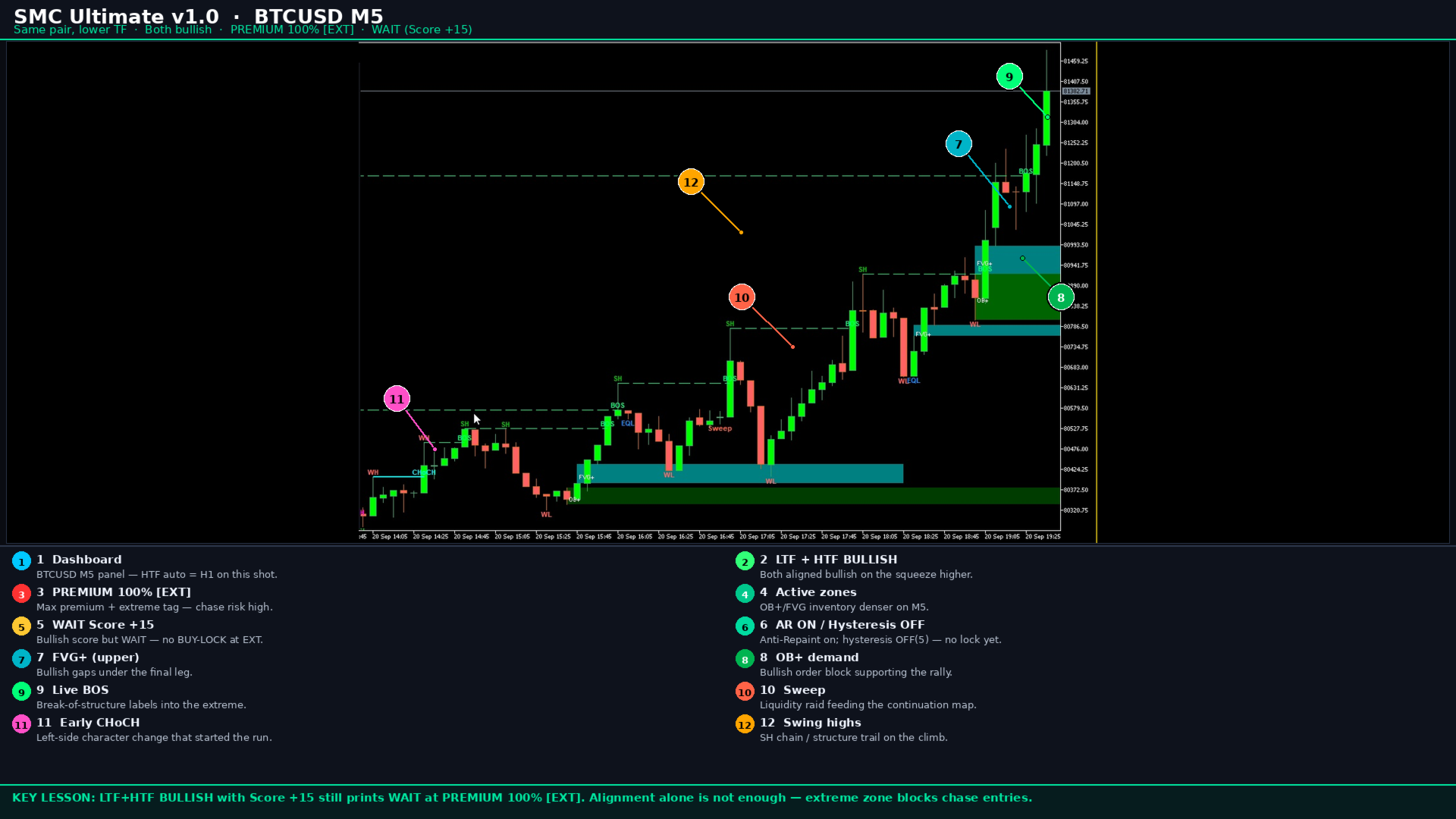
Institutional-grade Smart Money Concepts (SMC) / ICT decision engine for MetaTrader 5. It analyses market structure, liquidity, Order Blocks and Fair Value Gaps, then converts them into a clear score, encoded state and confirmed Buy/Sell signals.
The product works fully standalone with an on-chart dashboard, drawings and alerts. It is also EA-ready through a stable 4-buffer contract and a frozen 88-input layout for reliable iCustom integration.
Launch price for the first public release (version 1.0). The price may increase after early updates and reviews.
Key features
- HTF and LTF market structure: swings, BOS and CHoCH
- Liquidity map: equal highs/lows and sweep detection
- Order Blocks and Fair Value Gaps with touch and mitigation states
- Premium / Discount context scoring
- Weighted multi-factor decision score with hysteresis lock
- Anti-Repaint engine: confirmed signals locked on the closed bar (shift 1)
- On-chart dashboard: trend, zone, score, signal and buffer readout
- Alerts: popup, sound and push, with cooldown and once-per-bar options
- EA Mode: disable drawings and feed compatible Expert Advisors
- Multi-instance safe object prefix using ChartID
- Optional ATR-adaptive tolerances for EQH/EQL and FVG sizing
- Spread filter, session and weekday filters, cent-account mode
How signals work
Structure and liquidity engines update on the closed-bar logic path. Context places price in Premium, Discount or Neutral. The decision engine builds a capped score from configurable weights. Optional Strict-SMC sweep rules filter low-quality entries. With Anti-Repaint enabled (default), confirmed Buy/Sell values are locked on bar shift 1 and are not rewritten after the bar closes. Entry arrows appear only on confirmed closed bars, not on the forming candle.
Anti-Repaint and Two-Pass
Anti-Repaint is a core integrity feature and is enabled by default. Confirmed historical signals stay fixed after the bar closes.
Two-Pass Mitigation is experimental and disabled by default. It can refine historical OB/FVG mitigation accuracy.
If Anti-Repaint and Two-Pass are both enabled, Anti-Repaint takes priority automatically:
- Two-Pass is disabled for the current session
- The input value itself is never modified (88-slot EA contract stays intact)
- A warning is written to the Experts log
- An on-chart alert is shown when GUI is allowed
- Dashboard displays: 2-Pass:OFF(AR-Override)
To run Two-Pass intentionally, set Anti-Repaint to false. A full dual-mode merge is planned for a future update.
Dashboard
- LTF and HTF trend
- Premium-Discount zone with extreme tag
- Swing, BOS, CHoCH and Sweep counters
- Active OB and FVG counts
- Score and signal state: BUY, SELL or No Signal
- Hysteresis lock state
- Anti-Repaint and effective Two-Pass status
- Spread monitor, object count and HTF feed health
- Buffer readout: Score, Signal, State
EA buffers
Four indicator buffers are exported for Expert Advisors and custom tools:
- Buffer 0 - SMC_BUY: 1.0 on confirmed BUY at shift 1 only
- Buffer 1 - SMC_SELL: 1.0 on confirmed SELL at shift 1 only
- Buffer 2 - SMC_SCORE: decision strength, soft-capped around +/-200
- Buffer 3 - SMC_STATE: encoded HTF/LTF trend and sweep; +100000 when spread-blocked
Confirmed Buy/Sell are written at shift 1 only. Score and State at shift 0 carry a live preview of the bar-1 context for UI and EA responsiveness. Time-filter blocks suppress Buy/Sell but preserve State for EA logic. The input layout is fixed at 88 slots so positional iCustom reads remain stable across updates of this major line.
iCustom integration (EA code style)
Use the indicator name exactly as it appears under Navigator after Market install. Examples below use Market\SMC Ultimate. Confirmed entries are on shift 1 only. Buffer layout is frozen:
- 0 = SMC_BUY
- 1 = SMC_SELL
- 2 = SMC_SCORE
- 3 = SMC_STATE
Input layout is frozen at 88 positional slots for iCustom. Do not reorder inputs. Reserved slots 41-46 must stay in place if you pass values past that range. Trailing inputs you omit keep indicator defaults.
1) Globals
#define SMC_BUF_BUY 0
#define SMC_BUF_SELL 1
#define SMC_BUF_SCORE 2
#define SMC_BUF_STATE 3
#define SMC_SHIFT_CONFIRMED 1
#define SMC_SPREAD_BLOCK_MARK 100000.0
int g_smc_handle = INVALID_HANDLE;
datetime g_smc_last_bar = 0;
2) OnInit - create handle once
int OnInit()
{
g_smc_handle = iCustom(_Symbol, PERIOD_CURRENT, "Market\\SMC Ultimate");
if(g_smc_handle == INVALID_HANDLE)
{
Print("SMC Ultimate: iCustom failed, error=", GetLastError());
return INIT_FAILED;
}
return INIT_SUCCEEDED;
}
3) Optional - pass selected inputs by slot order
// Only if you must override defaults. Keep official order.
// Example idea (pseudo-order): StrictMode, MaxSpread, StrictSMC, ... EA_Mode=true
// g_smc_handle = iCustom(_Symbol, PERIOD_CURRENT, "Market\\SMC Ultimate",
// 0, 50, true, true, 5, true, true, true, false);
// Prefer defaults for first integration. Enable EA Mode from indicator inputs
// when the EA should run without chart objects.
4) Helper - read one buffer value
bool SMC_Read(const int buffer_index, const int shift, double &out_value)
{
out_value = EMPTY_VALUE;
if(g_smc_handle == INVALID_HANDLE) return false;
double tmp[];
ArraySetAsSeries(tmp, true);
if(CopyBuffer(g_smc_handle, buffer_index, shift, 1, tmp) != 1)
return false;
out_value = tmp[0];
return true;
}
5) Helper - valid numeric (not empty)
bool SMC_IsValidNum(const double v)
{
return (v != EMPTY_VALUE && MathIsValidNumber(v));
}
6) Helper - decode State buffer
bool SMC_DecodeState(double state_raw,
bool &spread_blocked,
int &htf_trend,
int <f_trend,
int &sweep_enc)
{
spread_blocked = false;
htf_trend = 0; ltf_trend = 0; sweep_enc = 0;
if(!SMC_IsValidNum(state_raw)) return false;
double s = state_raw;
if(s >= SMC_SPREAD_BLOCK_MARK)
{
spread_blocked = true;
s -= SMC_SPREAD_BLOCK_MARK;
}
int sv = (int)MathRound(s);
htf_trend = sv / 100 - 1; // -1 bear, 0 flat, +1 bull
ltf_trend = (sv % 100) / 10 - 1; // -1 bear, 0 flat, +1 bull
sweep_enc = sv % 10; // 0 none, 1 buy-side, 2 sell-side
return true;
}
7) OnTick - confirmed signal on new bar (shift 1)
void OnTick()
{
datetime t[];
ArraySetAsSeries(t, true);
if(CopyTime(_Symbol, PERIOD_CURRENT, 0, 2, t) != 2) return;
// Work once per new bar; signal is on the just-closed bar (shift 1)
if(t[0] == g_smc_last_bar) return;
g_smc_last_bar = t[0];
double buy=0, sell=0, score=0, state=0;
if(!SMC_Read(SMC_BUF_BUY, SMC_SHIFT_CONFIRMED, buy)) return;
if(!SMC_Read(SMC_BUF_SELL, SMC_SHIFT_CONFIRMED, sell)) return;
if(!SMC_Read(SMC_BUF_SCORE,SMC_SHIFT_CONFIRMED, score)) return;
if(!SMC_Read(SMC_BUF_STATE,SMC_SHIFT_CONFIRMED, state)) return;
bool spread_blocked; int htf, ltf, sweep;
if(!SMC_DecodeState(state, spread_blocked, htf, ltf, sweep)) return;
if(spread_blocked) return; // no new entries while spread-blocked
const bool is_buy =
SMC_IsValidNum(buy) && buy > 0.5 && buy < 1.0e10;
const bool is_sell =
SMC_IsValidNum(sell) && sell > 0.5 && sell < 1.0e10;
if(is_buy)
{
// Optional filters: score strength, HTF align, sweep
// if(score < 10) return;
// if(htf < 0) return;
PrintFormat("SMC BUY confirmed | score=%.0f htf=%d ltf=%d sweep=%d",
score, htf, ltf, sweep);
// --- your risk + OrderSend / trade.Buy() here ---
}
else if(is_sell)
{
PrintFormat("SMC SELL confirmed | score=%.0f htf=%d ltf=%d sweep=%d",
score, htf, ltf, sweep);
// --- your risk + OrderSend / trade.Sell() here ---
}
}
8) OnDeinit - release handle
void OnDeinit(const int reason)
{
if(g_smc_handle != INVALID_HANDLE)
{
IndicatorRelease(g_smc_handle);
g_smc_handle = INVALID_HANDLE;
}
}
Integration rules
- Trade from shift 1 Buy/Sell only, never from the forming bar shift 0
- Shift 0 Score/State are live preview values for monitoring, not final entries
- EMPTY_VALUE / invalid numbers mean no confirmed signal
- If State >= 100000, subtract 100000 and skip new entries (spread blocked)
- State encode: (htf+1)*100 + (ltf+1)*10 + sweepEnc
- Enable indicator EA Mode when the EA should run without dashboard/objects
- Always check CopyBuffer return count before using values
- Lot size, SL/TP, money management and OrderSend stay inside your EA
SMC Ultimate supplies the decision buffers. Your EA owns execution and risk.
Recommended start
- Attach to your working timeframe (M15-H1 are common; any timeframe is supported)
- Keep Anti-Repaint = true
- Keep Two-Pass = false unless you intentionally need it
- Set MaxSpread for your symbol (adaptive defaults help metals, indices and crypto)
- Tune MinDecisionScore and weights only after observing live behaviour
- For EA use: enable EA Mode and read the four buffers via iCustom as above
Best practices
- Treat the indicator as a decision engine, not a guaranteed trade printer
- Higher conviction usually combines HTF alignment, a supporting sweep and a non-extreme zone
- Respect broker spread and your own risk limits on every trade
- In Strategy Tester, use Visual mode when you need to verify objects and alert paths
- One instance per chart is ideal; multiple instances are isolated by ChartID prefix
Input groups (88 total, order frozen)
- Security and safety: spread, Strict SMC, Anti-Repaint, EA Mode and related controls
- Trading time and weekday filters
- ATR-adaptive tolerances
- Decision scoring weights
- Core structure: HTF, swing strength, lookback
- Decision threshold and zone mitigation, including experimental Two-Pass
- Fixed-mode fine constants
- Reserved EA-compatibility slots
- Chart object limits
- Visual toggles, alerts and dashboard layout
- Colors and logging
Do not reorder, remove or repurpose reserved slots if you integrate by input position.
Version 1.0
First public MQL5 Market release. Includes the full SMC/ICT stack (structure, liquidity, OB, FVG, context, decision), Anti-Repaint snapshot engine, experimental Two-Pass mitigation with active Anti-Repaint conflict resolution, EA-ready 4-buffer contract, frozen 88 inputs, ChartID multi-instance prefix, ATR-adaptive sizing, institutional dashboard and spread/session/hysteresis controls.
Support
For product support use the MQL5.org messaging system on the author profile page. Before writing, note symbol, timeframe and a screenshot of inputs plus any Experts-tab messages. Please allow reasonable time for a reply.
Disclaimer
Trading involves risk of loss. Historical structure patterns do not guarantee future results. SMC Ultimate is an analytical decision-support indicator and is not financial advice. You are solely responsible for risk management and trade execution.