Single Arrow MT4
- Indicators
-
Ahmed Hamed Hamed Eadwan
 Hello, I'm Ahmed — a trader and MQL5 developer based in the
United Arab Emirates, and the founder of R protocols.
I've been writing code since 1984 and trading the markets since 2006.
For many years, I developed trading tools for my own use, refining them
through real market experience. - Version: 1.0
- Activations: 5
One file. One arrow. One decision.
SingleArrow is a professional, self-contained divergence-signal indicator for MetaTrader 4. It combines a purpose-built linear-time ZigZag engine, a Williams %R divergence filter with leg separation, an optional pivot-protection layer and a two-mode signal system (Confirm / Live) — all compiled into a single file with no external indicators, no libraries and no DLLs.
MT4 edition — same engine, same signals
This is the MetaTrader 4 build of SingleArrow. It runs the identical engine as the MetaTrader 5 edition — same inputs, same defaults, same 5 buffers, same no-repaint rules — so identical settings produce identical pivots and arrows on both platforms.
- Native per-bar WPR: Williams %R is read directly bar-by-bar (iWPR) instead of an indicator handle, so the indicator stays smooth in the live terminal and in the MT4 Strategy Tester.
- One EX4, works anywhere: including Market rentals and VPS.
Who is it for
- Discretionary traders who want clean, rule-based divergence arrows instead of staring at raw oscillators.
- EA developers who need a machine-readable, deterministic signal source: five well-defined buffers readable through iCustom.
- Backtesters and strategists who need a confirmed, history-stable signal stream (Confirm mode).
Architecture in one picture
- Structure layer: the internal ZigZag engine extracts pivots from price in a single O(n) pass.
- Analysis layer: the Williams %R divergence filter validates each pivot pair with leg separation.
- Presentation layer: buy/sell arrows, pivot states, the WPR series and a compact diagnostic status line.
1) The internal ZigZag engine (why not the platform one?)
- Linear time O(n): the whole loaded history is processed in one pass; each new tick costs O(1) work, so the indicator stays light on fast ticks and deep history.
- Classical triple, modern core: Depth / Deviation / Backstep keep their familiar meaning, while the internal pivot bookkeeping (bounded Backstep suppression, deterministic seeding from the previous calculation) is implemented from scratch and hardened against edge cases.
- No iCustom, no missing buffers: the engine is embedded, so the signal pipeline never depends on another indicator being present on the chart or in the terminal folder. The compiled EX4 works anywhere, including Market rentals.
- Deterministic: identical parameters produce identical pivots on every chart, symbol and terminal build.
2) Williams %R divergence with leg separation
A raw oscillator level crossing is not a signal. The indicator compares price legs (pivot-to-pivot moves) with oscillator legs on the same span:
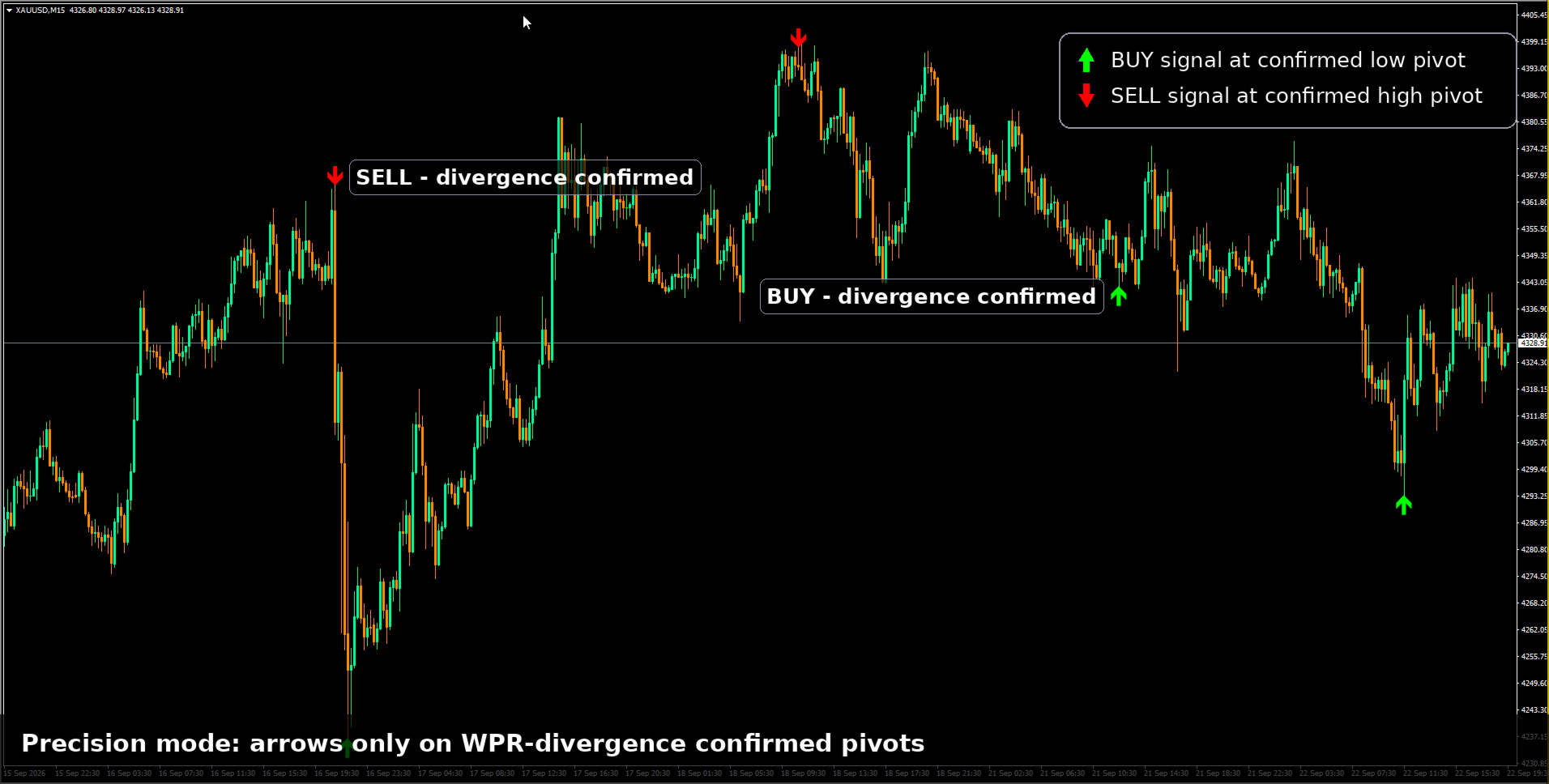
- Bearish divergence: price prints a higher high while the Williams %R leg prints a lower high → a sell arrow at the confirmed pivot high.
- Bullish divergence: price prints a lower low while the Williams %R leg prints a higher low → a buy arrow at the confirmed pivot low.
- Leg separation: swings inside a leg are excluded from the comparison, so a noisy mid-leg spike cannot fake or hide a divergence — and two consecutive same-direction pivots are never compared, the classic false-signal source in cheap ZigZag/divergence combos.
- Only a pivot that satisfies the ZigZag structure rules and the WPR divergence test produces an arrow (when divergence is enabled). Every arrow is a full decision, not a raw hint.
3) Signal modes: Confirm vs Live (read this carefully)
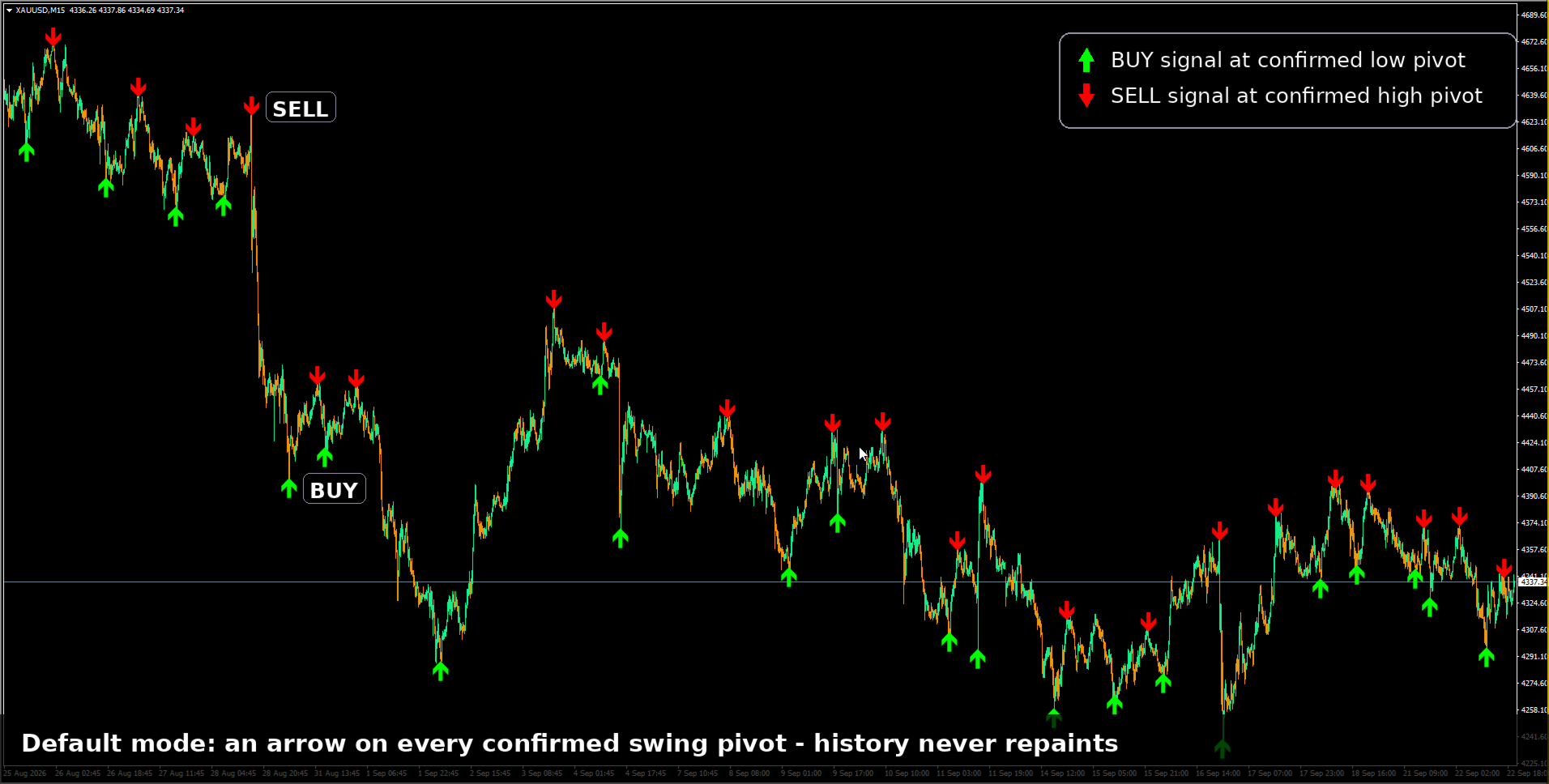
Confirm (default, InpConfirmBars = 1) — history-stable stream. A candidate divergence stays pending until the causing pivot is confirmed by the following price action (N bars, InpConfirmBars). Once committed, the arrow is frozen: it never moves, never disappears and never changes direction.
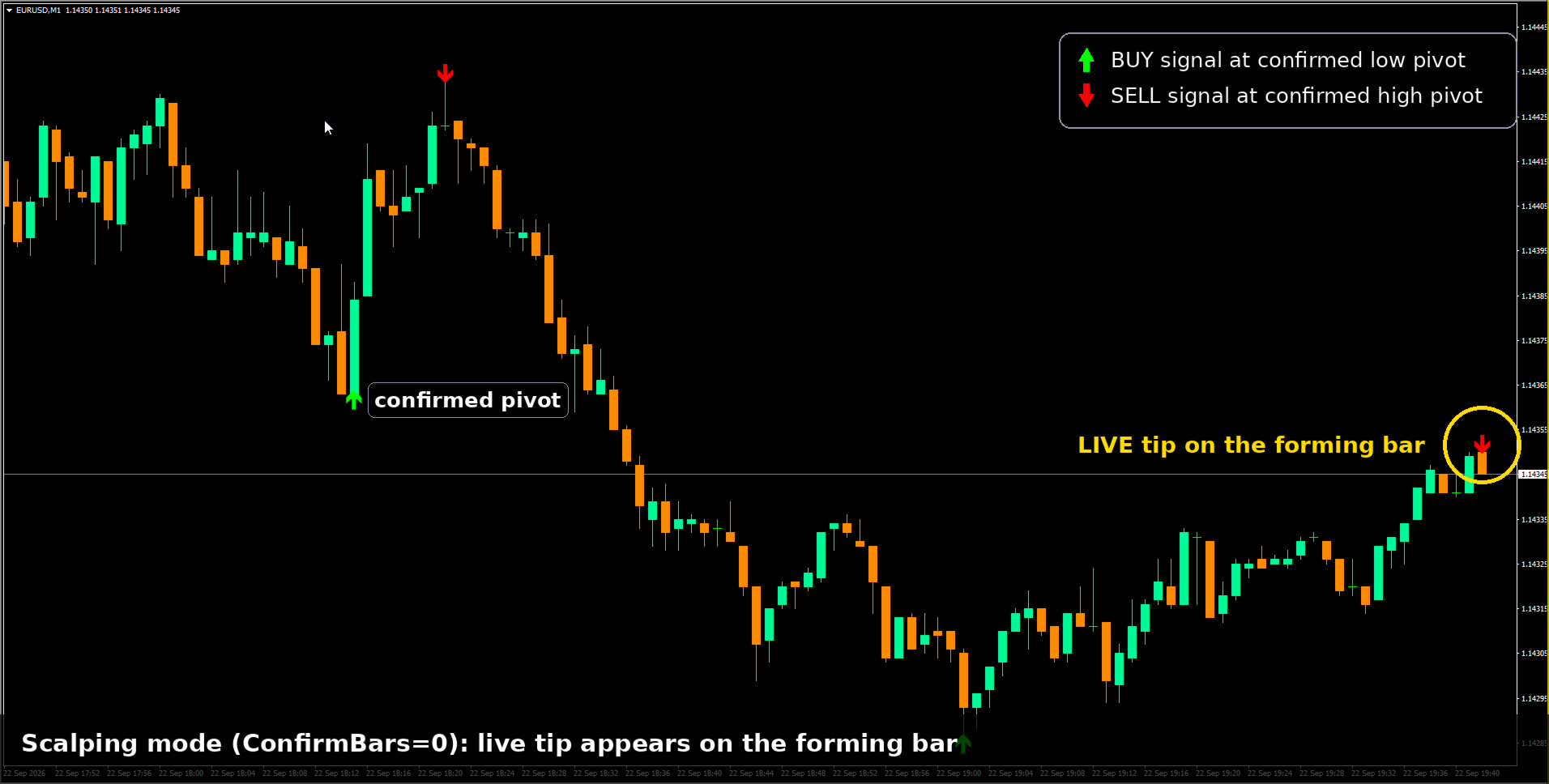
Live (InpConfirmBars = 0, shown as "Repaint" in diagnostics) — earliest possible read. The arrow is shown inside the forming bar. By design it may shift or vanish while the bar is unfinished. Recommended pairing: InpLockPivots = true, so already-locked pivots can no longer move.
The non-repaint guarantee (Confirm mode): because every engine parameter is manual (there is no auto-scaling that could drift between calculations), committed arrows in Confirm mode are non-repainting unconditionally. Startup validation rejects parameter combinations that could break determinism (Backstep ≥ Depth, Lookback below the engine minimum, and similar).
4) Pivot Locking
Optional. Confirmed pivots older than InpLockAfterBars closed bars are frozen in an internal registry; later recalculations, volatility spikes or parameter edits cannot move them. It is the extra protection layer for Live mode and for any workflow where you change settings on a running chart.
5) Full settings reference (defaults)
- ZigZag: InpDepth = 34, InpDeviation = 13, InpBackstep = 8 (must be < Depth).
- Divergence: InpWPRPeriod = 14, InpUseDivergence = false, InpLookback = 5000 (calculation window in bars; validated at startup against the engine minimum Depth×2 + Backstep + 1, capped at 100000).
- Signal modes: InpConfirmBars = 1 (0 = Live, N = Confirm), InpLiveMargin = 12 (live-zone margin, Live mode only), InpLockPivots = false + InpLockAfterBars = 3.
- Compatibility / diagnostics: InpPivotTolPts = 5 (reserved for set-file compatibility — kept, not used by the engine), InpShowDiag = false (shows a compact SA [INFO] status line: bars, window, pivot counts, lock state, mode).
6) Installation & first run
- Install from the Market tab inside your terminal (rentals and lifetime licenses are handled by MetaTrader 4).
- Attach to any chart and any timeframe (the engine needs at least 62 bars to start).
- Start with defaults in Confirm mode. Turn on InpShowDiag to watch the status line, then tune the ZigZag triple or enable the divergence filter for a stricter, lower-frequency signal stream.
7) Practical playbooks
- Intraday: M15 Confirm-mode arrows with InpUseDivergence = true — fewer, higher-quality entries.
- Swing: H4 pivots as context, H1 arrows as triggers.
- Scalping: InpConfirmBars = 0 (Live) for the earliest read, with InpLockPivots = true to protect committed pivots; you accept by-design shifts on the still-forming tip.
- EA: read the signal buffer at shift 1 (last closed bar) for a stable, backtest-consistent stream.
8) Performance & requirements
- MetaTrader 4, any symbol, any timeframe. No DLLs, no external files, no extra indicators.
- Linear-time core with incremental tick handling — designed for fast tick flow without chart freezes.
- Draws only arrows and buffers — no rectangles, no zones — so it can sit on every chart of a terminal at once.
- Clean deinitialization: the status line is removed on detach.
9) What this product is not
It does not place trades, it does not manage money, and it gives no profit guarantees. Divergence is a probabilistic, contextual reading. In Live mode, repainting is by design. It also does not include the Multi-Timeframe dashboard, support/resistance levels, ATR-adaptive parameters or the SA_REP_ / SA_POST_ transparency counters — those belong to the SingleArrow MTF edition (section 12).
10) iCustom & EA integration (buffers, code)
SingleArrow publishes 5 buffers, all readable from any EA via iCustom() + CopyBuffer() (MT4 build 600+); MetaTrader loads the indicator automatically on the first iCustom call — no manual chart attachment needed.
// BUFFER MAP (index -> content) // 0 SA_Buy BUY arrow price (0.0 = none), lime arrow #233 // 1 SA_Sell SELL arrow price (0.0 = none), red arrow #234 // 2 SA_Signal +1 buy / -1 sell / 0 none // 3 SA_Pivot +1 high pivot / -1 low pivot / 0 none // 4 SA_WPR Williams %R value int h = iCustom(_Symbol, PERIOD_CURRENT, "SingleArrow", 34, // InpDepth 13, // InpDeviation 8, // InpBackstep 14, // InpWPRPeriod 5000, // InpLookback 5, // InpPivotTolPts (reserved) true, // InpUseDivergence 1, // InpConfirmBars (0 = Live, 1+ = Confirm) false, // InpShowDiag 12, // InpLiveMargin false, // InpLockPivots 3); // InpLockAfterBars double sig[]; ArraySetAsSeries(sig, true); CopyBuffer(h, 2, 0, 3, sig); // buffer 2 = SA_Signal if(sig[1] == 1) { /* confirmed buy on last closed bar */ } if(sig[1] == -1) { /* confirmed sell on last closed bar */ }
- Handle lifecycle: create the handle once in OnInit and IndicatorRelease() it in OnDeinit; never call iCustom per tick.
- Committed feed at shift 1: read SA_Signal / SA_Buy / SA_Sell on the last closed bar for a stable, backtest-consistent stream; SA_Pivot separates high pivots (+1) from low pivots (−1).
- EA-only performance tip: pass InpShowDiag = false to skip the status line entirely.
- No GlobalVariable channel in this edition: the base edition publishes buffers only; the MTF edition adds the SA_REP_ / SA_POST_ counters for repaint transparency.
11) FAQ
- Does it repaint? In Confirm mode, no — unconditionally (all parameters are manual). In Live mode, changes on the forming tip are by design.
- Does it work on every symbol? Yes — the same defaults (Depth 34 / Deviation 13 / Backstep 8) are a sane starting point on FX, gold, crypto and indices.
- Can my EA use it? Yes — five stable buffers with identical names to the MT5 edition.
- Why one arrow instead of many hints? Every arrow has passed structure + divergence validation; fewer, higher-quality signals by design.
- Do I need the platform ZigZag on my chart? No. The engine is embedded.
- How is it different from SingleArrow MTF? The MTF edition adds the Multi-Timeframe dashboard, automatic S/R, ATR-adaptive parameters and the EA transparency counters. The base is the lean engine, optimized for speed and clarity.
12) The SingleArrow family (MT4)
- SingleArrow (this product): the base engine — arrows, pivot states, WPR, on your trading charts.
- SingleArrow MTF MT4: the same engine plus the Multi-Timeframe dashboard, automatic support/resistance, ATR-adaptive ZigZag parameters and the SA_REP_ / SA_POST_ transparency counters.
- SingleArrow Scanner MT4: the same engine across your whole watchlist and up to 8 timeframes — a live signal matrix with BIAS votes, divergence stars and filtered alerts.
- Same engine in all three: identical settings ⇒ identical signals.
Changelog
- v1.00: first Market release.