XauGuard EA
- Experts
- Version: 1.0
- Activations: 5

𝗫𝗔𝗨𝗚𝗨𝗔𝗥𝗗 𝗘𝗔 — 𝗦𝗘𝗠𝗜-𝗔𝗨𝗧𝗢 𝗛𝗘𝗗𝗚𝗘 𝗣𝗔𝗡𝗘𝗟 𝗙𝗢𝗥 𝗚𝗢𝗟𝗗
Symbol: XAUUSD (Gold) | Platform: MetaTrader 5 | Version: 1.30
XauGuard is a semi-automatic Expert Advisor for Gold (XAUUSD) on MetaTrader 5. You decide when to enter; it defends the position.
𝗛𝗢𝗪 𝗜𝗧 𝗪𝗢𝗥𝗞𝗦
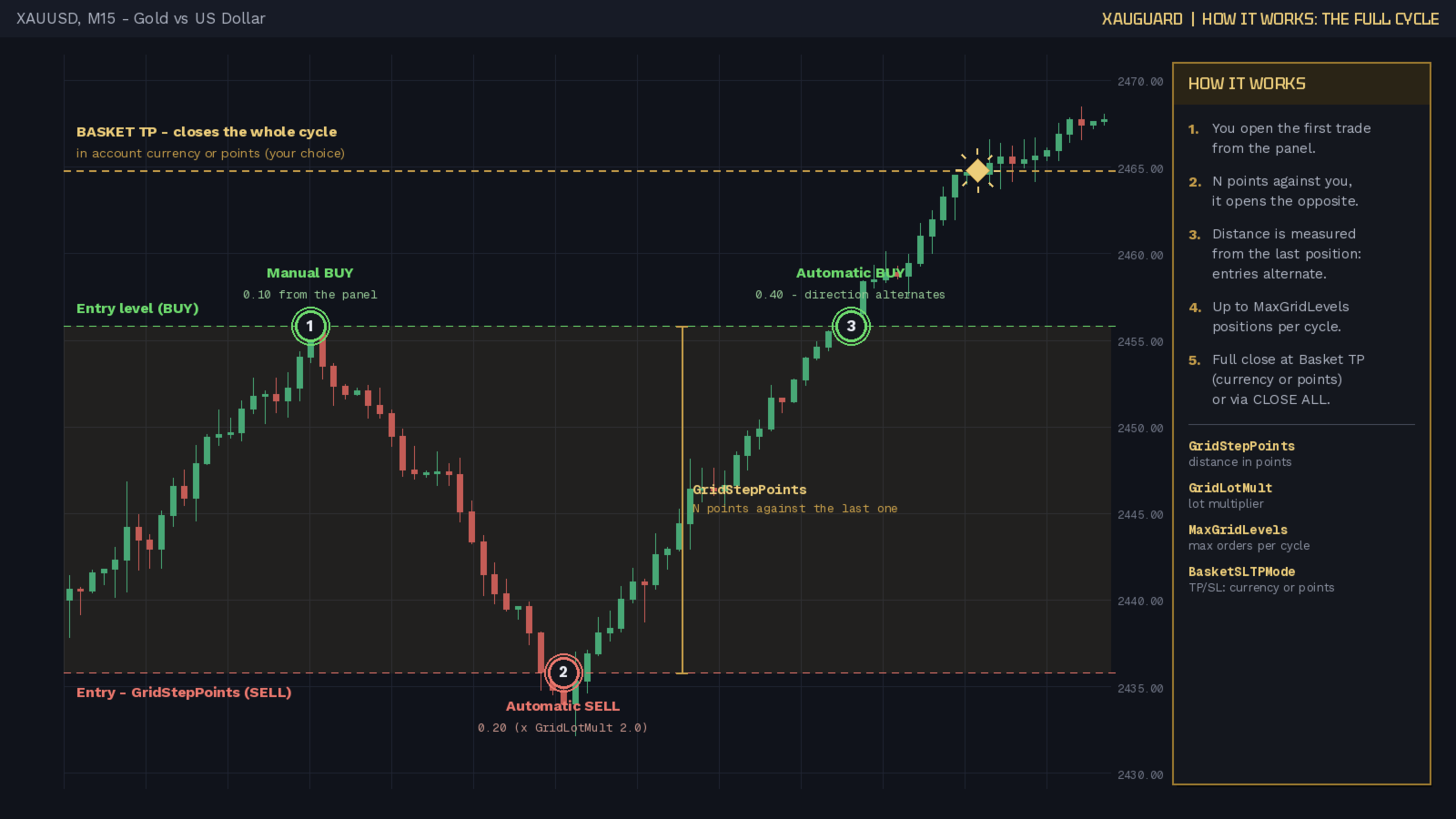
You open the first trade yourself, with one click from the on-chart panel (BUY or SELL, any lot size). From that moment XauGuard watches the price: if the market moves against your position by a distance you define (GridStepPoints), it automatically opens an OPPOSITE hedging position. If the move continues, the logic repeats, alternating direction (BUY -> SELL -> BUY...), up to a maximum number of positions that you set. The cycle closes automatically when the basket Take Profit is reached - in account currency or in points, your choice - or manually with one click on CLOSE ALL.
𝗧𝗥𝗘𝗡𝗗 & 𝗡𝗘𝗪𝗦 𝗕𝗘𝗛𝗔𝗩𝗜𝗢𝗨𝗥
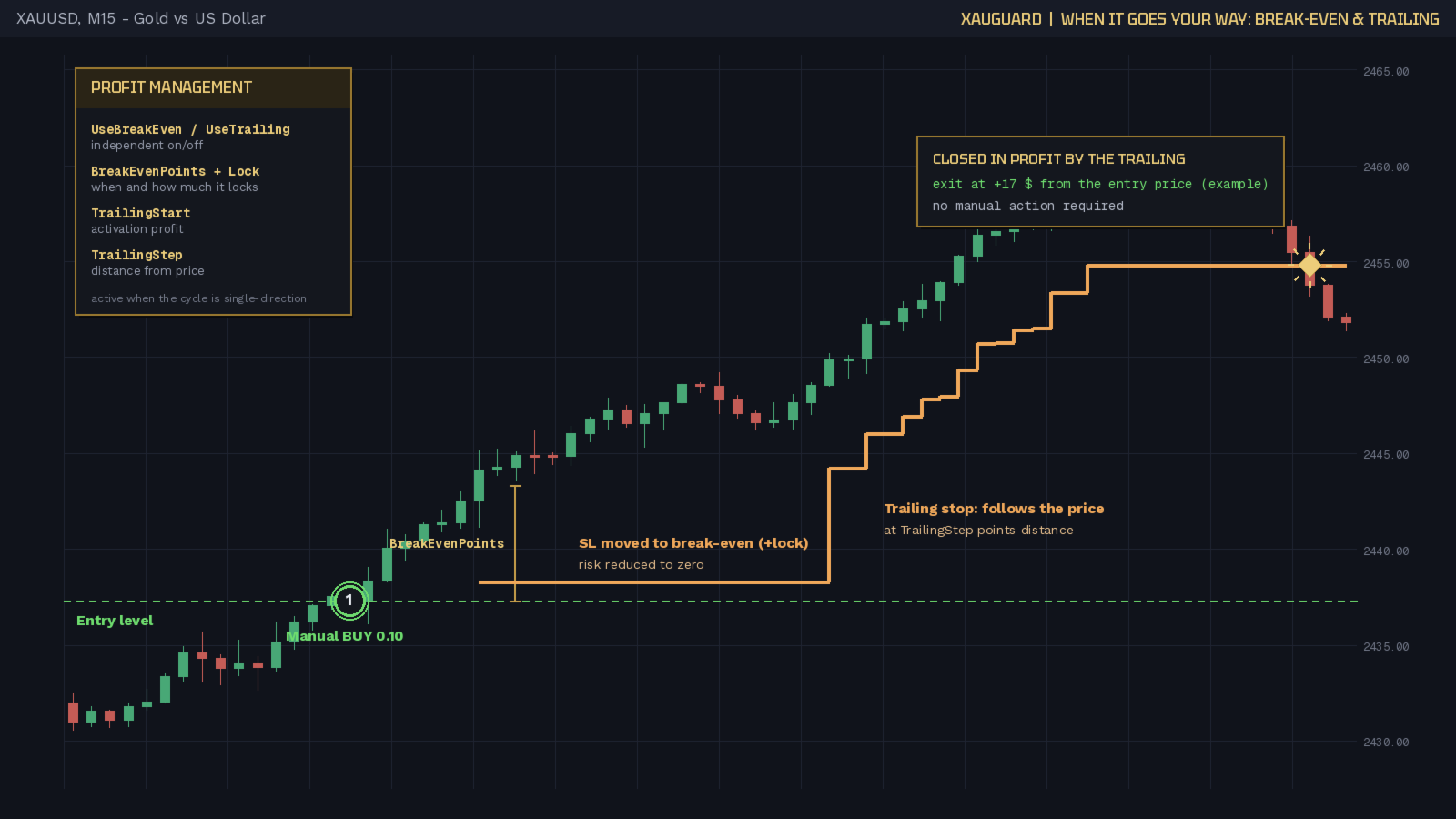
XauGuard is designed to ride Gold trends: when price moves in your favour, break-even quickly brings the risk to zero and the trailing stop follows the move point by point, letting the profit run for as long as the trend lasts. When the market turns against you, the distance hedge steps in and balances the exposure with no manual action required. Trailing works the trends, hedging works the reversals. The same logic also makes it suitable for high-impact news events (NFP, FOMC, CPI...): sudden Gold spikes are ridden by the trailing when they go your way and covered by the opposite position when they go against you, with no need to predict the direction of the move.
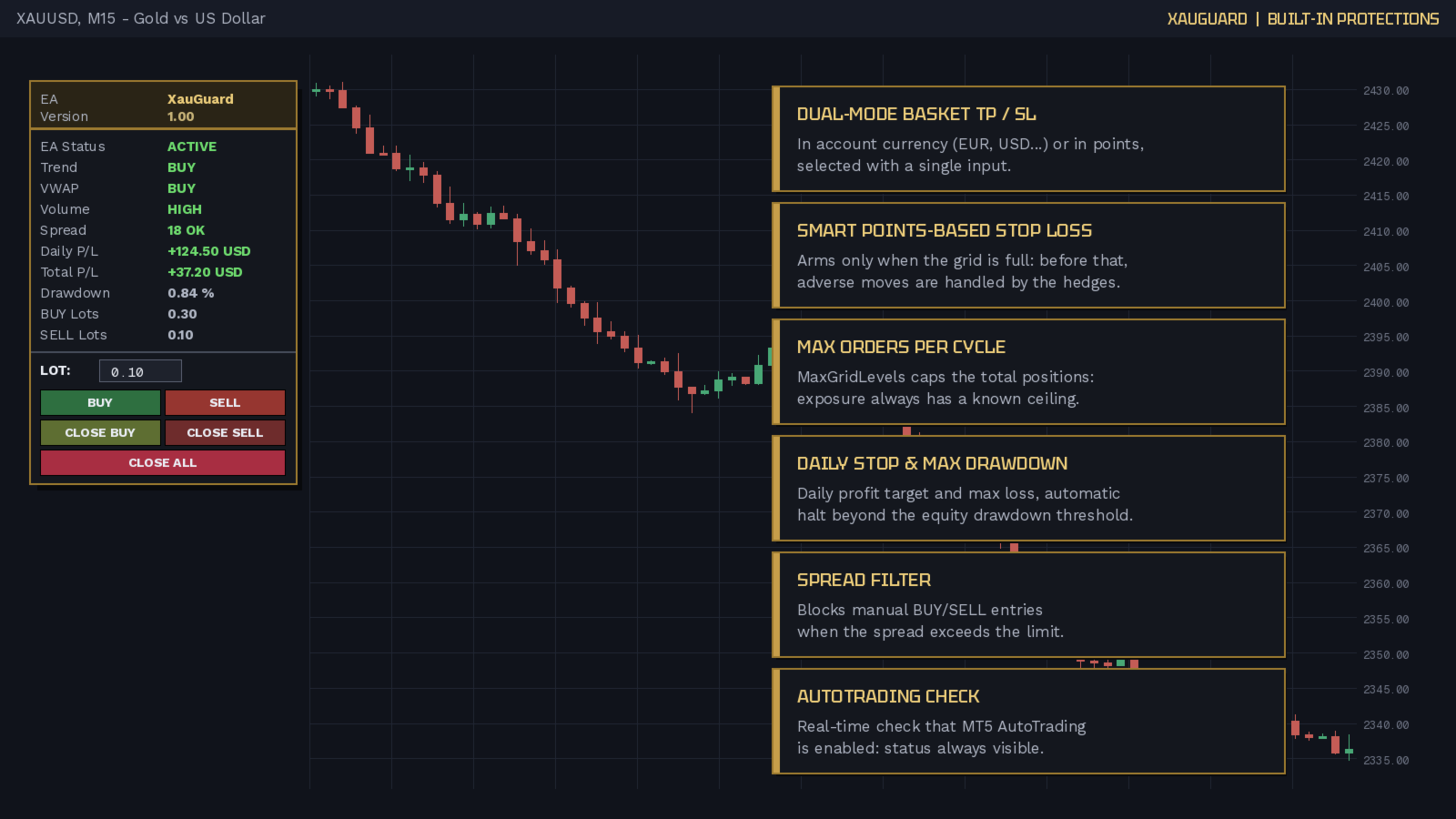
𝗕𝗨𝗜𝗟𝗧-𝗜𝗡 𝗣𝗥𝗢𝗧𝗘𝗖𝗧𝗜𝗢𝗡𝗦
- Basket Take Profit and Stop Loss in account currency or in points
- Smart points-based stop loss: arms only when the grid is full
- Maximum orders per cycle (exposure always capped)
- Daily profit and daily loss stop
- Automatic halt on maximum equity drawdown
- Manual entries blocked when the spread exceeds the limit
- Maximum manual lot cap on the panel
- Optional break-even and trailing stop
- Continuous MT5 AutoTrading status check
𝗜𝗡𝗣𝗨𝗧 𝗣𝗔𝗥𝗔𝗠𝗘𝗧𝗘𝗥𝗦
𝗚𝗘𝗡𝗘𝗥𝗔𝗟
- MagicNumber (770077): identifies the positions managed by the EA
- DefaultLot (0.01): initial lot in the panel LOT field
- MaxManualLot (1.0): maximum lot accepted from the panel
𝗧𝗥𝗘𝗡𝗗 / 𝗜𝗡𝗗𝗜𝗖𝗔𝗧𝗢𝗥𝗦
- UseADX (true): requires ADX above threshold to confirm the trend
- UseVWAP (true): requires price on the right side of the VWAP
- EMA_Fast (50) / EMA_Slow (200): averages defining the trend
- ADX_Period (14) / ADX_MinLevel (20): ADX period and threshold
- VolumeMA_Period (20) / VolumeMult (1.2): volume shows HIGH above average x multiplier (informational only)
𝗛𝗘𝗗𝗚𝗘 𝗚𝗥𝗜𝗗
- EnableHedgeGrid (true): enables the automatic opposite entries
- MaxGridLevels (5): max positions per cycle, manual trade included
- GridStepPoints (200): points against the last position that trigger the opposite
- GridLotMult (1.0): lot multiplier of each opposite
𝗧𝗥𝗔𝗗𝗘 𝗠𝗔𝗡𝗔𝗚𝗘𝗠𝗘𝗡𝗧
- UseBreakEven (true): moves the stop to break-even in profit
- BreakEvenPoints (150): profit points that trigger the BE
- BreakEvenLock (20): points locked beyond the average price
- UseTrailing (true): enables the trailing stop
- TrailingStart (200): profit points that start the trailing
- TrailingStep (100): stop distance from the price
- BasketSLTPMode (Currency): TP/SL in account currency or points
- BasketTakeProfit (50): cycle TP in account currency
- BasketTakeProfitPts (500): cycle TP in points
- BasketStopLoss (0): cycle SL in currency, 0 = off
- BasketStopLossPts (0): cycle SL in points, 0 = off; arms only once MaxGridLevels is reached
- DailyStopProfit (0): daily profit target, 0 = off
- DailyStopLoss (0): maximum daily loss, 0 = off
- MaxDrawdown (0): max equity drawdown from the peak, 0 = off
𝗦𝗣𝗥𝗘𝗔𝗗
- MaxSpreadPoints (50): above this limit manual BUY/SELL are blocked; the automatic hedges always remain active
𝗜𝗡𝗧𝗘𝗥𝗙𝗔𝗖𝗘
- EnableDashboard (true): shows the information dashboard
- EnableButtons (true): shows the lot field and trading buttons
- PanelX (20) / PanelY (90): panel position in pixels
𝗦𝗧𝗥𝗔𝗧𝗘𝗚𝗬 𝗧𝗘𝗦𝗧𝗘𝗥
- TesterOpenTrades (true): in backtests it opens the first trade of each cycle by itself (panel clicks do not exist in the tester); no effect on live and demo
- TesterDirection (Buy): first trade direction in backtests (Buy, Sell or Follow trend)
𝗪𝗛𝗢 𝗜𝗧 𝗜𝗦 𝗙𝗢𝗥
Traders who want to enter the market manually, on their own signal, but with an automatic safety net that covers adverse moves without hands-on management, and with clear risk rules set in advance.
𝗥𝗜𝗦𝗞 𝗪𝗔𝗥𝗡𝗜𝗡𝗚
Trading involves substantial risk and may not be suitable for everyone. Distance-hedging strategies increase exposure during extended moves: always test on a demo account before live use.
Symbol: XAUUSD (Gold) | Platform: MetaTrader 5 | Version: 1.30
XauGuard is a semi-automatic Expert Advisor for Gold (XAUUSD) on MetaTrader 5. You decide when to enter; it defends the position.
𝗛𝗢𝗪 𝗜𝗧 𝗪𝗢𝗥𝗞𝗦
You open the first trade yourself, with one click from the on-chart panel (BUY or SELL, any lot size). From that moment XauGuard watches the price: if the market moves against your position by a distance you define (GridStepPoints), it automatically opens an OPPOSITE hedging position. If the move continues, the logic repeats, alternating direction (BUY -> SELL -> BUY...), up to a maximum number of positions that you set. The cycle closes automatically when the basket Take Profit is reached - in account currency or in points, your choice - or manually with one click on CLOSE ALL.
𝗧𝗥𝗘𝗡𝗗 & 𝗡𝗘𝗪𝗦 𝗕𝗘𝗛𝗔𝗩𝗜𝗢𝗨𝗥
XauGuard is designed to ride Gold trends: when price moves in your favour, break-even quickly brings the risk to zero and the trailing stop follows the move point by point, letting the profit run for as long as the trend lasts. When the market turns against you, the distance hedge steps in and balances the exposure with no manual action required. Trailing works the trends, hedging works the reversals. The same logic also makes it suitable for high-impact news events (NFP, FOMC, CPI...): sudden Gold spikes are ridden by the trailing when they go your way and covered by the opposite position when they go against you, with no need to predict the direction of the move.
𝗕𝗨𝗜𝗟𝗧-𝗜𝗡 𝗣𝗥𝗢𝗧𝗘𝗖𝗧𝗜𝗢𝗡𝗦
- Basket Take Profit and Stop Loss in account currency or in points
- Smart points-based stop loss: arms only when the grid is full
- Maximum orders per cycle (exposure always capped)
- Daily profit and daily loss stop
- Automatic halt on maximum equity drawdown
- Manual entries blocked when the spread exceeds the limit
- Maximum manual lot cap on the panel
- Optional break-even and trailing stop
- Continuous MT5 AutoTrading status check
𝗜𝗡𝗣𝗨𝗧 𝗣𝗔𝗥𝗔𝗠𝗘𝗧𝗘𝗥𝗦
𝗚𝗘𝗡𝗘𝗥𝗔𝗟
- MagicNumber (770077): identifies the positions managed by the EA
- DefaultLot (0.01): initial lot in the panel LOT field
- MaxManualLot (1.0): maximum lot accepted from the panel
𝗧𝗥𝗘𝗡𝗗 / 𝗜𝗡𝗗𝗜𝗖𝗔𝗧𝗢𝗥𝗦
- UseADX (true): requires ADX above threshold to confirm the trend
- UseVWAP (true): requires price on the right side of the VWAP
- EMA_Fast (50) / EMA_Slow (200): averages defining the trend
- ADX_Period (14) / ADX_MinLevel (20): ADX period and threshold
- VolumeMA_Period (20) / VolumeMult (1.2): volume shows HIGH above average x multiplier (informational only)
𝗛𝗘𝗗𝗚𝗘 𝗚𝗥𝗜𝗗
- EnableHedgeGrid (true): enables the automatic opposite entries
- MaxGridLevels (5): max positions per cycle, manual trade included
- GridStepPoints (200): points against the last position that trigger the opposite
- GridLotMult (1.0): lot multiplier of each opposite
𝗧𝗥𝗔𝗗𝗘 𝗠𝗔𝗡𝗔𝗚𝗘𝗠𝗘𝗡𝗧
- UseBreakEven (true): moves the stop to break-even in profit
- BreakEvenPoints (150): profit points that trigger the BE
- BreakEvenLock (20): points locked beyond the average price
- UseTrailing (true): enables the trailing stop
- TrailingStart (200): profit points that start the trailing
- TrailingStep (100): stop distance from the price
- BasketSLTPMode (Currency): TP/SL in account currency or points
- BasketTakeProfit (50): cycle TP in account currency
- BasketTakeProfitPts (500): cycle TP in points
- BasketStopLoss (0): cycle SL in currency, 0 = off
- BasketStopLossPts (0): cycle SL in points, 0 = off; arms only once MaxGridLevels is reached
- DailyStopProfit (0): daily profit target, 0 = off
- DailyStopLoss (0): maximum daily loss, 0 = off
- MaxDrawdown (0): max equity drawdown from the peak, 0 = off
𝗦𝗣𝗥𝗘𝗔𝗗
- MaxSpreadPoints (50): above this limit manual BUY/SELL are blocked; the automatic hedges always remain active
𝗜𝗡𝗧𝗘𝗥𝗙𝗔𝗖𝗘
- EnableDashboard (true): shows the information dashboard
- EnableButtons (true): shows the lot field and trading buttons
- PanelX (20) / PanelY (90): panel position in pixels
𝗦𝗧𝗥𝗔𝗧𝗘𝗚𝗬 𝗧𝗘𝗦𝗧𝗘𝗥
- TesterOpenTrades (true): in backtests it opens the first trade of each cycle by itself (panel clicks do not exist in the tester); no effect on live and demo
- TesterDirection (Buy): first trade direction in backtests (Buy, Sell or Follow trend)
𝗪𝗛𝗢 𝗜𝗧 𝗜𝗦 𝗙𝗢𝗥
Traders who want to enter the market manually, on their own signal, but with an automatic safety net that covers adverse moves without hands-on management, and with clear risk rules set in advance.
𝗥𝗜𝗦𝗞 𝗪𝗔𝗥𝗡𝗜𝗡𝗚
Trading involves substantial risk and may not be suitable for everyone. Distance-hedging strategies increase exposure during extended moves: always test on a demo account before live use.