CCI Live Tuner
- Göstergeler
- Sürüm: 1.1
- Güncellendi: 5 Ağustos 2026

Her yatırımcı bu ritüeli bilir: gösterge ayarlarını aç, bir sayıyı değiştir, OK'a bas, grafiğe uzun uzun bak, olmadığına karar ver, ayarları tekrar aç, eski haline döndür. MetaTrader 4 üzerinde işlem yapıyorsanız bu ritüeli yıllardır tekrarlıyorsunuz. CCI Live Tuner buna son veriyor.
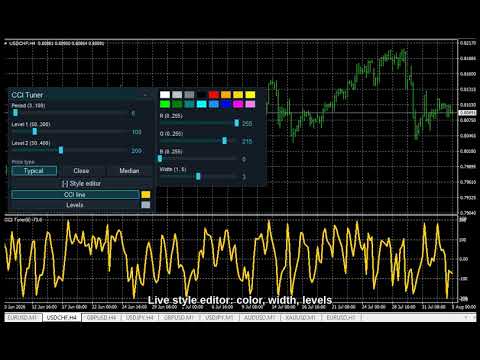
Bu, doğrudan grafik üzerinde, canlı olarak ayarladığınız bir Commodity Channel Index. Grafiğin üzerinde duran küçük bir panelde CCI periyodu ve her iki seviye çizgisi için kaydırıcılar var. Kaydırıcıyı sürüklediğinizde gösterge arka planda anında yeniden hesaplanır ve siz izlerken yeniden çizilir. Görüntü istediğiniz gibi olduğunda iş biter: diyalog yok, OK düğmesi yok, kaydedip yeniden açılacak bir şey yok.
Stil düzenleyici de canlı çalışır. Yerleşik düzenleyiciyi açın; 16 renklik palet ve RGB kaydırıcılarıyla CCI çizgisinin ve seviyelerin rengini ve kalınlığını değiştirin. Değişiklik yaptığınız anda grafiğe yansır. Panelin grafiğinizle uyumlu olması için üç hazır temadan birini seçin (Night Cyan, Graphite Gold, Clean Light).
Ayarlarınız her grafik için ayrı hatırlanır: periyotlar, seviyeler, fiyat tipi, renkler ve kalınlıklar yeniden başlatmanın ardından tam bıraktığınız gibi geri gelir.
MT4 için geliştirildi, üstünkörü aktarılmadı. Bu, MetaTrader 5 kullanıcılarımızın kullandığı Live Tuning panelinin aynısı — aynı kaydırıcılar, aynı stil düzenleyici, aynı temalar — MetaTrader 4 için doğrudan derlenmiş hali. Platforma ait bir ayrıntıyı açıkça belirtelim: MT4, göstergenin tüm seviye çizgilerini tek bir ortak stille çizer; bu yüzden buradaki stil düzenleyicide iki seviyeyi birlikte renklendiren tek bir Levels ögesi vardır. CCI çizgisinin kendisi ise MT5'teki gibi tamamen bağımsızdır.
Neden hoşunuza gidecek
- Anında geri bildirim. Sürükleyin, sonucu hemen görün. Doğru periyodu onlarca kez ayar penceresine girip çıkmadan, saniyeler içinde bulun.
- Stili canlı ayarlayın. Çizgi ve seviyelerin rengi ile kalınlığı, siz düzenlerken grafikte değişir; hiçbir şeyi yeniden açmanız gerekmez.
- Üç tema, tek tıkla koyu ya da açık, grafiğinize uygun şekilde.
- Grafik bazlı hafıza. Yaptığınız ayar, her grafik için ayrı ayrı, yeniden başlatmalardan sonra da korunur.
- Kendi CCI'nız. Typical Price temelli, temiz ve standart bir CCI uygulaması. Yeniden çizim yapmaz. Sizin yerinize işlem açmaz; karar desteği aracıdır.
Nasıl kullanılır
- CCI Live Tuner'ı herhangi bir grafiğe sürükleyin.
- Panel kaydırıcılarıyla periyodu ve iki seviyeyi belirleyin; CCI'nın canlı olarak güncellenmesini izleyin.
- Çizgi ve seviyelerin rengini/kalınlığını değiştirmek için Style editor'ı açın.
- Giriş parametrelerinden bir tema seçin (varsayılan Night Cyan).
CCI Live Tuner, Live Tuning ailesinin bir parçasıdır: önce ücretsiz klasikler, ardından aynı canlı ayarlama mantığı üzerine kurulu daha fazla gösterge ve çok zaman dilimli bir kontrol paneli gelecek. Bu çalışma şekli sizi ayar penceresine gidip gelmekten kurtarıyorsa, kısa bir yorum sıradaki hangi ürünü MT4'e taşımamız gerektiğini bize söyler.
İpucu: Panel bir noktada saydam görünüyorsa, grafiğinizde "Chart on foreground" seçeneği açıktır (F8 -> Common) ve mumlar panelin üzerine çizilmektedir. Gösterge, grafik ayarlarınıza bilinçli olarak saygı gösterir ve onları asla değiştirmez; seçeneğin işaretini kaldırdığınızda panel opak görünür.
Ücretsiz, bağımsız çalışır, DLL kullanmaz. Her sembolde ve her zaman diliminde çalışır.