
World Clock To Server Clock
- Utilities
-
Abdul Qadir Memon
 I am a software engineer and algorithmic trading tools developer with 20+ years of professional experience in software development, automation, cloud applications, and trading technology.
 - Version: 1.5
- Updated: 7 June 2026
World Clock To Server Clock
World Clock To Server Clock is a simple utility Expert Advisor that helps traders convert a selected world time into broker server time.
This is useful when you follow trading sessions, news events, economic releases, TradingView alerts, or strategy rules based on a specific city/timezone, but your MetaTrader 5 broker uses a different server timezone.
Key Features
- Converts world clock time to broker server time
- Uses today’s date for conversion
- Automatically detects broker server timezone from MetaTrader 5
- Supports TradingView-style timezone list
- Timezone dropdown is sorted by UTC offset
- Supports daylight saving time for major supported regions
- Shows nextday / previousday when converted server time crosses date boundary
- Clean dashboard built with MQL5 Standard Library controls
- No complicated setup
- No trading logic
- No orders are opened or modified
How It Works
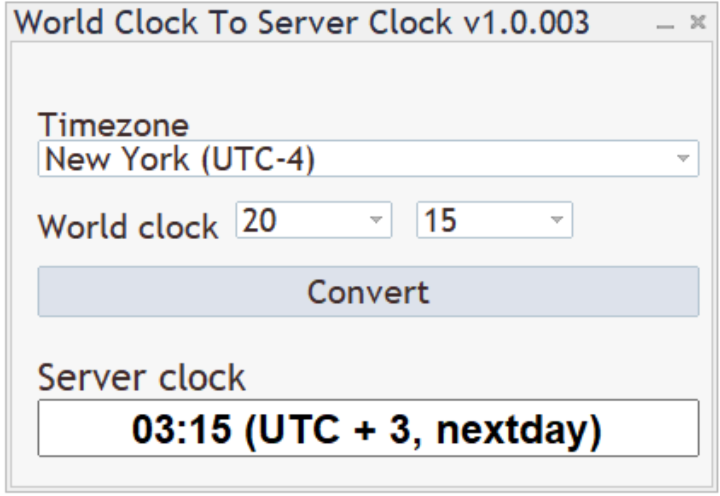
- Select a timezone or city from the dropdown.
- Select the world clock hour and minute.
- Click Convert.
- The EA shows the equivalent broker server time.
The result is shown in this format:
HH:mm (UTC + x)
If the converted time falls on a different server date, the result will include:
nextday
or
previousday
Example 1
You want to know what 09:30 New York time is on your broker server.
Select:
- Timezone: New York (UTC-4)
- Hour: 09
- Minute: 30
Click Convert.
Example result:
16:30 (UTC + 3)
This means 09:30 New York time is 16:30 on your broker server.
Example 2
You want to convert 23:00 London time to server time.
Select:
- Timezone: London (UTC+1)
- Hour: 23
- Minute: 00
Click Convert.
Example result:
01:00 (UTC + 3, nextday)
This means the server time is on the next server day.
Example 3
You want to convert 02:00 Tokyo time to server time.
Select:
- Timezone: Tokyo (UTC+9)
- Hour: 02
- Minute: 00
Click Convert.
Example result:
20:00 (UTC + 3, previousday)
This means the server time is on the previous server day.
Supported Timezones
The timezone list is based on TradingView-style city/timezone entries and includes major financial market regions such as:
- New York
- Chicago
- Los Angeles
- Toronto
- London
- Dublin
- Lisbon
- Berlin
- Paris
- Zurich
- Dubai
- Karachi
- Kolkata
- Singapore
- Hong Kong
- Tokyo
- Sydney
- New Zealand
The dropdown displays the current UTC offset for each supported timezone, for example:
New York (UTC-4)
London (UTC+1)
Tokyo (UTC+9)
Daylight Saving Time
The EA supports daylight saving time for major supported regions where DST rules are implemented, including:
- US / Canada style DST
- UK / Europe style DST
- Australia / Sydney style DST
- New Zealand style DST
- Chile / Santiago style DST
Fixed-offset regions remain fixed.
Parameters
This EA does not require input parameters.
All settings are selected directly from the dashboard:
- Timezone: Select the city/timezone to convert from
- Hour: Select world clock hour in 24-hour format
- Minute: Select world clock minute
- Convert: Shows the converted broker server time
Important Notes
- This is a utility EA only.
- It does not trade.
- It does not open, close, or modify orders.
- It does not use account risk or lot size settings.
- Broker server timezone is detected automatically.
- Conversion is based on today’s date.












































User didn't leave any comment to the rating