AntiSWAPcleaner

AntiSwapCleaner is an Expert Advisor (EA) designed to protect a trading account against losses caused by negative swaps (overnight fees charged for holding an open position).

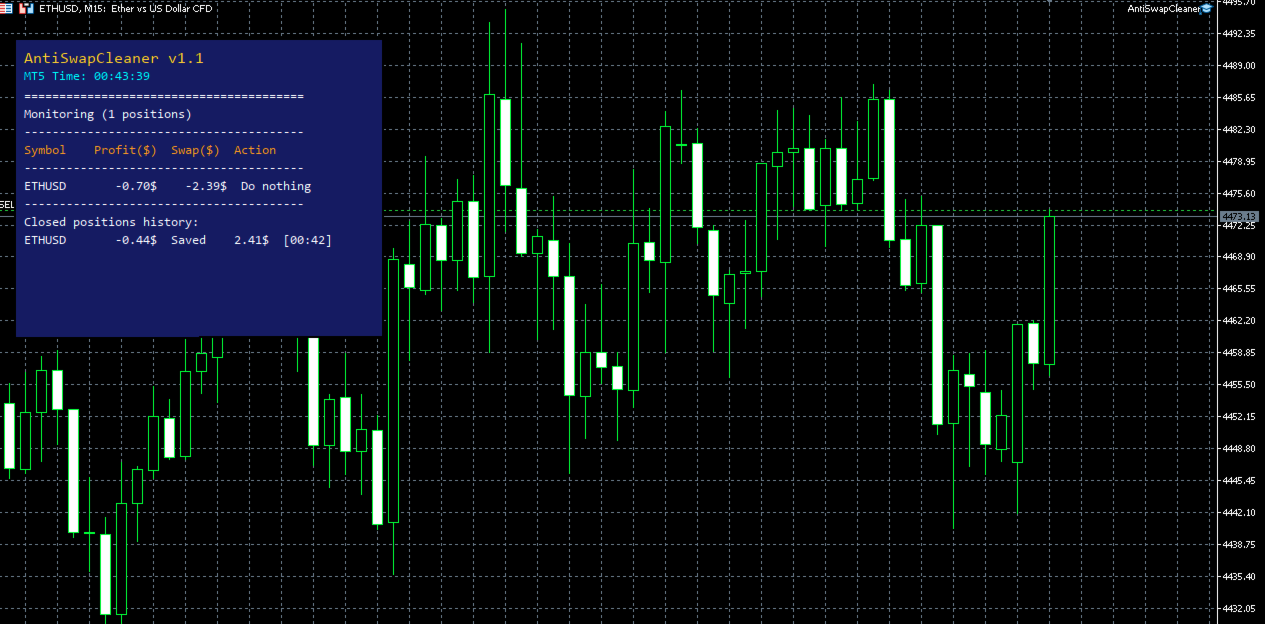
It runs in the background and monitors open positions matching a given Magic Number (or manual trades if enabled).
It calculates the applicable swap for each position (long or short) and compares the current profit of the position with the estimated swap.
If the profit is lower than the swap (i.e. the position risks costing more in fees than it earns), then the position is flagged for closure.
After that, it will automatically close the position if the condition is met, unless Debug mode is activated (in which case, it only displays a report).

General Operation

Time Range Control
The script does nothing unless the server time is between SurveillanceStartHour and SurveillanceEndHour:SurveillanceEndMinute.

Scanning Open Positions
For each position:

  • Retrieves ticket, symbol, profit, and Magic Number.

  • Verifies that it matches the Magic Number or is manual if IncludeManualTrades = true.

  • Analyzes the applicable swap.

Depending on the position type (BUY or SELL), the EA reads the symbol’s long/short swap.

If it’s Wednesday and TripleSwapWednesday = true, the swap is multiplied by 3.

Decision
If profit < |swap| → the position is considered unprofitable (risk of swap-related loss).

It is then flagged for closure (if DebugMode = false).

Closure
The position is closed with trade.PositionClose(ticket) .
If it fails, the error is logged with GetLastError() .

Advantages

  • Protects against passive losses due to swaps.

  • Allows safe testing thanks to Debug mode.

  • Flexible (choice of Magic Number, inclusion of manual trades, Wednesday adaptation).

Limitations

  • Works only within the defined time range (does not monitor outside of it).

  • May close a slightly losing position that could have turned profitable again.

  • Broker-dependent (not all apply triple swap on Wednesdays the same way).

Important Warning

All positions opened after AntiSwapCleaner starts are monitored and can be closed automatically if they meet the condition (profit < applicable swap).

👉 This means you must synchronize the shutdown time of the robot that opens positions (e.g., Gold Edge) with the shutdown time of AntiSwapCleaner.
Otherwise, newly opened positions may be immediately closed by AntiSwapCleaner.
Debug mode (which does not actually close positions) will help during setup.

Frequently Affected Brokers / Platforms

  • Admiral Markets

  • Most Forex/CFD brokers on MT4 / MT5 (industry standard)

  • LiteFinance, FP Markets, FundedNext, and other popular brokers follow this general rule

Parameters Description

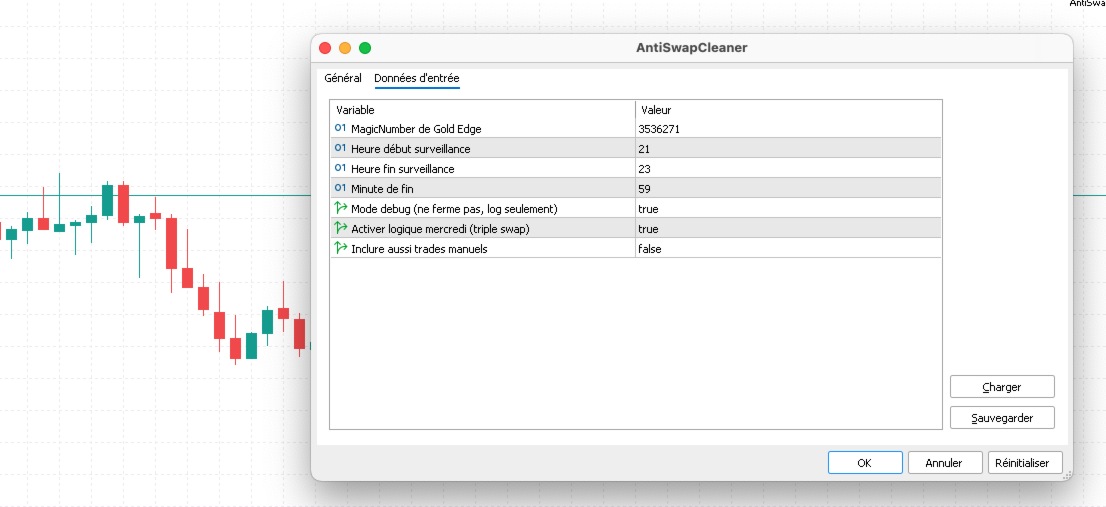
MagicNumberGoldEdge

  • Type: integer (int)

  • Default: Magic number of your bot

  • Description: The magic number identifying positions opened by a specific EA (here "Gold Edge").

  • Use: Filters only the positions opened by this EA.

  • Note: If IncludeManualTrades = true, the script will also monitor positions without a Magic Number (= 0).

SurveillanceStartHour

  • Type: integer (int)

  • Default: 21

  • Description: Start hour of the monitoring period (24h format).

  • Example: 21 = 9:00 PM (server time).

SurveillanceEndHour

  • Type: integer (int)

  • Default: 23

  • Description: End hour of the monitoring period.

SurveillanceEndMinute

  • Type: integer (int)

  • Default: 59

  • Description: End minute of the monitoring period.

  • Example: With SurveillanceEndHour = 23 and SurveillanceEndMinute = 59, monitoring stops at 11:59 PM.

DebugMode

  • Type: boolean (true/false)

  • Default: true

  • Description: Testing mode.

    • true → The EA does not actually close positions, it only displays a report.

    • false → The EA closes positions that meet the criteria.

TripleSwapWednesday

  • Type: boolean (true/false)

  • Default: true

  • Description: Enables the triple swap rule on Wednesday (a common broker practice).

  • Effect: Multiplies the applicable swap by 3 if day_of_week == 3 (Wednesday).

IncludeManualTrades

  • Type: boolean (true/false)

  • Default: false

  • Description: Defines whether the EA should also monitor manual trades (without a Magic Number).

  • Effect:

    • false → Only positions with MagicNumberGoldEdge are monitored.

    • true → Manual positions (Magic = 0) are also included in monitoring.


Recommended products
Explore all my products for MetaTrader 4, MetaTrader 5, and free Trial versions: https://www.mql5.com/es/users/urocio/seller You have two versions of the EA: Full version with unlimited symbols and features. Trial version (free) to test the EA’s performance: it operates only on EURUSD, runs 5 consecutive cycles, and then pauses for 7 days before restarting. Create your own trading strategies with complete flexibility! This Expert Advisor (EA) is designed to support multiple trading approac
Professional Trade Panel — All-in-One Smart Trading Tool This is a professional visual trading panel designed for the MetaTrader platform. It consolidates the most frequently used trading operations into a single compact and draggable interface, significantly improving execution efficiency and reducing the risk of misoperations. Core Features One-Click Close All: Close all open positions on the current symbol with a single click. The button displays real-time total floating profit and loss s
Viking Alpha DAX Ivar Edition
Valdeci Carlos Dos Passos Albuquerque
Viking Alpha DAX — Germany 40 Expert Advisor for MetaTrader 5 LAUNCH PROMO Only 10 copies at launch price. Price increases with each sale. Launch price: $297 Next price: $497 Final price: $997 Live Performance: FX Blue — Vikingtradingbots What Makes Viking Alpha DAX Different Most DAX robots fail for one simple reason: they treat the Germany 40 like a forex pair. It isn't. The DAX has a heartbeat — a specific rhythm tied to the Frankfurt Stock Exchange opening, the European session structure, an
Auto Trade Copier for MT5
Vu Trung Kien
4.56 (27)
Auto Trade Copier is designed to copy trades to multiple MT4, MT5 and cTrader accounts/terminals with 100% accuracy. The provider and receiver accounts must be on the same PC/VPS. With this tool, you can copy trades to receiver accounts on the same PC/VPS. All trading actions will be copied from provider to receiver perfectly. This version can be used on MT5 accounts only. For MT4 accounts, you must use Auto Trade Copier (for MT4). Reference: - For MT4 receiver, please download Trade Receiver Fr
Broker Connection Monitor MT5
AL MOOSAWI ABDULLAH JAFFER BAQER
• Please test the product in the Strategy Tester before purchasing to understand how it works. • If you face any issues, contact me via private message—I’m always available to help. • After purchase, send me a screenshot of your order to receive a   FREE EA   as a gift. Broker Connection Monitor - Keep Your Trading Secure! Ensure Stable Trading with Real-time Broker Connection Monitoring! Are you tired of unexpected connection drops affecting your trades? Do you want to monitor your broker's co
Exclusive Imperium MT5 — Automated Trading System Exclusive Imperium MT5 is an Expert Advisor for MetaTrader 5, based on market analysis algorithms and risk management. The EA operates in a fully automated mode and requires minimal trader intervention. Attention! Contact me immediately after purchase to receive setup instructions! IMPORTANT: All examples, screenshots, and tests are provided for demonstration purposes only. If a certain currency pair shows good results with one broker, it does no
Trade Copier Professional — Local Copy Solution Trade Copier Professional is a reliable local trade copying system for MetaTrader 4/5. It allows traders to replicate positions instantly across multiple accounts on the same computer, with built‑in safety controls and a professional dashboard. Overview The EA operates in both Master and Slave modes from a single file, with seamless switching. Trades can be copied between MT4 and MT5 terminals without internet dependency, using local file‑based
HMA Scalper Pro EA
Vladimir Shumikhin
5 (2)
HMA Scalper Pro EA — Automated Trading Advisor Based on Hull Moving Average (HMA) for MetaTrader 5 OVERVIEW HMA Scalper Pro EA is a professional trading robot (Expert Advisor) for MetaTrader 5 that trades in the direction of the Hull Moving Average (HMA). The HMA indicator determines the current trend direction, and the EA opens trades in that direction, enhanced by Smart Risk capital management, adaptive grid trading, trailing stop, breakeven, and time filters. The EA supports both Netting a
SolarTrade Suite Financial Robot: LaunchPad Market Expert - designed to open trades! This is a trading robot that uses special innovative and advanced algorithms to calculate its values, Your Assistant in the World of Financial Markets. Use our set of indicators from the SolarTrade Suite series to better choose the moment to launch this robot. Check out our other products from the SolarTrade Suite series at the bottom of the description. Do you want to confidently navigate the world of inves
PROMO: ONLY 10 LEFT AT $90! Next price:        $199 Price will be kept high to limit number of users for this strategy. This EA starts trading at the open of   London (UK) Session . It is based on analysis of advanced statistical distributions combined with short to medium term reversal patterns which have mean-reversion attributes. The EA includes several smart features and allows you to trade with a fixed or automatic lot size. The EA is not sensitive to spreads but can be backtested on both
Synqorix Trade Copier MT5 is a unified local trade copying solution for MetaTrader 5. A single Expert Advisor file can operate in one of two roles: • Provider — sends trades from the source account; • Receiver — receives and copies trades to the destination account. The role is selected with the InpRole input before launch. The Expert Advisor activates only the selected mode and automatically creates the appropriate PROVIDER or RECEIVER panel. Parameters belonging to the inactive role are no
The Gold Buyer
Moses Aboliwen Aduboa
Ride the Gold Trend with a Simple Buy-Only EA The  EA is a fully automated Buy-Only Expert Advisor for MetaTrader 5. It is designed to capture upward market opportunities with safe risk management and seamless execution. Why Traders Choose It: Best performance on Gold (XAUUSD) – highly liquid and trending. Buy-Only EA – focuses purely on long positions. Plug & Play setup – attach and let it trade automatically. Built-in Stop Loss & Take Profit protection. Smart one-position contro
| Fully-automated Smart Money Concept (ICT) inspired trading solution with multi-strategy capabilities | Built by a grid trader >> for grid traders.  This is MT5 version, click  here  for  Blue CARA MT4  (settings and logics are same in both versions)     Real monitoring signal  -->  Cara Gold Intro Blue CARA EA   ('CARA') - short for  C omprehensive  A lgorithmic   R esponsive   A dvisor is a next-gen  multi-currency    multi-timeframe  EA base on the widely known (and perhaps the most popul
Multi Close Manager
Nourdin Ben Youssef
Multi Close Manager Multi Close Manager is a MetaTrader 5 trade management utility designed to manage existing positions without opening new trades. The utility can be used with manually opened positions or positions opened by another Expert Advisor. It provides several independent position-closing methods, stop management, take-profit management, Telegram notifications, scheduled protection zones and an on-chart emergency close button. The individual management functions can be enabled or disab
FREE
ID Trade_Bot BS - an effective tool for automated trading using RSI Trade_Bot BS is an efficient solution for automated trading based on RSI, allowing flexible parameter customization and risk management. Thanks to the ability to choose a trading mode, dynamic Stop-Loss and Take-Profit levels, and trading mode adjustment (buying, selling, or both), it is suitable for various trading strategies. Key Features: Uses the RSI indicator to determine market conditions. Automatically opens an
Orbit Range Pro
Nikolai Konovalov
Proprietary, fully automated MT5 Expert Advisor with confidential trading logic. GBPUSD tested on 100% real ticks. Orbit Range Pro is a proprietary trading robot for MetaTrader 5. Its decision logic is confidential and is not disclosed - you get a ready-to-run EA, tuned and verified by the author. Verified GBPUSD backtest (MT5 Strategy Tester, real ticks 100%, $10,000 deposit, 0.03 lots): - Full period 2026.04.20-2026.10.17: net profit +$996.28 (~+9.96%), max equity drawdown 5.00%, profit fact
RisklyCopy MT5
Gabriele Liberto
RisklyCopy copies trades from a master account to one or more receiving accounts running on the same computer or VPS. It works between MT5 terminals, between MT4 terminals, and between MT4 and MT5, also with different brokers. How it works - Attach RisklyCopy in SEND mode on the master account and in RECEIVE mode on each receiving account, using the same channel name. - New trades, stop loss and take profit changes, partial closes and closes are copied. Lot calculation on the receiving accoun

Hamster Scalping mt5
Ramil Minniakhmetov
4.72 (245)
Hamster Scalping is a fully automated Expert Advisor. Night scalping strategy. The RSI indicator and an ATR-based filter are used for entries. The advisor needs a hedging account type Be careful i not sell EA or sets at telegram it scam. All settings free here at   blog .  IMPORTANT! Contact me immediately after the purchase to get instructions and a bonus! Real operation monitoring as well as my other products can be found here: https://www.mql5.com/en/users/mechanic/seller General Recommendati
Magic EA MT5
Kyra Nickaline Watson-gordon
Magic EA is an Expert Advisor based on Scalping, Elliot Waves and with filters such as RSI, Stochastic and 3 other strategies managed and decided with the robot smartly. Large number of inputs and settings are tested and optimized and embedded in the program thus inputs are limited and very simple. Using EA doesn't need any professional information or Forex Trading Knowledge. EA can trade on all symbols and all time frames, using special and unique strategies developed by the author. The EA w
Server Link >> h ttps://www.mql5.com/en/market/product/160109 CopyTrade Slave is a lightweight, reliable local trade copier for MetaTrader 5 that mirrors positions from a Master account to one or more Slave accounts using a fast shared-file mechanism. It is designed for signal providers, account managers, and traders who need precise synchronization of trades with flexible delay and lot control. ​ Main concept Role: Works as the Slave side of a local copy trading setup and receives trades fr
LocalSyncX – DRANREB TRADING MANAGER & LOCAL COPIER Two Powerful MT5 Trading Tools. One Complete Solution. LocalSyncX is an all-in-one MetaTrader 5 trading utility that combines two powerful tools: DRANREB TRADING MANAGER and DRANREB LOCAL COPIER . Designed for traders who want greater control over their trading activities, LocalSyncX provides convenient trade execution, position management, risk control, and local trade synchronization between multiple MT5 accounts. Whether you trade manually
Santa Scalping is a fully automated Expert Advisor with no use of martingale. Night scalping strategy. The SMA indicator filter are used for entries. This EA can be run from very small accounts. As small as 50 EUR. General Recommendations The minimum deposit is 50 USD,  default settings reccomend for eurusd m5 gmt +2 . Please use max spread 10 if you will not have orders change it to -1. Use a broker with good execution and with a spread of 2-5 points. A very fast VPS is required, preferably wi
DOES THIS SOUND FAMILIAR? Do you find the lot calculation slow and boring? Does it get worse with every new currency pair? Are you afraid of hitting a loss limit and losing the account? Does every lost account hurt more than the last one? I was caught in this loop myself. I built this tool for my own use. WHAT THIS IS This is an Expert Advisor. It lets you run several prop firm accounts from one PC. You enter on your main account and the trade is copied to the other accounts. Each account
Renko Logic
Ahmed Mohammed Bakr Bakr
MetaTrader 5 Renko Expert Advisor - User Guide Overview This Expert Advisor implements a complete Renko-based trading system with custom brick calculation, visual display, and automated trading logic. -The EA only for Rent unlimited Version coming soon. Features 1. Renko Engine Custom Renko Calculation : Built from scratch, no offline charts needed No Repainting : Uses only closed Renko bricks Configurable Brick Size : Set in points via input parameters Real-time Brick Formation : Automatically
Strong PScore Trader
Mohammadreza Jamaleddin Azhari
Strong PScore Trader Strong PScore Trader is an automated MetaTrader 5 Expert Advisor for XAUUSD on 5m timeframe only . It combines price-action support and resistance detection with PScore-based signal confirmation to identify structured BUY and SELL opportunities. The EA is designed to monitor price structure, evaluates bullish and bearish movement strength, and manages entries automatically when its signal conditions are satisfied. IMPORTANT: run the script on metaquotes demo account to get e
Monitor up to eight EA profiles with grouped magic numbers, per-EA and portfolio risk limits, performance analytics, comparison, notifications and trade reports. This utility monitors and contains managed trades; it does not generate entry signals. PropPulse Sentinel is a MetaTrader 5 utility Expert Advisor for monitoring and managing risk across multiple trading Expert Advisors running in the same terminal. It organises trading activity into up to eight managed EA profiles. Each profile can u
The Superior Remote Trade Copier is a comprehensive MT5 utility that copies trades remotely and privately via Telegram, eliminating the need for external VPS bridges or third-party web servers. The ecosystem consists of a Master EA, a free Desktop App, and a Client EA. Master (Transmitter) Trade Broadcasting: Transmits market orders, pending orders, position modifications, and partial/full closures directly via Telegram. UI Dashboard: Interactive on-chart panel for quick bulk actions (Close All,
Switch Method
Rikza Fauzan Nurfadilah
SmartSwitch EA v1.0: Auto-Method Trading System for MetaTrader 5 SmartSwitch is an Expert Advisor (EA) for MetaTrader 5 that automatically selects a trading method based on current market conditions. Instead of running one fixed strategy at all times, it checks the market on every tick and switches between four methods: Breakout-Retest, Supply & Demand, Momentum Scalping, and Post-News Trading. Tested and recommended on XAUUSD (Gold vs US Dollar), M15 chart. Other symbols have not been validated
Exclusive EA for FOREX HEDGE account The EA (FuzzyLogicTrendEA) is based on fuzzy logic strategies based on the analysis of a set of 5 indicators and filters. Each indicator and filter has a weight in the calculation and, when the fuzzy logic result reaches the value defined in the EA parameter, a negotiation is opened seeking a pre-defined gain. As additional functions it is possible to define maximum spread, stop loss and so on . Recommended Symbol: EURUSD, AUDUSD, GBPUSD, NZDUSD, USDCAD, AU
Fast copier for sending trades to multiple MT4 / MT5 accounts. MT5 Trade Copier Master EA sends trades instantly from your master account to one or multiple slave accounts. Supports copying to: • MT5 accounts • MT4 accounts Perfect for: • Multi-account traders • Signal providers • Account managers • Personal account mirroring Main Features • Fast local trade copying • Low latency execution • Multiple slave accounts support • Copy open positions on startup • Stable file-based communication • Easy
Buyers of this product also purchase
Trade Assistant MT5
Evgeniy Kravchenko
4.43 (216)
It helps to calculate the risk per trade, the easy installation of a new order, order management with partial closing functions, trailing stop of 7 types and other useful functions. Additional materials and instructions Installation instructions - Application instructions Line function -   shows on the chart the Opening line, Stop Loss, Take Profit. With this function it is easy to set a new order and see its additional characteristics before opening.   Risk management  - The risk calculation
FarmedHedge Pair Trading Dashboard
Tanapisit Tepawarapruek
5 (7)
Farmed Hedge Yield Farming | All Markets (Manual - Hybrid - Semi/Automated EA) VERIFIED TRADING RESULTS - Farmed Hedge Yield Axi Copy:  https://www.mql5.com/en/signals/2356376 - Farmed Hedge Yield Exn Copy:   https://www.mql5.com/en/signals/2356404 - Farmed Hedge Yield V Copy:  https://www.mql5.com/en/signals/2357156 IMPORTANT NOTICE: FarmedHedge is a MANUAL-FOCUSED TRADING UTILITY ,not a fully automated EA. Results shown on this Signal include manual trades and overall strategic management.
Forex Trade Manager MT5
InvestSoft
4.98 (690)
Trade Manager MT5 is an advanced position size calculator and trade management tool for MetaTrader 5, designed to help traders plan trades faster, control risk more precisely, and manage open positions directly from the chart. It combines order placement, risk based lot calculation, Stop Loss and Take Profit management, Break Even, Trailing Stop, Partial Close, Equity Protection, and external trade management in one panel. Whether you trade forex, indices, metals, commodities, crypto, or future
Telegram to MT5 Multi-Channel Copier   automatically copies trading signals from your Telegram and Discord channels straight to MetaTrader 5. No bots, no browser extensions, no manual copying. A signal arrives in Telegram or Discord and the EA opens the trade in your terminal within seconds. And before you copy a channel, the built-in backtester shows you what that channel would have done in your account. The product has two components: a Windows application that listens to your Telegram channel
Local Trade Copier EA MT5
Juvenille Emperor Limited
4.94 (150)
Local Trade Copier EA MT5 is a fast and flexible trade copier for copying and managing trades between multiple MetaTrader 5 accounts on the same Windows computer or Windows VPS. It combines local trade synchronization with Receiver-side controls for lot sizing, risk management, trade filtering, symbol mapping, trade management and account protection. Set up your Transmitter and Receiver terminals in about 1 minute and copy manual or EA trades between accounts at the same or different brokers. U
TradePanel MT5
Alfiya Fazylova
4.89 (174)
Trade Panel is a multi-functional trading assistant. The app contains over 50 trading functions for manual trading and allows you to automate most trading tasks. Application instructions: https://www.mql5.com/en/blogs/post/756482 Trial version of the application for a demo account: https://www.mql5.com/en/blogs/post/750865 How to install the application: https://www.mql5.com/en/blogs/post/756239 How to test the application in visual mode: https://www.mql5.com/en/blogs/post/770277 How to install
EA Overfitter
Stephen J Martret
5 (4)
That backtest looks great. But will it still be making money tomorrow, next week, next month? EA Overfitter re-runs your EA on 100 price histories it has never seen. One score tells you if the edge is real. A backtest tells you what an EA did on one price history — the one that happened to occur. What you cannot tell from it is how much of that result was the strategy and how much was the particular path. EA Overfitter answers that. It builds up to 100 synthetic price histories your EA has n
Copy Telegram signals with your own trading rules Telegram to MT5 Signal Trader automatically copies text-based trading signals from public and private Telegram channels and groups into MetaTrader 5. Manage multiple providers and MT5 accounts from one desktop app, with individual risk and trade settings for each provider . No Telegram bot or API setup needed for copying. Simply sign in with your own Telegram account by phone or QR code and select the channels or groups you have already joined. Y
Exp COPYLOT CLIENT for MT5
Vladislav Andruschenko
3.97 (35)
Professional Trade Copier for MetaTrader 5 Fast, professional, and reliable trade copier for MetaTrader . COPYLOT allows you to copy Forex trades between MT4 and MT5 terminals with support for Hedge and Netting accounts. COPYLOT MT5 version supports: - MT5 Hedge to MT5 Hedge - MT5 Hedge to MT5 Netting - MT5 Netting to MT5 Hedge - MT5 Netting to MT5 Netting - MT4 to MT5 Hedge - MT4 to MT5 Netting MT4 version Full Description +DEMO +PDF How To Buy How To Install How to get Log Files H
Strategy Ledger Pro
Abdullah Uygar Tuna
5 (17)
Strategy Ledger Pro is a read-only account analysis panel for MetaTrader 5. It separates account results by Expert Advisor, strategy, symbol, and magic number, so you can see what each one really contributes. The panel is available in 11 languages: English, Français, Deutsch, Español, Italiano, Português, Русский, Türkçe, 中文, 日本語 and 한국어. Before you download the demo. The Market runs the demo of any paid product in the Strategy Tester only. This panel analyses the trades on your own account, and
News Trade EA MT5
Konstantin Kulikov
4.55 (11)
Present to you the useful robot that I have been using for several years. It can be used in both semi-automatic mode and fully automatic mode. >>> Chat <<< The program contains flexible settings for trading on the news of the economic calendar. It cannot be checked in the strategy tester. Only real work. Download the latest archive of settings: https://www.mql5.com/en/blogs/post/747929 Signals monitoring: https://www.mql5.com/en/signals/author/test-standart When creating your own sets of setti
================================================================================ POC BREAKOUT - V20.72. Full Professional Grade Toolkit ================================================================================ POC Breakout is a full MetaTrader 5 trading dashboard for discretionary traders who want breakout signals, Point of Control (POC) context, volume profiles, order flow, market structure, news, alerts, and advanced trade planning in one professional workspace. Attached directly to you
The product will copy all telegram signal to MT5 ( which you are member) , also it can work as remote copier.  Easy to set up, copy order instant, can work with almost signal formats, image signal,  s upport to translate other language to English Work with all type of channel or group, even channel have "Restrict Saving Content", work with  multi channel, multi MT5 Work as remote copier: with signal have ticket number, it will copy exactly via ticket number. Support to backtest signal. How to s
Welcome to Entry In The Zone with SMC Multi Timeframe  —  COMPLETE SMC ANALYSIS SYSTEM — ALL IN ONE INDICATOR  Entry In The Zone with SMC Multi Timeframe  An indicator designed for market analysis based on Smart Money Concepts (SMC), displaying Market Structure, Key Zones (Order Blocks, Supply & Demand Zones, and Fair Value Gaps), Liquidity, and real-time BUY / SELL signals. It supports both Single-Timeframe and Multi-Timeframe analysis, along with the Confluence at Zone feature, which helps you
EA Auditor
Stephen J Martret
5 (7)
EA Auditor is an independent analysis tool for traders evaluating Expert Advisors and trading signals on MetaTrader 5. It audits backtest reports, reviews posted developer signals, and cross-verifies the two against each other to help traders assess strategies before committing capital. The MQL5 market offers a wide range of Expert Advisors from many developers, with varying approaches, quality, and transparency. EA Auditor provides a consistent, data-driven framework for reviewing them, answer
Telegram To MT5 Ultra
Mirel Daniel Gheonu
5 (5)
Telegram To MT5 — Signal Copier Turn the trading calls from your Telegram channels into real MT5 orders — automatically, on as many accounts as you like, with risk and rules fully under your control. Telegram To MT5 connects the VIP / signal channels you already follow on Telegram to your MetaTrader 5 terminal. A free companion desktop app reads the messages (even from channels that block bots), and this Expert Advisor executes them on your account — applying your own risk settings, symbol mappi
Telegram to MT5 Coppy
Sergey Batudayev
5 (10)
Telegram to MT5: The Ultimate Signal Copying Solution Simplify your trading with Telegram to MT5, the modern tool that copies trading signals directly from Telegram channels and chats to your MetaTrader 5 platform, without the need for DLLs. This powerful solution ensures precise signal execution, extensive customization options, saves time, and boosts your efficiency. [ Instructions and DEMO ] [ FAQ ] [ How atach logs properly ] [ Settings descrition ] Key Features Direct Telegram API Integrati
Trade copier MT5
Alfiya Fazylova
4.61 (57)
Trade Copier is a professional utility designed to copy and synchronize trades between trading accounts. Copying occurs from the account / terminal of the supplier to the account / terminal of the recipient, which are installed on the same computer or VPS . Before buying, you can test the demo version on a demo account. Demo version here . Full instruction here . Main functionality and benefits: Supports copying MT5> MT5, MT4> MT5, MT5> MT4, including MT5 netting accounts. * Supports copying Dem
AW Shepherd Safety MT5
AW Trading Software Limited
5 (5)
AW Shepherd Safety EA is an Expert Advisor for managing open positions. The trader opens the first order from the panel, and from there the EA runs the basket on its own: it adds recovery orders with a trend filter, closes a side on TakeProfit, trailing or stop, and shows the close levels on the chart. Buys and sells are managed separately, and both sides can be open at the same time. A recovery order opens not just on a price step but once Parabolic SAR, two MAs or candle color show a reversal
Kontrol01 Manager
Andrei Koval
5 (1)
EA Portfolio Control & Cloud Monitoring for MetaTrader 5 Your EAs manage trades. KONTROL_01 manages your EAs. A control system for traders running multiple Expert Advisors on the same account. Coordinate EA activity, manage trading risks and monitor your setup remotely. A detailed User Manual is available via DM after purchase. IN PRACTICE Multiple EAs. No coordination. Your EAs trade independently, unaware of each other's activity. KONTROL_01 coordinates them, limits simultaneous activity a
News Filter EA
Rashed Samir
5 (2)
News Filter EA: Advanced Algo Trading Assistant News Filter EA is an advanced algo trading assistant designed to enhance your trading experience. By using the News Filter EA , you can integrate a Forex economic news filter into your existing expert advisor, even if you do not have access to its source code. In addition to the news filter, you can also specify trading days and hours for your expert. The News Filter EA also includes risk management  and equity protection features. MT4 Version Ma
MT5 to Telegram Signal Provider turns your trading account into a signal provider. Every trade action, whether manual, by EA or from your phone, is instantly sent as a message to Telegram. You can fully customize the format or use a ready-made template for quick setup. [ Demo ] [ Manual ] [ MT4 Version ] [ Discord Version ]     New: [ Telegram To MT5 ] Setup A step by step user guide is available. Key Features Ability to customize order details sent to subscribers You can create a tiered subs
Seconds Chart MT5
Boris Sedov
4.61 (18)
Seconds Chart is a unique tool for creating second-based charts in MetaTrader 5 . With Seconds Chart , you can construct charts with timeframes set in seconds, providing unparalleled flexibility and precision in analysis that is unavailable with standard minute or hourly charts. For example, the S15 timeframe indicates a chart with candles lasting 15 seconds. You can use any indicators and Expert Advisors that support custom symbols. Working with them is just as convenient as on standard charts.
VirtualTradePad PRO SE MT5 — professional trading control center for MetaTrader 5 VirtualTradePad PRO SE is a premium chart-based trading panel and trade-management workspace for MetaTrader 5 . It is designed for traders who want faster execution, clearer position control, structured trade management, visual level planning and a professional workflow directly from the chart. This is not only a BUY / SELL panel. PRO SE combines manual trading, pending orders, position management, partial exits, b
Trader Evolution
Siarhei Vashchylka
5 (7)
" Trader Evolution " - A utility designed for traders who use wave and technical analysis in their work. One tab of the utility is capable of money management and opening orders, and the other can help in making Elliott wave and technical analysis. Manual (Be sure to read before purchasing) | Version for MT4 Advantages 1. Trading in a few clicks. Immediate and pending orders are available in the panel 2. Money management. The program automatically selects the appropriate lot size 3. Simplifies
AW Trade Manager
AW Trading Software Limited
AW Trade Manager is a trade panel for MetaTrader 5 with a risk/reward tool on the chart. A trade is planned with Entry, Stop Loss and Take Profit lines dragged with the mouse: plates show price, distance and money, zones show profit and loss, and the volume is calculated from the risk. Before sending, the confirmation window shows the whole trade with risk, margin and the rules of the position. Manual and instruction -> HERE / Free LIVE Demo -> HERE To manage a position after the entry the panel
RETAILBERG FOOTPRINT CHART PRO — Order-Flow Workspace for MetaTrader 5 Version 7.00  |  Professional System  |  31 tools  |  One chart A full 150-page illustrated User Manual is included. Please read the full manual to understand this feature packed footprint chart elements and ui. https://www.mql5.com/en/blogs/post/777982 DEMO / STRATEGY TESTER — PLEASE READ FIRST
On-Chart Trade Assistant & Risk Management Panel Ergotick Trade Manager gives you a complete set of trading tools directly on your MetaTrader 5 chart: a trade panel with lot size calculator, visual R:R tool, and daily loss limit protection; a separate statistics panel that tracks your performance and past trades; and an economic calendar you can toggle with one click. Built for scalpers, day traders, and prop firm traders. Ergotick Trade Manager is fast , light on resources , and stable , so it
RS Trade Copier - the ultra-fast local trade copier with a real graphical interface. Stop typing account numbers manually. No more 200+ cryptic inputs. A reliable and flexible tool for copying trading operations between multiple MT5 and MT4 terminals. It suits experienced traders, signal providers, and individual investors. It enables trade synchronization from one or multiple Providers to one or multiple Clients with high precision and minimal latency. It supports simple automatic configuration
Master Your Trading Discipline   Stop losing your hard-earned gains to overtrading and emotional decisions. The Discipline Tool is your ultimate trading assistant, ensuring strict risk management in real-time. Key Protection Features: Advanced Drawdown Defense : Automatically halts trading if your daily drawdown exceeds a preset threshold (percentage or dollar amount). Real-Time Equity Lock : Safeguard profits by referencing peak equity, ensuring drawdown stays within control. Hard Profit Target
More from author
TendencyView is an MQL5 indicator/expert designed to display and analyze the trend of a financial asset (the current symbol) across multiple timeframes in parallel: H1, H4, and D1. It calculates fast and slow moving averages for each timeframe, compares their crossovers, and determines the trend: TREND_UP (bullish)  -> Fast MA > Slow MA TREND_DOWN (bearish)  -> Fast MA < Slow MA TREND_SIDEWAYS (sideways)  -> No clear consensus On the chart, regardless of the timeframe, it displays color panels
EA Risk Guardian v76 EA Risk Guardian represents a new generation of automated trading robots, designed to deliver a professional and secure approach to algorithmic trading. This system stands out thanks to its multi-level validation architecture, which analyzes each market opportunity from several angles before making any decision. The robot operates through an intelligent three-phase workflow. First, it evaluates the main market trend by analyzing the ADX across three different timeframes, p
TradeVision is a simple and elegant performance indicator for MetaTrader 5. It was designed to give traders a clear and instant overview of their results. Gone are the days of digging through your account history! TradeVision displays a comprehensive and visually intuitive dashboard directly on your trading chart. At a glance, you can assess your efficiency and make more informed decisions. The widget displays your real-time performance statistics, segmented by key periods for a detailed and re
Filter:
No reviews
Reply to review