AntiSWAPcleaner
- Utilità
- Versione: 1.30
- Aggiornato: 5 settembre 2025
- Attivazioni: 5

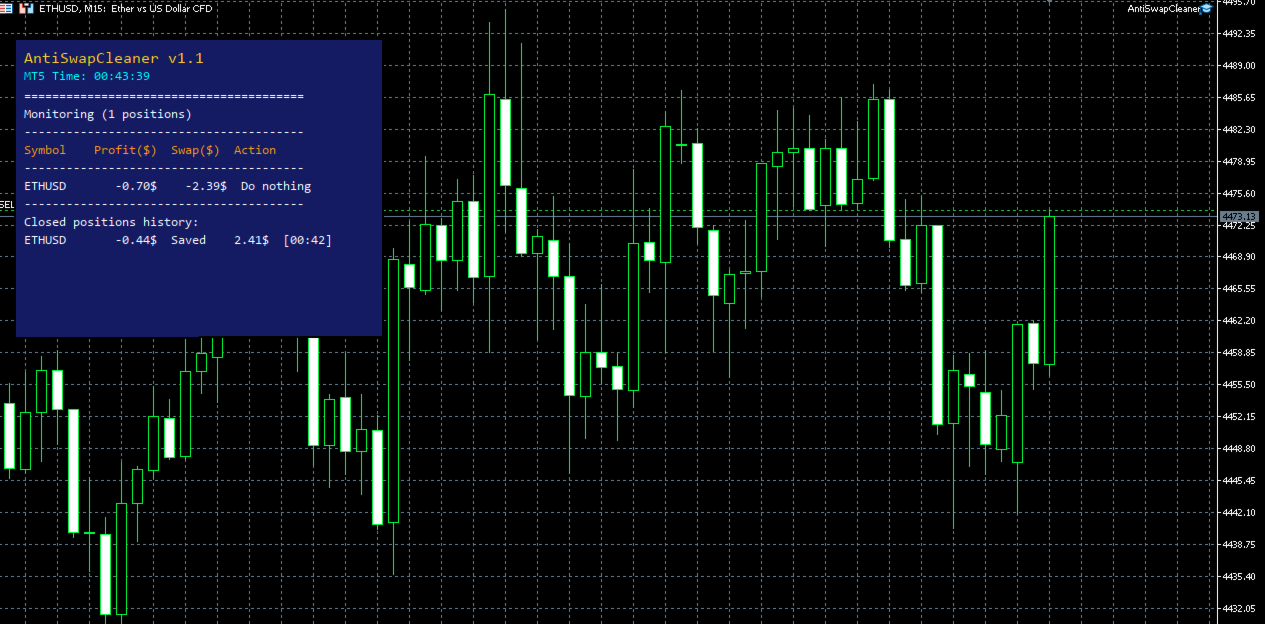
AntiSwapCleaner is an Expert Advisor (EA) designed to protect a trading account against losses caused by negative swaps (overnight fees charged for holding an open position).
It runs in the background and monitors open positions matching a given Magic Number (or manual trades if enabled).
It calculates the applicable swap for each position (long or short) and compares the current profit of the position with the estimated swap.
If the profit is lower than the swap (i.e. the position risks costing more in fees than it earns), then the position is flagged for closure.
After that, it will automatically close the position if the condition is met, unless Debug mode is activated (in which case, it only displays a report).
General Operation
Time Range Control
The script does nothing unless the server time is between SurveillanceStartHour and SurveillanceEndHour:SurveillanceEndMinute.
Scanning Open Positions
For each position:
-
Retrieves ticket, symbol, profit, and Magic Number.
-
Verifies that it matches the Magic Number or is manual if IncludeManualTrades = true.
-
Analyzes the applicable swap.
Depending on the position type (BUY or SELL), the EA reads the symbol’s long/short swap.
If it’s Wednesday and TripleSwapWednesday = true, the swap is multiplied by 3.
Decision
If profit < |swap| → the position is considered unprofitable (risk of swap-related loss).
It is then flagged for closure (if DebugMode = false).
Closure
The position is closed with trade.PositionClose(ticket) .
If it fails, the error is logged with GetLastError() .
Advantages
-
Protects against passive losses due to swaps.
-
Allows safe testing thanks to Debug mode.
-
Flexible (choice of Magic Number, inclusion of manual trades, Wednesday adaptation).
Limitations
-
Works only within the defined time range (does not monitor outside of it).
-
May close a slightly losing position that could have turned profitable again.
-
Broker-dependent (not all apply triple swap on Wednesdays the same way).
Important Warning
All positions opened after AntiSwapCleaner starts are monitored and can be closed automatically if they meet the condition (profit < applicable swap).
👉 This means you must synchronize the shutdown time of the robot that opens positions (e.g., Gold Edge) with the shutdown time of AntiSwapCleaner.
Otherwise, newly opened positions may be immediately closed by AntiSwapCleaner.
Debug mode (which does not actually close positions) will help during setup.
Frequently Affected Brokers / Platforms
-
Admiral Markets
-
Most Forex/CFD brokers on MT4 / MT5 (industry standard)
-
LiteFinance, FP Markets, FundedNext, and other popular brokers follow this general rule
Parameters Description
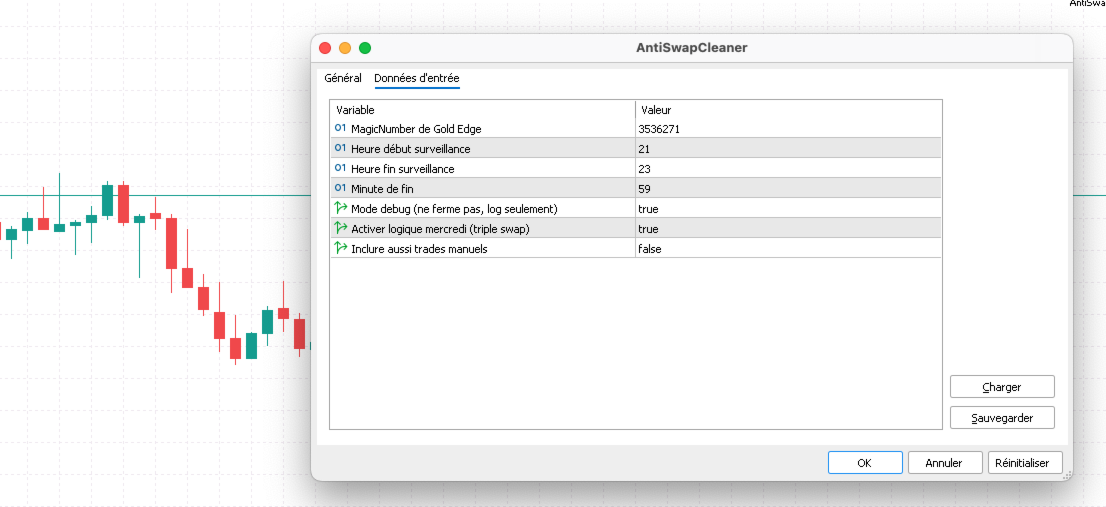
MagicNumberGoldEdge
-
Type: integer (int)
-
Default: Magic number of your bot
-
Description: The magic number identifying positions opened by a specific EA (here "Gold Edge").
-
Use: Filters only the positions opened by this EA.
-
Note: If IncludeManualTrades = true, the script will also monitor positions without a Magic Number (= 0).
SurveillanceStartHour
-
Type: integer (int)
-
Default: 21
-
Description: Start hour of the monitoring period (24h format).
-
Example: 21 = 9:00 PM (server time).
SurveillanceEndHour
-
Type: integer (int)
-
Default: 23
-
Description: End hour of the monitoring period.
SurveillanceEndMinute
-
Type: integer (int)
-
Default: 59
-
Description: End minute of the monitoring period.
-
Example: With SurveillanceEndHour = 23 and SurveillanceEndMinute = 59, monitoring stops at 11:59 PM.
DebugMode
-
Type: boolean (true/false)
-
Default: true
-
Description: Testing mode.
-
true → The EA does not actually close positions, it only displays a report.
-
false → The EA closes positions that meet the criteria.
-
TripleSwapWednesday
-
Type: boolean (true/false)
-
Default: true
-
Description: Enables the triple swap rule on Wednesday (a common broker practice).
-
Effect: Multiplies the applicable swap by 3 if day_of_week == 3 (Wednesday).
IncludeManualTrades
-
Type: boolean (true/false)
-
Default: false
-
Description: Defines whether the EA should also monitor manual trades (without a Magic Number).
-
Effect:
-
false → Only positions with MagicNumberGoldEdge are monitored.
-
true → Manual positions (Magic = 0) are also included in monitoring.
-