EA Pause Manager

4.33

EA Pause Manager — Your Smart Risk Guard & Scheduler (MT5)

What It Does

  • Stops conflicting trades before they happen, based on active market positions and, optionally, pending orders.
  • Pauses or resumes your EAs automatically based on:
    • A simple leader rule: the first EA to trade becomes the leader and blocks the rest.
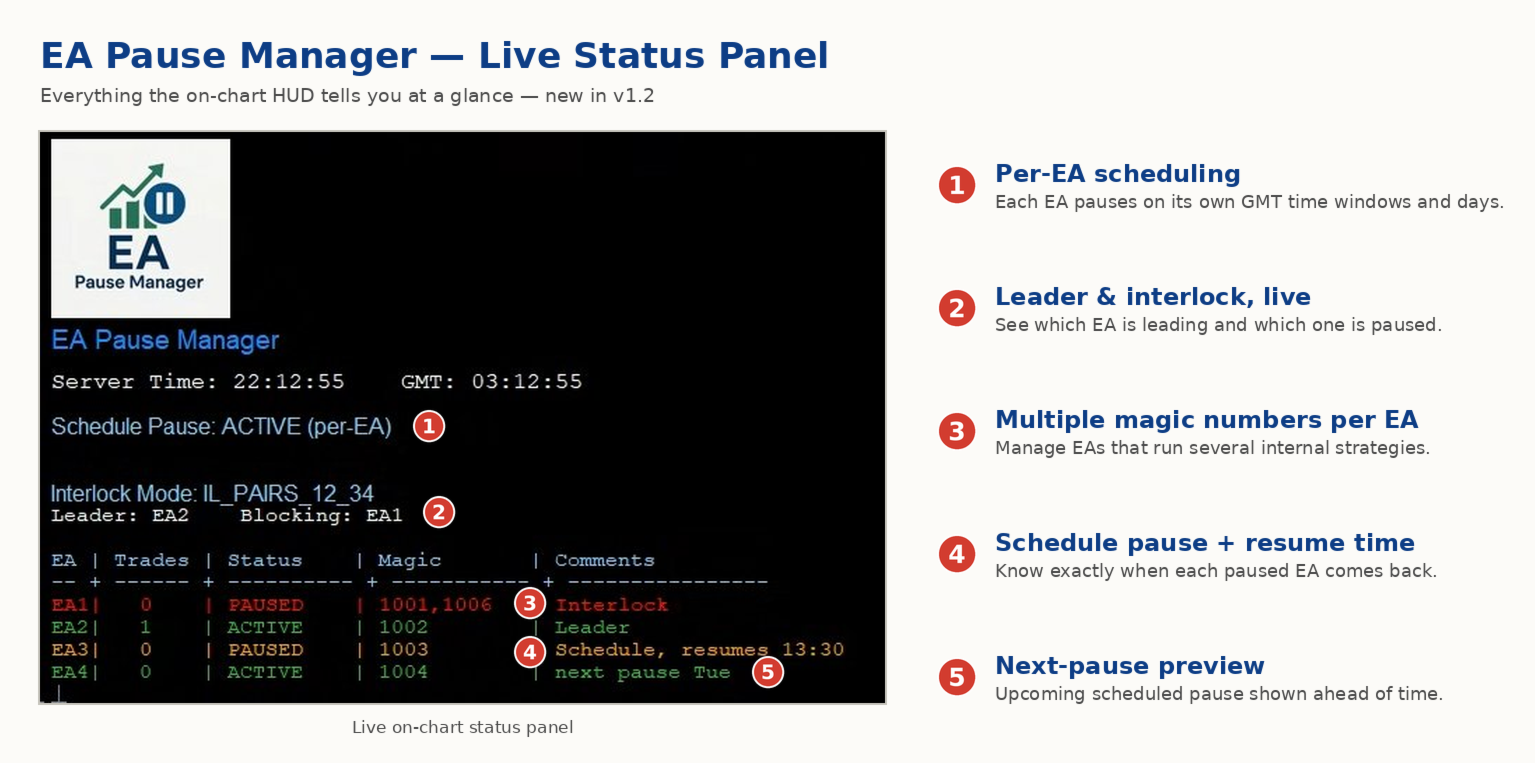
    • A time schedule you define — now configurable per EA. For example, you can run one EA during the day session and another EA overnight.
  • Optionally cleans up after simultaneous openings by closing the orphaned position of the paused EA.
  • Interlock logic is triggered by executed market positions and, optionally, by pending orders such as Buy Stop, Sell Stop, Buy Limit and Sell Limit.

Why It Matters

  • Protects your capital: helps avoid accidental extra orders.
  • Reduces drawdown risk: your EAs do not fight each other.
  • Works automatically: once configured, the pause/resume logic runs without manual intervention.

Important

  • EA Pause Manager reacts to executed market positions and, optionally, to pending orders.
  • Pending-order support is optional: a pending order can act as an interlock trigger, and pending orders from an EA paused by interlock can be cancelled automatically. This is useful for grid, breakout and straddle-style EAs.
  • Optional conflict closing: if two EAs open trades almost at the same time, the orphaned position of the paused EA can be closed automatically. This option is OFF by default and requires a hedging account.
  • For best results, configure EA Pause Manager while your EAs have no open positions or pending orders.
  • Schedules use GMT.
  • EAs are identified by Magic Number. Comment is used only as an optional label for organization.

Works With Pause Manager Indicator (Free)

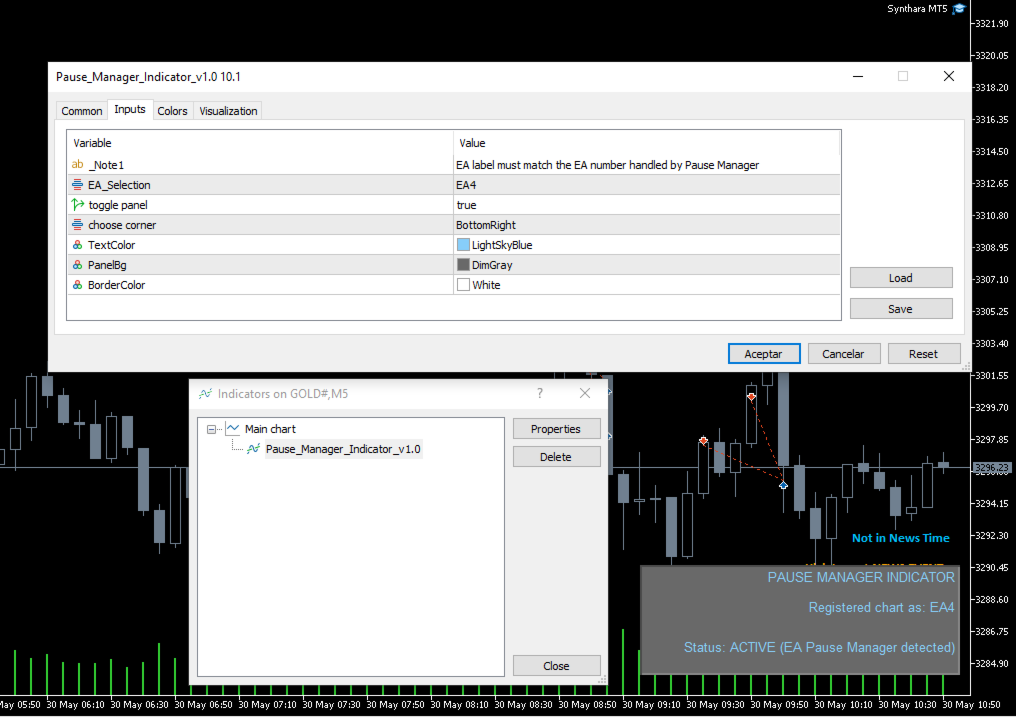
  • Attach this free indicator to every chart with an EA you want to manage using EA Pause Manager.
  • Up to 4 EAs can be managed per EA Pause Manager instance.
  • Pause Manager Indicator is required for correct operation.
  • Download and install Pause Manager Indicator from MQL5 Market > Indicators.

1. Key Features

  • Leader-follower pause: the first EA that opens a trade becomes the leader, and the linked EAs wait.
  • Fast event-driven reaction: competing EAs are paused almost instantly after a trade is detected.
  • Flexible per-EA schedules: each EA can have its own pause windows, multiple windows and specific days in GMT. This is ideal for session rotation.
  • Legacy single-window schedule mode is still available.
  • Multiple Magic Numbers per EA: manage EAs that run several internal strategies by using comma-separated Magic Numbers.
  • Pending-order support: optionally use pending orders as interlock triggers.
  • Auto-cancel pending orders: optionally cancel the pending orders of an EA paused by interlock.
  • Optional conflict closing: close the orphaned position of a paused EA when two EAs open almost at the same time. This requires a hedging account.
  • Up to 4 EAs per instance.
  • Instant alerts: receive push notifications on your mobile device.
  • Light and safe: pure MQL5, no DLLs, and MQL5 VPS compatible.

2. Unique Benefits

  • Combines EA-to-EA control and time scheduling in one tool.
  • Per-EA schedules allow your robots to rotate by session instead of all pausing together.
  • Supports pending-order and grid-style EAs, not only direct-market EAs.
  • Only pauses the EAs you choose — your other robots keep working.
  • Core pause/resume logic works on MT5 accounts. The optional conflict-closing feature requires a hedging account.

3. Input Parameters

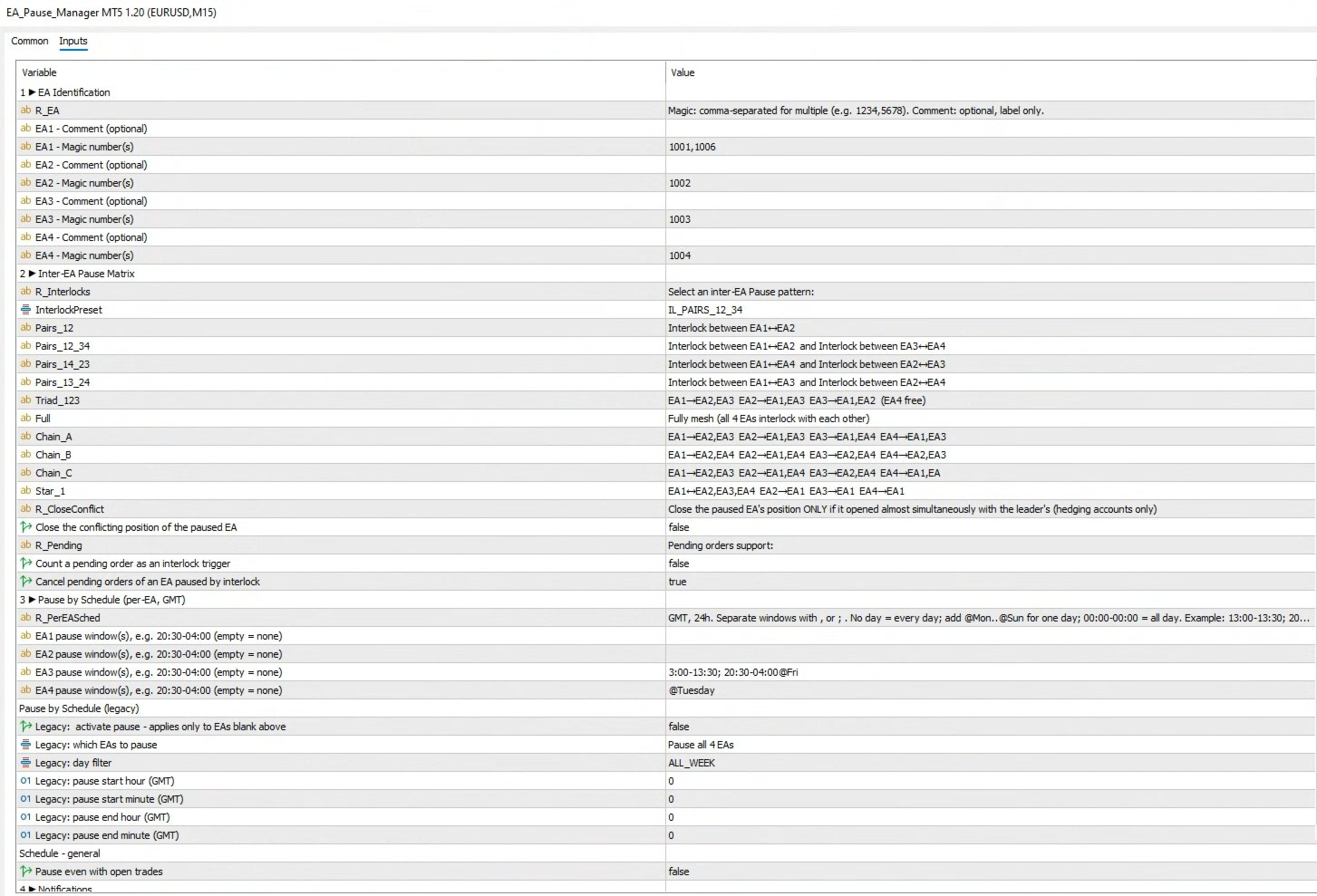
Group 1 - EA Identification

  • MAGIC_EA1 - Magic number(s) of EA #1. Separate multiple Magic Numbers with commas, for example: 1234 or 1234,5678.
  • COMMENT_EA1 - Optional label for EA #1. This is for organization only and does not affect detection.
  • MAGIC_EA2 - Magic number(s) of EA #2.
  • COMMENT_EA2 - Optional label for EA #2.
  • MAGIC_EA3 - Magic number(s) of EA #3.
  • COMMENT_EA3 - Optional label for EA #3.
  • MAGIC_EA4 - Magic number(s) of EA #4.
  • COMMENT_EA4 - Optional label for EA #4.

Inter-EA Pause Matrix - Preset Reference

  • IL_NONE - Interlocking disabled. All EAs trade freely without mutual restrictions.
  • IL_PAIRS_12 - Single pair lock: EA1 and EA2 block each other. EA3 and EA4 remain independent.
  • IL_PAIRS_12_34 - Dual-pair lock:
    • EA1 blocks EA2, and EA2 blocks EA1.
    • EA3 blocks EA4, and EA4 blocks EA3.
  • IL_PAIRS_14_23 - Dual-pair lock:
    • EA1 blocks EA4, and EA4 blocks EA1.
    • EA2 blocks EA3, and EA3 blocks EA2.
  • IL_PAIRS_13_24 - Dual-pair lock:
    • EA1 blocks EA3, and EA3 blocks EA1.
    • EA2 blocks EA4, and EA4 blocks EA2.
  • IL_TRIAD_123 - Three-way mesh: EA1, EA2 and EA3 interlock with each other. EA4 trades freely.
  • IL_FULL - Complete mesh: every EA interlocks with the other three. This is the maximum protection mode and the most restrictive preset.
  • IL_CHAIN_A - Chain pattern A:
    • EA1 interlocks with EA2 and EA3.
    • EA2 interlocks with EA1 and EA3.
    • EA3 interlocks with EA1 and EA4.
    • EA4 interlocks with EA1 and EA3.
  • IL_CHAIN_B - Chain pattern B:
    • EA1 interlocks with EA2 and EA4.
    • EA2 interlocks with EA1 and EA4.
    • EA3 interlocks with EA2 and EA4.
    • EA4 interlocks with EA2 and EA3.
  • IL_CHAIN_C - Chain pattern C:
    • EA1 interlocks with EA2 and EA3.
    • EA2 interlocks with EA1 and EA4.
    • EA3 interlocks with EA2 and EA4.
    • EA4 interlocks with EA1 and EA3.
  • IL_STAR_1 - Star hub on EA1: EA1 interlocks with EA2, EA3 and EA4. The other EAs interlock only with EA1, not among themselves.

Pending Orders

  • UsePendingOrdersAsTrigger - Count a pending order as an interlock trigger. OFF by default.
  • CancelFollowerPendings - Cancel the pending orders of an EA paused by interlock. ON by default. This does not generate trading cost and only affects EAs that use pending orders.

Conflict Position Closing

  • CloseConflictPositions - Close the orphaned position of a paused EA opened almost simultaneously with the leader. OFF by default and available for hedging accounts only. A push notification is sent whenever a position is closed by this feature.

Group 3 - Schedule Blocking

  • PauseSchedule_EA1 - Pause window(s) for EA #1 in GMT. Example: 20:30-04:00. Leave empty if no pause schedule is required. Multiple windows can be separated by commas or semicolons. Optional day filters can be added with @Mon, @Tue, @Wed, @Thu, @Fri, @Sat or @Sun.
  • PauseSchedule_EA2 - Pause window(s) for EA #2 in GMT.
  • PauseSchedule_EA3 - Pause window(s) for EA #3 in GMT.
  • PauseSchedule_EA4 - Pause window(s) for EA #4 in GMT.

Legacy Single-Window Schedule

The legacy single-window schedule is used only when a per-EA schedule window is empty.

  • BlockBySchedule - Master switch for the legacy time-based pause.
  • ScheduleEASelection - Selects which EAs the legacy schedule affects.
  • ScheduleDay - Legacy day filter: All, Monday, Tuesday, Wednesday, Thursday, Friday, Saturday or Sunday.
  • BlockStartHourGMT / BlockStartMinuteGMT - Legacy schedule start time in GMT.
  • BlockEndHourGMT / BlockEndMinuteGMT - Legacy schedule end time in GMT.
  • PauseEvenWithOrders - Keeps the schedule pause active even if positions are open.

Group 4 - Notifications

  • SendPushNotifications - Enables push alerts to the MetaTrader 5 mobile app.

Ready to protect your capital?

Put EA Pause Manager to work today and manage your multi-EA portfolio with smarter risk control.

Send a message after purchase to receive the updated manual.
Reviews 7
Amit-AX
696
Amit-AX 2026.04.24 09:31 
 

Works like magic. I had to use it after a massive grid resulted in blowing 16k loss due to late opening of trades on Friday. I wish i had EA Pause manager before to save the rainy day but finally this will not happen. David is incredibly helpful and supported. He has put together a guide that is useful, for anyone who says setup is not working that is clearly due to lack of reading guide or asking for steps because it works fine for me.

ESTARIX
425
ESTARIX 2025.12.24 06:35 
 

Essential. I haven't found any alternative in the market.

Amr Gomaa Saleh Husain
593
Amr Gomaa Saleh Husain 2025.07.27 21:50 
 

The Pause EA is an innovative and practical tool for managing multiple Expert Advisors running on the same account. It does precisely what it promises — pauses other EAs when one becomes active, helping reduce conflicts and overexposure from overlapping trades. It's beneficial for accounts employing aggressive or grid-based strategies.

Recommended products
GOLD Trending EA MT5 (M5) This Expert Advisor is designed for automated trading on XAUUSD (M5 timeframe). It uses a trend-following approach with defined entry conditions, profit management, and risk controls. The description provides full transparency: no results are hidden. Backtest data includes both profitable and losing periods to show realistic behavior. Backtest Results (2025 Full Year) These are results from the Strategy Tester using real-tick data (99.9% modeling quality). Backtest per
SMG Guard Pro
Tanawut Wongmanee
Smart Money Guardian The Ultimate Trade Manager & Equity Protection Expert Transform your manual trading with professional-grade discipline. Smart Money Guardian is not just a tool; it is your "Digital CEO" that manages every trade with mathematical precision, protecting your capital from emotional decisions and unexpected market volatility. ️ Why Choose Smart Money Guardian? Most manual traders fail due to a lack of exit discipline and poor risk management. This EA solves that by automating
Investmen Guru
Vitalii Zakharuk
Forex Bot Investment Guru Description: Highly Efficient Trading Tool Introduction Among the many tools for trading on the foreign exchange market, the   Investment Guru   forex bot stands out with its advanced internal architecture and unique operating mechanics. Its main goal is to provide traders with the ability to maximize market volatility without promising profits but with a clear structure that encourages purchasing. Operating Principle Investment Guru   employs trend trading methods, all
GEX Level Converter – Gamma Exposure Mapping for CFD Charts NASDAQ-100 edition — for US100 · NDX · NAS100 · USTECH and every Nasdaq-100 CFD equivalent Instantly see professional options-market levels directly on your MetaTrader Nasdaq-100 CFD chart. The GEX Level Converter translates the daily Gamma Exposure (GEX) zones of the NDX options market into precise price levels on your US100 / NAS100 / USTECH CFD. Trade with the same magnet levels that institutional desks watch every day. Where do G
(Crypto Currency Charts) It brings the history as much as the number of bars you specify and starts to show the instant data directly. Provides the opportunity to work in all time frames. Allows you to work with multiple symbols. This app is a background service. It downloads the history of all symbols starting with "S" on the market watch screen and shows the ticks data. Automatically transfers real-time trading data of Binance Spot to MT5. Run the script in the link to use the pr
DAX Quant Range MT5
Manuel De Huerta De La Cruz
DAX Quant Range MT5 is a fully automated Expert Advisor for MetaTrader 5 , specifically designed to trade the DAX index (GER40) during the European session , targeting institutional volatility at market open. The EA combines two professional trading strategies : Opening Range Breakout and EMA Pullback continuation , enhanced with volatility, momentum, and ATR-based risk management. This system is built for traders who value discipline, risk control, and consistency , avoiding aggressive or depen
MT5 history exporter for accurate trade analysis and CSV export. Export trades to Excel from MetaTrader 5 with full performance metrics. Advanced MT5 trade analyzer with MAE, trade duration, and reconstruction. Usually platforms hide critical information about how your trades actually behave. History Downloader and Trade Analyzer solves this. It rebuilds your trades from raw deal history and exports a clean, structured dataset with accurate metrics MT5 does not provide. What You Get A fully s
================================================================================ POC BREAKOUT - V20.72. Full Professional Grade Toolkit ================================================================================ POC Breakout is a full MetaTrader 5 trading dashboard for discretionary traders who want breakout signals, Point of Control (POC) context, volume profiles, order flow, market structure, news, alerts, and advanced trade planning in one professional workspace. Attached directly to you
MT5 to MT5 Trade Copier
Freedom Uzochukwu Nnadi
MT5 to MT5 Trade Copier: Unified Master-Slave Trade Replication for MetaTrader 5 Unlock seamless trade replication with the MT5 to MT5 Trade Copier, a powerful and versatile Expert Advisor (EA) for MetaTrader 5, now reengineered into a single, efficient solution. This updated version combines Master and Slave functionalities into one EA, allowing you to effortlessly switch between modes with a single parameter. Whether you are mirroring trades across accounts, managing client portfolios, or sca
Chat Ai MT5
Indra Maulana
3 (2)
Friends, this tool does not work in backtesting and you must run it live. Chat Ai assistant a versatile and intelligent AI assistant Talk to the AI, get advice from it, give it orders Can be used in all charts, time frames, symbols, markets and... With a very simple interface This tool is an artificial intelligence assistant that you can chat with. You can give him different commands. for example: Tell him to open a buy order for you. Or tell him to close your sales deals Or tell it to change
Easy Order Watcher
PT KARSA REKA CIPTA
Easy Order Watcher — Smart Trade Monitoring & Notifications Stay in control of your trades — wherever you are. Easy Order Watcher   is a lightweight and powerful Expert Advisor (EA) that tracks your live trades and instantly   notifies you when your positions hit key profit or loss levels   — based on   your own custom thresholds . It also displays real-time   margin level   and   time-stamped alerts adjusted to your time zone. Whether you're away from your desk or managing multiple trades, t
Video Explanation on YouTube: https://youtu.be/OJXERVs405g Keyboard Scalper Pro – Tool Explanation Keyboard Scalper Pro is a manual scalping tool designed to execute and manage trades entirely via keyboard hotkeys , allowing for fast, precise, and distraction-free trading . The tool does not automate trading decisions . All actions are triggered manually by the trader using predefined keys. Hotkey Functions Explained W – Buy Market Opens a market buy position instantly on the current symbol usi
Pips Velocity Scalper
Muhammad Nadeem Satti
aka 20pips challenge but dynamic. Precision meets performance. Pips Velocity  is an semi-automated trading system designed to exploit . By measuring the "velocity" of price action relative to a moving average, the EA identifies high-probability entry points for quick pip captures . Logic:  Manually Enters trades when the price reaches a specific point aording to your strategy. Dual-Directional Strategy: Easily switch between Buy and Sell signals based on price positioning relative to the trend .
FiveStarFX Scalp Machine
Adam Shareef Mohamed
FiveStarFX Scalp Machine Precision. Speed. Control. FiveStarFX Scalp Machine is a professional-grade M1 scalping system built for traders who demand speed, structure, and intelligent risk control. Designed around pure price action, the EA executes trades on every confirmed M1 candle close and manages each position with advanced protective logic. This is not a random scalper. This is a structured execution engine.
News With Sessions
Muhammad Jawad Shabir
News With Sessions Professional Session Tracker with Integrated Economic Calendar for MT5 News With Sessions is a professional trading intelligence indicator for MetaTrader 5 that combines live market session tracking with the MT5 economic calendar on a single chart. It shows when institutional sessions are active and which news events are driving price , without external websites, manual time-zone work, or extra tools. Built for traders who rely on time, liquidity, and fundamentals , this indic
Quant Trade Freedom All Market
Renan De Souza Quinelato
O que é “QUANT TRADE FREEDOM ALL MARKET” ? QUANT TRADE FREEDOM ALL MARKET é um software de negociação totalmente automatizado, especialmente projetado para negociação lucrativa com a plataforma de negociação METATRADE 5 (MT5). Pode negociar Forex e derivativos ( Mini Índice e Mini Dólar ) na bolsa brasileira. Como funciona o robô QUANT TRADE FREEDOM NEWS? QUANT TRADE FREEDOM ALL MARKET é um software 100% automatizado que define a melhor tendência para entrar em ordens de negociação no lugar de u
(Crypto Currency Charts) It brings the history as much as the number of bars you specify and starts to show the instant data directly. Provides the opportunity to work in all time frames. Allows you to work with multiple symbols. This app is a background service. It downloads the history of all symbols starting with "F" on the market watch screen and shows the ticks data. Automatically transfers real-time trading data of Binance Futures to MT5. Run the script in the link to use the program. 
Predator Genesis
Dragan Drenjanin
Introduction to Predator Genesis EA Predator Genesis is a cutting-edge Expert Advisor (EA) developed for the MetaTrader 5 (MT5) platform, representing the latest evolution in automated forex trading.   Predator Genesis   is designed to simplify the trading process while maintaining robust performance. Its minimalist user interface reflects a design philosophy of simplicity within complexity, ensuring accessibility without sacrificing depth. This version introduces notable changes from prior ite
MT5 to Telegram Notification Hub
George Liviu Geambasu
5 (1)
MT5 to Telegram Notification Hub   is a user-friendly tool that connects MetaTrader 5 (MT5) with Telegram, enabling seamless transmission of trade alerts, updates, and custom messages directly from MT5 to your Telegram account or channel. You can easily adjust and enable or disable specific parts of the notifications, making it ideal for signal providers and traders who want to keep their audience informed with real-time updates Setup guide A setup guide is available here . Key Features: Instan
MQL5 Blogs : https://www.mql5.com/en/blogs/post/761446 MT4 Version : https://www.mql5.com/en/market/product/136790 MT5 Version : https://www.mql5.com/en/market/product/136791 Time Wizard is a professional trading assistant built for traders who need speed, timing, and execution control in one clean dashboard. This Expert Advisor is designed for event-based trading, scheduled execution, and fast semi-automatic order management. It allows you to prepare your orders in advance, define the exact
Master Manager
Medina Cortez Edison Armando
MASTER MANAGER Risk management of open operations (Does not perform automatic operations) and structural analysis. "Stop chasing prices; let the Master Manager identify institutional zones for you and surgically manage the risk of the trades you enter." ️ System Features 1. Structural Analysis: Identification of Swings and Balance of Sights with confluence. 2. Liquidity (FVG): Imbalance zones with 50% mitigation and dynamic extension. 3. Visual Management: Draggable and fixed partial
Qm93
Kasampast Kumkaew
QM93 — CFD Multi-Strategy Expert Advisor QM93 is a fully automated Expert Advisor designed for CFD trading across Forex, Metals, Energies, Indices, and Crypto. It combines up to five independent trading strategies through a Voting System , ensuring trades are only opened when multiple strategies agree — reducing false signals and improving trade quality. Trading Strategies (Voting System) Each strategy casts a vote. A trade is triggered only when the combined vote ratio meets the configured thre
Predator On Steroids is a robust and highly adaptive Expert Advisor (EA) for MetaTrader 5, engineered for consistent performance across all timeframes and a wide range of financial instruments. The robot is designed to open trades with high frequency using market, stop, or limit orders (order type is fully customizable by the user). One of its most powerful features is the ability to automatically adapt its trading strategy to the specific instrument being traded. For example: On metals → it act
Ultra KZM
Nattapat Jiaranaikarn
Ultra KZM is an Expert Advisor that using the unique trading operation. It's strategy is based on the combination of grid and correlation system which is the new method that I invented and developed for a long time. You can see Live Signal from these links : (delete space) 1.  https: //www .myfxbook.com/portfolio/ultra-kzm-eurjpyeurchf/10224608 2.  https: //www .myfxbook.com/portfolio/ea-ultra-kzm-real-account/10374382 Note that this EA should run in ECN swap-free account. When you backtest yo
Ze Trader B3 Robo
Renato Takahashi
Zé Trader B3 Robô é o seu robô de negociação para a Bolsa Brasileira B3, operando miniíndice WIN e minidólar WDO , a partir de uma estratégia consistente baseada em indicadores técnicos relevantes. Tendência : SAR Parabólico simples ou com cruzamento de média móvel . Trigger : 2 médias móveis que podem ser configuradas em simples ou exponenciais, com sistema de trail de stoploss . Filtro de entrada : Estocástico em limites de compra e venda. Alvos e Stops : Fixos ou conforme valor do indicador A
Telegram EA Manager
Ebunoluwa Abimb Owodunni
All in one Multipurpose Telegram Trade Management , Manage and Copy Trades on the go From Telegram Pro Version MT5:  www.mql5.com/en/market/product/95742 Pro Version MT4:  www.mql5.com/en/market/product/85691 Execute Trades on mobile with fast execution When away from desktop MT5, or scalping the market with mobile device, or needed to copy trades from telegram groups while away, or doing some other activities, Telegram EA Manager is an effective tool to perform any trade operation with swift
FREE
AO Trade
Ka Lok Louis Wong
The AO Trade system is specifically tailored for trend trading, leveraging auction or news times as reference points for comparison with other specific order times to anticipate market trends. **All time parameters utilized in the EA are based on your terminal time. Different brokers may operate on different GMT time zones, which can further vary due to Daylight Saving Time adjustments.** **Kindly ensure thorough verification of time settings aligned with your terminal before implementation.**
Rosy Pro Panel MT5
Theresia Yovitha Herwanda
5 (1)
Download DEMO here  https://www.mql5.com/en/blogs/post/759772 An ultimate panel you've never seen before.  Compact and nice Trade panel with large Total P/L and it's percentage display. Groups for trades summary available: Ticket, Symbol, Type, Category, and Magic. Average price field helps you know your trading average price and direction. Set magic and comment of your trading in a very easy way. Group closing by symbol, type, category or magic - only by one click. Close All button for a quick
Harmony Grid MT5
Aliaksandr Charkes
Harmony Grid MT5  is a versatile trading system designed for the full or partial automation of various grid-based trading strategies (for hedging accounts). Additionally, this Expert Advisor can be viewed as a universal strategy builder, offering capabilities that go beyond simple grid trading. If you take the time to master its functionality, you can create more complex and customized systems. In other words, the strategy you implement does not necessarily have to be grid-oriented or fully auto
StrangerDoc
Hamdee Hayeealee
Trade smarter, not harder. StrangerDoc is a fully automated MT5 Expert Advisor engineered to find opportunity in both trending and ranging markets — while actively defending your account at every step. StrangerDoc EA, designed to generate **consistent cash flow** through a combination of  trend-following, step-index grid, and intelligent opposite-direction hedging. for trading Gold, BTC, EURUSD. For Expert Advisor need hedge type account  Contact me immediately after the purchase if you prefer
Buyers of this product also purchase
Trade Assistant MT5
Evgeniy Kravchenko
4.43 (214)
It helps to calculate the risk per trade, the easy installation of a new order, order management with partial closing functions, trailing stop of 7 types and other useful functions. Additional materials and instructions Installation instructions - Application instructions - Trial version of the application for a demo account Line function -   shows on the chart the Opening line, Stop Loss, Take Profit. With this function it is easy to set a new order and see its additional characteristics bef
Forex Trade Manager MT5
InvestSoft
4.98 (668)
Trade Manager MT5 is an advanced position size calculator and trade management tool for MetaTrader 5, designed to help traders plan trades faster, control risk more precisely, and manage open positions directly from the chart. It combines order placement, risk based lot calculation, Stop Loss and Take Profit management, Break Even, Trailing Stop, Partial Close, Equity Protection, and external trade management in one panel. Whether you trade forex, indices, metals, commodities, crypto, or future
TradePanel MT5
Alfiya Fazylova
4.88 (162)
Trade Panel is a multi-functional trading assistant. The app contains over 50 trading functions for manual trading and allows you to automate most trading tasks. Before making a purchase, you can test the demo version on a demo account. Download the trial version of the application for a demonstration account: https://www.mql5.com/en/blogs/post/750865 . Full instructions here . Trade. Allows you to perform trading operations in one click: Open pending orders and positions with automatic risk cal
Beta Release The Telegram to MT5 Signal Trader is nearly at the official alpha release. Some features are still under development and you may encounter minor bugs. If you experience issues, please report them, your feedback helps improve the software for everyone. Telegram to MT5 Signal Trader is a powerful tool that automatically copies trading signals from Telegram channels or groups directly to your MetaTrader 5 account. It supports both public and private Telegram channels, and you can conn
Power Candles Strategy Scanner - Self-Optimizing Multi-Symbol Setup Finder Power Candles Strategy Scanner runs the same self-optimizing engine that powers the Power Candles indicator - on every symbol in your Market Watch, side by side. One panel tells you which symbols are statistically tradable right now, which strategy wins on each, the optimal Stop Loss / Take Profit pair, and pings you the moment a fresh signal fires. This tool is part of the Stein Investments ecosystem - 18+ tools plus Max
Anchor Trade Manager
Kalinskie Gilliam
5 (5)
Anchor: The EA Manager Run your full EA portfolio without conflicts, without stacked risk, and without watching every chart yourself. Anchor coordinates up to 64 Expert Advisors on a single account, including daily loss protection built for prop firm rules. Attach Anchor to any chart. Type your EA names and magic numbers in one line. Click OK. Anchor begins coordinating immediately. Built for portfolios. Built for prop firms. Built for discipline. The Problem Running multiple EAs on the same acc
FarmedHedge Pair Trading Dashboard
Tanapisit Tepawarapruek
5 (3)
Farmed Hedge Yield Farming | All Markets (Manual - Hybrid - Semi/Automated EA) MULTI-ASSET SUPPORT Trade any asset available on your broker - Forex: Major, Minor, Exotic pairs - Crypto: BTC, ETH, XRP, SOL, BNB - Stocks: Apple, Tesla, Amazon, Google, etc. - Commodities: Gold, Silver, Oil, Gas - Indices: US30, NAS100, SPX500, DAX40 - Any CFD your broker offers VERIFIED TRADING RESULTS - Farmed Hedge Yield Axi Copy:  https://www.mql5.com/en/signals/2356376 - Farmed Hedge Yield Exn Copy:   https:/
EasyInsight AIO MT5
Alain Verleyen
4.92 (12)
EASY Insight AIO – All-In-One Power for AI-Driven Trading Want to skip the setup and start scanning the entire market – Forex, Gold, Crypto, Indices, and even Stocks – in seconds? EASY Insight AIO is the complete plug-and-play solution for AI-powered trade analysis. It includes all core Stein Investments indicators built-in and automatically exports clean, structured CSV files – perfect for backtesting, AI prompts, and live market decision-making. No need to install or configure indicators manu
Quant AI Agents
Ho Tuan Thang
5 (1)
Quant AI Agents are independent trading Expert Advisors. Instead of trading using a fixed strategy like other conventional EAs, Quant AI Agents   is a   multi-agent AI trading framework   that turns natural-language strategy prompts into live.  WANT THE SAME RESULTS AS MY LIVE SIGNAL?   Use the exact same brokers I do:   IC MARKETS , IC TRADING   .  Unlike the centralized stock market, Forex has no single, unified price feed.  Every broker sources liquidity from different providers, creating un
Premium Trade Manager - The Trade Panel With a Coach Built In Premium Trade Manager puts a trading coach inside your chart, with a full execution engine underneath it. Set the trade up the way you always do, then let Max, your AI trading coach, read that exact setup against your live account and give you a straight verdict before you commit: is the stop disciplined, is the risk sane, is a high-impact release minutes away, are you near a prop-firm limit. Below sits the engine that runs everything
The product will copy all telegram signal to MT5 ( which you are member) , also it can work as remote copier.  Easy to set up, copy order instant, can work with almost signal formats, image signal,  s upport to translate other language to English Work with all type of channel or group, even channel have "Restrict Saving Content", work with  multi channel, multi MT5 Work as remote copier: with signal have ticket number, it will copy exactly via ticket number. Support to backtest signal. How to s
Trade Manager DaneTrades
Levi Dane Benjamin
4.28 (29)
DaneTrades Trade Manager is a professional trade panel for MetaTrader 5, designed for fast, accurate execution with built‑in risk control. Place market or pending orders directly from the chart while the panel automatically calculates position size from your chosen risk, helping you stay consistent and avoid emotional decision‑making. The Trade Manager is built for manual traders who want structure: clear risk/reward planning, automation for repeatable management, and safeguards that help reduc
HINN Lazy Trader
ALGOFLOW OÜ
5 (1)
LIMITED SUMMER SALE -40% ! ONLY $470 insead of $790!  Maximum real discount! The core idea: using the user interface, you configure the parameters the chart must meet before entering a position (or positions), choose which entry models to use, and set the rules for when trading and planning should end. Lazy Trader  handles the rest: it  takes over all the routine chart watching and execution! full description  :: 3 key videos [1] ->  [2]   ->  [3] What can it do? - Understands Larry Williams
Welcome to ENTRY IN THE ZONE WITH SMC MULTI TIMEFRAME Entry In The Zone with  SMC Multi Timeframe  is a professional trading indicator built on Smart Money Concepts (SMC), combining market structure analysis with a No Repaint BUY / SELL signal system in a single indicator. It helps traders understand market structure more clearly, identify key price zones, and focus on higher-quality trading opportunities. By combining Multi-Timeframe Analysis, Points of Interest (POIs), and real-time signals, t
The News Filter MT5
Leolouiski Gan
4.78 (23)
This product filters   all expert advisors and manual charts   during news time.  It is able to remove any of your EA during news and automatically reattach them after news ends. This product also comes with a complete  order management system   that can handle your open positions and pending orders before the release of any news. Once you purchase   The News Filter , you will no longer need to rely on built-in news filters for future expert advisors, as this product can filter them all from her
YuClusters
Yury Kulikov
4.93 (43)
Attention: You can view the program operation in the free version  YuClusters DEMO .  YuClusters is a professional market analysis system. The trader has unique opportunities to analyze the flow of orders, trade volumes, price movements using various charts, profiles, indicators, and graphical objects. YuClusters operates on data based on Time&Sales or ticks information, depending on what is available in the quotes of a financial instrument. YuClusters allows you to build graphs by combining da
Chart Copilot
George Angelo Boutselis
Chart Copilot is a trading assistant designed to help traders place trades faster, manage open positions and set alerts of any type directly from the chart. All of these features are accessible through the graphical panel as well as through a conversational chatbot. Additional Material and Instructions: trial version  - setup instructions Chatbot Chart Copilot comes with a dedicated server running a large language model – this means that there is no need to create your own API key and you will i
EA Auditor
Stephen J Martret
5 (4)
EA Auditor is an independent analysis tool for traders evaluating Expert Advisors and trading signals on MetaTrader 5. It audits backtest reports, reviews posted developer signals, and cross-verifies the two against each other to help traders assess strategies before committing capital. The MQL5 market offers a wide range of Expert Advisors from many developers, with varying approaches, quality, and transparency. EA Auditor provides a consistent, data-driven framework for reviewing them, answer
Effortlessly manage multiple trading accounts The Local Trade Copier EA is a solution for individual traders or account managers who need to execute trade signals from external sources or who need to manage several accounts at the same time, without the need for a MAM or a PAMM account. It copies from up to 8 master accounts to unlimited slave accounts . [ Installation Guide | Update Guide | Troubleshooting | FAQ | All Products  ] 100% self hosted Easy to install and use It can copy from MT4 t
FUTURES ORDERFLOW FOOTPRINT CHART Professional OrderFlow EA for MetaTrader 5 Version 1.01| Professional tool for real traders | Institutional-Grade Visualization STRATEGY TESTER USERS - PLEASE SELECT EVERY REAL TICK WHEN TESTING AND YOU HAVE DOWNLOADED HISTORICAL DATA. IF YOU SEE A WAITING SCREEN AND IT IS NOT DOWNLOADING, IT MEANS YOU HAVE LOW HISTORICAL DATA. TRY 1 MIN AND 5 MIN FIRST ON 1 DAY DATA. ONE DAY DATA SHOULD BE THE NEWEST AND MOST CURRENT DATE. PLEASE WAIT UNTIL THE MARKET HAS ROL
Footprint Chart Pro — Professional OrderFlow EA for MetaTrader 5 Version 6.34 | Professional tool for real traders | Institutional-Grade Visualization DEMO USERS - PLEASE SELECT EVERY TICK / REAL TICK WHEN TESTING AND YOU HAVE DOWNLOADED HISTORICAL DATA. IF YOU SEE A WAITING SCREEN AND IT IS NOT DOWNLOADING, IT MEANS YOU HAVE LOW HISTORICAL DATA. TRY 1 MIN AND 5 MIN FIRST ON 1 DAY DATA. ONE DAY DATA SHOULD BE THE NEWEST AND MOST CURRENT DATE. PLEASE WAIT UNTIL THE MARKET HAS ROLLED OVER PERIOD.
Telegram To MT5 Receiver
Levi Dane Benjamin
4.53 (15)
Copy trade signals from Telegram channels you already belong to (including private and restricted channels) directly into MetaTrader 5. Set your risk rules once, monitor execution, and manage positions with built-in protections designed to reduce mistakes and overtrading. Fast setup : configure your channels, select what to copy, and start within minutes using a clean on-chart interface. User Guide + Demo | MT4 Version Who this is for Traders who follow one or more signal providers and want cons
AlgoRadar
Stephen J Martret
5 (4)
AlgoRadar is an on-chart analytics dashboard for MT5 that aggregates Expert Advisor performance across multiple accounts, brokers, and platforms, including both MT4 and MT5 data, into a single live view on your MT5 chart. All analysis runs from the chart interface, with no external applications or manual report processing required. EA Analysis and Ranking For traders running multiple Expert Advisors, AlgoRadar provides a consolidated view of each EA's performance across accounts. Active EAs a
Grid Manual MT5
Alfiya Fazylova
4.73 (22)
Grid Manual is a trading panel for working with grid strategies. The utility is universal, has flexible settings and an intuitive interface. It works with a grid of orders not only in the direction of averaging losses, but also in the direction of increasing profits. The trader does not need to create and maintain a grid of orders, the utility will do it. It is enough to open an order and the "Grid manual" will automatically create a grid of orders for it and will accompany it until the close. F
Patrex pro
Chioma Obunadike
5 (2)
Patrex Pro: Maximize Your Trading Potential Patrex Pro is an advanced trading bot designed to help traders optimize their trading strategies and maximize their potential returns. With its cutting-edge technology and user-friendly interface, Patrex Pro is the ultimate tool for traders seeking to elevate their trading game. Get MT4 Version Key Features: 1. Position Hedging: Patrex Pro allows users to hedge their positions based on their individual risk tolerance and market analysis. 2. Advanced R
AI Agents Supervisor
Ho Tuan Thang
5 (1)
AI Agent Supervisor is NOT an Expert Advisor. AI Agent Supervisor   is a   multi-agent AI risk & portfolio supervisor   that watches every EA on your account and intervenes in real time.  WANT AN AI PORTFOLIO MANAGER WATCHING YOUR FLEET 24/7?   Run your fleet on the same brokers I do:   IC MARKETS , IC TRADING   .  Unlike the centralized stock market, Forex has no single, unified price feed.  Every broker sources liquidity from different providers, creating unique data streams. The Supervisor r
Telegram to mt5 pro
Janet Abu Khalil
4 (4)
Telegram to MT5 Pro — Advanced Telegram Signal Copier with Auto-Fix, Multi-TP, Risk Control and Full Trade Management Telegram to MT5 Pro — Professional Telegram Signal Copier Telegram to MT5 Pro is a high-performance trade copier that automatically executes signals from Telegram directly into your MetaTrader 5 account, with full control over risk, execution, and trade management. The system consists of two components: • The Expert Advisor (EA) running inside MetaTrader 5 • A companion desktop
Trade Manager DashPlus
Henry Lyubomir Wallace
4.85 (13)
DashPlus is an advanced trade management tool designed to enhance your trading efficiency and effectiveness on the MetaTrader 5 platform. It offers a comprehensive suite of features, including risk calculation, order management, advanced grid systems, chart-based tools, and performance analytics. Key Features 1. Recovery Grid Implements an averaging and flexible grid system to manage trades during adverse market conditions. Allows for strategic entry and exit points to optimize trade recovery
This is a multi-currency converter script that can convert the currency of the account history to another currency and output it. Since it supports multiple currencies, it is possible to exchange USD, EUR mutual conversion, JPY, GBP, AUD, or other minor currencies. Currency Exchanger can be converted to other currencies immediately by executing it once, so anyone can easily exchange currency. Let Currency Exchanger do the tedious work! The exchange result from the account history can be output a
MT5 to Telegram Signal Provider turns your trading account into a signal provider. Every trade action, whether manual, by EA or from your phone, is instantly sent as a message to Telegram. You can fully customize the format or use a ready-made template for quick setup. [ Demo ] [ Manual ] [ MT4 Version ] [ Discord Version ]     New: [ Telegram To MT5 ] Setup A step by step user guide is available. Key Features Ability to customize order details sent to subscribers You can create a tiered subs
More from author
Pause Manager Indicator
David Enrique Barrera Moncayo
5 (1)
Pause Manager Indicator (for EA Pause Manager) What It Is: This is a lightweight chart indicator that works together with the EA Pause Manager utility. It displays the current status of your EAs and sends that information to the EA Pause Manager so it can pause/resume them correctly.  Required for proper functioning of EA Pause Manager . Features: Shows real-time status (ACTIVE / PAUSED) of the EA on the chart Displays EA ID (EA1–EA4), customizable via settings Minimal resource usage No input s
FREE
Filter:
Amit-AX
696
Amit-AX 2026.04.24 09:31 
 

Works like magic. I had to use it after a massive grid resulted in blowing 16k loss due to late opening of trades on Friday. I wish i had EA Pause manager before to save the rainy day but finally this will not happen. David is incredibly helpful and supported. He has put together a guide that is useful, for anyone who says setup is not working that is clearly due to lack of reading guide or asking for steps because it works fine for me.

530274656
20
530274656 2026.03.17 12:48 
 

Warning! Do not buy this EA Pause Manage! I purchased this EA to manage multiple EAs on one account and prevent simultaneous trading, especially for two Martingale EAs. Despite following the author’s settings exactly, the EA completely failed to work. My two Martingale EAs still opened trades at the same time, which is exactly what this EA is supposed to stop. I contacted the author for support, but my messages were read and ignored. This EA is useless, non-functional, and the support is zero. Save your money — this is a scam and a complete waste. Do not buy!

David Enrique Barrera Moncayo
771
Reply from developer David Enrique Barrera Moncayo 2026.03.18 01:59
Dear user, First of all, I would like to clarify that this product is not a scam, and it is actively used in real trading environments for risk management across multiple EAs. Many users, including myself, use it successfully under the correct conditions. Regarding your case, your EAs are using pending orders (Buy Stop / Sell Stop). As clearly explained in the product logic, EA Pause Manager is designed to act on executed market positions (f"First EA to trade becomes the leader"), not on pending orders. This is an important distinction, as pending orders can be triggered later without immediate interlock control. This limitation was explained to you in the support response. About the support: your message was received and answered within a reasonable timeframe considering time zone differences and personal constraints. However, before receiving a reply, you had already posted a damaging review, which does not reflect a fair or constructive interaction. We are always willing to help users who seek to understand how the tool works and how to configure it properly. However, misuse of the EA outside of its intended design does not mean the product is non-functional. EA Pause Manager remains a valuable tool for managing risk between EAs that open direct market orders, which is its intended use.
Bob
200
Bob 2026.02.15 21:40 
 

User didn't leave any comment to the rating

ESTARIX
425
ESTARIX 2025.12.24 06:35 
 

Essential. I haven't found any alternative in the market.

Amr Gomaa Saleh Husain
593
Amr Gomaa Saleh Husain 2025.07.27 21:50 
 

The Pause EA is an innovative and practical tool for managing multiple Expert Advisors running on the same account. It does precisely what it promises — pauses other EAs when one becomes active, helping reduce conflicts and overexposure from overlapping trades. It's beneficial for accounts employing aggressive or grid-based strategies.

trustalbert
52
trustalbert 2025.06.18 12:05 
 

Excellent Risk Control EA, avoid multiple SL in multiple timeframes!

Cristóbal Manuel
524
Cristóbal Manuel 2025.06.03 22:29 
 

Very useful fast and reliable!! Save many potential SL

Reply to review