Nova Ultimate Trade Panel

I think you want to use many beautiful features of the Metatrader platform in one place and without missing out.

We have designed a trading panel just for you. Meet all the magical features you missed.


Nova Ultimate Trade Panel offers you the best and convenient trading experience!

It is an auxiliary panel that works extremely fast and is coded to fulfill all your requests.

You can easily use it in all your trade transactions and take advantage of all its features at the highest level.

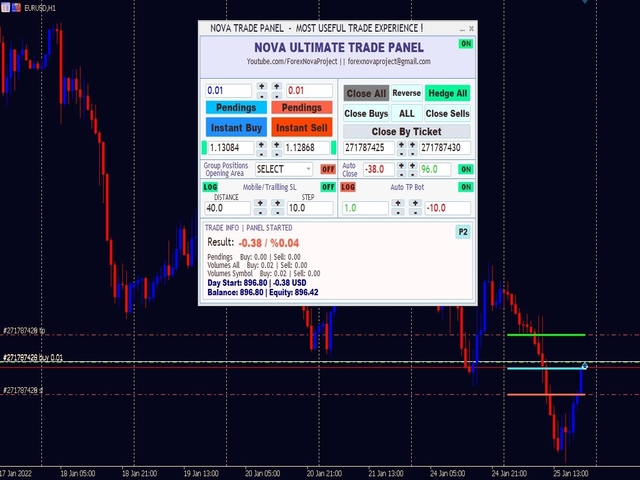
Designed as a Dynamic Panel, Nova Ultimate Trade Panel can be dragged, moved and minimized in size.


Let's talk about its built-in features;

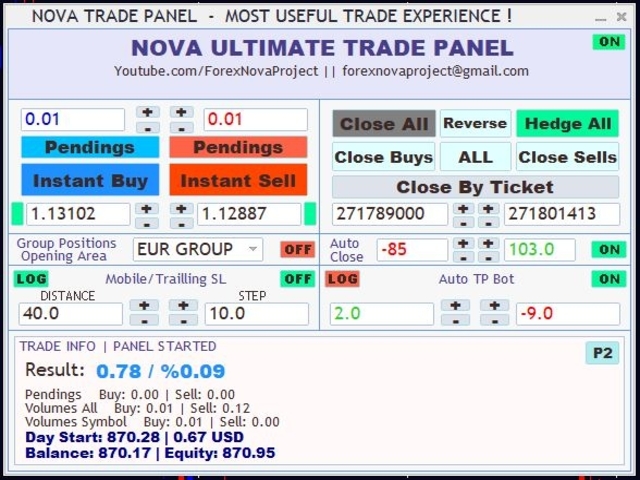
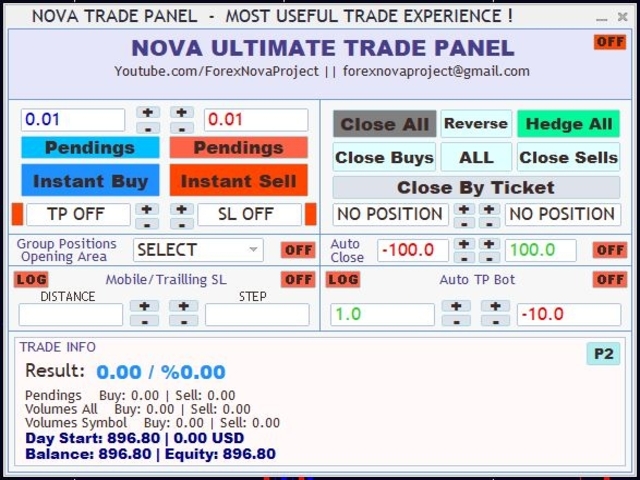
  • You can trade quickly and change the size of your trade (lot) as you wish, using the arrow keys and the boxes with data entry.
  • You can make pending transactions and change your transaction settings.
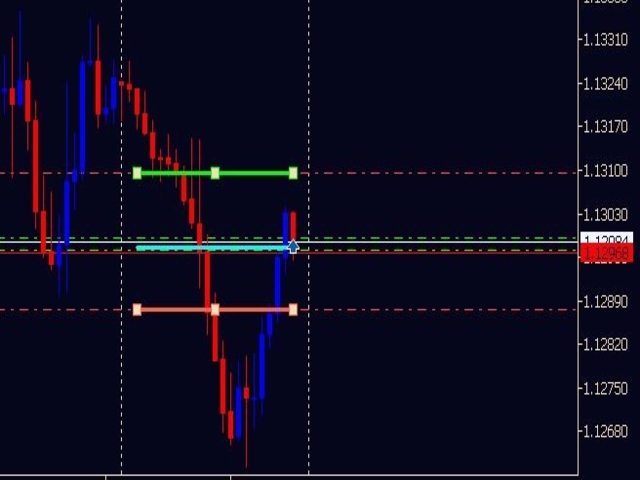
  • You can set the TAKE PROFIT and STOP LOSS levels of all your trades and pending trades with the arrow keys, toggle boxes and dynamic manual drag level shifter lines. Dynamic lines are drawn on the chart and when the level is changed, TP and SL levels also change on Nova Trade Panel.
  • Thanks to the group position opening area, you can open a buy or sell transaction on all pair symbols containing a currency at once. For example, if the EUR group is selected, the group position opening option is set to ON and the Instant Buy button is pressed, the Buy transaction is opened for all Euro-containing pairs.
  • The Nova Ultimate Trade panel has a built-in Trailing, Mobile Stop feature. If it is activated on the panel and the values ​​are adjusted, Stop Loss Moving becomes active and moves to the last opened position. If the LOG Button is active, the move is made based on the values ​​at the opening of the position.
  • You can close all your trade transactions, open a reverse position or make a Hedge to all positions through the panel.
  • It is also possible to make your closing transactions with the Ticket number of your trade transaction. When you press the arrows in the Ticket field, it will automatically bring up the first and last Ticket numbers, set them with the arrow keys and press the Close By Ticket button.
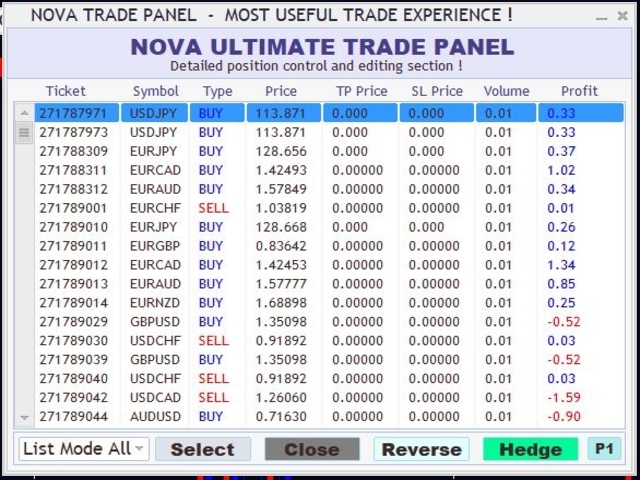
  • There is a second screen on the Nova Ultimate Trade Panel. You can go to the detailed view and change the positions by clicking the P2 Button. You can see all the positions in the list order and you can do your Closing, Reverse position opening, Freezing (Hedge) transactions from this screen.
  • Another feature of the panel is automatic closing, that is, if the profit status of your account exceeds a certain level or falls to a certain level, all positions are closed automatically. For this feature, set the values ​​in the Auto Close field and activate it.
  • Another feature of Nova Ultimate Trade Panel is the automatic simple bot feature. If you activate the Auto TP Bot on the panel, it starts working after you open a trade and opens a new position every time you take a profit, if you close your trade at the loss level, it will stop and wait. With this Bot feature, you can easily follow your trend. Let him keep opening trades for you and win.
  • In the Trade Info section, you can see the profitability of your account, the percentage of profit, the number and size of open and pending trade transactions (lot, volume), the account asset you started at the beginning of the day, your instant asset and available asset information.
Important note: depending on the speed of your computer, the panel will boot when switching between screens, wait a few seconds to avoid confusion!

Use the Nova Ultimate Trading Panel exactly for you.

If you have any questions, suggestions or find any bugs, please contact us!
Have fun!
Recommended products
AILibrary
Marius Ovidiu Sunzuiana
AI Utility Library for MQL5 The AI Utility Library for MQL5 is a next‑generation development framework that brings artificial intelligence, adaptive logic, and intelligent data processing directly into the MetaTrader ecosystem. Designed for traders, quants, and algorithm developers who demand more than traditional indicator logic, this library transforms MQL5 into a smarter, more predictive, and more efficient environment for building advanced trading systems. Built with a modular architectur
Pro Trade Utility
Alexandr Malanici
Pro Trade Utility for MetaTrader 5 Pro Trade Utility is a professional manual trading assistant designed for traders who want precision, speed and clarity — without automated strategies. This tool does not trade automatically . It helps you execute and manage trades correctly with proper risk control. Key Features  Risk & Position Management Risk-based automatic lot size calculation Risk shown clearly in account currency Adjustable Stop Loss (points) Fixed Risk:Reward display  Trade Executio
FastCopyCPpro
Alireza Kalamati
FastCopy CP Pro - Advanced Local Trade Copier Before purchasing, we highly recommend testing the core engine performance, broker compatibility, and execution speed using our free version (fully functional, limited to 10 trades): Download FastCopy CP Free Version Here FastCopy CP Pro is a highly optimized, 100% offline local trade copier designed specifically for MetaTrader 5. Engineered for traders on prop firms, and retail traders managing multiple accounts, it utilizes a sophisticated binary f
Dynamic RSI Guardian – Precision Trading with Full Risk Management Dynamic RSI Guardian is a professional algorithmic trading system designed for traders who value consistent performance, strict risk control, and flexibility . Built with advanced pip-based calculations and intelligent RSI-driven filters, it ensures every trade follows strict rules to minimize risk while maximizing opportunities. Key Features: Smart Entry System • RSI-based multi-filter confirmation • Detects high-probability
FREE
PrimeTrend bot
Andrei Moldovan
PrimeTrend EURUSD EA: Intelligence at the Service of Your Trading! Have you ever wanted a trading system capable of working 24/5, making precise decisions, and minimizing risk? PrimeTrend EURUSD EA is the solution you've been searching for! Designed to dominate the EUR/USD market with advanced trend-based strategies and technical analysis, this Expert Advisor is here to revolutionize the way you trade. Why Choose PrimeTrend EURUSD EA? 1. Excellent Performance Based on a proven strategy that le
Take a Break MT5
Eric Emmrich
4.75 (24)
News filter, equity guard & session control for all your EAs — one tool, full protection Take a Break has evolved from a basic news filter into a comprehensive account protection solution . It pauses your other Expert Advisors during news events or based on custom filters. When trading resumes, it automatically restores your entire chart setup , including all EA settings. Why traders choose Take a Break One news filter for all your EAs — no more relying on individual built-in filters that may o
PropShield Guardian MT5 – Ultimate Drawdown Protection & Trade Control EA Protect your account. Enforce discipline. Pass prop firm challenges with confidence. Stop blowing accounts. Start trading like a professional. PropShield Guardian MT5 is a powerful utility Expert Advisor designed to protect your account, enforce risk rules, and prevent emotional trading mistakes . This is NOT a trading bot. This is your automated risk manager and discipline system . Key Features:  Drawdown Protection Syste
Anchor Pro: Funded Guard & Trade Manager Stop Blowing Your Funded Accounts. Trade Visually. Protect Your Capital. Anchor Pro is not just a trade manager—it is a complete Funded Account Guardian and Visual Trading Suite . Designed specifically for traders taking Prop Firm challenges (FTMO, MyForexFunds, etc.), it combines institutional-grade risk protection with a revolutionary "Draw-to-Trade" engine. Whether you are trying to pass a challenge or keep your funded account safe, Anchor Pro locks in
FX28 Trader MT5
Tsvetan Tsvetanov
3 (1)
Introducing the FX28 Trader Dashboard – Your Ultimate Trade Manager Unlock the full potential of your trading experience with the FX28 Trader Dashboard, a comprehensive and intuitive trade manager designed to elevate your Forex trading to new heights. Whether you're a seasoned trader or just starting on your financial journey, this powerful tool is engineered to streamline your trading activities and enhance your decision-making process. Key Features: User-Friendly Interface: The FX28 Trader Da
MP RiskOracle MT5
Alexandru Chirila
Risk Oracle - Expert Advisor Description Risk Oracle is a sophisticated yet user-friendly Expert Advisor (EA) designed for risk management and trade execution. This utility tool is tailored to assist traders in executing orders at optimal prices while managing risk efficiently, without the need to manually calculate volumes and other parameters. By automating these critical aspects, Risk Oracle simplifies the trading process and allows traders to focus on strategy and market analysis. All Produc
Prop Guard AXIOM
Miguel Angel Leon Yanez
AXIOM Prop Guard is the essential safety tool for every prop firm and funded account trader. It monitors your Daily Drawdown and Maximum Drawdown in real time and automatically closes all open positions and pending orders the moment your account approaches the firm's risk limits — protecting your funded account before a single rule can be broken. Whether you are trading XAUUSD, Forex pairs, Indices, or Crypto, AXIOM Prop Guard works silently in the background on any chart and any symbol. No t
Plain
Ahmed Alaaeldin Abdulrahman Ahmed Elherzawi
This is a semi-automatic Expert Advisor that opens trades automatically based on the direction you set using the trade sell / buy on the panel. The magic of this EA is that it recognizes the objects that you draw on the chart by closing the open positions at key levels, it will notify you through the mobile notification, then it will wait for the next direction. It opens orders continuously regardless of the time frame of the chart. So you don't have to stay on a lower time frame. Instead, you c
Trade Manager Tool
Jean Sebastien Paquet
Trade Manager Tool uses adjustable lines displayed on your chart to let you prepare and visualize your order's entry, stop loss and take profit levels before you open a position. It will then use these levels along with your choice of maximum risk preset in order to   calculate your optimal position size   before sending the order to your broker. While providing an invaluable advantage to manual traders looking to control their risk and simplify their trading process, it also informs their deci
Cyber Pulse
Marco Brugali
4.35 (17)
Cyber Pulse Cyber Pulse is an innovative automated trading bot designed to operate efficiently on the GBPUSD, XAUUSD, and USDJPY markets. This bot executes an average of 3-5 trades per week, employing a clever combination of machine learning algorithms and price action strategies to deliver an excellent trading experience. Performance and Reliability: Market Versatility: Cyber Pulse is optimized for a wide range of assets, including currency and precious metals markets, ensuring flexibility and
FREE
Gld5X
Marius Ovidiu Sunzuiana
AI‑Driven XAUUSD M5 Expert Advisor  ️ Important Note for Buyers The EA is currently priced at only 44 USD , but this is a temporary launch price. The low price is not a reflection of the system’s value — it is intentionally set this way to gather early stars and verified reviews. Once the initial review phase is complete, the price will increase significantly. If you want access to an AI‑powered gold system at a fraction of its real market value, this is the moment to secure it before the p
You can see Binance Futures data instantly in Metatrader 5 and it allows you to use all the features that Metatrader has provided to you. You can access the data of all symbols listed on Binance Futures. Don't forget to set the timezone. Binance it's 00:00 UTC. You need to fix it according to your own country You need to pre-install the free Binance Future Symbol List plugin. https://www.mql5.com/tr/market/product/82891 After loading, it automatically downloads the data of the cryptos in the m
QuantumGold Matrix
Mohammed Lamine Kasmi
QuantumXAU Matrix – Smart Gold Trading EA for MetaTrader 5 QuantumXAU Matrix is a powerful, fully automated Expert Advisor specifically designed for XAUUSD (Gold) on the MetaTrader 5 platform. It follows a smart averaging strategy with controlled risk management, aiming for consistent profits through adaptive lot sizing and precise trade timing. Symbol-specific : Trades only on XAUUSD for optimized performance Automated logic : Opens positions based on market distance and profit targets
USDJPY Classic AI Currency portfolio for USDJPY featuring 5 authentic AI strategies This EA utilizes Machine Learning models (ONNX) to analyze and predict statistical patterns of price movements on the USDJPY 1-hour chart. By incorporating five independent strategies with different characteristics, it overcomes the vulnerabilities of single-logic systems and achieves a diversified portfolio capable of responding to various market conditions. 3 Core Technologies Authentic AI Model (ONNX) Integra
EasyInsight MT5
Alain Verleyen
5 (7)
EASY Insight – Smarter Trading Starts Here What if you could scan the entire market – Forex, Gold, Crypto, Indices, and even Stocks – in seconds, with no manual chart screening at all? EASY Insight is your all-in-one export engine for AI-powered trade analysis. It gathers data from the most relevant indicators – including both 8 standard indicators and, if installed, your licensed Stein Investments tools – and transforms it into a clean, structured CSV format that’s perfect for backtesting, AI
Risk Calculator – PeterT (MT5 EA) What It Does This is a Position Size & Risk Calculator Expert Advisor for MetaTrader 5. It places a floating panel on your chart that automatically calculates the correct lot size based on your account balance and the risk percentage you set. Instead of doing math manually before every trade, the tool handles it instantly — so you always know exactly how much you're risking. Key Features Auto Lot Sizing — Enter your risk % and Stop Loss in pips, and the EA inst
Daily Telegram Market Briefing — Professional FX Session Briefing for MT5 Daily Telegram Market Briefing is a MetaTrader 5 Expert Advisor that compiles a clean, actionable morning brief for the instrument on your chart and delivers it to your Telegram group or channel at a time you choose. It combines previous day OHLC levels, an Asia session range computed in your local time, a directional bias and short outlook, and a curated list of today’s high-impact macro events (from the ForexFactory cal
MangoFX Initial
Olisa Chigozie Ufondu
MangoFX Initial – Smart Trend EA with Tesla‑Style Risk Management MangoFX Initial is a fully automated Expert Advisor designed for traders who value disciplined risk control, flexible entry logic, and transparent performance monitoring. Whether you are a conservative swing trader or prefer a more aggressive delayed‑entry approach, this EA adapts to your style while protecting your capital with daily, yearly, and floating equity limits. Key Advantages · Two Trading Modes in One EA   · Standa
StrategyBuilder
Catalin Zachiu
Strategy Builder is an advanced and versatile trading robot meticulously crafted for MetaTrader 5, designed to empower traders with a sophisticated arsenal of standard indicators. This expertly engineered algorithm provides a comprehensive approach to trading by seamlessly integrating a plethora of indicators into a unified strategy, enabling traders to navigate the dynamic financial markets with precision and confidence. Key Features: Indicator Diversity: Strategy Builder harnesses the power o
SuperScalp Pro Trader EA Automated trading EA for the indicator — dual-source Fibonacci TP, per-ticket management, and advanced trailing stop. Quick start: Apply the indicator to your chart first, then attach this EA.  How to use Open your chart and select your preferred symbol and timeframe. Insert the indicator onto the chart. Attach SuperScalp Pro Trader EA to the same chart. Leave IndicatorName blank — the EA automatically detects the chart indicator instance (Mode B). To load the indicat
Smart Trade Manager Pro is the ultimate all-in-one trading panel designed to give you complete control over your manual trading. Built for both professional traders and prop-firm challenges (like FTMO), it brings TradingView-style visual planning directly into your MetaTrader 5 charts. KEY FEATURES: 1. Visual Chart Planning (TradingView Style) Plan your trades visually before execution! The EA draws interactive Profit/Loss boxes directly on the chart. Drag the edges of the boxes to seamlessly
The automated trading system executes only buy orders on the synthetic index Boom 300.  Minimal account deposit is 2500$. The parameters are optimized for 1 HOUR time frame. The entire history test is in screenshots section. Inputs: Account leverage `Leverage (1:N)`, Stop loss in percentage (values greater then zero), Take profit in percentage  (values greater then zero),  Evaluation frame length, Activation level in percentage for evaluation frame,  Close the order after N candles, Close the
TradeConditions Pro – Know When NOT to Trade Most traders lose money not because of strategy…   but because of bad trading conditions. This tool shows you what your broker is really doing — in real time. --- ### WHAT IT DOES TradeConditions Pro analyzes your trading environment and gives you a clear decision: SAFE – Good conditions   ️ CAUTION – Be careful   BAD – Avoid trading   --- ### FEATURES Real-time spread monitoring   Average / min / max spread tracking   Sprea
Doji Style
Dimpho Simon
1 (1)
(Feel free to download this at absolutely no cost, if you like it I have a scalping manager here:  https://www.mql5.com/en/market/product/101312 ) [Feel free to suggest on improvements that can be implemented. This EA will forever remain free.] Timeframe: 5 Min upwards (The 1 minute timeframe has very short candles, stoploss cannot be set) Currencies: Multi Settings: Lotsize: the trading volume for the EA How long a position will be held: 900 000 milliseconds for the 5 minute time or an equav
FREE
Boom 500 Players
Ignacio Agustin Mene Franco
Boom 500 Players - Professional Expert Advisor Overview Boom 500 Players is a specialized Expert Advisor (EA) optimized for trading the Boom 500 Index synthetic pair on the Deriv platform. This automated system has been designed with a high-frequency trading strategy that capitalizes on the unique characteristics of synthetic volatility indices. Backtesting Results Extensive backtesting conducted from January 2024 to November 2025 demonstrates exceptional performance: Total Return: $691.40 (+6
Ict Trend Hunter EA
Mohammed Lamine Kasmi
Trend Hunter EA: Stop Guessing, Start Trend Following Are you tired of entering trades that look perfect, only to have the market reverse strongly against you? The most common reason for this is trading against the dominant, underlying trend. The Trend Hunter EA is meticulously engineered to solve this exact problem by ensuring you are always trading in harmony with the market's primary direction. The Professional Strategy: Power on the High Frame, Precision on the Low Frame The Trend Hunter EA
FREE
Buyers of this product also purchase
Trade Assistant MT5
Evgeniy Kravchenko
4.42 (211)
It helps to calculate the risk per trade, the easy installation of a new order, order management with partial closing functions, trailing stop of 7 types and other useful functions. Additional materials and instructions Installation instructions - Application instructions - Trial version of the application for a demo account Line function -   shows on the chart the Opening line, Stop Loss, Take Profit. With this function it is easy to set a new order and see its additional characteristics bef
Forex Trade Manager MT5
InvestSoft
4.98 (656)
Welcome to Trade Manager MT5 - the ultimate risk management tool designed to make trading more intuitive, precise, and efficient. This is not just an order placement tool; it's a comprehensive solution for seamless trade planning, position management, and enhanced control over risk. Whether you're a beginner taking your first steps, an advanced trader, or a scalper needing rapid executions, Trade Manager MT5 adapts to your needs, offering flexibility across all markets, from forex and indices t
Quant AI Agents is NOT AN Expert Advisor. Quant AI Agents   is a   multi-agent AI trading framework   that turns natural-language strategy prompts into live.  WANT THE SAME RESULTS AS MY LIVE SIGNAL?   Use the exact same brokers I do:   IC MARKETS , IC TRADING   .  Unlike the centralized stock market, Forex has no single, unified price feed.  Every broker sources liquidity from different providers, creating unique data streams. Other brokers can only achieve trading performance equivalent to 60
TradePanel MT5
Alfiya Fazylova
4.87 (155)
Trade Panel is a multi-functional trading assistant. The app contains over 50 trading functions for manual trading and allows you to automate most trading tasks. Before making a purchase, you can test the demo version on a demo account. Download the trial version of the application for a demonstration account: https://www.mql5.com/en/blogs/post/750865 . Full instructions here . Trade. Allows you to perform trading operations in one click: Open pending orders and positions with automatic risk cal
Beta Release The Telegram to MT5 Signal Trader is nearly at the official alpha release. Some features are still under development and you may encounter minor bugs. If you experience issues, please report them, your feedback helps improve the software for everyone. Telegram to MT5 Signal Trader is a powerful tool that automatically copies trading signals from Telegram channels or groups directly to your MetaTrader 5 account. It supports both public and private Telegram channels, and you can conn
FarmedHedge Pair Trading Dashboard
Tanapisit Tepawarapruek
5 (3)
Farmed Hedge Yield Farming | All Markets (Manual - Hybrid - Semi/Automated EA) MULTI-ASSET SUPPORT Trade any asset available on your broker - Forex: Major, Minor, Exotic pairs - Crypto: BTC, ETH, XRP, SOL, BNB - Stocks: Apple, Tesla, Amazon, Google, etc. - Commodities: Gold, Silver, Oil, Gas - Indices: US30, NAS100, SPX500, DAX40 - Any CFD your broker offers VERIFIED TRADING RESULTS - Farmed Hedge Yield Axi Copy:  https://www.mql5.com/en/signals/2356376 - Farmed Hedge Yield Exn Copy:   https:/
YuClusters
Yury Kulikov
4.93 (43)
Attention: You can view the program operation in the free version  YuClusters DEMO .  YuClusters is a professional market analysis system. The trader has unique opportunities to analyze the flow of orders, trade volumes, price movements using various charts, profiles, indicators, and graphical objects. YuClusters operates on data based on Time&Sales or ticks information, depending on what is available in the quotes of a financial instrument. YuClusters allows you to build graphs by combining da
Power Candles Strategy Scanner - Self-Optimizing Multi-Symbol Setup Finder Power Candles Strategy Scanner runs the same self-optimizing engine that powers the Power Candles indicator - on every symbol in your Market Watch, side by side. One panel tells you which symbols are statistically tradable right now, which strategy wins on each, the optimal Stop Loss / Take Profit pair, and pings you the moment a fresh signal fires. This tool is part of the Stein Investments ecosystem - 18+ tools plus Max
Custom Alerts AIO: All-in-One Market Scanner – No Setup Required Overview Custom Alerts AIO is the fastest and easiest way to monitor multiple markets for real-time trading signals—without any setup or extra licenses. It comes with all required Stein Investments indicators already embedded, making it the perfect plug-and-play solution for traders who value simplicity and performance. Just load it to any chart and start receiving alerts across Forex, Metals, Crypto, and Indices. Shares can be a
Timeless Charts
Samuel Manoel De Souza
5 (5)
Timeless Charts is an all-in-one trading utility for professional traders. It combines custom chart types such as Seconds Charts and Renko with advanced order flow analysis using Footprints , Clusters , Volume Profiles , VWAP studies, and anchored analysis tools for deeper market insight. Trading and position management are handled directly from the chart through an integrated trade management panel , while Market Replay and Virtual Accounts provide environments for practicing trading skills and
AntiOverfit PRO MT5
Enrique Enguix
5 (5)
Before you buy an EA, check whether it really holds up or just got lucky in a backtest. Most robots are sold with a beautiful backtest. Rising equity curve. Good profit factor. Very few doubts. And yet, many of those EAs fall apart as soon as the market stops moving the way it did in that historical run. Why? Because a backtest only proves one thing: that the strategy worked on one specific price path. It does not prove it will hold up under different paths. It does not prove it is robust. And i
Bots Builder Pro MT5
Andrey Barinov
4.17 (6)
This is exactly what the name says. Visual strategy builder . One of a kind. Turn your trading strategies and ideas into Expert Advisors without writing single line of code. Generate mql source code files with a few clicks and get your fully functional Expert Advisors, which are ready for live execution, strategy tester and cloud optimization. There are very few options for those who have no programming skills and can not create their trading solutions in the MQL language. Now, with Bots Builde
Ultimate Extractor
Clifton Creath
5 (9)
Ultimate Extractor - Professional Trading Analytics for MT5 *****this is the local HTML version of Ultimate Extractor. !!!!!it is not compatible with Cloud!!!! For the online version please reach out to me directly****** Ultimate Extractor transforms your MetaTrader 5 trading history into actionable insights with comprehensive analytics, interactive charts, and real-time performance tracking. What It Does Automatically analyzes your MT5 trading history across all Expert Advisors and generates

Footprint Chart Pro — Professional OrderFlow EA for MetaTrader 5 Version 6.34 | Professional tool for real traders | Institutional-Grade Visualization DEMO USERS - PLEASE SELECT EVERY TICK / REAL TICK WHEN TESTING AND YOU HAVE DOWNLOADED HISTORICAL DATA. IF YOU SEE A WAITING SCREEN AND IT IS NOT DOWNLOADING, IT MEANS YOU HAVE LOW HISTORICAL DATA. TRY 1 MIN AND 5 MIN FIRST ON 1 DAY DATA. ONE DAY DATA SHOULD BE THE NEWEST AND MOST CURRENT DATE. PLEASE WAIT UNTIL THE MARKET HAS ROLLED OVER PERIOD.
AlgoRadar
Stephen J Martret
5 (4)
AlgoRadar is an on-chart analytics dashboard for MT5 that aggregates Expert Advisor performance across multiple accounts, brokers, and platforms, including both MT4 and MT5 data, into a single live view on your MT5 chart. All analysis runs from the chart interface, with no external applications or manual report processing required. EA Analysis and Ranking For traders running multiple Expert Advisors, AlgoRadar provides a consolidated view of each EA's performance across accounts. Active EAs a
The product will copy all telegram signal to MT5 ( which you are member) , also it can work as remote copier.  Easy to set up, copy order instant, can work with almost signal formats, image signal,  s upport to translate other language to English Work with all type of channel or group, even channel have "Restrict Saving Content", work with  multi channel, multi MT5 Work as remote copier: with signal have ticket number, it will copy exactly via ticket number. Support to backtest signal. How to s
Trade Copier Pro MT5
Vu Trung Kien
4 (4)
Trade Copier Pro MT5 is a tool to copy trade remotely to multiple MT4, MT5 and cTradfer accounts at different computers/locations over internet. This is an ideal solution for you if you are a signal provider and want to copy your trades to other receivers globally on your own rules. One provider can copy trades to multiple receivers and one receiver can get trade from multiple providers as well. The provider can even set the subscription expiry for each receiver, so that receiver will not be abl
Trade Manager DashPlus
Henry Lyubomir Wallace
5 (13)
DashPlus is an advanced trade management tool designed to enhance your trading efficiency and effectiveness on the MetaTrader 5 platform. It offers a comprehensive suite of features, including risk calculation, order management, advanced grid systems, chart-based tools, and performance analytics. Key Features 1. Recovery Grid Implements an averaging and flexible grid system to manage trades during adverse market conditions. Allows for strategic entry and exit points to optimize trade recovery
Comprehensive on chart trade panel with the unique ability to be controllable from mobile as well. Plus has a library of downloadable configuration, e.g. exit rules, extra panel buttons, pending order setup and more. Please see our product video. Works with all symbols not just currency pairs. Features On chart panel plus controllable from free app for Windows, iPhone and Android Built-in script engine with library of downloadable configuration, e.g. add 'Close All Trades in Profit' button, exit
EchoTrade Telegram to MT5 Copier
Perpetual Chinemerem Vincent
5 (1)
EchoTrade Telegram to MT5 Copier Seamless, Instant, and Reliable Signal Copying - Direct from Telegram to MetaTrader 5! The product does not run in the strategy tester but you can get free trial version here  for testing before purchase. Tired of manually executing trades from Telegram signals? EchoTrade automates the process, instantly copying trades from any Telegram channel or group directly into your MT5 account—accurately, efficiently, and without delay. Key Features: Universal Compatibi
Telegram To MT5 Receiver
Levi Dane Benjamin
4.31 (16)
Copy trade signals from Telegram channels you already belong to (including private and restricted channels) directly into MetaTrader 5. Set your risk rules once, monitor execution, and manage positions with built-in protections designed to reduce mistakes and overtrading. Fast setup : configure your channels, select what to copy, and start within minutes using a clean on-chart interface. User Guide + Demo | MT4 Version | Discord Version Who this is for Traders who follow one or more signal provi
Effortlessly manage multiple trading accounts The Local Trade Copier EA is a solution for individual traders or account managers who need to execute trade signals from external sources or who need to manage several accounts at the same time, without the need for a MAM or a PAMM account. It copies from up to 8 master accounts to unlimited slave accounts . [ Installation Guide | Update Guide | Troubleshooting | FAQ | All Products  ] 100% self hosted Easy to install and use It can copy from MT4 t
The product will copy all  Discord  signal   to MT5   ( which you are member  ) , also it can work as remote copier.  Easy to set up. Work with almost signal formats, support to translate other language to English Work with multi channel, multi MT5. Work with Image signal. Copy order instant, auto detect symbol. Work as remote copier: with signal have ticket number, it will copy exactly via ticket number. How to setup and guide: Let read all details about setup and download Discord To MetaTrader
RiskGuard Management
MONTORIO MICHELE
5 (22)
ATTENTION For a free trial version, visit my website. Manual QUANTUM RiskGuard Management — Your ultimate ally for uncompromising trading. Lot Calculator — Automatic lot size calculation. Quantum — Automatic risk to maximize profits and reduce drawdowns. Automatic Journal — Included and freely downloadable from my website. Automatic Screenshot — Two screenshots: one at entry and one at exit. Partial Profit — Smartly managed partial exits. Smartphone Trading — Place orders from your mobile, mana
HINN Lazy Trader
ALGOFLOW OÜ
5 (2)
The core idea: using the user interface, you configure the parameters the chart must meet before entering a position (or positions), choose which entry models to use, and set the rules for when trading and planning should end. Lazy Trader  handles the rest: it  takes over all the routine chart watching and execution! full description  :: 3 key videos [1] ->  [2]   ->  [3] What can it do? - Understands Larry Williams market structure - Understands swing market structure by Michael Huddleston
Gamma Edge Pro MT5
Xuan Nam Diep
1 (1)
Gamma Edge Pro MT5 — GexBot Classic API Integration Gamma Edge Pro   brings institutional-grade   Gamma Exposure (GEX) data   directly onto your MetaTrader 5 chart — the same data used by professional options traders to anticipate price magnets, hedging flows, and dealer positioning. Powered by the   GexBot Classic API , this indicator automatically maps options market data from US-listed instruments onto any   MT5 CFD instrument   — Forex pairs, Gold, indices, and more — with intelligent price
Prop Guardian Risk Manager MT5 – Daily and Overall Drawdown Protection for Prop Firm Traders Prop Guardian Risk Manager is a professional risk-control utility for MetaTrader 5, created for traders who operate under prop firm rules. It does not open trades and does not implement any trading strategy. Instead, it runs in the background, monitors your account risk and can automatically block trading or close exposure when your own limits are reached. Use it as a safety layer on top of your manual t
Ultimate Trailing Stop EA MT5
BLAKE STEVEN RODGER
4.13 (8)
This EA Utility allows you to manage (with advanced filtering) unlimited open orders (manual or EA) with 16 trailing stop methods: fixed, percent, ATR Exit, Chandelier Exit, Moving Average, Candle High Low Exit, Bollinger Bands, Parabolic, Envelope, Fractal, Ichimoku Kijun-Sen, Alligator, Exit After X Minutes or Bars, RSI and Stochastic. The trailing stop can be either real or virtual, and you can exit fully or with a partial close percent on touch or bar close.  Moreover, you can add (override
FUTURES ORDERFLOW FOOTPRINT CHART Professional OrderFlow EA for MetaTrader 5 Version 1.01| Professional tool for real traders | Institutional-Grade Visualization STRATEGY TESTER USERS - PLEASE SELECT EVERY REAL TICK WHEN TESTING AND YOU HAVE DOWNLOADED HISTORICAL DATA. IF YOU SEE A WAITING SCREEN AND IT IS NOT DOWNLOADING, IT MEANS YOU HAVE LOW HISTORICAL DATA. TRY 1 MIN AND 5 MIN FIRST ON 1 DAY DATA. ONE DAY DATA SHOULD BE THE NEWEST AND MOST CURRENT DATE. PLEASE WAIT UNTIL THE MARKET HAS ROL
This tool can help you close all open orders with one click, just click "Close all". If you only want to close profitable orders, click the "Close profitable" button. After clicking, all floating orders will be closed; If you only want to close the orders with floating losses, click the "Close losable" button. After clicking, all orders with floating losses will be closed. This tool has been tested for a year. The one-click position closing function is very complete, the position closing is time
Filter:
No reviews
Reply to review