
EA Pause Manager
- Utilitários
- Versão: 1.20
- Atualizado: 15 junho 2026
- Ativações: 7

EA Pause Manager — Your Smart Risk Guard & Scheduler (MT5)
What It Does
- Stops conflicting trades before they happen, based on active market positions and, optionally, pending orders.
- Pauses or resumes your EAs automatically based on:
- A simple leader rule: the first EA to trade becomes the leader and blocks the rest.
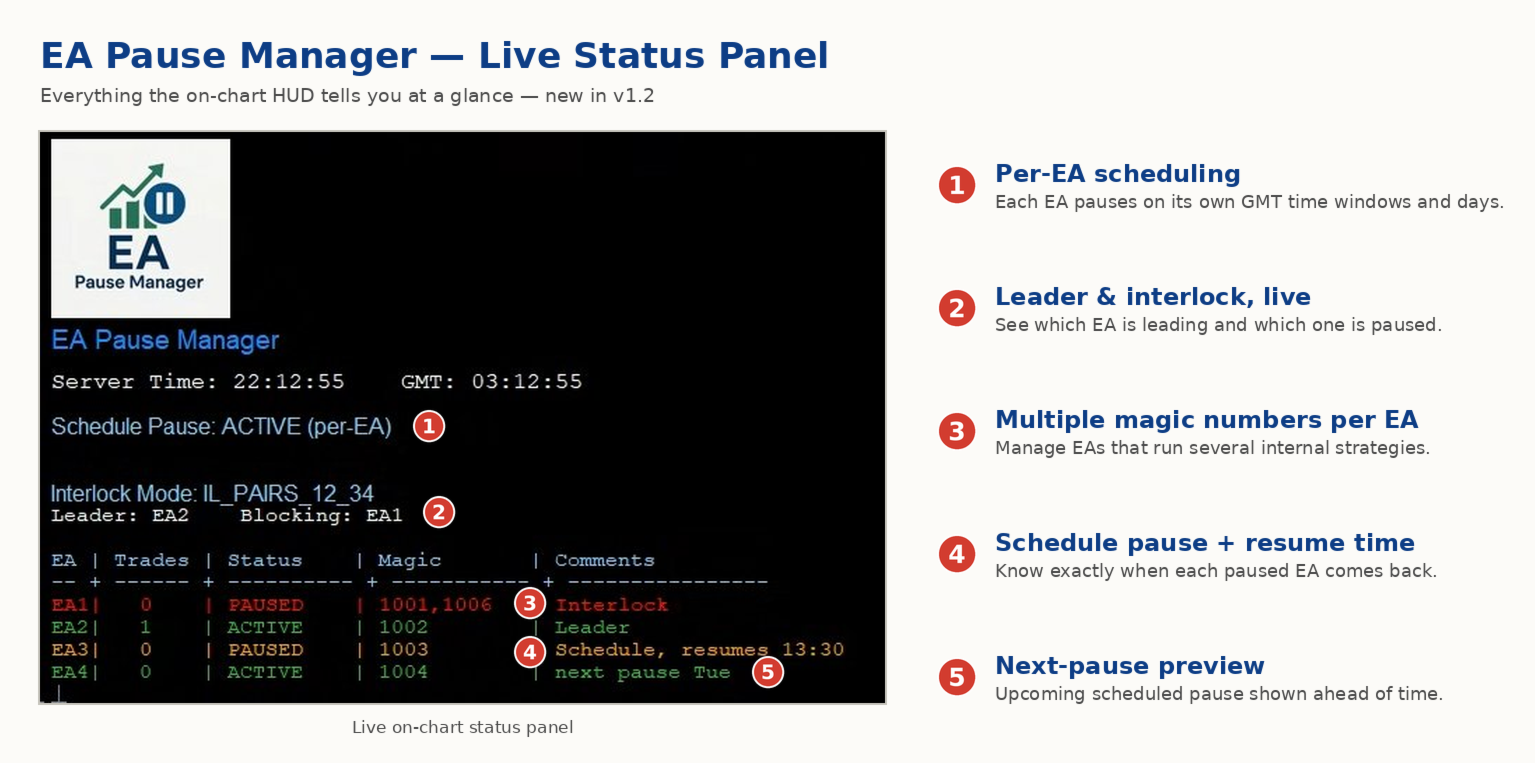
- A time schedule you define — now configurable per EA. For example, you can run one EA during the day session and another EA overnight.
- Optionally cleans up after simultaneous openings by closing the orphaned position of the paused EA.
- Interlock logic is triggered by executed market positions and, optionally, by pending orders such as Buy Stop, Sell Stop, Buy Limit and Sell Limit.
Why It Matters
- Protects your capital: helps avoid accidental extra orders.
- Reduces drawdown risk: your EAs do not fight each other.
- Works automatically: once configured, the pause/resume logic runs without manual intervention.
Important
- EA Pause Manager reacts to executed market positions and, optionally, to pending orders.
- Pending-order support is optional: a pending order can act as an interlock trigger, and pending orders from an EA paused by interlock can be cancelled automatically. This is useful for grid, breakout and straddle-style EAs.
- Optional conflict closing: if two EAs open trades almost at the same time, the orphaned position of the paused EA can be closed automatically. This option is OFF by default and requires a hedging account.
- For best results, configure EA Pause Manager while your EAs have no open positions or pending orders.
- Schedules use GMT.
- EAs are identified by Magic Number. Comment is used only as an optional label for organization.
Works With Pause Manager Indicator (Free)
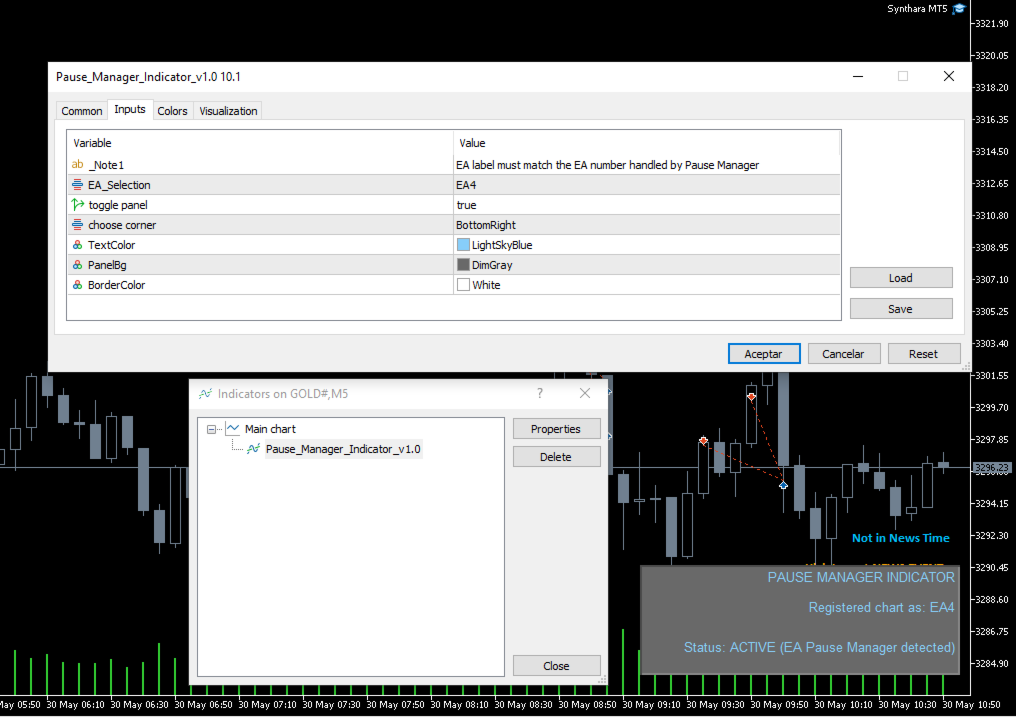
- Attach this free indicator to every chart with an EA you want to manage using EA Pause Manager.
- Up to 4 EAs can be managed per EA Pause Manager instance.
- Pause Manager Indicator is required for correct operation.
- Download and install Pause Manager Indicator from MQL5 Market > Indicators.
1. Key Features
- Leader-follower pause: the first EA that opens a trade becomes the leader, and the linked EAs wait.
- Fast event-driven reaction: competing EAs are paused almost instantly after a trade is detected.
- Flexible per-EA schedules: each EA can have its own pause windows, multiple windows and specific days in GMT. This is ideal for session rotation.
- Legacy single-window schedule mode is still available.
- Multiple Magic Numbers per EA: manage EAs that run several internal strategies by using comma-separated Magic Numbers.
- Pending-order support: optionally use pending orders as interlock triggers.
- Auto-cancel pending orders: optionally cancel the pending orders of an EA paused by interlock.
- Optional conflict closing: close the orphaned position of a paused EA when two EAs open almost at the same time. This requires a hedging account.
- Up to 4 EAs per instance.
- Instant alerts: receive push notifications on your mobile device.
- Light and safe: pure MQL5, no DLLs, and MQL5 VPS compatible.
2. Unique Benefits
- Combines EA-to-EA control and time scheduling in one tool.
- Per-EA schedules allow your robots to rotate by session instead of all pausing together.
- Supports pending-order and grid-style EAs, not only direct-market EAs.
- Only pauses the EAs you choose — your other robots keep working.
- Core pause/resume logic works on MT5 accounts. The optional conflict-closing feature requires a hedging account.
3. Input Parameters
Group 1 - EA Identification
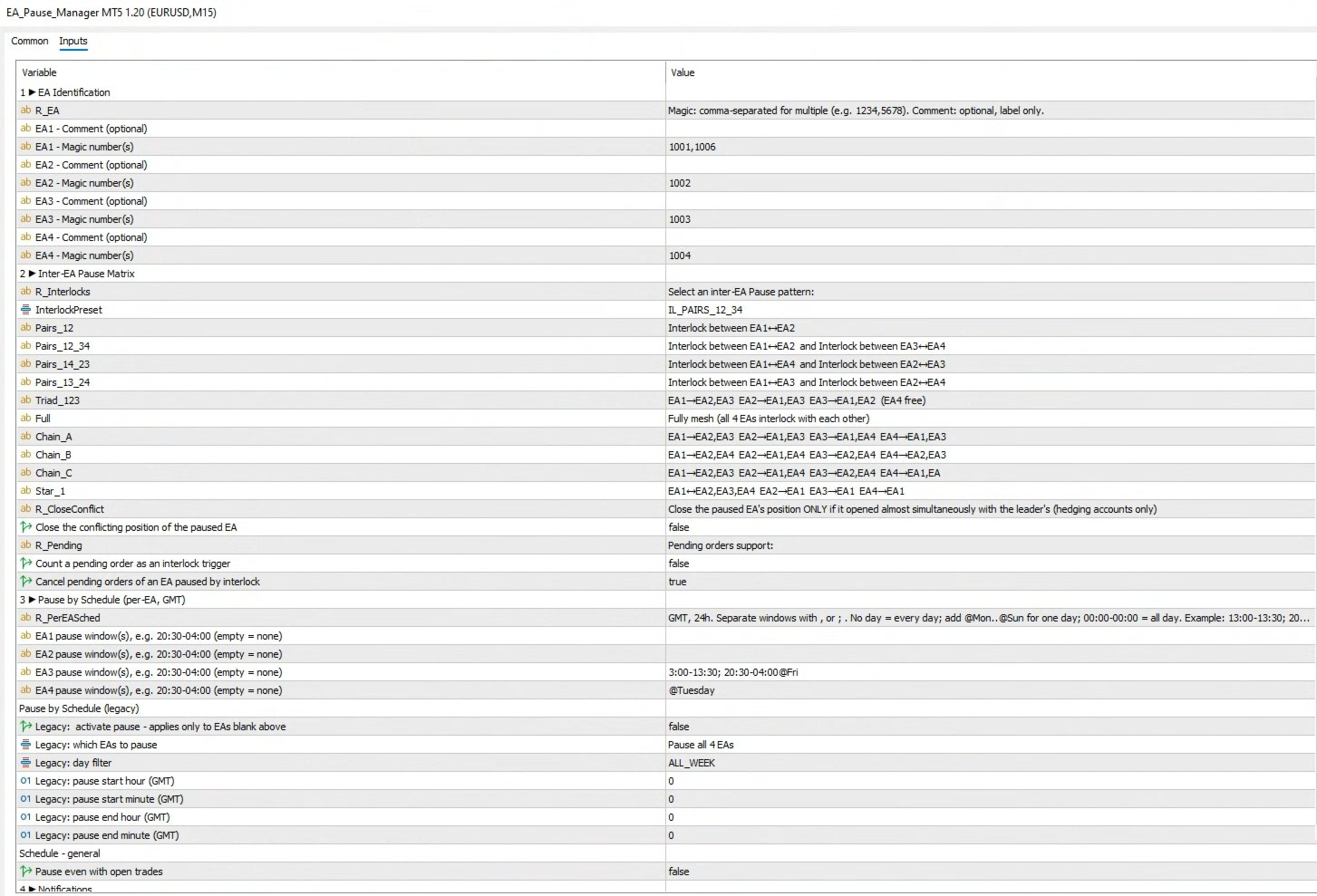
- MAGIC_EA1 - Magic number(s) of EA #1. Separate multiple Magic Numbers with commas, for example: 1234 or 1234,5678.
- COMMENT_EA1 - Optional label for EA #1. This is for organization only and does not affect detection.
- MAGIC_EA2 - Magic number(s) of EA #2.
- COMMENT_EA2 - Optional label for EA #2.
- MAGIC_EA3 - Magic number(s) of EA #3.
- COMMENT_EA3 - Optional label for EA #3.
- MAGIC_EA4 - Magic number(s) of EA #4.
- COMMENT_EA4 - Optional label for EA #4.
Inter-EA Pause Matrix - Preset Reference
- IL_NONE - Interlocking disabled. All EAs trade freely without mutual restrictions.
- IL_PAIRS_12 - Single pair lock: EA1 and EA2 block each other. EA3 and EA4 remain independent.
- IL_PAIRS_12_34 - Dual-pair lock:
- EA1 blocks EA2, and EA2 blocks EA1.
- EA3 blocks EA4, and EA4 blocks EA3.
- IL_PAIRS_14_23 - Dual-pair lock:
- EA1 blocks EA4, and EA4 blocks EA1.
- EA2 blocks EA3, and EA3 blocks EA2.
- IL_PAIRS_13_24 - Dual-pair lock:
- EA1 blocks EA3, and EA3 blocks EA1.
- EA2 blocks EA4, and EA4 blocks EA2.
- IL_TRIAD_123 - Three-way mesh: EA1, EA2 and EA3 interlock with each other. EA4 trades freely.
- IL_FULL - Complete mesh: every EA interlocks with the other three. This is the maximum protection mode and the most restrictive preset.
- IL_CHAIN_A - Chain pattern A:
- EA1 interlocks with EA2 and EA3.
- EA2 interlocks with EA1 and EA3.
- EA3 interlocks with EA1 and EA4.
- EA4 interlocks with EA1 and EA3.
- IL_CHAIN_B - Chain pattern B:
- EA1 interlocks with EA2 and EA4.
- EA2 interlocks with EA1 and EA4.
- EA3 interlocks with EA2 and EA4.
- EA4 interlocks with EA2 and EA3.
- IL_CHAIN_C - Chain pattern C:
- EA1 interlocks with EA2 and EA3.
- EA2 interlocks with EA1 and EA4.
- EA3 interlocks with EA2 and EA4.
- EA4 interlocks with EA1 and EA3.
- IL_STAR_1 - Star hub on EA1: EA1 interlocks with EA2, EA3 and EA4. The other EAs interlock only with EA1, not among themselves.
Pending Orders
- UsePendingOrdersAsTrigger - Count a pending order as an interlock trigger. OFF by default.
- CancelFollowerPendings - Cancel the pending orders of an EA paused by interlock. ON by default. This does not generate trading cost and only affects EAs that use pending orders.
Conflict Position Closing
- CloseConflictPositions - Close the orphaned position of a paused EA opened almost simultaneously with the leader. OFF by default and available for hedging accounts only. A push notification is sent whenever a position is closed by this feature.
Group 3 - Schedule Blocking
- PauseSchedule_EA1 - Pause window(s) for EA #1 in GMT. Example: 20:30-04:00. Leave empty if no pause schedule is required. Multiple windows can be separated by commas or semicolons. Optional day filters can be added with @Mon, @Tue, @Wed, @Thu, @Fri, @Sat or @Sun.
- PauseSchedule_EA2 - Pause window(s) for EA #2 in GMT.
- PauseSchedule_EA3 - Pause window(s) for EA #3 in GMT.
- PauseSchedule_EA4 - Pause window(s) for EA #4 in GMT.
Legacy Single-Window Schedule
The legacy single-window schedule is used only when a per-EA schedule window is empty.
- BlockBySchedule - Master switch for the legacy time-based pause.
- ScheduleEASelection - Selects which EAs the legacy schedule affects.
- ScheduleDay - Legacy day filter: All, Monday, Tuesday, Wednesday, Thursday, Friday, Saturday or Sunday.
- BlockStartHourGMT / BlockStartMinuteGMT - Legacy schedule start time in GMT.
- BlockEndHourGMT / BlockEndMinuteGMT - Legacy schedule end time in GMT.
- PauseEvenWithOrders - Keeps the schedule pause active even if positions are open.
Group 4 - Notifications
- SendPushNotifications - Enables push alerts to the MetaTrader 5 mobile app.
Ready to protect your capital?
Put EA Pause Manager to work today and manage your multi-EA portfolio with smarter risk control.
Send a message after purchase to receive the updated manual.












































Works like magic. I had to use it after a massive grid resulted in blowing 16k loss due to late opening of trades on Friday. I wish i had EA Pause manager before to save the rainy day but finally this will not happen. David is incredibly helpful and supported. He has put together a guide that is useful, for anyone who says setup is not working that is clearly due to lack of reading guide or asking for steps because it works fine for me.