

Engineering Trading Discipline into Code (Part 8): Building a Setup Confirmation and Trade Authorization Layer in MQL5
 1 283
1 283
 2
2

Contents
- Introduction
- Designing the Discipline Model
- MQL5 Implementation
- Building the CDisciplineLayer Class
- The CDisciplineGuardian Enforcement Module
- Creating the CDisciplinePanel Dashboard
- Integrating the Layer into an Expert Advisor
- Outcomes
- Conclusion
Introduction
Most trading systems focus on generating signals, yet very few control when those signals are actually permitted to execute. A setup may appear on the chart long before it becomes valid, and it may remain visible after its trading window has expired. In practice, this causes premature entries and stale trades. It can also allow interference from other Expert Advisors or manual actions that bypass strategy rules.
What is missing is a dedicated authorization layer between signal generation and execution. Such a layer must track setup status, apply session and expiry rules, and react when violations occur.
In this article, we build that framework in MQL5 using CDisciplineLayer, CDisciplineGuardian, and CDisciplinePanel, together with an example Expert Advisor that shows how the framework fits into an existing strategy.
Designing the Discipline Model
A recurring challenge in automated trading is distinguishing between identifying an opportunity and knowing when to act on it. Traders rarely fail because they cannot recognize a setup; they fail because they act prematurely or continue trading after the opportunity has expired.
To illustrate the idea, consider the double-top example shown below. Although the pattern suggests a potential bearish reversal, the setup is not immediately tradable. It first requires confirmation, such as a breakout and retest. Any position opened before that confirmation remains inside the unconfirmed setup zone and should not be traded.
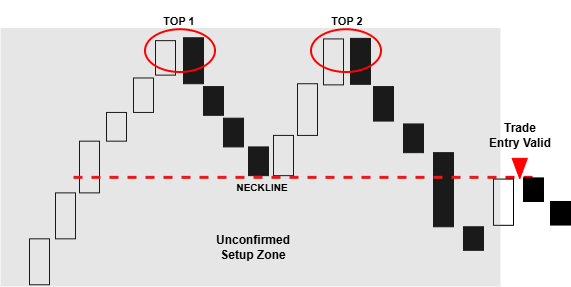
The same problem can occur in automated environments. A trader may enter early, or another Expert Advisor may open positions while the monitored setup is still forming. Without a control layer, execution can occur even though the setup has not yet reached a valid trading state.
The discipline model therefore has one purpose: trading is allowed only after confirmation and only while the setup remains valid. If confirmation has not occurred, trading is denied. If the setup has expired, trading is denied.
The model is implemented across three files:
- DisciplineLayer.mqh
- DisciplineGuardian.mqh
- DisciplinePanel.mqh
Defining the Setup Lifecycle
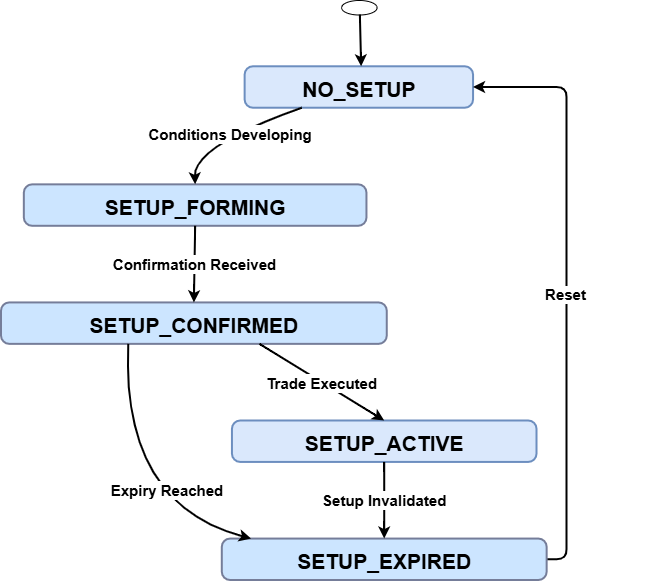
A setup is not simply either valid or invalid. It moves through a sequence of states that describe its current stage in the trading process.
| State | Meaning |
|---|---|
| NO_SETUP | No opportunity exists. |
| SETUP_FORMING | Conditions are developing, but confirmation has not yet occurred. |
| SETUP_CONFIRMED | The setup has satisfied the validation rules. |
| SETUP_ACTIVE | The setup remains tradable. |
| SETUP_EXPIRED | The setup is no longer valid for execution. |
This lifecycle is defined in DisciplineLayer.mqh. It prevents the strategy from treating every visible pattern as an executable trade. A setup that is still forming should not be traded, and a setup that has already expired should not be chased. By separating these stages, the framework keeps execution tied to the actual state of the setup.
Defining Trade Authorization Rules
Once the lifecycle is clear, the next step is to define the conditions that must be satisfied before trading is allowed.
A setup is considered tradable only when the following conditions are met:
- the setup has been confirmed;
- the setup has not expired;
- the signal is still fresh;
- the current time falls within the permitted session; and
- no global trading lock is active.
| Rule | Purpose |
|---|---|
| Setup confirmation | Prevents premature entries |
| Expiry control | Prevents late entries |
| Signal freshness | Prevents stale signals |
| Session filter | Restricts trading hours |
| Global lock | Suspends trading after violations |
These checks are also handled in DisciplineLayer.mqh, through the CanTrade() function. This gives the authorization layer a single responsibility: decide whether the setup is still allowed to trade.
Defining Enforcement Requirements
Authorization alone is not enough. The framework also defines how violations are handled when trading occurs outside the allowed conditions.
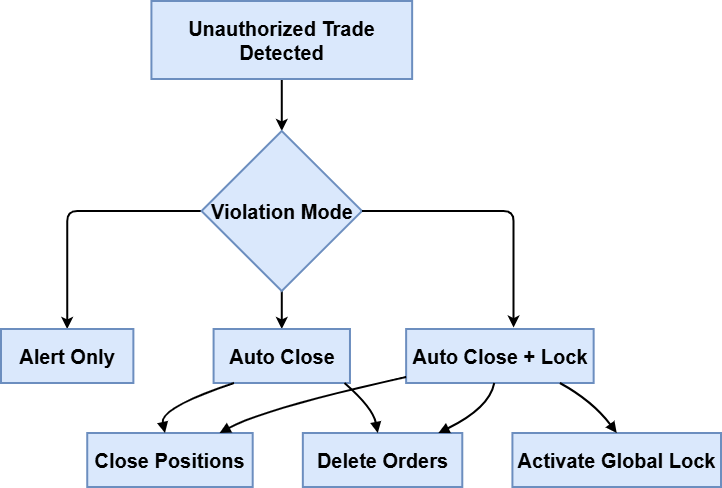
The guardian supports three responses:
| Response | Action |
|---|---|
| Alert | Notify the user |
| Auto-close | Remove unauthorized positions and orders |
| Auto-close + Lock | Remove the violation and disable further trading |
This logic is implemented in DisciplineGuardian.mqh. Depending on the selected mode, the system can only report the violation, remove the exposure, or stop trading entirely after a breach.
Defining Monitoring Requirements
The final part of the model is visibility. The user should be able to see the current discipline state without opening the code or checking the terminal logs.
The framework should expose:- current setup state;
- trade permission status;
- remaining setup lifetime;
- signal freshness status;
- session status; and
- guardian mode.
MQL5 Implementation
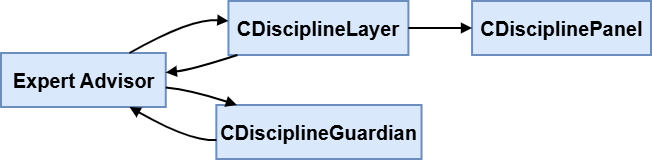
This section translates the discipline model into MQL5 code. We implement the authorization layer, the enforcement module, the dashboard, and then connect them to an example Expert Advisor.
Building the CDisciplineLayer ClassThe CDisciplineLayer class serves as the framework's central decision point for trade authorization. It evaluates setup state, freshness, expiry, session restrictions, and lock conditions before granting permission to trade.
1. Defining the Setup States
We begin by defining the setup states used to track the progress of a trading opportunity.
//--- Setup state enumeration
enum ENUM_SETUP_STATE
  {
   NO_SETUP = 0,          // No valid setup exists
   SETUP_FORMING,         // Conditions are developing
   SETUP_CONFIRMED,       // Setup fully validated
   SETUP_ACTIVE,          // Trade window open
   SETUP_EXPIRED          // Setup no longer valid
  };
These states provide the internal representation of the setup lifecycle defined earlier. The authorization layer uses them to determine whether trading should be permitted at any given time.
2. Creating the Class Structure
Next, we build the CDisciplineLayer class and declare the variables it needs.
//+------------------------------------------------------------------+
//| CDisciplineLayer: Trade authorization layer                      |
//+------------------------------------------------------------------+
class CDisciplineLayer
  {
private:
   ENUM_SETUP_STATE      m_state;
   datetime              m_setupDetectedTime;
   datetime              m_setupConfirmedTime;
   datetime              m_setupExpiryTime;

   //--- Session filter
   bool                  m_sessionFilterEnabled;
   int                   m_sessionStartHour;
   int                   m_sessionStartMinute;
   int                   m_sessionEndHour;
   int                   m_sessionEndMinute;

   //--- Signal freshness
   int                   m_signalFreshnessMinutes;

   //--- Global lock
   string                m_globalLockName;

   bool                  IsSetupConfirmed() const;
   bool                  IsTradeWindowValid() const;
   bool                  IsSessionAllowed() const;
   bool                  IsSignalFresh() const;

public:
                     CDisciplineLayer();
   bool                 Initialize();
   void                 SetSetupState(ENUM_SETUP_STATE state);
   void                 ConfirmSetup(datetime expiryTime);
   void                 ExpireSetup();
   bool                 CanTrade();

   void                 EnableSessionFilter(int startHour, int startMin, int endHour, int endMin);
   void                 DisableSessionFilter()                { m_sessionFilterEnabled = false; }
   void                 SetSignalFreshnessMinutes(int minutes) { m_signalFreshnessMinutes = minutes; }
   void                 SetGlobalLockName(string name)        { m_globalLockName = name; }

   //--- Getters for dashboard
   ENUM_SETUP_STATE     GetState()                      const { return m_state; }
   datetime             GetExpiryTime()                 const { return m_setupExpiryTime; }
   datetime             GetSetupConfirmedTime()         const { return m_setupConfirmedTime; }
   bool                 IsSessionFilterEnabled()        const { return m_sessionFilterEnabled; }
   void                 GetSessionTimes(int &sh, int &sm, int &eh, int &em) const;
   int                  GetSignalFreshnessMinutes()     const { return m_signalFreshnessMinutes; }
  };
The class stores the current setup state, the setup detection time, the confirmation time, and the expiry time. It also includes session filter settings, signal freshness settings, and the global lock name used to stop trading when required.
We also declare the helper functions that will later handle validation and trade approval. These include IsSetupConfirmed(), IsTradeWindowValid(), IsSessionAllowed(), IsSignalFresh(), and CanTrade().
3. Initializing the Class
After defining the class structure, we implement the constructor.
//+------------------------------------------------------------------+
//| Constructor                                                      |
//+------------------------------------------------------------------+
CDisciplineLayer::CDisciplineLayer()
  {
   m_state = NO_SETUP;
   m_setupDetectedTime = 0;
   m_setupConfirmedTime = 0;
   m_setupExpiryTime = 0;
   m_sessionFilterEnabled = false;
   m_sessionStartHour = 0;
   m_sessionStartMinute = 0;
   m_sessionEndHour   = 23;
   m_sessionEndMinute   = 59;
   m_signalFreshnessMinutes = 0;
   m_globalLockName = "DISC_GLOBAL_LOCK";
  }
The constructor establishes default values for all lifecycle, session, freshness, and lock settings, ensuring consistent behavior before any trading rules are applied.
4. Resetting Runtime State with Initialize()
We also provide the Initialize() function to reset the class when needed.
//+------------------------------------------------------------------+
//| Initializes runtime variables                                    |
//+------------------------------------------------------------------+
bool CDisciplineLayer::Initialize()
  {
   m_state = NO_SETUP;
   m_setupDetectedTime = 0;
   m_setupConfirmedTime = 0;
   m_setupExpiryTime = 0;
   return true;
  }
This function clears the current setup information and returns the state back to NO_SETUP. It gives us a simple way to reinitialize the discipline layer without recreating the object.
5. Configuring the Session Filter
To support time-based trading control, we implement EnableSessionFilter() and GetSessionTimes().
//+------------------------------------------------------------------+
//| Enables session filter with given start and end times            |
//+------------------------------------------------------------------+
void CDisciplineLayer::EnableSessionFilter(int startHour, int startMin, int endHour, int endMin)
  {
   m_sessionFilterEnabled = true;
   m_sessionStartHour = startHour;
   m_sessionStartMinute = startMin;
   m_sessionEndHour = endHour;
   m_sessionEndMinute = endMin;
  }

//+------------------------------------------------------------------+
//| Returns session start/end times                                  |
//+------------------------------------------------------------------+
void CDisciplineLayer::GetSessionTimes(int &sh, int &sm, int &eh, int &em) const
  {
   sh = m_sessionStartHour;
   sm = m_sessionStartMinute;
   eh = m_sessionEndHour;
   em = m_sessionEndMinute;
  }
EnableSessionFilter() turns on session filtering and stores the configured start and end times. GetSessionTimes() returns those values when they are needed by other parts of the EA.
The session parameters are stored here and later evaluated by IsSessionAllowed().
6. Checking Whether Trading Is Allowed by Session
Once the session filter has been configured, we implement IsSessionAllowed().
//+------------------------------------------------------------------+
//| Checks if current time is inside the allowed session             |
//+------------------------------------------------------------------+
bool CDisciplineLayer::IsSessionAllowed() const
  {
   if(!m_sessionFilterEnabled)
      return true;
   MqlDateTime tm;
   TimeCurrent(tm);
   int cur = tm.hour * 60 + tm.min;
   int start = m_sessionStartHour * 60 + m_sessionStartMinute;
   int end   = m_sessionEndHour   * 60 + m_sessionEndMinute;
   if(start <= end)
      return (cur >= start && cur <= end);
   else
      return (cur >= start || cur <= end);
  }
This function evaluates whether the current server time falls within the permitted trading session, with support for sessions that cross midnight.
7. Checking Signal Freshness
Next, we implement IsSignalFresh().
//+------------------------------------------------------------------+
//| Checks if the confirmed setup is still "fresh"                   |
//+------------------------------------------------------------------+
bool CDisciplineLayer::IsSignalFresh() const
  {
   if(m_signalFreshnessMinutes <= 0 || m_setupConfirmedTime == 0)
      return true;
   return (TimeCurrent() - m_setupConfirmedTime) <= m_signalFreshnessMinutes * 60;
  }
This function checks whether the confirmed setup is still within the allowed freshness period. If too much time has passed since confirmation, the signal is considered stale and is rejected.
This helps us avoid entering trades long after the original setup has become outdated.
8. Confirming the Setup State
We then implement IsSetupConfirmed().
//+------------------------------------------------------------------+
//| Returns true if the setup is in CONFIRMED or ACTIVE state        |
//+------------------------------------------------------------------+
bool CDisciplineLayer::IsSetupConfirmed() const
  {
   return (m_state == SETUP_CONFIRMED || m_state == SETUP_ACTIVE);
  }
This function verifies that the setup is in either the confirmed or active state. If the setup is still forming, missing, or already expired, the function returns false.
9. Checking the Trade Window
The next function is IsTradeWindowValid().
//+------------------------------------------------------------------+
//| Checks that the expiry time has not passed                       |
//+------------------------------------------------------------------+
bool CDisciplineLayer::IsTradeWindowValid() const
  {
   if(m_setupExpiryTime == 0)
      return true;
   return TimeCurrent() <= m_setupExpiryTime;
  }
This function verifies that the setup has not passed its expiry time. If no expiry has been defined, the setup remains valid. Otherwise, the current server time must still be within the allowed window.
The setup remains tradable until the expiry time is reached.
10. Building the Main Authorization Function
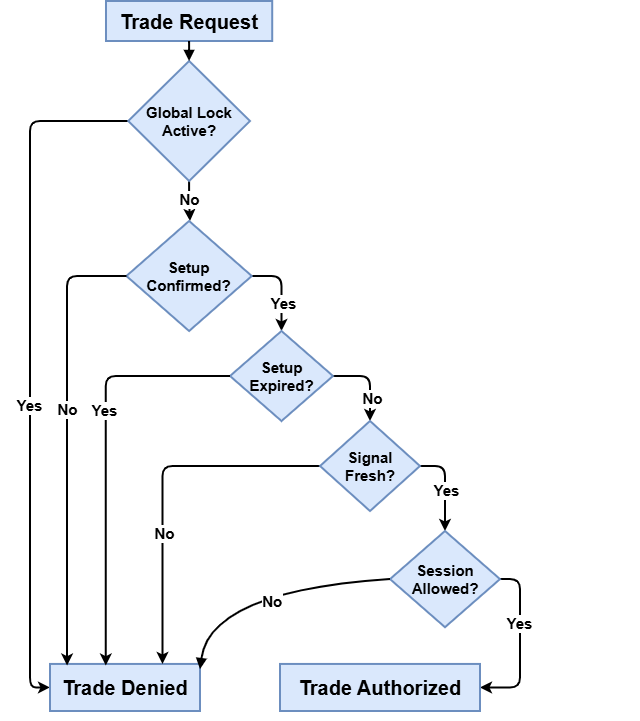
The heart of the class is CanTrade().
//+------------------------------------------------------------------+
//| Master authorization function                                    |
//+------------------------------------------------------------------+
bool CDisciplineLayer::CanTrade()
  {
//--- Global lock check
   if(GlobalVariableGet(m_globalLockName) > 0.5)
      return false;
//--- Setup must be confirmed
   if(!IsSetupConfirmed())
      return false;
//--- Expiry window
   if(!IsTradeWindowValid())
     {
      if(m_state != SETUP_EXPIRED)
         ExpireSetup();
      return false;
     }
//--- Signal freshness
   if(!IsSignalFresh())
      return false;
//--- Session filter
   if(!IsSessionAllowed())
      return false;
   return true;
  }
This function implements the authorization model defined earlier. Every trade request must pass all checks before execution is permitted; any single failure rejects the trade. CanTrade() thus serves as a single control point for all discipline rules.
11. Managing Setup State Changes
The last part of the class handles setup transitions through SetSetupState(), ConfirmSetup(), and ExpireSetup().
SetSetupState() updates the current state and clears old timing values when the setup is no longer valid. ConfirmSetup() records the confirmation time, stores the expiry time, and moves the setup into the confirmed state. ExpireSetup() marks the setup as expired and removes the active expiry window.
These functions keep the setup lifecycle controlled and make sure outdated setups do not remain active in the system.
//+------------------------------------------------------------------+
//| Manually sets the state                                          |
//+------------------------------------------------------------------+
void CDisciplineLayer::SetSetupState(ENUM_SETUP_STATE state)
  {
   m_state = state;
   if(state == NO_SETUP || state == SETUP_EXPIRED)
     {
      m_setupConfirmedTime = 0;
      m_setupExpiryTime = 0;
     }
   else
      if(state == SETUP_FORMING && m_setupDetectedTime == 0)
         m_setupDetectedTime = TimeCurrent();
  }

//+------------------------------------------------------------------+
//| Called by strategy when a valid setup is confirmed               |
//+------------------------------------------------------------------+
void CDisciplineLayer::ConfirmSetup(datetime expiryTime)
  {
   m_setupConfirmedTime = TimeCurrent();
   m_setupExpiryTime = expiryTime;
   m_state = SETUP_CONFIRMED;
  }

//+------------------------------------------------------------------+
//| Expires the current setup                                        |
//+------------------------------------------------------------------+
void CDisciplineLayer::ExpireSetup()
  {
   m_state = SETUP_EXPIRED;
   m_setupExpiryTime = 0;
  }
The CDisciplineGuardian Enforcement Module
Next, we implement the CDisciplineGuardian module, which enforces discipline rules whenever violations occur.
1. Defining the Violation Modes
The guardian supports three enforcement modes:
- Alert only mode
- Auto-close mode
- Auto-close and lock mode
//+------------------------------------------------------------------+
//| Violation handling modes                                         |
//+------------------------------------------------------------------+
enum ENUM_VIOLATION_MODE
  {
   MODE_ALERT_ONLY,
   MODE_AUTO_CLOSE,
   MODE_AUTO_CLOSE_LOCK
  };
These modes provide graduated enforcement: alert-only reports violations, auto-close removes unauthorized positions and pending orders, and auto-close-lock adds a global trading lock to prevent further activity.
This gives us a flexible enforcement model that can be configured based on how strict we want the discipline system to behave.
2. Creating the CDisciplineGuardian Structure
The guardian maintains three pieces of information: the lock prefix, the enforcement mode, and whether monitoring is currently enabled.
//+------------------------------------------------------------------+
//| CDisciplineGuardian: Discipline enforcement engine               |
//+------------------------------------------------------------------+
class CDisciplineGuardian
  {
private:
   string               m_globalLockPrefix;
   ENUM_VIOLATION_MODE  m_violationMode;
   bool                 m_enabled;

   void                 ClosePosition(ulong ticket);
   void                 DeleteOrder(ulong ticket);
   void                 ActivateGlobalLock();

public:
                     CDisciplineGuardian();

   void                 SetGlobalLockPrefix(string prefix)
     { m_globalLockPrefix = prefix; }

   void                 SetViolationMode(ENUM_VIOLATION_MODE mode)
     { m_violationMode = mode; }

   void                 Enable()
     { m_enabled = true; }

   void                 Disable()
     { m_enabled = false; }

   void                 Enforce(bool isTradingAllowed);
  };
The class stores the global lock prefix, the selected violation mode, and an enabled flag that allows the guardian to be switched on or off when required.
We also declare the helper functions that will carry out the enforcement work. These include ClosePosition(), DeleteOrder(), and ActivateGlobalLock().
3. Initializing the Guardian
The constructor applies sensible defaults so the guardian is ready to use immediately.
//+------------------------------------------------------------------+
//| Constructor                                                      |
//+------------------------------------------------------------------+
CDisciplineGuardian::CDisciplineGuardian()
  {
   m_globalLockPrefix = "DISC_";
   m_violationMode = MODE_AUTO_CLOSE;
   m_enabled = true;
  }
The constructor sets a default global lock prefix, assigns the default enforcement mode, and enables the guardian by default.
This gives the module a starting point before any custom configuration is applied.
4. Closing Unauthorized Positions
The first enforcement helper is ClosePosition().
//+------------------------------------------------------------------+
//| Closes an unauthorised position                                  |
//+------------------------------------------------------------------+
void CDisciplineGuardian::ClosePosition(ulong ticket)
  {
   if(!PositionSelectByTicket(ticket))
      return;

   MqlTradeRequest req = {};
   MqlTradeResult  res = {};

   req.action    = TRADE_ACTION_DEAL;
   req.symbol    = PositionGetString(POSITION_SYMBOL);
   req.volume    = PositionGetDouble(POSITION_VOLUME);
   req.type      = (PositionGetInteger(POSITION_TYPE) == POSITION_TYPE_BUY)
                   ? ORDER_TYPE_SELL
                   : ORDER_TYPE_BUY;
   req.position  = ticket;
   req.deviation = 10;
   req.magic     = 0;

   if(OrderSend(req,res))
      Print("[GUARDIAN] Closed unauthorised position #",ticket);
   else
      Print("[GUARDIAN] Failed to close position #",
            ticket,
            " error ",
            GetLastError());
  }
This function is used when the guardian needs to close an open position that is no longer allowed. It selects the position by ticket, builds the trade request, and sends a close order in the opposite direction of the current position.
If the order is sent successfully, the guardian logs a confirmation message. If the close fails, it logs the error so the problem can be traced.
5. Deleting Unauthorized Pending Orders
The next helper is DeleteOrder().
//+------------------------------------------------------------------+
//| Deletes an unauthorized pending order                            |
//+------------------------------------------------------------------+
void CDisciplineGuardian::DeleteOrder(ulong ticket)
  {
   if(!OrderSelect(ticket))
      return;

   MqlTradeRequest req = {};
   MqlTradeResult  res = {};

   req.action = TRADE_ACTION_REMOVE;
   req.order  = ticket;

   if(OrderSend(req,res))
      Print("[GUARDIAN] Deleted unauthorised pending order #",ticket);
   else
      Print("[GUARDIAN] Failed to delete order #",
            ticket,
            " error ",
            GetLastError());
  }
This function handles pending orders that are no longer permitted. It selects the order by ticket, builds a removal request, and sends the delete instruction to the trade server.
This keeps the system clean by removing pending entries that should not remain active once trading is restricted.
6. Activating the Global Lock
The guardian also includes ActivateGlobalLock().
//+------------------------------------------------------------------+
//| Activates the global trading lock                                |
//+------------------------------------------------------------------+
void CDisciplineGuardian::ActivateGlobalLock()
  {
   string lockName = m_globalLockPrefix + "GLOBAL_LOCK";

   GlobalVariableSet(lockName,1.0);

   Print("[GUARDIAN] Trading lock activated (",
         lockName,
         " = 1). Manual removal required.");
  }
This function creates a terminal global variable using the configured prefix and sets it to one. That global variable is then used as the trading lock signal.
By doing this, the guardian can force a terminal-wide stop after a serious violation, making the lock visible to any other module that checks the same global variable.
7. Enforcing the Discipline Rules
The main control function is Enforce(). It receives the authorization decision from the discipline layer. When trading is allowed, no action is taken. If trading is denied, the guardian scans open positions and pending orders and applies the selected response: alert, close, or close-and-lock.
//+------------------------------------------------------------------+
//| Enforces discipline rules on positions and orders                |
//+------------------------------------------------------------------+
void CDisciplineGuardian::Enforce(bool isTradingAllowed)
  {
   if(!m_enabled)
      return;

   if(isTradingAllowed)
      return;

//--- Process open positions
   for(int i = PositionsTotal() - 1; i >= 0; i--)
     {
      ulong ticket = PositionGetTicket(i);

      if(ticket == 0)
         continue;

      switch(m_violationMode)
        {
         case MODE_ALERT_ONLY:
            Print("[GUARDIAN] Alert: Position #",
                  ticket,
                  " not allowed");
            break;

         case MODE_AUTO_CLOSE:
            ClosePosition(ticket);
            break;

         case MODE_AUTO_CLOSE_LOCK:
            ClosePosition(ticket);
            ActivateGlobalLock();
            break;
        }
     }

//--- Process pending orders
   for(int i = OrdersTotal() - 1; i >= 0; i--)
     {
      ulong ticket = OrderGetTicket(i);

      if(ticket == 0)
         continue;

      switch(m_violationMode)
        {
         case MODE_ALERT_ONLY:
            Print("[GUARDIAN] Alert: Pending order #",
                  ticket,
                  " not allowed");
            break;

         case MODE_AUTO_CLOSE:
            DeleteOrder(ticket);
            break;

         case MODE_AUTO_CLOSE_LOCK:
            DeleteOrder(ticket);
            ActivateGlobalLock();
            break;
        }
     }
  }
This is where authorization becomes enforcement.
Creating the CDisciplinePanel Dashboard
With the discipline layer and guardian module in place, we now build the CDisciplinePanel class to show their status on the chart. It displays the current setup state, trade authorization status, expiry, session, and guardian mode in real time.
1. Defining the Panel Structure
We begin by declaring the CDisciplinePanel class and the variables it needs. The class stores the panel prefix, screen position, width, line spacing, font settings, background color, text color, and visibility flag. These variables control how the dashboard is drawn and where it appears on the chart.
//+------------------------------------------------------------------+
//|                                              DisciplinePanel.mqh |
//|                              Copyright 2026, Christian Benjamin. |
//|                          https://www.mql5.com/en/users/lynnchris |
//+------------------------------------------------------------------+
#property copyright "Copyright 2026, Christian Benjamin."
#property link      "https://www.mql5.com/en/users/lynnchris"
#property version   "2.0"

#include "Trade Authorization/DisciplineLayer.mqh"
#include "Trade Authorization/DisciplineGuardian.mqh"

//+------------------------------------------------------------------+
//| Discipline dashboard                                             |
//+------------------------------------------------------------------+
class CDisciplinePanel
  {
private:
   string               m_prefix;
   int                  m_cornerX;
   int                  m_cornerY;
   int                  m_width;
   int                  m_lineHeight;
   int                  m_fontSize;
   string               m_fontName;
   color                m_bgColor;
   color                m_textColor;
   bool                 m_visible;
   int                  m_lines;

   //--- Creates the panel background
   void                 CreateBackground();

   //--- Creates or updates a label
   void                 CreateLabel(string name,
                                    string text,
                                    int line,
                                    color clr,
                                    bool bold = true);

   //--- Deletes all panel objects
   void                 DeletePanel();

public:
   //--- Constructor
                     CDisciplinePanel();

   //--- Destructor
                    ~CDisciplinePanel();

   //--- Initializes panel settings
   void                 Init(string prefix,
                             int cornerX,
                             int cornerY,
                             int width,
                             color bg,
                             color txt);

   //--- Shows the panel
   void                 Show();

   //--- Hides the panel
   void                 Hide();

   //--- Updates the panel display
   void                 Update(CDisciplineLayer &discipline,
                               ENUM_VIOLATION_MODE mode);
  };
We also declare the helper functions that will handle panel creation and cleanup. CreateBackground() builds the panel frame, CreateLabel() draws each line of text, and DeletePanel() removes all objects created by the dashboard.
2. Initializing the Panel
Next, we implement the constructor. The constructor assigns default values for the panel layout and appearance. It sets the prefix used for chart objects, the panel position, width, line height, font size, font name, background color, text color, and visibility state.
//+------------------------------------------------------------------+
//| Constructor                                                      |
//+------------------------------------------------------------------+
CDisciplinePanel::CDisciplinePanel()
  {
   m_prefix     = "DispPanel_";
   m_cornerX    = 10;
   m_cornerY    = 30;
   m_width      = 380;
   m_lineHeight = 24;
   m_fontSize   = 13;
   m_fontName   = "Arial Bold";
   m_bgColor    = clrDarkSlateGray;
   m_textColor  = clrWhite;
   m_visible    = true;
   m_lines      = 0;
  }
This gives the dashboard a clean starting point before any custom configuration is applied.
//+------------------------------------------------------------------+
//| Initializes panel settings                                       |
//+------------------------------------------------------------------+
void CDisciplinePanel::Init(string prefix,
                            int cornerX,
                            int cornerY,
                            int width,
                            color bg,
                            color txt)
  {
   m_prefix    = prefix;
   m_cornerX   = cornerX;
   m_cornerY   = cornerY;
   m_width     = width;
   m_bgColor   = bg;
   m_textColor  = txt;
   m_visible   = true;
  }
We also provide the Init() function so the EA can change the panel position, size, and colors after construction. This keeps the dashboard flexible and easy to reuse on different charts.
3. Creating the Background
The CreateBackground() function is responsible for drawing the panel container.
//+------------------------------------------------------------------+
//| Creates the panel background                                     |
//+------------------------------------------------------------------+
void CDisciplinePanel::CreateBackground()
  {
   string objName = m_prefix + "bg";

   if(ObjectFind(0, objName) < 0)
     {
      ObjectCreate(0, objName, OBJ_RECTANGLE_LABEL, 0, 0, 0);
      ObjectSetInteger(0, objName, OBJPROP_CORNER, CORNER_LEFT_UPPER);
      ObjectSetInteger(0, objName, OBJPROP_XDISTANCE, m_cornerX);
      ObjectSetInteger(0, objName, OBJPROP_YDISTANCE, m_cornerY);
      ObjectSetInteger(0, objName, OBJPROP_BGCOLOR, m_bgColor);
      ObjectSetInteger(0, objName, OBJPROP_BORDER_TYPE, BORDER_RAISED);
      ObjectSetInteger(0, objName, OBJPROP_COLOR, clrSilver);
      ObjectSetInteger(0, objName, OBJPROP_WIDTH, 2);
      ObjectSetInteger(0, objName, OBJPROP_BACK, false);
      ObjectSetInteger(0, objName, OBJPROP_SELECTABLE, false);
      ObjectSetInteger(0, objName, OBJPROP_ZORDER, 1000);
     }

   ObjectSetInteger(0, objName, OBJPROP_XSIZE, m_width);
   ObjectSetInteger(0, objName, OBJPROP_YSIZE, (m_lines + 2) * m_lineHeight);
   ObjectSetInteger(0, objName, OBJPROP_BACK, false);
   ObjectSetInteger(0, objName, OBJPROP_ZORDER, 1000);
  }
This function creates a rectangle label on the chart if it does not already exist, then applies the panel position, width, height, background color, border style, and other display properties.
The background size adjusts dynamically based on the current number of display lines, ensuring the panel fits its content.
4. Creating the Text Labels
We then implement CreateLabel() to draw each line of text inside the panel.
//+------------------------------------------------------------------+
//| Creates or updates a label                                       |
//+------------------------------------------------------------------+
void CDisciplinePanel::CreateLabel(string name,
                                   string text,
                                   int line,
                                   color clr,
                                   bool bold)
  {
   string objName = m_prefix + name;

   if(ObjectFind(0, objName) < 0)
     {
      ObjectCreate(0, objName, OBJ_LABEL, 0, 0, 0);
      ObjectSetInteger(0, objName, OBJPROP_CORNER, CORNER_LEFT_UPPER);
      ObjectSetInteger(0, objName, OBJPROP_XDISTANCE, m_cornerX + 8);
      ObjectSetInteger(0, objName, OBJPROP_YDISTANCE, m_cornerY + 4 + line * m_lineHeight);
      ObjectSetInteger(0, objName, OBJPROP_FONTSIZE, m_fontSize);
      ObjectSetString(0, objName, OBJPROP_FONT, bold ? m_fontName : "Arial");
      ObjectSetInteger(0, objName, OBJPROP_BACK, false);
      ObjectSetInteger(0, objName, OBJPROP_SELECTABLE, false);
      ObjectSetInteger(0, objName, OBJPROP_ZORDER, 1001);
     }

   ObjectSetString(0, objName, OBJPROP_TEXT, text);
   ObjectSetInteger(0, objName, OBJPROP_COLOR, clr);
   ObjectSetInteger(0, objName, OBJPROP_BACK, false);
   ObjectSetInteger(0, objName, OBJPROP_ZORDER, 1001);
  }
This function creates a chart label for a given name and places it at the correct line position. It also applies the font size, font style, text color, and object settings required for display.
5. Cleaning Up the Panel
The DeletePanel() function removes all dashboard objects from the chart.
//+------------------------------------------------------------------+
//| Deletes all panel objects                                        |
//+------------------------------------------------------------------+
void CDisciplinePanel::DeletePanel()
  {
   for(int i = ObjectsTotal(0) - 1; i >= 0; i--)
     {
      string name = ObjectName(0, i);
      if(StringFind(name, m_prefix) == 0)
         ObjectDelete(0, name);
     }
  }
It scans through the chart objects and deletes every object that starts with the panel prefix. This ensures that old dashboard elements are cleared before the panel is redrawn.
6. Updating the Dashboard
The Update() rebuilds the dashboard using the current information from the discipline layer. It displays the setup state, authorization status, expiry information, freshness status, session information, and guardian mode before refreshing the chart display.
The complete implementation is shown below.
//+------------------------------------------------------------------+
//| Updates the panel display                                        |
//+------------------------------------------------------------------+
void CDisciplinePanel::Update(CDisciplineLayer &discipline,
                              ENUM_VIOLATION_MODE mode)
  {
   if(!m_visible)
      return;

   DeletePanel();

   int lineCount = 0;
   lineCount++;
   lineCount++;
   lineCount++;
   lineCount++;

   if(discipline.GetSignalFreshnessMinutes() > 0 &&
      discipline.GetSetupConfirmedTime() > 0)
      lineCount++;

   if(discipline.IsSessionFilterEnabled())
      lineCount++;

   lineCount++;

   m_lines = lineCount + 2;
   CreateBackground();

   int line = 0;

   CreateLabel("header", "DISCIPLINE DASHBOARD", line++, clrWhite, true);
   line++;

   ENUM_SETUP_STATE state = discipline.GetState();
   string stateStr = "";
   color stateColor = clrGray;

   switch(state)
     {
      case NO_SETUP:
         stateStr  = "[ ] NO SETUP";
         stateColor = clrGray;
         break;

      case SETUP_FORMING:
         stateStr  = "[~] FORMING";
         stateColor = clrYellow;
         break;

      case SETUP_CONFIRMED:
         stateStr  = "[+] CONFIRMED";
         stateColor = clrLimeGreen;
         break;

      case SETUP_ACTIVE:
         stateStr  = "[+] ACTIVE";
         stateColor = clrLimeGreen;
         break;

      case SETUP_EXPIRED:
         stateStr  = "[X] EXPIRED";
         stateColor = clrCrimson;
         break;

      default:
         stateStr  = "[?] UNKNOWN";
         stateColor = clrGray;
         break;
     }

   CreateLabel("state", "State: " + stateStr, line++, stateColor, true);

   bool canTrade = discipline.CanTrade();
   string tradeAllowed = canTrade ? "[ALLOWED]" : "[DENIED]";
   color tradeColor = canTrade ? clrLimeGreen : clrCrimson;
   CreateLabel("canTrade", "Trade Auth: " + tradeAllowed, line++, tradeColor, true);

   datetime expiry = discipline.GetExpiryTime();
   if(expiry > 0)
     {
      int remaining = (int)(expiry - TimeCurrent());
      string expiryStr = (remaining > 0)
                         ? TimeToString(expiry, TIME_MINUTES) + " (" + IntegerToString(remaining) + " sec)"
                         : "EXPIRED";
      CreateLabel("expiry", "Setup Expiry: " + expiryStr, line++, clrWhite, false);
     }
   else
      CreateLabel("expiry", "Setup Expiry: none", line++, clrWhite, false);

   int freshness = discipline.GetSignalFreshnessMinutes();
   if(freshness > 0 && discipline.GetSetupConfirmedTime() > 0)
     {
      int secondsOld = (int)(TimeCurrent() - discipline.GetSetupConfirmedTime());
      int remaining = freshness * 60 - secondsOld;
      string freshStr = (remaining > 0)
                        ? StringFormat("Signal fresh: %d sec", remaining)
                        : "Signal stale";
      CreateLabel("fresh", freshStr, line++, (remaining > 0) ? clrLightGreen : clrTomato, false);
     }

   if(discipline.IsSessionFilterEnabled())
     {
      int sh, sm, eh, em;
      discipline.GetSessionTimes(sh, sm, eh, em);

      MqlDateTime tm;
      TimeCurrent(tm);

      int cur = tm.hour * 60 + tm.min;
      int start = sh * 60 + sm;
      int end = eh * 60 + em;
      bool inSession = (start <= end) ? (cur >= start && cur <= end) : (cur >= start || cur <= end);

      string sessionStr = StringFormat("Session: %02d:%02d - %02d:%02d   %s",
                                       sh, sm, eh, em,
                                       inSession ? "ACTIVE" : "inactive");
      CreateLabel("session", sessionStr, line++, inSession ? clrLimeGreen : clrWhite, false);
     }

   string modeStr = "";
   switch(mode)
     {
      case MODE_ALERT_ONLY:
         modeStr = "ALERT ONLY";
         break;

      case MODE_AUTO_CLOSE:
         modeStr = "AUTO CLOSE";
         break;

      case MODE_AUTO_CLOSE_LOCK:
         modeStr = "AUTO CLOSE + LOCK";
         break;

      default:
         modeStr = "UNKNOWN";
         break;
     }

   CreateLabel("violation", "Guardian: " + modeStr, line++, clrCyan, true);

   m_lines = line;
   CreateBackground();
   ChartRedraw();
  }
Now, the CDisciplinePanel class gives us a clear visual dashboard for the discipline system. It presents setup state, trade authorization, expiry status, signal freshness, session control, and guardian mode in one place. This makes the behavior of the discipline framework easy to monitor directly from the chart.
Integrating the Layer into an Expert Advisor
The EA brings the three components together as a working example of the discipline model inside a strategy. It routes each setup through the authorization layer before execution is allowed.
1. Including the Discipline Modules
The EA starts by including the three modules used throughout the framework.
#include <Trade Authorization/DisciplineLayer.mqh>
#include <Trade Authorization/DisciplineGuardian.mqh>
#include <Trade Authorization/DisciplinePanel.mqh>
DisciplineLayer.mqh provides the authorization logic, DisciplineGuardian.mqh handles violations, and DisciplinePanel.mqh displays the current state on the chart.
2. Defining Inputs and Runtime Objects
The input parameters are grouped into discipline settings, guardian settings, strategy settings, and dashboard settings. This keeps the EA configuration clear and makes each part of the framework easy to adjust.
//+------------------------------------------------------------------+
//| Input parameters                                                 |
//+------------------------------------------------------------------+
input string   inp_Section1 = "Discipline Settings";
input int      inp_signalFreshnessMinutes = 15;
input bool     inp_useSessionFilter       = true;
input int      inp_sessionStartHour       = 8;
input int      inp_sessionStartMin        = 0;
input int      inp_sessionEndHour         = 17;
input int      inp_sessionEndMin          = 0;
input int      inp_setupExpirySeconds     = 1800;

input string   inp_Section2 = "Guardian Settings";
input ENUM_VIOLATION_MODE inp_violationMode = MODE_AUTO_CLOSE;

input string   inp_Section3 = "Strategy Settings";
input int      inp_fastMAPeriod          = 20;
input int      inp_slowMAPeriod          = 50;
input double   inp_lotSize               = 0.1;
input int      inp_magicNumber           = 123456;
input int      inp_formingDistancePoints  = 100;   // distance used to mark a setup as forming

input string   inp_Section4 = "Dashboard Settings";
input bool     inp_showDashboard = true;
input int      inp_dashboardX     = 10;
input int      inp_dashboardY     = 30;
The discipline settings control signal freshness, session filtering, and setup expiry. The guardian settings define how violations are handled. The strategy settings configure the SMA crossover logic, lot size, and magic number. The dashboard settings control whether the panel is shown and where it appears on the chart.
//+------------------------------------------------------------------+
//| Global objects and variables                                     |
//+------------------------------------------------------------------+
CDisciplineLayer     g_Discipline;
CDisciplineGuardian  g_Guardian;
CDisciplinePanel     g_Panel;

int                  g_fastMAHandle   = INVALID_HANDLE;
int                  g_slowMAHandle   = INVALID_HANDLE;
bool                 g_setupConfirmed = false;
int                  g_setupDirection  = 0;   // 1 = BUY, -1 = SELL
datetime             g_lastBarTime    = 0;
The EA also creates global instances of CDisciplineLayer, CDisciplineGuardian, and CDisciplinePanel, along with the moving average handles and the local setup flags used during execution.
3. Helper Functions for Trade Management
Before the EA reaches its initialization and execution stages, several helper functions are defined to handle common trading tasks. These functions keep the main trading logic clean by separating position management and broker-specific execution details from the strategy itself.
The first helper checks whether the current symbol already has an open position.
//+------------------------------------------------------------------+
//| Helper: detect whether there is an open position on this symbol  |
//+------------------------------------------------------------------+
bool HasOpenPosition()
  {
   return PositionSelect(_Symbol);
  }
This provides a simple reusable check that can be called whenever the EA needs to determine whether a position already exists on the current symbol.
The next helper determines which order filling mode is supported by the broker for the current symbol.
//+------------------------------------------------------------------+
//| Helper: choose a filling mode allowed by the symbol              |
//+------------------------------------------------------------------+
ENUM_ORDER_TYPE_FILLING GetSymbolFillingType(const string symbol)
  {
   long filling = SymbolInfoInteger(symbol, SYMBOL_FILLING_MODE);

   if((filling & SYMBOL_FILLING_FOK) != 0)
      return ORDER_FILLING_FOK;

   if((filling & SYMBOL_FILLING_IOC) != 0)
      return ORDER_FILLING_IOC;

   return ORDER_FILLING_RETURN;
  }
Different brokers and symbols may support different filling modes. By detecting the supported mode before submitting an order, the EA improves compatibility across trading environments.
The final helper closes any existing position on the current symbol.
//+------------------------------------------------------------------+
//| Helper: close an open position on the current symbol             |
//+------------------------------------------------------------------+
bool CloseCurrentPosition()
  {
   if(!PositionSelect(_Symbol))
      return true;

   long   posType = PositionGetInteger(POSITION_TYPE);
   double volume  = PositionGetDouble(POSITION_VOLUME);

   MqlTradeRequest req = {};
   MqlTradeResult  res = {};

   req.action       = TRADE_ACTION_DEAL;
   req.symbol       = _Symbol;
   req.volume       = volume;
   req.deviation    = 10;
   req.magic        = (ulong)inp_magicNumber;
   req.position     = (ulong)PositionGetInteger(POSITION_TICKET);
   req.type_filling = GetSymbolFillingType(_Symbol);

   if(posType == POSITION_TYPE_BUY)
     {
      req.type  = ORDER_TYPE_SELL;
      req.price = SymbolInfoDouble(_Symbol, SYMBOL_BID);
     }
   else
     {
      req.type  = ORDER_TYPE_BUY;
      req.price = SymbolInfoDouble(_Symbol, SYMBOL_ASK);
     }

   if(OrderSend(req, res) && (res.retcode == TRADE_RETCODE_DONE || res.retcode == TRADE_RETCODE_PLACED))
     {
      Print("[TRADE] Existing position closed. Ticket=", res.order);
      return true;
     }

   Print("[TRADE] Failed to close position. Error=", GetLastError(),
         " retcode=", res.retcode,
         " comment=", res.comment);
   return false;
  }
When a new signal appears in the opposite direction of an existing position, this helper allows the EA to close the current trade before opening a new one. The function automatically determines the opposite order type, uses the symbol's supported filling mode, and reports the result through the journal.
4. Initializing the Framework
Inside OnInit(), the discipline layer is configured first. Signal freshness is set, the session filter is enabled or disabled depending on input, and the global lock name is assigned before the layer is initialized.
The guardian is then configured with its global lock prefix and violation mode. If the dashboard is enabled, the panel is initialized and shown on the chart.
//+------------------------------------------------------------------+
//| Expert initialization function                                   |
//+------------------------------------------------------------------+
int OnInit()
  {
   g_Discipline.SetSignalFreshnessMinutes(inp_signalFreshnessMinutes);

   if(inp_useSessionFilter)
      g_Discipline.EnableSessionFilter(inp_sessionStartHour, inp_sessionStartMin,
                                       inp_sessionEndHour, inp_sessionEndMin);
   else
      g_Discipline.DisableSessionFilter();

   g_Discipline.SetGlobalLockName("DISC_GLOBAL_LOCK");
   g_Discipline.Initialize();

   g_Guardian.SetGlobalLockPrefix("DISC_");
   g_Guardian.SetViolationMode(inp_violationMode);
   g_Guardian.Enable();

   if(inp_showDashboard)
     {
      g_Panel.Init("Disp", inp_dashboardX, inp_dashboardY, 380, clrDarkSlateGray, clrWhite);
      g_Panel.Show();
     }

   g_fastMAHandle = iMA(_Symbol, PERIOD_CURRENT, inp_fastMAPeriod, 0, MODE_SMA, PRICE_CLOSE);
   g_slowMAHandle = iMA(_Symbol, PERIOD_CURRENT, inp_slowMAPeriod, 0, MODE_SMA, PRICE_CLOSE);

   if(g_fastMAHandle == INVALID_HANDLE || g_slowMAHandle == INVALID_HANDLE)
      return INIT_FAILED;

   EventSetTimer(2);
   return INIT_SUCCEEDED;
  }
After that, the EA creates the two SMA handles used by the trading logic. In this example, the fast period is 20 and the slow period is 50. If either handle fails, initialization stops immediately.
A timer is also started so the guardian and dashboard continue working even when no new tick arrives.
5. Cleaning Up Resources
When the EA is removed, OnDeinit() releases the indicator handles, stops the timer, and hides the dashboard. That keeps the chart clean and avoids leaving objects behind after the EA is unloaded.
//+------------------------------------------------------------------+
//| Expert deinitialization function                                 |
//+------------------------------------------------------------------+
void OnDeinit(const int reason)
  {
   if(g_fastMAHandle != INVALID_HANDLE)
      IndicatorRelease(g_fastMAHandle);

   if(g_slowMAHandle != INVALID_HANDLE)
      IndicatorRelease(g_slowMAHandle);

   EventKillTimer();
   g_Panel.Hide();
  }
6. Running the Enforcement Layer
OnTimer() keeps the discipline framework active. The EA asks g_Discipline.CanTrade() whether trading is currently authorized. The result is passed directly to g_Guardian.Enforce(), allowing the guardian to apply the configured response whenever trading is not permitted.
//+------------------------------------------------------------------+
//| Timer function                                                   |
//+------------------------------------------------------------------+
void OnTimer()
  {
   bool canTrade = g_Discipline.CanTrade();

   if(!canTrade)
      Print("[DISCIPLINE] Trade denied.");

   g_Guardian.Enforce(canTrade);

   if(inp_showDashboard)
      g_Panel.Update(g_Discipline, inp_violationMode);
  }
If the dashboard is enabled, it is updated at the same time so the current discipline state remains visible on the chart.
7. Detecting Trading Setups
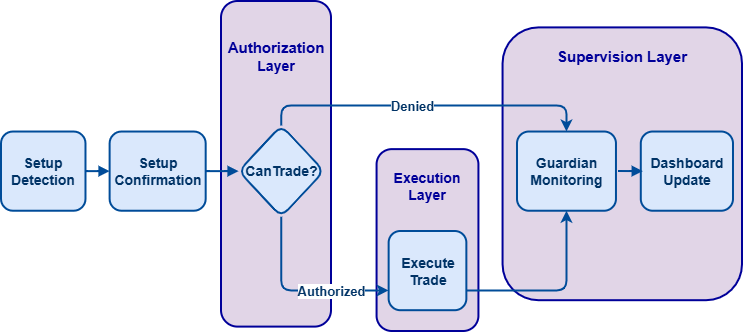
The trading logic is based on a closed-bar SMA crossover. The EA processes only once per new candle, which prevents repeated evaluations on the same bar.
It then reads the latest closed values of the fast and slow SMAs using CopyBuffer(). From those values, it determines whether a bullish crossover or bearish crossover has occurred.
//+------------------------------------------------------------------+
//| Tick function                                                    |
//+------------------------------------------------------------------+
void OnTick()
  {
   datetime currentBarTime = iTime(_Symbol, PERIOD_CURRENT, 0);
   if(currentBarTime == g_lastBarTime)
      return;

   g_lastBarTime = currentBarTime;

   double fastMA[3];
   double slowMA[3];

   if(CopyBuffer(g_fastMAHandle, 0, 1, 3, fastMA) < 3 ||
      CopyBuffer(g_slowMAHandle, 0, 1, 3, slowMA) < 3)
      return;

   bool bullishCross =
      (fastMA[0] > slowMA[0] &&
       fastMA[1] <= slowMA[1]);

   bool bearishCross =
      (fastMA[0] < slowMA[0] &&
       fastMA[1] >= slowMA[1]);

   bool setupForming =
      (MathAbs(fastMA[0] - slowMA[0]) / _Point <= inp_formingDistancePoints);

   if(setupForming && !bullishCross && !bearishCross)
      g_Discipline.SetSetupState(SETUP_FORMING);

   if(bullishCross)
     {
      datetime expiry = TimeCurrent() + inp_setupExpirySeconds;

      g_Discipline.ConfirmSetup(expiry);
      g_Discipline.SetSetupState(SETUP_CONFIRMED);

      g_setupConfirmed = true;
      g_setupDirection = 1;

      Print("[SETUP] Bullish SMA crossover confirmed. Valid until ",
            TimeToString(expiry, TIME_DATE | TIME_MINUTES));
     }
   else if(bearishCross)
     {
      datetime expiry = TimeCurrent() + inp_setupExpirySeconds;

      g_Discipline.ConfirmSetup(expiry);
      g_Discipline.SetSetupState(SETUP_CONFIRMED);

      g_setupConfirmed = true;
      g_setupDirection = -1;

      Print("[SETUP] Bearish SMA crossover confirmed. Valid until ",
            TimeToString(expiry, TIME_DATE | TIME_MINUTES));
     }
   else if(!setupForming && !g_setupConfirmed)
     {
      g_Discipline.SetSetupState(NO_SETUP);
     }

   if(g_setupConfirmed && g_Discipline.CanTrade())
     {
      if(ExecuteTrade(g_setupDirection))
        {
         g_setupConfirmed = false;
         g_Discipline.SetSetupState(SETUP_ACTIVE);
        }
     }

   if(g_setupConfirmed && g_Discipline.GetExpiryTime() > 0 &&
      TimeCurrent() > g_Discipline.GetExpiryTime())
     {
      g_Discipline.ExpireSetup();
      g_setupConfirmed = false;
      g_setupDirection = 0;
     }
  }
When the moving averages move close to each other but have not crossed yet, the setup is marked as SETUP_FORMING. When a bullish or bearish crossover is confirmed, the setup moves to SETUP_CONFIRMED, and the expiry time is stored.
If the setup moves away from that condition and no trade is pending, the state can return to NO_SETUP. Once the trade is executed, the setup is marked as SETUP_ACTIVE. If the expiry time is reached, the setup is moved to SETUP_EXPIRED.
This gives the example EA a simple but complete lifecycle that matches the model defined earlier in the article.
8. Authorizing Trade Execution
A confirmed setup does not go straight into execution. Before the order is sent, the EA checks g_Discipline.CanTrade().
//+------------------------------------------------------------------+
//| Trade authorization check                                        |
//+------------------------------------------------------------------+
if(g_setupConfirmed && g_Discipline.CanTrade())
  {
   ExecuteTrade(g_setupDirection);
   g_setupConfirmed = false;
  }
Only when the setup is still confirmed, still fresh, still inside the permitted session, and not blocked by a global lock does the EA proceed. If the authorization fails, no trade is sent.
The local flag g_setupConfirmed is used together with the discipline layer so the EA only trades once for each valid setup.
9. Executing the Trade
The actual trade is handled by ExecuteTrade(int direction).
This function supports both directions:
- 1 for buy,
- -1 for sell.
If a position already exists on the symbol, the function first checks whether it is aligned with the new signal. If it is already in the same direction, no new trade is opened. If it is in the opposite direction, the existing position is closed first before the new order is sent.
//+------------------------------------------------------------------+
//| Executes a market order                                          |
//+------------------------------------------------------------------+
bool ExecuteTrade(int direction)
  {
   if(direction != 1 && direction != -1)
      return false;

   if(PositionSelect(_Symbol))
     {
      long currentType = PositionGetInteger(POSITION_TYPE);

      if((direction == 1 && currentType == POSITION_TYPE_BUY) ||
         (direction == -1 && currentType == POSITION_TYPE_SELL))
        {
         Print("[TRADE] Position already aligned with signal. No new entry.");
         return false;
        }

      if(!CloseCurrentPosition())
         return false;
     }

   MqlTradeRequest req = {};
   MqlTradeResult  res = {};

   req.action       = TRADE_ACTION_DEAL;
   req.symbol       = _Symbol;
   req.volume       = inp_lotSize;
   req.deviation    = 10;
   req.magic        = (ulong)inp_magicNumber;
   req.comment      = "Discipline SMA Crossover";
   req.type_time    = ORDER_TIME_GTC;
   req.type_filling = GetSymbolFillingType(_Symbol);

   if(direction > 0)
     {
      req.type  = ORDER_TYPE_BUY;
      req.price = SymbolInfoDouble(_Symbol, SYMBOL_ASK);
     }
   else
     {
      req.type  = ORDER_TYPE_SELL;
      req.price = SymbolInfoDouble(_Symbol, SYMBOL_BID);
     }

   bool sent = OrderSend(req, res);

   if(sent && (res.retcode == TRADE_RETCODE_DONE || res.retcode == TRADE_RETCODE_PLACED))
     {
      Print("[TRADE] ", (direction > 0 ? "Buy" : "Sell"),
            " executed. Ticket=", res.order);
      return true;
     }

   Print("[TRADE] ", (direction > 0 ? "Buy" : "Sell"),
         " failed. Error=", GetLastError(),
         " retcode=", res.retcode,
         " comment=", res.comment);

   return false;
  }
The request uses the symbol's allowed filling mode and applies the configured lot size, magic number, and deviation settings, ensuring compatibility across different broker environments.
At this stage, the EA is fully connected to the discipline framework. The strategy detects the crossover, the discipline layer decides whether the setup is tradable, the guardian watches for violations, and the dashboard displays the current state in real time.
Outcomes
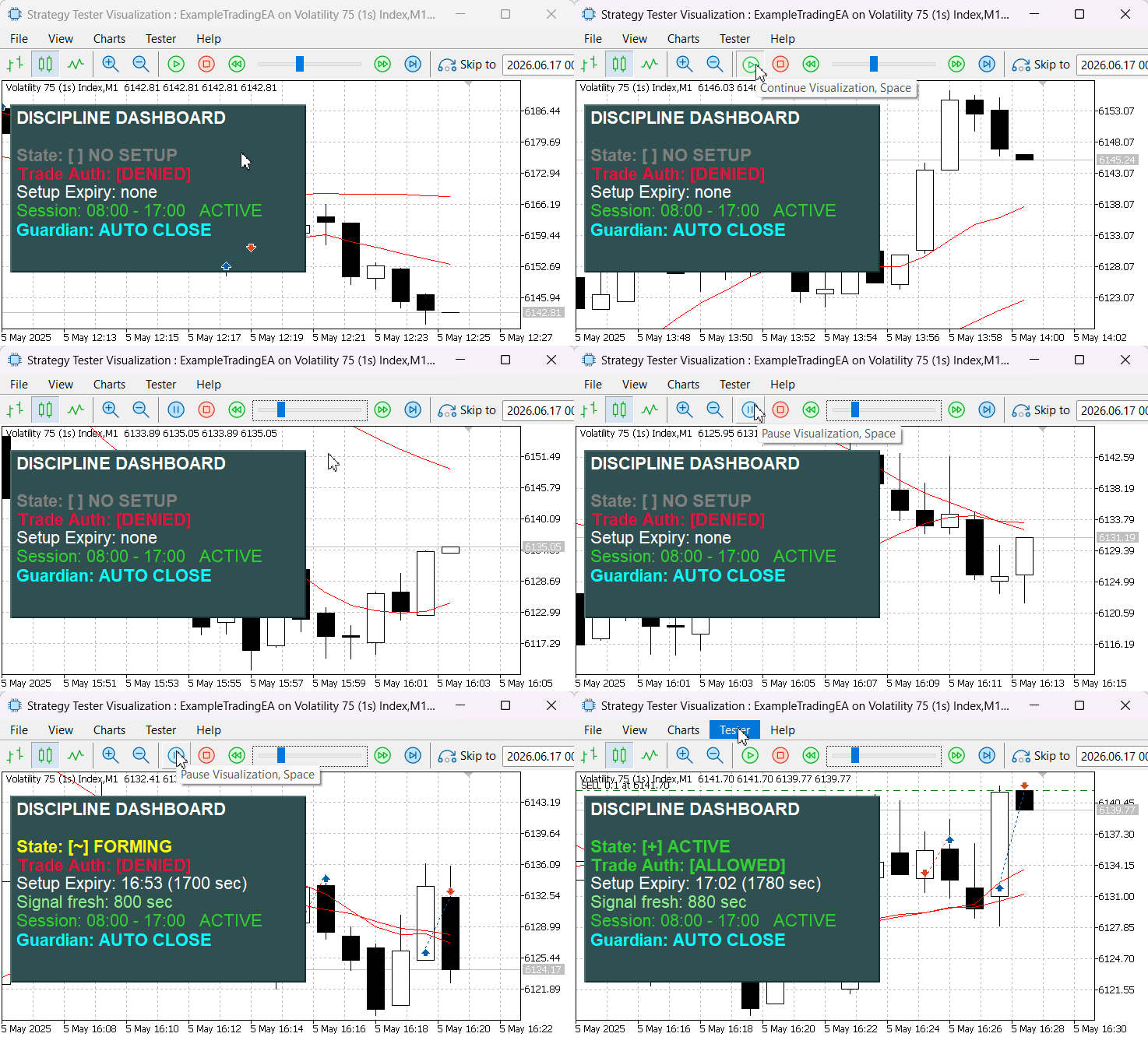
Testing shows the model performs as intended. The tester output below shows the Example Trading EA with the dashboard updating the setup state in real time. Trading is allowed only when the setup is confirmed and session rules are satisfied. As market conditions change, the panel shows transitions from forming to confirmed and then to expired.
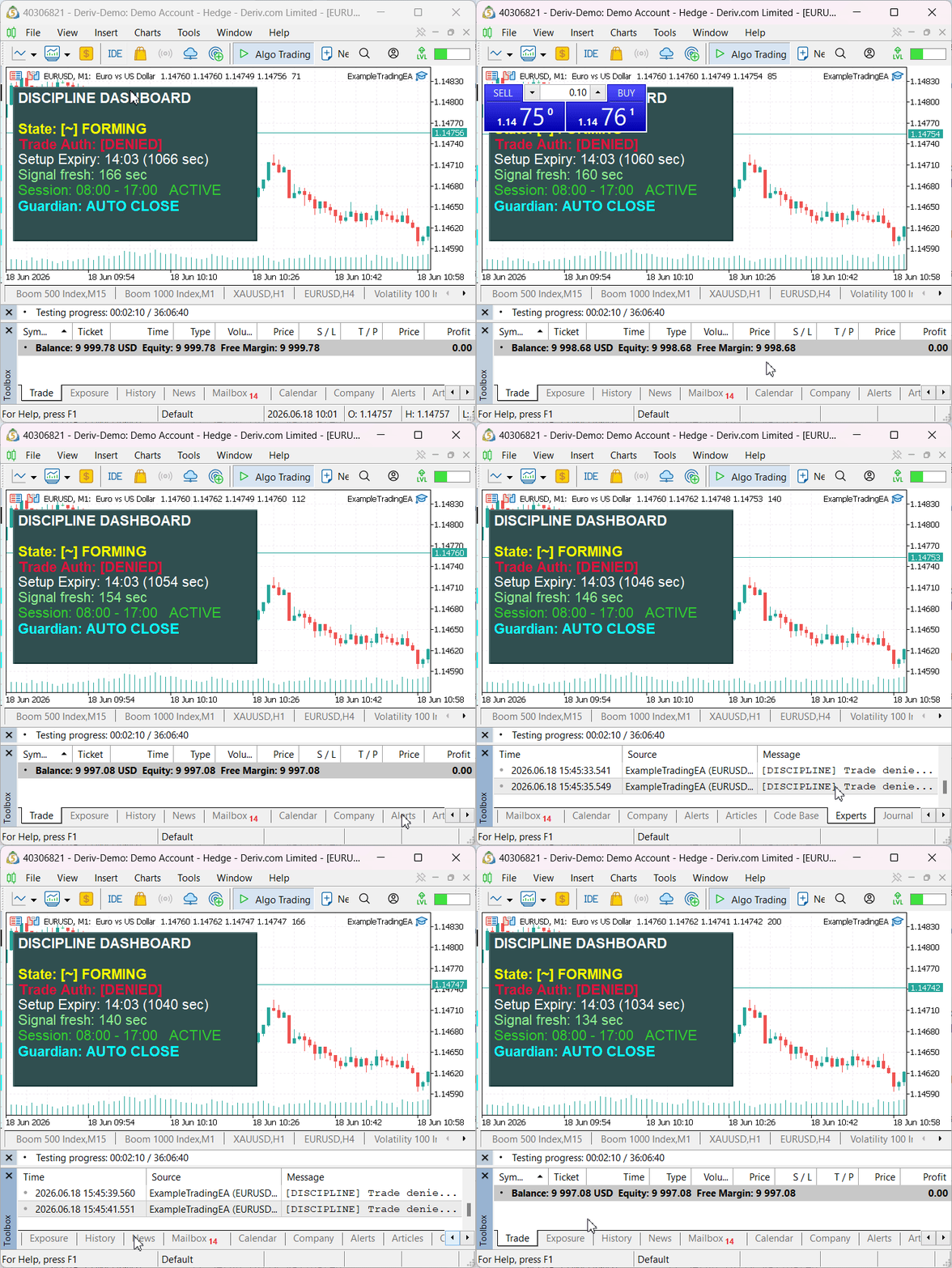
To verify enforcement behavior in real time, we intentionally opened manual trades while the setup was not authorized. As shown in the GIF below, the CDisciplineGuardian module detected these positions and automatically closed them shortly after they appeared. This demonstrates that the discipline framework is actively enforcing the setup rules at the account level, ensuring that positions cannot remain open when the monitored setup is unconfirmed, expired, outside the permitted session, or otherwise in violation of the authorization rules.
Conclusion
In this article, we addressed a common weakness in automated trading systems: the absence of a dedicated layer that controls when trading is actually permitted. Rather than relying on strategy logic alone, we introduced a framework that separates setup detection from trade authorization.
We implemented a setup lifecycle model inside CDisciplineLayer, allowing setups to progress through defined states while enforcing confirmation, expiry, freshness, session, and lock conditions through a single CanTrade() decision point. We then added the CDisciplineGuardian module to monitor account activity and react to violations through alerts, automatic position closure, order removal, and optional trading locks. To improve transparency, we built the CDisciplinePanel dashboard, which exposes the current discipline state directly on the chart.
We integrated the framework into a simple SMA crossover Expert Advisor to demonstrate how strategy signals can be routed through the authorization layer before execution. The result is a reusable discipline framework that attaches to virtually any trading system to control setup validity, enforce trading rules, and maintain execution discipline automatically.
Attachments
| File Name | Description |
|---|---|
| DisciplineLayer.mqh | Core trade authorization layer responsible for setup validation and permission checks. |
| DisciplineGuardian.mqh | Runtime enforcement module that handles violations and trading locks. |
| DisciplinePanel.mqh | Chart dashboard for monitoring the current discipline state. |
| ExampleTradingEA.mq5 | Example Expert Advisor demonstrating framework integration. |
Warning: All rights to these materials are reserved by MetaQuotes Ltd. Copying or reprinting of these materials in whole or in part is prohibited.
This article was written by a user of the site and reflects their personal views. MetaQuotes Ltd is not responsible for the accuracy of the information presented, nor for any consequences resulting from the use of the solutions, strategies or recommendations described.

 Developing a Neural Network Trading Robot Based on Mamba with Selective State Space Models
 Measuring What Matters (Part 1) : Portfolio Risk Decomposition in MQL5
 Automating Trading Strategies in MQL5 (Part 49): The Quasimodo (QM) Reversal Pattern
 Feature Engineering for ML (Part 8): Entropy Features in MQL5

- Free trading apps
- Over 8,000 signals for copying
- Economic news for exploring financial markets
You agree to website policy and terms of use
Using an authorisation system to categorise the validity of a trade can also improve testing since you can identify whether the conditions for entry and exits need to be redesigned or if the set-up itself is lucrative. Thank you for sharing this with us.
This is a brilliant mechanism to structurally enforce trading a strategy reliably.
Using an authorisation system to categorise the validity of a trade can also improve testing since you can identify whether the conditions for entry and exits need to be redesigned or if the set-up itself is lucrative. Thank you for sharing this with us.