

Heatmap Visualization of Intraday Return Patterns in MQL5 Using CCanvas
 1 333
1 333
 0
0

Introduction
Experienced traders often observe that certain instruments behave differently depending on the time of day and the day of the week. EURUSD tends to exhibit higher volatility during the London-New York overlap. XAUUSD frequently shows directional movement during Asian-session hours. These tendencies are recognizable to practitioners but rarely quantified systematically, because MetaTrader 5 provides no native tool for aggregating and visualizing return distributions across time dimensions simultaneously.
A heatmap solves this problem directly. The heatmap computes the average bar return for each hour-of-day and day-of-week over a configurable lookback period. It then maps these averages to a color-interpolated grid, turning thousands of data points into an interpretable two-dimensional view. A trader can identify at a glance which hour-day combinations have historically produced positive average returns and which have not — without claiming that this information predicts future behavior.
Bar Return Definition
The return of a single bar is defined as the percentage change from the previous close to the current close:
R_i = ( Close_i - Close_{i-1} ) / Close_{i-1} × 100
Percentage normalization is used rather than raw price differences because raw differences are instrument-dependent and non-comparable. A one-pip move on EURUSD and a one-pip move on XAUUSD carry entirely different economic significance. Percentage returns express both in the same unit, making the heatmap visually meaningful when compared across instruments.
Arithmetic averaging is used rather than geometric or log-return averaging. For small returns over short holding periods — individual bars — arithmetic and log-return averages converge, and arithmetic averaging is computationally simpler and more interpretable in a visualization context.
Two-Dimensional Aggregation
The aggregation matrix has dimensions 5 × 24, where rows index weekdays (Monday through Friday) and columns index hours of the day (0 through 23).
| Axis | Dimension | Values |
|---|---|---|
| Rows (Y) | 5 | Monday=0, Tuesday=1, Wednesday=2, Thursday=3, Friday=4 |
| Columns (X) | 24 | Hour 0 through Hour 23 |
For each historical bar, two values are extracted from its timestamp: the hour of day and the day of week. Weekend bars are discarded. The bar's percentage return is accumulated into the corresponding cell, and a sample counter for that cell is incremented. After the full historical scan, each cell's average return is computed by dividing the accumulated sum by the sample count.
The variable notation used throughout is:
| Symbol | Meaning |
|---|---|
| R_i | Bar return for bar i |
| H | Hour index (0–23) |
| D | Day index (0–4, Monday–Friday) |
| Sum(H,D) | Accumulated returns for cell (H,D) |
| Count(H,D) | Number of samples in cell (H,D) |
| Avg(H,D) | Mean return = Sum(H,D) / Count(H,D) |
Color Mapping
The color scale maps average return values to RGB colors using a red-to-green interpolation centered at zero.
| Color | Meaning |
|---|---|
| Dark Green | Strong positive average return |
| Light Green | Mild positive average return |
| Gray | Near-zero average return |
| Light Red | Mild negative average return |
| Dark Red | Strong negative average return |
The normalization divides each cell's average return by the maximum absolute return observed anywhere in the matrix. This relative approach ensures the full color range is always utilized regardless of whether the instrument has large or small absolute returns.
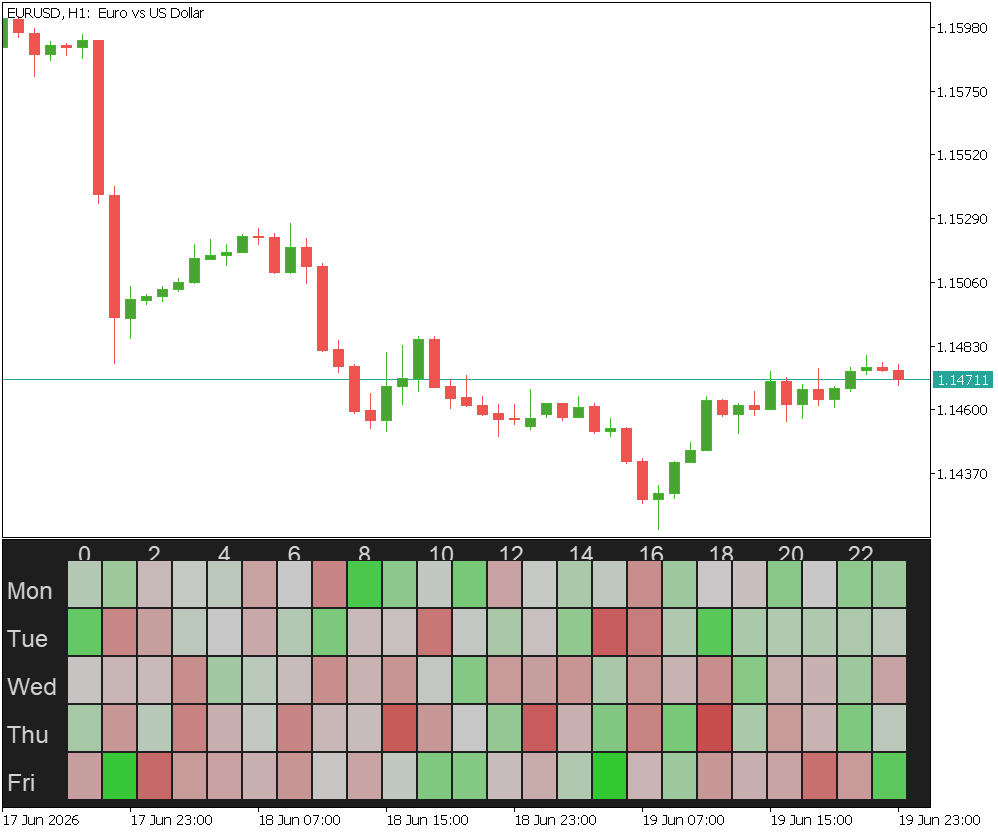
EURUSD H1 heatmap showing average return distribution across 5,000 historical bars. Green cells indicate hours and weekdays with historically positive average returns; red cells indicate negative. Color intensity reflects return magnitude relative to the strongest signal in the dataset.
Historical return averages are descriptive, not predictive. Markets are non-stationary: tendencies that produced a pattern in the lookback window may not persist. Structural events — central bank policy changes, market microstructure shifts — can invalidate historical patterns without warning.
The indicator does not perform statistical significance testing. A cell with an average return of +0.02% derived from 8 samples is not meaningfully different from zero. Cells with low sample counts should be interpreted cautiously. The visualization is an exploratory analytical tool, not a signal generator.
Computational Complexity
| Phase | Complexity | Notes |
|---|---|---|
| Historical bar scan | O(N) | N = number of lookback bars |
| Return accumulation | O(1) per bar | Direct matrix indexing |
| Average computation | O(120) | Fixed matrix size |
| Color interpolation | O(120) | Fixed matrix size |
| Canvas rendering | O(120) | Fixed matrix size |
The dominant cost is the historical scan, which executes once in OnCalculate() when the indicator first loads and again when a new bar closes. All rendering operates at the fixed cost O(120) regardless of how many bars were analyzed.
Expected Log Output
[ReturnHeatmap] Initialized — Lookback: 5000 bars
[ReturnHeatmap] Processed Bars    = 5000
[ReturnHeatmap] Max Avg Return    = 0.0700%
[ReturnHeatmap] Min Avg Return    = -0.0568%
[ReturnHeatmap] Max Abs Return    = 0.0700%
[ReturnHeatmap] Cells Rendered    = 120
[ReturnHeatmap] Canvas Updated Successfully
The 'Cells Rendered = 120' line confirms that every combination of weekday and hour contains at least one sample. On EURUSD H1, a 5,000-bar lookback covers roughly seven months of history. Under these conditions, each of the 120 cells typically has a meaningful sample size. On faster timeframes such as M1, the same lookback covers only a few days, leaving many cells empty and reducing the rendered cell count accordingly. Max Abs Return is used as the normalization denominator for the color scale. The strongest positive or negative cell is rendered with maximum saturation, and all other cells are scaled proportionally.
Code Listings and Architectural Breakdown
ReturnMatrix.mqh
CReturnMatrix is the central data structure of the indicator. It accumulates percentage bar returns into a 5×24 grid indexed by day-of-week and hour-of-day, and computes arithmetic averages per cell after the full historical scan completes. It has no awareness of disk, display, or color — it only manages numbers.
One important implementation note: the parameter name matrix cannot be used in recent versions of MQL5 because matrix was introduced as a built-in reserved keyword for mathematical matrix operations. All parameters referring to CReturnMatrix objects use the name ret_matrix throughout this implementation to avoid this conflict.
The file opens with its include guard and dimension constants:
//+------------------------------------------------------------------+
//|                                              ReturnMatrix.mqh    |
//|               Intraday Return Heatmap — Matrix Aggregation Layer |
//+------------------------------------------------------------------+
#ifndef RETURN_MATRIX_MQH
#define RETURN_MATRIX_MQH

//--- Matrix dimensions
#define HEATMAP_DAYS  5   // Monday through Friday
#define HEATMAP_HOURS 24  // Hours 0 through 23
HEATMAP_DAYS and HEATMAP_HOURS are defined as preprocessor constants rather than class members so that all other modules — HeatmapStatistics.mqh, HeatmapRenderer.mqh — can use them in their own loop bounds without depending on a CReturnMatrix instance.
The class declaration follows:
//+------------------------------------------------------------------+
//| CReturnMatrix                                                    |
//| Accumulates percentage bar returns into a 5x24 matrix indexed    |
//| by day-of-week (0=Monday..4=Friday) and hour-of-day (0..23).     |
//| Provides arithmetic average computation per cell after the       |
//| full historical scan is complete.                                |
//+------------------------------------------------------------------+
class CReturnMatrix
  {
private:
   double            m_sum[HEATMAP_DAYS][HEATMAP_HOURS];    // Accumulated returns
   int               m_count[HEATMAP_DAYS][HEATMAP_HOURS];  // Sample counts
   double            m_avg[HEATMAP_DAYS][HEATMAP_HOURS];    // Computed averages
   int               m_total_samples;                       // Valid bars processed

public:
                     CReturnMatrix(void);
                    ~CReturnMatrix(void);

   void              Reset(void);
   bool              Accumulate(int day_index, int hour_index, double ret);
   void              ComputeAverages(void);

   double            GetAverage(int day_index, int hour_index) const;
   int               GetCount(int day_index, int hour_index)   const;
   int               GetTotalSamples(void)                     const;
  };
Three parallel 5×24 arrays serve distinct roles. m_sum accumulates the raw sum of percentage returns contributed to each cell. m_count records how many bars have been accumulated into each cell. m_avg stores the computed arithmetic average, populated only after ComputeAverages() is called. m_total_samples tracks the global count of valid bars processed, used for the diagnostic log output.
//+------------------------------------------------------------------+
//| Constructor                                                      |
//+------------------------------------------------------------------+
CReturnMatrix::CReturnMatrix(void)
  {
   m_total_samples = 0;
   Reset();
  }

//+------------------------------------------------------------------+
//| Destructor                                                       |
//+------------------------------------------------------------------+
CReturnMatrix::~CReturnMatrix(void)
  {
  }
The constructor initializes m_total_samples and immediately calls Reset() to zero all array cells. The destructor is empty because all three arrays are fixed-size members allocated as part of the object itself — no heap memory is involved and no explicit release is needed. The total memory occupied by a CReturnMatrix instance is two double[5][24] arrays at 8 bytes each (1,920 bytes) plus one int[5][24] at 4 bytes (480 bytes), totaling approximately 2.4 KB.
//+------------------------------------------------------------------+
//| Clear all accumulators and counters                              |
//+------------------------------------------------------------------+
void CReturnMatrix::Reset(void)
  {
   m_total_samples = 0;

   for(int d = 0; d < HEATMAP_DAYS; d++)
     {
      for(int h = 0; h < HEATMAP_HOURS; h++)
        {
         m_sum[d][h]   = 0.0;
         m_count[d][h] = 0;
         m_avg[d][h]   = 0.0;
        }
     }
  }
Reset() zeroes all three arrays and the total sample counter in a single O(120) pass. It is called from the constructor and from BuildMatrix() in the main indicator file at the start of every recalculation cycle. This ensures that a second call — triggered by a new bar closing — does not accumulate on top of results from the previous scan.
//+------------------------------------------------------------------+
//| Accumulate one bar return into the correct cell                  |
//+------------------------------------------------------------------+
bool CReturnMatrix::Accumulate(int day_index, int hour_index, double ret)
  {
//--- validate cell indices before writing
   if(day_index < 0 || day_index >= HEATMAP_DAYS)
      return(false);
   if(hour_index < 0 || hour_index >= HEATMAP_HOURS)
      return(false);

//--- add return to accumulator and increment sample count
   m_sum[day_index][hour_index]   += ret;
   m_count[day_index][hour_index] += 1;
   m_total_samples++;

   return(true);
  }
Accumulate() is called once per valid historical bar. It validates both indices before writing to prevent out-of-range array access in the event that timestamp decomposition produces unexpected values. This bounds check is a second line of defense supplementing the weekend rejection performed in CTimeBucketAnalyzer. On a valid bar, the return is added to the cell's sum and both the cell counter and the global sample counter are incremented. The method has O(1) complexity — it performs a constant number of operations regardless of the matrix size.
//+------------------------------------------------------------------+
//| Compute average returns for all cells after the full scan        |
//+------------------------------------------------------------------+
void CReturnMatrix::ComputeAverages(void)
  {
   for(int d = 0; d < HEATMAP_DAYS; d++)
     {
      for(int h = 0; h < HEATMAP_HOURS; h++)
        {
         if(m_count[d][h] > 0)
            m_avg[d][h] = m_sum[d][h] / (double)m_count[d][h];
         else
            m_avg[d][h] = 0.0; // Neutral for cells with no samples
        }
     }
  }
ComputeAverages() performs the final division across all 120 cells in a single O(120) pass. This deferred computation strategy avoids performing thousands of redundant divisions during the scan — the averages are meaningless until all bars have been processed. Cells with zero sample counts receive an average of 0.0, which the color map renders as neutral gray.
//+------------------------------------------------------------------+
//| Return the computed average for a given cell                     |
//+------------------------------------------------------------------+
double CReturnMatrix::GetAverage(int day_index, int hour_index) const
  {
   if(day_index < 0 || day_index >= HEATMAP_DAYS)
      return(0.0);
   if(hour_index < 0 || hour_index >= HEATMAP_HOURS)
      return(0.0);
   return(m_avg[day_index][hour_index]);
  }

//+------------------------------------------------------------------+
//| Return the sample count for a given cell                         |
//+------------------------------------------------------------------+
int CReturnMatrix::GetCount(int day_index, int hour_index) const
  {
   if(day_index < 0 || day_index >= HEATMAP_DAYS)
      return(0);
   if(hour_index < 0 || hour_index >= HEATMAP_HOURS)
      return(0);
   return(m_count[day_index][hour_index]);
  }

//+------------------------------------------------------------------+
//| Return the total number of valid bars accumulated                |
//+------------------------------------------------------------------+
int CReturnMatrix::GetTotalSamples(void) const
  {
   return(m_total_samples);
  }

#endif // RETURN_MATRIX_MQH
Both accessors repeat the bounds check before returning, producing a safe neutral value on any out-of-range index. GetCount() is used by CHeatmapStatistics::Compute() to skip empty cells when computing summary statistics, and by CHeatmapRenderer::Render() implicitly through the average values. GetTotalSamples() returns the global bar count for the diagnostic log.
TimeBucketAnalyzer.mqh
CTimeBucketAnalyzer isolates all timestamp processing behind a static interface. Every method is static — timestamp decomposition is a pure function that depends only on its input and carries no state between calls. Instantiating the class is never necessary.
//+------------------------------------------------------------------+
//|                                         TimeBucketAnalyzer.mqh   |
//|               Intraday Return Heatmap — Time Decomposition Layer |
//+------------------------------------------------------------------+
#ifndef TIME_BUCKET_ANALYZER_MQH
#define TIME_BUCKET_ANALYZER_MQH

//+------------------------------------------------------------------+
//| CTimeBucketAnalyzer                                              |
//| Extracts the hour-of-day (0-23) and day-of-week index (0-4,      |
//| Monday=0 through Friday=4) from a bar timestamp.                 |
//| Weekend timestamps (Saturday and Sunday) are rejected.           |
//+------------------------------------------------------------------+
class CTimeBucketAnalyzer
  {
public:
                     CTimeBucketAnalyzer(void);
                    ~CTimeBucketAnalyzer(void);

   static bool       Decompose(datetime bar_time,
                               int &out_day_index,
                               int &out_hour_index);

   static bool       IsWeekend(datetime bar_time);
   static string     DayName(int day_index);
  };
Decompose() is the primary entry point called once per bar during the historical scan. IsWeekend() is a pre-filter called by Decompose() before any other processing. DayName() provides the three-character abbreviations used by the renderer to label the Y axis.
//+------------------------------------------------------------------+
//| Constructor                                                      |
//+------------------------------------------------------------------+
CTimeBucketAnalyzer::CTimeBucketAnalyzer(void)
  {
  }

//+------------------------------------------------------------------+
//| Destructor                                                       |
//+------------------------------------------------------------------+
CTimeBucketAnalyzer::~CTimeBucketAnalyzer(void)
  {
  }
Both are empty. The class holds no member data and allocates no resources. They are defined explicitly to comply with the common MetaQuotes convention that requires every class to declare its constructor and destructor.
//+------------------------------------------------------------------+
//| Return true if the timestamp falls on a weekend                  |
//+------------------------------------------------------------------+
bool CTimeBucketAnalyzer::IsWeekend(datetime bar_time)
  {
   MqlDateTime dt;
   TimeToStruct(bar_time, dt);
   return(dt.day_of_week == 0 || dt.day_of_week == 6); // Sunday=0, Saturday=6
  }
IsWeekend() uses TimeToStruct() to decompose the timestamp into an MqlDateTime struct and checks the day_of_week field against Sunday (0) and Saturday (6). The MQL4-era functions are not available in MQL5; TimeToStruct() is the preferred replacement. Some brokers include weekend candles in their history for certain instruments; rejecting them here prevents those bars from being accumulated into Monday or Friday cells through an incorrect day mapping.
//+------------------------------------------------------------------+
//| Decompose a timestamp into day and hour bucket indices           |
//+------------------------------------------------------------------+
bool CTimeBucketAnalyzer::Decompose(datetime bar_time,
                                    int &out_day_index,
                                    int &out_hour_index)
  {
   out_day_index  = -1;
   out_hour_index = -1;

//--- reject weekend bars before further processing
   if(IsWeekend(bar_time))
      return(false);

//--- decompose timestamp into calendar components
   MqlDateTime dt;
   TimeToStruct(bar_time, dt);

//--- extract hour of day directly from struct
   out_hour_index = dt.hour;

//--- day_of_week: Sunday=0, Monday=1 ... Saturday=6
   switch(dt.day_of_week)
     {
      case 1:
         out_day_index = 0;
         break; // Monday
      case 2:
         out_day_index = 1;
         break; // Tuesday
      case 3:
         out_day_index = 2;
         break; // Wednesday
      case 4:
         out_day_index = 3;
         break; // Thursday
      case 5:
         out_day_index = 4;
         break; // Friday
      default:
         return(false);
     }

   return(true);
  }
Decompose() initializes both output parameters to -1 before any processing. If the method returns false — due to a weekend bar or an unexpected day_of_week value — the caller receives index values that will fail the bounds check in CReturnMatrix::Accumulate(), providing a second layer of defense against data corruption.
The switch statement remaps remaps the day of week convention (Sunday=0, Monday=1, Saturday=6) to a zero-based Monday-first index. This remapping ensures that the matrix row for Monday corresponds to index 0, consistent with how the renderer labels the Y axis from top to bottom.
//+------------------------------------------------------------------+
//| Return the display name for a day index (0=Monday..4=Friday)     |
//+------------------------------------------------------------------+
string CTimeBucketAnalyzer::DayName(int day_index)
  {
   switch(day_index)
     {
      case 0:
         return("Monday");
      case 1:
         return("Tuesday");
      case 2:
         return("Wednesday");
      case 3:
         return("Thursday");
      case 4:
         return("Friday");
      default:
         return("Unknown");
     }
  }

#endif // TIME_BUCKET_ANALYZER_MQH
DayName() provides human-readable labels for the renderer's Y axis. The renderer calls StringSubstr(name, 0, 3) on the result to produce the three-character abbreviations Mon, Tue, Wed, Thu, Fri that fit within the 64-pixel label margin.
HeatmapColorMap.mqh
CHeatmapColorMap performs the normalization and RGB interpolation that determines what each cell looks like on screen. All methods are static — color conversion is a pure function of its inputs. The file includes <Canvas\Canvas.mqh> to gain access to the ARGB() macro, which is defined there.
//+------------------------------------------------------------------+
//|                                              HeatmapColorMap.mqh |
//|              Intraday Return Heatmap — Color Interpolation Layer |
//+------------------------------------------------------------------+
#ifndef HEATMAP_COLOR_MAP_MQH
#define HEATMAP_COLOR_MAP_MQH

#include <Canvas\Canvas.mqh>

//+------------------------------------------------------------------+
//| CHeatmapColorMap                                                 |
//| Converts an average return value into an ARGB color suitable     |
//| for CCanvas rendering. Normalization is relative to the maximum  |
//| absolute return observed in the full matrix, ensuring the color  |
//| scale uses its full dynamic range for any instrument.             |
//+------------------------------------------------------------------+
class CHeatmapColorMap
  {
public:
                     CHeatmapColorMap(void);
                    ~CHeatmapColorMap(void);

   static uint       ReturnToColor(double avg_return, double max_abs_return);
   static uint       NeutralColor(void);
  };
ReturnToColor() is the primary conversion method called for each of the 120 cells during rendering. NeutralColor() returns a fixed light gray used for cells with no data or a zero return range.
//+------------------------------------------------------------------+
//| Constructor                                                      |
//+------------------------------------------------------------------+
CHeatmapColorMap::CHeatmapColorMap(void)
  {
  }

//+------------------------------------------------------------------+
//| Destructor                                                       |
//+------------------------------------------------------------------+
CHeatmapColorMap::~CHeatmapColorMap(void)
  {
  }
Both are empty. The class holds no state and all methods are static.
//+------------------------------------------------------------------+
//| Return the neutral color used for zero-return or empty cells     |
//+------------------------------------------------------------------+
uint CHeatmapColorMap::NeutralColor(void)
  {
   return(ARGB(255, 200, 200, 200)); // Light gray
  }
NeutralColor() returns a fully opaque light gray in ARGB format. It is called when max_abs_return is effectively zero — meaning all cells in the matrix have zero average return, which can occur on synthetic price series or when the lookback contains no valid bars. It is also the visual output for any cell whose average return maps to zero after normalization.
//+------------------------------------------------------------------+
//| Map an average return to an ARGB color value                      |
//+------------------------------------------------------------------+
uint CHeatmapColorMap::ReturnToColor(double avg_return, double max_abs_return)
  {
//--- if no meaningful range exists, return neutral color
   if(max_abs_return < 1e-10)
      return(NeutralColor());

//--- normalize return to [-1, +1] range relative to observed maximum
   double norm = avg_return / max_abs_return;

//--- clamp to valid interpolation range
   if(norm > 1.0)
      norm = 1.0;
   if(norm < -1.0)
      norm = -1.0;

   int r = 0;
   int g = 0;
   int b = 0;

   if(norm >= 0.0)
     {
      //--- positive: interpolate from gray toward pure green as norm → 1
      r = (int)(50.0 + (1.0 - norm) * 150.0);
      g = 200;
      b = (int)(50.0 + (1.0 - norm) * 150.0);
     }
   else
     {
      //--- negative: interpolate from gray toward pure red as norm → -1
      r = 200;
      g = (int)(50.0 + (1.0 + norm) * 150.0);
      b = (int)(50.0 + (1.0 + norm) * 150.0);
     }

//--- clamp RGB components to valid byte range
   if(r < 0)
      r = 0;
   if(r > 255)
      r = 255;
   if(g < 0)
      g = 0;
   if(g > 255)
      g = 255;
   if(b < 0)
      b = 0;
   if(b > 255)
      b = 255;

//--- return as ARGB with full opacity
   return(ARGB(255, r, g, b));
  }
ReturnToColor() performs three sequential operations. First, it normalizes avg_return to the range [-1, +1] by dividing by max_abs_return. This relative normalization ensures the full color range is always utilized — a matrix where all returns fall between -0.01% and +0.01% will use the same color span as one where returns range from -0.5% to +0.5%. The clamp guards against floating-point imprecision that could push norm marginally outside the valid range.
Second, it computes the RGB components using two-branch interpolation. For positive returns it shifts from gray toward green; for negative returns it shifts from gray toward red. Component values are then clamped to [0, 255]. For positive returns, green is held constant at 200 and red and blue both fade from 200 toward 50 as norm approaches 1 — producing a progression from light gray at zero to saturated green at the maximum. For negative returns, red is held at 200 and green and blue fade symmetrically — producing light gray at zero and saturated red at the minimum. The result is a visually balanced bidirectional scale.
Third, the RGB components are clamped to [0, 255] and assembled using ARGB(255, r, g, b), which packs the four bytes into a 32-bit unsigned integer with the alpha channel set to 255 (fully opaque). CCanvas uses ARGB format — specifying the bytes in the wrong order would swap the positive and negative visual signals.
HeatmapStatistics.mqh
CHeatmapStatistics performs a single O(120) pass over the completed matrix to extract four summary values: minimum average return, maximum average return, maximum absolute return, and the count of populated cells. It is a separate class from CReturnMatrix because statistical summarization is a distinct responsibility — it consumes the matrix rather than managing it.
//+------------------------------------------------------------------+
//|                                            HeatmapStatistics.mqh |
//|              Intraday Return Heatmap — Statistical Summary Layer |
//+------------------------------------------------------------------+
#ifndef HEATMAP_STATISTICS_MQH
#define HEATMAP_STATISTICS_MQH

#include "ReturnMatrix.mqh"

//+------------------------------------------------------------------+
//| CHeatmapStatistics                                               |
//| Scans a completed CReturnMatrix to extract the summary values    |
//| required for color normalization and diagnostic logging:         |
//| minimum average return, maximum average return, and maximum      |
//| absolute average return used as the normalization denominator.   |
//+------------------------------------------------------------------+
class CHeatmapStatistics
  {
private:
   double            m_min_avg;    // Minimum average return in matrix
   double            m_max_avg;    // Maximum average return in matrix
   double            m_max_abs;    // Maximum absolute average return
   int               m_cell_count; // Number of cells with samples

public:
                     CHeatmapStatistics(void);
                    ~CHeatmapStatistics(void);

   void              Compute(CReturnMatrix &ret_matrix);

   double            MinAvg(void)    const;
   double            MaxAvg(void)    const;
   double            MaxAbs(void)    const;
   int               CellCount(void) const;

   void              PrintDiagnostics(int total_samples) const;
  };
m_max_abs is the value consumed by CHeatmapRenderer as the normalization denominator for the color scale. m_cell_count reports how many cells had at least one sample, which appears in the diagnostic log as Cells Rendered. The Compute() parameter is named ret_matrix rather than matrix to avoid the MQL5 reserved keyword conflict.
//+------------------------------------------------------------------+
//| Constructor                                                      |
//+------------------------------------------------------------------+
CHeatmapStatistics::CHeatmapStatistics(void)
  {
   m_min_avg    =  1e38;
   m_max_avg    = -1e38;
   m_max_abs    =  0.0;
   m_cell_count =  0;
  }

//+------------------------------------------------------------------+
//| Destructor                                                       |
//+------------------------------------------------------------------+
CHeatmapStatistics::~CHeatmapStatistics(void)
  {
  }
The constructor initializes m_min_avg to a large positive value and m_max_avg to a large negative value. This ensures that the first valid cell encountered will always update both extremes correctly — regardless of whether its average is positive or negative. The destructor is empty.
//+------------------------------------------------------------------+
//| Scan the matrix and compute summary statistics                   |
//+------------------------------------------------------------------+
void CHeatmapStatistics::Compute(CReturnMatrix &ret_matrix)
  {
//--- reset before scan to avoid accumulation from prior calls
   m_min_avg    =  1e38;
   m_max_avg    = -1e38;
   m_max_abs    =  0.0;
   m_cell_count =  0;

   for(int d = 0; d < HEATMAP_DAYS; d++)
     {
      for(int h = 0; h < HEATMAP_HOURS; h++)
        {
         if(ret_matrix.GetCount(d, h) == 0)
            continue; // Skip empty cells to avoid distorting extremes

         double avg = ret_matrix.GetAverage(d, h);
         m_cell_count++;

         if(avg < m_min_avg)
            m_min_avg = avg;
         if(avg > m_max_avg)
            m_max_avg = avg;

         double abs_avg = MathAbs(avg);
         if(abs_avg > m_max_abs)
            m_max_abs = abs_avg;
        }
     }

//--- guard against a matrix where no cells had any samples
   if(m_cell_count == 0)
     {
      m_min_avg = 0.0;
      m_max_avg = 0.0;
      m_max_abs = 0.0;
     }
  }
Compute() resets all four statistics at the start of each call to prevent accumulation across multiple recalculation cycles. The inner loop skips any cell where GetCount() returns zero — this is critical because empty cells hold a default average of 0.0, and including them would corrupt the minimum value by pulling it toward zero even when all non-empty cells are positive.
The guard block after the loop handles the pathological case where the entire matrix is empty — which occurs when the indicator loads on a chart with insufficient history — setting all statistics to zero to prevent undefined behavior in the color mapper.
//+------------------------------------------------------------------+
//| Return the minimum average return observed in the matrix          |
//+------------------------------------------------------------------+
double CHeatmapStatistics::MinAvg(void) const
  {
   return(m_min_avg);
  }

//+------------------------------------------------------------------+
//| Return the maximum average return observed in the matrix          |
//+------------------------------------------------------------------+
double CHeatmapStatistics::MaxAvg(void) const
  {
   return(m_max_avg);
  }

//+------------------------------------------------------------------+
//| Return the maximum absolute average return for normalization      |
//+------------------------------------------------------------------+
double CHeatmapStatistics::MaxAbs(void) const
  {
   return(m_max_abs);
  }

//+------------------------------------------------------------------+
//| Return the number of non-empty cells in the matrix                |
//+------------------------------------------------------------------+
int CHeatmapStatistics::CellCount(void) const
  {
   return(m_cell_count);
  }

//+------------------------------------------------------------------+
//| Print diagnostic statistics to the Experts tab                   |
//+------------------------------------------------------------------+
void CHeatmapStatistics::PrintDiagnostics(int total_samples) const
  {
   PrintFormat("[ReturnHeatmap] Processed Bars    = %d", total_samples);
   PrintFormat("[ReturnHeatmap] Max Avg Return    = %s%%",
               DoubleToString(m_max_avg, 4));
   PrintFormat("[ReturnHeatmap] Min Avg Return    = %s%%",
               DoubleToString(m_min_avg, 4));
   PrintFormat("[ReturnHeatmap] Max Abs Return    = %s%%",
               DoubleToString(m_max_abs, 4));
   PrintFormat("[ReturnHeatmap] Cells Rendered    = %d", m_cell_count);
  }

#endif // HEATMAP_STATISTICS_MQH
The four accessors return their respective private members directly. MaxAbs() is the most frequently consumed — it is called by CHeatmapRenderer::Render() before the drawing loop to establish the normalization denominator for the color scale.
PrintDiagnostics() produces the five-line summary visible in the Experts tab on each recalculation. The %% in the format string produces a literal percent sign in the output. DoubleToString() with four decimal places gives sufficient precision for the small return magnitudes typical of forex and crypto instruments.
HeatmapRenderer.mqh
CHeatmapRenderer manages the full lifecycle of the CCanvas object and translates abstract matrix data into visible pixels. It is the only module in the system that interacts with the MQL5 chart object layer.
//+------------------------------------------------------------------+
//|                                              HeatmapRenderer.mqh |
//|                 Intraday Return Heatmap — Canvas Rendering Layer |
//+------------------------------------------------------------------+
#ifndef HEATMAP_RENDERER_MQH
#define HEATMAP_RENDERER_MQH

//--- Include
#include <Canvas\Canvas.mqh>
#include "ReturnMatrix.mqh"
#include "TimeBucketAnalyzer.mqh"
#include "HeatmapColorMap.mqh"
#include "HeatmapStatistics.mqh"

//+------------------------------------------------------------------+
//| Layout constants                                                 |
//+------------------------------------------------------------------+
#define RENDERER_LABEL_WIDTH  64  // Pixels reserved for Y-axis day labels
#define RENDERER_LABEL_HEIGHT 20  // Pixels reserved for X-axis hour labels
#define RENDERER_PADDING       4  // General padding in pixels

//+------------------------------------------------------------------+
//| CHeatmapRenderer                                                 |
//| Manages a CCanvas object attached to a chart label object inside |
//| the indicator subwindow. Draws the background, weekday labels,   |
//| hour labels, and all 120 color cells, then commits the frame.    |
//+------------------------------------------------------------------+
class CHeatmapRenderer
  {
private:
   CCanvas           m_canvas;         // CCanvas bitmap object
   string            m_obj_name;       // Chart object name for bitmap
   long              m_chart_id;       // Target chart identifier
   int               m_subwindow;      // Indicator subwindow index
   int               m_canvas_width;   // Canvas width in pixels
   int               m_canvas_height;  // Canvas height in pixels
   bool              m_initialized;    // True after successful Create()

   int               CellWidth(void)  const;
   int               CellHeight(void) const;
   int               CellX(int hour_index) const;
   int               CellY(int day_index)  const;

   void              DrawBackground(void);
   void              DrawHourLabels(void);
   void              DrawDayLabels(void);
   void              DrawCell(int day_index, int hour_index,
                              double avg_return, double max_abs);

public:
                     CHeatmapRenderer(void);
                    ~CHeatmapRenderer(void);

   bool              Create(long chart_id, int subwindow,
                            int width, int height);
   void              Destroy(void);

   bool              Render(CReturnMatrix &ret_matrix,
                            CHeatmapStatistics *stats);
  };
The layout reserves RENDERER_LABEL_WIDTH = 64 pixels on the left for day-name labels and RENDERER_LABEL_HEIGHT = 20 pixels at the top for hour labels. The remaining canvas area is divided into a 5×24 grid whose cell dimensions adapt automatically to the canvas size.
Render() uses mixed parameter passing. ret_matrix is passed by reference because it contains fixed-size arrays. stats is passed as a pointer because CHeatmapStatistics does not have this restriction. This mixed approach is the solution that compiles correctly in the MQL5 environment.
//+------------------------------------------------------------------+
//| Constructor                                                      |
//+------------------------------------------------------------------+
CHeatmapRenderer::CHeatmapRenderer(void)
  {
   m_obj_name      = "HeatmapCanvas";
   m_chart_id      = 0;
   m_subwindow     = 0;
   m_canvas_width  = 0;
   m_canvas_height = 0;
   m_initialized   = false;
  }

//+------------------------------------------------------------------+
//| Destructor                                                       |
//+------------------------------------------------------------------+
CHeatmapRenderer::~CHeatmapRenderer(void)
  {
   Destroy();
  }
The constructor sets m_initialized to false, preventing any drawing method from executing before Create() succeeds. The destructor calls Destroy() to ensure the bitmap label object is removed from the chart even if the caller forgets to call Destroy() explicitly in OnDeinit().
//+------------------------------------------------------------------+
//| Compute the pixel width of a single heatmap cell                 |
//+------------------------------------------------------------------+
int CHeatmapRenderer::CellWidth(void) const
  {
   int usable = m_canvas_width - RENDERER_LABEL_WIDTH - RENDERER_PADDING;
   int w      = usable / HEATMAP_HOURS;
   return(w < 4 ? 4 : w);
  }

//+------------------------------------------------------------------+
//| Compute the pixel height of a single heatmap cell                |
//+------------------------------------------------------------------+
int CHeatmapRenderer::CellHeight(void) const
  {
   int usable = m_canvas_height - RENDERER_LABEL_HEIGHT - RENDERER_PADDING;
   int h      = usable / HEATMAP_DAYS;
   return(h < 4 ? 4 : h);
  }

//+------------------------------------------------------------------+
//| Compute the left pixel coordinate of a cell column               |
//+------------------------------------------------------------------+
int CHeatmapRenderer::CellX(int hour_index) const
  {
   return(RENDERER_LABEL_WIDTH + hour_index * CellWidth());
  }

//+------------------------------------------------------------------+
//| Compute the top pixel coordinate of a cell row                   |
//+------------------------------------------------------------------+
int CHeatmapRenderer::CellY(int day_index) const
  {
   return(RENDERER_LABEL_HEIGHT + day_index * CellHeight());
  }
CellWidth() subtracts the label margin and padding from the total canvas width, then divides by 24 to obtain the pixel width per cell. CellHeight() applies the same calculation vertically. Both enforce a minimum of 4 pixels to prevent invisible cells on extremely narrow subwindows. CellX() and CellY() convert grid coordinates to pixel coordinates by adding the respective label margin offset.
//+------------------------------------------------------------------+
//| Fill the canvas background with a dark color                     |
//+------------------------------------------------------------------+
void CHeatmapRenderer::DrawBackground(void)
  {
   m_canvas.Erase(ARGB(255, 30, 30, 30));
  }
DrawBackground() clears the entire bitmap to a dark gray before any other drawing. Without this clear, remnants from a previous render frame bleed through when cells are redrawn at different sizes after a window resize.
//+------------------------------------------------------------------+
//| Draw hour labels along the top X axis                            |
//+------------------------------------------------------------------+
void CHeatmapRenderer::DrawHourLabels(void)
  {
   uint text_color = ARGB(255, 210, 210, 210);
   int  cw         = CellWidth();

   for(int h = 0; h < HEATMAP_HOURS; h++)
     {
      if(h % 2 != 0)
         continue;

      int    x   = CellX(h) + cw / 2 - 6;
      int    y   = 2;
      string lbl = IntegerToString(h);

      m_canvas.TextOut(x, y, lbl, text_color);
     }
  }
DrawHourLabels() renders hour indices at even positions only (0, 2, 4, ... 22) to avoid text overlap on cells that may be as narrow as 20–30 pixels. The x coordinate centers the label within the cell by offsetting by half the cell width minus an approximate half-character correction of 6 pixels.
//+------------------------------------------------------------------+
//| Draw weekday labels along the left Y axis                        |
//+------------------------------------------------------------------+
void CHeatmapRenderer::DrawDayLabels(void)
  {
   uint text_color = ARGB(255, 210, 210, 210);
   int  ch         = CellHeight();

   for(int d = 0; d < HEATMAP_DAYS; d++)
     {
      int    y    = CellY(d) + ch / 2 - 6;
      string name = CTimeBucketAnalyzer::DayName(d);
      string lbl  = StringSubstr(name, 0, 3);

      m_canvas.TextOut(RENDERER_PADDING, y, lbl, text_color);
     }
  }
DrawDayLabels() renders three-character abbreviations — Mon, Tue, Wed, Thu, Fri — to fit within the 64-pixel label margin. The y coordinate vertically centers the label within the row using the same half-height offset pattern as the hour labels.
//+------------------------------------------------------------------+
//| Draw a single heatmap cell with its interpolated color           |
//+------------------------------------------------------------------+
void CHeatmapRenderer::DrawCell(int day_index, int hour_index,
                                double avg_return, double max_abs)
  {
   int x1 = CellX(hour_index);
   int y1 = CellY(day_index);
   int x2 = x1 + CellWidth()  - 1;
   int y2 = y1 + CellHeight() - 1;

   uint cell_color   = CHeatmapColorMap::ReturnToColor(avg_return, max_abs);
   uint border_color = ARGB(255, 30, 30, 30);

   m_canvas.FillRectangle(x1, y1, x2, y2, cell_color);
   m_canvas.Rectangle(x1, y1, x2, y2, border_color);
  }
DrawCell() computes the four pixel corners of the cell rectangle, obtains the interpolated color from CHeatmapColorMap::ReturnToColor(), floods the cell interior with FillRectangle(), and then draws a 1-pixel dark border with Rectangle(). The border uses the same dark gray as the background, making the grid structure visible without introducing a competing color.
//+------------------------------------------------------------------+
//| Create the CCanvas object and attach it to the chart             |
//+------------------------------------------------------------------+
bool CHeatmapRenderer::Create(long chart_id, int subwindow,
                              int width, int height)
  {
   m_chart_id      = chart_id;
   m_subwindow     = subwindow;
   m_canvas_width  = width  > 0 ? width  : 800;
   m_canvas_height = height > 0 ? height : 200;

   if(!m_canvas.CreateBitmapLabel(m_chart_id, m_subwindow,
                                  m_obj_name,
                                  0, 0,
                                  m_canvas_width,
                                  m_canvas_height,
                                  COLOR_FORMAT_ARGB_NORMALIZE))
     {
      PrintFormat("[HeatmapRenderer] CreateBitmapLabel failed: %d",
                  GetLastError());
      return(false);
     }

   m_initialized = true;
   return(true);
  }
Create() calls m_canvas.CreateBitmapLabel() with COLOR_FORMAT_ARGB_NORMALIZE, interpreted correctly as 8-bit-per-channel ARGB. The canvas dimensions default to 800×200 when the caller passes invalid values. m_initialized is set to true only after the canvas creation succeeds — if CreateBitmapLabel() fails, all subsequent drawing calls are blocked by the guard at the top of Render().
//+------------------------------------------------------------------+
//| Release the canvas object and delete the chart label             |
//+------------------------------------------------------------------+
void CHeatmapRenderer::Destroy(void)
  {
   if(m_initialized)
     {
      m_canvas.Destroy();
      ObjectDelete(m_chart_id, m_obj_name);
      m_initialized = false;
     }
  }
Destroy() calls m_canvas.Destroy() to release the bitmap resource and then ObjectDelete() to remove the chart label object by name. Without the explicit ObjectDelete(), the bitmap label persists visibly on the chart after the indicator is removed or recompiled, requiring the user to delete it manually.
//+------------------------------------------------------------------+
//| Render the complete heatmap from matrix and statistics           |
//+------------------------------------------------------------------+
bool CHeatmapRenderer::Render(CReturnMatrix &ret_matrix,
                              CHeatmapStatistics *stats)
  {
   if(!m_initialized)
      return(false);

   if(CheckPointer(&ret_matrix) == POINTER_INVALID ||
      CheckPointer(stats)  == POINTER_INVALID)
      return(false);

   double max_abs = stats.MaxAbs();

//--- clear canvas and draw structural elements first
   DrawBackground();
   DrawHourLabels();
   DrawDayLabels();

//--- draw all 120 color cells
   for(int d = 0; d < HEATMAP_DAYS; d++)
     {
      for(int h = 0; h < HEATMAP_HOURS; h++)
        {
         double avg = ret_matrix.GetAverage(d, h);
         DrawCell(d, h, avg, max_abs);
        }
     }

//--- commit the completed bitmap to the chart display
   m_canvas.Update();

   Print("[ReturnHeatmap] Canvas Updated Successfully");
   return(true);
  }

#endif // HEATMAP_RENDERER_MQH
Render() sequences all drawing methods and calls m_canvas.Update() exactly once at the end. Every intermediate drawing step operates on the in-memory bitmap; only this final call transfers the completed frame to the display, eliminating visible construction artifacts. The O(120) drawing loop is fast enough that the update appears instantaneous at any normal screen refresh rate.
IntradayReturnHeatmap.mq5
The main indicator file wires all modules together. It declares the three global objects, implements the historical scan in BuildMatrix(), and manages the indicator lifecycle across OnInit(), OnDeinit(), OnCalculate(), and OnChartEvent().
//+------------------------------------------------------------------+
//|                                        IntradayReturnHeatmap.mq5 |
//|                 Intraday Return Heatmap — Main Indicator Module  |
//+------------------------------------------------------------------+
#property indicator_separate_window
#property indicator_plots 0

//--- Include
#include <Heatmap_Visualization\ReturnMatrix.mqh>
#include <Heatmap_Visualization\TimeBucketAnalyzer.mqh>
#include <Heatmap_Visualization\HeatmapColorMap.mqh>
#include <Heatmap_Visualization\HeatmapStatistics.mqh>
#include <Heatmap_Visualization\HeatmapRenderer.mqh>
#property indicator_separate_window places the canvas in an independent subwindow below the price chart. #property indicator_plots 0 suppresses standard buffer rendering — this indicator draws entirely through CCanvas and has no buffer-based plots. The Data Window will show Indicator window 1 with no values beneath it, which is the correct behavior for a pure canvas renderer.
//--- Inputs
input int  inp_lookback_bars = 5000; // Number of Historical Bars Used For Analysis
input bool inp_print_stats   = true; // Print Summary Statistics To The Experts Tab

//--- Global Variables
CReturnMatrix      ExtMatrix;    // 5x24 return accumulation matrix
CHeatmapStatistics ExtStats;     // Statistical summary of matrix
CHeatmapRenderer   ExtRenderer;  // CCanvas rendering engine
bool               ExtReady;     // True after successful first render
All three objects are declared at global scope so they are shared across all event handlers without parameter passing. ExtReady tracks whether at least one successful render has completed, used by OnChartEvent() to decide whether to re-render after a window resize.
//+------------------------------------------------------------------+
//| Scan historical bars and populate the return matrix              |
//+------------------------------------------------------------------+
bool BuildMatrix(const datetime &time[],
                 const double   &close[])
  {
   ExtMatrix.Reset();

   int bars = ArraySize(close);
   if(bars < 2)
      return(false);

//--- determine the scan limit from the lookback input
   int scan_limit = bars - 1;
   if(inp_lookback_bars > 0 && inp_lookback_bars < scan_limit)
      scan_limit = inp_lookback_bars;

   for(int i = 0; i < scan_limit; i++)
     {
      if(close[i + 1] <= 0.0)
         continue;

      //--- compute percentage return relative to the previous bar close
      double ret = (close[i] - close[i + 1]) / close[i + 1] * 100.0;

      //--- decompose timestamp into day and hour bucket indices
      int day_idx  = -1;
      int hour_idx = -1;
      if(!CTimeBucketAnalyzer::Decompose(time[i], day_idx, hour_idx))
         continue;

      ExtMatrix.Accumulate(day_idx, hour_idx, ret);
     }

   ExtMatrix.ComputeAverages();
   return(true);
  }
BuildMatrix() is a free function — not a class method — so standard library calls within it require no :: prefix. The function iterates from index 0 to scan_limit - 1. For each bar at index i, the percentage return is computed relative to close[i+1] — the immediately preceding bar — because MQL5 indicator arrays are indexed with the most recent bar at index 0. The guard close[i + 1] <= 0.0 prevents division by zero on history gaps. ComputeAverages() is called once after all bars have been scanned.
//+------------------------------------------------------------------+
//| Indicator initialization function                                |
//+------------------------------------------------------------------+
int OnInit(void)
  {
   ExtReady = false;

   if(inp_lookback_bars < 2)
     {
      Print("[ReturnHeatmap] Error: inp_lookback_bars must be >= 2");
      return(INIT_PARAMETERS_INCORRECT);
     }

//--- locate the indicator subwindow
   int subwindow = ChartWindowFind(0, "");
   if(subwindow < 0)
      subwindow = 1;

//--- retrieve chart pixel dimensions for the subwindow
   int chart_width  = (int)ChartGetInteger(0, CHART_WIDTH_IN_PIXELS,  0);
   int chart_height = (int)ChartGetInteger(0, CHART_HEIGHT_IN_PIXELS, subwindow);

   if(chart_width < 100)
      chart_width = 800;
   if(chart_height < 50)
      chart_height = 200;

   if(!ExtRenderer.Create(0, subwindow, chart_width, chart_height))
     {
      Print("[ReturnHeatmap] Renderer creation failed");
      return(INIT_FAILED);
     }

   PrintFormat("[ReturnHeatmap] Initialized — Lookback: %d bars",
               inp_lookback_bars);
   return(INIT_SUCCEEDED);
  }
OnInit() queries the subwindow height using ChartGetInteger() with the subwindow index to obtain the actual pixel height allocated to the indicator window — which differs from the main chart window height. The defaults of 800×200 are applied if the returned values are unreasonably small, which can occur when the indicator initializes before the chart window has fully rendered.
//+------------------------------------------------------------------+
//| Indicator deinitialization function                              |
//+------------------------------------------------------------------+
void OnDeinit(const int reason)
  {
   ExtRenderer.Destroy();
   PrintFormat("[ReturnHeatmap] Deinitialized — reason: %d", reason);
  }
OnDeinit() calls ExtRenderer.Destroy() to remove the bitmap label from the chart. Without this call, the heatmap bitmap object persists visibly on the chart after the indicator is detached or recompiled.
//+------------------------------------------------------------------+
//| Indicator calculation function                                   |
//+------------------------------------------------------------------+
int OnCalculate(const int      rates_total,
                const int      prev_calculated,
                const datetime &time[],
                const double   &open[],
                const double   &high[],
                const double   &low[],
                const double   &close[],
                const long     &tick_volume[],
                const long     &volume[],
                const int      &spread[])
  {
//--- skip recalculation when no new bars have arrived
   if(prev_calculated > 0 && rates_total == prev_calculated)
      return(rates_total);

   if(rates_total < 3)
      return(0);

   if(!BuildMatrix(time, close))
     {
      Print("[ReturnHeatmap] BuildMatrix failed");
      return(0);
     }

//--- compute statistics from the completed matrix (passing object by reference)
   ExtStats.Compute(ExtMatrix);

   if(inp_print_stats)
      ExtStats.PrintDiagnostics(ExtMatrix.GetTotalSamples());

//--- render the heatmap to the canvas
   if(!ExtRenderer.Render(ExtMatrix, GetPointer(ExtStats)))
     {
      Print("[ReturnHeatmap] Render failed");
      return(0);
     }

   ExtReady = true;
   return(rates_total);
  }
The prev_calculated > 0 && rates_total == prev_calculated guard prevents the full matrix rebuild from running on every tick. It runs only when rates_total changes, which occurs on each new bar close. On M1 charts this means one recalculation per minute; on H1 charts one per hour.
GetPointer(ExtStats) is used to pass ExtStats to Render(), which expects a CHeatmapStatistics * pointer. For a global or stack-allocated object, GetPointer() is the correct MQL5 way to obtain a usable pointer — it is safer than the & address-of operator for non-heap objects in this context.
//+------------------------------------------------------------------+
//| Chart event handler — resize canvas when window dimensions change|
//+------------------------------------------------------------------+
void OnChartEvent(const int    id,
                  const long   &lparam,
                  const double &dparam,
                  const string &sparam)
  {
   if(id == CHARTEVENT_CHART_CHANGE)
     {
      int subwindow = ChartWindowFind(0, "");
      if(subwindow < 0)
         subwindow = 1;

      int new_width  = (int)ChartGetInteger(0, CHART_WIDTH_IN_PIXELS,  0);
      int new_height = (int)ChartGetInteger(0, CHART_HEIGHT_IN_PIXELS, subwindow);

      if(new_width < 100)
         new_width = 800;
      if(new_height < 50)
         new_height = 200;

      ExtRenderer.Destroy();
      if(ExtRenderer.Create(0, subwindow, new_width, new_height))
        {
         if(ExtReady)
            ExtRenderer.Render(ExtMatrix, GetPointer(ExtStats));
        }
     }
  }
OnChartEvent() responds to CHARTEVENT_CHART_CHANGE, which fires when the user resizes the terminal window or adjusts the chart panel layout. The renderer is destroyed and recreated at the new pixel dimensions. If ExtReady is true — meaning at least one successful render has occurred — the existing matrix and statistics are re-rendered immediately without rescanning history. This makes window resizing fast and avoids redundant computation.
Conclusion
This article presented a complete implementation of an intraday return heatmap for MetaTrader 5, transforming historical price data into a compact visual representation of average returns across weekdays and hours of the day. By combining percentage return normalization, a fixed 5×24 aggregation matrix, relative color scaling, and CCanvas rendering, the indicator provides a fast and intuitive way to explore historical intraday behavior directly within the trading platform.
The implementation is intentionally modular, separating time decomposition, return aggregation, statistical summarization, color mapping, and rendering into independent components. Runtime diagnostics verify correct data processing, while the computational cost remains predictable: the historical scan is O(N), whereas aggregation, normalization, and rendering operate on a fixed 120-cell matrix.
The resulting heatmap is designed as a practical analytical tool for exploring session-level tendencies, evaluating time-based filters, and validating hypotheses about intraday market behavior. Beyond this specific implementation, the same architecture can serve as a foundation for richer visual analytics in MetaTrader 5, including alternative aggregation methods, additional statistical metrics, or more advanced market behavior studies.
Programs used in the article:
| # | Name | Type | Description |
|---|---|---|---|
| 1 | ReturnMatrix.mqh | Include File | Defines the CReturnMatrix class, which accumulates percentage bar returns into a 5×24 grid and computes the arithmetic average for each weekday-hour cell after the historical scan completes. |
| 2 | TimeBucketAnalyzer.mqh | Include File | Defines the CTimeBucketAnalyzer class, which decomposes a bar timestamp into a weekday index and an hour index, and rejects weekend bars before they reach the accumulation stage. |
| 3 | HeatmapColorMap.mqh | Include File | Defines the CHeatmapColorMap class, which normalizes an average return value relative to the matrix maximum and converts it to an ARGB color ranging from dark red through neutral gray to dark green. |
| 4 | HeatmapStatistics.mqh | Include File | Defines the CHeatmapStatistics class, which scans the completed matrix to extract the minimum average return, maximum average return, maximum absolute return, and the count of populated cells used for color scaling and diagnostic output. |
| 5 | HeatmapRenderer.mqh | Include File | Defines the CHeatmapRenderer class, which manages a CCanvas bitmap object in the indicator subwindow and draws the background, axis labels, and all 120 color cells before committing the frame to the display. |
| 6 | IntradayReturnHeatmap.mq5 | Custom Indicator | The main indicator file that scans historical bars, builds the return matrix, computes statistics, and coordinates the rendering pipeline across OnInit(), OnCalculate(), OnDeinit(), and OnChartEvent(). |
| 7 | Heatmap_Visualization.zip | Zip Archive | Zip archive containing all the attached files and their paths relative to the terminal's root folder. |
Warning: All rights to these materials are reserved by MetaQuotes Ltd. Copying or reprinting of these materials in whole or in part is prohibited.
This article was written by a user of the site and reflects their personal views. MetaQuotes Ltd is not responsible for the accuracy of the information presented, nor for any consequences resulting from the use of the solutions, strategies or recommendations described.

 Digital Signal Processing for Traders: Building Ehlers' Filter Library in MQL5
 Market Microstructure in MQL5 (Part 7): Regime Classification
 Beyond GARCH (Part VII): Monte Carlo Volatility Forecasting in MQL5
 Automating Trading Strategies in MQL5 (Part 49): The Quasimodo (QM) Reversal Pattern

- Free trading apps
- Over 8,000 signals for copying
- Economic news for exploring financial markets
You agree to website policy and terms of use