

Larry Williams Market Secrets (Part 6): Measuring Volatility Breakouts Using Market Swings
 6 325
6 325
 0
0

Introduction
Volatility is the lifeblood of breakout trading, yet it is often treated as a one-dimensional concept. In the previous article in this series, we explored how Larry Williams measured volatility using the last trading period's range and demonstrated how that idea can be translated into a fully automated Expert Advisor in MQL5. While effective, that approach represents only one way to view market expansion.
In this article, we shift our attention to a different perspective—measuring volatility through market swings. Larry Williams argues that price swings, rather than single-period ranges, can reveal how buyers and sellers are positioning themselves beneath the surface of the market. By examining how far the price has traveled between key swing points over recent days, we gain insight into potential volatility expansions before they occur.
The goal of this article is not optimization, curve fitting, or filtering trades. Instead, the focus is on understanding and automating the raw concept as described, while keeping the implementation flexible and instrument-agnostic. We will break down the swing-based volatility calculation step by step, translate it into precise trading rules, and implement it as a reusable, well-structured MQL5 Expert Advisor.
Understanding the Swing-Based Volatility Measurement
Larry Williams proposes an alternative way of estimating short-term volatility by measuring recent price swings rather than relying on indicators such as ATR or standard deviation. The core idea is simple: recent directional price movement provides a practical estimate of how far the market can move in the next session.
Instead of measuring a single swing, two different swing distances are calculated using price data from the previous completed bars. These swings are evaluated at the moment a new bar opens, before any trading decisions are made.
Larry defines two explicit swing measurements. The first swing measures the distance from the high recorded three trading days ago to the low of the most recently completed day.
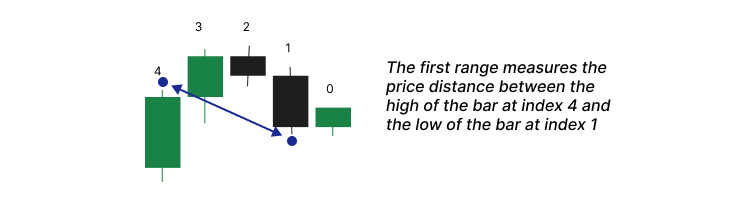
This captures the extent of downward price displacement across the recent trading window.
The second swing measures the distance from the high recorded one trading day ago (the bar immediately preceding the most recent one) to the low recorded three trading days ago.
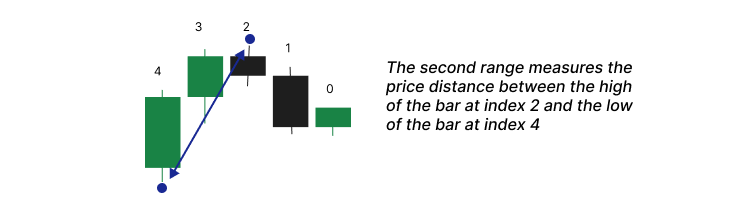
This captures the opposing directional movement within the same three-day structure.
No other highs or lows are involved. In particular, the height of the most recently completed bar is not used in the second calculation.
Both swing values are treated strictly as ranges, not directional moves. For this reason, their absolute values are used to ensure the result reflects magnitude only, regardless of whether the market has been rising or falling.
Once both swing distances are calculated, only the larger value is kept. Larry Williams treats this value as the current measure of volatility because it represents the strongest price movement observed in the recent market structure, independent of direction.
This selected swing value is then used to project breakout entry levels from the open of the new trading period.
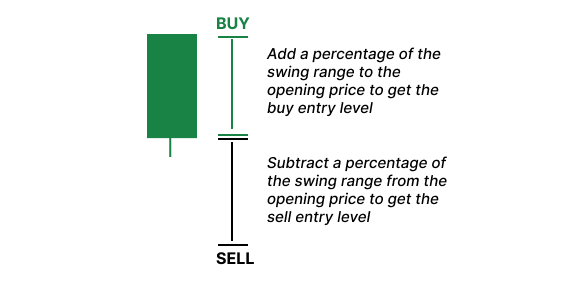
Buy and sell thresholds are calculated by adding or subtracting configurable percentages of this swing range from the opening price. Trades are triggered only when the price moves beyond these projected levels, confirming volatility rather than predicting it.
Translating the Concept into Trading Rules
At the opening of every new bar on the selected timeframe, the Expert Advisor calculates the swing range using Larry Williams’ swing measurement technique explained earlier. This swing range becomes the foundation for all decisions made during the current trading period. From this value, the Expert Advisor projects two key price levels. The buy entry level is calculated by adding a user-defined percentage of the swing range to the current price. A sell entry level is calculated by subtracting a user-defined percentage of the same swing range from the current price. These projected levels are stored in memory and remain unchanged until a new bar opens.
During the active trading period, price action is monitored tick by tick. If the price crosses above the buy entry level, the Expert Advisor triggers a market buy order. If the price crosses below the sell entry level, a market sell order is initiated. So that you know, no pending orders are used. All trades are executed at the market when a valid breakout occurs.
Risk management is directly tied to the measured swing range. The stop loss for each trade is calculated as a user-defined percentage of the same swing range used for entries. The take profit is then determined using a risk-to-reward approach. The distance between the entry price and the stop loss defines the risk. This risk distance is multiplied by a configurable reward factor to project the take profit level. This ensures that every trade follows a consistent and controlled risk structure.
Only one trade is allowed at any given time. Once a position is open, no additional trades can be triggered until the current one is closed. If the price does not reach either the buy or sell entry level during the entire trading period, no trade is taken. When a new bar opens, all previously calculated levels are discarded, and new ones are computed for the next period.
The Expert Advisor also allows the trader to control the permitted trade direction. The user can restrict trading to long positions only, short positions only, or allow both directions. This feature is handy for traders who apply discretionary trend analysis and prefer to trade only in the dominant market direction.
Position sizing is flexible through two lot-size calculation modes. In manual mode, the Expert Advisor uses a fixed lot size specified by the user. In automatic mode, position size is calculated based on a fixed percentage of the account balance. The automatic mode dynamically adjusts lot sizes to maintain the predefined risk percentage across trades, regardless of price volatility or account growth.
Building the Expert Advisor Step by Step
This section marks the start of assembling the Expert Advisor. From here onward, the focus shifts from theory to implementation. To follow along comfortably, the reader should already have basic working experience with MQL5. This includes using the MetaTrader 5 platform, attaching Expert Advisors to charts, and running tests in the Strategy Tester. The reader should also be familiar with MetaEditor 5and be able to write code, compile it, inspect errors, and debug when necessary. Programming is learned by doing, not by reading passively, so this section is designed to be followed actively.
For this reason, the complete and final source file developed in this article is attached as lwVolatilitySwingBreakoutExpert.mq5. If you encounter any issues while building the Expert Advisor step by step, you can always compare your work with the attached file to stay aligned. It is strongly recommended to download it before proceeding.
You can start by opening MetaEditor 5 and creating a new Expert Advisor file. You may give it any name you prefer. Once the file is created, could you paste the provided boilerplate code into it?
//+------------------------------------------------------------------+
//|                              lwVolatilitySwingBreakoutExpert.mq5 |
//|          Copyright 2026, MetaQuotes Ltd. Developer is Chacha Ian |
//|                          https://www.mql5.com/en/users/chachaian |
//+------------------------------------------------------------------+

#property copyright "Copyright 2026, MetaQuotes Ltd. Developer is Chacha Ian"
#property link      "https://www.mql5.com/en/users/chachaian"
#property version   "1.00"

//+------------------------------------------------------------------+
//| Standard Libraries                                               |
//+------------------------------------------------------------------+
#include <Trade\Trade.mqh>

//--- CUSTOM ENUMERATIONS
enum ENUM_TRADE_DIRECTION
{
   ONLY_LONG,
   ONLY_SHORT,
   TRADE_BOTH
};

enum ENUM_LOT_SIZE_INPUT_MODE
{
   MODE_MANUAL,
   MODE_AUTO
};

//+------------------------------------------------------------------+
//| User input variables                                             |
//+------------------------------------------------------------------+
input group "Information"
input ulong magicNumber         = 254700680002;
input ENUM_TIMEFRAMES timeframe = PERIOD_CURRENT;

input group "Volatility Breakout Parameters"
input double inpBuyRangeMultiplier   = 0.50;
input double inpSellRangeMultiplier  = 0.50;
input double inpStopRangeMultiplier  = 0.50;
input double inpRewardValue          = 4.0;

input group "Trade and Risk Management"
input ENUM_TRADE_DIRECTION direction        = ONLY_LONG;
input ENUM_LOT_SIZE_INPUT_MODE lotSizeMode  = MODE_AUTO;
input double riskPerTradePercent            = 1.0;
input double positionSize                   = 0.1;

//+------------------------------------------------------------------+
//| Global Variables                                                 |
//+------------------------------------------------------------------+
//--- Create a CTrade object to handle trading operations
CTrade Trade;

//--- Bid and Ask
double   askPrice;
double   bidPrice;

//+------------------------------------------------------------------+
//| Expert initialization function                                   |
//+------------------------------------------------------------------+
int OnInit(){

   //---  Assign a unique magic number to identify trades opened by this EA
   Trade.SetExpertMagicNumber(magicNumber);

   return(INIT_SUCCEEDED);
}

//+------------------------------------------------------------------+
//| Expert deinitialization function                                 |
//+------------------------------------------------------------------+
void OnDeinit(const int reason){

   //--- Notify why the program stopped running
   Print("Program terminated! Reason code: ", reason);

}

//+------------------------------------------------------------------+
//| Expert tick function                                             |
//+------------------------------------------------------------------+
void OnTick(){

   //--- Retrieve current market prices for trade execution
   askPrice      = SymbolInfoDouble (_Symbol, SYMBOL_ASK);
   bidPrice      = SymbolInfoDouble (_Symbol, SYMBOL_BID);
}

//+------------------------------------------------------------------+
//| TradeTransaction function                                        |
//+------------------------------------------------------------------+
void OnTradeTransaction(const MqlTradeTransaction& trans,
                        const MqlTradeRequest& request,
                        const MqlTradeResult& result)
{
}

//--- UTILITY FUNCTIONS

//+------------------------------------------------------------------+
This initial code establishes the structure we will build upon.
Understanding the Boilerplate Structure
The boilerplate code is divided into clearly defined sections, each serving a specific purpose. The header section defines ownership information and versioning. This does not affect trading logic but helps identify the file and its author.
//+------------------------------------------------------------------+
//|                              lwVolatilitySwingBreakoutExpert.mq5 |
//|          Copyright 2026, MetaQuotes Ltd. Developer is Chacha Ian |
//|                          https://www.mql5.com/en/users/chachaian |
//+------------------------------------------------------------------+

#property copyright "Copyright 2026, MetaQuotes Ltd. Developer is Chacha Ian"
#property link      "https://www.mql5.com/en/users/chachaian"
#property version   "1.00"
The standard library inclusion brings in the CTrade class. This class simplifies order execution and trade management and will be used later when placing trades.
//+------------------------------------------------------------------+
//| Standard Libraries                                               |
//+------------------------------------------------------------------+
#include <Trade\Trade.mqh>
Custom enumerations are defined next.
//--- CUSTOM ENUMERATIONS
enum ENUM_TRADE_DIRECTION
{
   ONLY_LONG,
   ONLY_SHORT,
   TRADE_BOTH
};

enum ENUM_LOT_SIZE_INPUT_MODE
{
   MODE_MANUAL,
   MODE_AUTO
};
These allow the user to control trade direction and position sizing behavior using readable options rather than numeric values. This improves both clarity and safety when configuring the Expert Advisor.
The input variables section exposes all configurable parameters to the user.
//+------------------------------------------------------------------+
//| User input variables                                             |
//+------------------------------------------------------------------+
input group "Information"
input ulong magicNumber         = 254700680002;
input ENUM_TIMEFRAMES timeframe = PERIOD_CURRENT;

input group "Volatility Breakout Parameters"
input double inpBuyRangeMultiplier   = 0.50;
input double inpSellRangeMultiplier  = 0.50;
input double inpStopRangeMultiplier  = 0.50;
input double inpRewardValue          = 4.0;

input group "Trade and Risk Management"
input ENUM_TRADE_DIRECTION direction        = ONLY_LONG;
input ENUM_LOT_SIZE_INPUT_MODE lotSizeMode  = MODE_AUTO;
input double riskPerTradePercent            = 1.0;
input double positionSize                   = 0.1;
These inputs control trade direction, volatility multipliers, stop-loss behavior, reward expectations, and position-sizing logic. Each of these inputs directly affects how Larry Williams’ volatility concept is translated into executable rules.
Global variables follow.
//+------------------------------------------------------------------+
//| Global Variables                                                 |
//+------------------------------------------------------------------+
//--- Create a CTrade object to handle trading operations
CTrade Trade;

//--- Bid and Ask
double   askPrice;
double   bidPrice;
Here, we create a CTrade object to execute trades and define variables to store the current bid and ask prices. These prices are refreshed on every tick and are used for accurate trade calculations.
The OnInit function runs once when the Expert Advisor starts.
//+------------------------------------------------------------------+
//| Expert initialization function                                   |
//+------------------------------------------------------------------+
int OnInit(){

   //---  Assign a unique magic number to identify trades opened by this EA
   Trade.SetExpertMagicNumber(magicNumber);

   return(INIT_SUCCEEDED);
}
Its role here is essential and straightforward. It assigns a unique magic number to the CTrade object so that all trades opened by this Expert Advisor can be identified reliably. In the future, we will use this function to initialize global variables that must start with known values.
The OnDeinit function runs when the Expert Advisor is removed or stopped.
//+------------------------------------------------------------------+
//| Expert deinitialization function                                 |
//+------------------------------------------------------------------+
void OnDeinit(const int reason){

   //--- Notify why the program stopped running
   Print("Program terminated! Reason code: ", reason);

}
It simply reports the termination reason and does not affect trading logic.
The OnTick function is called on every market tick.
//+------------------------------------------------------------------+
//| Expert tick function                                             |
//+------------------------------------------------------------------+
void OnTick(){

   //--- Retrieve current market prices for trade execution
   askPrice      = SymbolInfoDouble (_Symbol, SYMBOL_ASK);
   bidPrice      = SymbolInfoDouble (_Symbol, SYMBOL_BID);
}
At this stage, it only updates bid and ask prices. This function will later become the central control point for executing our strategy logic.
The utility functions section is intentionally left empty at first.
//--- UTILITY FUNCTIONS

//+------------------------------------------------------------------+
This is where we will place all custom helper functions that support the main trading logic.
Detecting a New Bar
Our strategy requires recalculating levels only once per trading period. To achieve this, we must detect when a new bar opens in the selected timeframe.
A custom function is added to the utility section for this purpose.
//--- UTILITY FUNCTIONS
//+------------------------------------------------------------------+
//| Function to check if there's a new bar on a given chart timeframe|
//+------------------------------------------------------------------+
bool IsNewBar(string symbol, ENUM_TIMEFRAMES tf, datetime &lastTm){

   datetime currentTm = iTime(symbol, tf, 0);
   if(currentTm != lastTm){
      lastTm       = currentTm;
      return true;
   }
   return false;
}
The function compares the current bar’s opening time with the previously recorded bar time. If the times differ, a new bar has formed.
The function accepts three parameters. The symbol and timeframe specify which chart we are monitoring. The third parameter is passed by reference and stores the opening time of the last processed bar. When a new bar is detected, this value is updated automatically.
To support this logic, a global variable of type datetime is declared.
//--- To help track new bar open
datetime lastBarOpenTime;
This variable tracks the opening time of the most recently processed bar. Inside the OnInit function, this variable is initialized to zero to ensure a clean starting state.
//+------------------------------------------------------------------+
//| Expert initialization function                                   |
//+------------------------------------------------------------------+
int OnInit(){

   ...

   //--- Initialize global variables
   lastBarOpenTime = 0;

   return(INIT_SUCCEEDED);
}
Storing Daily Volatility Levels
Each trading period requires a fixed set of price levels that remain valid until the next bar opens. These include the swing range, entry prices, stop-loss levels, and take-profit levels for both trade directions.
To store these values cleanly, a custom structure is defined in the global scope.
//--- Holds all price levels derived from Larry Williams' volatility breakout calculations
struct MqlLwVolatilityLevels
{
   double dominantSwingRange;
   double buyEntryPrice;
   double sellEntryPrice;
   double bullishStopLoss;
   double bearishStopLoss;
   double bullishTakeProfit;
   double bearishTakeProfit;
};

MqlLwVolatilityLevels lwVolatilityLevels;
This structure groups all related price levels into a single logical unit. An instance of this structure is created immediately after its definition.
Inside the OnInit function, the structure instance is reset using the ZeroMemory function.
//+------------------------------------------------------------------+
//| Expert initialization function                                   |
//+------------------------------------------------------------------+
int OnInit(){

   ...

   //--- Reset Larry Williams' volatility levels
   ZeroMemory(lwVolatilityLevels);

   return(INIT_SUCCEEDED);
}
This ensures that all fields start with known values and prevents unintended behavior caused by uninitialized data.
Calculating the Swing-Based Volatility Range
The first custom calculation function determines the swing based volatility range described by Larry Williams.
//+------------------------------------------------------------------+
//| Calculates Larry Williams swing-based volatility range           |
//+------------------------------------------------------------------+
double CalculateLwSwingVolatilityRange(const string symbol, ENUM_TIMEFRAMES tf){

   //--- Retrieve required highs and lows
   double high_3_days_ago = iHigh(symbol, tf, 4);
   double low_yesterday   = iLow (symbol, tf, 1);

   double high_1_day_ago  = iHigh(symbol, tf, 2);
   double low_3_days_ago  = iLow (symbol, tf, 4);

   //--- Validate data
   if(high_3_days_ago == 0.0 || low_yesterday == 0.0 ||
      high_1_day_ago  == 0.0 || low_3_days_ago == 0.0)
   {
      return 0.0;
   }

   //--- Calculate swing distances using absolute values
   double swingRangeA = MathAbs(high_3_days_ago - low_yesterday);
   double swingRangeB = MathAbs(high_1_day_ago  - low_3_days_ago);

   //--- Select the dominant swing
   double usableRange = MathMax(swingRangeA, swingRangeB);

   //--- Normalize for symbol precision
   return NormalizeDouble(usableRange, (int)SymbolInfoInteger(symbol, SYMBOL_DIGITS));
}
This function retrieves specific highs and lows from historical bars on the selected timeframe. Two swing distances are computed using absolute values to ensure correctness regardless of price ordering. The larger of the two swing distances is chosen as the dominant swing range.
This value represents the market’s most significant recent price expansion and serves as the volatility proxy for all subsequent calculations. The result is normalized to match the symbol’s price precision before being returned.
Calculating Entry Prices
The buy entry price is calculated by adding a user-defined percentage of the swing range to today’s opening price. This projects a bullish breakout level above the market.
//+--------------------------------------------------------------------------------+
//| Calculates the bullish breakout entry price using today's open and swing range |
//+--------------------------------------------------------------------------------+
double CalculateBuyEntryPrice(double todayOpen, double swingRange, double buyMultiplier){

   return todayOpen + (swingRange * buyMultiplier);
}
The sell entry price is calculated by subtracting a user-defined percentage of the swing range from today’s opening price. This projects a bearish breakout level below the market.
//+--------------------------------------------------------------------------------+
//| Calculates the bearish breakout entry price using today's open and swing range |
//+--------------------------------------------------------------------------------+
double CalculateSellEntryPrice(double todayOpen, double swingRange, double sellMultiplier){

   return todayOpen - (swingRange * sellMultiplier);
}
Both functions are intentionally simple. They translate volatility into actionable price levels without adding unnecessary complexity.
Calculating Stop Loss Levels
Stop loss levels are derived directly from the entry prices.
//+--------------------------------------------------------------------------------------------+
//| Calculates the stop-loss price for a bullish position based on entry price and swing range |
//+--------------------------------------------------------------------------------------------+
double CalculateBullishStopLoss(double entryPrice, double swingRange, double stopMultiplier){

   return entryPrice - (swingRange * stopMultiplier);
}


//+--------------------------------------------------------------------------------------------+
//| Calculates the stop-loss price for a bearish position based on entry price and swing range |
//+--------------------------------------------------------------------------------------------+
double CalculateBearishStopLoss(double entryPrice, double swingRange, double stopMultiplier){

   return entryPrice + (swingRange * stopMultiplier);
}
For a bullish trade, the stop loss is placed below the buy entry price by a user-defined fraction of the swing range. For a bearish trade, the stop loss is placed above the sell entry price using the same logic. This keeps risk proportional to recent volatility and ensures consistency across trades.
Calculating Take Profit Levels
Take profit levels are calculated using a risk-to-reward approach.
//+--------------------------------------------------------------------------+
//| Calculates take-profit level for a bullish trade using risk-reward logic |
//+--------------------------------------------------------------------------+
double CalculateBullishTakeProfit(double entryPrice, double stopLossPrice, double rewardValue){

   double stopDistance   = entryPrice - stopLossPrice;
   double rewardDistance = stopDistance * rewardValue;
   return NormalizeDouble(entryPrice + rewardDistance, Digits());
}

//+--------------------------------------------------------------------------+
//| Calculates take-profit level for a bearish trade using risk-reward logic |
//+--------------------------------------------------------------------------+
double CalculateBearishTakeProfit(double entryPrice, double stopLossPrice, double rewardValue){

   double stopDistance   = stopLossPrice - entryPrice;
   double rewardDistance = stopDistance * rewardValue;
   return NormalizeDouble(entryPrice - rewardDistance, Digits());
}
For bullish trades, the distance between the entry price and the stop loss defines the risk. This distance is multiplied by the reward factor to project the take profit above the entry price.
For bearish trades, the same logic applies in the opposite direction. The calculated take profit levels are normalized to the symbol’s precision before being returned.
Putting Everything Together in OnTick
With all supporting functions in place, the OnTick function now ties everything together.
//+------------------------------------------------------------------+
//| Expert tick function                                             |
//+------------------------------------------------------------------+
void OnTick(){

   ...

   //--- Run this block only when a new bar is detected on the selected timeframe
   if(IsNewBar(_Symbol, timeframe, lastBarOpenTime)){
      lwVolatilityLevels.dominantSwingRange = CalculateLwSwingVolatilityRange(_Symbol, timeframe);
      lwVolatilityLevels.buyEntryPrice      = CalculateBuyEntryPrice (askPrice, lwVolatilityLevels.dominantSwingRange, inpBuyRangeMultiplier );
      lwVolatilityLevels.sellEntryPrice     = CalculateSellEntryPrice(bidPrice, lwVolatilityLevels.dominantSwingRange, inpSellRangeMultiplier);
      lwVolatilityLevels.bullishStopLoss    = CalculateBullishStopLoss(lwVolatilityLevels.buyEntryPrice, lwVolatilityLevels.dominantSwingRange,  inpStopRangeMultiplier);
      lwVolatilityLevels.bearishStopLoss    = CalculateBearishStopLoss(lwVolatilityLevels.sellEntryPrice, lwVolatilityLevels.dominantSwingRange, inpStopRangeMultiplier);
      lwVolatilityLevels.bullishTakeProfit  = CalculateBullishTakeProfit(lwVolatilityLevels.buyEntryPrice, lwVolatilityLevels.bullishStopLoss,  inpRewardValue);
      lwVolatilityLevels.bearishTakeProfit  = CalculateBearishTakeProfit(lwVolatilityLevels.sellEntryPrice, lwVolatilityLevels.bearishStopLoss, inpRewardValue);
   }
}
On every tick, the Expert Advisor first updates bid and ask prices. It then checks whether a new bar has formed on the selected timeframe. If no new bar is detected, nothing else happens.
When a new bar is detected, all volatility-based levels are recalculated. The swing range is computed first. Entry prices, stop losses, and take profit levels are then derived sequentially using the previously calculated swing range.
These values are stored in the global structure and remain unchanged until the next new bar is detected. This approach ensures that trade decisions during the trading period are based on fixed, precomputed levels rather than constantly shifting values.
At this point, the Expert Advisor has a complete framework for calculating and storing all price levels required for trade execution. In the next section, these levels will be used to trigger trades and manage positions in accordance with the rules defined earlier.
Completing the Trading Logic and Executing Trades
At this stage, we already have everything needed to make trading decisions. Our daily volatility levels are calculated and stored in memory, and they remain valid until a new bar forms and fresh levels are computed. What remains is to define how and when trades are triggered, how we prevent duplicate positions, and how we execute orders in a controlled and consistent way.
The core idea is simple. Once the price crosses one of our predefined entry levels, we open a position in that direction. If the buy level is crossed first, we open a long trade. If the sell level is crossed first, we open a short trade. At all times, we enforce one strict rule. Only one position may be open at any given time.
To implement this cleanly, we break the logic into small utility functions.
Detecting Price Crosses
The first problem we need to solve is detecting when the price crosses a specific level. We are not interested in price simply touching a level. We want confirmation that the price has moved from one side of the level to the other. To do this, we define two utility functions. The IsCrossOver function detects when the price crosses a level from below.
//+------------------------------------------------------------------+
//| To detect a crossover at a given price level                     |
//+------------------------------------------------------------------+
bool IsCrossOver(const double price, const double &closePriceMinsData[]){
   if(closePriceMinsData[1] <= price && closePriceMinsData[0] > price){
      return true;
   }
   return false;
}
This function compares two consecutive one-minute closing prices against the target level. The value at index one represents the previous completed minute bar. The value at index zero represents the most recent bar. A crossover occurs when the previous close was at or below the level, and the current close is above the level. This simple comparison provides a clear and reliable signal that the price has moved above the level.
The IsCrossUnder function performs the opposite check. It detects when the price crosses a level from above to below.
//+------------------------------------------------------------------+
//| To detect a crossunder at a given price level                    |
//+------------------------------------------------------------------+
bool IsCrossUnder(const double price, const double &closePriceMinsData[]){
   if(closePriceMinsData[1] >= price && closePriceMinsData[0] < price){
      return true;
   }
   return false;
}
Here, the logic is reversed. We confirm that the previous close was at or above the level, and the most recent close has moved below it. This tells us that the price has crossed downward through the level. Together, these two functions form the foundation of our entry logic.
Storing Minute Price Data
Both crossover functions rely on 1-minute close price data. To support this, we define a global array that will store this data.
//--- To store minutes data
double closePriceMinutesData [];
This array must be treated as a time series. In MQL5, arrays do not behave as time series by default. If we do not explicitly change the indexing direction, index zero will not represent the most recent bar. That would break our crossover logic. For this reason, we configure the array during initialization.
//+------------------------------------------------------------------+
//| Expert initialization function                                   |
//+------------------------------------------------------------------+
int OnInit(){

   ...

   //--- Treat the following arrays as timeseries (index 0 becomes the most recent bar)
   ArraySetAsSeries(closePriceMinutesData, true);

 }
This instruction reverses the indexing order so that index zero always refers to the most recent bar. Without this step, our crossover checks would use incorrect price values, and the EA would behave unpredictably.
Updating Minute Data on Every Tick
Inside the OnTick function, we update our minute data array whenever new price data arrives.
//+------------------------------------------------------------------+
//| Expert tick function                                             |
//+------------------------------------------------------------------+
void OnTick(){

   ...

   //--- Get some minutes data
   if(CopyClose(_Symbol, PERIOD_M1, 0, 7, closePriceMinutesData) == -1){
      Print("Error while copying minutes datas ", GetLastError());
      return;
   }
}
We copy the most recent seven one-minute close prices. While we only need the last two values for crossover detection, copying a few extra bars adds a small safety margin and does not impact performance.
If the data copy fails, we stop execution for that tick. Acting on incomplete or missing price data would lead to unreliable trade decisions.
Preventing Multiple Active Positions
Price can cross the same level multiple times, especially during volatile conditions. Without proper safeguards, this could result in multiple trades being opened in quick succession.
To prevent this, we define two functions that check whether this EA already has an active position. To check for the existence of a long positions, we define the following custom function:
//+------------------------------------------------------------------+
//| To verify whether this EA currently has an active buy position.  |                                 |
//+------------------------------------------------------------------+
bool IsThereAnActiveBuyPosition(ulong magic){

   for(int i = PositionsTotal() - 1; i >= 0; i--){
      ulong ticket = PositionGetTicket(i);
      if(ticket == 0){
         Print("Error while fetching position ticket ", _LastError);
         continue;
      }else{
         if(PositionGetInteger(POSITION_MAGIC) == magic && PositionGetInteger(POSITION_TYPE) == POSITION_TYPE_BUY){
            return true;
         }
      }
   }

   return false;
}
This function loops through all open positions in the terminal. For each position, it checks two conditions. First, the magic number must match the Expert Advisor's magic number. This ensures we only inspect trades opened by this Expert Advisor. Second, the position type must be a buy position. If both conditions are met, the function returns true immediately. If no matching position is found, the function returns false.
To check for the existence of an active short position, we define the following function:
//+------------------------------------------------------------------+
//| To verify whether this EA currently has an active sell position. |                                 |
//+------------------------------------------------------------------+
bool IsThereAnActiveSellPosition(ulong magic){

   for(int i = PositionsTotal() - 1; i >= 0; i--){
      ulong ticket = PositionGetTicket(i);
      if(ticket == 0){
         Print("Error while fetching position ticket ", _LastError);
         continue;
      }else{
         if(PositionGetInteger(POSITION_MAGIC) == magic && PositionGetInteger(POSITION_TYPE) == POSITION_TYPE_SELL){
            return true;
         }
      }
   }

   return false;
}
This function follows the same structure as the previous one but explicitly checks for short positions. Together, these two checks ensure that we never open more than one trade at a time.
Automatic Position Sizing by Risk
To support automatic lot sizing, we define a function that calculates position size based on a fixed percentage of the account balance.
//+----------------------------------------------------------------------------------+
//| Calculates position size based on a fixed percentage risk of the account balance |
//+----------------------------------------------------------------------------------+
double CalculatePositionSizeByRisk(double stopDistance){
   double amountAtRisk = (riskPerTradePercent / 100.0) * AccountInfoDouble(ACCOUNT_BALANCE);
   double contractSize = SymbolInfoDouble(_Symbol, SYMBOL_TRADE_CONTRACT_SIZE);
   double volume       = amountAtRisk / (contractSize * stopDistance);
   return NormalizeDouble(volume, 2);
}
The logic is straightforward. We first calculate the monetary amount we are willing to risk per trade. This is based on the account balance and the configured risk percentage. Next, we retrieve the contract size for the current symbol. This tells us how much value is represented by one lot. Finally, we divide the risk amount by the stop-loss distance. The result is the position size that aligns with our risk rules. The value is normalized to two decimal places to comply with broker requirements.
Executing Buy Orders
Now we define the function that opens a market buy position.
//+------------------------------------------------------------------+
//| Function to open a market buy position                           |
//+------------------------------------------------------------------+
bool OpenBuy(double entryPrice, double stopLoss, double takeProfit, double lotSize){

   if(lotSizeMode == MODE_AUTO){
      lotSize = CalculatePositionSizeByRisk(lwVolatilityLevels.buyEntryPrice - lwVolatilityLevels.bullishStopLoss);
   }

   if(!Trade.Buy(lotSize, _Symbol, entryPrice, stopLoss, takeProfit)){
      Print("Error while executing a market buy order: ", GetLastError());
      Print(Trade.ResultRetcode());
      Print(Trade.ResultComment());
      return false;
   }
   return true;
}
If automatic lot sizing is enabled, the function calculates the position size based on the distance between the entry price and the stop loss. The trade is then executed using the CTrade class. If the order fails, we log detailed error information. If the order succeeds, the function returns true.
The sell function follows the same structure.
//+------------------------------------------------------------------+
//| Function to open a market sell position                          |
//+------------------------------------------------------------------+
bool OpenSel(double entryPrice, double stopLoss, double takeProfit, double lotSize){

   if(lotSizeMode == MODE_AUTO){
      lotSize = CalculatePositionSizeByRisk(lwVolatilityLevels.bearishStopLoss - lwVolatilityLevels.sellEntryPrice);
   }

   if(!Trade.Sell(lotSize, _Symbol, entryPrice, stopLoss, takeProfit)){
      Print("Error while executing a market sell order: ", GetLastError());
      Print(Trade.ResultRetcode());
      Print(Trade.ResultComment());
      return false;
   }
   return true;
}
The only difference is the direction of the stop distance and the use of a sell order. The structure remains consistent, which makes the code easier to maintain.
Bringing Everything Together in OnTick
With all building blocks in place, we now tie everything together inside the OnTick function.
//+------------------------------------------------------------------+
//| Expert tick function                                             |
//+------------------------------------------------------------------+
void OnTick(){

   ...

   //--- Long position logic
   if(direction == TRADE_BOTH || direction == ONLY_LONG){
      if(IsCrossOver(lwVolatilityLevels.buyEntryPrice, closePriceMinutesData)){
         if(!IsThereAnActiveBuyPosition(magicNumber) && !IsThereAnActiveSellPosition(magicNumber)){
            OpenBuy(askPrice, lwVolatilityLevels.bullishStopLoss, lwVolatilityLevels.bullishTakeProfit, positionSize);
         }
      }
   }

   //--- Short position logic
   if(direction == TRADE_BOTH || direction == ONLY_SHORT){
      if(IsCrossUnder(lwVolatilityLevels.sellEntryPrice, closePriceMinutesData)){
         if(!IsThereAnActiveBuyPosition(magicNumber) && !IsThereAnActiveSellPosition(magicNumber)){
            OpenSel(bidPrice, lwVolatilityLevels.bearishStopLoss, lwVolatilityLevels.bearishTakeProfit, positionSize);
         }
      }
   }
}
This block checks whether long trades are allowed. If they are, we test for a crossover above the buy entry level. If a crossover is detected and there are no active positions, we open a buy trade using the precomputed levels. The short logic follows the same structure. By structuring the logic this way, we ensure clarity, control, and strict adherence to the strategy rules.
Configuring the Chart Appearance
Before testing, we improve chart readability by configuring visual settings. Let us define the following custom utility function:
//+------------------------------------------------------------------+
//| This function configures the chart's appearance.                 |
//+------------------------------------------------------------------+
bool ConfigureChartAppearance()
{
   if(!ChartSetInteger(0, CHART_COLOR_BACKGROUND, clrWhite)){
      Print("Error while setting chart background, ", GetLastError());
      return false;
   }

   if(!ChartSetInteger(0, CHART_SHOW_GRID, false)){
      Print("Error while setting chart grid, ", GetLastError());
      return false;
   }

   if(!ChartSetInteger(0, CHART_MODE, CHART_CANDLES)){
      Print("Error while setting chart mode, ", GetLastError());
      return false;
   }

   if(!ChartSetInteger(0, CHART_COLOR_FOREGROUND, clrBlack)){
      Print("Error while setting chart foreground, ", GetLastError());
      return false;
   }

   if(!ChartSetInteger(0, CHART_COLOR_CANDLE_BULL, clrSeaGreen)){
      Print("Error while setting bullish candles color, ", GetLastError());
      return false;
   }

   if(!ChartSetInteger(0, CHART_COLOR_CANDLE_BEAR, clrBlack)){
      Print("Error while setting bearish candles color, ", GetLastError());
      return false;
   }

   if(!ChartSetInteger(0, CHART_COLOR_CHART_UP, clrSeaGreen)){
      Print("Error while setting bearish candles color, ", GetLastError());
      return false;
   }

   if(!ChartSetInteger(0, CHART_COLOR_CHART_DOWN, clrBlack)){
      Print("Error while setting bearish candles color, ", GetLastError());
      return false;
   }

   return true;
}

//+------------------------------------------------------------------+
This function sets a clean white background, removes the grid, enforces candlestick mode, and applies clear colors for bullish and bearish candles. If any configuration fails, the function reports the error and stops execution. We call this function during initialization.
//+------------------------------------------------------------------+
//| Expert initialization function                                   |
//+------------------------------------------------------------------+
int OnInit(){

   ...

   //--- To configure the chart's appearance
   if(!ConfigureChartAppearance()){
      Print("Error while configuring chart appearance", GetLastError());
      return INIT_FAILED;
   }
}
This ensures the chart is prepared before any trading activity begins.
At this point, the Expert Advisor is fully implemented. We can now compile the source code. If everything was added correctly, the code should compile without errors. If any issues arise, the attached source file, lwVolatilitySwingBreakoutExpert.mq5, can be used as a reference.
Testing the Expert Advisor
Testing allows us to verify that the trading logic behaves as expected and to evaluate how the strategy performs under historical market conditions. In this section, we focus on backtesting the EA using the MetaTrader 5 Strategy Tester.
Backtest Environment and Setup
A backtest was conducted on Gold (symbol XAUUSD) using a daily timeframe. The test period spans from 1st January 2025 to 31st December 2025. This provides a full one-year sample, which is sufficient to observe how the strategy reacts across different market conditions.
The EA was configured to operate in ONLY_LONG mode. This means the algorithm was allowed to take only long positions. Short trades were completely disabled. Each trade risked exactly one percent of the account balance, using the automatic position sizing logic implemented earlier.
To ensure that the results can be replicated, two important files have been attached to this article. The first file is configurations.ini. This file contains all the Strategy Tester environment settings, such as symbol, timeframe, and testing range. The second file is parameters.set. This file contains the exact input parameters used during the test, including risk settings and volatility multipliers. By loading both files into the Strategy Tester, similar testing conditions can be reproduced accurately.
Backtest Results Overview
The backtest began with an initial account balance of $10,000. At the end of the test period, the system produced a total net profit of $4,450.23. This represents a return on investment of slightly above forty-four percent over one year.
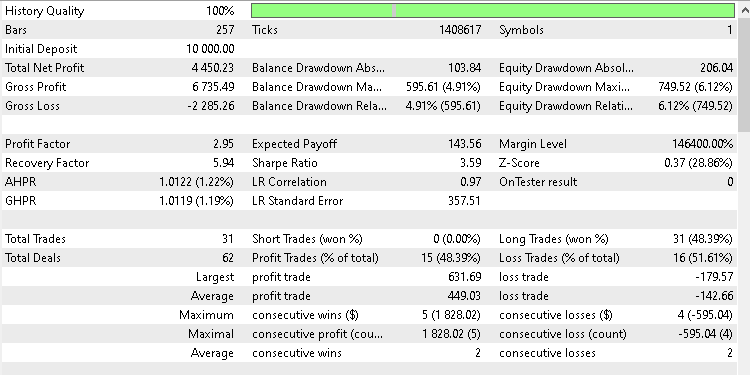
The system recorded a win rate of 48.39%. While this may appear modest at first glance, it aligns well with the strategy’s risk-reward structure. Profitable performance is achieved not through a high win rate, but through disciplined risk control and favorable reward sizing.
The equity curve shown in the performance screenshot is smooth and steady.
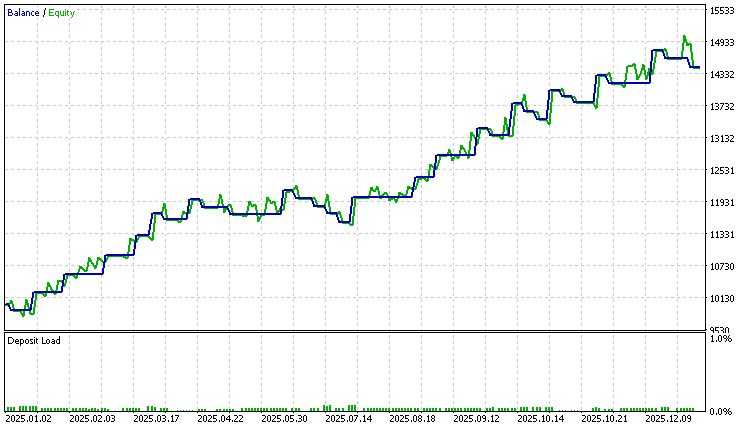
There are no sharp drops or sudden equity collapses. This behavior indicates controlled drawdowns and consistent execution of the trading rules.
I want to let you know that this test represents only one configuration and one market. The strategy was intentionally designed to be flexible. Input parameters such as risk percentage, volatility multipliers, and trade direction can all be adjusted. This allows traders to test different variations and adapt the logic to their own ideas.
I just wanted to let you know that the primary goal of this article is not to present a finished or optimized trading system. The goal is to demonstrate how Larry Williams’ methodology can be translated into a working algorithm that traders can study, modify, and extend. Readers are encouraged to run their own tests. Different symbols, timeframes, and parameter combinations may lead to different outcomes. Through experimentation, it becomes possible to discover variations that align better with individual trading preferences and risk tolerance.
We invite everyone to share their observations, test results, and insights in the comments section. Collective experimentation and discussion often reveal ideas that are not immediately obvious from a single backtest.
Conclusion
In this article, we successfully translated Larry Williams’ swing-based volatility breakout concept into a fully functional Expert Advisor for MetaTrader 5. Beginning with the original explanations from his book, we carefully interpreted the swing measurements, clarified their practical implications, and transformed them into precise, rule-based calculations suitable for automation.
We designed and implemented a complete trading system through a step-by-step process. This included detecting new trading periods, measuring the dominant swing range, projecting breakout entry levels, defining stop-loss and take-profit targets, and enforcing strict trade management rules. Each component was developed with clarity and purpose, resulting in an EA that is structured, readable, and easy to extend.
Beyond the strategy logic, the article demonstrated sound engineering practices in MQL5. We covered state management using structures, safe initialization of global variables, reliable crossover detection, position filtering using magic numbers, and both manual and risk-based position sizing. These are essential building blocks for any serious algorithmic trading system.
The backtesting section showed that the strategy can perform consistently when applied with discipline and proper risk control. More importantly, the system was intentionally designed to remain flexible. By exposing key parameters, the EA allows traders to test different ideas, adapt the logic to various markets, and explore their own edge rather than relying on fixed assumptions.
This article doesn't seem to present a perfect or optimized strategy. Instead, it illustrates how to convert a discretionary trading idea into a structured, testable, and repeatable algorithm. Readers who followed along now have a working volatility breakout Expert Advisor, a deeper understanding of Larry Williams’ methodology, and a solid framework they can build upon in future research.
The following table lists all supplementary files attached to this article, along with a brief description of the purpose each file serves. These files are provided to help readers reproduce the results discussed and follow the implementation accurately.
| File Name | Description | |
|---|---|---|
| 1 | lwVolatilitySwingBreakoutExpert.mq5 | The complete Expert Advisor source code is developed and explained in this article. |
| 2 | configurations.ini | Strategy Tester environment configuration used for the backtest. |
| 3 | parameters.set | The input parameter set applied during the backtest is shown in the article. |
Warning: All rights to these materials are reserved by MetaQuotes Ltd. Copying or reprinting of these materials in whole or in part is prohibited.
This article was written by a user of the site and reflects their personal views. MetaQuotes Ltd is not responsible for the accuracy of the information presented, nor for any consequences resulting from the use of the solutions, strategies or recommendations described.

 MQL5 Trading Tools (Part 12): Enhancing the Correlation Matrix Dashboard with Interactivity
 Build a Remote Forex Risk Management System in Python
 Introduction to MQL5 (Part 36): Mastering API and WebRequest Function in MQL5 (X)
 Developing a multi-currency Expert Advisor (Part 24): Adding a new strategy (II)

- Free trading apps
- Over 8,000 signals for copying
- Economic news for exploring financial markets
You agree to website policy and terms of use