

Building AI-Powered Trading Systems in MQL5 (Part 6): Introducing Chat Deletion and Search Functionality
 5 154
5 154
 0
0

Introduction
In our previous article (Part 5), we enhanced the ChatGPT-integrated program in MetaQuotes Language 5 (MQL5) by adding a collapsible sidebar that toggles between expanded and contracted states for optimized screen usage, incorporating small and large history popups for efficient chat navigation, and ensuring seamless multiline input handling with persistent encrypted storage. In Part 6, we introduce chat deletion and search functionality to the AI-powered trading system. This upgrade adds interactive delete buttons to the sidebar, history popups, and a new search popup with real-time filtering, enabling us to manage conversations by removing outdated chats and quickly locating relevant ones through title or content queries, all while maintaining the system's core features like AI-driven signals from chart data. We will cover the following topics:
- The Value of Chat Deletion and Search Features in AI Interfaces
- Implementation in MQL5
- Testing Chat Deletion and Search
- Conclusion
By the end, you’ll have an MQL5 AI trading assistant with advanced chat management capabilities, ready for customization—let’s dive in!
The Value of Chat Deletion and Search Features in AI Interfaces
Chat deletion and search features in AI trading interfaces play a pivotal role in maintaining an organized and efficient workspace, allowing us to remove irrelevant or outdated conversations that clutter the history, freeing up focus for current market analysis and preventing confusion during high-pressure trading sessions. Search functionality complements this by enabling quick retrieval of specific chats through keyword matching in titles or content, saving time when referencing past AI-generated insights like signal recommendations or strategy discussions, which is especially beneficial in volatile markets where historical context can inform rapid decisions. Together, these will enhance usability by reducing cognitive load, promoting data privacy through selective removal, and improving overall productivity, ensuring the AI assistant remains a streamlined tool rather than a disorganized archive.
Our approach is to add hover-activated delete buttons to the sidebar, small/large history popups, and search results using Wingdings icons, implement real-time filtering in a dedicated search popup with case-insensitive matching and a custom scrollbar, update chat storage logic to handle deletions while preserving the active chat or switching to the latest, and ensure seamless UI refreshes across all views, building a more manageable AI trading assistant for efficient conversation handling and quick access to relevant insights. We will also alter a couple of things slightly to match the upgraded UI, like using toggle icons as we promised in the previous version. Below is a visual representation of the features we aim to achieve.

Implementation in MQL5
To implement the upgrades, we will first define the search scrollbar objects that we will be adding for the search pop-up. This will match the criteria, like we have always been adding the defines. The other objects, such as the deletion buttons and search bars, will use the default prefix concatenation for easier deletion.
//+------------------------------------------------------------------+
//|                                         AI ChatGPT EA Part 6.mq5 |
//|                           Copyright 2025, Allan Munene Mutiiria. |
//|                                   https://t.me/Forex_Algo_Trader |
//+------------------------------------------------------------------+
#property copyright "Copyright 2025, Allan Munene Mutiiria."
#property link "https://t.me/Forex_Algo_Trader"
#property version "1.00"
#property strict
#property icon "1. Forex Algo-Trader.ico"

#define SEARCH_SCROLL_LEADER "ChatGPT_Search_Scroll_Leader"
#define SEARCH_SCROLL_UP_REC "ChatGPT_Search_Scroll_Up_Rec"
#define SEARCH_SCROLL_UP_LABEL "ChatGPT_Search_Scroll_Up_Label"
#define SEARCH_SCROLL_DOWN_REC "ChatGPT_Search_Scroll_Down_Rec"
#define SEARCH_SCROLL_DOWN_LABEL "ChatGPT_Search_Scroll_Down_Label"
#define SEARCH_SCROLL_SLIDER "ChatGPT_Search_Scroll_Slider"
We define constants for the search popup's scrollbar elements using #define, assigning names like "SEARCH_SCROLL_LEADER" for the track, "SEARCH_SCROLL_UP_REC" and "SEARCH_SCROLL_UP_LABEL" for the up button and its arrow, "SEARCH_SCROLL_DOWN_REC" and "SEARCH_SCROLL_DOWN_LABEL" for the down button, and "SEARCH_SCROLL_SLIDER" for the draggable thumb, ensuring consistent referencing in object creation and management functions to handle scrolling in the search results view. Next, we add new color and hover variables for the delete and search elements.
color search_original_bg = clrLightSlateGray;
color search_darker_bg;
bool search_hover = false;
color search_close_original_bg = clrLightGray;
color search_close_darker_bg;
bool search_close_hover = false;
color delete_original_bg = clrBeige;
color delete_darker_bg;

bool showing_search_popup = false;
int search_popup_x, search_popup_y, search_popup_w, search_popup_h;
string search_popup_objects[];
string search_chat_bgs[];
string search_delete_btns[];
int search_scroll_pos = 0;
bool search_scroll_visible = false;
int search_total_height = 0;
int search_visible_height = 0;
int search_slider_height = 20;
bool search_movingStateSlider = false;
int search_mlbDownX_Slider = 0;
int search_mlbDownY_Slider = 0;
int search_mlbDown_YD_Slider = 0;
bool just_opened_search = false;
string current_search_query = "";
Here, we define additional global variables to support the new search and deletion features in the AI interface, starting with colors for the search button ("search_original_bg" as light slate gray, "search_darker_bg" for its hover state) and a "search_hover" flag to track mouse interaction, enabling dynamic color changes for better user feedback. Similarly, we set colors for the search popup's close button ("search_close_original_bg" as light gray, "search_close_darker_bg") with its hover flag "search_close_hover", and for delete buttons ("delete_original_bg" as beige, "delete_darker_bg") to maintain consistent styling across popups and the sidebar.
For the search popup itself, we use a visibility flag "showing_search_popup", coordinates ("search_popup_x/y/w/h") for positioning, and arrays "search_popup_objects", "search_chat_bgs", "search_delete_btns" to manage and clean up its elements like backgrounds and buttons. We add scrolling support with "search_scroll_pos" for position, "search_scroll_visible" flag, heights ("search_total_height", "search_visible_height", "search_slider_height" at 20), slider drag state "search_movingStateSlider", and mouse down positions ("search_mlbDownX_Slider", "search_mlbDownY_Slider", "search_mlbDown_YD_Slider") for smooth interaction.
The "just_opened_search" flag prevents immediate closure on opening clicks, while "current_search_query" stores the user's input for real-time filtering, allowing the system to handle dynamic searches, deletions in various views (sidebar, small/large popups), and enhance chat management without cluttering the main interface. To handle the colors for the new elements, we add the following to the OnInit event handler.
int OnInit() {
   //--- added init logic

   search_darker_bg = DarkenColor(search_original_bg);
   search_close_darker_bg = DarkenColor(search_close_original_bg);
   delete_darker_bg = DarkenColor(delete_original_bg);

   //--- the rest remain the same

   return(INIT_SUCCEEDED);
}
In the OnInit event handler, we add initialization for new darker hover colors specific to the search and deletion features, setting "search_darker_bg" by darkening "search_original_bg" with "DarkenColor", similarly for "search_close_darker_bg" from "search_close_original_bg", and "delete_darker_bg" from "delete_original_bg" to enable visual feedback on mouse interactions. The rest of the function remains unchanged from previous versions, handling log file opening, image scaling, sidebar setup, dashboard creation, and event enabling, before returning INIT_SUCCEEDED to confirm successful startup. Before we add the delete buttons, let us define a logic to delete the chats.
void DeleteChat(int id) {
   int idx = GetChatIndex(id);
   if (idx < 0) return;
   if (current_chat_id == id) {
      if (ArraySize(chats) > 1) {
         int new_idx = (idx == ArraySize(chats) - 1) ? idx - 1 : ArraySize(chats) - 1;
         current_chat_id = chats[new_idx].id;
         current_title = chats[new_idx].title;
         conversationHistory = chats[new_idx].history;
      } else {
         CreateNewChat();
         return;
      }
   }
   ArrayRemove(chats, idx, 1);
   SaveChats();
   long history_y = ObjectGetInteger(0, "ChatGPT_HistoryButton", OBJPROP_YDISTANCE);
   if (showing_small_history_popup) {
      DeleteSmallHistoryPopup();
      if (!sidebarExpanded && ArraySize(chats) > 0) {
         ShowSmallHistoryPopup((int)history_y);
      }
   }
   if (showing_big_history_popup) {
      DeleteBigHistoryPopup();
      if (ArraySize(chats) > 0) {
         ShowBigHistoryPopup();
      }
   }
   if (showing_search_popup) {
      DeleteSearchPopup();
      if (ArraySize(chats) > 0) {
         ShowSearchPopup();
      }
   }
   UpdateSidebarDynamic();
   UpdateResponseDisplay();
   UpdatePromptDisplay();
   ChartRedraw();
}
Proceeding, we implement the "DeleteChat" function to remove a specific chat by ID from the persistent storage and UI, ensuring smooth handling of the active chat to avoid disruptions. We first locate the chat's index with "GetChatIndex", exiting early if not found. If it's the current chat ("current_chat_id" matches), and other chats exist, we select a new one—preferring the previous index if last or the last otherwise—updating "current_chat_id", "current_title", and "conversationHistory"; if no chats remain, we call "CreateNewChat" and return.
We then remove the chat from the "chats" array using ArrayRemove at the index with count 1, save changes with "SaveChats", and refresh open popups: for small history, delete with "DeleteSmallHistoryPopup" and reshow if sidebar contracted and chats left, using history button's y-position from ObjectGetInteger; similar for big and search popups, deleting and reshowing if chats exist. Finally, we update the sidebar with "UpdateSidebarDynamic", refresh response and prompt displays, and redraw the chart with ChartRedraw to reflect the deletion. Next, we update the dynamic sidebar function to include the creation of the delete buttons.
void UpdateSidebarDynamic() {
   int total = ObjectsTotal(0, 0, -1);
   for (int j = total - 1; j >= 0; j--) {
      string name = ObjectName(0, j, 0, -1);
      if (StringFind(name, "ChatGPT_NewChatButton") == 0 || StringFind(name, "ChatGPT_ClearButton") == 0 || StringFind(name, "ChatGPT_HistoryButton") == 0 || StringFind(name, "ChatGPT_SearchButton") == 0 || StringFind(name, "ChatGPT_ChatLabel_") == 0 || StringFind(name, "ChatGPT_ChatBg_") == 0 || StringFind(name, "ChatGPT_SidebarLogo") == 0 || StringFind(name, "ChatGPT_NewChatIcon") == 0 || StringFind(name, "ChatGPT_NewChatLabel") == 0 || StringFind(name, "ChatGPT_ClearIcon") == 0 || StringFind(name, "ChatGPT_ClearLabel") == 0 || StringFind(name, "ChatGPT_HistoryIcon") == 0 || StringFind(name, "ChatGPT_HistoryLabel") == 0 || StringFind(name, "ChatGPT_SearchLabel") == 0 || StringFind(name, "ChatGPT_SearchIcon") == 0 || StringFind(name, "ChatGPT_ToggleButton") == 0 || StringFind(name, "ChatGPT_SideDelete_") == 0) {
         ObjectDelete(0, name);
      }
   }
   ArrayResize(side_chat_bgs, 0);
   ArrayResize(side_delete_btns, 0);
   int sidebarX = g_dashboardX;
   int itemY = g_mainY + 10;
   string sidebar_logo_resource = sidebarExpanded ? ((StringLen(g_scaled_sidebar_resource) > 0) ? g_scaled_sidebar_resource : resourceImgLogo) : ((StringLen(g_scaled_sidebar_small) > 0) ? g_scaled_sidebar_small : resourceImgLogo);
   int logo_size = sidebarExpanded ? 81 : 30;
   createBitmapLabel("ChatGPT_SidebarLogo", sidebarX + (g_sidebarWidth - logo_size)/2, itemY, logo_size, logo_size, sidebar_logo_resource, clrNONE, CORNER_LEFT_UPPER);
   ObjectSetInteger(0, "ChatGPT_SidebarLogo", OBJPROP_ZORDER, 1);
   itemY += logo_size + 5;
   createButton("ChatGPT_SearchButton", sidebarX + 5, itemY, g_sidebarWidth - 10, g_buttonHeight, "", clrWhite, 11, search_original_bg, clrDarkSlateGray);
   ObjectSetInteger(0, "ChatGPT_SearchButton", OBJPROP_ZORDER, 1);
   int iconX = sidebarExpanded ? sidebarX + 5 + 10 : sidebarX + (g_sidebarWidth - 20)/2-6;
   createLabel("ChatGPT_SearchIcon", iconX, itemY + (g_buttonHeight - 20)/2-6, "L", clrWhite, 24, "Webdings", CORNER_LEFT_UPPER);
   ObjectSetInteger(0, "ChatGPT_SearchIcon", OBJPROP_ZORDER, 2);
   ObjectSetInteger(0, "ChatGPT_SearchIcon", OBJPROP_SELECTABLE, false);
   if (sidebarExpanded) {
      createLabel("ChatGPT_SearchLabel", sidebarX + 5 + 10 + 20 + 5, itemY + (g_buttonHeight - 20)/2, "Search", clrWhite, 11, "Arial", CORNER_LEFT_UPPER);
      ObjectSetInteger(0, "ChatGPT_SearchLabel", OBJPROP_ZORDER, 2);
      ObjectSetInteger(0, "ChatGPT_SearchLabel", OBJPROP_SELECTABLE, false);
   }
   itemY += g_buttonHeight + 5;
   createButton("ChatGPT_NewChatButton", sidebarX + 5, itemY, g_sidebarWidth - 10, g_buttonHeight, "", clrWhite, 11, new_chat_original_bg, clrRoyalBlue);
   ObjectSetInteger(0, "ChatGPT_NewChatButton", OBJPROP_ZORDER, 1);
   string newchat_icon_resource = (StringLen(g_scaled_newchat_resource) > 0) ? g_scaled_newchat_resource : resourceNewChat;
   iconX = sidebarExpanded ? sidebarX + 5 + 10 : sidebarX + 5 + (g_sidebarWidth - 10 - 30)/2;
   createBitmapLabel("ChatGPT_NewChatIcon", iconX, itemY + (g_buttonHeight - 30)/2, 30, 30, newchat_icon_resource, clrNONE, CORNER_LEFT_UPPER);
   ObjectSetInteger(0, "ChatGPT_NewChatIcon", OBJPROP_ZORDER, 2);
   ObjectSetInteger(0, "ChatGPT_NewChatIcon", OBJPROP_SELECTABLE, false);
   if (sidebarExpanded) {
      createLabel("ChatGPT_NewChatLabel", sidebarX + 5 + 10 + 30 + 5, itemY + (g_buttonHeight - 20)/2, "New Chat", clrWhite, 11, "Arial", CORNER_LEFT_UPPER);
      ObjectSetInteger(0, "ChatGPT_NewChatLabel", OBJPROP_ZORDER, 2);
      ObjectSetInteger(0, "ChatGPT_NewChatLabel", OBJPROP_SELECTABLE, false);
   }
   itemY += g_buttonHeight + 5;
   createButton("ChatGPT_ClearButton", sidebarX + 5, itemY, g_sidebarWidth - 10, g_buttonHeight, "", clrWhite, 11, clear_original_bg, clrIndianRed);
   ObjectSetInteger(0, "ChatGPT_ClearButton", OBJPROP_ZORDER, 1);
   string clear_icon_resource = (StringLen(g_scaled_clear_resource) > 0) ? g_scaled_clear_resource : resourceClear;
   iconX = sidebarExpanded ? sidebarX + 5 + 10 : sidebarX + 5 + (g_sidebarWidth - 10 - 30)/2;
   createBitmapLabel("ChatGPT_ClearIcon", iconX, itemY + (g_buttonHeight - 30)/2, 30, 30, clear_icon_resource, clrNONE, CORNER_LEFT_UPPER);
   ObjectSetInteger(0, "ChatGPT_ClearIcon", OBJPROP_ZORDER, 2);
   ObjectSetInteger(0, "ChatGPT_ClearIcon", OBJPROP_SELECTABLE, false);
   if (sidebarExpanded) {
      createLabel("ChatGPT_ClearLabel", sidebarX + 5 + 10 + 30 + 5, itemY + (g_buttonHeight - 20)/2, "Clear", clrWhite, 11, "Arial", CORNER_LEFT_UPPER);
      ObjectSetInteger(0, "ChatGPT_ClearLabel", OBJPROP_ZORDER, 2);
      ObjectSetInteger(0, "ChatGPT_ClearLabel", OBJPROP_SELECTABLE, false);
   }
   itemY += g_buttonHeight + 5;
   createButton("ChatGPT_HistoryButton", sidebarX + 5, itemY, g_sidebarWidth - 10, g_buttonHeight, "", clrBlack, 12, history_original_bg, clrGray);
   ObjectSetInteger(0, "ChatGPT_HistoryButton", OBJPROP_ZORDER, 1);
   string history_icon_resource = (StringLen(g_scaled_history_resource) > 0) ? g_scaled_history_resource : resourceHistory;
   iconX = sidebarExpanded ? sidebarX + 5 + 10 : sidebarX + 5 + (g_sidebarWidth - 10 - 30)/2;
   createBitmapLabel("ChatGPT_HistoryIcon", iconX, itemY + (g_buttonHeight - 30)/2, 30, 30, history_icon_resource, clrNONE, CORNER_LEFT_UPPER);
   ObjectSetInteger(0, "ChatGPT_HistoryIcon", OBJPROP_ZORDER, 2);
   ObjectSetInteger(0, "ChatGPT_HistoryIcon", OBJPROP_SELECTABLE, false);
   if (sidebarExpanded) {
      createLabel("ChatGPT_HistoryLabel", sidebarX + 5 + 10 + 30 + 5, itemY + (g_buttonHeight - 20)/2, "History", clrBlack, 12, "Arial", CORNER_LEFT_UPPER);
      ObjectSetInteger(0, "ChatGPT_HistoryLabel", OBJPROP_ZORDER, 2);
      ObjectSetInteger(0, "ChatGPT_HistoryLabel", OBJPROP_SELECTABLE, false);
   }
   itemY += g_buttonHeight + 5;
   if (sidebarExpanded) {
      int numChats = MathMin(ArraySize(chats), 7);
      int chatIndices[7];
      for (int i = 0; i < numChats; i++) {
         chatIndices[i] = ArraySize(chats) - 1 - i;
      }
      for (int i = 0; i < numChats; i++) {
         int chatIdx = chatIndices[i];
         string hashed_id = EncodeID(chats[chatIdx].id);
         string fullText = chats[chatIdx].title + " > " + hashed_id;
         string labelText = fullText;
         if (StringLen(fullText) > 19) {
            labelText = StringSubstr(fullText, 0, 16) + "...";
         }
         string bgName = "ChatGPT_ChatBg_" + hashed_id;
         createRecLabel(bgName, sidebarX + 5 + 10, itemY, g_sidebarWidth - 10 - 10, 25, clrBeige, 1, DarkenColor(clrBeige, 0.9), BORDER_FLAT, STYLE_SOLID);
         ObjectSetInteger(0, bgName, OBJPROP_ZORDER, 1);
         color textColor = (chats[chatIdx].id == current_chat_id) ? clrBlue : clrBlack;
         createLabel("ChatGPT_ChatLabel_" + hashed_id, sidebarX + 10 + 10, itemY + 3, labelText, textColor, 10, "Arial", CORNER_LEFT_UPPER, ANCHOR_LEFT_UPPER);
         ObjectSetInteger(0, "ChatGPT_ChatLabel_" + hashed_id, OBJPROP_ZORDER, 2);
         string deleteName = "ChatGPT_SideDelete_" + hashed_id;
         createButton(deleteName, sidebarX + g_sidebarWidth - 30, itemY + 3, 0, 20, "V", clrBeige, 15, clrBeige, clrBeige, "Wingdings 2");
         ObjectSetInteger(0, deleteName, OBJPROP_ZORDER, 2);
         int size = ArraySize(side_chat_bgs);
         ArrayResize(side_chat_bgs, size + 1);
         side_chat_bgs[size] = bgName;
         int del_size = ArraySize(side_delete_btns);
         ArrayResize(side_delete_btns, del_size + 1);
         side_delete_btns[del_size] = deleteName;
         itemY += 25 + 3;
      }
   }
   itemY += 5;
   string toggle_text = sidebarExpanded ? "9" : ":";
   createButton("ChatGPT_ToggleButton", sidebarX + 5, itemY, g_sidebarWidth - 10, g_buttonHeight, toggle_text, clrBlack, 15, toggle_original_bg, clrGray,"Webdings");
   ObjectSetInteger(0, "ChatGPT_ToggleButton", OBJPROP_ZORDER, 1);
   ChartRedraw();
}
Here, we just add the search button as the first sidebar button (icon-only in contracted state) and the delete icons to appear on hover. We have highlighted the specific changes for easier identification. This will lead to the following outcome.

Since we have added the delete buttons to the expanded sidebar state, we need to add them to the small popup in the contracted state as well. We will need to add to each chat we display.
void ShowSmallHistoryPopup(int button_y) {
   ArrayResize(small_popup_objects, 0);
   ArrayResize(small_chat_bgs, 0);
   ArrayResize(small_delete_btns, 0);
   long history_x = ObjectGetInteger(0, "ChatGPT_HistoryButton", OBJPROP_XDISTANCE);
   long history_w = ObjectGetInteger(0, "ChatGPT_HistoryButton", OBJPROP_XSIZE);
   int popup_x = (int)(history_x + history_w);
   int popup_y = button_y;
   int popup_w = 200;
   int item_height = 25;
   int num_chats = MathMin(ArraySize(chats), 7);
   int items_h = num_chats * (item_height + 5) - 5;
   int popup_h = items_h + g_buttonHeight + 20;
   string popup_bg = "ChatGPT_SmallHistoryBg";
   createRecLabel(popup_bg, popup_x, popup_y, popup_w, popup_h, clrWhite, 1, clrLightGray);
   int size = ArraySize(small_popup_objects);
   ArrayResize(small_popup_objects, size + 1);
   small_popup_objects[size] = popup_bg;
   int item_y = popup_y + 10;
   for (int i = 0; i < num_chats; i++) {
      int chatIdx = ArraySize(chats) - 1 - i;
      string hashed_id = EncodeID(chats[chatIdx].id);
      string labelText = chats[chatIdx].title;
      if (StringLen(labelText) > 25) labelText = StringSubstr(labelText, 0, 22) + "...";
      string bgName = "ChatGPT_SmallChatBg_" + hashed_id;
      createRecLabel(bgName, popup_x + 10, item_y, popup_w - 20, item_height, clrBeige, 1, DarkenColor(clrBeige, 0.9), BORDER_FLAT, STYLE_SOLID);
      string labelName = "ChatGPT_SmallChatLabel_" + hashed_id;
      createLabel(labelName, popup_x + 20, item_y + 3, labelText, clrBlack, 10, "Arial", CORNER_LEFT_UPPER, ANCHOR_LEFT_UPPER);
      string deleteName = "ChatGPT_SmallDelete_" + hashed_id;
      createButton(deleteName, popup_x + popup_w - 20 - 15, item_y + 3, 0, 20, "V", clrBeige, 15, clrBeige, clrBeige, "Wingdings 2");
      size = ArraySize(small_popup_objects);
      ArrayResize(small_popup_objects, size + 3);
      small_popup_objects[size] = bgName;
      small_popup_objects[size + 1] = labelName;
      small_popup_objects[size + 2] = deleteName;
      int bg_size = ArraySize(small_chat_bgs);
      ArrayResize(small_chat_bgs, bg_size + 1);
      small_chat_bgs[bg_size] = bgName;
      int del_size = ArraySize(small_delete_btns);
      ArrayResize(small_delete_btns, del_size + 1);
      small_delete_btns[del_size] = deleteName;
      item_y += item_height + 5;
   }
   string see_more = "ChatGPT_SeeMoreButton";
   createButton(see_more, popup_x + 10, item_y, popup_w - 20, g_buttonHeight, "See All", clrWhite, 11, see_more_original_bg, clrDarkBlue);
   size = ArraySize(small_popup_objects);
   ArrayResize(small_popup_objects, size + 1);
   small_popup_objects[size] = see_more;
   small_popup_x = popup_x;
   small_popup_y = popup_y;
   small_popup_w = popup_w;
   small_popup_h = popup_h;
   showing_small_history_popup = true;
   just_opened_small = true;
}
void DeleteSmallHistoryPopup() {
   for (int i = 0; i < ArraySize(small_popup_objects); i++) {
      ObjectDelete(0, small_popup_objects[i]);
   }
   ArrayResize(small_popup_objects, 0);
   ArrayResize(small_chat_bgs, 0);
   ArrayResize(small_delete_btns, 0);
   showing_small_history_popup = false;
}
The logic here is quite simple and self-explanatory. We just add the delete buttons to each chat and then clean up when the pop-up closes. We do the same thing to the big pop-up, too. To create the search popup, we will need new functions but logic similar to the big chats popup. Here is the logic we use to achieve that.
void ShowSearchPopup() {
   current_search_query = "";
   ArrayResize(search_popup_objects, 0);
   ArrayResize(search_chat_bgs, 0);
   ArrayResize(search_delete_btns, 0);
   search_scroll_pos = 0;
   search_scroll_visible = false;
   int popup_w = g_mainWidth - 20;
   int item_height = 25;
   int num_chats = ArraySize(chats);
   search_total_height = num_chats * (item_height + 5) - 5;
   int max_h = g_displayHeight - 20;
   int content_h = max_h - 40 - 40 - 10; // extra for search header
   search_visible_height = content_h - 35;
   int popup_h = max_h;
   search_popup_w = popup_w;
   search_popup_h = popup_h;
   search_popup_x = g_mainContentX + 10;
   search_popup_y = g_mainY + g_headerHeight + g_padding + 10;
   string popup_bg = "ChatGPT_SearchBg";
   createRecLabel(popup_bg, search_popup_x, search_popup_y, popup_w, popup_h, C'250,250,250', 1, clrDodgerBlue);
   int size = ArraySize(search_popup_objects);
   ArrayResize(search_popup_objects, size + 1);
   search_popup_objects[size] = popup_bg;
   string close_button = "ChatGPT_SearchCloseButton";
   createButton(close_button, search_popup_x + popup_w -40 -10, search_popup_y + 5, 40, 30, "r", clrRed, 13, search_close_original_bg, clrGray,"Webdings");
   size = ArraySize(search_popup_objects);
   ArrayResize(search_popup_objects, size + 1);
   search_popup_objects[size] = close_button;
   string search_edit = "ChatGPT_SearchInput";
   createEdit(search_edit, search_popup_x + 10, search_popup_y + 5, popup_w - 20 - 40 - 10, 30, "", clrBlack, 16, clrGainsboro, clrLightGray, "Calibri");
   ObjectSetInteger(0, search_edit, OBJPROP_BORDER_TYPE, BORDER_FLAT);
   size = ArraySize(search_popup_objects);
   ArrayResize(search_popup_objects, size + 1);
   search_popup_objects[size] = search_edit;
   string search_placeholder = "ChatGPT_SearchPlaceholder";
   int lineHeight = TextGetHeight("A", "Arial", 11);
   int labelY = search_popup_y + 5 + (30 - lineHeight) / 2 - 3;
   createLabel(search_placeholder, search_popup_x + 10 + 2, labelY, "Search Chats", clrGray, 11, "Arial", CORNER_LEFT_UPPER);
   size = ArraySize(search_popup_objects);
   ArrayResize(search_popup_objects, size + 1);
   search_popup_objects[size] = search_placeholder;
   int content_y = search_popup_y + 40 + 40;
   string content_bg = "ChatGPT_SearchContentBg";
   createRecLabel(content_bg, search_popup_x + 10, content_y, popup_w - 20, content_h, clrWhite, 1, clrGainsboro, BORDER_FLAT, STYLE_SOLID);
   size = ArraySize(search_popup_objects);
   ArrayResize(search_popup_objects, size + 1);
   search_popup_objects[size] = content_bg;
   bool need_search_scroll = search_total_height > search_visible_height;
   int reserved_w = need_search_scroll ? 16 : 0;
   int item_w = popup_w - 20 - 20 - reserved_w;
   UpdateSearchDisplay();
   if (need_search_scroll) {
      CreateSearchScrollbar();
      search_scroll_visible = true;
      UpdateSearchSliderPosition();
      UpdateSearchButtonColors();
   }
   showing_search_popup = true;
   just_opened_search = true;
   ChartRedraw();
}
void CreateSearchScrollbar() {
   int scrollbar_x = search_popup_x + search_popup_w - 10 - 16;
   int scrollbar_y = search_popup_y + 40 + 40 + 16;
   int scrollbar_width = 16;
   int scrollbar_height = search_popup_h - 40 - 40 - 10 - 2 * 16;
   int button_size = 16;
   createRecLabel(SEARCH_SCROLL_LEADER, scrollbar_x, scrollbar_y, scrollbar_width, scrollbar_height, C'220,220,220', 1, clrGainsboro, BORDER_FLAT, STYLE_SOLID, CORNER_LEFT_UPPER);
   createRecLabel(SEARCH_SCROLL_UP_REC, scrollbar_x, search_popup_y + 40 + 40, scrollbar_width, button_size, clrGainsboro, 1, clrGainsboro, BORDER_FLAT, STYLE_SOLID, CORNER_LEFT_UPPER);
   createLabel(SEARCH_SCROLL_UP_LABEL, scrollbar_x + 2, search_popup_y + 40 + 40 + -2, CharToString(0x35), clrDimGray, getFontSizeByDPI(10), "Webdings", CORNER_LEFT_UPPER);
   createRecLabel(SEARCH_SCROLL_DOWN_REC, scrollbar_x, search_popup_y + 40 + 40 + (search_popup_h - 40 - 40 - 10) - button_size, scrollbar_width, button_size, clrGainsboro, 1, clrGainsboro, BORDER_FLAT, STYLE_SOLID, CORNER_LEFT_UPPER);
   createLabel(SEARCH_SCROLL_DOWN_LABEL, scrollbar_x + 2, search_popup_y + 40 + 40 + (search_popup_h - 40 - 40 - 10) - button_size + -2, CharToString(0x36), clrDimGray, getFontSizeByDPI(10), "Webdings", CORNER_LEFT_UPPER);
   search_slider_height = CalculateSearchSliderHeight();
   createRecLabel(SEARCH_SCROLL_SLIDER, scrollbar_x, search_popup_y + 40 + 40 + (search_popup_h - 40 - 40 - 10) - button_size - search_slider_height, scrollbar_width, search_slider_height, clrSilver, 1, clrGainsboro, BORDER_FLAT, STYLE_SOLID, CORNER_LEFT_UPPER);
   int size = ArraySize(search_popup_objects);
   ArrayResize(search_popup_objects, size + 6);
   search_popup_objects[size] = SEARCH_SCROLL_LEADER;
   search_popup_objects[size + 1] = SEARCH_SCROLL_UP_REC;
   search_popup_objects[size + 2] = SEARCH_SCROLL_UP_LABEL;
   search_popup_objects[size + 3] = SEARCH_SCROLL_DOWN_REC;
   search_popup_objects[size + 4] = SEARCH_SCROLL_DOWN_LABEL;
   search_popup_objects[size + 5] = SEARCH_SCROLL_SLIDER;
}
int CalculateSearchSliderHeight() {
   int scroll_area_height = search_popup_h - 40 - 40 - 25 - 2 * 16;
   int slider_min_height = 20;
   if (search_total_height <= search_visible_height) return scroll_area_height;
   double visible_ratio = (double)search_visible_height / search_total_height;
   int height = (int)MathFloor(scroll_area_height * visible_ratio);
   return MathMax(slider_min_height, height);
}
void UpdateSearchSliderPosition() {
   int scrollbar_x = search_popup_x + search_popup_w - 10 - 16;
   int scrollbar_y = search_popup_y + 40 + 40 + 16;
   int scroll_area_height = search_popup_h - 40 - 40 - 25 - 2 * 16;
   int max_scroll = MathMax(0, search_total_height - search_visible_height);
   if (max_scroll <= 0) return;
   double scroll_ratio = (double)search_scroll_pos / max_scroll;
   int scroll_area_y_max = scrollbar_y + scroll_area_height - search_slider_height;
   int scroll_area_y_min = scrollbar_y;
   int new_y = scroll_area_y_min + (int)(scroll_ratio * (scroll_area_y_max - scroll_area_y_min));
   new_y = MathMax(scroll_area_y_min, MathMin(new_y, scroll_area_y_max));
   ObjectSetInteger(0, SEARCH_SCROLL_SLIDER, OBJPROP_YDISTANCE, new_y);
}
void UpdateSearchButtonColors() {
   int max_scroll = MathMax(0, search_total_height - search_visible_height);
   if (search_scroll_pos == 0) {
      ObjectSetInteger(0, SEARCH_SCROLL_UP_LABEL, OBJPROP_COLOR, clrSilver);
   } else {
      ObjectSetInteger(0, SEARCH_SCROLL_UP_LABEL, OBJPROP_COLOR, clrDimGray);
   }
   if (search_scroll_pos == max_scroll) {
      ObjectSetInteger(0, SEARCH_SCROLL_DOWN_LABEL, OBJPROP_COLOR, clrSilver);
   } else {
      ObjectSetInteger(0, SEARCH_SCROLL_DOWN_LABEL, OBJPROP_COLOR, clrDimGray);
   }
}
void SearchScrollUp() {
   if (search_scroll_pos > 0) {
      search_scroll_pos = MathMax(0, search_scroll_pos - 30);
      UpdateSearchDisplay();
      if (search_scroll_visible) {
         UpdateSearchSliderPosition();
         UpdateSearchButtonColors();
      }
   }
}
void SearchScrollDown() {
   int max_scroll = MathMax(0, search_total_height - search_visible_height);
   if (search_scroll_pos < max_scroll) {
      search_scroll_pos = MathMin(max_scroll, search_scroll_pos + 30);
      UpdateSearchDisplay();
      if (search_scroll_visible) {
         UpdateSearchSliderPosition();
         UpdateSearchButtonColors();
      }
   }
}
void UpdateSearchDisplay() {
   int total = ObjectsTotal(0, 0, -1);
   for (int j = total - 1; j >= 0; j--) {
      string name = ObjectName(0, j, 0, -1);
      if (StringFind(name, "ChatGPT_SearchChatBg_") == 0 || StringFind(name, "ChatGPT_SearchChatLabel_") == 0 || StringFind(name, "ChatGPT_SearchDelete_") == 0) {
         ObjectDelete(0, name);
      }
   }
   ArrayResize(search_chat_bgs, 0);
   ArrayResize(search_delete_btns, 0);
   Chat filtered[];
   ArrayResize(filtered, 0);
   for (int i = 0; i < ArraySize(chats); i++) {
      string lower_title = chats[i].title;
      StringToLower(lower_title);
      string lower_history = chats[i].history;
      StringToLower(lower_history);
      string lower_query = current_search_query;
      StringToLower(lower_query);
      if (StringFind(lower_title, lower_query) >= 0 || StringFind(lower_history, lower_query) >= 0 || lower_query == "") {
         int fsize = ArraySize(filtered);
         ArrayResize(filtered, fsize + 1);
         filtered[fsize] = chats[i];
      }
   }
   int num_chats = ArraySize(filtered);
   search_total_height = num_chats * (25 + 5) - 5;
   bool need_search_scroll = search_total_height > search_visible_height;
   bool prev_search_scroll_visible = search_scroll_visible;
   search_scroll_visible = need_search_scroll;
   if (search_scroll_visible != prev_search_scroll_visible) {
      if (search_scroll_visible) {
         CreateSearchScrollbar();
      } else {
         DeleteSearchScrollbar();
      }
   }
   int reserved_w = search_scroll_visible ? 16 : 0;
   int item_w = search_popup_w - 20 - 20 - reserved_w;
   int item_y = search_popup_y + 40 + 40 + 10 - search_scroll_pos;
   int end_y = search_popup_y + 40 + 40 + (search_popup_h - 40 - 40 - 10) - 25;
   int start_idx = 0;
   int current_h = 0;
   for (int i = 0; i < num_chats; i++) {
      if (current_h >= search_scroll_pos) {
         start_idx = i;
         item_y = search_popup_y + 40 + 40 + 10 + (current_h - search_scroll_pos);
         break;
      }
      current_h += 25 + 5;
   }
   int visible_count = 0;
   current_h = 0;
   for (int i = start_idx; i < num_chats; i++) {
      if (current_h + 25 > search_visible_height) break;
      current_h += 25 + 5;
      visible_count++;
   }
   for (int i = 0; i < visible_count; i++) {
      int chatIdx = num_chats - 1 - (start_idx + i);
      string hashed_id = EncodeID(filtered[chatIdx].id);
      string fullText = filtered[chatIdx].title + " > " + hashed_id;
      string labelText = fullText;
      if (StringLen(fullText) > 35) {
         labelText = StringSubstr(fullText, 0, 32) + "...";
      }
      string bgName = "ChatGPT_SearchChatBg_" + hashed_id;
      if (item_y >= search_popup_y + 40 + 40 + 10 && item_y < end_y) {
         createRecLabel(bgName, search_popup_x + 20, item_y, item_w, 25, clrBeige, 1, DarkenColor(clrBeige, 0.9), BORDER_FLAT, STYLE_SOLID);
      }
      string labelName = "ChatGPT_SearchChatLabel_" + hashed_id;
      if (item_y >= search_popup_y + 40 + 40 + 10 && item_y < end_y) {
         createLabel(labelName, search_popup_x + 30, item_y + 3, labelText, clrBlack, 10, "Arial", CORNER_LEFT_UPPER, ANCHOR_LEFT_UPPER);
      }
      string deleteName = "ChatGPT_SearchDelete_" + hashed_id;
      if (item_y >= search_popup_y + 40 + 40 + 10 && item_y < end_y) {
         createButton(deleteName, search_popup_x + 20 + item_w - 25, item_y + 3, 0, 20, "V", clrBeige, 15, clrBeige, clrBeige, "Wingdings 2");
      }
      int size = ArraySize(search_popup_objects);
      ArrayResize(search_popup_objects, size + 3);
      search_popup_objects[size] = bgName;
      search_popup_objects[size + 1] = labelName;
      search_popup_objects[size + 2] = deleteName;
      int bg_size = ArraySize(search_chat_bgs);
      ArrayResize(search_chat_bgs, bg_size + 1);
      search_chat_bgs[bg_size] = bgName;
      int del_size = ArraySize(search_delete_btns);
      ArrayResize(search_delete_btns, del_size + 1);
      search_delete_btns[del_size] = deleteName;
      item_y += 25 + 5;
   }
   if (search_scroll_visible) {
      search_slider_height = CalculateSearchSliderHeight();
      ObjectSetInteger(0, SEARCH_SCROLL_SLIDER, OBJPROP_YSIZE, search_slider_height);
      UpdateSearchSliderPosition();
      UpdateSearchButtonColors();
   }
   ChartRedraw();
}
void DeleteSearchScrollbar() {
   ObjectDelete(0, SEARCH_SCROLL_LEADER);
   ObjectDelete(0, SEARCH_SCROLL_UP_REC);
   ObjectDelete(0, SEARCH_SCROLL_UP_LABEL);
   ObjectDelete(0, SEARCH_SCROLL_DOWN_REC);
   ObjectDelete(0, SEARCH_SCROLL_DOWN_LABEL);
   ObjectDelete(0, SEARCH_SCROLL_SLIDER);
}
void DeleteSearchPopup() {
   for (int i = 0; i < ArraySize(search_popup_objects); i++) {
      ObjectDelete(0, search_popup_objects[i]);
   }
   DeleteSearchScrollbar();
   ArrayResize(search_popup_objects, 0);
   ArrayResize(search_chat_bgs, 0);
   ArrayResize(search_delete_btns, 0);
   showing_search_popup = false;
   search_scroll_visible = false;
}
First, we implement the "ShowSearchPopup" function to create a dedicated popup for searching chats, resetting "current_search_query" to empty, clearing arrays "search_popup_objects", "search_chat_bgs", and "search_delete_btns", and initializing scroll position and visibility to zero/false. We calculate popup dimensions based on "g_mainWidth" and "g_displayHeight", positioning it inset from the main content, creating the background "ChatGPT_SearchBg" with "createRecLabel" in light gray with dodger blue border, a close button "ChatGPT_SearchCloseButton" using "createButton" with Webdings 'r' in red, an input field "ChatGPT_SearchInput" with "createEdit" in gainsboro, and a placeholder label "ChatGPT_SearchPlaceholder" saying "Search Chats" in gray Arial font. We add a content background "ChatGPT_SearchContentBg" in white with gainsboro border, determine if scrolling is needed from total chats, call "UpdateSearchDisplay" to populate results, and if required, invoke "CreateSearchScrollbar", set visibility true, update position and colors, marking as shown with "showing_search_popup" true and "just_opened_search" true, redrawing with the ChartRedraw function.
The "CreateSearchScrollbar" function constructs the search popup's scrollbar, using "createRecLabel" for the leader track in light gray with gainsboro border, up/down rectangles in gainsboro, labels with Webdings arrows in dim gray, and a slider in silver with gainsboro border, calculating positions from "search_popup_x/y/w/h", and appends names to "search_popup_objects" for cleanup. "CalculateSearchSliderHeight" computes the search slider height proportionally from visible to total height, with min 20 pixels, returning the full area if no scroll is needed. "UpdateSearchSliderPosition" adjusts the search slider's y based on "search_scroll_pos" ratio over max scroll, clamping within the scroll area using MathMax and MathMin, set with the ObjectSetInteger function. "UpdateSearchButtonColors" grays out up/down arrows in silver if at top/bottom or dim gray if scrollable. "SearchScrollUp" and "SearchScrollDown" decrement/increment "search_scroll_pos" by 30, clamped to 0/max, then update display with "UpdateSearchDisplay" and, if visible, position/colors with "UpdateSearchSliderPosition" and "UpdateSearchButtonColors".
In "UpdateSearchDisplay", we clear existing search chat backgrounds, labels, and delete with ObjectsTotal and ObjectDelete using the StringFind function, and reset arrays. We filter "chats" into a "filtered" array by converting title, history, and query to lower case with StringToLower, checking for matches via "StringFind" or including all if the query is empty. We recalculate "search_total_height" from filtered count, determine scrolling need and reserved width, set item width accordingly, compute start index and y from "search_scroll_pos", count visible items within "search_visible_height", then loop to create backgrounds "ChatGPT_SearchChatBg_", labels "ChatGPT_SearchChatLabel_" with truncated titles, and delete buttons "ChatGPT_SearchDelete_" using Wingdings 'V' in beige (hidden size 0 initially), storing in arrays, positioned only if within view bounds. If "search_scroll_visible", update slider height with "CalculateSearchSliderHeight", set size, position with "UpdateSearchSliderPosition", and colors.
The "DeleteSearchScrollbar" function removes all search scrollbar objects. "DeleteSearchPopup" deletes all objects in "search_popup_objects", including the scrollbar with "DeleteSearchScrollbar", resets arrays and flags for "showing_search_popup" and "search_scroll_visible" to false. This will lead to the creation of the following interface.

With the functions responsible for the interface ready, we can call them in the chart event handler so that we can create the necessary objects or events when needed. We will use the same approach as the main chats display, only that this is responsible for search handling.
void OnChartEvent(const int id, const long &lparam, const double &dparam, const string &sparam) {

   //--- variables for elements

   if (id == CHARTEVENT_CLICK) {
      int clickX = (int)lparam;
      int clickY = (int)dparam;
      if (showing_big_history_popup) {
         if (just_opened_big) {
            just_opened_big = false;
         } else if (clickX < big_popup_x || clickX > big_popup_x + big_popup_w || clickY < big_popup_y || clickY > big_popup_y + big_popup_h) {
            DeleteBigHistoryPopup();
            ChartRedraw();
         }
      }
      if (showing_small_history_popup) {
         if (just_opened_small) {
            just_opened_small = false;
         } else if (clickX < small_popup_x || clickX > small_popup_x + small_popup_w || clickY < small_popup_y || clickY > small_popup_y + small_popup_h) {
            DeleteSmallHistoryPopup();
            ChartRedraw();
         }
      }
      if (showing_search_popup) {
         if (just_opened_search) {
            just_opened_search = false;
         } else if (clickX < search_popup_x || clickX > search_popup_x + search_popup_w || clickY < search_popup_y || clickY > search_popup_y + search_popup_h) {
            DeleteSearchPopup();
            ChartRedraw();
         }
      }
      return;
   }
   if (id == CHARTEVENT_OBJECT_CLICK) {
      if (StringFind(sparam, "ChatGPT_ChatLabel_") == 0 || StringFind(sparam, "ChatGPT_SmallChatLabel_") == 0 || StringFind(sparam, "ChatGPT_BigChatLabel_") == 0 || StringFind(sparam, "ChatGPT_SearchChatLabel_") == 0) {
         string prefix = "";
         if (StringFind(sparam, "ChatGPT_ChatLabel_") == 0) prefix = "ChatGPT_ChatLabel_";
         else if (StringFind(sparam, "ChatGPT_SmallChatLabel_") == 0) prefix = "ChatGPT_SmallChatLabel_";
         else if (StringFind(sparam, "ChatGPT_BigChatLabel_") == 0) prefix = "ChatGPT_BigChatLabel_";
         else if (StringFind(sparam, "ChatGPT_SearchChatLabel_") == 0) prefix = "ChatGPT_SearchChatLabel_";
         string hashed_id = StringSubstr(sparam, StringLen(prefix));
         int new_id = DecodeID(hashed_id);
         int idx = GetChatIndex(new_id);
         if (idx >= 0 && new_id != current_chat_id) {
            UpdateCurrentHistory();
            current_chat_id = new_id;
            current_title = chats[idx].title;
            conversationHistory = chats[idx].history;
            if (showing_small_history_popup) DeleteSmallHistoryPopup();
            if (showing_big_history_popup) DeleteBigHistoryPopup();
            if (showing_search_popup) DeleteSearchPopup();
            UpdateResponseDisplay();
            UpdateSidebarDynamic();
            ChartRedraw();
         }
         return;
      } else if (StringFind(sparam, "ChatGPT_SideDelete_") == 0 || StringFind(sparam, "ChatGPT_SmallDelete_") == 0 || StringFind(sparam, "ChatGPT_BigDelete_") == 0 || StringFind(sparam, "ChatGPT_SearchDelete_") == 0) {
         string prefix = "";
         if (StringFind(sparam, "ChatGPT_SideDelete_") == 0) prefix = "ChatGPT_SideDelete_";
         else if (StringFind(sparam, "ChatGPT_SmallDelete_") == 0) prefix = "ChatGPT_SmallDelete_";
         else if (StringFind(sparam, "ChatGPT_BigDelete_") == 0) prefix = "ChatGPT_BigDelete_";
         else if (StringFind(sparam, "ChatGPT_SearchDelete_") == 0) prefix = "ChatGPT_SearchDelete_";
         string hashed_id = StringSubstr(sparam, StringLen(prefix));
         int del_id = DecodeID(hashed_id);
         DeleteChat(del_id);
         return;
      }
   }

   //---

   else if (id == CHARTEVENT_OBJECT_CLICK && sparam == "ChatGPT_SearchButton") {
      ShowSearchPopup();
      just_opened_search = true;
   } else if (id == CHARTEVENT_OBJECT_CLICK && sparam == "ChatGPT_SearchCloseButton") {
      DeleteSearchPopup();
      ChartRedraw();
   } else if (id == CHARTEVENT_OBJECT_CLICK && (sparam == SEARCH_SCROLL_UP_REC || sparam == SEARCH_SCROLL_UP_LABEL)) {
      SearchScrollUp();
   } else if (id == CHARTEVENT_OBJECT_CLICK && (sparam == SEARCH_SCROLL_DOWN_REC || sparam == SEARCH_SCROLL_DOWN_LABEL)) {
      SearchScrollDown();
   } else if (id == CHARTEVENT_OBJECT_ENDEDIT && sparam == "ChatGPT_SearchInput") {
      current_search_query = (string)ObjectGetString(0, sparam, OBJPROP_TEXT);
      if (StringLen(current_search_query) == 0) {
         if (ObjectFind(0, "ChatGPT_SearchPlaceholder") < 0) {
            int lineHeight = TextGetHeight("A", "Arial", 11);
            int labelY = search_popup_y + 5 + (30 - lineHeight) / 2 - 3;
            createLabel("ChatGPT_SearchPlaceholder", search_popup_x + 10 + 2, labelY, "Search Chats", clrGray, 11, "Arial", CORNER_LEFT_UPPER);
         }
      } else {
         if (ObjectFind(0, "ChatGPT_SearchPlaceholder") >= 0) {
            ObjectDelete(0, "ChatGPT_SearchPlaceholder");
         }
      }
      UpdateSearchDisplay();
      ChartRedraw();
   }

   // mouse move logic same implementation

}
We use the OnChartEvent event handler to support the chat deletion and search functionality, focusing on clicks and edit events for the new search popup and delete buttons. For general clicks (CHARTEVENT_CLICK), we capture "clickX" and "clickY" coordinates, checking if any popup (big history, small history, or search) is open. If so, and not just opened (using flags like "just_opened_search"), we close the respective popup ("DeleteSearchPopup" is our concern) if the click is outside its bounds, followed by ChartRedraw, then return.
For object clicks (CHARTEVENT_OBJECT_CLICK), we handle chat selection across views (search is still our concern) by checking prefixes like "ChatGPT_SearchChatLabel_". We extract the hashed ID and do the rest, which should be common by now, and we close any open popups, refresh the response display and sidebar with "UpdateResponseDisplay" and "UpdateSidebarDynamic", redraw with "ChartRedraw", and return. For deletion, we check prefixes like "ChatGPT_SideDelete_", or "ChatGPT_SearchDelete_", extract and decode the ID, call "DeleteChat" to remove the chat, and return.
If the search button "ChatGPT_SearchButton" is clicked, we invoke "ShowSearchPopup" and set "just_opened_search" to true. For the search close button "ChatGPT_SearchCloseButton", we call "DeleteSearchPopup" and redraw. For search scrollbar elements ("SEARCH_SCROLL_UP_REC"/"SEARCH_SCROLL_UP_LABEL" or "SEARCH_SCROLL_DOWN_REC"/"SEARCH_SCROLL_DOWN_LABEL"), we trigger "SearchScrollUp" or "SearchScrollDown". For edit events (CHARTEVENT_OBJECT_ENDEDIT) on "ChatGPT_SearchInput", we capture the input as "current_search_query". If empty, we create a placeholder "ChatGPT_SearchPlaceholder" if absent, using "createLabel" with "Search Chats" in gray Arial; if not empty, we delete the placeholder if present. We then update the search results with "UpdateSearchDisplay" and redraw. The mouse move logic for hover effects and scrolling follows the same pattern as previous implementations, omitted here for brevity, ensuring consistent interactivity across the interface. After that update, the chart events are now complete. What we need to do is make sure that we give priority to the search pop-up as well to avoid flickering.
void UpdateResponseDisplay() {
   if (showing_small_history_popup || showing_big_history_popup || showing_search_popup) return;

   //--- rest of the function logic

}
Here, we just extend the conditional statement at the start of the function to block updates when showing the search popup, so that when we have the search popup open, we skip the response display updates, just because we create the popup within its area. Upon compilation, we have the following outcome for the search pop-up.

From the visualization, we can see that we are able to upgrade the program by adding the new search and delete elements, hence achieving our objectives. The thing that remains is backtesting the program, and that is handled in the next section.
Testing Chat Deletion and Search
We did the testing, and below is the compiled visualization in a single Graphics Interchange Format (GIF) bitmap image format.
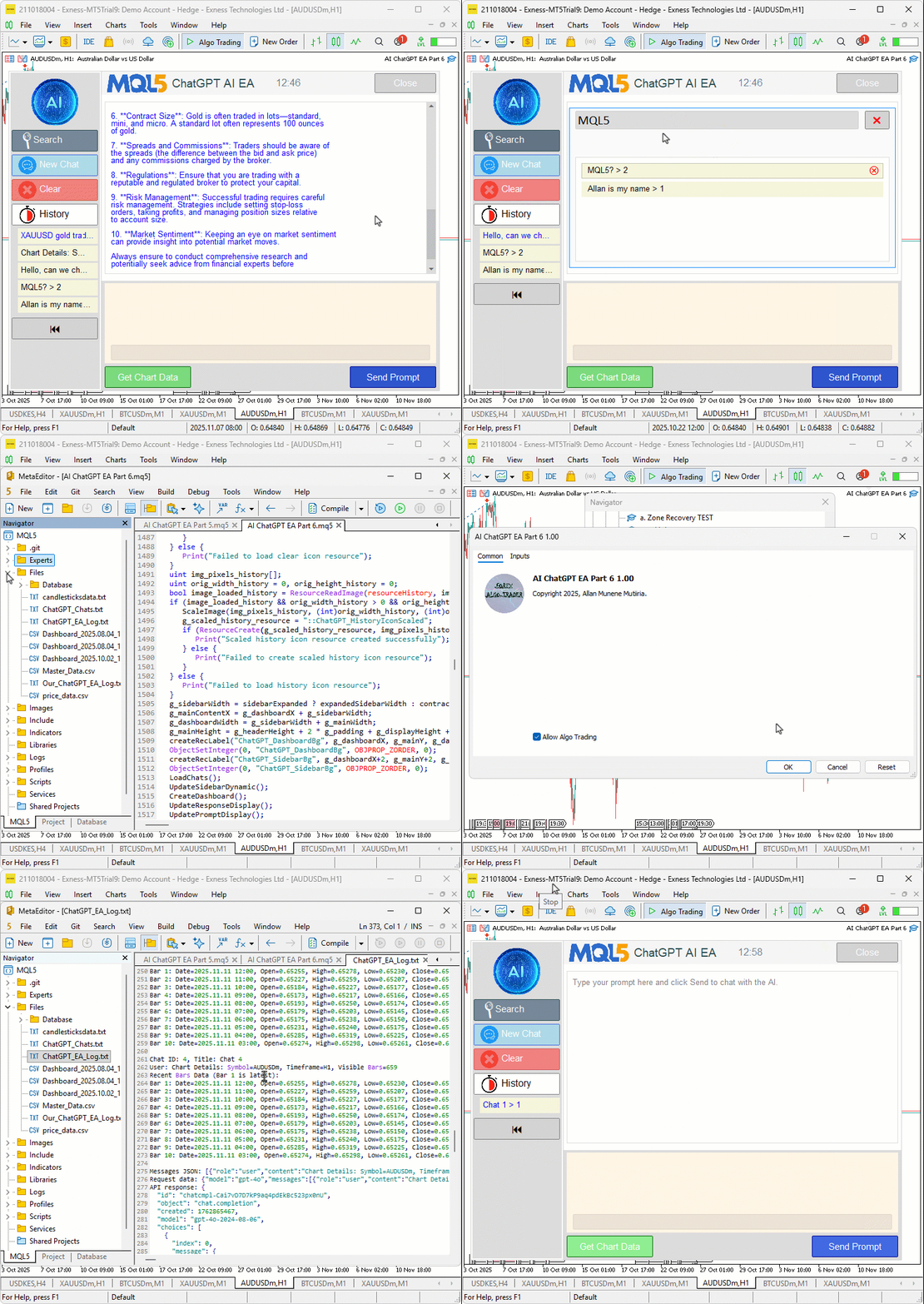
From the visualization, we can see that we maintain the integrity of the chat logs by not tampering with them. In case you are frequently using the chat and would want to delete the logs as well, here is the logic you would implement.
void ClearLogsForChat(int del_id) {
   if (logFileHandle != INVALID_HANDLE) {
      FileClose(logFileHandle);
   }
   string tempFile = "Temp_Log.txt";
   int readHandle = FileOpen(LogFileName, FILE_READ | FILE_TXT);
   if (readHandle == INVALID_HANDLE) {
      Print("Failed to open log for reading: ", GetLastError());
      ReopenLogHandle();
      return;
   }
   int writeHandle = FileOpen(tempFile, FILE_WRITE | FILE_TXT);
   if (writeHandle == INVALID_HANDLE) {
      Print("Failed to open temp log: ", GetLastError());
      FileClose(readHandle);
      ReopenLogHandle();
      return;
   }

   bool skipBlock = false;
   while (!FileIsEnding(readHandle)) {
      string line = FileReadString(readHandle);
      if (StringFind(line, "Chat ID: ") == 0) {
         // Reset skip for new block
         skipBlock = false;
         // Parse ID
         int commaPos = StringFind(line, ", Title: ");
         if (commaPos > 0) {
            string idStr = StringSubstr(line, 9, commaPos - 9);
            int chatId = (int)StringToInteger(idStr);
            if (chatId == del_id) {
               skipBlock = true;
            }
         }  // If parse fails, don't skip (safe default)
      }
      if (!skipBlock) {
         FileWrite(writeHandle, line);
      }
   }

   FileClose(readHandle);
   FileClose(writeHandle);

   FileDelete(LogFileName);
   FileMove(tempFile, 0, LogFileName, 0);

   ReopenLogHandle();
}

void ReopenLogHandle() {
   logFileHandle = FileOpen(LogFileName, FILE_READ | FILE_WRITE | FILE_TXT);
   if (logFileHandle != INVALID_HANDLE) {
      FileSeek(logFileHandle, 0, SEEK_END);
   } else {
      Print("Failed to reopen log: ", GetLastError());
   }
}

void DeleteChat(int id) {

   //--- rest of the logic

   ArrayRemove(chats, idx, 1);
   ClearLogsForChat(id); //--- we call the function after removing the chats
   SaveChats();

   //--- rest of the logic

}
We begin with the "ClearLogsForChat" function, which we create to remove all log entries belonging to a specific chat identified by "del_id". We first check if "logFileHandle" is valid, meaning that the log file is currently open. If it is, we close it using the FileClose function to safely prepare for reading and writing operations. We then define a temporary file name in the variable "tempFile", assigning it the value "Temp_Log.txt", which we use as an intermediate storage file during the cleanup process. Next, we open the main log file stored in "LogFileName" in read mode using FileOpen with flags FILE_READ and "FILE_TXT". If the file fails to open, we call the "ReopenLogHandle" function to restore access to the log file and exit the function.
We then open the temporary file in write mode using "FileOpen" again, but this time with the FILE_WRITE and "FILE_TXT" flags. If this fails, we call "ReopenLogHandle" before returning. Once both files are successfully open, we create a boolean variable "skipBlock" and initialize it to false. We use this variable to decide whether to skip writing specific sections of the log. We then begin a loop that runs until the end of the log file using "while (!FileIsEnding(readHandle))". Inside this loop, we read each line using FileReadString and store it in "line". If a line begins with "Chat ID: ", detected using StringFind, we recognize it as the start of a new chat entry. We reset "skipBlock" to false, then extract the numeric chat ID. To do this, we find the position of the text "Title: " in the line using "StringFind", extract the chat ID portion using StringSubstr, and convert it to an integer with the StringToInteger function. If the extracted "chatId" matches the "del_id" that we want to remove, we set "skipBlock" to true so that all lines related to that chat are ignored. For every other line, we write it back to the temporary file using FileWrite, effectively preserving only logs from other chats.
After processing all lines, we close both file handles using the FileClose function. We then delete the old log file using FileDelete and rename the temporary file to replace it using FileMove, ensuring that the old logs are replaced cleanly. Finally, we call "ReopenLogHandle" to reopen the main log file so that we can continue normal operations. The "ReopenLogHandle" function logic is not new here. We then call the function when deleting a chat to do the heavy lifting. If you don't want to delete the logs, you can ignore this change. You also need to note that if you have large logs, this will slow down the system because of the file reopenings and the rewrites. Actually, we added an input to control the log clearing, true by default. See below.
input bool DeleteLogsOnChatDelete = true;  // Clear logs when deleting chats?

//--- added conditional log clearing
if (DeleteLogsOnChatDelete) {
   ClearLogsForChat(id);
}
Upon compilation, we get the following outcome.
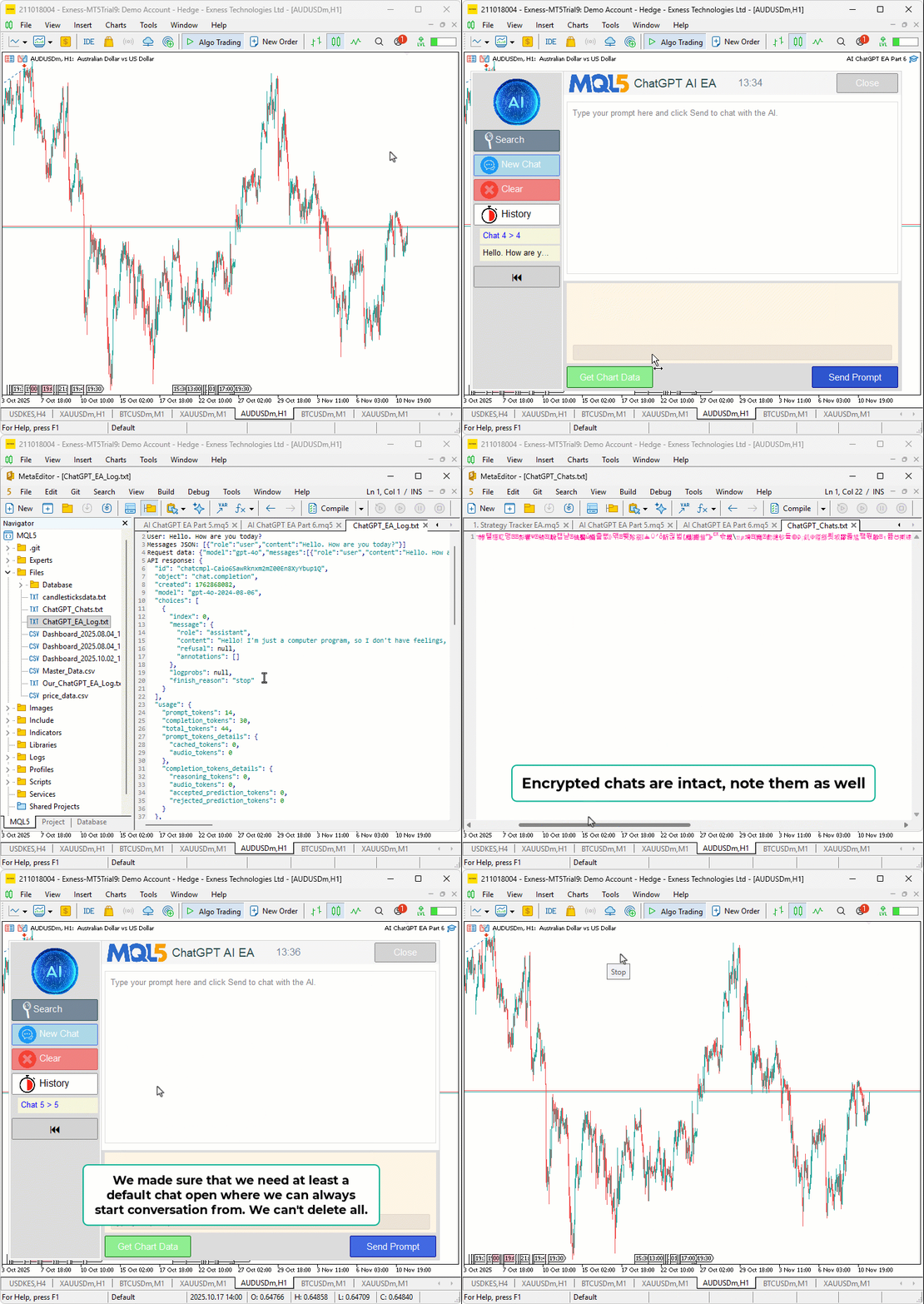
Conclusion
In conclusion, we’ve advanced our AI-powered trading system in MQL5 by introducing chat deletion through hover-activated buttons in the sidebar and popups, and a real-time search popup with case-insensitive filtering of titles and histories, enabling efficient management of persistent encrypted conversations while preserving multiline input and AI-driven signal generation from chart data. These features empower us to declutter and quickly retrieve relevant insights, enhancing productivity in dynamic market environments with intuitive controls and seamless UI updates. In the upcoming parts, we will integrate advanced trade execution based on AI signals and explore multi-symbol monitoring for a fully automated assistant. Stay tuned.
Attachments
| S/N | Name | Type | Description |
|---|---|---|---|
| 1 | AI_JSON_FILE.mqh | JSON Class Library | Class for handling JSON serialization and deserialization |
| 2 | AI_CREATE_OBJECTS_FNS.mqh | Object Functions Library | Functions for creating visualization objects like labels and buttons |
| 3 | AI_ChatGPT_EA_Part_6.mq5 | Expert Advisor | Main Expert Advisor for handling AI integration |
Warning: All rights to these materials are reserved by MetaQuotes Ltd. Copying or reprinting of these materials in whole or in part is prohibited.
This article was written by a user of the site and reflects their personal views. MetaQuotes Ltd is not responsible for the accuracy of the information presented, nor for any consequences resulting from the use of the solutions, strategies or recommendations described.

 Risk Management (Part 2): Implementing Lot Calculation in a Graphical Interface
 Markets Positioning Codex in MQL5 (Part 2): Bitwise Learning, with Multi-Patterns for Nvidia
 Overcoming The Limitation of Machine Learning (Part 7): Automatic Strategy Selection
 Developing Trading Strategy: Pseudo Pearson Correlation Approach

- Free trading apps
- Over 8,000 signals for copying
- Economic news for exploring financial markets
You agree to website policy and terms of use