

Developing Trading Strategy: Pseudo Pearson Correlation Approach
 4 279
4 279
 7
7

Introduction
Generating new indicators from existing ones offers a powerful way to enhance trading analysis. By defining a mathematical function that integrates the outputs of existing indicators, traders can create hybrid indicators that consolidate multiple signals into a single, efficient tool. This method reduces chart clutter, simplifies interpretation, and leverages the individual strengths of each component indicator to improve decision-making.
The approach to technical analysis involves monitoring several indicators simultaneously, each providing a unique signal. However, this can result in a cluttered chart, increased difficulty in interpretation, and at times, conflicting signals. The solution proposed here is to mathematically combine the signals of selected indicators into a single, new oscillator.
This article introduces a new indicator built from three oscillators using a modified version of the Pearson correlation function, which we call the Pseudo Pearson Correlation (PPC). The PPC indicator aims to quantify the dynamic relationship between oscillators and apply it within a practical trading strategy.
Concept Overview
The Pearson correlation coefficient (r) is a well-known statistical measure that quantifies the strength and direction of a linear relationship between two variables, X and Y. It is defined as:
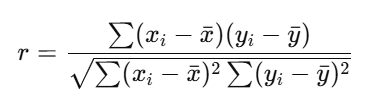
- x_i and y_i represent individual sample points,
- x_bar and y_bar denote the mean values of x and y respectively.
The correlation coefficient r ranges between –1 and +1, where:
- r = +1 implies perfect positive linear correlation.
- r= -1 depicts perfect negative linear correlation.
- r= 0 suggests no linear correlation.
This formula essentially measures the distance of each data point from its mean, standardized by the square root of the sum of squared distances.
The Modified Function: Pseudo Pearson Correlation (PPC)
In the proposed method, we modify the original Pearson correlation formula by replacing the mean value x and y with a third variable z. Thus, instead of measuring deviations from the mean, the relationship between x and y is measured relative to z.
The modified formula for the Pseudo Pearson Correlation (r′) is therefore expressed as:
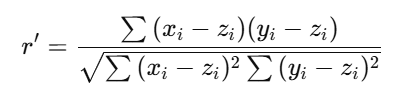
Here, z is another variable (not the mean of either x and y ) making the correlation “pseudo.”
Although the formula structure resembles the original Pearson correlation, it measures a three-variable interaction rather than a two-variable relationship. The result, 𝑟′ remains bounded within the range of –1 to +1, interpreted as:
| r' values | Interpretation |
|---|---|
| 1 | Perfect positive correlation |
| 0.7 - 0.9 | Strong positive correlation |
| 0.4 - 0.6 | Moderate positive correlation |
| 0.1 - 0.3 | Weak positive correlation |
| 0 | No correlation |
| -0.1 to -0.3 | Weak negative correlation |
| -0.4 to -0.6 | Moderate negative correlation |
| -0.7 to -0.9 | Strong negative correlation |
| -1 | Perfect negative correlation |
The positive r' implies x and y are in same direction relative to z where as the negativedepicts x and y are in opposite direction relative to z.
Application: Pseudo Pearson Correlation Oscillator and its Trading Strategy
In this section, the PPC is applied to construct a new oscillator and formulate a corresponding trading strategy.
- Pseudo Pearson Correlation Oscillator
The approach combines three well-known technical indicators—Relative Strength Index (RSI), Money Flow Index (MFI), and DeMarker (DEM)—as input variables for the PPC formula. Each of these oscillators has a normalized range between 0 and 1, which makes them ideal for comparative correlation analysis.
The RSI measures the speed and magnitude of recent price changes to evaluate whether an asset is overbought or oversold. It is a pure price momentum indicator. It compares the average gains of closing prices to the average losses over a specific look-back period.
The MFI is often called the "volume-weighted RSI." It incorporates both price and volume data. Instead of just using closing prices like the RSI, the MFI uses the typical price (average of high, low, and close) and multiplies it by volume to create money flow. This measures the buying and selling pressure.
The DEM Indicator focuses specifically on comparing the current price to the previous period's price to measure buying and selling pressure. It calculates the level of the current period's high (or low) relative to the previous period's high (or low). Its goal is to identify when buyers are unable to push the price to a new high (potential exhaustion) or when sellers are unable to push the price to a new low.
By integrating their outputs into the PPC function, we can quantify how closely two indicators (DEM and MFI) move relative to a third (RSI), which serves as a baseline.
Substituting the PPC variables x,y,z with DEM,MFI and RSI respectively, the formula becomes:
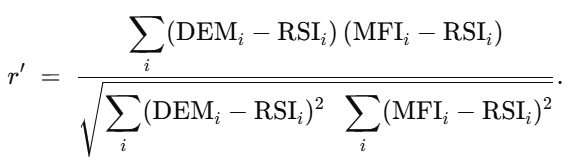
This equation defines the Pseudo Pearson Correlation Oscillator, which captures the dynamic relationship between DEM and MFI in reference to the RSI baseline.
The PPC oscillator can be interpreted as follows:
- +1 → DEM and MFI move togetherrelative to RSI (strong positive correlation).
- −1 → DEM and MFI move in opposite directionsrelative to RSI (strong negative correlation).
- ≈ 0 → Weak or no linear relationship between DEM and MFI relative to RSI.
This correlation-based oscillator provides a compact yet powerful analytical tool. It consolidates the behavioral tendencies of three oscillators into one, simplifying chart analysis and aiding the identification of confluence zones where price momentum and market strength align or diverge.
In this section we dive into the code structure of the PPC indicator and how it can be used in our trading method.
#property indicator_maximum 1
#property indicator_minimum -1

#property indicator_level1 -0.80
#property indicator_level2 -0.50
#property indicator_level3  0.00
#property indicator_level4  0.50
#property indicator_level5  0.80
We define the indicator’s properties by setting its maximum value to 1 and minimum value to -1. The indicator line levels are configured at ±0.8 and ±0.5.
//---- Inputs
input int                 CorrPeriod      = 21;
input int                 RSIPeriod       = 14;
input int                 MFIPeriod       = 14;
input int                 DeMPeriod       = 14;
The code allows users to adjust the RSI, MFI, and DeMarker periods, as well as the number of indicator values used to calculate the correlation, referred to as the CorrPeriod.
   IndicatorSetString(INDICATOR_SHORTNAME,
      StringFormat("PPr[ Corr=%d  RSI=%d  MFI=%d  DeM=%d ]",
                   CorrPeriod, RSIPeriod, MFIPeriod, DeMPeriod));

   // Create indicator handles
   rsi_handle = iRSI(_Symbol, _Period, RSIPeriod, PRICE_CLOSE);
   mfi_handle = iMFI(_Symbol, _Period, MFIPeriod,VOLUME_TICK);
   dem_handle = iDeMarker(_Symbol, _Period, DeMPeriod);

   if(rsi_handle == INVALID_HANDLE || mfi_handle == INVALID_HANDLE || dem_handle == INVALID_HANDLE)
   {
      Print("Error creating indicator handles");
      return(INIT_FAILED);
   }
During initialization, the indicator short name is set, and handles are created for the RSI, MFI, and DeMarker (DEM) indicators. Additionally, the code verifies that each handle is successfully created and checks for any errors in the process.
void OnDeinit(const int reason)
{
   if(rsi_handle != INVALID_HANDLE) IndicatorRelease(rsi_handle);
   if(mfi_handle != INVALID_HANDLE) IndicatorRelease(mfi_handle);
   if(dem_handle != INVALID_HANDLE) IndicatorRelease(dem_handle);
}
During deinitialization, we release all the indicator handles to free up system resources and ensure proper memory management.
   for(int i = pStart; i<rates_total; i++)
   {
      double sum_xy = 0.0;
      double sum_x2 = 0.0;
      double sum_y2 = 0.0;

      for(int j = 0; j < CorrPeriod; j++)
      {
         int sh = i - j;

         // Get RSI value
         double rsi = rsi_buffer[sh];

         // Get MFI value
         double mfi = mfi_buffer[sh];

         // Get DeMarker value
         double dem = dem_buffer[sh];

         // Deviations relative to RSI
         double dx = (dem - rsi);
         double dy = (mfi - rsi);

         sum_xy += dx * dy;
         sum_x2 += dx * dx;
         sum_y2 += dy * dy;
      }

      double denom = MathSqrt(sum_x2 * sum_y2);
      if(denom > 0.0)
         CorrBuffer[i] = sum_xy / denom;   //Pseudo Pearson r in [-1, +1]
      else
         CorrBuffer[i] = EMPTY_VALUE;
   }
This section of the code calculates the PPC value using the input indicators DEM, MFI, and RSI. The computed correlation values are then stored in the corrBuffer for plotting on the chart. The code handles cases where the PPC denominator equals zero by assigning an empty value, preventing division errors and ensuring stable indicator performance.
After placing the MetaTrader 5 version of the PPC Oscillator in your Indicators folder and successfully compiling it, you can simply select it from the list of custom indicators and attach it to your chart. The following GIF illustrates its functionality and behavior in real time.
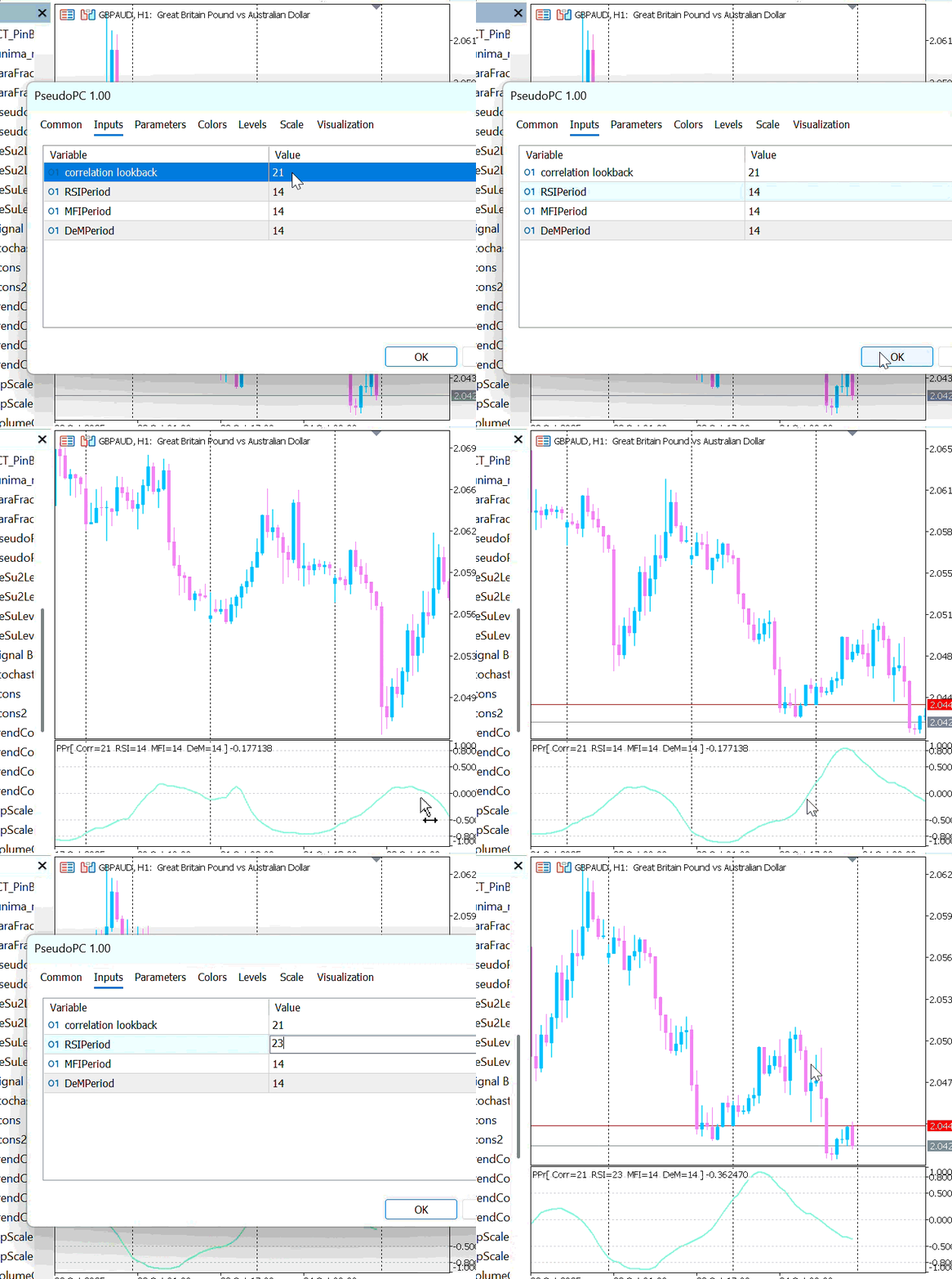
Figure 1: Pseudo Pearson Correlation Demo 1
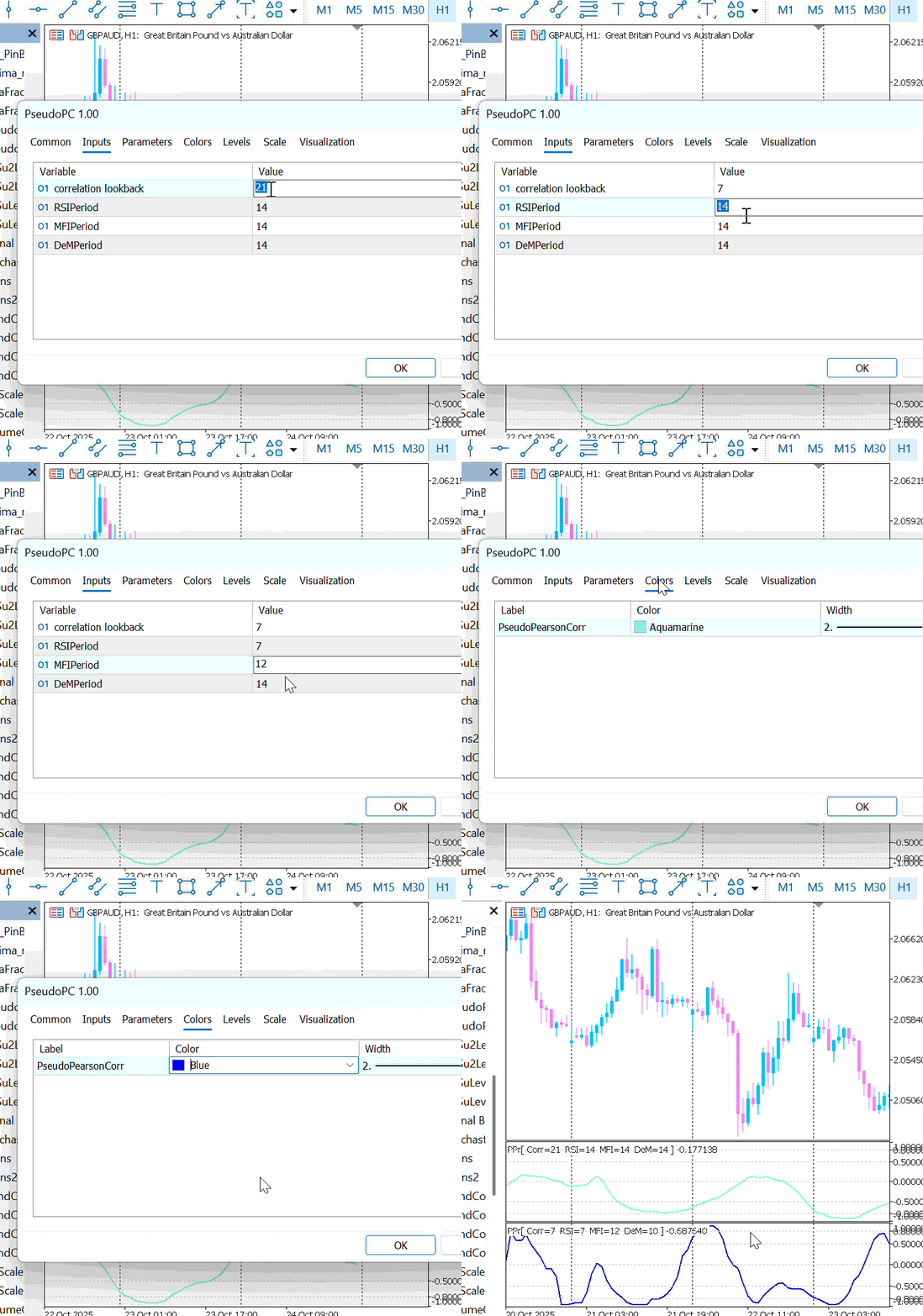
Figure 2: Pseudo Pearson Correlation Demo 2
Note that, similar to the Average True Range (ATR) indicator, the PPC indicator does not indicate trade direction as individual oscillators like RSI, MFI, and DeMarker (DEM) do. Instead, it measures the correlation among these oscillators—showing whether they are converging (positively correlated) or diverging (negatively correlated).
After developing the PPC Oscillator, the next step is to design a simple trading strategy to test the framework in real market conditions. In this strategy, the PPC Oscillator is combined with a Moving Average (MA) indicator to create a complementary trading framework.
The Moving Average serves as a trend direction filter, helping traders identify whether the market is generally moving upward or downward. The core logic is that a buy signal is only generated when the short-term MA is above the long-term, indicating a nascent bullish trend, and vice-versa for sell signals.
On the other hand, the PPC Oscillator acts as the entry signal generator within this trend context. The two strategies are designed to capitalize on different market states inferred from the PPC reading.
Strategy 1: The "Correlated Momentum" Strategy
This strategy aims to enter a trade when the momentum indicators (RSI, MFI, DeM) show a sudden, strong alignment, suggesting the onset of a unified momentum push in the direction of the prevailing trend.- Buy Signal: Triggered when the PPC value crosses upward through the +0.5 threshold, indicating a shift into a strongly positive correlated momentum state, and this occurs within a bullish MA trend.
- Sell Signal: Triggered when the PPC value crosses upward through the +0.5 threshold, but this occurs during a bearish MA trend. This suggests a strong coordinated momentum move to the downside.
Strategy 2: The "Non-Correlated" Strategy
This strategy operates on a contrarian premise. It seeks to enter a trade when the underlying momentum indicators (DEM and MFI) move apart relative to the RSI, a severe breakdown in their relationship (strong negative correlation), potentially signaling an exhaustion point and an impending reversal in the direction of the short-term trend.
- Buy Signal: Triggered when the PPC value crosses downward through the -0.5 threshold, indicating a plunge into strong negative correlation, while the short-term trend remains bullish. The logic is that this extreme divergence may resolve with a sharp price move upward.
- Sell Signal: Triggered when the PPC value crosses downward through the -0.5 threshold during a bearish short-term trend, anticipating a further price push down due to extreme divergence of PPC.
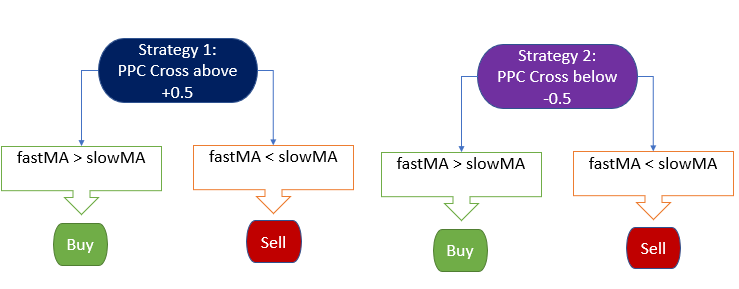
Figure 3: Trading strategy framework
By testing both correlated and non-correlated conditions, traders can analyze how the PPC Oscillator behaves in various market phases and determine which setup better aligns with their trading style and risk tolerance.
Expert Advisor Code Structure
At this stage, we proceed to explore the code structure of the Expert Advisor (EA) that utilizes the PPC indicator. This section explains how the EA integrates the PPC oscillator with the Moving Average filter to automate the trading strategies described earlier. It outlines the logical flow, key functions, and decision-making components that enable the EA to interpret indicator signals, generate trade entries, and manage positions based on the defined correlation strategies.
//--- Input parameters
input double Lots = 0.01;
input double StopLoss = 300;
input double TakeProfit = 700;
input int Slippage = 3;

input int CorrPeriod = 21;
input int RSIPeriod = 14;
input int MFIPeriod = 14;
input int DeMPeriod = 14;
input double PPr = 0.5;    // PseudoCorrelatedValue (0.1 to 1)

input int FastMAPeriod = 2;
input int SlowMAPeriod = 20;
We begin by defining the input parameters of the Expert Advisor (EA), which allow traders to control and adjust the EA’s behavior externally through the settings panel. These parameters provide flexibility in trade management and indicator configuration.
The primary trading parameters include:
- Lots– specifies the position size for each trade.
- StopLoss and TakeProfit – define the exit points in points, setting the maximum acceptable loss and the desired profit target.
- Slippage – determines the allowable deviation from the requested price to ensure smoother order execution, even under volatile market conditions.
In addition to these trade management parameters, the EA also includes inputs for indicator configuration:
- CorrPeriod, RSIPeriod, MFIPeriod, and DeMPeriod – allow the user to set and adjust the parameters of the PPC oscillator and its underlying indicators (RSI, MFI, and DeMarker).
- PPr parameter- represents the correlation threshold value that determines when an entry signal is triggered. It defines the sensitivity level of the PPC oscillator used for trade entries. When the PPr value is set within the range of 0 to 1, the EA automatically calculates its negative counterpart (–PPr) to represent the opposite correlation threshold.
- FastMAPeriod and SlowMAPeriod parameters- define the periods for the Moving Average (MA) indicators used to determine the overall trend direction. The FastMA responds quickly to recent price changes, capturing short-term movements, while the SlowMA smooths out price fluctuations to reveal the broader market trend.
//--- Strategy Selection
input bool EnableStrategy1 = true;   // Enable Strategy 1 Correlated
input bool EnableStrategy2 = false;  // Enable Strategy 2 NotCorrelated
This parameter allows the user to select which trading strategy (Strategy 1 or Strategy 2) the EA should follow. The EA is designed to execute only one trade at a time, ensuring that trades do not overlap or conflict.
If both strategies are set to true simultaneously, the EA automatically prioritizes and executes the first strategy whose conditions are met in real time. This logical safeguard ensures consistent and conflict-free trade execution while maintaining the intended strategy structure.
   //--- Create indicator handles
   indicatorHandle = iCustom(Symbol(), Period(), IndicatorName,
                            CorrPeriod, RSIPeriod, MFIPeriod, DeMPeriod);
   fastMaHandle = iMA(Symbol(), Period(), FastMAPeriod, 0, MODE_EMA, PRICE_CLOSE);
   slowMaHandle = iMA(Symbol(), Period(), SlowMAPeriod, 0, MODE_EMA, PRICE_CLOSE);
At the initialization stage of the EA, the iCustom function is called to retrieve the output values of the PPC indicator and store them in the indicatorHandle. This handle enables the EA to access real-time correlation data from the PPC oscillator throughout its operation.
In a similar manner, the iMA function is used to obtain the values of the Fast Moving Average (FastMA) and Slow Moving Average (SlowMA). These are stored in their respective handles—fastMAHandle and slowMAHandle—allowing the EA to continuously track market trends. Together, these handles form the core data connections the EA relies on to generate, evaluate, and execute trade signals effectively.
void OnDeinit(const int reason)
{
   if(indicatorHandle != INVALID_HANDLE) IndicatorRelease(indicatorHandle);
   if(fastMaHandle != INVALID_HANDLE) IndicatorRelease(fastMaHandle);
   if(slowMaHandle != INVALID_HANDLE) IndicatorRelease(slowMaHandle);
}
During the deinitialization stage, all indicator and moving average handles are released to free up system resources and ensure efficient memory management. This step prevents potential memory leaks or resource conflicts, maintaining the stability and performance of the EA during and after its execution.
//+------------------------------------------------------------------+
//| Check for new bar                                                |
//+------------------------------------------------------------------+
bool IsNewBar()
{
   datetime currentBar = iTime(Symbol(), Period(), 0);

   if(currentBar == lastBar)
      return false;

   lastBar = currentBar;
   return true;
}
The IsNewBar function ensures that the EA executes its logic only once per new bar or candle. This prevents the EA from repeatedly performing calculations or opening multiple trades within the same bar, thereby improving efficiency and reducing redundant processing.
   //--- STRATEGY 1 (Correlated) ---
   if(EnableStrategy1 && corr_prev < PPr && corr_curr > PPr)
   {
      if(maFast[0] > maSlow[0])
         OpenTrade(ORDER_TYPE_BUY, "Strategy1 BUY");
      else if(maFast[0] < maSlow[0])
         OpenTrade(ORDER_TYPE_SELL, "Strategy1 SELL");
   }

   //--- STRATEGY 2 (Not Correlated) ---
   if(EnableStrategy2 && corr_prev > -PPr && corr_curr < -PPr)
   {
      if(maFast[0] > maSlow[0])
         OpenTrade(ORDER_TYPE_BUY, "Strategy2 BUY");
      else if(maFast[0] < maSlow[0])
         OpenTrade(ORDER_TYPE_SELL, "Strategy2 SELL");
   }
This section of the code defines the entry conditions for both Strategy 1 and Strategy 2, as previously described. It evaluates the correlation values from the PPC indicator along with the Moving Average trend direction to determine whether a buy or sell signal should be triggered.
The OpenTrade function is then called to execute the trade. It takes two key parameters — the order type (buy or sell) and a comment — which helps identify the trade’s origin or strategy during execution. This structured approach ensures that each trade is opened under clearly defined conditions, improving the EA’s transparency and traceability.
Demonstration of EA
In this section, we demonstrate how the EA operates based on the trading logic outlined above. The EA uses the defined correlation and trend conditions to identify potential trade setups and execute them automatically.
Figure 4 illustrates the various parameters that users can adjust and optimize to improve the EA’s overall performance. These include trading inputs such as lot size, stop loss, take profit, and slippage, as well as indicator parameters like CorrPeriod, RSIPeriod, MFIPeriod, DeMPeriod, PPr and Moving Average periods. By fine-tuning these settings, traders can adapt the EA to different market conditions, enhance accuracy, and achieve better risk–reward outcomes.
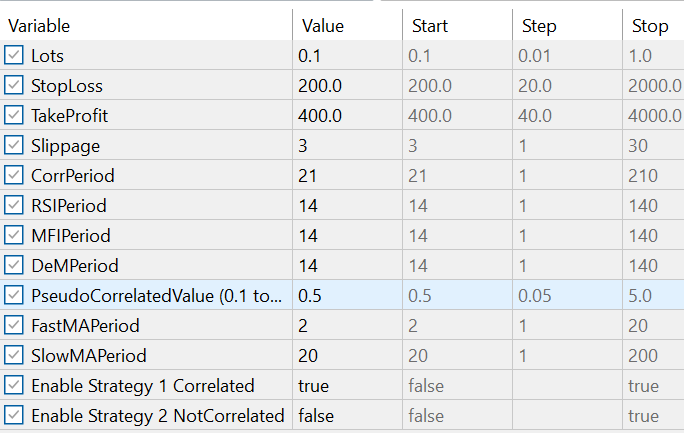
Figure 4: PPC EA Inputs
Figure 5 illustrates the process by which the EA executes trade orders in real time. In this example, Strategy 1 is used to demonstrate how the EA automatically opens and closes positions based on the predefined trading conditions.
Once the PPC correlation and Moving Average trend align to generate a valid entry signal, the EA opens a buy or sell order accordingly. Each trade is protected by stop loss and take profit levels, which are defined in the EA’s input parameters. The take profit secures profits when the market moves favorably, while the stop loss limits potential losses if the market moves against the position.
This illustration helps visualize the EA’s automated decision-making process—how it detects opportunities, executes trades, and manages risk without manual intervention.
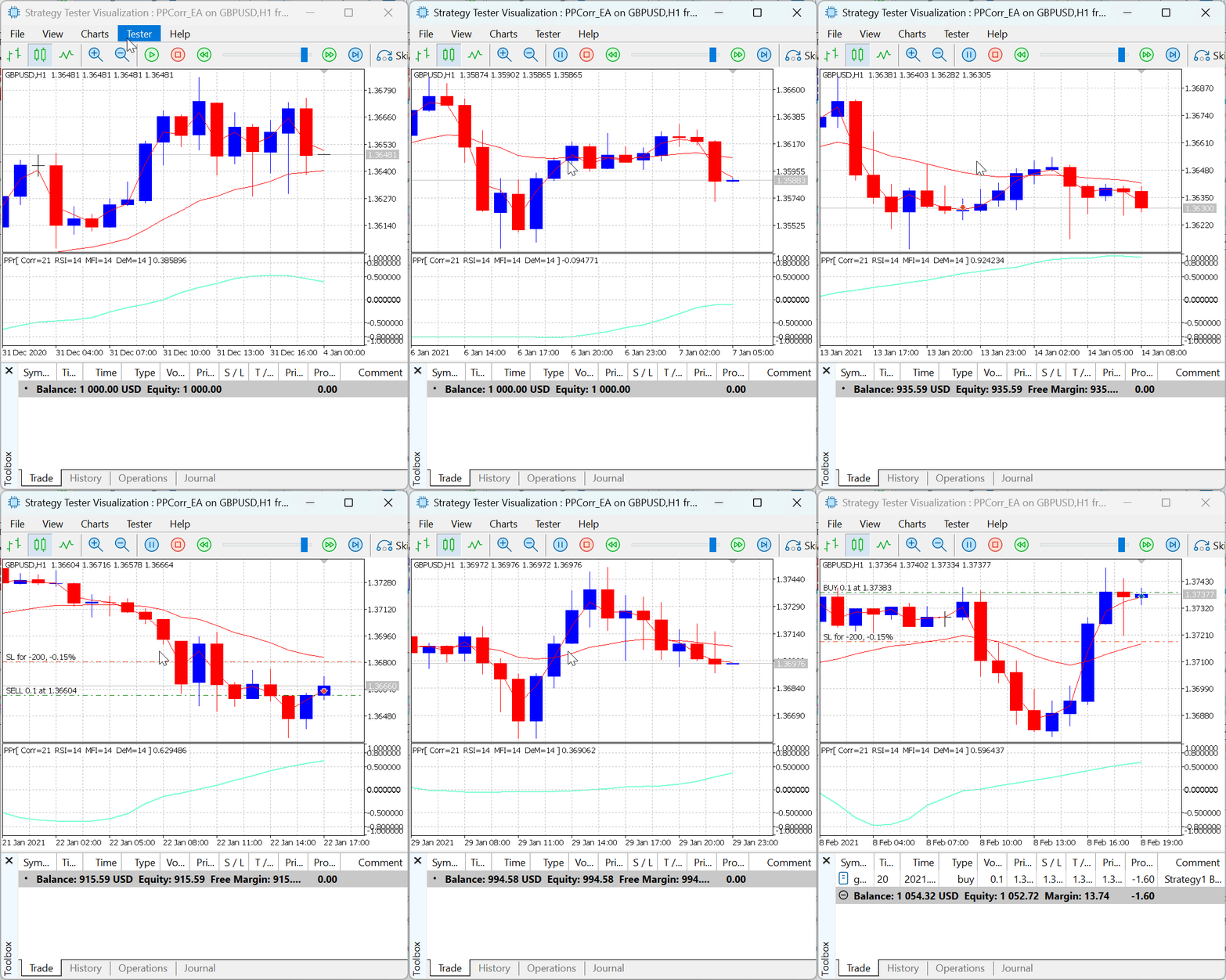
Figure 5: PPC EA Trade Execution
Conclusion
In this article, we demonstrated that it is possible to refine existing indicators to create a new and powerful analytical tool using a defined mathematical function. The proposed function, called the Pseudo Pearson Correlation, takes in three input variables—RSI, MFI, and DeMarker (DEM)—to generate a single output variable that measures the degree of correlation among them. Similar to the traditional Pearson Correlation, the PPC value ranges from -1 to +1, representing the strength and direction of correlation between the selected oscillators. The indicator visually plots these correlation values on the chart, allowing traders to easily observe periods of strong correlation and weak correlation in market momentum.
The PPC indicator was further integrated into an Expert Advisor to automate trading decisions. By combining it with a Moving Average filter, two trading strategies were developed and tested—one based on positive correlation (Strategy 1) and the other on negative correlation (Strategy 2). Both strategies successfully executed trades according to their defined logic, demonstrating the PPC’s potential as an effective entry signal when paired with a trend-following indicator.
Overall, the results show that the Pseudo Pearson Correlation approach provides a novel way to quantify relationships between oscillators, offering traders an additional layer of insight into market behavior. With further optimization and backtesting, the PPC indicator could serve as a valuable component in developing more adaptive and data-driven trading systems.
In the next chapter of this study, we will test the strategy on various financial instruments and currency pairs to evaluate the strengths and weaknesses of the EA that employs the PPC indicator. Stay tuned for more insights and results from these upcoming experiments.
| File | Description |
|---|---|
| PseudoPC.mq5 | This file contains the Pseudo Pearson Correlation (PseudoPC) indicator, designed to measure directional relationships in price data. |
| PPCorr_EA.mq5 | This file contains the Expert built upon the PseudoPC indicator, enabling automated trade execution based on the indicator’s signals and underlying logic. |
Warning: All rights to these materials are reserved by MetaQuotes Ltd. Copying or reprinting of these materials in whole or in part is prohibited.
This article was written by a user of the site and reflects their personal views. MetaQuotes Ltd is not responsible for the accuracy of the information presented, nor for any consequences resulting from the use of the solutions, strategies or recommendations described.

 Markets Positioning Codex in MQL5 (Part 2): Bitwise Learning, with Multi-Patterns for Nvidia
 From Novice to Expert: Predictive Price Pathways
 Building AI-Powered Trading Systems in MQL5 (Part 6): Introducing Chat Deletion and Search Functionality
 Implementation of a table model in MQL5: Applying the MVC concept

- Free trading apps
- Over 8,000 signals for copying
- Economic news for exploring financial markets
You agree to website policy and terms of use
It would be great to see reports with real performance of the test Expert Advisor compared to the same strategies without using the correlation filter - this way we can evaluate the effectiveness of the new indicator.
Most single period oscillators are by definition highly correlated, and using their correlation is not of much interest. Analysing several different periods makes sense, but probably each trader will do it with his preferred oscillator, i.e. the same type of oscillator, the setting of which is not discussed in the article (i.e. you cannot choose 3 RSI or 3 MFis, for example).
who's checking the articles now?
what is this invention of new terms with the attraction to the known ones ? this kind of devalues the mql5 resource ?
well, there is no "Pearson's pseudo-correlation" and its criteria in trading or statistics. NO
You are right, there is no strict term "Pearson's pseudocorrelation". What is meant here is the well-known phenomenon of spurious correlation - when Pearson's coefficient shows a relationship that has no causal meaning (e.g. due to a trend or hidden variable.
How is it possible that the first comment in a thread discussing an article is dated six months earlier than the article itself? )))
Because I posted it in the English thread when the original was published. After switching on automatic translation of forums into other languages - this situation happens regularly - you can see auto-translated posts from under the original in the discussion.