Nexus Institutional Alpha
- Эксперты
- Версия: 1.9
- Обновлено: 8 августа 2026
- Активации: 5

NEXUS INSTITUTIONAL ALPHA
Multi-Module Hybrid Ghost Engine
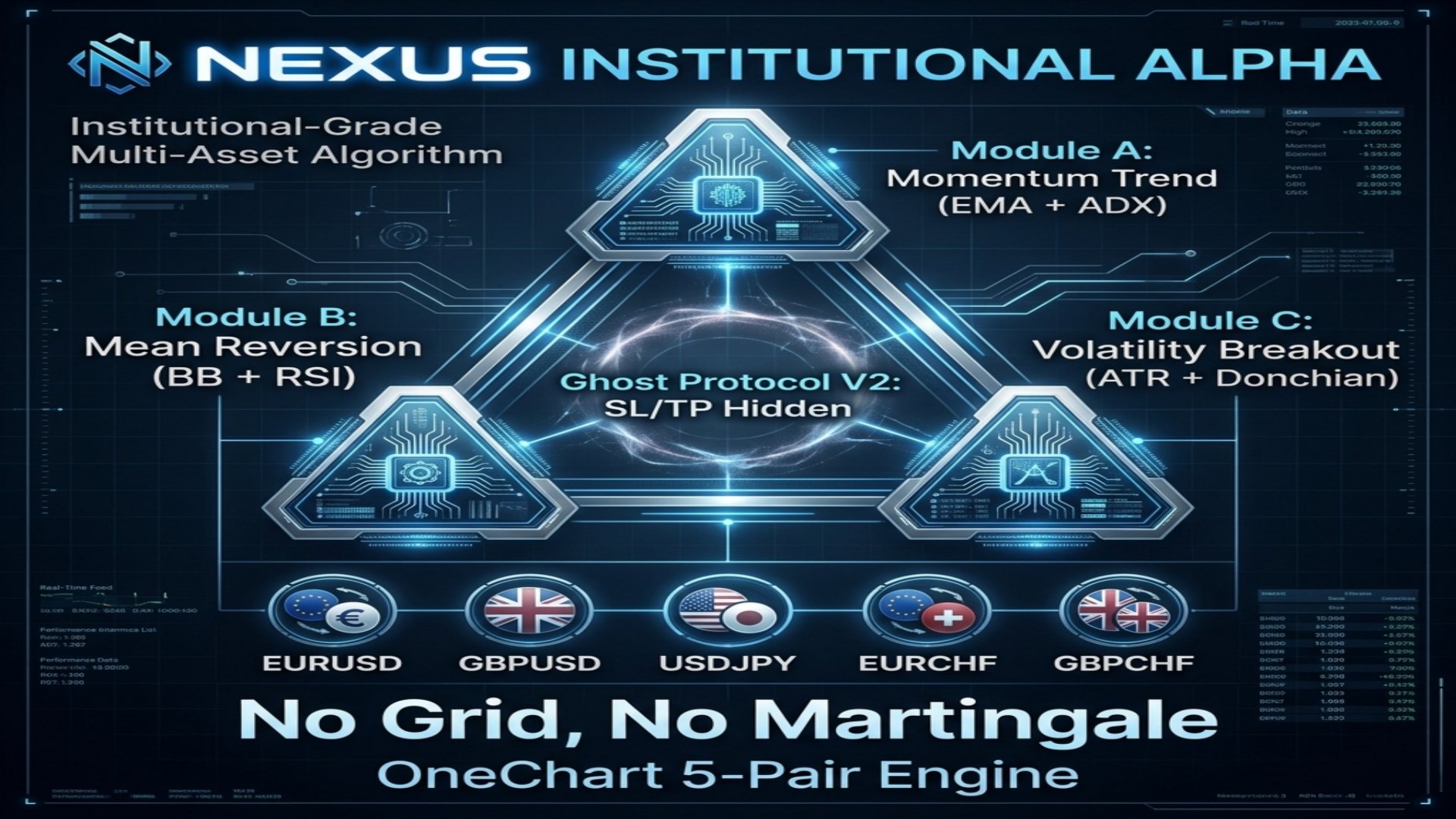
Nexus Institutional Alpha is a flagship algorithmic trading system featuring three independent trading modules that can be enabled or disabled individually, combined with Ghost Protocol stealth technology. Inspired by the most successful institutional-grade systems on the market
The EA trades five major Forex pairs (EURUSD, GBPUSD, USDJPY, EURCHF, GBPCHF) simultaneously from a single chart using OneChart architecture. Each module analyzes the market through a different lens: Momentum Trend, Mean Reversion, and Volatility Breakout. All Stop Loss and Take Profit levels are managed virtually through the Ghost Protocol, completely hidden from your broker.
=== WHY NEXUS INSTITUTIONAL ALPHA? ===
1. THREE INDEPENDENT MODULES: Module A (Momentum), Module B (Reversion), Module C (Breakout). Enable or disable each module independently. Run all three for maximum diversification, or focus on your favorite strategy.
2. GHOST PROTOCOL V2: All SL/TP targets are managed virtually by the EA. Your broker never sees your exit levels. Eliminates stop-hunting completely.
3. ONECHART 5-PAIR ENGINE: Attach to one chart and trade EURUSD, GBPUSD, USDJPY, EURCHF, GBPCHF simultaneously.
4. NEWS SHIELD: Automatically halts all new entries during high-impact news hours. Configurable start and end hours. Protects against NFP, FOMC, and ECB volatility spikes.
5. AEGIS SHIELD: Hard daily drawdown limiter. If losses exceed your threshold, all positions are closed instantly.
6. PHANTOM RANDOMIZER: Randomized execution delays for Prop Firm compliance (FTMO, MFF compatible).
7. NEXUS HUD DASHBOARD: Real-time on-chart display showing module status, position count per pair, floating P&L, daily drawdown, and news shield status.
8. NO GRID, NO MARTINGALE: Each module opens maximum 1 position per pair. Clean, institutional-grade risk management.
=== THE THREE MODULES ===
Module A (Momentum Trend): Uses EMA 10/50 crossover combined with ADX trend strength filter. Only enters when ADX confirms a strong trend (above 25). Perfect for capturing trending markets.
Module B (Mean Reversion): Combines Bollinger Bands with RSI extreme zones. Enters when RSI hits oversold (below 25) or overbought (above 75) AND price touches the outer Bollinger Band. Catches exhaustion reversals.
Module C (Volatility Breakout): Uses ATR expansion detection combined with Donchian Channel breakouts. Only trades when ATR is expanding above 1.3x its average, confirming genuine volatility expansion, not noise.
=== GOD-TIER PRESETS ===
[SETUP 1] FTMO PHANTOM (Ultra-Safe Prop Firm)
Designed to pass FTMO Phase 1 and Phase 2 evaluations with maximum safety.
- ModuleA: true / ModuleB: true / ModuleC: false
- RiskPercent: 0.5
- VirtualSL: 400 / VirtualTP: 600
- GhostMode: true
- NewsShield: true / NewsHourStart: 12 / NewsHourEnd: 16
- MaxDailyDD: 4.0
- UseRandomizer: true / RandDelayMax: 3
- MaxSpread: 25
- Chart: Any pair, M15
[SETUP 2] INSTITUTIONAL GROWTH (Medium Risk)
Balanced multi-module growth for live accounts $2,000+.
- ModuleA: true / ModuleB: true / ModuleC: true
- RiskPercent: 1.0
- VirtualSL: 500 / VirtualTP: 800
- GhostMode: true
- NewsShield: true / NewsHourStart: 13 / NewsHourEnd: 15
- MaxDailyDD: 5.0
- UseRandomizer: false
- MaxSpread: 30
- Chart: Any pair, M15
[SETUP 3] NEXUS APEX (Aggressive Multi-Module)
Maximum diversification power for experienced traders with accounts $5,000+.
- ModuleA: true / ModuleB: true / ModuleC: true
- RiskPercent: 2.0
- VirtualSL: 600 / VirtualTP: 1000
- GhostMode: true
- NewsShield: false
- MaxDailyDD: 8.0
- UseRandomizer: false
- MaxSpread: 35
- Chart: Any pair, M15
=== INSTALLATION & SETUP ===
1. Open any chart in MetaTrader 5 on the M15 timeframe (e.g., EURUSD).
2. Drag and drop Nexus Institutional Alpha onto the chart.
3. In the Inputs tab, enable or disable each module and configure your preset values.
4. The EA will automatically detect and trade all 5 pairs from the single chart.
5. Make sure all 5 pairs are visible in your Market Watch window.
6. Enable "Allow Algo Trading" in the toolbar.
7. Run on a VPS 24/5 for best results.