

Automatización de estrategias de trading en MQL5 (Parte 10): Desarrollo de la estrategia Trend Flat Momentum
 424
424
 0
0

Introducción
En el artículo anterior (Parte 9), desarrollamos un Asesor Experto para automatizar la estrategia de ruptura asiática utilizando niveles clave de sesión y gestión dinámica del riesgo en MetaQuotes Language 5 (MQL5). Ahora, en la Parte 10, centramos nuestra atención en la estrategia de impulso de tendencia plana (Trend Flat Momentum Strategy), un método que combina un cruce de dos medias móviles con filtros de impulso como el Índice de fuerza relativa (Relative Strength Index, RSI) y el Índice de canal de materias primas (Commodity Channel Index, CCI) para captar con precisión los movimientos de tendencia. Estructuraremos el artículo en torno a los siguientes temas:
Al final, tendremos un Asesor Experto totalmente funcional que automatiza la estrategia Trend Flat Momentum. ¡Vamos a ello!
Plan estratégico
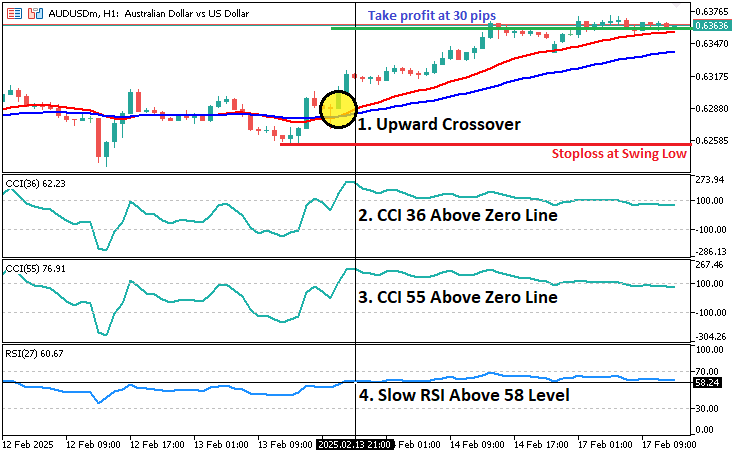
La estrategia Trend Flat Momentum está diseñada para capturar las tendencias del mercado combinando un sencillo sistema de cruce de medias móviles con un sólido filtrado del impulso. La idea central es generar señales de compra cuando una media móvil rápida cruza por encima de una media móvil más lenta, lo que sugiere una tendencia alcista, al tiempo que se confirma la señal con indicadores de impulso, que son un RSI y dos valores diferentes de CCI. Por el contrario, se señala una operación corta cuando la media móvil lenta supera a la media móvil rápida y los indicadores de impulso confirman condiciones bajistas. Los ajustes del indicador son:
- Índice del canal de materias primas (CCI) (36 períodos, cierre)
- Índice del canal de materias primas (CCI) (55 períodos, cierre)
- Índice de fuerza relativa lento (RSI) (27 períodos, cierre)
- Media móvil rápida (11 periodos, suavizado, precio medio)
- Media móvil lenta (25 períodos, suavizada, precio medio)
En cuanto a la estrategia de salida, colocaremos el stop loss en el mínimo anterior para una operación larga y en el máximo anterior para una operación corta. La toma de ganancias se realizará a un nivel predeterminado, a 300 puntos del precio de entrada. Este enfoque multifacético ayudará a filtrar las señales falsas y tiene como objetivo mejorar la calidad de las entradas comerciales, garantizando que la dirección de la tendencia y el impulso estén alineados. En resumen, la siguiente visualización muestra el plan estratégico simplificado.
Implementación en MQL5
Para crear el programa en MQL5, abra el MetaEditor, vaya al Navegador, localice la carpeta Indicadores, haga clic en la pestaña «Nuevo» y siga las instrucciones para crear el archivo. Una vez creado, en el entorno de programación, tendremos que declarar algunas variables globales que utilizaremos a lo largo del programa.
//+------------------------------------------------------------------+
//|                        Copyright 2025, Forex Algo-Trader, Allan. |
//|                                 "https://t.me/Forex_Algo_Trader" |
//+------------------------------------------------------------------+
#property copyright "Forex Algo-Trader, Allan"
#property link      "https://t.me/Forex_Algo_Trader"
#property version   "1.00"
#property description "This EA trades based on Trend Flat Momentum Strategy"
#property strict

#include <Trade\Trade.mqh> //--- Include the Trade library for order management.
CTrade obj_Trade; //--- Create an instance of the CTrade class to handle trading operations.

// Input parameters
input int    InpCCI36Period      = 36;              //--- CCI period 1
input int    InpCCI55Period      = 55;              //--- CCI period 2
input int    InpRSIPeriod        = 27;              //--- RSI period
input int    InpMAFastPeriod     = 11;              //--- Fast MA period
input int    InpMASlowPeriod     = 25;              //--- Slow MA period
input double InpRSIThreshold     = 58.0;            //--- RSI threshold for Buy signal (Sell uses 100 - Threshold)
input int    InpTakeProfitPoints = 300;             //--- Take profit in points
input double InpLotSize          = 0.1;             //--- Trade lot size

// Pivot parameters for detecting swing highs/lows
input int    PivotLeft  = 2;  //--- Number of bars to the left for pivot detection
input int    PivotRight = 2;  //--- Number of bars to the right for pivot detection

// Global indicator handles
int handleCCI36;  //--- Handle for the CCI indicator with period InpCCI36Period
int handleCCI55;  //--- Handle for the CCI indicator with period InpCCI55Period
int handleRSI;    //--- Handle for the RSI indicator with period InpRSIPeriod
int handleMA11;   //--- Handle for the fast moving average (MA) with period InpMAFastPeriod
int handleMA25;   //--- Handle for the slow moving average (MA) with period InpMASlowPeriod

// Global dynamic storage buffers
double ma11_buffer[];  //--- Dynamic array to store fast MA values
double ma25_buffer[];  //--- Dynamic array to store slow MA values
double rsi_buffer[];   //--- Dynamic array to store RSI values
double cci36_buffer[]; //--- Dynamic array to store CCI values (period 36)
double cci55_buffer[]; //--- Dynamic array to store CCI values (period 55)

// To detect a new bar
datetime lastBarTime = 0;  //--- Variable to store the time of the last processed bar
Comenzamos incluyendo el archivo «Trade\Trade.mqh» utilizando #include para acceder a las funciones de negociación integradas y crear «obj_Trade», una instancia de la clase «CTrade», para ejecutar órdenes de compra y venta. Definimos los parámetros clave input para la configuración de la estrategia, incluyendo «InpCCI36Period» e «InpCCI55Period» para los indicadores «CCI», «InpRSIPeriod» para «RSI» e «InpMAFastPeriod» e «InpMASlowPeriod» para dos medias móviles. «InpRSIThreshold» establece una condición para el filtrado de operaciones, mientras que «InpTakeProfitPoints» determina el nivel fijo de take profit y «InpLotSize» controla el tamaño de la posición.
Para mejorar la ejecución de las operaciones, introducimos «PivotLeft» y «PivotRight», que definen el número de barras utilizadas para detectar máximos y mínimos oscilantes para la colocación de stop-loss. Los manejadores de indicadores globales, como «handleCCI36», «handleCCI55», «handleRSI», «handleMA11» y «handleMA25», nos permiten recuperar los valores de los indicadores de manera eficiente. Las matrices dinámicas almacenan estos valores en «ma11_buffer», «ma25_buffer», «rsi_buffer», «cci36_buffer» y «cci55_buffer», lo que garantiza un procesamiento fluido de los datos. Por último, «lastBarTime» realiza un seguimiento de la última barra procesada para evitar múltiples operaciones en la misma vela, lo que garantiza una ejecución precisa de las operaciones. A continuación, podemos inicializar los indicadores en el controlador de eventos OnInit.
//+------------------------------------------------------------------+
//| Expert initialization function                                   |
//+------------------------------------------------------------------+
int OnInit() {
   //--- Create CCI handle for period InpCCI36Period using the close price.
   handleCCI36 = iCCI(_Symbol, _Period, InpCCI36Period, PRICE_CLOSE); //--- Create the CCI36 indicator handle.
   if (handleCCI36 == INVALID_HANDLE) { //--- Check if the CCI36 handle is valid.
      Print("Error creating CCI36 handle"); //--- Print an error message if invalid.
      return (INIT_FAILED); //--- Return failure if handle creation failed.
   }

   //--- Create CCI handle for period InpCCI55Period using the close price.
   handleCCI55 = iCCI(_Symbol, _Period, InpCCI55Period, PRICE_CLOSE); //--- Create the CCI55 indicator handle.
   if (handleCCI55 == INVALID_HANDLE) { //--- Check if the CCI55 handle is valid.
      Print("Error creating CCI55 handle"); //--- Print an error message if invalid.
      return (INIT_FAILED); //--- Return failure if handle creation failed.
   }

   //--- Create RSI handle for period InpRSIPeriod using the close price.
   handleRSI = iRSI(_Symbol, _Period, InpRSIPeriod, PRICE_CLOSE); //--- Create the RSI indicator handle.
   if (handleRSI == INVALID_HANDLE) { //--- Check if the RSI handle is valid.
      Print("Error creating RSI handle"); //--- Print an error message if invalid.
      return (INIT_FAILED); //--- Return failure if handle creation failed.
   }

   //--- Create fast MA handle using MODE_SMMA on the median price with period InpMAFastPeriod.
   handleMA11 = iMA(_Symbol, _Period, InpMAFastPeriod, 0, MODE_SMMA, PRICE_MEDIAN); //--- Create the fast MA handle.
   if (handleMA11 == INVALID_HANDLE) { //--- Check if the fast MA handle is valid.
      Print("Error creating MA11 handle"); //--- Print an error message if invalid.
      return (INIT_FAILED); //--- Return failure if handle creation failed.
   }

   //--- Create slow MA handle using MODE_SMMA on the median price with period InpMASlowPeriod.
   handleMA25 = iMA(_Symbol, _Period, InpMASlowPeriod, 0, MODE_SMMA, PRICE_MEDIAN); //--- Create the slow MA handle.
   if (handleMA25 == INVALID_HANDLE) { //--- Check if the slow MA handle is valid.
      Print("Error creating MA25 handle"); //--- Print an error message if invalid.
      return (INIT_FAILED); //--- Return failure if handle creation failed.
   }

   //--- Set the dynamic arrays as time series (index 0 = most recent closed bar).
   ArraySetAsSeries(ma11_buffer, true); //--- Set ma11_buffer as a time series.
   ArraySetAsSeries(ma25_buffer, true); //--- Set ma25_buffer as a time series.
   ArraySetAsSeries(rsi_buffer, true);  //--- Set rsi_buffer as a time series.
   ArraySetAsSeries(cci36_buffer, true); //--- Set cci36_buffer as a time series.
   ArraySetAsSeries(cci55_buffer, true); //--- Set cci55_buffer as a time series.

   return (INIT_SUCCEEDED); //--- Return success after initialization.
}
En el controlador de eventos OnInit, inicializamos el Asesor Experto creando y validando los identificadores de los indicadores. Utilizamos la función iCCI para crear manejadores CCI con períodos «InpCCI36Period» e «InpCCI55Period», la función iRSI para el identificador RSI y la función iMA para los identificadores rápidos y lentos SMMA con los períodos «InpMAFastPeriod» e «InpMASlowPeriod». Si algún identificador no es válido (INVALID_HANDLE), imprimimos un error y devolvemos un fallo (INIT_FAILED). Por último, utilizamos la función ArraySetAsSeries para dar formato a los búferes como series temporales y devolver un resultado satisfactorio tras una inicialización correcta. Para ahorrar recursos, debemos liberar los identificadores creados cuando se elimina el programa, tal y como se indica a continuación.
//+------------------------------------------------------------------+
//| Expert deinitialization function                                 |
//+------------------------------------------------------------------+
void OnDeinit(const int reason) {
   if (handleCCI36 != INVALID_HANDLE) { //--- If the CCI36 handle is valid,
      IndicatorRelease(handleCCI36); //--- release the CCI36 indicator.
   }
   if (handleCCI55 != INVALID_HANDLE) { //--- If the CCI55 handle is valid,
      IndicatorRelease(handleCCI55); //--- release the CCI55 indicator.
   }
   if (handleRSI != INVALID_HANDLE) { //--- If the RSI handle is valid,
      IndicatorRelease(handleRSI); //--- release the RSI indicator.
   }
   if (handleMA11 != INVALID_HANDLE) { //--- If the fast MA handle is valid,
      IndicatorRelease(handleMA11); //--- release the fast MA indicator.
   }
   if (handleMA25 != INVALID_HANDLE) { //--- If the slow MA handle is valid,
      IndicatorRelease(handleMA25); //--- release the slow MA indicator.
   }
}
Aquí, gestionamos la desinicialización del Asesor Experto liberando los recursos del indicador en OnDeinit. Comprobamos si cada indicador «CCI36», «CCI55», «RSI», MA rápida y MA lenta, son válidos. Si es así, utilizamos la función IndicatorRelease para liberar los recursos asignados, lo que garantiza una gestión eficiente de la memoria. Ahora podemos pasar al controlador de eventos OnTick, donde se llevará a cabo todo el procesamiento de datos y la toma de decisiones.
//+------------------------------------------------------------------+
//| Expert tick function                                             |
//+------------------------------------------------------------------+
void OnTick() {
   //--- Get the time of the current bar.
   datetime currentBarTime = iTime(_Symbol, _Period, 0); //--- Retrieve the current bar's time.
   if (currentBarTime != lastBarTime) { //--- If a new bar has formed,
      lastBarTime = currentBarTime; //--- update lastBarTime with the current bar's time.
      OnNewBar(); //--- Process the new bar.
   }
}
Aquí utilizamos el controlador de eventos OnTick para supervisar las actualizaciones de precios y detectar nuevas barras. Recuperamos la hora de la barra actual utilizando la función iTime y la comparamos con el valor almacenado «lastBarTime». Si se detecta una nueva barra, actualizamos «lastBarTime» para asegurarnos de que solo operamos una vez por barra, y llamamos a la función «OnNewBar» para procesar los datos de la nueva barra. Esta es la función en la que gestionamos toda la generación de señales y es la siguiente.
//+------------------------------------------------------------------+
//| Function called on every new bar (bar close)                     |
//+------------------------------------------------------------------+
void OnNewBar() {

   //--- Resize the dynamic arrays to hold 2 values (last closed bar and the one before).
   ArrayResize(ma11_buffer, 2); //--- Resize ma11_buffer to 2 elements.
   ArrayResize(ma25_buffer, 2); //--- Resize ma25_buffer to 2 elements.
   ArrayResize(rsi_buffer, 2);  //--- Resize rsi_buffer to 2 elements.
   ArrayResize(cci36_buffer, 2); //--- Resize cci36_buffer to 2 elements.
   ArrayResize(cci55_buffer, 2); //--- Resize cci55_buffer to 2 elements.

   //--- Copy indicator values into the dynamic arrays.
   if (CopyBuffer(handleMA11, 0, 1, 2, ma11_buffer) != 2) { //--- Copy 2 values from the fast MA indicator.
      return; //--- Exit the function if copying fails.
   }
   if (CopyBuffer(handleMA25, 0, 1, 2, ma25_buffer) != 2) { //--- Copy 2 values from the slow MA indicator.
      return; //--- Exit the function if copying fails.
   }
   if (CopyBuffer(handleRSI, 0, 1, 2, rsi_buffer) != 2) { //--- Copy 2 values from the RSI indicator.
      return; //--- Exit the function if copying fails.
   }
   if (CopyBuffer(handleCCI36, 0, 1, 2, cci36_buffer) != 2) { //--- Copy 2 values from the CCI36 indicator.
      return; //--- Exit the function if copying fails.
   }
   if (CopyBuffer(handleCCI55, 0, 1, 2, cci55_buffer) != 2) { //--- Copy 2 values from the CCI55 indicator.
      return; //--- Exit the function if copying fails.
   }

   //--- For clarity, assign the values from the arrays.
   //--- Index 0: last closed bar, Index 1: bar before.
   double ma11_current   = ma11_buffer[0]; //--- Fast MA value for the last closed bar.
   double ma11_previous  = ma11_buffer[1]; //--- Fast MA value for the previous bar.
   double ma25_current   = ma25_buffer[0]; //--- Slow MA value for the last closed bar.
   double ma25_previous  = ma25_buffer[1]; //--- Slow MA value for the previous bar.
   double rsi_current    = rsi_buffer[0];  //--- RSI value for the last closed bar.
   double cci36_current  = cci36_buffer[0]; //--- CCI36 value for the last closed bar.
   double cci55_current  = cci55_buffer[0]; //--- CCI55 value for the last closed bar.
}
En la función vacía «OnNewBar» que creamos, primero nos aseguramos de que las matrices dinámicas que contienen los valores de los indicadores se redimensionen utilizando la función ArrayResize para almacenar las dos últimas barras cerradas. A continuación, recuperamos los valores de los indicadores utilizando la función CopyBuffer para la media móvil rápida, la media móvil lenta, el RSI y los dos indicadores CCI. Si alguna de estas operaciones falla, la función se cierra para evitar errores. Una vez copiados correctamente los valores, los asignamos a variables para facilitar su consulta, distinguiendo entre la última barra cerrada y la barra anterior a ella. Esta configuración garantiza que siempre dispongamos de los datos de mercado más recientes para tomar decisiones comerciales. Si recuperamos los datos correctamente, podemos proceder a tomar decisiones comerciales. Comenzamos con la lógica de compra.
//--- Check for Buy Conditions:
bool maCrossoverBuy    = (ma11_previous < ma25_previous) && (ma11_current > ma25_current); //--- True if fast MA crosses above slow MA.
bool rsiConditionBuy   = (rsi_current > InpRSIThreshold); //--- True if RSI is above the Buy threshold.
bool cci36ConditionBuy = (cci36_current > 0); //--- True if CCI36 is positive.
bool cci55ConditionBuy = (cci55_current > 0); //--- True if CCI55 is positive.

if (maCrossoverBuy) { //--- If crossover for MA Buy is true...
   bool conditionsOk = true; //--- Initialize a flag to track if all conditions are met.

   //--- Check RSI condition for Buy.
   if (!rsiConditionBuy) { //--- If the RSI condition is not met...
      Print("Buy signal rejected: RSI condition not met. RSI=", rsi_current, " Threshold=", InpRSIThreshold); //--- Notify the user.
      conditionsOk = false; //--- Mark the conditions as not met.
   }
   //--- Check CCI36 condition for Buy.
   if (!cci36ConditionBuy) { //--- If the CCI36 condition is not met...
      Print("Buy signal rejected: CCI36 condition not met. CCI36=", cci36_current); //--- Notify the user.
      conditionsOk = false; //--- Mark the conditions as not met.
   }
   //--- Check CCI55 condition for Buy.
   if (!cci55ConditionBuy) { //--- If the CCI55 condition is not met...
      Print("Buy signal rejected: CCI55 condition not met. CCI55=", cci55_current); //--- Notify the user.
      conditionsOk = false; //--- Mark the conditions as not met.
   }
Aquí evaluamos las condiciones para entrar en una operación de compra. La variable «maCrossoverBuy» comprueba si la media móvil rápida («ma11») ha cruzado por encima de la media móvil lenta («ma25»), lo que indica una posible señal de compra. La condición «rsiConditionBuy» garantiza que el valor del RSI esté por encima del «InpRSIThreshold» definido, lo que confirma un fuerte impulso alcista. Las condiciones «cci36ConditionBuy» y «cci55ConditionBuy» comprueban si ambos indicadores CCI son positivos, lo que sugiere que el mercado se encuentra en una tendencia favorable. Si la condición «maCrossoverBuy» es verdadera, procedemos a validar las condiciones restantes. Si alguna condición falla, imprimimos un mensaje indicando por qué se rechaza la señal de compra y establecemos el indicador «conditionsOk» en falso para impedir que se ejecute la operación. Esta comprobación exhaustiva garantiza que solo se realicen operaciones con una fuerte confirmación alcista. Si detectamos uno, podemos proceder a abrir la posición.
if (conditionsOk) { //--- If all Buy conditions are met...
   //--- Get stop loss from previous swing low.
   double stopLoss = GetPivotLow(PivotLeft, PivotRight); //--- Use pivot low as the stop loss.
   if (stopLoss <= 0) { //--- If no valid pivot low is found...
      stopLoss = SymbolInfoDouble(_Symbol, SYMBOL_BID); //--- Fallback to current bid price.
   }

   double entryPrice = SymbolInfoDouble(_Symbol, SYMBOL_ASK); //--- Determine entry price as current ask price.
   double tp         = entryPrice + InpTakeProfitPoints * _Point; //--- Calculate take profit based on fixed points.

   //--- Print the swing point (pivot low) used as stop loss.
   Print("Buy signal: Swing Low used as Stop Loss = ", stopLoss); //--- Notify the user of the pivot low used.

   if (obj_Trade.Buy(InpLotSize, NULL, entryPrice, stopLoss, tp, "Buy Order")) { //--- Attempt to open a Buy order.
      Print("Buy order opened at ", entryPrice); //--- Notify the user if the order is opened successfully.
   }
   else {
      Print("Buy order failed: ", obj_Trade.ResultRetcodeDescription()); //--- Notify the user if the order fails.
   }

   return; //--- Exit after processing a valid Buy signal.
}
else {
   Print("Buy signal not executed due to failed condition(s)."); //--- Notify the user if Buy conditions failed.
}
Después de confirmar que se cumplen todas las condiciones de compra, procedemos a determinar el stop loss para la operación. Utilizamos la función «GetPivotLow» para encontrar el mínimo anterior, que se establece como stop loss. Si no se encuentra un mínimo pivote válido (es decir, el stop loss es menor o igual a 0), se utiliza el precio de compra actual como alternativa. El precio de entrada se toma del precio de venta actual utilizando la función SymbolInfoDouble con el parámetro SYMBOL_ASK. Calculamos la ganancia obtenida («tp») sumando los «InpTakeProfitPoints» especificados al precio de entrada, ajustado por el valor del punto del mercado (_Point).
Una vez determinados el precio de entrada, el stop loss y el take profit, se intenta realizar una orden de compra utilizando el método «obj_Trade.Buy». Si la orden de compra se abre correctamente, imprimimos (Print) un mensaje de confirmación. Si el pedido falla, proporcionamos el mensaje de fallo y la descripción del error utilizando «obj_Trade.ResultRetcodeDescription». Si no se cumplen las condiciones de compra, se imprime un mensaje indicando que la señal de compra ha sido rechazada y no se abre ninguna operación. Utilizamos una función personalizada «GetPivotLow» y su implementación es la siguiente.
//+------------------------------------------------------------------+
//| Function to find the most recent swing low (pivot low)           |
//+------------------------------------------------------------------+
double GetPivotLow(int left, int right) {
   MqlRates rates[]; //--- Declare an array to store rate data.
   int copied = CopyRates(_Symbol, _Period, 0, 100, rates); //--- Copy the last 100 bars into the rates array.
   if (copied <= (left + right)) { //--- Check if sufficient data was copied.
      return (0); //--- Return 0 if there are not enough bars.
   }

   //--- Loop through the bars to find a pivot low.
   for (int i = left; i <= copied - right - 1; i++) {
      bool isPivot = true; //--- Assume the current bar is a pivot low.
      double currentLow = rates[i].low; //--- Get the low value of the current bar.
      for (int j = i - left; j <= i + right; j++) { //--- Loop through neighboring bars.
         if (j == i) { //--- Skip the current bar.
            continue;
         }
         if (rates[j].low <= currentLow) { //--- If any neighbor's low is lower or equal,
            isPivot = false; //--- then the current bar is not a pivot low.
            break;
         }
      }
      if (isPivot) { //--- If a pivot low is confirmed,
         return (currentLow); //--- return the low value of the pivot.
      }
   }
   return (0); //--- Return 0 if no pivot low is found.
}
En la función, nuestro objetivo es identificar el mínimo oscilante más reciente (mínimo pivote) escaneando las últimas 100 barras de datos de mercado utilizando la función CopyRates. La matriz «rates» de la estructura MqlRates contiene los datos de precios, y nos aseguramos de que haya suficientes barras para realizar el cálculo comprobando si los datos copiados son mayores o iguales a la suma de los parámetros «left» y «right». A continuación, la función recorre las barras, comprobando si hay un mínimo pivote comparando el valor mínimo de la barra actual con las barras vecinas dentro del rango «izquierdo» y «derecho» especificado. Si el mínimo de cualquier barra adyacente es inferior o igual al mínimo de la barra actual, la barra actual no es un mínimo pivote. Si se encuentra un mínimo pivote, se devuelve su valor mínimo. Si no se encuentra ningún mínimo pivote después de comprobar todas las barras, la función devuelve 0.
Para elevar el pivote, utilizamos un enfoque similar, solo que con una lógica inversa.
//+------------------------------------------------------------------+
//| Function to find the most recent swing high (pivot high)         |
//+------------------------------------------------------------------+
double GetPivotHigh(int left, int right) {
   MqlRates rates[]; //--- Declare an array to store rate data.
   int copied = CopyRates(_Symbol, _Period, 0, 100, rates); //--- Copy the last 100 bars into the rates array.
   if (copied <= (left + right)) { //--- Check if sufficient data was copied.
      return (0); //--- Return 0 if there are not enough bars.
   }

   //--- Loop through the bars to find a pivot high.
   for (int i = left; i <= copied - right - 1; i++) {
      bool isPivot = true; //--- Assume the current bar is a pivot high.
      double currentHigh = rates[i].high; //--- Get the high value of the current bar.
      for (int j = i - left; j <= i + right; j++) { //--- Loop through neighboring bars.
         if (j == i) { //--- Skip the current bar.
            continue;
         }
         if (rates[j].high >= currentHigh) { //--- If any neighbor's high is higher or equal,
            isPivot = false; //--- then the current bar is not a pivot high.
            break;
         }
      }
      if (isPivot) { //--- If a pivot high is confirmed,
         return (currentHigh); //--- return the high value of the pivot.
      }
   }
   return (0); //--- Return 0 if no pivot high is found.
}
Armados con estas funciones, podemos procesar las señales de venta utilizando un enfoque inverso similar al que utilizamos para las posiciones de compra.
//--- Check for Sell Conditions:
bool maCrossoverSell    = (ma11_previous > ma25_previous) && (ma11_current < ma25_current); //--- True if fast MA crosses below slow MA.
bool rsiConditionSell   = (rsi_current < (100.0 - InpRSIThreshold)); //--- True if RSI is below the Sell threshold.
bool cci36ConditionSell = (cci36_current < 0); //--- True if CCI36 is negative.
bool cci55ConditionSell = (cci55_current < 0); //--- True if CCI55 is negative.

if (maCrossoverSell) { //--- If crossover for MA Sell is true...
   bool conditionsOk = true; //--- Initialize a flag to track if all conditions are met.

   //--- Check RSI condition for Sell.
   if (!rsiConditionSell) { //--- If the RSI condition is not met...
      Print("Sell signal rejected: RSI condition not met. RSI=", rsi_current, " Required below=", (100.0 - InpRSIThreshold)); //--- Notify the user.
      conditionsOk = false; //--- Mark the conditions as not met.
   }
   //--- Check CCI36 condition for Sell.
   if (!cci36ConditionSell) { //--- If the CCI36 condition is not met...
      Print("Sell signal rejected: CCI36 condition not met. CCI36=", cci36_current); //--- Notify the user.
      conditionsOk = false; //--- Mark the conditions as not met.
   }
   //--- Check CCI55 condition for Sell.
   if (!cci55ConditionSell) { //--- If the CCI55 condition is not met...
      Print("Sell signal rejected: CCI55 condition not met. CCI55=", cci55_current); //--- Notify the user.
      conditionsOk = false; //--- Mark the conditions as not met.
   }

   if (conditionsOk) { //--- If all Sell conditions are met...
      //--- Get stop loss from previous swing high.
      double stopLoss = GetPivotHigh(PivotLeft, PivotRight); //--- Use pivot high as the stop loss.
      if (stopLoss <= 0) { //--- If no valid pivot high is found...
         stopLoss = SymbolInfoDouble(_Symbol, SYMBOL_ASK); //--- Fallback to current ask price.
      }

      double entryPrice = SymbolInfoDouble(_Symbol, SYMBOL_BID); //--- Determine entry price as current bid price.
      double tp         = entryPrice - InpTakeProfitPoints * _Point; //--- Calculate take profit based on fixed points.

      //--- Print the swing point (pivot high) used as stop loss.
      Print("Sell signal: Swing High used as Stop Loss = ", stopLoss); //--- Notify the user of the pivot high used.

      if (obj_Trade.Sell(InpLotSize, NULL, entryPrice, stopLoss, tp, "Sell Order")) { //--- Attempt to open a Sell order.
         Print("Sell order opened at ", entryPrice); //--- Notify the user if the order is opened successfully.
      }
      else {
         Print("Sell order failed: ", obj_Trade.ResultRetcodeDescription()); //--- Notify the user if the order fails.
      }

      return; //--- Exit after processing a valid Sell signal.
   }
   else {
      Print("Sell signal not executed due to failed condition(s)."); //--- Notify the user if Sell conditions failed.
   }
}
Aquí, verificamos las condiciones para una señal de venta invirtiendo la lógica utilizada para las señales de compra. Comenzamos comprobando si la media móvil rápida cruza por debajo de la media móvil lenta, lo que se captura mediante la condición «maCrossoverSell». A continuación, verificamos si el RSI está por debajo del umbral de venta y comprobamos que los valores CCI36 y CCI55 sean negativos.
Si se cumplen todas las condiciones, calculamos el stop loss utilizando la función «GetPivotHigh» para encontrar el máximo más reciente y determinamos el take profit basándonos en una distancia fija. A continuación, intentamos abrir una orden de venta utilizando el método «obj_Trade.Sell». Si el pedido se realiza correctamente, imprimimos un mensaje de confirmación; si no, mostramos un mensaje de error. Si alguna condición no se cumple, notificamos al usuario que la señal de venta ha sido rechazada. Tras compilar y ejecutar el programa, obtenemos el siguiente resultado.
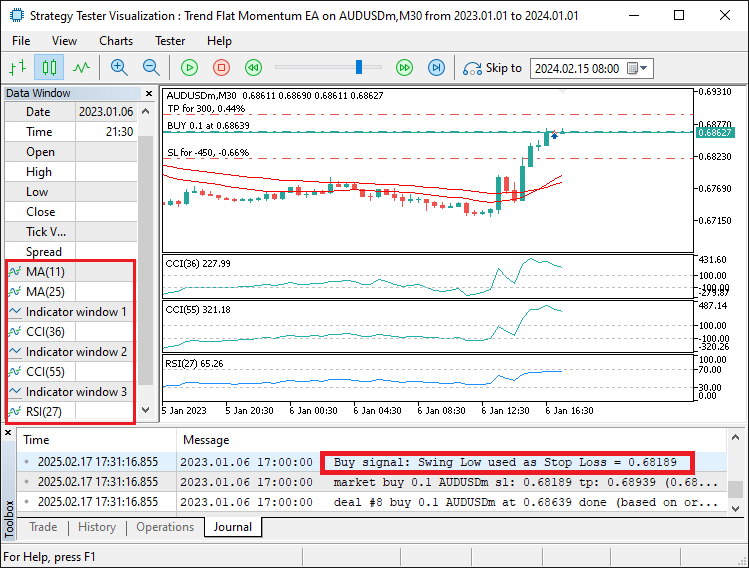
En la imagen podemos ver que el programa identifica y verifica todas las condiciones de entrada y, si se validan, abre la posición correspondiente con los parámetros de entrada respectivos, logrando así nuestro objetivo. Lo que queda por hacer es realizar una prueba retrospectiva del programa, lo cual se aborda en la siguiente sección.
Prueba retrospectiva
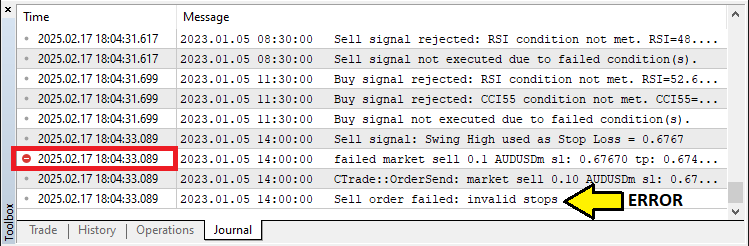
Al realizar pruebas retrospectivas exhaustivas del programa, observamos que, al buscar puntos de oscilación, utilizábamos primero los datos más antiguos para la comparación, lo que en ocasiones, aunque raras, daba lugar a puntos de oscilación no válidos y, por lo tanto, a stops no válidos para el stop loss.
Para mitigar el problema, adoptamos un enfoque en el que establecimos los datos de búsqueda como una serie temporal utilizando la función ArraySetAsSeries, de modo que tenemos los datos más recientes en la primera posición de las matrices de almacenamiento y, por lo tanto, utilizamos primero los datos más recientes para el análisis, como se indica a continuación.
//+------------------------------------------------------------------+
//| Function to find the most recent swing low (pivot low)           |
//+------------------------------------------------------------------+
double GetPivotLow(int left, int right) {
   MqlRates rates[]; //--- Declare an array to store rate data.
   ArraySetAsSeries(rates, true);

//---


}
Tras realizar pruebas adicionales para confirmar los resultados, hemos obtenido los siguientes resultados.
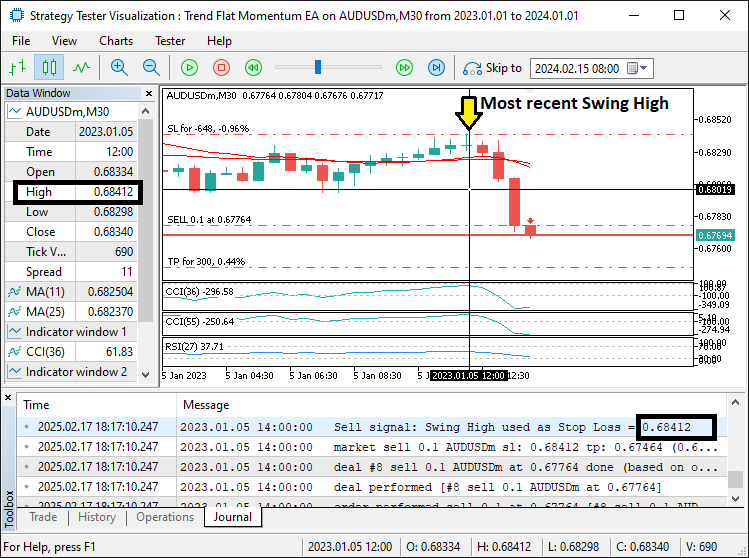
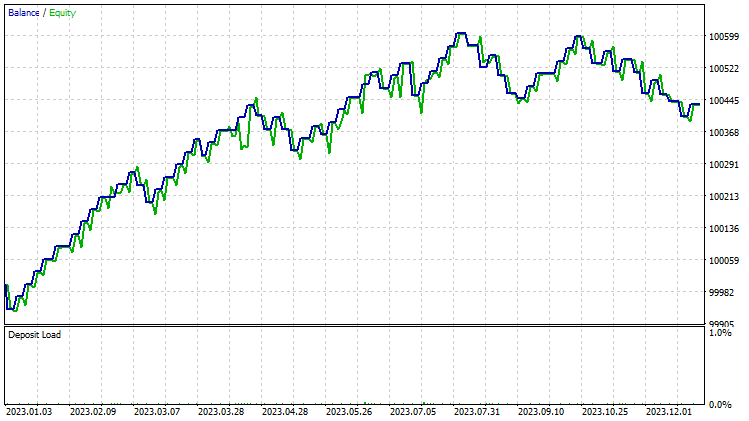
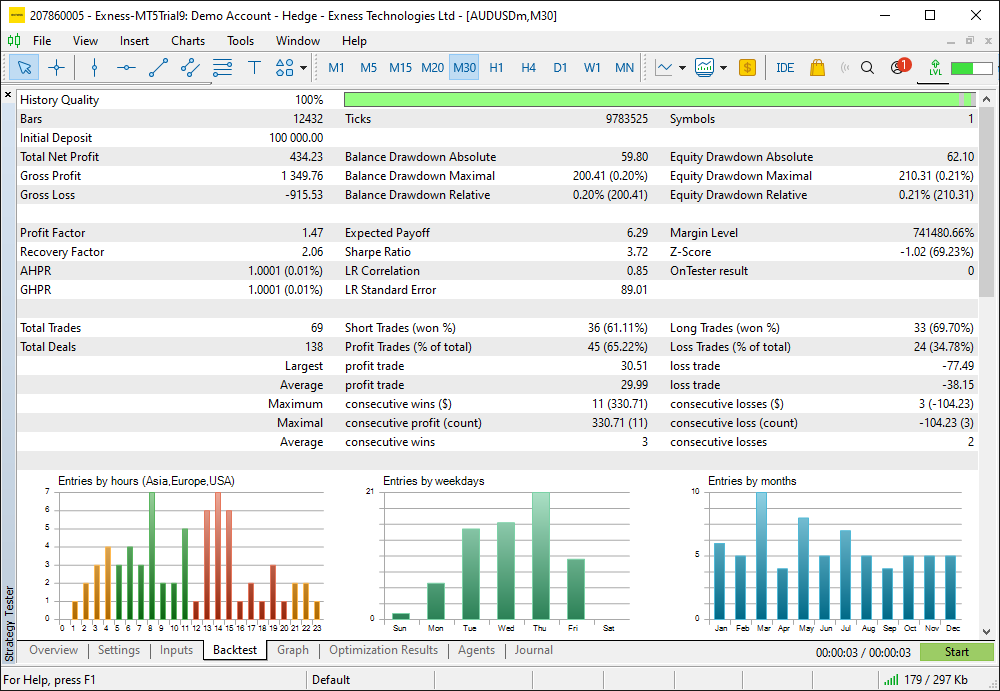
En la imagen podemos ver que obtenemos correctamente los puntos de oscilación recientes reales, lo que nos permite eliminar el error de « stops no válidos ». Por lo tanto, no nos quedaremos fuera de las operaciones y, tras realizar pruebas exhaustivas, de 2023 a 2024, obtenemos los siguientes resultados.
Gráfico de prueba retrospectiva:
Informe de prueba retrospectiva:
Conclusión
En conclusión, hemos desarrollado con éxito un asesor experto MQL5 diseñado para automatizar una estrategia integral de trading Trend Flat Momentum que combina múltiples indicadores de tendencia y momentum para señales tanto de compra como de venta. Al incorporar condiciones clave, como cruces de indicadores y comprobaciones de umbrales, hemos creado un sistema dinámico que reacciona a las tendencias del mercado con puntos de entrada y salida precisos.
Descargo de responsabilidad: Este artículo tiene fines exclusivamente educativos. El trading implica un riesgo financiero significativo y las condiciones del mercado pueden cambiar rápidamente. Si bien la estrategia proporcionada ofrece un enfoque estructurado para el trading, no garantiza la rentabilidad. Es fundamental realizar pruebas retrospectivas exhaustivas y una gestión sólida de riesgos antes de aplicar este sistema en un entorno real.
Al implementar estos conceptos, puede mejorar sus habilidades de trading algorítmico y refinar su enfoque del análisis técnico. ¡Mucha suerte a medida que continúas desarrollando y mejorando tus estrategias comerciales!
Traducción del inglés realizada por MetaQuotes Ltd.
Artículo original: https://www.mql5.com/en/articles/17247
Advertencia: todos los derechos de estos materiales pertenecen a MetaQuotes Ltd. Queda totalmente prohibido el copiado total o parcial.
Este artículo ha sido escrito por un usuario del sitio web y refleja su punto de vista personal. MetaQuotes Ltd. no se responsabiliza de la exactitud de la información ofrecida, ni de las posibles consecuencias del uso de las soluciones, estrategias o recomendaciones descritas.

 Algoritmo de optimización de neuroboides — Neuroboids Optimization Algorithm (NOA)
 Visualización de estrategias en MQL5: distribuimos los resultados de la optimización en gráficos de criterios
 Trading de arbitraje en Forex: Un bot market-maker simple de sintéticos para comenzar
 Características del Wizard MQL5 que debe conocer (Parte 55): SAC con Prioritized Experience Replay (PER)

- Aplicaciones de trading gratuitas
- 8 000+ señales para copiar
- Noticias económicas para analizar los mercados financieros
Usted acepta la política del sitio web y las condiciones de uso